
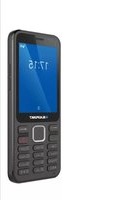
SM 05 - Mobile Phone BLAUPUNKT - Free user manual and instructions
Find the device manual for free SM 05 BLAUPUNKT in PDF.
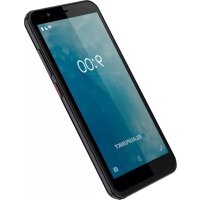



| Product type | Mobile phone |
| Brand | Blaupunkt |
| Model | SM 05 |
| Power supply - Input | AC 100-240 V ~ 50/60 Hz 0.2 A |
| Power supply - Output | DC 5 V - 1 A |
| Battery | 2000 mAh - 3.8 V (rechargeable) |
| SAR values (head) | 0.358 W/kg |
| SAR values (body) | 1.549 W/kg |
| Supported card types | Mini SIM, Micro SIM, Micro SD |
| Emergency calls | Possible without SIM card |
| Home screen | Dedicated button with access to Google Assistant (long press) |
| Water resistance | Not waterproof, keep dry |
| Hearing protection | Avoid prolonged listening at high volume |
| Recommended charging temperature | Below 40 °C |
| Battery storage temperature | Between 15 °C and 25 °C |
| Maintenance - Cleaning | Do not use chemical products or strong solvents |
| Maintenance - Opening | Only according to the manual instructions |
| Approved accessories | Use only those approved by the manufacturer |
| Compliance | Directives 2014/53/EU and RoHS 2011/65/EU |
| Warranty | Loss of warranty if using non-approved parts |
Frequently Asked Questions - SM 05 BLAUPUNKT
User questions about SM 05 BLAUPUNKT
0 question about this device. Answer the ones you know or ask your own.
Ask a new question about this device
Download the instructions for your Mobile Phone in PDF format for free! Find your manual SM 05 - BLAUPUNKT and take your electronic device back in hand. On this page are published all the documents necessary for the use of your device. SM 05 by BLAUPUNKT.
USER MANUAL SM 05 BLAUPUNKT
- Safety instructions 2
- Technical Specifications 3
- Insert the memory card and SIM card 3
- Switch the device on and off 3
- Using the Phone's Buttons 3
- Emergency calls 4
- Handling and maintenance 4
7.1 Battery 4 7.2 Maintain the appliance 4
- Declaration of Conformity 5
1. Safety instructions
ATTENTION: Please read this guide carefully. Failure to comply with the safety regulations may be dangerous or illegal, and the manufacturer cannot be held liable for any malfunction resulting from improper use.
Restricted areas
Switch off the device if the use of a mobile phone is not allowed or if it may cause interference or danger, such as an aircraft, hospitals or medical devices, fuels, chemicals or blasting areas. Observe the instructions in restricted areas.
Road safety
Observe local laws and regulations. Do not use the phone while driving, first road safety.
Interference
All wireless devices may be susceptible to interference, which may affect performance.
Qualified service
The product can only be repaired by a qualified person.
Charger, battery and other accessories
Only use a battery approved by the manufacturer, charger and other accessories. Do not connect incompatible products.
The mains power socket used must be close to the charger/holder and easily accessible, so that it can be used as an on/off facility.
Water resistance
The appliance is not waterproof, so keep it dry.
Hearing protection
To avoid hearing damage, do not listen to music or radio for a long time at high volume.
Use environment
The device complies with the recommended emission values for radio waves when kept at a minimum distance of 1.5 cm from the ear. When carrying the phone in a case, belt clip or holder, make sure that it does not contain metal and that the phone is slightly distracted from the body. When using other accessories, it is not possible to operate in accordance with radio frequency guidelines. If you do not use a case and do not hold the phone on your ear, keep it at least 2.5 cm away from your body, especially during data transfer.
2. Technical Specifications
Power Supply Features:
- Input: AC 100-240V~50/60Hz 0.2A Output: DC 5V - 1A
Battery and Voltage: 2000mAh - 3.8V
SAR value: 0.358W/Kg (Head), 1.549W/Kg (Body)
3. Insert the memory card and SIM card
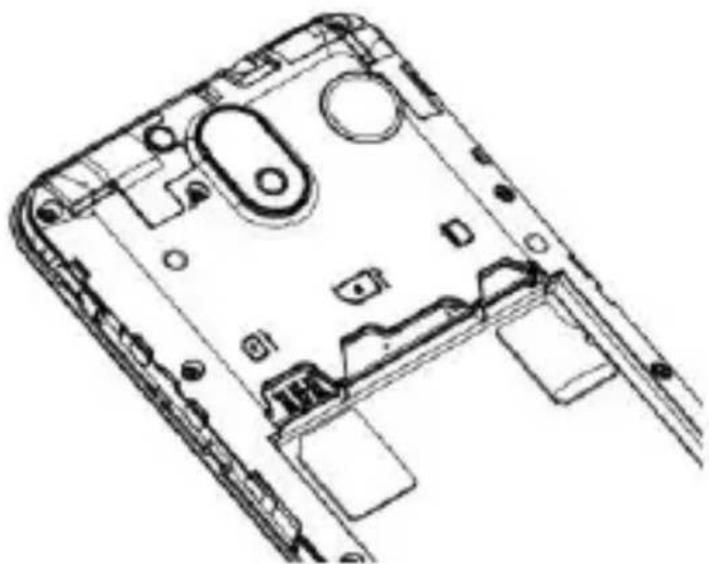
Turn off the power and remove the back cover and battery. Insert the SIM card according to the mark on the device. Make sure that the chip contact and the cut edge of the card are aligned in the correct direction. Slide the card into the slot until it stops. The device handles Mini SIM + Micro SIM + Micro SD cards.
4. Switch the device on and off
Press and hold the Power button to turn on the power.
Press and hold the power button and select "Power off" from the Options menu.
5. Using the Phone's Buttons
| Button | Description |
| Apps: Opens the list of recent applications. | |
| Home: returns to Home screen. Press and hold to open GoogleTM Assistant. | |
| Back: returns to the previous screen you were working in | |
6. Emergency calls
You can also make emergency calls without a SIM card. For more information, contact your network service provider.
7. Handling and maintenance
7.1 Battery
- The device has a rechargeable battery. When the power supply is low, charge the battery.
- Disconnect the charger from the power outlet and the appliance when not in use. Do not allow the battery to charge for more than a week, as it may reduce the battery life.
- Extreme temperatures may also affect the battery. If the ambient temperature exceeds 40°C, do not charge the battery.
- Do not use a damaged battery or charger.
- Do not short-circuit the battery. For example, a metallic object such as a coin, clip or pen may cause a short circuit.
- Do not leave the battery too hot (such as in a car in summer) or too cold (such as freezing), as it may reduce its service life. Try to store the battery between 15°C and 25°C. A too cold or too hot battery may temporarily not work, even if it is fully charged.
- Do not throw the battery in a fire. Dispose of the used battery according to local regulations and recycle if possible.
7.2 Maintain the appliance
- Keep the appliance dry. Precipitation, mist and all other liquids can cause corrosion in the circuit boards.
- Do not store the product in dusty places, as moving parts and electrical accessories may be damaged.
- Do not store the device in hot places. High temperatures can shorten the life of the electrical devices, damage the battery and melt the plastic parts.
- Do not store the device in a cold place. When the device returns to normal temperature, the inside moisture can damage the electrical circuits.
- Open the appliance only as instructed in this manual.
- Do not drop, shake the appliance as small parts break.
- Do not use strong chemicals or solvents to clean the appliance.
- Do not paint the appliance. Paint can clog the moving parts and hinder proper operation.
- Use only approved parts; improper parts may damage the unit and may result in loss of warranty. If the product does not work properly, consult the service provided on the warranty card.
- The manufacturer is not liable for any malfunction resulting from improper use.
8. Declaration of Conformity
The Blaupunkt SM 05 model complies with the essential requirements and relevant provisions of the 2014/53/EU Directive and RoHS Directive 2011/65/EU. The Declaration of Conformity is available on our website.
CE
Designed and Engineered by
Blaupunkt Competence Center Mobile Europe HTM Mobile Kft.
Assembled in P.R.C by
Mobiwire Mobiles (NingBo) Co., Ltd
Building A. No. 999 Dacheng Road, Fenghua, Ningbo, Zhejiang,
China 315500
For more information on this product, visit our website at www.htmmmobile.hu or www.blaupunkt.com.
Google and other marks are trademarks of Google LLC.
Designed and Engineered by Blaupunkt Competence Center Mobile Europe HTM Mobile Kft.
1118 Budapest, Dayka Gábor utca 3. Hungary Assembled in P.R.C by Mobiwire Mobiles (NingBo) Co., Ltd Building A.No.999 Dacheng Road, Fenghua, Ningbo, Zhejiang, China 315500
Designed and Engineered by
Blaupunkt Competence Center Mobile Europe
HTM Mobile Kft.
Assembled in P.R.C by
Mobiwire Mobiles (NingBo) Co., Ltd
Building A.No.999 Dacheng Road, Fenghua, Ningbo, Zhejiang,
China 315500
Designed and Engineered by
Blaupunkt Competence Center Mobile Europe
HTM Mobile Kft. - 1118 Budapest, Dayka Gábor utca 3. Hungary Assembled in P.R.C by
Mobiwire Mobiles (NingBo) Co., Ltd - Building A.No.999 Dacheng Road, Fenghua, Ningbo, Zhejiang, China 315500
Designed and Engineered by
Blaupunkt Competence Center Mobile Europe
HTM Mobile Kft.
Assembled in P.R.C by
Mobiwire Mobiles (NingBo) Co., Ltd
Building A.No.999 Dacheng Road, Fenghua, Ningbo, Zhejiang,
China 315500
Designed and Engineered by
Blaupunkt Competence Center Mobile Europe
HTM Mobile Kft.
Assembled in P.R.C by
Mobiwire Mobiles (NingBo) Co., Ltd
Building A.No.999 Dacheng Road, Fenghua, Ningbo, Zhejiang, China 315500
For more information about this product, please visit our
website at www.htmmobile.hu
or
www.blaupunkt.com
Designed and Engineered by
Blaupunkt Competence Center Mobile Europe
HTM Mobile Kft.
Assembled in P.R.C by
Mobiwire Mobiles (NingBo) Co., Ltd
Building A.No.999 Dacheng Road, Fenghua, Ningbo, Zhejiang,
China 315500
Designed and Engineered by
Blaupunkt Competence Center Mobile Europe
HTM Mobile Kft.
Assembled in P.R.C by
Mobiwire Mobiles (NingBo) Co., Ltd
Building A.No.999 Dacheng Road, Fenghua, Ningbo, Zhejiang,
China 315500
Visit our website at www.htmmobile.hu or
Designed and Engineered by Blaupunkt Competence Center Mobile Europe HTM Mobile Kft.
1118 Budapest, Dayka Gábor utca 3. Hungary Assembled in P.R.C by Mobiwire Mobiles (NingBo) Co., Ltd Building A.No.999 Dacheng Road, Fenghua, Ningbo, Zhejiang, China 315500
Designed and Engineered by
Blaupunkt Competence Center Mobile Europe HTM Mobile Kft.
Assembled in P.R.C by
Mobiwire Mobiles (NingBo) Co., Ltd
Building A.No.999 Dacheng Road, Fenghua, Ningbo, Zhejiang, China 315500
Designed and Engineered by
Blaupunkt Competence Center Mobile Europe
HTM Mobile Kft. - 1118 Budapest, Dayka Gábor utca 3. Hungary Assembled in P.R.C by
Mobiwire Mobiles (NingBo) Co., Ltd - Building A.No.999 Dacheng Road, Fenghua, Ningbo, Zhejiang, China 315500
Read the safety instructions in the restricted areas.
Safety on the road
Always follow local laws. Do not use the device while driving, road safety is paramount.
Interference
Any wireless device may be sensitive to interference, which could affect its operation.
Designed and Engineered by
Blaupunkt Competence Center Mobile Europe HTM Mobile Kft.
Assembled in P.R.C by
Mobiwire Mobiles (NingBo) Co., Ltd
Building A.No.999 Dacheng Road, Fenghua, Ningbo, Zhejiang, China 315500
For new information about this product, visit
our website at www.htmmobile.hu
www.blaupunkt.com.
Google and other marks are trademarks of Google LLC.
First Steps Mobile Phone SM 05
Contents
- Safety regulations 2
- Getting to know the device 3
- Inserting memory and SIM cards 3
- Turning the device on and off 3
- Device keys 3
- Emergency calls 4 7. Operation and maintenance 4
7.1 Battery 4 7.2 Device maintenance 4
- Declaration of conformity 5
1. Safety regulations
Please read the safety regulations carefully, as neglecting them can be dangerous and even illegal.
The owner of the device is responsible for its use.
Designed and Engineered by
Blaupunkt Competence Center Mobile Europe
HTM Mobile Kft.
Assembled in P.R.C by
Mobiwire Mobiles (NingBo) Co., Ltd
Building A.No.999 Dacheng Road, Fenghua, Ningbo, Zhejiang,
China 315500
Further information about the device can be found on our website: www.htmmobile.hu or www.blaupunkt.com
Designed and Engineered by
Blaupunkt Competence Center Mobile Europe
HTM Mobile Kft. - 1118 Budapest, Dayka Gábor utca 3. Hungary Assembled in P.R.C by
Mobiwire Mobiles (NingBo) Co., Ltd - Building A.No.999 Dacheng
Road, Fenghua, Ningbo, Zhejiang, China 315500



- SAFETY INSTRUCTIONS
- RESTRICTED AREAS
- ROAD SAFETY
- INTERFERENCE
- QUALIFIED SERVICE
- CHARGER, BATTERY AND OTHER ACCESSORIES
- WATER RESISTANCE
- HEARING PROTECTION
- USE ENVIRONMENT
- TECHNICAL SPECIFICATIONS
- INSERT THE MEMORY CARD AND SIM CARD
- SWITCH THE DEVICE ON AND OFF
- USING THE PHONE'S BUTTONS
- EMERGENCY CALLS
- HANDLING AND MAINTENANCE
- BATTERY
- MAINTAIN THE APPLIANCE
- DECLARATION OF CONFORMITY
- CE
- FIRST STEPS MOBILE PHONE SM
- CONTENTS
- SAFETY REGULATIONS
Brand : BLAUPUNKT
Model : SM 05
Category : Mobile Phone