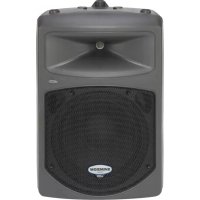
db300i - Loudspeaker SAMSON - Free user manual and instructions
Find the device manual for free db300i SAMSON in PDF.



| Product type | Two-way passive speaker |
| Brand | Samson |
| Model | db300i (dB300) |
| Dimensions (H x W x D) | 762 x 483 x 432 mm |
| Weight | 17.24 kg |
| Rated power (program) | 300 W at 8 Ω |
| Nominal impedance | 8 Ω |
| Frequency response | 65 Hz – 18 kHz (±3 dB) |
| Crossover frequency | 2.1 kHz (18 dB/octave, Linkwitz filter) |
| Sensitivity | 93 dB SPL (1 W/1 m) |
| Woofer | 30.5 cm (12") with 7.6 cm voice coil and 1.4 kg ferrite magnet |
| Tweeter | 4.4 cm (1.75") titanium dome compression driver with 2.5 cm horn |
| Input connectors | Speakon and 6.35 mm jack |
| Extension connector | Speakon and 6.35 mm jack (parallel) |
| Mounting | 35 mm pole mount, M6 rigging points (x4), monitor angles 30° and 45°, stacking |
| Baffle material | Ultra-durable composite plastic with textured finish and reinforced steel grille |
| Recommended use | Front-of-house and stage monitor sound reinforcement |
| Warranty | 3 years |
| Maintenance | Clean with a damp cloth only |
| Optional accessories | MB300U (U-bracket) and MB300A (suspension) mounting kits (sold separately) |
Frequently Asked Questions - db300i SAMSON
User questions about db300i SAMSON
0 question about this device. Answer the ones you know or ask your own.
Ask a new question about this device
Download the instructions for your Loudspeaker in PDF format for free! Find your manual db300i - SAMSON and take your electronic device back in hand. On this page are published all the documents necessary for the use of your device. db300i by SAMSON.
USER MANUAL db300i SAMSON
natural_image
Diagram of a Samsung air conditioner unit with top and front views (no text or symbols)300 Watt 2-way Loudspeaker
Owners Manual
Safety Instructions/Consignes de sécurité/Sicherheitsvorkehrungen
WARNING
DO NOT EXPOSE THIS EQUIPMENT
TO RAIN OR MOISTURE
AVIS
RISQUE DE CHOC ELECTRONIQUE
NE PAS OUVRIR
CAUTION
FOR CONTINUED PROTECTION AGAINST RISK OF FIRE, REPLACE ONLY WITH SAME TYPE FUSE
ATTENTION
UTILISER UN FUSIBLE DE
RECHANGE DE MÊME TYPE

CAUTION
RISK OF ELECTRIC SHOCK
DO NOT OPEN

WARNING: To reduce the risk of fire or electric shock, do not expose this unit to rain or moisture. To reduce the hazard of electrical shock, do not remove cover or back. No user serviceable parts inside. Please refer all servicing to qualified personnel. The lightning flash with an arrowhead symbol within an equilateral triangle, is intended to alert the user to the presence of uninsulated "dangerous voltage" within the products enclosure that may be of sufficient magnitude to constitute a risk of electric shock to persons. The exclamation point within an equilateral triangle is intended to alert the user to the presence of important operating and maintenance (servicing) instructions in the literature accompanying the product.
Important Safety Instructions
- Please read all instructions before operating the unit.
- Keep these instructions for future reference.
- Please heed all safety warnings.
- Follow manufacturers instructions.
- Do not use this unit near water or moisture.
- Clean only with a damp cloth.
- Do not block any of the ventilation openings. Install in accordance with the manufacturers instructions.
- Do not install near any heat sources such as radiators, heat registers, stoves, or other apparatus (including amplifiers) that produce heat.
- Do not defeat the safety purpose of the polarized or grounding-type plug. A polarized plug has two blades with one wider than the other. A grounding type plug has two blades and a third grounding prong. The wide blade or third prong is provided for your safety. When the provided plug does not fit your outlet, consult an electrician for replacement of the obsolete outlet.
- Protect the power cord from being walked on and pinched particularly at plugs, convenience receptacles and at the point at which they exit from the unit.
- Unplug this unit during lightning storms or when unused for long periods of time.
- Refer all servicing to qualified personnel. Servicing is required when the unit has been damaged in any way, such as power supply cord or plug damage, or if liquid has been spilled or objects have fallen into the unit, the unit has been exposed to rain or moisture, does not operate normally, or has been dropped.
Copyright 2006, Samson Technologies Corp.
Printed October, 2006 v1.2
Samson Technologies Corp.
45 Gilpin Avenue
Hauppauge, New York 11788-8816
Phone: 1-800-3-SAMSON (1-800-372-6766)
Fax: 631-784-2201
www.samsontech.com
^A K-TEAM
PRODUCTION
Table of Contents
ENGLISH
Introduction 2
dB300 Features 3
dB300 Components 4
dB300 Front Panel, Rear Panel 4
Quick Set-Up 5
Positioning the dB300 6
Microphone Positioning - 6
How to Reduce Feedback 6
Speaker Placement 6
Using the dB300 as a Floor Monitor 6
Setting Up Your dB300 System 7-8
Using Speaker Stands 8
Stacking the dB300 8
Setting Up Your dB300 System 9
Permanent Installation 9
Using the Fly-points 9
dB300 Wiring Guide 10
Db300 Optional Mounting Kits 47-48
dB300 Specifications 49
Dimensions 50
FRANÇAIS
Introduction 11
Congratulations on purchasing the Samson dB300! The dB300 speaker system by Samson takes the concept of PA systems to a new level. By combining 300 watts of power handling, advanced crossover design and the highest quality speaker and cabinet components, the dB300 provides studio quality sound for any kind of live application. The loudspeaker features a super heavy-duty, custom designed, 12-inch low frequency driver which employees a 3-inch voice coil and an advanced motor design featuring an over-sized magnet. The result, deep low frequency response that's accurate, tight and focussed. Handling the high frequency response is the dB300's high output, proprietary compression driver utilizing a 1.75-inch (44 millimeter) titanium diaphragm with a 1-inch throat set upon a wide dispersion horn. The high frequency response is clean, smooth and vivid. The dB300 offers crystal-clear audio and an ultra-wide sound field. Not only a front-firing PA speaker, the dB300 is also designed to operate as a wedge-style monitor. The cabinet's right and left side panels are joined at different angles, so depending on the side you choose, you get near and far dispersion angles, allowing for greater flexibility on stage. Adding to the dB300's practical design is a catalog of mounting options. With the dB300, setup and break down is quick and easy. The compact cabinet can be easily stacked, stand mounted using the integral 1 3/8-inch pole mount receptacle, suspended using the four built-in fly points or permanently installed with the optional wall-mount bracket. Thick wall construction with heavy-grade steel grills, scuff-resistant textured finishes and rigid corners offer excellent protection against wear and tear. As fixed sound reinforcement or as a durable, great-sounding road PA, the dB300 is ideal for sound professionals and performers looking for serious output and studio monitor sound quality from a compact PA speaker system.
In these pages, you'll find a detailed description of the features of the dB300 PA system, as well as a description of its front and rear panels, step-by-step instructions for its setup and use, and full specifications. You'll also find a warranty card enclosed—please don't forget to fill it out and mail it in so that you can receive online technical support and so we can send you updated information about these and other Samson products in the future.
With proper care, your dB300 will operate trouble free for many years. We recommend you record your serial number in the space provided below for future reference.
Serial number: ____
Date of purchase: ____
Should your unit ever require servicing, a Return Authorization number (RA) must be obtained before shipping your unit to Samson. Without this number, the unit will not be accepted. Please call Samson at 1-800-3SAMSON (1-800-372-6766) for a Return Authorization number prior to shipping your unit. Please retain the original packing materials and if possible, return the unit in the original carton and packing materials.
dB300 Features
natural_image
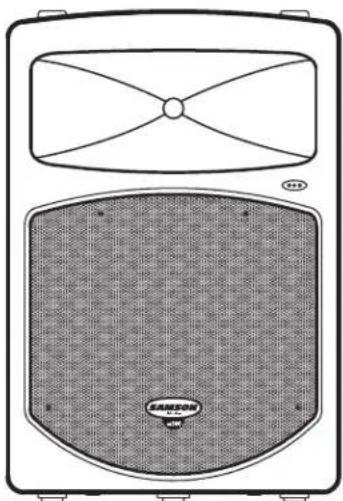
Technical line drawing of a speaker grille with top panel and base panel (no text or symbols)The Samson dB300 two-way loudspeaker is an all-in-one solution for live sound. Here are some of its main features:
- Two-way loudspeaker system.
• 300 watt power handling, 8-ohm load impedance. - Rigid, thick-wall composite plastic enclosure focusses energy forward increasing the overall SPL.
- Custom designed, heavy-duty, 12-inch low frequency driver with 3-inch voice coil.
- 1" throat, high-frequency compression driver with 1.75-inch titanium diaphragm.
- Internal 18 dB/octave time aligned crossover.
• 30 and 45-degree monitor angles for near and far field coverage.
• Standard 1 3/8-inch (35mm) speaker stand receptacle.
• Four M6 fly-points for hanging installations. - Optional U bracket kits for wall mounting or arrays clusters.
• Rugged, road-worthy construction for high reliability.
• Quality build and rugged construction ensure reliable performance from venue to venue.
• Three-year extended warranty.
dB300 Components
dB300 Front Panel
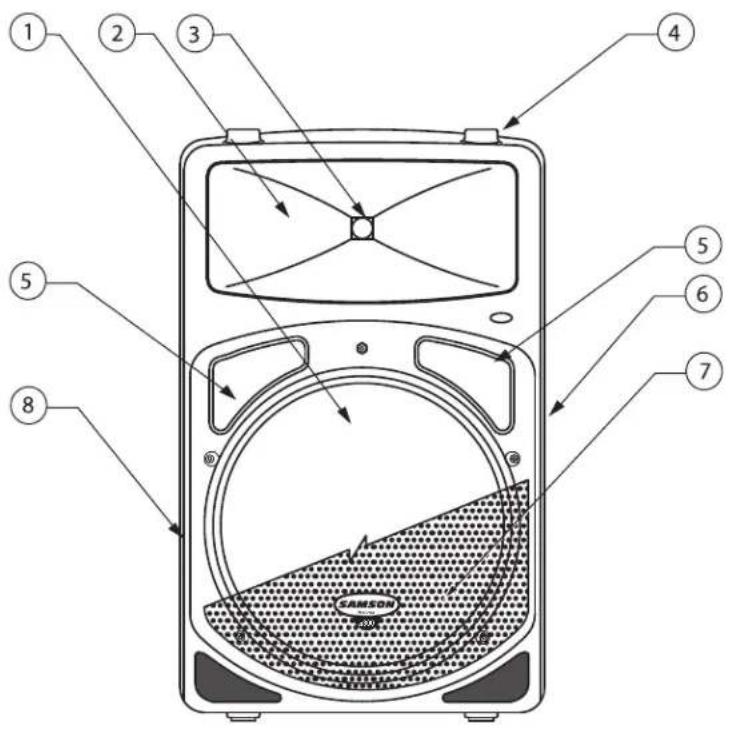
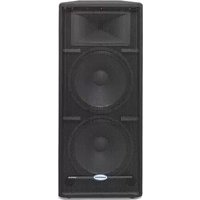
1 12 Inch Driver – Custom designed, heavy-duty, 12" low frequency driver provides deep bass.
2 Wide Dispersion Horn - 1 inch throat, 60 x 90 degree wide dispersion horn provides extensive coverage and linear off-axis response.
3 Titanium Compression Driver - 1.75 inch (44mm), titanium diaphragm with 1 inch opening.
4 Stacking Bumper – Gender mating bumpers for stacking dB300's.
5 Bass Port—Two precision tuned, low frequency port tubes extend the bass response.
6 Handle – One of two ultra over sized rubber grip carry handles.
7 Steel Grill – Durable steel grill provides protection for, and easy access to LF driver.
8 Enclosure – Thick-wall, rugged PVC plastic enclosure.
dB300 Rear Panel
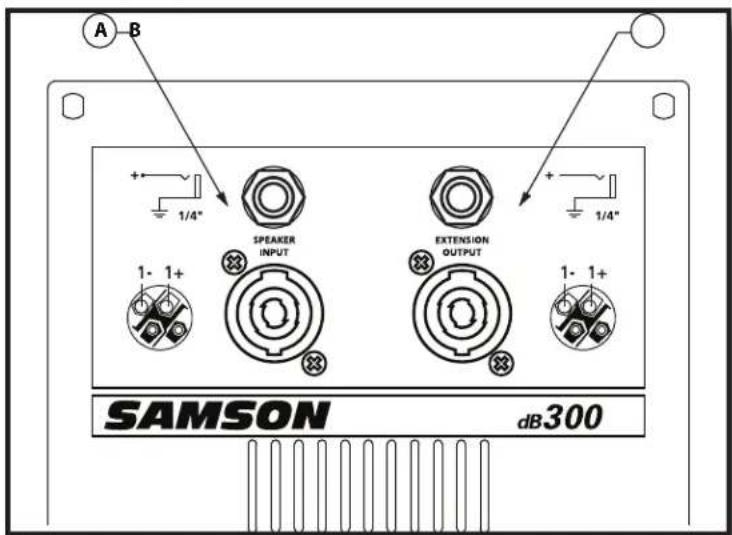
A Speaker Input – Speakon and 1/4" connector for connecting to power amplifier. See page 10 of this manual for a detailed wiring diagram.
B Extension Output – Speakon and 1/4" input jack parallel output for connecting additional dB300's.
Quick Set-Up
In the following pages of this manual, you will find a detailed explanation of system set-ups, but if you just want to get started quickly, you can follow the diagram and steps below to set up a basic stereo PA system.

flowchart
graph TD
    A["SPEAKER INPUT"] --> B["POWER AMP OUTPUTS"]
    C["SPEAKER INPUT"] --> D["POWER AMP INPUTS"]
    B --> E["MAIN LEFT AND RIGHT OUTPUTS"]
    D --> E
    E --> F["SAMSON"]
    style A fill:#f9f,stroke:#333
    style C fill:#f9f,stroke:#333
    style B fill:#ccf,stroke:#333
    style D fill:#ccf,stroke:#333
    style E fill:#cfc,stroke:#333
    style F fill:#fcc,stroke:#333
NOTE: It is important to remember the Golden Rule of audio ... "LAST ON, FIRST OFF". Translated, this means that when turning on your system, you should always turn your power amplifiers or powered monitors on LAST, and when turning your system off, turn your power amps off FIRST. This helps avoid any loud pops caused by inrush current at power up, which can sometimes damage loudspeakers.
- Before connecting your dB300's, make sure that the power of all your systems components is turned off. Also, make sure that your power amplifier volume controls and the main left and right faders of your mixer are turned all the way down.
- Connect the cables to your microphones and instruments, or a CD player, to your mixer. Then, connect the mixers outputs to the inputs of your power amplifier.
- Switch on the power of the mixer, instruments and/or CD player, and then switch on your power amplifier.
- While speaking into the mic (or playing the instrument or CD), raise the mixers main Left and Right faders to the "0" position. Be sure that the mixer's output meters are not clipping. If they are, adjust the mixer volumes down until the signal cleans up.
- Now, slowly raise your power amp until you reach the desired listening level.
NOTE: In order to get the cleanest sound and protect your speaker, you want to keep the mixer from clipping so be sure that the mixer's meters do not show sustained clipping. In most applications, you want to keep the level of the power amplifier all the way up so you can keep the mixers main outputs from clipping.
Positioning the dB300
Microphone Positioning - How to Reduce Feedback
Feedback is the annoying howling and squealing that is heard when the microphone gets too close to the speaker and the volume is high. You get feedback when the microphone picks up the amplified signal from the speaker, and then amplifies through the speaker again, and then picks it up again, and so on and so on. In general, it is always recommended that any LIVE mic (a mic that's on) is positioned behind the speaker enclosures. This will give you the best level from your system before feedback. One possible exception is when you are adjusting the sounds of the microphones, since you want to listen in front of the speaker to hear properly. To do this, lower the MAIN VOLUME while setting the EQ and effect from in front of the speakers. Once you have the sound you like, move the microphones to behind the speakers and raise the Main volume.
Speaker Placement
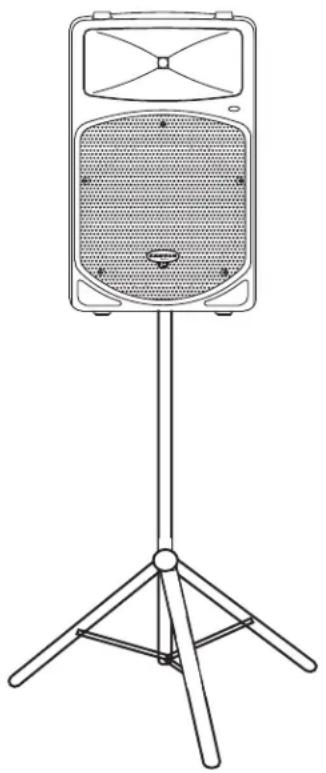
Whenever possible it is a good idea to raise the speakers above the heads of the listening audience. The dB300 enclosure features a standard 1 3/8" pole mount receptacle, which are compatible with standard speaker stands like the Samson TS50 or TS100. In a smaller setting like a school cafeteria, library, or a mall kiosk, you can also use the dB300 in one of the tilt back monitor positions, which will improve the projection of the speakers and may eliminate the need for speaker stands.
natural_image
Line drawing of a portable audio device with a stand and three legs (no text or symbols)Using the dB300 as a Floor Monitor
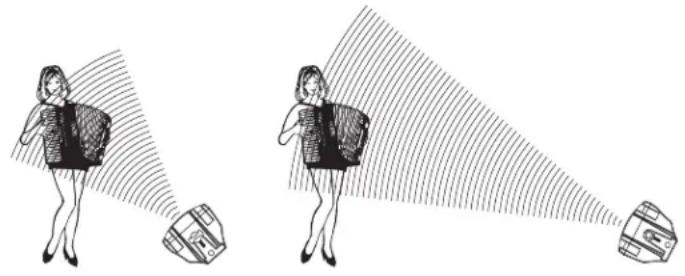
The dB300 is an ideal solution for stage monitoring and thanks to its unique design, two wedge monitor positions are possible. When placed on its side with the high frequency horn facing to the left of the enclosure, the dB300 is tilted at a 30 degree angle optimizing performance when used on a large stage. When placed on its side with the high frequency horn facing to the right of the enclosure, the dB300 is tilted at a 45 degree angle optimizing performance when used on smaller stages. In a large stage monitor system, several dB300's can be daisy-chained together using the EXTENSION SPEAKER output.
Note: Be sure to check the manufacturers minimum recommended impedance for your power amplifier to avoid overload and possible damage to both the speaker and amplifier. In many instances when using the dB300 as a monitor system, you may choose to use an external equalizer like the Samson S Curve 131 to increase the volume and reduce the chance of feedback.
natural_image
Illustration of two women in business attire with backpacks, one looking at a camera and the other holding a device (no text or symbols present)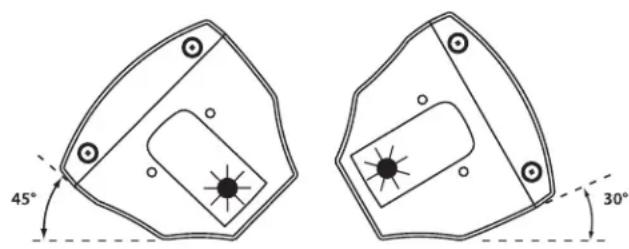
NEAR FIELD FAR FIELD
Setting Up Your dB300 System
flowchart
graph TD
    A["SPEAKER INPUT"] --> B["Vocal"]
    B --> C["Speaker Input"]
    C --> D["SAMSON MODELS6"]
    D --> E["SPEAKER INPUT"]
    E --> F["Extension Speaker OUTPUT"]
    F --> G["SAMSON MODELS6"]
    G --> H["SPEAKER INPUT"]
    H --> I["Extension Speaker OUTPUT"]
    I --> J["SAMSON MODELS6"]
    J --> K["SPEAKER INPUT"]
    K --> L["SAMSON MODELS6"]
    L --> M["SPEAKER INPUT"]
    M --> N["SAMSON MODELS6"]
    N --> O["SPEAKER INPUT"]
    O --> P["SAMSON MODELS6"]
    P --> Q["SPEAKER INPUT"]
    Q --> R["SAMSON MODELS6"]
    R --> S["SPEAKER INPUT"]
    S --> T["SAMSON MODELS6"]
    T --> U["SPEAKER INPUT"]
    U --> V["SAMSON MODELS6"]
    V --> W["SPEAKER INPUT"]
    W --> X["SAMSON MODELS6"]
    X --> Y["SPEAKER INPUT"]
    Y --> Z["SAMSON MODELS6"]
    Z --> AA["SPEAKER INPUT"]
    AA --> AB["SAMSON MODELS6"]
    AB --> AC["SPEAKER INPUT"]
    AC --> AD["SAMSON MODELS6"]
    AD --> AE["SPEAKER INPUT"]
    AE --> AF["SAMSON MODELS6"]
    AF --> AG["SPEAKER INPUT"]
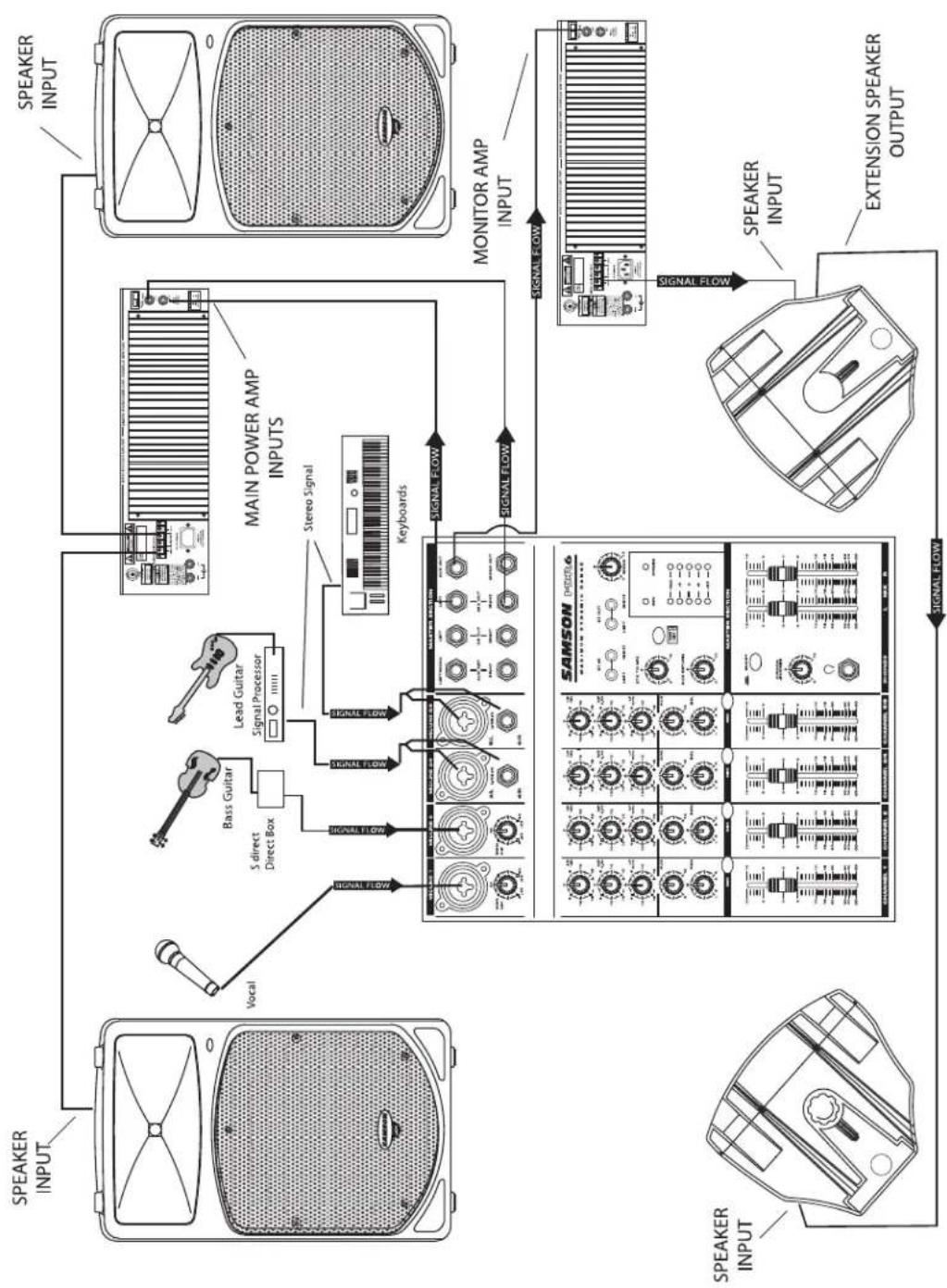
This example shows a typical PA system using mixer with an external power amplifier and a pair of dB300 for the main left and right mix. A separate signal from the mixer's AUX/MONITOR bus is sent to two additional dB300's placed in the tilt-back, wedge positions for use as floor monitors. In order to increase the output of the monitor system, the use of an external graphic equalizer like one of the Samson "E" or "S curve" series is highly recommended.
Setting Up Your dB300 System
Using Speaker Stands
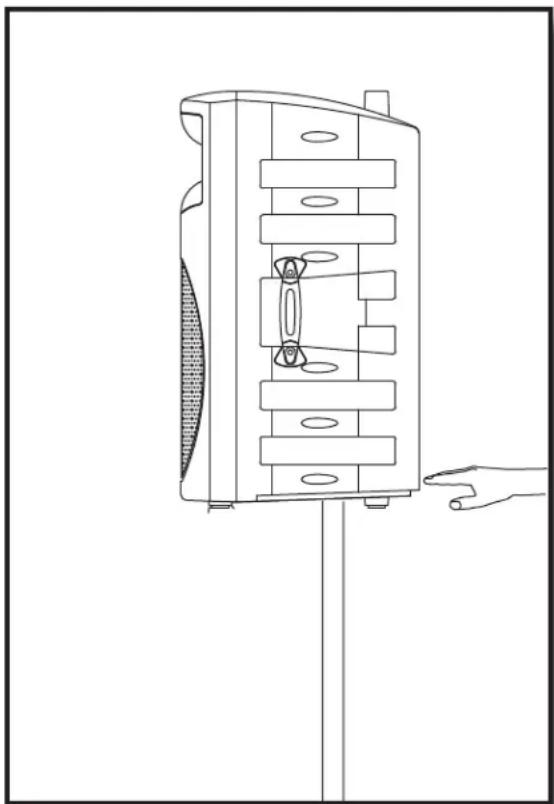
The dB300 enclosure features a standard 1 3/8", pole mount receptacle, which are compatible with speaker stands from a variety of manufacturers. Before installing the dB300 on a speaker stand, loosen the thumbscrew located on the bottom of the rear side of the enclosure. Once installed on the stand, be sure to tighten the thumbscrew to hold the speaker in place. Be careful not to over tighten the thumbscrew to avoid stripping the threads.
natural_image
Line drawing of a mechanical device with internal components and a hand pointing to it (no text or symbols)Stacking the dB300
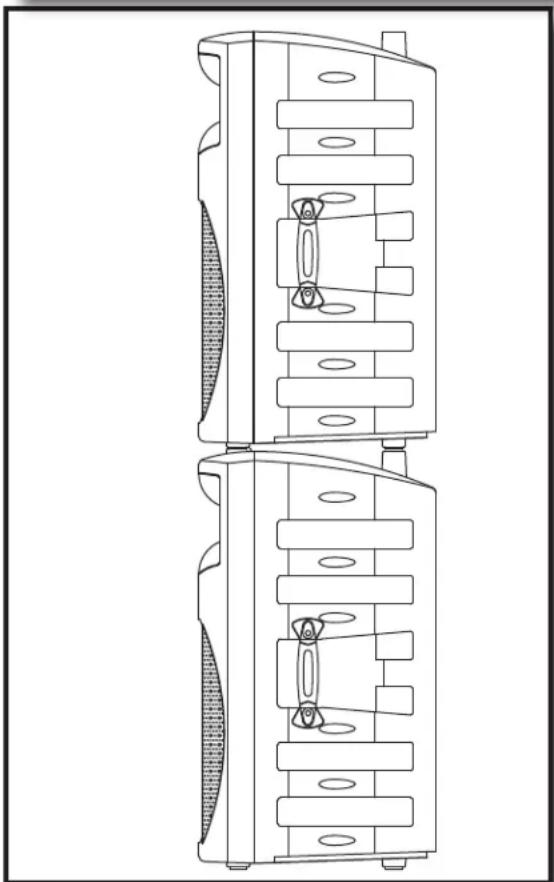
The dB300 enclosure incorporates gender mating stack feet and bumpers that allows you to stack one dB300 on top of another. When stacking the dB300's, be certain that the rubber feet from the top unit are securely fastened into the bottom unit's stacking bumpers.
NOTE: DO NOT STACK dB300's OVER TWO (2) TALL.
natural_image
Technical line drawing of a dual-chamber electronic device with no visible text or symbolsSetting Up Your dB300 System
Permanent Installation
The dB300 is logical solution for many fixed installations in live sound venues, discos, schools, houses of worship, convention centers and airport terminals to name a few. The enclosure is extremely versatile for installation as it can be hung in several different positions by using the 4 Fly-points.
Hanging the dB300 is serious business and therefore licensed and insured professional sound contractors only should perform such an installation.
natural_image
Technical line drawing of a mechanical component with internal slots and mounting holes (no text or symbols)Using the Fly-points
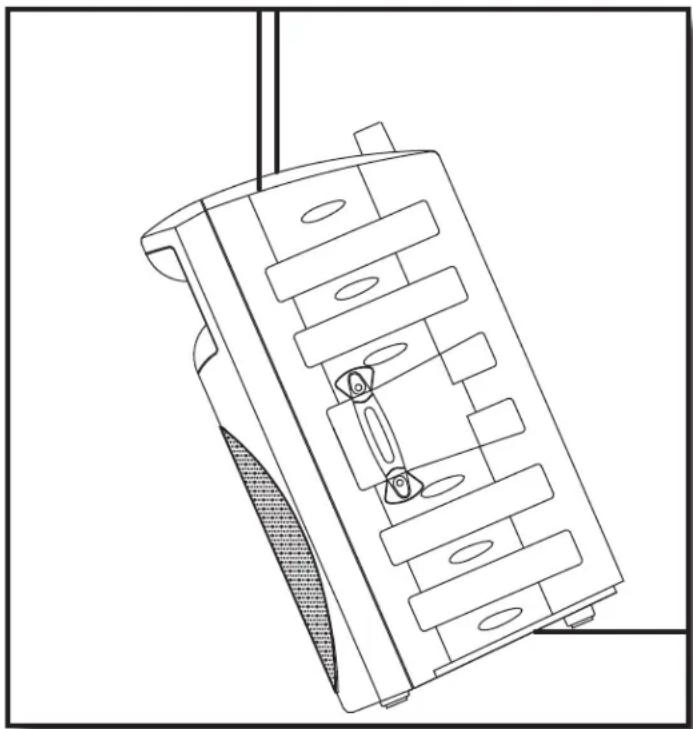
IMPORTANT NOTE: Only licensed and insured professional sound contractors should install the dB300 using the Fly-points. Samson assumes no liability for any installation.
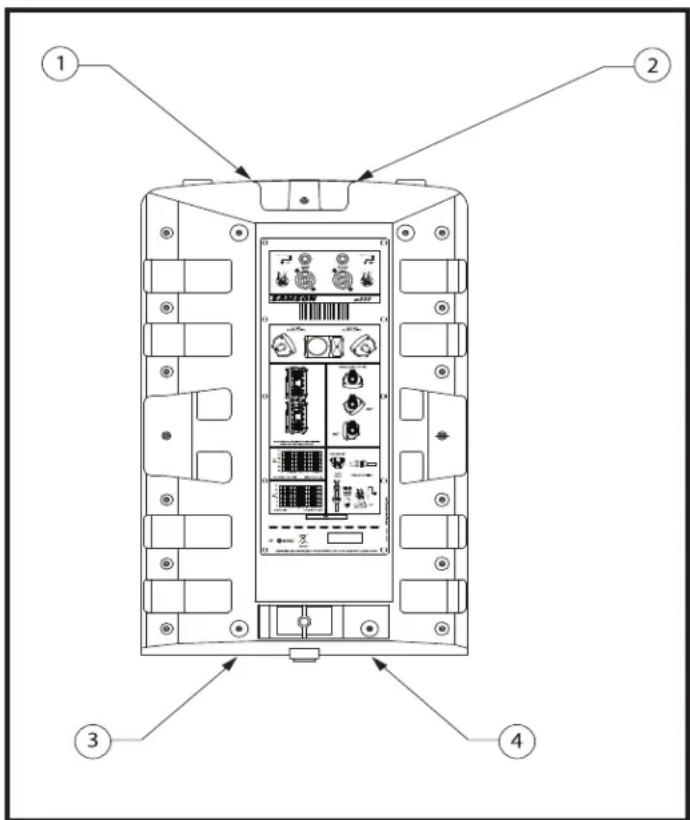
The dB300 features 4 Fly-points located in pairs on the top and bottom of the enclosure. By removing the installed screws you will have access to the threaded inserts that are compatible with a variety of standard M6 hardware including that offered by ATM Flyware.
dB300 Wiring Guide
CONNECTING THE dB300
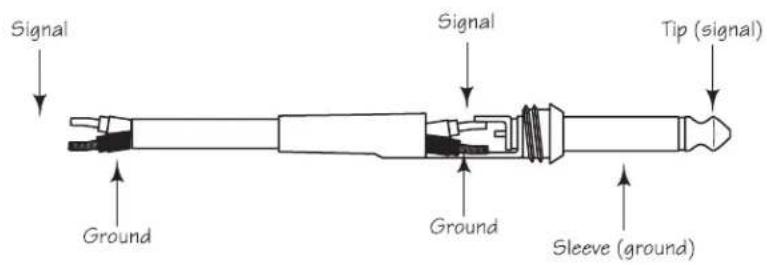
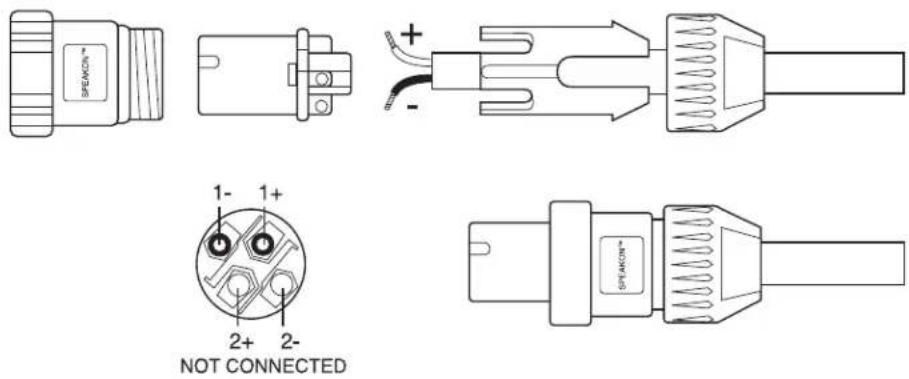
The dB300 provides both Speakon and 1/4" phone connectors for easy interface with industry standard cables. You can use a variety of standard speaker cables that are available "off the shelve" at you local pro-audio or musical instrument retailer. Be sure that cables use stranded speaker wire, and a gauge 12-14 is recommended. A good choice is one of the follow Samson cables; TSS30, TSQ30, SP1430 or SP1430N. If you are making you own cables, use the diagrams following below to ensure a proper hook up.
Unbalanced 1/4" Connector
Speakon Wiring Guide
Introduction
natural_image
Line drawing of a speaker with antenna and cover (no text or symbols)dB300 — FACE ARRIÈRE
natural_image
Line drawing of a vintage-style speaker on a tripod stand (no text or symbols)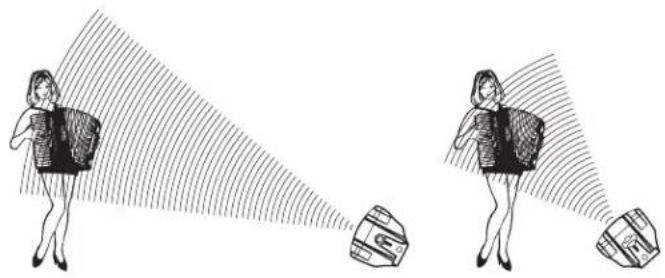
natural_image
Illustration of two women projecting a camera to their sides, with no text or symbols present.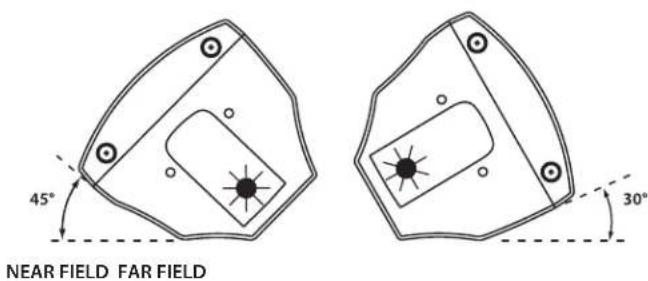
natural_image
Line drawing of a multi-tiered electronic device with a hand pointing to it (no text or symbols)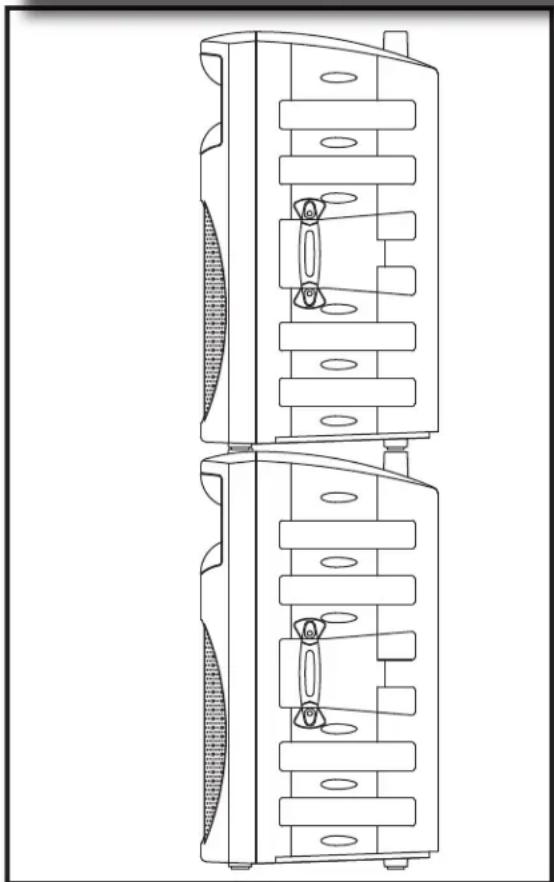
natural_image
Technical line drawing of a dual-chamber electronic device with internal components (no text or symbols)natural_image
Technical line drawing of a mechanical component with internal channels and mounting holes (no text or symbols)natural_image
Diagram of a speaker with antenna and grille (no text or symbols)dB300 RÜCKSEITE
natural_image
Line drawing of a vintage audio amplifier with a tripod stand (no text or symbols)natural_image
Technical line drawing of a mechanical device with internal components and a hand pointing to it (no text or symbols)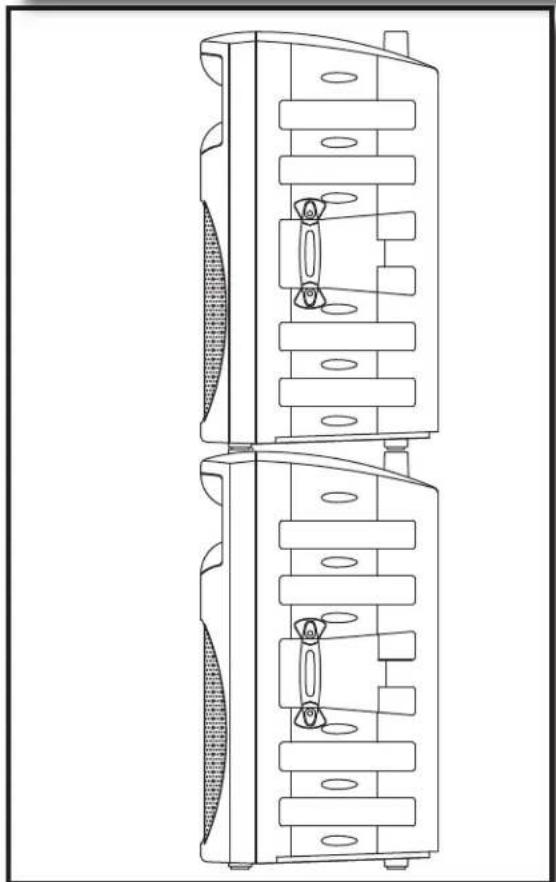
natural_image
Technical line drawing of a dual-tiered mechanical device with internal components (no text or symbols)natural_image
Technical line drawing of a mechanical component with internal slots and mounting holes (no text or symbols)dB300 Verdrahtung
dB300 ANSCHLIESSEN
natural_image
Diagram of a speaker grille with top panel and base panel, no text or symbols presentnatural_image
Line drawing of a portable audio device with a stand and three legs (no text or symbols)natural_image
Illustration of two women projecting a camera to their sides, with no text or symbols present.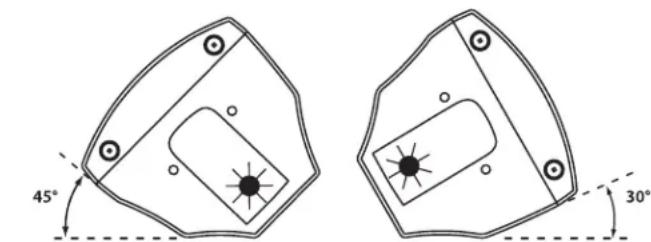
NEAR FIELD FAR FIELD
natural_image
Line drawing of a mechanical device with a handle and internal components, no text or symbols present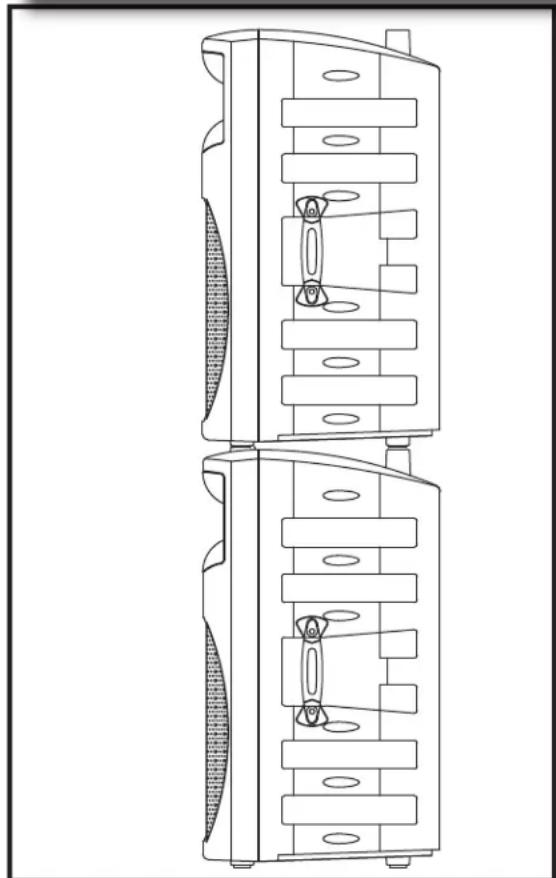
natural_image
Technical line drawing of a dual-chamber electronic device with internal components (no text or symbols)natural_image
Technical line drawing of a mechanical component with internal slots and mounting holes (no text or symbols)Introduzione
natural_image
Technical line drawing of a speaker grille with fan blade and base (no text or symbols)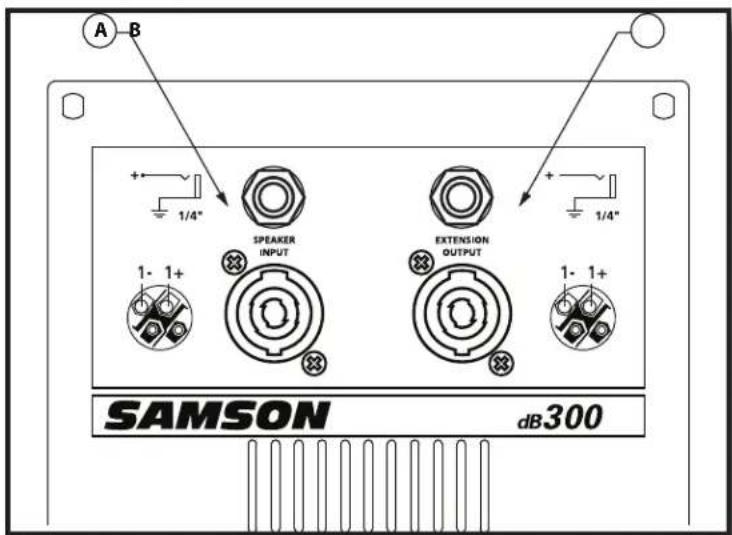
natural_image
Line drawing of a portable electronic device with a three-legged stand (no text or symbols)natural_image
Illustration of two women projecting a camera to their sides, with no text or symbols present.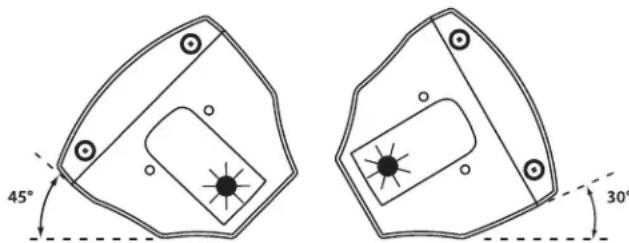
NEAR FIELD FAR FIELD
natural_image
Line drawing of a multi-tiered electronic device with a hand pointing to it (no text or symbols)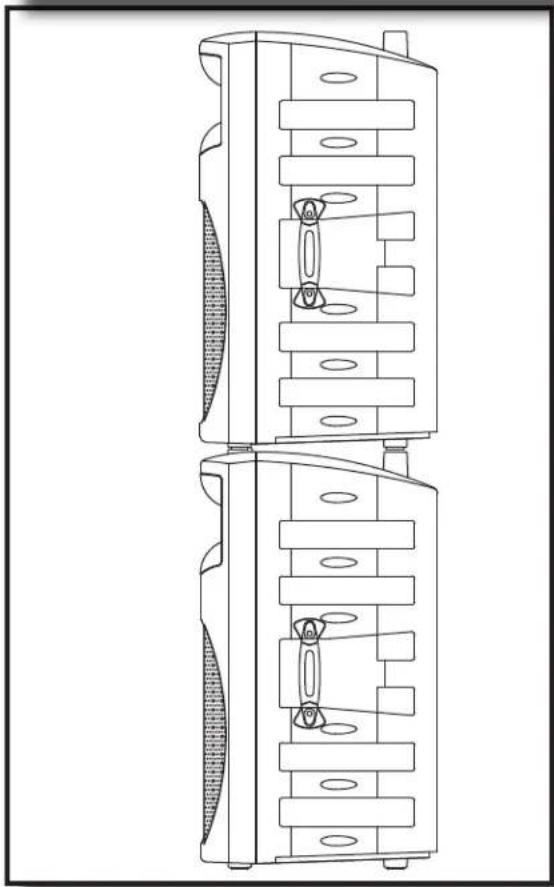
natural_image
Technical line drawing of a dual-chamber electronic device with internal components (no text or symbols)natural_image
Technical line drawing of a mechanical component with internal channels and mounting holes (no text or symbols)MB300U - "U mount" Bracket
The MB300U "U-bracket" mounting kit is used for ceiling and wall installations, allowing the dB300 to be mounted in a variety of positions. Either vertical or horizontal configurations can be used to achieve the desired sound coverage. The MB300U can also be used in conjunction with the MB300A array kit for creating hanging arrays of two to six speakers. For more information, please visit our web site at www.samsontech.com.
MB300U - Kit de "supports en U"
MB300U - "U-Bracket"
MB300U - "Staffa a U"
natural_image
Technical line drawing of a wall-mounted electrical enclosure with mounting hardware, shown from top and side views (no text or symbols)Optional Mounting Kits / Kits de fixation optionnels / Optionale Montage-Kits Kits opcionales de montaje /Kit di Montaggio Opzionali
MB300A - Array Kit
The MB300A array kit is used to create hanging arrays of two to six dB300 enclosures. Used in conjunction with the MB300U, arrays of 50° angles for tight coverage, or 60° angles for wide coverage, are possible. For more information, please visit our web site at www.samsontech.com.
B300A - Kit de suspension
natural_image
Diagram showing two views of a device with labeled components and directional arrows (no text or symbols)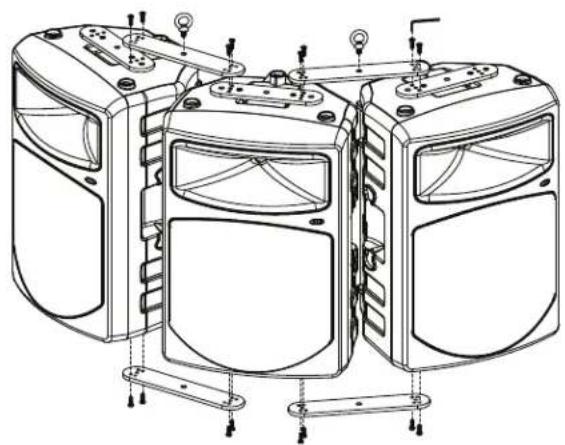
natural_image
Technical line drawing of a multi-case device housing with mounting brackets and mounting holes (no text or symbols)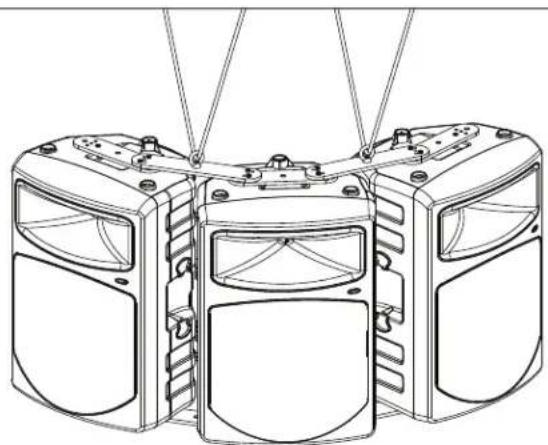
natural_image
Technical line drawing of a three-tiered mechanical device with mounting holes and structural brackets (no text or symbols)dB300 Specifications
Power Rating: (@ 8 Ohm): 300 Watts Program
Rated Impedance 8 Ohms
Frequency Response: 65 Hz – 18 kHz ± 3 dB
Sensitivity: 93 dB SPL @ 1W/1m
Crossover Frequency: 2.1 kHz, 18 dB/Oct, Linkwitz
LF Driver: 12-inch heavy-duty driver, 3-inch voice coil (Kapton Former), 50 oz.
barium ferrite magnet
HF Driver: 1.75" titanium compression driver
Mounting: Integral 1 3/8-inch Pole Mount Receptacle, 45° wedge monitor posi-
tion, 30° wedge monitor position, Four Fly Points
Weight: 38 lbs.17.24kg
Specifications are subject to change without notice.
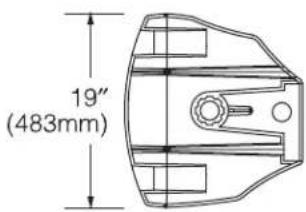
Dimensiones: 30" (a) x 19" (l) x 17" (p) (762 mm) (a) x (483 mm) (l) x (432 mm) (p)
Samson Technologies Corp.
45 Gilpin Avenue
Hauppauge, New York 11788-8816
Phone: 1-800-3-SAMSON (1-800-372-6766)
Fax: 631-784-2201
www.samsontech.com

- Owners Manual
- Safety Instructions/Consignes de sécurité/Sicherheitsvorkehrungen
- WARNING
- CAUTION
- Important Safety Instructions
- Table of Contents
- ENGLISH
- FRANÇAIS
- dB300 Features
- dB300 Components
- dB300 Front Panel
- dB300 Rear Panel
- Quick Set-Up
- Positioning the dB300
- Microphone Positioning - How to Reduce Feedback
- Speaker Placement
- Using the dB300 as a Floor Monitor
- Setting Up Your dB300 System
- Using Speaker Stands
- Stacking the dB300
- Permanent Installation
- Using the Fly-points
- dB300 Wiring Guide
- CONNECTING THE dB300
- Unbalanced 1/4" Connector
- Speakon Wiring Guide
- Introduction
- dB300 — FACE ARRIÈRE
- dB300 RÜCKSEITE
- dB300 Verdrahtung
- dB300 ANSCHLIESSEN
- Introduzione
- MB300U - "U mount" Bracket
- MB300U - Kit de "supports en U"
- MB300U - "U-Bracket"
- MB300U - "Staffa a U"
- Optional Mounting Kits / Kits de fixation optionnels / Optionale Montage-Kits Kits opcionales de montaje /Kit di Montaggio Opzionali
- MB300A - Array Kit
- B300A - Kit de suspension
- dB300 Specifications
Brand : SAMSON
Model : db300i
Category : Loudspeaker