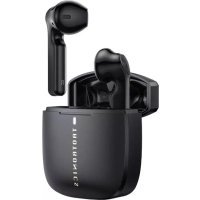
TTBH092 - Earplug TaoTronics - Free user manual and instructions
Find the device manual for free TTBH092 TaoTronics in PDF.



| Product Type | Bluetooth Wireless Earbuds (True Wireless) |
| Model | TTBH092 (SoundLiberty 92) |
| Brand | TaoTronics |
| Connectivity | Bluetooth |
| Battery Life | Up to 6 hours of listening, 24 hours with charging case |
| Charging | USB-C (charging case) |
| Microphone | Built-in |
| Controls | Touch (play/pause, volume, tracks, calls, voice assistant) |
| Weight | Approx. 4 g per earbud, 35 g for case |
| Battery | Rechargeable lithium-ion |
| Box Contents | Earbuds, charging case, USB-C cable, user manual, quick start guide |
| Care | Clean with a soft dry cloth; do not use detergents or chemicals |
| Safety | Do not use at high volume for prolonged periods; avoid exposure to water and high temperatures; do not disassemble |
| Repairability | Do not repair yourself; contact TaoTronics customer support |
| Warranty | See conditions provided by manufacturer |
| Manufacturer | Sunvalleytek International Inc. |
| Compatibility | Bluetooth devices (smartphones, tablets, computers) |
| Protection Rating | Not specified (avoid moisture) |
Frequently Asked Questions - TTBH092 TaoTronics
User questions about TTBH092 TaoTronics
0 question about this device. Answer the ones you know or ask your own.
Ask a new question about this device
Download the instructions for your Earplug in PDF format for free! Find your manual TTBH092 - TaoTronics and take your electronic device back in hand. On this page are published all the documents necessary for the use of your device. TTBH092 by TaoTronics.
USER MANUAL TTBH092 TaoTronics
Manufacturer: Shenzhen NearbyExpress Technology Development Co., Ltd.
Address: Floor 7, Building E, Galaxy World Phase II, Shenzhen, China
Learn more about the EU Declaration of Conformity:
https://www.taotronics.com/pages/user-manual

CE RoHS


MADE IN CHINA
03-13-2020
TT-BH092_V1.1


TAOTRONICS
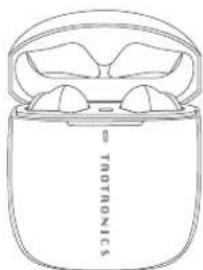
Model: TT-BH092
TaoTronics SoundLiberty 92
True Wireless Stereo Earbuds
User Guide


CONTENTS
| English | 01-11 |
| Deutsch | 12-24 |
| Français | 25-37 |
| Español | 38-51 |
| Italiano | 52-63 |
| 日本語 | 64-75 |
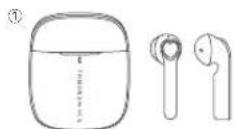
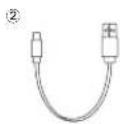
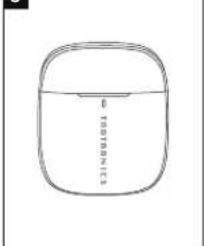
PACKAGE CONTENTS (Fig. 1)
1
③
④

EN
① TaoTronics True Wireless Stereo Earbuds (TT-BH092)
② 1 x USB-C Charging Cable
③ 1 x User Guide
④ 1 x Quick Start Guide
DE
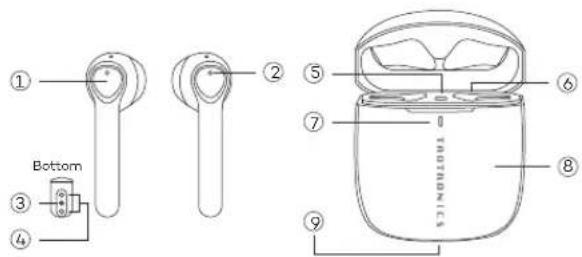
PRODUCT DIAGRAM (Fig. 2)
2
EN
① Multifunction Touch Control
② LED Indicator
③ Microphone
④ Charging Contacts
⑤ Reset Button
⑥ Charging Slot
⑦ Charging Indicator
⑧ Charging Case
⑨ USB-C Charging Port
DE
IMPORTANT SAFETY INSTRUCTIONS
Please read the instructions thoroughly before using this product and retain it for future reference.
Hearing Safety
- Do not wear earbuds with high volume for a long time to avoid damaging your hearing.
- Set the earbuds to low volume before you put them on, then increase the volume gradually as per your preference.
- Do not set volume too high to stay aware of your surroundings.
- Please refer to local laws and regulations if you want to answer phone calls via this device during driving.
- For your safety, avoid distraction from music or phone calls when you are driving or doing other activities with potential dangers.
Warning: Please set the volume to proper level to avoid hearing damages.
Caution
- Do not expose this product to high temperatures.
- Do not immerse the earbuds into water or expose them to humidity for a long time.
- Do not clean the product with detergent containing alcohol, ammonia, benzene or abrasives.
- Avoid dropping.
- Place the earbuds back into the charging case when not in use and keep it away from children and pets to avoid choking hazard.
- Unauthorized disassembly of any parts of this product is forbidden, which 01 02


may cause fire hazard, warranty voidance, and/or property loss.
- Close attention is needed when using near children.
- Keep the charging case away from water, rain or any other liquid.
- Don't use the product in thunderstorm to avoid malfunction or electric shock.
• Always ask a professional technician or authorized personnel for repair.

This product contains lithium battery. Never expose it to excessive heat such as direct sunlight or fire to avoid explosion.
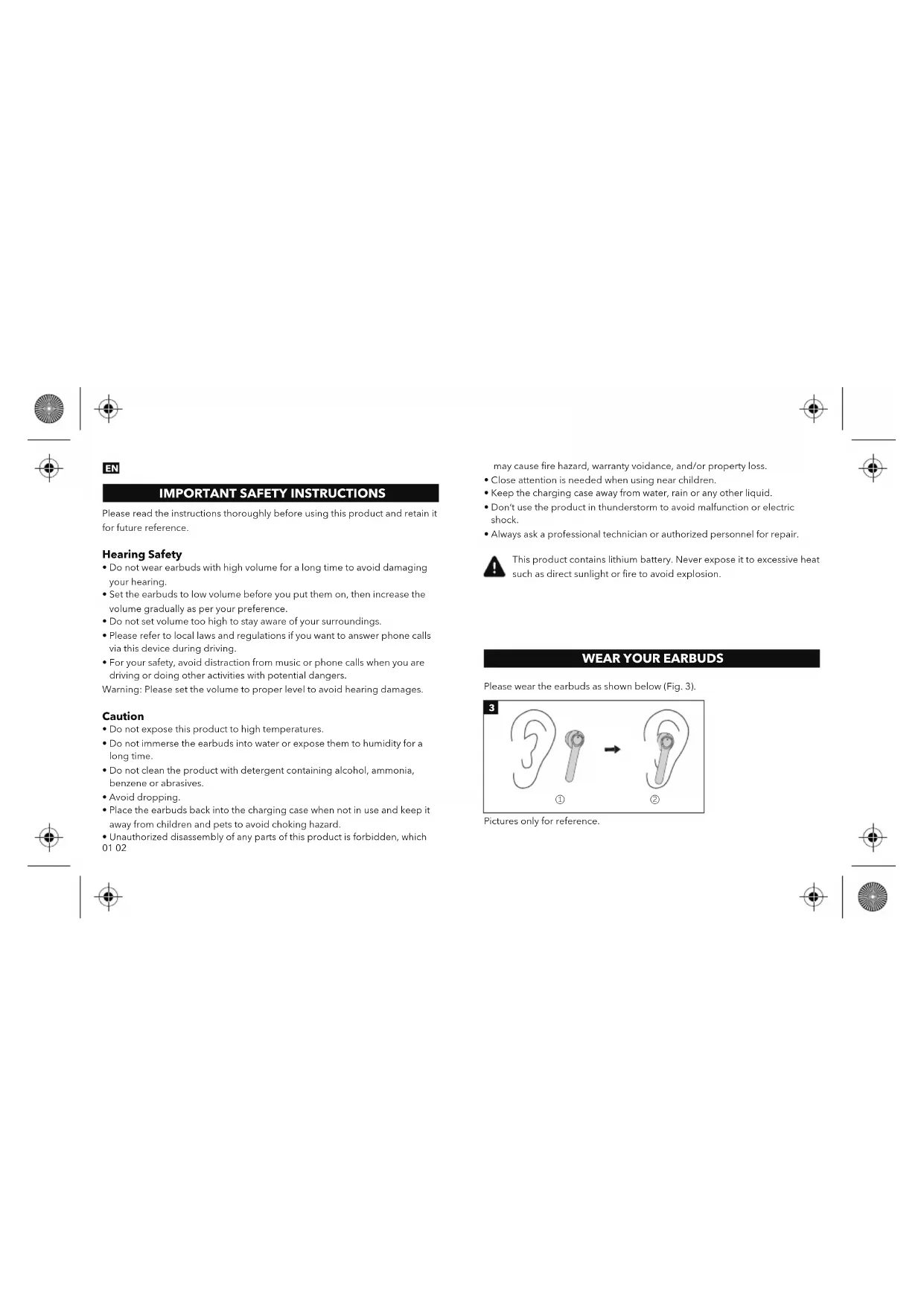
WEAR YOUR EARBUDS
Please wear the earbuds as shown below (Fig. 3).
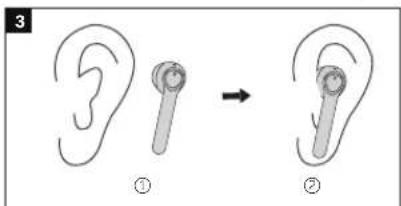
Pictures only for reference.


Bluetooth Caution
- When the device is connected wirelessly to another device, place the two devices close to each other to achieve their normal functionalities and avoid possible signal interference.
- The maximum effective Bluetooth range may vary with the environmental circumstances.
- When using a wireless connection, make sure there are no obstacles between the two devices. Obstacles including walls and fences may shorten the effective range.
USING YOUR EARBUDS
Charging
Charging the Earbuds
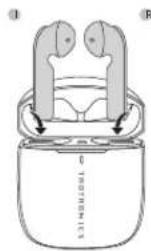
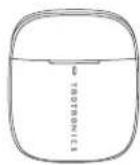
- Put the earbuds into the charging case as per the L (left) and R (right) marks (Fig. 4).
- Cover the lid and charging will start automatically (Fig. 5).
Note:
- Please fully charge the earbuds when using them for the first time.
- When battery is low, a "Battery low" voice prompt will be heard (if you are wearing the earbuds). Please charge it in time or the earbuds will turn off automatically around 10 minutes later.
- Charge the earbuds at least once every 3 months when not using for a long time. 03 04

4
5
Charging the Charging Case
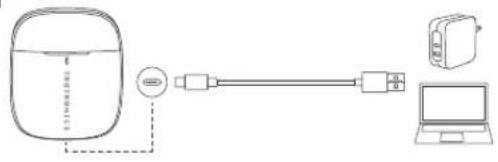
- Connect the charging port with any USB charging adapter or active computer USB port (Fig. 6).
- The charging indicator will flash and turn solid white once fully charged.
Note: • Unplug the charging cable (timely) when fully charged. - Press the Reset Button to check the current battery status.
6


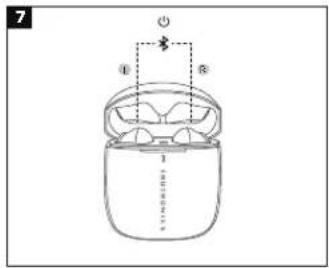
Power On (Fig. 7)
Uncover the lid and they will power on automatically.
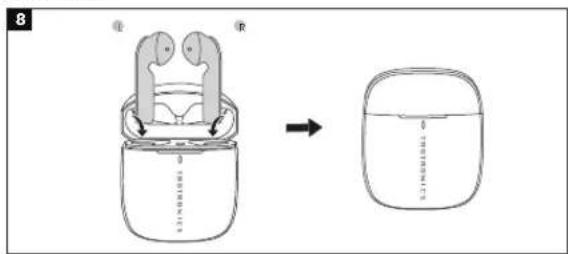
Power Off (Fig. 8)
Put the earbuds into the charging case and close the lid, they will turn off automatically.
05 06


Pairing
- You can use one earbud or both earbuds as per your preference. Please refer to the corresponding pairing instructions.
- Before pairing, please turn off other Bluetooth devices and place the device to be connected close to the earbuds.
- When the earbuds are disconnected from your device for more than 10 minutes, they will turn off automatically.
Couple Earbuds Mode
- Uncover the lid to turn on the earbuds, they will connect with each other automatically. The LED indicators on both earbuds will flash blue and white alternately indicating the earbuds are in pairing mode now.
- Turn on the Bluetooth function on your device and search for nearby devices. Find "TAOTRONICS SoundLiberty 92" in the searching results, tap on the name to connect.
- Once connected, the LED indicators on both earbuds will flash blue slowly. Note:
- The earbuds can remember the devices paired previously, and will attempt to pair with the last connected device. If re-pairing failed, the earbuds will enter pairing mode.
- It is not recommended to wear the two earbuds on different people. If necessary, please keep the two earbuds close to each other in couple earbuds mode.


Single Earbud Mode
- Take out one earbud from the charging case, and make sure the other one is placed in the charging case and the lid is covered.
- It will try to pair with the last paired device first then enter pairing mode with its LED indicator flashing blue and white alternately if pairing failed.
- Turn on the Bluetooth function on your device and search for nearby devices. Find "TAOTRONICS SoundLiberty 92" in the searching results, tap on the name to connect.
- Once connected, the LED indicator will flash blue slowly.
Note:
If you want to change to couple mode, simply take out the other earbud from the charging case, they will pair with each other automatically.
Clear Pairing List
If you failed to pair your device with the earbuds, please clear the pairing history as instructed below:
- Put the earbuds back into the charging case, close the lid then open it.
- Press and hold the Reset Button for 10 seconds until the LED indicators on the earbuds and the charging case flash white three times.
- If you have paired your device with the earbuds before, remove "TAOTRONICS SoundLiberty 92" from the Bluetooth device list and pair again.
- Re-pair with your Bluetooth® device as instructed in "Pairing" section.
Note:
If you want to pair the earbuds with another device when you have already paired them with a device, deactivate the Bluetooth function on the paired device or clear "TAOTRONICS SoundLiberty 92" from its Bluetooth list. Restore the earbuds to factory settings as instructed above if pairing failed. 07.08
Note: Only when you are wearing the earbuds can you hear the voice prompt.
OPERATION AND FUNCTIONS
| Function | Operation | Voice Prompt |
| Play / Pause | Tap the Touch Control on either of the earbuds twice under music | / |
| Volume + | Tap the Touch Control on the right earbud | Toots when highest setting is reached |
| Volume - | Tap the Touch Control on the left earbud | / |
| Next Track | Tap the Touch Control on the right earbud three times | / |
| Previous Track | Tap the Touch Control on the left earbud three times | / |
| Answer Phone Call | Tap the Touch Control on either of the earbuds once | / |
| Hang up Phone Call | Tap and hold the Touch Control on either of the earbuds for 2 seconds | / |
| Decline an Incoming Call | Tap and hold the Touch Control on either of the earbuds for 2 seconds | Call rejected |
| Turn On / Off Voice Control | When paired successfully, tap and hold the Touch Control on either of the earbuds for 2 seconds until a beep is heard | Toot |
| Clear Pairing List | Refer to the "Clear Pairing List" section | / |
| Go into Pairing Mode | Refer to the "Pairing" section | Pairing |
| Successfully paired with your device | / | Connected |
| Bluetooth out of Range / Failed to pair with your device | / | Disconnected |
CLEANING AND MAINTENANCE
- Clean the earbuds and the charging case on a regular basis.
- Use dry and soft cotton cloth to wipe the unit.
Note: Do not insert anything into the product. - Keep away from sharp objects to avoid scratches.
- Put the unit in a dry and shady place if it is to be idle for a long time.
- Do not clean the product with detergent or chemicals.
09 10
TROUBLESHOOTING
| No. | Problem Solution | |
| 1 | Failed to turn on the earbuds | Earbuds low battery, please charge them |
| 2 | Failed to charge the earbuds | Place the earbuds into the charging case properlyMake sure the charging case is charged fully |
| 3 | Can't charge the charging case | Make sure the charging cable is intact and plugged in properly |
| 4 | Can't find "TAOTRONICS SoundLiberty 92" in the Bluetooth device list | The earbuds reconnected with previously paired device automatically:Deactivate the Bluetooth function of previously paired device or clear "TAOTRONICS SoundLiberty 92" from its Bluetooth device list, and then search againPut the device to be connected close to the earbuds |
| 5 | Failed to pair the earbuds with your device | Turn on the device and activate its Bluetooth function before pairingBring the earbuds into pairing mode as instructed in the "Pairing" section |
| 6 | No sound in one of the earbuds in couple earbuds mode | Place both earbuds back to the charging case then take them out, they will pair with each other automatically. If pairing failed, restore them back to the factory settings as instructed in the "Clear Pairing List" section |
| 7 Poor sound quality | Wear the earbuds properly and keep them close to each other.Place the connected device close to the earbuds or remove the obstacles between themClear the debris on the earbuds |
| 8 Unstable connection | Keep the earbuds close to your Bluetooth deviceThe effective distance may shorten with obstacles in the wayTurn off other Bluetooth devices to decrease the interference |
| 9 Can't hear the other party during a phone call | Set the volume to higher level |
| 10 The other party can't hear your voice during a phone call | Free the built-in microphone of any covers |
| 11 Multifunction Touch control of the earbuds is unresponsive | Place the two earbuds into the charging case and cover the lid, disconnect the Bluetooth connection. Uncover the lid to turn on the earbuds and pair again. |
WARRANTY AND SERVICE
If any problems occur, please contact the TaoTronics Customer Care Centre in your country via the contact information listed in this User Guide.
11 12

DE
5
15 16


Laden der Ladehülle
Koppeln
Marche (Fig. 7)
Couplage
Encender (Figura.7)
Bluetoothについての注意事項
ケースの充電
Bluetooth® EN The Bluetooth® word mark and logos are registered trademarks owned by the Bluetooth SIG, Inc. and any use of such marks by Sunvalleytek International Inc. is under license. Other trademarks and trade names are those of their respective owners.
NOTE: This equipment has been tested and found to comply with the limits for a Class B digital device, pursuant to part 15 of the FCC Rules. These limits are designed to provide reasonable protection against harmful interference in a residential installation. This equipment generates uses and can radiate radio frequency energy and, if not installed and used in accordance with the instructions, may cause harmful interference to radio communications. However, there is no guarantee that interference will not occur in a particular installation. If this equipment does cause harmful interference to radio or television reception, which can be determined by turning the equipment off and on, the user is encouraged to try to correct the interference by one or more of the following measures:
- Reorient or relocate the receiving antenna.
- Increase the separation between the equipment and receiver.
- Connect the equipment into an outlet on a circuit different from that to which the receiver is connected.
- Consult the dealer or an experienced radio/TV technician for help
Changes or modifications not expressly approved by the party responsible for compliance could void the user's authority to operate the equipment. This device complies with Part 15 of the FCC Rules. Operation is subject to the following two conditions:
(1) this device may not cause harmful interference, and(2) this device must accept any interference received, including interference that may cause undesired operation.


WEEE Compliance
Correct Disposal of This Product (Waste Electrical & Electronic Equipment) (Applicable in countries with separate collection systems)
This marking on the product, accessories or literature indicates that the product and its electronic accessories should not be disposed of with other household waste at the end of their working life. To prevent possible harm to the environment or human health from uncontrolled waste disposal, please separate these items from other types of waste and recycle them responsibly to promote the sustainable reuse of material resources. Household users should contact either the retailer where they purchased this product, or their local government office, for details of where and how they can take these items for environmentally safe recycling. Business users should contact their supplier and check the terms and conditions of the purchase contract. This product and its electronic accessories should not be mixed with other commercial wastes for disposal.


www.taotronics.com
尺寸:85*95mm
胶装

- CONTENTS
- PACKAGE CONTENTS (FIG. 1)
- EN
- DE
- PRODUCT DIAGRAM (FIG. 2)
- IMPORTANT SAFETY INSTRUCTIONS
- HEARING SAFETY
- CAUTION
- WEAR YOUR EARBUDS
- BLUETOOTH CAUTION
- USING YOUR EARBUDS
- CHARGING
- CHARGING THE EARBUDS
- NOTE
- CHARGING THE CHARGING CASE
- POWER ON (FIG. 7)
- POWER OFF (FIG. 8)
- PAIRING
- COUPLE EARBUDS MODE
- SINGLE EARBUD MODE
- CLEAR PAIRING LIST
- CLEANING AND MAINTENANCE
- WARRANTY AND SERVICE
- LADEN DER LADEHÜLLE
- KOPPELN
- MARCHE (FIG. 7)
- COUPLAGE
- ENCENDER (FIGURA.7)
- BLUETOOTHについての注意事項
- ケースの充電
- WEEE COMPLIANCE
Brand : TaoTronics
Model : TTBH092
Category : Earplug