TTBH053 - Earplug TaoTronics - Free user manual and instructions
Find the device manual for free TTBH053 TaoTronics in PDF.



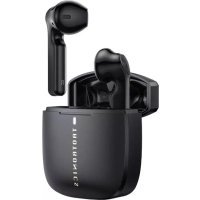
| Product Type | Wireless Bluetooth Earphones |
| Brand | TaoTronics |
| Model | TTBH053 |
| Dimensions (each earbud) | Approx. 2.3 x 1.3 x 1.5 cm |
| Weight (each earbud) | Approx. 4 g |
| Charging case dimensions | Approx. 6.0 x 3.5 x 2.5 cm |
| Total weight (with case) | Approx. 45 g |
| Power source | Rechargeable lithium-ion battery (earbuds) + built-in case battery |
| Charging port | Micro-USB |
| Battery life (earbuds) | Up to 5 hours |
| Total battery life with case | Up to 20 hours |
| Charging time | Approx. 1.5 hours |
| Bluetooth version | 5.0 |
| Operating range | Approx. 10 meters |
| Distance between earbuds | Approx. 3 meters |
| Main functions | Phone calls, music control, voice command, mono mode |
| Touch controls | Play/Pause, volume, tracks, reject/answer call |
| Box contents | 2 earbuds, charging case, micro-USB cable, 6 ear tips (2 pre-installed) |
| Care | Clean with a dry, soft cloth. Do not use liquid products. |
| Safety precautions | Do not expose to water, fire, or extreme temperatures. Do not disassemble. |
| Spare parts | Ear tips (sizes S/M/L), micro-USB cable |
| Repairability | Not designed for user repair. Contact customer service. |
Frequently Asked Questions - TTBH053 TaoTronics
User questions about TTBH053 TaoTronics
0 question about this device. Answer the ones you know or ask your own.
Ask a new question about this device
Download the instructions for your Earplug in PDF format for free! Find your manual TTBH053 - TaoTronics and take your electronic device back in hand. On this page are published all the documents necessary for the use of your device. TTBH053 by TaoTronics.
USER MANUAL TTBH053 TaoTronics
US Distributor: SUNVALLEYTEK INTERNATIONAL INC.
Address:46724 Lakeview Blvd, Fremont, CA 94538
EUROPE
E-mail:
support.uk@taotronics.com(UK)
support.de@taotronics.com(DE)
support.fr@taotronics.com(FR)
support.es@taotronics.com(ES)
support.it@taotronics.com(IT)
EU Importer: ZBT International Trading GmbH
Manufacturer: Shenzhen NearbyExpress Technology Development Co., Ltd.
Address: 333 Bulong Road, Shenzhen, China, 518129
Learn more about the EU Declaration of Conformity:
https://www.taotronics.com/downloads-TT-BH053-CE-Cert.html

TAOTRONICS
EN
Product Diagram
- Charging Indicators
- LED Indicator
- Touch Control
- Charging Contacts
- Micro USB Input Port
DE
Produktabbildung
This product contains lithium battery. Never expose it to strong sunlight or toss it into fire to avoid explosion.
Package Contents
· 1 x Charging Case
· 2 x Earbuds
· 1 x USB Charging Cable
- 6 x Ear Tips (two are equipped on the earphones)
· 1 x User Manual
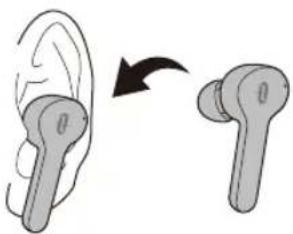
How to Use
How to Wear
Charging
Charging the Earbuds
Put the earbuds into the charging case properly, and charging will start automatically. The LED indicator will flash blue slowly when charging and turn off once fully charged.
Charging the Charging Case
Connect the Micro USB charging port with any USB output port, and charging will start automatically. The charging indicators will light up progressively.
Note:
- Never pull the charging contacts with force to avoid malfunctions.
- Please charge the earbuds and charging case for the first use or reuse after long idle time.
Pairing
Couple Earbuds Mode
Take out the earbuds from the charging case, and they will connect with each other automatically. Once connected, the LED indicator on
the left earbud will flash blue and white alternately and the LED indicator on the right earbud will flash white slowly.
Turn on the Bluetooth function on your device and search for nearby devices. Find "TaoTronics TT-BH053" in the searching results. Tap on the name to connect. Once connected, the LED indicators on both earbuds will flash white once every 5 seconds.
Single Earbud Mode (Only Functional via Left Earbud)
Take out the left earbud from the charging case, it will try to connect the previously paired device first and then enter pairing mode if the connection failed with the LED indicator flashing blue and white alternately.
- Turn on the Bluetooth function on your device, search for nearby devices. Find "TaoTronics TT-BH053" in the searching results. Tap on the name to connect.
Note:
If you want to change to couple earbuds mode from single earbud mode, simply take out the right earbud from the charging case, they will pair with each other automatically.
Operation and Functions
| Function Operation | |
| Answer Phone Call | Tap the Touch Control on either of the earbuds once |
| Hang up Phone Call | Tap the Touch Control on either of the earbuds twice |
| Reject Incoming Call | Tap and hold the Touch Control on either of the earbuds for 2 seconds |
| Previous Track | Tap the Touch Control on the left earbud three times |
| Next Track | Tap the Touch Control on the right earbud three times |
| Play / Pause | Tap the Touch Control on either of the earbuds twice |
| Volume - | Tap the Touch Control on the left earbud |
| Volume + | Tap the Touch Control on the right earbud |
| Turn On / Off Voice Control | When paired successfully, press and hold the Touch Control on either of the earbuds for 2 seconds until a beep is heard |
Note:
- If your earbuds failed to pair with each other, please restore to factory settings as per the instructions below:
1) Place the earbuds into the charging case, tap and hold the Touch Control of both earbuds for 10 seconds until the LED indicators flash twice to enter reset mode.
2) Take out both earbuds, and they will pair with each other automatically. Pair them with your device when the LED indicator on the right earbud flashes blue and that on the left earbud flashes blue and white alternately.
3) If you have paired your device with the earbuds before, remove "TaoTronics TT-BH053" from the bluetooth device list and pair again. - Extra attention is needed when wearing the earbuds to avoid accidental tapping of the Touch Control.
- It is not recommended to wear the two earbuds on different people. If need to do so, please keep the 2 earbuds within 9.8ft in couple earbuds mode.
- The volume cannot be adjusted in single earbud mode.
Warning
- Never dismantle or refit the product to avoid malfunction or fire hazards.
- Keep away from corrosive liquids to avoid damages to the product.
- Keep away from extreme temperatures.
- Keep away from children and pets.
- Don't use the product in thunderstorm weather to avoid malfunction or electric shock.
FAQ
Q: Failed charging of the charging case.
A: Make sure the charging cable is intact and plugged in properly.
Q: Signal of the earbuds is unstable and there is no sound in the earbuds.
A: Please wear the earbuds properly and put your phone in the front pocket when using it outdoor.
Q: Two devices named "TaoTronics TT-BH053" are found.
A: Delete both names and search again.
Q: Sound is unclear.
A: Increase the volume slowly on your phone and earbuds and keep them close to each other.
Q: What's the effective range between the two earbuds?
A: Around 3 meters / 9.8 feet.
DE
ACHTUNG:
Ladevorgang
Laden der Ohrhörer
Chargement
Carga
Ricarica
充電
イヤホンの充電
EN The Bluetooth ® word mark and logos are registered trademarks owned by the Bluetooth SIG,
Inc. and any use of such marks by Sunvalleytek International Inc. is under license. Other trademarks and trade names are those of their respective owners.
NOTE: This equipment has been tested and found to comply with the limits for a Class B digital device, pursuant to part 15 of the FCC Rules. These limits are designed to provide reasonable protection against harmful interference in a residential installation. This equipment generates uses and can radiate radio frequency energy and, if not installed and used in accordance with the instructions, may cause harmful interference to radio communications. However, there is no guarantee that interference will not occur in a particular installation. If this equipment does cause harmful interference to radio or television reception, which can be determined by turning the equipment off and on, the user is encouraged to try to correct the interference by one or more of the following measures:
- Reorient or relocate the receiving antenna.
- Increase the separation between the equipment and receiver.
-Connect the equipment into an outlet on a circuit different from that to which the receiver is connected.
-Consult the dealer or an experienced radio/TV technician for help Changes or modifications not expressly approved by the party responsible for compliance could void the user's authority to operate the equipment. This device complies with Part 15 of the FCC Rules. Operation is subject to the following two conditions:
(1) this device may not cause harmful interference, and(2) this device must accept any interference received, including interference that may cause undesired operation.
尺寸:85*95mm
装订成册

- EUROPE
- EN
- PRODUCT DIAGRAM
- DE
- PRODUKTABBILDUNG
- PACKAGE CONTENTS
- HOW TO USE
- HOW TO WEAR
- CHARGING
- CHARGING THE EARBUDS
- CHARGING THE CHARGING CASE
- NOTE
- PAIRING
- COUPLE EARBUDS MODE
- SINGLE EARBUD MODE (ONLY FUNCTIONAL VIA LEFT EARBUD)
- WARNING
- FAQ
- ACHTUNG
- LADEVORGANG
- LADEN DER OHRHÖRER
- CHARGEMENT
- CARGA
- RICARICA
- 充電
- イヤホンの充電
Brand : TaoTronics
Model : TTBH053
Category : Earplug