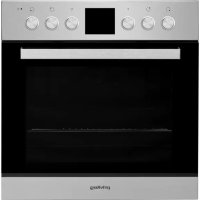
PHVR6 OH5V1 IN - Oven PRIVILEG - Free user manual and instructions
Find the device manual for free PHVR6 OH5V1 IN PRIVILEG in PDF.



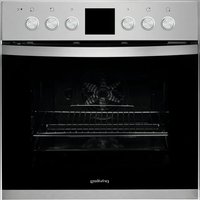
| Brand | PRIVILEG |
| Model | PHVR6 OH5V1 IN |
| Product type | Oven with ceramic hob |
| Power supply | 230 V / 50 Hz (estimated) |
| Number of oven functions | 7 (Natural convection, Hydrocleaning, Forced convection, Grill, Gratin, Defrost, Lighting) |
| Hydrocleaning function | Low-temperature steam cleaning (35 min at 90°C) |
| Lighting type | Incandescent bulb 25-40 W / 230 V type E-14, T300 °C or halogen 20-40 W / 230 V type G9, T300 °C |
| Number of cooking zones | 4 (including 2 with multizone function) |
| Hob functions | Slow heating, Keep warm, Rapid boiling, Multizone |
| Supplied accessories | Metal grid, Drip tray, Baking tray (depending on model) |
| Exterior cleaning | Damp microfiber cloth with neutral pH detergent |
| Interior cleaning | Hydrocleaning or damp cloth after cooling |
| Removable door | Yes (to facilitate cleaning) |
| Safety | Unplug before maintenance; do not use steam cleaner |
| Repairability index | Not communicated (spare parts available through after-sales service) |
| Documentation | Manual and guide available at docs.whirlpool.eu |
Frequently Asked Questions - PHVR6 OH5V1 IN PRIVILEG
User questions about PHVR6 OH5V1 IN PRIVILEG
0 question about this device. Answer the ones you know or ask your own.
Ask a new question about this device
Download the instructions for your Oven in PDF format for free! Find your manual PHVR6 OH5V1 IN - PRIVILEG and take your electronic device back in hand. On this page are published all the documents necessary for the use of your device. PHVR6 OH5V1 IN by PRIVILEG.
USER MANUAL PHVR6 OH5V1 IN PRIVILEG
BEDIENKNOPFE DES KOCHFELDS
A. Kochfeld vorne links.
B. Kochfeld hinten links.
C. Kochfeld hinten rechts.
D. Kochfeld vorne rechts.
You can download the Safety Instructions and the Use and Care Guide by visiting our website docs.whirlpool.eu and following the instructions on the back of this booklet.

Before using the appliance carefully read the Health and Safety guide.
PRODUCT DESCRIPTION
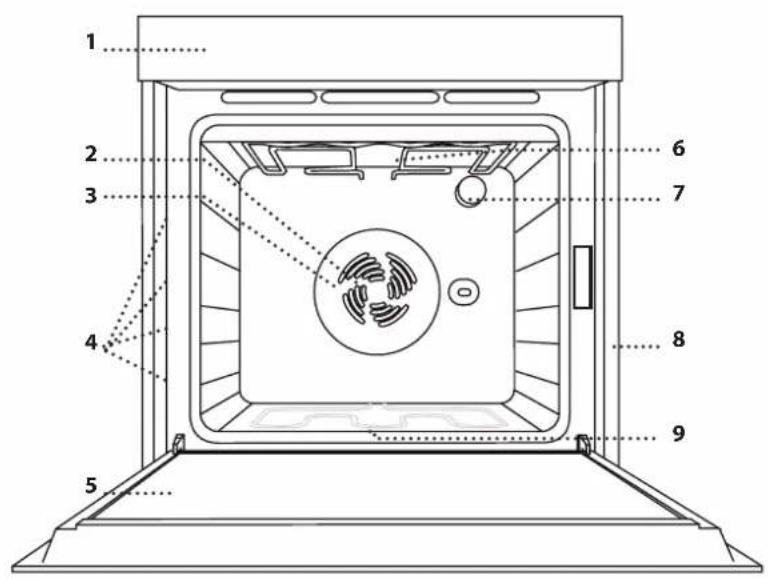
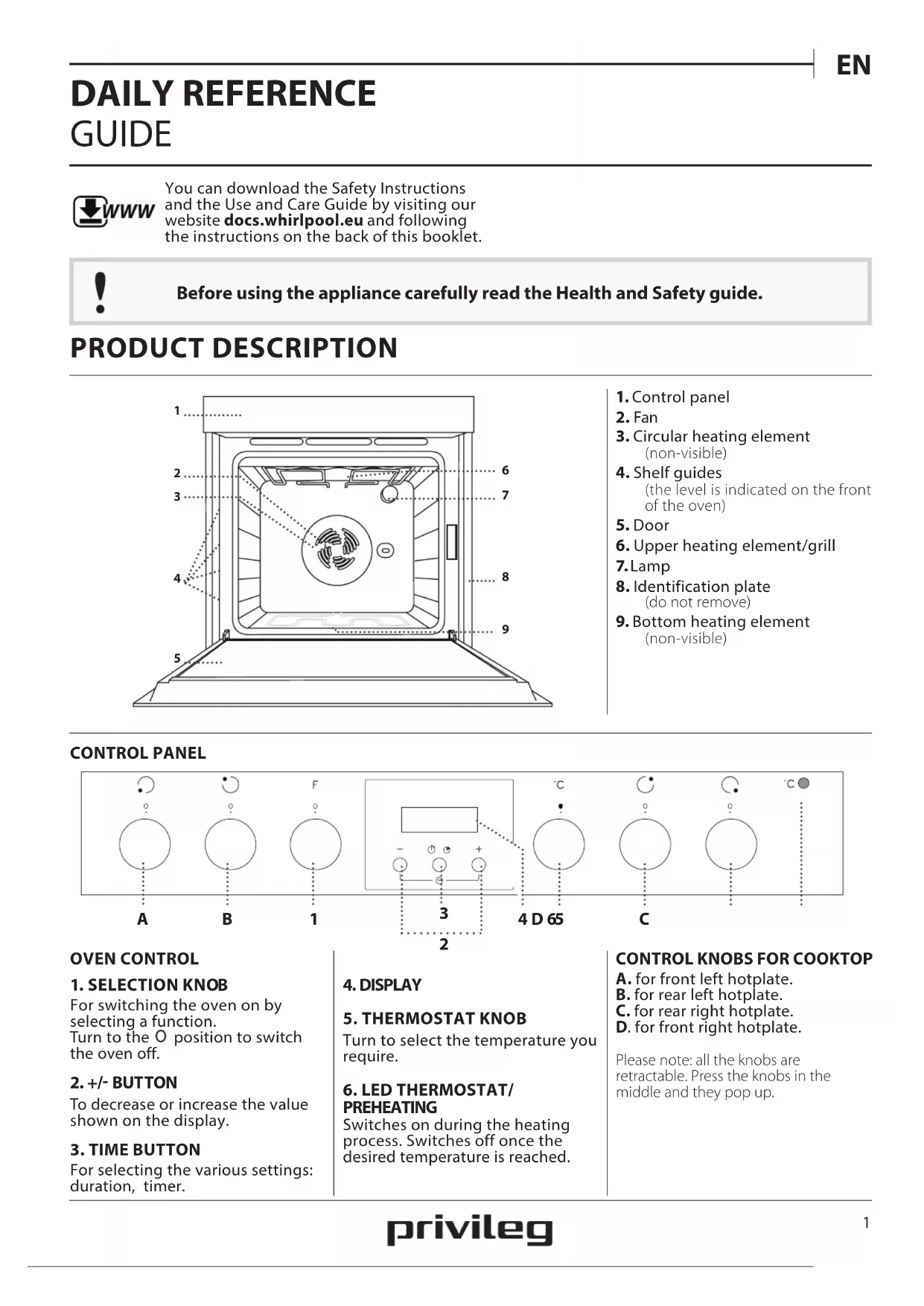
- Control panel
2.Fan - Circular heating element (non-visible)
- Shelf guides (the level is indicated on the front of the oven)
- Door
- Upper heating element/grill
7.Lamp - Identification plate (do not remove)
- Bottom heating element (non-visible)
CONTROL PANEL
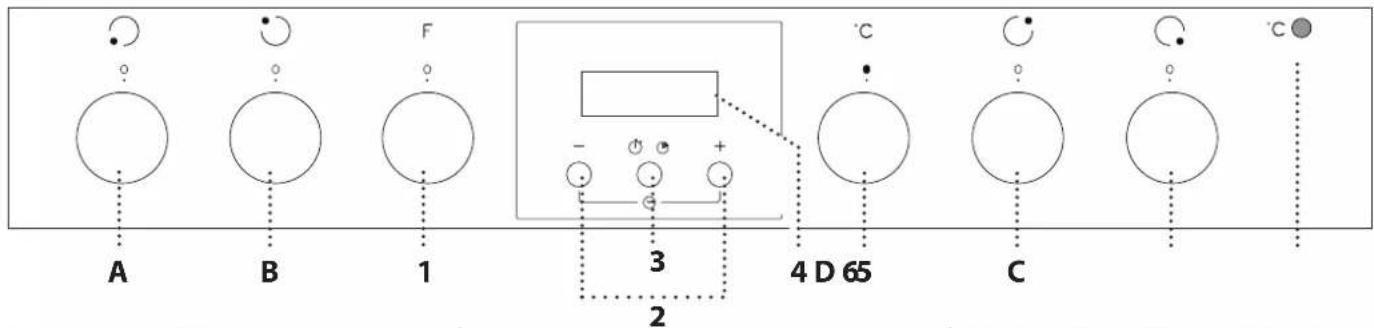
OVEN CONTROL
1. SELECTION KNOB
For switching the oven on by selecting a function.
Turn to the O position to switch the oven off.
2. +/- BUTTON
To decrease or increase the value shown on the display.
3. TIME BUTTON
For selecting the various settings: duration, timer.
4. DISPLAY
5. THERMOSTAT KNOB
Turn to select the temperature you require.
6. LED THERMOSTAT/ PREHEATING
Switches on during the heating process. Switches off once the desired temperature is reached.
CONTROL KNOBS FOR COOKTOP
A. for front left hotplate.
B. for rear left hotplate.
C. for rear right hotplate.
D. for front right hotplate.
Please note: all the knobs are retractable. Press the knobs in the middle and they pop up.
The number and the type of accessories may vary depending on which model is purchased.
Other accessories that are not supplied can be purchased separately from the After-sales Service.
INSERTING THE WIRE SHELF AND OTHER ACCESSORIES
Insert the wire shelf horizontally by sliding it across the shelf guides, making sure that the side with the raised edge is facing upwards.
Other accessories, such as the drip tray and the baking tray, are inserted horizontally in the same way as the wire shelf.
REMOVING AND REFITTING THE SHELF GUIDES
-
To remove the shelf guides, remove the fixing screws (if present) on both sides with the aid of a coin of a tool. Lift the guides up and pull the lower parts out of their seatings: The shelf guides can now be removed.
-
To refit the shelf guides, first fit them back into their upper seating. Keeping them held up, slide them into the cooking compartment, then lower them into position in the lower seating. Refit the fixing screws.
FUNCTIONS

Download the Use and Care Guide from docs.whirlpool.eu for more information

OFF
For switching off the oven.

LIGHT
To switch the oven light on/off.

CONVENTIONAL
For cooking any kind of dish on one shelf.

HYDROCLEANING
To eliminate the dirt created by cooking by means of a low temperature cycle. The action of the steam released during this special low-temperature cleaning cycle allows dirt and food residues to be removed with ease. Pour 200ml of drinking water on the bottom of the oven and use the function for 35^ at 90^ Activate the function when the oven is cold and let it cool down for 15^ once the cycle ends.

CONVECTION BAKE
For cooking meat and pies with liquid filling (savoury or sweet) on a single shelf, and pizzas on one or two shelves. This function delivers an even, golden, crisp top and base. When cooking on two levels, switch the position of the dishes halfway through cooking to cook food more evenly.

GRILL
For grilling steaks, kebabs and sausages, cooking vegetables au gratin or toasting bread. When grilling meat, we recommend using a tray to collect the cooking juices: Position the pan on any of the levels below the wire shelf and add 500 ml of drinking water.

GRATIN
For roasting large joints of meat (legs, roast beef, chicken). We recommend using a tray to collect the cooking juices: Position the pan on any of the levels below the wire shelf and add 500ml of drinking water. The turnspit (if provided) can be used with this function.

DEFROSTING
To speed up defrosting of food.
USING THE APPLIANCE FOR THE FIRST TIME
1. SETTING THE TIME
You will need to set the time when you switch on the appliance for the first time: "AUTO" and "0.00" flash on the display.
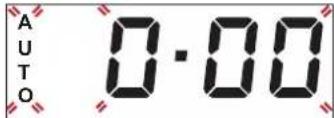
To set the time of day, press buttons—and at the same time: Set the time of day using the + and - buttons.
Please note: To change the time of the day afterwards for example following lengthy power outages, you will need to reset the time.
2. SETTING THE TONE
Having selected the desired time value, press the time button: The display shows "ton 1".
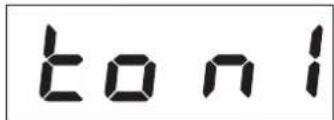
To select the desired tone, press button-, then press the time button to confirm.
3. HEAT THE OVEN
A new oven may release odours that have been left behind during manufacturing: this is completely normal. Before starting to cook food, we therefore recommend heating the oven with it empty in order to remove any possible odours.
Remove any protective cardboard or transparent film from the oven and remove any accessories from inside it. Heat the oven to 250^ for about one hour, preferably using the "Convection Bake" function. The oven must be empty during this time.
Follow the instructions for setting the function correctly.
Please note: It is advisable to air the room after using the appliance for the first time.
DAILYUSE
1. SELECT A FUNCTION
To select a function, turn the selection knob to the symbol for the function you require.
2. ACTIVATE A FUNCTION
To start the function you have selected, turn the thermostat knob to set the temperature you require.
To interrupt the function at any time, switch off the oven, turn the selection knob and the thermostat knob to O and
3. PREHEATING
Once the function has been activated, the LED thermostat will switch on signalling that the preheating process has begun.
At the end of this process, the LED thermostat switches off indicating that the oven has reached the set temperature: at this point, place the food inside and proceed with cooking.
Please note: Placing the food in the oven before preheating has finished may have an adverse effect on the final cooking result.
. PROGRAMMING COOKING
After selecting and activating the function, it is possible to set the duration.

DURATION
Press the time button: the symbol flashes.
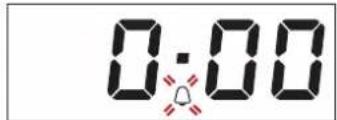
Press the time button again: the display shows DUR and AUTO flashes.
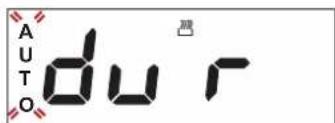
Set the duration using the buttons + and -After a few seconds, the display shows the time of the day while AUTO remain lit, confirming the setting.
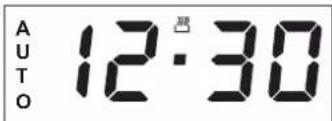
To view the remaining cooking duration press the time button for at least 2 seconds.
To change it, if necessary, press it again a second time, using + and - buttons to modify the duration.
At the end of cooking, the symbol switches off, an alarm sounds while AUTO flashes on the display.
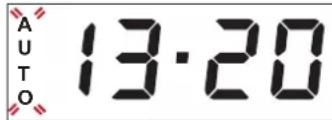
Press any button to deactivate the alarm. Return the function knob and thermostat knob to O and then press the time button for at least 2 seconds to switch off the oven.

SETTING THE TIMER
This option does not interrupt or activate cooking but allows you to use the display as a timer, both while a function is active and when the oven is off. To activate the timer, long press the time button: the symbol flashes on the display.
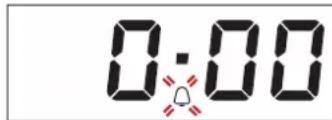
Use the and buttons to set the desired duration: the countdown begins after a few seconds.
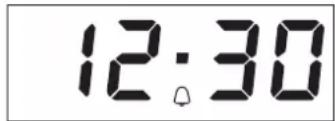
The display shows the time of the day and the remains lit, confirming the timer has been set.
Please note: To view the countdown and change it if necessary, press the time button 2 seconds again.
COOKTOP OPERATION
(see the instructions supplied with the cooktop).
Turn the control knob of the relevant hotplate clockwise to the desired power setting.
The oven control panel features 4 adjustable knobs for cooktop operation. The cooktop control knobs are marked with a numerical scale corresponding to different power settings, and a series of function symbols.

GENTLEHEAT
To allow dough to rise, to soften butter taken from the fridge, to keep baby bottles or food warm, also for making yoghurt, melting chocolate, etc. This function is only available when the residual heat indicator is on. For this function, make sure the residual heat indicator of the desired hotplate is on. Turn the knob to . To deselect the function, change the position of the knob.
HEAT MAINTENANCE
To maintain a constant temperature of 60^ until the end of cooking. To select this function, turn the knob to 15.
FAST BOIL
This function is used to bring water to the boil rapidly and remains on for a preset time. At the end of the preset time, the cooktop automatically returns to the maximum power setting. This function can be selected even during cooking. Important: before selecting this function, make sure the pot is positioned on the selected hotplate in order to avoid any damage to the cooktop surface. The stated performance values for this function are those guaranteed for all glass ceramic cooktops. For this function, place the pot on the selected hotplate and turn the knob to 念 . To deselect, change the position of the knob.
MULTIZONE This is availa
This is available on the front left and rear left hotplates. This extends the heating area of the cooktop in order to allow the use of large, oval or rectangular pots or cooking receptacles. To select this function: turn the knob to and wait until the residual heat indicator for the hotplate begins to flash. To switch on the triple zone function (if available), wait until the LED begins flashing quickly. Select the power setting required by turning the knob anticlockwise. The residual heat indicator remains on to indicate that the cooktop is in use. To deselect, turn the knob to O by turning the knob anticlockwise.
Please note: The multizone function can only be switched on for the double and triple hotplates of the cooktop.
COOKING TABLE
| RECIPE FUNCTION PREHEAT | TEMPERATURE (°C) | DURATION (MIN) | LEVEL AND ACCESSORIES | ||
| Leavened cakes | ─ | Yes 160 - 180 35 - 55 | 2 | ||
| ─ | Yes 150 - 170 30 - 90 * | 3 1 | |||
| Filled cake (cheese cake, strudel, fruit pie) | ─ | Yes 150 - 190 30 - 85 | 2 | ||
| ─ | Yes 150 - 190 35 - 90 * | 3 1 | |||
| Biscuits/tartlets | ─ | Yes 170 - 180 15 - 40 | 3 | ||
| ─ | Yes 150 - 175 20 - 45 * | 3 1 | |||
| Choux buns | ─ | Yes 180 30 - 40 | 3 | ||
| ─ | Yes 170 - 190 35 - 45 * | 3 1 | |||
| Meringues | ─ | Yes | 90 | 120 - 130 | 3 |
| ─ | Yes | 90 | 130 - 150 * | 3 1 | |
| Bread/Pizza/Focaccia | ─ | Yes 190 - 250 15 - 50 | 2 | ||
| ─ | Yes 190 - 250 25 - 45 * | 3 1 | |||
| Frozen pizza | ─ | Yes 250 | 10 - 15 | 2 | |
| ─ | Yes 250 | 10 - 20 * | 3 1 | ||
| Savoury pies (vegetable pie,quiche) | ─ | Yes 175 - 200 40 - 50 | 2 | ||
| ─ | Yes 180 - 190 40 - 55 * | 3 1 | |||
| Vols-au-vents/puff pastry crackers | ─ | Yes | 180 - 200 | 20 - 30 | 3 |
| ─ | Yes 180 - 190 20 - 40 * | 3 1 | |||
| Lasagne/baked pasta/canneloni/flans | ─ | Yes | 190 - 200 40 - 65 | 2 | |
| Lamb/veal/beef/pork 1 kg | ─ | Yes | 190 - 200 | 90 - 110 | 2 |
| Chicken/rabbit/duck 1 kg | ─ | Yes | 190 - 200 | 65 - 85 | 2 |
| Turkey/goose 3 kg | ─ | Yes | 190 - 200 | 140 - 180 | 1 / 2 |
| Baked fish/en papillote (fillets, whole) | ─ | Yes | 180 - 200 40 - 60 | 2 | |
| Stuffed vegetables (tomatoes, courgettes, aubergines) | ─ | Yes 175 - 200 50 - 60 | 2 | ||
| Toast | ─ | Yes | 200 | 2 - 5 | 4 |
| Fish fillets/steaks | ─ | Yes | 200 | 30 - 40 ** | 4 3 |
| FUNCTIONS | Conventional | Grill | Gratin | Convection Bake |
| ACCESSIONS | Wire shelf | Cake tin on wire shelf | Drip tray / Baking tray or cake tin on wire shelf | Drip tray / Baking tray or Drip tray with 500 ml of water |
| RECIPE FUNCTION PREHEAT | TEMPERATURE (°C) | DURATION (MIN) | LEVEL AND ACCESSORIES | ||
| Sausages/kebabs/spare ribs/hamburgers | Yes 200 | 30 - 50 ** | 4 3 | ||
| Roast chicken 1-1.3 kg | - | 200 | 55 - 70 ** | 2 1 | |
| Roast beef rare 1 kg | - | 200 | 35 - 50 *** | 2 | |
| Leg of lamb/shanks - 200 60 - 90 *** | 2 | ||||
| Roast potatoes - 200 45 - 55 *** | 2 | ||||
| Vegetable gratin | - | 200 | 20 - 30 | 2 | |
| Lasagna & meat | Yes | 200 | 50 - 100 **** | 3 1 | |
| Meat & potatoes | Yes | 200 | 45 - 100 **** | 3 1 | |
| Fish & vegetables | Yes | 180 | 30 - 50 **** | 3 1 |
- Switch levels halfway through cooking.
Turn food halfway through cooking.
Turn food two thirds of the way through cooking (if necessary).
*** Estimated length of time: dishes can be removed from the oven at different times depending on personal preference.
Download the Use and Care Guide by visiting the website docs.whirlpool.eu to consult the table of tested recipes filled out for the assessment institutes in accordance with the IEC 60350 - 1 standard.
| FUNCTIONS | Conventional | Grill | Gratin | Convection Bake |
| ACCESSIONS | Wire shelf | Cake tin on wire shelf | Drip tray / Baking tray or cake tin on wire shelf | Drip tray / Baking tray or cake tin on wire shelf |
CLEANING AND MAINTENANCE

Download the Use and Care Guide from docs.whirlpool.eu for more information
Make sure that the oven has cooled down before carrying out any maintenance or cleaning.
Do not use steam cleaners.
Do not use wire wool, abrasive scourers or abrasive/corrosive cleaning agents, as these could damage the surfaces of the appliance.
Wear protective gloves.
The oven must be disconnected from the mains before carrying out any kind of maintenance work.
EXTERIOR SURFACES
- Clean the surfaces with a damp microfibre cloth. If they are very dirty, add a few drops of pH-neutral detergent. Finish off with a dry cloth.
- Do not use corrosive or abrasive detergents. If any of these products inadvertently comes into contact with the surfaces of the appliance, clean immediately with a damp microfibre cloth.
INTERIOR SURFACES
After every use, leave the oven to cool and then clean it, preferably while it is still warm, to remove any deposits or stains caused by food residues. To
dry any condensation that has formed as a result of cooking foods with a high water content, leave the oven to cool completely and then wipe it with a cloth or sponge.
- Clean the glass in the door with a suitable liquid detergent.
- The oven door can be removed to facilitate cleaning.
ACCESSIONS
Soak the accessories in a washing-up liquid solution after use, handling them with oven gloves if they are still hot. Food residues can be removed using a washing-up brush or a sponge.
REPLACING THE LAMP
- Disconnect the oven from the power supply.
- Unscrew the cover from the light, replace the bulb and screw the cover back on the light.
- Reconnect the oven to the power supply.
Please note: Only use 25-40W/230V type E-14, T300°C incandescent lamps, or 20-40W/230 V type G9, T300°C halogen lamps. The bulb used in the product is specifically designed for domestic appliances and is not suitable for general room lighting within the home (EC Regulation 244/2009). Light bulbs are available from our After-sales Service.
- If using halogen bulbs, do not handle them with your bare hands as your fingerprints could cause damage. Do not use the oven until the light cover has been refitted.
REMOVING AND REFITTING THE DOOR
- To remove the door, open it fully and lower the catches until they are in the unlock position.
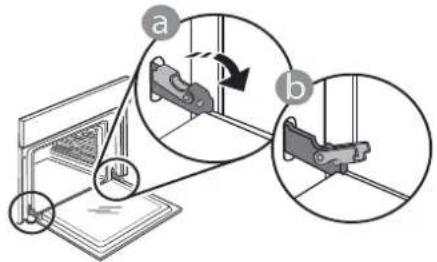
- Close the door as much as you can.
Take a firm hold of the door with both hands - do not hold it by the handle.
Simply remove the doo by continuing to close it while pulling it upwards at the same time until it is released from its seating. Put the door to one side, resting it on a soft surface.

- Refit the door by moving it towards the oven, aligning the hooks of the hinges with their seating and securing the upper part onto its seating.
- Lower the door and then open it fully. Lower the catches into their original position: Make sure that you lower them down completely
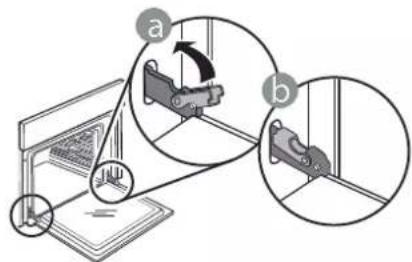
Apply gentle pressure to check that the catches are in the correct position.
- Try closing the door and check to make sure that it lines up with the control panel. If it does not, repeat the steps above: The door could become damaged if it does not work properly..
HOW TO READ THE COOKING TABLE
The table lists the best function, accessories and level to use to cook various different types of food. Cooking times start from the moment food is placed in the oven, excluding preheating (where required). Cooking temperatures and times are approximate and depend on the amount of food and the type of accessory used. Use the lowest recommended settings to begin with and, if the food is not cooked enough, then switch to higher settings. Use the accessories supplied and preferably dark-coloured metal cake tins and baking plates. You can also use Pyrex or stoneware pans and accessories, but bear in mind that cooking times will be slightly longer.
COOKING DIFFERENT FOODS AT THE SAME TIME
Using the "Forced Air" function, you can cook different foods which require the same cooking temperature at the same time (for example: fish and vegetables), using different shelves. Remove the food which requires a shorter cooking time and leave the food which requires a longer cooking time in the oven.
TROUBLESHOOTING

Download the Use and Care Guide from docs.whirlpool.eu for more information
| Problem Possible cause Solution | ||
| The oven does not work. | Power cut. Disconnection from the mains. | Check for the presence of mains electrical power and whether the oven is connected to the electricity supply. Turn off the oven and restart it to see if the fault persists. |
| The display shows the letter “F” followed by a number. | Software problem. Contact you | nearest Client After-sales Service Centre and state the number following the letter “F”. |
PRODUCT FICHE
The product fiche with energy data of this appliance can be downloaded from the website docs.whirlpool.eu
HOW TO OBTAIN THE USE AND CARE GUIDE
Download the Use and Care Guide from our website docs.whirlpool.eu (you can use this QR Code), specifying the product's commercial code.
Alternatively, contact our Client After-sales Service.


CONTACTING OUR AFTER-SALES SERVICE
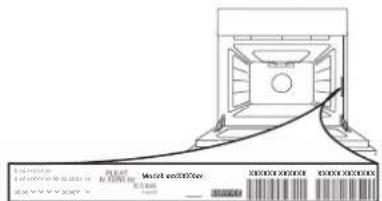
You can find our contact details in the warranty manual. When
contacting our Client After-sales Service, please state the codes provided on your product's identification plate.

400011603915/B
GUIDE D'UTILISATION QUOTIDIENNE

| FONCTIONS | Convection naturelle | Grill | Gratin | Convection forcee |
| FONCTIONS | Convection naturelle | Grill | Gratin | Convection forcee |
Per portare rapidamente l'acqua ad ebollizione;这对于 the question of how to use this technique is very difficult. It is not possible to use it in all cases, and it is necessary to use it in some cases. For example, if you want to use it for a musical purpose, you should use it in the case of an instrument such as a guitar or piano.
MULTIZONA
CÓMOPONERSE EN CONTACTO CON NUESTROSERVICIO POSTVENTA

- BEDIENKNOPFE DES KOCHFELDS
- PRODUCT DESCRIPTION
- CONTROL PANEL
- OVEN CONTROL
- SELECTION KNOB
- +/- BUTTON
- TIME BUTTON
- DISPLAY
- THERMOSTAT KNOB
- LED THERMOSTAT/ PREHEATING
- CONTROL KNOBS FOR COOKTOP
- INSERTING THE WIRE SHELF AND OTHER ACCESSORIES
- REMOVING AND REFITTING THE SHELF GUIDES
- FUNCTIONS
- CONVENTIONAL
- HYDROCLEANING
- CONVECTION BAKE
- USING THE APPLIANCE FOR THE FIRST TIME
- SETTING THE TIME
- SETTING THE TONE
- HEAT THE OVEN
- DAILYUSE
- SELECT A FUNCTION
- ACTIVATE A FUNCTION
- PREHEATING
- PROGRAMMING COOKING
- SETTING THE TIMER
- COOKTOP OPERATION
- GENTLEHEAT
- HEAT MAINTENANCE
- FAST BOIL
- MULTIZONE This is availa
- COOKING TABLE
- CLEANING AND MAINTENANCE
- EXTERIOR SURFACES
- INTERIOR SURFACES
- ACCESSIONS
- REPLACING THE LAMP
- REMOVING AND REFITTING THE DOOR
- HOW TO READ THE COOKING TABLE
- COOKING DIFFERENT FOODS AT THE SAME TIME
- TROUBLESHOOTING
- PRODUCT FICHE
- HOW TO OBTAIN THE USE AND CARE GUIDE
- CONTACTING OUR AFTER-SALES SERVICE
- GUIDE D'UTILISATION QUOTIDIENNE
- MULTIZONA
- CÓMOPONERSE EN CONTACTO CON NUESTROSERVICIO POSTVENTA
Brand : PRIVILEG
Model : PHVR6 OH5V1 IN
Category : Oven