Live Large HXEP303 - Earplug JAM - Free user manual and instructions
Find the device manual for free Live Large HXEP303 JAM in PDF.



| Product Type | Wireless headset (Bluetooth headphones) |
| Brand | JAM |
| Model | Live Large HXEP303 |
| Power | Internal rechargeable lithium-ion battery, charges via micro USB |
| Charging time | Approximately 2 hours |
| Battery life | Up to 7 hours of listening |
| Charge indicator | Red LED solid when charging, off when charged |
| Connectivity | Bluetooth 5.0 (estimated) and 3.5 mm AUX input |
| Bluetooth range | Approximately 10 meters (estimated) |
| Controls | On/off/play/pause button, volume +/-, next/previous track |
| Call management | Answer, reject, end, transfer |
| Included accessories | 3 sets of ear tips, USB cable, quick start guide, welcome card, legal card, sticker |
| Maintenance | Clean with a dry cloth, do not immerse in water |
| Safety instructions | Do not listen at high volume, keep out of reach of children, do not expose to heat |
| Warranty (US/Canada) | 1 year |
| Warranty (UK/Europe) | 2 years |
| Weight | Approximately 150 g (estimated) |
| Dimensions (headphones) | Approximately 18 x 16 x 4 cm (estimated) |
| Country of manufacture | China (estimated) |
Frequently Asked Questions - Live Large HXEP303 JAM
User questions about Live Large HXEP303 JAM
0 question about this device. Answer the ones you know or ask your own.
Ask a new question about this device
Download the instructions for your Earplug in PDF format for free! Find your manual Live Large HXEP303 - JAM and take your electronic device back in hand. On this page are published all the documents necessary for the use of your device. Live Large HXEP303 by JAM.
USER MANUAL Live Large HXEP303 JAM
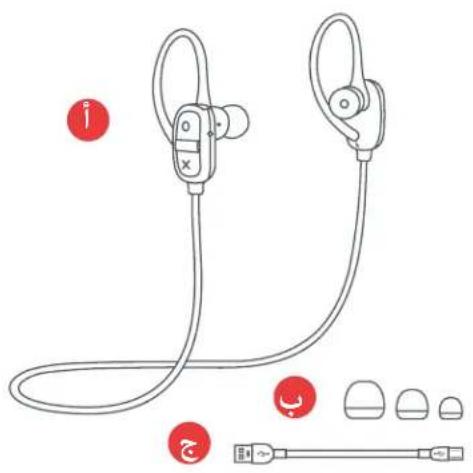
B - 3 sets of ear tips
C - USB cable
D - Quick-Start Guide
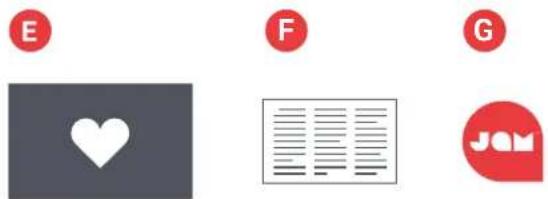
E - Welcome card
F - Legal card
G - Jam sticker
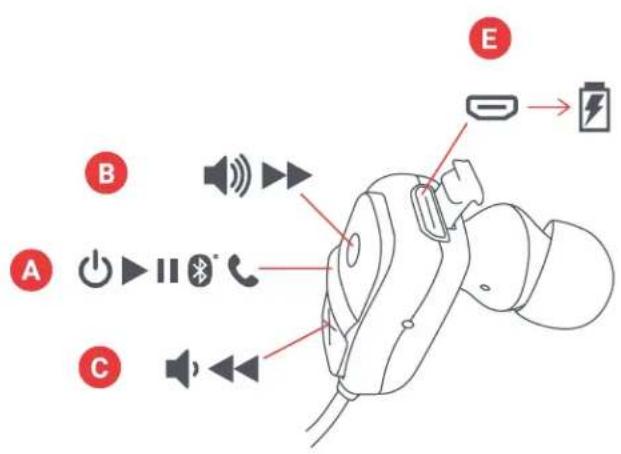
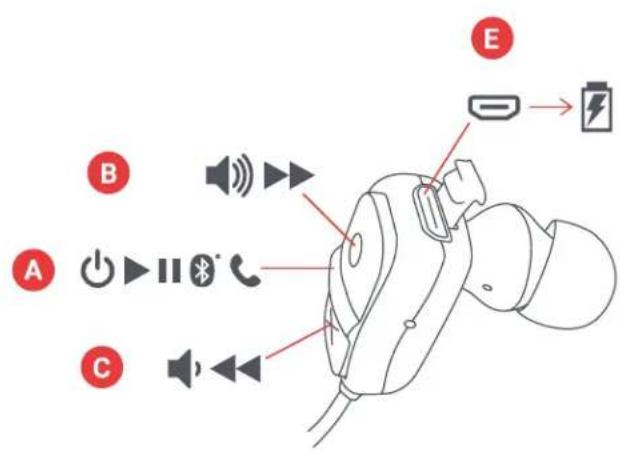
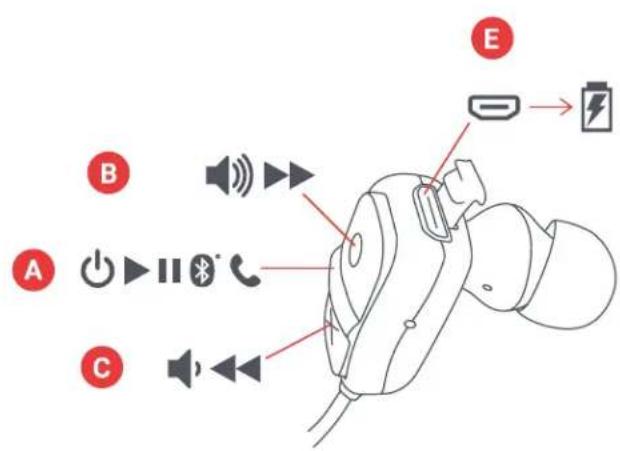
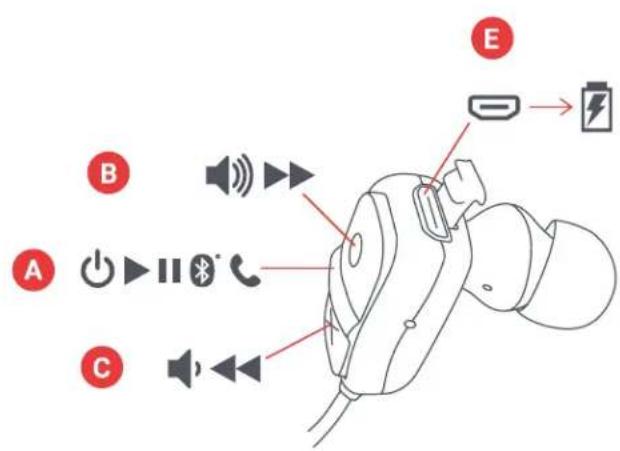
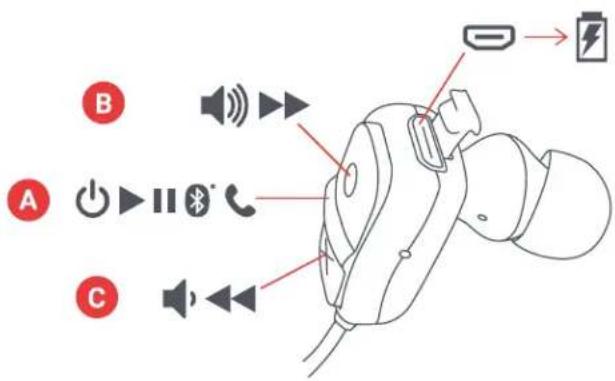
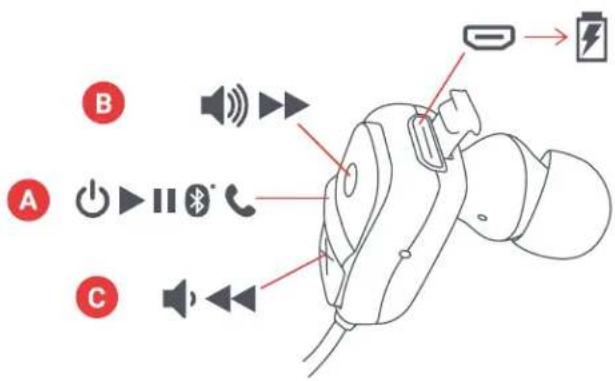
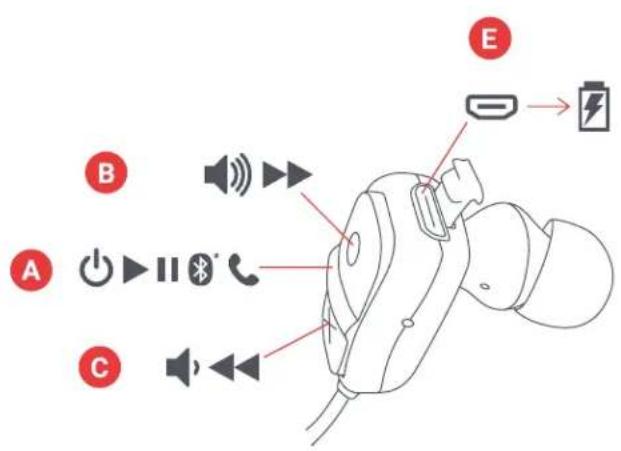
CONTROLS
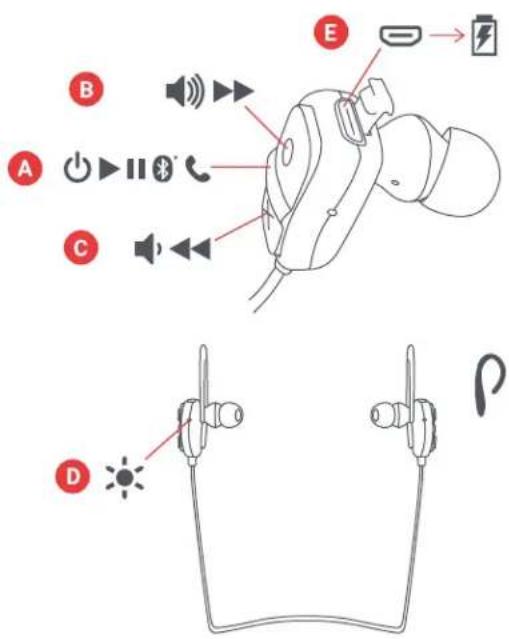
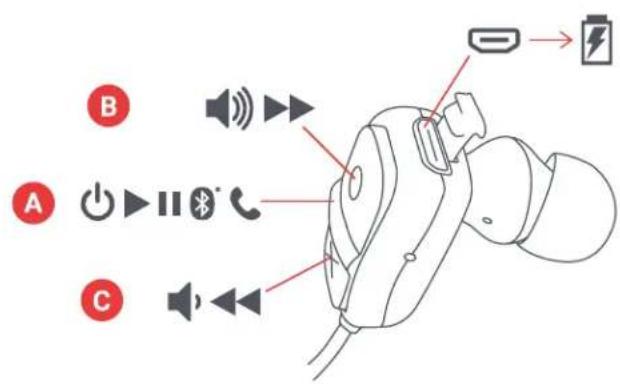
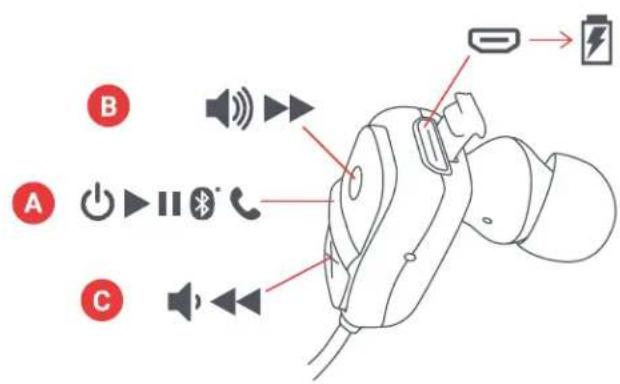
A - Power on/off/play/pause button
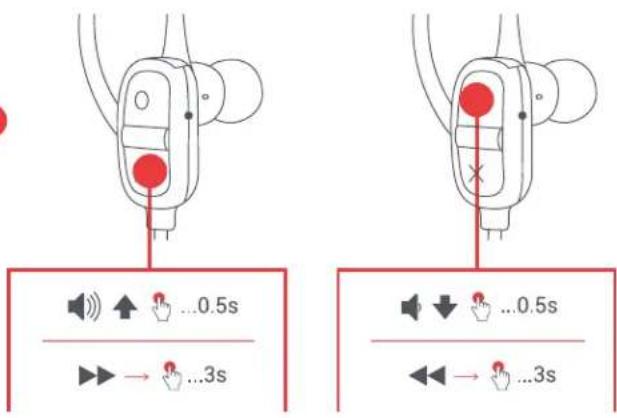
B - Volume up/next track
C - Volume down/previous track
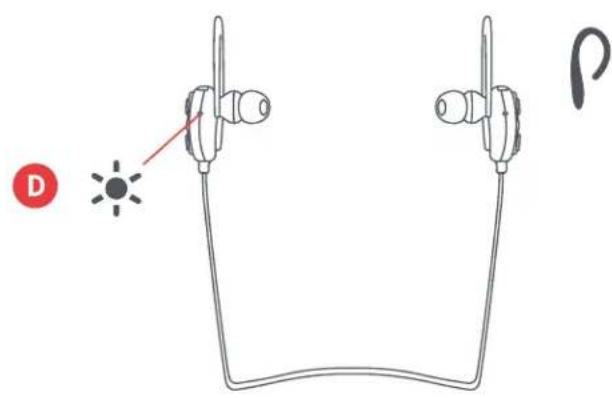
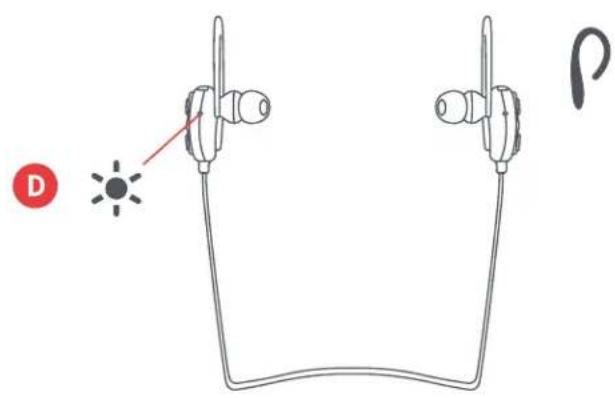
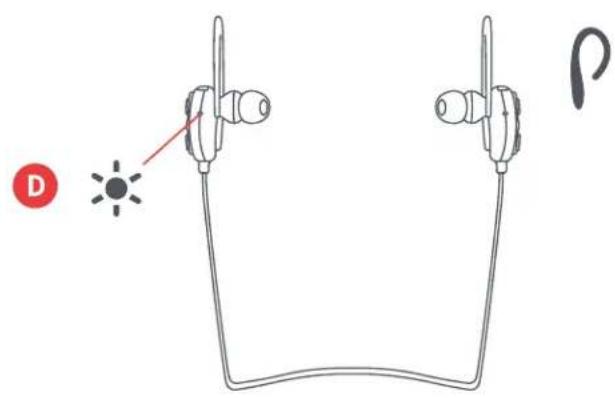
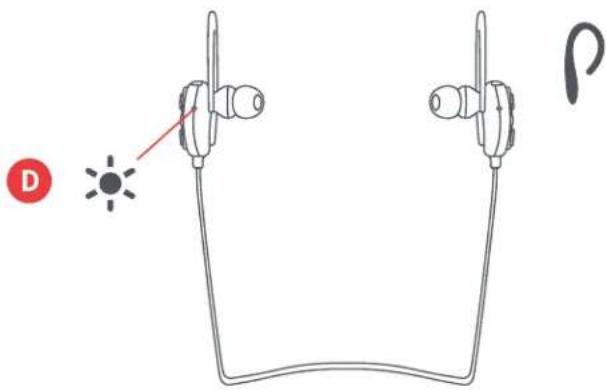
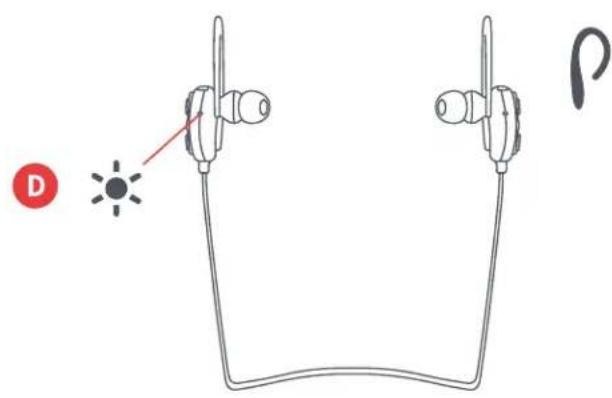
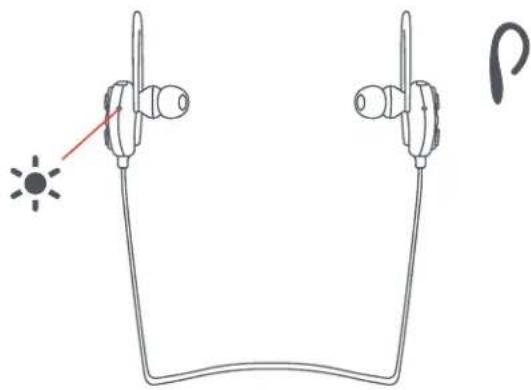
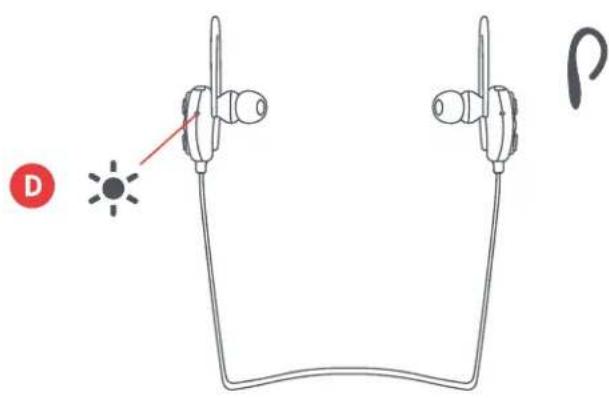
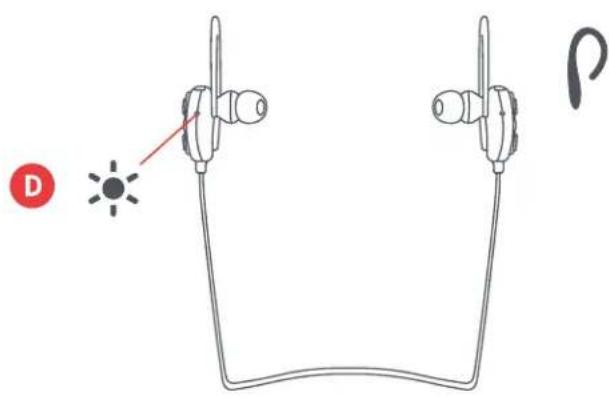
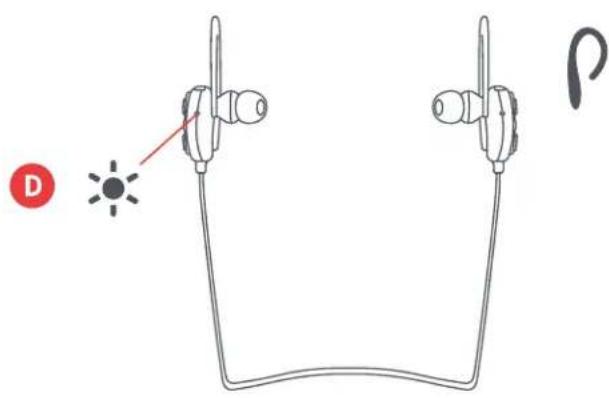
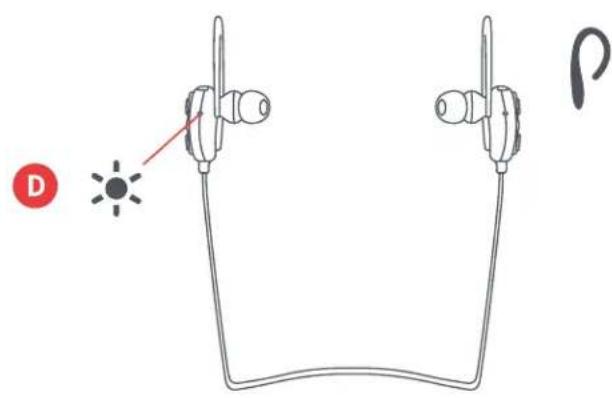
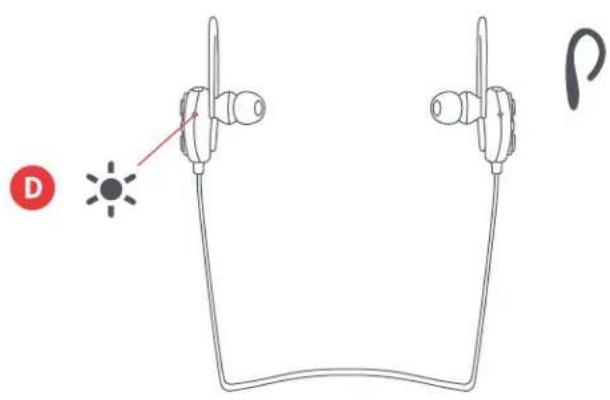
D - LED light indicator
E - Aux-in port
SET UP
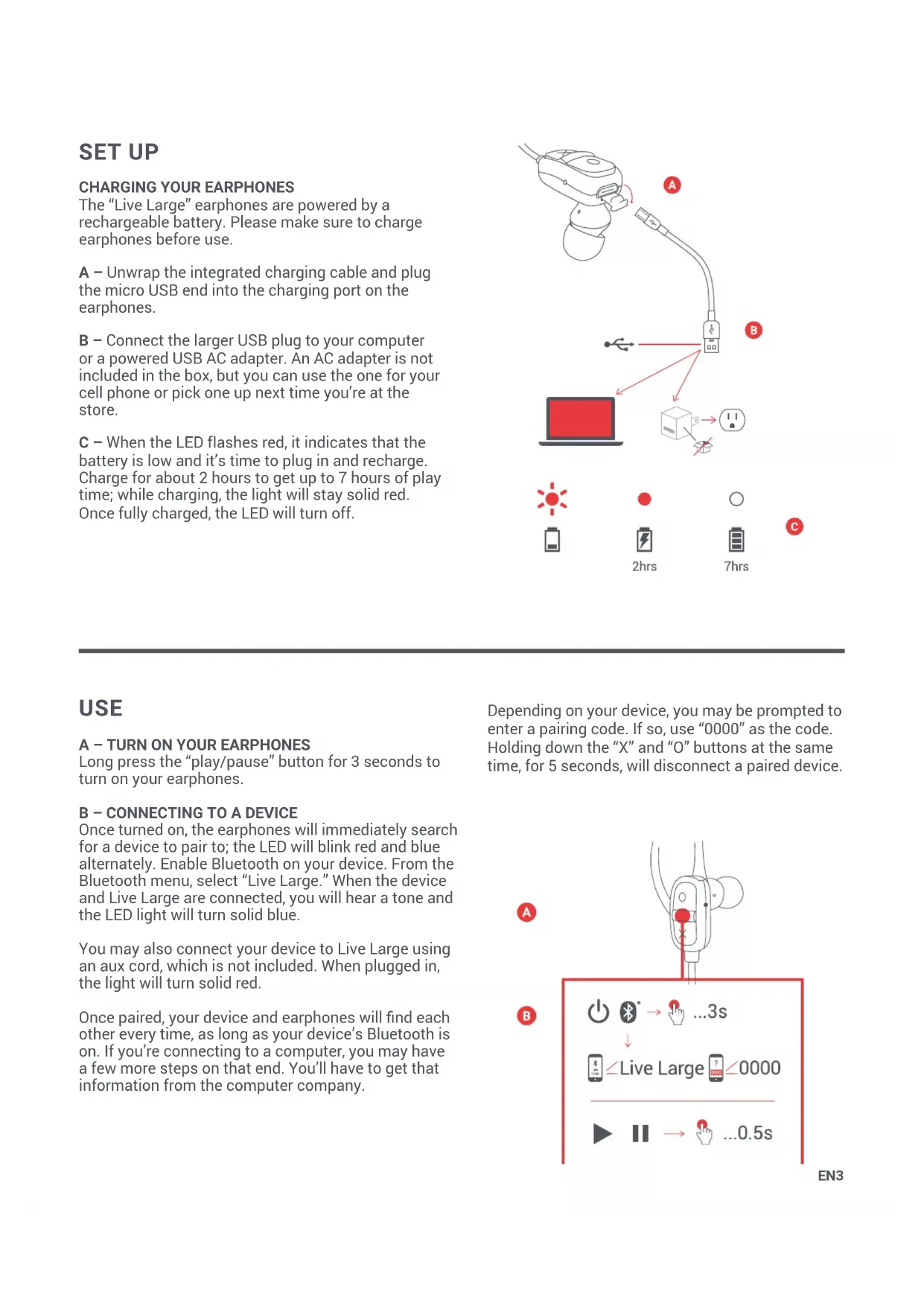
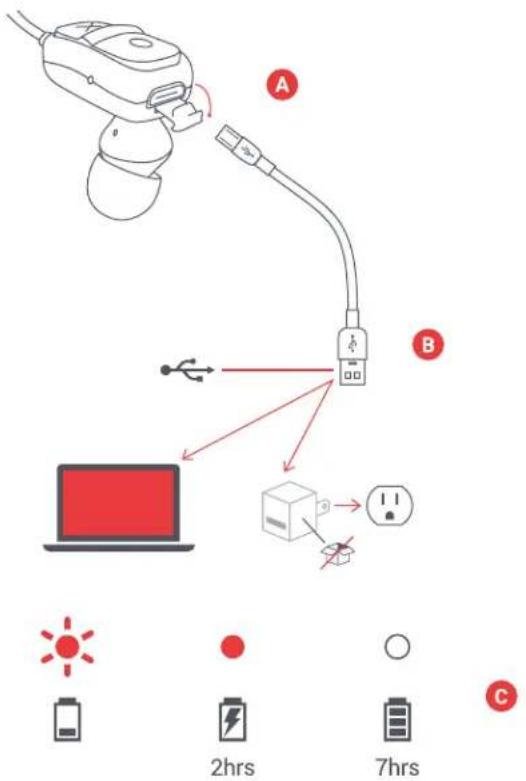
The "Live Large" earphones are powered by a rechargeable battery. Please make sure to charge earphones before use.
A – Unwrap the integrated charging cable and plug the micro USB end into the charging port on the earphones.
B – Connect the larger USB plug to your computer or a powered USB AC adapter. An AC adapter is not included in the box, but you can use the one for your cell phone or pick one up next time you're at the store.
C – When the LED flashes red, it indicates that the battery is low and it's time to plug in and recharge. Charge for about 2 hours to get up to 7 hours of play time; while charging, the light will stay solid red. Once fully charged, the LED will turn off.
USE
Long press the "play/pause" button for 3 seconds to turn on your earphones.
B - CONNECTING TO A DEVICE
Once turned on, the earphones will immediately search for a device to pair to; the LED will blink red and blue alternately. Enable Bluetooth on your device. From the Bluetooth menu, select "Live Large." When the device and Live Large are connected, you will hear a tone and the LED light will turn solid blue.
You may also connect your device to Live Large using an aux cord, which is not included. When plugged in, the light will turn solid red.
Once paired, your device and earphones will find each other every time, as long as your device's Bluetooth is on. If you're connecting to a computer, you may have a few more steps on that end. You'll have to get that information from the computer company.
Depending on your device, you may be prompted to enter a pairing code. If so, use "0000" as the code. Holding down the "X" and "O" buttons at the same time, for 5 seconds, will disconnect a paired device.
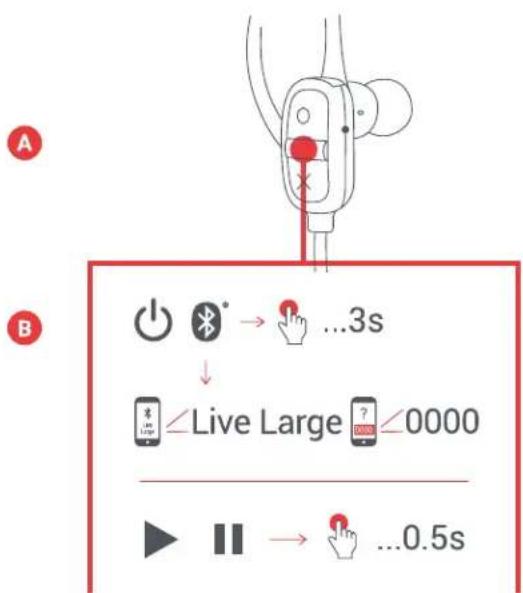
flowchart
graph TD
    A["Power Battery"] --> B["Bluetooth"]
    B --> C["...3s"]
    C --> D["Live Large"]
    D --> E["? 0000"]
    E --> F["...0.5s"]
C - BUTTON FUNCTION
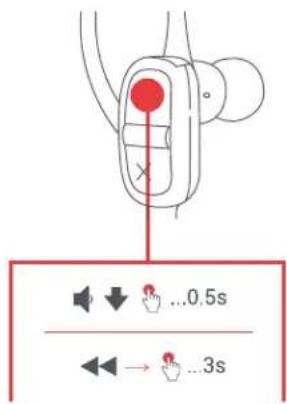
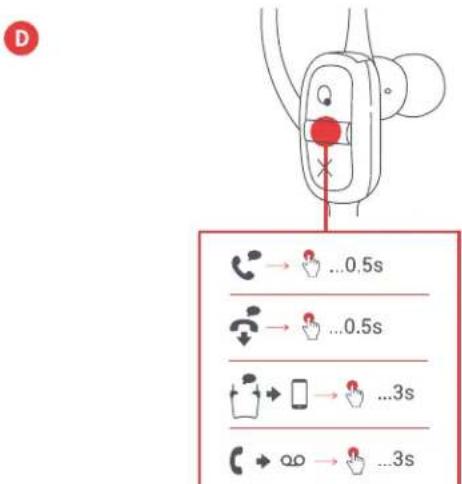
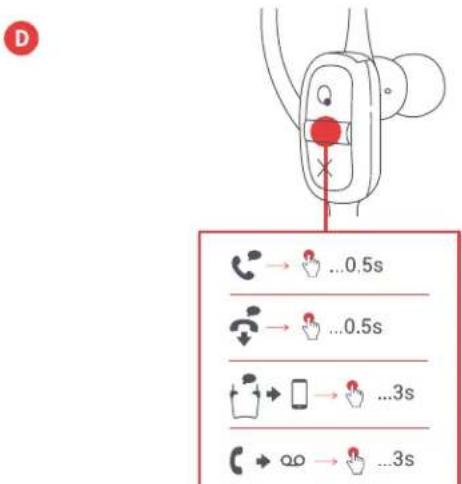
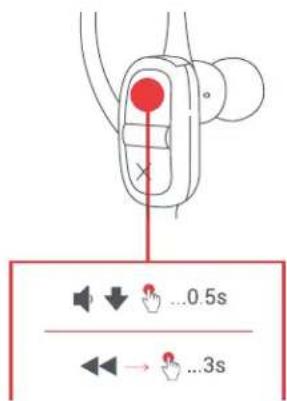
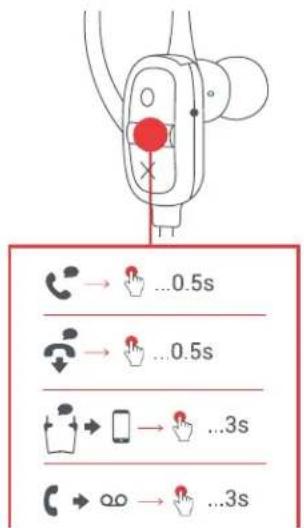
Short press the "play/pause" button for 0.5 seconds to play your music. To increase the volume, short press the "O" button; to lower the volume, short press the "X" button. To skip forward a track, long press the "O" button; to skip back a track, long press the "X" button.
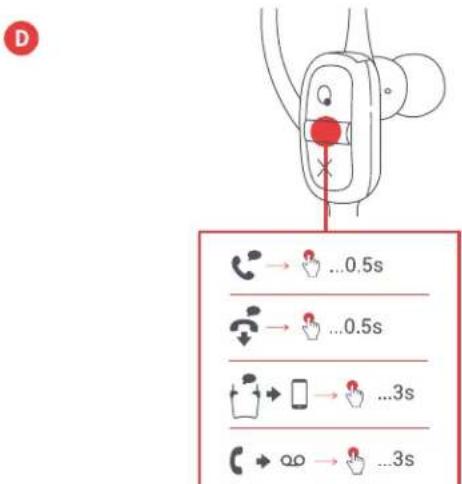
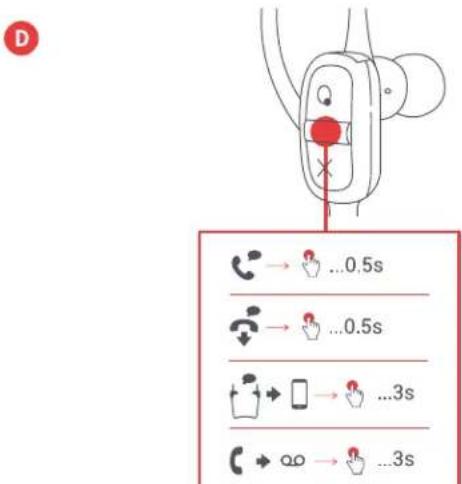
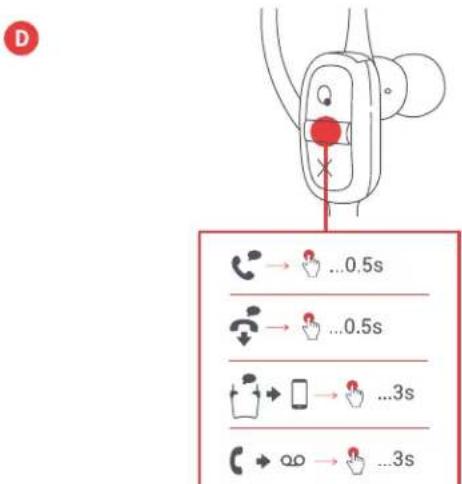
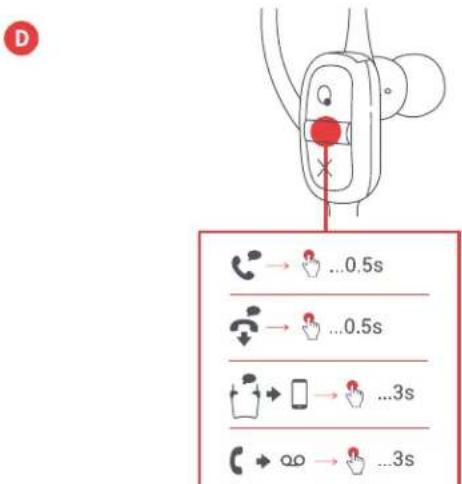
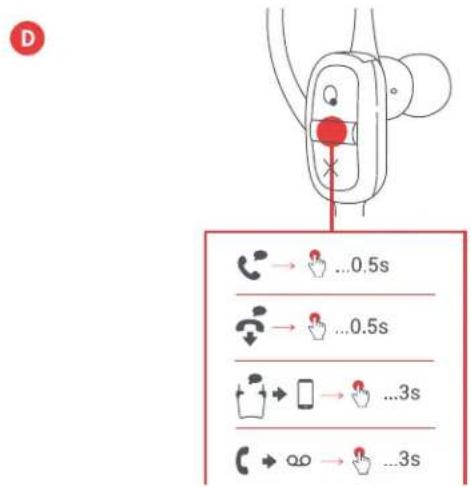
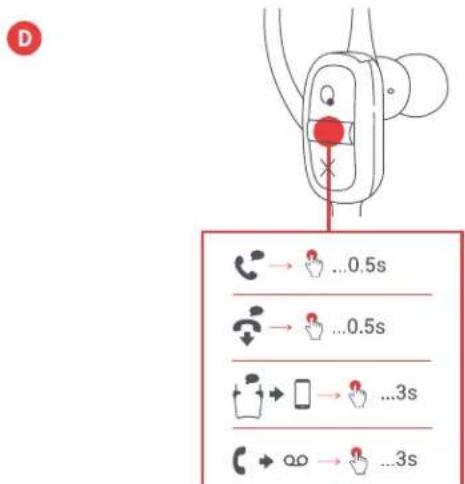
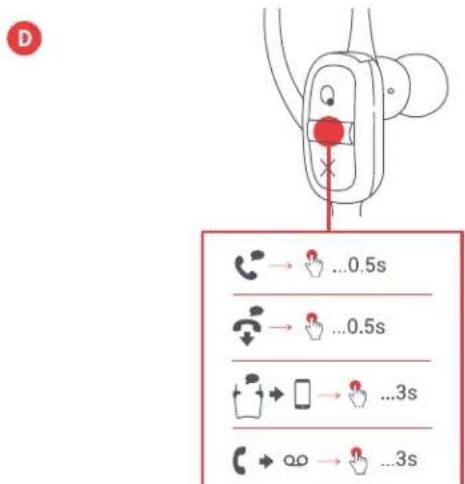
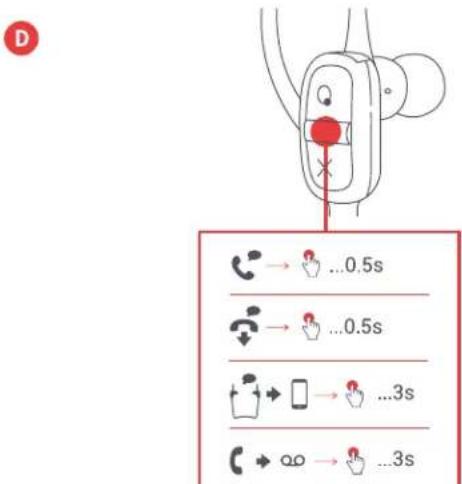
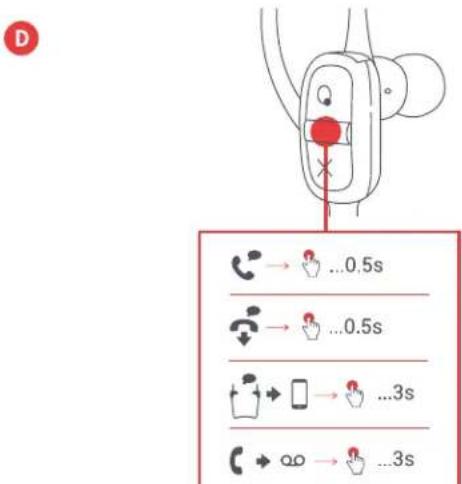
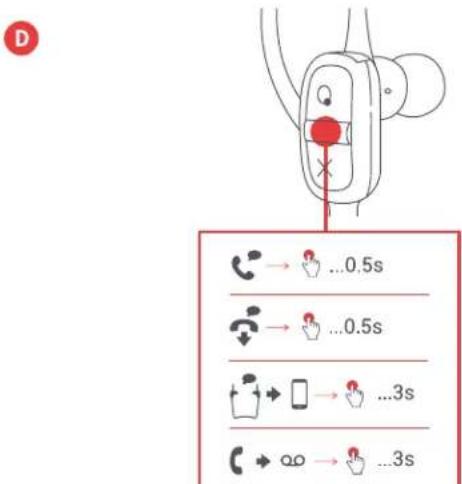
D - CALL HANDLING
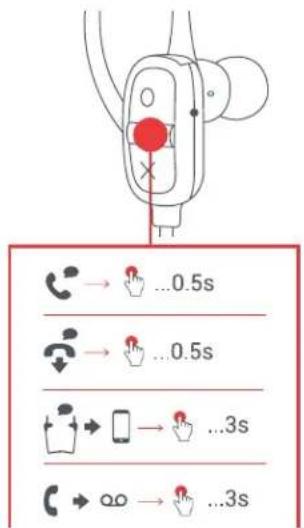
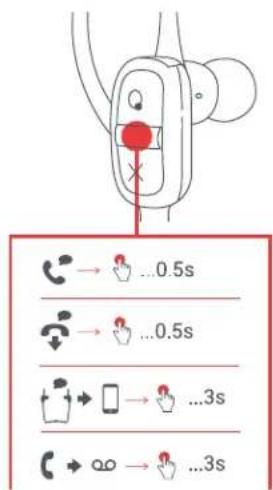
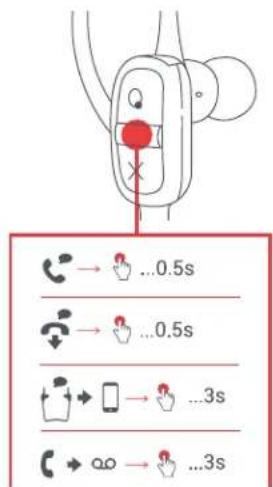
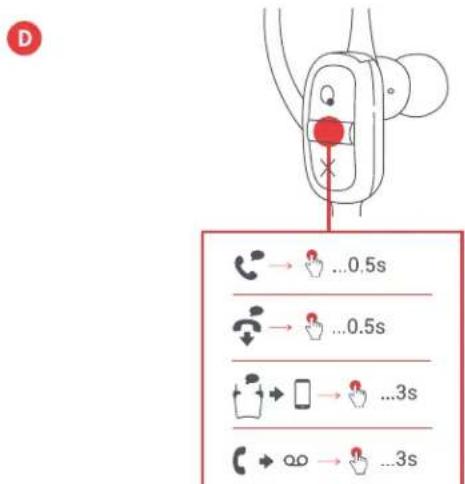
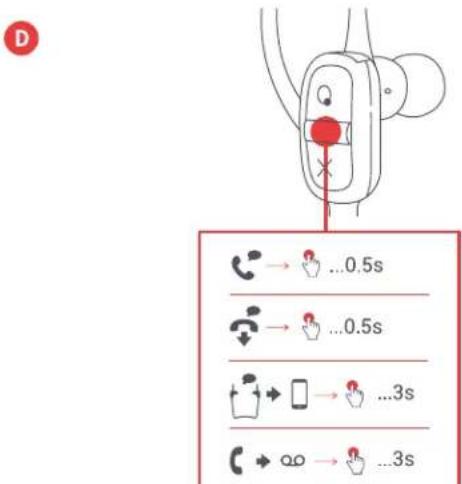
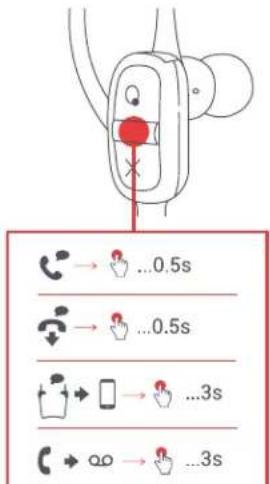
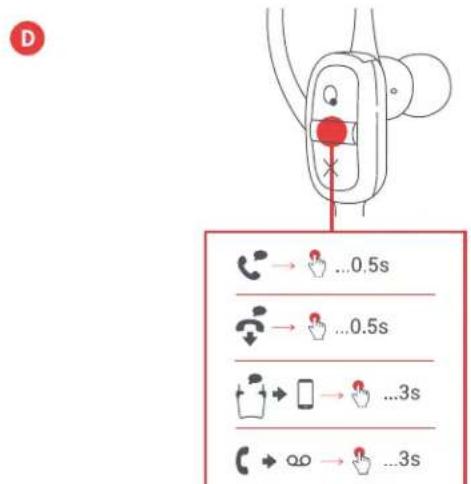
While rocking out to your music, if a call comes in, short press the "play/pause" button to pick up a call; short press again when you're done, to hang up.
While on a call, if you want to make it private, long press the "play/pause" button to move the call from the earphones to your phone.
If a call comes in and you don't want to pick it up, long press the "play/pause" button to send the call to voicemail.
*See the tables below for complete button function and LED light indicator interpretation.
C
D
LED INDICATORS
CHARGING
| Low batteryRed flash every 5 seconds | Short press play/pause buttonPlay/Pau | ||
| ChargingSolid red | Short press O buttonVolume up | ||
| Charging completeLED off | Short press X buttonVolume down |
IN USE
| Pairing modeFlashing blue and red | Short press X buttonSkip backward a tra | |
| Paired with deviceBlue flash every 5 seconds | CALLS |
BASIC FUNCTIONS
POWER
| Long press play/pause buttonPowercall/off | Long press play/pause buttonDecline a |
LEGAL INFORMATION
READ ALL INSTRUCTIONS BEFORE USE AND SAVE THESE INSTRUCTIONS FOR FUTURE REFERENCE.
FCC Warning:
This equipment has been tested and found to comply with the limits for a Class B digital device, pursuant to Part 15 of the FCC Rules. These limits are designed to provide reasonable protection against harmful interference in a residential installation. This equipment generates, uses, and can radiate radio frequency energy and, if not installed and used in accordance with the instructions, may cause harmful interference to radio communications. However, there is no guarantee that interference will not occur in a particular installation. If this equipment does cause harmful interference to radio or television reception, which can be determined by turning the equipment off and on, the user is encouraged to try to correct the interference by one or more of the following measures:
- Reorient or relocate the receiving antenna.
- Increase the separation between the equipment and receiver.
- Connect the equipment into an outlet on a circuit different from that to which the receiver is connected.
- Consult the dealer or an experienced radio/TV technician for help.
Any changes or modifications not expressly approved by the party responsible for compliance could void the user's authority to operate the equipment.
This device complies with Part 15 of the FCC Rules. Operation is subject to the following two conditions:
(1) This device may not cause harmful interference, and
(2) This device must accept any interference received, including interference that may cause undesired operation.
FCC RF Exposure Statement:
This equipment complies with FCC radiation exposure limits set forth for an uncontrolled environment. This transmitter must not be co-located or operating in conjunction with any other antenna or transmitter.
ISEDC Caution:
This device complies with Innovation, Science, and Economic Development Canada licence-exempt RSS standard(s). Operation is subject to the following two conditions:
(1) This device may not cause interference, and
(2) This device must accept any interference, including interference that may cause undesired operation of the device.
ISEDC RF Exposure Statement:
The device is in compliance with RF exposure guidelines; users can obtain Canadian information on RF exposure and compliance.
1-YEAR LIMITED WARRANTY – US & CANADA
WARRANTY - US & CANADA
JAM warrants this product free from defect in material and workmanship for a period of 1 year from the date of purchase. This warranty does not cover damage caused by misuse or abuse, accident, the attachment of any unauthorized accessory, alteration to the product, or any other conditions whatsoever that are beyond the control of JAM.
For detailed Warranty instructions and information, visit: www.jamaudio.com/customer-support/warranty-1yr. To obtain warranty service on your JAM product, contact a Consumer Relations representative by the telephone number or email address for your country of residence. Please make sure to have the model number of the product available.
For service in the USA Email: cservice@jamaudio.com Tel: 1-888-802-0040 8:30am-7:00pm EST M-F
For service in Canada
Email:
cservice@homedicsgroup.ca
Tel: 1-888-225-7378
8:30am-5:00pm EST M-F
For service in Australia Email: cservice@homedics.com.au Tel: 03 87566500 8:30am-5:00pm AEST M-F www.jam-audio.com.au
WARRANTY – UK & EUROPE
JAM warrants this product free from defect in material and workmanship for a period of 2 years from the date of purchase. This warranty does not cover damage caused by misuse or abuse, accident, the attachment of any unauthorised accessory, alteration to the product, or any other conditions whatsoever that are beyond the control of JAM. Distributed in the EU by FKA Brands Ltd, Somerhill Business Park, Tonbridge, TN11 0GP, UK. Tel: 020 3538 0768 Email: uksupport@jamaudio.com.
WARRANTY - AUSTRALIA
(1-YEAR LIMITED WARRANTY)
We or Us means HoMedics Australia Pty Ltd ACN 31 103 985 717 and our contact details are set out at the end of this warranty; You means the purchaser or the original end-user of the Goods. You may be a domestic user or a professional user; Supplier means the authorized distributor or retailer of the Goods that sold you the Goods in Australia and New Zealand; and Goods means the product or equipment which was accompanied by this warranty and purchased in Australia and New Zealand.
For Australia:
Our Goods come with guarantees that cannot be excluded under the Australian Consumer Law. You are entitled, subject to the provisions of the Australian Consumer Law, to a replacement or refund for a major failure and for compensation for any other reasonably foreseeable loss or damage. You are also entitled, subject to the provisions of the Australian Consumer Law, to have the Goods repaired or replaced if the goods fail to be of acceptable quality and the failure does not amount to a major failure. This is not a complete statement of your legal rights as a consumer.
For New Zealand:
Our Goods come with guarantees that cannot be excluded under the Consumer Guarantees Act 1993. This guarantee applies in addition to the conditions and guarantees implied by that legislation.
The Warranty
HoMedics sells its products with the intent that they are free of defects in manufacture and workmanship under normal use and service. In the unlikely event that your HoMedics product proves to be faulty within 1 year from the date of purchase due to workmanship or materials only, we will replace it at our own expense, subject to the terms and conditions of this guarantee. The warranty period is limited to 3 months from the date of purchase for products used commercially/professionally.
Terms and Conditions:
In addition to the rights and remedies that you have under the Australian Consumer Law, Consumer Guarantees Act of New Zealand or any other applicable law and without excluding such rights and remedies warranty against defects:
-
The Goods are designed to withstand the rigors of normal household use and are manufactured to the highest standards using the highest quality components. Whilst unlikely, if, during the first 12 months (3 months commercial use) from their date of purchase from the Supplier (Warranty Period), the Goods prove defective by reason of improper workmanship or materials and none of your statutory rights or remedies apply, we will replace the Goods, subject to the terms and conditions of this warranty.
-
We do not have to replace the Goods under this Additional Warranty if the Goods have been damaged due to misuse or abuse, accident, the attachment of any unauthorised accessory, alteration to the product, improper installation, unauthorised repairs or modifications, improper use of electrical/power supply, loss of power, malfunction, or damage of an operating part from failure to provide manufacturer's recommended maintenance, transportation damage, theft, neglect, vandalism, environmental conditions, or any other conditions whatsoever that are beyond the control of HoMedics.
-
This Warranty does not extend to the purchase of used, repaired, or secondhand products, or to products not imported or supplied by HoMedics Australia Pty Ltd, including but not limited to those sold on offshore internet auction sites.
-
This Warranty extends only to consumers and does not extend to Suppliers.
-
Even when we do not have to replace the Goods, we may decide to do so anyway. In some cases, we may decide to substitute the Goods with a similar alternative product of our choosing. All such decisions are at our absolute discretion.
-
All such replaced or substituted Goods continue to receive the benefit of this Additional Warranty for the time remaining on the original Warranty Period (or 3 months, whichever is the longest).
-
This Additional Warranty does not cover items damaged by normal wear and tear, including but not limited to chips, scratches, abrasions, discolouration, and other minor defects, where the damage has negligible effect on the operation or performance of the Goods.
-
This Additional Warranty is limited to replacement or substitution only. As far as the law permits, we will not be liable for any loss or damage caused to property or persons arising from any cause whatsoever, and shall have no liability for any incidental, consequential, or special damages.
-
This warranty is only valid and enforceable in Australia and New Zealand.
Making a Claim:
In order to claim under this Warranty, you must return the Goods to the Supplier (place of purchase) for replacement. If this is not possible, please contact our Consumer Relations department by email (cservice@homedics.com.au) or at the address below.
- All returned Goods must be accompanied by satisfactory proof of purchase that clearly indicates the name and address of the Supplier, the date and place of purchase, and identifies the product. It is best to provide an original, legible, and unmodified receipt or sales invoice.
- You must bear any expense for return of the Goods or otherwise associated with making your claim under this Additional Warranty.
Distributed in Australia by HOMEDICS AUSTRALIA PTY LTD, 14 Kingsley Close, Rowville, Victoria 3178. Distributed in New Zealand by Phoenix Distribution NZ Ltd, 7B Orbit Drive, Albany / North Shore 0757, Auckland, New Zealand.
IMPORTANT SAFETY INSTRUCTIONS
READ ALL INSTRUCTIONS BEFORE USING.
WARNING: Listen responsibly. To avoid hearing damage, make sure the volume on your device is turned down before connecting earphones. After placing earphones on your ears, gradually turn up the volume until you reach a comfortable listening volume.
- Use this product only for its intended purpose as described in this manual. Do not use attachments not recommended by Jam.
- Jam is not liable for any damage caused to smartphones, iPod/MP3 players, or any other devices.
- Do not place or store this product where it can fall or be dropped into a tub or sink.
- Do not place or drop into water or any other liquid.
• Not for use by children. THIS IS NOT A TOY.
- Never operate this product if it has a damaged cord, plug, cable, or housing.
- Keep away from heated surfaces.
- Only set on dry surfaces. Do not place on surface wet from water or cleaning solvents.
WARNING: This product has an internal, non-replaceable lithium battery. Please dispose in accordance with your local, state, province, and country guidelines. Batteries (battery pack or batteries installed) shall not be exposed to excessive heat such as sunshine, fire, or the like.
BATTERY REPLACEMENT
Your headphones includes a rechargeable battery designed to last the lifetime of the product. In the unlikely event that you should require a replacement battery, please contact Consumer Relations, which will supply details of the warranty and out-of-warranty replacement battery service. This product contains small parts that may present a choking hazard for young children.
CAUTION: All servicing of this product must be performed by authorized Jam Audio service personnel only. For complete user guide and to register your product, visit www.jamaudio.com (USA), canada.jamaudio.com (Canada), or uk.jamaudio.com/ instructionbooks (UK).

To prevent possible hearing damage, do not listen at high volume for long periods.

WEEE EXPLANATION
This marking indicates that this product should not be disposed with other household wastes throughout the EU.
To prevent possible harm to the environment or human health from uncontrolled waste disposal, recycle it responsibly to promote the sustainable reuse of material resources.

BATTERY DIRECTIVE
This symbol indicates that batteries must not be disposed of in the domestic waste as they contain substances that can be damaging to the environment and health. Please dispose of batteries in designated collection points.
Hereby, FKA Brands Ltd declares that this radio device is in compliance with the essential requirements and other relevant provisions of Directive 2014/53/EU. A copy of the Declaration of Conformity can be obtained from uk.jamaudio.com/DoC.
© 2018 HMDX. All rights reserved. JAM is a registered trademark of HMDX. HMDX is a registered trademark of FKA Distributing Co. The Bluetooth® word mark and logos are registered trademarks owned by Bluetooth SIG, Inc. and any use of such marks by HMDX is under license.



Operating frequency band: 2402 - 2480MHz
HX-P303: Maximum radio-frequency power transmitted: 6.53dBm
Distributed by HMDX.
3000 N Pontiac Trail
Commerce Township, MI 48390
All rights reserved.
IB-EP303
JOM ^TM
"Live Large"
HX-EP303
COMMANDES

UTILISATION
A - MISE EN MARCHE DES ÉCOUTEURS
VOYANTS À DEL
CHARGE
MODO DE USO
A - ENCIENDA SUS AUDÍFONOS
INDICADORES LED
CARGANDO
GEBRAUCH
A - EINSCHALTEN IHRER OHRHÖRER
LED-ANZEIGEN
LADEN
BEDIENING
GEBRUIK
A - UW OORTELEFOONS INSCHAKELEN
LED-INDICATOREN
OPLADEN
| seconden | batterij is bijna leegRood lampje |
| OpladenOnonderbroken rood | |
| Opladen voltooidLED Uit |
IN GEBRUIK
STYREFUNKTIONER
ANVENDELSE
A - SLUKNING AF H∅RETELEFONERNE
LYSDIODEINDIKATRER
OPLADNING
USO
A - ACCENSIONE DEGLI AURICOLARI
SPIE LED
CARICA
KÄYTTÖ
A - VIRRAN KYTKEMINEN KUULOKKEISIIN
C - PAINIKETOIMINNOT
LED-MERKKIVALOT
LATAA
KULLANIM
A - KULAKLIKLARINIZI AÇIN
LED GÖSTERGELERİ
ŞARJ ETME
ANVÄNDNING
A - AKTIVERING AV DINA HÖRLURAR
LED-INDIKATORER
LADDAR
ЭЛЕМЕНТЫ УПРАВЛЕНИЯ
A — наушники
D
СИГНАЛЫ СВЕТОДИОДА
ЗАРЯДКА
natural_image
Line drawing of a two-band wireless earbuds with attached cable, labeled C and B (no text or symbols on the devices themselves)D
E

F
G

A - ørepropper
B – tre sett med øretupper
C - USB-kabel
D - hurtigveiledning
E - velkomstkort
F – kort med rettslig informasjon
G - JAM-klistremerke
KONTROLLER
BRUK
A - SLÅ PÅ ∅REPROPPENE
C - KNAPPEFUNKSJON
LED-INDIKATORER
LADER
natural_image
Line drawing of a two-band wireless earbuds with attached cable, labeled C and B (no text or symbols on the devices themselves)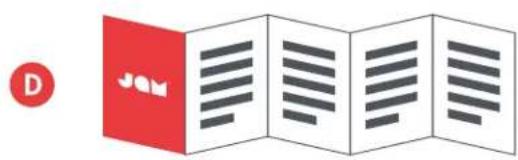
ΧΕΙΡΙΣΤΗΡΙΑ
ΧΡΗΣΗ
D
ΕΝΔΕΙΞΕΙΣ LED
ΦΟΡΤΙΣΗ
natural_image
Line drawing of a two-band wireless earbuds with attached cable, labeled C and B (no text or symbols on the devices themselves)D
E

F
G

OVLÁDACÍ PRVKY
D
natural_image
Diagram of a car hood with earphones and a sun icon, no text or symbols presentPOUŽITÍ
A - ZAPNUTÍ SLUCHÁTEK
INDIKÁTORY LED
NABÍJENÍ
DŮLEŽITÉ POKYNY TÝKAJÍCÍ SE BEZPEČNOSTI
PŘED POUŽITÍ SI PŘEČTĚTE VŠECHNY POKYNY
natural_image
Line drawing of a wireless earbuds with labeled components (no text or symbols on the device itself)
HASZNÁLAT
A - FÜLHALLGATÓK BEKAPCSOLÁSA
LED KIJELZÖK
TÖLTÉS
natural_image
Line drawing of a two-board wireless earbuds with attached microphone and connector (no text or symbols)
USO
A - LIGUE SEUS FONES DE OUVIDO
INDICADORES DE LED
CARREGANDO
natural_image
Line drawing of a two-band wireless earbuds with attached cable, labeled C and B (no text or symbols on the devices themselves)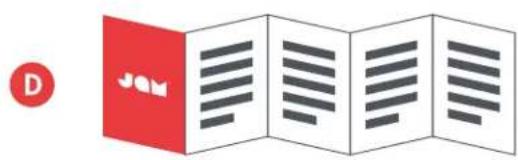
POUŽITIE
A - ZAPNUTIE SLÚCHADIEL
INDIKÁTORY LED
NABÍJANIE
DÔLEŽITÉ BEZPEČNOSTNÉ POKYNY
VŠETKY POKYNY SI PREČÍTAJTE PRED POUŽITÍM.
natural_image
Line drawing of a two-band wireless earbuds with attached cable, labeled C and B (no text or symbols on the devices themselves)
UTILIZARE
A - PORNIREA CĂSTILOR
INDICATORI LED
ÎNCĂRCARE
natural_image
Line drawing of a two-band wireless earbuds with attached cable, labeled C and B (no text or symbols on the devices themselves)
UŻYCIE
A - WŁĄCZ SŁUCHAWKI
D
WSKAŹNIKI LED
ŁADOWANIE

[Non-Text]
[Non-Text]

9
j

الإعداد
شحن سماعات الأدن
natural_image
Line drawing of a two-band wireless earbuds with attached cable, labeled C and B (no text or symbols on the devices themselves)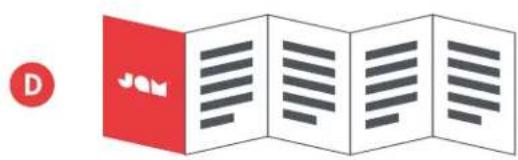
조작부
A-이어폰
B-이어팀 3세트
C-USB케이블
D-빠른 시작 가이드
E-환영 카드
F-법률 카드
G-Jam 스티커
사용
A-이어폰 켜기
C-버튼 기능
LED 표시등
충전 중
控制
使用
A - 啟動耳機
D
LED顯示燈
充電
출력 (Output Power): 0.03Mw/MHz
변조 형식 (Modulation Type): GFSK, π/4-DQPSK, 8DPSK
전원 (Power Supply): 3.7 V from battery



- CONTROLS
- SET UP
- USE
- B - CONNECTING TO A DEVICE
- C - BUTTON FUNCTION
- D - CALL HANDLING
- LED INDICATORS
- BASIC FUNCTIONS
- LEGAL INFORMATION
- READ ALL INSTRUCTIONS BEFORE USE AND SAVE THESE INSTRUCTIONS FOR FUTURE REFERENCE.
- FCC Warning:
- FCC RF Exposure Statement:
- ISEDC Caution:
- ISEDC RF Exposure Statement:
- 1-YEAR LIMITED WARRANTY – US & CANADA
- WARRANTY - US & CANADA
- For service in Canada
- WARRANTY – UK & EUROPE
- WARRANTY - AUSTRALIA
- (1-YEAR LIMITED WARRANTY)
- For Australia:
- For New Zealand:
- The Warranty
- Terms and Conditions:
- Making a Claim:
- IMPORTANT SAFETY INSTRUCTIONS
- READ ALL INSTRUCTIONS BEFORE USING.
- WARNING: This product has an internal, non-replaceable lithium battery. Please dispose in accordance with your local, state, province, and country guidelines. Batteries (battery pack or batteries installed) shall not be exposed to excessive heat such as sunshine, fire, or the like.
- BATTERY REPLACEMENT
- WEEE EXPLANATION
- BATTERY DIRECTIVE
- JOM TM
- "Live Large"
- COMMANDES
- UTILISATION
- A - MISE EN MARCHE DES ÉCOUTEURS
- VOYANTS À DEL
- MODO DE USO
- A - ENCIENDA SUS AUDÍFONOS
- INDICADORES LED
- GEBRAUCH
- A - EINSCHALTEN IHRER OHRHÖRER
- LED-ANZEIGEN
- BEDIENING
- GEBRUIK
- A - UW OORTELEFOONS INSCHAKELEN
- LED-INDICATOREN
- STYREFUNKTIONER
- ANVENDELSE
- A - SLUKNING AF H∅RETELEFONERNE
- LYSDIODEINDIKATRER
- USO
- A - ACCENSIONE DEGLI AURICOLARI
- SPIE LED
- KÄYTTÖ
- A - VIRRAN KYTKEMINEN KUULOKKEISIIN
- C - PAINIKETOIMINNOT
- LED-MERKKIVALOT
- KULLANIM
- A - KULAKLIKLARINIZI AÇIN
- LED GÖSTERGELERİ
- ANVÄNDNING
- A - AKTIVERING AV DINA HÖRLURAR
- LED-INDIKATORER
- ЭЛЕМЕНТЫ УПРАВЛЕНИЯ
- СИГНАЛЫ СВЕТОДИОДА
- KONTROLLER
- BRUK
- A - SLÅ PÅ ∅REPROPPENE
- C - KNAPPEFUNKSJON
- ΧΕΙΡΙΣΤΗΡΙΑ
- ΧΡΗΣΗ
- ΕΝΔΕΙΞΕΙΣ LED
- OVLÁDACÍ PRVKY
- POUŽITÍ
- A - ZAPNUTÍ SLUCHÁTEK
- INDIKÁTORY LED
- DŮLEŽITÉ POKYNY TÝKAJÍCÍ SE BEZPEČNOSTI
- PŘED POUŽITÍ SI PŘEČTĚTE VŠECHNY POKYNY
- HASZNÁLAT
- A - FÜLHALLGATÓK BEKAPCSOLÁSA
- LED KIJELZÖK
- A - LIGUE SEUS FONES DE OUVIDO
- INDICADORES DE LED
- POUŽITIE
- A - ZAPNUTIE SLÚCHADIEL
- DÔLEŽITÉ BEZPEČNOSTNÉ POKYNY
- VŠETKY POKYNY SI PREČÍTAJTE PRED POUŽITÍM.
- UTILIZARE
- A - PORNIREA CĂSTILOR
- INDICATORI LED
- UŻYCIE
- A - WŁĄCZ SŁUCHAWKI
- WSKAŹNIKI LED
- 조작부
- 사용
- C-버튼 기능
- LED 표시등
- 控制
- 使用
- LED顯示燈
Brand : JAM
Model : Live Large HXEP303
Category : Earplug