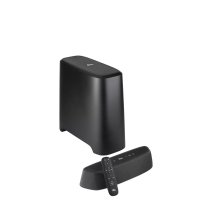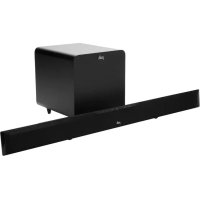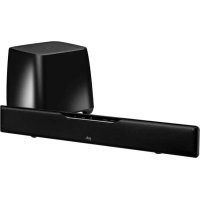
SurroundBar 5000 - Soundbar POLK - Free user manual and instructions
Find the device manual for free SurroundBar 5000 POLK in PDF.



User questions about SurroundBar 5000 POLK
0 question about this device. Answer the ones you know or ask your own.
Ask a new question about this device
Download the instructions for your Soundbar in PDF format for free! Find your manual SurroundBar 5000 - POLK and take your electronic device back in hand. On this page are published all the documents necessary for the use of your device. SurroundBar 5000 by POLK.
USER MANUAL SurroundBar 5000 POLK
IMPORTANT SAFETY INSTRUCTIONS
This product was designed and manufactured to meet strict quality and safety standards. There are, some installation and operation precautions which you should be particularly aware of.
- Read Instructions. All the safety and operating instructions should be read before the system is
- Retain Instructions. The safety and operating instructions should be retained for future reference.
- Heed Warnings. All warnings on the appliances and in the operating instructions should be adhered
- Follow Instructions. All operating and use instructions should be followed.
-
Cleaning. Unplug the appliance from wall outlet before cleaning. Do not use liquid cleaners or aerosol cleaners. Use a damp cloth for cleaning.
-
Attachments. Do not use attachments not recommended by the product manufacturer as they may cause
-
Water and Moisture. Do not use these appliances near water for example, near a bath tub, with sink, or laundry tub, in a wet basement, or near a swimming pool, and the like.
-
Accessories Do not place these appliances on an unstable cart, stand, tripod, bracket, or table products may fail, causing serious injury to a child or adult, and serious damage to the product a cart, stand, tripod, bracket, or table recommended by the manufacturer, or sold with the apoliar mounting of the appliances should follow the manufacturer's instructions, and should use mounting accessories recommended by the manufacturer.
-
Ventilation: Slots and openings in the cabinet are provided for ventilation and to ensure reliable of the appliances and to protect them from overheating, and these openings must not be blocked. The openings should never be blocked by placing the products on a bed, sofa, rug, or other so this product should never be placed near or over a radiator or heat register. This product should in a built-in installation such as a bookcase or rack unless proper ventilation is provided or the instructions have been adhered to.
-
Power Sources. This product should be operated only from the type of power source indicated marking labels. If you are not sure of the type of power supply to your home, consult your a dealer or local power company.
-
Grounding or Polarization. This product is equipped with polarized alternating-current line plugs (plugs one blade wider than the other). This plug will fit into the power outlet only one way. This is if you are unable to insert the plug fully into the outlet, try reversing the plug. If the plug should still fail to fit, contact your electrician to replace your obsolete outlet. Do not defeat the safety purpose of the
-
Power Cord Protection. Power-supply cord should be routed so that it is not likely to be walked on or pinched by items placed upon or against it, paying particular attention to cords at plugs, convenience receptacles, and the point where they exit from the appliances.
-
Lightning. For added protection for this audio/video product during a lightning storm, or when it is unattended and unused for long periods of time, unplug it from the wall outlet and disconnect to cable system. This will prevent damage to the product due to lightning and power-line surges.
-
Power Lines. An outside antenna system should not be located in the vicinity of overhead power electric light or power circuits, or where it can fall into such power lines or circuits. When inst antenna system, extreme care should be taken to keep from touching such power lines or circuits with them might be fatal.
-
Overloading. Do not overload wall outlets and extension cords as this can result in a risk of fire or electric shock.
-
Object and Liquid Entry. Never push objects of any kind into this product through openings, as the dangerous voltage points or short out parts that could result in a fire or electric shock. Never s of any kind on this audio/video product.
-
Servicing. Do not attempt to service this product yourself, as opening or removing covers may exp you to dangerous voltage or other hazards. Refer all servicing to qualified service personnel.
-
Damage Requiring Service. Unplug this product from wall outlets and refer servicing to qualified service personnel under the following conditions.
a. When the power supply cord or plug is damaged.
b. If liquid has been spilled, or objects have fallen into the product.
c. If the product has been exposed to rain or water.
d. If the product does not operate normally by following the operating instructions. Adjust only those controls that are covered by the operating instructions, as an improper adjustment of other controls may result in damage and will often require extensive work by a qualified technician to restore the product to its normal operation.
e. If the product has been dropped or the cabinet has been damaged.
f. When the product exhibits a distinct change in performance this indicates a need for service.
- Replacement Parts. When replacement parts are required, be sure the service technician has used replacement parts specified by the manufacturer or that the parts have the same characteristics as the original part. Unauthorized substitutions may result in fire, electric shock or other hazards.

CAUTION: Danger of EXPLOSION if battery is incorrectly replaced. Replace only with the same or equivalent type. (CR2025)

WARNING: Do not expose batteries or battery pack to excessive heat such as sunshine, fire or the like.
- Safety Check. Upon completion of any service or repairs to this product, ask the service technician to perform safety checks to determine that the products are in proper operating condition.
- Cars and Stands. The appliances should be used only with a cart or stand that is recommended by the manufacturer. An appliance and cart combination should be moved with cars or parts of excessive force, and uneven surfaces may cause the appliance and cart combination to avoid injury. Use caution when moving the cart/apparatus combination to avoid injury from tip-over time
- This product is not intended for use outdoors.
[Non-Text]
[Non-Text]
m = 311 - [Non-Text]
[Non-Text]
to perform
[Non-Text]
[Non-Text]
[Non-Text]
[Non-Text] - 广力云智慧零售收银系统
[Non-Text]
[Non-Text]
to perform
[Non-Text]
[Non-Text]
[Non-Text]
[Non-Text]
ad
ed
m = 311
m = 311 - 。
[Non-Text]
ian to perform
[Non-Text]
ad
ed
m = 311 - 。
[Non-Text]
[Non-Text]
ad
ed

er,WARNING:DO NOT INGEST BATTERY, CHEMICAL BURN HAZARD
a. The remote control supplied with This product contains a coin/button cell battery. If the coin/ button cell battery is swallowed, it can cause severe internal burns in just 2 hours and can lead to death.
b. Keep new and used batteries away from children. If the battery compartment does not close securely, stop using the product and keep it away from children.
c. If you think batteries might have been swallowed or placed inside any part of the body, seek immediate medical attention.
y cause CAUTION marks shown here are located on the back of yourself/Barn

CAUTION: To prevent electric shock, match wide blade of plug to wide slot, insert fully.

nCAUTION: No naked flame sources, such as the candles, with should be placed on the apparatus.
^S Class B Emissions Limits
This Class B digital apparatus meets all requirements of the Canadian Interference—Causing Equipment Regulations.
Operation. or covered
Operation is subject to the following two conditions:
not be placed 1) This device may not cause interference, and manufacturers. 2) This device must accept any interference, including interference that may cause undesired operation of the device.
on the Product Disposal
Certain international, national and/or local laws and/or regulations may apply regarding the disposal of this product. For further detailed information, please contact the retailer where you purchased this buying, which or the Polk Importer/Distributor in your country. A listing of Polk Importer/Distributors can be found on the Polk website www.polkaudio.com or by contacting Polk at: 5601 Metro Drive Baltimore, Maryland 21215, USA. Phone: +1 410 358 3600; in California: 1 800 377 7555.
NOTE:
This equipment has been tested and found to comply with the limits for a Class B digital device, pursuant to the FCC Rules. These limits are designed to provide reasonable protection against harmful interference in a Residential installation. This equipment generates, uses and can radiate radio frequency energy, and, if not installed or used in accordance with the instructions, may cause harmful interference to radio communications. However, there is no guarantee that interference will not occur in a particular installation.
In this equipment does cause harmful interference to radio or television reception, which can be determined by the equipment off and on, the user is encouraged to try to correct the interference by one or more of the equipment. Reorient or relocate the receiving antenna. Increase the separation between the equipment and receiver. Connect the equipment into an outlet on a circuit different from that to which the receiver is connected. Con the dealer or an experienced radio/TV technician for help.
y-mârhoeiarchenna(s) used for this transmitter must be installed to provide a separation distance of at least 20 ill liquid all persons and must not be co-located or operating in conjunction with any other antenna or transmit
• Changes or modifications not expressly approved by the party responsible for compliance could void the use se authority to operate the equipment.
[Non-Text]
[Non-Text]
[Non-Text]
[Non-Text]
[Non-Text]
dse
rols
:
[Non-Text]
[Non-Text]
replacement
| part.
[Non-Text]
[Non-Text]
[Non-Text]
[Non-Text]
[Non-Text]
[Non-Text]
[Non-Text]
[Non-Text]
[Non-Text]
[Non-Text]
[Non-Text]
[Non-Text]
[Non-Text]
[Non-Text]
[Non-Text]
[Non-Text]
[Non-Text]
[Non-Text]
[Non-Text]
[Non-Text]
[Non-Text]
[Non-Text]
[Non-Text]
[Non-Text]
[Non-Text]
[Non-Text]
[Non-Text]
[Non-Text]
[Non-Text]
[Non-Text]
[Non-Text]
[Non-Text]
[Non-Text]
[Non-Text]
[Non-Text]
[Non-Text]
[Non-Text]
[Non-Text]
[Non-Text]
[Non-Text]
[Non-Text]
[Non-Text]
[Non-Text]
[Non-Text]
[Non-Text]
[Non-Text]
[Non-Text]
[Non-Text]
[Non-Text]
[Non-Text]
[Non-Text]
[Non-Text]
[Non-Text]
[Non-Text]
[Non-Text]
PLEASE TAKE INVENTORY
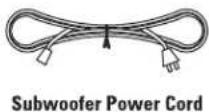
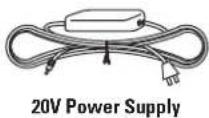
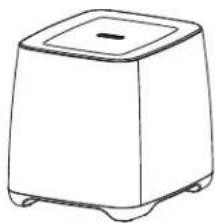
Please check to ensure you have everything in your Polk® SurroundBar® 5000 Instant Home Theater(IHT) carton. Inside, you should find:
- SurroundBar
- Subwoofer
- Subwoofer Power Cord
- 20V Power Supply
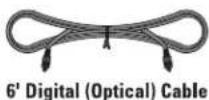
- 6' Digital (Optical) Cable
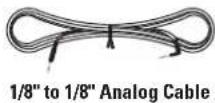
- 1/8" to 1/8" analog cable
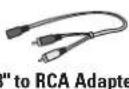
- 1/8" to RCA adapter
- Quick Start Guide
- Owner's Manual
- Online Registration Card
- Remote Control (Battery Included)
Important Note: If anything is missing or damaged, or if your Polk Audio SurroundBar 5000 IHT fails to operate, please notify your dealer immediately. We recommend keeping your original carton and packing materials in case you need to ship the unit in the future.
ABOUT YOUR SURROUNDBAR 5000 IHT
Thank you for choosing the SurroundBar 5000 IHT from Polk Audio. You're about to discover how the legendary Polk Audio sound makes watching TV and movies so much more exciting. Using a single bar loudspeaker and a wireless subwoofer, the SurroundBar 5000 IHT produces a wide soundstage and rich, full sound. PoDigital Logic offers spectacular performance and convenience. And there's even more about the SurroundBar 5000 IHT you'll enjoy:
- Bluetooth® wireless technology with apfXdelivers CD-quality sound from your smartphone, tablet or other compatible device.
- Sleek design, shallow 2 1/4" depth blends seamlessly with today's contemporary TVs.
- SmartBar™ enables your SurroundBar to learn your TV's original IR remote control. (Backup remote included.)
- Dual tuned-port enclosure creates optimum blending of drivers and subwoofer whether the bar is wall- or shelf-mounted.
- Compact wireless subwoofer can be placed anywhere in the room within 50' of the SurroundBar 5000.
- Polk Audio's signature sound, warm and full, with clarity and detail, turns games, movies and TV into an exciting viewing experience.
- Dolby® Digital decoding.
- Energy Star ^2 certified.
INSIDE YOUR SURROUNDBAR 5000 IHT CARTON:

text_image
inward 0 pH
Remote Control
(Battery Included)
SurroundBar
natural_image
Simple line drawing of a square-shaped container with a lid and side legs (no text or symbols)Subwoofer
Quick Start Guide
text_image
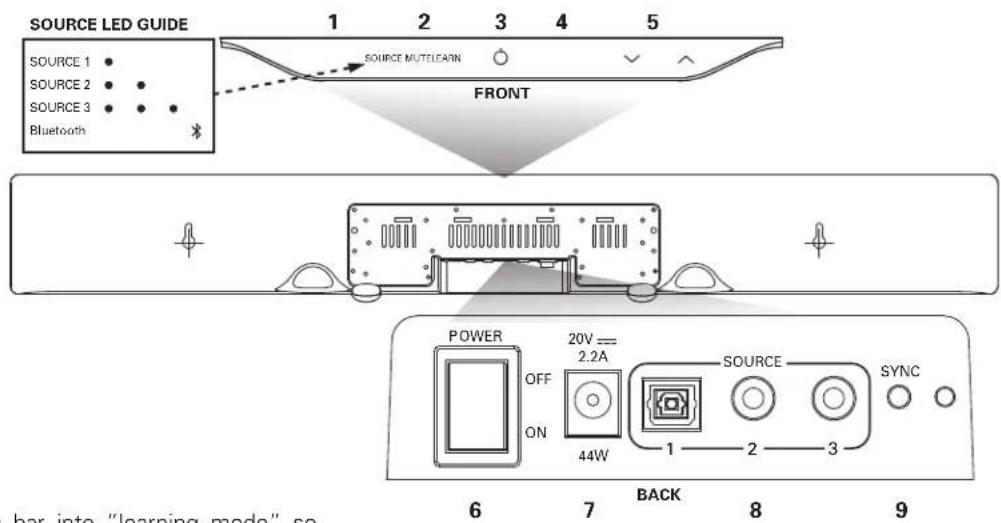
SOURCE LED GUIDE 1 2 3 4 5 SOURCE 1 • SOURCE 2 • SOURCE 3 • Bluetooth SOURCE MUTELEARN FRONT POWER OFF ON 20V == 2.2A 44W SOURCE SYNC 1 2 3 6 7 BACK 8 9 bar into "learning mode" soBAR CONTROLS
Front Panel:
- Learn—Puts the bar into "learning mode" so you can program it to respond to commands from your existing remote control.
- Source—Changes which input source you are listening to.
Source 1: digital/optical
Source 2: analog
Source 3: analog
Source 4 Bluetooth ( ): Bluetoothless technology (See "PAIR AND CONNECT YOUR BLUETOOTH DEVICE WITH THE SURROUNDBAR" on page 8.)
LED—Blue light indicates which Source has been selected (see Source LED Guide above). Source 1 LED will light green if Dolby Digital signal is being decoded.
- Power ⏻)—Turns on the bar or puts it in standby mode.
LED—A light that shines green, orange or red to indicate operating status. - Mute—Mutes and unmutes the sound coming from the SurroundBar 5000 IHT, indicated by green slow flash.
- Volume Up and Down√( / )—Adjusts the volume of the SurroundBar 5000 IHT.
Back Panel:
- Power Switch—Turns the bar on or off, but you can leave it on all the time.
- Power Connection—The bar power supply connects here.
- Audio Inputs (Source 1, 2, or 3)—Where you connect your TV (or other sources) to the SurroundBar 5000. Use the 6' optical cable (Source 1) provided or 1/8" analog cable (Source 2 or 3) provided.
- SYNC—The SYNC button ensures the subwoofer and bar are communicating. (See "SYNCING THE BAR AND WIRELESS SUBWOOFER" on page 7.)
BAR POWER() LED
Normal Operating Mode:
Green Steady—Power is on; all is well.
Red Steady—The bar is in standby mode.
Green Two Blinks—A remote control or keypad operation signal is received successfully.
Green Slow Blinking—System is muted.
Green Fast Blinking (After pressing volume up button)—You have reached the maximum volume.
Green Fast Blinking (At power up)—The bar and subwoofer have established a wireless connection.
BAR POWER( ) LED
Learning Mode: (See page 10 for instructions.)
Orange Blinking—The bar is in learning mode.
Orange Steady—The bar is in learning mode and a function has been selected.
Green Blinking—The bar has successfully learned a remote control command.
Red Blinking—The bar has failed to learn a remote control command.
Red and Orange Blinking—Learned IR codes have been successfully erased.
SOURCE LED
Green Blinking—Dolby Digital source recognized (Source 1 only).
Green Steady—Dolby Digital source received and is being decoded (Source 1 only).
Blue Steady—PCM or analog source received.
text_image
1 2 3 4 5 polk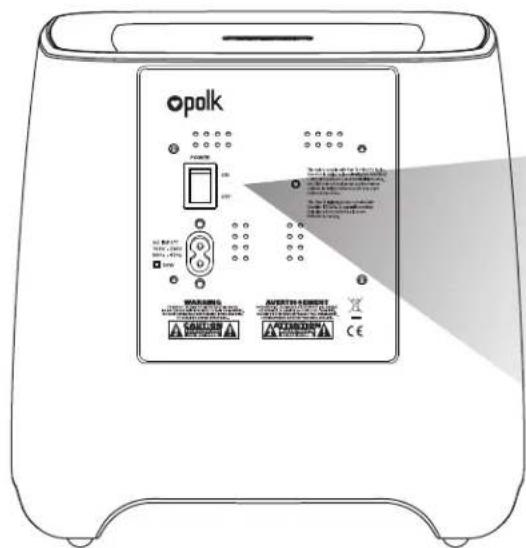
text_image
Opolk POWER ON OFF No. 100 Power OFF WARNING AVORTH ORDER CE A A A A A A A A A A A A A A A A A A A A A A A A A A A A A A A A A A A A A AREMOTE CONTROL
-
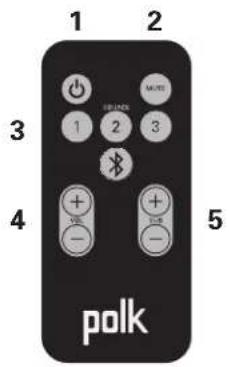
Power ⏻)—Turns on the bar or puts it in standby mode.
-
Mute—Mutes and unmutes the sound coming from the SurroundBar 5000 IHT.
-
Source 1, 2, or —Changes which input source you are listening to.
-
Volume Up and Down (+ / -) —Adjusts the master volume of the SurroundBar 5000 IHT system.
-
SUB Volume Up and Down (+ / -) Adjusts the volume of the subwoofer.
text_image
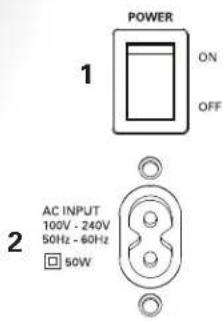
POWER 1 ON OFF AC INPUT 100V - 240V 50Hz - 60Hz 50WSUBWOOFER CONTROLS
- Power Switch—Turns the wireless subwoofer on or off, but you can leave it on all the time if you wish.
- Power Connection—The subwoofer power cord connects here.
THE STATUS LIGHT ON THE WIRELESS SUBWOOFER INDICATES THE FOLLOWING:
When light shines green:
a. Green Steady—The bar and subwoofer are connected.
b. Green Slow Blinking—The subwoofer is searching for the bar.
c. Green Fast Blinking—The subwoofer is in the process of connecting with the bar.
When light shines red:
a. Red Steady—The subwoofer is in standby mode.
b. Red Blinking—The subwoofer is in protection mode.
Specifications
| Dimensions | |
| SurroundBar 3 3/4" H x 31" W x 2 1/4" D(9.53 cm x 78.74 cm x 5.72 cm) | |
| Subwoofer 10" H x 10 1/4" W x 10 3/4" D(25.4 cm x 26.04 cm x 27.31 cm) | |
| Weight | |
| SurroundBar 5 lbs (2.3 kg) | |
| Subwoofer 7 lbs (3.2 kg) | |
| Power Requirements | |
| SurroundBar 20V, 2.2 A | |
| Subwoofer 100V - 240V~50Hz - 60Hz, 50W | |
| Model SurroundBar 5000 Instant Home Theater | |
| Remote Battery | CR2025 |
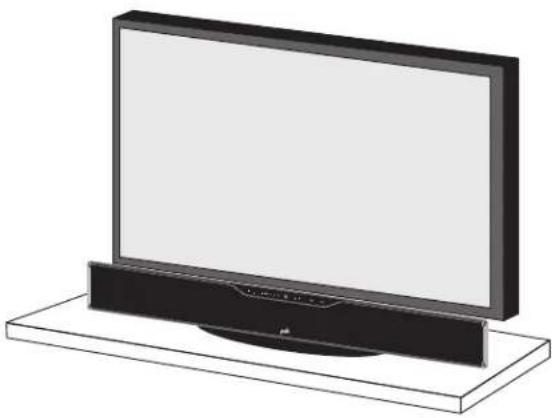
natural_image
Illustration of a flat-screen TV with a black case and a circular base (no text or symbols visible)Shelf mounted bar sits in front of TV
natural_image
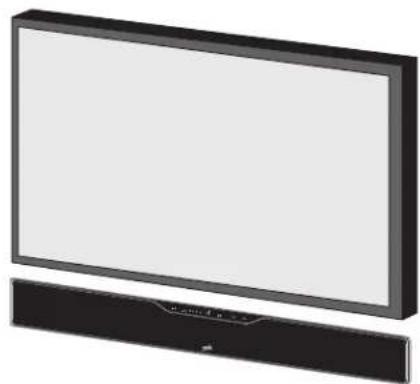
Illustration of a flat-screen TV with a black frame and a smaller black base (no text or symbols visible)Wall mounted bar
It's easy. The bar comes with rubber feet already attached, so it will sit securely on any flat surface. Just center the bar under your TV screen. If your TV is housed in a media center, you can place the bar above the TV.
If your TV is wall mounted, the bar can mount right beneath it. The bar has built-in keyhole slots that make it easy.
Note: The rubber feet are detachable and may be removed entirely (for wall-mounting the bar) or moved along the bottom surface of the bar, depending upon your installation.
WHERE TO LOCATE YOUR SUBWOOFER FOR THE BEST SOUND
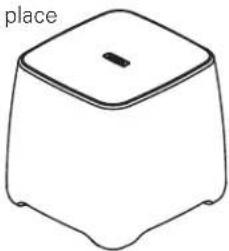
Your wireless subwoofer is really easy to place and can go just about anywhere in the room. Plus you don't have to worry about connecting wires, because the only wire you have to plug in is the power cord. And that's it.
Here's a little trick: If you place
your subwoofer in a corner of your room, it will reinforce the subwoofer's output, making it sound louder.
natural_image
Simple line drawing of a 3D object resembling a container or housing with a lid and base (no text or symbols)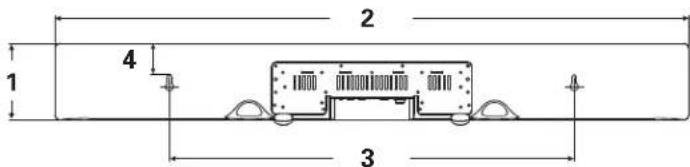
text_image
1 2 3 4Overall Dimensions
- 3 3/4" H (9.53 cm)
- 31" (78.74 cm)
Keyhole Slots
- 19 13/16" W (50.32 cm)
Top of Bar to Keyhole Slots
- 1 5/8" (4.13 cm)
Note: If you wall mount your SurroundBar, ensure that your wall anchors secure properly into the wall and that they can bear the weight of the SurroundBar, which is 5 lbs (2.3 kg).
HOW TO CONNECT YOUR BAR
HOW TO CONNECT YOUR SUBWOOFER
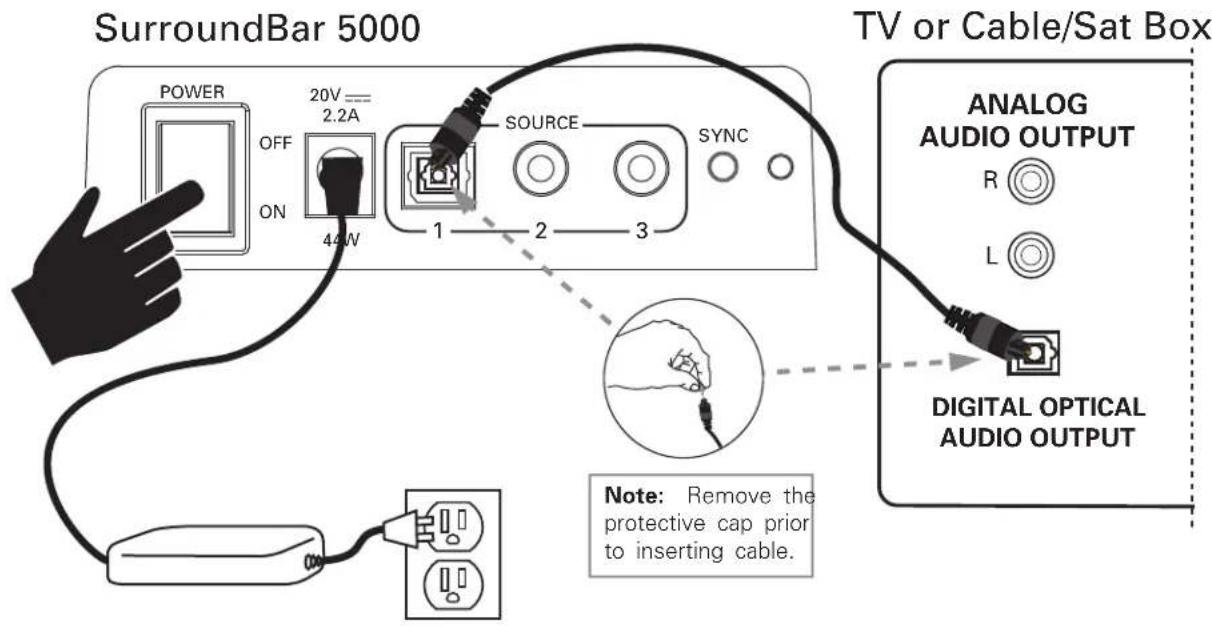
This is really easy too. You likely have many sources for your audio signal: your TV, your DVD player, or a cable/satellite box. Your subwoofer receives a wireless audio signal from the bar, so all you need to do is plug in the power cord and make The bar is able to accept audio from up to three different sources. The main power switch is ON.
The simplest approach is to connect the optical audio output of your TV to the optical input on the back of the bar. This method will provide the highest quality audio regardless of whether you are watching TV or watching your favorite DVD.
If your TV does not have an optical output, you can use the optical output from your DVD player or your cable/satellite box to connect to the optical input on the bar. Then simply use the other bar inputs for your other audio sources.
text_image
SurroundBar 5000 POWER 20V= 2.2A OFF ON 44W SOURCE SYNC 1 2 3 TV or Cable/Sat Box ANALOG AUDIO OUTPUT R L DIGITAL OPTICAL AUDIO OUTPUT Note: Remove the protective cap prior to inserting cable.SYNCING THE BAR AND WIRELESS SUBWOOFER
The SurroundBar 5000 bar and wireless subwoofer come from the factory preset to work together. If the wireless subwoofer stops receiving an audio signal, follow these instructions to re-establish the connection.
- Turn off the subwoofer's AC Mains switch.
- Press and hold the SYNC button on the back of the bar for three (3) seconds.
-
The LED on the back of the bar will blink, indicating that the bar and the subwoofer are ready to be connected.
-
Turn on the subwoofer's AC Mains switch. When the subwoofer LED turns solid green the bar and subwoofer are connected and ready to use.
BLUETOOTH® WIRELESS TECHNOLOGY
To use your Bluetoothwireless technology device with the SurroundBar 5000, you must first pair your device with your SurroundBar.
Pairing creates the ability of your Bluetooth device to connect with your SurroundBar wirelessly. Pairing is like a handshake between your Bluetooth device and your SurroundBar 5000 in which they meet and exchange information.
You only have to pair your SurroundBar with your Bluetooth device one time for this exchange of information to take place. After that you simply select the "polk soundbar" from your device list to make the connection to your SurroundBar.
The SurroundBar can hold 8 Bluetoothdevices in its memory.
If enough devices pair after yours, your device could be dropped from the memory list.
Pair and connect your Bluetooth device with the SurroundBar:
- Make sure your Bluetooth device and SurroundBar 5000 are both powered on.
- Activate the Bluetooth function on your Bluetooth source device. See your device's manual for instructions.
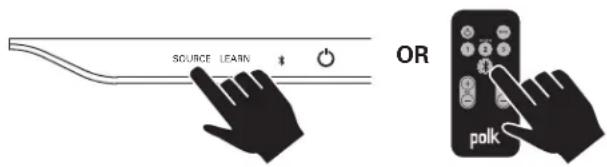
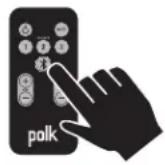
- Press the Bluetooth source button from the SurroundBar remote or press the SOURCE button on the SurroundBar until the Bluetoothsource is selected.
text_image
SOURCE LEARN OR polkThe Bluetooth symbol will illuminate, then begin slowly pulsing as it looks for the paired device.
- Your SurroundBar will now be displayed on your source device and available to pair and/or connect. Select the "polk soundbar" on your device to initiate the connection process.
- After a short delay (5 seconds), the two devices should now be connected. You should hear a short tone and the Bluetooth source symbol will now be steady blue.
- Play your music from your device!
Note: If your device asks for a passcode to pair to the SurroundBar, enter "0000."
How to disconnect with a Bluetooth device:
- Press and release the Remote Control Bluetooth button, or
- Press and release the Bluetooth Source button, or
- Turn off or disconnect the Bluetooth feature on your Bluetooth device.
The SurroundBar will emit a short tone and the Bluetooth source symbol will begin slowly pulsing when disconnected.
Automatic connection:
Any time you want to connect the last paired device and play it through the SurroundBar, do the following:
- Turn your device's Bluetoothfunction on.
- Enter Bluetooth source by pressing the Bluetooth source button from the remote or press the SOURCE button on the SurroundBar until the Bluetoothsource is selected.
- After a short delay, the two devices will automatically connect, you will hear a short tone, and the Bluetooth source symbol will now be steady blue.
Note: By default, the last connected Bluetooth device will automatically connect if available.
Pair and/or connect to a device when in Bluetooth source, but disconnected:
- Engage the Bluetooth function on your Bluetooth source device. See your device's manual for instructions.
a. The SurroundBar will be displayed on your source device as available to pair and connect. Select the "polk soundbar" on your device to initiate the pairing and connection process.
After a short delay, the two devices should now be paired and connected. You should hear a short tone and the Bluetoothsource symbol will now be steady blue.
How to disconnect:
Note: Anytime The SurroundBar exits SLEEP mode and is in Bluetoothsource, the SurroundBar will automatically connect to the last paired Bluetoothdevice if the paired device's Bluetoothfeature is on.
HOW TO OPTIMIZE THE SOUND WHEN TV SPEAKERS ARE ON
You should hear sound from the bar. If you don't, turn up the volume on the bar using its volume control buttons.
If your bar is connected to your TV, there's a very good chance your TV speakers are also playing. It's impossible to give specific instructions on how to turn off the speakers for every TV, but here's a way to do it that covers many of the TVs out there.
- On your TV remote control, find a "menu" or "setup" button.
- Press this button. You should see an on-screen menu.
- Next, look for an option to control audio functions and select it.
The setting to turn off your TV's internal speakers should be here.
If you can't turn off your TV internal speakers, don't worry. Your SurroundBar 5000 IHT will make your TV sound much better. To enjoy the best performance from your bar, you'll want it to play louder than your TV. Use the following steps to adjust the volume balance between your TV and the bar:
- If necessary, program your bar to respond to the volume up and down control commands of your TV remote. (See "HOW TO SETUP A REMOTE CONTROL FOR YOUR SURROUNDBAR 5000 IHT" on page 10.)
- Turn your TV volume all the way down using the control buttons on your TV.
- Then, using the volume keys on your bar, set the volume to a normal listening level (do not use the remote control).
After you make these adjustments, your SurroundBar 5000 IHT should always be louder than your TV speakers. Then use the TV remote control to adjust the volume as you normally do.
FINE TUNING YOUR SUBWOOFER VOLUME LEVEL
The next thing you'll want to do is adjust the subwoofer to blend with your bar. This will ensure the system produces the best sound.
To set the subwoofer's volume, play a variety of source material—some music, a movie sound track with great special effects, a movie chapter or a part of a concert in which people are speaking. Adjust the volume until what you hear sounds natural to you in your normal viewing location.
HOW TO SET UP A REMOTE CONTROL FOR YOUR SURROUNDBAR IHT
SMARTBAR™ PROGRAMMING NOTE:
For your SurroundBar to respond to your remote control, you MUST FIRST program the bar to respond to your television's original IR (Infra-Red) remote. An RF (Radio Frequency) remote will not work. Other remotes (cable, satellite) will work only after you have programmed the bar to respond to the TV's IR remote.
Programming Instructions: Your SurroundBar IHT is currently programmed to respond to the remote control that is included with the product. However, we strongly recommend programming the SurroundBar to also respond to your existing remote control using the steps illustrated below. This will enable you to operate all of your components using a single remote control. While programming the SurroundBar, ignore anything that may be displayed on the TV screen.
Example: To teach your bar the "Volume Up" command of your remote control:
1 The SurroundBar is turned on and the LED is solid green. And you have sound coming from the bar.
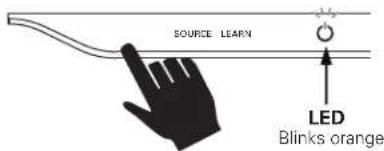
2 Press and hold "LEARN" for 2 seconds, or until LED blinks orange, then release the "LEARN" button.
text_image
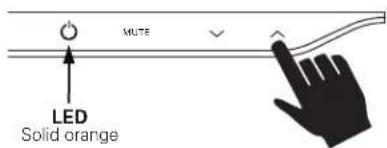
SOURCE LEARN LED Blinks orange3 Press and release Volume Up “^” LED turns solid orange.
text_image
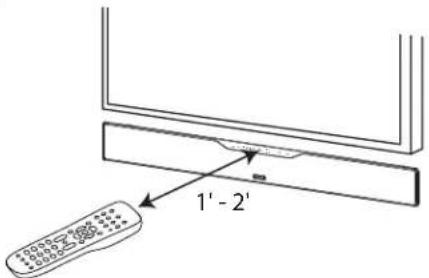
MUTE LED Solid orange4 Hold TV remote 1' - 2' from SurroundBar.
text_image
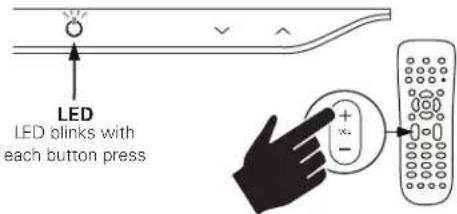
1' - 2'5 Tap "Volume Up" button on your TV's remote control 4 - 8 times, once per second. Tap, do not hold.
text_image
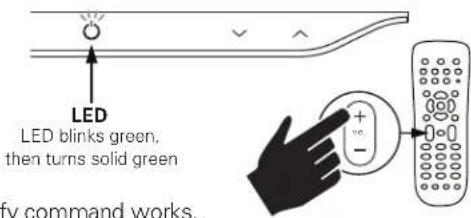
LED LED blinks with each button press6 When the LED blinks green quickly for 3 seconds, the command has been learned. The LED will become solid green.
text_image
LED LED blinks green, then turns solid green fy command works.Repeat steps 1-6 to program "Volume Down" (√), Source, Mute and Power buttons (○).
Note: If your bar fails to learn certain IR remote codes, the power LED will blink red. Try erasing any previously programmed codes (see below) and carefully repeat steps 1-6 above.
Code Erasing Procedure: If you have programmed your SurroundBar IHT to respond to a remote control and you no longer want it to do so, erase the codes by pressing the LEARN key for about two seconds while the unit is in standby mode (power LED is red). You'll know that previously learned codes have been successfully erased when the power LED blinks orange twice.
Note: This procedure removes ALL of your bar's remote control programming. If you only need to change the programming for some of the bar buttons, follow the six steps in the sequence previously described to redo any previous programming.
The SurroundBar will continue to respond to the provided credit card remote control.
SUB VOLUME CONTROL ON THE BAR
While unit is on and LED is solid green.
- Tap LEARN once, LED (○) turns orange.
- To adjust sub volume, tap up (∧) or down (√).
- To return to master volume, tap LEARN again, LED (💡) turns green.
NOTE: Bass can also be adjusted with included remote control.
TROUBLESHOOTING
The bar does not power on.
- Ensure you have plugged the power supply into a live wall outlet.
- Ensure that all components of the power supply are connected properly.
- Ensure the power supply is properly connected to the bar power input.
- Ensure the rear panel power switch is in the "ON" position.
The subwoofer does not power on.
- Ensure the subwoofer is plugged into a live wall outlet.
- Ensure the rear panel power switch is in the "ON" position.
No sound from the bar.
- Check that the TV or cable box is providing a signal. If necessary, check using an alternate source.
- Check that the bar is receiving power and is turned on.
- Turn up the volume of the bar.
- Check the input cables to make sure they are connected securely.
- Turn up the volume of your television or cable box.
- Check mute status: Is the bar status light slowly blinking green? If so, press the MUTE button on the bar.
No sound from the subwoofer.
- See section "Subwoofer does not power on."
- Turn up the subwoofer volume using the remote control.
- Is the subwoofer status indicator blinking green? If so, the bar and subwoofer's wireless connection has been lost. Turn off both the bar and subwoofer. Then turn them back on to re-establish communication. If this does not fix the issue, refer to the section "SYNCING THE BAR AND WIRELESS SUBWOOFER," on page 7.
The sound coming from the bar is distorted.
- Try turning down the volume of your audio source, if possible.
- Audio processing (see FAQ's on page 12)—there may be audio processing occurring prior to reaching the bar. Disable this processing.
The included remote control won't work.
- Ensure the battery's protective plastic tab has been removed.
- Replace the battery (CR2025).
Bass output is not loud enough.
- Turn up the subwoofer's volume using the remote control.
- Place the subwoofer closer to a corner of the room.
- Move subwoofer closer to viewing location within the room.
The bar won't learn my remote control commands.
- Carefully follow the programming instructions on the previous page of this manual.
- Hold the remote steady and 1-2 feet from the front of the bar.
- Quickly "tap" the button on your existing remote until the status LED blinks green.
Note: The bar learns almost all IR commands, but some IR protocols cannot be programmed.
The volume of my television speakers gets louder than my SurroundBar 5000 system over time.
- Turn off your TV speakers per the instructions on page 9 of this manual.
- When the remote control volume button is held down, your television may change volume levels faster than the bar. Use the buttons on the bar to adjust the volume of the bar to the correct balance with the TV speakers.
The subwoofer's output is intermittent, or sounds weak or is distorted.
- The wireless subwoofer could be too far away from the bar to receive a sufficiently strong signal. Try moving the subwoofer closer.
My Bluetooth device and bar will not disconnect.
- Some Bluetoothdevices will constantly attempt to connect to a paired device, so you must turn off the Bluetoothfunction on your device to allow other devices to connect to the bar.
FAQ'S (FREQUENTLYASKEDQUESTIONS)
My TV does not have an optical output. How do I connect my audio?
You have several options for connecting your audio:
- Use the optical output of your source unit (cable/satellite box, DVD player, etc.) and connect directly to the SurroundBar 5000 using the supplied optical cable.
- Use the 1/8" (3.5mm) analog / headphone output of your TV (if available) and connect directly to the SurroundBar 5000 using the supplied 1/8" (3.5mm) to 1/8" (3.5mm) analog cable.
- Use the RCA audio outputs (white/red pair) on your TV (if available) and connect directly to the SurroundBar 5000 using the supplied 1/8" (3.5mm) to 1/8" (3.5mm) analog cable and 1/8" (3.5mm) to RCA adapter.
What if my provided optical cable is too short?
- We did our best to provide a cable of adequate length; however, there might be a few setup instances in which the cable may be too short. If that is your situation, your local electronics store will have cables that meet your required length.
My audio sounds strange and distorted.
- Your SurroundBar 5000 requires a clean, unaltered stereo or Dolby Digital signal for proper audio performance. If the sound from your SurroundBar 5000 is strange or distorted, then check the audio menus of whatever source(s) are connected to your SurroundBar 5000 and make sure any audio processing is turned off.
Why can't I successfully program the SurroundBar 5000 to respond to my remote control?
- There are many remote control formats, and we have done our best to make the SurroundBar 5000 compatible with the most popular brands. However, there are likely some cases in which the bar will not be able to learn your remote codes. In this case, please use the remote control provided with the SurroundBar 5000 product or try a different universal remote control.
Note: RF only remotes will not work with this system.
How do I control the SurroundBar 5000?
There are three ways to control your SurroundBar 5000:
- Use the touch-sensitive buttons on the front of the bar.
- Use the provided remote control.
- Program the SurroundBar 5000 to respond to your existing remote (see included instructions).
My SurroundBar 5000 was responding to commands, but now it isn't. What should I do?
- In this rare event, simply turn off the power (switch located on the back of the bar), wait a few seconds, and then turn the power back on. This should restore control.
How do I erase previously learned remote control commands?
- If you have programmed your SurroundBar 5000 to respond to a remote control and you no longer want it to do so, then you can erase the codes by pressing the LEARN key for about two seconds while the unit is in standby mode (power LED is red). The SurroundBar 5000 will continue to respond to the provided credit card remote control.
Can I adjust the subwoofer level control from the bar keypad if I cannot locate the provided remote control?
- Yes. You can control the subwoofer volume from the bar keypad by tapping the LEARN key prior to using the volume buttons. When the power LED shines orange, the volume keys √√control the subwoofer volume. Tap the LEARN key again when you are done with the adjustment.
To contact Customer Service/Technical Support:
- If you have a question or comment, please feel free to call us or email us. In North America and Canada, call Polk Audio Customer Service: 800-377-7655 (M-F 9-5:30 EST) or via email polkcs@polkaudio.com. Outside the US, call 410-358-3600.
A Note Regarding Wireless Performa
Like all wireless devices, your SurroundBar 5000 IHT may be susceptible to RF interference from such sources as microwave ovens, WiFi computer systems, video game systems, cordless telephones, blue tooth systems, baby monitors and other devices. In particular, any devices operating in the 2.4GHz band may cause intermittent wireless connections between the SurroundBar 5000 speaker and the subwoofer. It is also possible that your SurroundBar 5000 IHT System may affect other wireless systems. For the most part, you can avoid wireless performance problems by physically separating these devices from your SurroundBar 5000 IHT System. Maintaining a distance of several feet or more between your SurroundBar 5000 IHT speaker and any wireless device should prevent any mutual interference effects. If you do notice any subwoofer signal dropouts take care to identify the root cause (most commonly having other wireless devices too close) and resolve accordingly. Any interference effects from a microwave oven will cease once the oven stops operating and may be resolved on a long-term basis by increasing the physical distance between your SurroundBar 5000 IHT System and the microwave oven.
WARNING:LISTENCAREFULLY
Polk Audio loudspeakers and subwoofers are capable of playing at extremely high volume levels which could cause serious or permanent hearing damage. Polk Audio, Inc. accepts no liability for hearing loss, bodily injury or property damage resulting from the misuse of its products.
Keep these guidelines in mind and always use your own good judgment when controlling volume: - You should limit prolonged exposure to volumes that exceed B5 decibels(dB). Refer to the Occupational Health and Safety Administration (OSHA) guidelines at: www.osha.gov/dts/osta/ctm/noise/standards_more.html.
Polk Audio is a DEI Holdings, Inc. Company. Polk Audio, Polk, The Speaker Specialists, Polk Digital Logic and SurroundBar are registered trademarks of Polk Audio, Inc.
Products that have earned the Energy Stare designed to protect the environment through superior energy efficiency.
Manufactured under licence from Dolby Laboratories. Dolby and the double-D symbol are registered trademarks of Dolby Laboratories.
The Bluetooth ^® word mark and logos are registered trademarks owned by Bluetooth SIG, Inc. and any use of such marks by Polk Audio is under license. Other trademarks and trade names are those of their respective owners.
The "aptX software is copyright CSR plc or its group companies. All rights reserved. The aptX mark and the aptX logo are trade marks of CSR plc or one of its group companies and may be registered in one or more jurisdictions."
FRANÇAIS
CONSIGNES DE SÉCURITÉ IMPORTANTES
natural_image
Simple line drawing of a rectangular device with a lid and base, no text or symbols present.Subwoofer
natural_image
Illustration of a flat-screen TV with a black case and a circular base (no text or symbols)natural_image
Illustration of a flat-screen TV with a black frame and a black base (no text or symbols visible)- 19 13/16" W (50.32 cm)
text_image
SOURCE LEARN OU polkCAUTION: Danger of EXPLOSION if battery is incorrectly replaced. Replace only with the same or equivalent type. (CR2025)

WARNING: Do not expose batteries or battery pack to excessive heat such as sunshine, fire or the like.
natural_image
Simple line drawing of a square-shaped container with a lid and side legs (no text or symbols)Subwoofer
text_image
Opolk POWER 10% 20% Air Condition Control Air Condition Control Air Condition Control Air Condition Control Air Condition Control Air Condition Control Air Condition Control Air Condition Control Air Condition Control Air Condition Control Air Condition Control Air Condition Control Air Condition Control Air Condition Control Air Condition Control Air Condition Control Air Condition Control Air Condition Control Air Condition Control Air Condition Control Air Condition Control Air Condition Control Air Condition Control Air Condition Control Air Condition Control Air Condition ControlCONTROL REMOTO
INDICADOR LED DEL SUBWOOFER
natural_image
Illustration of a flat-screen TV with a black case and a circular button, mounted on a rectangular base (no text or symbols visible)natural_image
Illustration of a modern flat-screen monitor with a black frame and a black base (no text or symbols visible)text_image
SOURCE LEARN0
charge, except as set forth below. All replaced parts and Products become the property of Polk Audio.
This warranty is in lieu of all other expressed Warranties. If this Product is defective workmanship as warranted above, your sole remedy shall be repair or replacement as I In no event will Polk Audio, Inc. be liable to you for any incidental or consequential out of the use or inability to use the Product, even if Polk Audio, Inc., or a Polk A
Dealer, has been advised of the possibility of such damages, or for any claim by any states do not allow the exclusion or limitation of consequential damages, so the above exclusion may not apply to you. All implied warranties on this Product are limited to this expressed Warranty. Some states do not allow limitation on how long an implied so the above limitations may not apply to you. This Warranty gives you specific legal also may have other rights which vary from state to state. This Warranty applies only purchased in the United States of America, its possessions, and U.S. and NATO armed exchanges and audio clubs. The Warranty terms and conditions applicable to Products pur in other countries are available from the Polk Audio Authorized Distributors in such cou
Thank you for your Polk Audio purchase. If you have a question or comment, please to call us or email us. In North America and Canada, call Polk Audio Customer Service (M-F, 9-5:30 EST) or via email polkcs@polkaudio.com. Outside the US, call 410-358-3600.