eSAM402 - Mixer Ecler - Free user manual and instructions
Find the device manual for free eSAM402 Ecler in PDF.



| Product type | Professional mixing console |
| Brand | Ecler |
| Model | eSAM402 |
| Number of input channels | 4 (3 MIC/LINE channels + 1 LINE channel) |
| Input connectivity | Balanced Euroblock for microphone and line |
| Phantom power | +18 V selectable via internal jumper (disabled by default) |
| Talkover function | Yes, assignable to inputs 1, 2 and 3 |
| Equalization | 3-band: bass (100 Hz), mid (2 kHz), treble (10 kHz), ±15 dB, screwdriver adjustment |
| VU meter | 3-level LED per channel |
| Main outputs | Balanced stereo on Euroblock (OUT L/OUT R) |
| Auxiliary/recording output | AUX/REC, nominal level 0 dBV, +6 dB gain selectable |
| Remote control input | MUTE, dry contact NO (normally open) |
| Power supply | 90-264 V AC, 47-63 Hz |
| Protection | Time-lag fuse 0.5 A |
| Rack mounting | 19 inches, 1U |
| Maintenance | Clean with a damp cloth (no solvents) |
| Safety | Mandatory grounding; do not expose to water; do not open |
| Repairability | Fuse replaceable by a qualified technician |
Frequently Asked Questions - eSAM402 Ecler
User questions about eSAM402 Ecler
0 question about this device. Answer the ones you know or ask your own.
Ask a new question about this device
Download the instructions for your Mixer in PDF format for free! Find your manual eSAM402 - Ecler and take your electronic device back in hand. On this page are published all the documents necessary for the use of your device. eSAM402 by Ecler.
USER MANUAL eSAM402 Ecler
Graphic Symbol Explanation

The lightning flash with arrowhead symbol, within an equilateral triangle, is intended to alert the user to the presence of uninsulated “dangerous voltage” within the product’s enclosure that may be of sufficient magnitude to constitute a risk of electric shock to persons.

The exclamation point within an equilateral triangle is intended to alert the user to the presence of important operating and maintenance (servicing) instructions in the literature accompanying the appliance.

The lightning flashes printed next to the OUTPUT terminals of the apparatus are intended to alert the user to the risk of hazardous energy. Output connectors that could pose a risk are marked with the lightning flash. Do not touch output terminals while apparatus power is on. Make all connections with apparatus turned off.
WARNING: To prevent fire or shock hazard, do not expose this equipment to rain or moisture.
IMPORTANT SAFETY INSTRUCTIONS
- Read these instructions.
- Keep these instructions.
- Heed all warnings.
- Follow all instructions.
-
Do not use this apparatus near water.
-
Clean only with dry cloth.
-
Do not block any ventilation openings. Install in accordance with the manufacturer's instructions.
-
Do not install near any heat sources such as radiators, heat registers, stoves, or other apparatus (including amplifiers) that produce heat.
-
Do not defeat the safety purpose of the polarized or grounding type plug. A polarized plug has two blades with one wider than the other. A grounding type plug has two blades and a third grounding prong. The wide blade or the third prong are provided for your safety. If the provided plug does not fit into your outlet, consult an electrician for replacement of the obsolete outlet.
-
Protect the power cord from being walked on or pinched particularly at the plugs, convenience receptacles, and at the point where they exit from the apparatus.
-
Only use attachments/accessories specified by the manufacturer.
-
Unplug the apparatus during lightening sorts or when unused for long periods of time.
-
Refer all servicing to qualified personnel. Servicing is required when the apparatus has been damaged in any way, suck as power supply cord or plug is damaged, liquid has been spilled or objects have fallen into the apparatus, the apparatus has been exposed to rain or moisture, does not operate normally, or has been dropped.
-
Disconnecting from mains: Switching off the POWER switch all the functions and light indicators of the device will be stopped, but fully disconnecting the device from mains is done unplugging the power cord from the mains input socket. For this reason, it always shall remain readily operable.
| 1. IMPORTANT REMARK | 0 | 4 | ||
| 1.1. | Safety | Precautions | 04 | |
| 2. INTRODUCTION | 0 | 4 |
| 3. INSTALLATION | 0 | 5 |
| 4. INPUTS | 0 | 5 |
| 5. OUTPUTS | 0 | 6 |
| 6. CONSIDERATIONS | 0 | 7 |
| 6.1. | Starting | Up | 07 | |||||||
| 6.2. | Equalization | 07 | ||||||||
| 6 | 3 | . | V | U | - | m | e | t | e | r |
| 6.4. | Ground | loops, | background | noise | ||||||
| 6.5. | Cleaning | 07 | ||||||||
| 7. TECHNICAL CHARACTERISTICS | 2 | 6 |
| 8. DIAGRAMS | 2 | 7 |
| 8.1. | Function | list | 27 |
| 8.2. | Function | diagram |
| 8.3. | Configuration | diagram | 2 |
| 8.4. | Block | diagram | 29 |
1. IMPORTANT REMARK
We thank you for trusting on us and choosing our eSAM402 mixer. In order to get the most in operation and efficiency from your mixing unit, it is VERY IMPORTANT for you - before you plug anything - to read this manual very carefully and take seriously into account all considerations specified within it.
In order to guarantee the optimum operation of this unit, we strongly recommend that its maintenance be carried out by our Authorised Technical Services.
1.1. Safety Precautions

This apparatus must be earthed through its mains cable.
Do not expose the unit to rain or water splashes, and do not place liquid containers or incandescent objects like candles on top of the unit.
Any change in the configuration of the unit must be carried out by a qualified technician.
Should any connection / disconnection task be done, always disconnect the unit from the mains supply.
There are no user serviceable parts inside the unit.

CAUTION: RISK OF ELECTRIC SHOCK. DO NOT OPEN.
2. INTRODUCTION
The eSAM402 is an easy-to-use professional mixer designed for PA applications. Its main features are:
• 3 MIC/LINE STEREO input channels.
• 1 fourth STEREO LINE input channel
• Balanced main stereo output
- Adjustable microphone sensitivity on the back panel.
• +18 V DC Phantom power supply available for all "MIC" inputs.
- Includes assignable Talkover on inputs 1, 2 and 3 (the Talkover function may be simultaneously enabled on one, two or all entries).
- Global 3-band tone controls, adjustable with a screwdriver.
- 3 LED level indicators per channel for the stereo mix signal.
- Main output level control.
- Record output.
- The "MUTE" remote control input allows connection of external dry contact closures (fire detection systems and other safety devices that have to mute the mixer signal by activating the "NO" (normally open) control signal).
- Mono/stereo selector for the main mix output.
3. INSTALLATION
EN
The eSAM402 mixer has been specially designed to be installed in a standard 19" rack, taking up 1U. It has been designed to be operated by non-technical users. This is the reason why its tone controls are adjustable only with a screwdriver. On the opposite, input and output level controls use classic and easily accessible rotary knobs.
Due to its low power consumption and heat sink, the eSAM402 doesn't need any fan cooling. However, avoid installing it in dusty environments and/or in a location with extreme temperature and moisture.
The mixer should be kept apart from noise and interference sources (dimmers, motors, etc...) as well as from power cables.
The eSAM402 operates from 90V to 264V CA, 47 to 63Hz. Its oversized power supply is compatible with any mains voltage worldwide.
In order to protect the mixer from eventual overloads, the eSAM402 is protected by a timered power fuse of 0.5A. If it gets blown up, you must replace it with an identical one. If it gets blown up, you must replace it with an identical one. NEVER REPLACE THE FUSE WITH ANOTHER ONE WITH A HIGHER VALUE.

CAUTION: Fuse substitutions have to be performed by a qualified technician.
4. INPUTS
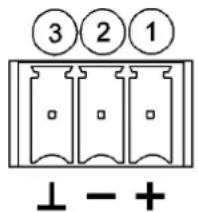
The eSAM402 supports two types of audio signals for each of its first three inputs (mono MIC or stereo LINE), selectable by a MIC/LINE switch on the rear panel:
- Microphone signal: 3 mixing channels offer a Euroblock connector for a nominal input level from -50dBV (3.16mV) to -20dBV (0.1mV), with a GAIN control on the rear panel to adjust the gain.
Here is the wiring diagram for microphones:
Balanced
- Live (+18V)
- Cold (+18V)
- Ground (0V)
(Phantom ON)
text_image
3 2 1 ⊥ - +Unbalanced
- Live (+18V)
2-3.Ground (0V)
(Phantom ON)
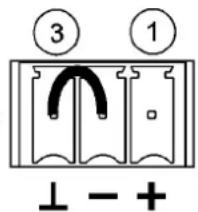
text_image
③ ① ⊥ - +Microphones must be low impedance (200 to 600Ω) and monophonic.
The eSAM402 supplies phantom power for condenser microphones; it is enabled by an internal jumper (see diagram). By default, phantom power is disabled (factory setting).
The Talkover (priority) function operates when a signal is detected at the inputs 1 to 3 this function is assigned to; it attenuates the other inputs of the unit that don't have priority. Turn it on/off for each input channel with the "TK" switch on the front panel.
- To manage the important level differences existing between conventional CD and LINE sources and other devices capable of producing audio signals, the LINE inputs 1-3 of the eSAM402 are standard line inputs (0dBV) and the sensitivity of the LINE input #4 can be selected (0/-6dBV) by internal jumper (the default position is 0dBV). A sensitivity of -6dBV is ideal for low-level sound sources such as media players, portable MP3 players, tablets, computers, mobile phones, etc.
Turntables CAN NOT be directly connected to this unit, because eSAM402 has no RIAA preamp equipped input.
5. OUTPUTS
The eSAM402 has a main stereo output (OUT L / OUT R), with electronically balanced Euroblock connectors.
Connection is made according to the following diagram:
Balanced
- Live
- Cold
- Ground
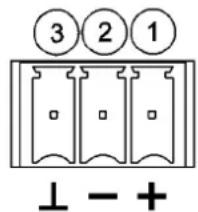
text_image
③ ② 1 ⊥ - +Unbalanced
1. Live
3. Ground
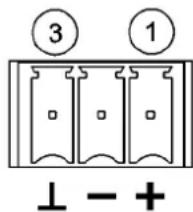
text_image
③ ① ⊥ - +The mixer's main output level (OUTPUT VOL) must be set in order to avoid your system power amp clipping indicators (CLIP) to be permanently lit. Only the most powerful lower frequencies must light them.
Other connections on the back panel:
- AUX/REC output with a nominal output of 0dBV (10kΩ load) and an extra gain setting of +6dB, enabled by internal jumper (0dBV is the default position).
- L+R switch: convert output signals in a mono signal.
- MUTE remote control input: enabled by external dry contact closure. It allows connection of fire detection systems and other safety devices that have to mute the mixer by using this control signal. The mode of operation is "NO" (normally open).
6. CONSIDERATIONS
6.1. Starting up
This is directly done via the POWER mains switch. Even is the power-up noise of eSAM402 is minimal, we highly recommend to power up all equipment in the following order: sound sources, mixing units, equalizer, processors and finally power amplifiers. The power down sequence is the inverse of the power up one.
6.2. Equalization
The tone controls of the main output provide a ± 15dB gain/attenuation for each of the bands, and their central operating frequencies are 100Hz, 2kHz and 10kHz. Given the philosophy of this unit, the tone controls are designed to be adjusted with a screwdriver, thereby preventing accidental manipulation during normal use.
6.3. VU-meter
The eSAM402 has a VU-meter to show the main mixing signal.
6.4. Ground loops, background noise
You should always make sure that the signal sources coming to the unit, as well as all devices connected to its outputs, do not have their grounds interconnected, that is; ground must never come from two different devices. Should this ever happen, noises could occur and seriously interfere the sound quality.
Cable shields, when connected to the chassis, must never be linked together. This will avoid ground loops.
The eSAM402 mixer was designed to produce the lowest background noise. Independently from the electronic design, the resulting background noise directly relies on the correct use and installation of the mixing unit.
Adjust, where appropriate, the gain of each input for an adequate operating level and then adjust the VOL controls on the front panel to obtain the desired input mix. Finally, adjust the VOL control of the main mix output to get the relevant output volume for your installation, and also enable the TK switches for priority inputs (a signal detection on these priority inputs will attenuate the signal of non-priority inputs).
Important ____ note on mix level adjustment: setting for example a channel VOL control to "2" and the output VOL control to "10" is not the same as the opposite. In the first case, the signal entering the mixing amplifier is weak, but even so it contains a background noise, so the signal/noise ratio is low (low signal). When the output amplifier equally amplifies both parts as a whole, the output has a very high background noise. In the second case, as the channel VOL control is set to the maximum, the signal received by the mixing amplifier has a high level and therefore also a high (good) signal/noise ratio, so when this signal reaches the output VOL control and is amplified, the signal/noise ratio remains better than in the previous case.
6.5. Cleaning
The front panel should not be cleaned with solvent or abrasive substances because silk-printing could be damaged. To clean it, use a soft cloth slightly wet with water and neutral liquid soap; dry it with a clean cloth. Be careful that water never gets into the unit through the holes of the front panel.
ES

L I N E 4 M I C 1 - 3 E
Input Sensitivity adjust MIC/LIN 1-3 ±15dB
Outputs Level/Minimum load OUT 0(+6)dBV*/600Ω
AUX/REC 0dBV/10kΩ
Frequency response LINE 10Hz-50kHz -1dB
MIC BAL 10Hz-30kHz -1dB
Harmonic distortion LINE <0.005%
M I C B A L
CMRR MIC >60dB@1kHz
Signal/Noise ratio (gain +15dB) LINE >100dB
MIC BAL >85dB
Tone control BASS 100Hz ±15dB
MID 2kHz ±15dB
TREBLE 10kHz ±15dB
Talkover TIME 2 seconds
EFFECT -30 dB
Phantom voltage +18VDC
Mains 90-264VCA 47-63Hz
Power consumption 14VA
Dimensions Panel 482.6x44mm
W e i g h t
(*) Internally selectable
8. DIAGRAMS
8. DIAGRAMAS
8.1. Function list 8.1. Lista de funciones
- Channel volume control, VOL 1. Control de volumen de la vía, VOL
- Talkover switch, TK 2. Puesta en marcha talkover, TK
- Bass control, BASS 3. Control de graves, BASS
- Midrange control, MID 4. Control de medios, MID
- Treble control, TREBLE 5. Control de agudos, TREBLE
- Output main volume control, OUTPUT VOL 6. Control nivel general de salida, OUTPUT VOL
- LED indicator, MUTE 7. Indicador luminoso, MUTE
- LED indicator, POWER ON 8. Led puesta en marcha, POWER ON
- Led Vu-meter, LEVEL 9. Vu-metro a leds, LEVEL
- Micro input, MIC 10. Entrada micro, MIC
- Micro line selector 11. Selector micro linea
- Line input, LINE 12. Entrada línea, LINE
- Input sensitivity adjust, ADJ 13. Ajuste sensibilidad de entrada, ADJ
- Recording output, AUX/REC 14. Salida de grabación, AUX/REC
- Mono-stereo switch, L+R
- Conmutador de mono-estéreo, L+R
- Main output, left channel, OUTPUT L 16. Salida principal, canal izquierdo, OUTPUT L
- Main output, right channel, OUTPUT R 17. Salida principal, canal derecho, OUTPUT R
- Screwable terminal for remote mute, MUTE 18. Terminales atornillables control remoto mute, MUTE
- Mains socket 19. Base de toma de red
- Fuse holder 20. Portafusibles
- Mains switch, POWER
- Interruptor puesta en marcha, POWER