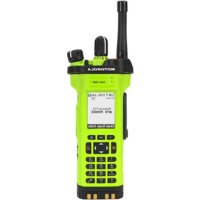
APX 7000XE - Talkie Walkie MOTOROLA - Free user manual and instructions
Find the device manual for free APX 7000XE MOTOROLA in PDF.



User questions about APX 7000XE MOTOROLA
0 question about this device. Answer the ones you know or ask your own.
Ask a new question about this device
Download the instructions for your Talkie Walkie in PDF format for free! Find your manual APX 7000XE - MOTOROLA and take your electronic device back in hand. On this page are published all the documents necessary for the use of your device. APX 7000XE by MOTOROLA.
USER MANUAL APX 7000XE MOTOROLA
natural_image
Green and black motorola with visible signal waves and antenna (no text or symbols on device body)
MOTOROLA
ASTRO® APX™ 7000XE Series Digital Portable Radios Quick Reference Card RF Energy Exposure and Product Safety Guide for Portable Two-Way Radios ATTENTION!
This radio is restricted to Occupational use only. Before using the radio, read the RF Energy Exposure and Product Safety Guide for Portable Two-Way Radios which contains important operating instructions for safe usage and RF energy awareness and control for Compliance with applicable standards and Regulations:
Radio Controls

text_image
Top (Orange) Button Accessory Connector 3-Position A/B/C Switch
text_image
16-Position Select Knob On/Off/Volume Control Knob Top Side (Select) Button PTT Button Side Button 1 Side Button 2 Antenna 2-Position Concentric Switch Top Display Bluetooth Pairing Indicator Main Speaker BatteryRadio On/Off
- On – On/Off/Volume knob clockwise.
- Off – On/Off/Volume knob counterclockwise.
Zones and Channels
- Zone – Zone switch to desired zone.
- Channel – Channel switch to desired channel.
■ Receiving and Transmitting
1 Select zone/channel.
2 Listen for a transmission. OR
Press and hold Volume Set button.
OR
Press Monitor button and listen fo
3 Adjust volume, if necessary.
4 Press the PTT button to transmit; release to receive.
Sending an Emergency Alarm
1 Press and hold the Emergency button*.
2 The display shows EMERGENCY and the current zone/channel. A short, medium-pitched tone sounds, and the LED blinks red momentarily.
3 When acknowledgment is received, you hear four beeps; alarm ends; and radio exits emergency.
* Default emergency button press timer is set to 1 second. This timer is programmable, see Sending an Emergency Alarm section in the user guide for details.
To exit emergency at any time, press and hold the Emergency button.
Sending an Emergency Call
1 Press the Emergency button.
2 Press and hold the PTT button. Speak clearly into the microphone.
3 Release the PTT button to end call.
4 Press and hold Emergency button to exit emergency.
To exit emergency at any time, press and hold the Emergency button.
Sending a Silent Emergency Call
1 Press the Emergency button.
2 The display does not change; the LED does not light up, and there is no tone.
3 Silent emergency continues until you: Press and hold the Emergency button to exit emergency state. OR Press and release the PTT button to exit the Silent Emergency Alarm mode and enter regular dispatch or Emergency Call mode.
To exit emergency at any time, press and hold the Emergency button.
■ Display Status Icons
| Blinks when the battery is low. | |
| T..ll | The more stripes, the stronger the signal strength for the current site (trunking only). |
| |→| | Direct radio to radio communication or connected through a repeater.On = DirectOff = Repeater |
| This channel is being monitored. | |
| HORL | L = Radio is set at Low power.H = Radio is set at High power. |
| Z | Scanning a scan list. |
| Z. | Blinking dot = Detects activity on the Priority-One Channel during scan.Steady dot = Detects activity on the Priority-Two Channel during scan. |
| X | The vote scan feature is enabled. |
| Q | On = Secure operation.Off = Clear operation.Blinking = Receiving an encrypted voice call. |
| On steady = View modeBlinking = Program mode | |
| A orBORC | Basic Zone Bank 1A = Radio is in Zone 1.B = Radio is in Zone 2.C = Radio is in Zone 3. |
| D orE orF | Basic Zone Bank 2D = Radio is in Zone 4.E = Radio is in Zone 5.F = Radio is in Zone 6. |
| A, B,C... ...X orY | Enhanced Zone BankA = Contains Zone 1, Zone 2 and Zone 3,B = Contains Zone 4, Zone 5 and Zone 6,C = Contains Zone 7, Zone 8 and Zone 9..X = Contains Zone 70, Zone 71 and Zone 72,Y = Contains Zone 73, Zone 74 and Zone 75. |
| Bluetooth is ready. | |
| Bluetooth is connected to the device. |

MOTOROLA
Motorola Solutions, Inc.
1303 East Algonquin Road
Schaumburg, Illinois 60196 U.S.A.
MOTOROLA, MOTO, MOTOROLA SOLUTIONS and
the Stylized M logo are trademarks or registered trademarks
of Motorola Trademark Holdings, LLC and are used under license.
All other trademarks are the property of their respective owners.
© 2013 Motorola Solutions, Inc. All rights reserved.
November 2013. Printed in the U.S.A.


PMLN6737A