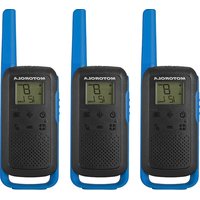
Talkabout T270TP - Talkie Walkie MOTOROLA - Free user manual and instructions
Find the device manual for free Talkabout T270TP MOTOROLA in PDF.


| Product type | Walkie-talkie |
| Brand | Motorola |
| Model | Talkabout T270TP |
| Dimensions (L x W x H) | Approximately 20.3 x 5.7 x 3.8 cm |
| Weight (with batteries) | Approximately 200 g |
| Power supply | Rechargeable NiMH battery pack included or 3 AA alkaline batteries |
| Estimated battery life | Up to 16 hours (depending on usage) |
| Channels | 22 FRS/GMRS channels (depending on country) |
| Interference reduction codes | 121 codes (38 analog + 83 digital) |
| Maximum range | Up to 10 km in open terrain |
| Main features | VOX/iVOX, channel scan, dual sleep, simplified pairing, weather receiver (T27X model), keypad lock, call tones, PTT timer |
| Maintenance and cleaning | Clean with a soft, dry cloth. Avoid moisture and extreme temperatures. Store at room temperature. |
| Safety | Complies with RF exposure standards. Hearing protection recommended. Use only Motorola approved accessories. |
| Spare parts and repairability | Rechargeable NiMH battery, micro-USB charger, belt clip. Repairs only by Motorola authorized centers. |
| Warranty | 2 years (USA, Canada, Mexico, Panama); 1 year (Brazil, Chile, Peru) |
Frequently Asked Questions - Talkabout T270TP MOTOROLA
User questions about Talkabout T270TP MOTOROLA
0 question about this device. Answer the ones you know or ask your own.
Ask a new question about this device
Download the instructions for your Talkie Walkie in PDF format for free! Find your manual Talkabout T270TP - MOTOROLA and take your electronic device back in hand. On this page are published all the documents necessary for the use of your device. Talkabout T270TP by MOTOROLA.
USER MANUAL Talkabout T270TP MOTOROLA
©2023 Motorola Solutions, Inc. All rights reserved

MN006555A01-AD
English
Contents
Safety and Compliance Information. 2
Chapter 1: Radio Overview 6
Radio Controls. 6
Status Indicators. 7
Chapter 2: Getting Started. 8
Personalization Stickers. 8
Installing the Battery. 8
Radio Battery Meter. 9
Battery Capacity Maintenance. 9
Charging The Battery 9
Attaching and Removing the Belt Clips. 9
Attaching the Belt Clip. 9
Removing the Belt Clip 9
Turning the Radio On and Off. 9
Setting the Volume. 9
Chapter 3: Talking and Listening. 9
Talk Range. 10
Monitoring Channels. 10
Triggering the Push-to-Talk Time-Out Timer. 10
Switching Modes 10
Chapter 4: Menu Options. 10
Selecting Channels. 11
Selecting the Interference Eliminator Codes. 11
Setting and Transmitting Call Tones 11
Configuring the iVOX or VOX. 12
Setting the Dual Watch Mode. 12
Setting the Keypad Tones. 12
Transmitting a Talk Confirmation Tones. 13
Chapter 5: Special Features. 13
Locking or Unlocking the Keypad. 13
Locking Keypad Lock. 13
Unlocking Keypad Lock. 13
Operating Easy Pairing. 13
Scan. 13
Scanning Channels. 14
Chapter 6: Weather Receiver. 14
Selecting the Weather Mode. 15
Setting the Weather Channel. 15
Setting the Weather Alert. 15
Weather Channels and Frequencies. 15
Chapter 7: Channels and Frequencies. 16
Chapter 8: Accessories. 17
Chapter 9: Warranty. 18
English
Safety and Compliance Information

Note:
- Before using this radio, read this booklet which contains important operating instructions.
- For information on product details, brochures, user manuals, and approved accessories. Please refer to https:// www.motorolasolutions.com.
Compliance with RF Exposure Standards
National and international regulations require manufacturers to comply with the RF energy exposure limits for portable two-way radios before they can be marketed. Your Motorola Solutions two-way radio is designed, manufactured, and tested to comply with all applicable national and international regulations for human exposure to radio frequency electromagnetic energy.
RF Energy Exposure Awareness and Control Information and Operational Instructions for General Population and Uncontrolled Environment Use
For more information on what RF energy exposure is, see the following websites:
- https://www.fcc.gov/
- https://www.who.int/health-topics/electromagnetic-fields/
- http://www.ic.gc.ca/eic/site/smt-gst.nsf/eng/ sf11467.html
- http://www.ic.gc.ca/eic/site/smt-gst.nsf/eng/ sf01904.html
For additional information, see https://www.motorolasolutions.com/en_us/about/company-overview/ corporate-responsibility/governance-and-policies.html
Operating Instructions
- Transmit no more than 50% of the time. To transmit (talk), press the Push-To-Talk (PTT) button. To receive calls, release the PTT button.
- Hold the radio in a vertical position in front of the face with the microphone (and other parts of the radio including the antenna) at least 1 in. (2.5 cm) away from the nose or lips.
- Antenna should be kept away from the eye.
-
When worn on the body, always place the radio in a Motorola Solutions-approved clip, holder, holster, case, or body harness for this product.
-
Do not hold the antenna when the radio is transmitting.
- Do not use any portable radio that has a damaged antenna. If a damaged antenna comes into contact with your skin, minor burn can result.
- To ensure continued compliance with applicable RF exposure limits, use only Motorola Solutions-approved, supplied or replacement antennas, batteries, and accessories.
- For a list of Motorola Solutions-approved accessories please refer to your user manual or visit https://www.motorolasolutions.com.
Acoustic Safety

Caution: Exposure to loud noises from any source for extended periods of time may temporarily or permanently affect your hearing. The louder the volume of the radio, the sooner your hearing will be affected. Hearing damage from loud noise is sometimes undetectable at first, and can have a cumulative effect.
To protect your hearing:
- Use the lowest volume necessary to do your job.
- Turn up the volume only if you are in noisy surroundings.
- Turn down the volume before adding headset or earpiece.
- Limit the amount of time you use headsets or earpieces at high volume.
- When using the radio without a headset or earpiece, do not place the radio's speaker directly against your ear.
Medical Devices

Caution: If you use a personal medical device, such as a pacemaker or hearing aid, consult the manufacturer of your device to determine if it is adequately shielded from RF energy. Your physician may be able to assist you in obtaining this information.
Holsters Incorporating Magnets
Motorola Solutions holsters incorporate strong, neodymium magnets. If you use a personal medical device, such as a pacemaker or hearing aid, consult the manufacturer of your device to determine if it can be used in close proximity to magnets. Your physician may be able to assist you in obtaining this information. Also be aware that magnets can damage other products, including cell phones, computers, hard drives, and other
electronic devices, as well as credit cards and magnetic media. Keep the holster away from any mechanical device that could be affected by a magnetic field. Consult the manufacturer of your product to determine if your device or product can be used in close proximity to magnets.
OperationalWarnings
The following explains the operational warnings:
For Vehicle With Air Bags

Warning:
Refer to your vehicle manufacturer's manual prior to installation of electronic equipment to avoid interference with air bag wiring.
- Do not place a portable radio in the area over an air bag or in the air bag deployment area. Air bags inflate with great force. If a portable radio is placed in the air bag deployment area and the air bag inflates, the radio may be propelled with great force and cause serious injury to occupants of the vehicle.
Potentially Explosive Atmospheres

Warning:
- Do not carry a radio that is not certified for Hazardous Locations into a potentially explosive atmosphere. It could result in a serious injury or death. You should only use a radio certified for hazardous locations in potentially explosive atmospheres.
- Explosive atmospheres refer to hazard classified locations that may contain hazardous gas, vapors, dusts, such as fueling areas below decks on boats, fuel or chemical transferor storage facilities, and areas where the air contains chemicals or particles such as grain, dust, or metal powders. Areas with potentially explosive atmospheres are often, but not always, posted.
- Do not remove, install, or charge batteries in such areas, or remove or install antennas. Sparks in a potentially explosive atmosphere can cause an explosion or fire resulting in bodily injury or even death.
Blasting Caps and Blasting Areas

Warning: To avoid possible interference with blasting operations, turn off your radio when you are near electrical blasting caps, in a blasting area, or in areas posted: "Turn off Two-Way radio." Obey all signs and instructions.
Batteries

Caution: Use only Motorola Solutions approved batteries.
- Risk of explosion if the battery is replaced by an incorrect type.
- Charge your battery using the approved Motorola Solutions charger.
- Connect the charger/power supply to a nearby and easily accessible power outlet.
- Use the battery in accordance with its water and/or dust Ingress Protection (IP) rating.
- Do not discard your battery into a fire.
- Do not replace the battery in any area labeled "Hazardous Atmosphere".
- Do not disassemble, crush, puncture, shred, or otherwise attempt to change the form of your battery.
- Do not dry a wet or damp battery with an appliance or heat source, such as a hair dryer or microwave oven.
- Do not allow conductive material such as jewelry, keys, or beaded chains to touch exposed battery terminals.
- Do not dispose of batteries with household waste.
Safety Instruction for Power Supply
- The power supply is for use with equipment according to IEC/EN/UL 62368-1/60950-1.
- The power supply is for indoor use in dry locations.
- The equipment should be connected to a nearby and easily accessible socket outlet.
- If the power supply is damaged or defective, do not repair or use the power supply.
- For more details, please refer to https://www.motorolasolutions.com/en_xu/support/emea-compliance.html#phnav_other-products.
English
Do Not Substitute Options or Accessories
The Motorola Solutions communications equipment certified as intrinsically safe by the approving agency (UL, CSA, CENELEC) is tested as a complete system which consists of the listed agency Approved portable, Approved battery, and Approved accessories or options, or both. This Approved portable and battery combination must be strictly observed. There must be no substitution of items, even if the substitute has been previously Approved with a different Motorola Solutions communications equipment unit. Approved configurations are listed by the Approving Agency (UL, CSA, CENELEC).
The Hazardous Location-Approved Label affixed to radio refers to the intrinsically safe classification of that radio product, and the approved batteries that can be used with that system.
The manual part number referenced on the Hazardous Location-Approved Label identifies the approved Accessories and or options that can be used with that portable radio unit.
Using a non-Motorola Solutions-Hazardous Location-Approved battery and/or accessory with the Motorola Solutions approved radio unit will void the Hazardous Location approval of that radio unit.
European Union (EU) Waste of Electrical and Electronic Equipment (WEEE) Directive


The European Union's WEEE directive requires that products sold into EU countries must have the crossed out trash bin label on the product (or the package in some cases). As defined by the WEEE directive, this cross-out trash bin label means that customers and end-users in EU countries should not dispose of electronic and electrical equipment or accessories in household waste. Customers or end-users in EU countries should contact their local equipment supplier representative or service centre for information about the waste collection system in their country.
Class B Digital Device
For a Class B digital device or peripheral, the instructions furnished the user shall include the following or similar statement, placed in a prominent location in the text of the manual:
Note: This equipment has been tested and found to comply with the limits for a Class B digital device, pursuant to part 15 of the FCC Rules. These limits are designed to provide reasonable protection against harmful interference in a residential installation. This equipment generates, uses and can radiate radio frequency energy and, if not installed and used in accordance with the instructions, may cause harmful interference to radio communications. However, there is no guarantee that interference will not occur in a particular installation. If this equipment does cause harmful interference to radio or television reception, which can be determined by turning the equipment off and on, the user is encouraged to try to correct the interference by one or more of the following measures:
- Reorient or relocate the receiving antenna.
- Increase the separation between the equipment and receiver.
- Connect the equipment into an outlet on a circuit different from that to which the receiver is connected.
- Consult the dealer or an experienced radio/TV technician for help.
USA (FCC)/CANADA(ISED)
According to FCC Part 95, FRS devices do not require a license. Use of Motorola Solutions radio in Canada is subject to the rules and regulations in ISED RSS 210 and do not require a license. Changes or modifications not expressly approved by Motorola Solutions may void the user authority granted by the FCC or ISED to operate this radio and should not be made. To comply with FCC or ISED requirements, transmitter adjustments should be made only by or under the supervision of a person certified as technically qualified to perform transmitter maintenance and repairs in the private land mobile and fixed services as certified by an organization representative of the user of those services.
Replacement of any transmitter component (crystal, semiconductor, etc) not authorized by the FCC or ISED equipment authorization for this radio could violate FCC or ISED rules.

Note: Use of this radio outside the country where it was intended to be distributed is subject to government regulations and may be prohibited.
Notice to Users (FCC and ISED)
This device complies with Part 15 of the FCC rules and ISED's license-exempt RSS's per the following conditions:
- This device may not cause harmful interference.
- This device must accept any interference received, including interference that may cause undesired operation.
Mexico and Panama
Mexico and the Republic of Panama do not require authorization to use FRS radio equipment frequencies.
Chile
Servicio de Banda Local UHF frequency use is subject to SUBTEL Resolution 1.261 and Resolution 52 Exenta. A license is required for use in Chile.
To obtain a Banda Local end-user license:
- Fill out the required application form to request Local Band service.
Table 1: Location to Obtain the Application Form for Local Band Service
Location Description
- Present this form with your ID at the SUBTEL office.
- Consult the SUBTEL office for applicable fees.
For more information, consult SUBTEL at http://www.subtel.cl or call their office.
Peru
Colectivo Familiar frequency use is subject to MTC RVM 388-200-MTC/15.03 and FCC (FRS), Part 95B. No license is required for use in Peru. Consult MTC Peru at http://www.mtc.gob.pe for more information.
Brazil
The frequency general use is subject to the Resolution n° 680 and to the Act n° 14448, Item 15 - Radio Communication Equipment of General Use. It is not required to use license in Brazil. See the Anatel site for more information:
http://www.anatel.gov.br.

Note: Use of this radio outside the country where it was intended to be distributed is subject to government regulations and may be prohibited.
Supplier's Declaration of Conformity

Supplier's Declaration of Conformity Per FCC CFR 47 Part 2 Section 2.1077(a)
Responsible Party
Name: Motorola Solutions, Inc.
Address: 2000 Progress Pkwy, Schaumburg, II. 60196.
Phone Number: 1-800-927-2744
Hereby declares that the product:
Model Name: T210, T210TP, T270, T270TP, T271TP, T275
conforms to the following regulations:
FCC Part 15, subpart B, section 15.107(a), 15.107(d), and section 15.109(a).
English
Radio Overview
This chapter explains the buttons and functions of the radio.
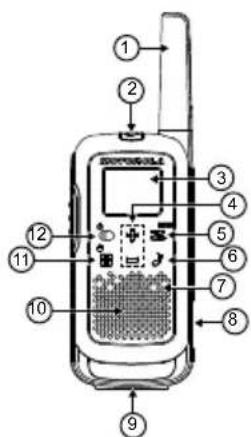
Radio Controls

Figure 1: T27X Radio
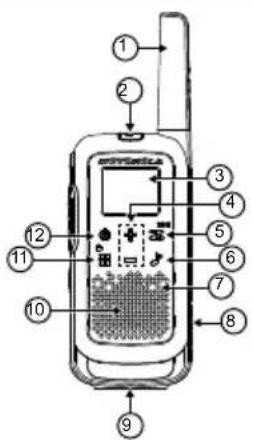
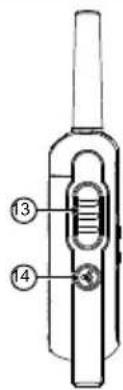
Figure 2: T21X Radio
| Item Description Item Description |
| 1 Antenna 8 Micro-USB Charging Port |
| 2 Accessory Port 9 Space for Personalization Stickers |
| 3 Screen 10 Speaker |
| 4 Navigation But- ton (+/-) 11 Menu/Lock |
| 5 Scan/Monitor 12 Power or Mode 1 |
| 6 Call Tone 13 Push-To-Talk (PTT) But- ton |
| 7 Microphone 14 Easy Pairing Button |
English
Status Indicators
This chapter explains the icons on the display of the radio.
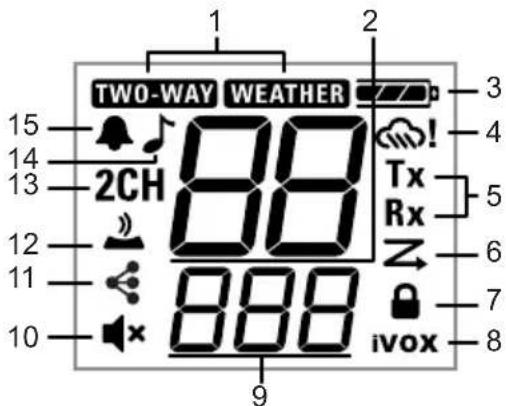
Figure 3: T27X Display
| Item Description | |
| 1 Mode | 2 |
| 2 Channel | |
| 3 Battery Power (3 Battery Levels) | |
| 4 Weather Alert | 3 |
| 5 Transmit or Receive Status | |
| 6 Scan | |
| Item Description |
| 7 Keypad Lock |
| 8 iVOX [OFF,L1,L2,L3] VOX [L1,L2,L3] |
| 9 Interference Eliminator Code · Number (used for Call Tone and Speaker Vol- ume) · On/Off · L0/L1/L2/L3 (used for iVOX and VOX) |
| 10 Speaker Volume (0–7) |
| 11 Easy Pairing (On/Off) |
| 12 Keypad Tone (On/Off) |
| 13 Dual Watch (On/Off) |
| 14 Call Tone (number) |
| 15 Roger Tone (On/Off) |
English
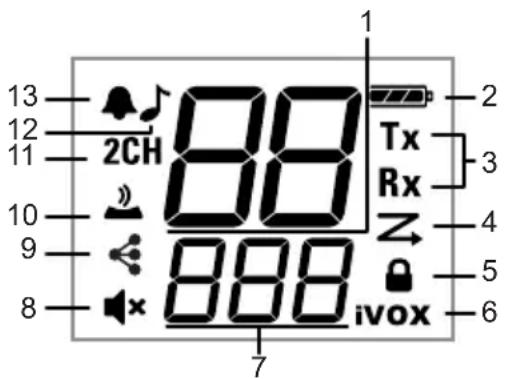
Figure 4: T21X Display
Item Description
| 1 Channel |
| 2 Battery Power (3 Battery Levels) |
| 3 Transmit or Receive Status |
| 4 Scan |
| 5 Keypad Lock |
| 6 iVOX [OFF,L1,L2,L3] VOX [L1,L2,L3] |
| 7 Interference Eliminator Code ·Number (used for Call Tone and Speaker Vol- ume) ·On/Off ·L0/L1/L2/L3 (used for iVOX) |
| 8 Speaker Volume (0–7) |
Item Description
| 9 Easy Pairing (On/Off) |
| 10 Keypad Tone (On/Off) |
| 11 Dual Watch (On/Off) |
| 12 Call Tone (number) |
| 13 Roger Tone (On/Off) |
Getting Started
This chapter provides instructions on how to prepare your radio for use.
Personalization Stickers
Stickers are provided to personalize and keep track of radios. You can use permanent markers for blank stickers.
Installing the Battery
Each radio can use either one NiMH rechargeable battery pack or three AA alkaline batteries. Radio sounds a tone when the battery power is low.
Discard the retailer tag, which is in one of the battery compartments.
- Turn off your radio.
- To unlock the battery cover, face the back of the radio and push the latch on the battery cover to the left.
- For the NiMH battery pack, insert the battery pack by following the instructions on the battery pack. For AA alkaline batteries, insert the batteries.

Note:
Observe the polarity of the batteries.
The ribbon should be underneath the battery pack or batteries and must wrap around the right side of the pack or batteries for easy removal.
- To lock the battery cover, close the battery cover and push the latch to the right.
Radio Battery Meter
The radio battery icon shows the battery charge level, from full to empty. When the radio has one bar left, or after releasing the PTT button, the radio chirps periodically to indicate low battery alert.
Battery Capacity Maintenance
You should charge the NiMH batteries once every three months when not in use. After a longer lapse, charging is delayed and can take up to five minutes to begin.

Caution: Batteries corrode over time and may cause permanent damage to your radio. Before placing the radio in storage, remove the battery. Store the NiMH batteries in temperatures between -20^ to 35^ , and in low humidity, to avoid damage. Avoid damp conditions and corrosive materials.
Charging The Battery
The micro-USB charger allows you to charge your NiMH battery pack from a wall power outlet.
Turn off your radio.
- Plug the micro-USB cable into the charging port on your radio.
- Connect the USB charging cable to a power source. The battery meter bar scrolls when the battery is charging.

Note:
An empty battery is fully charged in 8 hr.
- When moving between hot and cold temperatures, do not charge the NiMH battery pack until the battery temperature acclimates, which usually takes about 20 minutes.
- For optimal battery life, remove the radio from the charger within 16 hours. Do not store the radio while connected to the charger.
Attaching and Removing the Belt Clips
Attaching the Belt Clip
- Attach the belt clip to the belt clip slot at the back of the radio until the clip clicks in place.
- Attach the belt clip to your pocket or belt strap until the clip clicks in place.
Removing the Belt Clip
- To release the latch, pull the release tab on top of the belt clip.
- Push the belt clip with your other hand towards the top of the radio.
Turning the Radio On and Off
To turn the radio on or off, press and hold the Power button.
- Once turned on, the radio chirps and briefly shows all feature icons available on the radio.
- The display screen shows the current channel, code, and all features that are enabled. The radio is now in Two-Way mode.
Setting the Volume
Perform one of the following actions:
To increase volume, from any mode, press +.
To decrease volume, from any mode, press -

Caution: Do not hold the radio close to your ear. If the volume is set to an uncomfortable level, it could hurt your ear.
Talking and Listening
This chapter provides information on how to use your radio for communication.
Ensure that all radios in your group are set to the same channel and are on the same Interference Eliminator Code.
- To talk, press and hold the PTT button. When transmitting, your radio displays the following indicators:
English
The radio displays Tx icon.
The TWO-WAY icon blinks. 4
- To listen, release the PTT button.
When receiving, your radio displays the following indicators:
The radio displays Rx icon.
The TWO-WAY icon blinks. 4

Note: Hold the radio one inch away from your mouth and speak directly into the microphone for maximum clarity. Do not cover the microphone while speaking.
Talk Range
Your radio is designed to maximize the performance and improve the transmission range. Do not use radios closer than five feet apart.
Monitoring Channels
To enter the Monitor mode and listen for weak signals on the current channel, press and hold the Scan/Monitor button for three seconds.

Note: You can also listen to the volume level of the radio when you are not receiving calls. If necessary, you can adjust the volume.
Triggering the Push-to-Talk Time-Out Timer
To prevent accidental transmissions and save battery life, the radio emits a continuous warning tone and stops transmitting if you press the PTT button for more than 60 continuous seconds.
Switching Modes
To switch between the Two-Way and Weather modes, press the Mode button.
- When the radio is in Two-Way mode, the TWO-WAY icon is displayed.
- When the radio is in Weather mode, the WEATHER icon is displayed.
- Corresponding settings and information are shown on the display.
Menu Options
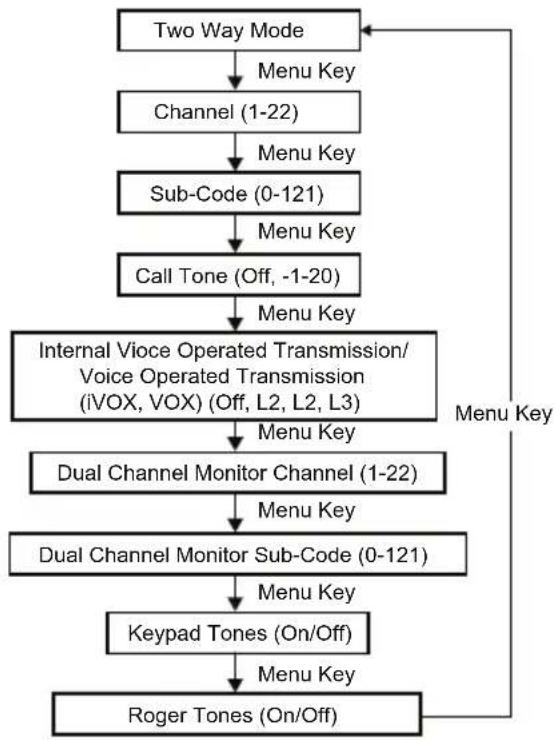
USA, Canada, and Latin America
Figure 5: Two-Way Mode Menu
English
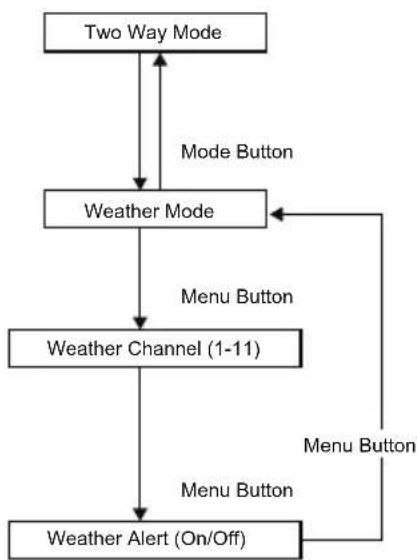
Figure 6: Weather Mode Menu

Note: Weather channel broadcasts is available in United States and Canada only.
Selecting Channels
Each country model has different number of channels and frequencies. For more details, see Channels and Frequencies on page 16.
- Turn on the radio and press the Menu/Lock button until the channel number blinks.
-
To change the channel, press the + or - button. Pressing and holding the keys allows you to scroll through the channel rapidly.
-
To confirm the channel and exit menu, press the PTT button.
You can continue the set-up by pressing the Menu/Lock button.
Selecting the Interference Eliminator Codes
Interference Eliminator Codes help minimize interference by blocking transmissions from unknown sources. Your radio has 121 Interference Eliminator Codes. Codes 1-38 are standard analog codes that appear on other Family Radio Service (FRS) radios. Codes 39-121 are additional digital codes added for superior interference protection. 0 is the off position with analog or digital codes not enabled.
- Press the Menu/Lock button until the code starts to blink.
- To select the code, press the + or - button.
Pressing and holding the keys allows you to scroll through the codes rapidly.
- To save the code setting and exit Menu, press the PTT button.
You can continue the set-up by pressing the Menu/Lock button.

Note:
You can set a different code for each channel using this procedure.
On a radio that uses Interference Eliminator Codes, the code must be set to 0 to communicate with radios that do not have Interference Eliminator Codes. When you select 0, the tone, no code message displays on your radio.
Setting and Transmitting Call Tones
Your radio can transmit different call tones to other radios in your group. Call tones allow you to alert other radios when you want to talk. Your radio has 20 call tones to choose.
- Press the Menu/Lock button until the Call Tone icon appears. The display shows the current call tone setting.
- To change and listen to the call tones, press the + or - button.
English

Note: Setting the call tone to OFF disables the call tone feature.
- To set the new call tone and exit Menu, press the PTT button. You can continue the set-up by pressing the Menu/Lock button.
- To transmit your call tone to other radios with the same channel and Interference Eliminator Code, press the Call Tone button.
Configuring the iVOX or VOX
With the Internal Voice Operated Transmission (iVOX) or Voice Operated Transmission (VOX), you can begin transmission by speaking into the microphone of the radio or audio accessory instead of pressing the PTT button.
Table 2: Transmission Sensitivity
| Classification Description |
| L3 High Sensitivity for quiet environments. |
| L2 Medium Sensitivity for most environ- ments. |
| L1 Low Sensitivity for noisy environments. |
| 1. Press the Menu/Lock button until the radio displays iVOX icon. The radio displays VOX icon when an audio accessory is connected. The current setting (Off, L1-L3) blinks. 2. To select the sensitivity level, press the + or - button. 3. To exit menu, press the PTT button. You can continue the set-up by pressing the Menu/Lock button. |
Setting the Dual Watch Mode
The Dual Watch mode enables you to scan the current channel and another channel alternately.
- Press the Menu/Lock button until the Dual Watch icon blinks. The current call setting blinks.
- To select the channel, press the + or - button. Then press the Menu/ Lock button.
- To select the code, press the + or - button.
- To activate Dual Watch, press the PTT button or wait until time out. The screen alternates between the Home Channel and Dual Watch Channel.
- To end Dual Watch mode, press the Menu/Lock button.

Note: If you set the same channel and code as the current channel, the Dual Watch Mode is not enabled.
Setting the Keypad Tones
You can enable or disable the speaker key tones. You hear the key tone each time you push a button.
- Press the Menu/Lock button until the radio displays Keypad Tone icon. The current on/off setting blinks.
- To turn on or off keypad tones, press the + or - button.
- To confirm and exit menu, press the PTT button. You can continue the set-up by pressing the Menu/Lock button.

Note: The following features are not disabled when the keypad tone feature is turned off:
Transmit timeout alert tone
Call tone
- Low battery alert tone
The transmitted talk confirmation tone
Transmitting a Talk Confirmation Tones
You can set your radio to transmit a unique tone when you finish transmitting, similar to saying "Roger" or "Over" to let others know you are finished talking.
- Press the Menu/Lock button until the radio displays Roger Tone icon. The current setting blinks.
- To turn the confirmation tone on or off, press the + or - button.
- To confirm and exit menu, press the PTT button.
You can continue the set-up by pressing the Menu/Lock button.
Special Features
This chapter explains the features of your radio.
Locking or Unlocking the Keypad
Locking Keypad Lock
Press and hold the Menu/Lock button until the radio displays Keypad Lock icon.
When in lock mode, you can turn the radio on and off, adjust the volume, receive, transmit, send a call tone, and monitor channels. All other functions are locked.
Unlocking Keypad Lock
To unlock the radio, press and hold the Menu/Lock button until the Keypad Lock icon disappears.
Operating Easy Pairing
The Easy Pairing feature allows all radios in a group to be programmed simultaneously to the same channel and Interference Eliminator Code. Any one radio in the group can be set as the leader. The channel and Interference Eliminator Code settings of the leader can be copied to the other radios in the group. To program all radios in the group simultaneously, all radio users in the group must perform Easy Pairing at the same time. The leader must transmit when the other radios are in Easy Pairing Mode, otherwise the transmission is not picked up.
- Pick any radio as the "Leader radio". Program the channel and Interference Eliminator Code to the desired settings on this radio. See Scanning Channels on page 14 and Selecting the Interference Eliminator Codes on page 11.
- To copy the channel and Interference Eliminator Code combination to all the other member radios, press and hold the button on the member radios until you hear a beep.
- Release the button after the beep, and wait for the transmission from the Leader radio. The Easy Pairing icon blinks indicating that the radio is in Easy Pairing Mode and waiting to receive the settings from the leader. The radio stays in this mode for three minutes.

Note: To programme all the radios at the same time, the radios in the group must perform these step at the same time.
- Press and hold down the button until you hear a double beep on the Leader's radio. At the double beep, the radios in the group copy the transmitted channel and Interference Eliminator Code settings of the leader.

Note:
- The Leader's radio must make this transmission when all the member radios are still in the Easy Pairing mode, otherwise the transmission is not picked up.
- The leader must not release the Easy Pairing button at the first tone, otherwise the radio becomes a recipient. If this action happens, you must press the PTT button to escape and then retry the step.
Scan
Scanning allows you to search all channels for transmissions from unknown parties, search for someone in your group who accidentally changed channels, or search for unused channels for your own use.
The Scan feature includes a priority feature, Basic Scan Mode, and Advanced Scan Mode for effective searching. The Basic Scan Mode
English
uses the channel and code combination that are set for each channel or the default code value of 1.
The Advanced Scan Mode scans all channels for codes, detects any code in use, and temporarily uses that code value for that channel. The detected code is used for only one transmission.
Priority is given to the Home Channel. The Home Channel is the channel and Interference Eliminator Code that your radio is set to when you start the scan. The Home Channel is the channel and Sub-Code that your radio is set to when you start the scan. As the Home Channel is scanned more often than other channels, your radio responds quickly to any activity on the Home Channel.
Scanning Channels
Basic Scanning
- Press the Scan/Monitor button.
The radio displays scan icon on the display and the radio begins to scroll through the channel and code combinations. Your radio stops scrolling when it detects channel activity that matches the channel and code combination. You can hear the transmission. - To respond and talk to the person transmitting, press the PTT button in five seconds after the end of the transmission.
The radio resumes scrolling through the channels five seconds after the end of any received activity. - To stop scanning, press the Scan/Monitor button.
Advanced Scanning
- Set the Interference Eliminator Code to zero or turn it off.
-
Press the Scan/Monitor button.
-
The radio displays the scan icon on the display and the radio begins to scroll through the channels. No Interference Eliminator Codes filter what is heard.
-
When the radio detects channel activity with any or no code, the radio stops scrolling and you can hear the transmission. Radio detects and displays the Interference Eliminator Code that is in use.
-
To respond and talk to the person transmitting, press the PTT button in five seconds after the end of the transmission.
The radio transmits by using the newly detected Interference Eliminator Code.
The radio resumes scrolling through the channels five seconds after the end of any received activity.
4. To stop scanning, press the Scan/Monitor button.
Scanning Notes
- The transmission appears on the home channel if you press the PTT button while the radio is scrolling through inactive channels. Scanning resumes five seconds after the end of your transmission. To stop scanning at any time, press the Scan/Monitor button.
If the radio stops on an undesired transmission, you may immediately resume the scan by briefly pressing either the + or - buttons. - If the radio repeatedly stops on an undesired transmission, you may temporarily remove that channel from the scan list by pressing and holding the either + or - buttons for three seconds.
You may remove more than one channel in this way.
-
To restore the removed channels to the scan list, perform one of the followings:
-
Turn the radio off and then turn on.
- Exit and re-enter the scanning mode by pressing the Scan/Monitor button.

Note:
- You cannot remove the home channel from the scan list.
- The detected code can only be used for one transmission in Advanced Scan. You must note that code, exit scan, and set that detected code on that channel to permanently use the detected code.
Weather Receiver
Your radio can tune in to broadcasts by the United States National Oceanic and Atmospheric Administration (NOAA) Weather Radio and Environment and Climate Change Canada (ECCC) Weather Radio.
You can listen to a weather channel or set your radio to alert you to emergency weather broadcasts that interrupt routine broadcasts. See Weather Channels and Frequencies on page 15 for details. When you listen to a weather channel, you cannot use your radio in scan mode or for Two-Way communications.
Both NOAA and ECCC have transmitters located throughout the United States and Canada, respectively. These transmitters broadcast watches, forecasts, and other information 24 hours a day.

Note: NOAA weather radio stations are assigned to cover specific areas and service may be limited. To view the appropriate transmitter for your area, check with your local weather office for frequency and details or visit http:// www.weather.gov/nwr in the US. The use of the NOAA logo does not provide an endorsement or implied endorsement by the National Weather Service of NOAA, nor does the use of the Weather Radio logo provide an endorsement or implied endorsement by Environment and Climate Change Canada (ECCC).
Weather feature is not available on model T21X. Weather feature is available on model T27X designed for use in United States of America and Canada.
Selecting the Weather Mode
To enter the Weather mode from the Two-Way mode, press the Mode button.
Setting the Weather Channel
Your radio receives weather frequencies.
- In Weather mode, press the Menu/Lock button until the weather channel number blinks.
- To select the appropriate channel with good reception in your area, press the + or - button.
- To confirm the channel and exit menu, press the PTT button. You can continue the set-up by pressing the Menu/Lock button.
Setting the Weather Alert
Your radio can be set to respond to the National Oceanic and Atmospheric Administration (NOAA) Weather Radio emergency messages. A special alarm tone sounds an alert and turns on the
weather receiver to give you immediate weather and emergency information.
- In Weather mode, press the Menu/Lock button twice until the Weather Alert icon is displayed.
- To select on or off, press the + or - button.
- To exit the weather menu set-up, press the PTT button or the Menu/ Lock button.
- To return to Two-Way mode, press the Mode button. If you activate the Weather Alert and return to Two-Way mode, the radio displays the Weather Alert icon.

Note:
- The weather mode automatically reverts to Two-Way mode when the weather channel is activated, either manually or after receiving an alert, and no buttons are pressed for five minutes.
- The weather channel reception depends on how close you are to a transmitter and whether you are indoors or outdoors. Since weather channels are transmitted without codes, they may contain static or noise. Weather Alert does not function while actively transmitting or receiving in Two-Way mode.
Weather Channels and Frequencies
Table 3: Frequencies of Weather Channels
| Weather Channel Frequency |
| WX1 162.550 MHz |
| WX2 162.400 MHz |
| WX3 162.475 MHz |
| WX4 162.425 MHz |
English
| Weather Channel Frequency |
| WX5 162.450 MHz |
| WX6 162.500 MHz |
| WX7 162.525 MHz |
| WX8 161.650 MHz |
| WX9 161.775 MHz |
| WX10 161.750 MHz |
| WX11 162.000 MHz |
Channels and Frequencies
The Family Radio Service (FRS) device is approved for USA and Canada.
Table 4: Channels and Frequencies for the USA, Canada, Mexico, and Panama
| Channel Frequency (MHz) Max Power Output |
| 1 462.5625 2.0 W |
| 2 462.5875 2.0 W |
| 3 462.6125 2.0 W |
| 4 462.6375 2.0 W |
| 5 462.6625 2.0 W |
| 6 462.6875 2.0 W |
| 7 462.7125 2.0 W |
| 8 467.5625 0.5 W |
| 9 467.5875 0.5 W |
| Channel Frequency (MHz) Max Power Output |
| 10 467.6125 0.5 W |
| 11 467.6375 0.5 W |
| 12 467.6625 0.5 W |
| 13 467.6875 0.5 W |
| 14 467.7125 0.5 W |
| 15 462.5500 2.0 W |
| 16 462.5750 2.0 W |
| 17 462.6000 2.0 W |
| 18 462.6250 2.0 W |
| 19 462.6500 2.0 W |
| 20 462.6750 2.0 W |
| 21 462.7000 2.0 W |
| 22 462.7250 2.0 W |

Note: Power refers to the maximum allowable power as defined by FCC/ISED for each channel under FRS rules for the USA and FRS/GMRS for Canada and is not a reflection of the power specification of the radio.
Table 5: Channels and Frequencies for Peru
| Channel Frequency (MHz) | Channel Frequency (MHz) |
| 1 462.5625 8 467.5625 | |
| 2 462.5875 9 467.5875 | |
| 3 462.6125 10 467.6125 |
English
| Channel Frequency (MHz) | Channel Frequency (MHz) | ||
| 4 462.6375 | 11 467.6375 | ||
| 5 462.6625 | 12 467.6625 | ||
| 6 462.6875 | 13 467.6875 | ||
| 7 462.7125 | 14 467.7125 | ||
| Table 6: Channels and Frequencies for Brazil | |||
| Channel | Frequency (MHz) | Channel Frequency (MHz) | |
| 1 462.5625 | 14 467.5625 | ||
| 2 462.5750 | 15 467.5750 | ||
| 3 462.5875 | 16 467.5875 | ||
| 4 462.6000 | 17 467.6000 | ||
| 5 462.6125 | 18 467.6125 | ||
| 6 462.6250 | 19 467.6250 | ||
| 7 462.6375 | 20 467.6375 | ||
| 8 462.6500 | 21 467.6500 | ||
| 9 462.6625 | 22 467.6625 | ||
| 10 462.6750 | 23 467.6750 | ||
| 11 462.6875 | 24 467.6875 | ||
| 12 462.7000 | 25 467.7000 | ||
| 13 462.7125 | 26 467.7125 | ||
Table 7: Channels and Frequencies for Chile
| Channel Frequency (MHz) | Chan- nel | Frequency (MHz) |
| 1 462.5500 18 467.6000 | ||
| 2 462.5625 19 467.6250 | ||
| 3 462.5750 20 467.6500 | ||
| 4 462.5875 21 467.6750 | ||
| 5 462.6000 22 467.7000 | ||
| 6 462.6125 23 467.7250 | ||
| 7 462.6250 24 467.8125 | ||
| 8 462.6375 25 467.8250 | ||
| 9 462.6500 26 467.8375 | ||
| 10 462.6625 27 467.850 | ||
| 11 462.6750 28 467.8625 | ||
| 12 462.6875 29 467.8750 | ||
| 13 462.7000 30 467.8875 | ||
| 14 462.7125 31 467.9000 | ||
| 15 462.7250 32 467.9150 | ||
| 16 467.5500 33 467.9250 | ||
| 17 467.5750 -- |
Accessories
For more information on convenient power, carry and audio accessories to optimize your Talkabout Two-Way Radios, refer to https:// www.motorolasolutions.com/talkabout.
English
Warranty
Consumer Two-Way Radio Products and Accessories purchased in the United States, Canada, Mexico, Panama, Brazil, Chile, and Peru
What Does this Warranty Cover?
Subject to the exclusions contained below, Motorola Solutions, Inc. ("Motorola") warrants the Motorola branded consumer Two-Way radios that operate via Family Radio Service or General Mobile Radio Service ("Products"), the Motorola branded or certified accessories sold for use with these Products ("Accessories") to be free from defects in materials and workmanship under normal consumer usage for the periods outlined below. This limited warranty is the exclusive remedy of a consumer, and applies as follows to new Products and Accessories and purchased by consumers in the United States, Canada, Mexico, Panama, Brazil, Chile, and Peru, which are accompanied by this written warranty. This limited warranty is the exclusive remedy of a consumer, and applies as follows to new Products and Accessories and purchased by consumers in the United States, Canada, Mexico, Panama, Brazil, and Columbia, which are accompanied by this written warranty.
Who Is Covered?
This warranty extends only to the first consumer purchaser, and is not transferable.
What will MOTOROLA SOLUTIONS, INC. do?
Motorola Solutions, Inc., at its option, will at no charge repair, replace or refund the purchase price of any Products or Accessories that do not conform to this warranty. We may use functionally equivalent reconditioned/refurbished/pre-owned or new Products or Accessories.
What Other Limitations Are There?
Any Implied Warranties, Including Without Limitation. The implied warranties of merchantability and fitness for a particular purpose, shall be limited to the duration of this limited warranty, otherwise the repair, replacement, or refund as provided under this express limited warranty is the exclusive remedy of the consumers, and is provided in lieu of all other warranties, express or implied.
In no event shall Motorola Solutions be liable, whether in contract or tort (including negligence) for damages in excess of the purchase price of the product or accessory, or for any indirect, incidental, special or
consequential damages of any kind, or loss of revenue or profits, loss of business, loss of information or other financial loss arising out of or in connection with the ability or inability to use the products or accessories to the full extent these damages may be disclaimed by law.
Some states and jurisdictions do not allow the limitation or exclusion of incidental or consequential damages, or limitation on the length of an implied warranty, so the above limitations or exclusions may not apply to you. This warranty gives you specific legal rights, and you may also have other rights that vary from state to state or from one jurisdiction to another.
Table 8: USA, Canada, Mexico, and Panama
| Products Covered Length Of Coverage | |
| Products and Accessories as defined above, unless otherwise provided for below. | Two (2) years from the date of purchase by the first consumer/purchaser of the product unless otherwise provided for below. |
| Products and Accessories that are repaired or replaced. | The balance of the original warranty or for ninety (90) days from the date returned to the consumer, whichever is longer. |
Table 9: Brazil, Chile, and Peru
| Products Covered Length Of Coverage | |
| Products and Accessories as defined above, unless otherwise provided for below. | One (1) years from the date of purchase by the first consumer or purchaser of the product unless otherwise provided for below. |
| Batteries whose fully charged capacity falls below 80% of their rated capacity and batteries that leak. | |
Products Covered Length Of Coverage
Products and Accessories that are repaired or replaced.
The balance of the original warranty or for ninety (90) days from the date returned to the consumer, whichever is longer.
Exclusions From Warranty Coverage
Normal Wear and Tear:
Periodic maintenance, repair and replacement of Products or Accessories due to normal wear and tear.
Abuse & Misuse:
Defects or damage that result from: (a) improper operation, storage, misuse or abuse, accident or neglect, such as physical damage (cracks, scratches, etc.) to the surface of the Products and Accessories resulting from misuse; (b) contact with liquid, water, rain, extreme humidity or heavy perspiration, sand, dirt or the like, extreme heat, or food; (c) use of the Products or Accessories for commercial purposes or subjecting the Product or Accessory to abnormal usage or conditions; or (d) other acts which are not the fault of Motorola Solutions.
Use of Non-Motorola Solutions branded Products and Accessories:
Defects or damage that result from the use of Non-Motorola Solutions branded or certified products, accessories, software or other peripheral equipment.
Unauthorized Service or Modification:
Defects or damages resulting from service, testing, adjustment, installation, maintenance, alteration, or modification in any way by someone other than Motorola Solutions or its authorized service centers.
Altered Products:
Products or Accessories with (a) serial numbers or date tags that have been removed, altered or obliterated; (b) broken seals or that show evidence of tampering; (c) mismatched board serial numbers; or (d) nonconforming or non-Motorola Solutions branded housings, or parts.
Communication Services:
Defects, damages, or the failure of Products or Accessories due to any communication service or signal you may subscribe to or use with the Products or Accessories.
How to Obtain Warranty Service or Other Information?
To obtain service or information, call the following contact:
Region Contact
USA and Canada Two-Way Radios
-1-800-448-6686
- https://www.motorolasolutions.com/talkabout
Latin America Toll Free:
Mexico 001-855-241-8253
Panama 001-800-205-3867
Peru 0800-55979
Chile 123-0020-2126
- Brazil 0800-168272 or https://www.motorolasolutions.com/talkabout
Toll or long Distance:
Spanish +1 630-203-5826
- English +1 630-203-5824
Portuguese: +001.312.725.5373
Brazil +55 11 3525-3055 and 3056
For Accessories:
Call the telephone number designated above for the Product with which they are used.
You will receive instructions on how to ship the Products or Accessories at your expense, to Motorola Solutions or a Motorola Solutions Authorized Repair Center. To obtain service, you must include: (a) a copy of your receipt, bill of sale or other comparable proof of purchase; (b) a written description of the problem; (c) the name of your service provider, if applicable; (d) the name and location of the installation facility (if applicable) and, most importantly; (e) your address and telephone number.
English
For more information, visit us at:
Link

https://www.facebook.com/MotorolaTalkaboutWalkieTalkies

http://bit.ly/Talkabout

https://www.motorolasolutions.com/talkabout
Français (Canada)
Table des matières
- https://www.fcc.gov/
- https://www.who.int/health-topics/electromagnetic-fields/
- http://www.ic.gc.ca/eic/site/smt-gst.nsf/eng/sf11467.html
- http://www.ic.gc.ca/eic/site/smt-gst.nsf/eng/ sf01904.html
voir https://www.motorolasolutions.com/en_us/about/company-overview/ corporate-responsibility/governance-and-policies.html
Nom: Motorola Solutions, Inc.
Adresse: 2000 Progress Pkwy, Schaumburg, II.60196.
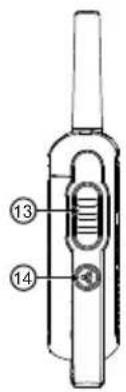
Figure 1: Radio T27X
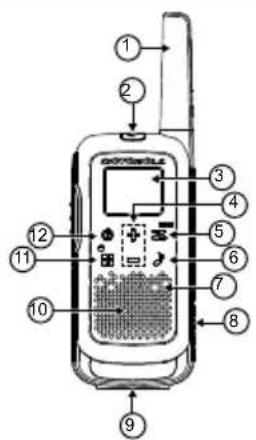
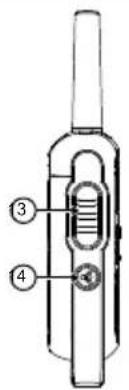
Figure 2: Radio T21X
Classification Description
Classification Description
environments bruyants.
- https://www.motorolasolutions.com/talkabout
http://bit.ly/Talkabout

https://www.motorolasolutions.com/talkabout
- https://www.fcc.gov/
- https://www.who.int/health-topics/electromagnetic-fields/
- http://www.ic.gc.ca/eic/site/smt-gst.nsf/eng/sf11467.html
- http://www.ic.gc.ca/eic/site/smt-gst.nsf/eng/sf01904.html
Para Obtener informacion adicular,
consulte https://www.motorolasolutions.com/en_us/about/companyoverview/corporate-responsibility/governance-and-policies.html
- https://www.motorolasolutions.com/talkabout
http://bit.ly/Talkabout
https://www.motorolasolutions.com/talkabout

http://www.motorolasolutions.com/talkabout/es

Portugues (Brasil)
Índice
- https://www.fcc.gov/
- https://www.who.int/health-topics/electromagnetic-fields/
- http://www.ic.gc.ca/eic/site/smt-gst.nsf/eng/sf11467.html
- http://www.ic.gc.ca/eic/site/smt-gst.nsf/eng/sf01904.html
Para obter informacoes adcionais,
consulte https://www.motorolasolutions.com/en_us/about/companyoverview/corporate-responsibility/governance-and-policies.html
Name: Motorola Solutions, Inc.
Endereço: 2000 Progress Pkwy, Schaumburg,
II. 60196.
Telephone: 1-800-927-2744
| Canal meteorológico Freqência |
| WX4 162.425 MHz |
| WX5 162.450 MHz |
| WX6 162.500 MHz |
| WX7 162.525 MHz |
| WX8 161.650 MHz |
| WX9 161.775 MHz |
| WX10 161.750 MHz |
| WX11 162.000 MHz |
| Canal Freqência (MHz) Potência Tmaxima de saía |
| 1 462,5625 2,0 W |
| 2 462,5875 2,0 W |
| 3 462,6125 2,0 W |
| 4 462,6375 2,0 W |
| 5 462,6625 2,0 W |
| 6 462,6875 2,0 W |
| 7 462,7125 2,0 W |
| 8 467,5625 0,5 W |
| Canal Freqência (MHz) Potência Tmaxima de saía |
| 9 467,5875 0,5 W |
| 10 467,6125 0,5 W |
| 11 467,6375 0,5 W |
| 12 467,6625 0,5 W |
| 13 467,6875 0,5 W |
| 14 467,7125 0,5 W |
| 15 462,5500 2,0 W |
| 16 462,5750 2,0 W |
| 17 462,6000 2,0 W |
| 18 462,6250 2,0 W |
| 19 462,6500 2,0 W |
| 20 462,6750 2,0 W |
| 21 462,7000 2,0 W |
| 22 462,7250 2,0 W |

http://bit.ly/Talkabout

https://www.motorolasolutions.com/talkabout

http://www.motorolasolutions.com/talkabout/pt

MOTOROLA SOLUTIONS


MOTOROLA, MOTO, MOTOROLA SOLUTIONS and the Stylized M logo are trademarks or registered trademarks of Motorola Trademark Holdings, LLC and are used under license. All other trademarks are the property of their respective owners.
© 2021 and 2023 Motorola Solutions, Inc. All rights reserved.
Printed in