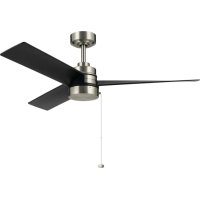
Spyn Lite - Fan Kichler - Free user manual and instructions
Find the device manual for free Spyn Lite Kichler in PDF.


| Product Type | Ceiling Fan |
| Brand | Kichler |
| Model | Spyn Lite |
| Blade Span | 1.32 m (52 inches) |
| Net Weight | 6.5 kg |
| Gross Weight | 7.8 kg |
| Power Supply | 120 V ~ 60 Hz |
| Number of Speeds | 3 (High, Medium, Low) |
| Reversing Switch | Yes, Summer/Winter |
| Control | Pull Chain |
| Minimum Installation Height | 2.1 m from floor |
| Outlet Box Capacity | 15.9 kg (35 lb) minimum |
| Use with Dimmer | Not compatible |
| Blade Material | Not specified (estimate: plastic or wood) |
| Cleaning | Dry or slightly damp cloth, no detergent |
| Recommended Ceiling Distance | 30.5 cm (12 inches) minimum |
| Number of Blades | 3 |
| Safety Cable Included | Yes (required in Canada) |
| Warranty | Not specified (estimate: 1 year) |
| Manufacturer Reference | Spyn Lite 52" |
Frequently Asked Questions - Spyn Lite Kichler
User questions about Spyn Lite Kichler
0 question about this device. Answer the ones you know or ask your own.
Ask a new question about this device
Download the instructions for your Fan in PDF format for free! Find your manual Spyn Lite - Kichler and take your electronic device back in hand. On this page are published all the documents necessary for the use of your device. Spyn Lite by Kichler.
USER MANUAL Spyn Lite Kichler
Product images may vary slightly from actual product.
natural_image
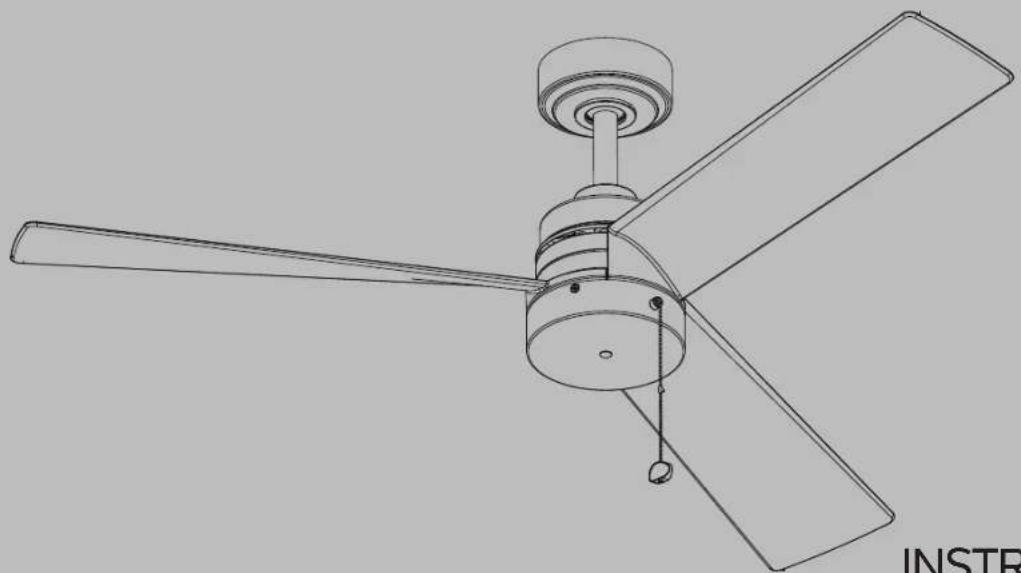
Line drawing of a three-blade office fan with a propeller and fan blade (no text or symbols)READ AND SAVE THESE INSTRUCTIONS
INSTRUCTION MANUAL
Model#300375
| KICHLER.COM2
TABLE OF CONTENTS
SAFETY RULES 4
TOOLS REQUIRED 6
PACKAGE CONTENTS 6
MOUNTING OPTIONS 7
HANGING THE FAN 8
INSTALLATION OF SAFETY SUPPORT .... 10
MAKE THE ELECTRICAL CONNECTIONS .....11
FINISHING THE INSTALLATION 12
ATTACHING THE FAN BLADES 13
INSTALLING THE SWITCH COVER....13
INSTALLING THE SWITCH HOUSING ....14
OPERATING INSTRUCTIONS ....16
TROUBLESHOOTING....17
SAFETY RULES
WARNING: FOR CANADA, THIS FAN MUST BE SECURED DIRECTLY TO THE BUILDING STRUCTURE / CEILING JOIST. DON'T SECURE THIS FAN TO AN OUTLET BOX.
- CAUTION - RISK OF SHOCK: Disconnect Power at the main circuit breaker panel or main fusebox before starting and during the installation.
- WARNING: All wiring must be in accordance with the National Electrical Code "ANSI / NFPA70" and local electrical codes. Electrical installation should be performed by a qualified licensed electrician.
- WARNING: To reduce the risk of electric shock, this fan must be installed with a general-use, isolating wall control / switch.
- WARNING: Not suitable for use with solid-state speed controls.
- WARNING: To reduce the risk of fire, electric shock, or personal injury, mount to outlet box marked "acceptable for fan support of 15.9 kg (35 lbs.) or less" and use mounting screws provided with the outlet box. Most outlet boxes commonly used for the support of light fixtures are not acceptable for
fan support and may need to be replaced. Due to the complexity of the installation of this fan, a qualified licensed electrician is strongly recommended.
- The outlet box and support structure must be securely mounted and capable of reliably supporting a minimum of 15.9 kg (35 pounds). Use only cULus Listed outlet boxes marked "Acceptable for Fan Support of 15.9 kg (35 lbs) or less".
- The fan must be mounted with a minimum of 2.1m (7 feet) clearance from the trailing edge of the blades to the floor.
- WARNING: Do not operate reversing switch while fan blades are in motion. Fan must be turned off and blades stopped before reversing blade direction.
- Avoid placing objects in the path of the blades.
- WARNING: make sure the power is disconnected before cleaning your fan.
SAFETY RULES (CONTINUED)
- To avoid personal injury or damage to the fan and other items, be cautious when working around or cleaning the fan.
- Do not use water or detergents when cleaning the fan or fan blades. A dry dust cloth or lightly dampened cloth will be suitable for most cleaning.
- After making electrical connections, spliced conductors should be turned upward and pushed carefully up into outlet box. The wires should be spread apart with the grounded conductor and the equipment-grounding conductor on one side of the outlet box and the ungrounded conductor on the other side of the outlet box.
- Electrical diagrams are reference only. Light kits that are not packed with the fan must be cULus Listed and marked suitable for use with the model fan you are installing. Switches must be cULus General Use Switches. Refer to the Instructions packaged with the light kits and switches for proper assembly.
-
All set screws must be checked, and retightened where necessary, before installation.
-
N.W.6.5 KGS(14.33 LBS) / G.W.7.8 KGS(17.19LBS)
WARNING
TO REDUCE THE RISK OF PERSONAL INJURY, DO NOT BEND THE BLADES DURING ASSEMBLY OR AFTER INSTALLATION. DO NOT INSERT OBJECTS IN THE PATH OF THE BLADES.
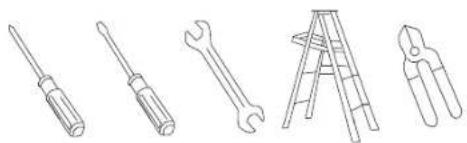
TOOLS REQUIRED
- Phillips screwdriver
- Blade screwdriver
- 11 mm wrench
- Step ladder
- Wire cutters
natural_image
Line drawings of five different tools: screwdriver, wrench, flatener, ladder, and pliers (no text or symbols)PACKAGE CONTENTS
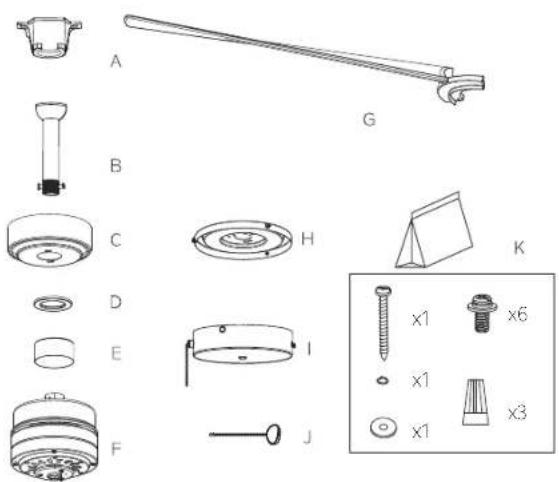
Unpack your fan and check the contents. You should have the following items:
A. Mounting Bracket
B. Ball / Downrod Assembly
C. Canopy
D. Canopy Trim Ring
E. Coupling Cover
F. Motor Body
G. Fan Blades (3)
H. Switch Cover
1. Switch Housing
J. Pull Chain Extension and Fob
K. Package Hardware
1) Mounting Hardware:
Wire Connectors (3)
2) Blade Attachment Hardware:
Fan Blade Mounting Screws
and washers (6)
3) Safety Cable Hardware:
Wood Screw (1).
Spring Washer (1).
Flat Washer (1)
MOUNTING OPTIONS
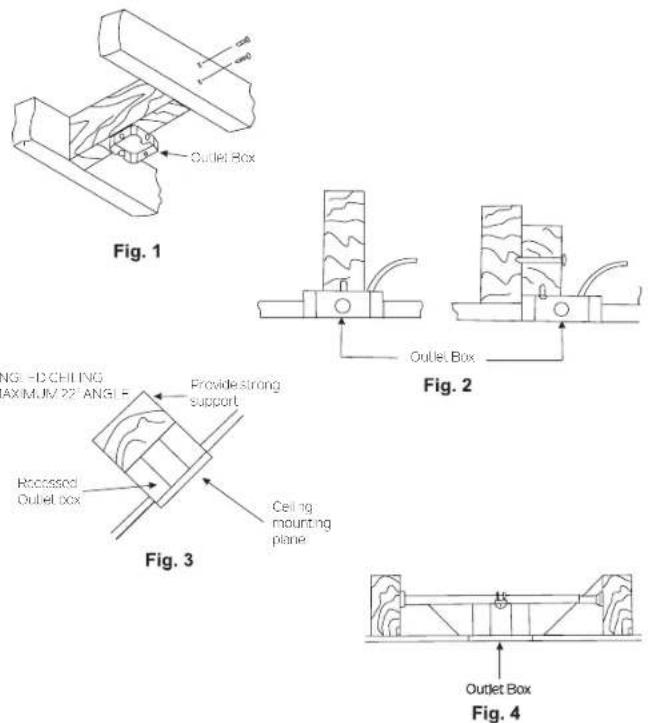
If there isn't an existing UL(cUL for Canadian Installation) listed mounting box, then read the following instructions. Disconnect the power by removing fuses or turning off circuit breakers.
Secure the outlet box directly to the building structure. Use appropriate fasteners and building materials. The outlet box and its support must be able to fully support the full weight of the fan (up to 15.9 kg (35 pounds)). Do not use plastic outlet boxes.
Figures 1, 2 and 3 are examples of different ways to mount the outlet box.
NOTE: If you are installing the ceiling fan on a sloped (vaulted) ceiling, you may need a longer downrod to maintain proper clearance between the tip of the blade and the ceiling. A minimum clearance of 12" is suggested for optimal operation.
NOTE: Depending on the location you have selected for installation, you may need to purchase and install a "Joist Hanger" for the support of the outlet box. Make sure the joist hanger you purchase has been designed for use with ceiling fans. (Fig. 4)
HANGING THE FAN
CAUTION: To avoid possible electrical shock, be sure you have turned off the power at the main circuit panel.
REMEMBER to turn off the power before you begin installation. This is necessary for your safety.
To properly install your ceiling fan, follow the steps below.
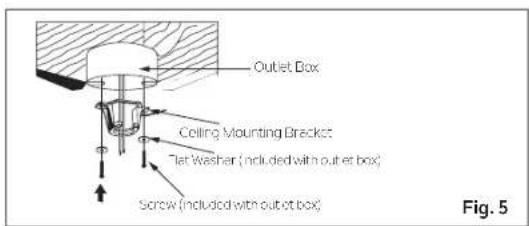
Step 1. Before attaching fan to outlet box (not included), ensure the outlet box is securely fastened to at least two points to a structural ceiling member (a loose box will cause the fan to wobble). Pass the 120 volt supply wires from the ceiling outlet box through the center of the ceiling mounting bracket. Install mounting bracket to outlet box in ceiling using the screws and washers included with the outlet box. (Fig. 5)
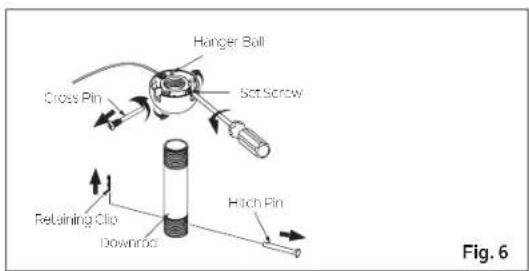
Step 2. Remove the retaining clip and hitch pin from the downrod assembly. Remove the hanger ball from the downrod assembly by loosening the set screw on the hanger ball (do not remove), unscrewing and removing the cross pin, and unscrewing the hanger ball (counterclockwise) from the downrod. (Fig. 6)
NOTE: Make sure to keep removed hardware separate to avoid confusion during installation.
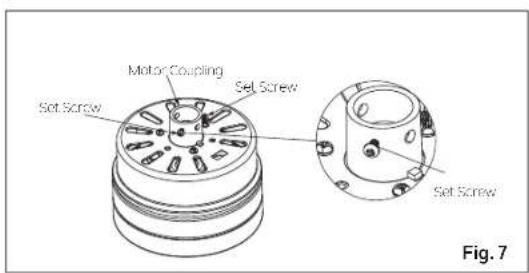
Step 3. Loosen the two set screws (do not remove) on the motor coupling. (Fig. 7)
HANGING THE FAN (CONTINUED)
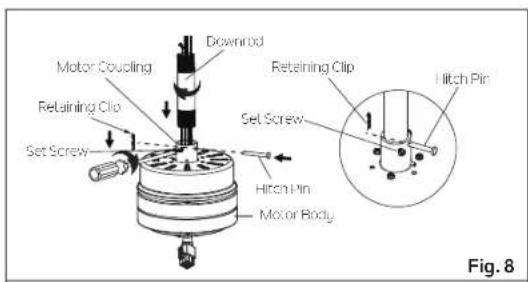
Step 4. Carefully feed fan wires and safety cable up through the downrod. Thread the downrod into the motor coupling until the hitch pin holes are aligned. Next, replace the hitch pin and retaining clip.
NOTE: Be careful not to jam the hitch pin against the wiring inside of the downrod. Tighten both set screws. (Fig. 8)
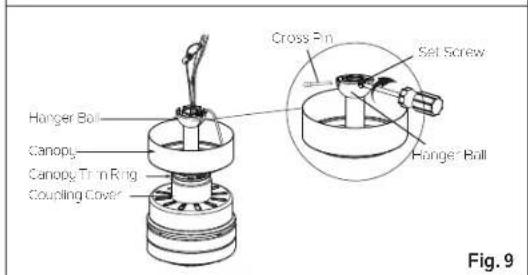
Step 5. Slip the coupling cover, canopy trim ring (smooth finished side facing motor body) and canopy onto the downrod. Carefully reinstall the hanger ball onto the downrod. Carefully reinstall the cross pin through the hanger ball and downrod.
NOTE: Be careful not to jam the cross pin against the wiring inside of the downrod.
Make sure the cross pin is in the correct position. Tighten the cross pin. Tighten the set screw on the hanger ball. Make sure the wires are not twisted. (Fig. 9)
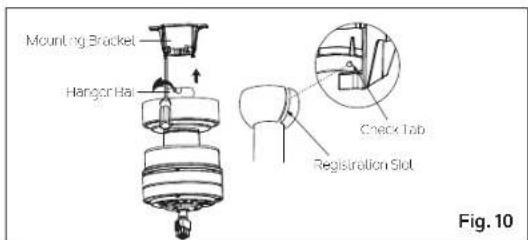
Step 6. Lift the motor body into position and place the hanger ball into the mounting bracket. Rotate the entire assembly until the "Check Tab" has dropped into the "Registration Slot" and seats firmly. (Fig. 10) The entire motor body should not rotate if this is done correctly.
WARNING: Failure to reattach the cross pin and seat the "Check Tab" can cause the fan to fall from the ceiling during operation. Take special care to make sure this pin is reattached.
INSTALLATION OF SAFETY SUPPORT (Required For Canadian Installation Only)
A safety support cable is provided to help prevent the ceiling fan from falling, please install it as steps below.
Step1. Slip the spring washer, then the flat washer onto the wood screw, then drive the wood screw into the side of the brace that holds the outlet box. Leave 3mm (1/8") of space between the support brace and the flat washer. (Fig.11)
Step2. Insert the safety cable through the mounting bracket and one of the holes in the outlet box into the ceiling. Adjust the length of the safety cable to reach the screw and flat washer by pulling the extra cable through the cable clamp until the overall length is correct, put the end of the cable back through the cable clamp, forming a loop at the end of the cable. Tighten the cable clamp securely. Now, put the loop in the end of the safety cable over the wood screw and under the flat washer. Tighten the wood screw securely. (Fig.12)
NOTE: Although the safety support cable is required for Canadian installations only, it is a good idea to make the attachment with any installation.
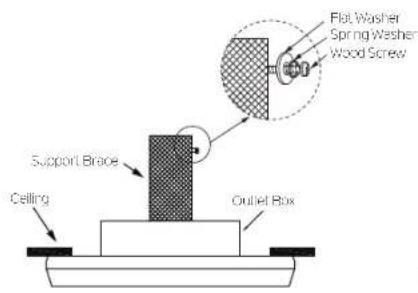
Fig. 11
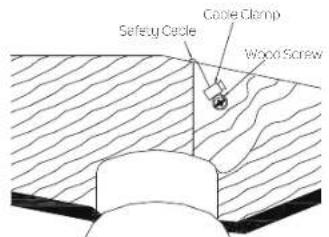
Fig. 12
MAKE THE ELECTRICAL CONNECTIONS
WARNING: To avoid possible electrical shock, be sure you have turned off the power at the main circuit panel before wiring. Follow the steps below to connect the fan to your household wiring. Use the wire connectors supplied with your fan. Secure the connectors with electrical tape. Make sure there are no loose wire strands or connections.
WARNING: If your house wires are in different colors than referenced in this manual, stop immediately. A professional electrician is recommended to determine proper wiring.
WARNING: Check to see that all connections are tight, including ground, and that no bare wire is visible at the wire connections.
Step 1. Connect the fan supply (black) wire and light supply (blue) wire to the household supply (black) wire as shown in Figure 13.
Step 2. Connect the neutral fan (white) wire to the neutral household (white) wire.
Step 3. Connect the fan ground wire (yellow/green) to the household ground wire.
Step 4. After connecting the wires, turn the wire connecting nuts upward, and push the wiring into the outlet box. Spread them apart so that the green (ground) and white (neutral) wires are on one side of the outlet box and the black (hot) wires are on the other side.
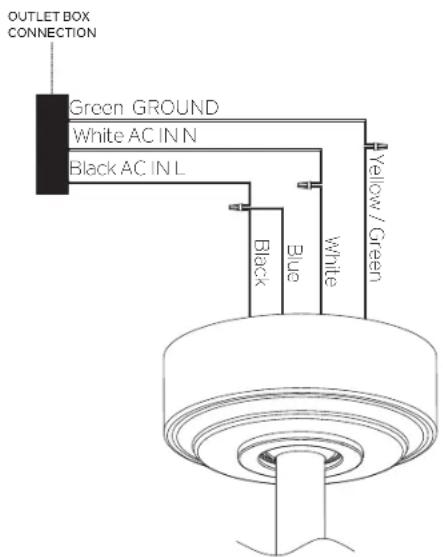
Fig. 13
FINISHING THE INSTALLATION
CAUTION: Before continuing installation, confirm that the power is still turned off at the main circuit breaker or by removing the circuit fuse. Turning the power off using a wall switch is not sufficient to prevent electrical shock.
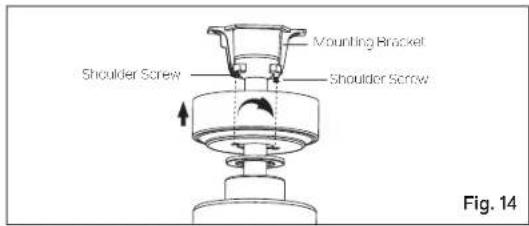
Step 1. Loosen the two shoulder screws at the bottom of the mounting bracket (do not remove). (Fig. 14)
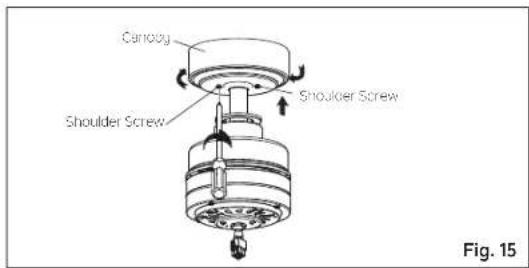
Step 2. Raise the canopy to the mounting bracket. Place the key hole slots in the canopy over the shoulder screws in the mounting bracket. Rotate the canopy (clockwise) until the canopy locks in place against the shoulder screws (at the narrow ends of the key hole slots). Tighten the two shoulder screws to secure the canopy in place. (Fig. 15)
WARNING: Make sure the "Check Tab" at the bottom of the ceiling mounting bracket is properly seated in the "Registration Slot" on the side of the hanger ball before attaching the canopy to the ceiling mounting bracket.
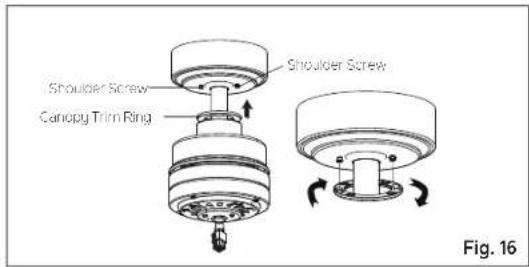
Step 3. Raise the canopy trim ring to the canopy. Place the key hole slots in the canopy trim ring over the heads of the shoulder screws. Rotate the canopy trim ring (clockwise) until it locks in place against the shoulder screws (at the narrow ends of the key hole slots). (Fig. 16)
NOTE: Adjust the shoulder screws as necessary until the canopy and canopy trim ring are snug. (Fig. 16)
ATTACHING THE FAN BLADES
CAUTION: Before continuing installation, confirm that the power is still turned off at the main circuit breaker or by removing the circuit fuse. Turning the power off using a wall switch is not sufficient to prevent electrical shock.
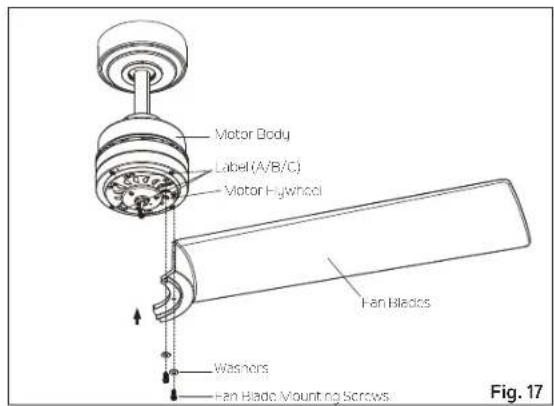
Step 1. NOTE: The holes in the fan blades and the holes in the motor flywheel are marked "A", "B", or "C". Line up the holes in the fan blades with the holes in the motor flywheel (Line up A to A, B to B, and C to C). Attach fan blades to the flywheel with the washers and fan blade mounting screws provided. Tighten to secure. (Fig. 17)
INSTALLING THE SWITCH COVER
CAUTION: Before continuing installation, confirm that the power is still turned off at the main circuit breaker or by removing the circuit fuse. Turning the power off using a wall switch is not sufficient to prevent electrical shock.
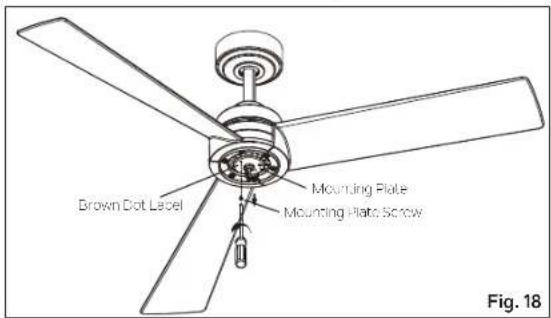
Step 1. Remove the mounting plate screw that is marked with a brown dot label from the mounting plate. Retain mounting plate screw. Loosen the other two mounting plate screws (do not remove). (Fig. 18)
INSTALLING THE SWITCH COVER (CONTINUED)
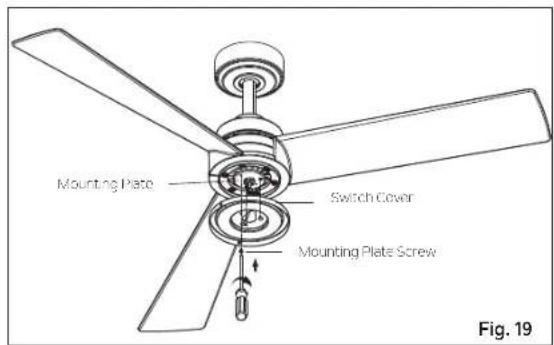
Step 2. Place the key hole slots in the switch cover over the 2 mounting plate screws that were loosened on the mounting plate. Rotate the switch cover (clockwise) until it locks in place against the mounting plate screws at the narrow ends of the key hole slots.
Align the remaining hole in the switch cover with the remaining hole in the mounting plate. Install the mounting plate screw that was removed from the mounting plate into the aligned holes. Tighten all 3 mounting plate screws to secure the switch cover in place. (Fig.19)
INSTALLING THE SWITCH HOUSING
CAUTION: Before continuing installation, confirm that the power is still turned off at the main circuit breaker or by removing the circuit fuse. Turning the power off using a wall switch is not sufficient to prevent electrical shock.
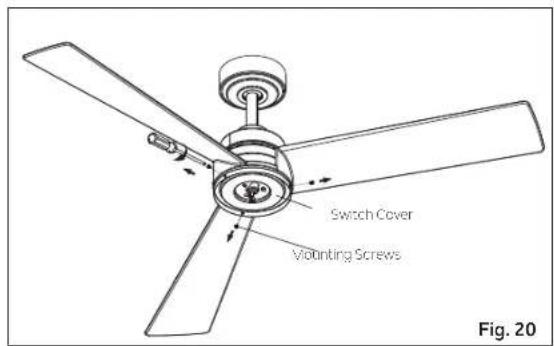
Step 1. Remove the three preinstalled mounting screws from the outside edge of the switch cover. Retain mounting screws. (Fig. 20)
INSTALLING THE SWITCH HOUSING (CONTINUED)
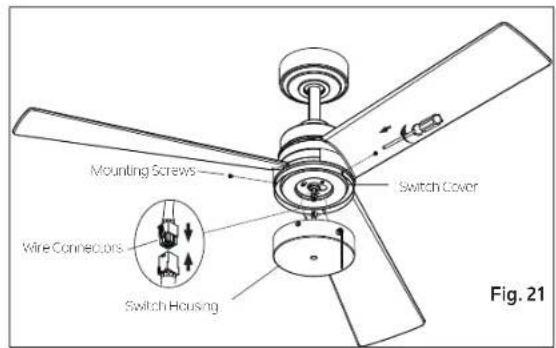
Step 2. Raise the switch housing close to the fan, and push the square wire connectors together (one from the fan and one from the switch housing). (Fig.21)
NOTE: The connectors will ONLY engage when the color coded strips are matched (aligned).
Step 3. Carefully push all the wires into the switch housing. Attach the switch housing to the switch cover with the mounting screws that were removed in Step 1. Make sure each screw is tight. (Fig. 21)
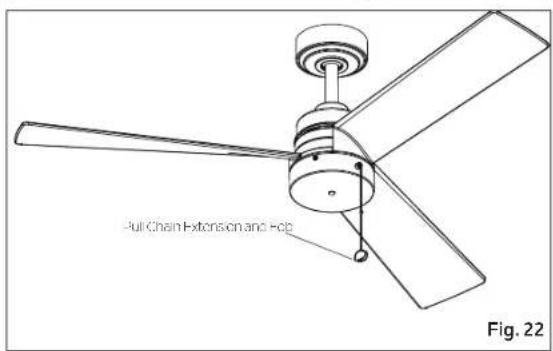
Step4. Install the pull chain extension and fob. (Fig. 22)
OPERATING INSTRUCTIONS
Turn the power on and check the operation of your ceiling fan. The pull chain controls the 3 speeds of your ceiling fan. (Fig. 23)
1st pull = High, 2nd pull = Medium, 3rd pull = Low and the 4th pull turns the fan motor off.
WARNING: Do not operate reversing switch while fan blades are in motion. Fan must be turned off and blades stopped before reversing blade direction.
The switch on the side of the switch housing controls the direction of the fan blades, "Forward" or "Reverse". (Fig. 23)
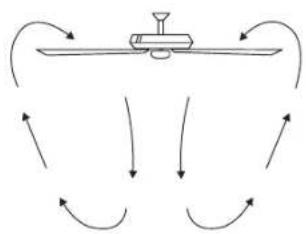
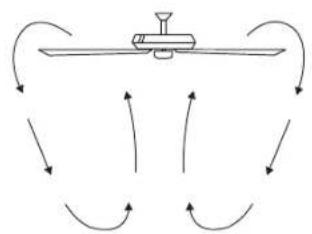
Warm Weather Operation: Forward (fan rotates counter clockwise). A downward airflow creates a cooling effect (Fig. 24). This allows you to set your air conditioner on a warmer setting without affecting your general comfort.
Cool Weather Operation: Reverse (fan rotates clockwise). An upward airflow moves warm air off the ceiling areas (Fig. 25). This allows you to set your heating unit on a cooler setting without affecting your general comfort.
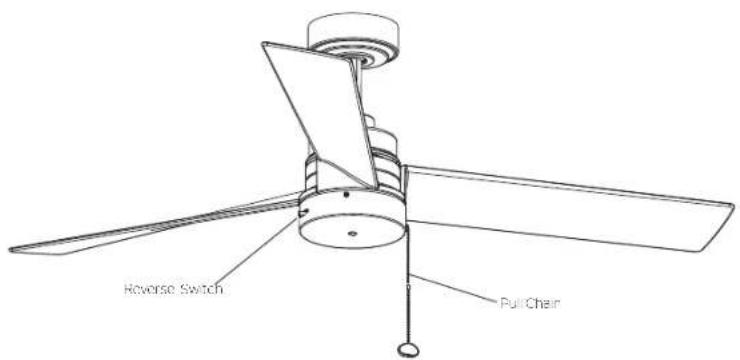
Fig. 23
natural_image
Diagram showing airflow around a mechanical component with curved arrows indicating direction (no text or symbols)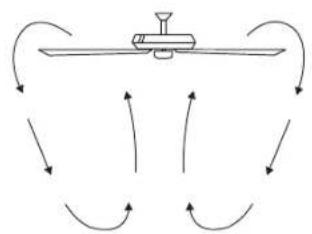
flowchart
graph TD
    A["Central Device"] --> B["Arrow 1"]
    A --> C["Arrow 2"]
    A --> D["Arrow 3"]
    A --> E["Arrow 4"]
    A --> F["Arrow 5"]
    A --> G["Arrow 6"]
    A --> H["Arrow 7"]
    A --> I["Arrow 8"]
    A --> J["Arrow 9"]
    A --> K["Arrow 10"]
Fig. 24 Fig. 25
TROUBLESHOOTING
Problem Solution
Fan will not start.
-
Check circuit fuses or breakers.
-
Check all electrical connections to ensure proper contact.
CAUTION: Make sure the main power is OFF when checking any electrical connection.
Fan sounds noisy.
-
Make sure all motor housing screws are snug.
-
Make sure the screws that attach the fan blade brackets to the motor are tight.
-
Make sure wire nut connections are not rubbing against each other or the interior wall of the switch housing.
CAUTION: Make sure main power is off.
-
Allow a 24-hour "breaking-in" period. Most noise associated with a new fan disappears during this time.
-
If using an optional light kit, make sure the screws securing the glassware are tight. Make sure the light bulbs are not touching any other component.
-
Do not connect this fan to a wall mounted variable speed control(s). They are not compatible with ceiling fan motors or remote controls.
-
Make sure the upper canopy is a short distance from the ceiling. It should not touch the ceiling.
Fan wobble.
-
Check that all blade and blade arm screws are secure.
-
Most fan wobbling probems are caused when blade levers are unequal. Check this level by selecting a point on the ceiling above the tip of one of the blades. Measure this distance. Rotate the fan until the next blade is positioned for measurement. Repeat for each blade. The distance deviation should be equal within 1/8".
-
If the blade wobble is still noticeable, interchanging two adjacent (side by side) blades can redistribute the weight and possibly result in smoother operation.
WARNING: To reduce the risk of personal injury and to ensure the proper operation of your ceiling fan, never attach the blade assemblies until the ceiling fan has been mounted on the ceiling.
Do not bend the blade while installing, Balancing or cleaning the fan. Do not Insert foreign objects between rotating fan blades.
KICHLER®
www.kichler.com
KICHLER LIGHTING LLC
30455 Solon Rd.
Solon, OH 44139 USA.
CUSTOMER SERVICE 866.558.5706
8:00 AM TO 5:00 PM EST, MONDAY - FRIDAY
REV. 14-NOV-2023
© Kichler Lighting LLC. All Rights Reserved.
KICHLER®
Spyn Lite de 52 po
natural_image
Line drawing of a three-blade office fan with a central hub and propeller (no text or symbols)LISEZ ET CONSERVEZ CES INSTRUCTIONS
MANUEL D'INSTRUCTIONS
Modèle n° 300375
| KICHLER.COM2
TABLE DES MATIÈRES
RÈGLES DE SÉCURITÉ ....4
OUTILSNÉCESSAIRES 6
CONTENU DUCOLIS....6
OPTIONS DE MONTAGE 7
SUSPENDRE LE VENTILATEUR....8
INSTALLATION DU SUPPORT DE SÉCURITÉ .....10
EFFECTUER LES RACCORDEMENTS ÉLECTRIQUES ....11
FIN DE L'INSTALLATION ....12
FIXATION DES PALES DU VENTILATEURS .....13
INSTALLATION DU COUVERCLE DU COMMUTATEUR....13
INSTALLATION DU BOÎTIER DE COMMUTATEUR....14
INSTRUCTIONS D'UTILISATION ....16
DÉPANNAGE....17
RÈGLES DE SÉCURITÉ
AVERTISSEMENT : POUR LE CANADA, CE VENTILATEUR DOIT ÊTRE FIXÉ DIRECTEMENT À LA STRUCTURE DU BÂTIMENT OU À LA SOLIVE DE PLAFOND. NE PAS FIXER CE VENTILATEUR À UNE BOÎTE DE SORTIE.
natural_image
Line drawings of five different tools: screwdriver, wrench, flatener, ladder, and pliers (no text or symbols)CONTENU DU COLIS
OPTIONS DE MONTAGE
natural_image
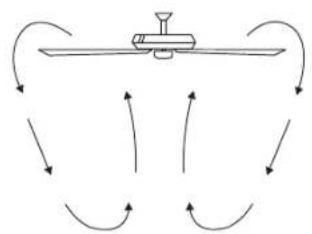
Diagram showing airflow around a mechanical component with curved arrows indicating direction (no text or symbols)Image 24 Image 25
flowchart
graph TD
    A["Central Device"] --> B["Arrow 1"]
    A --> C["Arrow 2"]
    A --> D["Arrow 3"]
    A --> E["Arrow 4"]
    A --> F["Arrow 5"]
    A --> G["Arrow 6"]
    A --> H["Arrow 7"]
    A --> I["Arrow 8"]
    A --> J["Arrow 9"]
    A --> K["Arrow 10"]
DÉPANNAGE
Problème Solution
natural_image
Line drawing of a three-blade ceiling fan with a central hub and propeller (no text or symbols)LEA Y GUARDE ESTAS INSTRUCCIONES
MANUAL DE
INSTRUCCIONES
natural_image
Line drawings of five different tools: screwdriver, wrench, flatener, ladder, and pliers (no text or symbols)OPCIONES DE MONTAJE
natural_image
Diagram showing airflow around a mechanical device with curved arrows indicating direction (no text or symbols)Figura 24 Figura 25
flowchart
graph TD
    A["Central Device"] --> B["Arrow 1"]
    A --> C["Arrow 2"]
    A --> D["Arrow 3"]
    A --> E["Arrow 4"]
    A --> F["Arrow 5"]
    A --> G["Arrow 6"]
    A --> H["Arrow 7"]
    A --> I["Arrow 8"]
    A --> J["Arrow 9"]
    A --> K["Arrow 10"]