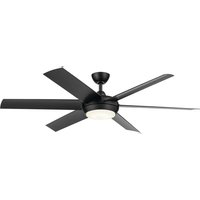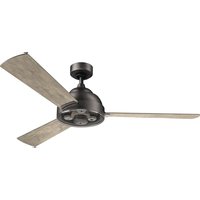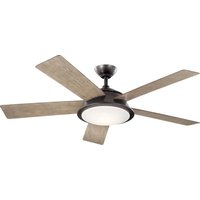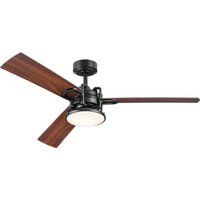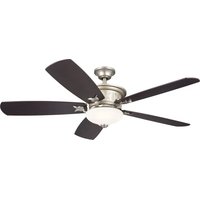
Guardian 330057 - Fan Kichler - Free user manual and instructions
Find the device manual for free Guardian 330057 Kichler in PDF.


User questions about Guardian 330057 Kichler
0 question about this device. Answer the ones you know or ask your own.
Ask a new question about this device
Download the instructions for your Fan in PDF format for free! Find your manual Guardian 330057 - Kichler and take your electronic device back in hand. On this page are published all the documents necessary for the use of your device. Guardian 330057 by Kichler.
USER MANUAL Guardian 330057 Kichler
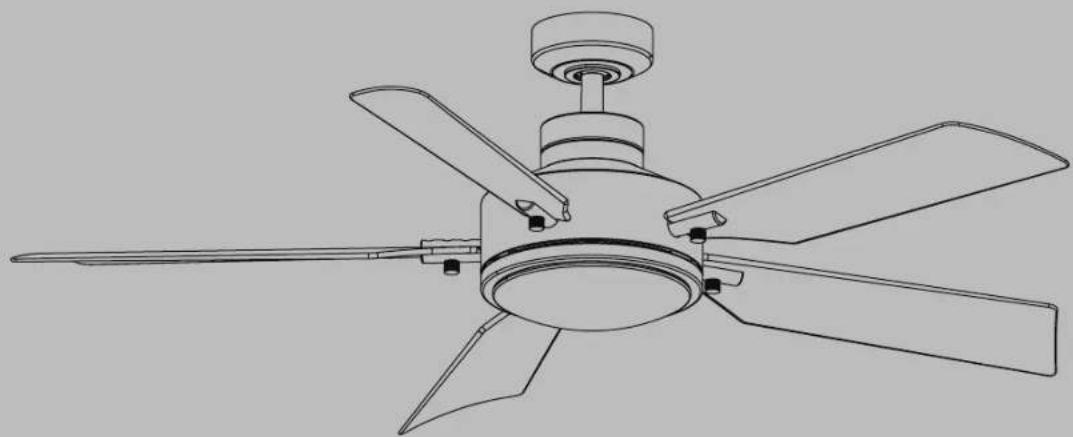
Product images may vary slightly from actual product.
natural_image
Line drawing of a five-blade cabinet fan with blades and top mount (no text or symbols)READ AND SAVE THESE INSTRUCTIONS
INSTRUCTION MANUAL
Model# 330057
TABLE OF CONTENTS
SAFETY RULES 3
TOOLS REQUIRED 6
PACKAGE CONTENTS 6
MOUNTING OPTIONS ....7
HANGING THE MOTOR ASSEMBLY 8
INSTALLATION OF SAFETY SUPPORT ....11
ELECTRICAL CONNECTIONS 12
COMPLETING THE MOTOR INSTALLATION ..... 13
ATTACHING THE FAN BLADES ....14
INSTALLING THE LIGHT PLATE 15
INSTALLING THE LIGHT KIT AND GLASS SHADE ..... 16
INSTALLING THE "COOLTOUCH" CONTROL SYSTEM WALL PLATE 17
INSTALLING AND REMOVING THE HANDHELD TRANSMITTER....18
OPERATING INSTRUCTIONS....18
REVERSE FUNCTION 20
FCC INFORMATION 20
TROUBLESHOOTING 21
SAFETY RULES
READ AND SAVE THESE INSTRUCTIONS
WARNING: FOR CANADA, THIS FAN MUST BE SECURED DIRECTLY TO THE BUILDING STRUCTURE / CEILING JOIST. DON'T SECURE THIS FAN TO AN OUTLET BOX.
- CAUTION – RISK OF SHOCK – Disconnect Power at the main circuit breaker panel or main fusebox before starting and during the installation.
- WARNING: This fixture is intended for installation in accordance with the National Electrical Code (NEC) and all local code specifications. If you are not familiar with code requirements, installation by a certified electrician is recommended.
- WARNING: To reduce the risk of fire or electric shock, use only the control provided with the fan.
-
WARNING: To reduce the risk of fire, electric shock, or Personal Injury mount to an outlet box marked "Acceptable For Fan Support of up to 15.9 kg (35 lbs)". For outlet box mounting, use mounting screws (and lock washers) provided with the outlet box. Most outlet boxes commonly used for the support of light fixtures are not acceptable for fan support and may need to be replaced. Due to the complexity of the installation of this fan, a qualified licensed electrician is strongly recommended.
-
⚠WARNING: Chemical Burn Hazard. Keep batteries away from children.; and
This product contains a lithium button/coin cell battery. If a new or used lithium button/coin cell battery is swallowed or enters the body, it can cause severe internal burns and can lead to death in as little as 2 hours. Always completely secure the battery compartment. If the battery compartment does not close securely, stop using the product, remove the batteries, and keep it away from children. If you think batteries might have been swallowed or placed inside any part of the body, seek immediate medical attention.
a) The cells shall be disposed of properly, including keeping them away from children; and
b) Even used cells may cause injury.
- All wiring must be in accordance with the National Electrical Code ANSI/NFPA 70 and local electrical codes. Electrical installation should be performed by a qualified licensed electrician.
SAFETY RULES
- The outlet box and support structure must be securely mounted and capable of reliably supporting a minimum of 15.9 kg (35 pounds). Use only cULus Listed outlet boxes marked "FOR FAN SUPPORT".
- WARNING: TO REDUCE THE RISK OF FIRE, ELECTRIC SHOCK OR PERSONAL INJURY, MOUNT FAN TO OUTLET BOX MARKED "ACCEPTABLE FOR FAN SUPPORT".
- Avoid placing objects in the path of the blades.
- To avoid personal injury or damage to the fan and other items, be cautious when working around or cleaning the fan.
- To operate the reverse function on this fan, press the reverse button while the fan is running.
- Make sure the installation site you choose allows a minimum clearance of 2.1 m (7 feet) from the blades to the floor and at least 30 inches from the ends of the blades to any obstruction.
- WARNING: make sure the power is disconnected before cleaning your fan.
-
Do not use water or detergents when cleaning the fan or fan blades. A dry dust cloth or lightly dampened cloth will be suitable for most cleaning.
-
After making the electrical connections, spliced conductors should be turned upward and pushed carefully up into outlet box. The wires should be spread apart with the grounded conductor and the equipment-grounding conductor on one side of the outlet box and the ungrounded conductor on the other side of the outlet box.
- Electrical diagrams are for reference only. Light kits that are not packed with the fan must be ETL Listed and marked suitable for use with the model fan you are installing. Switches must be ETL General Use Switches. Refer to the Instructions packaged with the light kits and switches for proper assembly.
- All set screws must be checked, and retightened where necessary, before installation.
- The subject fan 330057 weight information is as below: Net Weight: 11.83 kgs / 26 lbs; Gross Weight: 13.03 kgs / 28.67 lbs
WARNING
TO REDUCE THE RISK OF PERSONAL INJURY, DO NOT BEND THE BLADE BRACKETS DURING ASSEMBLY OR AFTER INSTALLATION. DO NOT INSERT OBJECTS IN THE PATH OF THE BLADES.
SAFETY RULES (continued)
WARNING
• INGESTION HAZARD: This product contains a button cell or coin battery.
• DEATH or serious injury can occur if ingested.
• A swallowed button cell or coin battery can cause Internal Chemical Burns in as little as 2 hours.
- KEEP new and used batteries OUT OF REACH of CHILDREN.
- Seek immediate medical attention if a battery is suspected to be swallowed or inserted inside any part of the body.
- Remove and immediately recycle or dispose of used batteries according to local regulations and keep away from children. Do NOT dispose of batteries in household trash or incinerate.
• Even used batteries may cause severe injury or death.
• Call a local poison control center for treatment information.
• Battery Type: CR2032 and Nominal Battery Voltage: 3V.
• Non-rechargeable batteries are not to be recharged.
- Do not force discharge, recharge, disassemble, heat above 40°C or incinerate. Doing so may result in injury due to venting, leakage or explosion resulting in chemical burns.
- Ensure the batteries are installed correctly according to polarity (+ and -).
- Do not mix old and new batteries, different brands or types of batteries, such as alkaline, carbon-zinc, or rechargeable batteries.
- Remove and immediately recycle or dispose of batteries from equipment not used for an extended period of time according to local regulations.
• Always completely secure the battery compartment. If the battery compartment does not close securely, stop using the product, remove the batteries, and keep them away from children.

text_image
Warning symbol with exclamation mark inside triangle and plus/minus signs below, indicating caution or error warning.TOOLS AND MATERIALS REQUIRED
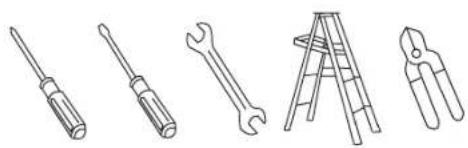
• Phillips Screwdriver
- Blade Screwdriver
- 11 mm Wrench
- Step Ladder
- Wire Cutters
natural_image
Line drawings of five different tools: screwdriver, wrench, ladder, pliers, and flat screw (no text or symbols)PACKAGE CONTENTS
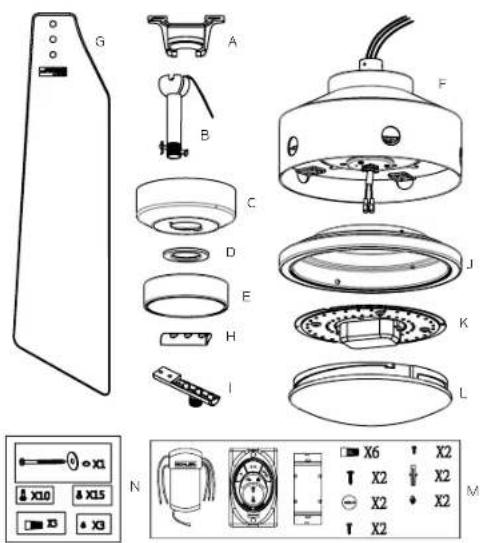
Unpack your fan and check the contents. You should have the following items:
A. Mounting Bracket
B. Ball / Downrod Assembly
C. Canopy
D. Canopy Hole Cover
E. Coupling Cover
F. Motor Assembly
G. Blade (5)
H. Blade Cover (5)
I. Blade Bracket (5)
J. Light Plate
K. Light Kit
L. Glass Shade
M. Wall control Kit:
Receiver (1), Control (1), Metal Plate (1),
Wire connector (6), Wood Screw (2).
Battery (2), Long Screw (2),
Short Screw (2), Expansion Anchor (2).
Plastic Nut (2)
N. Package hardware
1.) Mounting hardware : Wire Connector (3)
2.) Blade attachment hardware: Screws (15)
3.) Blade bracket attachment hardware: Screw (10)
4.) Safety cable hardware:
Wood screw (1), Spring washer (1),
Flat washer (1)
5.) Light Kit Hardware: Screw (3)
text_image
Exploded view diagram of a refrigerator with labeled parts and control panelMOUNTING OPTIONS
If there is not an existing UL (cUL for Canadian Installation) listed mounting box, then read the following instructions. Disconnect the power by removing fuses or turning off circuit breakers.
Secure the outlet box directly to the building structure. Use appropriate fasteners and building materials. The outlet box and its support must be able to fully support the full weight of the fan (up to 15.9kg (35 pounds)). Do not use plastic outlet boxes.
Figures 1, 2 and 3 are examples of different ways to mount the outlet box.
NOTE: If you are installing the ceiling fan on a sloped (vaulted) ceiling, you may need a longer down rod to maintain proper clearance between the tip of the blade and the ceiling. A minimum clearance of 12" is suggested for optimal operation.
NOTE: You must use 12" or longer downrod for 22° slope (max angle 22°). (Fig. 3)
NOTE: Depending on the location you have selected for installation, you may need to purchase and install a joist hanger for the support of the outlet box. Make sure the joist hanger you purchase has been designed for use with ceiling fans. (Fig. 4)
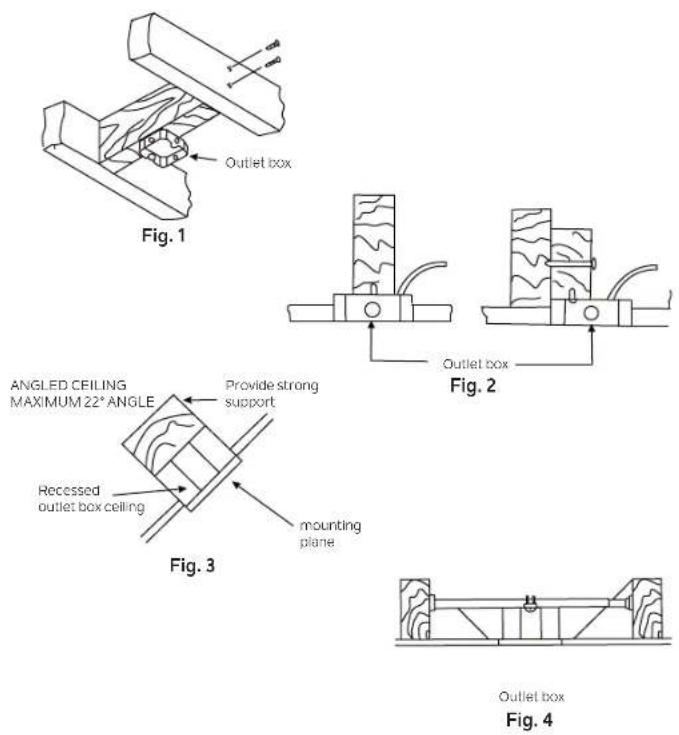
Outlet box
HANGING THE MOTOR ASSEMBLY
REMEMBER to turn off the power before you begin installation. This is necessary for your safety and also the proper programming of the control system.
To properly install your ceiling fan, follow the steps below.
Step 1. Before attaching fan to outlet box (not included), ensure the outlet box is securely fastened to at least two points to a structural ceiling member (a loose box will cause the fan to wobble). Pass the 120 volt supply wires from the ceiling outlet box through the center of the ceiling mounting bracket. Install mounting bracket to outlet box in ceiling using the screws and washers included with the outlet box. (Fig. 5)
Step 2. Remove the hairpin and clevis pin from the downrod assembly, retain for later use. Remove the hanger ball from the downrod assembly by loosening set screw, removing the cross pin, and sliding ball of the rod. (Fig. 6)
NOTE: Make sure to keep loosened hardware separate to avoid confusion during installation.
Step 3. Loosen the two set screws on the motor coupling. (Fig. 7)
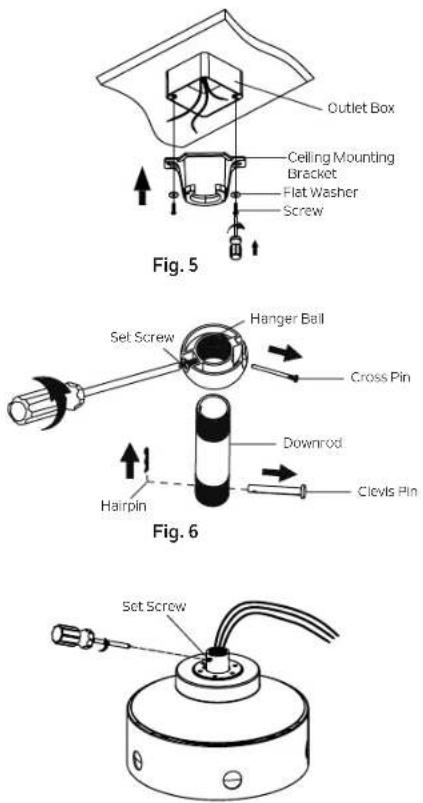
Fig. 7
HANGING THE MOTOR ASSEMBLY (continued)
Step 4. Carefully feed fan wires and safety cable up through the downrod. Thread the downrod onto the motor coupling until the clevis pin holes are aligned. Next, replace the clevis pin and hairpin, then tighten both set screws. (Fig. 8)
Step 5. Slip the coupling cover, canopy hole cover and canopy onto the downrod. Carefully reinstall the hanger ball onto the downrod. Make sure the cross pin is in the correct position and the set screw is tight and the wires are not twisted. (Fig. 9)
CAUTION: Ensure all screws are tight before moving to the next step.
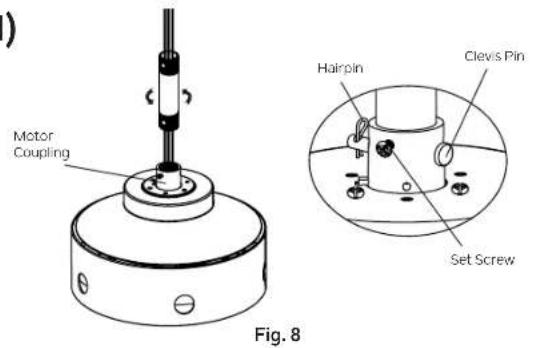
text_image
Motor Coupling Hairpin Clevis Pin Set Screw Fig. 8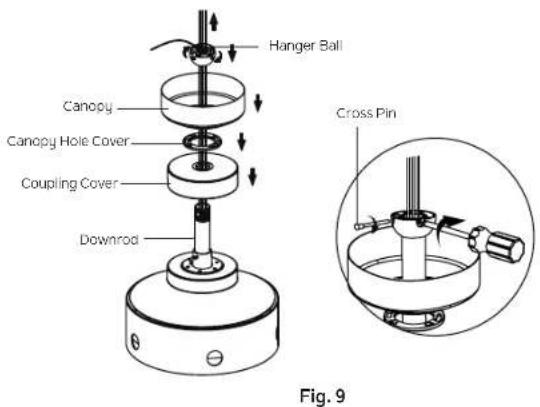
text_image
Hanger Ball Canopy Canopy Hole Cover Coupling Cover Downrod Cross Pin Fig. 9HANGING THE MOTOR ASSEMBLY (continued)
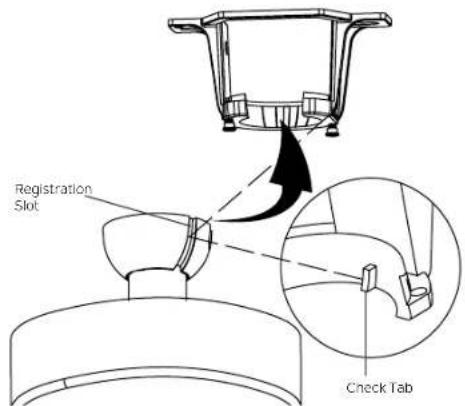
Step 6. Now lift the motor assembly into position and place the hanger ball into the mounting bracket. Rotate until the check tab has dropped into the registration slot and seats firmly. (Fig. 10) The entire motor body should not rotate if this is done correctly.
WARNING: Failure to properly seat the check tab can damage the ceiling fan during operation.
text_image
Registration Slot Check TabFig. 10
INSTALLATION OF SAFETY SUPPORT (required for Canadian installation ONLY)
A safety support cable is provided to help prevent the ceiling fan from falling, please install it as follows.
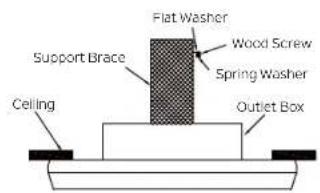
Step 1. Drive a wood screw and washers into the side of the brace that holds the outlet box. Leave 3mm (1/8") of space between the support brace and the washer (Fig. 11)
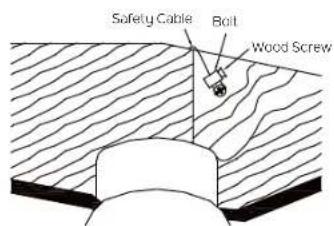
Step 2. Insert the safety cable through the mounting bracket and one of the holes in the outlet box into the ceiling. Adjust the length of the safety cable to reach the screw and washers by pulling the extra cable through the cable clamp until the overall length is correct, put the end of the cable back through the cable clamp, forming a loop at the end of the cable. Tighten the cable clamp securely. Now, put the loop in the end of the safety cable over the wood screw and under the washer. Tighten the wood screw securely. (Fig. 12)
NOTE: Although the safety support cable is required for Canadian installations only, it's a good idea to make the attachment with any installation.
text_image
Flat Washer Wood Screw Spring Washer Support Brace Ceiling Outlet BoxFig. 11
text_image
Safety Cable Bolt Wood ScrewFig. 12
ELECTRICAL CONNECTIONS
WARNING: To avoid possible electrical shock, be sure you have turned off the power at the main circuit panel before wiring.
Follow the steps below to connect the fan to your household wiring. Use the wire connectors supplied with your fan. Secure the connectors with electrical tape. Make sure there are no loose wire stands or connections.
WARNING: If your house wires are different colors than referenced in this manual, stop immediately. A professional electrician is recommended to determine proper wiring.
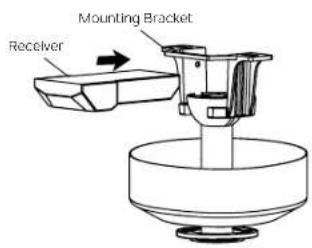
Step 1. Insert the receiver into the mounting bracket, and keep flat in opposition of ceiling. (Fig. 13)
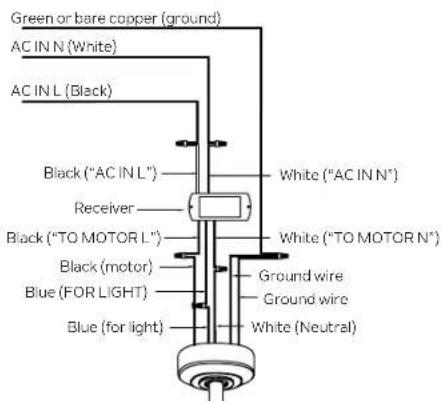
Step 2. Motor to Receiver Electrical Connections: Connect the BLACK wire from the fan to BLACK wire marked "TO MOTOR L" from the receiver. Connect the WHITE wire from the fan to the WHITE wire marked "TO MOTOR N" from the receiver. Connect the BLUE wire from the fan to the BLUE wire marked "FOR LIGHT" from the receiver. Secure all the wire connections with the plastic wire connectors provided. (Fig. 14)
Step 3. Remote Receiver to Outlet Box Electrical Connections: Connect the BLACK (hot) wire from the ceiling to the BLACK wire marked "AC IN L" from the receiver. Connect the WHITE (Neutral) wire from the ceiling to the WHITE wire marked "AC IN N" from the receiver. Secure all the wire connections with the plastic wire connectors provided. (Fig. 14)
text_image
Mounting Bracket ReceiverFig. 13
text_image
Green or bare copper (ground) AC IN N (White) AC IN L (Black) Black ("AC IN L") Receiver Black ("TO MOTOR L") Black (motor) Blue (FOR LIGHT) Blue (for light) White ("AC IN N") White ("TO MOTOR N") Ground wire Ground wire White (Neutral)Fig. 14
ELECTRICAL CONNECTIONS
Step 4. If your outlet box has a ground wire (green or bare copper) connect it to the fan ground wires. Otherwise, connect the fan ground wire to the mounting bracket. Secure the wire connection with a plastic nut provided. After connecting the wires, spread them apart so that the green and white wires are on one side of the outlet box and black and blue wires are on the other side. (Fig. 14)
NOTE: Carefully tuck the wire connections up into the outlet box.
NOTE: Fan must be installed at a maximum distance of 30 feet from the transmitting unit for proper signal transmission between the transmitting unit and the fan's receiving unit.
text_image
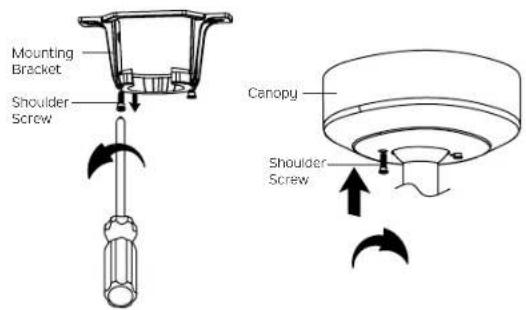
Mounting Bracket Shoulder Screw Canopy Shoulder ScrewFig. 16 Fig. 15
COMPLETING THE MOTOR INSTALLATION
Step 1. Remove one of the two shoulder screws in the mounting bracket. Loosen the second shoulder screw without fully removing it. (Fig. 15)
Step 2. Assemble canopy by rotating key slot in canopy over shoulder screw in mounting bracket. Reinstall the shoulder screw that was previously removed, then retighten two shoulder screws securely. (Fig. 16)
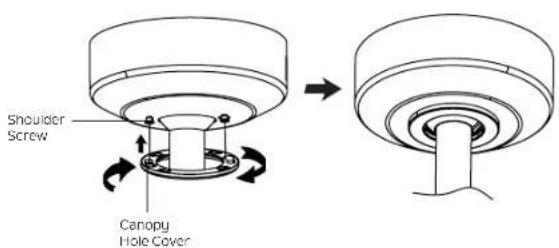
Step 3. Securely attach and tighten the canopy hole cover over the shoulder screws in the mounting bracket utilizing the keyslot twist-lock feature.(Fig.17)
text_image
Shoulder Screw Canopy Hole CoverFig. 17
ATTACHING THE FAN BLADES
CAUTION: To Reduce The Risk Of Electric Shock, Disconnect The Electrical Supply Circuit To The Fan Before Installing Fan Blades.
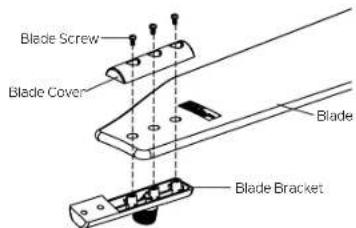
Step 1. Position the blades over the blade brackets with the threaded posts showing. Make sure the bottom edge of the blades are fully seated against the blade brackets. Place the blade covers on the top of the blades, positioning the holes over the threaded posts. Tighten blade screws to secure the blades to the blade brackets. (Fig.18)
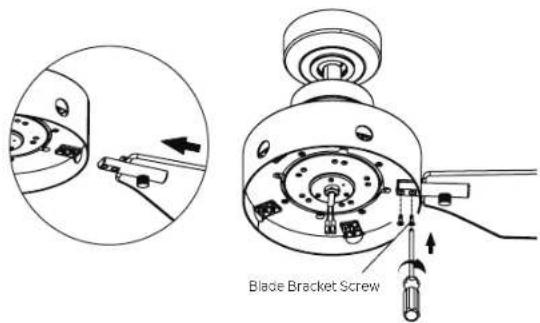
Step 2. Secure the blade brackets to motor using blade bracket screws as shown. (Fig.19)
text_image
Blade Screw Blade Cover Blade Blade BracketFig. 18
text_image
Blade Bracket ScrewFig. 19
INSTALLING THE LIGHT PLATE
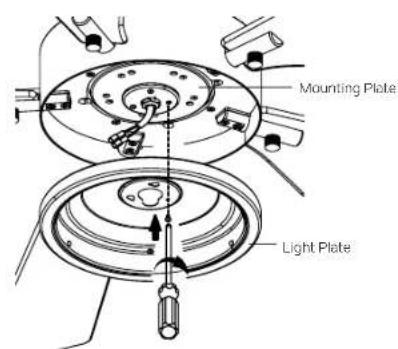
Step 1. Remove the screw marked with a brown dot label on the mounting plate and keep for later use. Loosen the other two (do not remove).(Fig.20)
Step 2. Place the two slot holes on the light plate over the 2 screws previously loosened from the mounting plate. Rotate the light plate until it locks in place at the narrow end of the key holes. Secure by tightening the 2 screws previously loosened and the one previously removed. (Fig. 21)

text_image
Mounting Plate ScrewFig. 20
text_image
Mounting Plate Light PlateFig. 21
INSTALLING THE LIGHT KIT AND GLASS SHADE
CAUTION: To Reduce The Risk Of Electric Shock, Disconnect The Electrical Supply Circuit To The Fan Before Installing Light Kit.
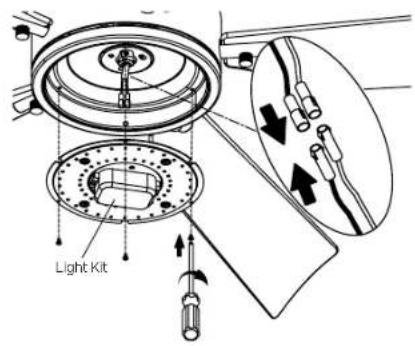
Step 1. Hold the LED light kit to light plate, then connect the 2 single pin connectors from the light kit to the 2 single pin connectors from the motor assembly. Connect the black wire to the black wire, and the white wire to white wire. Attach the light kit to the light plate and securely tighten with three (3) screws from the screw pack. (Fig. 22)
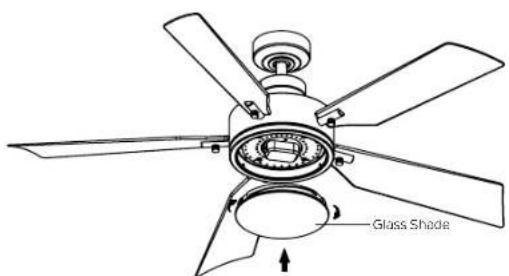
Step 2. Secure the glass shade to light plate by turning in a clockwise direction. Turn the glass shade gradually until it snaps on to the light plate, DO NOT OVER-TIGHTEN. (Fig. 23)
text_image
Light KitFig. 22
text_image
Glass ShadeFig. 23
INSTALLING THE COOLTOUCH\* CONTROL SYSTEM WALL PLATE
CAUTION: MAKE SURE THE ELECTRICITY IS TURNED OFF AT THE MAIN JUNCTION BOX OR THE CORRECT FUSE HAS BEEN PULLED OFF AT THE MAIN JUNCTION BOX BEFORE CONTINUING.
WARNING: All wiring must be in accordance with the National Electrical Code local electrical codes. Electrical installation should be performed by a qualified licensed electrician.
Select a location to install your "CoolTouch" Control System Transmitter. You can replace an existing wall switch, or install the transmitter on ANY flat surface.
WARNING: SWITCH INSTALLATION MUST COMPLY WITH ALL LOCAL AND NATIONAL ELECTRIC CODES.
Option 1. Install the control system using an existing wall switch outlet box. Make sure the electrical power is TURNED OFF at the main panel before wiring.
Step 1. Remove the existing wall plate and the old switch from the wall outlet box. Wire the BLACK leads (hot) together with connector and push back inside the outlet box. (Fig. 24)
Step 2. Install the metal plate and "CoolTouch" wall plate to the existing wall outlet box with 4 screws provided. Then place the two plastic plugs into the wall plate. (Fig. 25)
Option 2: Install the control system on ANY flat surface; Select the desired location and use the "CoolTouch" wall plate to make the location for the mounting holes. Plastic wall anchors and screws are provided for this type of installation. After installing the wall anchors, attach the "CoolTouch" wall plate with the mounting screws and then insert the plastic plugs to finish installation.
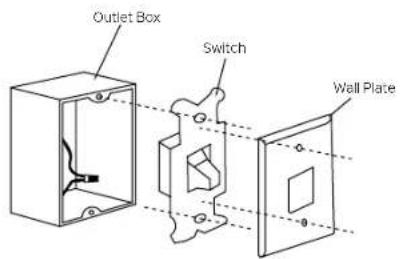
text_image
Outlet Box Switch Wall PlateFig. 24
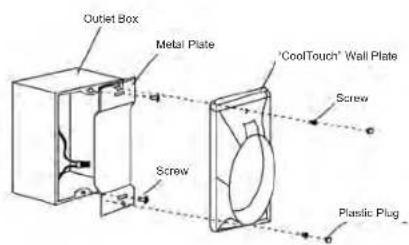
text_image
Outlet Box Metal Plate "CoolTouch" Wall Plate Screw Screw Plastic PlugFig. 25
INSTALLING AND REMOVING THE HANDHELD TRANSMITTER
Step 1. To place the transmitter in the wall plate, put the bottom end in first and then press the top into the wall plate. The transmitter is now held in the wall plate and will function from here. (Fig.26)
Step 2. To remove the transmitter from the wall plate, push the release button and the transmitter will fall into your hand.
OPERATING INSTRUCTIONS

WARNING: Chemical Burn Hazard. Keep batteries away from children.
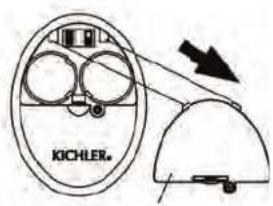
Step 1. Using a screwdriver, remove the battery cover from the handset and save the screw for later use. (Fig. 27)
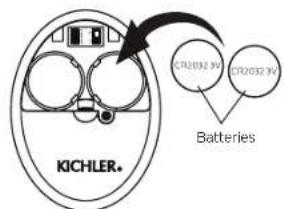
Step 2. To make fan operational, install two 3V CR2032 batteries (included). The batteries should be installed with the positive (+) side up. Replace with CR2032 batteries when necessary. (Fig. 28)
NOTE: If not used for long periods of time, remove batteries to prevent damage to the handset control. Store the control away from excessive heat or humidity.
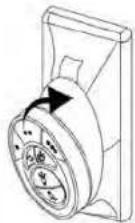
Fig. 26
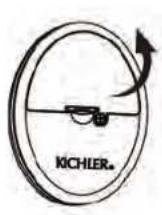
text_image
KICHLERFig. 27
text_image
KICHLER. CTR2032 9V CTR2032 9V BatteriesFig. 28
OPERATING INSTRUCTIONS
NOTE: Each handset control carries a unique ID code to facilitate communication between paired devices. The ID code is set by factory and is not user changeable. However, you will be required to perform an ID code learning process manually under these circumstances:
- If you have multiple fans installed within a close proximity and want to control all fans using a same handset control.
NOTE: Each fan requires its own receiver.
- When your remote control is not responding (make sure battery is not dead).
• After you have replaced a faulty transmitter or receiver with a new one.
Otherwise the remote control will not work. To perform this process manually, follow steps below: After installing and wiring the unit, restore power to your fan, press and hold the "LEARN" key for 1-3 seconds, and the fan will turn on at medium speed and light (if installed) will turn on. This confirms that the learning process has been completed. This operation must be completed within 30 seconds after restoring power to the fan. (Fig. 29)
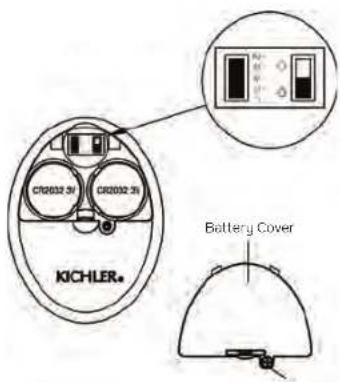
NOTE: Ensure slide switch in battery compartment marked "D O" is set to "D" position. (Fig. 29)
Step 4. Replace the battery cover and tighten with screwdriver. (Fig. 29)
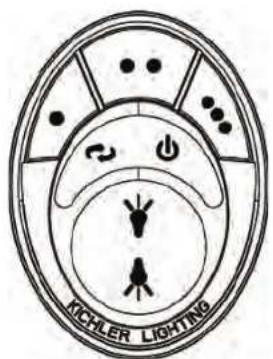
Step 5. The buttons control the fan speed and light as follows: (Fig. 30)
| ● | Low speed |
| ●● | Medium speed |
| ●●● | High speed |
| ↓ | Fan OFF |
| Airflow (Forward or Reverse) | |
| No function (Do not use this button) | |
| a.) Light ON/OFF.b.) Press and hold to dim or brighten light to desired level. |
text_image
CR2032 5V CR2032 5V KICHLER. Battery CoverFig. 29
Screw
text_image
KCHLER LIGHTINGFig. 30
REVERSE FUNCTION
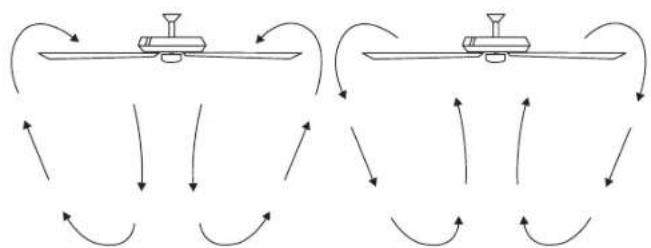
To operate the reverse function on this fan, press the "Reverse" button while fan is running. Speed setting for warm or cool weather depends on factors such as the room size, ceiling height, number of fans and so on.
Warm Weather Operation: Forward (counter clockwise). A downward airflow creates a cooling effect (Fig. 31). This allows you to set your air conditioner on a warmer setting without affecting your general comfort.
Cool Weather Operation: Reverse (clockwise). An upward airflow moves warm air off of the ceiling (Fig. 32). This allows you to set your heating unit on a cooler setting without affecting your general comfort.
flowchart
graph TD
    A["Sensor 1"] --> B["Sensor 2"]
    B --> C["Sensor 3"]
    C --> D["Sensor 4"]
    D --> E["Sensor 5"]
    E --> F["Sensor 6"]
    F --> G["Sensor 7"]
    G --> H["Sensor 8"]
    H --> I["Sensor 9"]
    I --> J["Sensor 10"]
    J --> K["Sensor 11"]
    K --> L["Sensor 12"]
    L --> M["Sensor 13"]
    M --> N["Sensor 14"]
    N --> O["Sensor 15"]
    O --> P["Sensor 16"]
    P --> Q["Sensor 17"]
    Q --> R["Sensor 18"]
    R --> S["Sensor 19"]
    S --> T["Sensor 20"]
    T --> U["Sensor 21"]
    U --> V["Sensor 22"]
    V --> W["Sensor 23"]
    W --> X["Sensor 24"]
    X --> Y["Sensor 25"]
    Y --> Z["Sensor 26"]
    Z --> AA["Sensor 27"]
    AA --> AB["Sensor 28"]
    AB --> AC["Sensor 29"]
    AC --> AD["Sensor 30"]
    AD --> AE["Sensor 31"]
    AE --> AF["Sensor 32"]
    AF --> AG["Sensor 33"]
    AG --> AH["Sensor 34"]
    AH --> AI["Sensor 35"]
    AI --> AJ["Sensor 36"]
    AJ --> AK["Sensor 37"]
    AK --> AL["Sensor 38"]
    AL --> AM["Sensor 39"]
    AM --> AN["Sensor 40"]
    AN --> AO["Sensor 41"]
    AO --> AP["Sensor 42"]
    AP --> AQ["Sensor 43"]
    AQ --> AR["Sensor 44"]
    AR --> AS["Sensor 45"]
    AS --> AT["Sensor 46"]
    AT --> AU["Sensor 47"]
    AU --> AV["Sensor 48"]
    AV --> AW["Sensor 49"]
    AW --> AX["Sensor 50"]
Fig. 31 Fig. 32
FCC Information
This device complies with part 15 of the FCC Rules. Operation is subject to the following two conditions:
1.) This device may not cause harmful interference, and
2.) This device must accept any interference received, including interference that may cause undesired operation.
Note: This equipment has been tested and found to comply with the limits for a Class B digital device, pursuant to part 15 of the FCC Rules. These limits are designed to provide reasonable protection against harmful interference in a residential installation. This equipment generates, uses and can radiate radio frequency energy and, if not installed and used in accordance with the instructions, may cause harmful interference to radio communications. However, there is no guarantee that interference will not occur in a particular installation. If this equipment does cause harmful interference to radio or television reception, which can be determined by turning the equipment off and on, the user is encouraged to try to correct the interference by one or more of the following measures:
- Reorient or relocate the receiving antenna.
- Increase the separation between the equipment and receiver.
- Connect the equipment into an outlet on a circuit different from that to which the receiver is connected.
- Consult the dealer or an experienced radio/TV technician or help.
TROUBLESHOOTING
| Problem | Solution |
| Fan will not start. | 1. Check circuit fuses or breakers.2. Check all electrical connections to ensure proper contact. CAUTION: Make sure the main power is OFF when checking any electrical connection.3. Make sure the transmitter batteries are installed properly. Positive (+) side fading out.4. Ensure the batteries have a good charge. |
| Fan sounds noisy. | 1. Make sure all motor housing screws are snug.2. Make sure the screws that attach the fan blade brackets to the motor are tight.3. Make sure wire nut connections are not rubbing against each other or the interior wall of the switch housing. CAUTION: Make sure main power is off.4. Allow a 24-hour "breaking-in" period. Most noise associated with a new fam disappears during this time.5. If using an optional light kit, make sure the screws securing the glassware are tight. Make sure the light bulbs are not touching any other component.6. Do not connect this fan to a wall mounted variable speed control(s). They are not compatible with ceiling fan motors or remote controls.7. Make sure the upper canopy has a short distance from the ceiling. It should not touch the ceiling. |
| Fan wobble. | 1. Check that all blade and blade arm screws are secure.2. Most fan wobbling problems are caused when blade levels are unequal. Check this level by selecting a point on the ceiling above the tip of one of the blades. Measure this distance. Rotate the fan until the next blade is positioned for measurement. Repeat for each blade. The distance deviation should be equal within 1/8 ".3. If the blade wobble is still noticeable, interchanging two adjacent (side by side) blades can redistribute the weight and possibly result in smoother operation. |
| Remote control malfunction. | 1.Ceiling Fans with remote control systems CAN NOT be operated in conjunction with any other control system EXCEPT a basic On/off wall switch, if desired. |
KICHLER®
www.kichler.com
KICHLER LIGHTING LLC
30455 Solon Rd.
Solon, OH 44139 USA
CUSTOMER SERVICE 866.558.5706
8:00 AM TO 5:00 PM EST, MONDAY - FRIDAY
REV 10-MAY-2024
© Kichler Lighting LLC. All Rights Reserved.
KICHLER®
56" Guardian
natural_image
Line drawing of a five-blade cabinet fan with blades and top mount (no text or symbols)LISEZ ET CONSERVEZ CES INSTRUCTIONS
MANUEL D'INSTRUCTIONS
Modèle n° 330057
TABLE DES MATIÈRES
LES RÈGLES DE SÉCURITÉ ....3
OUTILS NÉCESSAIRES ....6
CONTENU DU COLIS 6
OPTIONS DE MONTAGE ....7
SUSPENDRE L'ENSEMBLE MOTEUR ....8
INSTALLATION DU SUPPORT DE SÉCURITÉ .....11
CONNEXIONS ÉLECTRIQUES ......12
TERMINER L'INSTALLATION DU MOTEUR .....13
FIXATION DES PALES DU VENTILATEUR .....14
INSTALLATION DE LA PLAQUE D'ÉCLAIRAGE .....15
INSTALLATION DU KIT D'ÉCLAIRAGE ET DU VERRE .....16
INSTALLATION DE LA PLAQUE MURALE DU SYSTÈME DE COMMANDE « COOLTOUCH »......17
INSTALLATION ET DÉMONTAGE DE L'ÉMETTEUR PORTATIF ....18
MODE D'EMPLOI....18
FONCTION INVERSE 20
INFORMATIONS CFC 20
DÉPANNAGE 21
RÈGLES DE SÉCURITÉ
LISEZ ET CONSERVEZ CES INSTRUCTIONS
AVERTISSEMENT : POUR LE CANADA, CE VENTILATEUR DOIT ÊTRE FIXÉ DIRECTEMENT À LA STRUCTURE DU BÂTIMENT OU À LA SOLIVE DE PLAFOND. NE PAS FIXER CE VENTILATEUR À UNE BOÎTE DE SORTIE.
text_image
Warning symbol image with exclamation mark and minus sign, commonly used to indicate hazard or cautionOUTILS ET MATÉRIAUX NÉCESSAIRES
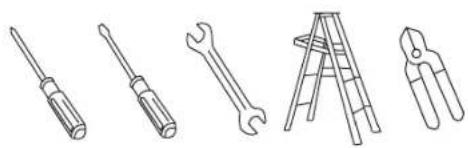
- Tournevis cruciforme
- Tournevis à lame
- Clé de 11 mm
• Escabeau - Pinces coupantes
natural_image
Line drawings of five different tools: screwdriver, wrench, ladder, pliers, and flat screw (no text or symbols)CONTENU DU COLIS
text_image
Exploded view diagram of a refrigerator with labeled parts and control panelOPTIONS DE MONTAGE
natural_image
Line drawing of a five-blade ceiling fan with blades and central hub (no text or symbols)LEER Y GUARDAR ESTAS INSTRUCCIONES