Prodigy Plus C1448R - Ice Maker Scotsman - Free user manual and instructions
Find the device manual for free Prodigy Plus C1448R Scotsman in PDF.



| Product Type | Modular Ice Machine with Remote Condenser |
| Brand | Scotsman |
| Model | Prodigy Plus C1448R |
| Production Capacity | 635 kg/day (1400 lb/day) |
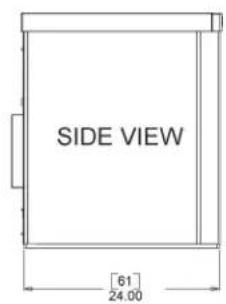
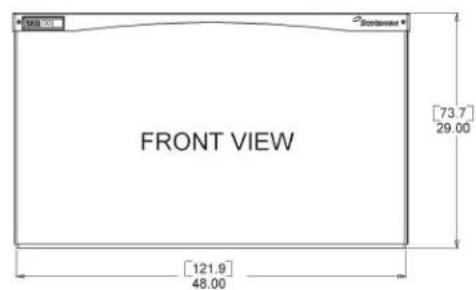
| Dimensions (L x W x H) | 122 x 61 x 74 cm |
| Weight | Approximately 120 kg |
| Power Supply | 230 V, 50 Hz, single-phase |
| Ice Type | Cube (depending on version) |
| Ambient Temperature Min/Max | 10°C / 40°C |
| Water Temperature Min/Max | 4°C / 40°C |
| Water Pressure Min/Max | 1 bar / 5 bar |
| Remote Condenser | Included, remote installation |
| Max Refrigerant Line Length | 30 m actual / 45 m equivalent |
| Max Condenser Elevation Above | 10 m |
| Max Condenser Elevation Below | 4.5 m |
| Water Connection | 3/4" BSPP |
| Drain Connection | 3/4" FPT |
| Indicator Lights | Power, Status, Water, Clean |
| Functions | Automatic cycle, adjustable drain, defrost assist |
| Options | Vari-Smart (ice level), SmartBoard (recording) |
| Maintenance | Cleaning and disinfection at least 2 times per year |
| Recommended Water Filters | Scotsman SSM3 or AquaPatrol ADS-AP3 |
| Warranty | See separate sheet |
Frequently Asked Questions - Prodigy Plus C1448R Scotsman
User questions about Prodigy Plus C1448R Scotsman
0 question about this device. Answer the ones you know or ask your own.
Ask a new question about this device
Download the instructions for your Ice Maker in PDF format for free! Find your manual Prodigy Plus C1448R - Scotsman and take your electronic device back in hand. On this page are published all the documents necessary for the use of your device. Prodigy Plus C1448R by Scotsman.
USER MANUAL Prodigy Plus C1448R Scotsman
Scotsman Ice Systems
InstallationandUser'sManual
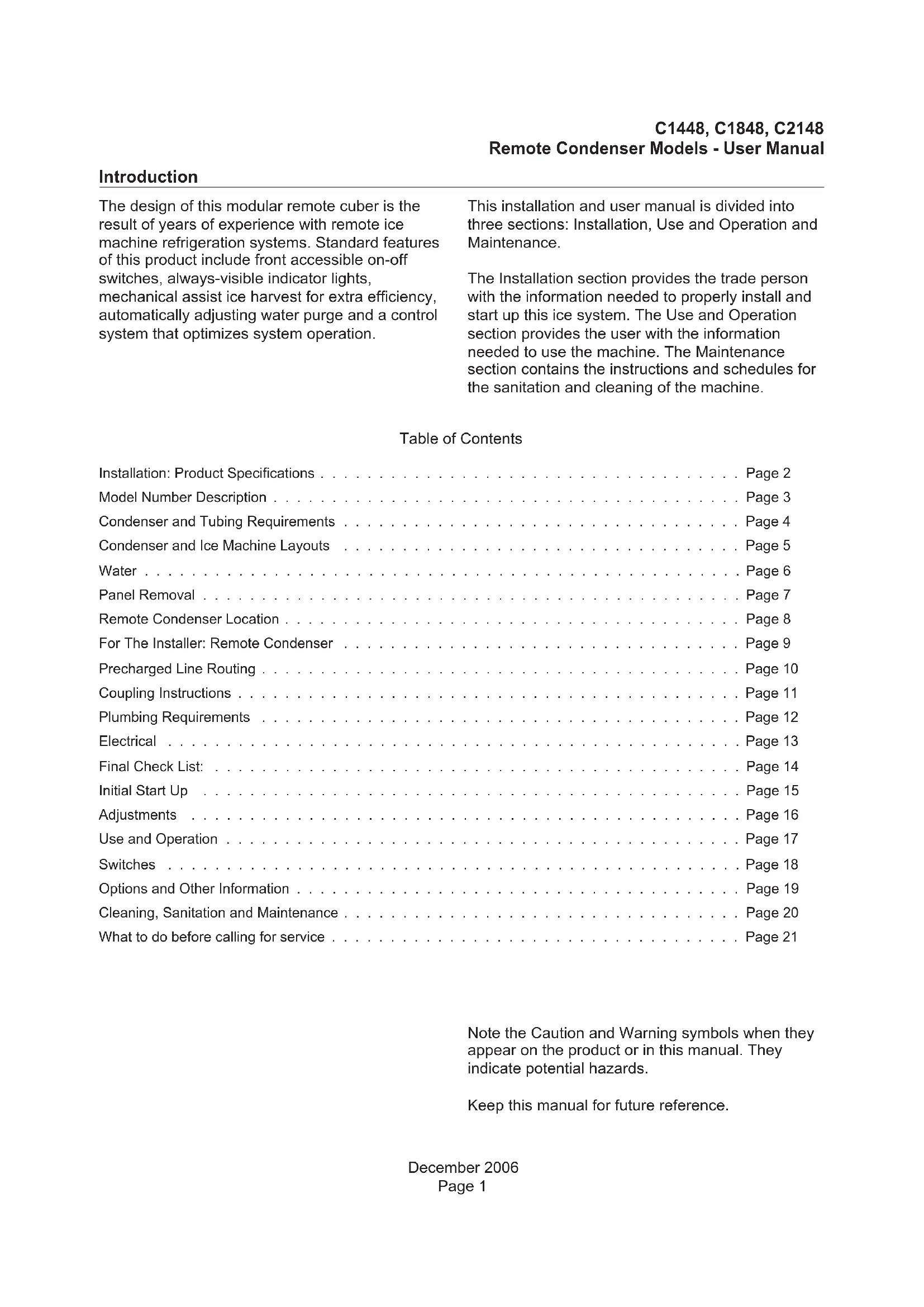
The design of this modular remote cuber is the result of years of experience with remote ice machine refrigeration systems. Standard features of this product include front accessible on-off switches, always-visible indicator lights, mechanical assist ice harvest for extra efficiency, automatically adjusting water purge and a control system that optimizes system operation.
This installation and user manual is divided into three sections: Installation, Use and Operation and Maintenance.
The Installation section provides the trade person with the information needed to properly install and start up this ice system. The Use and Operation section provides the user with the information needed to use the machine. The Maintenance section contains the instructions and schedules for the sanitation and cleaning of the machine.
Table of Contents
| Installation: Product Specifications | Page 2 |
| Model Number Description | Page 3 |
| Condenser and Tubing Requirements | Page 4 |
| Condenser and Ice Machine Layouts | Page 5 |
| Water | Page 6 |
| Panel Removal | Page 7 |
| Remote Condenser Location | Page 8 |
| For The Installer: Remote Condenser | Page 9 |
| Precharged Line Routing | Page 10 |
| Coupling Instructions | Page 11 |
| Plumbing Requirements | Page 12 |
| Electrical | Page 13 |
| Final Check List: | Page 14 |
| Initial Start Up | Page 15 |
| Adjustments | Page 16 |
| Use and Operation | Page 17 |
| Switches | Page 18 |
| Options and Other Information | Page 19 |
| Cleaning, Sanitation and Maintenance | Page 20 |
| What to do before calling for service | Page 21 |
Note the Caution and Warning symbols when they appear on the product or in this manual. They indicate potential hazards.
Keep this manual for future reference.
Location Limitations
This ice system is made up of three parts, the ice making machine, or head; the remote condenser; and the interconnecting tubing. The ice making machine must be installed indoors, in a controlled environment. Space must be provided near the machine for service access. The remote condenser may be installed above or below the ice machine, per the limits stated later in this manual. The remote condenser may be installed outdoors within the temperature limits listed below. The interconnecting tubing must be installed per the directions stated in this manual, and the amount of tubing exposed to uncontrolled temperatures must be minimized.
Space Limitations
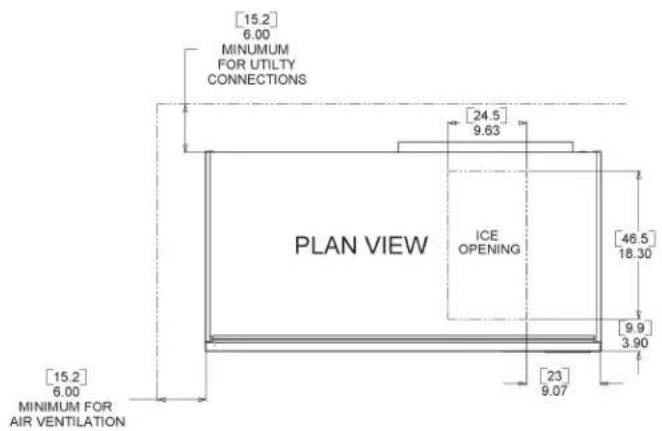
Although the machine will function with no clearance to the top and sides, some space must be allowed for service access. Building the machine in with no access will cause higher service cost, in many cases this extra cost may not be covered by warranty.
Environmental Limitations, ice machine:
| Minimum Maximum | ||
| Air temperature 10 | °C. 40 | °C. |
| Water temperature | 4°C. 40 | °C. |
| Water pressure 1 | bar 5 bar | |
Remote condenser
| Minimum Maximum | ||
| Air temperature -6 | °C. 49 | °C. |
Power Supply
| Minimum Maximum | ||
| 230 volt model | 207 volts | 253 volts |
Warranty Information
The warranty statement for this product is provided separately from this manual. Refer to it for applicable coverage. In general warranty covers defects in material and workmanship. It does not cover maintenance, corrections to installations, or situations when the ice machine is operated in circumstances that exceed the limitations printed above.
Product Information
The machine is a specialized version of a modular cuber. A modular cuber does not include any ice storage, it is designed to be placed onto an ice storage bin. Many installations only require the matching bin, but some may need an adapter to be placed between the ice machine and the bin. Additionally, the machine must be connected to the correct remote condenser and use the correct pre-charged tubing. The machine is supplied with a full refrigerant charge, field charging is not required.
This product cannot be stacked. See the chart for application information.
Model Number Description
Example
C1448MR-6A
C=cuber
14=nominal capacity in 100s of pounds
- 48=nominal width of cabinet in inches
- S=cube size, S=small or half dice, M=medium or full dice
- R=condenser type. R=Remote
- 6=Electrical code. -6=230/50/1,
- A=series revision code. A=first series.
Note: In some areas of this manual model numbers may include only the first five characters of the model number, meaning that cube size, condenser type and voltage differences are not critical to the information listed there.
Scottsman assumes no liability of responsibility of any kind for products manufactured by Scotsman that have been altered in any way, including the use of any part and/or other components not specifically approved by Scotsman.
Scotsman reserves the right to make design changes and/or improvements at any time. Specifications and design are subject to change without notice.
Options:
There are several options available for field installation. They include:
- Vari-Smart™ Adjustable ice level system
- SmartBoard™ Advanced feature control
Some installations require bin or dispenser adapters. See the table below.
Standard bin applications - Adapter information
| Model BH900* or | B948 | BH1100, BH1300 or BH1600 |
| C1448, C1848 or C2148 | Direct fit, no adapter needed | Adapter panels included with bin, no adapter needed |
- If stainless steel Kbaffle3 has been installed, remove it and replace with the original plastic baffle.
Other bins and applications:
Note the drop zone and optional ultrasonic sensor locations in the illustrations.
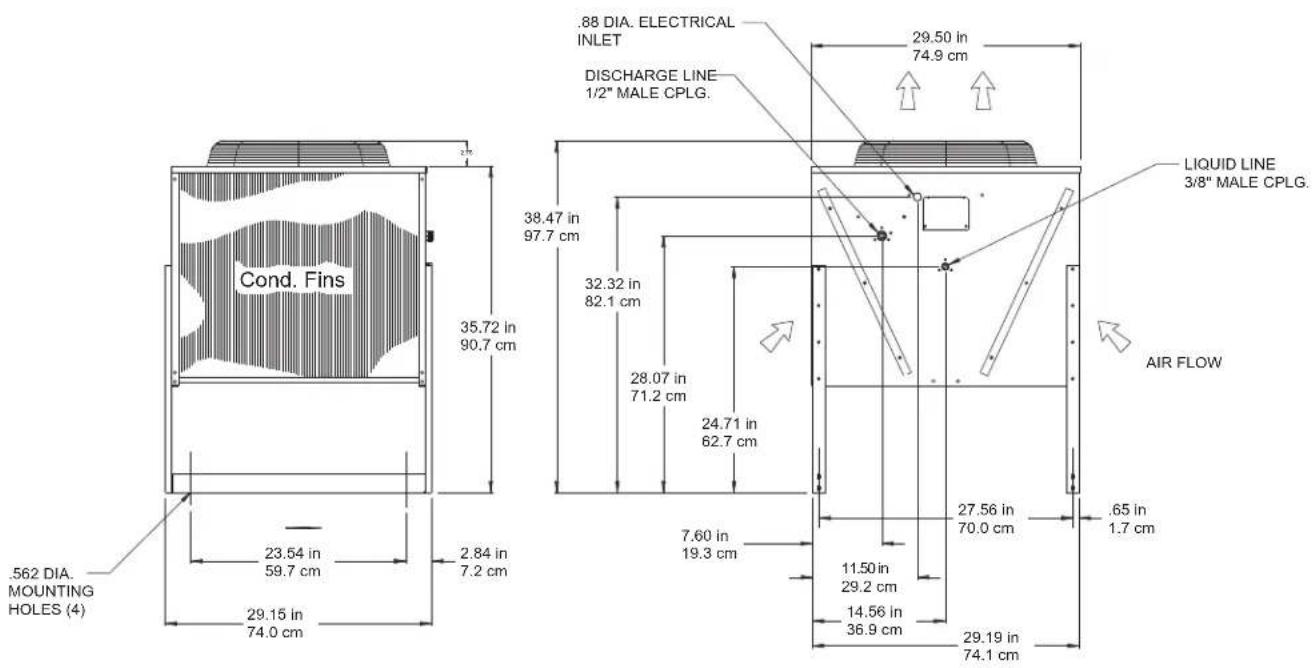
Condenser and Tubing Requirements
| Dimensions (cm) w x d x h | Model Electrical | Use condenser | Maximum Fuse Size* | |
| 122 x 61 x 74 | C1448MR-6 | 230/50/1 | ERC311-6 | 30 |
| same C1848MR-6 23 | 0/50/1 ERC611-6 | 30 | ||
| same C2148MR-6 23 | 0/50/1 ERC611-6 | 30 |
Table notes: Medium cube models have the same electrical characteristics as Small. Series revision code omitted. All the listed condensers include a headmaster valve.
*Ratings include the remote condenser motor, as it is designed to be powered by the ice machine. If connecting remote condenser independently of the ice machine, use the information on the condenser's dataplate for fuse and wire sizes.
Precharged tubing kits:
The ice making head's and the remote condenser's refrigeration circuits must be connected. They are designed to be connected using precharged refrigerant tubing, supplied in kits of liquid and discharge tubes. Several lengths are available, order the one that just exceeds the length needed for the site.
| 10' 20' 40' | 75' | |||
| C1448, C1848, C2148 | RTE10 | RTE20 | RTE40 | RTE75 |
No additional refrigerant is required.
Water
The quality of the water supplied to the ice machine will have an impact on the time between cleanings and ultimately on the life of the product. There are two ways water can contain impurities: in suspension or in solution. Suspended solids can be filtered out. In solution or dissolved solids cannot be filtered, they must be diluted or treated.
Scotsman filters:
A triple head filter is recommended. Either the Scotsman SSM3 taste and odor filter system, or the ADS-AP3 AquaPatrol system.
Water filters are recommended to remove suspended solids. Some filters have treatment in them for suspended solids. Check with a water treatment service for a recommendation.
RO water. This machine can be supplied with Reverse Osmosis water, but the water conductivity must be no less than 10 microSiemens/cm.
Potential for Airborne Contamination
Installing an ice machine near a source of yeast or similar material can result in the need for more frequent sanitation cleanings due to the tendency of these materials to contaminate the machine. Most water filters remove chlorine from the water supply to the machine which contributes to this situation. Testing has shown that using a filter that does not remove chlorine, such as the Scotsman Aqua Patrol, will greatly improve this situation, while the ice making process itself will remove the chlorine from the ice, resulting in no taste or odor impact. Additionally, devices intended to enhance ice machine sanitation, such as the Scotsman Aqua Bullet, can be placed in the machine to keep it cleaner between manual cleanings.
Water Purge
Cube ice machines use more water than what ends up in the bin as ice. While most water is used during ice making, a portion is designed to be drained out every cycle to reduce the amount of hard water scale in the machine. That's known as water purge, and an effective purge can increase the time between needed water system cleaning.
In addition, this product is designed to automatically vary the amount of water purged based on the purity of the water supplied to it. The water purge rate can also be set manually. Adjustments of purge due to local water conditions are not covered by warranty.
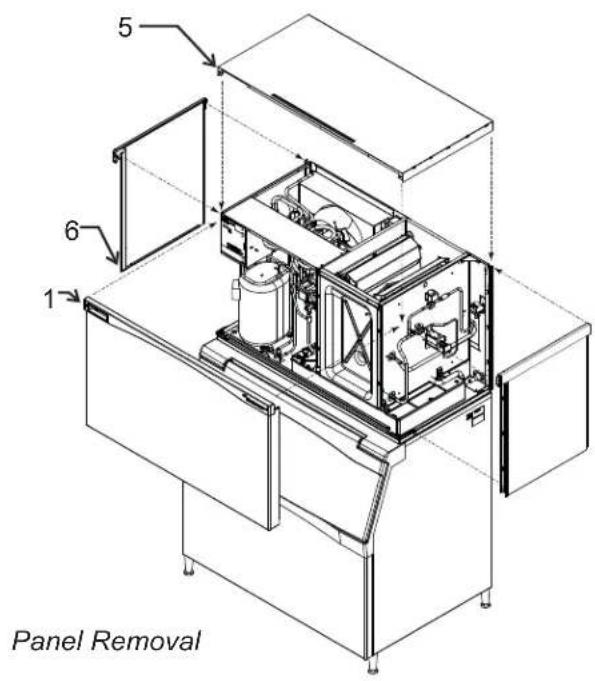
Panel Removal
- Locate and loosen the two screws at the front edge of the top panel.
- Pull the front panel out at the top until it clears the top panel.
- Lift the front panel up and off the machine.
- Remove two screws from the front edge of the top panel.
- Lift up the front of the top panel, push it back an inch, then lift to remove.
- Locate and loosen the screw holding each side panel to the base.
- Pull the side panel forward to release it from the back panel.
This manual covers several models of remote cubers. The model number on the ice machine can be found either on the dataplate, which is on the back panel, or the serial number tag, which is behind the front panel. See the illustration for the locations of the dataplate and the serial number tag.
The remote condenser has a separate model and serial number. Its model and serial number is on the dataplate on the condenser near the quick connect fittings.
Write the model and serial number of the ice machine here:
Write the model and serial number of the remote condenser here:
Write the model and serial number of the ice storage bin here:
Write the day of initial start up here: That day starts the warranty period.
Uncrate and Set Up
Begin with the ice storage bin. Remove the carton, and, using part of the carton as a cushion, tip the bin on its back to remove the skid. Attach the supplied legs or optional casters. Return the bin to a normal, upright position.
Check the bin top gasket for tears or gaps. If recycling an older bin, replace the gasket or repair with food grade sealant prior to placing the ice machine on the bin.
Install the bin top adapter or ice dispenser adapter, if one is required for the application.
If the ice machine has not been unpacked, do so now. Remove the carton from the skid. Cut away any shipping strapping. Lift the ice machine off the skid directly onto the bin.
Note: The machine is heavy. Use a mechanical lift if necessary.
Secure the ice machine to the bin with the hardware provided (two metal straps and four bolts).
Remote Condenser Location
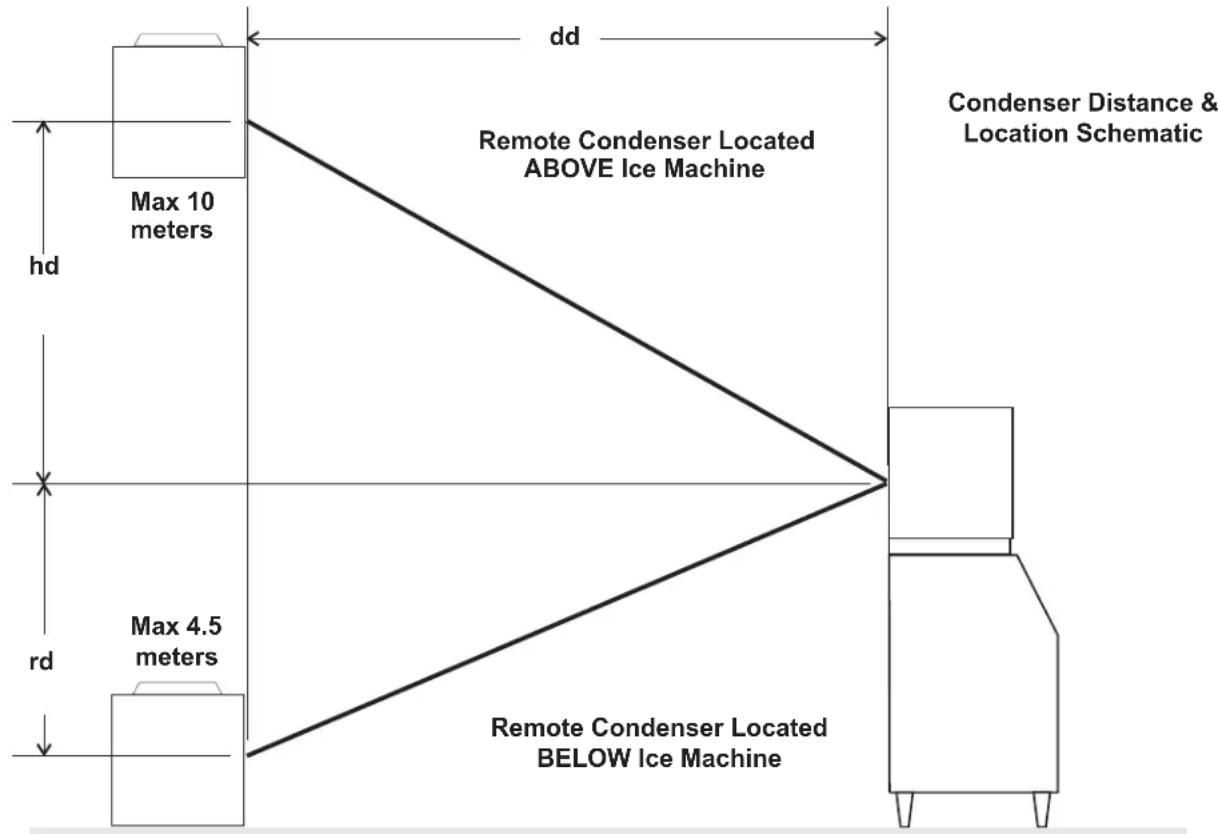
Use the following for planning the placement of the condenser relative to the ice machine
Location Limits - condenser location must not exceed ANY of the following limits:
Maximum rise from the ice machine to the condenser is 10 meters
Maximum drop from the ice machine to the condenser is 4 and half meters
- Physical line set maximum length is 30 meters.
- Calculated line set length maximum is 45.
Calculation Formula:
- Drop = dd × 2 (dd = distance in meters)
- Rise = rd × 1.2 (rd = distance in meters)
Horizontal Run = hd x 1 (hd = distance in meters) - Calculation: Drop(s) + Rise(s) + Horizontal Run = dd + rd + hd = Calculated Line Length
Do NOT:
- Route a line set that rises, then falls, then rises.
- Route a line set that falls, then rises, then falls.
Calculation Example 1:
The condenser is to be located 2 meters below the ice machine and then 6 meters away horizontally.
2 × 2 = 4.4 + 6 = 10 . This location would be acceptable
Calculation Example 2:
The condenser is to be located 10 meters above and then 36 meters away horizontally. 10 × 1.2 = 12 . 12 + 36 = 48 . 48 is greater than the 45 maximum and is NOT acceptable.
For The Installer: Remote Condenser
Locate the condenser as near as possible to the interior location of the ice machine.
Note: The location of the condenser is relative to the ice machine is LIMITED by the specification on the prior page.
Meet all applicable building codes.
Roof Attachment
Install and attach the remote condenser to the roof of the building, using the methods and practices of construction that conform to the local building codes, including having a roofing contractor secure the condenser to the roof.
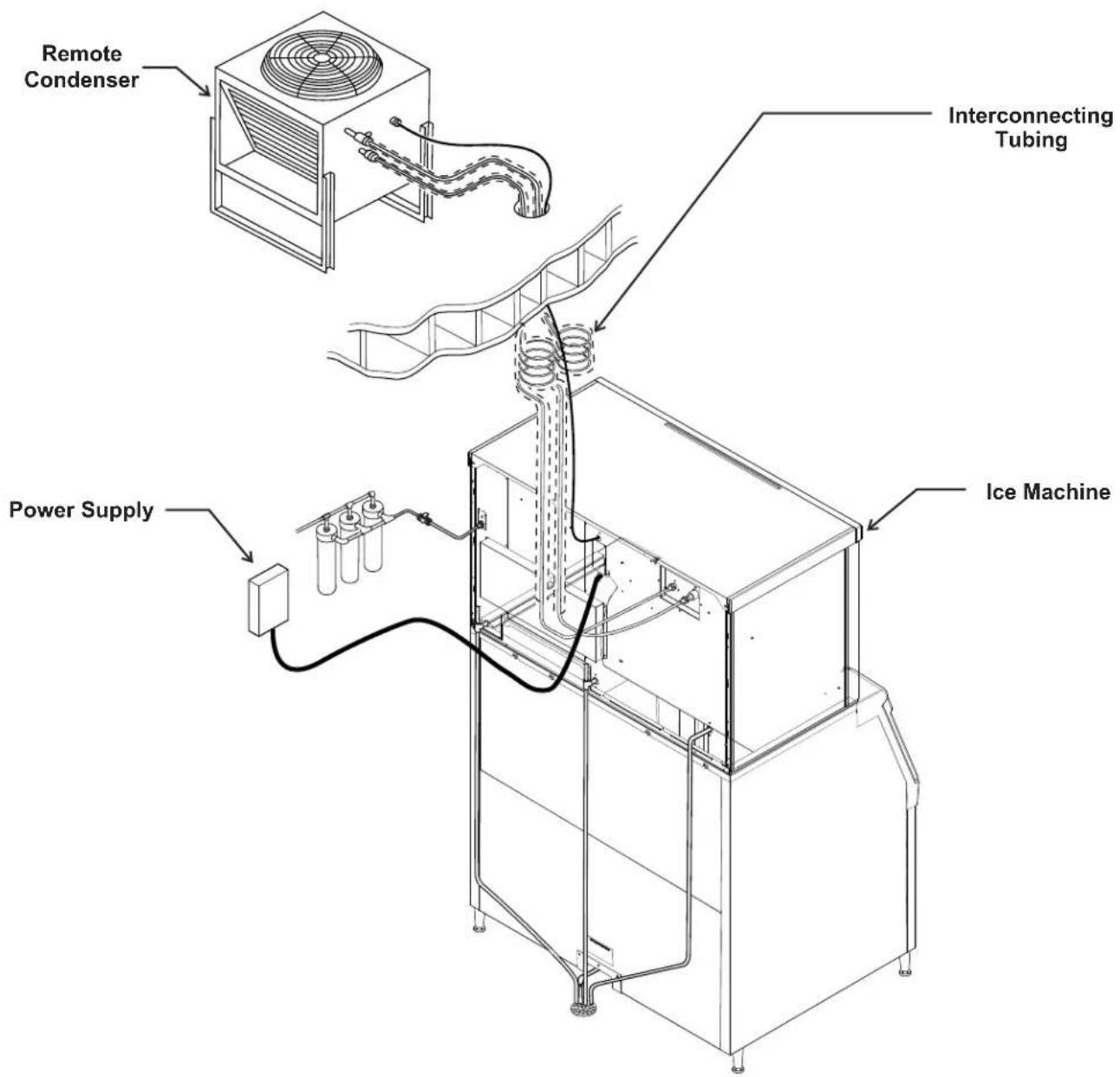
Remote Condenser, Typical System Illustration
Precharged Line Routing
Do not connect the precharged tubing until all routing and forming of the tubing is complete. See the Coupling Instructions for final connections.
- Each set of pre-charged tubing lines contains a liquid line, and a large diameter discharge line. Both ends of each line have quick connect couplings, the end without access valves goes to the ice maker.
Note: The openings in the building ceiling or wall, listed in the next step, are the minimum sizes recommended for passing the refrigerant lines through.
- Have the roofing contractor cut a minimum hole for the refrigerant lines of 50~mm . Check local codes, a separate hole may be required for the electrical power supply to the condenser.
Caution: Do NOT kink the refrigerant tubing while routing it.
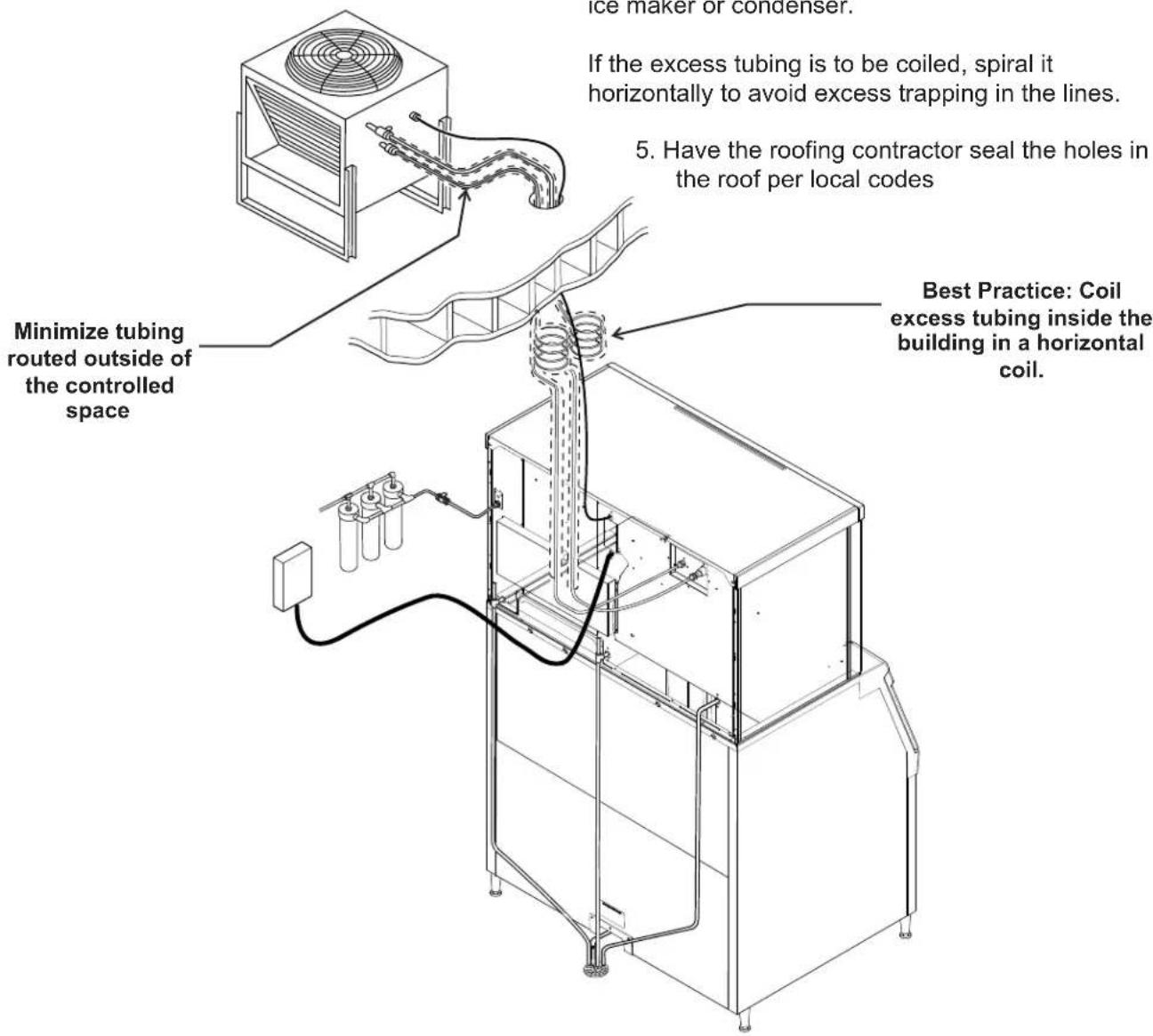
- Route the refrigerant tubes thru the roof opening. Follow straight line routing whenever possible. Excess tubing may EITHER be coiled up INSIDE the building OR cut out prior to connection to the ice maker and condenser.
If the excess tubing is cut out, after re-brazing the tubing must be evacuated prior to connection to the ice maker or condenser.
If the excess tubing is to be coiled, spiral it horizontally to avoid excess trapping in the lines.
- Have the roofing contractor seal the holes in the roof per local codes
December 2006 Page 10
Coupling Instructions
The couplings on the ends of the pre-charged line sets are self-sealing when installed properly. Follow these instructions carefully.
Initial Connections
- Remove the protector caps and plugs. Wipe the seats and threaded surfaces with a clean cloth to remove any possible foreign matter.
- Lubricate the inside of the couplings, especially the O-rings, with refrigerant oil.
- Position the fittings on the correct connections on the condenser and ice machine.
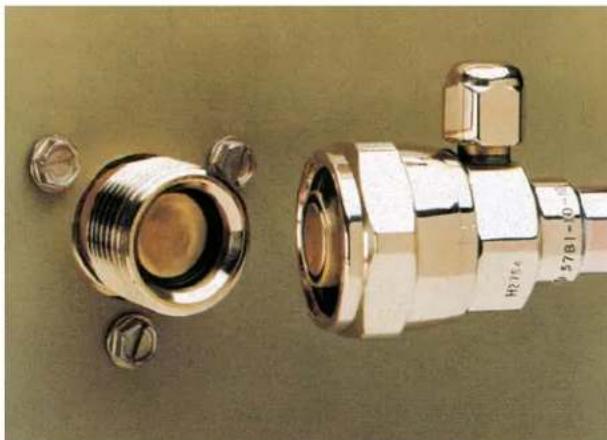
- The larger tube connects to the remote condenser fitting marked "discharge line".
- The smaller tube connects to the remote condenser fitting marked "liquid line".
- The other end of the larger tube connects to the ice maker fitting marked "discharge line".
The other end of the smaller tube connects to the ice maker fitting marked "liquid line".
Final Connections:
4a. Begin by tightening the couplings together by hand until it is certain that the threads are properly engaged.
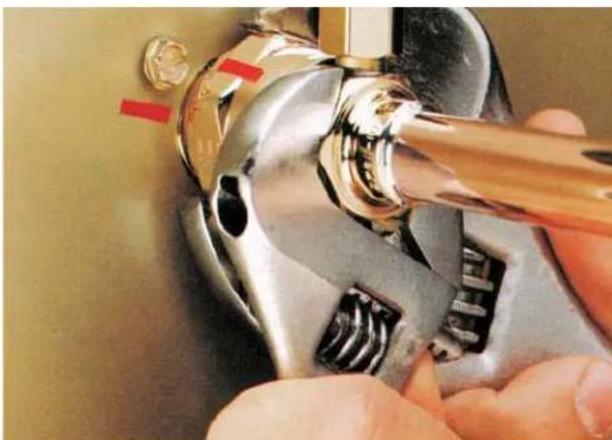
4b. Then using two wrenches tighten the coupling until it bottoms out or a definite increase in resistance is felt.
It is important that ONLY the nut on the pre-charged tube be turned, or the diaphragms will
be torn out by the piercing knives and they will be loose in the refrigeration system. Note: As the couplings are tightened, the diaphragms in the quick connect couplings will begin to be pierced. As that happens, there will be some resistance to tightening the swivel nut.
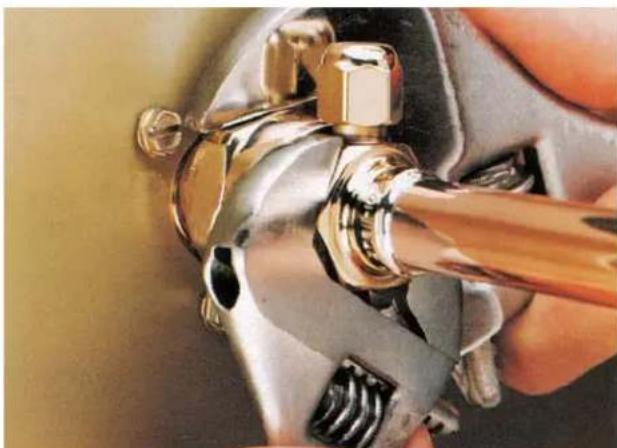
4c. Continue tightening the swivel nut until it bottoms out or a very definite increase in resistance is felt (no threads should be showing).
- Use a marker or pen to mark a line on the coupling nut and unit panel. Then tighten the coupling nut an additional one-quarter turn. The line will show the amount that the nut turns. Do NOT over tighten.
- After all connections have been made, and after the king valve has been opened (do not open yet), check the couplings for leaks.
Plumbing Requirements
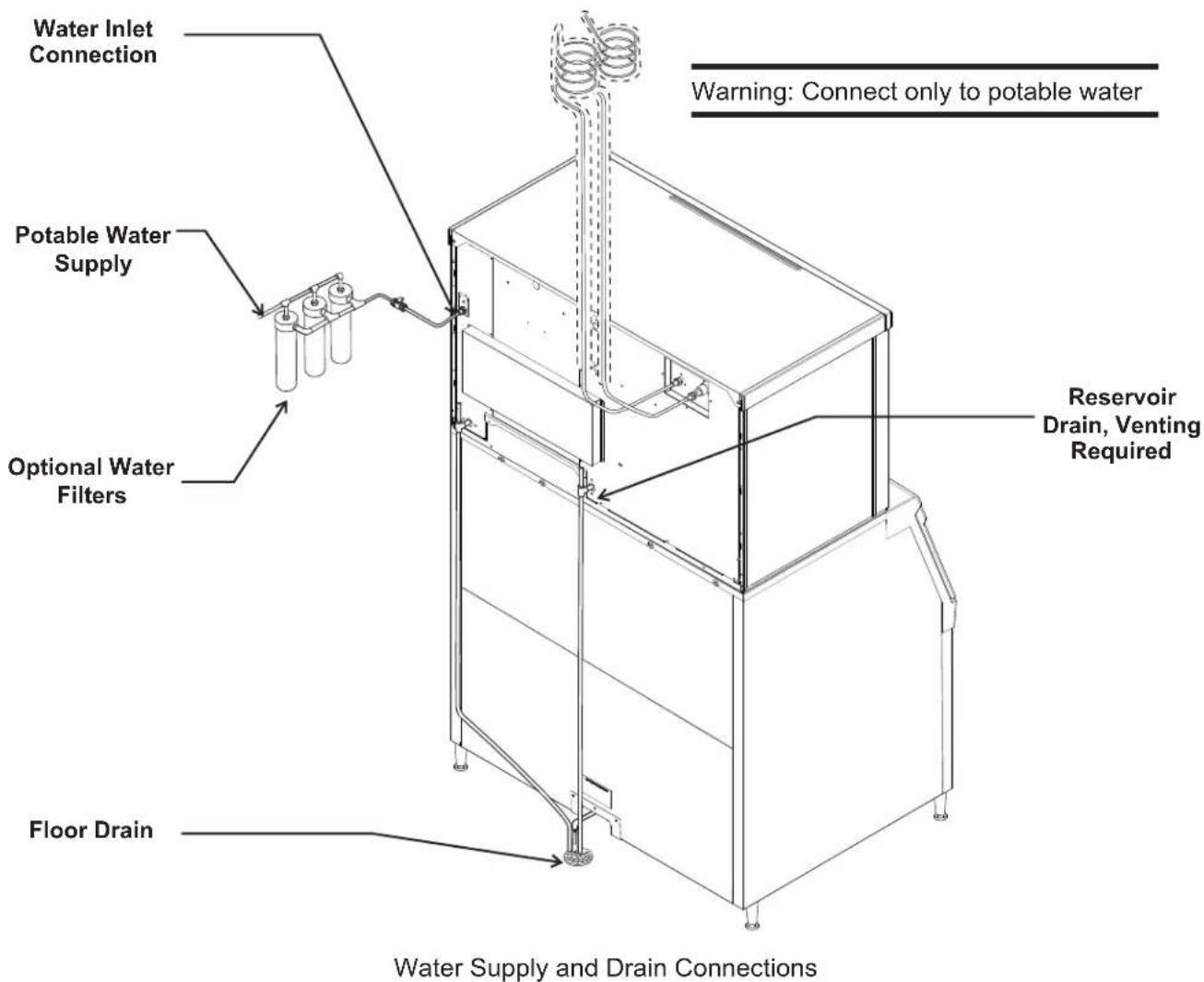
All models require connection to cold, potable water. A hand actuated valve within site of the machine is required. There is a single 3/4 gas BSPP inlet water connection.
Water Filters: Install a new cartridge if the filters were used with a prior machine.
Drains.: All models require drain tubing to be attached to them. There is a single 3/4'' FPT drain fitting in the back of the cabinet.
Install new tubing when replacing a prior ice machine, as the tubing will have been sized for the old model and might not be correct for this one.
-
Connect water supply to water inlet fittings.
-
Connect drain tubing to drain fitting.
- Route the drain tubing to building drain. Follow local codes for air gap.
- Use rigid drain tubes and route them separately - do not Tee into the bin's drain.
Vent the reservoir drain. A vertical vent at the back of the drain, extended about 200mm will allow the gravity drain to empty and also keep any surges during draining from discharging water.
Horizontal runs of drain tubing need a 20mm fall per meter of run for proper draining.
Follow all applicable codes.
Electrical
The machine is not supplied with a power cord, one must be field installed.
Notice: In case the power cable is damaged, it must be replaced ONLY by QUALIFIED TECHNICIANS to prevent any possible risks.
The dataplate on the back of the cabinet details the power requirements, including voltage, phase and maximum fuse size. Extension cords are not permitted. Use of a licensed electrician is recommended.
The ice maker is designed to operate on its own electrical circuit and must be individually fused. Voltage variation must not exceed the limits listed earlier.
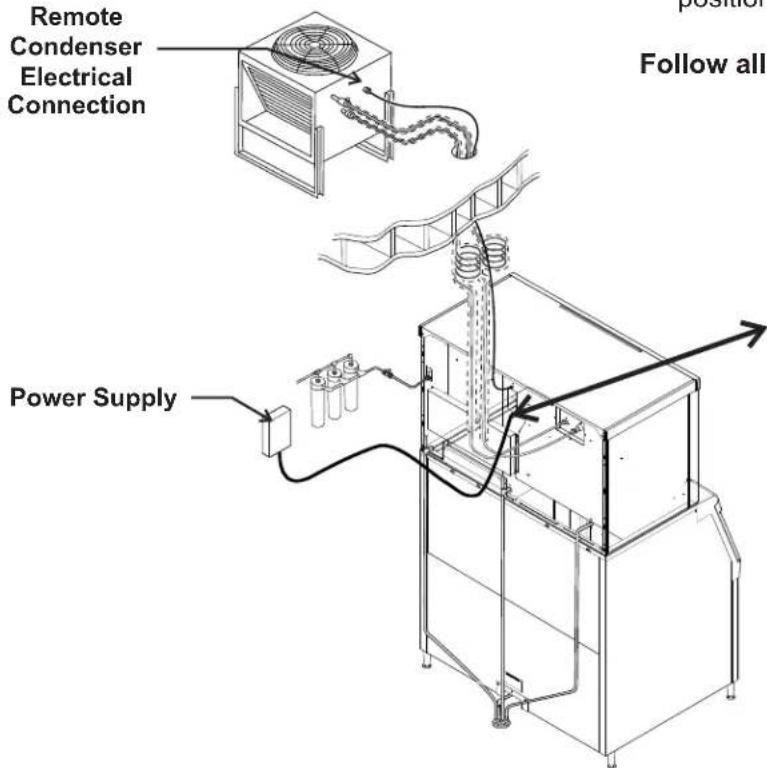
The remote condenser is designed to be powered from the ice machine. A separate knockout hole has been provided in the ice maker electrical junction box.
Electrical connections are made inside the junction box in the back panel of the ice machine.
The electrical disconnect switch with fuse protection must be a two pole type with a minimum of 3mm between open contacts.
- Obtain the proper power cord and plug based on the power requirements of the machine and the country of use.
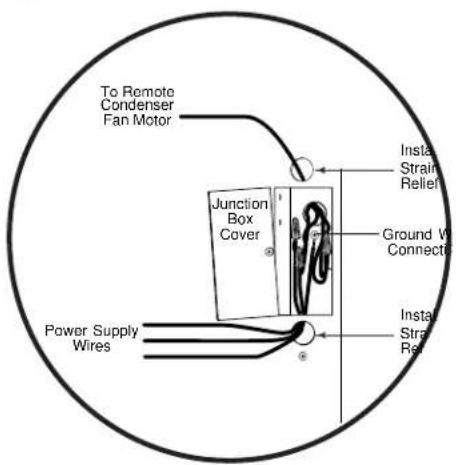
- Remove the junction box cover and route the power cord through the access hole and properly attach the power supply wires to the leads in the junction box.
- Attach the remote condenser fan motor wires to the wires in the junction box tagged "fan motor leads".
- Install field supplied, non - detachable strain reliefs per code. Attach a ground wire to the ground connection in the junction box. The ground wire lead must be longer than the power supply lead wires.
- Check voltage when complete.
- Return the junction box cover to its original position and secure with the original screws.
Follow all applicable codes.
Electrical Connections
Final Check List:
- Is the unit located indoors in a controlled environment?
- Is the unit located where it can receive adequate cooling air?
- Has the correct electrical power been supplied to the machine?
- Have all the water supply connections been made?
- Have all the drain connections been made?
- Has the remote condenser been properly installed?
- Has the interconnecting tubing been properly routed between the remote condenser and the ice machine?
- Have the quick connects been properly connected?
- Has the power supply wire from the ice machine to the remote condenser been properly run and connected?
- Has the unit been leveled?
- Have all unpacking materials been removed?
- Is the water pressure adequate?
- Have the drain connections been checked for leaks?
- Has the bin interior been wiped clean or sanitized?
- Have any water filter cartridges been replaced?
- Have all required kits and adapters been properly installed?
Initial Start Up
- Remove front and left side panels. Check machine for any packing or wires rubbing moving parts. Note location of control board in upper left corner of the machine's front.
- Remove tape securing each curtain to its evaporator.
- Switch on the electrical power to the machine. Observe that some of the control's indicator lights glow and its display shows .
- Wait 4 hours for the compressor's crankcase heater to warm up the oil in the compressor.
- Open the water supply valve.
- Turn the receiver's outlet valve to the full open position.
- Push and release the ON button.
The indicator light will begin to blink F . The purge valve will open and the water pump will start. The inlet water valve will open to add water to the reservoir. After a few seconds the purge valve will close and the water pump will stop. Water will flow into the machine until the reservoir is full. The hot gas valves and harvest assist devices will activate and the liquid line solenoid valve will open, then the compressor, remote fan motor and water pump will start. The display will show a continuous F . Five seconds later the hot gas valves will close and the harvest assist devices will return to their standby positions. Warm air will be discharged from the condenser coil.
- During the Freeze cycle move the curtain and observe that the SW1 or SW2 light on the control board blinks ON when the curtain moves away from the evaporator and OFF when returned to its normal position. Note: Moving the curtain during the Freeze cycle has no affect on unit operation.
- Observe the Ready for Harvest indicator light. It may blink early in the freeze cycle, that is normal. The control will ignore that signal for the first 6 minutes of freeze.
- When the ice has frozen enough, the Ready for Harvest indicator light will be on steady. After
it's been on steady for a few seconds Harvest will begin.
- The display shows an H .
The hot gas valves open and the harvest assist mechanisms are activated. The purge valve opens to drain some water, when it does the inlet water valve opens to refill the reservoir. After a few seconds the purge valve closes but the inlet water valve continues to fill the reservoir. Harvest continues until the ice is released as a unit from each evaporator and forces each curtain to open. When both curtains have opened and re-closed the controller returns the unit to a freeze cycle.
- Check the ice harvested for proper bridge thickness. The ice bridge is factory set at 3/16 inch. If needed, adjust bridge thickness. Do NOT make it too thin.
- Determine the water purge setting from the table on the next page. If desired, change the setting to accommodate the local water conditions.
- Return the panels to their normal positions and secure them to the machine.
- Instruct the user in the operation of the machine and its maintenance requirements.
- Fill out and mail the warranty registration form.
Typical Ice Making Cycle Times (minutes)
Listed times are for clean machines. Cycle times at startup will be longer until the system stabilizes.
| Model | 21°C. cond air / 10°C. water | 32°C. cond air / 21°C. water |
| C1448R 11 14-15 | ||
| C1848R 9-10 11 | ||
| C2148R 10 12 |
Adjustments
Bridge Thickness - For A Service Tech Only
- Push and hold Off till the machine stops.
- Remove evaporator cover.
- Remove curtain.
- Use a box wrench and rotate the bridge thickness adjustment screw in 1/8 turn increments CW to increase bridge thickness. Rotate CCW to decrease bridge thickness.
Caution: Do not make the bridge too thin or the machine will not harvest properly. Bridge thickness adjustments are not covered by warranty.
- Return curtain to its normal position.
- Push and release the On button. Check next harvest of ice. Repeat steps 1-6 if needed.
Water purge setting
The water purge is factory set to the automatic position, suitable for most water conditions. The setting can be changed to one of 5 manual settings or left on automatic.
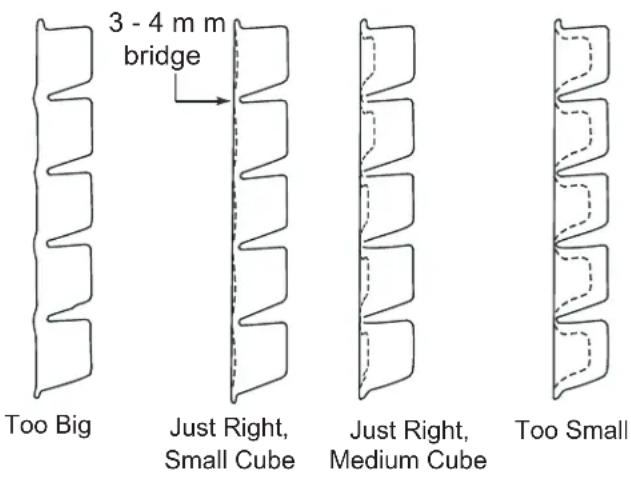
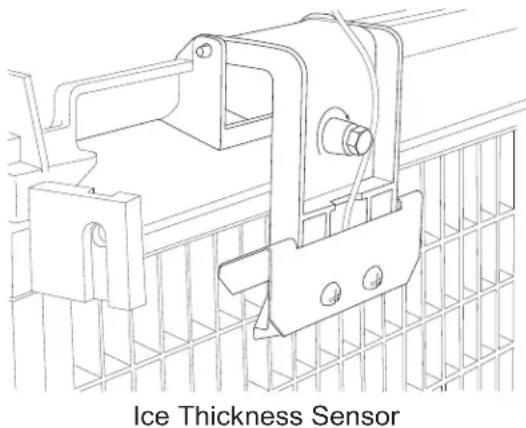
Ice Bridge Thickness Measurement
| purge setting | 1 - Minimum | 2 - Moderate | 3 - Standard | 4 - Heavy | 5 - Maximum | A - Automatic |
| Water Type | RO water or equivalent | Factory Setting for typical water | High TDS water | Any with conductivity not less than 10 microSiemens/cm |
To set:
- Switch the machine OFF by holding the Off button in until a number or the letter R shows on the display.
- Press and release the On button repeatedly until the number on the display corresponds to the desired setting.
- Press and release the Off switch again to return to the normal control state.
Use and Operation
Once started, the ice machine will automatically make ice until the bin or dispenser is full of ice. When ice level drops, the ice machine will resume making ice. There are four indicator lights at the front of the machine that provide information on the condition of the machine.
Caution: Do not place anything on top of the ice machine, including the ice scoop. Debris and moisture from objects on top of the machine can work their way into the cabinet and cause serious damage. Damage caused by foreign material is not covered by warranty.
Indicator Lights:
Power
Status
Water
Clean
| Indicator Lights & Their Meanings | ||||
| Power Status | Water De-Scale & Sanitize | |||
| Steady Green | Normal | Normal - bin full or making ice | - | - |
| Blinking Green | Self Test Failure | Switching on or off - - | ||
| Blinking Red - | Diagnostic shutdown or, if making ice, temperature sensor failure | Lack of water | - | |
| Yellow - - - | Time to de-scale and sanitize | |||
| Blinking Yellow | - - - In Cleaning mode | |||
| Light off No power Switched off Normal Normal | ||||
| All Blinking | Unit remotely locked out - check with leasing company | |||
If the Water light is on, the machine has sensed a lack of water. Check the water supply to the machine. The water may have been shut off or the water filter cartridges need to be changed.
If the Clean light is on, the machine has determined that it may need to be cleaned. Contact an authorized Scotsman service agent and have the machine cleaned, de-scaled and sanitized.
Note: A Component Indicator Light switches ON to indicate that the component is operating.
Note: There are two Curtain Switch lights, SW1 and SW2. A curtain switch light is ON when a curtain is either open or not present.
Switches
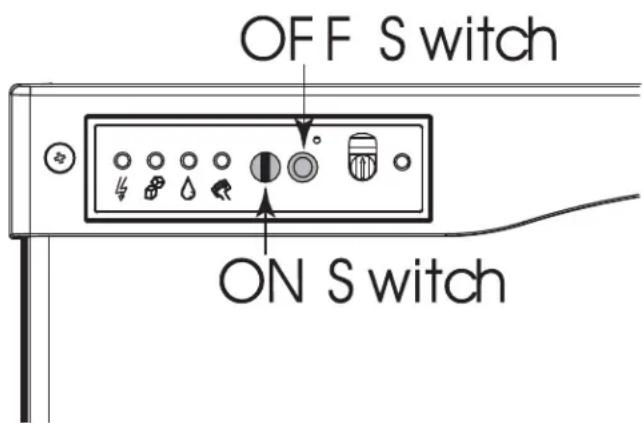
The panel in the front of the machine can be flipped up to access two switches - on and off.
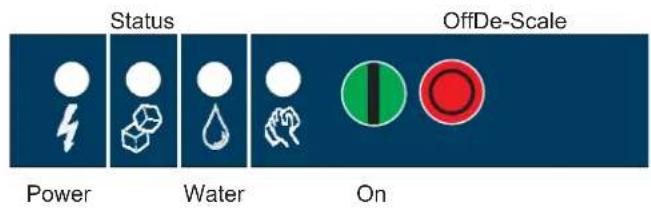
To switch the machine OFF, push and release the Off button. The machine will shut off at the end of the next cycle.
To switch the machine ON, push and release the On button. The machine will go through a start up process and then resume ice making.
Control Options
There are two optional, field installed controls that can be on this machine.
KVS Adjustable ice level control
- KSB Advanced Feature control
Adjustable ice level control
When this option is present there is an adjustment post and an additional indicator light to the right of the four indicator lights mentioned above. They are all visible under the flip-up door. The ultrasonic ice level control allows the user to control the point that the ice machine will stop making ice before the bin or dispenser is full. Reasons for this include:
- Seasonal changes in ice used
- Planning to sanitize the bin
- Faster turnover for fresher ice
Certain dispenser applications where maximum ice level is not desired
Use of adjustable ice level control
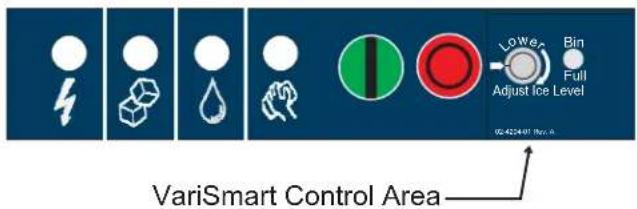
There are several positions the ice level can be set to, including Off (knob and label indicators lined up), where it fills the bin until the standard bin control shuts the machine off. See the kit's instructions for complete details.
Rotate the adjustment post to the desired ice level. The machine will fill up to that level and when it shuts off the indicator light next to the adjustment post will be On.
Note: Ice will build up in the bin or dispenser at an angle, the distances listed above will be from the sensor to the top of the ice directly beneath it.
The actual distance between the highest point of the ice may be closer or further away, depending upon the angle of the ice.
Options and Other Information
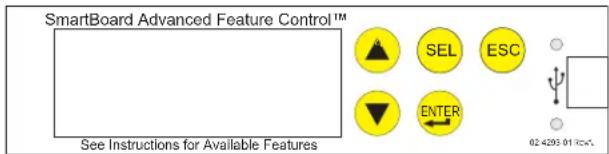
SmartBoard
When this option is present there is an additional display panel in the area below the main control board. It is not visible when the front panel is on. The SmartBoard's features include:
- Seven day programmable ice level setting when used with the optional Vari-Smart ice level control
- Recording of machine operation, including cycle time.
Calculation of average cycle time - Recall of malfunctions with the time they occurred.
Ice
The cuber drops ice in large sections. That ice will break up into random parts as it falls into the bin, but some large sections may remain on top of the ice in the bin. When removing ice, tap the groups of ice with an ice scoop to separate them into smaller units. In a dispenser, this ice will break up into mostly individual cubes as the dispense mechanism moves the ice.
Heat
Most heat is exhausted at the remote condenser. The ice machine should not generate significant heat.
Noise
The ice machine will make noise when it is in ice making mode. The compressor and water pump all produce some sound. It is also normal to hear some cracking just before the harvest cycle begins. In addition, during the harvest cycle each harvest assist solenoid will click twice as it pushes the ice out and returns to its normal position. The ice harvests as a unit or slab, which makes some noise when it impacts the bin or dispenser. These noises are all normal for this machine.
Cleaning, Sanitation and Maintenance
This ice system requires three types of maintenance:
- Remove the build up of mineral scale from the ice machine's water system and sensors.
- Sanitize the ice machine's water system and the ice storage bin or dispenser.
- Clean the remote air cooled condenser
It is the User's responsibility to keep the ice
machine and ice storage bin in a sanitary condition.
Sanitize the ice storage bin as frequently as local
health codes require, and every time the ice
machine is cleaned and sanitized.
The ice machine's water system should be cleaned and sanitized a minimum of twice per year.
This is critical to the proper operation of the ice machine. Contact your local authorized service
agent for water system cleaning.
Exterior Panels
The front and side panels are durable stainless
steel. Fingerprints, dust and grease will require
cleaning with a good quality stainless steel cleaner.
Water filters
If the machine has been connected to water filters,
check the cartridges for the date they were
replaced or for the pressure on the gauge. Change
cartridges if they've been installed more than 6
months or if the pressure drops too much when the
ice machine fills with water.
Remote condenser
Contact your local authorized service agent for
water system cleaning.
Reasons the machine might shut itself off:
- Lack of water.
- Freeze cycle takes too long.
Harvest cycle takes too long.
High discharge temperature. - Controller self test failure.
- Very high voltage
Check the following:
- Has the water supply to the ice machine or building been shut off? If yes, the ice machine will automatically restart within 25 minutes after water begins to flow to it.
- Has power been shut off to the ice machine? If yes, the ice machine will automatically restart when power is restored.
- Has someone shut the power off to the remote condenser while the ice machine still had power? If yes, the ice machine may need to be manually reset.
- Is a curtain open because some ice is stuck under it? If so, remove the ice and the machine should start in a few minutes.
Note: Curtains can be removed & replaced anytime the machine is in a standby mode or when it is in a freeze cycle. Removal of both curtains during harvest terminates harvest at that point and, if left off, will result in the machine shutting off.
To Manually Reset the machine.
Push and release the Off button.
Push and release the On button.
To Shut the Machine Off:
- Push and hold the Off button for 3 seconds or until the machine stops.
Reset or Switch Off
Power
Status
Water
De-scale






Sanitize
On
Off
AutoAlert* Indicator Lights
Technician Section

Manual Harvest

Clean
Code Display

Control Operation - See Manual
Water Light On - Restore water supply to machine.
De-Scale Light On - Clean and sanitize machine.
Flush Setting - To Change: Depress Off for 3 seconds. Press On to select purge (1-5) setting or A for Automatic.
Test Mode -Depress Off for 3 seconds, then depress Clean for 3 seconds.
Recall Diagnostic Codes -Depress Off for 3 seconds. Press Harvest repeatedly to go from most recent to oldest of 10.
Reset from Code 1, 2, 4 or 8 - Depress Off then Depress On.
Code
F . Freeze Cycle
F flashes.... Freeze Cycle is Pending
H .Harvest Cycle
H flashes...Manual Harvest
b .Bin is Full
C . Clean Cycle
L Board Locked
d....Test Mode
0 . Off
E . Self Test Failed
/ flashes.... Max Freeze - Retrying
- . Max Freeze Time Shut Down
2 flashes....Max Harvest -Retrying
2 . Max Harvest Time Shut Down
- Slow Water Fill
4 . High Discharge Temp
5 .... Sump Temp Sensor Failure
7 . Discharge Temp Sensor Failure
8 flashes . . . Short Freeze - Retrying
- Short Freeze - Thin ice All 4 Upper Lights Flashing - Unit Remotely
Locked Out - Contact Leasing Company
Component Operation Indicator Lights

PRODIGY Scotsman
02-4189-01 Rev A.
O
O
Introduzione
Instructions de raccords.
Plomberie Page 12
Informations electriques. Page 13
LiTe de verificaton finale : Page 14
Instructions de raccords
Pourmettre lamachinehors tension:
RegisterinstallationsinNorthAmerican, the Caribbean, Centralor SouthAmericabymailingtheyellow registration formto:
775CorporateWoodsParkway
VernonHills,IL60061
USA
Telephone:847-215-4500Fax:847-913-9844
Registerinstallationsalallotherareasbymailingthecardatthebackofthismanualto:
Phone+39-02-93960208-fax+39-02-93960201
scotsman.europe@frimont.it