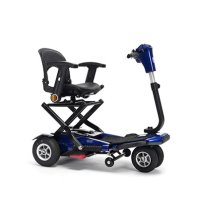
Sedna Premium - Electric scooter Vermeiren - Free user manual and instructions
Find the device manual for free Sedna Premium Vermeiren in PDF.



| Product type | Foldable electric scooter, class B (outdoor use) |
| Brand | Vermeiren |
| Model | Sedna Premium |
| Maximum user weight | 115 kg |
| Maximum speed | 6 km/h |
| Typical range | 14 km (depending on conditions, ISO 7176-4 standard) |
| Dimensions unfolded (L x W x H) | 960 mm x 530 mm x 870 mm |
| Dimensions folded (L x W x H) | 750 mm x 530 mm x 485 mm |
| Total weight (with battery) | 31.6 kg |
| Total weight (without battery) | 28.3 kg |
| Battery | Lithium 24 V DC, 10.5 Ah, 276 Wh (removable) |
| Battery charger | METCO NL07-25HT, 29.4 V DC, 2.36 A |
| Motor | 270 W nominal, integrated electromagnetic brake |
| Front tires | 200 x 50 mm, pneumatic (2) |
| Rear tires | 2.80 / 2.50 - 4, pneumatic (2) |
| Maximum safe slope | 6° |
| Maximum obstacle height | 30 mm |
| Turning radius | 820 mm |
| Minimum width for U-turn | 1250 mm |
| Seat (depth x width) | 330 mm x 406 mm |
| Seat height (to ground) | 540 mm |
| Backrest (height) | 330 mm / 360 mm |
| Warranty | According to country's general conditions (5 years expected lifespan) |
| Maintenance | Cleaning with damp cloth, annual check by authorized dealer |
Frequently Asked Questions - Sedna Premium Vermeiren
User questions about Sedna Premium Vermeiren
0 question about this device. Answer the ones you know or ask your own.
Ask a new question about this device
Download the instructions for your Electric scooter in PDF format for free! Find your manual Sedna Premium - Vermeiren and take your electronic device back in hand. On this page are published all the documents necessary for the use of your device. Sedna Premium by Vermeiren.
USER MANUAL Sedna Premium Vermeiren
MANUEL D'UTILISATION
GEBRUIKSAANWIJZING
GEBRAUCHSANWEISUNG
natural_image
Red and black electric scooter with attached charging device (no visible text or symbols)EN
Instructions for specialist dealer
This instruction manual is part and parcel of the product and must accompany every product sold.
Version: D, 2023-05
FR
All rights reserved, including translation.
2.1 Intended use 5
2.2 General safety instructions 5
2.3 Symbols on the scooter 6
2.4 Transport....6
2.5 Folding/Unfolding....7
2.6 First use and storage 9
3 Using your scooter....10
3.1 First ride....10
3.2 Operating your scooter 10
3.3 Transfer in and out of the scooter 13
3.4 Brake and free-wheel lever 13
3.5 Comfort adjustments....14
3.6 Battery status, status indication and charging....16
4 Maintenance....19
4.1 Instructions of maintenance....19
4.2 Expected lifespan....20
4.3 Reuse 20
4.4 End of use....20
4.5 Warranty 20
5 Troubleshooting....21
6 Technical specifications....23
Preface
Congratulations! You are now owner of a Vermeiren scooter!
This scooter is made by qualified and committed personnel. It is designed and produced according to high quality standards guarded by Vermeiren.
Thanks for your trust in the products of Vermeiren. To support you on the use of this scooter and its operating options, this manual is offered. Please read it carefully; it will help you to get familiar with the operation, capabilities and limitations of your scooter.
If you still have questions after reading this manual, do not hesitate to contact your specialist dealer. He/she will be glad to help you on this subject.
Important note
To ensure your safety and to prolong the lifetime of your product, please take good care of it and have it checked and/serviced on regular base.
This manual reflects the latest product developments. Vermeiren has the right to implement changes to this type of product without being imposed to any obligation to adapt or replace similar products previously delivered.
Pictures of the product are used to clarify the instructions in this manual. Details of the depicted product may deviate from your product.
Information available
On our website http://www.vermeiren.com/ you will always find the most recent version of the information in this manual. Please consult this website regularly for possible updates.
Visually impaired people can download the electronic version of this manual and have it read out by means of a text-to-speech software application.
This user manual
For user and specialist dealer
User manual of battery charger
For user and specialist dealer
Service manual for scooters
For specialist dealer
EC declaration of conformity


1 Your product
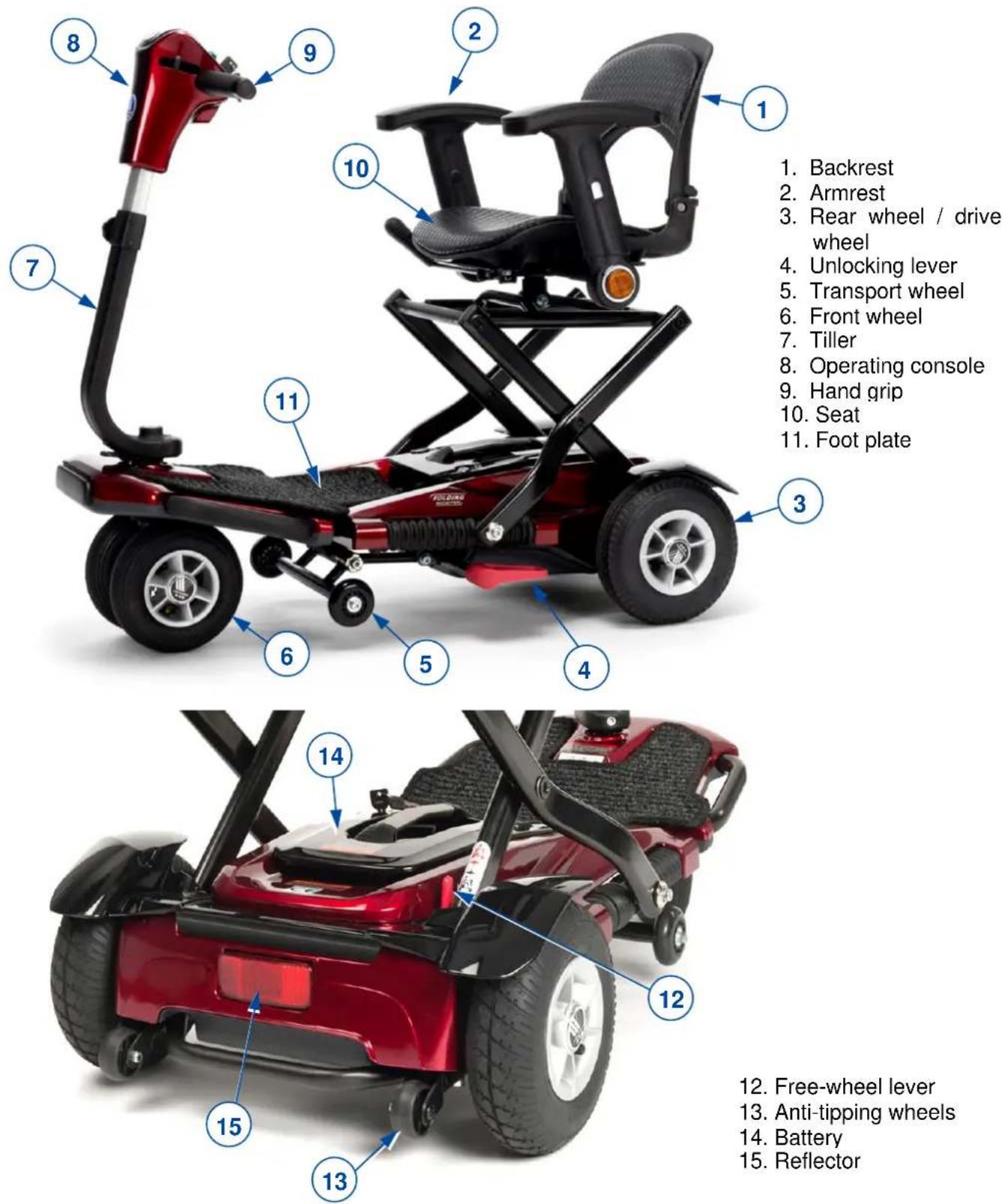
1. Backrest
2. Armrest
3. Rear wheel / drive wheel
4. Unlocking lever
5. Transport wheel
6. Front wheel
7. Tiller
8. Operating console
9. Hand grip
10. Seat
11. Foot plate
12. Free-wheel lever
13. Anti-tipping wheels
14. Battery
15. Reflector
Figure 1 Important parts
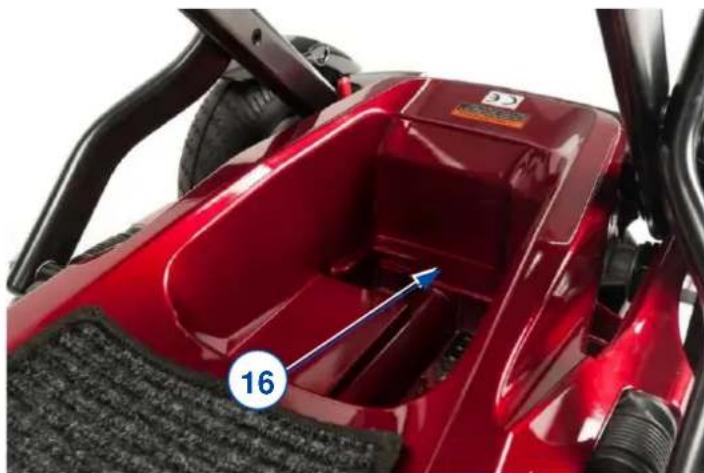
natural_image
Close-up of a red electric motor cab with visible gear and wheel, showing internal components and a numbered label (16) pointing to the interior area.- Location of identification plate
2 Before use
2.1 Intended use
In this paragraph a brief description of the intended use of your scooter is given. Additionally, relevant warnings are added to the instructions in the other paragraphs. In this way we would like to make you aware of the possible misuse that may appear.
- This scooter is classified as a class A product and is suitable for outdoor use.
- This scooter is designed and produced solely to transport one (1) person with a maximum weight of 115kg. It is not designed for transport of goods or objects, or for any other use than the transport previously described.
- If applicable, use only accessories and spare parts approved by Vermeiren.
- You should NOT use this scooter if you suffer from physical or mental impairments that may put you, or other people, in danger when driving the scooter, such as; visual impairment, mental disorder, hemiplegics or paraplegics. For this reason, consult your doctor first and make sure that your specialist dealer is informed about his advice.
- Please read all technical details and limits of your scooter in chapter 6.
- The warranty on this product is based on normal use and maintenance as described in this manual. Damage to your product caused by improper use or lack of maintenance will cause the warranty to lapse.
2.2 General safety instructions
CAUTION
Risk of injuries and/or damage
Please read and follow the instructions in this manual. Otherwise you may get injured or your scooter may get damaged.
Keep the following general warnings in mind during use:
- Do not use your scooter if you under influence of alcohol, medicines or other substances that may influence your driving abilities.
- Be aware that some parts of your scooter may get very hot or cold due to ambient temperature, solar radiation, heating devices or due to the motor drive during the ride. Be careful when touching. Wear protective clothing if the weather is cold. After a ride, wait till the scooter/motor has cooled down.
- Before switching the scooter on, be aware of the environment/situation in which you are located. Adjust your speed to this before driving off. We advise you to use the slowest speed setting to drive indoors. For outdoor driving you can adjust the speed to a suitable speed at which you feel comfortable and safe.
- ALWAYS keep in mind that your scooter may stop suddenly due to a discharged battery or a protection that prevents your scooter from further damage. Also check the causes mentioned in chapter 5.
- Your scooter has been tested for electromagnetic compatibility and complies with the standard, see chapter 6. Nevertheless, sources of electromagnetic field may influence the driving performance of your scooter like the fields of mobile phones, power generators or high-power energy sources. On the other hand, the electronics of your scooter can affect other electronic appliances too, like alarm systems of shops and automatic doors. We advise therefore to check your scooter regularly for damage and wear, since these may enlarge the interference, see also chapter 4.
- Only drive on flat surfaces where all wheels touch the ground and where there is sufficient contact to operate the scooter safely.
- Make sure that your hands, clothes, belts, buckles or jewellery don't get caught by wheels or other moving parts during use.
In case a serious incident has occurred involving your product, notify Vermeiren or your specialist dealer as well as the competent authority in your country.
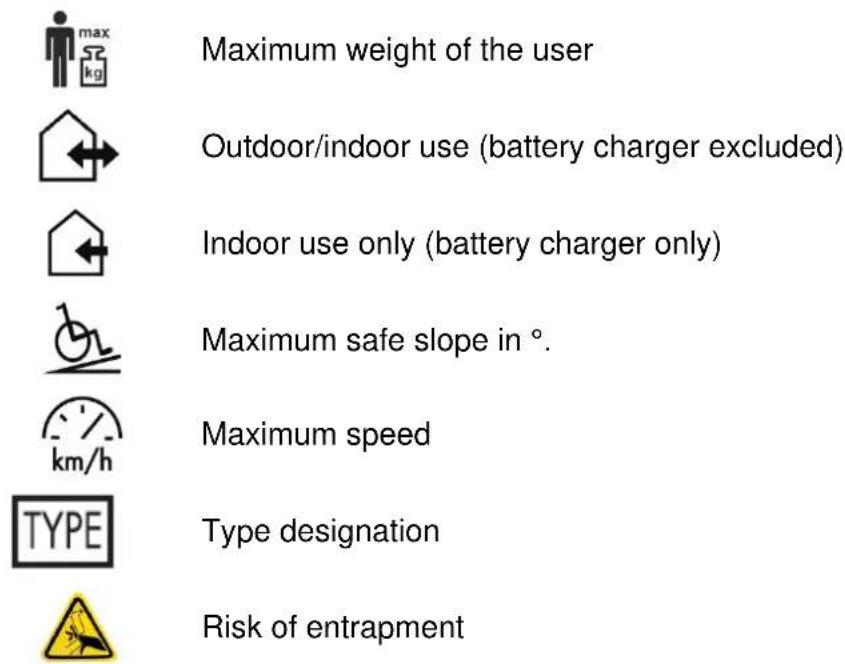
2.3 Symbols on the scooter
The symbols in following list are applicable for your scooter. Missing symbols can be found in the relevant ISO standard (ISO 7000, ISO 7001 and IEC 417).
2.4 Transport
i Since the scooter is equipped with a Lithium battery, it is not possible to transport the scooter (as a whole) by air plane. If you still consider to do so, consult your airline before booking your flight. It is possible to transport your scooter by air plane, without battery and to buy a new battery at the place of arrival. Contact your specialist dealer for this matter.
Deflate the scooter tires a bit before taking off. Inflate them again after arrival. In this way you prevent the bursting of the tires during flight.
2.4.1 Moving the scooter
Use the free-wheel lever to transport your scooter over a small distance (drive disconnected). Read the instructions in §2.5 about folding and unfolding your scooter.
2.4.2 Transport in the car

Risk of severe injuries
Do NOT use your scooter as seat in a vehicle, see next symbol. The best way to transport your scooter is to fold and lift it (with help) in the vehicle. Tighten the scooter well to the vehicle, to make sure that it won't move during cornering and that it won't be launched during full braking.


Risk of damage or injuries
Transport of the scooter (unfolded) must be done with free-wheel lever in rear, coupled position to make sure that the brake is activated.
2.5 Folding/Unfolding
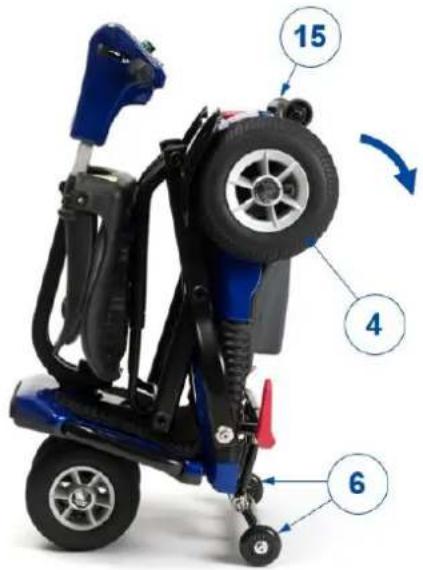
2.5.1 Unfolding scooter and connecting drive
[1]
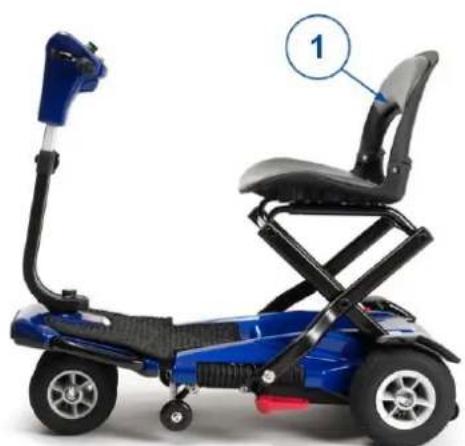
Lower the back of the scooter by holding frame tube (15) and turn it down till the scooter lands on rear wheels (4).
[2]
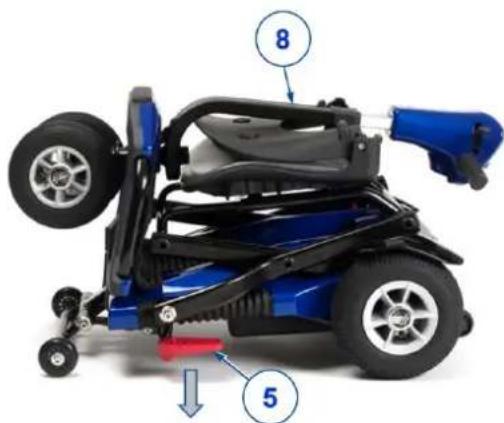
Push red lever (5) down with your foot to release the lock of tiller (8); with an audible click.
[3]
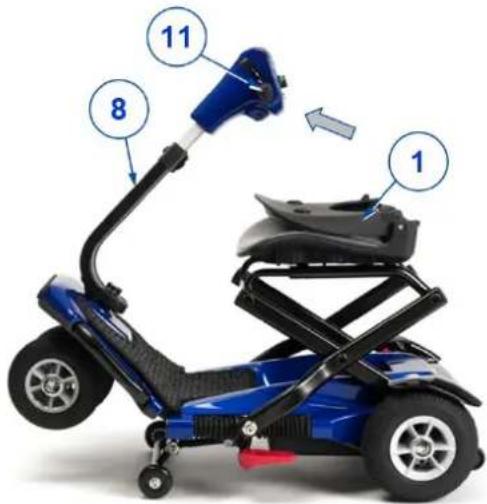
Grab the hand grips and turn tiller (8) upward. Release the hand grips before the front wheels touch the ground. An audible click is to be heard as signal that the tiller is locked.
natural_image
Blue electric scooter with black seat and articulated arm, labeled with number 1 (no text or symbols on the device itself)[4]
Turn backrest (1) upward.

CAUTION
Make sure that your fingers won't get entrapped at the hinging point.
![A 14 B [5]](/content/2026/03/523656/images/6a378ad3e675f398713c88b09a4191ade784a8630dd6aa1afc48dbc2069f680e.jpg)
Put free-wheel lever (14) in coupled position (B), pointing to the rear of the scooter. Your scooter is now ready to be used.
2.5.2 Folding
![[1] 20](/content/2026/03/523656/images/95cce2ddd7fec0c126258be514f9ae02a7c73fc99f1454fe0f9456f26955acc1.jpg)
Turn you scooter OFF and remove the key from ON/OFF switch (20).
![A 14 B [2]](/content/2026/03/523656/images/4256abfa7a479928b88717bd5cd4988bbf4e1bf779483e6198bab3438088b7e8.jpg)
Put free-wheel lever (14) in free-wheel position (A), pointing to the front of the scooter.
![[3] 8 5](/content/2026/03/523656/images/cc58b770821552bb097ae322b1233b0f8c65095384c45931325625596aa1a06f.jpg)
Push with your foot the red lever (5) down to unlock; a click should be heard.
![[4] 8 1](/content/2026/03/523656/images/6f2b62ff4d2c2981f58757986eb503239217debb34b119bcb48bd06257b2bee0.jpg)
Fold backrest (1) against the seat. Next turn tiller (8) towards the seat.
![[5] 8 15](/content/2026/03/523656/images/f89e4d535fdd51a1c892949253e3a2e8f65bddcbf2088017741be15ca94209e5.jpg)
If tiller (8) lies on the seat, push it gently down till it is locked; a click should be heard. Lift the tiller to check whether it is properly locked.
![15 7 6 [6]](/content/2026/03/523656/images/db9b03de97de5737a9a1881913274bda19db227fc812bbb33cdba416dc46d600.jpg)
Lift the rear end of the scooter by the frame tube (15) till the scooter lands on its front wheels (17). The scooter is now ready to be pushed to a storage location.
2.6 First use and storage
CAUTION
Risk of battery damage
- Never completely discharge the battery. When the scooter will be stored for a longer period, first remove the battery and take maintenance into account during the storing period, see also §3.6.
- Do not interrupt the charging cycle; only disconnect the battery charger when the battery is fully charged.
- Make sure that your scooter is stored dry and indoors to prevent mould from growing and the upholstery from being damaged. If necessary, use a protective cover.
- Check the technical details for storage, see chapter 6.
Ensure that the battery has been fully charged before using your scooter, ask your dealer if this has already been done or not. To charge, follow the charging instructions in §3.6.
3 Using your scooter

WARNING
Risk of injuries
- First read previous chapters and inform yourself about the intended use. Do NOT use your scooter unless you have read and fully understood all instructions.
- In case of doubts or questions, do not hesitate to contact your local specialist dealer, your care provider or technical adviser to help you on this.
3.1 First ride

CAUTION
Risk of injuries and damage
- Make sure that your scooter is switched OFF when getting on and off.
• Always unplug the battery charger from the scooter before starting to drive.
i Make sure you are familiar with the operation of your scooter before using it on crowded and possibly dangerous places. First exercise at a specious, open area with little bystanders and ask someone to accompany you.
-
Make sure that:
-
the scooter is on a flat surface with all wheels touching the ground;
- the battery is fully charged, see §3.6;
• the motor is coupled, see § 3.4; - the tyres have the correct tyre pressure, see § 6;
- you have the correct sitting position;
-
all adjustments have been fixed securely.
-
Switch your scooter on, see § 3.2.
- Set the speed to lowest speed setting, see § 3.2.
- Put both hands on the handgrips of the tiller.
- Slightly pull the right operating lever to drive to the front. Use the left operating lever to drive backwards. Release the lever to stop. Repeat this a few times.
- If you feel confident enough, repeat this at a higher speed.
- Now try to turn, in forward and backward direction. Repeat this a few times.
- Make sure your scooter stands stable when ending the ride.
- Switch off the scooter and remove the key to protect against theft.
3.2 Operating your scooter

WARNING
Risk of injuries or damage
- Do NOT drive on slopes, obstacles, steps or kerbs larger than the size described in the technical specifications in chapter 6.
• Take the local road traffic law into consideration; it may differ per country. - Do not adjust the speed while you are driving.
- Take the weather conditions into consideration. Avoid driving by moist weather, extreme heat, snow, black ice, freezing temperatures; see technical specifications in chapter 6.
- Since your scooter is not equipped with lighting, it is not suitable to drive on public roads at poor visibility (darkness, mist, twilight). Make sure that you are well visible, also during daylight by using fluorescent clothing and/or by using own lighting at the front and rear side of the scooter.
- To prevent tipping over, try to drive with a large turning radius at corners and curves. Do not cut corners and don't drive with sharp bends. Try to drive straight in small passages to prevent getting entrapped.
-
Do not lean too far to the left/right/front/back of the scooter to prevent tipping over. Please pay specially attention when you are negotiating slopes and obstacles.
-
Be aware of other road users to whom your scooter may be an obstacle. Pay special attention when turning, reversing or driving backward. If you are not acquainted with driving backwards, first practice in an open area. Indicate the direction you intend to go before cornering.
- When driving indoors, only use the lowest speed setting.
- Do not turn your scooter "OFF" while driving as this will lead to an emergency stop and possible risk of accident and injury.
- Keep the braking distance in mind, see also the technical specification in chapter 6. Be aware that the braking distance depends on speed, surface, weather conditions, slope and weight of the user.
- Pay attention if the road has holes or gaps that may cause entrapment of the wheels.
3.2.1 Operator control
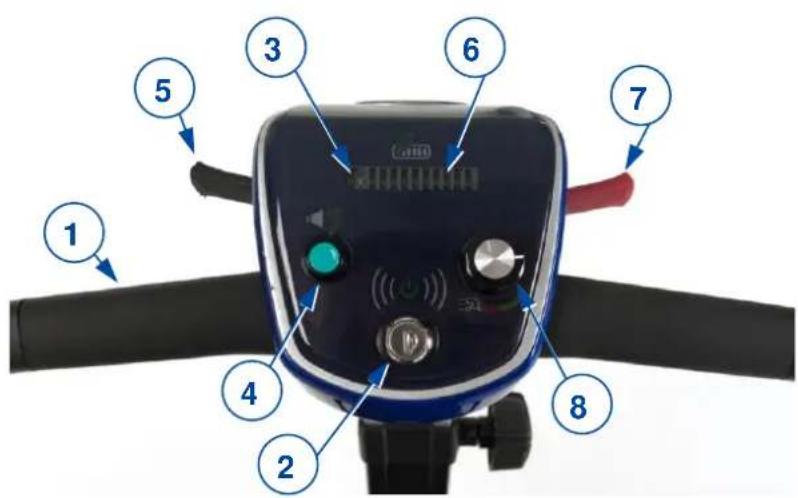
- Hand grip
- ON/OFF switch
- Error indicator
- Signal push button
- Operating-lever left (drive backward)
- Battery indicator
- Operating-lever right (drive forward)
- Speed control
3.2.2 Switching on and off
Switching ON with ON/OFF switch (2)
Put the key in switch (2) and turn it clockwise (ON).
The status indicators (3) light up for some seconds when the key is turne (during self-test). Battery indicator (6) stays visible. See also §3.2.
Switching OFF with ON/OFF switch (2)
Turn the key in switch (2) counter clockwise (OFF) and remove the key. The lights of status indicator (3) extinguish.
Switching automatically OFF (time)
The scooter will be switched off automatically if it hasn't been used for 30 minutes. To start the scooter again:
- Turn the key counter clockwise.
- Remove the key from the ON/OFF switch (2).
- Put the key back in the switch.
- Turn the key clockwise (ON).
3.2.3 Operating the brakes
To apply the electromagnetic brakes:
- Let go of the speed lever (5 or 7). The electromagnetic brake in the motor will be activated, the scooter will stop.
3.2.4 Driving

WARNING
Risk of injuries
Do not use both sides of the speed lever simultaneously. This might leave you unable to control your scooter.
i • This paragraph is a first acquaintance with driving your scooter. Read the complete manual first before you go for a ride.
- The surface of the controller gets slightly warm during use.
Operating lever (7) (driving forward)
To start or stop moving FORWARD.
The movement starts as soon as the lever is slightly pulled towards you. The more the lever is pulled, the faster the scooter will move (up till the maximum speed setting) When the lever is release, the electromagnetic brake is applied. The scooter stops immediately.
Operating lever (5) (driving backward)
To start or stop moving BACKWARD.
The movement starts as soon as the lever is slightly pulled towards you. The more the lever is pulled, the faster the scooter will move (up till 50% of maximum speed setting). When the lever is release, the electromagnetic brake is applied. The scooter stops immediately.
Speed control (8)
Turn speed control (8) clockwise to increase the maximum speed setting. Turn the control counter clockwise to decrease the maximum speed setting.
Push button for sound signal (4) Press the button (4) to alarm bystanders by sound signal.
Driving around corners and in bends

WARNING
Risk of tipping injuries
- Reduce your speed before you enter a curve or corner.
• Always maintain an adequate distance from corners and obstacles. - Do not drive your vehicle in an "S" pattern or make erratic turnings.
For corners and bends, use both hands to turn the handle bar in the direction you wish to take. It is very important that you ensure that there is enough space allowing you to go around bends and corners. Narrow passages must preferably be approached in a large curve so as to allow you to enter the narrowest part as straight from the front as possible. Bear in mind that your scooter's back part will in most cases be wider than the front part.
Backward movement
The speed of rearward movement is automatically reduced in comparison with forward driving. We also recommend that you use the slowest speed setting when you drive backward.
Do not forget that the steering direction with rearward driving is the opposite of when you go forward, and that your scooter will turn directly in the required direction.
The horn will beep while driving the scooter backwards.
Taking slopes

WARNING
Risk of injuries and/or damage
- Never put your scooter in free-wheel mode on a slope. The scooter may start moving, causing injuries to you or bystanders.
- Do not turn when driving down a slope, since the weight of the scooter may cause tipping over.
- Make sure all four wheel touch the ground while driving up or down.
Driving up
- Drive in a straight line and with higher speed on a slope, and lean slightly forward. When you drive in an angle or too slow, there is a risk of tipping over or falling.
- Never reverse on a slope.
Going downhill
- Drive in a straight line (forward or backward) and with lower speed on a slope. When you drive in an angle or too fast, there is a risk of tipping over or falling.
- Lean slightly backward during a forward descent; lean slightly forward during a backward descent.
Coping with obstacles

WARNING
Risk of injuries by unexpected movement
- Do not use your scooter on an escalator.
• Always approach a kerb from the front. - Make sure that all wheels make contact to the ground when driving up or down.
If necessary, take a short run up to speed-up the scooter to mount the obstacle or kerb. Prevent that you or your scooter has to cope with a large recoil.
3.3 Transfer in and out of the scooter
- Park the scooter as close as possible to the place where you want to transfer.
- Make sure that the scooter is switched off.
- Turn the armpad upwards on the side where you want to transfer.
- Swivel the seat until it is facing you (see §3.5.4).
- Transfer to / from the seat of the scooter.
3.4 Brake and free-wheel lever

CAUTION
Risk of injuries
Only operate the free-wheel lever when your scooter is turned OFF! An attendant should operate the free-wheel lever if you have impaired mobility. NEVER operate it from sitting position.
i Make sure that the free-wheel lever is in its rear position BEFORE switching the scooter ON. Electromagnetic brakes do NOT function if the scooter is in free-wheel mode.
Your scooter is equipped with electromagnetic brakes. These brakes function automatically, only if free-wheel lever (9) is in rear position, see figure 2. In this situation, the brakes start braking if:
- de scooter is OFF;
- de scooter is ON and the operating levers are released;
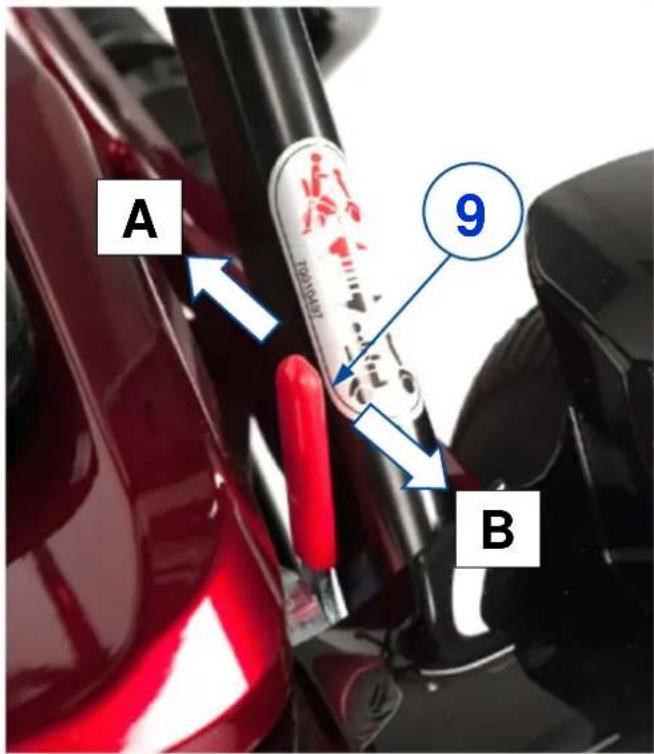
Free-wheel lever (9):
- Push lever to the FRONT (position A) to put the scooter in free-wheel mode. Now, the motor is disconnected. The scooter can be moved manually.
- Push lever to the REAR (position B) to connect the motor to the drive. This should be done before starting the scooter.
Figure 2 Operating free-wheel lever
3.5 Comfort adjustments
i The following adjustments should be done before starting your scooter.

CAUTION
Risk of entrapment
Make sure that your hands/fingers won't get entrapped during scooter adjustment.
3.5.1 Sit position
For a comfortable and safe ride it is advised to:
- adjust tiller height to your body length; see § 3.5.2;
- turn the armrests upward, if applicable; see § 3.5.3;
- use the rotatable seat correctly, if applicable; see § 3.5.4;
- sit down on the seat with your lower back against the backrest;
- keep your feet on the foot plate.

CAUTION
Risk of injuries or damage
- Make sure that no loose clothing can get caught by wheels or tiller.
- Do not lean too far to the left/right/front/back of the scooter to prevent tipping over. Please pay specially attention when you are negotiating slopes and obstacles.
3.5.2 Tiller
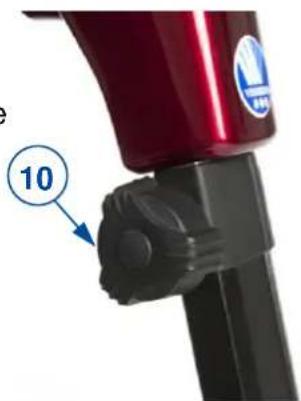
Adjust the height of the tiller with operating console, so you can operate levers and buttons easily.
Height
- Loosen knob (10) of the height adjustment.
- Raise or lower the operating console with the hand grips.
- Tighten the knob again.
- Make sure that the height adjustment is well secured.
3.5.3 Armrests
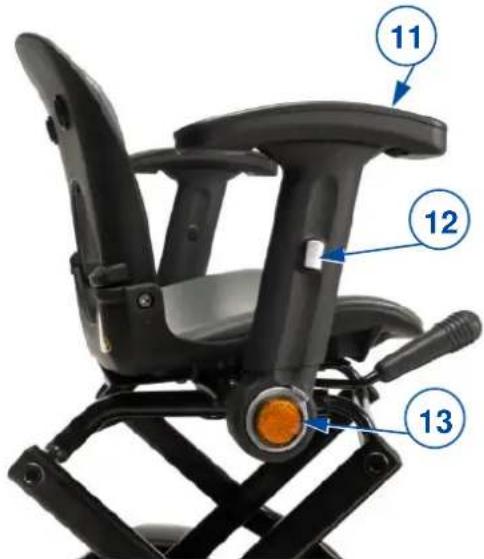
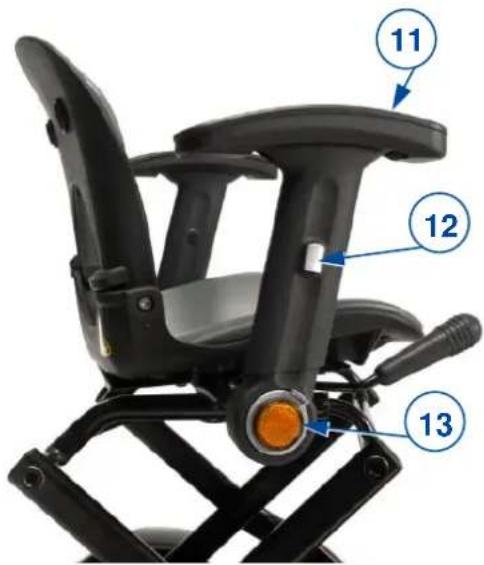
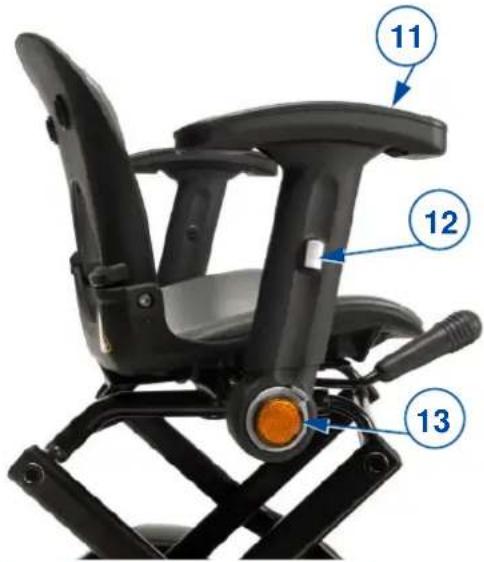
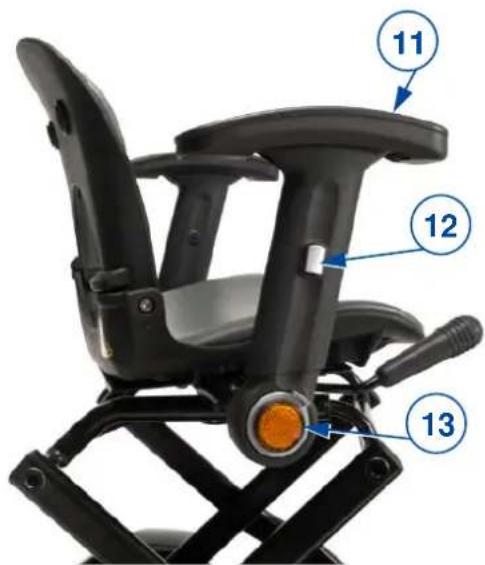
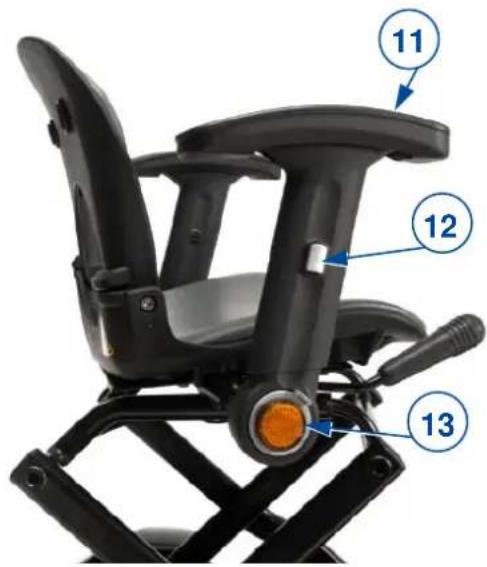
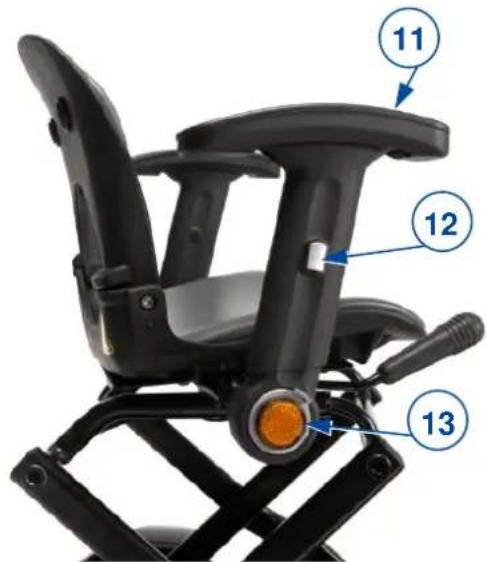
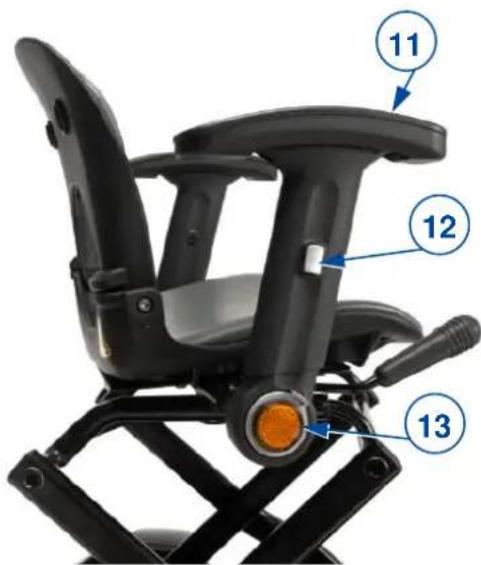
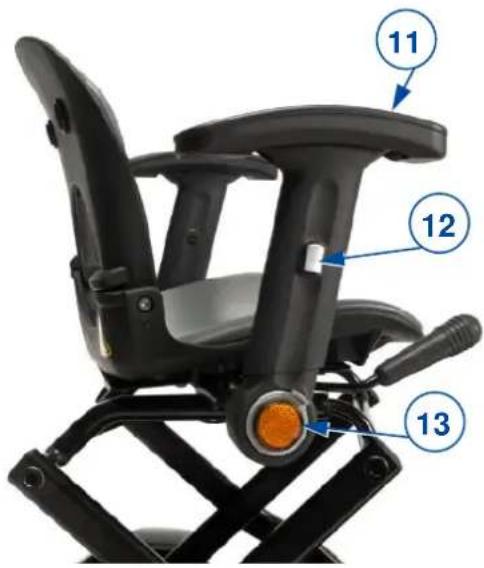
Figure 3 Rotatable seat and armrests
- Armrest (2x)
- Height adjustment of armrest
- Position adjustment of armrest
i Your specialist dealer installs the armrests according to a standard width. It is possible to have the space between the armrests adjusted.
Position
The armrests can be turned backwards to make it easier to sit down on the seat.
- Press the small button (13) next to the reflector and turn the armrest towards the desired position (up or down).
- Release the button and check that the armrest is secured.
Height
- Sit down on the seat.
- Turn armrest (11) up.
- Press on height adjustment (12) on the side of the armrest and slide the armrest to the desired height.
- Release the button and check that the armrest is secured.
- Repeat this for the other armrest.
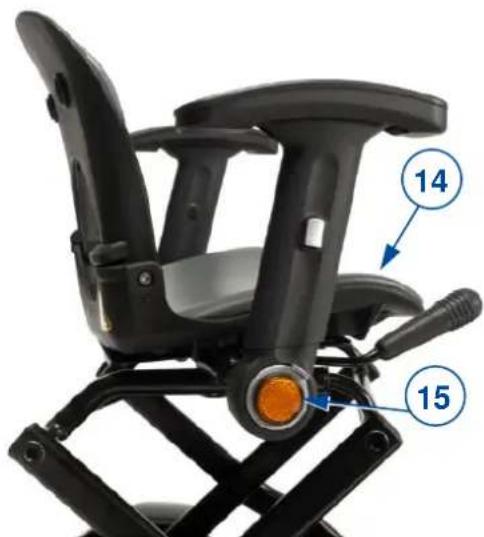
3.5.4 Rotatable seat
Turn the seat to the side
- Stand next to the scooter.
- Pull lever (15) up and turn seat (14) towards you.
- Release the lever and check if the seat is locked.
Turn the seat to the front
- While sitting on your scooter, pull lever (15) up and turn yourself with the seat to the front.
- Release the lever and check if the seat is locked.
natural_image
Close-up of a black bicycle seat with orange headlight and labeled parts (14 and 15), no visible text or symbols beyond labels.3.6 Battery status, status indication and charging
3.6.1 Battery status and status indication
The indicator lights of the status indication and battery status will go on as soon as the scooter is switched on, see next figure.
- Check if all lights are on (if the battery is fully charged, see next)
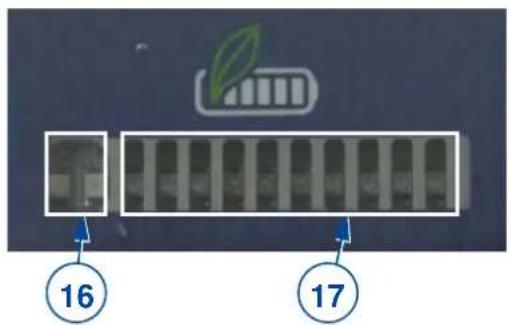
Figure 4 Battery-status and status indication
Status (fault) indication (16)
These red lights go on by switching the scooter on and next they go out. In case of any problem these lights will blink slowly. The number of blinks indicate the fault code. The meaning of this code can be found in chapter 5.
Battery-status indication (17)
The battery-status lights will go on from left to right after switching on. When the battery is fully charged, all blocks/lights will be on. Using the scooter will decrease the battery charge and some of the lights on the right will go out. The more lights are on, the higher battery charge is.
The batteries need to be charged again If only 3 red lights on the left are on. Keep in mind that the scooter will automatically stop during the ride when battery charge becomes to low.(see chapter 3.6)
3.6.2 Removing and replacing battery
i The key to switch the scooter on is also to be used to unlock the battery.
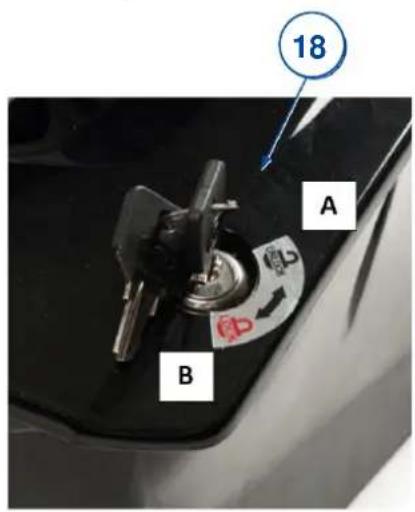
To remove battery (18) from the scooter:
- Put the key in the lock and turn the key counter clockwise (position A).
- The battery is now unlocked and can be lifted from the scooter by the handle.
To replace the battery:
- Make sure that the key is in the “unlocked” position.
- Place the battery in the housing of the scooter.
- Turn the key clockwise (position B) to block the battery.
- Check the battery to be locked.
Figure 5 Lock-unlock battery
3.6.3 Charging the battery

WARNING
Risk of injuries and damage due to fire
- Only use the battery charger delivered with the scooter. The use of any other charger may be dangerous (fire hazard).
- The battery charger is only intended to charge the batteries delivered with the scooter, not to charge any other batteries.
- Do not adapt any of the delivered parts, like cables, plugs or battery charger. Never open or change the battery or the connection points.
- Protect the battery and battery charger against flames, high and low temperatures (see chapter 6), moisture, sunshine, severe shocks (for example dropping). Do NOT use the battery if this has been the case.
- Charge the battery with the battery charger, indoors, in a well-ventilated area, out of children's reach.
CAUTION
Risk of damage
- Battery self-discharge and the quiescent current of the connected users will drain the battery charge slowly. The battery may be irreversibly damaged if the battery is fully discharg Therefore, make sure that the battery is charged on time:
- With intensive use (long distances, daily use): Immediately recharge after use.
With average use (short distances, daily or a few times a week): Charge when battery indicator shows 50% discharge. - With little use or storage: Charge once a week.
- If your scooter is stored for a while, the battery should be removed and stored separately.
- Read the storage and maintenance instructions in chapter 4 and technical details in chapter 6.
- Only disconnect the battery charger when the battery is fully charged, see the following symbols on the charger.
- Do not charge batteries below 0°C. Move the battery to a warmer place and start charging.
- Keep the connection point for the battery charger free of dust and other contamination.
- In case of any problems whereby the battery cannot be charged according to following instructions, please contact your specialist dealer.
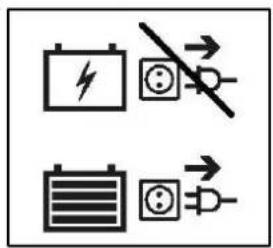

- It is recommended to unplug the battery charger from the mains when not in use. This is to prevent unnecessary energy consumption.
CAUTION
Risk of damage
Protect your battery from large sources of electromagnetic radiation.

In case of any problems, read the instructions of the battery charger or contact your specialist dealer.
Follow the instructions for charging:
-
Switch the scooter OFF.
-
FIRST connect the charger to a 230V AC power socket. The indicator goes on (green) to show that the charger is powered. If not, check the charger's manual before connecting it to the battery. If the indicator lights alternating in green and red, there is some fault. Do not use the charger.
-
Slide/turn the cover (19) of the charging point on the battery open.
-
Connect the battery to the charger. During charging lights the indicator red.
-
Wait till the battery is fully loaded. The indicator light turns green again.
-
Disconnect the battery and slide the cover plate back in place.
-
Switch the scooter on and check if all lights of the battery status indicator are on.
-
Remove the charger from the socket, let it cool down and store it on a dry location.
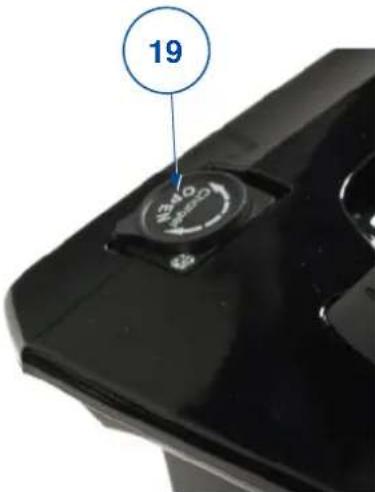
Figure 6 Connection point for battery charger
Depending on battery condition, it will be charged after 4 up to 10 hours. Charging for a longer period won't harm the battery; but do not charge for more than 24 hours. By daily use of your scooter we recommend to charge the batteries for 8 to 10 hours after use.
When the battery does not charge properly, the charging will stop after 5 hours and the status indicator will blink every second. Further charging is of no use.
The charging process can be stopped or started any time by following the instructions above.
4 Maintenance
i Regular care ensures that your scooter is preserved in a perfectly functional condition. For the maintenance manual, refer to the Vermeiren website: www.vermeiren.com.
CAUTION
Risk of injuries and damage
Repairs and replacements may only be undertaken by trained persons and only genuine replacement parts of Vermeiren should be used.
i The last page of this manual contains a registration form for the specialist dealer to record each service.
The service frequency depends on the frequency and intensity of use. Contact your dealer to agree to a common timetable for inspection/maintenance/repair.
Before each use
Visually inspect the following points:
- Battery status: Be aware of the action radius of the battery mentioned in the technical specifications, see chapter 6. Charge the battery when necessary, see § 3.6.
• Condition of wheels/tires, see § 4.1.1. - All parts: Contamination, see § 4.1.2.
- Operating console and cables: Damage like wires that are frayed, broken or that become exposed.
- Wheels, tiller, operating console: Well secured.
- Seat and backrest: Dented spot, damages or tears. Replace the seat and/or backrest if necessary.
Contact your specialist dealer for possible repairs or part replacements.
Monthly
If your scooter is stored for a longer period, you still need to charge the batteries monthly. For more information, see § 3.6.
Yearly or more often
Have your scooter inspected and serviced by your specialist dealer, at least once a year, or more often. The minimum maintenance frequency depends on use and should therefore be commonly agreed on with your specialist dealer.
If stored
Make sure that your scooter is stored dry to prevent mould to grow and damage the upholstery.
4.1 Instructions of maintenance
4.1.1 Wheels and tires
- Keep your wheels free of wires, hair, sand and carpet fibres.
- Check the profile of the tyre. If the tread depth is less than 1 mm, the tyres need to be replaced. Contact your specialist dealer for this matter.
- Check the tyre pressure of each tyre. The pressure depends on the type of tyre. The required pressure is readable on the tyre side.
- If your tyre does not stay pressurised or is visibly flat, contact your specialist dealer for replacement.
CAUTION
Risk of injuries or damage
Make sure that the maximum pressure is not exceeded during inflation. Check the details on the side of the tyre.
4.1.2 Cleaning
CAUTION
Risk of damage by moisture
- Keep the operating console clean and protect it from water and rain.
- Never use a hose or high-pressure cleaner to clean the scooter.
Wipe all rigid parts of the scooter with a damp cloth (not drenched). If necessary, use a mild soap, suitable for varnishes and synthetics.
The upholstery can be cleaned with lukewarm water and a mild soap. Do not use abrasive cleaning agents to clean.
Keep the ventilation openings of the battery charger clean and free of accumulated dust. Blow away the dust and clean the battery charger enclosure with a slightly moistened cloth, if required.
4.2 Expected lifespan
The average lifespan of your scooter is 5 years. Depending on the frequency of use, driving circumstances and maintenance, the lifespan of your scooter will increase or decrease.
4.3 Reuse
Before each reuse, have the scooter disinfected, inspected and serviced according to the instructions in the maintenance manual.
4.4 End of use
At end of life, you need to dispose your scooter according to the local environmental legislation. The best way to do so, is to disassemble the scooter to facilitate the transport of recyclable parts. Usually, batteries are collected separately.
4.5 Warranty
The warranty on this product is subject to the general terms and conditions of each country.
5 Troubleshooting
Even if you use your scooter properly a technical problem may occur despite this. In this case, contact your local specialist dealer.

WARNING
Risk of injuries and damage to the scooter
- NEVER repair your scooter yourself attempting to solve the problem.
- For failures at the operating console you need to contact the specialist dealer. He decides if the console needs to be reprogrammed.
The following symptoms may indicate a serious problem. Therefore contact your specialist dealer always if you spot any of following deviations:
- Strange sound;
- Frayed/damaged wiring harnesses;
- Cracked or broken connectors;
- Uneven tread wear at one of the tyres;
- Jerky movements;
- Scooter deflects to one side;
- Damaged or broken wheel assemblies;
- Scooter does not switch on;
- Scooter is powered, but does not move to the front or back.
In case of a possible problem, a system code is displayed by the blinking LED of the possible problem indicator, see §3.6.1 (16). The following table summarises the possible system codes (number of blinks). Some problems can be solved by yourself. For all problems marked in grey, consult your specialist dealer.
(*) OONAPU fault means "Out Of Neutral At Power Up". This fault appears for example if the operating lever at the left or right side does not return to its neutral position causing the scooter to move the moment the ON/OFF switched is being operated. The scooter/controller is protected to prevent this abrupt movement.
Table 1: Troubleshooting
| Code | Problem | Meaning |
| 1 | Battery voltage low | (Sound signal goes on)The scooter switches OFF automatically if battery voltage drops below 21.0 V. Recharge the battery. For more information see § 3.6. |
| 2 | Fault by low battery voltage | Battery voltage is low.Recharge the battery.Check battery, associated connection and wiring. |
| 3 | Fault by high battery voltage | Battery voltage is high.This may occur if battery is overcharged, for example while driving down a long slope. In such cases, reduce your speed to minimize charging of battery. |
| 4 | Current limit has been reachedOrTemporary stop due to high controller temperature | Maximum current rating of motor has been exceeded for too long.because the scooter has stalled. Switch the scooter off. Wait a few minutes and switch it back on.caused by a motor fault. Check motor, its associated connections and wiring.Scooter switches off automatically when temperature of controller or motor gets too high. This can be caused by:driving up a long, steep slope;an ambient temperature which is too high;leaving the scooter in the sun for too long.By switching the scooter off, all components are able to cool down. When the temperature is back to normal, the scooter can be started again. But we advise to leave it OFF for 5 more minutes to let it cool down completely. |
| 5 | Brake fault | Either a brake release switch is active;Or the brake system is faulty.Check brake and associated connections and wiring.Make sure that any associated switch is in its correct position. |
| 6 | Drive inhibit | Either a stop function is active;Or charger inhibit;Or OONAPU (*) condition has occurred.Release the stop conditions.Disconnect the battery charger.Make sure that the operating levers are in neutral position when the scooter is switched on.Possibly the operating-levers mechanism requires re- calibration. |
| 7 | Fault at speed control | Operating levers, speed control, SRW or their wiring may be faulty.Check the operating-lever mechanism and speed control and associated connections and wiring. |
| 8 | Motor voltage fault | Motor and its wiring may be faulty.Check motor and associated connections and wiring |
| 9 | Other error | Controller may have an internal fault.Check all connections and wirings. |
6 Technical specifications
The technical specifications below are valid for the scooter in standard settings and optimum environmental conditions. If other accessories are used, the tabulated values will change. Changes in outdoor temperatures, humidity, uphills, downhills, soils and battery levels can reduce output.
Table 2: Technical specifications
| Brand | Vermeiren |
| Type | Scooter, rear wheel drive, Class A |
| Model | Sedna |
| Description | Dimensions |
| Max. weight of user | 115 kg |
| Max. speed (driving forward) | 6 km/h |
| Min. braking distance at max. speed | 2600 mm |
| Action radius* | 14 km |
| Maximum height of obstacle | 30 mm |
| Maximum safe slope | 6° |
| Minimum turning radius | 820 mm |
| Minimum width required to reverse | 1250 mm |
| L x W x H Dimensions unfolded | 960 mm x 530 mm x 870 mm |
| L x W x H Dimensions folded | 750mm x 530 mm x 485 mm |
| Total mass, battery included | 31,6 kg |
| Total mass, battery excluded | 28,3 kg |
| Total mass of heaviest part | 24,3 kg |
| Effective seat depth | 330 mm |
| Effective seat width | 406 mm |
| Seat surface height at front edge (measured from ground) | 540 mm |
| Angle seat surface | -6° |
| Backrest angle | 103° |
| Backrest height | 330 mm / 360 mm |
| Horizontal position of axle | 50 mm |
| Motor | Nom. 270 Watt, electromagnetic brake |
| Battery | 1x Li-battery 24V DC – 10,5 Ah – 276 Wh |
| Controller | Dynamic controller, R-series |
| Protection class | IP X4 |
| Battery charger | METCO, NL07-25HT, 29.4Vdc, 2.36A |
| Protection class of battery charger | IPx1 |
| Insulation class of battery charger | II |
| Max. sound level scooter motor | 60 dB(5A) |
| Sound level horn/audible signal | 77 dB(5A) |
| EMC compatible according to | ISO 7176-21 |
| Ignitability of upholstery according to | EN 1021-2 |
| Diameter rear wheels (number) | 2.80 / 2.50 - 4 air (2) |
| Diameter front wheels (number) | 200 x 50 mm air (2) |
| Suspension | Frontside |
| Control (wig-wag) | Lever to start/stop movement |
| Operating console | Rotatable switch for speed control |
| Temperature to store and use | +5 °C tot +40 °C |
| Operating temperature for electronics | -10°C tot +40°C |
| Humidity to store and use | 30% |
| We reserve the right to introduce technical changes. Measurement tolerance ± 15 mm /1,5 kg / 1,5°. * The theoretical action radius reduces if the scooter is frequently used on slopes, rough surfaces or to climb kerbs. The maximum driving distance is tested in ideal circumstances according to ISO 7176-4. | |
Sommaire
Préface....2
natural_image
Close-up of a red toy car's front compartment with visible tire, buttons, and textured base (no text or symbols)natural_image
Blue electric scooter with black seat and articulated arm, labeled with number 1 (no text or symbols on the device itself)[4]
natural_image
Close-up of a red handheld device with black handle and circular label pointing to number 10 (no text or symbols on device body)3.5.3 Accoudoirs
natural_image
Close-up of a black bicycle seat with orange headlight and blue circular annotations (14 and 15) pointing to the seat (no text or symbols on the chair itself)natural_image
Close-up of a red electric scooter front bumper with visible seat, wheels, and a blue arrow pointing to the side panel (no text or symbols)natural_image
Blue electric scooter with attached seat and articulated arm, labeled with number 1 (no text or symbols on the device itself)[4]
natural_image
Close-up of a blue electric scooter front panel with control buttons and a display screen (no readable text or symbols)[1]
natural_image
Close-up of a red and black handheld device with a blue circular badge and number 10 pointing to a knob (no text or symbols on the device itself)3.5.3 Armsteunen
natural_image
Close-up of a black bicycle seat with orange headlight and blue circular annotations (14 and 15) pointing to the front wheel.3.6 Batterijstatus, statusweergave en opladen
3.6.1 Batterijstatus en statusweergave
i
natural_image
Close-up of a red toy car's front bumper with visible tire, seat, and dashboard (no text or symbols)natural_image
Blue electric scooter with black seat and articulated arm, labeled with number 1 (no text or symbols on the device itself)[4]
natural_image
Top-down view of a blue electric scooter head with control buttons and a display screen (no visible text or symbols)natural_image
Close-up of a red and black handheld device with a blue circular annotation showing the number 10 (no readable text or symbols beyond the label)3.5.3 Armstützen
natural_image
Close-up of a black bicycle seat with orange head and orange sensor, labeled with numbers 14 and 15 (no text or symbols on the chair itself)VORSICHT
Beschädigungsgefahr
natural_image
Close-up of a red toy car's front compartment with visible tire, dashboard, and textured cushion (no text or symbols)natural_image
Blue electric scooter with black seat and articulated arm, labeled with number 1 (no text or symbols on the device itself)[4]
natural_image
Top-down view of a blue electric scooter front bumper with control panel and buttons (no visible text or symbols)[1]
natural_image
Close-up of a red and black mechanical component with a numbered annotation (10) pointing to a feature, no readable text or symbols present.3.5.3 Braccioli
natural_image
Black and white photo of a car seat with orange headlight and labeled parts (14 and 15), no visible text or symbols beyond labels.
natural_image
Close-up of a red electric motor cab with visible wheels and a numbered component (16), no text or symbols present.natural_image
Blue electric scooter with black seat and articulated arm, labeled with number 1 (no text or symbols on the device itself)[4]
natural_image
Close-up of a blue electric scooter front panel with control buttons and a numeric label (20) pointing to the side, no readable text or symbols beyond the number.[1]
natural_image
Close-up of a red and black mechanical component with a blue circle labeled '10' pointing to a small knob or knob (no text or symbols beyond the number)
3.5.3 Reposabrazos
natural_image
Close-up of a black bicycle seat with orange headlight and blue circular annotations (14 and 15) pointing to the seat (no text or symbols on the chair itself)natural_image
Close-up of a red toy car's front compartment with visible tire, dashboard, and textured cushion (no text or symbols)natural_image
Blue electric scooter with black seat and articulated arm, labeled with number 1 (no text or symbols on the device itself)[4]
natural_image
Close-up of a blue electric scooter front panel with control buttons and a display screen (no readable text or symbols)[1]
natural_image
Close-up of a red and black mechanical device with a blue circular label showing the number 10 (no text or symbols on the device itself)
3.5.3 Podłokietniki
natural_image
Close-up of a black bicycle seat with orange headlight and blue circular annotations (14 and 15) pointing to specific parts (no text or symbols on the chair itself)natural_image
Close-up of a red toy car's front compartment with visible wheels and a numbered component (16), no text or symbols present.natural_image
Blue electric scooter with black seat and articulated arm, labeled with number 1 (no text or symbols on the device itself)[4]
natural_image
Close-up of a red and black mechanical component with a blue circular annotation labeled '10' pointing to a specific part (no readable text or symbols beyond the number)3.5.3 Područky
natural_image
Close-up of a black bicycle seat with orange headlight and blue circular annotations (14 and 15) pointing to the wheel (no text or symbols on the chair itself)
Service registration form
This product (name): ....
was inspected (I), serviced (S), repaired (R) or disinfected (D):
| By (stamp):Kind of work: I / S / R / DDate: | By (stamp):Kind of work: I / S / R / DDate: | By (stamp):Kind of work: I / S / R / DDate: |
| By (stamp):Kind of work: I / S / R / DDate: | By (stamp):Kind of work: I / S / R / DDate: | By (stamp):Kind of work: I / S / R / DDate: |
| By (stamp):Kind of work: I / S / R / DDate: | By (stamp):Kind of work: I / S / R / DDate: | By (stamp):Kind of world: I / S / R / DDate: |
| By (stamp):Kind of work: I / S / R / DDate: | By (stamp):Kind of work: I / S / R / DDate: | By (stamp):Kind of work: I / S / R / DDate: |
| By (stamp):Kind of work: I / S / R / DDate: | By (stamp):Kind of work: I / S /R / DDate: | By (stamp):Kind of work: I / S / R / DDate: |
| By (stamp):Kind of work: I / S / R / DDate: | By (stamp):Kind of work: I / S / R / DDate: | By (stamp):Kind of work: I / S / R / DDate: |

Vermeiren GROUP
Vermeirenplein 1 / 15
2920 Kalmthout
BE
website: www.vermeiren.com
- EN
- Instructions for specialist dealer
- FR
- Using your scooter....10
- Maintenance....19
- Troubleshooting....21
- Technical specifications....23
- Preface
- Important note
- Information available
- Your product
- Before use
- Intended use
- General safety instructions
- Symbols on the scooter
- Transport
- Moving the scooter
- Transport in the car
- Folding/Unfolding
- Unfolding scooter and connecting drive
- Folding
- First use and storage
- CAUTION
- Using your scooter
- WARNING
- Risk of injuries
- First ride
- Risk of injuries and damage
- Operating your scooter
- Risk of injuries or damage
- Operator control
- Switching on and off
- Operating the brakes
- Driving
- Driving around corners and in bends
- Backward movement
- Taking slopes
- Driving up
- Going downhill
- Coping with obstacles
- Transfer in and out of the scooter
- Brake and free-wheel lever
- Comfort adjustments
- Sit position
- Tiller
- Height
- Armrests
- Position
- Rotatable seat
- Turn the seat to the side
- Turn the seat to the front
- Battery status, status indication and charging
- Battery status and status indication
- Removing and replacing battery
- Charging the battery
- Maintenance
- Before each use
- Monthly
- Yearly or more often
- If stored
- Instructions of maintenance
- Wheels and tires
- Cleaning
- Risk of damage by moisture
- Expected lifespan
- Reuse
- End of use
- Warranty
- Troubleshooting
- Technical specifications
- Sommaire
- Préface....2
- Accoudoirs
- Armsteunen
- Batterijstatus, statusweergave en opladen
- Batterijstatus en statusweergave
- Armstützen
- VORSICHT
- Beschädigungsgefahr
- Braccioli
- Reposabrazos
- Podłokietniki
- Područky
- Service registration form
Brand : Vermeiren
Model : Sedna Premium
Category : Electric scooter