ASP200BT - Speakers KENWOOD - Free user manual and instructions
Find the device manual for free ASP200BT KENWOOD in PDF.



| Product type | Portable Bluetooth speaker |
| Brand | Kenwood |
| Model | ASP200BT |
| Dimensions (W x H x D) | 245 x 300 x 255 mm |
| Weight | 3.36 kg |
| Power supply | USB-C (5 V, 2.2 A) / USB PD 10-30 W |
| Built-in battery | Lithium-ion 7.4 V, 3600 mAh, 26.6 Wh |
| Battery life | Up to 10 hours |
| Charging time | Approximately 4 hours |
| Bluetooth | Version 5.0, Class 2, range ~10 m |
| Bluetooth profiles | A2DP, AVRCP |
| Output power | 50 W RMS |
| AUX input | 3.5 mm jack |
| Microphone input | 6.35 mm jack |
| USB port | USB-A, FAT16/FAT32, max. 128 GB |
| SD card reader | Micro SD, max. 128 GB |
| Supported audio formats | MP3, WMA |
| Preset sound modes | 6 (EQ0 to EQ5) |
| Light effects | 4 modes (ON1-ON4) + off |
| TWS function | Yes (True Wireless Stereo) |
| Echo function | Yes, adjustable (E00 to E30) |
| Display | LED |
| Operating temperature | +5°C to +35°C |
| Box contents | Speaker, USB-C cable, manual |
Frequently Asked Questions - ASP200BT KENWOOD
User questions about ASP200BT KENWOOD
0 question about this device. Answer the ones you know or ask your own.
Ask a new question about this device
Download the instructions for your Speakers in PDF format for free! Find your manual ASP200BT - KENWOOD and take your electronic device back in hand. On this page are published all the documents necessary for the use of your device. ASP200BT by KENWOOD.
USER MANUAL ASP200BT KENWOOD
First Floor, Gleneagles, The Belfry, Colonial Way, Watford, Hertfordshire WD24 4WH
UNITED KINGDOM
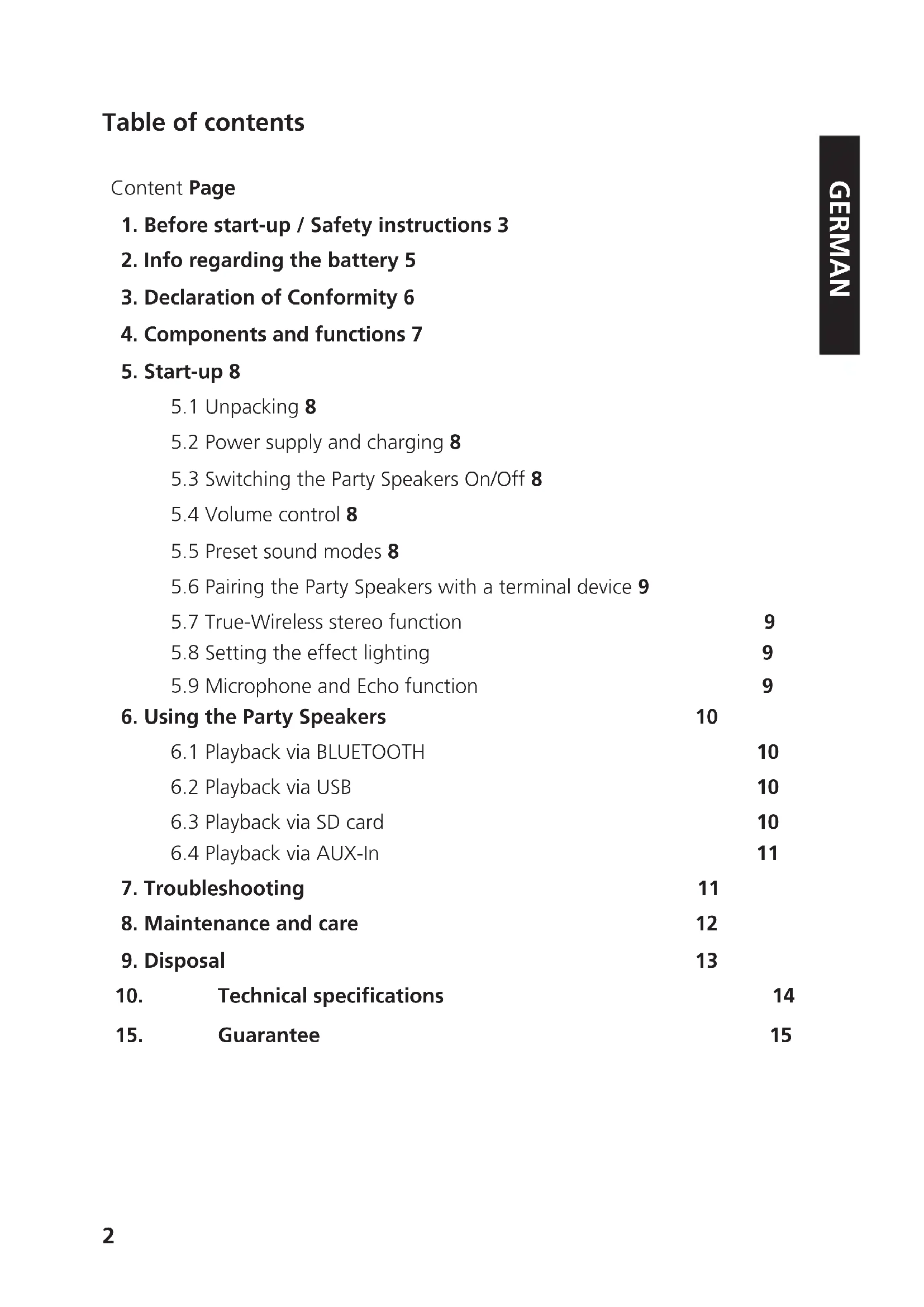
- Before start-up / Safety instructions 3
- Info regarding the battery 5
- Declaration of Conformity 6
- Components and functions 7
5. Start-up 8
5.1 Unpacking 8
5.2 Power supply and charging 8
5.3 Switching the Party Speakers On/Off 8
5.4 Volume control 8
5.5 Preset sound modes 8
5.6 Pairing the Party Speakers with a terminal device 9
5.7 True-Wireless stereo function 9
5.8 Setting the effect lighting 9
5.9 Microphone and Echo function 9
6.Using the Party Speakers 10
6.1Playback via BLUETOOTH 10
6.2Playback via USB 10
6.3Playback via SD card 10
6.4Playback via AUX-In 11
7.Troubleshooting 11
8.Maintenance and care 12
9. Disposal 13
10. Technical specifications 14
15. Guarantee 15
1. Before start-up
IMPORTANT SAFETY INSTRUCTIONS
Attention: Read this page carefully to ensure safe operation of the device.
Read instructions carefully!
- Follow all safety and operating instructions when using this product.
Keep the instructions in a safe place!
- You should keep the safety and operating instructions for future reference.
Follow the warning instructions!
- You should strictly follow all warnings provided on the product and listed in the operating instructions.
Clean only with a dry cloth!
- Pull out all cables from the device before cleaning this product. Never use liquid cleaning detergents or cleaning sprays. Use only a slightly damp cloth for cleaning.
Accessories
- Use only the accessories recommended by the manufacturer.
Do not use this device near water
- The device should never be exposed to water droplets or water splashes, such as those found near a bathtub, wash basin, kitchen sink, washing machine, wet basement or swimming pool. Never place containers filled with liquids, such as e.g. flower vases, on the device or directly next to the device.
Ventilation
- Slots and openings in the housing are used to ventilate the device to ensure reliable operation of the device and to protect the device from overheating and possible autoignition. Do not block the ventilation holes. Install the device according to the manufacturer's instructions. Never block the ventilation holes by placing the device on a bed, sofa, rug, or similar soft surfaces. This device should not be installed in a bookshelf or built-in wardrobe unless adequate ventilation is ensured.
Power supply
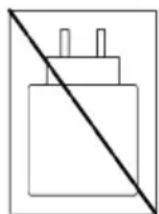
- This device may be connected to the mains voltage only with a USB-C mains adapter (5 V, 2.2 A, not included in the scope of delivery). In any case, make sure that the local mains voltage matches the specifications on the mains adapter used. If you are unsure about the type of power supply in your home, contact your specialised dealer or power company.
Penetration of foreign material and liquid
- That sure that foreign materials or liquids never penetrate into the device or the USB-C mains adapter through the openings, as otherwise there might be contact with high voltage components or short circuit resulting in fire or electric shock. Never spill liquids of any kind on this device or its USB-C mains adapter used.
Thunderstorm
- The device should be disconnected from the mains during thunderstorms and if it is not used for a long time.
Overload
- Never overload mains sockets, extension cords or multiple sockets, otherwise there is a risk of fire or electric shock.
Maintenance
- Never attempt to carry out the maintenance of this device yourself, because live parts can be exposed through the openings or by removing covers, contacting which can be hazardous. Leave all maintenance to qualified service personnel.
Damage requiring repair
- Maintenance and repair work should only be carried out by a qualified customer service. Maintenance/repair is required if the device has been damaged (e.g. the USB-C power adapter), if liquid has penetrated into the device, if objects have entered the device, if the device has been exposed to rain or moisture, it stops working properly or has fallen down.
Spare Parts
- If replacement parts are required, make sure that the customer service technician uses spare parts specified by the manufacturer or that have the same characteristics as the original parts. Unauthorised parts may cause fire, electric shock or other accidents.
Safety test
- Once maintenance or repair of this device has been completed, ask the customer service technician to perform a safety check to determine if the equipment is in perfect working order.
Heat
- Do not install the device near hot surfaces, such as radiators, fan heaters, stoves or other devices (including amplifiers) that can be hot. Never place objects with open flame, such as candles or lanterns, on or near the device. The installed batteries should not be exposed to excessive heat such as direct sunlight, fire or the like.
Risks associated with high volume
To prevent possible hearing damage, do not listen at high volume for long periods.
Automatic energy saving function
The device is equipped with an automatic energy saving function. This switches the device to the standby mode within 10 minutes, if no BT-signal is received or no storage media is played.
2. Info regarding the battery
The Lithium-Ion battery contains flammable substances such as organic solvents. If handled incorrectly, the battery can burst and catch fire or release extreme heat, deteriorate in its performance or develop other damage. Please pay particular attention to these instructions, which treatment is prohibited.
Fire hazard
- Protect the device with permanently built-in Lithium-Ion battery against mechanical damages.
- Keep candles and any other open flames away from this product at all times to prevent the device from catching fire.
- Protect the device against heat: There is a fire hazard. If you plan to set this device on a shelf, keep a distance of at least 10cm on the sides.
Hazard from the integrated battery
- Do not use the device if there are visible damages to the casing or the USB charge cable. Repairs on the device must be carried out exclusively by those authorised by the Customer Service.
- Do not expose the device to direct sunlight or heat. The ambiance temperature must not fall below +5^ C and must not exceed +35^ C. The temperature in motor vehicle can be significantly higher than 35^ C.
- If the battery has reached the end of its service life, the device with the integrated battery must be disposed of properly. Do not attempt to remove or replace the battery.
- The battery should note be reused or taken apart.
- Should the battery leak electrolyte solution, avoid contact with the eyes, mucous membranes and skin. Rinse the affected spots immediately with plenty of clear water and seek medical attention. The electrolyte solution can cause irritation.
- The battery must not be short circuited. The battery can overheat and explode.
- The device must not be thrown into fire. The battery can explode.
It is not allowed to make modifications to the device.
Caution!
Danger of explosion if the battery is replaced by a incorrect type;
- with extremely high or low temperatures that a battery is exposed to during use, storage or transport;
with low air pressure at high altitudes; - when replacing a battery by an incorrect type that can bypass a fuse (for example, some lithium battery types):
- when disposing of a battery in fire or a hot oven, or with mechanical crushing or cutting of a battery:
- when leaving a battery in an environment with extremely high temperatures or with extremely low air pressure, which may cause an explosion or escaping of flammable liquids or gases.
3. Declaration of Conformity
EU Declaration of Conformity
Hereby, JVCKENWOOD Corporation declares that the radio equipment type [KENWOOD] AS-P200BT complies with Directive 2014/53/EU. The full text of the EU Declaration of Conformity is available at the following Internet address: http://www.kenwood.com/euukdoc/
For United Kingdom
Hereby, JVCKENWOOD Corporation declares that the radio equipment type [KENWOOD] AS-P200BT complies with Radio Equipment Ordinance 2017. The full text of the EU Declaration of Conformity is available at the following Internet address: http://www.kenwood.com/euukdoc/
Manufacturer:
JVCKENWOOD Corporation
3-12, Moriyacho, Kanagawa-ku, Yokohama-shi, Kanagawa 221-0022, JAPAN
EU Contact address:
JVCKENWOOD Europe B.V.
Rendementsweg 20 B-9, NL-3641 SL Mijdrecht, THE NETHERLANDS
UK contact address:
JVCKENWOOD U.K. Limited
First Floor, Gleneagles, The Belfry, Colonial Way, Watford, Hertfordshire WD24 4WH
UNITED KINGDOM
The Bluetooth® word mark and logos are registered trademarks of BLUETOOTH SIG Inc. and any use of such marks by JVCKENWOOD Corporation takes place under license. Other trademarks and trade names are those of their respective owners.
4. Components and functions
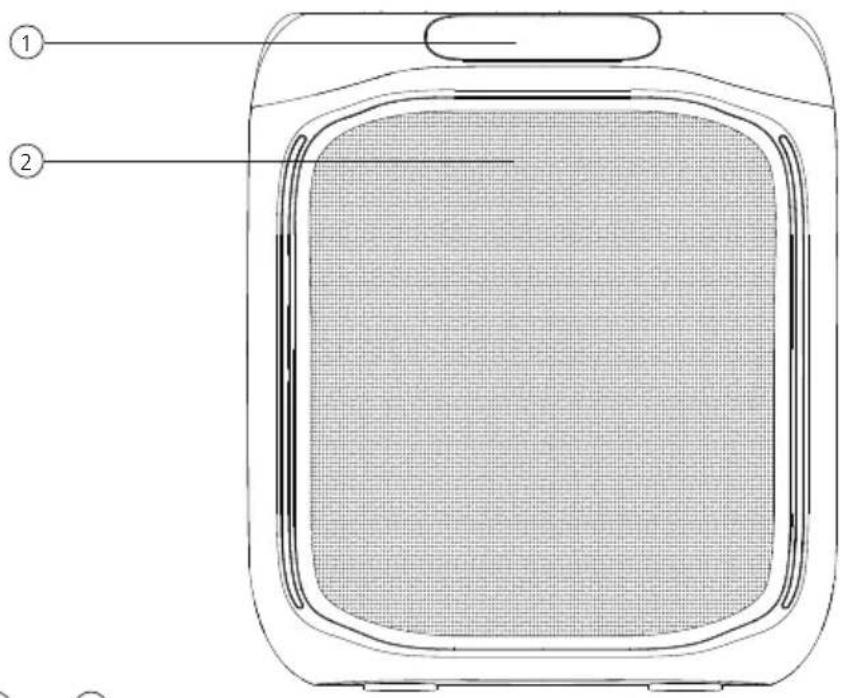
Front side
1 - Display
2 - Speaker
3 - Microphone connection
4 - AUX connection
5 - Insert SD card
6 - USB connection
7 - DC-In (USB-C) / LED Charge control
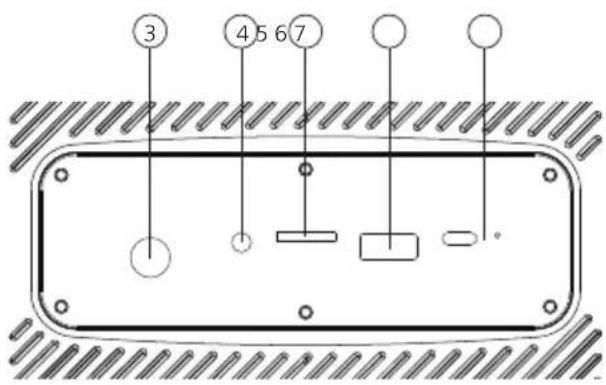
Back side (detail)
Top view
1 - Volume / Microphone level / Echo level control
2 - Selection of Microphone level / Echo level
3 - EQ / pairing TWS
4 - On/Off(standby)
5 - Skip track forwards
6 - BT / AUX / SD / USB modes
7 - Effect lighting
8 - Skip track backwards
9 - Play / Pause - BT unpair
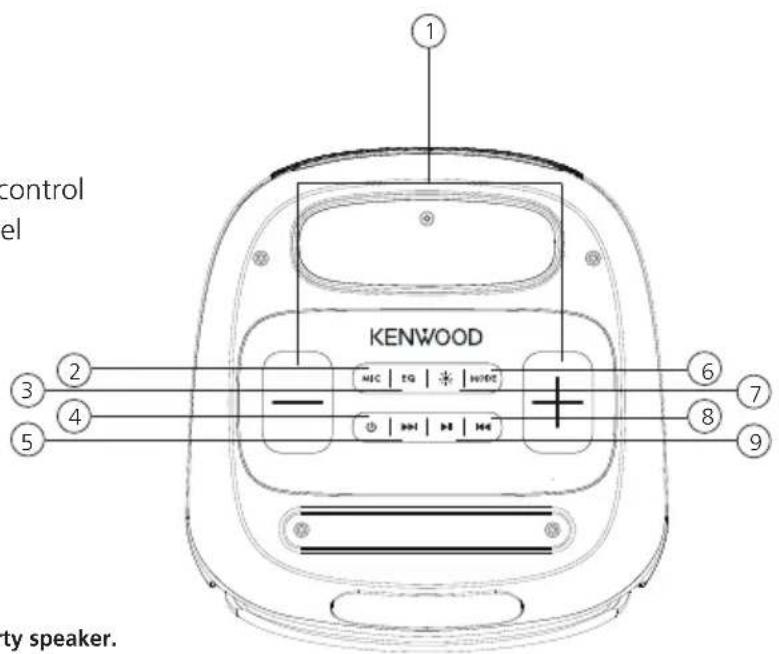
The rating label is located on the underside of the party speaker.
5. Start-up
5.1 Unpacking
Carefully unpack the Party Speaker and make sure all accessories are present:
USB-C charging cable
- Operating instructions
5.2 Power supply and charging
The Party Speaker is powered by a built-in Lithium-iron battery. Charge the built-in battery at least for four hours before using the device for the first time.
- To charge the internal battery, connect the smaller end (USB-C) of the supplied USB cable to the DC-IN socket on the back side of the Party Speaker and the other end (USB-A) to a USB voltage source (5 V, 2,2 A, not included in the scope of delivery).
- The LED charge control lights up red while charging and goes off when the battery is fully charged. You can use the Party Speaker while the charging is in progress, but this would prolong the charging time.
- Once charging is completed disconnect the USB charging cable from the USB voltage source, pull out the charging cable from the Party Speaker.
- To maintain the full capacity of the battery so long as possible, you should fully charge the battery every 2 to 3 months, even if you do not use the Party Speaker.
- Charge the battery in ambient temperature of between +5^ C and +35^ C .
- The battery maintains it's charge best at room temperature.
- The lower the ambient temperature, the shorter the playback time.
- The battery must be charged whenever the battery charge indicator is flashing on the Display.
The power supplied by the charger (not included) must be between a minimum of 10 watts, which the party speaker requires, and a maximum of 30 watts in order to achieve the maximum battery charging speed.
5.3 Switching the Party Speakers On/Off
- To switch the device on in the Standby mode, press and hold the
button until an acoustic signal sounds and "HIFI" followed by "bBLUE" appears on the Display. If no BT terminal devices is paired the BLUETOOTH Symbol flashes on the Display. - Press the button once again to switch the device back in the standby mode.
The Display briefly shows "OFF", a signal tone sounds and the device switches off.
5.4 Volume control
- Hold and press the < + > to increase the Volume. Once the minimum volume "U30" has been reached there also sounds an acoustic signal.
- Hold and press the < - > button to reduce the volume. Once the maximum volume "U00" has been reached there also sounds an acoustic signal.
- The set volume of "U00" to "U30" is shown on the Display.
5.5 Preset sound modes
The Party Speaker has 6 preset sound modes"EQ0" to "EQ5". These can be switched through by briefly pressing the "EQ" button. The active mode is briefly shown on the Display.
5.6 Pairing the Party Speakers with a terminal device
The cordless data transmission via the BLUTOOTH protocol allows for the loudspeaker system to be connected to the compatible devices. The maximum operating range of the data transmission is 10 m. Impediments and other electronic devices can impair the signal transmission and reduce the operating range. To pair the loudspeaker with your terminal device please proceed as follows:
- Switch on the BLUETOOTH Loudspeaker.
- Now open the BLUETOOTH settings on the terminal device to be paired and start searching for available BLUETOOTH devices there. Select "KENWOOD AS-P200BT" and start the pairing process.
- Following the successful pairing the loudspeaker emits a signal tone, and the BLUETOOTH symbol on the Display stops flashing. Now the music playback can be controlled via the terminal.
- Hold and press the
button for 8 seconds to interrupt the BLUETOOTH connection.
5.7 True-Wireless Stereo function (TWS)
This function makes it possible to pair two similar loudspeakers to achieve a stereo effect. For this please proceed as follows:
- Place the two Party Speakers at a distance of 1 meter from each other and switch both of them on.
- On the Party Speaker which is to take over the music control press the
button for approx. 2 seconds. A signal tone sounds, which a few seconds later is repeated on the second Party Speaker. Now the devices are paired. - The volume, the setting of the sound modes and the effect lighting of both devices are synchronised.
- If one of the devices is switched off the second device also switches off automatically. Next time they are switched on the TWS function is reactivated.
- If you want to unpair, press the
button on one of the Party Speakers for 2 seconds.
5.8 Setting the effect lighting
The Party Speaker offers a built-in effect lighting which is synchronised with the music beat. You can call up 4 different effects"ON1" to "ON4".
The effects vary depending on the type of the music and the volume.
- Please press the
button, to switch between the various modes. The "OFF" mode switches the lighting off temporarily.
5.9 Microphone and Echo function
A commercially available microphone with 6.35mm jack plug can be connected to the input MIC on the back side. This way you can sing along to the music or make announcements. You can control the microphone level in proportion to the total volume, an echo effect can be mixed in.
- Please press 1 x the
button and then use < + > or < -> to set the microphone level. The control range goes from "H00" (Microphone mute) to"H30". - Please press 2 x the
button and then use <+> or <-> to set the echo effect. The control range goes from "E00" (Echo off) to "E30".
6. Using the Party Speakers
6.1Playback via BLUETOOTH
In BLUETOOTH mode the media can be controlled by the terminal device. You can use the App of your choice for this purpose. Basic functions can also be operated on the BLUETOOTH Loudspeaker:
- Hold and press the > or + > button to reduce or increase the volume.
- Press on the
or , to select the previous or next track. - Press the
button to pause the playback.
6.2Playback via USB
Using a USB stick (maximum size 128 GB) you can play audio files in MP3 and WMA formats.
- Plug in a USB stick in the connection on the back side of the Party Speakers.
- The device automatically switches to the "USB" source and there is a voice output "USB Mode".
- The number of audio files saved on the USB stick is briefly shown on the Display, then playback starts automatically. Now the elapsed play time of the audio file is shown on the Display.
- Press on the
or , to select the previous or next track. - Press the
button to pause the playback. - By pressing the
button you can switch between the individual sources.
If no USB stick is inserted, the "USB" source cannot be selected.
6.3Playback via SD card
Using a Micro SD card (maximum size 128 GB) you can play audio files in MP3 and WMA formats.
- Plug in a Micro SD card in the connection on the back side of the Party Speakers.
- The device automatically switches to the "TF/SD" source and there is a voice output "SD Card Mode".
- The number of audio files saved on the Micro SD card is briefly shown on the Display, then playback starts automatically. Now the elapsed play time of the audio file is shown on the Display.
- Press on the
or , to select the previous or next track. - Press the
button to pause the playback. - By pressing the
button you can switch between the individual sources.
If no Micro SD card is inserted, the "USB" source can not be selected.
6.4Playback via AUX-In
To play music, external devices such as e.g. MP3 players, DVD players or game consoles can be connected.
- Plug a commercially available audio cable with 3.5mm jack plug in the AUX-In socket of the Party Speakers and the corresponding playback device.
- Repeatedly press the
button until "AUX" appears on the Display.
There is a voice output "AUX Mode"
- The music is controlled via the playback device.
7. Troubleshooting
Notes on troubleshooting
| Problem Solution | |
| No function | • Is the battery empty? Charge the battery. • Has the loudspeaker switched off automatically? |
| No sound | • Has the volume been turned down all the way? Increase the volume on the playback device, if needed. |
| No BLUTOOTH connection | • Are the playback device and the loudspeaker paired? • BLUETOOTH selected as source? |
| No playback via USB or SD. | • Are the appropriate storage media plugged in? • Do the storage media contain compatible audio files? • Are the storage media selected as source? |
| Poor sound quality in BLU-TOOTH mode | • Is the interrupting objected between the playback device and the loudspeaker? This can be, e.g. walls or other electronic devices. If needed, change the location of the play-back device or the loudspeaker. • Is the playback device too far away from the loud-speaker? Please bring the two device close to each other. • Increase the volume on the playback device. • Is the charge level of the battery too low? |
8. Maintenance and care
Cleaning the housing: Use a cloth lightly moistened with a mild detergent. Do not use detergents containing alcohol, ammonia or scouring agents.
Cautions on condensation
Condensation (dew) may form inside the unit if there is a significant difference between the temperature of the unit and the ambient temperature. If condensation occurs inside the unit, proper function is no longer guaranteed. In this case, you have to wait a few hours; After the moisture has dried, the device can be reused.
Special care should be taken in the following circumstances
When the unit is moved from one place to another at a much higher or lower temperature, or when the humidity at the installation site increases, etc.
9. Disposal
Disposal of used electrical and electronic equipment and batteries.
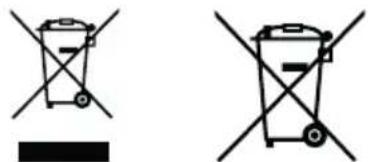
The (crossed-out wheeled bin) symbol on the product or its packaging indicates that this product must not be handled as normal household waste, but handed in to a collection point managed by public waste management authorities or to a collection point set up by the manufacturer or distributor, free of charge.
The owners of electrical devices should usually separate the waste batteries and waste accumulators which are not firmly enclosed in the waste devices from these waste devices before handing them over to collection points. This does not apply if the waste devices are prepared for recycling with the participation of a public waste management authority. By helping to properly dispose of this product, you are protecting the environment and the health of your fellow human beings. Improper or incorrect disposal endangers the environment and health. For more information on the recycling of these electrical devices and batteries, please contact your local authority or your municipal waste disposal companies.
Disposal instructions for consumers in Germany: https://www.e-schrott-entsorgen.org/
Disposal instructions for consumers in Austria: https://www.elektro-ade.at/
Disposal instructions for consumers in Ireland: https://www.mywaste.ie/
Disposal instructions for consumers in United Kingdom: https://www-recyclenow.com/
Disposal instructions for consumers in France: https://www.quefairedemesdechets.fr
10. Technical Specifications AS-P200BT
| Power supply DC voltage 5V, 2.2 | A, USB-C | 10 - 30 W USB PD |
| Battery | ||
| Type Lithium-Ion | ||
| Voltage 7,4 V | ||
| Capacity 3600 mAh | ||
| Power content 26.6 Wh | ||
| Operating time / Charging time max. | ax. 10 hrs. / approx. 4 hrs. | |
| UN Number UN3481 Lithium-Ion | batteries included in the equipment | |
| BLUETOOTH | ||
| BLUETOOTH version V5.0 | ||
| Power class Class 2 | ||
| Maximum transmission power 4 dbm | ||
| Reach about 10 meters (may vary depending on the environment) | ||
| Frequency range 2.402 GHz – 2.4GHz | ||
| BLUETOOTH profile | A2DP (Advanced Audio Distribution Profile, AVRCP (Audio/Video Remote Control Profile) | |
| Storage media | ||
| USB-A | Playable files: MP3, WMA Compatible with USB1.1 full-speed, FAT16, FAT32 Max. 500 mA, Bit rates: 32 kBit/s to 320 kBit/s Maximum storage size 128 GB | |
| Micro SD card | Playable files: MP3, WMA Compatible with USB1.1 full-speed, FAT16, FAT32 Max. 500 mA, Bit rates: 32 kBit/s to 320 kBit/s Maximum storage size 128 GB | |
| Analogue inputs | ||
| AUX-In | 3.5 mm jack plug | |
| Microphone input | 6.35 mm jack plug | |
| Amplifier | ||
| Output capacity | 50 W RMS | |
| Dimensions and weight | ||
| Device | (W x H x D) 245 x 300 x 255 mm/3.36 kg | |
| Temperature range | +5°C to +35°C | |
11. Guarantee
Dear customer,
thank you for purchasing this Kenwood product. If this product shows defects in material or workmanship under normal operating conditions, we will remove these free of charge or replace the device in accordance with the following warranty provisions.
Please keep this warranty card in a safe place.
Kenwood guarantees this device for a period of two years from the date of purchase as shown on the invoice or sales receipt from the Kenwood dealer.
This warranty covers material and workmanship defects. We reserve the right to replace the product if cost-efficient repair is no longer possible. Costs for packaging and installation as well as costs and risks in connection with the actual repair are not included in the warranty and will be invoiced.
Conditions
A. To assert warranty claims, in addition to submitting this warranty card, the following information is required:
(a) Your name with full address
(b) The receipt or invoice from a retailer based in an EU country indicating the original date of purchase.
(c) The full name and address of the retailer from whom the product was purchased.
(d) The serial number and model name of the product.
Kenwood reserves the right to refuse warranty service if the aforementioned information is missing or if changes have been made to the product since it was first purchased.
B. At the time of delivery to the retailer, this product complies with all standards and safety regulations applicable in the country of destination. Modifications required to operate the device in countries outside the country of destination are not covered by the aforementioned warranty conditions. In addition, we do not accept any liability for work in this context or for damage to the product resulting from such work.
If the product is used in a country for which it was not designed and manufactured, warranty work will only be carried out if the user bears the costs for upgrading the device to nationally applicable standards and safety regulations.
In addition, if the product differs from the products sold by the official importer and if spare parts are not available for the repair of this product, the user must bear the costs of transporting the device to and from the country of purchase.
The same applies if no warranty services can be offered in the country concerned for other legitimate reasons.
C. The following are excluded from the warranty:
(a) Changes to the product, as well as normal maintenance and adjustment work, including the regular checks mentioned in the Operating Instructions.
(b) Damage to the product caused by inadequate or improper work if this work was carried out by third parties who are not authorised to carry out warranty services on behalf of the manufacturer.
(c) Damage caused by negligence, accidents, changes, improper installation, defective packaging, incorrect operation or the use of incorrect spare parts for repairs.
(d) Damage caused by fire, water damage, lightning strikes, earthquakes, inadequate ventilation, force majeure, connection to incorrect mains voltage or other causes for which Kenwood is not responsible.
(e) Damage to speakers due to overloading. Damages to other items that are not part of the product, such as: DVDs, compact discs, USB storage media, smartphones, etc.
(f) Consumable or wearing parts that have to be replaced as part of normal customer service, such as: Batteries, rechargeable batteries, lamps, etc. (g). All products in which the serial number(s) has been completely or partially removed, changed or made illegible.
This warranty can be claimed by anyone who has purchased the product legally.
In accordance with the aforementioned warranty conditions, the product will be repaired or replaced free of charge. This right does not in any way affect other rights of the user within the framework of the applicable legal provisions.
Repairs or replacements do not extend the warranty period.
Further claims are excluded, in particular those for conversion, reduction or compensation.
Contact address:
JVCKENWOOD U.K. Limited
First Floor, Gleneagles, The Belfry, Colonial Way, Watford, Hertfordshire WD24 4WH
Email: Enquiries@uk.jvckenwood.com www.kenwood-electronics.co.uk
KENWOOD
KENWOOD
Party Speaker
AS-P200BT
NOTICE D'EMPLOI
JVCKENWOOD Corporation
Sommaire
Sommaire Page
First Floor, Gleneagles, the Belfry, Colonial Way, Watford, Hertfordshire WD24 4WH ROYAUME-UNI
6.4 Lecture via AUX-In
First Floor, Gleneagles, The Belfry, Colonial Way, Watford, Hertfordshire WD24 4WH
Regno Unito
First Floor, Gleneagles, The Belfry, Colonial Way, Watford, Hertfordshire WD24 4WH
VERENIGD KONINKRIJK