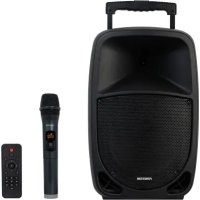
MALIBU310 - Speaker FoneStar - Free user manual and instructions
Find the device manual for free MALIBU310 FoneStar in PDF.


| Product type | Portable speaker |
| Brand | FoneStar |
| Model | MALIBU310 |
| Power | 100 W max, 20 W RMS |
| Speakers | 1 woofer 10", 1 tweeter 1" |
| Inputs | 1 microphone jack 6.3 mm, 1 stereo line jack 3.5 mm |
| Media playback | Bluetooth 5.0, USB, microSD, FM, LINE |
| Microphone | 1 UHF wireless microphone (650 MHz) included |
| Functions | Karaoke with Voice Canceller, microphone priority, echo, TWS, microphone recording |
| Power supply | Mains 110-240 V AC, Li-ion battery 11.1 V 2200 mAh |
| Battery life | 8 h (at 50% volume) |
| Charging time | 3 h |
| Dimensions | 310 x 490 x 260 mm |
| Included accessories | Remote control, power cable, wireless microphone |
| Maintenance and cleaning | Clean with a dry, soft cloth. Do not use abrasive products or solvents. |
| Safety | Do not expose to moisture. Do not open the device. Use only the supplied mains adapter. |
| Spare parts and repairability | Contact the authorized FoneStar after-sales service. |
Frequently Asked Questions - MALIBU310 FoneStar
User questions about MALIBU310 FoneStar
0 question about this device. Answer the ones you know or ask your own.
Ask a new question about this device
Download the instructions for your Speaker in PDF format for free! Find your manual MALIBU310 - FoneStar and take your electronic device back in hand. On this page are published all the documents necessary for the use of your device. MALIBU310 by FoneStar.
USER MANUAL MALIBU310 FoneStar
INSTRUCTION MANUAL/MANUAL DE USUARIO/
MODE D'EMPLOI/MANUAL DE INSTRUÇÉS
DESCRIPTION
-
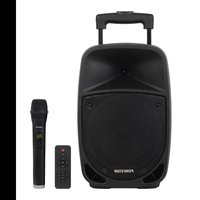
Portable speaker with 1 wireless microphones.
-
This portable speaker will accompany you at all your events or parties, a live performance or a live talk. It provides the perfect musical atmosphere, you can play music, do karaoke, record microphone input, sound your performances or amplify your voice.
- Its high sound power will allow you to cover events of up to 20 people with excellent audio quality thanks to its definition in the high frequencies and its BASS REFLEX bass reinforcement.
- The MALIBU-310 incorporates everything you need to amplify the sound. Includes a hand-held wireless microphone and an input for connecting another wired microphone. You can karaoke by activating the Voice Canceller function that cancels the voice over the music, assign voice priority to fade the music while speaking, and independently control the volume of the music and microphone, as well as the echo for the microphone.
- It has a multifunctional Bluetooth®, USB/microSD, radio or line-in with remote control. It also offers the possibility to connect 2 speakers via Bluetooth and play the same content via the TWS function.
- Its simple and intuitive use minimises set-up time.
- Highly versatile, adaptable to a multitude of uses and very easy to transport thanks to its trolley design and highly efficient lightweight components, such as the class D amplifier and the rechargeable lithium battery, which requires little maintenance and provides great autonomy.
- It is the perfect loudspeaker for users without extensive audio knowledge, who need to create a musical atmosphere for family parties and small events, as well as for more professional users for classes, courses or presentations, or for artists who want to give small live performances or recitals.
CONTROLS AND FUNCTIONS
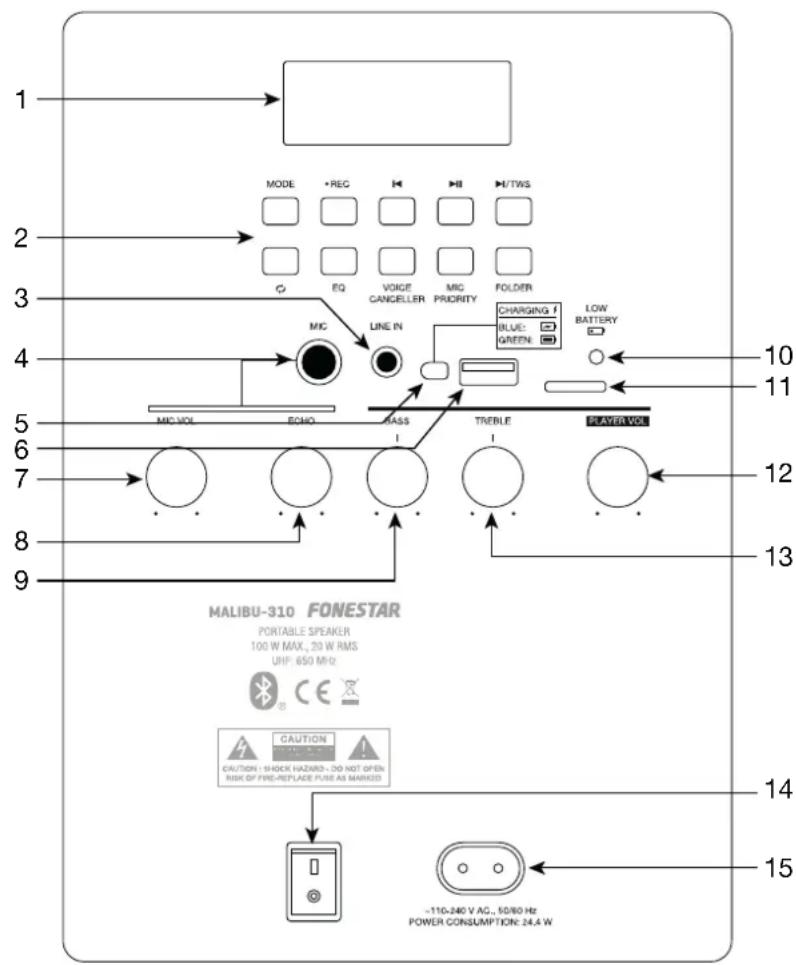
1.- Player module information display.
2.- Player buttons.
a.- MODE: short presses of this button allow you to change the mode on the player to choose the desired audio source: USB, microSD (CArD), Bluetooth (BLUE), FM radio (display shows frequency), line-in (LINE).
b.- REC: a short press of this button starts/stops the recording of the microphone audio. A long press allows the recorded tracks to be played back. Once you have started playback, you can control it with the buttons II, and
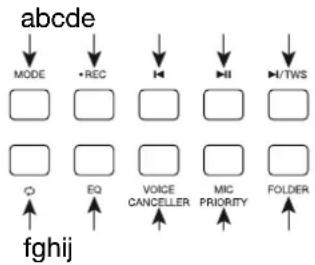
c.- in Bluetooth, USB and micro SD mode,a short press will skip to the previous song and a press in FM mode will skip to the previous stored frequency.
d.- ▷ll: in Bluetooth and USB and micro SD mode, starts/pauses audio playback; in FM mode, it automatically memorises all frequencies detected with sufficient signal quality.
e.- H/TWS: in Bluetooth, USB and micro SD mode, a short press allows you to skip to the next song. In FM mode, switches to the next stored frequency. A long press on this button activates the TWS function, for more information see OPERATION.
f.- : in USB and micro Sdmode,mode, activates/deactivates shuffle playback.
- ONE: plays the same song over and over again.
- ALL: plays the songs in order and restarts at the end.
g.- EQ: allows you to select between the different existing equalisations: FLAT (no EQ), POP, ROCK, JAZZ, CLASSIC.
h.- VOICE CANCELLER: removes the voice from songs by equalizing to enhance the karaoke experience. The display shows rON when the function is activated and rOFF when it is deactivated.
i.- MIC PRIORITY: activate microphone priority over music. The music will fade out when there is a signal from either microphone: MIC or wireless microphone. The display shows PON when the function is activated and POFF when it is deactivated.
j.- FOLDER: in USB and microSD mode, allows you to select the folder to be played.
3.- LINE IN: stereo line-level auxiliary input, 3.5mm jack plug.
4.- MIC: balanced mic level input, 6.3 mm jack plug.
5.- CHARGING BATTERY: battery charging process indicator light. This indicator will illuminate blue while the battery is charging and will turn green when the battery is fully charged.
6.- USB storage device connection port.
7.- MIC VOL: microphone volume control MIC and wireless microphone.
8.- ECHO: control of the echo function on the microphones. Allows adjustment of the number of echo repeats of MIC and wireless microphone.
9.- BASS: control that boosts or attenuates the player's bass frequencies.
10. - LOW BATTERY: low battery indicator light. When this indicator lights up blue, connect the power cable.
11.- MicroSD memory card connection port.
12.- PLAYER VOL: player volume control.
13.- TREBLE: control that boosts or attenuates the player's treble frequencies.
14.- On/off loudspeaker switch.
15.- Input to connect AC power supply cable.
EN HAND-HELD MICROPHONE
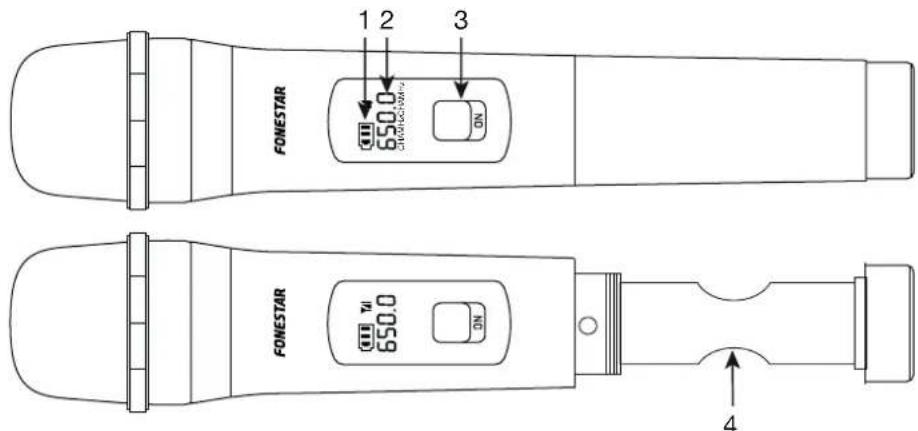
1.- Battery status indicator light: correct battery level, low battery level.
2.- Transmission frequency indicator.
3.- Hand-held microphone on/off switch.
4. Battery holder. Use 2 × 1.5 V batteries type LR6-AA, preferably alkaline. When inserting the batteries, make sure that the polarity is correct.
REMOTE CONTROL
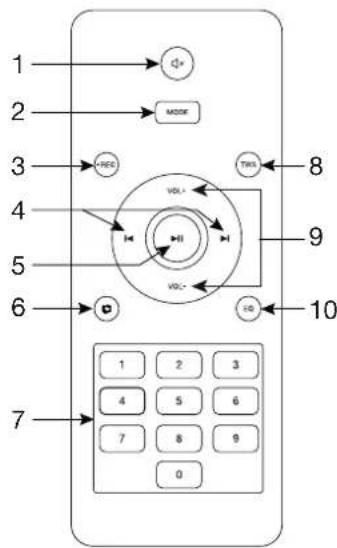
1.- :mutes the speaker.
2.- MODE: short presses of this button allow you to change the mode on the player to choose the desired audio source: USB, microSD (CArD), Bluetooth (BLUE), FM radio (display shows frequency), line-in (LINE).
3.- REC: a short press of this button starts/stops the recording of the microphone audio. A long press allows the recorded tracks to be played back. Once you have started playback, you can control it with the buttons II, and H
4.- in Bluetooth, USB and micro SD mode, starts/pauses audio playback; a long press to fast forward/rewind. In FM mode it skips to the previous/ next stored frequency.
5.- In Bluetooth, USB and micro SD mode, starts/pauses audio playback; in FM mode, it automatically memorises all frequencies that are detected with sufficient signal quality.
6.- : in USB and micro SD mode, activates/deactivates shuffle playback.
- ONE: plays the same song over and over again.
- ALL: plays the songs in order and restarts at the end.
7.- 0-9: number buttons to automatically select the desired audio track on the USB or microSD device or the stored radio station. In FM radio, allows to select the stations stored in the memory.
8.- TWS: A press on this button activates the TWS function, for more information see OPERATION.
9.- VOL-/VOL+: player volume controls.
10.- EQ: allows you to select between the different existing equalisations. FLAT (no EQ), POP, ROCK, JAZZ, CLASSIC.
OPERATION
RECHARGEABLE BATTERY
To charge the battery, connect the device to a 230 V AC socket using the mains cable. Keep the device connected to the mains and switched on during the charging time, which is approximately 3 hours. The battery indicator light will turn blue during charging and will turn off when fully charged.
Battery life depends on the use of the equipment, type of music played, volume, etc. Battery life is 8 hours under optimal laboratory conditions.
NOTE: this speaker is battery operated and connected to AC power.
PLAYER
All player modes have additional equalisation to the rear panel controls (BASS and TREBLE) via the EQ button on the player and on the remote control. In addition, the remote control has a MUTE function to mute the audio (the display will flash indicating that the mute function is active).
USB/microSD MODE
- Insert the USB device or microSD card and select the desired mode; the display will show USb or CArD respectively. It will then start playback by indicating the song number, briefly, and the playback time (00:00).
- Press K/H, on the player or on the remote control, to change songs or to huise/resume playback.
NOTE: this mode allows you to change the playback mode.
BLUETOOTH MODE
- Select Bluetooth mode. The display will show BLUE. BLUE flashing indicates that no connection has been established with a device and when it stops flashing it indicates that it is connected.
- To connect your device, open the Bluetooth settings screen on your smartphone or tablet. Activate the Bluetooth function, select the MALIBU-310 and pair with it.
NOTE: this player remembers the last connected device. So, you will not need to do this linking process and the linking will be done automatically.
-
Select the music on your smartphone/tablet and start playback.
-
Make sure your smartphone/tablet is loud enough to be heard through the speaker. In this way, you can control the volume from the MALIBU itself at a later time without having to manipulate any other equipment.
- Press H/N, on the player or on the remote control, to change songs or to pluse/resume playback.
FM MODE
- Select FM mode. The display will show the tuned frequency (000.0 MHz).
-
Perform an automatic tuning of the stations to start using this mode by short pressing the button
-
Once you have finished, you can select the station you want to listen to from among those tuned in with K/Min the front panel or on the remote control.
LINE MODE
- Connect your audio device (Smartphone, tablet, PC, etc.) via a stereo audio cable to the LINE IN input on the rear panel.
- Select line input mode. The display will show LINE.
- Select the music on your device and start playback.
- Make sure your device is loud enough to be heard through the speaker. In this way, you can control the volume from the MALIBU itself at a later time without having to manipulate any other equipment.
MICROPHONE REORDER
The recording function will only record the signal from the microphones regardless of the mode selected on the player.
- Connect the microphones you wish to record (wired or wireless) and adjust their volume, echo effect and equalisation.
2.- Connect a recording drive to the USB port or microSD slot. While recording you can listen to the music as you record the voice by selecting the mode on the player as long as it is not the same mode you are using for the recording.
NOTE: USB device has priority over microSD card.
3.- Press the REC button on the player or remote control and press it again to stop recording. Pressing again will start a new recording. The recording can be paused and resumed with the button.
4.- To play back these recordings, long press the REC button on the player or on the remote control.
The recordings are stored in a REC folder on the USB or microSD card and will be named 00000.MP3.
TWS FUNCTION (TRUE WIRELESS STEREO)
The TWS function allows the player's audio (USB, microSD, Bluetooth, FM or AUX) to be played through 2 speakers in stereo. For this function there will always be a master speaker playing the left channel of the stereo signal, and a slave speaker playing the right channel.
To do this you must have 2 MALIBU-308, MALIBU-310, MALIBU-312 or MALIBU-315 speakers and follow these steps:
1.- Turn both MALIBU speakers on and activated Bluetooth mode.
2.- On the slave speaker, press the TWS button and SLAU will both show and flash on the display..
3.- Wait a few seconds, the displays on both speakers will stop flashing indicating that they are connected.
4.- Select the playback mode on the master speaker and start playback.
Both speakers can be used to control the player's functions: ▶, and .But it will only be possible to switch modes from the master loudspeaker.
NOTE: all other speaker inputs such as MIC or GUITAR will only be heard through the speaker to which they are connected. Please note that if the wireless microphones of both loudspeakers are of the same frequency, both cannot be used.
-
Before making any connections:
-
Make sure that all equipment is switched off and disconnected from the power supply socket.
- Check the condition of the speaker battery and the wireless microphone batteries.
-
Set the volume controls to minimum.
-
Connect the device(s) you need:
-
USB device in the USB port.
- MicroSD card in the microSD slot.
- PC, tablet, smartphone, etc. in the LINE IN input.
- Microphone cable in input MIC.
-
For Bluetooth mode you will have to wait for the speaker to turn on and pair it.
-
Turn on the devices connected in the previous step and the wireless microphone, and lastly, turn on the loudspeaker. You can use the MALIBU powered directly from the mains or using the internal battery.
- Select the operating mode and adjust the PLAYER VOL and MIC VOL volume controls.
NOTE: if a microphone (wireless and/or wired) is to be used, be sure not to stand in front of the loudspeaker and at a distance to avoid feedback and other disturbing noises.
- After use, do not forget to switch off and disconnect the equipment from the mains.
| MALIBU-310 | |
| FEATURES Portable speaker. | |
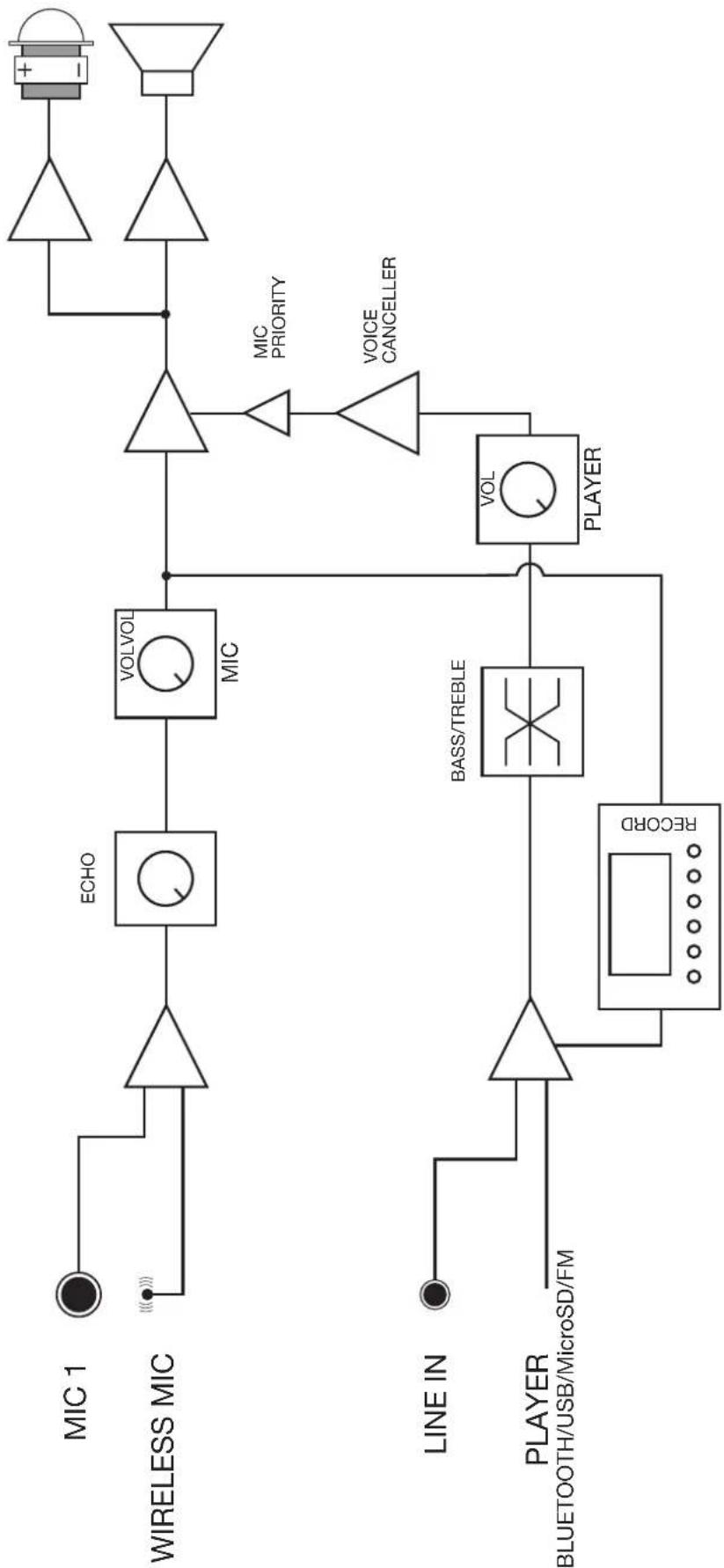
| 1 x UHF hand-held wireless microphone (650 MHz).Bluetooth/USB/microSD/FM/LINE player and microphone audio recorderBluetooth receiver 5.0.Karaoke function with Voice Cancellation, priority, microphone echo control and independent volume control of music and microphones.TWS function for Bluetooth pairing of two loudspeakers.Input for microphone with cable.Rechargeable Li-ion battery.BASS REFLEX reinforcement.Remote control of the player.Trolley transport cart.Hole in the base for 35 mm tube. | |
| POWER 100 W maximum, 20 W RMS | |
| LOUDSPEAKERS 1 x 10" woofer1 x 1" tweeter | |
| INPUTS 1 x mic, 6.3 mm | mm jack, 4,700 Ω 33 mV1 x stereo line, 3.5 mm jack, 10,000 Ω 549 mV |
| CONTROLS Microphone | ne volume with echoPlayer volume with bass and treble controlPlayer with source selection, playback control, recording, TWS, voice eliminator, voice priority, playback mode and equalisationLow battery indicatorBattery charge indicator |
| POWER SUPPLY 110-240 V CA, 24.4 W | |
| Battery Li-ion 7.4 V, 2,200 mAhAutonomy with rechargeable battery: 8 h*Battery charging time: 3 h*At 50% of the volume. Depending on the type of music and volume, the battery life may be reducedWorks while rechargingWireless microphones: 2 x LR6-AA batteriesRemote control: 2 x LR03-AAA batteries | |
| DIMENSIONS 310 x 490 x 260 mm depth | |
| OPTIONAL FAL-M10: carrying bag | |
SIMPLIFIED EU DECLARATION OF CONFORMITY
FONESTAR SISTEMAS S.A. hereby declares that the Portable speaker MALIBU-310 complies with the Directive 2014/53/EU.
The complete text of the EU Declaration of Conformity is available at the following internet address:
fonestar.com/MALIBU-310