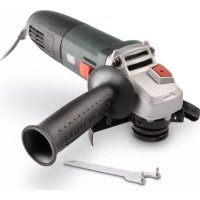
POWP1020 - Grinder PowerPlus - Free user manual and instructions
Find the device manual for free POWP1020 PowerPlus in PDF.



| Product type | Angle grinder |
| Brand | PowerPlus |
| Model | POWP1020 |
| Power supply | 220-240 V ~ 50 Hz |
| Power consumption | 850 W |
| No-load speed | 11000 min⁻¹ |
| Max. grinding wheel diameter | 125 mm |
| Spindle thread | M14 |
| Weight (approx.) | 2.5 kg |
| Dimensions (L × W × H, approx.) | 300 × 100 × 100 mm |
| Protection class | II (double insulation) |
| Main functions | Grinding, roughing, polishing, sanding (with accessories) |
| Included accessories | 1 additional handle, 1 two-pin spanner, instruction manual |
| Sound pressure (LpA) | 87 dB(A) |
| Sound power (LwA) | 98 dB(A) |
| Vibration (ah) | 15.3 m/s² |
| Maintenance and cleaning | Clean ventilation slots, use a soft cloth, do not use solvents |
| Safety | Wear safety goggles and hearing protection; do not use without the guard |
| Warranty | 2 years (covers material and manufacturing defects) |
| After-sales service | Contact your dealer or authorized PowerPlus service center |
Frequently Asked Questions - POWP1020 PowerPlus
User questions about POWP1020 PowerPlus
0 question about this device. Answer the ones you know or ask your own.
Ask a new question about this device
Download the instructions for your Grinder in PDF format for free! Find your manual POWP1020 - PowerPlus and take your electronic device back in hand. On this page are published all the documents necessary for the use of your device. POWP1020 by PowerPlus.
USER MANUAL POWP1020 PowerPlus
EL | HR | SR | CS | SK | RO | PL | HU | RU | BG
POWP1020

POWERPLUS
NL NEDERLANDS VERTAALDE VERSIE VAN DE ORIGINELE HANDLEIDING
FR FRANÇAIS TRADUCTION DU MODE D'EMPLOI D'ORIGINE
EN ENGLISH ORIGINAL INSTRUCTION MANUAL
natural_image
Top-down view of a power tool with black and green blade, no visible text or symbolsFig. 1

natural_image
Close-up of a hand using a power tool to cut a circular saw (no text or symbols visible)
natural_image
Close-up of a mechanical component with a black handle and bolted joint (no visible text or symbols)Fig .2 Fig. 3

Fig. 4 Fig. 5

POWERPLUS POWP1020 NL
2 BESCHRIJVING (FIG. A)
Two-hole spanner = pensleutel
Product: Haakse slijper
Handelsmerk: POWERplus
Model: POWP1020
natural_image
Simple hand-drawn sketch of a rounded rectangular shape with a diagonal line (no text or symbols)Philippe Vankerkhove
Regelgevings- en compliancemanager
13/05/2022
POWERPLUS
POWP1020 FR
natural_image
Simple hand-drawn sketch of a rounded rectangular shape with a diagonal line (no text or symbols)Philippe Vankerkhove
2 DESCRIPTION (FIG. A)....3
3 PACKAGE CONTENT LIST 3
4 SYMBOLS....4
5 GENERAL POWER TOOL SAFETY WARNINGS....4
5.1 Working area....4
5.2 Electrical safety....4
5.3 Personal safety .... 5
5.4 Power tool use and care....5
5.5 Service....5
6 SPECIFIC SAFETY INSTRUCTIONS FOR ANGLE GRINDERS ..... 6
7 OPERATION 6
7.1 Fitting the auxiliary handle (Fig. 1)....6
7.2 Assembly the protective guard (Fig. 2 & 3)....7
7.3 Replacing the grinding disc (Fig. 4 & 5)....7
7.4 Switching on / off 7
7.4.1 Switching on....7
7.4.2 Switching off....7
8 OPERATON MODES....8
8.1 Grinding....8
9 FLANGE ARRANGEMENTS WHEN USING GRINDING WHEELS . 8
9.1 Flange arrangements when using a depressed centre or straight grinding wheel 8
10 CLEANING AND MAINTENANCE 8
10.1 Cleaning....8
10.2 Lubrication 8
11 TECHNICAL DATA....9
12 NOISE....9
13 SERVICE DEPARTMENT....9
14 STORAGE....9
POWERPLUS POWP1020 EN
15 WARRANTY....10
16 ENVIRONMENT....10
17 DECLARATION OF CONFORMITY....11
POWERPLUS POWP1020 EN ANGLE GRINDER 850W - 125MM POWP1020
1 INTENDED USE
This machine is developed for grinding and roughing of metal and stone. With help of the correct accessories the machine can also be used for brushing and sanding.

WARNING! For your own safety, read this manual and the general safety instructions carefully before using the appliance. Your power tool should only be given to other users together with these instructions.
2 DESCRIPTION (FIG. A)
- Lock for protective guard
- Spindle lock button
- Attachment point for auxiliary handle
- Main handle
- On/Off switch
- Auxiliary handle
- Guard
- Grinding disc (not included)
3 PACKAGE CONTENT LIST
- Remove all packaging materials.
- Remove remaining packaging and packing inserts (if included).
- Check that the package contents are complete.
- Check the appliance, the power cord, the power plug and all accessories for transportation damage.
- Keep the packaging materials as far as possible until the end of the warranty period. Then take it to your local waste disposal system.

WARNING! Packaging materials are not toys! Children must not play with plastic bags! There is a danger of suffocation!
1 x angle grinder
1 x auxiliary handle
1 x pin spanner
1 x instruction manual

If any parts are missing or damaged, please contact your dealer.
4 SYMBOLS
In this manual and/or on the machine the following symbols are used:
 | Wear gloves |  | Always wear safety goggles. |
 | In accordance with essential requirements of the European directive(s). |  | Class II - The machine is double insulated; Earthing wire is therefore not necessary. |
 | Denotes risk of personal injury or damage to the tool. |  | Read manual before use |
5 GENERAL POWER TOOL SAFETY WARNINGS
Read all safety warnings and instructions. Failure to heed warnings and follow instructions may result in electric shock, fire and/or serious injury. Keep safety warnings and instructions for future reference. The term "power tool" in the safety warnings refers to your mains-operated (corded) power tool or battery-operated (cordless) power tool.
5.1 Working area
- Keep working area clean and well lit. Untidy and dark areas can lead to accidents.
- Do not operate power tools in potentially explosive surroundings, for example, in the presence of inflammable liquids, gases or dust. Power tools create sparks which may ignite the dust or fumes.
- Keep children and bystanders at a distance when operating a power tool. Distractions can cause you to lose control of it.
5.2 Electrical safety

Always check that the power supply corresponds to the voltage on the rating plate.
- Power tool plugs must match the outlet. Never modify the plug in any way. Do not use adapter plugs with earthed power tools. Unmodified plugs and matching outlets will reduce the risk of a lethal electric shock.
- Avoid body contact with earthed surfaces such as pipes, radiators, kitchen ranges and refrigerators. There is an increased risk of a lethal electric shock if your body is earthed.
- Do not expose power tools to rain or wet conditions. If water gets inside a power tool, it will increase the risk of a lethal electric shock.
- Do not damage the cord. Never use the cord for carrying, pulling or unplugging the power tool. Keep the cord away from heat, oil, sharp edges or moving parts. Damaged or entangled cords increase the risk of a lethal electric shock.
- When operating a power tool outdoors, use an extension cable suitable for outdoor use. Using a cord suitable for outdoor use reduces the risk of a lethal electric shock.
- If operating a power tool in a damp location is unavoidable, use a power supply protected by a residual current device (RCD). Using an RCD reduces the risk of a lethal electric shock.
5.3 Personal safety
- Stay alert, watch what you are doing and use common sense when operating a power tool. Do not use a power tool when you are tired or under the influence of drugs, alcohol or medication. A moment of inattention when operating a power tool may result in serious personal injury.
- Use safety equipment. Always wear eye protection. Using safety equipment such as a dust mask, non-skid safety shoes, a hard hat, or hearing protection whenever it is needed will reduce the risk of personal injury.
- Avoid accidental starts. Ensure the switch is in the off position before inserting the plug. Carrying power tools with your finger on the switch or plugging in power tools when the switch is in the on position makes accidents more likely.
- Remove any adjusting keys or spanners before turning on the power tool. A spanner or key left attached to a rotating part of the power tool may result in personal injury.
- Do not reach out too far. Keep your feet firmly on the ground at all times. This will enable you retain control over the power tool in unexpected situations.
- Dress properly. Do not wear loose clothing or jewellery. Keep your hair, clothing and gloves away from the power tool. Loose clothes, jewellery or long hair can become entangled in the moving parts.
- If there are devices for connecting dust extraction and collection facilities, please ensure that they are attached and used correctly. Using such devices can reduce dust-related hazards.
5.4 Power tool use and care
- Do not expect the power tool to do more than it can. Use the correct power tool for what you want to do. A power tool will achieve better results and be safer if used in the context for which it was designed.
- Do not use the power tool if the switch cannot turn it on and off. A power tool with a broken switch is dangerous and must be repaired.
- Disconnect the plug from the power source before making adjustments, changing accessories, or storing power tools. Such preventive safety measures reduce the risk of starting the power tool accidentally.
- Store power tools, when not in use, out of the reach of children and do not allow people who are not familiar with the power tool or these instructions to operate it. Power tools are potentially dangerous in the hands of untrained users.
- Maintenance. Check for misalignment or jammed moving parts, breakages or any other feature that might affect the operation of the power tool. If it is damaged, the power tool must be repaired. Many accidents are caused by using poorly maintained power tools.
- Keep cutting tools sharp and clean. Properly maintained cutting tools with sharp cutting edges are less likely to jam and are easier to control.
- Use the power tool, accessories and cutting tools, etc., in accordance with these instructions and in the manner intended for the particular type of power tool, taking into account the working conditions and the work which needs to be done. Using a power tool in ways for which it was not intended can lead to potentially hazardous situations.
5.5 Service
- Your power tool should be serviced by a qualified specialist using only standard spare parts. This will ensure that it meets the required safety standards.
6 SPECIFIC SAFETY INSTRUCTIONS FOR ANGLE GRINDERS
- Check that the maximum speed indicated on the grinding disc corresponds to the maximum speed of the machine. The speed of the machine must not exceed the value on the grinding disc.
- Make sure that the dimensions of the grinding disc correspond to the specifications of the machine.
- Make sure that the grinding disc has been mounted and fastened properly. Do not use reducing rings or adapters to make the grinding disc fit properly.
- Treat and store grinding discs in conformance with the supplier's instructions.
- Do not use the machine for grinding workpieces with a maximum thickness exceeding the maximum grinding depth of the grinding disc.
- Do not use grinding discs for deburring.
- When grinding discs have to be mounted on the thread of the spindle, make sure that the spindle has sufficient thread. Make sure that the spindle is sufficiently protected and does not touch the grinding surface.
- Before use, inspect the grinding disc for any damage. Do not use grinding discs which are cracked, ripped or otherwise damaged.
■ Before use, let the machine run idle for 30 seconds.
- Immediately switch off the machine in case of abnormal vibrations or occurrence of another defect. Carefully inspect the machine and grinding disc before switching the machine on again.
- Make sure that sparks do not put people into danger or that they contact highly flammable substances.
- Make sure that the workpiece is sufficiently supported or clamped. Keep your hands away from the surface to be cut.
- Always wear safety goggles and hearing protection. If desired or required also use another kind of protection like for example an apron or helmet.
- Ensure that mounted wheels and points are fitted in accordance with the manufacturer's instructions.
- Ensure that blotters are used when they are provided with the bonded abrasive product and when they are required.
- If a guard is supplied with the tool never use the tool without such a guard.
- For tools intended to be fitted with threaded hole wheel, ensure that the thread in the wheel is long enough to accept the spindle length.
- Ensure that ventilation openings are kept clear when working in dusty conditions. If it should become necessary to clear dust, first disconnect the tool from the mains supply (use non metallic objects) and avoid damaging internal parts.
- Though poor conditions of the electrical mains, shortly voltage drops can appear when starting the equipment. This can influence other equipment (eq. blinking of a lamp). If the mains-impedance Zmax <0.348 Ohm, such disturbances are not expected. (In case of need, you may contact your local supply authority for further information.
7 OPERATION
7.1 Fitting the auxiliary handle (Fig. 1)

Ensure that the plug is not in the socket when fitting or removing the auxiliary handle.
The side handle can be used for both left-hand and right hand control.
- Fasten the side handle for left-hand operation on the right-hand side of the machine.
- Fasten the side handle for right-hand operation on the left-hand side of the machine.
POWERPLUS POWP1020 EN
7.2 Assembly the protective guard (Fig. 2 & 3)

Mount the guard before using the machine.
- Place the protective guard (7) on the housing. Be aware that the notch of the guard falls across the edge of the housing.
- Fix the protective guard (7) by screwing the bolt
- The closed side of the guard always has to point in the user's direction.
7.3 Replacing the grinding disc (Fig. 4 & 5)

Beware – a disc which has been used may be very hot!
- Pull out the power plug from the mains socket.
- Depress and hold down the spindle lock button (2) to secure the spindle.
- Turn the shaft until it locks.
- Remove the outer flange (a) and backing flange (b) by using the two-hole spanner provided.
- Fit the desired disc (9) on the spindle and replace the outer flange and backing flange. Release the spindle lock.

Important! Only ever press the spindle lock when the motor and grinding spindle are at a standstill!
You must keep the spindle lock pressed while you change the wheel!
For grinding wheels up to approx. 3 mm thick, screw on the flange nut with the flat side facing the grinding wheel.
7.4 Switching on / off

Before working with the angle grinder, check that the voltage shown on the machine's model plate is the same as the mains voltage being used.
Before engage the ON/OFF switch button, check that the grinding disc is properly fitted and run smoothly, the outer flange is well tightened.
7.4.1 Switching on
Switch the angle grinder on by depress the rear position of the ON/OFF switch button (4) and pushing the switch button forward and lock onto the "ON" position.
7.4.2 Switching off
Depress the rear position of the ON/OFF switch button (4), it returns automatically to the "OFF" position and the tool turns off. Do not let go of grinder until it has stopped running.

The wheel continues to rotate after the tool is switched off.
Do not put the machine down when the disc is still turning.

In case of interruption of the mains supply the on/off switch of the tool needs to be released and reactuated.
8 OPERATON MODES
8.1 Grinding
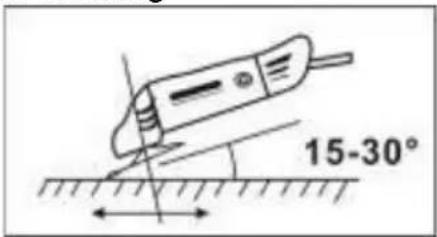
Hold the handle (4) and auxiliary handle (7) firmly and switch on. Avoid blocking the ventilation slots with your hand, as this may cause the grinder to overheat. Let the disc reach full speed. Apply the grinder to the item. Maximum effect is achieved when the grinder is held at an angle of 15-30^ in relation to the item. Move the grinder gently along the item. Give the grinder time to work. It is rarely necessary to press the disc hard against the surface to be worked. Sparks can occur in the motor compartment during use. This is normal and does not mean the grinder is defective. Switch off the grinder after use.
9 FLANGE ARRANGEMENTS WHEN USING GRINDING WHEELS
9.1 Flange arrangements when using a depressed centre or straight grinding wheel

1 Clamping flange
2 Flange nut
10 CLEANING AND MAINTENANCE

Attention! Before performing any work on the equipment, pull the power plug.
10.1 Cleaning
- Keep the ventilation slots of the machine clean to prevent overheating of the engine.
- Regularly clean the machine housing with a soft cloth, preferably after each use.
- Keep the ventilation slots free from dust and dirt.
- If the dirt does not come off use a soft cloth moistened with soapy water.

Never use solvents such as petrol, alcohol, ammonia water, etc. These solvents may damage the plastic parts.
10.2 Lubrication
The machine does not require any specific lubrication.
11 TECHNICAL DATA
| Voltage / frequency | 220-240 V / 50 Hz |
| Power input | 850 W |
| No load speed | 11000min ^-1 |
| Max. disc diameter: | ∅ 125 mm |
| Drive spindle thread: | M 14 |
12 NOISE
Noise emission values measured according to relevant standard. (K=3)
| Acoustic pressure level LpA | 87 dB(A) |
| Acoustic power level LwA | 98 dB(A) |

ATTENTION! Wear hearing protection when sound pressure is over 85 dB(A).
aw (Vibration)
15.3m/s²
K = 1,5 ~m / s^2
13 SERVICE DEPARTMENT
- Damaged switches must be replaced by our after-sales service department.
- If the connecting cable (or mains plug) is damaged, it must be replaced by a special connecting cable which is available from our service department. Replacement of the connecting cable should only be carried out by our service department (see last page) or by a qualified specialist (qualified electrician).
14 STORAGE
- Thoroughly clean the whole machine and its accessories.
- Store it out of the reach of children, in a stable and secure position, in a cool and dry place, avoid too high and too low temperatures.
- Protect it from exposure to direct sunlight. Keep it in the dark, if possible.
- Don't keep it in plastic bags to avoid humidity build-up.
15 WARRANTY
- This warranty covers all material or production flaws excluding : batteries, chargers, defective parts subject to normal wear & tear such as bearings, brushes, cables, and plugs, or accessories such as drills, drill bits, saw blades, etc. ; damage or defects resulting from maltreatment, accidents or alterations; nor the cost of transportation.
- Damage and/or defects resulting from inappropriate use also do not fall under the warranty provisions.
■ We also disclaim all liability for any bodily injury resulting from inappropriate use of the tool.
- Repairs may only be carried out by an authorised customer service centre for Powerplus tools.
- You can always obtain more information at the number 00 32 3 292 92 90.
- Any transportation costs shall always be borne by the customer, unless agreed otherwise in writing.
- At the same time, no claim can be made on the warranty if the damage of the device is the result of negligent maintenance or overload.
- Definitely excluded from the warranty is damage resulting from fluid permeation, excessive dust penetration, intentional damage (on purpose or by gross carelessness), inappropriate usage (use for purposes for which the device is not suitable), incompetent usage (e.g. not following the instructions given in the manual), inexpert assembly, lightning strike, erroneous net voltage. This list is not exhaustive.
- Acceptance of claims under warranty can never lead to the prolongation of the warranty period nor commencement of a new warranty period in case of a device replacement.
■ Devices or parts which are replaced under the warranty therefore remain the property of Varo NV.
- We reserve the right to reject a claim whenever the purchase cannot be verified or when it is clear that the product has not been properly maintained. (Clean ventilation slots, carbon brushes serviced regularly, etc.).
- Your purchase receipt must be kept as proof of date of purchase.
- Your appliance must be returned undismantled to your dealer in an acceptably clean state, (in its original blow-moulded case if applicable to the unit), accompanied by proof of purchase.
16 ENVIRONMENT
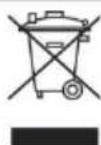
Should your appliance need replacement after extended use, do not dispose of it with the household refuse, but in an environmentally safe way.
Waste produced by electrical machine items should not be handled like normal household rubbish. Please recycle where recycle facilities exist. Check with your Local Authority or retailer for recycling advice.
VARO – Vic. Van Rompuy N.V. - Joseph Van Instraat 9 - BE2500 Lier - BELGIUM, declares that,
product : Angle grinder
trade mark : POWERplus
model: POWP1020
is in conformity with the essential requirements and other relevant provisions of the applicable European Directives, based on the application of European harmonized standards. Any unauthorized modification of the apparatus voids this declaration.
European Directives (including, if applicable, their amendments up to the date of signature);
2011/65/EU
2006/42/EC
2014/30/EU
European harmonized standards (including, if applicable, their amendments up to the date of signature);
EN60745-1:2009
EN60745-2-3:2011
EN IEC 55014-1 : 2021
The undersigned acts on behalf of the company CEO,

natural_image
Simple hand-drawn sketch of a rounded rectangular shape with a diagonal line and a small dot inside (no text or symbols)Philippe Vankerkhove
Regulatory Affairs – Compliance Manager
13/05/2022
POWERPLUS
POWP1020 DE
Two-hole spanner = Lochschlüssel
natural_image
Simple hand-drawn sketch of a rounded rectangular shape with a diagonal line (no text or symbols)Philippe Vankerkhove 13/05/2022
POWERPLUS POWP1020 ES
Two-hole scanner = Llave de espigas
natural_image
Simple hand-drawn sketch of a rounded rectangular shape with a small circle on top (no text or symbols)Philippe Vankerkhove
7.4 Switching on / off 8
7.4.1 Switching on....8
7.4.2 Switching off....8
8 MODALITÀ OPERATIVE....8
8.1 Smerigliatura....8
9 POSIZIONE DELLA FLANGIA SE SI IMPIEGANO MOLE PER SMERIGLIATURA....9
7.4 Switching on / off

Before working with the angle grinder, check that the voltage shown on the machine's model plate is the same as the mains voltage being used.
Before engage the ON/OFF switch button, check that the grinding disc is properly fitted and run smoothly, the outer flange is well tightened.
7.4.1 Switching on
Switch the angle grinder on by depress the rear position of the ON/OFF switch button (4) and pushing the switch button forward and lock onto the "ON" position.
7.4.2 Switching off
Depress the rear position of the ON/OFF switch button (4), it returns automatically to the "OFF" position and the tool turns off. Do not let go of grinder until it has stopped running.

The wheel continues to rotate after the tool is switched off.
Do not put the machine down when the disc is still turning.

In case of interruption of the mains supply the on/off switch of the tool needs to be released and reactuated.
8 MODALITÀ OPERATIVE
8.1 Smerigliatura

natural_image
Simple hand-drawn sketch of a rounded rectangular shape with a small circular mark on the top (no text or symbols)Philippe Vankerkhove
Regulatory Affairs – Compliance Manager
13/05/2022
POWERPLUS
POWP1020 PT
Two-hole spanner = Chave de pinos
natural_image
Simple hand-drawn sketch of a rounded rectangular shape with a diagonal line (no text or symbols)Philippe Vankerkhove
Two-hole spanner = Hakenøkkel
natural_image
Simple hand-drawn sketch of a rounded rectangular shape with a small arrow on top (no text or symbols)Philippe Vankerkhove
Regulatoriske saker - Samsvarsleder
13/05/2022
POWERPLUS
POWP1020 DA
Two-hole spanner = Tapnøgle
natural_image
Simple hand-drawn sketch of an irregular shape with a diagonal line (no text or symbols)Philippe Vankerkhove
Regulatory Affairs (afdelingen for juridiske anliggender)
13/05/2022
POWERPLUS POWP1020 SV
3 FÖRPACKNINGSINNEHÅLL
Two-hole spanner = Tappnyckel
Outer flange = Flänsmutter
Backing flange = Stödfläns
Output spindle = Spindel
natural_image
Simple hand-drawn sketch of a rounded rectangular shape with a diagonal line (no text or symbols)Philippe Vankerkhove
Outer flange = Ulkolaippa
Backing flange = Aluslaippa
natural_image
Simple hand-drawn sketch of a rounded rectangular shape with a diagonal line (no text or symbols)Philippe Vankerkhove
natural_image
Simple hand-drawn sketch of an elongated oval shape with a small protrusion (no text or symbols)Philippe Vankerkhove
natural_image
Simple hand-drawn sketch of a rounded rectangular shape with a diagonal line (no text or symbols)Philippe Vankerkhove
POWERPLUS POWP1020 SR
1 NAMENJENA UPOTREBA....3
2 OPIS (SL. A) 3
3 LISTA SADRŽAJA PAKETA....3
4 SIMBOLI 4
5 OPŠTA BEZBEDNOSNA UPUTSTVA ZA ELEKTRIČNE ALATE...4
5.1 Radna oblast 4
POWERPLUS POWP1020 SR
14 SKLADIŠTENJE 9
15 GARANCIJA 10
16 ŽIVOTNA SREDINA.... 10
17 IZJAVA O USKLAĐENOSTI.... 11
POWERPLUS POWP1020 SR
UGAONA BRUSILICA 850W—125MM POWP1020
1 NAMENJENA UPOTREBA
Ova mašina je namenjena za brušenje i grubu obradu metala i kamena. Uz pomoć odgovarajuće dodatne opreme mašina se može koristiti i za čišćenje (poliranje) obrađene površine i fino brušenje.

POWERPLUS POWP1020 SR
7.2 Montiranje štitnika (Sl. 2 & 3)

Postavite štitnik pre nego što upotrebite mašinu.
■ Postavite štitnik (7) na kućište. Pazite da zarez štitnika padne preko ivice kućišta.
- Pričvrstite štitnik (7) zavijanjem zavrtnja.
- Zatvorena strana štitnika uvek mora da bude okrenuta u pravcu korisnika.
7.3 Zamena brusnog diska (Sl. 4 & 5)

natural_image
Simple hand-drawn sketch of a rounded rectangular shape with a diagonal line (no text or symbols)Philippe Vankerkhove
natural_image
Simple hand-drawn sketch of a rounded rectangular shape with a diagonal line (no text or symbols)Philippe Vankerkhove
2 POPIS (OBR. A)....3
3 OBSAH BALENIA....3
4 VYSVETLENIE SYMBOLOV 4
5 VŠEOBECNÉ BEZPEČNOSTNÉ VAROVANIA PRE ELEKTRICKÉ NÁRADIE ....4
5.1 Pracovná plocha ....4
natural_image
Simple hand-drawn sketch of an elongated oval shape with a small protrusion (no text or symbols)Philippe Vankerkhove
13/05/2022
POWERPLUS POWP1020 RO
1 UTILIZARE PREVĂZUTĂ....3
2 DESCRIERE (FIG. A)....3
3 CONTINUTUL PACHETULUI....3
4 SIMBOLURI 4
5 AVERTISMENTE GENERALE DE SIGURANTĂ PRIVIND APARATUL ELECTRIC....4
natural_image
Simple hand-drawn sketch of an irregular shape with a curved line and arrow (no text or symbols)Philippe Vankerkhove
Divizia de reglementare – Director de conformitate 13/05/2022
POWERPLUS POWP1020 PL
2 OPIS (RYC. A)....3
3 SPIS CZEŚCI....3
4 OZNACZENIA 4
5 OGÓLNE ZASADY BEZPIECZNEJ PRACY ELEKTRONARZĘDZIAMI....4
natural_image
Symbol of a trash bin crossed with a diagonal line, no text or labels presentnatural_image
Simple hand-drawn sketch of a rounded rectangular shape with a small protrusion (no text or symbols)Philippe Vankerkhove
natural_image
Simple hand-drawn sketch of a rounded rectangular shape with a small circular mark on top (no text or symbols)Philippe Vankerkhove
natural_image
Simple hand-drawn sketch of a rounded rectangular shape with a diagonal line (no text or symbols)Philippe Vankerkhove
natural_image
Simple hand-drawn sketch of a rounded rectangular shape with a diagonal line (no text or symbols)Philippe Vankerkhove
natural_image
Green and black industrial power tool with visible blade and handle, no text or symbols on body
WWW.VARO.COM
DESIGNED AND MARKETED BY VARO
©copyright by varo
VARO - VIC. VAN ROMPUY nv
JOSEPH VAN INSTRAAT 9 - 2500 LIER - BELGIUM
OFFICES:


- POWERPLUS
- POWERPLUS POWP1020 NL
- BESCHRIJVING (FIG. A)
- POWP1020 FR
- POWERPLUS POWP1020 EN
- POWERPLUS POWP1020 EN ANGLE GRINDER 850W - 125MM POWP1020
- INTENDED USE
- DESCRIPTION (FIG. A)
- PACKAGE CONTENT LIST
- SYMBOLS
- GENERAL POWER TOOL SAFETY WARNINGS
- Working area
- Electrical safety
- Personal safety
- Power tool use and care
- Service
- SPECIFIC SAFETY INSTRUCTIONS FOR ANGLE GRINDERS
- OPERATION
- Fitting the auxiliary handle (Fig. 1)
- Assembly the protective guard (Fig. 2 & 3)
- Mount the guard before using the machine.
- Replacing the grinding disc (Fig. 4 & 5)
- Beware – a disc which has been used may be very hot!
- Important! Only ever press the spindle lock when the motor and grinding spindle are at a standstill!
- Switching on / off
- Before working with the angle grinder, check that the voltage shown on the machine's model plate is the same as the mains voltage being used.
- Before engage the ON/OFF switch button, check that the grinding disc is properly fitted and run smoothly, the outer flange is well tightened.
- Switching on
- Switching off
- The wheel continues to rotate after the tool is switched off.
- Do not put the machine down when the disc is still turning.
- In case of interruption of the mains supply the on/off switch of the tool needs to be released and reactuated.
- OPERATON MODES
- Grinding
- FLANGE ARRANGEMENTS WHEN USING GRINDING WHEELS
- Flange arrangements when using a depressed centre or straight grinding wheel
- CLEANING AND MAINTENANCE
- Cleaning
- Lubrication
- NOISE
- SERVICE DEPARTMENT
- STORAGE
- WARRANTY
- ENVIRONMENT
- POWP1020 DE
- POWERPLUS POWP1020 ES
- MODALITÀ OPERATIVE
- Smerigliatura
- POWP1020 PT
- POWP1020 DA
- POWERPLUS POWP1020 SV
- FÖRPACKNINGSINNEHÅLL
- POWERPLUS POWP1020 SR
- UGAONA BRUSILICA 850W—125MM POWP1020
- NAMENJENA UPOTREBA
- Montiranje štitnika (Sl. 2 & 3)
- Postavite štitnik pre nego što upotrebite mašinu.
- Zamena brusnog diska (Sl. 4 & 5)
- POWERPLUS POWP1020 RO
- POWERPLUS POWP1020 PL
Brand : PowerPlus
Model : POWP1020
Category : Grinder