MultiMax 6300 - Multitools DREMEL - Free user manual and instructions
Find the device manual for free MultiMax 6300 DREMEL in PDF.



| Product Type | Oscillating Multifunction Tool |
| Brand | Dremel |
| Model | MultiMax 6300 |
| Power Supply | 120 V AC, 50/60 Hz |
| No Load Speed (Oscillations per Minute) | 10,000 to 21,000 OPM |
| Speed Adjustment | 10-Position Dial with Electronic Feedback |
| Oscillation Angle | Approximately 2° (not specified, standard estimate) |
| Main Functions | Sawing, Sanding, Scraping, Grout Removal, Grinding |
| Compatible Materials | Wood, Non-Ferrous Metals, Plastic, Drywall, Tile, Grout |
| Weight | Approximately 1.5 kg (estimate) |
| Dimensions (L x W x H) | Approximately 30 x 10 x 12 cm (estimate) |
| Included Accessories | Cutting Blades, Scraper Blades, Sandpaper, Backing Pad, Hex Key |
| Accessory Attachment | Screw Clamping System with Quick-Adjust Slot (12 pins) |
| Maintenance | Clean with Compressed Air, Inspect Brushes Every 50-60 Hours |
| Safety | Double Insulation, Slide Switch Shut-Off, Soft Start |
| Recommended Protective Equipment | Safety Glasses, Dust Mask, Protective Gloves |
| Spare Parts Available | Carbon Brushes, Backing Pads, Accessories (Blades, Sandpaper, etc.) |
| Repairability | Dremel Authorized Service Center; Manufacturer Repair Recommended |
| Warranty | 2 Years Against Defects in Material and Workmanship |
| General Information | Tool designed for residential renovation projects; www.dremel.com |
Frequently Asked Questions - MultiMax 6300 DREMEL
User questions about MultiMax 6300 DREMEL
0 question about this device. Answer the ones you know or ask your own.
Ask a new question about this device
Download the instructions for your Multitools in PDF format for free! Find your manual MultiMax 6300 - DREMEL and take your electronic device back in hand. On this page are published all the documents necessary for the use of your device. MultiMax 6300 by DREMEL.
USER MANUAL MultiMax 6300 DREMEL
IMPORTANT: IMPORTANT : IMPORTANTE: Read Before Using Lire avant usage Leer antes de usar

Operating/Safety Instructions Consignes de fonctionnement/securité Instrucciones de funciona y seguidad
6300
DREMEL
Call Toll Free for Consumer Information & Service Locations
For English Version See page 2
General Power Tool SafetyWarnings

WARNING
Read all safety warnings and instructions. Failure to follow the warnings and instructions may result in electric shock, fire and/or serious injury.
SAVE ALL WARNING AND INSTRUCTIONS FOR FUTURE REFERENCE
The term "power tool" in all of the warnings listed below refers to your mains-operated (corded) power tool or battery-operated (cordless) power tool.
Work area safety
Keep work area clean and well lit. Cluttered or dark areas invite accidents.
Do not operate power tools in explosive atmospheres, such as in the presence of flammable liquids, gases or dust. Power tools create sparks which may ignite the dust or fumes.
Keep children and bystanders away while operating a power tool. Distractions can cause you to lose control.
Electrical safety
Power tool plugs must match the outlet. Never modify the plug in any way. Do not use any adapter plugs with earthed (grounded) power tools. Unmodified plugs and matching outlets will reduce risk of electric shock.
Avoid body contact with earthed or grounded surfaces such as pipes, radiators, ranges and refrigerators. There is an increased risk of electric shock if your body is earthed or grounded.
Do not expose power tools to rain or wet conditions. Water entering a power tool will increase the risk of electric shock.
Do not abuse the cord. Never use the cord for carrying, pulling or unplugging the power tool. Keep cord away from heat, oil, sharp edges or moving parts. Damaged or entangled cords increase the risk of electric shock.
When operating a power tool outdoors, use an extension cord suitable for outdoor use. Use of a cord suitable for outdoor use reduces the risk of electric shock.
If operating the power tool in damp locations is unavoidable use a Ground Fault Circuit Interrueter (GFCI) protected supply. Use of a GFCI reduce the risk of electric shock.
GFCI and personal protection devices like electrician's rubber gloves and footwear will further enhance your personal safety.
Do not use AC only rated tools with a DC power supply. While the tool may appear to work, the electrical components of the AC rated tool are likely to fail and create a hazard to the operator.
Personal safety
Stay alert, watch what you are doing and use common sense when operating a power tool. Do not use a power tool while you are tired or under the influence of drugs, alcohol or medication. A moment of inattention while operating power tools may result in serious personal injury.
Use personal protective equipment. Always wear eye protection. Protective equipment such as dust mask, non-skid safety shoes, hard hat, or hearing protection used for appropriate conditions will reduce personal injuries.
Prevent unintentional starting. Ensure the switch is in the off-position before connecting to power source and / or battery pack, picking up or carrying the tool. Carrying power tools with your finger on the switch or plugging in power tools that have the switch on invites accidents.
Remove any adjusting key or wrench before turning the power tool on. A wrench or a key left attached to a rotating part of the power tool may result in personal injury.
Do not overreach. Keep proper footing and balance at all times. This enables better control of the power tool in unexpected situations.
Dress properly. Do not wear loose clothing or jewelry. Keep your hair, clothing and gloves away from moving parts. Loose clothes, jewelry or long hair can be caught in moving parts.
If devices are provided for the connection of dust extraction and collection facilities, ensure these are connected and properly used. Use of dust collection can reduce dust-related hazards.
Keep handles dry, clean and free from oil and grease. Slippery hands cannot safely control the power tool.
Power tool use and care
Do not force the power tool. Use the correct power tool for your application. The correct power tool will do the job better and safer at the rate for which it was designed.
Do not use the power tool if the switch does not turn it on and off. Any power tool that cannot be controlled with the switch is dangerous and must be repaired.
Disconnect the plug from the power source and/or the battery pack from the power tool before making any adjustments, changing accessories, or storing power tools. Such preventive safety measures reduce the risk of starting the power tool accidentally.
Store idle power tools out of the reach of children and do not allow persons unfamiliar with the power tool or these instructions to operate the power tool. Power tools are dangerous in the hands of untrained users.
Maintain power tools. Check for misalignment or binding of moving parts, breakage of parts and any other condition that may affect the power tools operation. If damaged, have the power tool repaired before use. Many accidents are caused by poorly maintained power tools.
Keep cutting tools sharp and clean. Properly maintained cutting tools with sharp cutting
edges are less likely to bind and are easier to control.
Use the power tool, accessories and tool bits etc. in accordance with these instructions, taking into account the working conditions and the work to be performed. Use of the power tool for operations different from those intended could result in a hazardous situation.
Use clamps or other practical way to secure and support the workpiece to a stable platform. Holding the work by hand or against your body is unstable and may lead to loss of control.
Service
Have your power tool serviced by a qualified repair person using only identical replacement parts. This will ensure that the safety of the power tool is maintained.
Develop a periodic maintenance schedule for your tool. When cleaning a tool be careful not to disassemble any portion of the tool since internal wires may be misplaced or pinched or safety guard return springs may be improperly mounted. Certain cleaning agents such as gasoline, carbon tetrachloride, ammonia, etc. may damage plastic parts.
Risk of injury to user. The power cord must only be serviced by a Dremel Service Facility.
SAVE ALL WARNING AND INSTRUCTIONS FOR FUTURE REFERENCE
Safety Rules for Oscillating Tools
Hold power tools by insulated gripping surfaces when performing an operation where the cutting tools may contact hidden wiring. Contact with a "live" wire will make exposed metal parts of the tool "live" and shock the operator. Do not drill, fasten or break into existing walls or other blind areas where electrical wiring may exist. If this situation is unavoidable, disconnect all fuses or circuit breakers feeding this worksite.
Use a metal detector to determine if there are gas or water pipes hidden in the work area or call the local utility company for assistance before beginning the operation. Striking or cutting into a gas line will result in explosion. Water entering an electrical device may cause electrocution.
Always hold the tool firmly with both hands for maximum control. Keep proper footing and balance at all times. This enables better control of the power tool in unexpected situations.
Keep hands away from cutting area. Do not reach under the material being cut. The proximity of the blade to your hand is hidden from your sight.
Do not use dull or damaged blades. Bent blade can break easily or cause kickback.
Exercise extreme caution when handling the accessories. The accessories are very sharp.
Wear protective gloves when changing cutting accessories. Accessories become hot after prolonged usage.
Use thick cushioned gloves and limit the exposure time by taking frequent rest periods. Vibration caused by the tool may be harmful to the hands and arms.
Before scraping, check workpiece for nails. If there are nails, either remove them or set them well below intended finished surface. Striking a nail with accessory edge could cause the tool to jump.
Do not wet sand with this tool. Liquids entering the motor housing is an electrical shock hazard.
Never work in area which is soaked with a liquid, such as a solvent or water, or dampened such as newly applied wallpaper. There is an electrical shock hazard when working in such conditions with a power tool and heating of the liquid caused by scraping action may cause harmful vapors to be emitted from workpiece.
Always wear eye protection and a dust mask for dusty applications and when sanding overhead. Sanding particles can be absorbed by your eyes and inhaled easily and may cause health complications.
Use special precautions when sanding chemically pressure treated lumber, paint that may be lead based, or any other materials that may contain carcinogens. A suitable breathing respirator and protective clothing must be worn by all persons entering the work area. Work area should be sealed by plastic sheeting and persons not protected should be kept out until work area is thoroughly cleaned.
Do not use sandpaper intended for larger sanding pads. Larger sandpaper will extend beyond the sanding pad causing snagging, tearing of the paper or kick-back. Extra paper extending beyond the sanding pad can also cause serious lacerations.
WARNING Some dust created by power sanding, sawing, grinding, drilling, and other construction activities contains chemicals known to cause cancer, birth defects or other reproductive harm. Some examples of these chemicals are:
- Lead from lead-based paints,
- Crystalline silica from bricks and cement and other masonry products, and
- Arsenic and chromium from chemically-treated lumber.
Your risk from these exposures varies, depending on how often you do this type of work. To reduce your exposure to these chemicals: work in a well ventilated area, and work with approved safety equipment, such as those dust masks that are specially designed to filter out microscopic particles.
Symbols
IMPORTANT: Some of the following symbols may be used on your tool. Please study them and learn their meaning. Proper interpretation of these symbols will allow you to operate the tool better and safer.
| Symbol Name Designation/Explanation | ||
| V Volts | Voltage (potential) | |
| A Amperes Current | ||
| Hz Hertz | Frequency (cycles per second) | |
| W Watt Power | ||
| kg Kilograms Weight | ||
| min Minutes Time | ||
| s Seconds Time | ||
| ∅ | Diameter | Size of drill bits, grinding wheels, etc. |
| n0 | No load speed | Rotational speed, at no load |
| .../min | Revolutions or reciprocation per minute | Revolutions, strokes, surface speed, orbits etc. per minute |
| 0 Off position | Zero speed, zero torque... | |
| 1, 2, 3, ... | Selector settings | Speed, torque or position settings. Higher number means greater speed |
| I, II, III, | ||
| 0 | Infinitely variable selector with off | Speed is increasing from 0 setting |
| → | Arrow | Action in the direction of arrow |
| ~ | Alternating current | Type or a characteristic of current |
| == | Direct current | Type or a characteristic of current |
| ~ | Alternating or direct current | Type or a characteristic of current |
| □ | Class II construction | Designates Double Insulated Construction tools. |
| ⊕ | Earthing terminal | Grounding terminal |
| △ | Warning symbol | Alerts user to warning messages |
| Li-ion RBRC seal | Designates Li-ion battery recycling program | |

This symbol designates that this tool is listed by Underwriters Laboratories.

This symbol designates that this tool is listed by the Canadian Standards Association, to United States and Canadian Standards.


This symbol designates that this tool is listed by the Canadian Standards Association.

This symbol designates that this tool is listed by Underwriters Laboratories, to United States and Canadian Standards.
This symbol designates that this tool complies to NOM Mexican Standards.

This symbol designates that this tool is listed by the Intertek Testing Services, to United States and Canadian Standards.
Functional Description and Specifications

WARNING
Disconnect the plug from the power source before making any assembly, adjustments or changing accessories. Such preventive safety
measures reduce the risk of starting the tool accidentally.
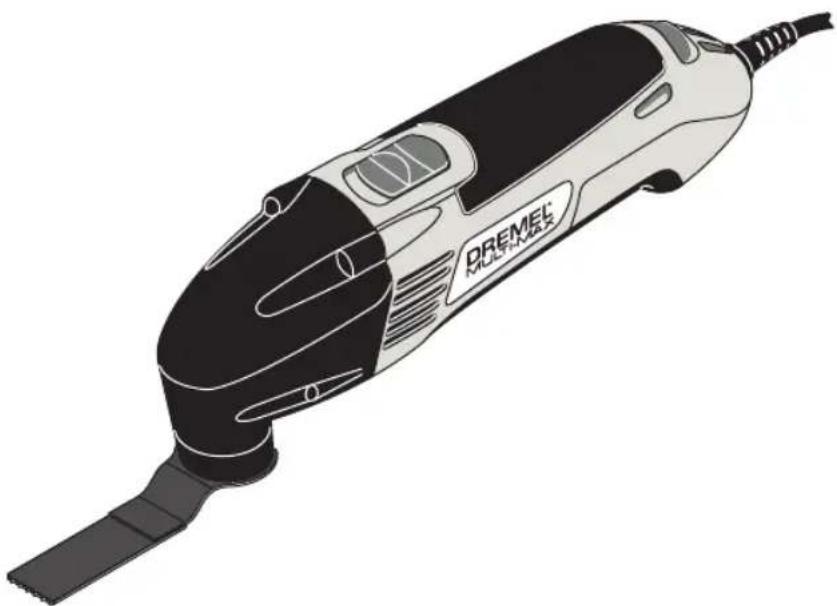
Model 6300 Multi-Max Oscillating Power Tool
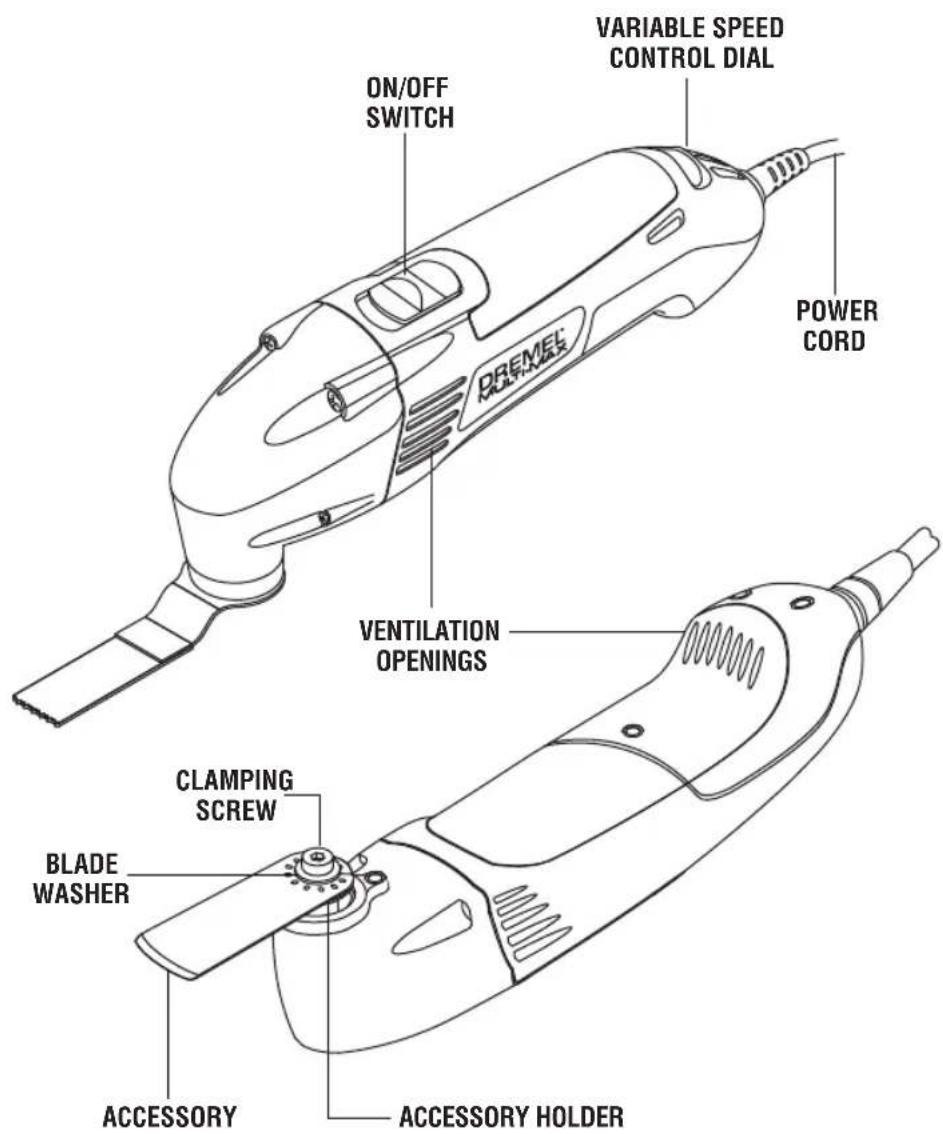
FIG.1
Model number 6300
No load speed n
10,000-21,000/min
Voltage rating
120V 60Hz
NOTE: For tool specifications refer to the nameplate on your tool.
Assembly
WARNING
Disconnect the plug from the power source before
making any assembly, adjustments or changing accessories. Such preventive safety measures reduce the risk of starting the tool accidentally.
WARNING
For all work or when changing accessories
always wear protective gloves. Such preventive safety measures reduce the risk of injury from sharp edges of the accessories. Application tools can become very hot while working. Danger of burns!
INSTALLING AND REMOVING ACCESSORIES
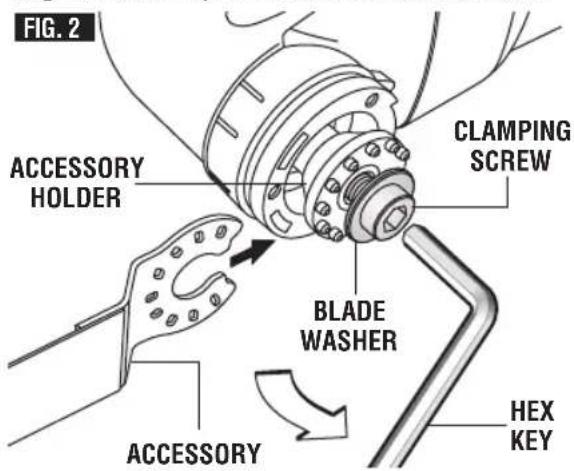
Dremel cutting, scraper blades have a QuickFit slot which allows for faster accessory removal compared with other conventional oscillating tool systems.
- Loosen the clamping screw using the hex key provided just enough so you can slide the accessory between the accessory holder and the blade washer (Fig. 2).
- Clean accessory holder, accessory and the clamping screw with a clean cloth.
- Place the accessory onto the accessory holder making sure the accessory engages all 12 pins in the holder and the accessory is flush against the accessory holder.
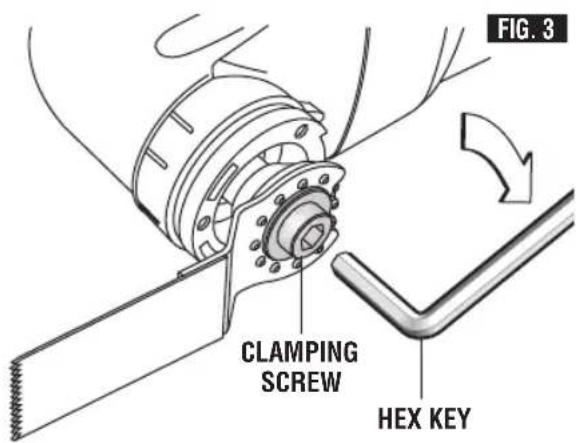
- Securely tighten the clamping screw with the hex provided (Fig. 3).
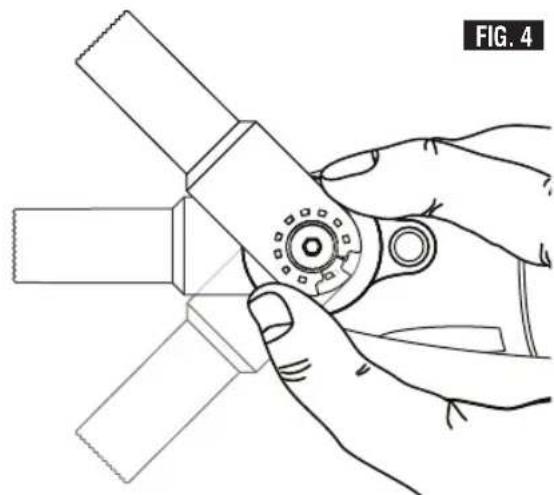
NOTE: Some accessories, such as scrapers or blades, may be mounted either straight on the tool, or at an angle to enhance usability (Fig. 4).
INSTALLING AND REMOVING SANDING SHEETS
Your backing pad uses hook-and-loop backed accessories, which firmly grip the backing pad when applied with moderate pressure.
- Align the sanding sheet and press it onto the sanding plate by hand.
- Firmly press the power tool with the sanding sheet against a flat surface and briefly switch the power tool on. This will promote good adhesion and helps to prevent premature wear.
- To change, merely peel off the old sanding sheet, remove dust from the backing pad if necessary, and press the new sanding sheet in place.
After considerable service the backing pad surface will become worn, and the backing pad must be replaced when it no longer offers a firm grip. If you are experiencing premature wear out of the backing pad facing, decrease the amount of pressure you are applying during operation of the tool.
For maximum use of abrasive, rotate pad 120 degrees when tip of abrasive becomes worn.
Introduction
Thank you for purchasing the Dremel MultiMax.
This tool was designed to tackle home repair, remodeling and restoration projects. The Dremel Multi-Max tackles tasks that are tedious, time consuming or simply next to impossible to achieve with any other tool. The ergonomic housing is designed for you to hold and control in a comfortable manner during operation.
It comes with an assortment of accessories that are specifically designed for remodeling work where you need precision and control.
Your Dremel Multi-Max has a robust electric motor, is comfortable in the hand, and is made to accept a large variety of accessories
including flush cut blades, scraper blades, grout removal wheels and sanding pads.
Accessories come in a variety of shapes and permit you to do a number of different jobs. As you become familiar with the range of accessories and their uses, you will learn just how versatile your Dremel Multi-Max is.
Visit www.dremel.com to learn more about what you can do with your Dremel Multi-Max.
INTENDED USE
This Dremel Multi-Max Tool is intended for dry sanding of surfaces, corners, edges, for scraping, for sawing soft metals, wood and plastic components, and for grout removal using the applicable tools and accessories recommended by Dremel.
Operating Instructions
LEARNING TO USE THE TOOL
Getting the most out of your oscillating tool is a matter of learning how to let the speed and the feel of the tool in your hands work for you.
The first step in learning to use the tool is to get the "feel" of it. Hold it in your hand and feel its weight and balance (Fig. 5). Depending on the application, you will need to adjust your hand position to achieve optimum comfort and control. The unique comfort grip on the body of the tool allows for added comfort and control during use.
When holding tool, do not cover the air vents with your hand. Blocking the air vents could cause the motor to overheat.
IMPORTANT! Practice on scrap material first to see how the tool's high-speed action performs. Keep in mind that your tool will perform best by allowing the speed, along with the correct accessory, do the work for you. Be careful not to apply too much pressure.
Instead, lower the oscillating accessory lightly to the work surface and allow it to touch the
FIG.5
point at which you want to begin. Concentrate on guiding the tool over the work using very little pressure from your hand. Allow the accessory to do the work.
Usually it is better to make a series of passes with the tool rather than to do the entire job with one pass. To make a cut, for example, pass the tool back and forth over the work. Cut a little material on each pass until you reach the desired depth.
SLIDE "ON/OFF" SWITCH
The tool is switched "ON" by the slide switch located on the topside of the motor housing.
TO TURN THE TOOL "ON", slide the switch button forward.
TO TURN THE TOOL "OFF", slide the switch button backward.
ELECTRONIC FEEDBACK
Your tool is equipped with an internal electronic feedback system that provides a "soft start", which will reduce the stresses that occur from a high torque start. The system also helps to keep the preselected speed virtually constant between no-load and load conditions.
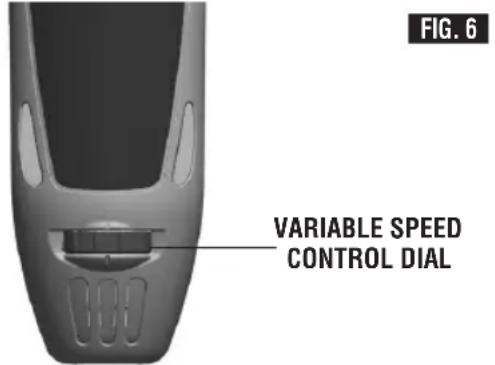
VARIABLE SPEED CONTROL DIAL
This tool is equipped with a variable speed control dial (Fig. 6). The speed may be controlled during operation by presetting the dial in any one of ten positions.
OPERATING SPEEDS
The Dremel Multi-Max consists of an AC universal motor and oscillating mechanism to perform applications such as cutting, grout removal, scraping, sanding and more.
The Dremel Multi-Max has a high oscillating motion of 10,000 - 21,000 opsms. The high speed motion allows the Dremel Multi-Max to achieve with excellent results. The oscillating motion allows the dust to fall to the surface rather than slinging particles into the air.
To achieve the best results when working with different materials, set the variable speed control to suit the job (See Speed Chart on Page 10 for guidance). To select the right speed for the accessory in use, practice with scrap material first.
NOTE: Speed is affected by voltages changes. A reduced incoming voltage will slow the OPM of the tool, especially at the lowest setting. If your tool appears to be running slowly, increase the speed setting accordingly. The tool may not start at the lowest switch setting in areas where outlet voltage is less than 120 volts. Simply move the speed setting to a higher position to begin operation.
The variable speed control settings are marked on the speed control dial. The settings for approximate OPM's are:
Switch Setting Speed Range
/min (OPM)
2 10,000-11,000
411,000-13,000
613,000-16,000
816,000-19,000
10 19,000-21,000
You can refer to the charts on next page to determine the proper speed, based on the material and accessory being used. These charts enable you to select both the correct accessory and the optimum speed at a glance.
Use only Dremel, high-performance accessories.
Multi-Max Accessory Speed Settings
| Description | Catalog Numbers | Soft Wood | Hard Wood | Painted Wood | Laminates/ | Steel | Aluminum/ Copper | Vinyl/ Carpet | Caulk/ Adhesive | Stone/ Cement | Grout | |
| 60, 120 and 240 Grit Paper - Bare Wood | MM70W | 2 - 10 | 2 - 10 | - | 2 - 6 | 8 - 10 | 8 - 10 | - | - | - | - | |
| 60, 120 and 240 Grit Paper - Paint | MM70P | 2 - 10 | 2 - 10 | 2 - 10 | 2 - 6 | 8 - 10 | 8 - 10 | - | - | - | - | |
| 3/8" HCS Wood Flush Cut Blade | MM411 | 8 - 10 | 6 - 10 | - | 2 - 6 | - | - | - | - | - | - | |
| 3/4" BiM Wood/Metal Flush Cut Blade | MM440 | 8 - 10 | 6 - 10 | - | 2 - 6 | - | - | - | - | - | - | |
| 3/4" HCS Wood Flush Cut Blade | MM422 | 8 - 10 | 6 - 10 | - | 2 - 6 | 8 - 10* | 8 - 10 | - | - | - | - | |
| 3" Flat Saw Blade | MM450 | 8 - 10 | 6 - 10 | - | 2 - 6 | - | - | - | - | - | - | |
| 1/8" Grout Removal Blade | MM500 | - | - | - | - | - | - | - | - | - | 6 - 10 | |
| 1/16" Grout Removal Blade | MM501 | - | - | - | - | - | - | - | - | - | 6 - 10 | |
| Rigid Scaper Blade | MM600 | - | - | 2 - 4 | - | - | - | 2 - 8 | 2 - 6 | - | - | |
| Flexible Scaper Blade | MM610 | - | - | 2 - 4 | - | - | - | - | 2 - 6 | - | - | |
| 60 Grit Diamond Paper | MM900 | - | - | - | - | - | - | - | - | 6 - 10 | 6 - 10 |
- Soft steel only
Operating Applications
APPLICATION
Your Dremel Multi-Max Tool is intended for sanding and cutting wooden materials, plastic, plaster and non-ferrous metals. It is especially suitable for working close to edges, in tight spaces, and for flush cutting. This tool must be used only with Dremel accessories.
Below are some typical uses for your Dremel Multi-Max Tool.
WARNING
For all accessories, work with the accessory away
from the body. Never position hand near or directly in front of working area. Always hold the tool with both hands and wear protective gloves.
Flush Cutting
Remove excess wood from door jamb, window sill and/or toekick. Removing excess copper or PVC pipe.
Removal work
e.g. carpets & backing, old tile adhesives, caulking on masonry, wood and other surfaces.
Removal of excess materials
e.g. plaster, mortar splatters, concrete on tiles, sills.
Preparation of surfaces
e.g. for new floors and tiles.
Detail sanding
e.g. for sanding in extremely tight areas otherwise difficult to reach and require hand sanding
CUTTING
Saw blades are ideal for making precise cuts in tight areas, close to edges or flush to a surface.
Select a medium to high speed for making initial plunge, start off at medium speed for increased control. After making your initial cut, you can increase speed for faster cutting ability.
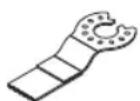
Flush cutting blades are intended to make precise cuts to allow for installation of flooring or wall material. When flush cutting
it is important not to force the tool during the plunge cut. If you experience a strong vibration in your hand during the plunge cut, this indicates that you are applying too much pressure. Back the tool out and let the speed of the tool do the work. While keeping the teeth
of the blade in the work surface, move the back of the tool in a slow sideways motion. This motion will help expedite the cut.
When making a flush cut it is always a good idea to have a piece of scrap material (tile or wood) supporting the blade. If you need to rest the flush cutting blade on a delicate surface, you should protect the surface with cardboard or masking tape.
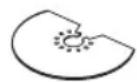
The flat saw blade is ideal for making precise cuts in wood, plaster, drywall material.
Applications include cutting openings in flooring for venting, repairing damaged flooring, cutting openings for electrical boxes. The blade works best on softer woods such as pine. For harder woods, the blade life will be limited.
Select a medium to high speed.
The flat saw blade can also be used for window restoration making glazing easy to remove. The saw blade can be placed directly against the edge of the window frame, guiding the blade through the glazing.
GROUT REMOVAL
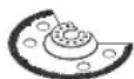
Grout removal blades are ideal for removing damaged or cracked grout. Grout blades
come in different widths (1/16" and 1/8") to tackle different grout line widths. Before selecting a grout blade measure the grout line width to pick the appropriate blade.
Select a medium to high speed.
To remove the grout, use a back and forth motion, making several passes along the grout line. The hardness of the grout will dictate how many passes are needed. Try and keep the grout blade aligned with the grout line and be careful not to apply too much side pressure on the grout blade during the process. To control plunge depth use the carbide grit line on the blade as an indicator. Be careful not to plunge beyond the carbide grit line to avoid damage to the backer board material.
The grout blades can handle both sanded and unsanded grout. If you notice the blade clogging during the grout removal process, you can use a brass brush to clean the grit, thus exposing the grit again.
The grout blade geometry is designed so that the blade can remove all grout up to the
surface of a wall or corner. This can be accomplished by ensuring that the segmented portion of the blade is facing the wall or corner.
SCRAPING
Scrapers are suitable for removing old coats of varnish or adhesives, removing bonded carpeting, e.g. on stairs/steps and other small/medium size surfaces.
Select low to medium speed.
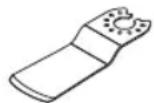
Rigid scrapers are for large area removal, and harder materials such as vinyl flooring, carpeting and tile adhesives. When
removing strong, tacky adhesives, grease the scraper blade surface with (petroleum jelly or silicone grease) to reduce gumming up.
The carpet/vinyl flooring removes easier if it is scored prior to removal so the scraper blade can move underneath the flooring material.
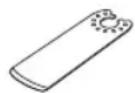
Flexible scrapers are used for hard to reach areas and softer material such as caulk.
Mount the scraper blade with the logo side facing up. With the flexible scraper, make sure that the screw head does not make contact with surface during the scraping process (a 30 -45 degree pitch is recommend). This can be accomplished by making sure that the tool is at an angle to the blade. You should be able to see the blade flex during the scraping process.
If you are removing caulk from a delicate surface such as a bath tub or tile back splash, we recommend taping or protecting the surface that the blade will rest on. Use rubbing alcohol to clean the surface after the caulk and/or adhesive is removed.
Turn the tool on and place desired accessory on the area where material is to be removed.
Begin with light pressure. The oscillating motion of accessory only occurs when pressure is applied to the material to be removed.
Excessive pressure can gouge or damage the background surfaces (e.g., wood, plaster).

SANDING
Sanding accessories are suitable for dry sanding of wood, metal, surfaces, corners and edges and
hard to reach areas.
Work with the complete surface of the sanding pad, not only with the tip.
Corners may be finished using the tip or edge of the selected accessory, which should occasionally be rotated during use to distribute the wear on the accessory and backing pad surface.
Sand with a continuous motion and light pressure. DO NOT apply excessive pressure - let the tool do the work. Excessive pressure will result in poor handling, vibration, and unwanted sanding marks and premature wear on the sanding sheet.
Always be certain that smaller workpieces are securely fastened to a bench or other support. Larger panels may be held in place by hand on a bench or sawhorses.
Open-coat aluminum oxide sanding sheets are recommended for most wood or metal sanding applications, as this synthetic material cuts quickly and wears well. Some applications, such as metal finishing or cleaning, require special abrasive pads which are available from your dealer. For best results, use Dremel sanding accessories which are of superior quality and are carefully selected to produce professional quality results with your oscillating tool.
The following suggestions may be used as a general guide for abrasive selection, but the best results will be obtained by sanding a test sample of the workpiece first.
Grit Application
Coarse For rough wood or metal sanding, and rust or old finish removal.
Medium For general wood or metal sanding
Fine For final finishing of wood, metal, plaster and other surfaces.
With the workpiece firmly secured, turn tool on as described above. Contact the work with the tool after the tool has reached its full speed, and remove it from the work before switching the tool off. Operating your oscillating tool in this manner will prolong switch and motor life, and greatly increase the quality of your work.
Move the oscillating tool in long steady strokes parallel to the grain using some lateral motion to overlap the strokes by as much as 75% . DO NOT apply excessive pressure - let the tool do the work. Excessive pressure will result in poor handling, vibration, and unwanted sanding marks.
GRINDING
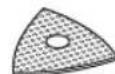
The diamond paper accessory allows for the Multi-Max to be used for grinding away cement, plaster or. Preparing the surface for tile. ent is a common application for this
The diamond paper needs to be mounted to the backing pad prior to use.
Select a low to high speed depending on the material removal rate desired.
Corners may be finished using the tip or edge of the selected accessory, which should occasionally be rotated during use to distribute the wear on the accessory and backing pad surface.
Grind with a continuous motion and light pressure. DO NOT apply excessive pressure - let the tool do the work. Excessive pressure will result in poor handling, vibration, and premature wear on the diamond paper sheet.
Selecting Sanding/Grinding Sheets
| Material Application Grit Size | |||
| All wooden materials (e.g., hardwood, softwood, chipboard, building board) Metal materials-Metal materials, fiberglass and plasticsSand Paper (Dark) | For coarse-sanding, e.g. of rough, unplanned beams and boards | Coarse | 60 |
| For face sanding and planing small irregularities | Medium | 120 | |
| For finish and fine sanding of wood | Fine | 240 | |
| Paint, varnish, filling compound and fillerSand Paper (White) | For sanding off paint | Coarse | 80 |
| For sanding primer (e.g., for removing brush dashes, drops of paint and paint run) | Medium | 120 | |
| For final sanding of primers before coating | Fine | 240 | |
| Masonry, stone, cement and thin setDiamond Paper | For smoothing, shaping and braking edges | Coarse | 60 |
FIG.7
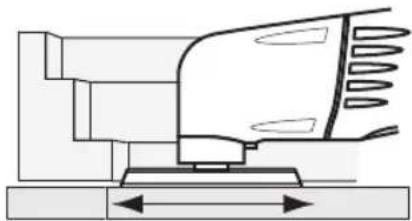
CORRECT: Sand with a smooth back and forth motion, allowing the weight of the tool to do the work.
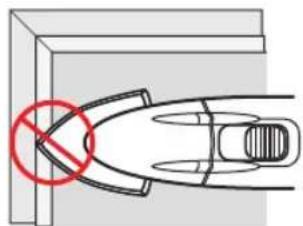
INCORRECT: Avoid sanding with only the tip of the pad. Keep as much sand paper in touch with the work surface as possible.
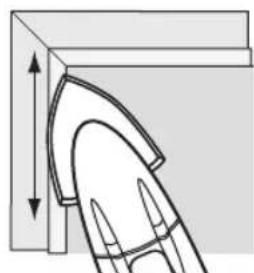
CORRECT: Always sand with the pad and sandpaer flat against the work surface. Work smoothly in a back and forth motion.
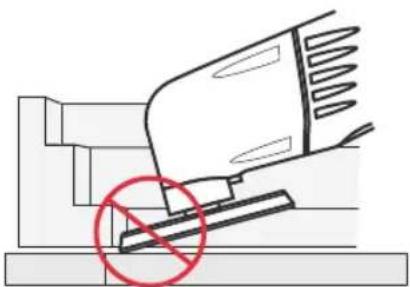
INCORRECT: Avoid tipping the pad. Always sand flat.
FIG.8

CORRECT: Always cut with a smooth back and forth motion. Never force the blade. Apply light pressure to guide the tool.
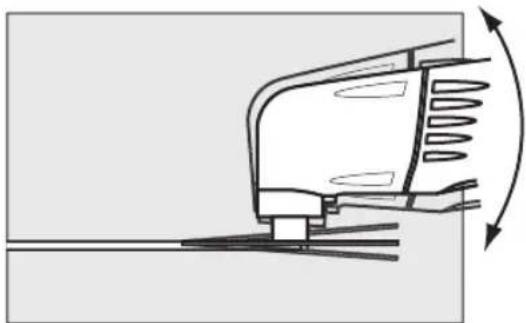
INCORRECT: Do not twist the tool while cutting. This can cause the blade to bind.
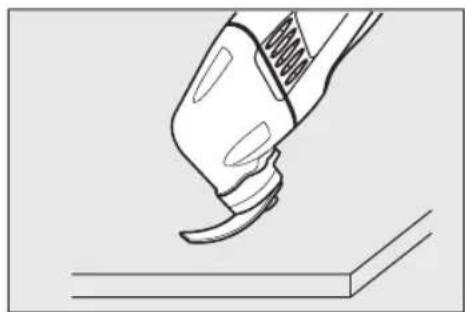
CORRECT: Make sure flexible scraper blade flexes enough
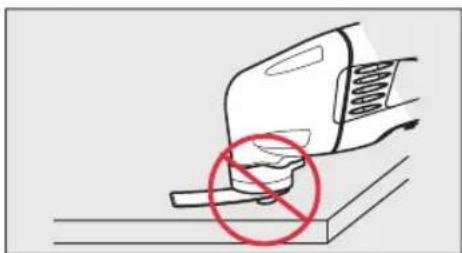
INCORRECT: Avoid screw head touching surface with flexible scraper blade.
Maintenance Information
Service
WARNING
NO USER SERVICEABLE PARTS INSIDE. Preventive
maintenance performed by unauthorized personnel may result in misplacing of internal wires and components which could cause serious hazard. We recommend that all tool service be performed by a Dremel Service Facility.
CARBON BRUSHES
The brushes and commutator in your tool have been engineered for many hours of dependable service. To maintain peak efficiency of the motor, we recommend every 50 - 60 hours the brushes be serviced by a Dremel Service Facility.
Cleaning
WARNING
To avoid accidents always disconnect the tool from
the power supply before cleaning or performing any maintenance. The tool may be cleaned most effectively with compressed dry air. Always wear safety goggles when cleaning tools with compressed air.
Ventilation openings and switch levers must be kept clean and free of foreign matter. Do not attempt to clean by inserting pointed objects through openings.
CAUTION
Certain cleaning agents and solvents damage
plastic parts. Some of these are: gasoline, carbon tetrachloride, chlorinated cleaning solvents, ammonia and household detergents that contain ammonia.
Extension Cords
WARNING
If an extension cord is necessary, a cord with
adequate size conductors that is capable of carrying the current necessary for your tool must be used. This will prevent excessive voltage drop, loss of power or overheating. Grounded tools must use 3-wire extension cords that have 3-prong plugs and receptacles.
NOTE: The smaller the gauge number, the heavier the cord.
RECOMMENDED SIZES OF EXTENSION CORDS 120 VOLT ALTERNATING CURRENT TOOLS
| Tool's Ampere Rating | Cord Size in A.W.G. | Wire Sizes in mm2 | |
| Cord Length in Feet | Cord Length in Meters | ||
| 25 | 50 100 150 15 | 30 60 120 | |
| 3-6 | 18 | 16 14 0.75 0.75 1.5 | 2.5 |
| 6-8 | 18 | 16 14 12 0.75 1.0 | 2.5 4.0 |
| 8-10 | 18 | 16 14 12 0.75 1.0 | 2.5 4.0 |
| 10-12 | 16 | 16 14 12 1.0 | 2.5 4.0 |
| 12-16 | 14 | 12————— | —— |
Multi-Max Accessories
| Accessory | Material | Application |
| MM11 Base plate for sanding | Depends on sanding sheet | Sanding surfaces close to edges, in corners or hard to reach areas. Depending on the sanding sheet for, e.g., sanding wood, paint, varnish, thinset and cement. |
| MM411 3/8" HCS wood flush cut blade | Wood, plastic, drywall and other soft materials | Smaller cuts and flush cuts. Example: Cut-outs in furniture for cable connections. |
| MM440 3/4" HCS wood flush cut blade | Wood, plastic drywall and other soft materials | Cutting and deep flush cuts; also for sawing close to edges, in corners and hard to reach areas. Example: Flush cutting door jamb or window sill, for flooring or tile installation. |
| MM422 3/4" BIM wood metal flush cut blade | Non-ferrous metals, wood, plastic and other soft metals | Smaller cuts and plunge cuts. Example: Sawing off water pipes (copper) or cable ducts flush against walls, floors or ceilings. |
| MM450 3" HCS Flat Saw Blade | Wood (limited use on hard wood) plastic, drywall and other soft materials. | Cutting in existing trim or flooring. Cutting close to edges in corners or hard to reach areas. Examples: Installing floor vent or repairing damaged wood flooring. |
| MM500 MM501 Segmented 1/8", 1/16" grout removal | Grout joints | Removing grout from between wall or floor tiles. Example: Removing grout joints between wall tiles for repair work. |
| MM600 Rigid scraper blade | Vinyl, varnish and carpeting | Remove vinyl flooring and bonded carpeting. Example: On stairs/steps or other small/medium sized surfaces. Scraping off old coats of varnish/paint or other adhesive. |
| MM610 Flexible scraper blade | Caulk, adhesives, paint and other soft materials | Removing caulk, coats of peeling paint or soft adhesive. |
| MM900 60 grit diamond paper | Thinset, cement and motar. | Removing thinset or cement; Example: Grinding away thinset after tile removal. |
| MM70P Sand paper | Varnish and paint removal | For sanding primer and removing brush strokes, drops of paint and paint run. |
| MM70W Sand paper | Bare wood, hardwood, softwood, chipboard, metal | For detail sanding. |
HCS = High Carbon Steel BiM =BiMetal
Dremel® Limited Warranty
Your Dremel product is warranted against defective material or workmanship for a period of two years from date of purchase. In the event of a failure of a product to conform to this written warranty, please take the following action:
- DO NOT return your product to the place of purchase.
- Carefully package the product by itself, with no other items, and return it, freight prepaid, along with:
A. A copy of your dated proof of purchase (please keep a copy for yourself).
B. A written statement about the nature of the problem.
C. Your name, address and phone number to:
UNITED STATES
Dremel Service Center
Dremel Service Center
4915 21st Street OR 4631 E. Sunny Dune
Racine, WI 53406 Palm Springs, CA 92264
1-800-4-Dremel
CANADA OUTSIDE
Giles Tool Agency CONTINENTAL UNITED STATES
47 Granger Av. See your local distributor or write to
Scarborough, Ont Dremel, 4915 21st Street
Canada M1K 3K9 Racine, WI 53406
1-416-287-3000
We recommend that the package be insured against loss or in transit damage for which we cannot be responsible.
This warranty applies only to the original registered purchaser. DAMAGE TO THE PRODUCT RESULTING FROM TAMPERING, ACCIDENT, ABUSE, NEGLIGENCE, UNAUTHORIZED REPAIRS OR ALTERATIONS, UNAPPROVED ATTACHMENTS OR OTHER CAUSES UNRELATED TO PROBLEMS WITH MATERIAL OR WORKMANSHIP ARE NOT COVERED BY THIS WARRANTY.
No employee, agent, dealer or other person is authorized to give any warranties on behalf of Dremel. If Dremel inspection shows that the problem was caused by problems with material or workmanship within the limitations of the warranty, Dremel will repair or replace the product free of charge and return product prepaid. Repairs made necessary by normal wear or abuse, or repair for product outside the warranty period, if they can be made, will be charged at regular factory prices.
DREMEL MAKES NO OTHER WARRANTY OF ANY KIND WHATEVER, EXPRESSED OR IMPLIED, AND ALL IMPLIED WARRANTY OF MERCHANTABILITY AND FITNESS FOR A PARTICULAR PURPOSE WHICH EXCEED THE ABOVE MENTIONED OBLIGATION ARE HEREBY DISCLAIMED BY DREMEL AND EXCUSED FROM THIS LIMITED WARRANTY.
This warranty gives you specific legal rights and you may also have other rights which vary from state to state. The obligation of the warrantor is solely to repair or replace the product. The warrantor is not liable for any incidental or consequential damages due to any such alleged defect. Some states do not allow the exclusion or limitation of incidental or consequential damages, so the above limitations or exclusion may not apply to you.
For prices and warranty fulfillment in the continental United States, contact your local Dremel distributor.
© Robert Bosch Tool Corporation 1800 W. Central Road Mt. Prospect, IL 60056-2230
Exportado por: Robert Bosch Tool Corporation Mt. Prospect, IL 60056 -2230, E.U.A.
Importado a Mexico por: Robert Bosch, S. de R.L. de C.V.
Calle Robert Bosch No. 405 - 50071 Toluca, Edo. de Mex. - Mexico
Tel. 052 (722) 279 2300 ext 1160/Fax. 052 (722) 216-6656
Multi-Max Accessories
Dremel Service Center Dremel Service Center
4915 21st Street OU 4631 E. Sunny Dune
Racine, WI 53406 Palm Springs, CA 92264
1-800-4-Dremel
CANADA A L'EXTÉRIEUR DU TERRITOIRE
Giles Tool Agency CONTINENTAL DES ETATS-UNIS
Dremel Service Center Dremel Service Center
4915 21st Street O 4631 E. Sunny Dune
Racine, WI 53406 Palm Springs, CA 92264
1-800-4-Dremel
CANADÁ FUERA DE LOS TERRITORIOS
Scarborough, Ont Dremel, 4915 21st Street
Canada M1K 3K9 Racine, WI 53406
1-416-287-3000