Pure Power 12 M - Phone charger Be Quiet! - Free user manual and instructions
Find the device manual for free Pure Power 12 M Be Quiet! in PDF.



| Product Type | PC Power Supply (ATX Power Supply) |
| Brand | Be Quiet! |
| Model | Pure Power 12 M |
| Form Factor | ATX (compatible with most PC cases) |
| Max Power | Not specified in manual (estimated: 550W to 850W depending on variant) |
| Connectors | 20/24-pin motherboard, 12V-P4/12V-P8 CPU, modular cables for peripherals |
| Compatibility | Intel ATX12V 3.1, PCIe 5.1, EPS12V 2.92, C6/C7, Energy Star 8.0 |
| Built-in Protections | OCP (overcurrent), UVP (undervoltage), OVP (overvoltage), SCP (short circuit), OTP (overheating), OPP (overload) |
| Cable Management | Modular (cable set included) |
| Fan | Built-in (not detailed in manual) |
| Approximate Dimensions | 150 x 140 x 86 mm (standard ATX) |
| Approximate Weight | About 1.5 kg (estimate) |
| Input Voltage | 100-240 V AC, 50/60 Hz (standard) |
| Standby Consumption | Compliant with ErP directive (low standby consumption) |
| Maintenance and Cleaning | Unplug, clean exterior with a dry cloth; do not use a damp cloth or cleaning products |
| Safety of Use | Never open the power supply (high voltage even when unplugged); use only the supplied cables |
| Spare Parts and Reparability | Modular cables, mounting screws, cable ties; opening voids warranty; repair only by authorized personnel |
| Manufacturer's Warranty | 10 years (for end consumer, initial purchase from authorized dealer) |
| Included Accessories | Modular cables, grounded power cord, user manual, cable ties, mounting screws |
| General Information | Brand Be Quiet!, after-sales service: 0800 469 209, service@be-quiet.fr, www.bequiet.com |
Frequently Asked Questions - Pure Power 12 M Be Quiet!
User questions about Pure Power 12 M Be Quiet!
0 question about this device. Answer the ones you know or ask your own.
Ask a new question about this device
Download the instructions for your Phone charger in PDF format for free! Find your manual Pure Power 12 M - Be Quiet! and take your electronic device back in hand. On this page are published all the documents necessary for the use of your device. Pure Power 12 M by Be Quiet!.
USER MANUAL Pure Power 12 M Be Quiet!
Safety instructions 6
Compatibility 7
7
Safety functions. 8
Troubleshooting 9
Frequent Problems 9
Accessories 10
Notes on disposal. 10
Warranty 10
Manufacturer's details 11
Copyright 11
Technical data 55
DEUTSCH
Einleitung 12
Label 55
Voltage regulation 56
Operating conditions 56
Minimal load 56
Rail Distribution 56
Dimensions 57
Connectivity and cable lengths 57
1. INTRODUCTION
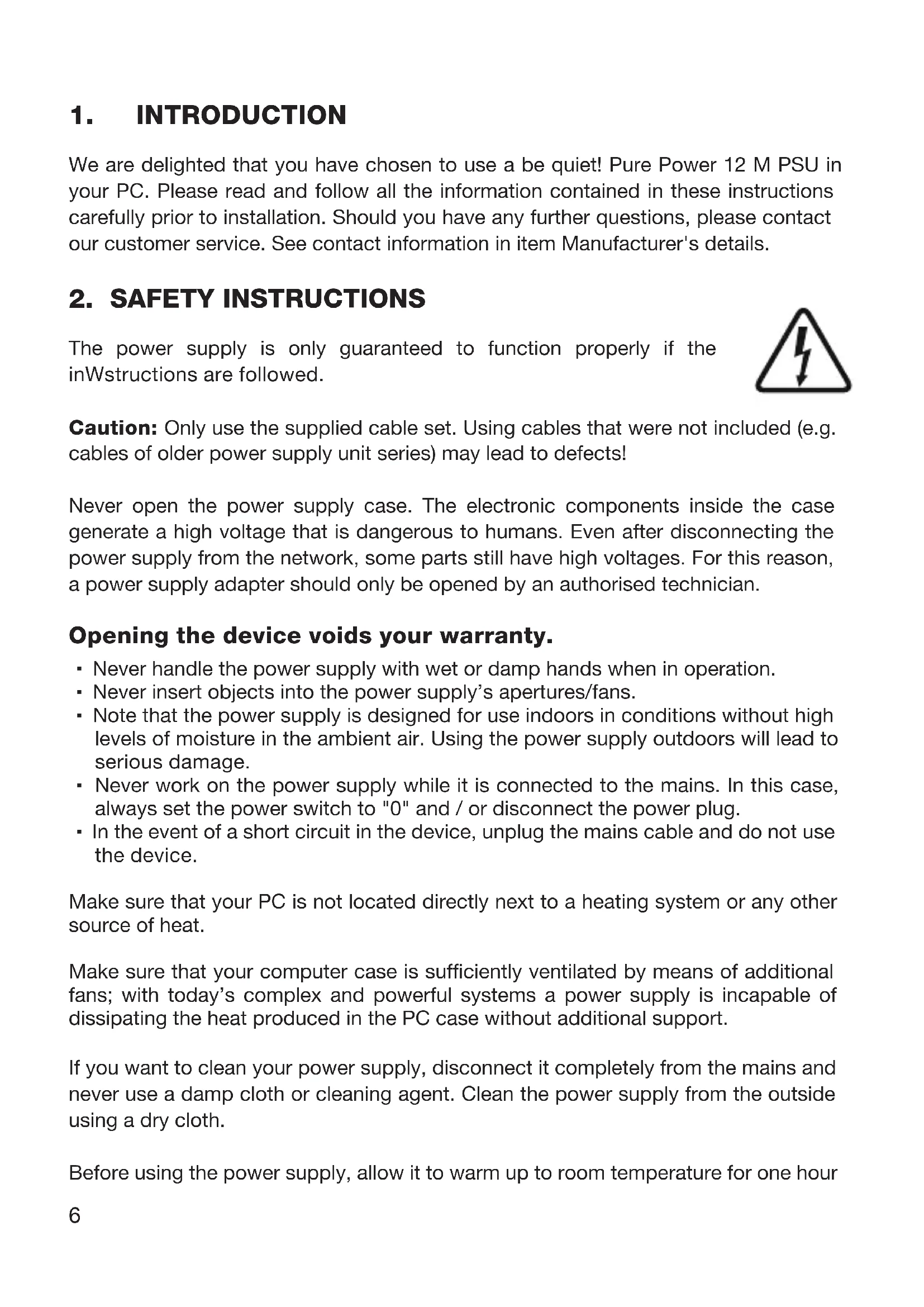
We are delighted that you have chosen to use a be quiet! Pure Power 12 M PSU in your PC. Please read and follow all the information contained in these instructions carefully prior to installation. Should you have any further questions, please contact our customer service. See contact information in item Manufacturer's details.
2. SAFETY INSTRUCTIONS
The power supply is only guaranteed to function properly if the inWinstructions are followed.
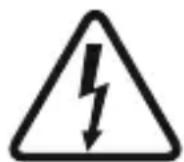
Caution: Only use the supplied cable set. Using cables that were not included (e.g. cables of older power supply unit series) may lead to defects!
Never open the power supply case. The electronic components inside the case generate a high voltage that is dangerous to humans. Even after disconnecting the power supply from the network, some parts still have high voltages. For this reason, a power supply adapter should only be opened by an authorised technician.
Opening the device voids your warranty.
- Never handle the power supply with wet or damp hands when in operation.
- Never insert objects into the power supply's apertures/fans.
- Note that the power supply is designed for use indoors in conditions without high levels of moisture in the ambient air. Using the power supply outdoors will lead to serious damage.
- Never work on the power supply while it is connected to the mains. In this case, always set the power switch to "0" and / or disconnect the power plug.
- In the event of a short circuit in the device, unplug the mains cable and do not use the device.
Make sure that your PC is not located directly next to a heating system or any other source of heat.
Make sure that your computer case is sufficiently ventilated by means of additional fans; with today's complex and powerful systems a power supply is incapable of dissipating the heat produced in the PC case without additional support.
If you want to clean your power supply, disconnect it completely from the mains and never use a damp cloth or cleaning agent. Clean the power supply from the outside using a dry cloth.
Before using the power supply, allow it to warm up to room temperature for one hour
to prevent condensation accumulating in the power supply.
3. COMPATIBILITY
The be quiet! Pure Power 12 M series power supplies are compatible with all recent popular power supply and motherboard specifications such as:
Intel ATX12V 3.1 Power Supply Design Guide Revision 2.1
PCIe 5.1
- BTX Version 1.0a
- E-ATX Server Motherboards via 8-Pin connector
EPS12V version 2.92
Intel C6/C7 Status for the new processor generation
- Energy Star 8.0 guidelines
ErP guidelines
4. INSTALLING YOUR NEW POWER SUPPLY
Please read „Safety instructions" before you begin the installation.
Note: You will need a screwdriver to fit the power supply in your PC. Only use the screws provided with the power supply because they have the correct thread.
Caution: Only use the supplied cable set. Using cables that were not included (e.g. cables of older power supply unit series) may lead to defects!
First remove your old power supply. To do so, proceed as follows:
- Carefully disconnect your PC from any power sources and unplug all cables connected to the PC.
- Open the PC case, taking care to follow the manufacturer's instructions.
- Disconnect all plugs from the motherboard and all other components, such as FDDs, HDDs, or optical drives. Make sure that there are no plugs from the old power supply connected to any of the components.
- Now remove the screws at the rear of the power supply and carefully pull the power supply out of the PC case. Take special care that no cables get caught in the components and damage them.
Fitting your new be quiet! Pure Power 12 M power supply:
- Place the new power supply in the space provided in the PC case and connect to the rear panel using the four screws provided. Do not use excessive force.
- Plug the 20/24-pin connector into the socket provided on the motherboard. If you have a 24-pin connection, place the remaining 4 pins in the correct position before
you plug the connector into the socket. If you have a motherboard with a 20-pin connector, fold the additional 4 pins to one side.
- Now plug the 12V-P4 or P8 connector for the CPU into the socket provided on the motherboard.
5. SAFETY FUNCTIONS
All be quiet! power supplies have numerous safety functions. They are designed to protect the power supply and the components connected to it against damage. If one of these safeguards is triggered, the system will reboot or power off in most cases. If this happens, you should immediately check the PC for errors.
For more info on troubleshooting see the "Troubleshooting" chapter.
The be quiet! Pure Power 12 M series has the following safety functions:
OCP (Over current protection)
If the load on the individual circuits exceeds the specified limit, the power supply is automatically switched off.
UVP (Undervoltage protection)
This safeguard is triggered if the voltage on the circuits drops below a certain limit. The power supply is automatically switched off in this case.
OVP (Overvoltage protection)
The overvoltage safeguard is triggered if the voltage in the circuits is too high; the power supply is deactivated.
SCP (Short circuit safeguard)
The fuse protecting the power supply's secondary circuits prevents physical defects of the power supply and the components connected to it.
OTP (Temperature safeguard)
In the case of excessive heat build-up in the power supply, the power supply immediately and automatically switches off. You cannot switch it back on until it has cooled down. Please ensure that the PC has sufficient cooling.
OPP (overload protection)
This safeguard is triggered if the total output of the power supply exceeds the specified maximum load. This can happen if the output of power supply is insufficient for the system (incorrectly dimensioned).
6. TROUBLESHOOTING
Please note: If you have an ATX system, the power supply is enabled by the motherboard in order to boot the PC. For this reason, please refer to the motherboard or case manual to check whether the on/off switch is connected correctly.
Caution: There is a risk of fatal injury when working on power sources. If you notice traces of smoke, damaged cables and exposure to liquids, immediately disconnect the power from the mains and do not use it again.
Never open the power supply case. High-voltage components in the interior of the power supply may still be live after a longer period of disuse.
Please have any and all necessary repairs conducted by an authorized expert! Opening the device will void your warranty.
If the system in which you installed the power supply does not work properly, check for these possible sources of error first:
-
Check that the mains cable to the power supply is correctly and firmly plugged into the power supply and the socket. Ideally, you should use a separate power socket for the computer power supply.
-
Check whether all connectors are correctly plugged in, and make any necessary adjustments, such as in case of incorrect polarity.
-
Check the connection between the on/off switch on the case to the motherboard. Refer to the motherboard manual if needed! Switch the power supply on by setting the switch to position "I" and then pressing the on/off switch on the case. If the power supply still does not switch on, continue with the next item.
-
Check your system for possible short circuits or faulty hardware, making sure that you switch off the computer and disconnect all devices not required for the computer to start. Switch the computer back on. Repeat this process and connect one device after each reboot, until you discover the fault. If the power supply does not react due to a short circuit, wait for at least 5 minutes before switching back on as the device is equipped with overload protection.
7. FREQUENT PROBLEMS
Problem: The selected voltages (via BIOS/UEFI) are to low/high
If you check the power supply voltages via the BIOS/UEFI on the motherboard or the operating system, note that they may be displayed incorrectly. This typically results from imprecise measurements by motherboard and does not necessarily imply a genuine problem.
Problem: After installing a new graphics card, the PC will not power on, or it crashes frequently.
You have installed a new higher performance graphics card in your system and now your PC fails to boot, or it crashes immediately with minimal workload. The power supply is inadequately dimensioned for your graphics card. Before making a purchase, please refer to our PSU calculator tool on www.bequiet.com. The tool will help you to find the right be quiet! power supply from our range of products.
Important note:
If the problems persist, please contact our customer service department immediately.
8. ACCESSORIES
The power supply package includes the following accessories: Cable management cable set, mains lead, operating manual, cable ties, screws for installing the power supply
9. NOTES ON DISPOSAL
Due to European directives* you are no longer allowed to dispose of used electrical and electronic devices as unsorted domestic waste. The devices must be collected separately. The trash can on wheels pictogram indicates the need to dispose of the device separately. Please help to protect the
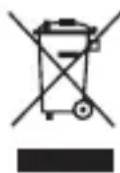
environment and make sure, once you have decided to stop using the device, that you dispose of it responsibly via the correct collection system.
In Germany, you are legally** required to dispose of used devices separately, instead of as domestic waste. Your local waste disposal authority has set up one or more collection points at which used devices from private households in your area can be handed in free of charge. In some cases waste disposal authorities will pick up used devices, even from private households. Please refer to your local household waste collection brochure, or visit your town hall or community administration office, for more information on handing in or collecting used devices in your area.
- Complies with Directive of the European Parliament and of European Council on waste electrical and electronic equipment (WEEE).
** Corresponds to the law on sale, return and sustainable disposal of electrical and electronic equipment (Electrical and Electronic Equipment Act - ElektroG)
10. WARRANTY
-
10 years manufacturer's warranty for consumers (original purchase from authorised be quiet! dealers only).
-
Your original purchase receipt will be required before warranty performance is rendered. Please keep it in a safe place.
- Opening the device, manipulations and / or technical modifications of any kind and damage due to external mechanical force will void your warranty.
- To read the warranty terms and conditions in full, see Service/Warranty Conditions on the homepage at bequiet.com.
Our General Terms and Conditions of Business apply; for details, please refer to bequiet.com on the internet.
11. MANUFACTURER'S DETAILS
For support in Germany, you can call our free service hotline,
Tel. 0049 40 736 7686 - 44 Fax 0049 40-7367686-69
Email: service@bequiet.com
Internet page and PSU Calculator: www.bequiet.com
UK Authorised Representative (for authorities only) ProductIP (UK) Ltd.
8, Northumberland Av. London WC2N 5BY

12. COPYRIGHT
- You are not allowed to reproduce, disclose, publish or store the contents of this documentation, or excerpts of it, without the prior written consent of Listan.
- be quiet! is a registered trademark of Listan GmbH. Other products and company names mentioned in this documentation may be brands or trademarks of their respective owners.
- In accordance with company policy, all Listan products are subject to ongoing development. Listan reserves the right to make changes and improvements to any product described in this documentation without prior announcement.
- Under no circumstances shall Listan be held liable for loss of data and income, or for any specific, incidental, direct, or indirect damage, however it arises.
- The content of this documentation represents the current state-of-art. Listan does not assume, whether expressed or implicit, any liability for the correctness or completeness of the content of this documentation, including, but not limited to the implicit guarantee of market suitability and aptitude for a special purpose, unless applicable laws or jurisdiction stringently stipulate such a liability.
Listan retains the right to make changes to this documentation or to withdraw the documentation at any time without prior announcement.
1. EINLEITUNG
Listan Poland Sp. z o.o.
Ecnn cncTeMa, B KOTOpOY yCTaHOBJIeH 6JOK NITaHnIa, He pa6oTaET DOJXHBIM O6pa3OM, npOBepbTe BO3MOxHbI pNHyHbI OUn6OK:
- Y6eIntecb, yTO cTeBOJ Ka6eJIb 3JIeKTpONHTAHNЯ npaBnIbHO n HaJeXHO NOdkJIoueH K nopTy NITaHNA H PO3eTKe. ONTImaJIbHO nCNOJIb3OBaTb OTdJIbHyIO PO3ETKY DnI PNTAHN KOMNbIOTepa.
- Y6eIntecb, yTO BCE pa3bembl npaBnIbHO NOdkJIIOueHbI N BHeCInTe KOppeKTHBbl, HAnpIMep, B cIyae HeNpaBnIbHOI NOJApHOCTN.
- Поберпс coeINHeHne BbIKIOuATEJI KOpNyca C cIcTeMHoI nlaToI.Пи HeO6xOIMOCtN O6paTInTEcB K INHCTpyKUIN CnCTeMHoI nlaTBI! BkJIIOHTe 6JOK nITaHnY, yCTaHOVB NepeKIIIOvATEJB B NOLOXKeHne "I" N 3aTeM HaxKaB KJIaBNy BKIOUeHnHa KOpNcy. EcIn CnCTema He BkJIIOuaeTcR, nepeiDInTe K cJeDuIooMeMy NyHKTy.
- Поберп Te Baшу систу На педmet KOPOTKORO 3ambikaHЯ ИИ HeNCnpaBHoro obopydOBaHЯ, y6eINBwInc bpeed 3TUM, YTO KOMNbIOTep BblKJIIOUeH IN BCE HeKpITnHbIe KOMNoHENTb CnCTEmbl OTcoEduHbI. BKJIIOuAte KOMNbIOTep. IobTopiTe 3TOT npouecC, NOkJIIOUaY OndHO yCTpoJcTBO 3a DpyrIM npI KaJdoH HOBOI 3aRpy3Ke, NOKa He o6hApyXitE HeNCnPabHbI KOMnoHENT. EcII N6loK nITaHЯ He BKJIIOUaETcY n3-3a KOPOTKORO 3ambikaHЯ, NOdoXdIte He MeHee 5 MInHT, npexJe Yem BKJIIOUaTb CHOBA.
7. YACTbIE IPOBJEMbl
PpOyKT npOn3BedeH B KHP
Email: info@be-quiet.ru
UVP (3axnct BiД 3aHxkehoI HanpyrN)
ДаHa систema 3axncty cnpaцьовс,якso Hanpyra no laHcIorax naaE HnxKYe 3a neBn pIBeHb.у zbOMy BInapdky XINBJIeHHa BOTOMaTUnHO BmMkaetbcra.
OVP (3axnct BiD niBnuehoi Hanpyr)
3axnCT BiD niBnueHoi HanpyrC npaobye, kso Hnpyra B naHiorax BX NaTo BnCOka, 6lOK KINBHeHH BIDKIOUaETbcra.
SCP (3axnCT BiD KopoTkoTo 3amNkaHHa
3anobixhNk 3axuzae BTOPINHI IaHIOrN 6LOky XnBHeHHra Ta nIKNoueHi KOMNOHeHTN BiKoPOTKOrO 3AMHKaHHra.
OTP (3axnct BiD neperpiBy)
Y pa3i NaMipHoro NiBnueHnre TEmpeaTyPi BCEpeDnHi 6JOKy XNBHeHHra BIn ABTOMaTnUHO BIMKHeTbcra. Bu He 3MOxTe Noro yBIMKHyTu, DOKN TempeaTypa He 3HN3NTbCdo HOpMaJIbHoro pIBHry. BydJaacka, nepekoHaItecra, 1O KOMN'HTep 3a6e3neuHn eFekTINBHM OxOLOJKeHHaM.
OPP (3axnCT BiD nepeBaHTaXKeHHra)
LЯ систema 3axncty cnpaocobye,якso cymapha buxiHa notyxhictb 6lOKy KINBJIeHЯ NepeBnUyE Bka3aHm MaKcImaJbHn pIbeH. Lc MoKe cTaTncr,Якso BxIDHa NOTyxHICTb 6lOKy KINBJIeHry HeIOCTaTHr dIra CnCTeMn.
6. NOUyK HECnPABHOCTEIN
YBara:
Якwo Bn BnKOpNCTObYeTe CnCTeMy ATX, 6JOK XnBJIeHnA kTbByeTbcr Ype3 MaTePnHcBky PnAty DnI 3aBaHTaxKeHHn PK. Byd JIacka, 3BepHiTbcr Do OnCcy MaTePnHcBkoI PnAtn a6o KopnyCy, 6O6 nepeKoHaTncr y npabInbHoCTi NiKJIoueHHra.
PonepeJxHn: IcHyE He6e3neKa dIy JxITTg NiD yac po6OTN 3 DxKepeJom XnBLeHH. JKIO Bn NOMiTIu cIiD NIMy, NOsKOJXeHi Ka6eJI a6O BnINb pIDH, HeraHNO BiD'EdHaIte XnBLeHH BId MepeKi Ta He BnKOpNCtOBuYTe 6lOK XnBLeHHa 3HOBy.
He BIDKpNBaIe KOpNc 6JOky XnBJIeHn. BnCOKOBJbTHi KOMNoHEHTn 6JOky XnBJIeHn MOxUyTb Ipe6yBaTu Ni d HappyroHO HabITb Nicra TpNBaIoro Yacy 3 MOMHTy BiKJIIOUeHHa.
Будь Ласka, РpoВоДыт eci Heo6xIDHi peMoHTHi po6OTn, ВИКориСТОВИ послуги АВТOPИЗОВАнOr eKcpepta! BiДКрИТЯ корnyс npиСТpoI прИЗВODИТьdo BTPaTHr rapaHTII ВИРбИКа.
Jkso cncTeMa, y kii BcTaHOBJeHO 6JOK XNBJIeHHa, He npaIOE HaJIeXHM YHOM, nepeBiPe MoKJIbI
PnUHN NOMNLOK:
- IpepekoHaITeCra, 10 Ka6eJIb XnBHeHna PpaBnIbHO Ta HadiIHO iKJIIOueHn Do nOpTy XnBHeHn Ta po3EtKn. ONTImaJIbHO BnKOpNCTOByBaTn OKpEmy po3ETKy dJa XnBHeHn KOMN'IOTePa.
- Ipekeohntecra, 0o Bci po3'emn npabnlbno ndkluehi Ta BheciTb KopeKTUNH, HapnKnaI, y BNnAky He npabnlbHOI NOJrPHOCTi.
- YbIMKHiTb 6IOK XINBHeHHa, BCTaHOBBuN nepeMnKaU y NIOJKeHHa «I» i HaTNCiTb KJIaBiUy YbIMKHeHHa Kaopnyci. RaIcTeMa He BMnKaETbcra, nepeNdItb Do HAcTyHNO rYHKTV.
- IpepebiTe BaUy CnCTeMy Ha npEMeT KOpOTKOrO 3aMnKaHnA a6o HeCnpaBHorO 6bIaHaHHa, nepekoHabWncb npeed Tm, 10 KOMN'IOTe BIMKHeHO i BcI HeKpHTuHi KOMNoHENTn CnCTeMn BiID'EDHaHI. Cnpo6yIte yBIMKHyTN KOMN'IOTe. NOBTOHTE uei npoc, iDkJIouaOuOn Odn H pncTpii 3a iHsIM Ni d Yac KOxHoro HOBOrO 3aBaHTaxKeHHa, DOKN BnABITE HeCnpaBHN KOMNOHEr. JkIo 6Jok XnBJeHHa He BMnKaETbcra chepe3 KOpOTKe 3aMnKaHHa, 3aueKaIte 5 XBUNH, nepsh HIX BMnKaTu 3HOvY.
7. YACTI ПОБЛЕМN
PpOyKT BnroTOBJeHn y KHP
Email: aftersales.CEE@bequiet.com
12. ABTOPcbKI INPABA
Bam He Do3BOJRAETbCBy BIDTBOPIOBAu, PO3KpNBaTu 3MiCT, Ny6likyBaTu 36epiratn BMICT CboRo DOkymeHTa
a6o BnTg 3 HbOrO 6e3 nonepedHboi nncbMoBoi 3roDn Listan.
be quiet! € 3apeectpoBaHIM TOBAPHM 3HaKOM Listan GmbH. IInsi npOdykTn Ta Ha3Bn KOMnaii, 3raDiHi y ciN iHCTpyKciI, MoKyTb 6yTN MapKaMn a60 3apeectpoBaHIMTOPROBIMN MapKaMn BiINOBiDHNX BJaCHNKIB.
BidiNoiDnO do noJIitKu KOMnaHii, Bcra npoDyKci JIaTbCra nocTiHOMy ydoCKHaJIeHHIO Ta po3BNTKy. Listan 3aIIu7ae 3a c6oIo npaBO BVocHTu 6yb-iaK1 3MiHn Ta BdoCKHaJIeHHry 6yb-IAkN pOdyKT, OINCAHNI UCbOMy DOKUMeHTi, 6e3 nonepedxehnra.
3a kOdHx 06ctabn Listan He Hece BiINOBiJaIbHocTi 3a BTPaTn daHnx, npN6yTk y abo 6yb-aki KOHKpeTHi, BNpaKOBi, nprmi a6o HENPami 36NTKN y pa3i ix HaCTaHHa. 3MiCT ciEi DOKymeHTaui npedCTaBnaE noToUHm CTah cnpab. Listan He Hece BiINObIaJIbHOcTi 3a npaBnJIbHiCt b Yu NOBHOTy 3MiCTy UBOrO DOKymeHTa.
Listan 3aIiuae 3a co6oIO npaBO BVocHTn 3MiHn Do DOKyMeHTaCi a6o BnIyHTn II y 6b-aykn Yac 6e3 nonepedhboro NOBIDOMJIeHHra.
Limited Warranty
Per the terms and conditions of this limited warranty as given below, be quiet! warrants its new products to be free of defects resulting from faulty materials and faulty manufacturing for the length of the warranty period.
I. APPLICABILITY
This non-transferable warranty is applicable to newly purchased, previously unopened be quiet! products and is enforceable by only the original consumer purchaser. Proof of purchase is required for warranty service, so should be retained. be quiet! does not provide warranty registration services.
II. WARRANTY PERIOD
For eligible products, parts and labor are warranted for the appli-cable warranty period from the date of purchase. The applicable warranty period varies by product model, and is identified in your user documentation, on the product package, or as listed below. Should any of these warranty periods differ, the longest specified warranty period will apply. Replaced products will be warranted for the remainder of the original warranty period or thirty days, whichever is longer.
III. EXCLUSIONS
The following are not covered by the warranty:
-
Normal wear and tear.
-
Any product which has been modified without permission from be quiet!, or on which the serial number or warranty sticker has been defaced, modified, or removed.
- Damage, deterioration or malfunction resulting from:
Accident, abuse, misuse or improper use, neglect, connection to an improper voltage source, unauthorized product modification, or failure to follow instructions included with the product.
Fire, water, lightning, or other acts of nature.
Repair or attempted repair by anyone not authorized by be quiet!.
Shipping or transport damage (claims must be made with the carrier).
Any other cause which does not relate to a defect in materials or manufacturing workmanship.4. Cartons, cases, batteries, cabinets, tapes, accessories or other consumables used with this product.
- be quiet!, Inc. does not warrant that this product will meet your requirements. It is your responsibility to determine the suitability of this product for your purpose.
- Removal or installation charges.
- Shipping charges.
- Any incidental charges.
IV. EXCLUSION OF DAMAGES
be quiet! 's sole obligation and liability under this warranty is limited to the repair or replacement of a defective product at its option. be quiet! shall not, in any event, be liable for any special, incidental, indirect, or consequential damages whatsoever, including but not limited to loss of profits, revenue, or data (whether direct or indirect), damages resulting from interruption of service and loss of business, or for liability in tort relating to this product or resulting from its use or possession, even if be quiet! has been advised previously of the possibility of such damages.
V. LIMITATIONS OF IMPLIED WARRANTYES
There are no other warranties, expressed or implied, including but not limited to those of merchantability or fitness for a particular purpose. The duration of implied warranties is limited to the warranty length specified in Paragraph II.50
VI. LOCAL LAW AND YOUR WARRANTY
This warranty gives you specific legal rights. You may also have other rights granted under local law. These rights may vary.
VII. NO OTHER WARRANTY
No be quiet! employee, dealer, or other agent is authorized to make any modification, extension, or addition to this warranty.
VIII. TO OBTAIN TECHNICAL SUPPORT OR WARRANTY SERVICE
Please see your product owner's manual or visit the Online Support section at www.bequiet.com for details and contact information. You will need to provide proof of purchase for warranty service.
TECHNICAL DATA
Technische Daten, Données technique, Datos professionnel, Dati technici, Dane technicze, Texhuiècken xapaçTepinCTiKn, CneuΦikaùi
1. LABEL
| AC Input | 100 - 240Vac 50 - 60Hz 10 - 5A | |||||
| DC Output = | 3.3V 5V | 12V1 12V2 | -12V 5VSB | |||
| Max. Current | 20A | 20A | 36A 32A | 0.3A 3A | ||
| Max. Combined Power | 120W | 750W | 3.6W 15W | |||
| 750W | ||||||
| AC Input | 100 - 240Vac 50 - 60Hz 10 - 5A | |||||
| DC Output = | 3.3V 5V | 12V1 12V2 | -12V 5VSB | |||
| Max. Current | 20A | 20A | 32A 28A | 0.3A 3A | ||
| Max. Combined Power | 120W | 650W | 3.6W 15W | |||
| 650W | ||||||
| AC Input | 100 - 240Vac 50 - 60Hz 10 - 5A | |||||
| DC Output = | 3.3V 5V | 12V1 12V2 | 12V 5VSB | |||
| Max. Current | 20A | 20A | 28A 24A | 0.3A 3A | ||
| Max. Combined Power | 120W | 550W | 3.6W 15W | |||
| 550W | ||||||
2. VOLTAGE REGULATION
| DC Output | 3.3V | 5V | 12V1 | 12V2 | -12V | 5VSB |
| Tolerance | +/- 4% | +/- 4% | +/- 4% | +/- 4% | +/- 10% | +/- 4% |
| Ripple/Noise (max.) | 40mV 40mV 80mV 80mV 40mV | |||||
3. OPERATING CONDITIONS
| Environment Temperature | Rel. Humidity |
| Operation | 0 ~ 50°C up to 90% (non-condensing) |
| Storage | -20 ~ 70°C up to 95% (non-condensing) |
4. MINIMAL LOAD
| 3.3V | 5V | 12V1 | 12V2 | -12V | 5VSB | |
| 750W-550W | 0A | 0A | 0A | 0A | 0A | 0A |
5. RAIL DISTRIBUTION
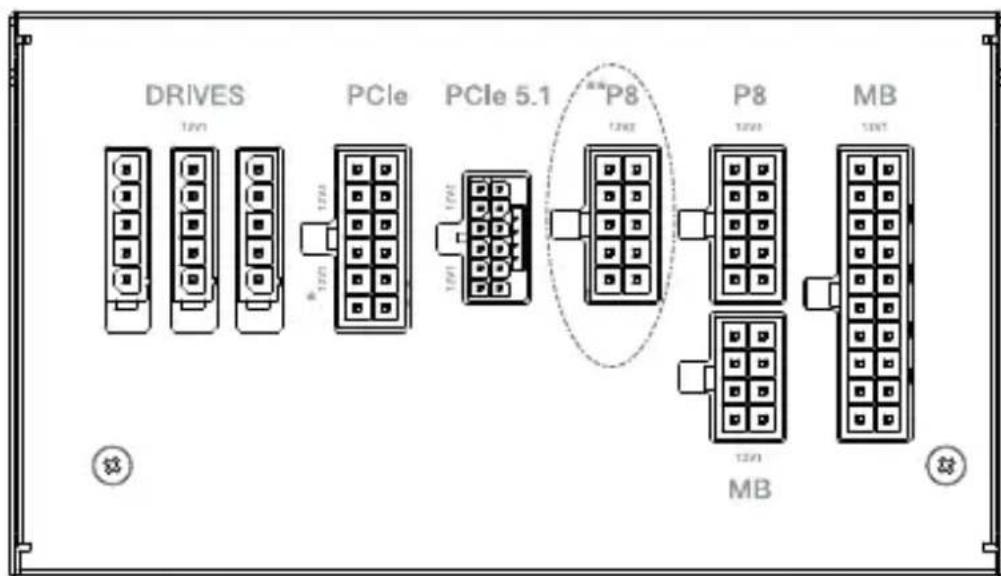
* Use 12V1 first.
** only for 650 / 750 Watt
6. DIMENSIONS
L x W x H (mm): 160 x 150 x 86
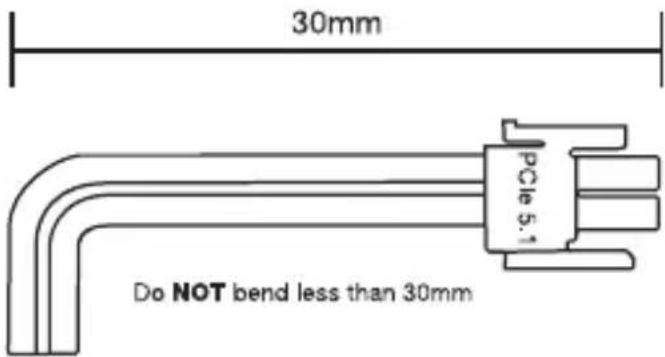
7. CONNECTIVITY AND CABLE LENGTHS
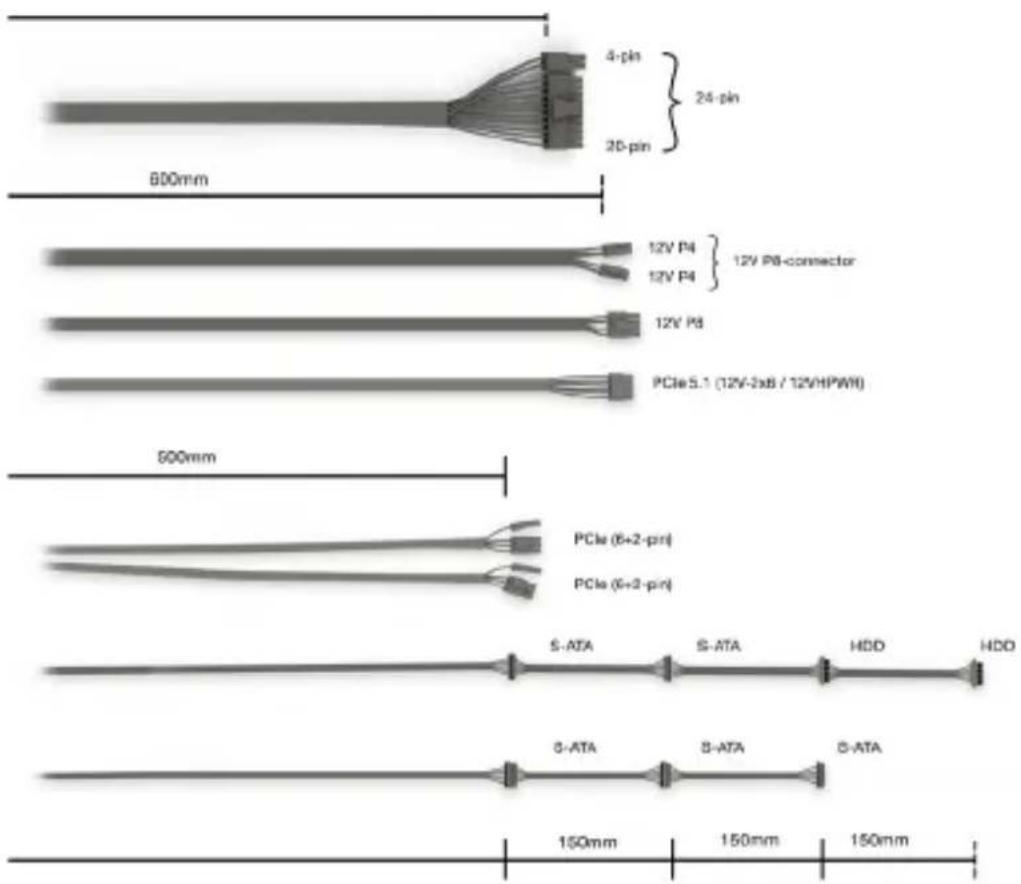
750W
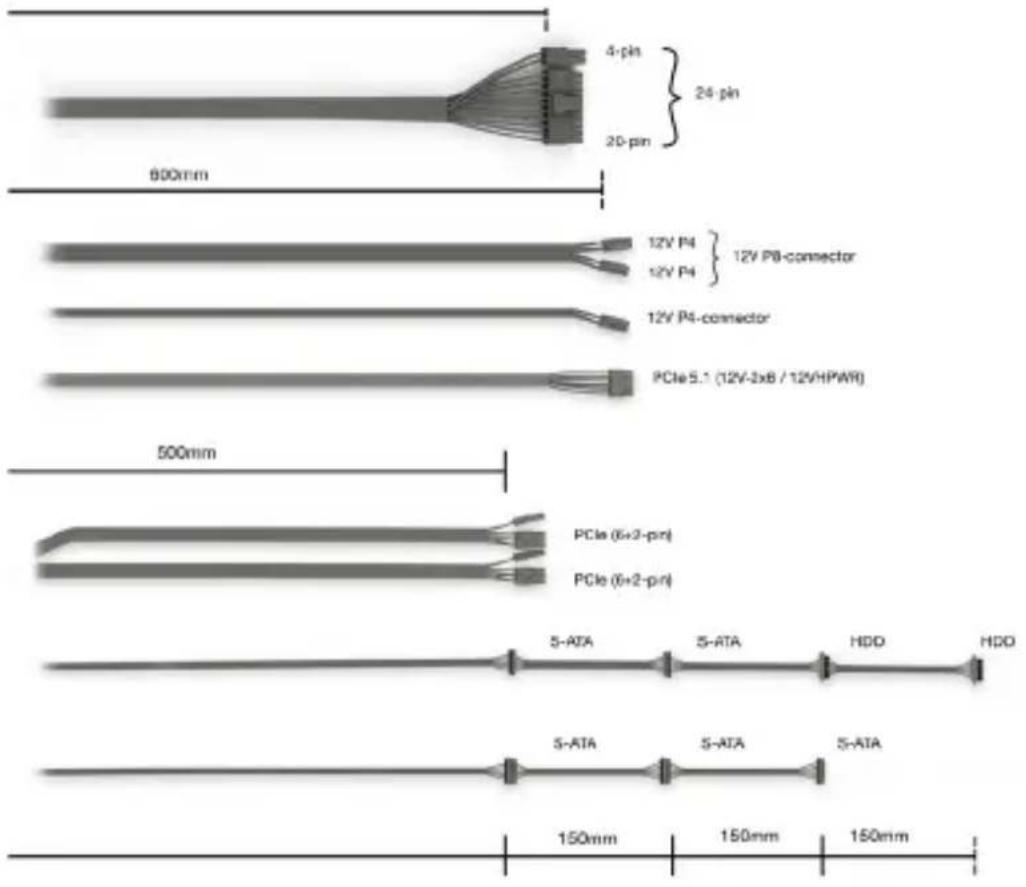
650W
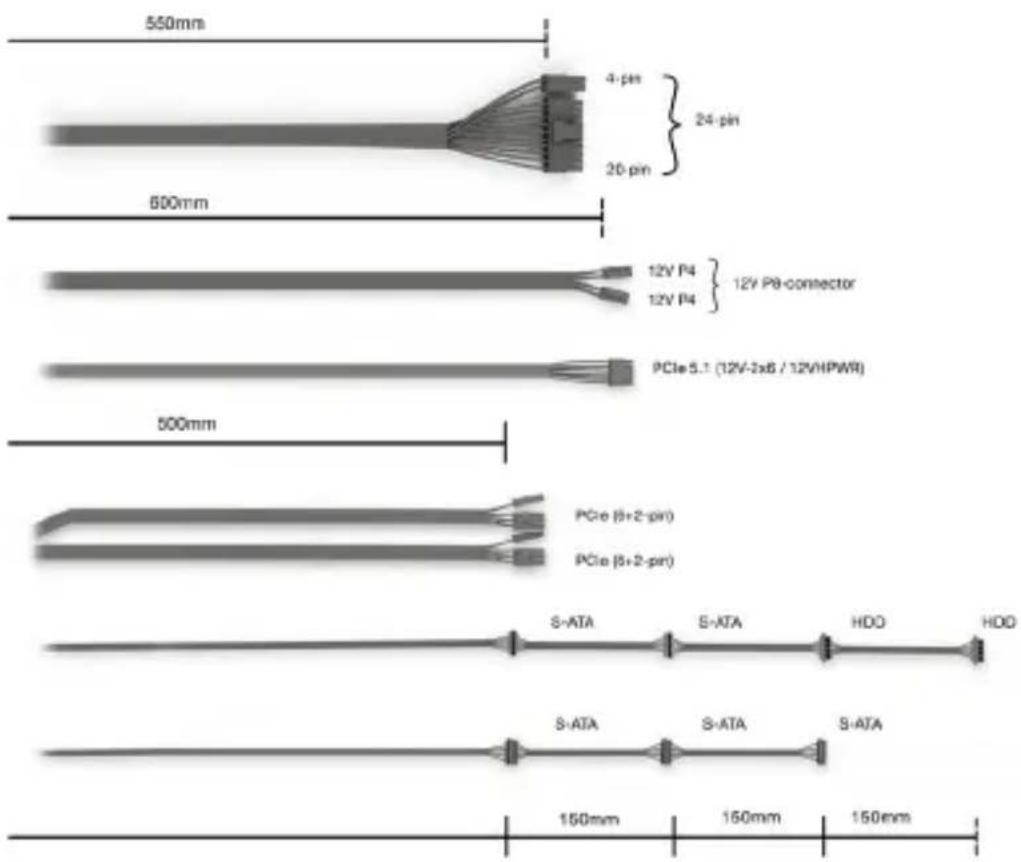
550W
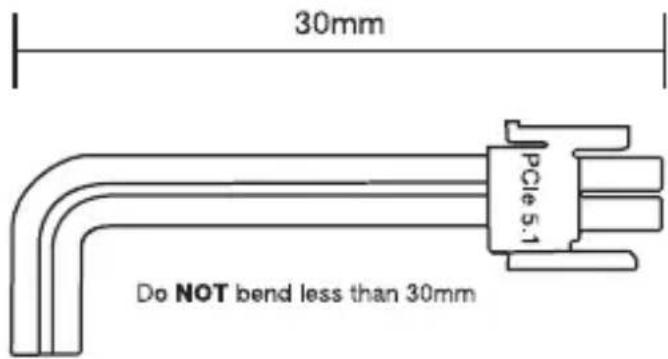
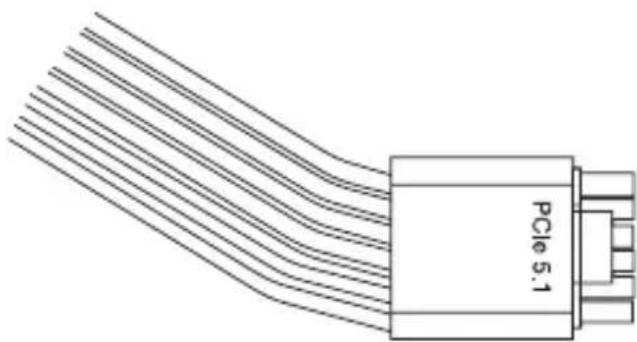
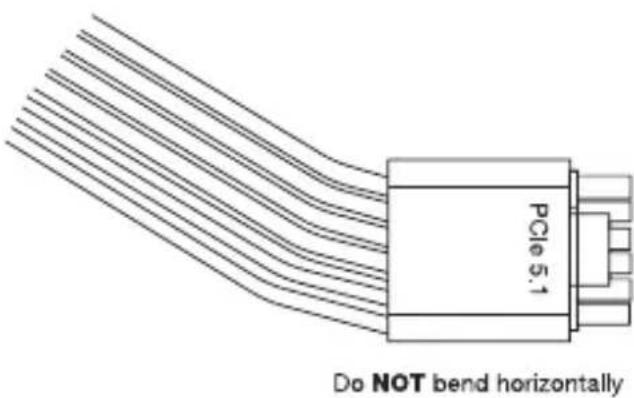
Do NOT bend horizontally
NOTES / NOTIZEN
NOTES / NOTIZEN