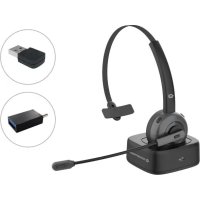
POLONA03BDA - Headphones CONCEPTRONIC - Free user manual and instructions
Find the device manual for free POLONA03BDA CONCEPTRONIC in PDF.



| Product type | Bluetooth wireless headset |
| Model | POLONA03BDA |
| Brand | Conceptronic |
| Connectivity | Bluetooth 5.0 (frequency range 2402-2480 MHz) |
| Maximum power (EIRP) | 3.58 dBm |
| Power supply | Rechargeable battery via USB 5V (power adapter not included) |
| Battery life | Several hours (depends on usage) |
| Control buttons | Multi-function button (MFB), Volume +/-, Mute |
| Phone functions | Answer/hang up, reject, redial last number, voice transfer |
| Music functions | Play/pause, next/previous, SIRI activation |
| LED indicators | Blue/red for power, pairing, low battery, reconnection |
| Charging | Via charging station or USB cable (5V adapter required) |
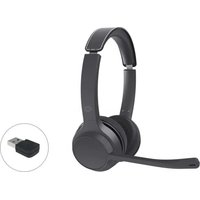
| Bluetooth audio adapter included | Yes, for connection to a computer |
| Safety instructions | Do not expose to water, moisture, fire; do not use if damaged; respect restricted areas |
| Cleaning | Disconnect and turn off before cleaning; do not use harsh products |
| Hearing protection | Do not listen at excessive volume for long periods; risk of hearing damage |
| Warranty | Void if instructions not followed |
| Disposal | Do not dispose of with household waste; recycle via collection points |
| Weight (estimated) | Approximately 200 g (reasonable estimate) |
| Dimensions (estimated) | Approximately 20 x 15 x 5 cm (reasonable estimate) |
Frequently Asked Questions - POLONA03BDA CONCEPTRONIC
User questions about POLONA03BDA CONCEPTRONIC
0 question about this device. Answer the ones you know or ask your own.
Ask a new question about this device
Download the instructions for your Headphones in PDF format for free! Find your manual POLONA03BDA - CONCEPTRONIC and take your electronic device back in hand. On this page are published all the documents necessary for the use of your device. POLONA03BDA by CONCEPTRONIC.
USER MANUAL POLONA03BDA CONCEPTRONIC
| Bluetooth Version | 5.0 |
| Frequency | 2.402 - 2.480GHz |
| EIRP | 3.58dBm |
| Support Bluetooth profile | A2DP/AVRCP/HFP/HSP |
| Battery Capacity | 400mAh rechargeable lithium polymer battery |
| Charging Time | 1.5±0.5 hours |
| Working Time | 22 hours (50% Volume) |
| Standby Time | 850 hours |
1: Multi-Function Button (MFB)
2:Volume +
3:Volume-
4: Mute button
5: USB-C Charging Port
ENGLISH
Safety &Warnings instructions:
Read the operating instructions carefully and especially observe the safety information. If you do not follow the safety instructions and information on proper handling in this manual, we assume no liability for any resulting personal injury or damage to property. Such cases will invalidate the warranty/guarantee.
- Keep the device away from water, humidity, fire or hot environments.
- Keep your device and all its parts and accessories out of the reach of small children.
- Do not leave the packaging material lying around carelessly. This may become dangerous playing material for children.
- Avoid dropping, throwing or crushing the device.
- Do not open, change or damage the device.
- Do not use a damaged USB charger or cable to charge the device. Using an improper charging method may result in fire or explosion.
- Do not recharge batteries near a fire or in extremely hot conditions.
■ Observe signs and notices that prohibit or restrict the use of electronic devices.
Turn off your device in any location where instructed to do so. - Do not listen to music at an excessive volume for prolonged periods. This can lead to hearing damage.
- Unplug all cables and turn your device off before cleaning.
Disposal of waste electrical equipment and batteries: Do not dispose of waste electrical equipment and batteries with household waste. Please hand them to your local recycling point. Batteries should be fully discharged when disposed of. Incorrect storage/disposal can harm the environment and/or cause injury.

CE marking: Conceptronic declares that this product complies with the directives listed in the section 'Declaration of Conformity'.
Radiation Exposure Statement:
This device has been evaluated and found to meet general RF exposure requirements. It can be used in portable exposure conditions without restriction. The device operates within the frequency range of 2402 - 2480 MHz, with a maximum output power (EIRP) of 3.58dBm.
Installation & usage:
| Button | Function | Operation |
| ①Multi-FunctionButton (MFB) | Power on/off | Long press 3 seconds. |
| Pairing | Long press the MFB for around 5 seconds to power on. A prompt tone will sound, the blue light flashes 5 times quickly then blue and red light will flash alternately, and the headset enters the pairing mode when a second prompt tone is heard. Then operate the smartphone/tablet according to instructions to pair with the headset. Select“POLONA03”. | |
| Re-connecting | Power on the headset, double-click the MFB move directly to pairing mode. The paired device needs to be re-connected manually by operating the pairing mode. If the headset disconnects due to moving out of range, it will enter re-connection mode once it moves back within an effective working distance. | |
| Answer/ hang up phone calls | Short press. | |
| Reject phone calls | Long press 2 seconds. | |
| Last Number Redial | Double-click. | |
| Activating SIRI | Long press 1.5 seconds. | |
| Music Play/Pause | Short press. | |
| Voice transfer | During phone calling, long press for 3 seconds and wait for the alert to sound. | |
| ② Volume + | Volume up* | Short press. |
| Next | Long press 2 seconds. | |
| ③ Volume - | Volume down* | Short press. |
| Previous | Long press 2 seconds. | |
| ④ Mute button | Phone call mute | Press about 1 second to turn on/off the MIC. |
- A prompt tone will sound when the volume is at its maximum or minimum.
LED indicator:
| Power-on and Pairing | Blue light flashes 5 times. |
| Power off | Red light flashes 5 times. |
| Pairing mode | Red and blue lights flash alternately. |
| Standby mode | Blue light flashes once every 4 seconds. |
| Low battery reminder | Red light flashes twice every 12 seconds and there is a “Toot” sound every 60 seconds. |
| Reconnect | Blue light flashes once every 5 seconds. |
Charging:
- Charging dock: Connect the charging dock to a 5V power adapter. Red light will always remain on. Place the headset in the dock, and charging will commence once the red light on the headset switches on. When fully charged, the red light of the headphone will turn off. The headset will still work during the charging process.
- The headset also offers direct charging via a cable.
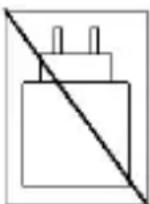
Power Adapter Notice:
This product does not include a power adapter. Please use a power adapter with a 5V charging voltage to charge the product.
Bluetooth Audio Adapter (POLONA03BDA):
- Put the Bluetooth audio adapter into a computer, the device will appear as "POLONA03", it will power on and enter 're-connect mode'. A blue light will flash once every 5 seconds.
- Power on the headset. After it has connected successfully, a blue light will switch on.
- If there is no connection after about 10 seconds, it will enter 'searching and pairing mode' (Red and blue lights flash alternately), in which case operate the headset to connect with the computer, according to instructions (Re-connecting).
DEUTSCH
support@conceptronic.net

www.conceptronic.net
Digital Data Communications GmbH - Im Defdahl 10 F, 44141 Dortmund, Germany
CONCEPTRONIC® is a registered trademark of Digital Data Communications GmbH © Copyright Digital Data Communications GmbH. All Rights Reserved.

Brand : CONCEPTRONIC
Model : POLONA03BDA
Category : Headphones