DualMax WK13016CA - Air purifier Oreck - Free user manual and instructions
Find the device manual for free DualMax WK13016CA Oreck in PDF.



User questions about DualMax WK13016CA Oreck
0 question about this device. Answer the ones you know or ask your own.
Ask a new question about this device
Download the instructions for your Air purifier in PDF format for free! Find your manual DualMax WK13016CA - Oreck and take your electronic device back in hand. On this page are published all the documents necessary for the use of your device. DualMax WK13016CA by Oreck.
USER MANUAL DualMax WK13016CA Oreck
Read this manual carefully, and keep for future reference.

ENERGY STAR
This product earned the ENERGY STAR by meeting strict energy efficiency guidelines set by the US EPA. US EPA does not endorse any manufacturer claims of healthier indoor air from the use of this product.
The energy efficiency of this ENERGY STAR qualified model is measured based on a ratio between the model's CADR for dust and the electrical energy it consumes, or CADR/Watt.
Enjoy
Congratulations on your purchase of the Oreck DualMax™ air purifier. Use this manual to learn the features, operation and maintenance of the Oreck Air Purifier.
Welcome to our Call. Click. Visit. customer service program. To contact Oreck:
Call

USA: 1·800·989·3535
Canada: 1·888·676·7325
Click

www.oreck.com
Visit

Visit one of our many Oreck store locations

Contents
Safety 3
GeneralWarnings. 3
PlacementWarnings 4
Features 5
Operation. 7
Cleaning 8
Cleaning Intervals 8
Cleaning the Pre-Filter 9
Cleaning the Truman Cell 9
Drying the Truman Cell 11
DryOperationMode. 11
Cleaning the ExhaustGrille. 12
Troubleshooting 13
Warranty 14
Spanish 15
French 30

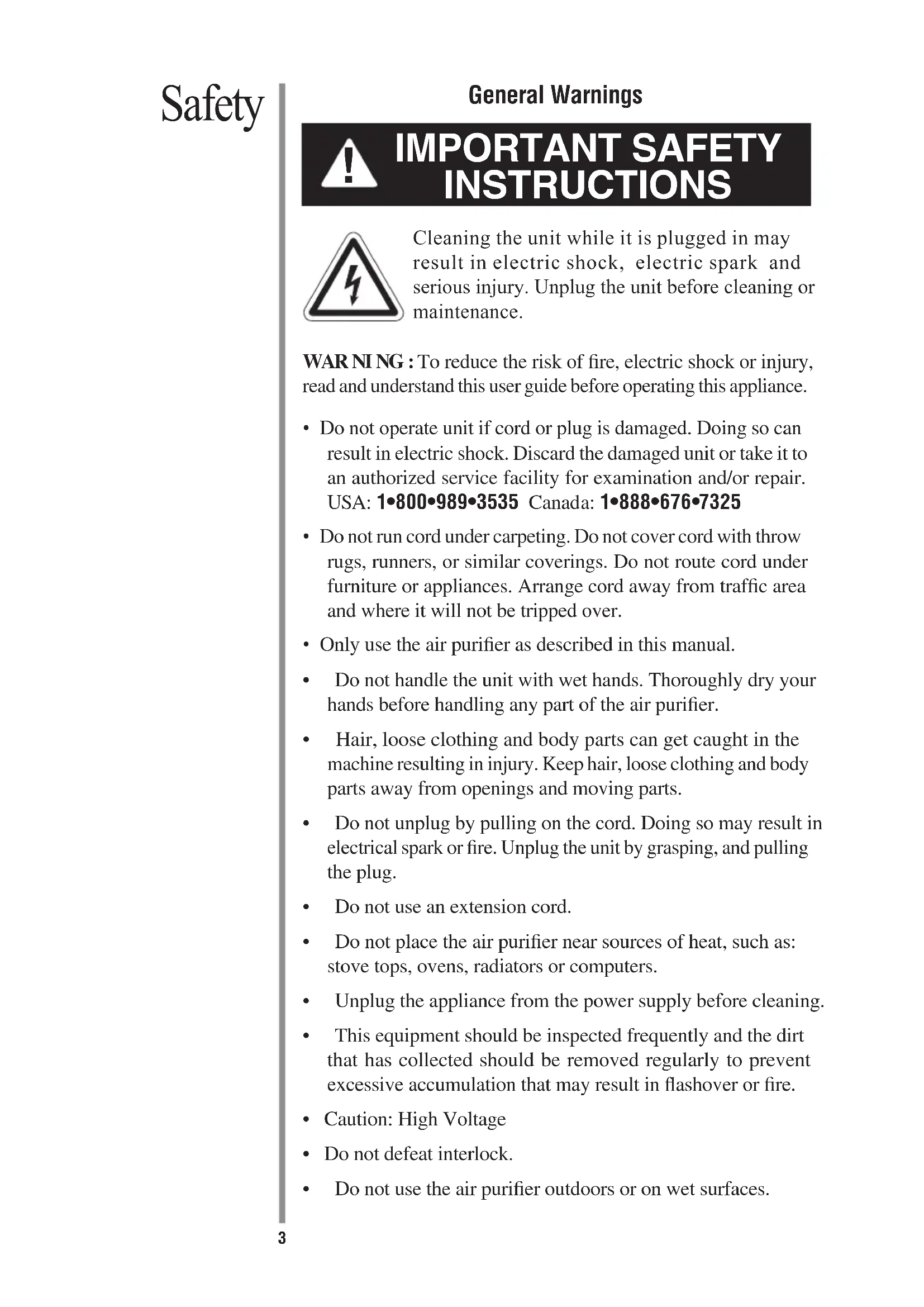
IMPORTANT SAFETY INSTRUCTIONS
Cleaning the unit while it is plugged in may result in electric shock, electric spark and serious injury. Unplug the unit before cleaning or maintenance.
WARNING : To reduce the risk of fire, electric shock or injury, read and understand this user guide before operating this appliance.
- Do not operate unit if cord or plug is damaged. Doing so can result in electric shock. Discard the damaged unit or take it to an authorized service facility for examination and/or repair.
USA: 1-800-989-3535 Canada: 1-888-676-7325 - Do not run cord under carpeting. Do not cover cord with throw rugs, runners, or similar coverings. Do not route cord under furniture or appliances. Arrange cord away from traffic area and where it will not be tripped over.
- Only use the air purifier as described in this manual.
- Do not handle the unit with wet hands. Thoroughly dry your hands before handling any part of the air purifier.
- Hair, loose clothing and body parts can get caught in the machine resulting in injury. Keep hair, loose clothing and body parts away from openings and moving parts.
- Do not unplug by pulling on the cord. Doing so may result in electrical spark or fire. Unplug the unit by grasping, and pulling the plug.
- Do not use an extension cord.
- Do not place the air purifier near sources of heat, such as: stove tops, ovens, radiators or computers.
- Unplug the appliance from the power supply before cleaning.
- This equipment should be inspected frequently and the dirt that has collected should be removed regularly to prevent excessive accumulation that may result in flashover or fire.
- Caution: High Voltage
- Do not defeat interlock.
-
Do not use the air purifier outdoors or on wet surfaces.
-
Do not use the air purifier in an enclosed space where flammable, combustible or explosive gases are present.
- Do not use in an area where toxic vapors, flammable dust or oxygen tanks are present. Check the location and make sure these elements are not present.
- Warning: Product contains chemicals known to the State of California to cause cancer, birth defects, or other reproductive harm.
- Do not place open flames, including candles, directly in front of the air purifier.
- It is important to keep all objects away from the air intake grille.
- Place the air purifier on a flat, solid, stable surface. Never place the unit on soft surfaces such as a bed or sofa.
- Position the air purifier so that the dirty air is not drawn across your head or body while sitting or sleeping.
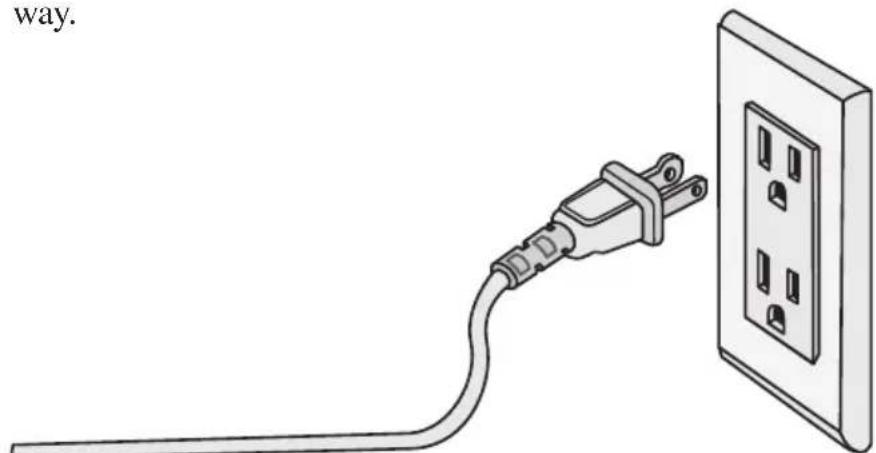
- Place the air purifier so the plug on the power cord easily reaches a standard electrical outlet for a polarized plug.
Children should be supervised when product is in use. Do not allow children to play on or near the air purifier. Keep children's hair, loose clothing, and body parts away from/out of the intake grille, vents, holes, or openings.
This product is suitable for use with solid-state speed controls.
Note: To reduce the risk of electric shock this product has a polarized plug (one blade wider than the other). The plug will only fit in a polarized outlet only one way. If the plug does not fit properly, reverse the plug. If it still does not fit, contact qualified personnel to install the proper outlet. Do not alter the plug in any way.
READ AND SAVE THESE INSTRUCTIONS
Features
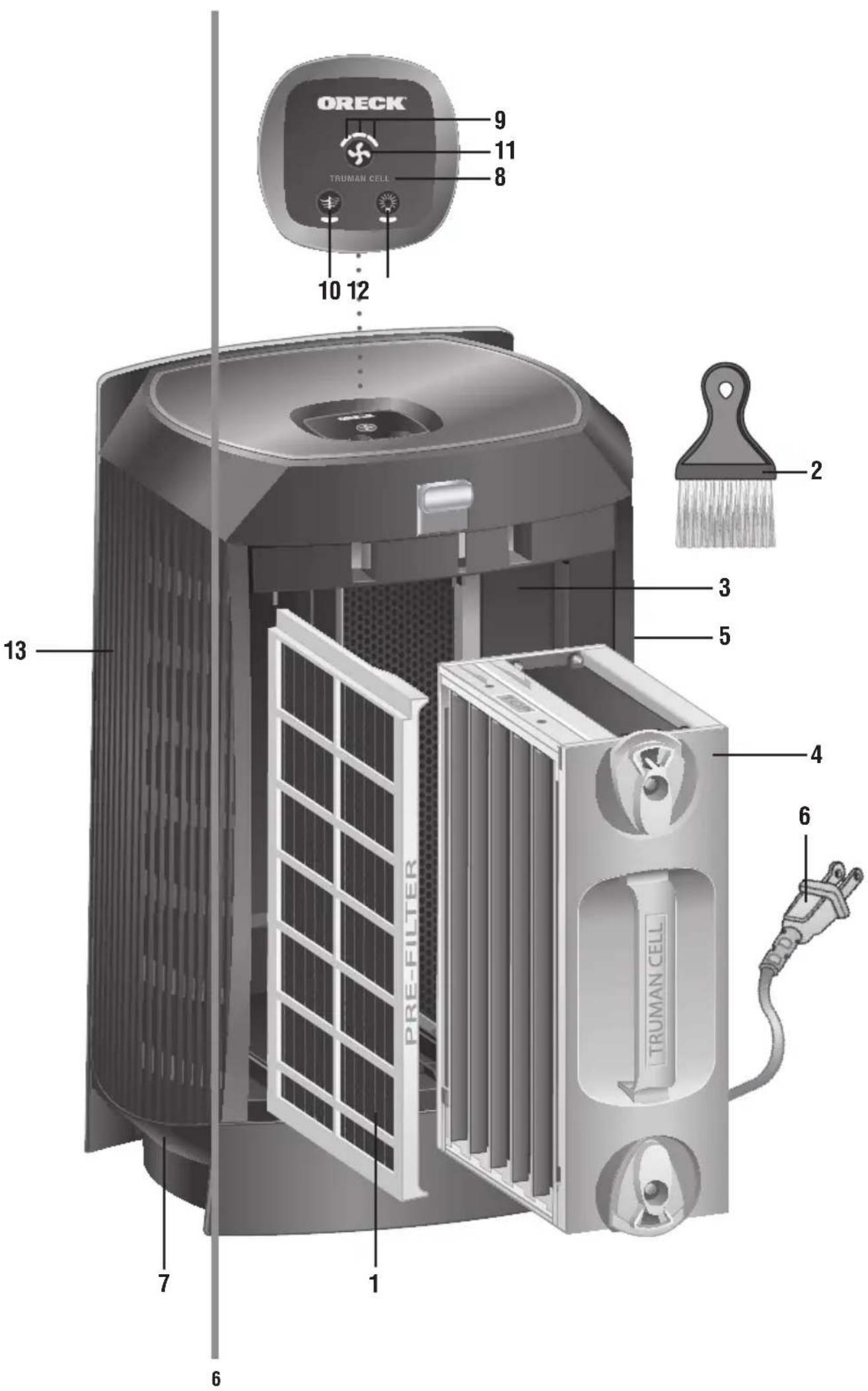
- Pre-Filter: Filter large particles such as dust, hair and lint.
- Cleaning Brush: Use to clean the front and back grilles. Stores snuggly in the compartment under the cover.
- Odor Absorber System: This component combines advanced catalytic technologies to reduce odors and chemical fumes from glues, solvents, and synthetic materials when air passes through the filter and is activated by the DualMax™ internal lights. (The Odor Absorber System cannot be removed.)
- Truman Cell: Electrostatically charges and collects small particles such as dust, smoke, pollen, mold, and fungi from the air that passes through the filter.
- Exhaust Grille: Directs the flow of air as it exits the unit.
- Power Cord: Plug into the outlet to begin use.
- Night Light: The Oreck logo on the front panel & the indicators on the control panel will illuminate when the night light is activated.
- Collector Cell Light: A solid amber light is included as a handy reminder to clean the Truman Cell after 30 days. A blinking light indicates a malfunction that has caused the Truman Cell® to shut down and requires attention.
- Speed Indicator Light: The speeds will be cumulatively indicated: 1= silent; 1+2= medium; 1+2+3= high.
- Odor Absorber Button: This button turns the internal lights on or off as desired. If turned off, the unit will continue to filter particles from the air that passes through the filter but its odor and VOC capability will be greatly reduced.
- Motor Speed/Power Button: Press the power button repeatedly for the desired speed.
Low for Silence Technology
Medium for normal use
High for maximum cleaning - Night Light Button: Repeatedly press this button to change the lighting scheme to best suit your preference.
- Front Grille: Air enters here for the first stage of cleaning.
Operation
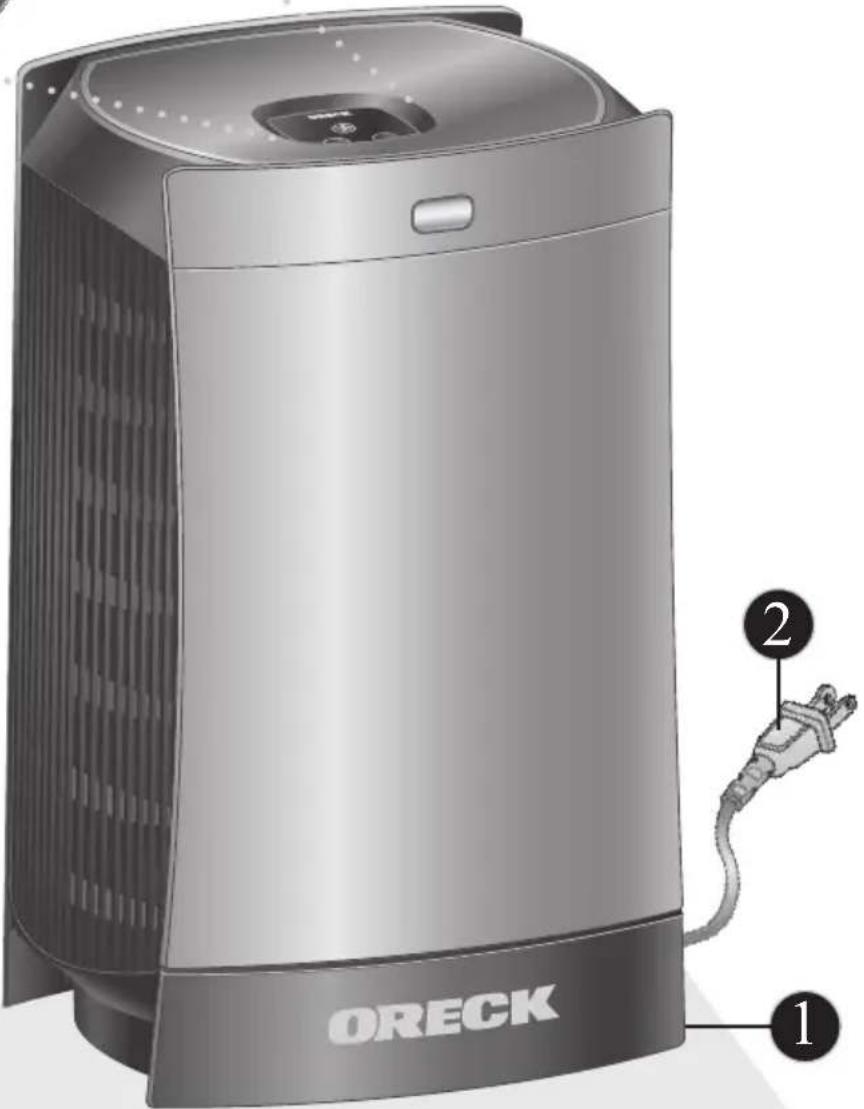
- Place. Locate the air purifier on a solid surface. Be sure the grille is not blocked by other objects and there are no candles or flames near the unit.
- Plug In. Plug into nearest standard electrical outlet that accepts a polarized plug.
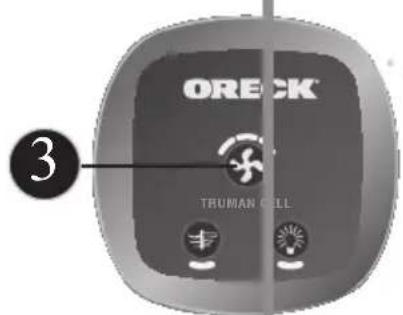
- Select the air cleaning speed. Press the motor speed/power button until you reach the desired speed.
Cleaning
Cleaning Intervals
Proper care and cleaning of the air purifier is critical to performance. The following chart shows the cleaning intervals and method.
| Part Cleaning Time | Method | |
| Cabinet As needed | Wipe with damp cloth first. If required, follow with mild, non-abrasive cleaner. | |
| Truman Cell® | 2 to 4 weeks | Spray Oreck Assail-a-Cell® cleaner or soak in warm water or warm water with mild liquid detergent. Rinse and dry. |
| Pre-Filter 2 to 4 weeks | Rinse thoroughly in warm water or as needed. | |
| Air Direction Grillie | As needed Use the brush provided with the air purifier to brush away debris in between the slots. | |
WARNING!
Cleaning the unit while it is plugged in may result in electric shock, electric spark and serious injury. Unplug the unit before cleaning or maintenance.
Cleaning the Pre-Filter
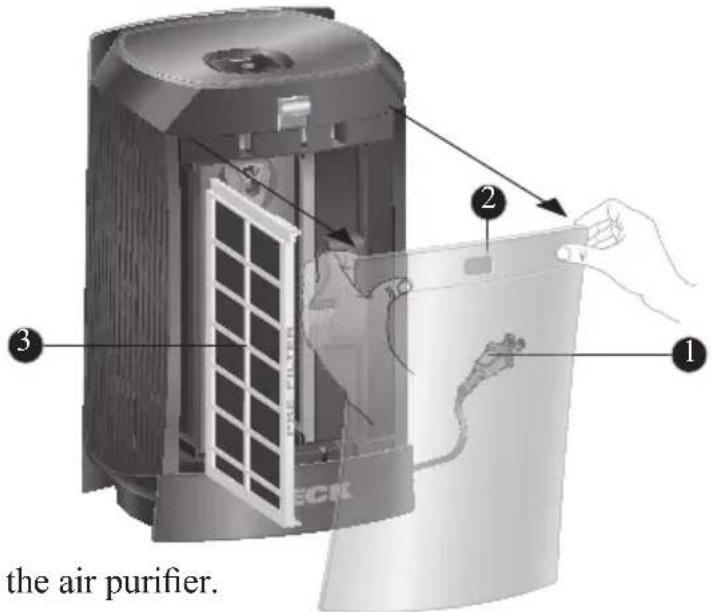
- Unplug the air purifier.
- Open the Cover by gently pulling from the top corners.
- Pull the Pre-Filter straight out of the Cabinet.
- Thoroughly rinse the Pre-Filter and let it air dry before placing it back in the Cabinet. Do not use heated or compressed air as part of the drying process.
- Slide the Pre-Filter back into the unit.
- Close the Cover securely.
Cleaning the Truman Cell®
Note: The Truman Cell may require more frequent cleaning if "arcing" occurs. Arcing is a sharp snapping sound that occurs when large particles are collected in the Truman Cell. If prolonged or continuous arcing occurs, the Truman Cell should be cleaned.
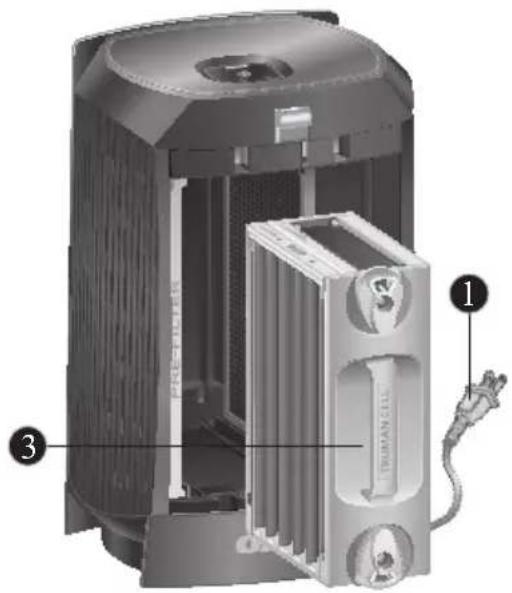
- Unplug the air purifier.
- Open the Cover by gently pulling from the top corners.
- Remove the Truman Cell by unlocking top and bottom knobs and pulling straight out.
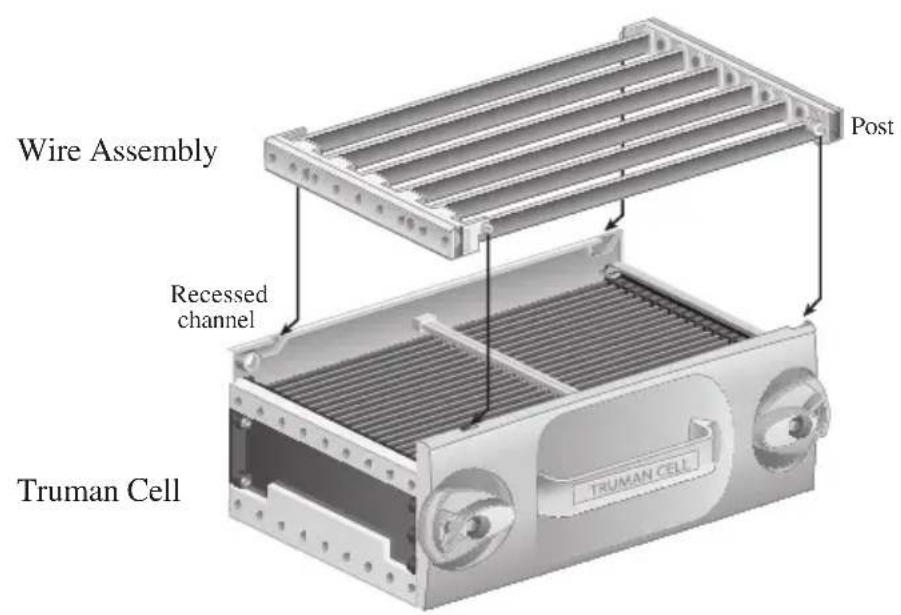
- Separate the Truman Cell from the Wire Assembly for easier access to each during cleaning.
-
Place each in sink, bathtub or other location where cleaner can cover every surface.
-
Spray Oreck Assail-a-Cell® cleaner between each Cell Plate and cover each surface. Allow the cleaner to soak for a few minutes but do not let it dry. Thoroughly rinse the Truman Cell® with clean water.
An alternative method to clean the Truman Cell is to rinse or soak it in warm water for loose debris. Mild liquid dish detergent in water may also be used to help break down tough dirt and residue. Thoroughly rinse the Truman Cell with clean water.
Note: To prevent damage to the components of the Truman Cell, do not put in dishwasher or use a cotton swab.
Tough residue such as tar from tobacco smoke may need additional cleaning or longer soaking.
-
Shake excess water from the Truman Cell to speed up drying time. Do not use heated or compressed air to dry.
-
Reassemble the Wire Assembly and Truman Cell® by inserting the (4) post located on the outside edges of the Wire Assembly into the recessed channels of the Truman Cell®. After guiding the post into the recessed channels, slide the Wire Assembly until it locks into place.
-
Place the Truman Cell ® back into the unit by sliding it straight in and turning each knob to its locking position. The Truman Cell ® is specially designed so that it can only be inserted in one direction.
-
Close the Cover securely.
Drying the Truman Cell®
Note: The Truman Cell® must be completely dry after cleaning in order to operate properly. A drying mode is available to help remove any residual moisture. While in this mode, the fan will be running on Medium speed, and no power will be supplied to the Truman Cell. Once the unit detects that the Truman Cell® is completely dry, it will return to its original operating settings and function as normal.
"Dry Mode" Operation
If the power supply detects that the Truman Cell is wet, it shuts down power to the cell and causes the Collector Cell light to blink rapidly.
- While the Collector Cell light is blinking, press and hold the power button to initiate "Dry Mode".
-
Next, the following will all happen simultaneously:
-
The lights directly above and below the power button will flash 3 times.
-
The unit will switch to medium speed.
The Collector Cell light will start to blink in a slow pattern. -
Once in "Dry Mode"
-
The unit will run for 60 minutes and then attempt to reset the power supply to the Truman Cell®.
- If the power supply successfully restarts, the unit will return to its original speed and run as normal.
- If not successful, it will go through the same process up to two more times.
- If still not successful after the third try, the cell is likely damaged or is shorting out due to the presence of a foreign object; it will return to the original speed and the Collector Cell light will blink with a rapid blink pattern indefinitely until the unit is reset.
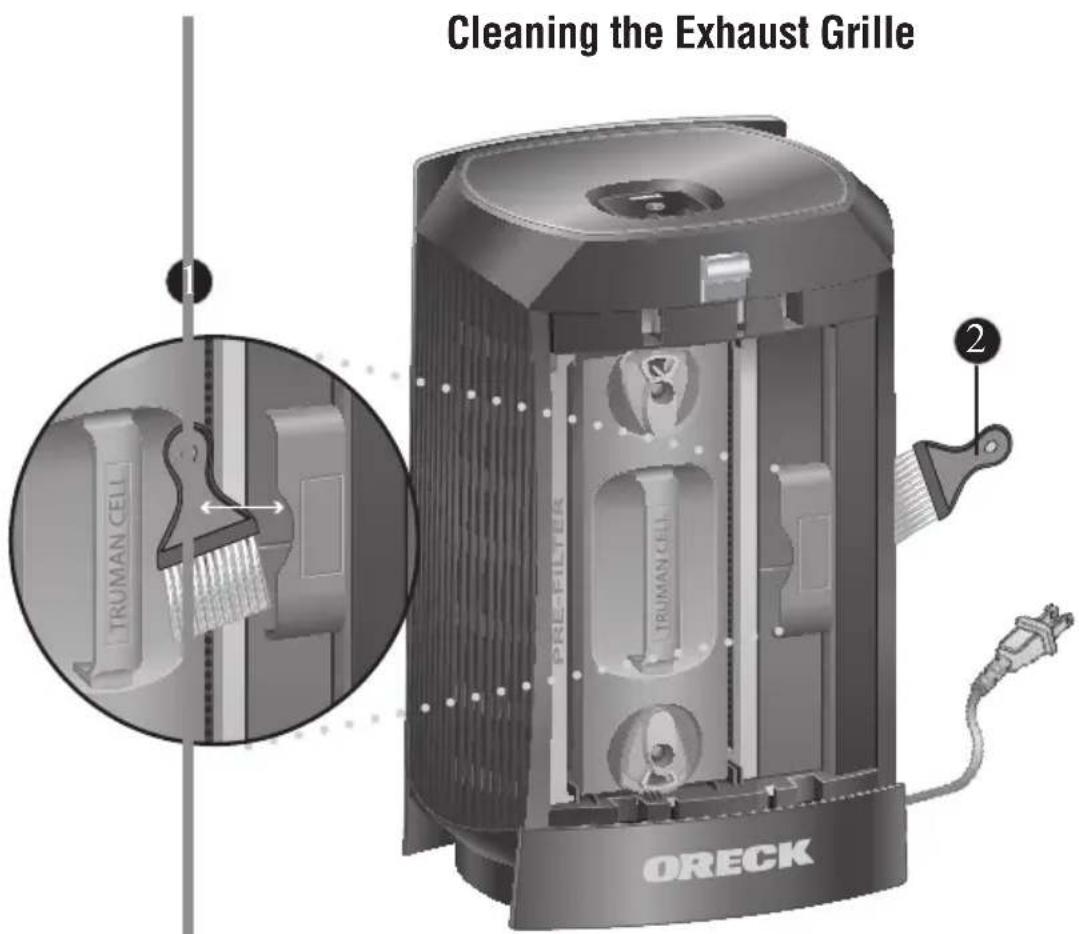
- Remove the Cleaning Brush from the storage slot located under the Cover.
- Brush away debris that has collected between the Grille Slots.
- Return the Cleaning Brush to the storage slot.
Troubleshooting
Service problems that appear to be major can often be solved easily. You can be your own troubleshooter by reviewing this guide.
All other servicing should be done by an Oreck authorized service center.
| Problem Check Solution | ||
| Unit does not turn ON | • Power Cord • Selector Switch • Cover | • Plug in Power Cord • Set Selector Switch for desired fan speed. • Make sure the cover is securely closed |
| Truman Cell®light has turned solid amber. | Truman Cell®· | A solid amber light is a 30 day c reminder. Wash Collector Cell. Make sure it is thoroughly clean before reinstalling. |
| Truman Cell®light is blinking amber. | Truman Cell®· | A fast blinking light indicates the supply has shut down due to arcing or short circuit. The cell should be inspected and cleaned, repaired, or replaced. • A slow blinking light indicates the unit is in Dry Mode. |
| Unit does not remove particles. | Truman Cell®· | Clean the Truman Cell®. • Truman Cell®by damaged. Contact Oreck for service. |
| Unit sparks, crcrackles and pops. | Truman Cell® | • Sparking or popping noise (arcing) can occur when a large particle is captured in the Truman Cell®. If the unit is arcing excessively, the cell may be dirty. Try cleaning the Truman Cell®. • If excessive arcing continues after proper cleaning, the Truman Cell®may be damaged. If damaged, contact Oreck for service. |
| Unit still does not operate properly. | Review all the above. | Contact Oreck for service. |
Warranty
ORECK MANUFACTURING COMPANY: (Oreck Manufacturing Company gives you the following limited warranty for this product only if it was originally purchased for residential use, not for resale, from Oreck or an Oreck Authorized Retail Dealer.)
Oreck will repair or replace, free of charge, to the original purchaser, any part that is found to be defective in material or workmanship within five (5) years following the date of purchase for all residential models. NOTE: If the unit is used commercially, a one (1) year overall warranty applies.
This limited warranty does not cover the replacement of expendable or consumable parts such as filters, cartridges, and other parts subject to normal wear unless they are defective in material or workmanship.
This limited warranty does not apply to any part subjected to accident, abuse, commercial use, alteration, misuse, damage caused by act of God, the use of voltages other than on the data plate of this product or service of this product by other than Oreck or a participating Factory Authorized Service Center.
Oreck does not authorize any person or representative to assume or grant any other warranty obligation with the sale of this product.
Oreck's limited warranty is valid only if you retain proof of purchase from Oreck or an Oreck Authorized Retail Dealer for this product. If you purchase this product from any other source, your purchase is "AS IS," which means Oreck grants you no warranty, and that you, not Oreck, assume the entire risk of the quality and performance of this product, including the entire cost of any necessary servicing or repairs of any defects.
Oreck's liability for damages to you for any costs whatsoever arising out of this statement of limited warranty shall be limited to the amount paid for this product at the time of original purchase, and Oreck shall not be liable for any direct, indirect, consequential or incidental damages arising out of the use or inability to use this product. Some states do not allow the exclusion or limitation of incidental or consequential damages, so the above limitation or exclusion may not apply to you.
ALL EXPRESS AND IMPLIED WARRANTYES OTHER THAN THE LIMITED WARRANTY SET FORTH ABOVE, FOR THIS PRODUCT, INCLUDING IMPLIED WARRANTYES OF MERCHANTABILITY AND FITNESS FOR A PARTICULAR PURPOSE ARE EXPRESSLY DENIED.
This warranty gives you specific legal rights, and you may also have other rights which vary from state to state.
Guía del usuario
ORECK
© 2012 Oreck Holdings, LLC.
All rights reserved. All marks, text, logos, product configurations and registered trademarks are owned and used under the authority of Oreck Holdings, LLC.
22040-02 REV B 02/12 ECN#10934