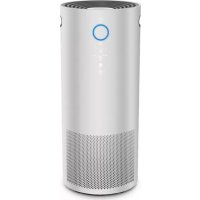
Air Response Turbo WK18500 - Air purifier Oreck - Free user manual and instructions
Find the device manual for free Air Response Turbo WK18500 Oreck in PDF.


| Brand | Oreck |
| Model | Air Response Turbo WK18500 |
| Product type | Air Purifier |
| Use | Household only |
| Filter | 3-layer filter (pre-filter, odor control layer, HEPA filter) |
| Fan modes | Manual (Low, Medium, High), Auto, Night, Turbo |
| Timer | 1, 2, 4, 6 or 8 hours |
| Air quality indicator | Yes (blue, purple, red) |
| Dust sensor | Yes, at the back of the unit |
| Child lock | Yes, press and hold 3 seconds |
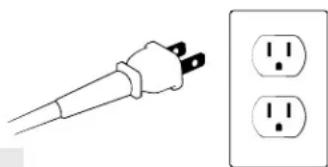
| Plug type | Polarized (one blade wider) |
| Filter replacement | Every 12 months (12h/day) – filter not washable |
| Replacement filter model | Type B4 (AK48500) |
| Warranty | 2-year limited (defective parts) |
| Customer service | 1.800.989.3535 (USA) / Oreck.com |
Frequently Asked Questions - Air Response Turbo WK18500 Oreck
User questions about Air Response Turbo WK18500 Oreck
0 question about this device. Answer the ones you know or ask your own.
Ask a new question about this device
Download the instructions for your Air purifier in PDF format for free! Find your manual Air Response Turbo WK18500 - Oreck and take your electronic device back in hand. On this page are published all the documents necessary for the use of your device. Air Response Turbo WK18500 by Oreck.
USER MANUAL Air Response Turbo WK18500 Oreck
AIR RESPONSE™ TURBO AIR PURIFIERS | OWNER'S MANUAL

natural_image
Close-up of a white cylindrical device with a blue circular button and control buttons, no visible text or symbols.CONTENTS
Important Safety Instructions ....1
Display Icons 3
Operating Air Response™ Turbo ..... 4
Maintenance 7
Troubleshooting & Certified Parts .....9
Warranty 10
IMPORTANT: READ CAREFULLY BEFORE ASSEMBLY AND USE
This air purifier is intended for household use only. If used commercially, warranty is VOID.
IMPORTANT SAFETY INSTRUCTIONS SAVE THESE INSTRUCTIONS
When using an electrical appliance, basic precautions should always be followed, including the following:
READ ALL INSTRUCTIONS BEFORE USING THIS APPLIANCE.
WARNING: TO REDUCE THE RISK OF FIRE, ELECTRIC SHOCK OR INJURY:
• Fully assemble before operating.
- Operate unit only at voltage specified on data label.
- Do not use the unit outdoors or on wet surfaces. Do not allow to get wet.
- Do not allow to be used as a toy. Not intended for use by children age 12 and under. Close supervision is necessary when used by or near children. To avoid injury or damage, keep children away from product, and do not allow children to place fingers or other objects into any openings.
- Use only as described in this manual. Use only manufacturer's recommended attachments and products.
- Do not use unit with damaged cord or plug. If appliance is not working as it should, has been dropped, damaged, left outdoors, or dropped into water, return it to a service center or call customer service at 1.800.989.3535 prior to continuing use.
- Do not pull or carry by cord, use cord as a handle, close door on cord, or pull cord around sharp edges or corners.
- Do not place product on cord.
- Do not place the unit near sources of heat such as stove tops, radiators, or computers.
- Do not unplug by pulling on cord. To unplug grasp the plug, not the cord.
- Do not handle plug or unit with wet hands.
- Do not put any object into openings. Do not use with any openings blocked; keep free of dust, lint, hair, and anything that may reduce air flow.
- Keep hair, loose clothing, fingers and all parts of body away from openings and moving parts.
- Do not use the unit in an enclosed space where flammable, combustible, or explosive gases are present.
- Do not use without filters in place.
-
Do not use in an area where toxic vapors, flammable dust or oxygen tanks are present. Doing so may result in serious injury or death. Check the location and make sure these elements are not present.
-
Do not run cord under carpeting. Do not cover cord with throw rugs, runners, or similar coverings. Arrange cord away from traffic area and where it will not be tripped over.
- Do not block or partially block the air intake or air exhaust grilles. Ensure that there is adequate airflow around the unit.
- Unplug the cord from the outlet when not in use or before any routine cleaning or maintenance. Turn off all controls before unplugging.
- Keep the unit away from heaters/fireplaces and other hot objects/locations.
- Do not place any items on top of the unit, or sit on the unit.
- Never open the front cover while the unit is plugged into a wall outlet.
- Keep personal and loose objects (such as jewelry, loose ties, long hair etc.) away from unit.
- Never use compressed gas dusters, canned air, flammable or aerosol cleaners on this product. Some cleaning agents may combust causing serious injury and/or property damage.
- Keep children and pets away from the unit.
- Do not place open flames, including candles, directly in front of the air purifier.
PLEASE KEEP INSTRUCTIONS FOR FURTHER USE.
It is important to consider the following when deciding on where to locate the air purifier:
- Position the air purifier on a flat, solid, stable surface. Never place the unit on soft surfaces such as a bed or sofa.
- Position the air purifier where the dirty air is not drawn across your head or body while sitting or sleeping.
- Position the air purifier so the plug on the power cord reaches a standard electrical outlet for a polarized plug.
! WARNING !
THIS PRODUCT CONTAINS CHEMICALS KNOWN TO THE STATE OF CALIFORNIA TO CAUSE CANCER AND BIRTH DEFECTS OR OTHER REPRODUCTIVE HARM. WASH HANDS AFTER HANDLING.
CALIFORNIA PROPOSITION 65 WARNING

WARNING: Cancer and Reproductive Harm – www.P65Warnings.ca.gov
! CAUTION !
STORE APPROPRIATELY INDOORS IN A DRY PLACE. DO NOT EXPOSE MACHINE TO FREEZING TEMPERATURES.
natural_image
Illustration of a power plug and two separate electrical outlets (no text or symbols)! WARNING !
TO REDUCE THE RISK OF ELECTRIC SHOCK, THIS EQUIPMENT HAS A POLARIZED PLUG (ONE BLADE IS WIDER THAN THE OTHER). THIS PLUG WILL FIT IN A POLARIZED OUTLET ONLY ONE WAY. IF THE PLUG DOES NOT FIT FULLY IN THE OUTLET, REVERSE THE PLUG. IF IT STILL DOES NOT FIT, CONTACT QUALIFIED PERSONNEL TO INSTALL THE PROPER OUTLET. DO NOT ALTER THE PLUG IN ANY WAY.
DISPLAY ICONS

text_image
Power On / Off Fan Speed, Auto Mode, and Night Mode Filter Replacement Light Air Inlet Air Quality Indicator Light ● Low Medium High Particle Count Timer 1, 2,4,6,8 Hours Turbo Mode Child Lock
text_image
Carry Handle Carry Handle Dust Sensor 3-Stage FilterOPERATING AIR RESPONSE™ TURBO

natural_image
Illustration of a modern cylindrical device with a hand interacting with its touchscreen, accompanied by an inset close-up of the finger's touch (no text or symbols visible)Power On / Off
Remove all plastic and packaging from the unit and filter prior to operating.
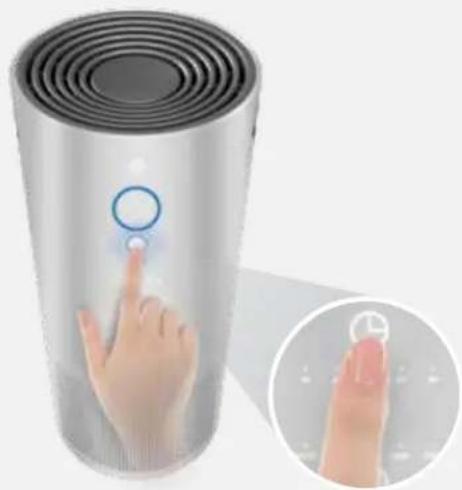
Timer
natural_image
Illustration of a modern cylindrical device with a finger pressing a button, accompanied by an inset close-up of its finger pointing at a clock (no text or symbols visible)Timer Control
Press to set timer. The timer lights will illuminate showing the time selected: 1, 2, 4, 6, or 8 hours. The air purifier will turn off once the selected time has completed.
The unit will run continuously if no timer option selected.

natural_image
Solid blue rectangular shape with no text, symbols, or patterns
natural_image
Illustration of a smart speaker with a hand interacting with the screen, showing speed control interface (no text or symbols on device)Speed Control:
Manual Fan Speed: L=Low M=Medium H=High
Auto Mode: The dust sensor will automatically adjust the fan speed based on particles detected in the air. Night Mode: Dims the lights and turns fan speed to low for easy sleeping.
| Particle Count | ||
| Blue Light Purple | Light Red Light | |
| Low Medium High | ||



Auto
Auto Mode: Air Quality Indicator Light
Lets you know auto mode is working by changing colors depending on the amount of particles in the air.
The Air Quality Indicator Light will remain blue in manual mode.
natural_image
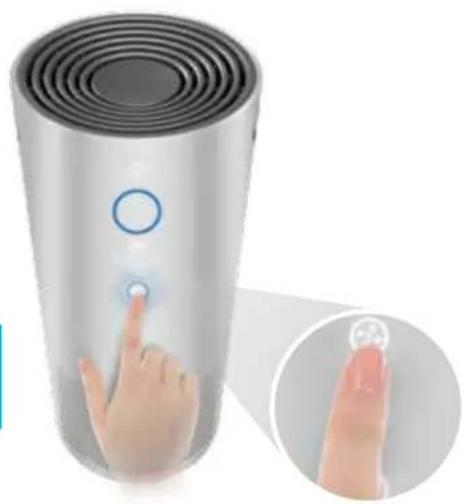
Illustration of a smart speaker with a finger pointing at the button, accompanied by an inset showing the hand interacting with a small circular object (no text or symbols visible)Turbo Mode
Place into turbo mode for maximum fan speed to address highly polluted air.

natural_image
Illustration of a child lock device with a finger pressing the button, shown in an inset close-up (no text or symbols on the device itself)Press lock button for 3 seconds to lock controls. To unlock controls, press lock button again for 3 seconds
MAINTENANCE
natural_image
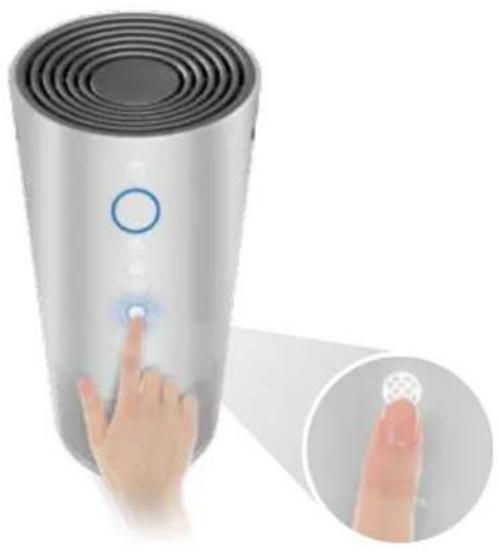
Hand interacting with a cylindrical device displaying a smart speaker icon, with an inset showing a finger pointing to the screen (no text or symbols visible)3-Stage Filter Indicator
Indicator light will illuminate to remind you to change the 3-Stage Filter.
Replace main filter every 12 months based on 12 hours of use per day. This may happen more frequently depending on usage.
Replacement Filter Guide
| Air ResponseTM Size Filter Replacement Kit* | |
| Small (Model# WK16000) Type B1 (Model# AK46000) | |
| Medium (Model# WK16001) Type B2 (Model# AKz46001) | |
| Large (Model# WK16002) Type B3 (Model# AK46002) | |
| Turbo (Model# WK18500) Type B4 ( Model# AK48500) |
*Filter Replacement Kit includes:
(1) 3-Stage Filter (combines a pre-screen, odor control + HEPA Media)
IMPORTANT!
Only certified Oreck® accessories, parts and filters should be used with this product.
Please call 1-800-989-3535 (U.S.) or visit Oreck.com for reorder information.
CAUTION! TO REDUCE THE RISK OF INJURY FROM MOVING PARTS - UNPLUG BEFORE CLEANING AND SERVICING. IMPORTANT! THE FILTERS ARE NOT WASHABLE.
Replacing the 3-Stage Filter
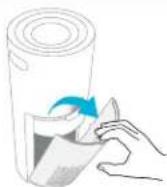
Once Filter Replacement indicator light illuminates, remove the cover filter.
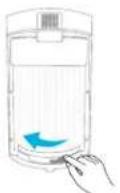
- Slide the filter lock to the left. (Unlock position).
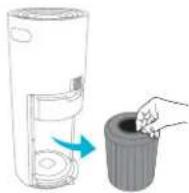
3 Carefully pull the used filter out.
▶ Replace 3-Stage filter according to indicator light.
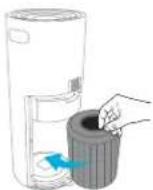
3 Slide replacement filter into the unit.

4 Lock the filter into place by sliding the filter lock the right. Refit the filter cover.
Remove any plastic coverings from new filter(s) before installing.
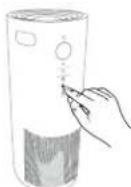
5 After cover is refit, hold down Filter Replacement indicator button for 5 seconds to reset the air purifiers indicator light.
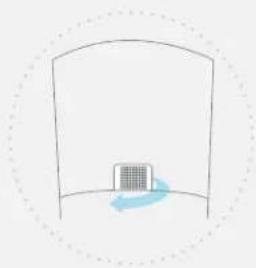
Dust Sensor is located on the back of the unit.
natural_image
Simple line drawing of a building inside a curved structure, with a blue arrow indicating rotation (no text or symbols)Clean dust sensor every time a filter is replaced by gently wiping clean with a cotton swab. This will help ensure the air purifier continues to operate at maximum performance.
TROUBLESHOOTING
! WARNING !
TO REDUCE THE RISK OF PERSONAL INJURY, UNPLUG BEFORE CLEANING OR SERVICING. ANY OTHER SERVICING SHOULD BE DONE BY AN AUTHORIZED SERVICE REPRESENTATIVE.
IF APPLIANCE IS NOT WORKING AS IT SHOULD, HAS BEEN DROPPED, DAMAGED, LEFT OUTDOORS, OR DROPPED INTO WATER, TAKE IT TO A SERVICE CENTER PRIOR TO CONTINUING USE. VISIT ORECK.COM TO FIND YOUR NEAREST LOCATION.
| Problem What to Do | |
| Unit does not turn on The plug may not be | fully pushed into the electrical socket. |
| Blown fuse or tripped breaker. Replace fuse/reset breaker in home. | |
| The filter cover may not be secure. Check the filter cover is securely fitted. Go to "Maintenance". | |
| The filter may not be fitted correctly. Check the filter. Go to 'Maintenance'. | |
| Timer may have finished. Re-set the timer. Go to "Operating Air Response" Turbo" section. | |
| Why isn't my fan turning? | The filter may not be fitted correctly. Check the filter. Go to "Maintenance". |
| Why is my air purifier making an excessive noise? | The air grills may be blocked. Make sure the air inlet is free from any obstruction.The filter may need replacing. Go to "Maintenance". |
| Why isn't my fan turning? | The filter may not be fitted correctly. Check the filter. Go to "Maintenance". |
| Why is my air quality indicator light always red in Auto Mode? | Dust has collected on dust sensor. Clear out any debris by gently wiping clean with a cotton swab or using a vacuum hose. |
For more troubleshooting or FAQs please call 1-800-989-3535 (U.S.) or visit Oreck.com
Certified Parts
Only Certified Oreck ^® accessories, parts, and filters should be used with this product. Oreck cannot guarantee optimal performance with the use of non-Oreck components. Damage to this product caused by the installation or use of non-Oreck components shall not be covered under and is excluded from this warranty.
To ensure accessories, parts, and filters are certified, customers should purchase through a Factory Authorized Dealer or through Oreck.com. Certified Oreck® filters will carry the mark below:

Please call 1-800-989-3535 (U.S.) or visit Oreck.com if you have any questions.
WARRANTY
TTI Floor Care North America (ORECK) gives you, the original purchaser of this product, the following limited warranty only if this product was purchased from Oreck® or an Oreck Authorized Retail Dealer, used only for residential purposes, and not held for resale.
Oreck will repair or replace, free of charge, any part of this product that is found to be defective in material or workmanship within two (2) years following the date of purchase for all residential models. NOTE: warranty is void if used in a commercial setting. This limited warranty does not cover the replacement of expendable or consumable parts such as filters, cartridges, and other parts subject to normal wear unless they are defective in material or workmanship.
This limited warranty does not apply to any part subjected to accident, abuse, commercial use, alteration, misuse, damage caused by an act of God, or the use of voltages other than on the data plate of this product. Damage to this product caused by service performed by someone other than Oreck or an Oreck Authorized Retail Dealer is not covered by and is excluded from this warranty. Oreck does not authorize any person or representative to assume or grant any other warranty obligation with the sale of this project.
The Oreck limited warranty is valid only if you retain proof of purchase from Oreck or an Oreck Authorized Retail Dealer for this product. If you purchase this product from any other source, your purchase is "AS IS," which means that Oreck grants you no warranty, and that you, not Oreck, assume the entire risk of the quality and performance of the product, including the entire cost of any necessary servicing or repairs of any defects.
Oreck's liability for damages to you for any costs whatsoever arising from this limited warranty shall be limited to the amount paid for this product at the time of original purchase, and Oreck shall not be liable for any direct, indirect, consequential or incidental damages arising out of the use or inability to use this product. Some states do not allow the exclusion or limitation of incidental or consequential damages, so the above limitations or exclusions may not apply to you.
ALL EXPRESS AND IMPLIED WARRANTIES OTHER THAN THE LIMITED WARRANTY SET FORTH ABOVE, FOR THE PRODUCT, INCLUDING IMPLIED WARRANTIES OF MERCHANTABILITY AND FITNESS FOR A PARTICULAR PURPOSE ARE EXPRESSLY DISCLAIMED TO THE FULLEST EXTENT ALLOWED BY APPLICABLE LAW.
Notwithstanding the foregoing, no warranty provided herein or arising under any applicable law shall exceed 2 years in duration. However, some states do not allow limitations on how long an implied warranty lasts, so the above limitation may not apply to you.
This warranty shall be governed and construed under the laws of the state of Ohio. This warranty gives you specific legal rights, and you may also have other rights, which vary from state to state.
ORECK.
ORECK.
Techtronic Floor Care Technology Limited
Distributed by Royal Appliance Mfg. Co. Glenwillow, OH 44139
961152036
©2017 Techtronic Floor Care Technology Limited
PURIFICADORES DE AIRE AIR RESPONSE™ TURBO | MANUAL DEL PROPIETARIO

natural_image
Close-up of a white cylindrical electronic device with a blue circular button and control buttons (no visible text or symbols)CONTENIDOS
natural_image
Illustration of a modern cylindrical device with a hand interacting with its touchscreen, accompanied by an inset close-up of the finger's touch (no text or symbols visible)Encendido / Apagado
natural_image
Illustration of a modern cylindrical device with a finger pressing a button, accompanied by an inset showing the hand interacting with a wall display (no text or symbols on the device itself)natural_image
Solid blue rectangular shape with no text, symbols, or patterns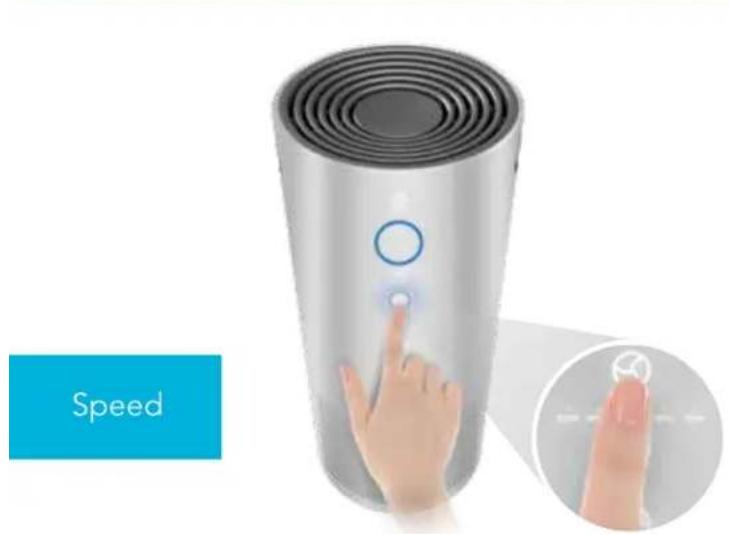
natural_image
Illustration of a smart speaker with a hand interacting with the screen, showing speed control (no text or symbols on device)natural_image
Illustration of a smart speaker with a hand interacting with the button, shown in two views: one close-up and one magnified inset (no text or symbols)Modo Turbo
natural_image
Hand interacting with a digital device displaying a button, shown in an inset image (no text or symbols visible)Bloqueo para niños
natural_image
Hand interacting with a cylindrical smart speaker device, showing a button and finger placement (no text or symbols visible)natural_image
Simple line drawing of a container with a blue arrow indicating direction (no text or symbols)Techtronic Floor Care Technology Limited
Distribuido por Royal Appliance Mfg. Co. Glenwillow, OH 44139
961152036
©2017 Techtronic Floor Care Technology Limited
PURIFICATEURS D'AIR AIR RESPONSE ^MC TURBO | MANUEL D'UTILISATION

natural_image
Close-up of a white cylindrical air purifier with a blue circular indicator and control buttons (no text or symbols visible)CONTENU
natural_image
Illustration of a digital touchless device with a finger pointing at its screen, shown in two views: one zoomed-in (no text or symbols)natural_image
Illustration of a hand interacting with a digital touchscreen device, showing a blue circular button and a magnified inset (no text or symbols)natural_image
Solid blue rectangular shape with no text, symbols, or patterns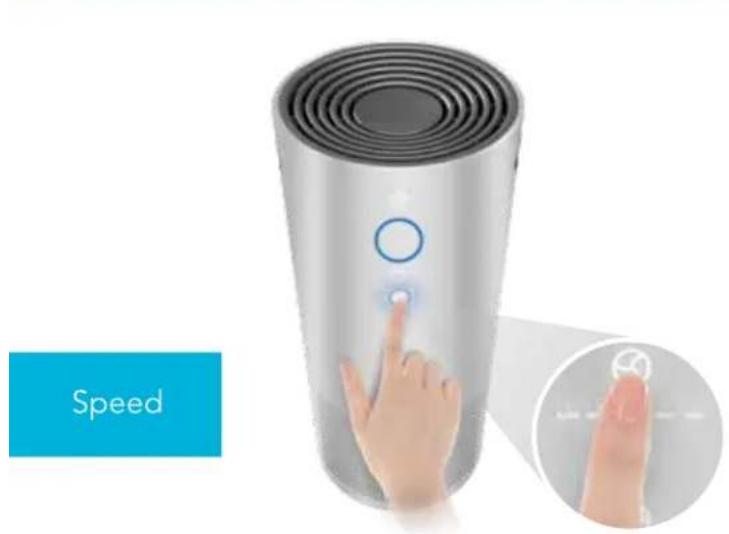
natural_image
Illustration of a smart air purifier with a hand interacting with the speed sensor, shown in two views: one with a circular button and the other with an icon (no text or symbols on the device itself)natural_image
Illustration of a smart speaker with a finger pressing a button, shown in two views: one close-up and one magnified inset (no text or symbols)Mode Turbo
natural_image
Hand interacting with a smart speaker device displaying a circular button, with an inset close-up showing the finger pointing at it (no text or symbols visible)natural_image
Simple line drawing of a box inside a curved container with a blue arrow indicating rotation (no text or symbols)Techtronic Floor Care Technology Limited
© Techtronic Floor Care Technology Limited, 2017.