Air Response - Air purifier Oreck - Free user manual and instructions
Find the device manual for free Air Response Oreck in PDF.


User questions about Air Response Oreck
0 question about this device. Answer the ones you know or ask your own.
Ask a new question about this device
Download the instructions for your Air purifier in PDF format for free! Find your manual Air Response - Oreck and take your electronic device back in hand. On this page are published all the documents necessary for the use of your device. Air Response by Oreck.
USER MANUAL Air Response Oreck
natural_image
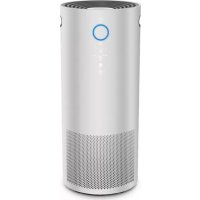
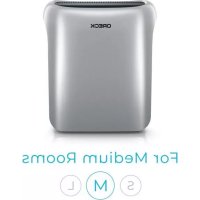
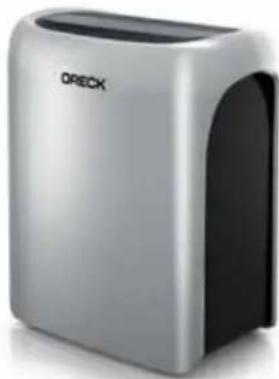
Exterior view of a modern ORECK brand air purifier (no visible text or symbols on body)AIR RESPONSE™
AIR PURIFIERS
USER MANUAL
MODEL: WK16000 / WK16001 / WK16002
IMPORTANT: READ ALL INSTRUCTIONS CAREFULLY BEFORE ASSEMBLY AND USE.
This air purifier is intended for household use only. If used commercially, warranty is VOID.
Questions or concerns?
For assistance, please call Customer Service at 1-800-989-3535 (U.S.) 1-888-676-7325 (Canada) Mon-Fri 9am-6pm EST before returning this product to the store.
IMPORTANT SAFETY INSTRUCTIONS READ AND SAVE THESE INSTRUCTIONS
READ ALL SAFETY WARNINGS AND INSTRUCTIONS BEFORE USING THIS PRODUCT.
- When using an electrical appliance, basic precautions should always be followed, including the following:
WARNING: TO REDUCE THE RISK OF FIRE, ELECTRIC SHOCK OR INJURY:
- Fully assemble before operating.
- Operate unit only at voltage specified on data label.
- Do not use the unit outdoors or on wet surfaces. Do not allow to get wet.
- Do not allow to be used as a toy. Not intended for use by children aged 12 and under. Close supervision is necessary when used by or near children. To avoid injury or damage, keep children away from product, and do not allow children to place fingers or other objects into any openings.
- Use only as described in this manual. Use only manufacturer's recommended attachments and products.
- Do not use unit with damaged cord or plug. If appliance is not working as it should, has been dropped, damaged, left outdoors, or dropped into water, return it to a service center or call customer service at 1-800-989-3535 prior to continuing use.
- Do not pull or carry by cord, use cord as a handle, close door on cord, or pull cord around sharp edges or corners.
- Do not place product on cord.
-
Do not use this fan with any solid-state speed control device.
-
Do not place the unit near sources of heat such as glove lops, radiators, or computers.
- Do not unplug by pulling on cord. To unplug grasp the plug, not the cord.
- Do not handle plug or unit with wet hands.
- Do not put any object into openings. Do not use with any openings blocked; keep free of dust, lint, hair, and anything that may reduce air flow.
- Keep hair, loose clothing, fingers and all parts of body away from openings and moving parts.
- Do not use the unit in an enclosed space where flammable, combustible, or explosive gases are present.
- Do not use without filters in place.
- Do not use in an area where toxic vapors, flammable dust or oxygen tanks are present. Doing so may result in serious injury or death. Check the location and make sure these elements are not present.
- Do not run cord under carpeting. Do not cover cord with throw rugs, runners, or similar coverings. Arrange cord away from traffic area and where it will not be tripped over.
- Do not block or partially block the air intake or air exhaust grilles. Ensure that there is adequate airflow around the unit.
- Unplug the cord from the outlet when not in use or before any routine cleaning or maintenance. Turn off all controls before unplugging.
- Keep the unit away from heaters/fireplaces and other hot objects/locations.
- Do not place any items on top of the unit or sit
on the unit.
- Never open the front cover while the unit is plugged into a wall outlet. - Keep personal and loose objects (such as jewelry, loose ties, long hair etc.) away from unit.
- Never use compressed gas dusters, canned air, flammable or aerosol cleaners on this product. Some cleaning agents may combust causing serious injury and/or property damage.
- Keep children and pets away from the unit.
- Do not place open flames, including candles, directly in front of the air purifier.
PLEASE KEEP INSTRUCTIONS FOR FURTHER USE.
It is important to consider the following when deciding on where to locate the air purifier:
- Position the air purifier on a flat, solid, stable surface. Never place the unit on soft surfaces such as a bed or sofa.
- Position the air purifier where the dirty air is not drawn across your head or body while sitting or sleeping.
- Position the air purifier so the plug on the power cord reaches a standard electrical outlet for a polarized plug.
WARNING: THIS PRODUCT CONTAINS CHEMICALS KNOWN TO THE STATE OF CALIFORNIA TO CAUSE CANCER AND BIRTH DEFECTS OR OTHER REPRODUCTIVE HARM. WASH HANDS AFTER HANDLING.
DISPLAY ICONS
CAUTION: STORE APPROPRIATELY INDOORS IN A DRY PLACE. DO NOT EXPOSE MACHINE TO FREEZING TEMPERATURES.
natural_image
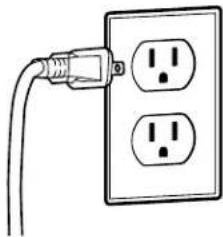
Simple line drawing of a power outlet with two socket plugs (no text or symbols)WARNING: TO REDUCE THE RISK OF ELECTRIC SHOCK, THIS EQUIPMENT HAS A POLARIZED PLUG (ONE BLADE IS WIDER THAN THE OTHER). THIS PLUG WILL FIT IN A POLARIZED OUTLET ONLY ONE WAY. IF THE PLUG DOES NOT FIT FULLY IN THE OUTLET, REVERSE THE PLUG. IF IT STILL DOES NOT FIT, CONTACT QUALIFIED PERSONNEL TO INSTALL THE PROPER OUTLET. DO NOT ALTER THE PLUG IN ANY WAY.
text_image
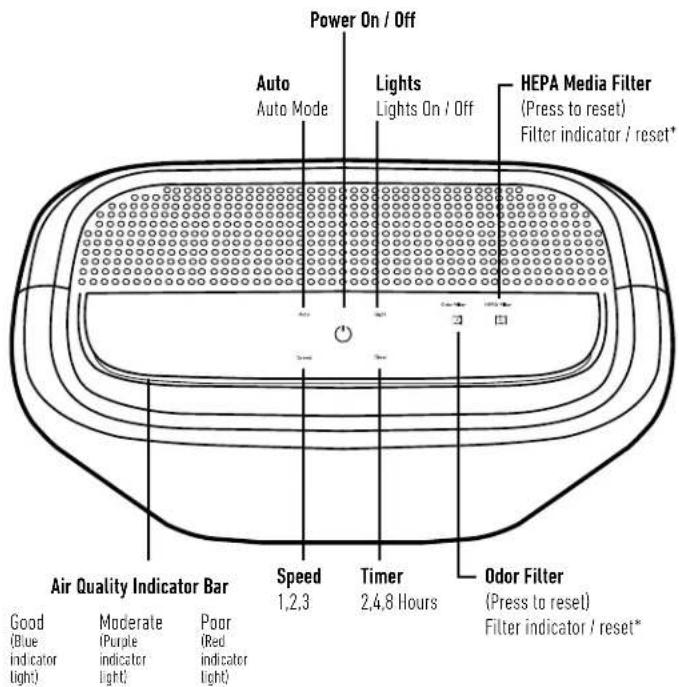
Power On / Off Auto Auto Mode Lights Lights On / Off HEPA Media Filter (Press to reset) Filter indicator / reset* Air Quality Indicator Bar Speed 1,2,3 Timer 2,4,8 Hours Odor Filter (Press to reset) Filter indicator / reset* Good (Blue indicator light) Moderate (Purple indicator light) Poor (Red indicator light)*Filter indicator light will only turn on when a new filter is needed.
WHAT'S IN THE BOX?
| (1) Air Purifier |
| (1) HEPA Filter (Installed in Machine) |
| (1) Odor Filter (Installed in Machine) |
| (1) Extra Odor Filter (In box) |
OPERATING AIR RESPONSE™
natural_image
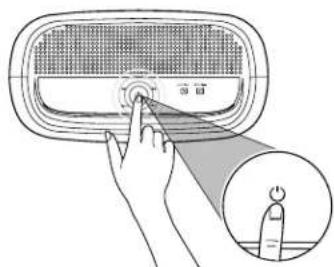
Illustration of a hand pressing a button on a device with a magnified inset showing a finger pointing to the button (no text or symbols present)Power On / Off
Remove all plastic and packaging from the unit and filters prior to operating.
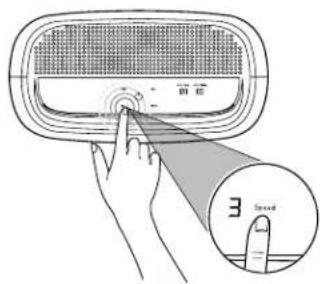
SPEED
text_image
Diagram showing a hand pressing a button on a device with a magnified inset highlighting the 'Speed' button.Manual Mode: To Manually Adjust Fan Speed Press "Speed" until desired fan setting is reached.
| LOW
2 MEDIUM
3 HIGH
The Air Quality Indicator Bar will remain blue in manual mode.
AUTO

text_image
Diagram showing a hand pressing a button on a device with a magnified view of the button indicating power and current.DustSense™ Technology
Press "Auto" to activate DustSense™ Technology which will automatically adjust the fan speed based on the amount of particles in the air.
Unit defaults to Auto Mode when turned on.
text_image
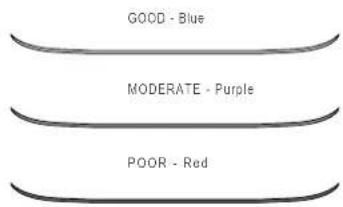
GOOD - Blue MODERATE - Purple POOR - RedAir Quality Indicator Bar
Lets you know it's working by changing colors depending on the amount of particles in the air. Air Quality Indicator Bar is activated only in "Auto Mode." In manual mode, the Air Quality Indicator Bar will remain blue.
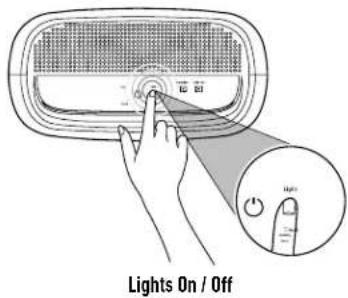
LIGHT
text_image
Lights On / OffPress "Light," to dim display panel and turn off the Air Quality Indicator Bar for less interruptions at night.
Operating selections will not be affected.
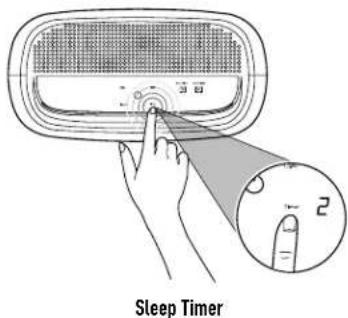
TIMER
text_image
Sleep TimerPress "Timer" to select 2, 4, or 8 hours. Once selected the unit will turn off after time runs out. To cancel sleep timer, tap until number disappears.
MAINTENANCE
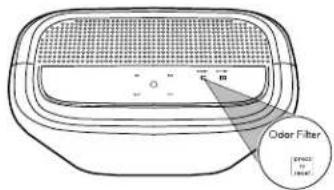
Indicator light will illuminate to remind you to change the Odor filter. Light will appear approximately every 6 months based on 12 hours of use per day. This may happen more frequently depending on usage.
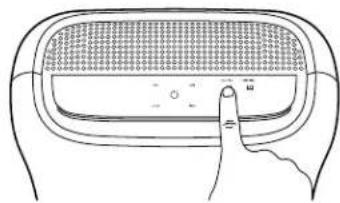
After replacing the filter, don't forget to reset the filter indicator.
text_image
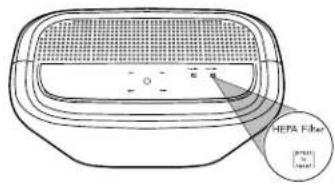
HEPA Filter [ magn to mater]HEPA Media Filter Indicator
Indicator light will illuminate to remind you to change the HEPA Media filter. Light will appear approximately every 12 months based on 12 hours of use per day. This may happen more frequently depending on usage.
After replacing the filter, don't forget to reset the filter indicator.
REPLACEMENT FILTER GUIDE
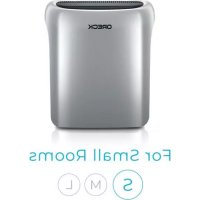
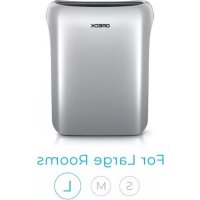
Air Response™ Size Filter Replacement Kit*
| Small(Model# WK16000) | Type B1(Model# AK46000) |
| Medium(Model# WK16001) | Type B2(Model# AK46001) |
| Large(Model# WK16002) | Type B3(Model# AK46002) |
\*Filter Replacement Kit includes:
(1) HEPA Media filter and (2) Odor filters.
IMPORTANT!
Only certified Oreck ^® accessories, parts and filters should be used with this product.
Please call 1-800-989-3535 (U.S.) or 1-888-676-7325 (Canada) or visit Oreck.com for reorder information.
CAUTION: TO REDUCE THE RISK OF INJURY FROM MOVING PARTS - UNPLUG BEFORE CLEANING AND SERVICING. IMPORTANT! THE FILTERS ARE NOT WASHABLE.
REPLACING THE ODOR FILTER
natural_image
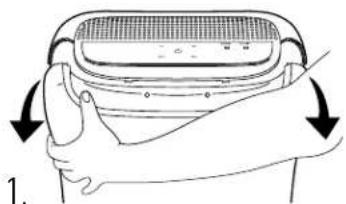
Illustration of hands holding a device with arrows indicating rotation (no text or symbols)Remove cover
natural_image
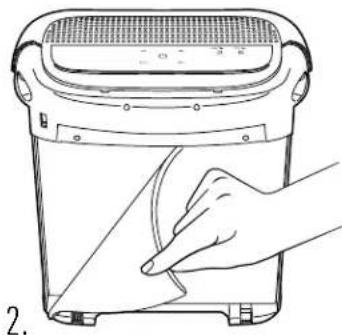
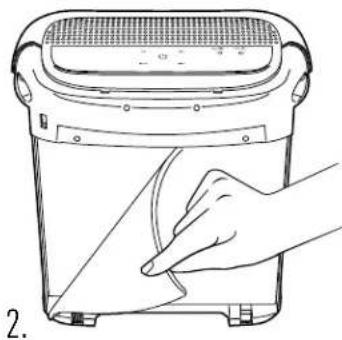
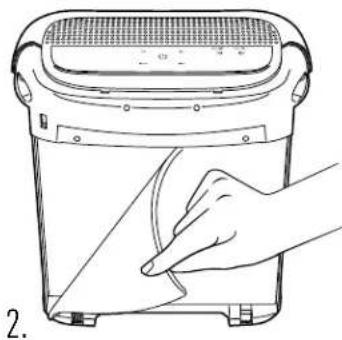
Line drawing of a hand cleaning a heater with a cloth (no text or symbols)Remove & replace with new Odor filter
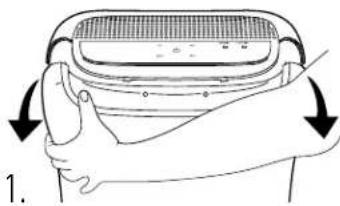
natural_image
Illustration of hands holding a device with arrows indicating rotation (no text or symbols)Replace cover
natural_image
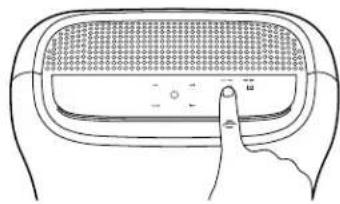
Line drawing of a hand pressing down on a textured rectangular object (no text or symbols)After filter is replaced, press indicator light for 4 seconds to reset. Icon will disappear.
Odor and HEPA Media filters may not need to be replaced at the same time. Replace according to indicator light.
Remove any plastic coverings from new filter(s) before installing.
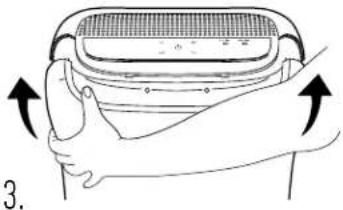
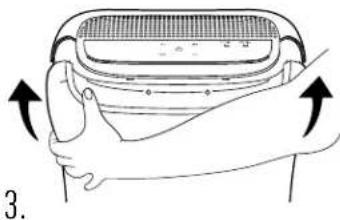
REPLACING THE HEPA MEDIA FILTER
natural_image
Illustration of hands holding a grater with arrows indicating motion (no text or symbols)Remove cover
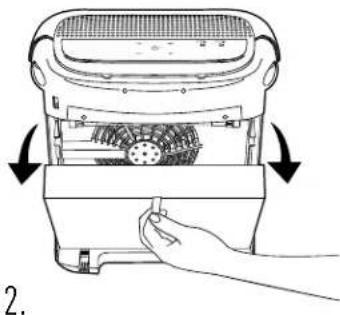
natural_image
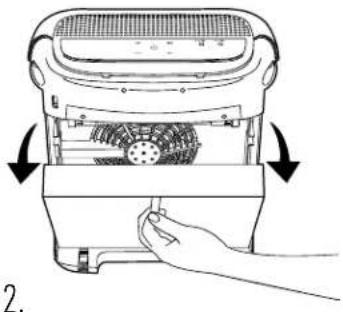
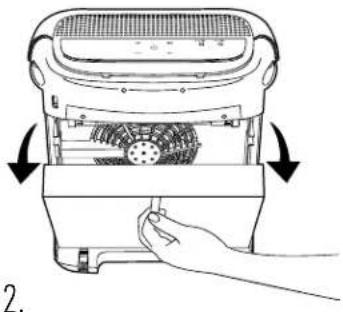
Line drawing of a hand pressing down on a device with arrows indicating motion (no text or symbols)Remove & replace with new HEPA Media filter
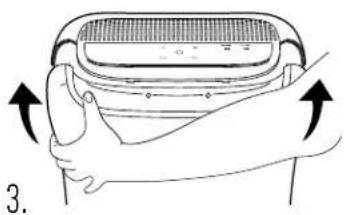
natural_image
Illustration of hands holding a device with directional arrows indicating rotation (no text or symbols)Replace cover
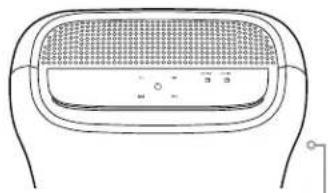
natural_image
Line drawing of a device with a mesh grille and control buttons (no text or symbols)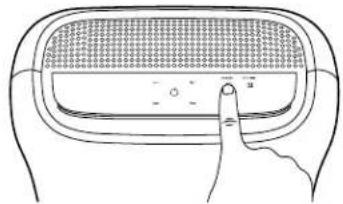
natural_image
Line drawing of a hand pressing down on a device panel (no text or symbols)After filter is replaced, press indicator light for 4 seconds to reset. Icon will disappear.
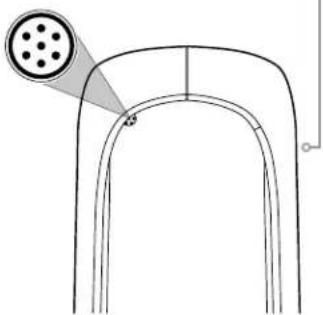
natural_image
Pure diagram of a U-shaped structure with a circular component and a small dot at the base (no text or symbols)Dust Sensor is located on the right side of the unit.
4.
Clean dust sensor every time a filter is replaced. Clear out any debris by gently wiping clean with a cotton swab or using a vacuum hose. This will help ensure the air purifier continues to operate at maximum performance.
Maintenance instructions can also be found on the inside front panel of the Air Response
TROUBLESHOOTING
WARNING: TO REDUCE THE RISK OF PERSONAL INJURY, UNPLUG BEFORE CLEANING OR SERVICING. ANY OTHER SERVICING SHOULD BE DONE BY AN AUTHORIZED SERVICE REPRESENTATIVE.
IF APPLIANCE IS NOT WORKING AS IT SHOULD, HAS BEEN DROPPED, DAMAGED, LEFT OUTDOORS, OR DROPPED INTO WATER, TAKE IT TO A SERVICE CENTER PRIOR TO CONTINUING USE. VISIT ORECK.COM TO FIND YOUR NEAREST SERVICE CENTER LOCATION.
| PROBLEM POSSIBLE CAUSE WHAT TO DO | ||
| Unit does not turn on | 1. Power cord not firmly plugged into outlet | 1. Plug unit in firmly |
| 2. Front panel is not secure 2. Ensure front panel is firmly closed | ||
| 3. No voltage in wall 3. Check fuse or breaker in home | ||
| 4. Blown fuse or tripped breaker | 4. Replace fuse/reset breaker in home | |
| Indicator bar is always red in Auto Mode | 1. Dust has collected on sensor | 1. Clear out any debris by gently wiping clean with a cotton swab or using a vacuum hose |
| For more troubleshooting or FAQs please call 1-800-989-3535 (U.S.) or 1-888-676-7325 (Canada) or visit Oreck.com | ||
CERTIFIED PARTS
Only Certified Oreck® accessories, parts, and filters should be used with this product. Oreck cannot guarantee optimal performance with the use of non-Oreck components. Damage to this product caused by the installation or use of non-Oreck components shall not be covered under and is excluded from this warranty.
To ensure accessories, parts, and filters are certified, customers should purchase through a Factory Authorized Dealer or through Oreck.com. Certified Oreck® filters will carry the mark below:
ORECK parts CERTIFIED
Please call 1-800-989-3535 (U.S.) or 1-888-676-7325 (Canada) or visit Oreck.com if you have any questions.
WARRANTY
TTI Floor Care North America (ORECK) gives you the following limited warranty for this product only if it was originally purchased and solely used residentially, not for resale, from Oreck or an Oreck Authorized Retail Dealer. Oreck will repair or replace, free of charge, to the original purchaser, any part that is found to be defective in material or workmanship within two (2) years following the date of purchase for all residential models. NOTE: Warranty is void if used in a commercial setting. This limited warranty does not cover the replacement of expendable or consumable parts such as filters, cartridges, and other parts subject to normal wear unless they are defective in material or workmanship. This limited warranty does not apply to any part subjected to accident, abuse, commercial use, alteration, misuse, damage caused by an act of God, the use of voltages other than on the data plate of this product or service of this product by other than Oreck or a participating Factory Authorized Service Center. Oreck does not authorize any person or representative to assume or grant any other warranty obligation with the sale of this project. The Oreck limited warranty is valid only if you retain proof of purchase from Oreck or an Oreck Authorized Retail Dealer for this product. If you purchase this product from any other source, your purchase is "AS IS," which means Oreck grants you no warranty, and that you, not Oreck assume the entire risk of the quality and performance of the product, including the entire cost of any necessary servicing or repairs of any defects. The Oreck liability for damages to you for any costs whatsoever arising out of this statement of limited warranty shall be limited to the amount paid for this product at the time of original purchase, and Oreck shall not be liable for any direct, indirect, consequential or incidental damages arising out of the use or inability to use this product. Some states do not allow the exclusion or limitation of incidental or consequential damages, so the above limitations or exclusions may not apply to you. ALL EXPRESS AND IMPLIED WARRANTIES OTHER THAN THE LIMITED WARRANTY SET FORTH ABOVE, FOR THE PRODUCT, INCLUDING IMPLIED WARRANTIES OF MERCHANTABILITY AND FITNESS FOR A PARTICULAR PURPOSE ARE EXPRESSLY DISCLAIMED. This warranty gives you specific legal rights, and you may also have other rights, which vary from state to state. Notwithstanding the foregoing, no warranty provided herein or arising under any applicable law shall exceed 2 years in duration.
ORECK.
natural_image
Exterior view of a modern ORECK brand air purifier (no text or symbols visible on body)PURIFICATEURS D'AIR
AIR RESPONSE ^MC
MANUEL D'UTILISATION
MODÈLE: WK16000 / WK16001 / WK16002
IMPORTANT : LISEZ ATTENTIVEMENT LES PRÉSENTES INSTRUCTIONS AVANT D'ASSEMBLER ET D'UTILISER LE PRODUIT.
natural_image
Illustration of a hand pressing a button on a device with a magnified inset showing a finger pointing to the button (no text or symbols present)text_image
Diagram showing a hand pressing a button on a device with an inset highlighting the 'Speed' (3.0) speed measurement.natural_image
Illustration of a hand pressing down on a device with a circular dial indicator (no text or symbols)Technologie DustSense ^MC
text_image
Diagram showing a hand pressing a button on a device with a power button, illustrating electrical or control operation.text_image
Diagram showing a hand pressing a button on a device with a magnified view of the button labeled '2'text_image
Odor Filter [0.0123] [0.0124]text_image
HEFA Filter M Snatural_image
Illustration of a hand gripping a gridded appliance with arrows indicating rotation (no text or symbols)Retirez le couvercle.
natural_image
Line drawing of a hand cleaning a kitchen appliance with a knife (no text or symbols)natural_image
Illustration of hands holding a device with arrows indicating rotation (no text or symbols)Replacez le couvercle.
natural_image
Line drawing of a hand pressing down on a textured rectangular object (no text or symbols)natural_image
Illustration of a hand holding a grater with arrows indicating compression or adjustment (no text or symbols)Retirez le couvercle.
natural_image
Line drawing of a hand inserting a component into a kitchen appliance (no text or symbols)natural_image
Technical line drawing of a device component with a grid-patterned top and a pin icon on the side (no text or symbols)natural_image
Illustration of hands holding a device with arrows indicating rotation (no text or symbols)Replacez le couvercle.
natural_image
Line drawing of a hand pressing a button on a device panel (no text or symbols)natural_image
Exterior view of a modern ORECK brand air purifier (no text or symbols visible on body)natural_image
Simple line drawing of a plug inserted into an electrical outlet (no text or symbols)natural_image
Illustration of a hand pressing a button on a device with a magnified inset showing a finger pointing to the button (no text or symbols present)Encendido / Apagado
text_image
Diagram showing a hand pressing a button on a device with an inset highlighting the 'Speed' (3.0) speed measurement.natural_image
Illustration of a hand pressing a button on a device with a circular dial (no text or symbols)text_image
Diagram showing a hand pressing a button labeled '按钮' (button) to press a device, with an inset close-up of the button indicating '按钮' (button).Luces encendidas / apagadas
text_image
Diagram showing a hand pressing a button on a device with a magnified view highlighting the button number 2.Temporizador
text_image
Oder Filter [07] 2013 [08] 2014text_image
HEPA Filter M Snatural_image
Illustration of a hand gripping a small appliance with arrows indicating rotation (no text or symbols)Retire la tapa.
natural_image
Line drawing of a hand cleaning a kitchen appliance with a knife (no text or symbols)natural_image
Illustration of hands holding a grater with arrows indicating motion (no text or symbols)natural_image
Line drawing of a finger pressing down on a textured rectangular object (no text or symbols)natural_image
Illustration of a hand holding a grater with arrows indicating rotation (no text or symbols)Retire la tapa.
natural_image
Line drawing of a hand inserting a component into a device with arrows indicating rotation (no text or symbols)natural_image
Simple line drawing of a device with a mesh grille and control buttons (no text or symbols)