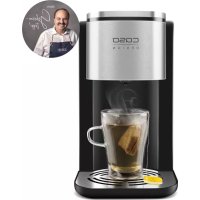
HW 500 Touch - Water dispenser CASO - Free user manual and instructions
Find the device manual for free HW 500 Touch CASO in PDF.



| Product Type | Hot water dispenser / Rapid boiling kettle |
| Brand | Caso |
| Model | HW 500 Touch |
| Dimensions (W x H x D) | 16 x 30 x 28 cm |
| Net weight | 2345 g |
| Power supply | 220-240 V ~ 50/60 Hz |
| Power consumption | 2200-2600 W |
| Reservoir capacity | 2.2 L |
| Adjustable temperatures | Ambient, 45°C, 55°C, 65°C, 75°C, 85°C, 100°C |
| Adjustable water volumes | 100 ml, 200 ml, 300 ml, continuous flow |
| Control | Touch panel with automatic lock (3 s to unlock, 10-15 s to lock) |
| Water filter | Replaceable filter, lifespan 4 to 6 weeks (approx. 150 L) |
| Safety | Overheat protection with reset button; automatic lock; automatic shut-off; child safety (use by children ≥8 years under supervision) |
| Cleaning and maintenance | Descale with vinegar at least once a month; do not immerse the appliance; clean the exterior with a damp cloth |
| Spare parts and repairability | Replaceable water filter; repairs exclusively by authorized service center; use of original parts |
| Warranty | 24 months (parts and labor) |
| Included accessories | Kettle, water filter, reset key, instruction manual |
Frequently Asked Questions - HW 500 Touch CASO
User questions about HW 500 Touch CASO
0 question about this device. Answer the ones you know or ask your own.
Ask a new question about this device
Download the instructions for your Water dispenser in PDF format for free! Find your manual HW 500 Touch - CASO and take your electronic device back in hand. On this page are published all the documents necessary for the use of your device. HW 500 Touch by CASO.
USER MANUAL HW 500 Touch CASO
natural_image
Exterior view of a black and silver CO2SO water dispenser with circular vent base (no text or symbols on device body)Artikel-Nr. 1863

Braukmann GmbH
Raiffeisenstraße 9
D-59757 Arnsberg
Tel.: +49 (0) 29 32 / 80 55 4 - 99
Fax: +49 (0) 29 32 / 80 55 4 - 77
eMail: kundenservice@caso-germany.de
10.3 Warning notices....24
10.4 Limitation of liability 25
10.5 Copyright protection 25
11 Safety 25
11.1 Intended use....25
11.2 General Safety information....26
11.3 Danger of burns 27
11.4 Dangers due to electrical power....28
12 Commissioning....28
12.1 Safety information ....28
12.2 Delivery scope and transport inspection....28
12.3 Unpacking....29
12.4 Disposal of the packaging....29
12.5 Setup location requirements: 29
12.6 Electrical connection....29
12.7 Overheating protection & reset 30
13 Design and Function 30
13.1 Overview....30
13.2 Control panel....31
13.3 Rating plate 31
14 Operation and Handling 31
14.1 Before initial use....31
14.1.1 Preparation of the waterfilter 31
14.1.2 Preparation of the device 32
14.2 Use 32
14.2.1 Water disposal from the drip tray 33
14.2.2 Replacing the filter 33
14.2.3 Error code Lo 33
15 Cleaning and Maintenance....33
15.1 Safety information ....33
15.2 Cleaning....33
15.3 Storage 34
16 Disposal of the Old Device....34
17 Guarantee ....34
18 Technical Data....35
natural_image
Technical line drawing of a mechanical bracket or housing component with mounting holes and a labeled part (1), no text or symbols present.natural_image
Simple line drawing of a coffee maker with lid and base, no text or symbols presentHINWEIS
natural_image
Line drawing of a device with a circular button and a square base, showing a rotation arrow (no text or symbols)natural_image
Technical line drawing of a mechanical device with a labeled component (A), no text or symbols present.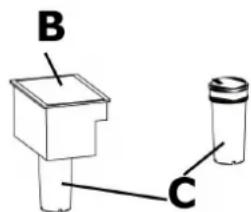
5.2.2 Fehlercode Lo
natural_image
Technical line drawing of a mechanical housing or enclosure with numbered components (no text or symbols)Original Operating Manual Instant Boiling Water Dispenser HW 500 Touch
natural_image
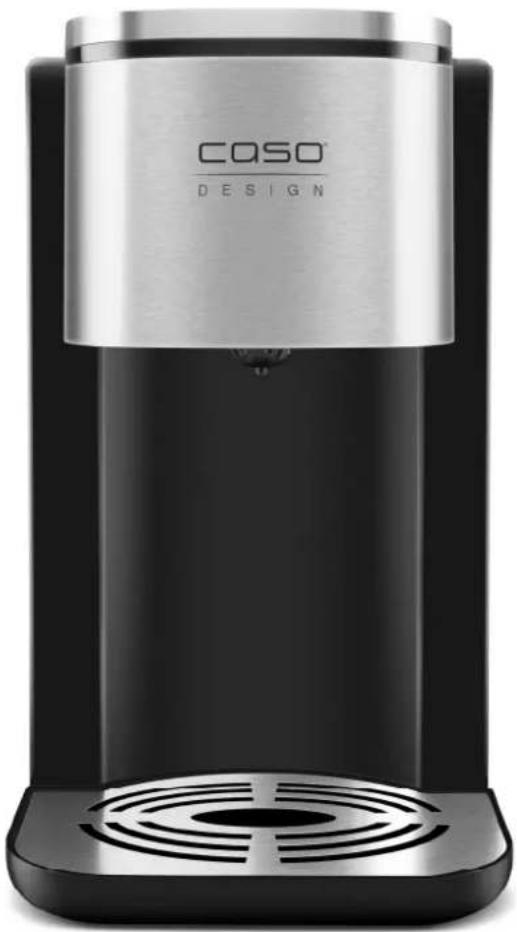
Exterior view of a black and silver CASO DESIGN water dispenser (no text or symbols on the device itself)
Item no. 1863
10 Operating Manual
10.1 General
Please read the information contained herein so that you can become familiar with your device quickly and take advantage of the full scope of its functions. Your Water Dispenser will serve you for many years if you handle it and care for it properly. We wish you a lot of pleasure in using it!
10.2 Information on this manual
These Operating Instructions are a component of the Water Dispenser (referred to hereafter as the device) and provide you with important information for the initial commissioning, safety, intended use and care of the device. The Operating Instructions must be available at all times at the device. This Operating Manual must be read and applied by every person who is instructed to work with the device:
- Commissioning - Operation - Troubleshooting and/or - Cleaning Keep the Operating Manual in a safe place and pass it on to the subsequent owner along with the device.
10.3 Warning notices
The following warning notices are used in the Operating Manual concerned here.
AGEFAHR Danger
A warning notice of this level of danger indicates a potentially dangerous situation. If the dangerous situation is not avoided, this can lead to death or serious injuries.
▶ Observe the instructions in this warning notice in order to avoid the danger of death or serious personal injuries.
⚠️WARNUNG Warning
A warning notice of this level of danger indicates a possible dangerous situation. If the dangerous situation is not avoided, this can lead to serious injuries.
▶ Observe the instructions in this warning notice in order to avoid the personal injuries.
▲VORSICHT Attention
A warning notice of this level of danger indicates a possible dangerous situation.
If the dangerous situation is not avoided, this can lead to slight or moderate injuries.
▶ Observe the instructions in this warning notice in order to avoid the personal injuries.
HINWEIS Please note
A notice of this kind indicates additional information, which will simplify the handling of the machine.
10.4 Limitation of liability
All the technical information, data and notices with regard to the installation, operation and care are completely up-to-date at the time of printing and are compiled to the best of our knowledge and belief, taking our past experience and findings into consideration.
No claims can be derived from the information provided, the illustrations or descriptions in this manual. The manufacturer does not assume any liability for damages arising as a result of the following:
• Non-observance of the manual
- Improper repairs
- Use of unauthorized spare parts
Modifications of the device are not recommended and are not covered by the guarantee. All translations are carried out to the best of our knowledge. We do not assume any liability for translation errors, not even if the translation was carried out by us or on our instructions. The original German text remains solely binding.
10.5 Copyright protection
This document is copyright protected. Braukmann GmbH reserves all the rights, including those for photomechanical reproduction, duplication and distribution using special processes (e.g. data processing, data carriers, data networks), even partially.
Subject to content and technical changes.
11 Safety
This chapter provides you with important safety notices when handling the device.
The device corresponds with the required safety regulations. Improper use can result in personal or property damages.
11.1 Intended use
This device (with waterfilter included) is only intended for use in households in enclosed spaces for boiling of drinking water.
This device is intended for use in the household and for similar applications such as:
- in kitchens for employees in shops, offices, and other commercial areas; • in B&Bs,
• in agricultural estates; - by customers in hotels, motels and other residential establishments.
Uses for a different purpose or for a purpose which exceeds this description are considered incompatible with the intended or designated use.
⚠️WARNUNG
Warning
Danger due to unintended use! Dangers can emanate from the device if it is used for an unintended use and/or a different kind of use.
▶ Use the device exclusively for its intended use.
▶ Observe the procedural methods described in this Operating Manual.
Claims of all kinds due to damages resulting from unintended uses are excluded. The User bears the sole risk.
11.2 General Safety information
HINWEIS Please note
Please observe the following general safety notices with regard to the safe handling of the device.
▶ Read all instructions before using.
This device may be used by children aged 8 and above, if they are supervised or have been instructed at to the safe use of the device and have understood the resulting hazards.
▶ Cleaning and maintenance by the user must not be performed by children unless they are at least 8 years old and are supervised. Children are not allowed to play with the device.
▶ The device and its connecting cable must be kept away from children who are less than 8 years old.
The device may be used by individuals with reduced physical, sensory or mental capabilities or a lack of experience and / or knowledge of their use if they are supervised or have been instructed at to the safe use of the device and have understood the resulting hazards.
▶ Unplug the unit when not in use and before cleaning. Allow unit to cool before cleaning.
▶ Inspect the unit, its power cord and plug for any damage before using. If there appears to be any damage or if the unit shows signs of malfunctioning, do not use the appliance. Return the appliance to the nearest authorized service facility for inspection and repair.
▶ Only customer service departments authorized by the manufacturer may carry out repairs on the device, as otherwise the guarantee entitlements will be null and void in the event of any subsequent damages. Improperly performed repairs can cause considerable dangers for the user.
▶ Defective components must always be replaced with original replacement parts. Only such parts will guarantee that the safety requirements are fulfilled.
HINWEIS
Please note
▶ Do not use accessory attachments that have not been recommended by the manufacturer.
▶ Do not use outdoors.
▶ Do not allow cord to touch hot surfaces or hang over sharp edges such as those on countertops.
▶ Do not place the unit on or near a hot gas or electric burner, or heated oven.
▶ Always handle the device gently. Do not place it near the edge of the table or counter to protect against the deformation or functional damage in case it falls down from the table accidentally.
▶ Do not use this appliance for any unintended use.
▶ SAVE THESE INSTRUCTIONS.
11.3 Danger of burns
⚠️WARNUNG
Warning
The water heated in the device and the device can become very hot.
Please observe the following safety notices in order not to burn or scald yourself or others.
▶ When boiling water the device become hot.
▶ Do not touch the hot surface and not the spout when the device is in operation. Danger of burns.
▶ Open the lid of the water tank slowly, to prevent scalding through the escaping steam.
▶ Always test the temperature of the water before you drink it.
▶ Avoid the risk of burns: Please check the temperature of the food before you give it to your baby. This can easily be done on the back of your hand.
▶ Pay attention to the hot water steam that is produced during cooking process. Risk of burns.
11.4 Dangers due to electrical power
▲GEFAHR Mortal danger due to electrical power!
Mortal danger exists when coming into contact with live wires or subassemblies! Observe the following safety notices to avoid dangers due to electrical power:
▶ Do not dip the cable, device or plug into water or other liquid to prevent an electric shock.
▶ Do not operate this device if it has a damaged cable or plug, if it is not working properly or if it has been damaged or dropped. If the power cable or plug are damaged, then they must be replaced by the manufacturer or its service agent in order to avoid a hazard.
▶ Do not open the housing on the device under any circumstances. There is a danger of an electrical shock if live connections are touched and the electrical or mechanical structure is altered. In addition, functional faults on the device can also occur.
12 Commissioning
This chapter provides you with important safety notices during the initial commissioning of the device. Observe the following notices to avoid dangers and damages.
12.1 Safety information
⚠️WARNUNG Warning
▶ Packaging materials may not be used for playing. There is a danger of suffocation.
12.2 Delivery scope and transport inspection
As a rule, the Water Dispenser is delivered with the following components:
- Water Dispenser - Operation Manual
- Waterfilter
HINWEIS Please note
▶ Examine the shipment for its completeness and for any visible damages.
▶ Immediately notify the carrier, the insurance and the supplier about any incomplete shipment or damages as a result of inadequate packaging or due to transportation.
12.3 Unpacking
To unpack the device, proceed as follows:
Remove the device out of the carton and remove the packaging material.
12.4 Disposal of the packaging

The packaging protects the device against damages during transit. The packaging materials are selected in accordance with environmentally compatible and recycling-related points of view and can therefore be recycled. Returning the packaging back to the material loop saves raw materials and reduces the quantities of accumulated waste. Take any packaging materials that are no longer required to “Green Dot” recycling collection points for disposal.
12.5 Setup location requirements:
In order to ensure the safe and trouble-free operation of the device, the setup location must fulfil the following prerequisites:
- The device must be set up on a firm, flat, horizontal surface with sufficient load-bearing capacity for the device.
- Place the device only on a waterresistant surface. Do not use the device outdoors.
- Do not operate the product near hot gas or hot stove.
- Choose the setup location in such a way that children cannot reach the device.
- The device is not intended to be installed in a wall or a built-in cupboard.
- Do not set up the device in a hot, wet or extremely damp environment or near flammable material.
- The electrical socket must be easily accessible so that the power lead can be disconnected easily, in the case of an emergency.
- The installation and assembly of this device in non-stationary setup locations (e.g. on ships) must be carried out by specialist companies / electricians, provided they guarantee the prerequisites for the safe use of this device.
12.6 Electrical connection
In order to ensure the safe and trouble-free operation of the device, the following instructions must be observed for the electrical connection:
- Before connecting the device, compare the connection data (voltage and frequency) on the rating plate with those of your electrical network. This data must agree in order that no damages occur in the device. If in doubt, ask your qualified electrician.
- The connection between the device and the electrical network may employ a 3 meter long (max.) extension cable with a cross-section of 1.5 mm ^2 . The use of multiple plugs or gangs is prohibited because of the danger of fire that is involved with this.
- Make sure that the power cable is undamaged and has not been installed under the ice maker or over hot or sharp surfaces.
- The electrical outlet must be protected by a 16A safety cut-out switch.
- The electrical safety of the device is only guaranteed if the device is connected to a properly installed protective conductor system. If in doubt, have the house installation checked over by a qualified electrician. The manufacturer cannot be made responsible for damages that are caused by a missing or damaged protective conductor.
12.7 Overheating protection & reset
The appliance is equipped with an overheating protection facility. If the temperature of the appliance exceeds the critical limit the appliance shuts off further power supply for safety reasons.
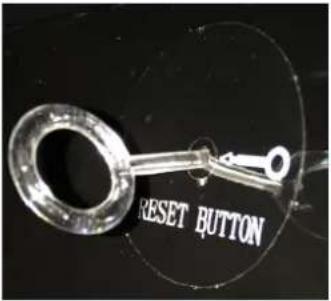
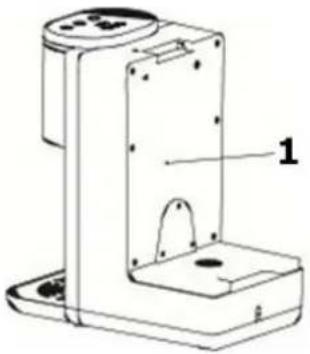
By pressing the reset button (1) the appliance can be reactivated.
Unplug the device before reset. When the device is only producing cold water please press reset button.
Please use enclosed reset-key for the reset-button.
natural_image
Technical line drawing of a mechanical device with labeled component 1 (no text or symbols beyond label)13 Design and Function
In this chapter, you'll find important information on the design and function of the device.
13.1 Overview
⚠️WARNUNG
Warning
▶ Warning symbol: hot steam.
▶ Caution hot steam can escape at device. Risk of burns.

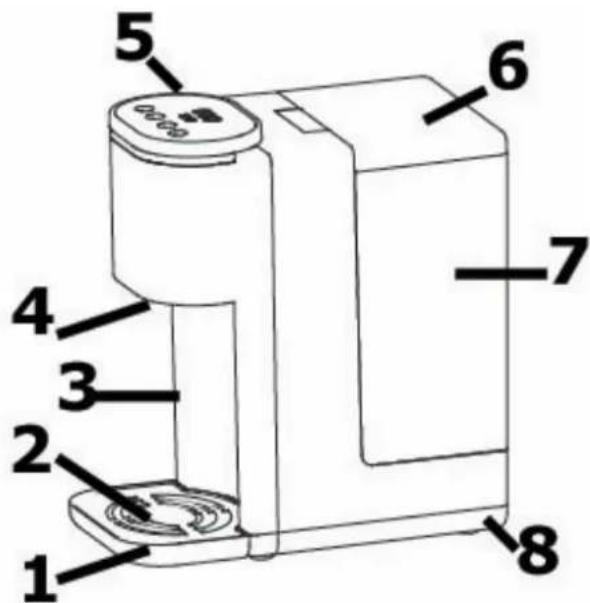
1 drip tray
2 cover of drip tray
3 main body
4 spout
5 control panel
6 tank cover
7 tank
8 base
HINWEIS
Please note
▶ Please note that the dispensed water (at all temperature settings) is not boiled before. Therefore, especially when preparing baby food, we recommend to boil the water first, cool it down to room temperature and then pour it into the water tank of the device.
13.2 Control panel
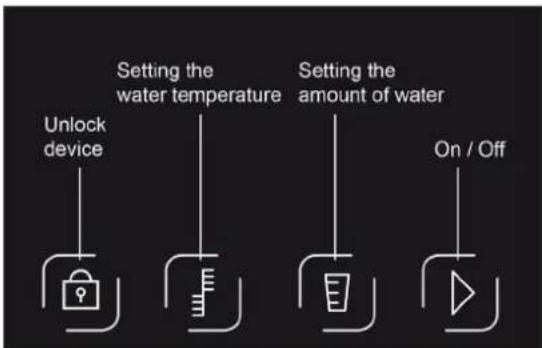

Press the button for about 3 seconds to unlock. After approximately 10-15 seconds without operation it locks automatically. Press the button again to unlock the device.

Set the desired temperature according to 000 (normal temperature water), 45°C, 55°C, 65°C, 75°C, 85°C, 100°C

Set the water volume according to 100ml, 200ml, 300ml, 000 (continuous water flow)

Start and stop function setting.
13.3 Rating plate
The rating plate with the connection and performance data can be found beneath the device.
14 Operation and Handling
This chapter provides you with important notices with regard to operating the device. Observe the following notices to avoid dangers and damages.
⚠️WARNUNG
Warning
▶ Do not leave the appliance unsupervised during operation.
14.1 Before initial use
14.1.1 Preparation of the waterfilter
- Remove the waterfilter from all packaging. There may be a small residue of black carbon particles in the bag or on the filter body. This is normal. These particles are harmless and will be washed off during the preparation process.
- Soak the filter upright in water for 10 min.
- Rinse the filter thoroughly under running water.
- The filter is now ready for use.
HINWEIS Please note
The lifetime of the filter lasts about 4-6 weeks of normal use (filtering of approximately 150 l water in total).
▶ Store the replacement filter cartridges in a cool location, out of direct sunlight and away from heat sources.
14.1.2 Preparation of the device
- Place device without drip tray.
- Fill the tank up to max marking.
- Place vessel below the spout which can collect whole content of watertank.
- Start the device with 000 temperature setting and continuous water flow until ca. 300 ml water is dispensed.
- Turn to 100°C temperature setting with continuous water flow and let the device dispense water.
- When device shows Lo (watertank is empty), then the process is finished.
- The device can now be equipped with waterfilter and filled with fresh water.
- The device is ready for use.
14.2 Use
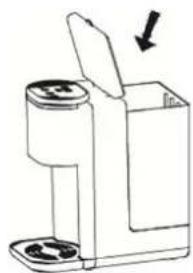
- Fill the watertank with water, you can remove the watertank to do this.
-
Place your cup on the removable drip tray, make sure it aligns with the spout.
-
First press out 3-5 seconds. an light
-
Press choose your desired temperature and press to set the water volume.
-
Press ▶ operate the device. The desired water will flow out continuously from water spout. Press ▶ again, when your desired amount of water is dispensed. The device will stop working at once.
-
If you want to dispense water again, repeat the steps above.
natural_image
Simple line drawing of a mechanical device with a lid and arrow indicating direction (no text or symbols)HINWEIS Please note
▶ If device was not used for longer time there could be scale deposits despite water filter. In this case let 100 ml with 100 °C run through the device.
The appliance has a memory function if the plug is still plugged in. The settings, that were adjusted the last time, are still adjusted. The settings will be reset after unplugging.
The ambient temperature changes everyday. This leads to different amounts of water. It can vary up to +- 15%.
14.2.1 Water disposal from the drip tray
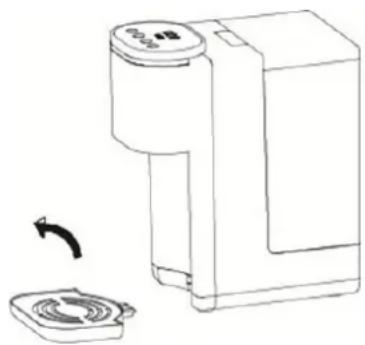
- When the drip tray is full, grasp and stabilize the appliance by one hand and use the other hand to lift up the drip tray slightly to remove it.
- Empty the water tray and insert it into the original place. Make sure it is properly inserted.
14.2.2 Replacing the filter
- Open the tank cover (A) and take out the filter box (B) with the old waterfilter (C).
- Soak the new waterfilter upright in water for 10 min.
- Rinse the new waterfilter thoroughly under running water.
- Remove the old waterfilter and replace it with the new waterfilter (see fig.). Therefore take out the filter box, place the new waterfilter and pull it down from the bottom.
A tank cover
B filter box
C waterfilter
natural_image
Line drawing of a mechanical device with a rotating button and square base (no text or symbols)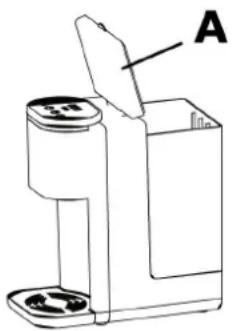
natural_image
Technical line drawing of a mechanical device with labeled component A (no text or symbols beyond label)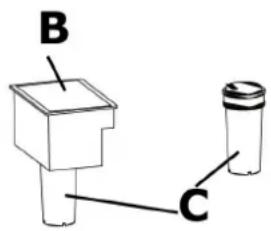
14.2.3 Error code Lo
If the appliance stops to operate with a beeping sound and the display shows the error code Lo, it means that there is too little water or no water in the water tank. Please fill in enough water into the water tank immediately.
15 Cleaning and Maintenance
This chapter provides you with important notices with regard to cleaning and maintaining the device. Please observe the notices to prevent damages due to cleaning the device incorrectly and to ensure trouble-free operation.
15.1 Safety information
▲VORSICHT Attention
Please observe the safety instructions, before cleaning your device
▶ Unplug the device when not in use and before any cleaning.
▶ Never immerse the unit, cord or plug in water or other liquids and do not place in the dishwasher.
▶ Do not use iron brush, abradant, kitchen cleaner, or sharp cleaning tool for cleaning.
15.2 Cleaning
- Remove the plug from the outlet and let the device cool down.
- To maintain the performance of the device, descale the appliance at least once a month. If you use a CASO water filter and change it as regular as described in “replacing the waterfilter” you do not need to descale the appliance.
- Add some vinegar into the water and operate the appliance (without waterfilter) three times. The scale will be removed. After that, pour out the water in the water tank.
- Do not clean the main machine. Only wipe it with a damp cloth.
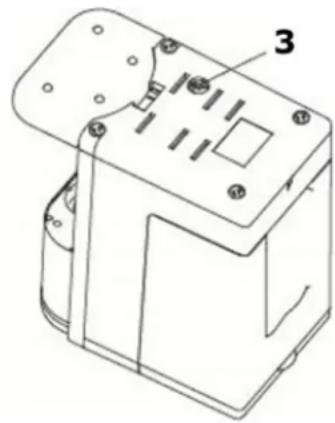
Drainage stopper
After cleaning the appliance, please take out the drainage stopper (3) in order to clean up waste water. Put the drainage stopper back in after opening it. Make sure it is fastened properly.
15.3 Storage
If the appliance is not used frequently, unplug and clean it, then put back into the original packing box to avoid that the electrical components from getting humidified or damaged.
16 Disposal of the Old Device
Old electric and electronic devices frequently still contain valuable materials. However, they
also contain damaging substances, which were necessary for their functionality and safety.
If these were put in the non-recyclable waste or were handled incorrectly, they could be detrimental to human health and the environment.
Therefore, do not put your old device into the non-recyclable waste under any circumstances.
HINWEIS Please note
▶ Utilise the collection point, established in your town, to return and recycle old electric and electronic devices. If necessary, contact your town hall, local refuse collection service or your dealer for information.
▶ Ensure that your old device is stored safely away from children until it is taken away.
17 Guarantee
We provide a 24 month guarantee for this product, commencing from the date of sale, for faults which are attributable to production or material faults. Your legal guarantee entitlements in accordance with § 439 ff. BGB-E remain unaffected by this.
The guarantee does not include damages, which were incurred as a result of improper handling or use, as well as malfunctions which only have a minor effect on the function or the value of the device. Consumables, transit damages, inasmuch as we are not responsible for these, as well as damages, which were incurred as a result of any repairs that were not performed by us, are also excluded from the guarantee entitlements.
This device is designed for use in domestic situations and has the appropriate performance levels. Any use in commercial situations is only covered under the guarantee to the extent that it would be comparable with the stresses of being used in a domestic situation. It is not intended for any additional, commercial use. In the event of justified complaints, we will repair the faulty device at our discretion or replace it with a trouble-free device. Any pending faults must be reported within 14 days of delivery. All further claims are excluded.
To enforce a guarantee claim, please contact us prior to returning the device (always provide us with proof of purchase).
18 Technical Data
| Device Instant Boiler Water Dispenser | HW 500 Touch |
| Item No.: 1863 | |
| Mains data 220 V - 240 V, 50 Hz / 60 Hz | |
| Power consumption 2200 W - 2600 W | |
| Volume 2,2 L | |
| External measurements (W x H x D): 16 x 30 x 28 cm | |
| Net weight 2345 g |
natural_image
Exterior view of a black and silver CO5O DESIGN water dispenser (no text or symbols on body)
N°. d'article 1863
19 Mode d'emploi
19.1 Généralités
natural_image
Technical line drawing of a mechanical bracket or housing component with labeled part 1 (no text or symbols beyond label)natural_image
Simple line drawing of a mechanical device with a lid and base, showing no text or symbols.natural_image
Line drawing of a device with a circular button and a square base, showing a rotation arrow (no text or symbols)natural_image
Line drawing of a mechanical device with labeled component A (no text or symbols on the object itself)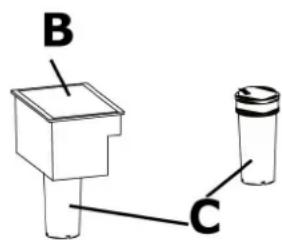
natural_image
Technical line drawing of a mechanical component with labeled parts (no text or symbols present)natural_image
Exterior view of a CASO Design water dispenser device (no text or symbols on body)natural_image
Technical line drawing of a mechanical device with labeled component 1 (no text or symbols beyond label)natural_image
Simple line drawing of a mechanical device with a lid and base, no text or symbols presentHINWEIS
Indicazione
natural_image
Line drawing of a mechanical device with a rotating button and base plate (no text or symbols)natural_image
Technical line drawing of a mechanical device with labeled component A (no text or symbols beyond label)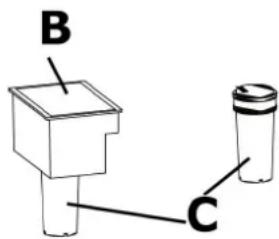
natural_image
Technical line drawing of a mechanical component with labeled parts (no text or symbols beyond part numbers)natural_image
Exterior view of a black and silver CASO DESIGN water dispenser (no text or symbols on body)
Ref. 1863
natural_image
Technical line drawing of a mechanical device with labeled component 1 (no text or symbols beyond label)natural_image
Simple line drawing of a mechanical device with a lid and base, showing no text or symbols.natural_image
Line drawing of a device with a rotating button and a square base, showing no text or symbols.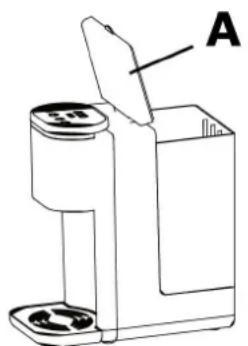
natural_image
Line drawing of a mechanical device with labeled component A (no text or symbols on the object itself)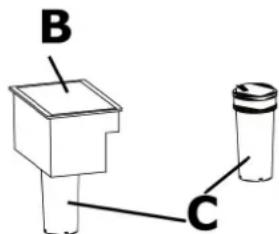
natural_image
Technical line drawing of a mechanical component with numbered parts (no text or symbols)natural_image
Exterior view of a black and silver CASO Design water dispenser (no text or symbols on the device itself)Artikelnummer 1863

natural_image
Technical line drawing of a mechanical housing or enclosure with labeled component '1' (no text or symbols beyond label)natural_image
Simple line drawing of a mechanical device with a lid and arrow indicating direction (no text or symbols)HINWEIS
T i p
natural_image
Line drawing of a device with a circular base and a rotating button, showing no text or symbols.natural_image
Line drawing of a mechanical device with a labeled component (A), no text or symbols present.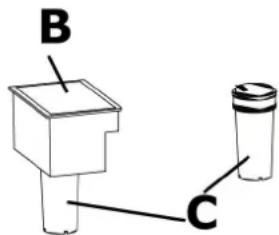
50.2.3 Foutcode Lo
natural_image
Technical line drawing of a mechanical component with labeled parts (no text or symbols beyond the number 3)51.3 Opslag
natural_image
Exterior view of a black and silver CO2SO design water dispenser (no text or symbols on the device itself)HINWEIS Y K A 3 A H I E
natural_image
Technical line drawing of a mechanical bracket with mounting holes and a labeled component (no text or symbols present)HINWEIS Y K A 3 A H I E
HINWEIS Y K A 3 A H I E
natural_image
Line drawing of a device with a circular component and a square base, showing a rotation arrow (no text or symbols)natural_image
Technical line drawing of a mechanical component with mounting holes and internal features (no text or symbols)
- Braukmann GmbH
- HINWEIS
- Fehlercode Lo
- Original Operating Manual Instant Boiling Water Dispenser HW 500 Touch
- Operating Manual
- General
- Information on this manual
- Warning notices
- AGEFAHR Danger
- ⚠️WARNUNG Warning
- ▲VORSICHT Attention
- HINWEIS Please note
- Limitation of liability
- Copyright protection
- Safety
- Intended use
- ⚠️WARNUNG
- Warning
- General Safety information
- Please observe the following general safety notices with regard to the safe handling of the device.
- Please note
- Danger of burns
- The water heated in the device and the device can become very hot.
- Dangers due to electrical power
- ▲GEFAHR Mortal danger due to electrical power!
- Commissioning
- Safety information
- Delivery scope and transport inspection
- Unpacking
- Disposal of the packaging
- Setup location requirements:
- Electrical connection
- Overheating protection & reset
- Design and Function
- Overview
- Control panel
- Rating plate
- Operation and Handling
- Before initial use
- Preparation of the waterfilter
- Preparation of the device
- Use
- Water disposal from the drip tray
- Replacing the filter
- Error code Lo
- Cleaning and Maintenance
- Safety information
- Cleaning
- Drainage stopper
- Storage
- Disposal of the Old Device
- Guarantee
- Technical Data
- Mode d'emploi
- Généralités
- Indicazione
- T i p
- Foutcode Lo
- Opslag
- HINWEIS Y K A 3 A H I E
Brand : CASO
Model : HW 500 Touch
Category : Water dispenser