IAN 314695 - Weather Station AURIOL - Free user manual and instructions
Find the device manual for free IAN 314695 AURIOL in PDF.



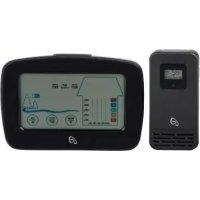
| Product type | Radio-controlled weather station with ventilation indicator |
| Brand | Auriol |
| Model | IAN 314695 |
| Dimensions (base station) | Approx. 15.0 × 9.6 × 2.3 cm |
| Weight (base station) | Approx. 160 g (without batteries) |
| Power supply (base station) | 2 x AAA alkaline batteries 1.5 V |
| Dimensions (outdoor sensor) | Approx. 5.0 × 9.7 × 2.9 cm |
| Weight (outdoor sensor) | Approx. 45 g (without batteries) |
| Power supply (outdoor sensor) | 2 x AAA alkaline batteries 1.5 V |
| Radio range | Max. 50 m (without obstacles) |
| Frequency | 433 MHz |
| Protection rating (outdoor sensor) | IPX4 (splash-proof) |
| Display | DCF77 radio-controlled time, indoor/outdoor temperature, indoor/outdoor humidity, thermal comfort, ventilation recommendation, mold alert, min/max values |
| Special functions | Alarm with snooze, backlight, time zone setting, 12/24 h format, up to 3 outdoor sensors |
| Cleaning | Soft, dry, lint-free cloth |
| Warranty | 3 years |
| After-sales service | Inter-Quartz GmbH, support@inter-quartz.de |
| Spare parts | Additional outdoor sensors available (ref. 4-LD5631) |
Frequently Asked Questions - IAN 314695 AURIOL
User questions about IAN 314695 AURIOL
0 question about this device. Answer the ones you know or ask your own.
Ask a new question about this device
Download the instructions for your Weather Station in PDF format for free! Find your manual IAN 314695 - AURIOL and take your electronic device back in hand. On this page are published all the documents necessary for the use of your device. IAN 314695 by AURIOL.
USER MANUAL IAN 314695 AURIOL
Usage and safety instructions
IAN 354197_2010


DE Beriings- und Sicherheitshinweise .1
FR lssation et avertissements de securite 19
IT 1o zioni per I'uso e per la sicurezza -38
Usage and safety instructions -57
Table of contents -57
Introduction -59-
Intended use 59
Scope of delivery 59
Specifications 59
Weather station -59-
Radio outdoor sensor 60
Important safetymipnntmationfietformation. 60-
Important safety information for users 60
Important safety information for the batteries 60
Display and controls 61
Radio-controlled weather station -61-
Radio outdoor sensor 62
Securely placing or mounting the weather station 62
Securely placing or mounting the radio outdoor sensor 63
Setup 64
Time zone adjustment 64
Reception problems 65
Turning radio control signal reception on or off 65
Restarting radio control signal reception 65-
Light 66
12/24 hour time format -66-
Temperature -66-
Speed setting 66
Basic settings -66-
Setting the alarm time 66
Activating and deactivating the alarm -66-
Snooze (SNOOZE) 67
Radio outdoor sensor/channel setting -67-
Ventilation rating 68
Comfort display 68
Ventilation recommendation 68-
Setting the mould alert 68
Activating and deactivating the mould alert 69
Maximum and minimum values 69-
Battery low indicator 69
Restart (RESET) -69-
Cleaning instructions. 69
Storage 70
Simplified EU declaration of conformity 70
Disposal -70
Disposal of the electronic device -70
-57-
GB
Battery disposal -70
Recycling -71
Waste disposal -72
digi-tech gmbh warranty -72
Warranty conditions 72
Warranty period and defects liability -72
Scope of the warranty 72
Warranty claim procedure 73
Order service -74
Service -74-
Supplier 74
RADIO-CONTROLLED WEATHER STATION & VENTILATION MONITOR
Introduction
Congratulations on the purchase of your new weather station. You have chosen a high quality product. The instruction manual is part of the product- it contains important information about safety, use and disposal. Read the manual with all usage and safety notes before using the weather station. Only use the weather station in the intended way and for the intended applications. If the weather station is given to someone else, include all documentation with the weather station. Please keep the packaging and the instruction manual for future reference.
Intended use
This electronic appliance is intended for time display and the described additional features. Any other use or modification of the electronic appliance does not comply with the intended uses. The manufacturer is not liable for damages caused by improper use or misuse. The device is not intended for commercial use.
Scope of delivery
Please note: Please check the scope of delivery after purchase. Make sure that all parts are present and not defective. If the delivery is incomplete and/or parts are damaged, do not use the radio controlled weather station. Contact the service department (see "Warranty case processing").
1 x Weather station
2 x Alkaline batteries 1.5 V AAA LRO3
1 x Radio outdoor sensor
2 x Alkaline batteries 1.5 V AAA LRO3
2xAnchor/dowel
- 2xScrews
1 x Instruction manual
Specifications
Weather station
- Touch-screen operation
- Measuring range/temperature: -10 - 50 °C
Temperature display/tolerance: + / - 1^ (0 - 50^) + / - 1,5^ (-10 - 0^) - Measuring range/humidity: 20% - 95%
- Humidity display/tolerance: +/- 5%
Dimensions: approx. 15,0 × 9,6 × 2,3cm
Weight: approx. 160 g (exkl. Batterie) - Batteries: 2 × 1.5 V AAA RO3/LRO3 (UM-4)


Radio outdoor sensor
- Measuring range/temperature: -40 - 60 °C
- Temperature display/tolerance: +/- 1 °C (0 - 50 °C); +/- 2 °C (-40 - 0 °C, 50 - 60 °C)
- Measuring range/humidity: 20% - 95%
- Humidity display/tolerance: +/- 5 %
Range: max. 50 m
Frequency: 433 MHz
Transmission power: 0.024 W
Protection offered by the case (radio outdoor sensor): IPX4 (Water resistant according to IEC norm 60529) - Dimensions: approx. 5,0 × 9,7 × 2,9 ~cm
Weight: approx. 45 g (excl. batteries) -
Batteries: 2 × 1,5 V AAA RO3/LRO3 (UM-4)
-
Symbol for direct voltage


Important safety information
Important safety information for users

WARNING! RISK OF INJURY!
This device may be used by persons (including children over 8 years of age) with reduced physical, sensory or mental abilities or lack of experience and knowledge, if they are supervised or instructed regarding the safe use of the device and understand the dangers that may arise. Children may not play with the device. Cleaning and user maintenance of the device may not be performed by children without supervision. Keep packaging films out of the hands of children. There is a danger of suffocation.
Important safety information for the batteries

WARNING!
HEALTH HAZARD! RISK OF EXPLOSION!
Keep new and old batteries/rechargeable batteries out of reach of small children. If a battery/rechargeable battery is swallowed, medical help must be obtained immediately.
The batteries/rechargeable batteries must always be inserted with the correct polarity. Clean the battery and device contacts beforehand if necessary. Do not attempt to recharge, short-circuit, or open the
batteries/rechargeable batteries. Never heat the
batteries/rechargeable batteries to recharge them. Do not expose the batteries to excessive heat such as sunshine, fire or the like. There is an increased risk of leakage! Never throw batteries/rechargeable batteries into fire, as they can explode.
-60-


Improper use of the batteries/rechargeable batteries poses a risk of explosion and leakage of the battery fluid. If the batteries/rechargeable batteries should leak, avoid contact with skin, eyes and mucous membranes. Use gloves. In the event of contact with battery fluid, immediately rinse the affected areas with plenty of clean water and consult a doctor immediately. Remove exhausted batteries/rechargeable batteries from the device immediately, there is an increased risk of leakage.
Display and controls

Radio-controlled weather station
| 1 | Indoor temperature 2 | Ventilation recommendation | |
| 3 | Indoor humidity 4 Mould warning | ||
| 5 | arm symbol 6 Time zone | ||
| 7 | SNOOZE/LIGHT-button 8 Time | ||
| 9 | Battery low indicator for station | 10 | Radio control symbol |
| 11 | Ventilation rating 12 | Radio outdoor sensor channel | |
| 13 | Battery low indicator for radio outdoor sensor | 14 | Radio outdoor sensor humidity |
| 15 | Radio outdoor sensor temperature | 16 | CH-/up按钮 |
| 17 | MEM-/down -button 18 °C/°F/SET-button | ||
| 19 | ON/OFF/ALARM- button | 20 | Comfort display |
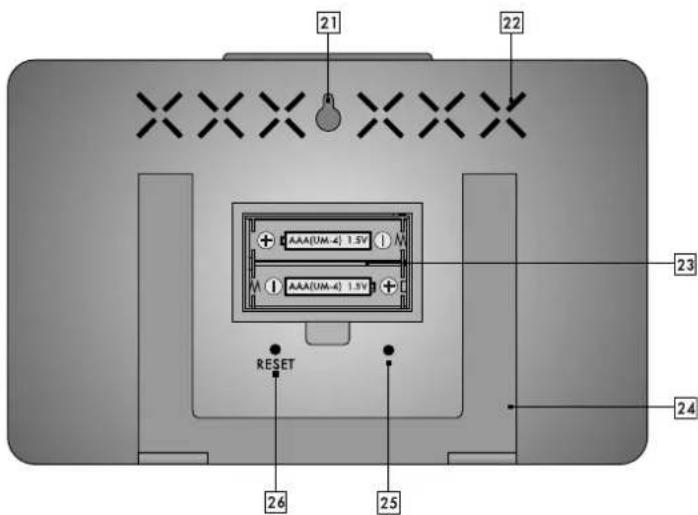
| 21 Hole for wall mounting 22 Ventilation slots | |
| 23 Battery compartment 24 Fo ding Stand | |
| 25 Buzzer 26 RESET-button | |
Radio outdoor sensor
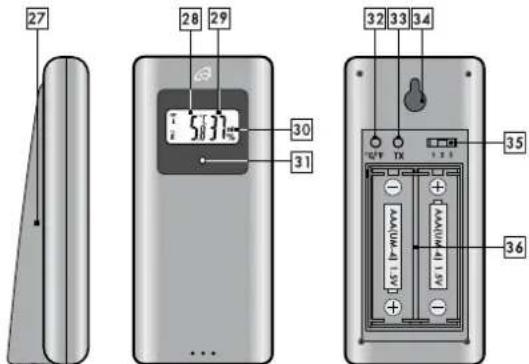
| 27 Stand 28 Temperature | ||
| 29 Humidity 30 Set channel | ||
| 31 Operation-LED 32 °C/°F-button | ||
| 33 TX-button 34 Hole for wall mounting | ||
| 35 Channel selection switch 36 | Battery compartment | |
Securely placing or mounting the weather station
The weather station with radio outdoor sensor is not designed for operation in rooms with high humidity (i.e. bathroom). Not designed for use in rooms with high humidity (e.g. bathrooms). Use the supplied dowel and screw for wall mounting. Before mounting to a wall, make sure that there are no gas, water or electricity lines at the drilling
location. Pay attention to the condition of the wall. The enclosed mounting material is not suitable for all types of walls. The manufacturer is not liable for any damage caused by improper mounting.
Protect sensitive surfaces before setup, otherwise scratches may occur.
Make sure that:
- sufficient ventilation is always guaranteed (don't place the device on shelves or where curtains or furniture block the ventilation slots 22, and ensure that there are at least 10cm of space on all sides);
- the device isn't placed on a thick carpet or bed during operation, no direct heat sources (i.e. radiators) influence the device;
- no direct sunlight reaches the device;
- contact with splashing or dripping water must be avoided (don't place any items filled with liquids, i.e. vases, onto or next to the device);
the device doesn't stand near magnetic fields (i.e. speakers); - no foreign objects or dust penetrate the housing;
- candles and other open flames must be kept away from this product at all times to prevent the spread of fire.
Securely placing or mounting the radio outdoor sensor
Place the sensor in a location where it is protected from the weather, for example under an awning or carport. The sensor has an IPX4 rating and is therefore protected from water splashes. Not designed for use in rooms with high humidity (e.g. bathrooms). Use the supplied dowel and screw for wall mounting. Before mounting to a wall, make sure that there are no gas, water or electricity lines at the drilling location. Pay attention to the condition of the wall. The enclosed mounting material is not suitable for all types of walls. The manufacturer is not liable for any damage caused by improper mounting.
Protect sensitive surfaces before setup, otherwise scratches may occur. Make sure that:
- the sensor hangs or stands upright;
- sufficient ventilation is always guaranteed (don't place the device on shelves or where curtains or furniture block the ventilation holes, and ensure that there are at least 10cm of space on all sides);
- no direct sunlight reaches the device;
- the device doesn't stand near magnetic fields (i.e. speakers);
- no foreign objects or dust penetrate the housing;
- sensitive surfaces are protected before placement.

Setup

Insert the batteries into the battery compartment of the radio outdoor sensor 36 and only then insert batteries into the battery compartment of the radio-controlled weather station 23.
Remove the protective film from the display.
Open the battery compartment of the radio outdoor sensor 36
and insert the included batteries in the correct polarity.

The operation LED 31 lights up briefly and the temperature is displayed.
Close the battery compartment.
Open the battery compartment of the radio-controlled weather station
23 and insert the included batteries in the correct polarity.

Close the battery compartment.
The display will turn on for 5 seconds and a tone will sound. The radio-controlled weather station will measure the indoor temperature and indoor humidity. Then the radio-controlled weather station will begin to receive the temperature and humidity from the radio outdoor sensor. The radio waves 22 will blink. The process can take up to 3 minutes. If radio signal reception is not possible, the radio-controlled weather station will abort the process. The radio-controlled weather station now starts reception of the DCF77 radio control signal. The radio control symbol 10 will blink on the display. This process can take from 3 to 10 minutes. During the reception process, all buttons except the SNOOZE/LIGHT button 7 will not function. If the reception of the radio time signal remains unsuccessful after 10 minutes, the radio control symbol 10 will disappear from the display. Set the time manually (see basic settings). The radio-controlled weather station will start a new reception attempt at 04:00 o'clock and 05:00 o'clock and the time will be corrected automatically if reception is successful.
Note: Please do not move the radio-controlled weather station during the reception process.

If reception is successful, the radio control symbol 10 will
appear on the display permanently and the correct time will be set automatically. During daylight saving time, DST will appear on the display to the left of the radio control symbol 10
Time zone adjustment
If you are in a country, in which the clock displays the wrong time even though it can receive the DCF77 time signal, please use the time zone adjustment to use your weather station in a time zone other than the standard time zone (UTC+1 = Central European Time). Set the difference in hours (-01 for example) to the desired time zone. Press and hold 1x long and 2x briefly the ^ C / ^ SET-button 18 in normal time display mode. The time zone will blink and can be set with
-64-

the MEM- -button 17 or the CH- -button 16. Press the ^ C / ^ SETbutton 18 to confirm your setting. The 12/24 hour time format will blink. Press the button again and the radio-controlled weather station will return to the normal setting. The radio-controlled weather station will show the changed time (for example: 1 hour less).
Reception problems
The DCF77 radio signal is transmitted from a location near Frankfurt am Main and can be received within a radius of approximately 2000 km around Frankfurt am Main. However, there are some obstacles and sources of interference, which may substantially hinder reception. If your weather station does not correctly receive the DCF77 radio signal, please hang or place the weather station in a different location at your site. Please note that devices such as computers, telephones, radios and televisions may cause electromagnetic radiation which can interfere with the DCF77 signal reception. Other possible detriments to reception are: strong building insulation (metal building materials), nearby mountains or atmospheric interference. It may also be necessary to replace the batteries.
Turning radio control signal reception on or off
Radio control reception can be turned off temporarily by pressing and holding the MEM- button 17 2 x for 3 seconds.

The radio control symbol 10 will disappear from the display.
The radio-controlled weather station will no longer receive the radio control signal but will restart reception every hour between 01:00 and 05:00 o'clock. Alternatively press and hold the MEM-Button 17 to restart DCF77 radio control signal reception.
To permanently turn off radio control signal reception, press and hold both the MEM-▼-button 17 and the CH-▲-button 16 together for 3 seconds. The radio control symbol 10 will disappear. The radio-controlled weather station will now no longer receive the DCFZ7 radio
control signal.
Press and hold the MEM- -button 17 and the CH- -button 16
together for 3 seconds and the radio wave symbol 10 will
disappear. The radio-controlled weather station can now receive the
DCF77 signal again.
The radio-controlled weather station will attempt to receive the radio control signal hourly between 01:00 and 05:00 o'clock and correct the time automatically if reception is successful. If reception is
successful, the radio control symbol 10 will appear on the display permanently.
Restarting radio control signal reception
Radio control signal reception can be restarted by pressing and holding the MEM-▼-button 17 for 3 seconds. The radio control

symbol 10 will blink on the display. The radio-controlled weather station will now start the DCF77 signal reception attempt. This process can take from 3-10 minutes.
Light
Press the SNOOZE/LIGHT button 7 to briefly activate the backlight.
12/24 hour time format
Press and hold the ^ C / F -SET-button 18 1x long and 3× briefly in normal time display mode. The 12- or 24-hour time format will blink and can be set by pressing the MEM- -button 17 or the CH- button 16. In 12-hour mode the display will show AM before noon and PM after noon.
Temperature
Press the ^ C / F -SET-button 18 to show the temperature unit degrees Celsius (^) or degrees Fahrenheit (^)
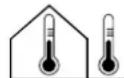
Indoor / outdoor temperature
Speed setting
Press and hold the MEM- -button 17 and the CH- -button 16 to use the speed setting feature when setting numerical values.
Basic settings
The following basic settings are possible: Hours, minutes, time zone and 12/24 hour time format. Press and hold the ^ C / ^ F -SET-button 18 in normal time display mode for 3 seconds. The hours will blink and can be set by pressing the MEM- -button 17 or the CH- -button 16. Press the ^ C / ^ F -SET-button 18 to confirm your setting. Set the minutes, time zone 00-(-) and 12/24 hour time format in the same way.
Setting the alarm time

Press the ON/OFF-ALARM-button 19 1x briefly while in normal time display mode to enter alarm mode. OFF and AL will appear on the display. Press and hold the ON/OFF-ALARM-button 19. The hours will blink and can be set by pressing the MEM- button 17 or the CH-▲-button 16. Press the ON/OFF-ALARM-button 19 to confirm your setting. The minutes will blink and can be set in the same way. Press the ON/OFF-ALARM-button 19 to confirm your setting and return to normal time display mode.
Activating and deactivating the alarm
Press the ON/OFF-ALARM-button 19 1x briefly in normal time display mode to enter alarm mode. OFF and AL will appear on the display.

Press the MEM- -button 17 or the CH- -button 16. The set alarm time and the alarm symbol will appear on the display. The alarm is now activated. Press the MEM- -button 17 or the CH- -button 16 again. OFF will appear on the display and the alarm symbol will disappear. The alarm is now deactivated.
Press the ON/OFF-ALARM-button 192 x briefly to return to normal time display mode.
Snoopze (SNOOZE)
Press the SNOOZE/LIGHT-button 7 when the alarm sounds to temporarily deactivate the alarm. Z^z will blink on the display. After 5 minutes, the alarm will sound once again. Press any button other than the SNOOZE/LIGHT-button 7 to turn the alarm off.
Radio outdoor sensor/channel setting
You may use up to 3 sensors with your radio-controlled weather station at the same time.
Attention: Insert the batteries into the battery compartment of the radio outdoor sensor 36 and only then insert batteries into the battery compartment of the radio-controlled weather station 23.
Open the battery compartment of the radio outdoor sensor 36 and set the desired channel (1-3) using the channel selection switch 35. Press and hold the CH- button 16 on the radio-controlled weather station for 3 seconds until the radio waves 42 for the radio outdoor sensor blink. The radio-controlled weather station will now attempt to receive the signal from the radio outdoor sensor. Press the TX-button 33 to manually transmit the outdoor temperature and outdoor humidity from the radio outdoor sensor to the radio-controlled weather station. Press the ^ C / ^ -button 32 to select the temperature unit C-Celsius or F-Fahrenheit. Close the battery compartment.
Attention: The radio outdoor sensor must be set up within a maximum distance of 50m from the radio-controlled weather station with no obstacles.
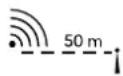
If you use multiple radio outdoor sensors, press the CH- button 16 briefly to switch between the different radio outdoor sensors. The rotation symbol the left of the radio outdoor sensor channel 12 on the display shows that the radio-controlled weather station will alternate between the different radio outdoor sensors. Only connected sensors are shown. Press and hold the CH- button 16. The radio-controlled weather station will receive the temperature and humidity from the radio outdoor sensors and the radio waves ± 2 will blink. If you wish to connect an additional radio outdoor sensor, the radio-controlled weather station will detect it automatically or you may press

the TX-button 33 on the radio outdoor sensor to transmit the signal manually.
Ventilation rating
Based on the humidity and temperature values for the indoor and outdoor areas, the radio-controlled weather station will rate how the indoor humidity value may change through ventilation.

Humidity rises 5% or more

Humidity stays the same

Humidity sinks by 5% or more
Comfort display
The comfort display 20 is influenced by the indoor humidity. However, the status "COMFORT" is only displayed, if the indoor humidity and indoor temperature is in the comfort range (45% - 65% and 20 - 25°C).
| TOO WET | WET COMFORT | DRY TOO DRY | ||
| 85% - 95% | 66% - 84% | 45% - 65% | 31% - 44% | 20% - 30% |
Ventilation recommendation
The radio-controlled weather station calculates the expected change in room climate from the measured indoor and outdoor values and will either recommend ventilation or not.
| Open window No | window change Close | window |
| Room climate changes | Room climate stays the same | Room climate changes |
Setting the mould alert
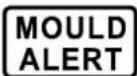
Press the ON/OFF-ALARM-button 19 in normal time display mode to enter mould alert mode. OFF will appear on the display. Press and hold the ON/OFF-19. The pre-set mould alert value of 65% humidity w can be changed in 5% increments by pressing the M or the CH-▲-button 16. Press the ON/OFF-ALARM confirm your setting and return to normal time display

Activating and deactivating the mould alert
Press the ON/OFF-ALARM-button 192 x briefly in normal time display mode to enter mould alert mode. OFF will appear on the display.
Press the MEM- -button 17 or the CH- -button 16. The set humidity value and the mould alert icon will appear on the display. The mould alert is now activated.
Press the MEM- -button 17 or the CH-▲-button 16 again. OFF will appear on the display and the mould alert icon will disappear.
The mould alert is now deactivated.
Press the ON/OFF-ALARM-button 19 to return to normal time display mode.
Maximum and minimum values
The radio-controlled weather station will start to record the maximum and minimum values for temperature and humidity when the batteries are inserted.
Press the MEM- -button 17 1 x briefly to show the maximum MAX indoor temperature 1, outdoor temperature 15, indoor humidity 3 and outdoor temperature 14 on the display.
Press the MEM- -button 17 again 1× briefly to show minimum MIN indoor temperature 1, outdoor temperature 15, indoor humidity 3 and outdoor temperature 14 on the display. To delete the stored maximum and minimum values, press 1× briefly and 1× long the MEM- button
- The stored maximum and minimum values are deleted and new values will be recorded.
Battery low indicator
If the batteries are to weak to power the radio-controlled weather station, the radio outdoor sensor and the signal transmission, the battery low indicator 9 or 13 will appear on the display. The batteries must be replaced as soon as possible in all devices. Restart the radio-controlled weather station.
Restart (RESET)
Press the RESET-button 26 to reset the radio-controlled weather station and restart radio signal reception.
Cleaning instructions
Improper cleaning can damage the device. Do not submerge the device in water or other liquids. Do not use aggressive cleaners, brushes with metal or nylon bristles, or sharp or metallic cleaning tools such as knives, scrapers or similar implements. These may damage the surface of the device. Clean the device using a soft, dry, lint-free cloth, such as a glasses cleaning cloth.

Storage
If the weather station and the outdoor sensor are not used for a longer period of time, remove the batteries and store it, cleaned and protected from sunlight, in a dry, cool place, preferably in its original packaging.
Simplified EU declaration of conformity

Hereby, digi-tech gmbh declares that the radio-controlled weather station 4-LD5631 is in compliance with the RED 2014/53/EU, article 10 (8) directive. The full text of the EU declaration of conformity is available at the following internet address: http://www.digi-tech-gmbh.com/ce/354197_2010_WSL.pdf
Disposal
This device and all the packaging materials are recyclable. Please dispose of them separately for better waste handling. You can find out about disposal options for your product by contacting your municipality.
Please take note of the marking of packaging material when separating waste materials. They are marked with abbreviations (a) and numbers (b) with the following meanings:
1-7: plastics
20-22: paper and cardboard
80-98: composite materials.

Disposal of the electronic device
Remove the batteries before disposal and dispose of them separately (see Disposal of the batteries). This weather station and the outdoor sensor are subjects to the European

Directive 2012/19/EU. The symbol of the crossed-out wheelie bin indicates that the product must be disposed of separately in the European Union. Labelled products cannot be disposed of with normal household waste, but must be handed in at a collection point for the recycling of electrical and electronic equipment. In the interest of the environment, when your device has reached the end of its usefulness, do no throw it in the normal household trash. Disposc of it in the proper and correct way. You can find out about collection sites and their business hours from your public administration. Please adhere to applicable requirements.
Battery disposal
The accompanying symbol indicates that batteries and rechargeable batteries must not be disposed of with normal household waste. Defective or used batteries/rechargeable batteries must be recycled in accordance with Directive 2006/66/EC and its amendments. Consumers are legally obliged to dispose of all batteries and rechargeable batteries, regardless of

whether they contain harmful substances such as: Cd = cadmium, Hg = mercury, Pb = lead, Li = lithium or not, at a collection point in their municipality / district or at a retail outlet, for environmentally friendly disposal and for the recovery of valuable raw materials such as cobalt, nickel or copper.
The return of batteries and accumulators is free of charge.

WARNING!
Environmental damage through incorrect disposal of batteries / rechargeable batteries!
Some of the possible materials such as mercury, cadmium and lead are poisonous and, if not disposed of properly, endanger the environment. For example, heavy metals can have harmful effects on the health of humans, animals and plants and accumulate in the environment and in the food chain, and can then enter the body indirectly via food.

WARNING! Danger of explosion!
With used batteries containing lithium (Li = lithium) there is a high risk of fire. Therefore, special attention must be paid to the proper disposal of used batteries and rechargeable batteries containing lithium. Incorrect disposal can also lead to internal and external short circuits due to thermal effects (heat) or mechanical damage. A short circuit can lead to a fire or an explosion and have serious consequences for humans and the environment.
For this reason, tape off the poles of lithium-based batteries and rechargeable batteries prior to disposal in order to avoid an external short circuit.
Batteries and rechargeable batteries that are not permanently installed in the device must be removed and disposed of separately before disposal of the device.
Please return batteries and rechargeable batteries only when they have been discharged!
Use rechargeable batteries instead of disposable batteries whenever possible.
Recycling
The product packaging consists of recyclable materials. Please dispose of them properly at the available collection sites.


Waste disposal
Disposal of the packaging in an environmentally responsible fashion. Please note the marking of the different packaging materials and separate them if applicable.

digi-tech gmbh warranty
This weather station includes a 3 year warranty starting on the day of purchase. In case of defects of this weather station you have, by law, certain rights regarding the vendor of the weather station. These rights are not changed by the warranty which is described in the following paragraphs.
Warranty conditions
The warranty duration starts on the date of purchase. Please keep the receipt in a safe place. The receipt is needed as a proof of purchase. If a defect occurs in the weather station within 3 years, the weather station will be repaired or replaced (according to our choice) free of charge. This warranty requires that, within the 3 year warranty period, the weather station and the receipt can be made available to us along with a short written description of the defect and when it occurred. If the defect is covered by the warranty, you will receive the repaired weather station or a new weather station. Repair or replacement does not cause the warranty period to restart.
Warranty period and defects liability
The warranty period is not increased by the defect liability. This also applies to repaired or replaced parts. If defects are noticed at the time of purchase they must be reported immediately upon unpacking the item. Paid repair may be available after the end of the warranty period.
Scope of the warranty
The weather station was manufactured according to strict quality guidelines and was carefully inspected before delivery. The warranty does not include parts that experience normal wear and tear and can thus be seen as wear parts or fragile parts that are damaged. Examples include Switches, Batteries or parts made of glass.
This warranty becomes void if the weather station is damaged, is not used in the recommended way or is improperly repaired.
For proper use of the weather station all instructions in this manual must be adhered to exactly. Use of the weather station in a way that is discouraged in the manual must be avoided.
The weather station not intended for commercial use. Abusive or improper use, excessive force and changes that are made by nonauthorized repair centers will void the warranty.

Warranty claim procedure
To ensure that your call is processed in a fast and efficient manner please note the following directions:
Have your receipt (as proof of purchase) and the article number (354197_2010) handy.
The article number can be found on the type label, an engraving, the front page of the manual (bottom left) or a sticker on the back side or bottom side of the case.
In case defects occur, please first contact the service center (see below) by phone or email.

Visit www.lidl-service.com to download this and many other manuals, product videos and software.
With this QR-Code you can reach the Lidl-Service-Site (www.lidl-service.com) directly and you can open your manual by entering the article number (354197_2010).
Order service
Additional radio outside sensors can be ordered by fax +49(0)6198-5770-99 or online at www.inter-quartz.de. The price for one sensor is 5,00 € excluding VAT and despatch.
Service
Inter-Quartz GmbH
Valterweg 27A
65817 Eppstein
GERMANY
Email: support@inter-quartz.de
Telephone: +49 (0)6198 571825

DE 0080055156616
AT 0080055156616
CH 0800563862
IAN 354197_2010
Art.-Nr.: 4-LD5631

Year of manufacture: 2021

Supplier
Please note that the following address is not a service address.
Please first contact the service address (see above).
digi-tech gmbh
Valterweg 27A
65817 Eppstein
GERMANY


digi-tech gmbh
Valterweg 27A
65817 Eppstein
GERMANY