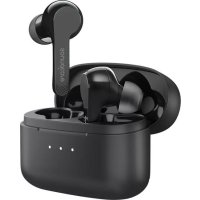
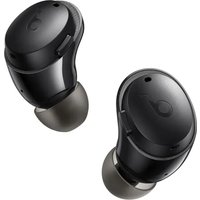
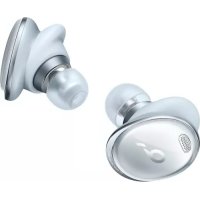
Liberty Air - Earplug soundcore - Free user manual and instructions
Find the device manual for free Liberty Air soundcore in PDF.



| Product type | True Wireless Earbuds |
| Brand | Soundcore |
| Model | Liberty Air |
| Bluetooth version | v5.0 |
| Bluetooth range | Up to 10 meters |
| Impedance | 16 Ω |
| Speaker | 6 mm × 2 (full range) |
| Frequency response | 20 Hz - 20 kHz |
| Weight (earbuds + case) | 55 g |
| Earbuds battery life | 5 hours (varies by volume and content) |
| Charging time | 2 hours |
| Charging input | 5 V, 0.5 A |
| Touch control | Multi-function touch pad on each earbud |
| Main functions | Play/Pause, next/previous track, call control, voice assistant (Siri, etc.) |
| Power on/off | Automatic by removing/replacing in case, or manual (touch button 2 sec) |
| LED indicators | Earbuds: red (low battery), white (charging), off (charged). Case: white (battery level and charging) |
| Reset | Delete device from Bluetooth list, press 4 times on each earbud, replace in case |
| Maintenance and cleaning | Wipe with a soft, dry cloth. Do not use chemicals. |
| Safety | Do not expose to extreme temperatures, do not immerse in water |
| Repairability | Not user serviceable. Contact support for repairs. |
Frequently Asked Questions - Liberty Air soundcore
User questions about Liberty Air soundcore
0 question about this device. Answer the ones you know or ask your own.
Ask a new question about this device
Download the instructions for your Earplug in PDF format for free! Find your manual Liberty Air - soundcore and take your electronic device back in hand. On this page are published all the documents necessary for the use of your device. Liberty Air by soundcore.
USER MANUAL Liberty Air soundcore
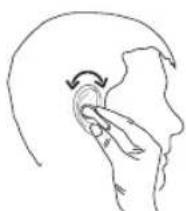
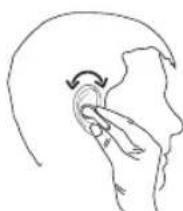
- Insert the earbuds into the inner canal of your ears.
- Turn and find the most comfortable position.

Charging

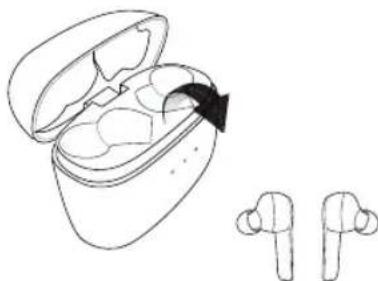
Remove the film on the earbuds when taking them out of the charging case for the first time.
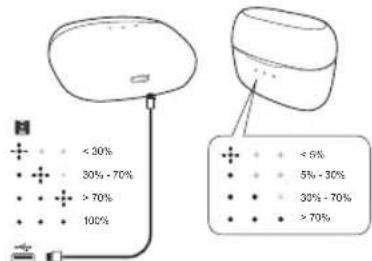
Open or close the charging case to activate the LED battery indicator.
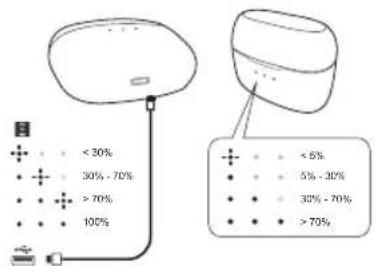
Charging case indicator (When opened or closed)
Flashing white (for 5 seconds) Display power level

Slow flashing white (for 5 seconds)
<5% power level

Steady white 5%~30% power level


Steady white 30% -70% power level
Steady white >70% power level
Charging case indicator (Connected to power source)

Steady white (for 1 second)
Charging

-
- Flashing white 0%~30% power level

Second LED indicator flashing white
30%~70% power level

Third LED indicator flashing white
70% power level

Steady white Fully charged
Earbud status indicator

Flashing red (once every minute) Low battery

Steady white Charging
Off Fully charged

To preserve battery lifespan, fully charge at least once every 45 days.

Turn On / Off
- The earbuds switch on automatically when taken out of the charging case. To manually switch on, tap the multifunction touchpad on both your earbuds once.
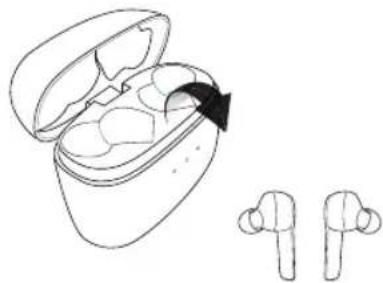
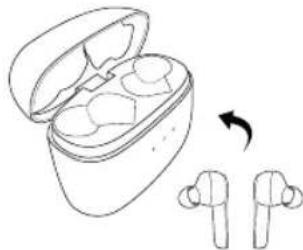
- The earbuds switch off automatically when placed back in the charging case.
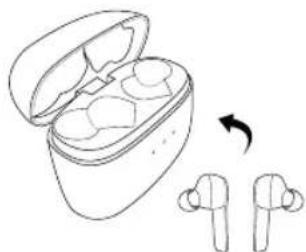
OFF
Flashing red for 1 second (Earbud status indicator)

Pairing
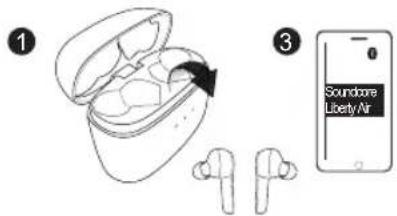
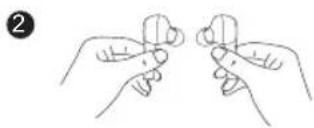
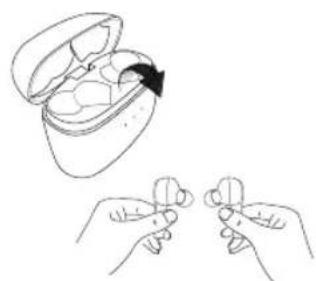
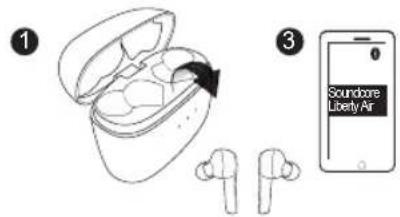
- True Wireless Stereo connection
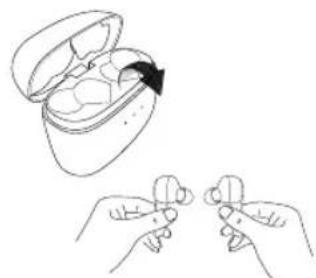

ON Flashing white for 1 second (Earbud status indicator)
03
English English 04

Slow flashing white (Breathing-like)
True Wireless Stereo pairing mode

Steady white (For 1 second)
True Wireless Stereo connection is successful (the right earbud is connected to the left earbud).
2. Bluetooth connection (Device)
Enter pairing mode when earbuds are switched on.
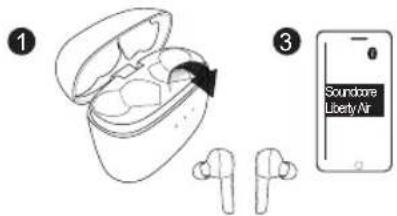
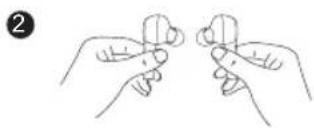

Rapidly flashing white Pairing mode

Slow flashing white
Connected to a device

Controls
| R | Tap the multi-function touchpad on the right carbud twice | Play / pause |
| R | Tap and hold the multi- function touchpad on the right earbud for 2 seconds | Next track |
| L | Tap and hold the multi- function touchpad on the left earbud for 2 seconds | Previous track |
| +/- | Control volume via the connected device | Volume up / down |
| R | Tap the multi-function touchpad on the right carbud twice | Answer / End call |
| R | Tap and hold touchpad on right earbud for 2 seconds | Reject call |
| R | Tap the multi-function touchpad on right earbud twice | Put current call on hold and answer incoming call |
| R | Tap and hold touchpad on right earbud for 2 seconds | Switch between held call and active call |
| R | Tap and hold touchpad on right earbud for 2 seconds | Transfer a call between headphones and mobile phone |
| +/- | Slow flashing white (Right earbud only) | On a call |

Slow flashing white (Right earbud only)
Incoming call
Tap the multifunction touchpad on the left earbud twice

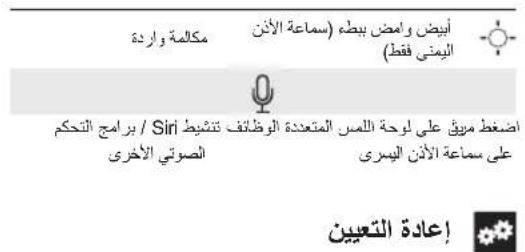
Activate Siri/ Other voice control software

Reset
2
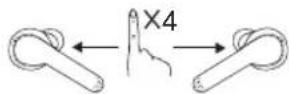
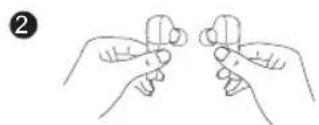
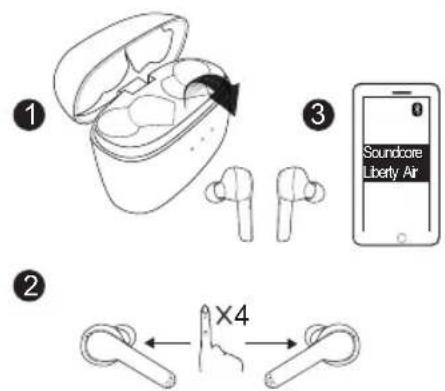
Reset the earbuds if you can only hear sound on one side:
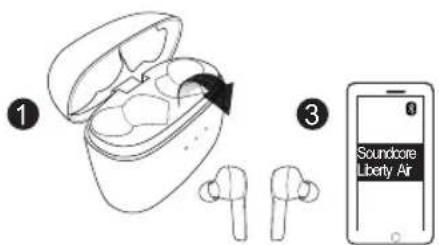
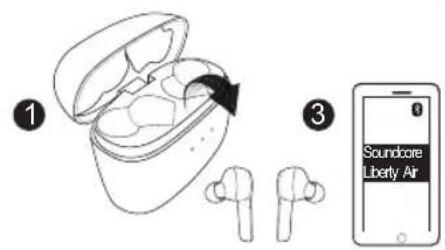
- Delete the "Soundcore Liberty Air" in device's bluetooth list, and turn off the bluetooth on your device.
07 English English 08
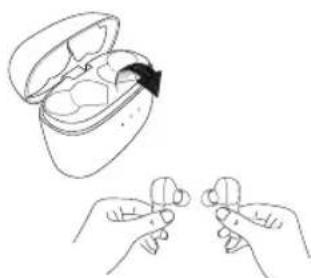
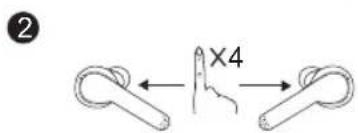
- Only take one earbud out of the charging case. Tap the multifunction touchpad on the earbud for 4 times. Repeat the same on the other earbud.
- Put both earbuds into the charging case.
- Then take both earbuds out of the charging case, place them near each other, then the LED indicator will start flashing in white(breathing like).
- Once the LED indicator on right earbud flashes white, go to the Bluetooth pairing list on your device and select "Soundcore Liberty Air".
Specifications

Specifications are subject to change without notice.
Input 5V 0.5A
华
Charging time 2 hours
Playtime (varies by volume level and content)
5 hours
Weight (product net weight) 55g / 1.9oz
Impedance
16Ω
Driver (full range) 6mm × 2
Frequency response 20 Hz - 20 KHz
Bluetooth version V 5.0
Range 10m / 33ft

Použiváni
Parringstilland for True Wireless Stereo

Lyser hyidt (11 sekund)
True Wireless Stereo-forbindelse opretitet (hajre oreprop er forbundet med venstre oreprop).
Tap the multi function touchpad on right earbud twice
Specifications techniques

True Wireless Stereoparkoppingslage True Wireless Group operating law

Lyser vitt (i en sekund)
- True Wireless Stereo-tilkobling
Norsk Norsk 92

Blinker salke hvitt (pustefrekwens)
True Wireless Stereoparingsmodus

Lyser kontinuierlig hvit (Iett sexund)
True Wireless Stereo-tikoblingen er velkykket (hoyre orepropper koblet til venstre orepropp).
2. Bluetooth-tilkobling (enhet)
Gainiparingsmodusnareproppenereslallpa.

BCTPO MNTAET BENBIM CBOTM

MnHNOHTB
Pekimcompankei
PJIJIIOHHeHO KcTPOCTBy

3nementbIynpaBneHna
| 30% | 30% | 30% | 30% | 30% | 30% |
| 70% | 70% | 70% | 70% | 70% | 70% |
jbjai kewu jy
True Wireless Stereo 1
140

(1) Bluetooth 2.1
1
juaaiai jao


141
paillie

#
| ### / ### | ### | ### |
#
| ### | ### | ### |
| ### | ### | ### |
| ### | ### | ### |
| ### | ### | ### |
| ### | ### | ### |
| ### | ### | ### |
| ### | ### | ### |
| ### | ### | ### |
142
a 1
saaa aag aeg aae aag aag aag aag aag aag aag aag aag aag aag aag aag aag aag aag aag aag aag aag aag aag aag aag aag aag aag aag aag aag aag aag aag aag aag aag aag aag aag aag aag aag aag aag aag aag aag aag aag aag aeg aeg aeg aeg aeg aeg aeg aeg aeg aeg aeg aeg aeg aeg aeg aeg aeg aeg aeg aeg aeg aeg aeg aeg aeg aeg aeg aeg aeg aeg aeg aeg aeg aeg aeg
| 0.5=1/255 | |
NNTIN N

nnnnnnnnnnnnnnnnnnnnnn 1
yoy

Pnnnnnnnnnnnnnnnnnnnnnnnnnnnnnnnnnnnnnnnnnnnnnnnnnnnnnnnnnnnnnnnnnnnnnnnnnnnnnnnnnnn
.
n nn nnnnnnnnnnnnnnn
nion nn
(nIO INNIN)yynnn
nnnnn (nne 5 nnn) nnnn
5%>nnn nn n7
30%~5% nnn nn nHE
70%-30% nnnn nn nHE
70%<nnnnn p:HE
(nnnnnn)
y 7
30%~0% nnnn nn nnnn
70%~30% nnn nn nnn
70%<nnnn
nniin 1000
y
y
nynnnn
145 nnn
146
nnn nnn nn nnn nnn 452222222

#

nnnnnnnnnnnnnnnnnnnnnnnnnnnnnnnnnnnnnnnnnnnnnnnnnnnnnnnnnnnnnnnnnnnnnnnnnnnnnnnnnnnnnnnnnnnnnnnnnnn
00007 11n n) nn nnnn n (nix

147 nnn
yon 7777777777777777777777777777
.2
010007 11n n) nn nn nn nn nn nn nn nn nn nn nn nn nn nn nn nn nn nn nn nn nn nn nn nn nn nn nn nn nn nn nn nn nn nn nn nn nn nn nn nn nn nn nn nn nn nn nn nn nn nn nn nn nn nn nn nn nn nn nn nn nn nn nn nn nn nn nn nn nn nn nn nn nn nn nn nn nn nn nn
7

True Wireless Stereo) 1
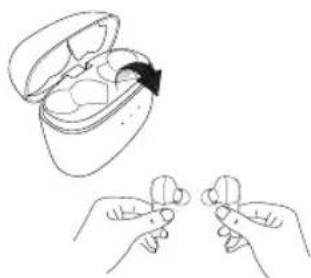
148
True Wireless Stereo
n (True Wireless Stereo) np (nnn)
(wn) Bluetooth n.1
nnnnnnnnnnnnnnnnnnnnnnnnnnnnnnnnnnnnnnnnnnnnnnnnnnnnnnnnnnnnnnnnnnnnnnnnnnnnnnnnnnnnnnnnnnnnnnnnnnn
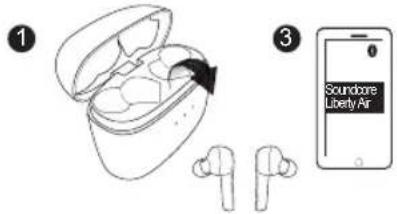
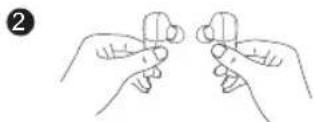
ynnnnn 17
y


7777


y
nnnnnnnnnnnnnnnnnnnnnnnnnnnnnnnnnnnnnnnnnnnnnnnnnnnnnnnnnnnnnnnnnnnnnnnnnnnnnnnnnnnnnnnnnnnnnnnnnnnnnnnnnnnnn

n nnnnnnnnnnnnnnnnnnnnnnnnnnnnnnnnnnnnnnnnnnnnnnnnnnnnnnnnnnnnnnnnnnnnnnnnnnnnnnnnnnnnnnnnnnnnnnnnnnnnnnnnnnnnnnnnnnn

n nn nnnnnnnnnnnnnnnnnnnnnnnnnnnnnnnnnnnnnnnnnnnnnnnnnnnnnnnnnnnnnnnnnnnnnnnnnnnnnnnnnnnnnnnnnnnnnnnnnnnnnnnnnnnnnnnnnnnnnnnnnnnnnnn
nnon/nynn nnn
ynnn nn nnnnnnnnnnnnnnnnnnnnnnnnnnnnnnnnnnnnnnnnnnnnnnnnnnnnnnnnnnnnnnnnnnnnnnnnnnnnnnnnnnnnnnnnnnnnnnnnn


nnnnnnnnnnnnnnnnnnnnnnnnnnnnnnnnnnnnnnnnnnnnnnnnnnnnnnnnnnnnnnnnnnnnnnnnnnnnnnnnnnnnnnnnnnnnnnnnnnnnnnnnnnn

n n nn nnnn 2

nnnnnnnnnnnnnnnnnnnnnnnnnnnnnnnnnnnnnnnnnnnnnnnnnnnnnnnnnnnnnnnnnnnnnnnnnnnnnnnnnnnnnnnnnnnnnnnnnnn
nnnnnnnnnnnnnnnnnnnnnnnnnnnnnnnnnnnnnnnnnnnnnnnnnnnnnnnnnnnnnnnnnnnnnnnnnnnnnnnnnnnnnnnnnnnnnnnnnnnnnnnnnnnnn

nnnnn nn nnnn
n 2

nnnnnnnnnnnnnnnnnnnnnnnnnnnnnnnnnnnnnnnnnnnnnnnnnnnnnnnnnnnnnnnnnnnnnnnnnnnnnnnnnnnnnnnnnnnnnnnnnnnnnnnnn
n 2

nnnn

149 n nn
150
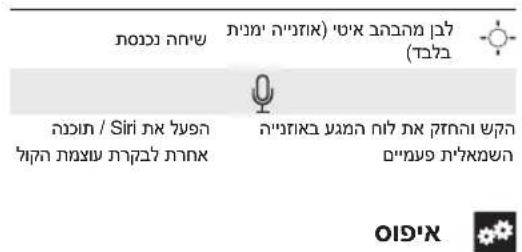
y Bluetooth-n nnuu Soundcore Liberty Air nn pnn .1 ywnn Bluetooth-n nn nnn
ynnn nnynnn nnnnnnnnnnnn 2
yynnnnnnnnnnnnnnnnnnnnnnnnnnnnnnnnnnnnnnnnnnnnnnnnnnnnnnnnnnnnnnnnnnnnnnnnnnnnnnnnnnnnnnnnnnnnnnnnnnnnnnnnnnnnnnnnnnnnnnnnnnnnnnnnnnnnnnnnnnnnnnnnnnnnnnnnnnnnnnnn nn nn nn nn nn nn nn nn nn nn nn nn nn nn nn nn nn nn nn nn nn nn nn nn nn nn nn nn nn nn nn nn nn nn nn nn nn nn nn nn nn nn nn nn nn nn nn nn nn nn nn nn nn nn nn nn nn nn nn nn nn nn nn nn nn nn nn nn nn nn nn nn nn nn nn nn nn nn nn nn nn nn nn nn nn nn nn nn nn nn nn nn nrnne nannn nannn nannn nannn nannn nannn nannn nannn nannn nannn nannn nannn nannn nannn nannn nannn nannn nannn nannn nannn nannn nannn nannn nannn nannn nannn nannn nannn nannn nannn nannn nannn nannn nannn
| ### |
| ### 0.5 ### 5### no### |
| ### no ### no ### |
| ### 5 ### no ### no ### no ### no ### (###) |
| ### 1.9 / ### 55(### no ### no ###) ### |
| ### 16### |
| 2 × ### 6(### no ###) ### |
| ### 20 - ### 20### no### |
| V 5.0 Bluetooth no### |
| ### 10### |
151 nnn
152
Customer Service
Kundenservice|力次卡一卡服务Client|ServizioaiCienl
AtteniOni Cliente|Servicio de Apoio ao Cientie|客服支持
O6cnykBaHne KneHIOB|Zakaznic podpora|Kundeservice
Asiaicaspalvelu|Kontenservice|Kundeservice
KundtJnst|客户服务|ninn

18-month limited warranty
18 Monate beschränkte Herstellunggarantie | 18 Monat 18 Menge Garantie Limitée de 18 mois | Garantia limitata 18 misi Garantie Limitada de 18 meises | 18 meses de garantie limité | 18个月质保期 | Orgaune houra rapaHTnHa 18 Mec | 18 mésicr oriemezera zarauka | 18 mandes begranset garanti | 18 oukaudon rajoitatu tuku | 18 kaheh bok | 18 maanden bepeke garantie | 18 mandes begrenset garanti | 18 mandes begransad garanti | 18 kienl有限保面

Lifetime technical support
Leperslanger technischer Support | 天之力卡拉一
Support technique à vie | Supporto tecnico a vita
Asistencia tcnica da por vida
Suorte tecnico ao longo da vda uril do produc
终身客服支持
Teknische kndepkna Ha becb coek ekcnnyatau
Dozivotri lechnicka podpora
Teknisk support i hele proucktets veletid
Flinkainen tekkinen tuki | 皇韩尼将子
Levensange technische ondersteing
Teknisk statte helle tevetici | Ivstids teknisk support
永久技施支援 |

service@soundcore.com
+1(800)9887973(US)Mon-Fri 9:00-17:00(PT) +44(0)1604936200(JK)Mon Fri 6:00 11:00(GMT) +49(0)6995797960(DC)Mon-Fri 6:00-11:00 +810344557823(日本)月金 9:00 17:00 +864000550036(中国)周一至周五9:00 17:30 +82-2-6464-7088(中国)日—9:00-17:30
Declaration of Conformity
Hereby, Anker Innovations Limited declares that the radio equipment type A3902 is in compliance with Directive 2014/53/EU. The full text of the EU declaration of conformity is available at the following internet address: https://www.soundcore.com/
Maximum output power:4dBm Frequency band:2.4G band (2.4000GHz-2.4835GHz) FCC ID:2AOKB-A3902 IC:23451-A3902 24F820407
Anker Innovations Limited
Room 1318 19, Hollywood Plaza, 610 Nathan Road, Mongkok, Kowloon, Hong Kong
For questions on the product, please check the FAQ page on our website: https://www.soundcore.com/products/variant/liberty-air/A3902011 https://www.soundcore.com/products/variant/liberty-air/A3902021
For FAQs and more information, please visit:

@SoundcoreAudio @soundcoreaudio @soundcoreaudio
- Charging
- Charging case indicator (When opened or closed)
- Charging case indicator (Connected to power source)
- Earbud status indicator
- Turn On / Off
- Pairing
- Bluetooth connection (Device)
- Controls
- Reset
- Specifications
- Použiváni
- Specifications techniques
- Bluetooth-tilkobling (enhet)
- 3nementbIynpaBneHna
- jbjai kewu jy
- #
- NNTIN N
- yoy
- (nIO INNIN)yynnn
- (nnnnnn)
- nniin 1000
- 7777
- Customer Service
- 18-month limited warranty
- Lifetime technical support
- service@soundcore.com
- Declaration of Conformity
Brand : soundcore
Model : Liberty Air
Category : Earplug