SAMSUNG Clean Station VCASAE904 - Vacuum Cleaner

Clean Station VCASAE904 - Vacuum Cleaner SAMSUNG - Free user manual and instructions

Find the device manual for free Clean Station VCASAE904 SAMSUNG in PDF.
📄 169 pages English EN Download 💬 AI Question 10 questions ⚙️ Specs
Notice SAMSUNG Clean Station VCASAE904 - page 4
Pick your language and provide your email: we'll send you a specifically translated version.
Product type Automatic dust emptying station for cordless vacuum cleaner
Brand Samsung
Model VCASAE904 (VCA-SAE904)
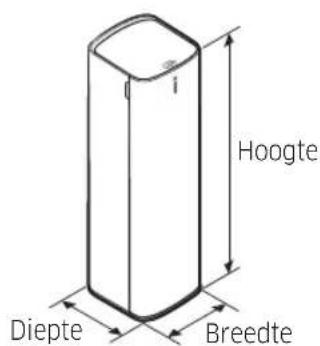
Dimensions (L x D x H) 180 x 185 x 600 mm
Weight 5.6 kg
Power supply 230 V, 50 Hz
Dust bag type Disposable bag (model VCA-ADB90)
Number of bags included 2 (1 installed + 1 spare)
Dust container capacity Approximately 0.5 L (transparent container)
Main function Automatic emptying of Jet vacuum cleaner dust container
Status indicator Blue light (on) / red light (bag full)
Compatibility Jet dust container of Samsung Jet cordless vacuum cleaners
Filters Pre-motor filter (non-woven textile), washable micro-filter, metal mesh grid filter, ultrafine dust filter (replace once a year)
Maintenance Clean container with water, shake ultrafine filter, wash micro-filter
Safety Automatic shut-off when bag full (motor protection), indoor use only
Power cord length Approximately 1.5 m (estimated)
Noise Not specified
Spare parts Dust bag VCA-ADB90, replacement filters available
Repairability Repair by Samsung authorized service center only
Warranty Consult manual or retailer

Frequently Asked Questions - Clean Station VCASAE904 SAMSUNG

Which vacuum cleaners are compatible with the Clean Station VCASAE904?
The Clean Station is compatible only with the Jet dust container of Samsung Jet cordless vacuum cleaners (models VCA-SAE90A, VCA-SAE90B, VCA-SAE901, VCA-SAE902, VCA-SAE903, VCA-SAE904).
How to replace the dust bag?
Open the front cover, pull the [PULL] lever diagonally to remove the used bag. Insert a new bag (ref. VCA-ADB90) by pushing it back then lock the lever until it clicks. Close the cover.
What to do when the light turns red?
The red light indicates that the dust bag is full. Replace it with a new one. After replacement, the light turns blue again.
How to clean the ultrafine dust filter?
Do not wash this filter with water. Simply shake it to remove dust. Replace it once a year for optimal performance.
Can I use the Clean Station without the vacuum cleaner?
No, the Clean Station is designed only to empty the dust container of the Jet vacuum cleaner. It does not work as a standalone vacuum cleaner.
What is the weight of the device?
The Clean Station weighs 5.6 kg. Place it on a stable floor to avoid falls.
How to install the Clean Station?
Place the device at least 10 cm from the wall on a stable floor. Store the cord in the bottom groove, route it along the wall and plug it in. The blue light turns on then off.
What to do if the device does not stop or smells bad?
If the bag is full, the motor may shut off automatically. Replace the bag. If bad odors persist, replace the bag even if not full, or clean the filters.
Can I clean the dust container?
Yes, empty the container, wash it with water and dry it completely before reinstalling. For the washable micro-filter, press the top with one hand during operation if the container is full.
Where to buy replacement dust bags?
Use only Samsung VCA-ADB90 bags. Contact your Samsung retailer or an authorized repair center.

User questions about Clean Station VCASAE904 SAMSUNG

0 question about this device. Answer the ones you know or ask your own.

Ask a new question about this device

The email remains private: it is only used to notify you if someone responds to your question.

No questions yet. Be the first to ask one.

Download the instructions for your Vacuum Cleaner in PDF format for free! Find your manual Clean Station VCASAE904 - SAMSUNG and take your electronic device back in hand. On this page are published all the documents necessary for the use of your device. Clean Station VCASAE904 by SAMSUNG.

USER MANUAL Clean Station VCASAE904 SAMSUNG

ART WORK SPEC
Changes Note: 2, 7 / REV.UP
Design: Hyunwoo LimProductVacuum CleanerHQ R&D PIC:
Size: 148mm x 210mmMaterial: Wood Free 80g VCA-SAE90*Model/PJT
Page: 168 Print Color: Black PartCode DJ68-00832E
Date: 2020-12-09Post Processing : CutRev No01 → 02

Jungran Kim

Clean station

User manual

VCA-SAE90*

  • Before operating this unit, please read the instructions carefully.
  • For indoor use only

SAMSUNG Clean Station VCASAE904 - User manual - 1

text_image SAMSUNG

Contents

PREPARATION

Safety Information 3

INSTALLATION

Installing the clean station 7

Installation guide 7

MAINTENANCE

Maintaining the clean station 10

Dust bag 10

Dustbin 11

Premotor Filter 11

Ultra fine Dust Filter 11

OPERATION

Using the clean station 8

Product specifications
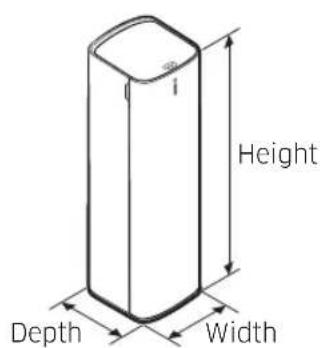
SAMSUNG Clean Station VCASAE904 - Product specifications - 1

text_image Height Depth Width
ModelVCA-SAE90AVCA-SAE90BVCA-SAE901, VCA-SAE902VCA-SAE903, VCA-SAE904
Power230 V, 50 Hz
Weight5.6 kg
SizeW 180 mm x D 185 mm x H 600 mm
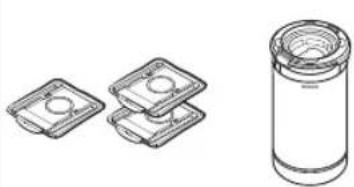
Dust bag3 units2 units

NOTE

- The wave pattern on the exterior of the product is a natural appearance due to the use of pearl plastic materials and its pearl distribution.

Accessories

* VCA-SAE90A, VCA-SAE90B
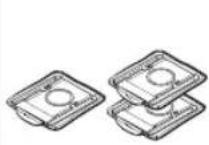
SAMSUNG Clean Station VCASAE904 - Accessories - 1

SAMSUNG Clean Station VCASAE904 - Accessories - 2

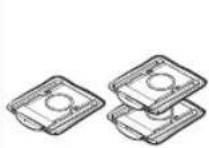
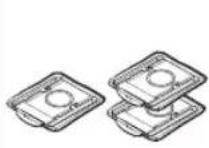
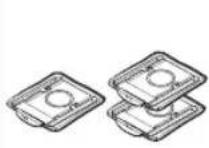
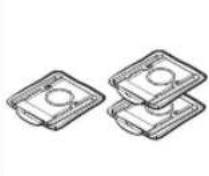
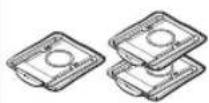
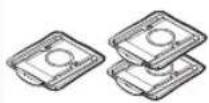
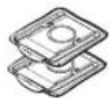
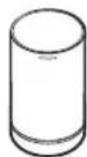
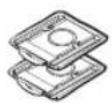
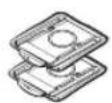
Dust bag:

3 units (Inside the product:

1 unit / Spare: 2 units)

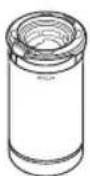
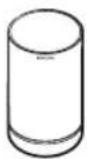
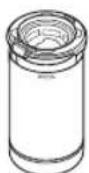
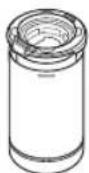
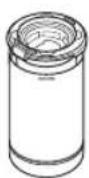
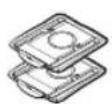
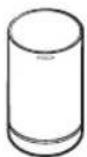
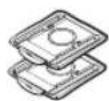
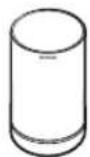
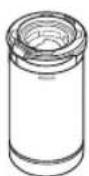
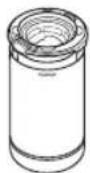
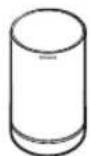
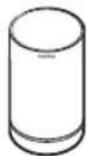
Dustbin Dust

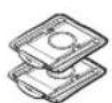
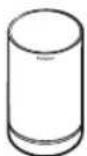
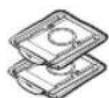
* VCA-SAE901, VCA-SAE902 VCA-SAE903, VCA-SAE904

SAMSUNG Clean Station VCASAE904 - Accessories - 3

SAMSUNG Clean Station VCASAE904 - Accessories - 4

bag:

2 units (Inside the product:

1 unit / Spare: 1 unit)

SAMSUNG Clean Station VCASAE904 - Accessories - 5

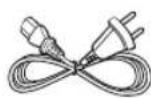
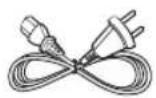
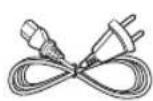
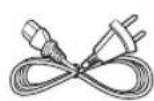
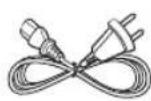
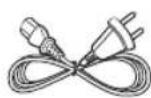
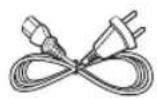
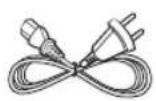
Power cord

SAMSUNG Clean Station VCASAE904 - Accessories - 6

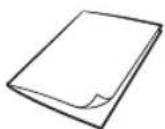
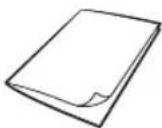
User manual

NOTE

- If you want to purchase an additional dust bag, check the model name (VCA-ADB90) and Samsung logo (SAMSUNG) first, then contact your nearest Samsung Electronics retailer or Samsung service center.

2 English

Safety Information

The following contents are written for users' safety and prevention of property damage. Before using the product, please read this manual thoroughly and use the product correctly.

*For safety reasons, people with physical, sensory difficulties, or mental disorder, lack of experience and knowledge should not use this product without the supervision of their guardians.

Caution/Warning symbols used

SAMSUNG Clean Station VCASAE904 - Caution/Warning symbols used - 1

WARNING

Indicates that a danger of death or serious injury exists.

SAMSUNG Clean Station VCASAE904 - WARNING - 1

CAUTION

Indicates that a risk of personal injury or material damage exists.

Other symbols used

SAMSUNG Clean Station VCASAE904 - Other symbols used - 1

NOTE

Indicates that the following text contains additional important information.

- For information on Samsung's environmental commitments and product specific regulatory obligations e.g. REACH (WEEE, Batteries) visit: samsung.com/uk/aboutsamsung/samsungelectronics/corporatecitizenship/data_corner.html

Failure to meet these requirements could cause damage to the internal parts of the vacuum and void your warranty.

General

- This appliance can be used by children aged from 8 years and above and persons with reduced physical, sensory or mental capabilities or lack of experience and knowledge if they have been given supervision or instruction concerning use of the appliance in a safe way and understand the hazards involved. Children should not play with the appliance. Children should not clean or perform maintenance on the product without adult supervision.

Installation

CAUTION

- The clean station should be placed and used on a stable floor.

- If the product falls over, an injury or product and floor damage may occur.

- Do not place or use the product on an uneven floor, a carpet, a living room table, or a desk etc.

- If the product falls over, an injury or product and floor damage may occur.

- Do not place the product at a wall behind which pipes (gas or water etc.) or electrical cables are installed.

- Do not install the product near water, in an area with excessive moisture, or near window, etc.

- Do not install the product in a place where people frequently pass by, near an entrance, or a narrow passage.

- If people trip over the product, an injury or product damage may occur.

WARNING

- Do not bend the power cord with excessive force or put heavy objects on the power cord.

- Otherwise, electric shock or fire may occur.

- If there is dust, water, etc. on a contact point of the power plug pins, wipe them carefully.

- Otherwise, abnormal operation or electric shock may occur.

- Do not pull the power cord and do not touch the power plug with wet hands.

- Otherwise, electric shock or fire may occur.

- Do not use a power source with the incorrect voltage. Do not use a multi-plug outlet or power strip for the product. Do not leave the power cord lying on the floor.

Attach the cord close to a wall.

- Otherwise, electric shock or fire may occur.

- Do not use a damaged power plug, power cord, or loose power outlet.

- Otherwise, electric shock or fire may occur.

4 English

  • If the power cord is damaged, have a Samsung authorized service center's qualified repairman replace the power cord with a new power cord.
  • Otherwise, electric shock or fire may occur.
  • Except for an authorized repairman, do not disassemble or modify the clean station.
  • When using the product in a veranda, make sure the power cord and the power plug do not touch water.

Operation

SAMSUNG Clean Station VCASAE904 - Operation - 1

WARNING

  • Static electricity may occur depending on the humidity, temperature, or floor material, etc. of your operating environment. If it happens repeatedly, contact a Samsung service center.
  • Do not cause a short circuit by touching the power terminal with chop sticks, metal screw drivers, etc.

- Otherwise, product malfunction or electric shock may occur.

  • Make sure that any liquid such as water or juice does not touch inside or outside the product.
  • Otherwise, electric shock or fire may occur.

- The clean station is manufactured for Samsung Jet wireless vacuum cleaner only, so do not use the clean station for other purposes.

- Do not use the product near heating appliances such as heaters, or in areas containing combustible sprays, or flammable materials.

- Otherwise, fire or product deformation may occur.

- If there is a gas leak, or a combustible spray is used such as a dust remover, do not touch the power outlet and open the window for ventilation.

- Otherwise, an explosion or fire may occur.

- If the product makes a strange sound or emits a smell or smoke, turn off the product immediately, and then contact a Samsung service center.

- Otherwise, electric shock or fire may occur.

SAMSUNG Clean Station VCASAE904 - WARNING - 1

CAUTION

  • Do not allow children or a pet to ride on or play with the product.
  • If the product falls over, an injury or product and floor damage may occur.
  • When moving the product, you should grip it with both hands.

SAMSUNG Clean Station VCASAE904 - CAUTION - 1

NOTE

  • When the dust bag of the clean station is filled with dust, the product may stop temporarily due to the overheating prevention device of the motor. Replace the dust bag and operate the product again.
  • As a new product, it may have a slight odor for the first 3 months after purchase.

Maintenance

SAMSUNG Clean Station VCASAE904 - Maintenance - 1

WARNING

  • When cleaning the exterior of the product, unplug the product first and then wipe it with a dry towel. Do not spray water directly onto the product or wipe it with volatile materials such as benzene, thinner, or alcohol.
  • Otherwise, product damage such as plastic breakage, deformation, discoloration, printing deterioration, etc. may occur.

SAMSUNG Clean Station VCASAE904 - WARNING - 1

CAUTION

  • Do not push the clean station in case it falls over.
  • Personal injury, floor and product damage may occur.
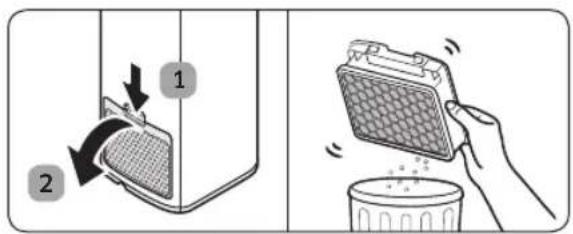
  • When the clean station emits bad odor, replace the dust bag or clean the filters.
  • When you pull the power cord out of the groove at the bottom of the clean station, do not pull it hard. Turn the cord gently on its side so that it can come out without interruption.

- Otherwise, the power cord may get damaged and could cause an electric shock or fire.

Installing the clean station

Installation guide

SAMSUNG Clean Station VCASAE904 - Installation guide - 1

text_image 1 ○ ○

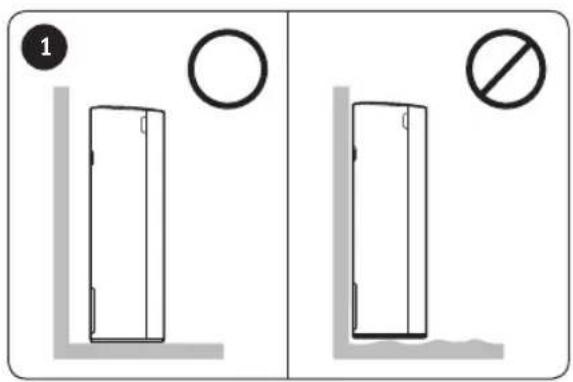
As the outlet is at the rear of the product, do not put the product close against a wall, allow 10 cm space between the wall and the product, and place the product on a stable floor.

SAMSUNG Clean Station VCASAE904 - Installation guide - 2

text_image Diagram illustrating two electric vehicle charging stations connected to a water level, with one showing a plug and the other without a prohibition sign.

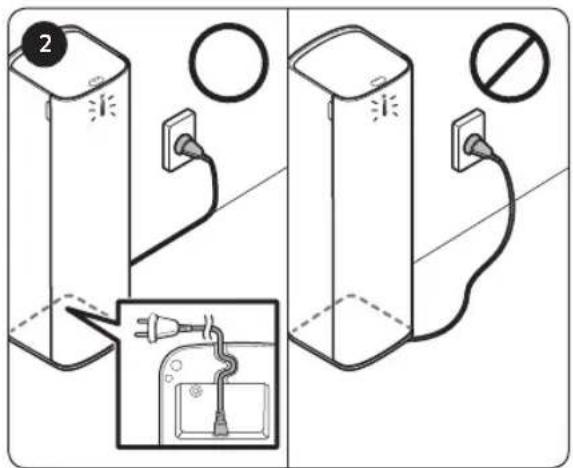
Put the power cord into the groove at the bottom of the clean station, arrange the cord neatly along the wall and plug the product in.

  • When the cord is placed on the floor carelessly, the power cord may be damaged or a person can trip over the cord.
  • When the clean station is plugged in, the product status indicator turns to 'blue' and then goes off.

SAMSUNG Clean Station VCASAE904 - Installation guide - 3

* Please refer to the QR code for detailed information on the use of product and cleaning methods.

SAMSUNG Clean Station VCASAE904 - Installation guide - 4

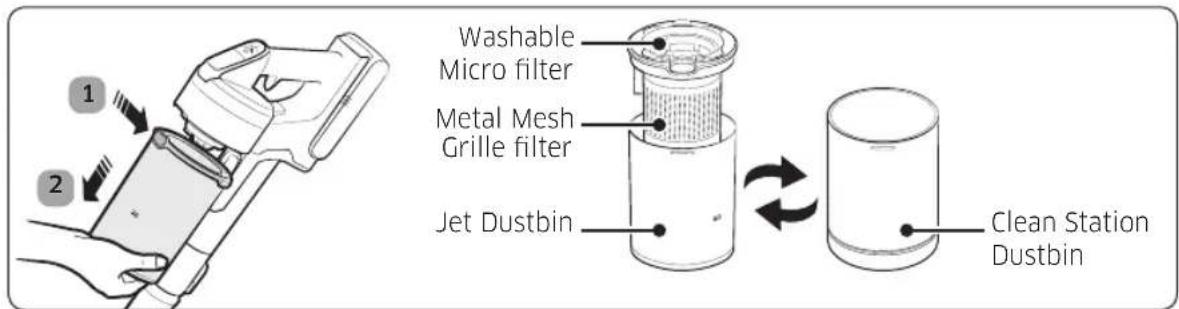
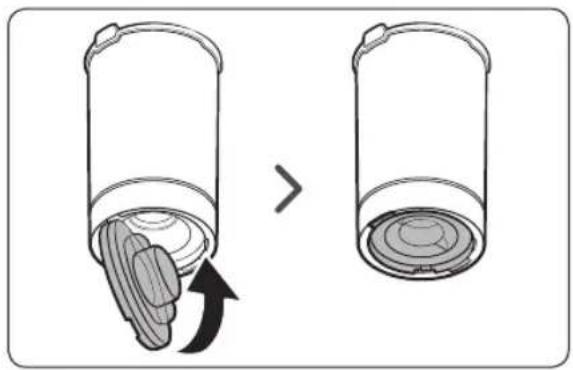
text_image 1 2 Washable Micro filter Metal Mesh Grille filter Jet Dustbin Clean Station Dustbin

* VCA-SAE901, VCA-SAE902, VCA-SAE903, VCA-SAE904 includes only the transparent Dustbin.
* Need to detach the Metal Mesh Grille filter and Washable Micro filter from the Jet Dustbin and then attach them to the Clean Station Dustbin.

English 7

Using the clean station

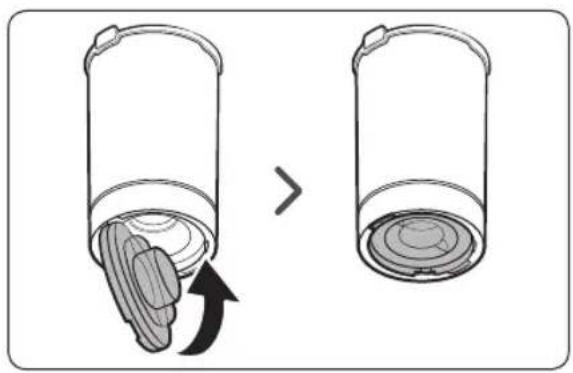
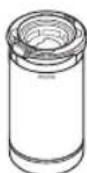
The clean station is compatible with the provided dustbin only.
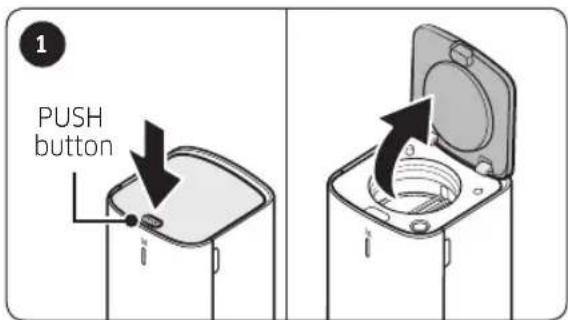
SAMSUNG Clean Station VCASAE904 - Using the clean station - 1

text_image 1 PUSH button

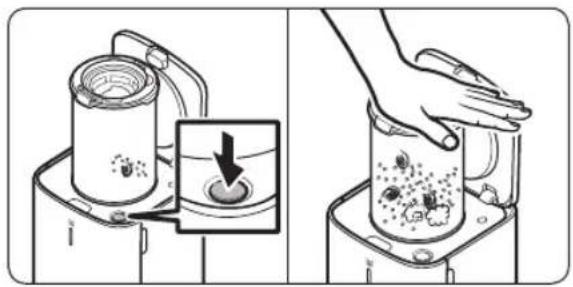
Press the [PUSH] button on the upper cover of the clean station.
SAMSUNG Clean Station VCASAE904 - Using the clean station - 2

text_image Product status indicator Start/Stop button

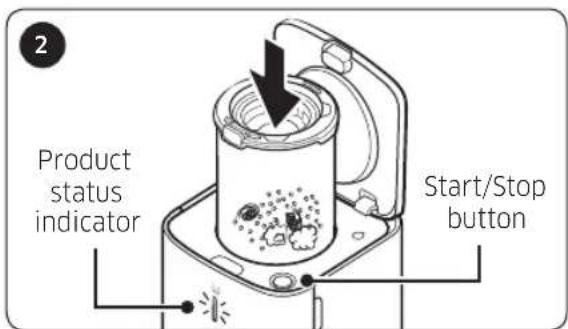
Insert the dustbin into the clean station. Dust is ejected automatically.

  • When the clean station is in operation, the product status indicator turns to 'blue'.
  • Press the [Start/Stop] button to stop operation.

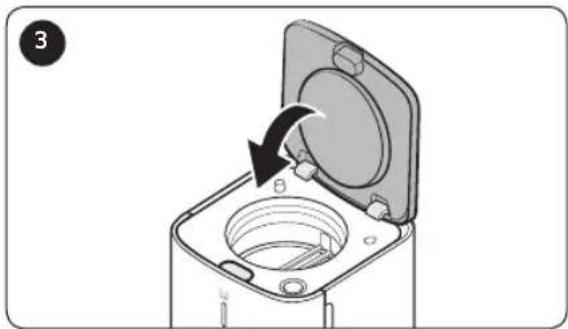
When the clean station's operation stops completely, pull the dustbin out and close the clean station by pressing the upper cover firmly.
SAMSUNG Clean Station VCASAE904 - Using the clean station - 3

natural_image Diagram of a mechanical device with an open lid and internal components, showing a black arrow indicating rotation (no text or symbols present)

8 English

SAMSUNG Clean Station VCASAE904 - Using the clean station - 4

natural_image Illustration of a blender being placed on top of a tray with a hand holding the lid (no text or symbols present)

SAMSUNG Clean Station VCASAE904 - Using the clean station - 5

natural_image Diagram showing a cylindrical container with internal layers being removed, labeled with an arrow indicating process (no text or symbols present)

SAMSUNG Clean Station VCASAE904 - Using the clean station - 6

NOTE

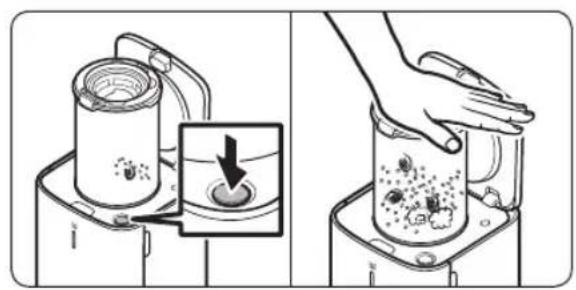
- When dust still remains inside the dustbin even after using the clean station, press the [Start/Stop] button to operate the clean station.

- Press the button again to stop operation.

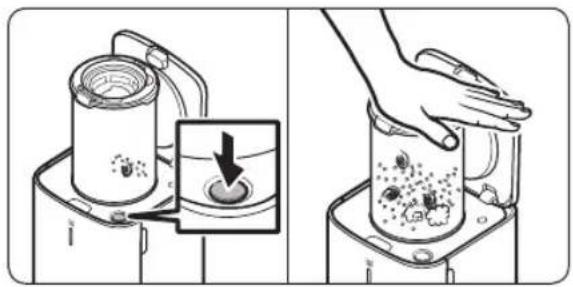
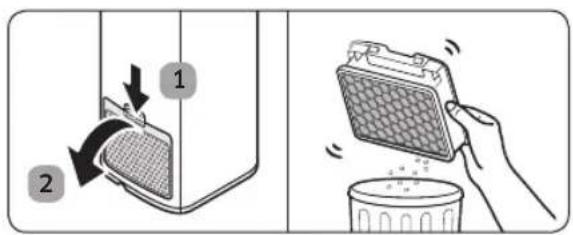
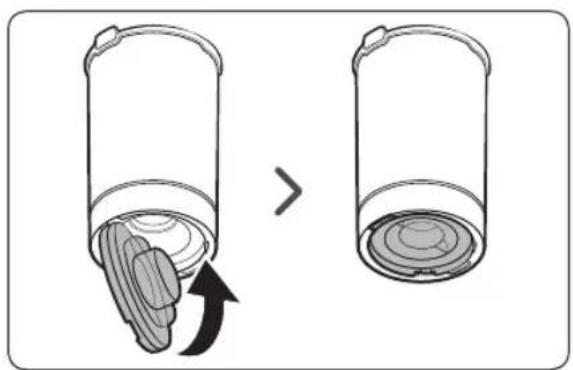
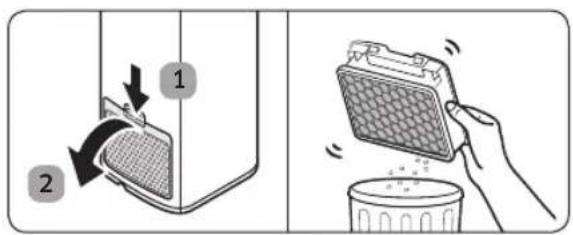
  • If the dustbin is filled with dust and will not eject it properly, use a hand to push down the top of the washable micro filter, and then operate the clean station.
  • When there are foreign object residues, remove them by referring to 'Maintaining the clean station' section of the manual.

SAMSUNG Clean Station VCASAE904 - NOTE - 1

CAUTION

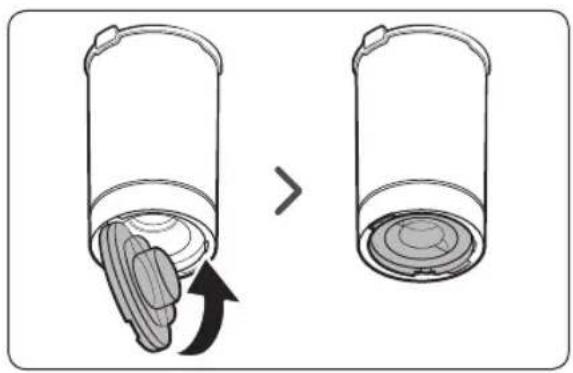
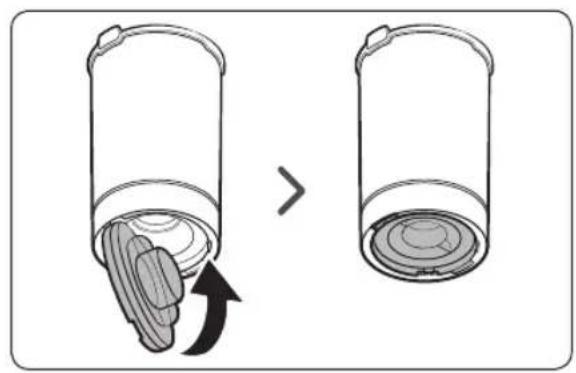
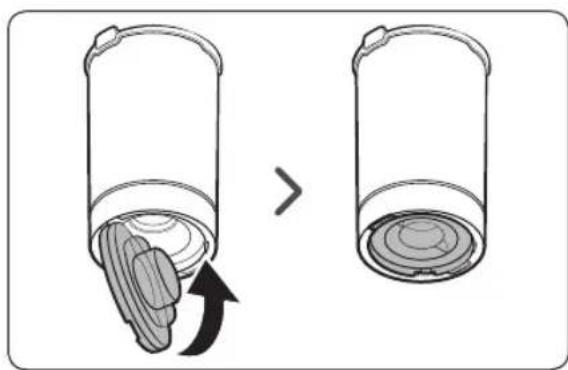
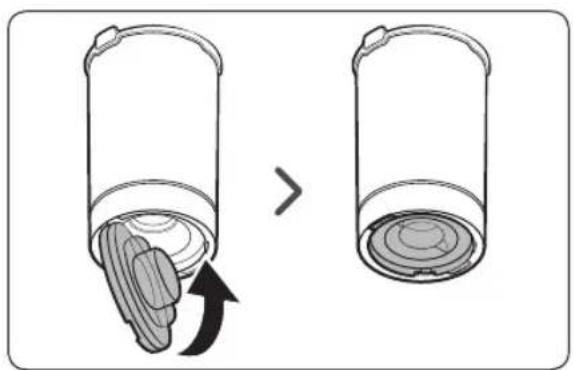
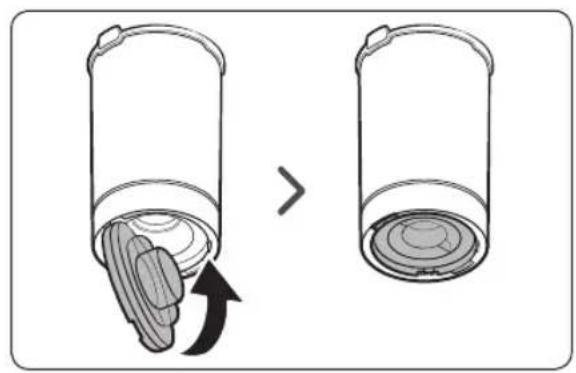
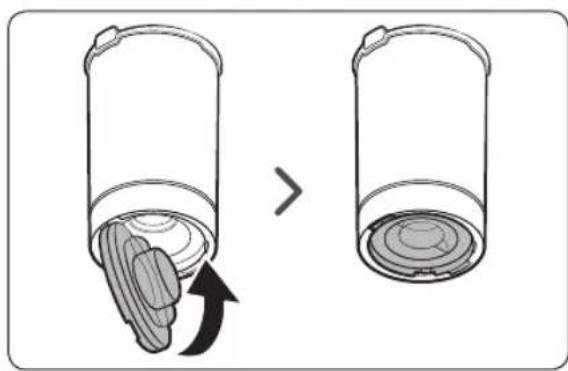
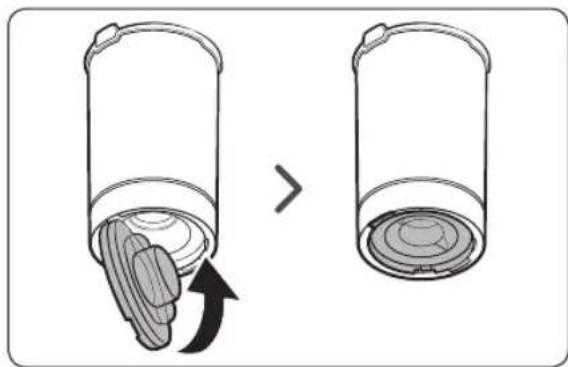
• After using the clean station, you should close the dustbin by pressing the bottom cover firmly until you hear it 'click'.

Maintaining the clean station

Dust bag

Time to replace a dust bag
SAMSUNG Clean Station VCASAE904 - Dust bag - 1

natural_image Simple line drawing of a device emitting light into a screen (no text or symbols)

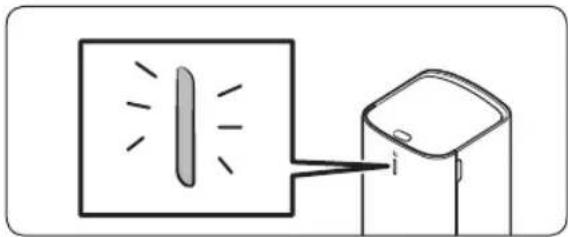
* When the product status indicator turns to 'red', you should replace the dust bag.

SAMSUNG Clean Station VCASAE904 - Dust bag - 2

text_image Diagram showing a refrigerator with labeled parts and directional arrows indicating movement or change.

SAMSUNG Clean Station VCASAE904 - Dust bag - 3

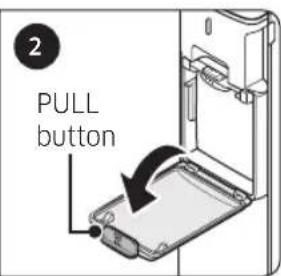
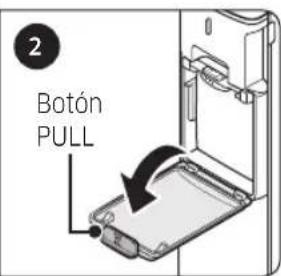
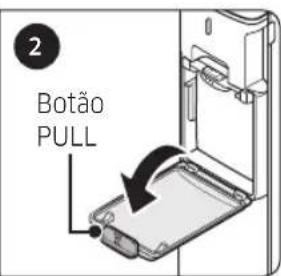
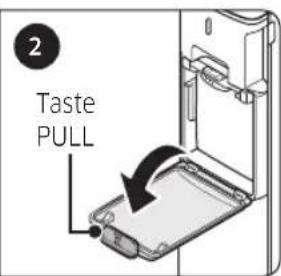
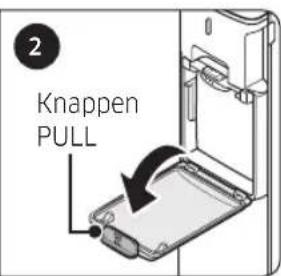
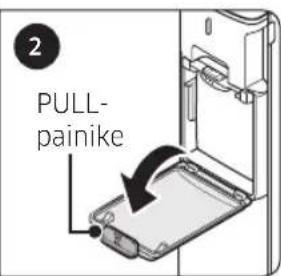
text_image 2 PULL button

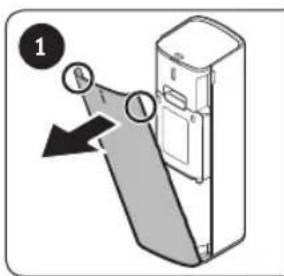
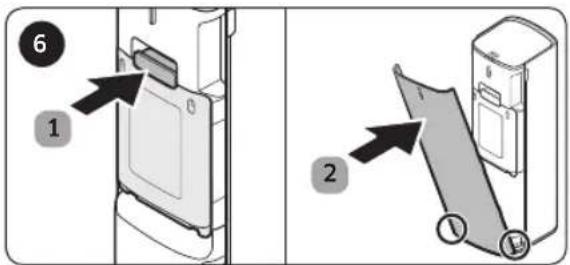
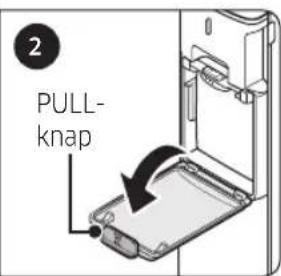
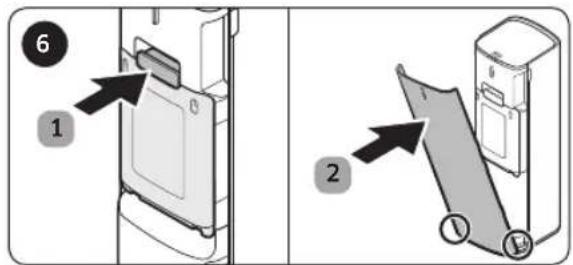
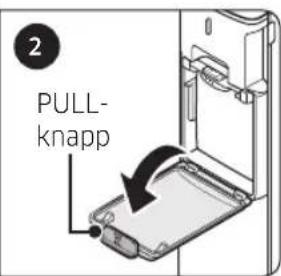
1 Grip both sides of the front cover and pull the cover towards you.
2 Open the cover by pulling the [PULL] button.
SAMSUNG Clean Station VCASAE904 - Dust bag - 4

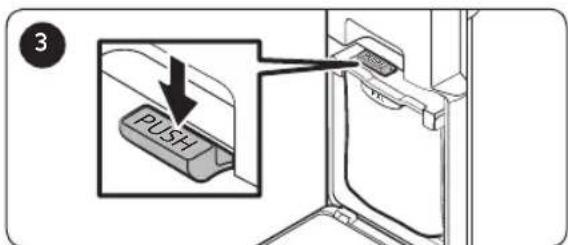
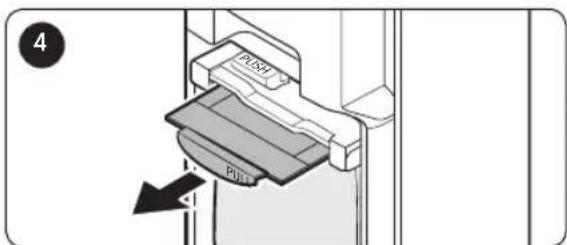
text_image 3 PUSH

Press the [PUSH] lever. Pull the [PULL] lever out in a diagonal
SAMSUNG Clean Station VCASAE904 - Dust bag - 5

text_image 4 PLOT PIN

direction and remove the dust bag.

SAMSUNG Clean Station VCASAE904 - Dust bag - 6

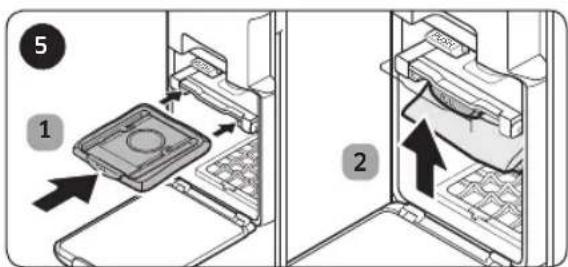
text_image 5 1 2

Insert a new dust bag towards the back and push the [PULL] lever upward firmly until you hear it 'click'.

SAMSUNG Clean Station VCASAE904 - Dust bag - 7

text_image Diagram showing two steps of a refrigerator door opening, labeled with numbered instructions and arrows indicating movement.

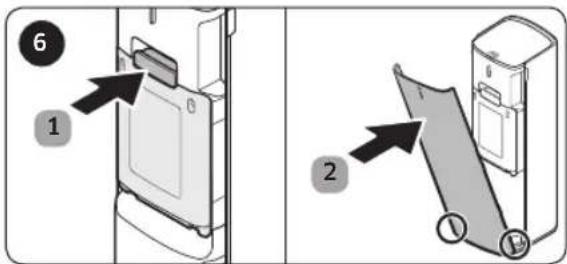
After replacing the dust bag, assemble the clean station in reverse order.

* Be cautious not to assemble incorrectly when inserting the dust bag.

NOTE

  • If the dust bag emits a bad odor even though it is not filled with dust, replace the dust bag.
  • When you operate the clean station after replacing the dust bag, the status indicator changes from red to blue.
10 English

SAMSUNG Clean Station VCASAE904 - NOTE - 1

natural_image Illustration of a kitchen cleaning and sanitation process with buckets, toilets, a shower, and a sun (no text or symbols)

SAMSUNG Clean Station VCASAE904 - NOTE - 2

natural_image Illustration showing a refrigerator with a tray and a hand holding a tray, next to a bowl (no text or symbols)

SAMSUNG Clean Station VCASAE904 - NOTE - 3

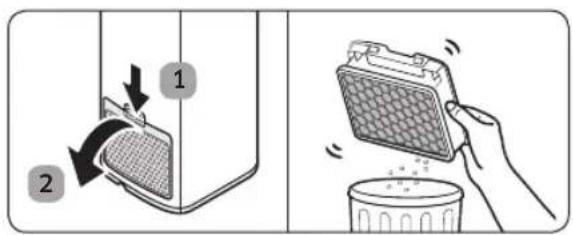
text_image Diagram illustrating two steps of cleaning a food container: adding a mesh to a container and using a cloth to clean it.

Dustbin

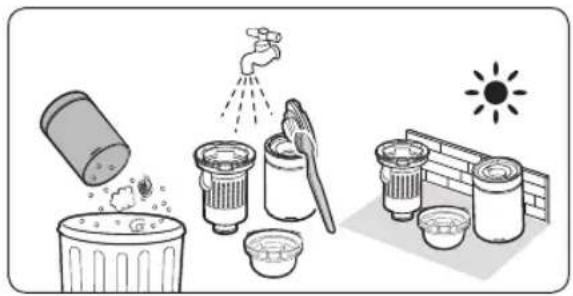
After emptying the dustbin, clean it with water and dry completely before use.

Premotor Filter

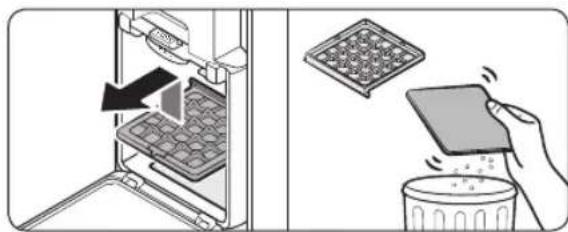
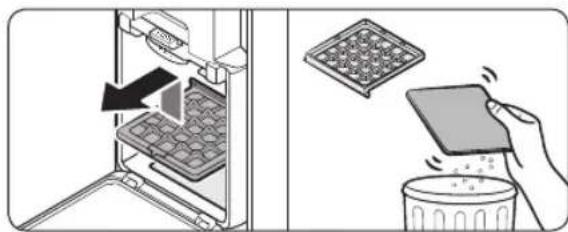
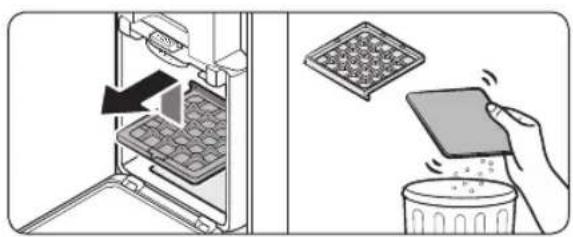
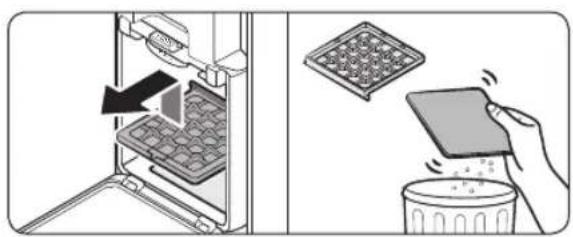
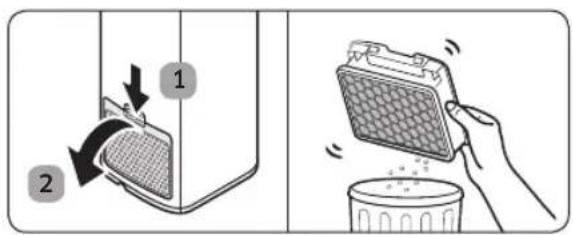
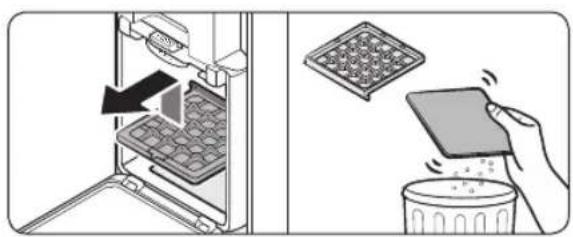
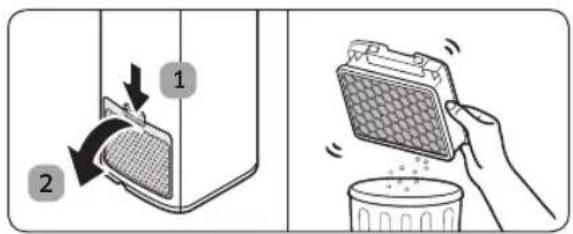
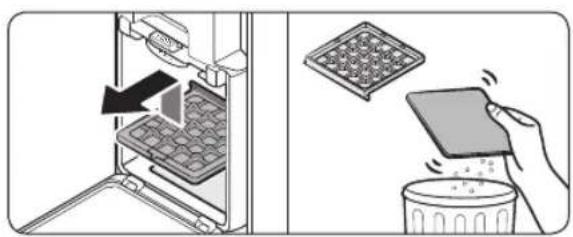
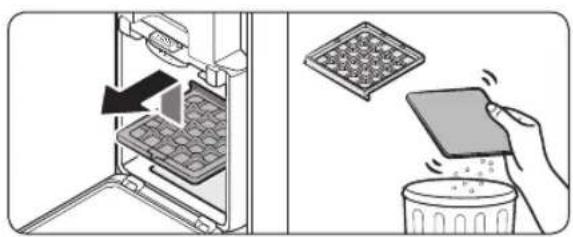
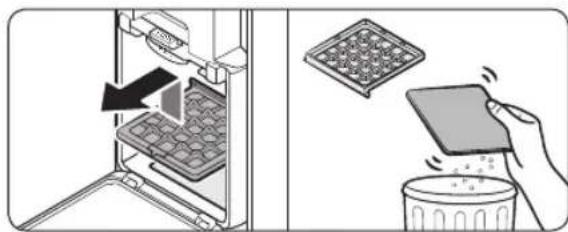
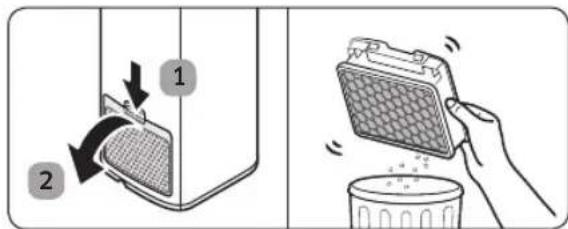
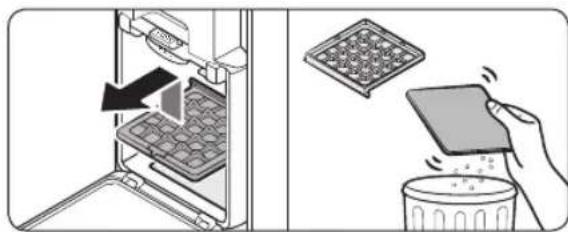
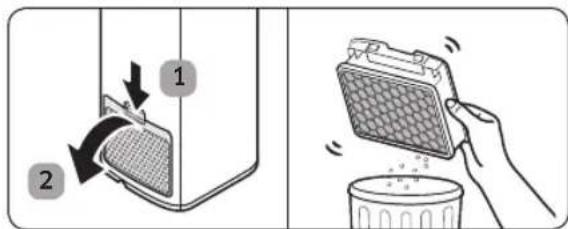
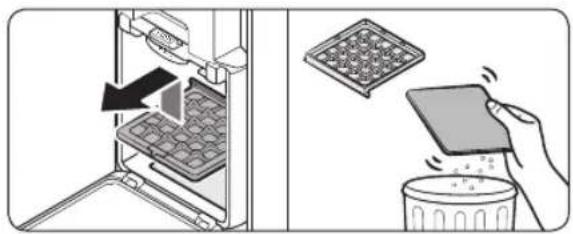
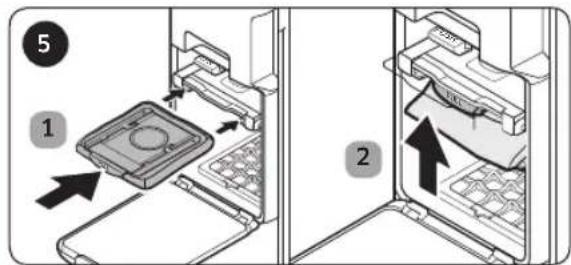
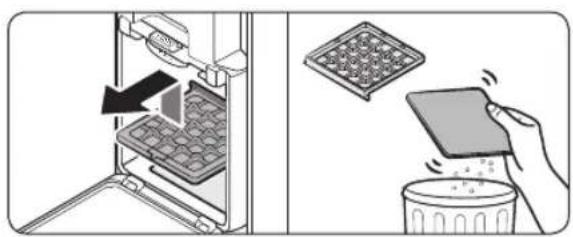
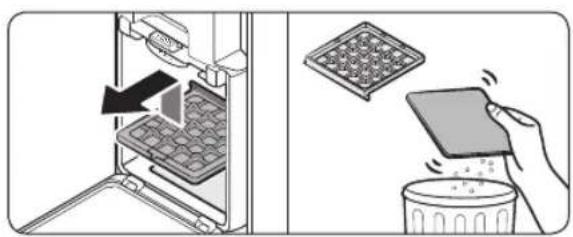
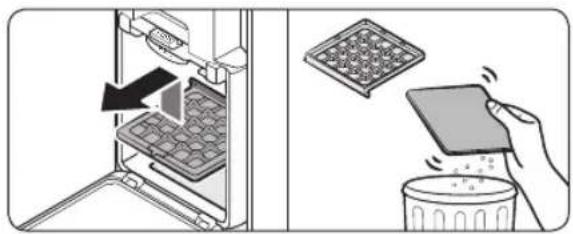
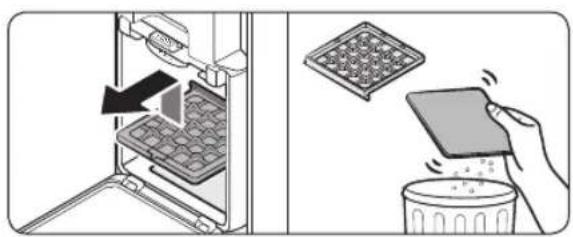
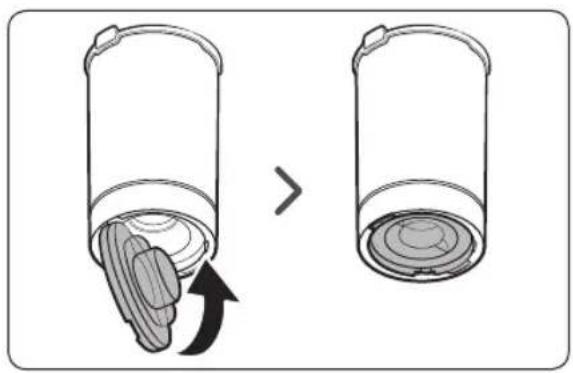
  • Lift up the Premotor Filter inside the product and pull it out. Then, detach the nonwoven fabric from the filter.
  • Remove the dust on the nonwoven fabric by shaking it and reassemble the Premotor Filter.

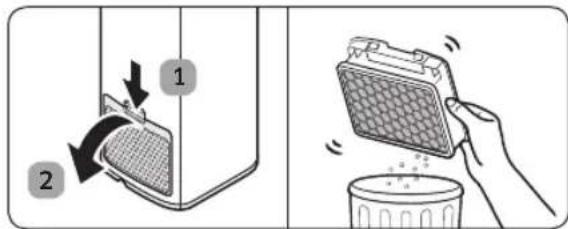
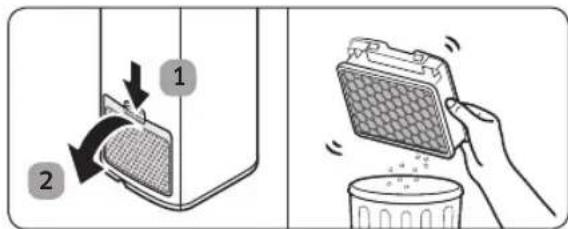
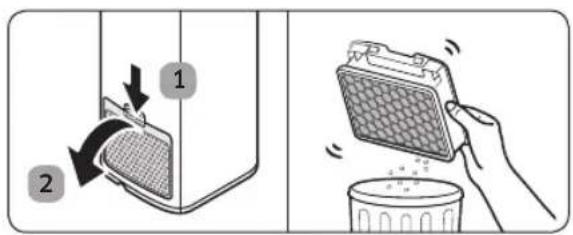
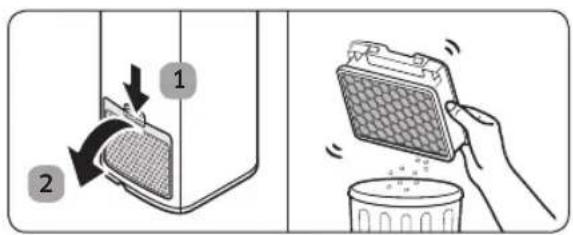
Ultra fine Dust Filter

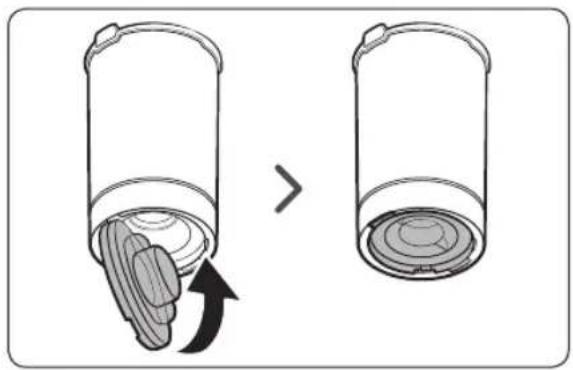
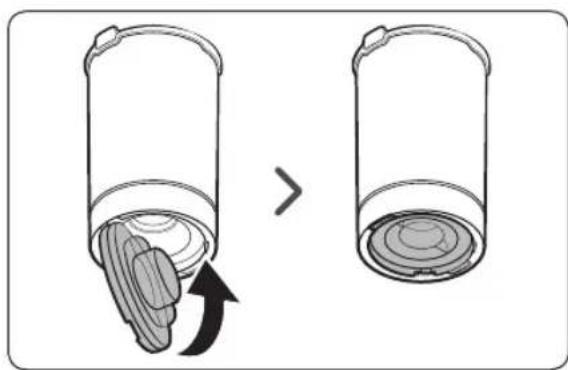
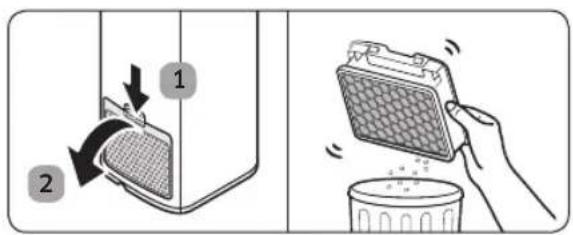
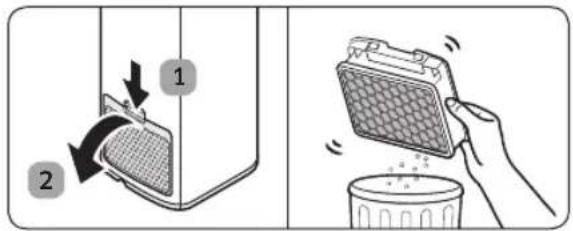
  • Do not clean the Ultra fine Dust Filter with water. Shake the filter.
  • To maintain the best performance of the Ultra fine Dust Filter, replace the filter once a year.

SAMSUNG

If you have any questions or comments relating to Samsung products, please contact the SAMSUNG customer care center.

Country Customer Care Center Web Site
LITHUANIA 8-800-77777 www.samsung.com/lt/support
LATVIA 8000-7267 www.samsung.com/lv/support
ESTONIA 800-7267 www.samsung.com/ee/support

SAMSUNG Clean Station VCASAE904 - SAMSUNG - 1

Puhastusjaam

Kasutusjuhend

VCA-SAE90*

* VCA-SAE90A, VCA-SAE90B

SAMSUNG Clean Station VCASAE904 - Kasutusjuhend - 1

Tolmukotte: 3 tk (Toote sees: 1 tk / varuks: 2 tk)

SAMSUNG Clean Station VCASAE904 - Kasutusjuhend - 2

Tolmukamber

* VCA-SAE901, VCA-SAE902 VCA-SAE903, VCA-SAE904
SAMSUNG Clean Station VCASAE904 - Kasutusjuhend - 3

Tolmukotte: 2 tk (Toote sees: 1 tk / varuks: 1 tk)

SAMSUNG Clean Station VCASAE904 - Kasutusjuhend - 4

Tolmukamber

SAMSUNG Clean Station VCASAE904 - Kasutusjuhend - 5

Toitejuhe

SAMSUNG Clean Station VCASAE904 - Kasutusjuhend - 6

Kasutusjuhend

MÄRKUS

text_image Diagram illustrating two electric vehicle charging stations connected to a water level, with one showing a plug and the other without a prohibition sign.
natural_image Diagram of a mechanical device with an open lid and internal components, showing a black arrow indicating rotation (no text or symbols present)
natural_image Illustration of a blender being placed on top of a tray with a hand holding the lid (no text or symbols present)

SAMSUNG Clean Station VCASAE904 - MÄRKUS - 1

natural_image Diagram showing a cylindrical container with internal layers being shifted, indicating a change or transformation (no text or symbols present)

MÄRKUS

natural_image Simple line drawing of a device emitting light into a screen (no text or symbols)
text_image Diagram showing two steps of a device opening, labeled with numbered arrows and numbered circles (1 and 2)
text_image Diagram showing two steps of installing a door panel, labeled with arrows and numbered callouts.
natural_image Illustration of household cleaning and sanitation process with buckets, toilets, and a sun (no text or symbols)

SAMSUNG Clean Station VCASAE904 - MÄRKUS - 1

natural_image Illustration showing a kitchen appliance with a tray and a plate being inserted, alongside a hand holding a tablet (no text or symbols present)

SAMSUNG Clean Station VCASAE904 - MÄRKUS - 2

text_image Diagram illustrating two steps of cleaning a food container: adding a mesh to a container and removing it into a trash bin.

Tolmukamber

* VCA-SAE90A, VCA-SAE90B

SAMSUNG Clean Station VCASAE904 - Tolmukamber - 1

* VCA-SAE901, VCA-SAE902 VCA-SAE903, VCA-SAE904
SAMSUNG Clean Station VCASAE904 - Tolmukamber - 2

text_image Diagram showing two electric vehicle charging stations connected to a power outlet, with an inset illustrating the electrical setup.
text_image Poga PUSH
natural_image Diagram of a mechanical device with an open lid and internal components, showing a black arrow indicating rotation (no text or symbols present)
natural_image Illustration of a blender being placed on top of a tray with a hand holding the lid (no text or symbols present)

SAMSUNG Clean Station VCASAE904 - Tolmukamber - 3

natural_image Diagram showing a cylindrical container with internal layers being removed, labeled with an arrow indicating process (no text or symbols present)

PIEZIME

natural_image Simple line drawing of a device emitting light into a screen (no text or symbols)
text_image Diagram showing two steps of a printer or printer setup with labeled components and directional arrows indicating process flow.

levietojiet jaunu puteklu maisinu un stingri spiediet sviru [PULL] uz augšu, līdz atskan klikškis.

SAMSUNG Clean Station VCASAE904 - PIEZIME - 1

text_image Diagram showing two steps of installing a door panel, labeled with arrows and numbered callouts.
natural_image Illustration of household cleaning and sanitation items including a toilet, washing machines, and buckets under a sun (no text or symbols)

SAMSUNG Clean Station VCASAE904 - PIEZIME - 2

natural_image Illustration showing a kitchen appliance with a tray and a plate being placed on a dish (no text or symbols)

SAMSUNG Clean Station VCASAE904 - PIEZIME - 3

text_image Diagram illustrating two steps of cleaning a food container: adding a filter to a container and removing it into a trash bin.

Puteklu tvertne

* VCA-SAE90A, VCA-SAE90B

SAMSUNG Clean Station VCASAE904 - Puteklu tvertne - 1

SAMSUNG Clean Station VCASAE904 - Puteklu tvertne - 2

Dulkių maišelis:

3 vienetai

(gaminio viduje:

1 vienetas /

atsarginis:

2 vienetai)

Dulkių indas

text_image Diagram illustrating two electric vehicle charging stations connected to a water level, with one showing a plug and the other without a prohibition sign.
natural_image Diagram of a mechanical device with an open lid and internal components, showing a black arrow indicating rotation (no text or symbols present)

8 Lietuvių k.

SAMSUNG Clean Station VCASAE904 - Puteklu tvertne - 3

natural_image Illustration of a blender being placed on top, showing the lid and base with contents (no text or symbols)

SAMSUNG Clean Station VCASAE904 - Puteklu tvertne - 4

natural_image Diagram showing a cylindrical container being inserted into a lid, with an arrow indicating the process (no text or symbols present)

PASTABA

natural_image Simple line drawing of a device emitting light into a screen (no text or symbols)
text_image Diagram showing two steps of a refrigerator door opening, labeled with numbered instructions and arrows indicating movement.
natural_image Illustration of a sunlit outdoor scene with buckets, water spray, and cleaning tools (no text or symbols)

SAMSUNG Clean Station VCASAE904 - PASTABA - 1

natural_image Illustration showing a refrigerator with a tray and a hand holding a tray, next to a bowl of food (no text or symbols)

SAMSUNG Clean Station VCASAE904 - PASTABA - 2

text_image Diagram illustrating two steps of cleaning a food container: adding a mesh to a container and removing it into a trash bin.

Dulkių indas

text_image Diagram illustrating two electric vehicle charging stations connected to a water level, with one showing a plug and the other without a prohibition sign.
natural_image Diagram of a mechanical device with an open lid and internal components, showing a black arrow indicating rotation (no text or symbols present)
natural_image Illustration of a blender being placed on top, showing the lid and base with contents (no text or symbols)

SAMSUNG Clean Station VCASAE904 - Dulkių indas - 1

natural_image Diagram showing a cylindrical container being inserted into a lid, with an arrow indicating the process (no text or symbols present)

SAMSUNG Clean Station VCASAE904 - Dulkių indas - 2

NOTA

natural_image Simple line drawing of a device emitting light rays from a screen (no text or symbols)
text_image Diagram showing two steps of a device opening with labeled components and directional arrows indicating movement.
text_image Diagram showing two steps of installing a door panel, labeled with numbered arrows and numbered circles.
natural_image Illustration of a kitchen cleaning and sanitation process with buckets, toilets, a shower, and a sun (no text or symbols)

SAMSUNG Clean Station VCASAE904 - NOTA - 1

natural_image Illustration showing a refrigerator interior with a tray holding a chocolate chip and a hand placing it into a trash bin (no text or symbols)

SAMSUNG Clean Station VCASAE904 - NOTA - 2

text_image Diagram illustrating two steps of a food storage or cleaning procedure: adding a mesh to a container and removing a bag into a trash bin.

www.samsung.com/it/support

SAMSUNG Clean Station VCASAE904 - NOTA - 3

* VCA-SAE90A, VCA-SAE90B

SAMSUNG Clean Station VCASAE904 - NOTA - 4

Bolsa de polvo:

3 unidades

(dentro del

producto: 1 unidad

/ repuesto:

2 unidades)

SAMSUNG Clean Station VCASAE904 - NOTA - 5

Contenedor de polvo

* VCA-SAE901, VCA-SAE902 VCA-SAE903, VCA-SAE904
SAMSUNG Clean Station VCASAE904 - NOTA - 6

Bolsa de polvo:

2 unidades

(dentro del

producto: 1 unidad

/ repuesto:

1 unidad)

SAMSUNG Clean Station VCASAE904 - NOTA - 7

Contenedor de polvo

SAMSUNG Clean Station VCASAE904 - NOTA - 8

text_image Diagram illustrating two electric vehicle charging stations with labeled components and a water level diagram showing connections to a sink.
natural_image Mechanical diagram showing a device with a lid and internal components, no text or symbols present
natural_image Illustration of a hand pressing down on a small container with granular contents, showing a magnified view of the lid (no text or symbols present)

SAMSUNG Clean Station VCASAE904 - NOTA - 9

natural_image Diagram showing a container being inserted into a lid, with an arrow indicating the process (no text or symbols present)

SAMSUNG Clean Station VCASAE904 - NOTA - 10

NOTA

natural_image Simple line drawing of a device emitting light into a screen (no text or symbols)
text_image Diagram showing a refrigerator with labeled parts and directional arrows indicating movement or change.

SAMSUNG Clean Station VCASAE904 - NOTA - 1

text_image Diagram showing two steps of a device opening, labeled with numbered arrows and numbered circles (1 and 2)
text_image Diagram showing two steps of installing a door panel, labeled with arrows and numbered callouts.
natural_image Illustration of household cleaning and sanitation tools including a toilet, water spray, buckets, and a sun (no text or symbols)

SAMSUNG Clean Station VCASAE904 - NOTA - 2

natural_image Illustration showing a refrigerator with a tray and a hand holding a food item, no text or symbols present.

SAMSUNG Clean Station VCASAE904 - NOTA - 3

text_image Diagram illustrating two steps of cleaning a food container: adding a mesh to a lid and removing it into a trash bin.

Contenedor de polvo

* VCA-SAE90A, VCA-SAE90B

SAMSUNG Clean Station VCASAE904 - Contenedor de polvo - 1

* VCA-SAE901, VCA-SAE902 VCA-SAE903, VCA-SAE904
SAMSUNG Clean Station VCASAE904 - Contenedor de polvo - 2

SAMSUNG Clean Station VCASAE904 - Contenedor de polvo - 3

text_image Diagram showing two electric vehicle charging stations connected to a power outlet, with an inset illustrating the electrical setup.
natural_image Diagram of a mechanical device with an open lid and internal components, showing a black arrow indicating rotation (no text or symbols present)
natural_image Illustration of a hand pressing down on a cylindrical container with granular contents, showing a drop and recovery process (no text or symbols)

SAMSUNG Clean Station VCASAE904 - Contenedor de polvo - 4

natural_image Diagram showing a cylindrical container with a lid and an arrow indicating a process or transformation (no text or symbols present)

SAMSUNG Clean Station VCASAE904 - Contenedor de polvo - 5

NOTA

natural_image Simple line drawing of a device emitting light into a screen (no text or symbols)
text_image Diagram showing a refrigerator with labeled parts and directional arrows indicating movement or change.

SAMSUNG Clean Station VCASAE904 - NOTA - 1

text_image Botão PULL
text_image Diagram showing two steps of a refrigerator interior with labeled parts and directional arrows indicating movement.
text_image Diagram showing two steps of installing a door panel, labeled with arrows and numbered callouts.
natural_image Illustration of a kitchen cleaning and sanitation process with buckets, toilets, a shower, and a sun (no text or symbols)

SAMSUNG Clean Station VCASAE904 - NOTA - 2

natural_image Illustration showing a refrigerator with a tray and a hand holding a tray, next to a bowl (no text or symbols)

SAMSUNG Clean Station VCASAE904 - NOTA - 3

text_image Diagram illustrating two steps of cleaning a food container: adding a mesh to a container and using a cloth to clean it.

Reservatório do pó

www.samsung.com/pt/support

SAMSUNG Clean Station VCASAE904 - Reservatório do pó - 1

Reinigungsstation

Benutzerhandbuch

VCA-SAE90*

* VCA-SAE90A, VCA-SAE90B

SAMSUNG Clean Station VCASAE904 - Benutzerhandbuch - 1

Staubbeutel:

3 Stück (Ins

Gerät eingesetzt:

1 Stück / Ersatz:

2 Stück)

SAMSUNG Clean Station VCASAE904 - Benutzerhandbuch - 2

Staubbehälter

* VCA-SAE901, VCA-SAE902 VCA-SAE903, VCA-SAE904
SAMSUNG Clean Station VCASAE904 - Benutzerhandbuch - 3

SAMSUNG Clean Station VCASAE904 - Benutzerhandbuch - 4

Staubbeutel:

2 Stück (Ins

Gerät eingesetzt:

1 Stück / Ersatz:

1 Stück)

SAMSUNG Clean Station VCASAE904 - Benutzerhandbuch - 5

Netzkabel

SAMSUNG Clean Station VCASAE904 - Benutzerhandbuch - 6

Benutzerhandbuch

HINWEIS

text_image Diagram illustrating two electric vehicle charging stations connected to a water level, with one showing a plug and the other without a prohibition sign.
natural_image Diagram of a mechanical device with an open lid and internal components, showing a black arrow indicating rotation or movement (no text or symbols present)
natural_image Illustration of a hand pressing down on a small container with granular contents, showing a magnified view of the lid (no text or symbols present)

SAMSUNG Clean Station VCASAE904 - HINWEIS - 1

natural_image Diagram showing a container being inserted into a lid, with an arrow indicating the process (no text or symbols present)

HINWEIS

natural_image Simple line drawing of a device emitting light into a screen (no text or symbols)
text_image Diagram showing a refrigerator with labeled parts and directional arrows indicating movement or change.

SAMSUNG Clean Station VCASAE904 - HINWEIS - 1

text_image 2 Taste PULL
text_image Diagram showing two steps of a refrigerator interior with labeled parts and directional arrows indicating movement.
natural_image Illustration of a kitchen cleaning and sanitation process with buckets, toilets, a shower, and a sun (no text or symbols)

SAMSUNG Clean Station VCASAE904 - HINWEIS - 2

natural_image Illustration showing a refrigerator interior with a tray holding a chocolate chip and a hand placing it into a trash bin (no text or symbols)

SAMSUNG Clean Station VCASAE904 - HINWEIS - 3

text_image Diagram illustrating two steps of cleaning a food container: adding a mesh to a container and using a cloth to clean it.

Staubbehälter

Productspecifications

SAMSUNG Clean Station VCASAE904 - Productspecifications - 1

* VCA-SAE90A, VCA-SAE90B

SAMSUNG Clean Station VCASAE904 - Productspecifications - 2

natural_image Technical line drawing of a cylindrical component with three square cutouts and a cylindrical housing (no text or symbols)

Stofopvangzak:

3 stuks (in het

product: 1 stuk/

reserve: 2 stuks)

* VCA-SAE901, VCA-SAE902

VCA-SAE903, VCA-SAE904
SAMSUNG Clean Station VCASAE904 - Productspecifications - 3

SAMSUNG Clean Station VCASAE904 - Productspecifications - 4

Stofopvangzak:

2 stuks (in het

product: 1 stuk/

reserve: 1 stuk)

SAMSUNG Clean Station VCASAE904 - Productspecifications - 5

text_image Diagram illustrating two electric vehicle charging stations connected to a water level, with one showing a plug and the other without a prohibition sign.
natural_image Diagram of a mechanical device with an open lid and internal components, showing a black arrow indicating rotation or movement (no text or symbols present)

SAMSUNG Clean Station VCASAE904 - Productspecifications - 6

natural_image Illustration of a blender being placed on top of a tray, showing the lid and base with particles (no text or symbols)

SAMSUNG Clean Station VCASAE904 - Productspecifications - 7

natural_image Diagram showing a cylindrical container being inserted into a granular material, with an arrow indicating the process (no text or symbols present)

OPMERKING

natural_image Simple line drawing of a device emitting light into a screen (no text or symbols)
text_image Diagram showing two steps of a refrigerator door opening, labeled with numbered instructions and arrows indicating movement.
natural_image Illustration of household cleaning and sanitation items including a toilet, washing machines, and buckets under a sun (no text or symbols)

SAMSUNG Clean Station VCASAE904 - OPMERKING - 1

natural_image Illustration showing a kitchen appliance with a tray and a plate being placed on a dish (no text or symbols)

SAMSUNG Clean Station VCASAE904 - OPMERKING - 2

text_image Diagram illustrating two steps of cleaning a food container: adding a lid to a grater and removing it into a trash bin.

Stofopvangbak

* VCA-SAE90A, VCA-SAE90B

SAMSUNG Clean Station VCASAE904 - Stofopvangbak - 1

* VCA-SAE901, VCA-SAE902 VCA-SAE903, VCA-SAE904
SAMSUNG Clean Station VCASAE904 - Stofopvangbak - 2

text_image Diagram illustrating two electric vehicle charging stations with labeled components and a water level test showing plug connections.
natural_image Diagram of a mechanical device with an open lid and internal components, showing a black arrow indicating rotation (no text or symbols present)
natural_image Illustration of a blender being placed on top, showing the lid and base with contents (no text or symbols)

SAMSUNG Clean Station VCASAE904 - Stofopvangbak - 3

natural_image Diagram showing a cylindrical container with internal layers being shifted, indicating a change or transformation (no text or symbols present)

REMARQUE

natural_image Simple line drawing of a device emitting light into a screen (no text or symbols)
text_image Diagram showing two steps of a device interior with labeled components and directional arrows indicating movement.
text_image Diagram showing two steps of installing a door panel, labeled with arrows and numbered parts.
natural_image Illustration of household cleaning and sanitation process with buckets, toilets, and a sun (no text or symbols)

SAMSUNG Clean Station VCASAE904 - REMARQUE - 1

natural_image Illustration showing a kitchen appliance with a tray and a hand holding a tablet, next to a bowl of food (no text or symbols)

SAMSUNG Clean Station VCASAE904 - REMARQUE - 2

text_image Diagram illustrating two steps of cleaning a food container: adding a grater to a tray and removing it into a trash bin.

* VCA-SAE90A, VCA-SAE90B

SAMSUNG Clean Station VCASAE904 - REMARQUE - 3

SAMSUNG Clean Station VCASAE904 - REMARQUE - 4

Dammpåse: 3 st (inuti produkten: 1 st / reserv: 2 st)

Dammbehållare

* VCA-SAE901, VCA-SAE902 VCA-SAE903, VCA-SAE904

SAMSUNG Clean Station VCASAE904 - REMARQUE - 5

SAMSUNG Clean Station VCASAE904 - REMARQUE - 6

SAMSUNG Clean Station VCASAE904 - REMARQUE - 7

SAMSUNG Clean Station VCASAE904 - REMARQUE - 8

text_image Diagram illustrating two electric vehicle charging stations with labeled components and a water level test showing plug connections.
natural_image Mechanical diagram showing a device with a lid and internal components, no text or symbols present
natural_image Simple line drawing of a device emitting light into a screen (no text or symbols)
text_image Diagram showing a refrigerator with labeled parts and directional arrows indicating movement or change.

SAMSUNG Clean Station VCASAE904 - REMARQUE - 9

text_image 2 Knappen PULL
text_image Diagram showing two steps of a refrigerator door opening, labeled with numbered instructions and arrows indicating movement.
natural_image Illustration of a kitchen cleaning and sanitation process with buckets, toilets, a shower, and a sun (no text or symbols)

SAMSUNG Clean Station VCASAE904 - REMARQUE - 10

natural_image Illustration of a kitchen appliance with a tray, showing a hand holding a lid and a bowl (no text or symbols)

SAMSUNG Clean Station VCASAE904 - REMARQUE - 11

text_image Diagram illustrating two steps of cleaning a food container: adding a mesh to a container and using a cloth to clean the dish.

Dammbehållare

* VCA-SAE90A, VCA-SAE90B

SAMSUNG Clean Station VCASAE904 - Dammbehållare - 1

SAMSUNG Clean Station VCASAE904 - Dammbehållare - 2

* VCA-SAE901, VCA-SAE902 VCA-SAE903, VCA-SAE904
SAMSUNG Clean Station VCASAE904 - Dammbehållare - 3

SAMSUNG Clean Station VCASAE904 - Dammbehållare - 4

Støvsugerpose:

text_image Diagram showing two electric vehicle charging stations connected to a power outlet, with an inset illustrating the electrical setup.
natural_image Diagram of a mechanical device with an open lid and internal components, showing a black arrow indicating rotation or movement (no text or symbols present)
natural_image Illustration of a blender being placed on top, showing the lid and base with contents (no text or symbols)

SAMSUNG Clean Station VCASAE904 - Dammbehållare - 5

natural_image Diagram showing a cylindrical container being inserted into a lid, with an arrow indicating the process (no text or symbols present)

BEMÆRK

natural_image Simple line drawing of a device emitting light into a screen (no text or symbols)
text_image Diagram showing a refrigerator with labeled parts and directional arrows indicating movement or change.

SAMSUNG Clean Station VCASAE904 - BEMÆRK - 1

text_image 2 PULL- knap
text_image Diagram showing two steps of a door opening process, labeled with numbered arrows and numbered circles.

SAMSUNG Clean Station VCASAE904 - BEMÆRK - 2

text_image Diagram showing two steps of a door opening process, labeled with numbered arrows and numbered circles.

SAMSUNG Clean Station VCASAE904 - BEMÆRK - 3

text_image Diagram showing two steps of a refrigerator interior with labeled parts and directional arrows indicating movement.
natural_image Illustration of a sunlit outdoor scene with kitchen utensils, a faucet, and cleaning containers (no text or symbols)

SAMSUNG Clean Station VCASAE904 - BEMÆRK - 4

natural_image Illustration showing a refrigerator interior with a tray holding a chocolate chip and a hand placing it into a trash bin (no text or symbols)

SAMSUNG Clean Station VCASAE904 - BEMÆRK - 5

text_image Diagram illustrating two steps of cleaning a food container: adding a mesh to a container and using a cloth to clean it.

Støvbeholder

* VCA-SAE90A, VCA-SAE90B

SAMSUNG Clean Station VCASAE904 - Støvbeholder - 1

SAMSUNG Clean Station VCASAE904 - Støvbeholder - 2

Støvpose: 3 enheter

(på innsiden av

produktet: 1 enhet

/ ekstra: 2 enheter)

Støvbeholder

* VCA-SAE901, VCA-SAE902

VCA-SAE903, VCA-SAE904
SAMSUNG Clean Station VCASAE904 - Støvbeholder - 3

SAMSUNG Clean Station VCASAE904 - Støvbeholder - 4

Støvpose: 2 enheter

(på innsiden av

produktet: 1 enhet

/ ekstra: 1 enhet)

SAMSUNG Clean Station VCASAE904 - Støvbeholder - 5

SAMSUNG Clean Station VCASAE904 - Støvbeholder - 6

Strømledning

Brukerhåndbok

MERK

text_image Diagram showing two electric vehicle charging stations connected to a power outlet, with an inset illustrating the electrical setup.
natural_image Mechanical diagram showing a device with a lid and internal components, no text or symbols present
natural_image Illustration of a blender being placed on top, showing the lid and base with particles (no text or symbols)

SAMSUNG Clean Station VCASAE904 - MERK - 1

natural_image Diagram showing a cylindrical container with internal layers being shifted, indicating a change or transformation (no text or symbols present)

SAMSUNG Clean Station VCASAE904 - MERK - 2

MERK

natural_image Simple line drawing of a device emitting light into a screen (no text or symbols)
text_image Diagram showing a refrigerator with labeled parts and directional arrows indicating movement or change.

SAMSUNG Clean Station VCASAE904 - MERK - 1

text_image 2 PULL- knapp
text_image Diagram showing two steps of a refrigerator interior with labeled parts and directional arrows indicating movement.
text_image Diagram showing two steps of installing a door panel, labeled with arrows and numbered callouts.
natural_image Illustration of a sunlit outdoor scene with kitchen utensils, a faucet, and cleaning containers (no text or symbols)

SAMSUNG Clean Station VCASAE904 - MERK - 2

natural_image Illustration showing a refrigerator interior with a tray holding a chocolate chip and a hand placing it into a trash bin (no text or symbols)

SAMSUNG Clean Station VCASAE904 - MERK - 3

text_image Diagram illustrating two steps of cleaning a food container: adding a mesh to a container and using a cloth to clean it.

Støvbeholder

* VCA-SAE90A, VCA-SAE90B

SAMSUNG Clean Station VCASAE904 - Støvbeholder - 1

SAMSUNG Clean Station VCASAE904 - Støvbeholder - 2

VCA-SAE903, VCA-SAE904

SAMSUNG Clean Station VCASAE904 - Støvbeholder - 3

SAMSUNG Clean Station VCASAE904 - Støvbeholder - 4

SAMSUNG Clean Station VCASAE904 - Støvbeholder - 5

SAMSUNG Clean Station VCASAE904 - Støvbeholder - 6

text_image Diagram illustrating two electric vehicle charging stations with labeled components and a water level test showing plug connections.
text_image 1 PUSH- painike
natural_image Mechanical component diagram showing a housing with a lid and internal cavity, no text or symbols present
natural_image Illustration of a hand pressing down on a cylindrical container with granular contents, showing a drop and recovery process (no text or symbols)

SAMSUNG Clean Station VCASAE904 - Støvbeholder - 7

natural_image Diagram showing a cylindrical container with a curved arrow indicating a change or transformation, ending with a circular lid (no text or symbols present)

SAMSUNG Clean Station VCASAE904 - Støvbeholder - 8

HUOM.

natural_image Simple line drawing of a device emitting light into a screen (no text or symbols)
text_image Diagram showing a refrigerator with labeled parts and directional arrows indicating movement or change.

SAMSUNG Clean Station VCASAE904 - HUOM. - 1

text_image 2 PULL- painike
text_image Diagram showing two steps of a refrigerator interior with labeled parts and directional arrows indicating movement.
text_image Diagram showing two steps of installing a door panel, labeled with arrows and numbered callouts.
natural_image Illustration of a sunlit outdoor scene with buckets, water spray, and cleaning tools (no text or symbols)

SAMSUNG Clean Station VCASAE904 - HUOM. - 2

natural_image Illustration of a kitchen appliance with a tray, showing a hand placing a lid onto a dish (no text or symbols present)

SAMSUNG Clean Station VCASAE904 - HUOM. - 3

text_image Diagram illustrating two steps of cleaning a food container: adding a mesh to a container and removing it into a trash bin.

Pölysäiliö

Manual assistant
Powered by Anthropic
Waiting for your message
Product information

Brand : SAMSUNG

Model : Clean Station VCASAE904

Category : Vacuum Cleaner