Dots Collection 13700 - Coffee machine BELLA - Free user manual and instructions
Find the device manual for free Dots Collection 13700 BELLA in PDF.



| Device type | Two-slice toaster |
| Brand | Bella |
| Model | Dots Collection 13700 |
| Product Name | BELLA Dots Collection 13700 |
| Power | Approximately 900 W |
| Power Supply | 120 V, 60 Hz, AC |
| Dimensions (approx.) | 30 x 20 x 22 cm |
| Weight (approx.) | 1.5 kg |
| Color | Not specified (likely white or silver) |
| Main Functions | Toast, bagel, defrost, waffle, gluten-free, reheat, cancel |
| Browning adjustment | 7 levels (light to dark) |
| Loading lever | Yes, with lift function for small items |
| Illuminated buttons | Yes, for each selected function |
| Crumb tray | Removable, located under the toaster |
| Plug type | Polarized (one wider prong) |
| Cord length | Short (approx. 30 cm), with possibility of using an extension cord |
| Exterior material | Stainless steel or plastic (not specified) |
| Maintenance | Clean exterior with a soft, dry cloth; empty crumb tray regularly |
| Safety | Automatic shut-off, overheat protection, emergency stop with cancel button |
| Warranty | 2 years (limited) |
| Spare parts | Not specified; contact customer service for replacement |
| Repairability | Do not attempt to repair yourself; entrust to a qualified technician |
Frequently Asked Questions - Dots Collection 13700 BELLA
User questions about Dots Collection 13700 BELLA
0 question about this device. Answer the ones you know or ask your own.
Ask a new question about this device
Download the instructions for your Coffee machine in PDF format for free! Find your manual Dots Collection 13700 - BELLA and take your electronic device back in hand. On this page are published all the documents necessary for the use of your device. Dots Collection 13700 by BELLA.
USER MANUAL Dots Collection 13700 BELLA
natural_image
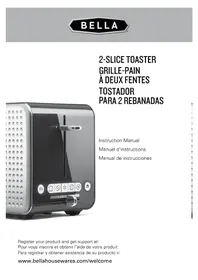
Modern black-and-white photo of a modern 3D toaster with control buttons and decorative patterns (no visible text or symbols)Instruction Manual
Register your product and get support at:
www.bellahousewares.com/welcome
Table of Contents
Important Safeguards....2
Notes on the cord....3
Notes on the plug 3
Getting to know your 2 slice toaster....4
Before using for the first time....4
How to use the toaster....4
Browning control....5
Toast function 5
Bagel function....5
Defrost function....5
Waffle function....5
Gluten-free function....5
Reheat function....6
Cancel function....6
Cleaning and maintenance....6
Warranty 7
Table des matières
When using electrical appliances, basic safety precautions should always be followed including the following:
- READ ALL INSTRUCTIONS
- Do not touch hot surfaces. Use handles or knobs.
- To protect against electrical shock do not immerse cord, plugs, or (state specific part or parts in question) in water or other liquid.
- Close supervision is necessary when any appliance is used by or near children.
- Unplug from outlet when not in use and before cleaning. Allow to cool before putting on or taking off parts.
- Do not operate any appliance with a damaged cord or plug or after the appliance malfunctions or has been damaged in any manner. Return appliance to the nearest authorized service facility for examination, repair, or adjustment
- The use of accessory attachments not recommended by the appliance manufacturer may cause injuries.
- Do not use outdoors (this item may be omitted if the product is specifically intended for outdoor use).
- Do not let cord hang over edge of table or counter, or touch hot surfaces.
- Do not place on or near a hot gas or electric burner, or in a heated oven.
- Extreme caution must be used when moving an appliance containing hot oil or other hot liquids.
- Always attach plug to appliance first, then plug cord into the wall outlet. To disconnect, turn any control to off, then remove plug from wall outlet.
- Do not use appliance for other than intended use.
- Save these Instructions.
- Oversize foods, metal foil packages, or utensils must not be inserted in a toaster as they may involve a risk of fire or electric shock.
- A fire may occur if toasters are covered or touching flammable material, including curtains, draperies, walls, and the like, when in operation.
- Do not attempt to dislodge food when toaster is plugged in. (This may be omitted if toaster employs sheathed type heating elements.)
CAUTION: This appliance is hot during operation and retains heat for some time after turning off. Always use oven mitts when handling hot material and allow metal parts to cool before cleaning. Do not place anything on top of the Toaster while it is operating or while it is hot.
CAUTION:
DO NOT toast pastries with runny fillings or frosting.
DO NOT toast torn slices of bread.
DO NOT place buttered bread or wrapped food into the Toaster.
DO NOT toast small-size bread, mini-baguettes, breadsticks, etc.
SAVE THESE INSTRUCTIONS FOR HOUSEHOLD USE ONLY
Notes on the Cord
The provided short power-supply cord (or detachable power-supply cord) should be used to reduce the risk resulting from becoming entangled in or tripping over a longer cord. Longer detachable power-supply cords or extension cords are available and may be used if care is exercised in their use. If a longer detachable power-supply cord or extension cord is used:
- The marked electrical rating of the cord set or extension cord should be at least as great as the electrical rating of the appliance.
- The cord should be arranged so that it will not drape over the countertop or table top where it can be pulled on by children or tripped over unintentionally.
Notes on the Plug
This appliance has a polarized plug (one blade is wider than the other).
To reduce the risk of electric shock, this plug will fit in a polarized outlet only one way. If the plug does not fit fully into the outlet, reverse the plug. If it still does not fit, contact a qualified electrician. Do not modify the plug in any way.
Plasticizer Warning
CAUTION: To prevent Plasticizers from migrating to the finish of the counter top or table top or other furniture, place NON-PLASTIC coasters or place mats between the appliance and the finish of the counter top or table top. Failure to do so may cause the finish to darken; permanent blemishes may occur or stains can appear.
Electric Power
If the electrical circuit is overloaded with other appliances, your appliance may not operate properly. It should be operated on a separate electrical circuit from other appliances.
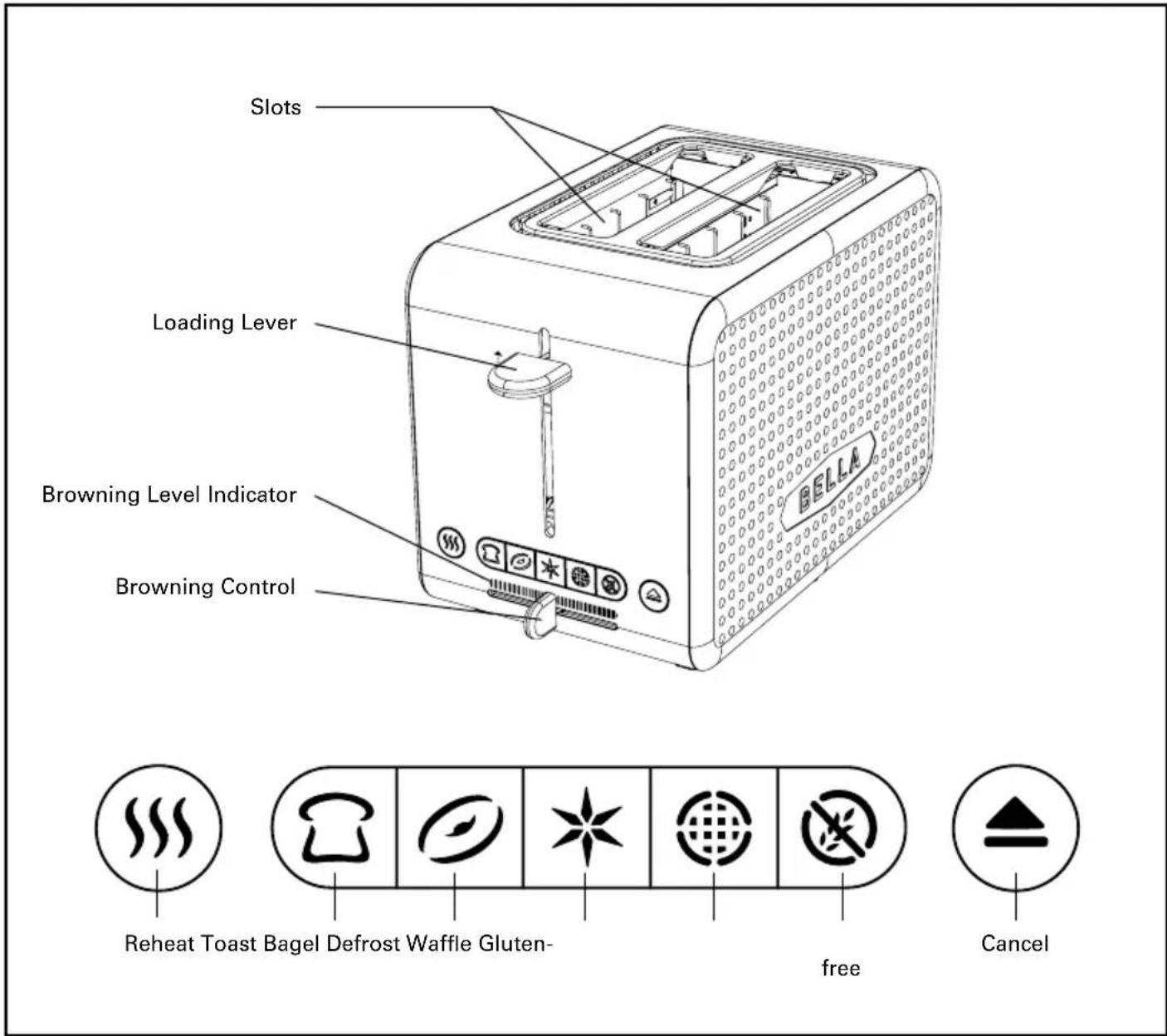
Getting To Know Your 2 slice Toaster
Product may vary slightly from illustrations.
text_image
Slots Loading Lever Browning Level Indicator Browning Control Reheat Toast Bagel Defrost Waffle Gluten- free CancelBefore Using For The First Time
There may be manufacturing residue or oil remaining in the toaster or heating element, which might emit an odor at the time of the first use. This is normal and will not occur after several uses. It is suggested to operate the toaster without bread for first toasting cycle according to the below steps. Then let the unit cool down before you start toasting the first slice.
How To Use The Toaster
- Ensure the toaster is connected to the main power supply.
-
Place one to two slices of bread into the toasting slots and press the loading lever down until it latches. The toaster will heat up automatically and start toasting.
NOTE: the toaster must be connected to the main power supply in order for the bread carriage to engage and for the toasting cycle to begin -
Adjust the browning control to brown the toast to your desired taste.
-
To stop toasting press the CANCEL ( ▲) button at any time.
-
The loading lever will rise automatically when toasting is finished. This toaster is equipped with a high lift lever to help with the removal of smaller items.
-
If the toast is not dark enough, you can toast the bread again. Adjust the browning control to your desired setting and replace the toast. Ensure the toast does not burn while re-toasting.
Browning Control
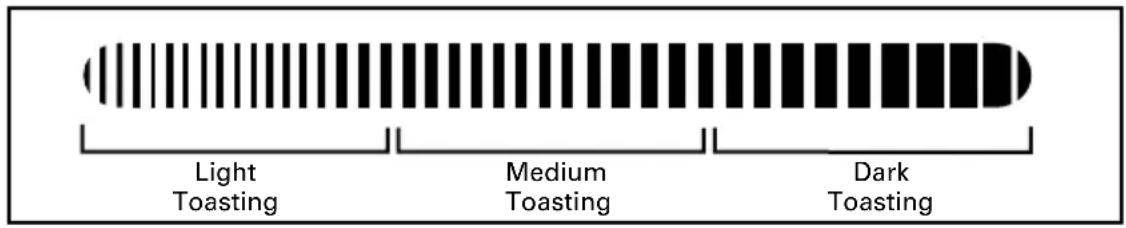
The browning control enables adjustment of toasting time and has the following settings:
text_image
Light Toasting Medium Toasting Dark ToastingToast Function (D
Toast your bread to your liking with TOAST function. This is the default option; the Toast indicator is lit up when Toaster is powered up.
- Place one slice of bread in each toasting slot.
- Set the browning control to desired setting.
- Press the loading lever down.
- Press the TOAST button ( ☐). The Toast indicator will light up. Ensure toast doesn't burn.
- The loading lever will rise automatically when the toasting cycle is complete.
Bagel Function (D)
The bagel setting works great for English muffins, too!
- Place one half in each toasting slot with the cut sides facing the center.
- Set the browning control to desired setting.
- Press the loading lever down.
- Press the BAGEL button ( ⭕ ). The bagel indicator will light up. Ensure bagel doesn't burn.
- The loading lever will rise automatically when the toasting cycle is complete.
Defrost Function (\*)
Your Toaster can defrost bread before it is toasted. You can also use it to defrost your gluten-free bread, bagel or waffle.
- Place the frozen bread, bagel or waffle in the toaster.
- Set the browning control to desired shade setting.
- Press the loading lever down.
- Press the DEFROST button (★) along with the Toast (Bagel (), Waffle () or Gluten-free button. Both the Defrost and Toaster/Bagel/Waffle/Gluten-free indicators will light up.
- The loading lever will rise automatically when the toasting cycle is complete.
Waffle Function ( )
Use your toaster to heat up your waffles!
- Place one waffle in each toasting slot
- Set the browning control to desired setting.
- Press the loading lever down.
- Press the WAFFLE button ( 🔒). The Waffle indicator will light up. Ensure waffle doesn't burn.
- The loading lever will rise automatically when the toasting cycle is complete.
Gluten-free Function (X)
Use your toaster to toast, reheat or defrost your Gluten-free bread, bagels and waffles!
- Place one bread, bagel or waffle in each toasting slot
- Set the browning control to desired setting.
- Press the loading lever down.
- Press the GLUTEN-FREE button ( Ⓧ) to toast. The Gluten free button will light up. Ensure toast/ bagel/waffle doesn't burn.
- The loading lever will rise automatically when the toasting cycle is complete.
Reheat Function ( )
Use this function for warming pre-toasted bread, bagel or waffle.
- Place one bread/ bagel/ waffle in each toasting slot
- Press the loading lever down.
- Press the REHEAT button ( ) . The Reheat indicator will light up. Ensure toast doesn't burn.
- The loading lever will rise automatically when the toasting cycle is complete.
Cancel Function (♠
The CANCEL (▲) button can be pressed at any time during toasting to interrupt the toasting cycle.
CAUTION:
- Remove all protective wrapping before using the toaster.
- If toaster starts to smoke, press CANCEL ( ▲) to stop toasting immediately.
- Do not toast food with runny ingredients.
- Never attempt to remove bread jammed in the slots without first unplugging the toaster from the electrical outlet. Be sure not to damage the internal mechanism or heating elements when removing bread.
- The bread slot is to be used for toasting regular bread slices only. Do not use the toaster to toast irregular shaped bread or round bread.
Cleaning and Maintenance
- Disconnect the toaster from outlet before cleaning.
- Wipe the outside with a soft dry cloth after toaster cools down. Never use metal polish.
- Pull out crumb tray on bottom of toaster and empty it. If toaster is used frequently, accumulated bread crumbs should be removed at least once a week. Make sure the crumb tray is inserted correctly to the toaster and completely closed before using the toaster again.
- The power cord may be wound under the bottom of the toaster when not in use or for storage.
This appliance requires little maintenance. Do not try to repair it yourself. Any servicing requiring disassembly must be performed by a qualified appliance repair technician.
Limited TWO-YEAR Warranty
SENSIO Inc. hereby warrants that for a period of TWO YEARS from the date of purchase, this product will be free from mechanical defects in material and workmanship, and for 90 days in respect to non-mechanical parts. At its sole discretion, SENSIO Inc. will either repair or replace the product found to be defective, or issue a refund on the product during the warranty period.
The warranty is only valid for the original retail purchaser from the date of initial retail purchase and is not transferable. Keep the original sales receipt, as proof of purchase is required to obtain warranty validation. Retail stores selling this product do not have the right to alter, modify, or in any way revise the terms and conditions of the warranty.
EXCLUSIONS:
The warranty does not cover normal wear of parts or damage resulting from any of the following: negligent use of the product, use of improper voltage or current, improper routine maintenance, use contrary to the operating instructions, disassembly, repair, or alteration by anyone other than qualified SENSIO Inc. personnel. Also, the warranty does not cover Acts of God such as fire, floods, hurricanes, or tornadoes.
SENSIO Inc. shall not be liable for any incidental or consequential damages caused by the breach of any express or implied warranty. Apart from the extent prohibited by applicable law, any implied warranty of merchantability or fitness for a particular purpose is limited in time to the duration of the warranty. Some states, provinces or jurisdictions do not allow the exclusion or limitation of incidental or consequential damages, or limitations on how long an implied warranty lasts, and therefore, the above exclusions or limitations may not apply to you. The warranty covers specific legal rights which may vary by state, province and/or jurisdiction.
HOW TO OBTAIN WARRANTY SERVICE:
You must contact Customer Service at our toll-free number: 1-866-832-4843. A Customer Service Representative will attempt to resolve warranty issues over the phone. If the Customer Service Representative is unable to resolve the problem, you will be provided with a case number and asked to return the product to SENSIO Inc. Attach a tag to the product that includes: your name, address, daytime contact telephone number, case number, and description of the problem. Also, include a copy of the original sales receipt. Carefully package the tagged product with the sales receipt, and send it (with shipping and insurance prepaid) to SENSIO Inc.'s address. SENSIO Inc. shall bear no responsibility or liability for the returned product while in transit to SENSIO Inc.'s Customer Service Center.
CONSIGNES DE SÉCURITÉ IMPORTANTES
For customer service questions or comments
BELLA® is a registered trademark of Sensio Inc.