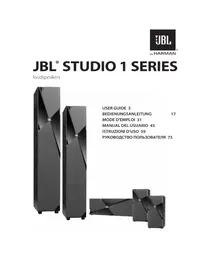
Studio 180 - Pregnant JBL - Free user manual and instructions
Find the device manual for free Studio 180 JBL in PDF.

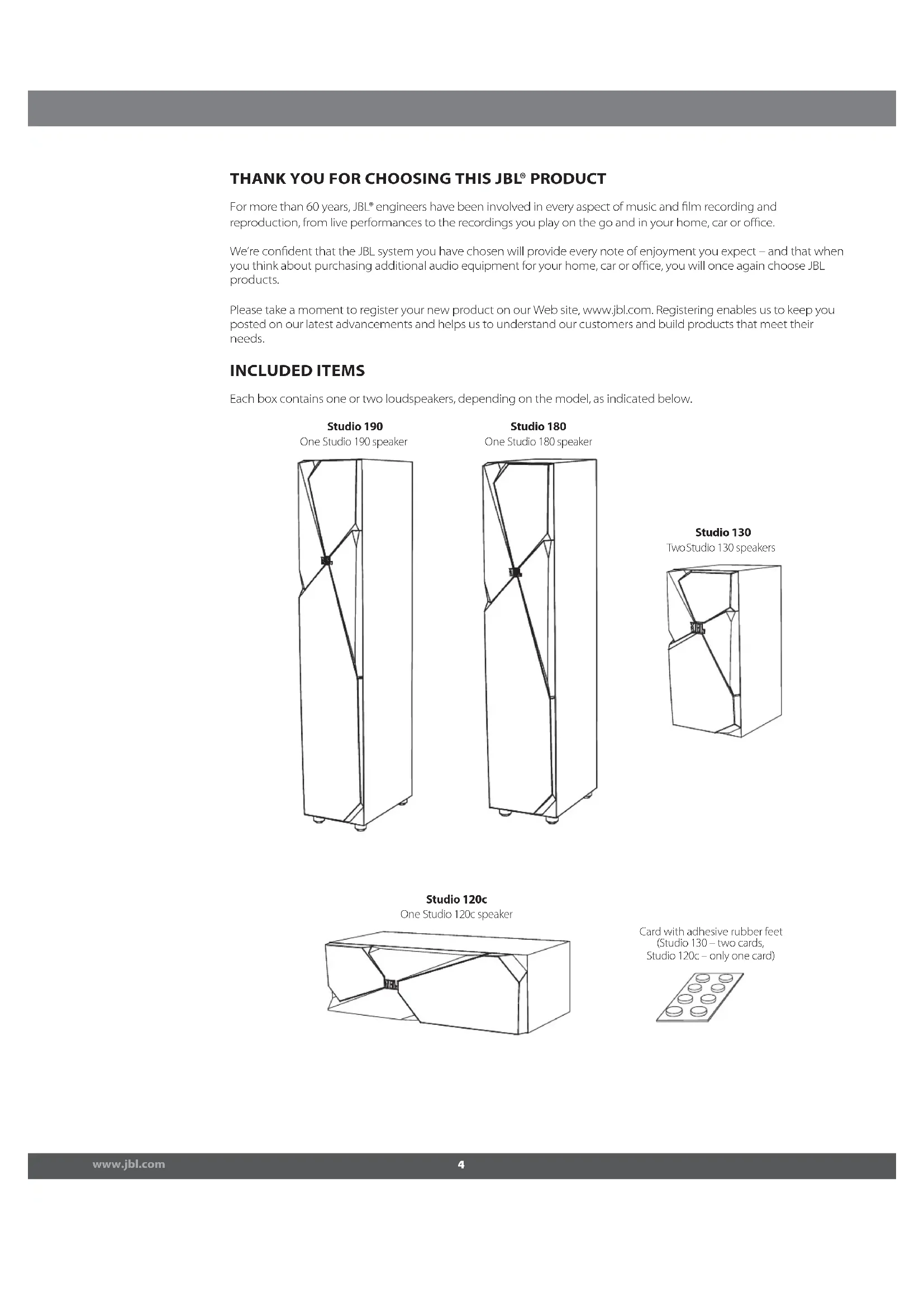


| Product type | 3-way floorstanding speaker |
| Brand | JBL |
| Model | Studio 180 |
| Woofer | 165mm (6.5") PolyPlas™ cone, magnetically shielded |
| Midrange driver | 100mm (4") PolyPlas™ cone, magnetically shielded |
| Tweeter | 25mm (1") CMMD® dome with Bi-Radial® waveguide |
| Power handling | 90 W continuous, 360 W peak |
| Frequency response | 45 Hz – 22 kHz |
| Nominal impedance | 8 Ω |
| Sensitivity | 89 dB (2.83 V/1 m) |
| Crossover frequencies | 1.1 kHz and 2.5 kHz, 6 dB/octave |
| Enclosure type | Bass-reflex (tuned) |
| Connector type | Gold-plated binding posts (bi-wire capable) |
| Dimensions (H × W × D) | 1016 × 200 × 333 mm |
| Weight | 17.5 kg |
| Recommended use | Left/right front speaker in a home theater or stereo system |
| Maintenance | Wipe with a dry cloth; dust the grille with a vacuum cleaner on low suction |
| Spare parts | Contact your JBL dealer for repairs |
| Included documents | User manual |
Frequently Asked Questions - Studio 180 JBL
User questions about Studio 180 JBL
0 question about this device. Answer the ones you know or ask your own.
Ask a new question about this device
Download the instructions for your Pregnant in PDF format for free! Find your manual Studio 180 - JBL and take your electronic device back in hand. On this page are published all the documents necessary for the use of your device. Studio 180 by JBL.
USER MANUAL Studio 180 JBL
natural_image
Exterior view of a modern office building (no signage)THANK YOU FOR CHOOSING THIS JBL® PRODUCT
For more than 60 years, JBL ^® engineers have been involved in every aspect of music and film recording and reproduction, from live performances to the recordings you play on the go and in your home, car or office.
We're confident that the JBL system you have chosen will provide every note of enjoyment you expect – and that when you think about purchasing additional audio equipment for your home, car or office, you will once again choose JBL products.
Please take a moment to register your new product on our Web site, www.jbl.com. Registering enables us to keep you posted on our latest advancements and helps us to understand our customers and build products that meet their needs.
INCLUDED ITEMS
Each box contains one or two loudspeakers, depending on the model, as indicated below.
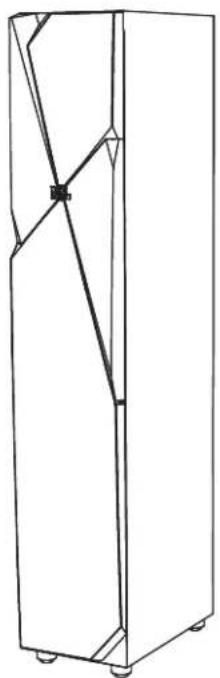
Studio 190
One Studio 190 speaker
natural_image
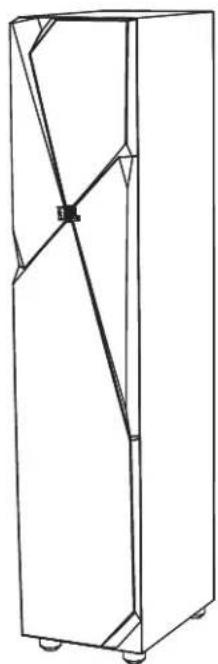
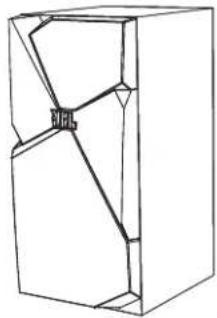
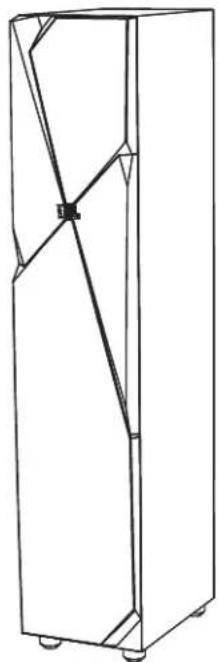
Line drawing of a cabinet or rack unit with internal structural lines (no text or symbols)Studio 180
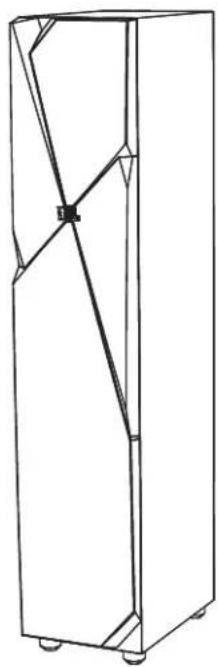
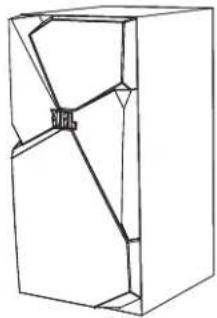
One Studio 180 speaker
natural_image
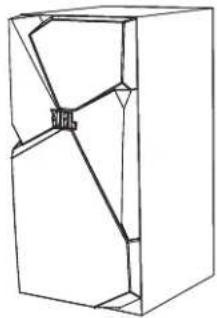
Line drawing of a cabinet or storage unit with internal diagonal lines and mounting feet (no text or symbols)Studio 130
Two Studio 130 speakers
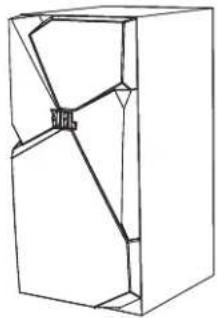
natural_image
Pure technical line drawing of a mechanical component without any text, numbers, or symbolsStudio 120c
One Studio 120c speaker
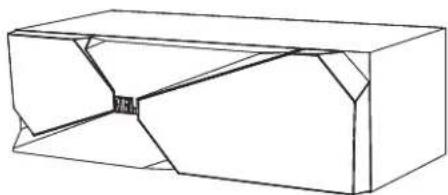
natural_image
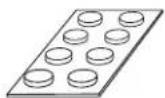
Pure technical line drawing of a rectangular mechanical component with internal cutouts (no text or symbols)Card with adhesive rubber feet
(Studio 130 – two cards, audio 120c – only one card)
PLACEMENT
For best results, place the speakers 6 – 10 feet (1.8m – 3m) apart. Angling the speakers toward the listening position can improve the stereo imaging. The speakers will produce the most accurate stereo soundstage when the angle between the listener and the speakers is between 40 and 60 degrees.
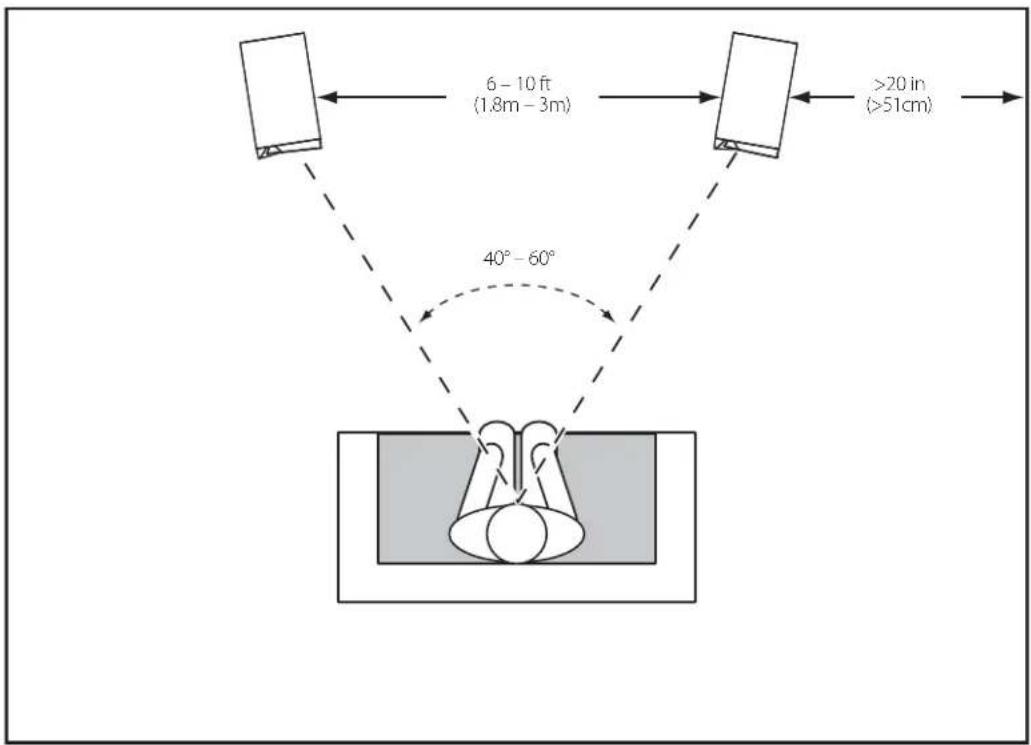
Generally, bass output will increase as the speaker is moved closer to a wall or corner.
For best performance, we recommend that you place the speakers at least 20 inches (51cm) away from the side walls.
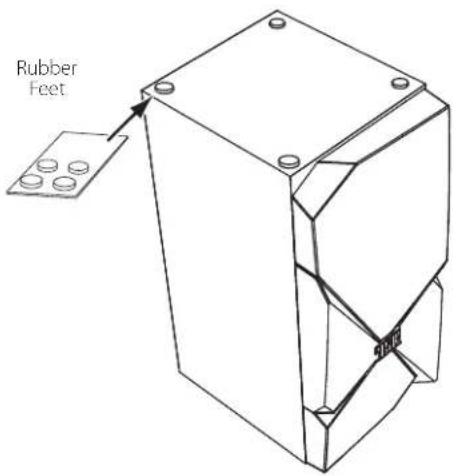
- Position Studio 130 shelf speakers so that their tweeters are approximately at ear level. Peel the adhesive rubber feet from the card and apply them to the bottoms of the speakers.
STUDIO 120c
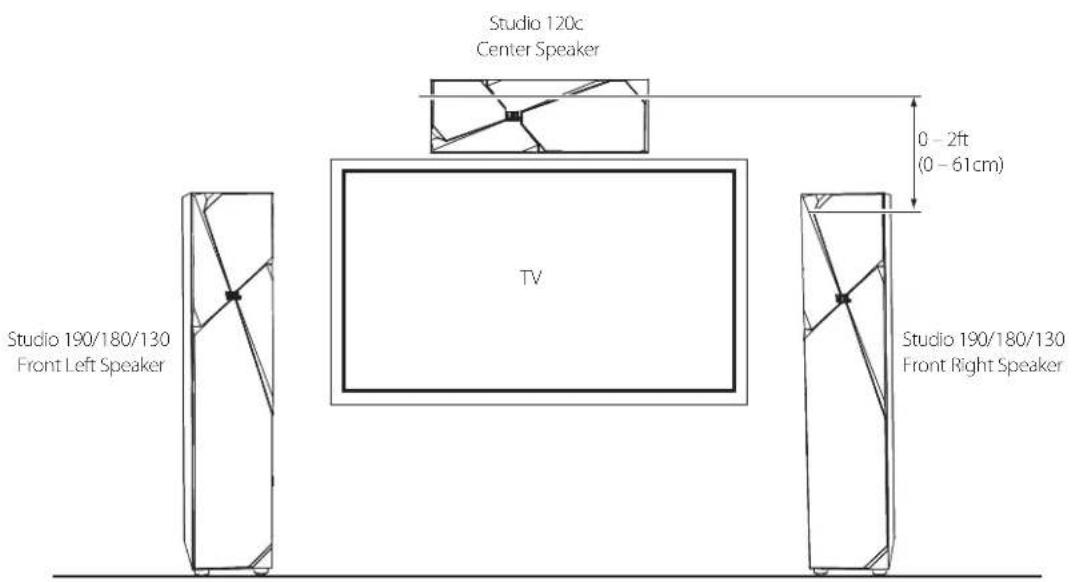
You should place the center speaker directly above or below the center of your TV screen. The speaker's center should be no more than 2 feet (61cm) above or below the tweeters of the front left and front right speakers. If your TV set is deep enough, you can set the center speaker on top of the TV, with the speaker's front edge even with the TV's front edge.
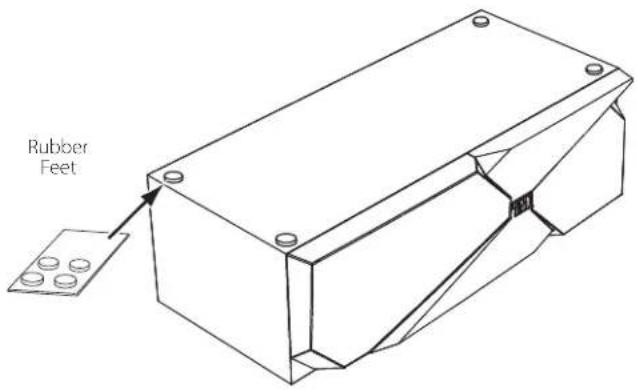
- Peel the adhesive rubber feet from the card and apply them to the bottom of the speaker.
STUDIO 130 - SURROUND CHANNELS (5.1-CHANNEL SYSTEM)
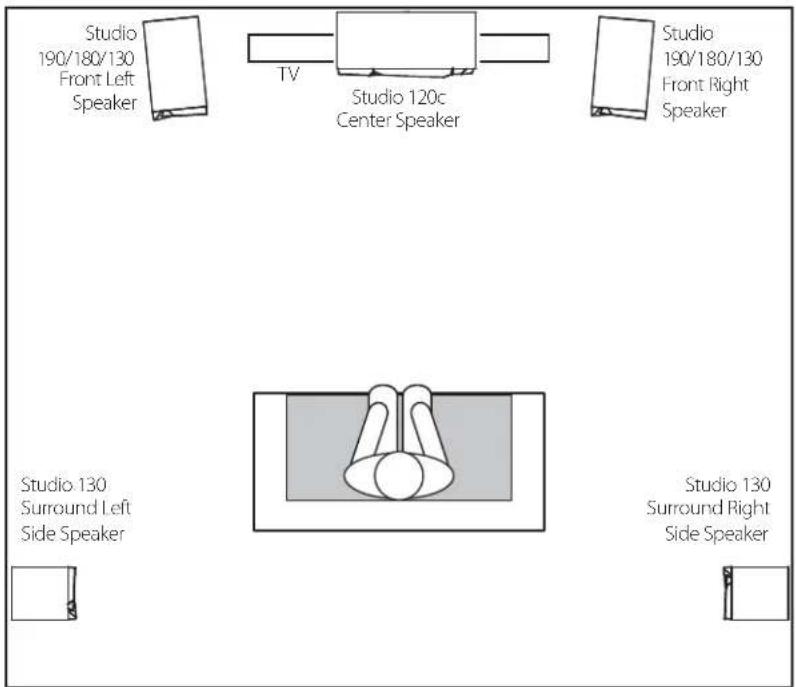
When you use Studio 130 speakers as surround-channel speakers in a 5.1-channel system, place them slightly behind the listening position, facing each other. Ideally, they should be 5 – 6 feet (1.5m – 1.8m) above the floor. An alternate location would be on a wall behind the listening position, facing forward. The surround speakers should not call attention to themselves while they're playing. Experiment with their placement until you hear a diffuse, ambient sound accompanying the sounds that you hear from the front left, front right and center speakers.
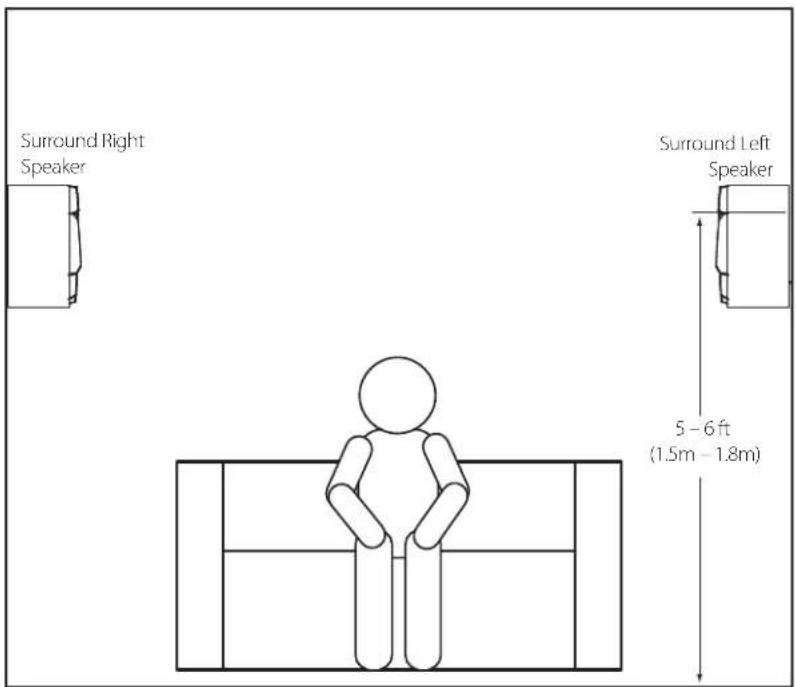
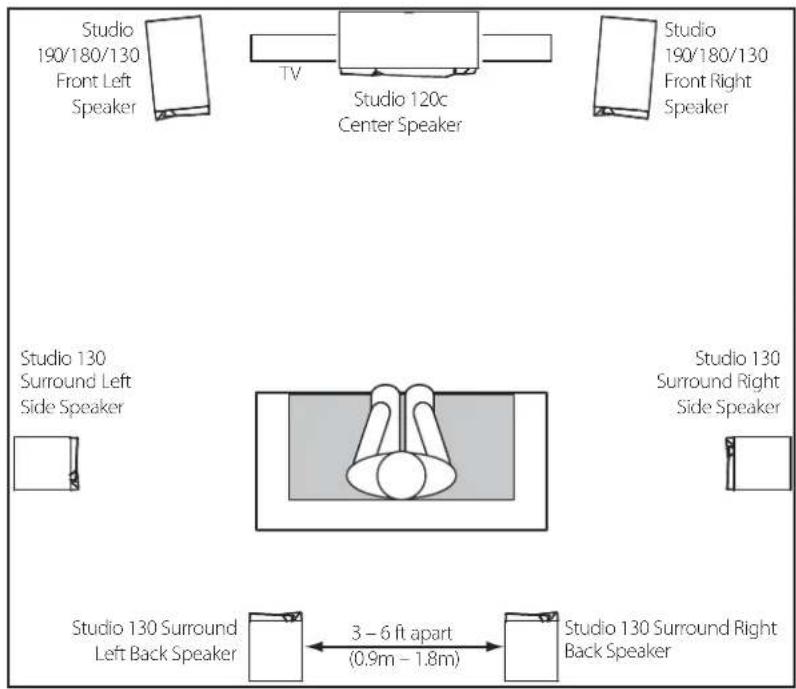
STUDIO 130 - SURROUND CHANNELS (7.1-CHANNEL SYSTEM)
When you use Studio 130 speakers as surround-channel speakers in a 7.1-channel system, place the surround side speakers directly to the sides of the listening position, at least 5 – 6 feet (1.5m – 1.8m) above the floor. Place the surround back speakers on the wall behind the listening position, also at least 5 – 6 feet (1.5m – 1.8m) above the floor and 3 – 6 feet (0.9m – 1.8m) apart.
CONNECTIONS
CAUTION: Make sure that all of the system's electrical components are turned OFF (and preferably unplugged from their AC outlets) before making any connections.
Speakers and amplifiers have corresponding positive and negative (+" and −") connection terminals. All Studio 1 series speakers have connection terminals that are marked "+" and "−" on the terminal-cup assembly. Additionally, the "+" terminals have red markings, while the "-" terminals have black markings.
To ensure proper polarity, connect each "+" terminal on the back of the amplifier or receiver to the respective "+" (red) terminal on each speaker. Connect the "-" terminals in a similar way. Do not reverse polarities (i.e., "+" to "-" or "-" to "+" when making connections. Doing so will cause poor stereo imaging and diminished bass performance.
IMPORTANT: Make sure the (+) and (−) wires or connectors do not touch each other or the other terminal. Touching wires can cause a short circuit that can damage your receiver or amplifier.
BASIC SINGLE-WIRE CONNECTION
Connect the amplifier to each speaker as shown in the illustration below.
For the Studio 190 and Studio 180 speakers, you can use either set of terminals on the connector panel.
IMPORTANT: Do not remove the metal jumpers from between the two sets of terminals when connecting the speaker wires.
Studio 130, Studio 120c
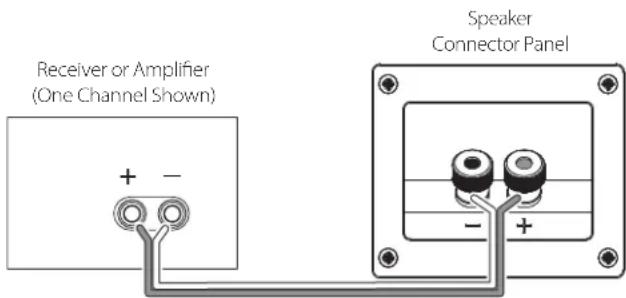
Studio 190, Studio 180
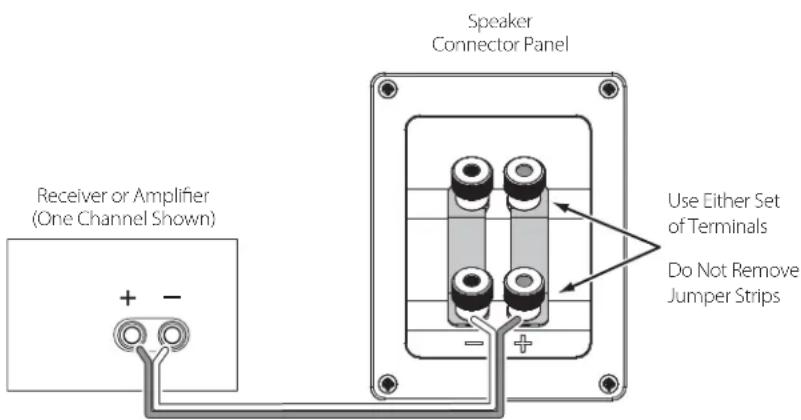
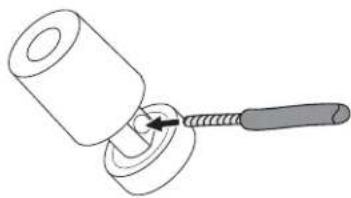
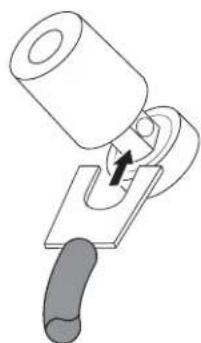
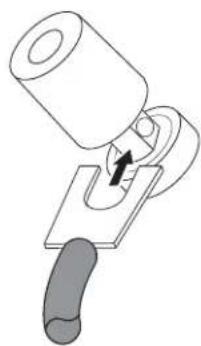
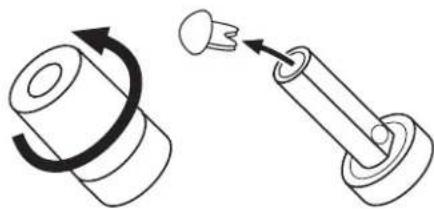
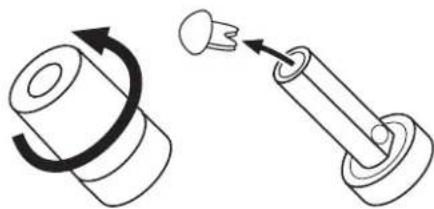
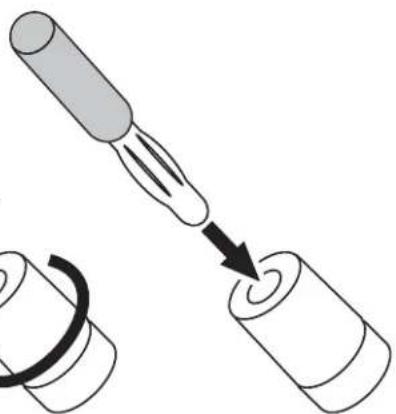
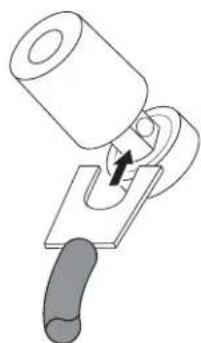
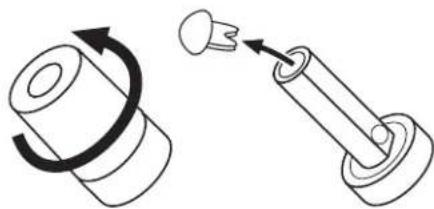
The Studio 1 series speakers' gold-plated speaker terminals can accept a variety of wire connector types: bare wire, pin connectors, spade connectors and banana connectors.
USING BARE WIRE OR PIN CONNECTORS:

2.3.
natural_image
Simple line drawing of a hammer striking a cylindrical object with a handle (no text or symbols)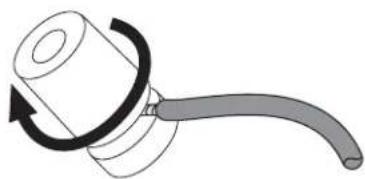
natural_image
Diagram of a mechanical device with a curved handle and rotating arrow (no text or symbols)USING SPADE CONNECTORS:

2.3.
natural_image
Diagram of a mechanical device with a cylindrical component inserted into a slot, showing a handle and arrow indicating direction (no text or symbols)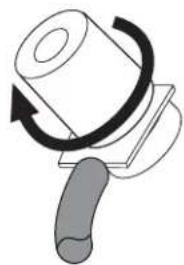
natural_image
Diagram of a mechanical press or clamping device with a rotating roller and handle (no text or symbols)USING BANANA CONNECTORS:
1.2.3.4.
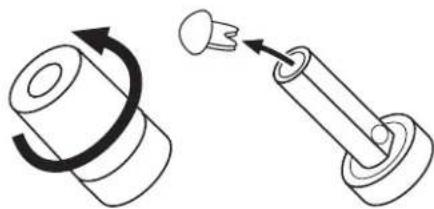
natural_image
Diagram showing a mechanical component with rotational motion and a spring-like assembly (no text or symbols)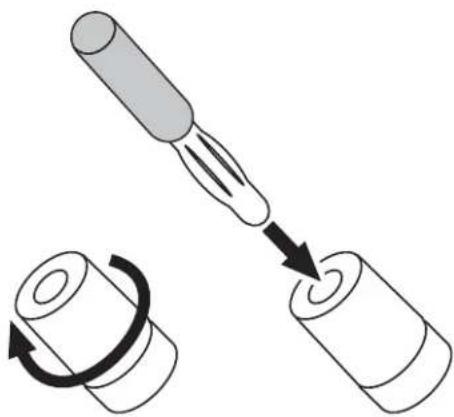
natural_image
Diagram showing a tool interacting with a cylindrical object, with an arrow indicating rotation (no text or symbols present)BI-WIRE CONNECTION (STUDIO 190/STUDIO 180)
The Studio 190 and Studio 180 connection assemblies have two sets of input terminals that are connected by metal jumper bars. The upper set of terminals is for the midrange/tweeter, and the lower set of terminals is for the woofer(s). This arrangement allows you to bi-wire the speakers using a single stereo amplifier or using two stereo amplifiers. Bi-wiring can offer sonic advantages and more flexibility in power-amplifier selection over a conventional single-wire connection.
Before bi-wiring the speakers, remove the jumper bars.
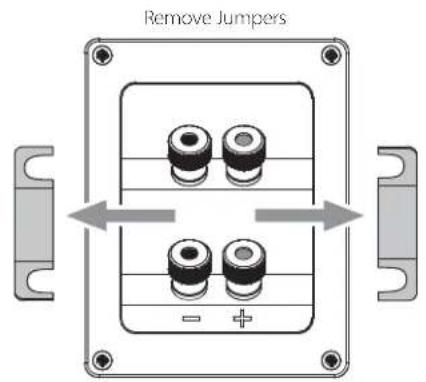
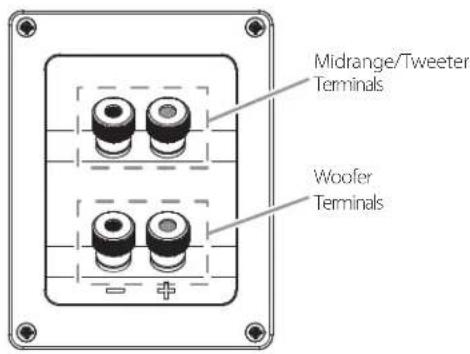
SINGLE-AMPLIFIER BI-WIRING
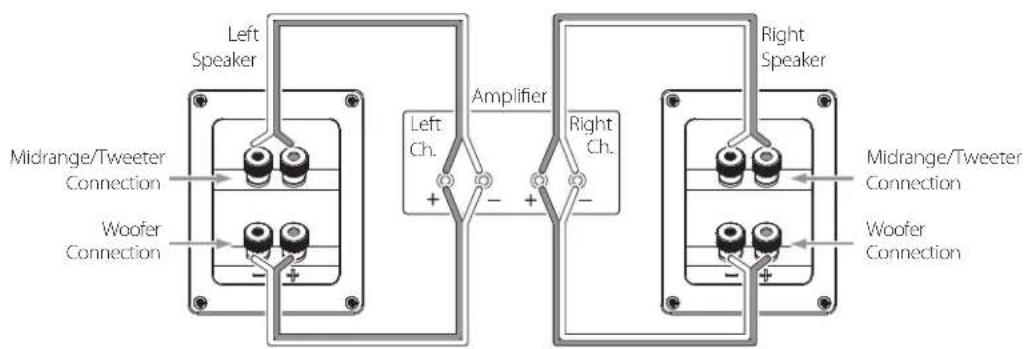
DUAL-AMPLIFIER BI-WIRING
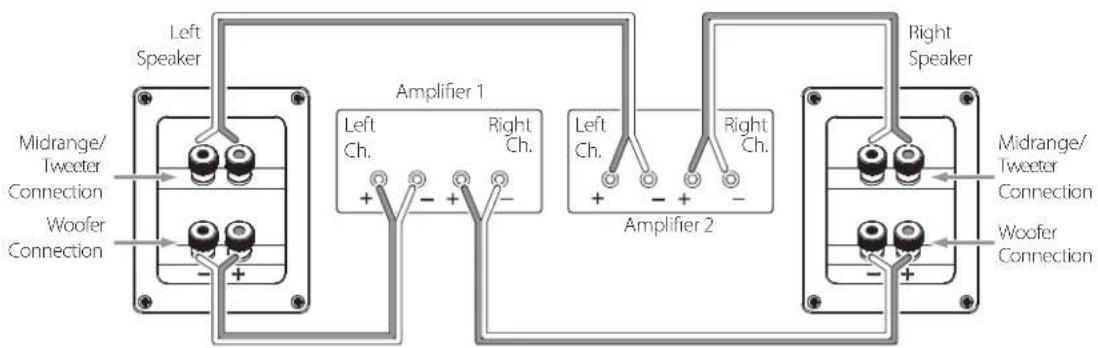
For more information about various speaker-wire and connection options, contact your local JBL dealer.
CARING FOR YOUR SPEAKERS
- Wipe the cabinet with a clean, dry cloth to remove dust. Damp cloths may dull the cabinet's finish. Do not use volatile liquids such as benzene, paint thinner or alcohol on the cabinet.
- Do not spray insecticide near the cabinet.
- To remove dust from the grille fabric, use a vacuum cleaner set to low suction.
- Do not wash the grilles in water, as it may fade the color or make it uneven.
- If the surfaces of the woofer and midrange cones become dusty, you can carefully sweep them clean with a soft, dry calligraphy brush or paint brush. Do not use a damp cloth.
- NEVER touch anything to the tweeter dome.
SPECIFICATIONS
STUDIO 190 FLOORSTANDING SPEAKER
| Speaker type: Three-way dual-woofer, floorstanding | |
| Low-frequency transducer: Two 6-1/2" (165mm) PolyPlasTM cones, magnetically shielded | |
| Midrange transducer: 4" (100mm) PolyPlas cone, magnetically shielded | |
| High-frequency transducer: | 1" CMMD® Lite dome, magnetically shielded, in a Bi-Radial * constant-directivity waveguide |
| Power handling: 100 watts (continuous); 400 watts (peak) | |
| Frequency response: 40Hz – 22kHz | |
| Nominal impedance: 8 ohms | |
| Sensitivity (2.83V/1m): 90dB | |
| Crossover frequencies: 800Hz, 3.2kHz, 6dB/octave | |
| Enclosure type: Ported, with midrange subenclosure | |
| Connector type: Dual gold-plated binding posts (bi-wire capable) | |
| Dimensions (H x W x D): 44-1/8" x 7-7/8" x 14-3/4" (1121mm x 200mm x 375mm) | |
| Weight: 48.8 lb (22.1kg) | |
STUDIO 180 FLOORSTANDING SPEAKER
| Speaker type: Three-way floorstanding | |
| Low-frequency transducer: 6-1/2" (165mm) PolyPlas cone, magnetically shielded | |
| Midrange transducer: 4" (100mm) PolyPlas cone, magnetically shielded | |
| High-frequency transducer: | 1" CMMD Lite dome, magnetically shielded, in a Bi-Radial constant-directivity waveguide |
| Power handling: 90 watts (continuous); 360 watts (peak) | |
| Frequency response: 45Hz – 22kHz | |
| Nominal impedance: 8 ohms | |
| Sensitivity (2.83V/1m): 89dB | |
| Crossover frequencies: 1.1kHz, 2.5kHz, 6dB/octave | |
| Enclosure type: Ported, with midrange subenclosure | |
| Connector type: Dual gold-plated binding posts (bi-wire capable) | |
| Dimensions (H x W x D): 40" x 7-7/8" x 13-1/8" (1016mm x 200mm x 333mm) | |
| Weight: 38.6 lb (17.5kg) | |
| Speaker type: Two-way bookshelf | |
| Low-frequency transducer: 4" (100mm) PolyPlas cone, magnetically shielded | |
| High-frequency transducer: | 1" CMMD Lite dome, magnetically shielded, in a Bi-Radial constant-directivity waveguide |
| Power handling: 60 watts (continuous); 240 watts (peak) | |
| Frequency response: | 60Hz – 22kHz |
| Nominal impedance: | 8 ohms |
| Sensitivity (2.83V/1m): | 87dB |
| Crossover frequencies: | 3kHz, 12dB/octave |
| Enclosure type: | Ported |
| Connector type: Gold-plated binding posts | |
| Dimensions (H x W x D): | 13-3/4" x 6-1/2" x 8-1/4" (349mm x 165mm x 210mm) |
| Weight: | 10.9 lb (4.9kg) |
STUDIO 120c CENTER-CHANNEL SPEAKER
| Speaker type: 2-1/2-way dual center-channel | |
| Low-frequency transducer: Two 4" (100mm) PolyPlas cones, magnetically shielded | |
| High-frequency transducer: | 1" CMMD Lite dome, magnetically shielded, in a Bi-Radial constant-directivity waveguide |
| Power handling: 60 watts (continuous); 240 watts (peak) | |
| Frequency response: 60Hz – 22kHz | |
| Nominal impedance: 8 ohms | |
| Sensitivity (2.83V/1m): 90dB | |
| Crossover frequencies: 900Hz, 12dB/octave; 1.8kHz, 24dB/octave | |
| Enclosure type: Ported | |
| Connector type: Gold-plated binding posts | |
| Dimensions (H x W x D): 6-1/2" x 21" x 9-7/8" (165mm x 533mm x 251mm) | |
| Weight: 18.6 lb (8.4kg) | |
HARMAN
Harman Consumer, Inc.
8500 Balboa Boulevard, Northridge, CA 91329 USA www.jbl.com
© 2010 Harman International Industries, Incorporated. All rights reserved.
Features, specifications and appearance are subject to change without notice.
JBL, Bi-Radial and CMMD are trademarks of Harman International Industries, Incorporated, registered in the United States and/or other countries.
PolyPlas is a trademark of Harman International Industries, Incorporated.
Part No. 950-0308-001
JBL® STUDIO 1 SERIE
Lautsprecher
natural_image
Exterior view of a modern office building (no signage)natural_image
Line drawing of a cabinet or rack unit with internal structural lines (no text or symbols)natural_image
Line drawing of a cabinet or storage unit with internal structural lines (no text or symbols)natural_image
Pure technical line drawing of a mechanical component without any text, numbers, or symbolsnatural_image
Pure technical line drawing of a rectangular mechanical component with internal cutouts (no text or symbols)natural_image
Simple line drawing of a gavel striking a mechanical component (no text or symbols)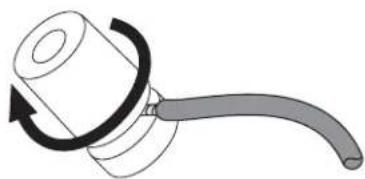
natural_image
Diagram of a mechanical device with a curved handle and rotating arrow (no text or symbols)KABELSCHUHE VERWENDEN:

2.3.
natural_image
Diagram of a mechanical device with a cylindrical component inserted into a slot, showing a handle and arrow indicating motion (no text or symbols)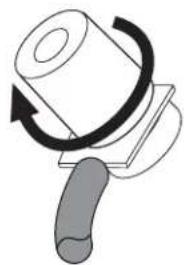
natural_image
Diagram of a mechanical press or clamping device with a rotating roller and handle (no text or symbols)BANANENSTECKER VERWENDEN:
1.2.3.4.
natural_image
Diagram showing a mechanical component with rotational motion and a spring-like assembly (no text or symbols)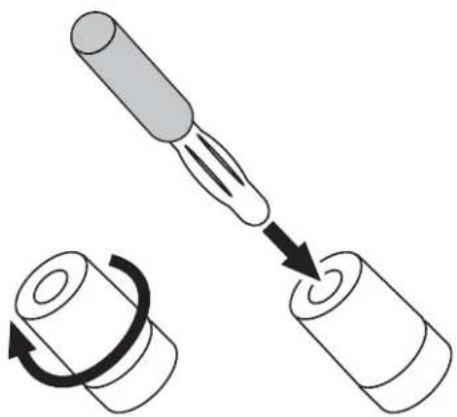
natural_image
Diagram showing a tool interacting with a cylindrical object, with an arrow indicating rotation (no text or symbols present)BI-WIRE-VERBINDUNGEN (STUDIO 190/STUDIO 180)
Harman Consumer, Inc.
8500 Balboa Boulevard, Northridge, CA 91329 USA www.jbl.com
natural_image
Exterior view of a modern office building (no signage)MERCI D'AVOIR CHOISI CE PRODUIT JBL®
natural_image
Line drawing of a cabinet or rack unit with internal structural lines (no text or symbols)natural_image
Line drawing of a cabinet or storage unit with internal structural lines (no text or symbols)Studio 130
Deux enceintes Studio 130
natural_image
Pure technical line drawing of a mechanical component without any text, numbers, or symbolsnatural_image
Line drawing of a 3D rectangular block with internal geometric cutouts and a small central square (no text or symbols)natural_image
Simple line drawing of a gavel striking a mechanical component (no text or symbols)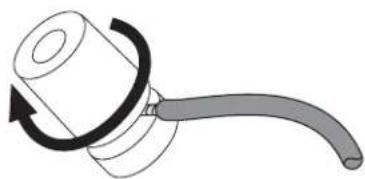
natural_image
Diagram of a mechanical device with a curved handle and rotating arrow (no text or symbols)natural_image
Diagram of a mechanical device with a cylindrical component inserted into a slot, showing a handle and arrow indicating motion (no text or symbols)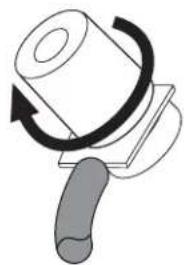
natural_image
Diagram of a mechanical press or clamping device with a rotating roller and handle (no text or symbols)UTILISATION DES FICHES BANANES :
natural_image
Diagram showing a mechanical component with rotational motion and a spring-like assembly (no text or symbols)2.
3.4.

natural_image
Diagram showing a tool interacting with a cylindrical object, no text or symbols presentBRANCHEMENT BIFILAIRE (STUDIO 190/STUDIO 180)
Harman Consumer, Inc.
8500 Balboa Boulevard, Northridge, CA 91329 USA www.jbl.com
natural_image
Exterior view of a modern office building (no signage)GRACIAS POR ELEGIR ESTE PRODUCTO DE JBL®
natural_image
Line drawing of a cabinet or rack unit with internal structural lines (no text or symbols)Studio 180
Un altavoz Studio 180
natural_image
Line drawing of a cabinet or storage unit with internal structural lines and mounting feet (no text or symbols)Studio 130
Dos altavoces Studio 130
natural_image
Pure technical line drawing of a mechanical component without any text, numbers, or symbolsnatural_image
Pure technical line drawing of a rectangular mechanical component with internal cutouts (no text or symbols)natural_image
Simple line drawing of a gavel striking a mechanical component (no text or symbols)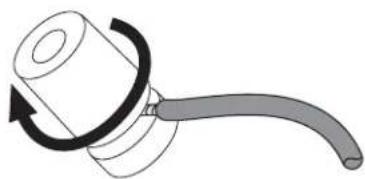
natural_image
Diagram of a mechanical device with a curved handle and rotating arrow (no text or symbols)natural_image
Diagram of a mechanical device with a cylindrical component and a handle, showing a turning mechanism (no text or symbols)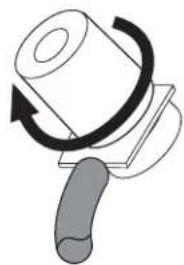
natural_image
Diagram of a mechanical press or clamping device with a rotating roller and handle (no text or symbols)USO DE CONECTORES BANANA:
1.2.3.4.
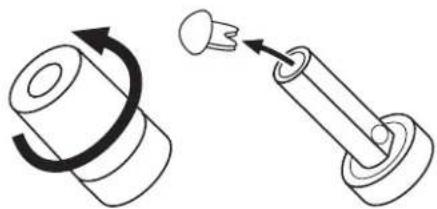
natural_image
Diagram showing a mechanical assembly with a rotating shaft and a spring-loaded component (no text or symbols)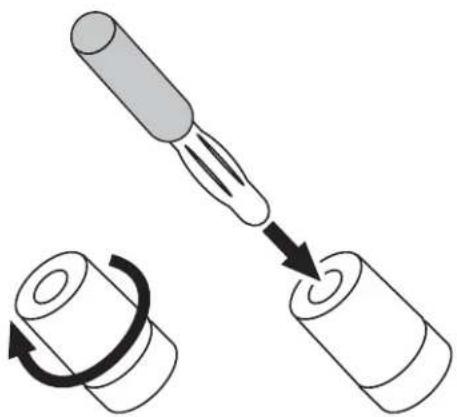
natural_image
Diagram showing a tool interacting with a cylindrical object, with an arrow indicating rotation (no text or symbols present)Harman Consumer, Inc.
8500 Balboa Boulevard, Northridge, CA 91329 USA www.jbl.com
© 2010 Harman International Industries, Incorporated. Reservados todos los derechos.
natural_image
Exterior view of a modern office building (no signage)GRAZIE PER AVER SCELTO QUESTO PRODOTTO JBL®
natural_image
Line drawing of a cabinet or storage unit with internal components and mounting feet (no text or symbols)Studio 180
Un diffusore Studio 180
natural_image
Line drawing of a cabinet or storage unit with internal diagonal lines and mounting feet (no text or symbols)Studio 130
Due diffusori Studio 130
natural_image
Pure 3D line drawing of a mechanical or architectural component with no text, numbers, or symbolsnatural_image
Pure technical line drawing of a rectangular mechanical component with internal cutouts (no text or symbols)STUDIO 120c
STUDIO 130 - CANALI SURROUND (IMPIANTO A 5.1 CANALI)
natural_image
Simple line drawing of a hammer striking a cylindrical object with a handle (no text or symbols)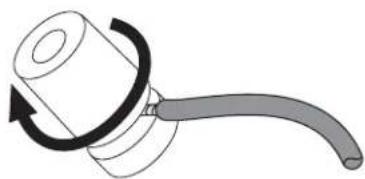
natural_image
Diagram of a mechanical device with a curved handle and rotating arrow (no text or symbols)USO DEI CONNETTORI A FORCELLA:

2.3.
natural_image
Diagram of a mechanical device with a cylindrical component inserted into a slot, showing a handle and arrow indicating direction (no text or symbols)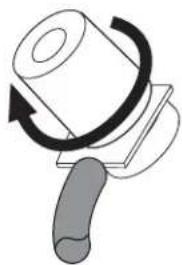
natural_image
Diagram of a mechanical device with a rotating knob and handle, no text or symbols presentUSO DEI CONNETTORI A BANANA:
1.2.3.4.
natural_image
Diagram showing a mechanical component with rotational motion and a spring-like assembly (no text or symbols)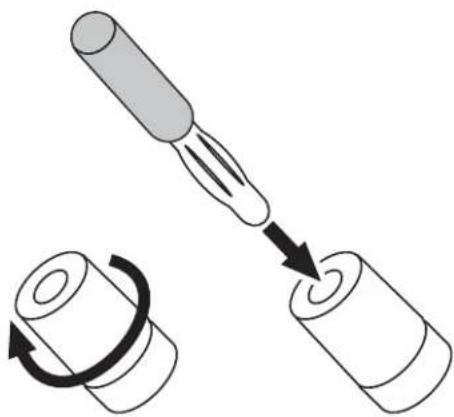
natural_image
Diagram showing a tool interacting with a cylindrical object, with an arrow indicating rotation (no text or symbols present)COLLEGAMENTO IN MODALITÀ BI-WIRING (STUDIO 190/STUDIO 180)
Harman Consumer, Inc.
8500 Balboa Boulevard, Northridge, CA 91329 USA www.jbl.com
natural_image
Exterior view of a modern office building (no signage)natural_image
Line drawing of a cabinet or rack unit with internal structural lines and mounting feet (no text or symbols)natural_image
Line drawing of a cabinet or storage unit with internal diagonal lines and mounting feet (no text or symbols)natural_image
Pure 3D line drawing of a mechanical or architectural component with no text, numbers, or symbolsnatural_image
Pure technical line drawing of a rectangular mechanical component with internal cutouts (no text or symbols)natural_image
Simple line drawing of a gavel striking a mechanical component (no text or symbols)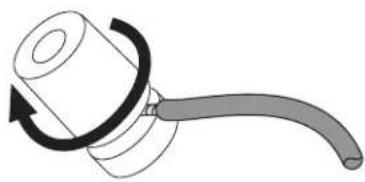
natural_image
Diagram of a mechanical device with a curved handle and rotating arrow (no text or symbols)natural_image
Diagram of a mechanical device with a cylindrical component and a handle, showing a turning mechanism (no text or symbols)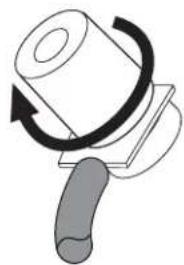
natural_image
Diagram of a mechanical press or clamping device with a rotating roller and handle (no text or symbols)natural_image
Diagram showing a mechanical assembly with a rotating shaft and a spring-loaded component (no text or symbols)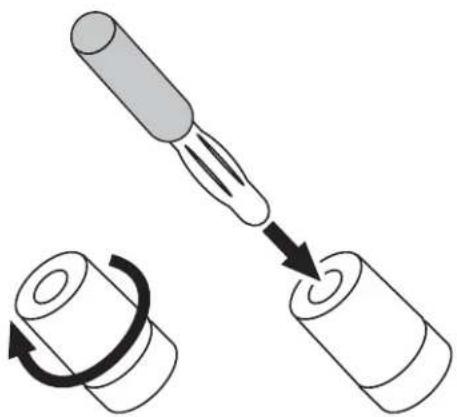
natural_image
Diagram showing a tool interacting with a cylindrical object, with an arrow indicating rotation (no text or symbols present)Harman Consumer, Inc.
8500 Balboa Boulevard, Northridge, CA 91329 USA www.jbl.com
© 2009 Harman International Industries, Incorporated. Все права защищены.

- THANK YOU FOR CHOOSING THIS JBL® PRODUCT
- INCLUDED ITEMS
- PLACEMENT
- STUDIO 120c
- STUDIO 130 - SURROUND CHANNELS (5.1-CHANNEL SYSTEM)
- STUDIO 130 - SURROUND CHANNELS (7.1-CHANNEL SYSTEM)
- CONNECTIONS
- BASIC SINGLE-WIRE CONNECTION
- USING BARE WIRE OR PIN CONNECTORS:
- USING SPADE CONNECTORS:
- USING BANANA CONNECTORS:
- BI-WIRE CONNECTION (STUDIO 190/STUDIO 180)
- CARING FOR YOUR SPEAKERS
- SPECIFICATIONS
- HARMAN
- JBL® STUDIO 1 SERIE
- KABELSCHUHE VERWENDEN:
- BANANENSTECKER VERWENDEN:
- BI-WIRE-VERBINDUNGEN (STUDIO 190/STUDIO 180)
- MERCI D'AVOIR CHOISI CE PRODUIT JBL®
- UTILISATION DES FICHES BANANES :
- BRANCHEMENT BIFILAIRE (STUDIO 190/STUDIO 180)
- GRACIAS POR ELEGIR ESTE PRODUCTO DE JBL®
- USO DE CONECTORES BANANA:
- GRAZIE PER AVER SCELTO QUESTO PRODOTTO JBL®
- STUDIO 130 - CANALI SURROUND (IMPIANTO A 5.1 CANALI)
- USO DEI CONNETTORI A FORCELLA:
- USO DEI CONNETTORI A BANANA:
- COLLEGAMENTO IN MODALITÀ BI-WIRING (STUDIO 190/STUDIO 180)
Brand : JBL
Model : Studio 180
Category : Pregnant