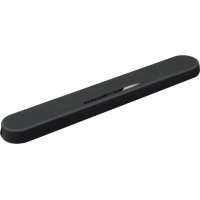
USER MANUAL ESB1080 YAMAHA
Using the remote control. 16
Part names and functions. 18
PREPARATION 22
1 Installation 22
Installing the unit on a TV stand, etc. 22
2 Connecting a TV. 23
Connecting a TV that supports Audio Return Channel (ARC) 23
Connecting a TV that does not support Audio Return Channel (ARC) 24
3 Connecting playback devices. 25
HDMI connection with a playback device. 25
Analog connection with a playback device. 25
4 Connecting an external subwoofer 26
Connecting an external subwoofer 26
5 Connecting the power cord. 26
Connecting the power cord. 26
PLAYBACK 27
Basic operations 27
Basic procedure for playback 27
Enjoying your favorite sound. 29
Playback with 3D surround sound. 29
Playback with surround sound 29
Playback with 2-channel stereo sound. 29
Playback of human voices clearly (clear voice) 30
Enjoying enhanced bass sound (bass extension) 30
Use of a Bluetooth device 31
Listening to music stored on a Bluetooth device 31
Connecting the unit to two Bluetooth devices simultaneously (multipoint
connection) 33
Useful features for playback 34
Using a TV's remote control to operate the unit (HDMI control) 34
Showing audio information with playback 35
Operating the unit with the HOME THEATER CONTROLLER app. 36
CONFIGURATIONS 37
Configuring various functions 37
Changing the brightness of the indicators (DIMMER) 37
Configuring the HDMI control function 37
Configuring HDMI audio output 38
Setting the auto power standby function 38
Enabling/disabling touch panel control (child lock function) 39
Configuring the Bluetooth standby function 39
Initializing the unit. 40
APPENDIX 41
When any problem appears (General) 41
When any problem appears (Power and system function) 41
When any problem appears (Audio) 44
When any problem appears (Bluetooth®) 46
Specifications 48
Specifications 48
Supported HDMI audio and video formats. 49
Supported digital audio formats. 50
Mounting the unit on a wall. 51
Explanation of Graphical Symbols
The lightning flash with arrowhead symbol within an equilateral triangle is intended to alert the user to the presence of uninsulated "dangerous voltage" within the product's enclosure that may be of sufficient magnitude to constitute a risk of electric shock to persons.

The exclamation point within an equilateral triangle is intended to alert the user to the presence of important operating and maintenance (servicing) instructions in the literature accompanying the product.
IMPORTANT SAFETY INSTRUCTIONS
1 Read these instructions.
2 Keep these instructions.
3 Heed all warnings
4 Follow all instructions.
5 Do not use this apparatus near water.
6 Clean only with dry cloth.
7 Do not block any ventilation openings. Install in accordance with the manufacturer's instructions.
8 Do not install near any heat sources such as radiators, heat registers, stoves, or other apparatus (including amplifiers) that produce heat.
9 Do not defeat the safety purpose of the polarized or grounding-type plug. A polarized plug has two blades with one wider than the other. A grounding type plug has two blades and a third grounding prong. The wide blade or the third prong are provided for your safety. If the provided plug does not fit into your outlet, consult an electrician for replacement of the obsolete outlet.
10 Protect the power cord from being walked on or pinched particularly at plugs, convenience receptacles, and the point where they exit from the apparatus.
11 Only use attachments/accessories specified by the manufacturer.
12 Use only with the cart, stand, tripod, bracket, or table specified by the manufacturer, or sold with the apparatus. When a cart is used, use caution when moving the cart/apparatus combination to avoid injury from tip-over.
13 Unplug this apparatus during lightning storms or when unused for long periods of time.
14 Refer all servicing to qualified service personnel. Servicing is required when the apparatus has been damaged in any way, such as power-supply cord or plug is damaged, liquid has been spilled or objects have fallen into the apparatus, the apparatus has been exposed to rain or moisture, does not operate normally, or has been dropped.
WARNING
TO REDUCE THE RISK OF FIRE OR ELECTRIC SHOCK,DO NOT EXPOSE THIS APPARATUS TO RAIN OR MOISTURE.
(UL60065_03)
This product contains a battery that contains perchlorate material. Perchlorate Material—special handling may apply, See www.dtsc.ca.gov/hazardouswaste/perchlorate.
1. IMPORTANT NOTICE: DO NOT MODIFY THIS UNIT!
This product, when installed as indicated in the instructions contained in this manual, meets FCC requirements. Modifications not expressly approved by Yamaha may void your authority, granted by the FCC, to use the product.
2. IMPORTANT:
When connecting this product to accessories and/or another product use only high quality shielded cables. Cable/s supplied with this product MUST be used. Follow all installation instructions. Failure to follow instructions could void your FCC authorization to use this product in the USA.
3. NOTE:
This product has been tested and found to comply with the requirements listed in FCC Regulations, Part 15 for Class "B" digital devices. Compliance with these requirements provides a reasonable level of assurance that your use of this product in a residential environment will not result in harmful interference with other electronic devices. This equipment generates uses radio frequencies and, if not installed and used according to the instructions found in the users manual, may cause interference harmful to the operation of other electronic devices. Compliance with FCC regulations does not guarantee that interference will not occur in all installations. If this product is found to be the source of interference, which can be determined by turning the unit "OFF" and "ON", please try to eliminate the problem by using one of the following measures: Relocate either this product or the device that is being affected by the interference. Utilize power outlets that are on different branch (circuit breaker or fuse) circuits or install AC line filter/s.
In the case of radio or TV interference, relocate/reorient the antenna. If the antenna lead-in is 300 ohm ribbon lead, change the lead-in to co-axial type cable. If these corrective measures do not produce satisfactory results, please contact the local retailer authorized to distribute this type of product. If you can not locate the appropriate retailer, please contact Yamaha Unified Communications, Inc., 144 North Rd, Suite 3250 Sudbury, MA 01776
The above statements apply ONLY to those products distributed by Yamaha Unified Communications, Inc. or its subsidiaries.
Responsible Party: Yamaha Unified Communications, Inc.
Address: 144 North Rd, Suite 3250 Sudbury, MA 01776
Telephone:800-326-1088
Type of Equipment: Front Surround System
Model Name: ESB-1080
This device complies with Part 15 of FCC Rules. Operation is subject to the following two conditions: (1) this device may not cause harmful interference, and (2) this device must accept any interference received, including interference that may cause undesired operation.
- This applies only to products distributed by Yamaha Unified Communications, Inc.
FCC NOTICE (U.S.A.)
- This equipment complies with FCC radiation exposure limits set forth for an uncontrolled environment and meets the FCC radio frequency (RF) Exposure Guidelines. This equipment has very low levels of RF energy that is deemed to comply without maximum permissive exposure evaluation (MPE).
- This transmitter must not be co-located or operated in conjunction with any other antenna or transmitter.
IC NOTICE (Canada)
- This equipment complies with ISED radiation exposure limits set forth for an uncontrolled environment and meets RSS-102 of the ISED radio frequency (RF) Exposure rules as this equipment has very low levels of RF energy.
-
This device contains licence-exempt transmitter(s)/receiver(s) that comply with Innovation, Science and Economic Development Canada's licence-exempt RSS(s). Operation is subject to the following two conditions:
-
This device may not cause interference.
- This device must accept any interference, including interference that may cause undesired operation of the device.
CANICES-3(B)/NMB-3(B) (can-b-02)
PRECAUTIONS
PLEASE READ CAREFULLY BEFORE USE. BE SURE TO FOLLOW THESE INSTRUCTIONS.
The precautions listed below are to prevent risk of harm to the user and others, as well as to prevent property damage, and to help the user use this unit properly and safely. Be sure to follow these instructions.
After reading this manual, be sure to keep it in a safe place where it can be referenced at any time.
- Be sure to request inspections or repairs from the dealer where you purchased the unit or from qualified Yamaha service personnel.
- Yamaha cannot be held responsible for injury to you or damage of the products caused by improper use or modifications to the unit.
- This product is for ordinary homes. Do not use for applications requiring high reliability, such as managing lives, health care or high-value assets.

WARNING
This content indicates "risk of serious injury or death."
If you notice any abnormality
- If any of the following abnormalities occur, immediately turn off the power and disconnect the power plug. If you are using batteries, remove the batteries from this unit.
The power cord/plug is damaged.
- An unusual smell, unusual sound or smoke is emitted from the unit.
Foreign material or water gets into the interior of the unit.
- There is a loss of sound during use.
- There is a crack or damage in the unit.
Continued use could cause electric shocks, a fire, or malfunctions
Immediately request an inspection or repair from the dealer where you purchased the unit or from qualified Yamaha service personnel.
Power supply
- Do not do anything that could damage the power cord.
-Do not place it near a heater.
- Do not bend it excessively or alter it.
-Do not scratch it.
- Do not place it under a heavy object.
Using the power cord with the core of the cord exposed could cause electric shocks or a fire.
-
Do not touch the power plug or cord if there is a chance of lightning. Failure to observe this may cause electric shocks.
Use this unit with the power supply voltage printed on it. Failure to connect to an appropriate AC outlet may cause a fire, electric shocks, or malfunctions.
-
Be sure to use the supplied power cord. Also, do not use the supplied power cord for other units.
Failure to observe the above may cause a fire, burns, or malfunctions.
- Check the electric plug periodically and remove any dirt or dust which may have accumulated on it.
Failure to observe this may cause a fire or electric shocks.
- When setting up the unit, make sure that the AC outlet you are using is easily accessible.
If some trouble or malfunction occurs, immediately turn off the power switch and disconnect the plug from the AC outlet. Even when the power switch is turned off, as long as the power cord is not unplugged from the wall AC outlet, the unit will not be disconnected from the power source.
If you hear thunder or suspect approaching lightning, quickly turn off the power switch and pull the power plug from the AC outlet.
Failure to observe this may cause a fire or malfunctions.
If not using the unit for long periods of time, be sure to pull the power plug from the AC outlet.
Failure to observe this may cause a fire or malfunctions.
Installation
Install in the manner instructed in the manual.
Falling or toppling may result in injury or damage.
- Confirm that the finished installation is safe and secure. Also, carry out safety inspections periodically.
Failure to observe this may cause devices to fall and result in injury.
Do not disassemble
- Do not disassemble or modify this unit.
Failure to observe this may cause a fire, electric shocks, injury, or malfunctions.
Water warning
- Do not expose the unit to rain, use it near water or in damp or wet conditions, or place on it any containers (such as vases, bottles or glasses) containing liquids which might spill into any openings or places where water may drop. A liquid such as water getting into the unit may cause a fire, electric shocks, or malfunctions.
- Never insert or remove an electric plug with wet hands. Do not handle this unit with wet hands.
Failure to observe this may cause electric shocks or malfunctions.
Fire warning
- Do not place any burning items or open flames near the unit, since they may cause a fire.
Maintenance and care
- Do not use aerosols or spray-type chemicals that contain combustible gas for cleaning or lubrication.
The combustible gas will remain inside the unit, which may cause explosion or fire.
Handling caution
- Be careful not to drop or apply strong impact to this unit.
Failure to observe this may cause electric shocks, a fire, or malfunctions.
Battery use
DO NOT INGEST BATTERY, CHEMICAL BURN HAZARD
The remote control supplied with this product contains a coin/button cell battery. If the coin/button cell battery is swallowed, it can cause severe internal burns in just 2 hours and can lead to death.
Keep new and used batteries away from children. If the battery compartment does not close securely, stop using the product and keep it away from children.
If you think batteries might have been swallowed or placed inside any part of the body, seek immediate medical attention.
Do not disassemble a battery.
If the contents of the battery get on your hands or in your eyes, it can cause blindness or chemical burns.
Do not dispose of a battery in fire.
Do not expose a battery to high temperatures, such as direct sunlight or a fire.
Doing so may result in the battery bursting, causing a fire or injury.
- Do not attempt to recharge batteries that are not intended to be charged. Charging could cause the battery to burst or leak, which can cause blindness, chemical burns, or injury.
If the batteries do leak, avoid contact with the leaked fluid.
Battery fluid is corrosive and may possibly cause loss of sight or chemical burns. If the batteries do leak, avoid contact with the leaked fluid. If the battery fluid should come in contact with your eyes, mouth, or skin, wash immediately with water and consult a doctor.
Wireless unit
- Do not use this unit near medical devices or inside medical facilities. Radio waves from this unit may affect electro-medical devices.
- Do not use this unit within 15 cm (6 in) of persons with a heart pacemaker implant or a defibrillator implant.
Radio waves from this unit may affect electro-medical devices, such as a heart pacemaker implant or defibrillator implant.

CAUTION
This content indicates "risk of injury."
Power supply
-
Do not use an AC outlet where the power plug fits loosely when inserted. Failure to observe this may cause a fire, electric shocks, or burns.
-
When disconnecting the power plug, always hold the plug itself and not the cord.
Pulling by the cord can damage it and cause electric shocks or a fire.
- Insert the power plug firmly all the way into the AC outlet.
Using the unit when it is not plugged in sufficiently can cause dust to accumulate on the plug, causing a fire or burns.
Installation
Failure to observe the above may trap heat inside the unit, causing a fire or malfunctions. Ensure that there is adequate space around the unit: at least 10cm (4 in) on top, 10cm (4 in) on the sides, and 10cm (4 in) on the rear.
- Do not install the unit in other ways than indicated.
Failure to observe this may cause malfunctions or for the unit to fail and cause injury.
- Do not install the unit in places where it may come into contact with corrosive gases or salt air or places that have excessive smoke or steam. Doing so may result in malfunction.
- Avoid being near the unit during a disaster, such as an earthquake. Since the unit may turn over or fall and cause injury, quickly move away from the unit and go to a safe place.
- Before moving this unit, be sure to turn off the power switch and disconnect all connection cables.
Failure to observe this may damage the cables or cause you or someone else to trip and fall.
- For proper mounting the unit on a wall, make sure to have it done by the dealer from where you purchased the unit or by qualified service personnel.
Failure to observe this may cause the installation to fall and result in injury. Installation requires special skills and experience.
Hearing loss
- Do not use the unit for a long period of time at a high or uncomfortable volume level, since this can cause permanent hearing loss. If you experience any hearing loss or ringing in the ears, consult a physician.
Before connecting the unit to other devices, turn off the power for all devices. Failing to do so may result in hearing loss, electric shock, or device damage.
Maintenance and care
- Remove the power plug from the AC outlet before cleaning the unit. Failure to observe this may cause electric shocks.
Handling caution
Failure to observe this may cause injuries or damage to the equipment.
- Avoid pulling the connected cables to prevent injuries or damage to the unit by causing it to fall.
Battery use
-
Do not use batteries other than specified batteries. Doing so cause fire, burns, or inflammation due to le
-
Keep batteries away from children.
A child could accidentally swallow a battery. Failure to observe this may also cause inflammation due to battery fluid leaks.
- Do not put in a pocket or bag, carry, or store batteries together with pieces of metal.
The battery could short, burst, or leak, causing a fire or injury.
Always make sure all batteries are inserted in conformity with the +/polarity markings.
Failure to do so might result in a fire, burns, or inflammation due to fluid leaks.
- When the batteries run out, or if the unit is not to be used for a long time, remove the batteries from the remote control to prevent possible leakage of the battery fluid.
- When storing or discarding batteries, insulate the terminal area by applying tape, or some other protection.
Mixing them with other batteries or metal objects can cause a fire, burns, or inflammation due to fluid.
Notice
Indicates points that you must observe in order to prevent product failure, damage or malfunction and data loss.
Power supply
- If not using the unit for a long period of time, be sure to pull the power plug from the outlet. Even if this unit is turned off by [心] (Standby/On), a minute current is still flowing.
Installation
- Do not use this unit in the vicinity of other electronic equipment, such as a TV, radio, or mobile phone. Failure to observe this may cause this unit or the TV or radio to produce noise.
- Do not use this unit in a location that is exposed to direct sunlight that becomes extremely hot, such as near a heater, or extremely cold, or that is subject to excessive dust or vibration. Failure to observe this may cause the unit's panel to become deformed, the internal components to malfunction, or for operation to become unstable.
- If using a wireless function, avoid installing this unit near metal walls or desks, microwave ovens, or other wireless network devices.
Obstructions could shorten the transmission distance.
Connections
If connecting external units, be sure to thoroughly read the manual for each unit and connect them in accordance with the instructions.
Failure to properly handle a unit in accordance with the instructions could cause malfunctions.
- Do not connect this unit to industrial units.
Digital audio interface standards for consumer use and industrial use are different. This unit has been designed to connect to a consumer-use digital audio interface. Connections to an industrial-use digital audio interface could not only cause this unit to malfunction, but could also damage the speakers.
Handling
- Do not place vinyl, plastic, or rubber products on this unit. Failure to observe this may cause discoloration or deformation in the panel of this unit.
- If the ambient temperature changes drastically (such as during unit transportation or under rapid heating or cooling) and there is a chance condensation may have formed in the unit, leave the unit for several hours without turning on the power until it is completely dry before use. Using the unit while there is condensation can cause malfunctions.
Maintenance and care
- When cleaning the unit, use a dry, soft cloth. Using chemicals such as benzine or thinner, cleaning agents, or chemical scrubbing cloths can cause discoloration or deformation.
Speakers
- Do not touch the speaker units. Failure to observe this may damage the speaker units.
About disposal
- Be sure to discard used batteries in accordance with local regulations.
Information for users on collection and disposal of old equipment and used batteries:
These symbols on the products, packaging, and/or accompanying documents mean that used electrical and electronic products and batteries should not be mixed with general household waste. For proper treatment, recovery and recycling of old products and used batteries, please take them to applicable collection points, in accordance with your national legislation.

By disposing of these products and batteries correctly, you will help to save valuable resources and prevent any potential negative effects on human health and the environment which could otherwise arise from inappropriate waste handling.

For more information about collection and recycling of old products and batteries, please contact your local municipality, your waste disposal service or the point of sale where you purchased the items.

For business users in the European Union:
If you wish to discard electrical and electronic equipment, please contact your dealer or supplier for further information.
Information on Disposal in other Countries outside the European Union:
These symbols are only valid in the European Union. If you wish to discard these items, please contact your local authorities or dealer and ask for the correct method of disposal.
Note for the battery symbol (bottom two symbol examples):
This symbol might be used in combination with a chemical symbol. In this case it complies with the requirement set by the EU Battery Directive for the chemical involved.
(weeebattery_eu_en_02)
Indicates notes on instructions, restrictions on functions, and additional information that may be helpful.
About the name plate of the unit
The model number, serial number, power requirements, etc., may be found on or near the name plate, which is at the bottom of the unit.
You should note this serial number in the space provided below and retain this manual as a permanent record of your purchase to aid identification in the event of theft.
Model No.
Serial No.
(bottomen_01)
Trademarks
DOLBY AUDIO
Manufactured under license from Dolby Laboratories. Dolby, Dolby Audio, Pro Logic, and the double-D symbol are trademarks of Dolby Laboratories.

dt
Digital Surround

For DTS patents, see http://patents.dts.com.
Manufactured under license from DTS, Inc. DTS, the Symbol, DTS and the Symbol together, DTS Digital Surround, and DTS Virtual:X are registered trademarks or trademarks of DTS, Inc. in the United States and/or other countries.
© DTS, Inc. All Rights Reserved.
App Store
App Store is a service mark of Apple Inc.
HOMI
The terms HDMI, the HDMI Logo, and High-Definition Multimedia Interface are trademarks or registered trademarks of HDMI Licensing LLC in the United States and other countries.
x.v.ColorTM
"x.v.Color" is a trademark of Sony Corporation.

Bluetooth
The Bluetooth® word mark and logos are registered trademarks owned by Bluetooth SIG, Inc. and any use of such marks by Yameha Corporation is under license.
Blu-rayTM
"Blu-ray DiscTM", "Blu-rayTM", and the logos are trademarks of the Blue-ray Disc Association.
About content in this manual
- This manual is for the following readers:
the users of the unit
- the constructor, builder and dealer that mount the unit on the wall
This manual uses the following signal words for the important information:
WARNING
This content indicates "risk of serious injury or death."
CAUTION
This content indicates "risk of injury."
Indicates points that you must observe in order to prevent product failure, damage or malfunction and data loss, as well as to protect the environment.
Indicates notes on instructions, restrictions on functions, and additional information that may be helpful.
- The illustrations and screens in this manual are for instructional purposes only.
- The company names and product names in this manual are the trademarks or registered trademarks of their respective companies.
- Software may be revised and updated without prior notice.
BEFORE USING THE UNIT
Features
Introduction
This front surround system with its built-in subwoofer allows for the enjoyment of dynamic sound with video played on a TV.
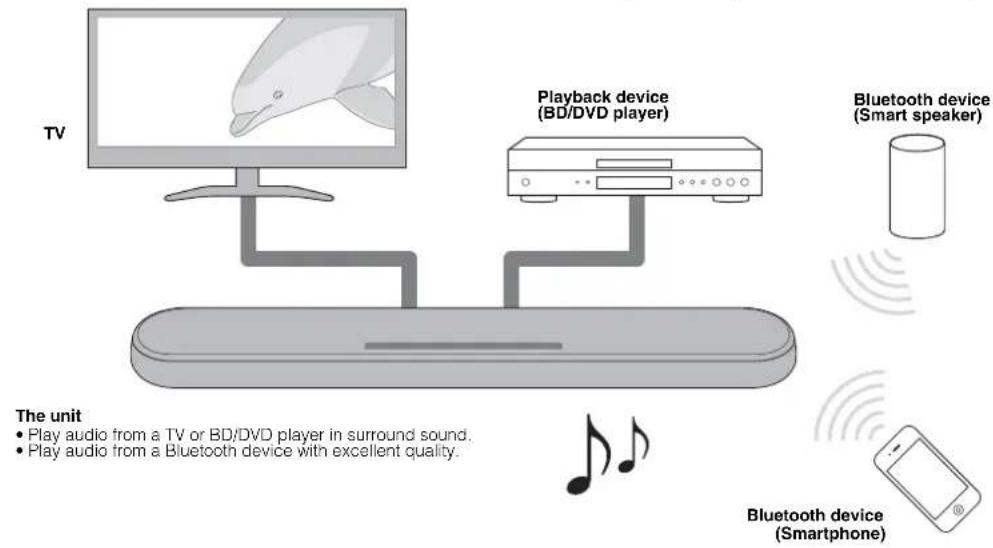
3D surround playback
Surround sound can be heard not only from horizontal directions, but also from varying heights when DTS Virtual:X is used. For details, see the following:
"Playback with 3D surround sound" (p.29)
Transmission of 4K high dynamic range (HDR) video
Enjoy high-resolution video from a cable or satellite set top box, or a BD/DVD player. When a TV that supports Audio Return Channel (ARC) is used, this ARC-compatible unit can be connected to the TV via a single HDMI cable. For details, see the following:
"Connecting a TV that supports Audio Return Channel (ARC)" (p.23)
"Supported HDMI audio and video formats" (p.49)
HDMI control function
Link functions of a TV and the unit are available using the TV's remote control. For details, see the following:
- "Using a TV's remote control to operate the unit (HDMI control)" (p.34)
Support for multipoint connection of Bluetooth devices
Easily play content from a Bluetooth-compatible smartphone, tablet, or PC. In addition, the unit supports multipoint connection and can switch between two Bluetooth devices for playback. Our exclusive
Compressed Music Enhancer technology improves sound quality and characteristics, and can be used to enjoy realistic and impressive sound. For details, see the following:
- "Connecting the unit to two Bluetooth devices simultaneously (multipoint connection)" (p.33)
HOME THEATER CONTROLLER app
HOME THEATER CONTROLLER, a free app for smartphones, allows you to easily operate the unit using a smartphone. For details, see the following:
- "Operating the unit with the HOME THEATER CONTROLLER app" (p.36)
Bass extension
The bass extension function boosts low bass levels to enjoy more powerful sound. For details, see the following:
- "Enjoying enhanced bass sound (bass extension)" (p.30)
Clear voice
The clear voice function makes speech, such as dialog and narration, clearer. For details, see the following:
"Playback of human voices clearly (clear voice)" (p.30)
Accessories
Checking the accessories
Make sure you have received all of the following accessories.

Remote control

A CR2025 Lithium battery has already been inserted into the remote control.
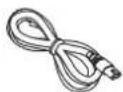
Power cord
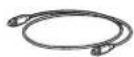
Optical digital audio cable
Mounting template

* Use when mounting the unit on awall.

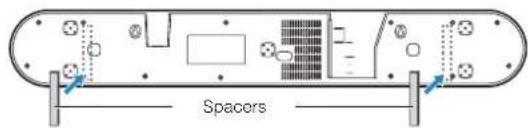
Spacers (x 2/sheet) Use when mounting the unit on a wall.
Owner's Manual (this booklet)
Using the remote control
Preparing the remote control
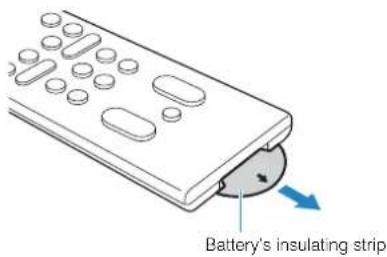
Remove the battery's insulating strip before attempting to use the remote control.
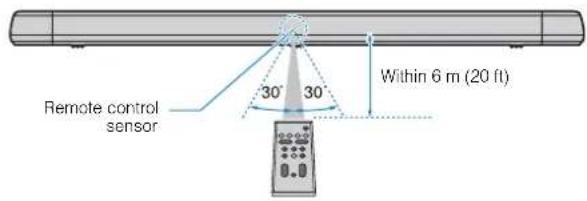
Operating range of the remote control
Operate the remote control within the range shown in the following figure.
NOTE
When the unit is mounted on a wall, point the remote control at the remote control sensor on the top panel. For details, see the following:
Part names and functions of the front/top panel (p.18)
- "Mounting the unit on a wall" (p.51)
Replacing the battery in the remote control
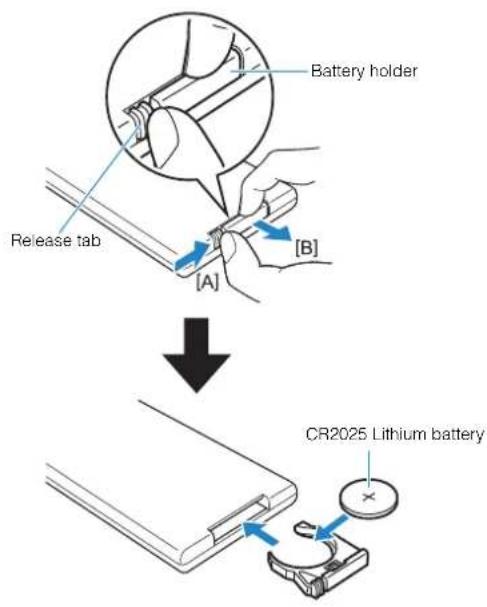
Press and hold the release tab firmly in the direction indicated by [A], and slowly slide the battery holder out in the direction indicated by [B].
Part names and functions
Part names and functions of the front/top panel
The part names and functions of the front and top panels are as follows.
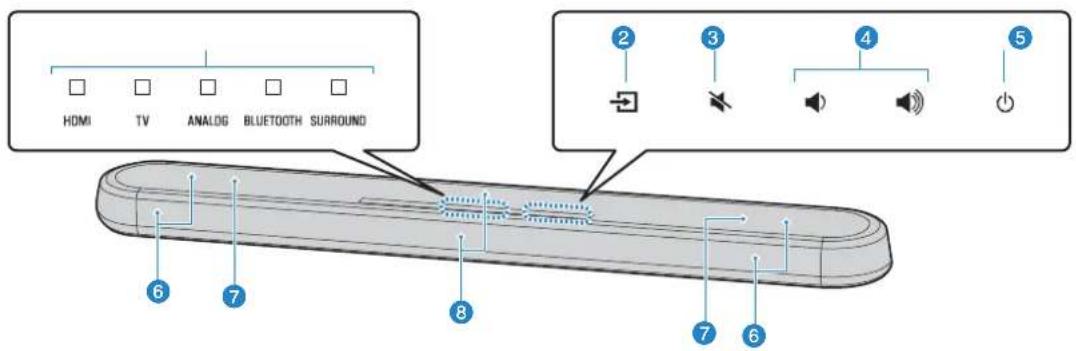
Indicators
The indicators on the top panel flash or glow, to show the operation and setting status. In this manual, indicators status, such as off, glowing, and flashing, are shown as the illustrations below.


Glows

NOTE
The brightness of the indicators can be changed using DIMMER on the remote control. For details, see the following:
- Changing the brightness of the indicators (DIMMER) (p.37)
Select an input source to be played back (p.27).
(mute)
Mute the audio output (p.27). Touch again to unmute.
4 / (volume +/-)
Adjust the volume (p.27).
(power)
Turn on or off the unit.
NOTE
The unit may automatically turn off when the auto power standby function is enabled (p.38).
6 Speakers
Dual built-in subwoofer
The built-in subwoofer are located in the top part of the unit.
Remote control sensors
Receive infrared signals from the remote control of the unit (p.17).
NOTE
- 2, 3, 4 and 5 are touch sensors. Touch icons with your finger to control functions.
- Do not place any objects on the touch panel as doing so may result in unintended operations.
-
When touch panel control is disabled, no operations can be performed using the unit's touch panel. This prevents accidental operation of the unit. For details, refer to the following:
-
"Enabling/disabling touch panel control (child lock function)" (p.39)
Part names and functions of the rear panel
The part names and functions of the rear panel are as follows.
The illustrations in this manual include labels next to the jacks on the bottom of the unit for easy identification.
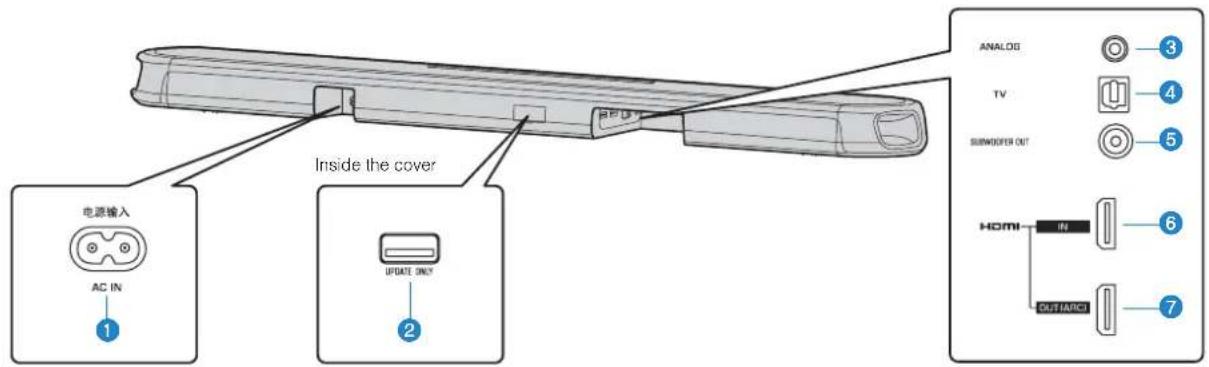
AC IN jack
Connect the power cord of this unit (p.26).
UPDATE ONLY jack
Use to update this unit's firmware. The jack is located inside the cover.
Refer to the instructions supplied with the firmware for details.
For connecting to an external device with a 3.5 mm stereo mini plug cable and inputting audio signals (p.25).
For connecting to a TV with an optical digital audio cable and inputting audio signals (p.24).
SUBWOOFER OUT jack
For connecting to an external subwoofer with an RCA mono cable (p.26).
HDMI IN jack
For connecting to an HDMI-compatible playback device, such as a BD/DVD player, a satellite and cable TV tuner, and a game console, and inputting video/audiosignals (p.25).
HDMI OUT (ARC) jack
For connecting to an HDMI-compatible TV and outputting video/audiosignals (p.23). When a TV that supports Audio Return Channel (ARC) is used, TV audio signal can also be input through this jack.
Part names and functions of the remote control
The part names and functions of the supplied remote control are as follows.
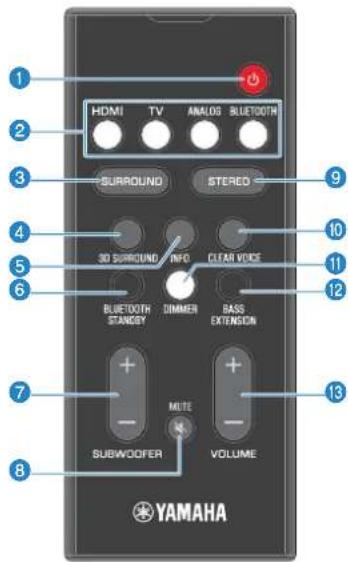
Turn on/off the unit.
Turned on


HDMI
TV
ANALO
BLU
DOTH
RRO
D
The indicator for the last input source selected glows.
Turned off (Bluetooth standby function enabled) (p.39)


Select an input source to be played back.
- HDMI: Sound from a device connected to the HDMI IN jack (p.25)
TV:TV audio (p.23)
- ANALOG: Sound from a device connected to the ANALOG input jack (p.25)
- BLUETOOTH : Sound from a Bluetooth device (p.33)
Switch to surround playback (p.29).
Switch to 3D surround playback (p.29).
Indicate audio signal information of the input source being played or bass extension setting (p.35).
Hold down the key for more than 3 seconds to enable/disable the Bluetooth standby function (p.39).
Adjust the volume of the subwoofer (p.27)
Mute the audio output (p.27). Press the key again to unmute.
Switch to stereo (2-channel) playback (p.29).
Enable/disable the clear voice function (p.30).
Change the brightness of the indicators (p.37).
Enable/disable the bass extension function (p.30).
Adjust the volume of the unit (p.27).
PREPARATION
1 installation
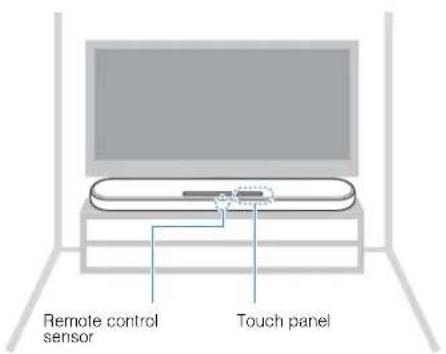
Installing the unit on a TV stand, etc.
Position the unit with the touch panel facing up on a TV stand, etc.
NOTICE
- Do not stack the unit and a BD/DVD player or other device directly on each other. Doing so may cause a malfunction due to vibrations.
- Avoid touching, and never place any weight or pressure on the speakers (portion covered with fabric) on the top of the unit. Doing so may damage the speakers.
- The unit contains non-magnetic shielding speakers. Do not place magnetically sensitive items (hard disk drive, etc.) near the unit.
NOTE
The unit can also be mounted on a wall. Some knowledge of building construction is required for safe installation. Please have a qualified contractor or dealer install the unit on a wall. For details, refer to the following:
Information for qualified contractors or dealers" (p.51)
2 onnecting a TV
Connecting a TV that supports Audio Return Channel (ARC)
Connect the TV, which supports Audio Return Channel (ARC), to the unit with an HDMI cable (sold separately).
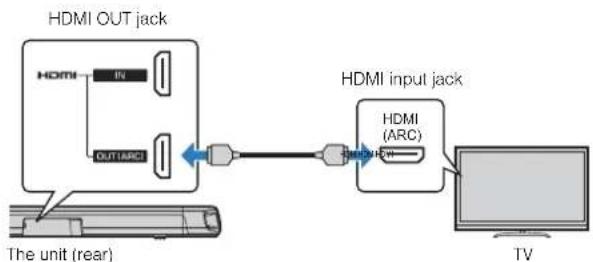
What is Audio Return Channel (ARC)?
In order for the unit to play audio from a TV, the TV must usually be connected to the unit via an audio cable as well as an HDMI cable. If, however, the TV supports Audio Return Channel (ARC), TV audio signals can be input to the unit via the HDMI cable that outputs video signals from the unit to the TV.
NOTE
- Connect an HDMI cable to the audio return channel supported jack (the jack with "ARC" indicated) on TV.
-
Enable the HDMI control function of the unit to activate the Audio Return Channel (ARC). For details, see the following:
-
"Configuring the HDMI control function" (p.37)
-
Use a 19-pin HDMI cable with the HDMI logo printed on it. A cable with a maximum length of 5m (16 ft) is recommended to prevent degradation of signal quality.
Use a premium high-speed HDMI cable for playback of 3D and 4K video content.
- The unit supports HDCP version 2.2, a copy protection technology. For playback of 4K video, connect the unit to the HDMI input jack (one compatible with HDCP 2.2) on an HDCP 2.2-compliant TV.
- The TV input jack cannot be used when a TV that supports the Audio Return Channel is connected to the unit.
Connecting a TV that does not support Audio Return Channel (ARC)
Connect the TV to the unit with an HDMI cable (sold separately) and an optical digital audio cable (supplied).
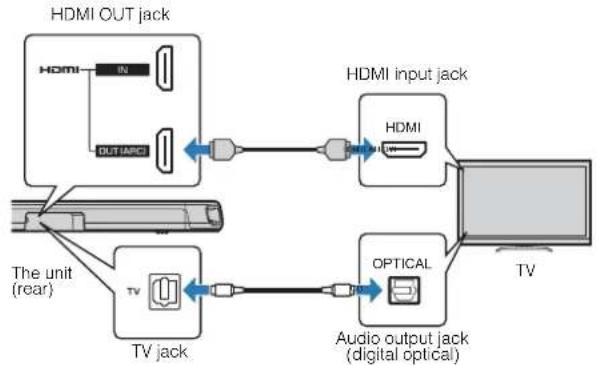
NOTE
- Use a 19-pin HDMI cable with the HDMI logo printed on it. A cable with a maximum length of 5m (16 ft) is recommended to prevent degradation of signal quality.
Use a premium high-speed HDMI cable for playback of 3D and 4K video content.
- The unit supports HDCP version 2.2, a copy protection technology. For playback of 4K video, connect the unit to the HDMI input jack (one compatible with HDCP 2.2) on an HDCP 2.2-compliant TV.
- When connecting the supplied optical digital audio cable, be sure to remove the cap and check the plug's orientation before connecting it.
- If the TV has no optical jack, connect the audio output jack on the TV to the ANALOG input jacks on the unit. For details, see the following:
- "Analog connection with a playback device" (p.25)
3 onnecting playback devices
HDMI connection with a playback device
Connect a playback device such as a BD/DVD player to the unit with an HDMI cable (sold separately). Use the HDMI cable to best connect a playback device equipped with the HDMI output jack.
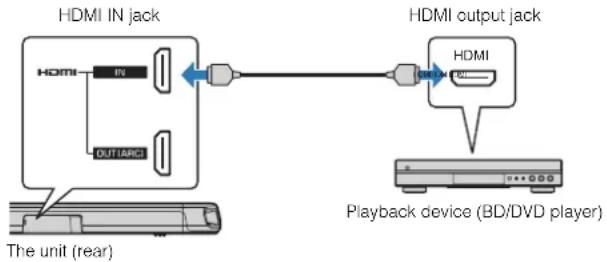
NOTE
- Once the HDMI control function has been activated, video and audio contents from playback devices can be output from the TV even when the unit is turned off (HDMI signal pass-through). For details, see the following:
- "Configuring the HDMI control function" (p.37)
- Use a 19-pin HDMI cable with the HDMI logo printed on it. A cable with a maximum length of 5m (16 ft) is recommended to prevent degradation of signal quality.
Use a premium high-speed HDMI cable for playback of 3D and 4K video content
- The unit supports HDCP version 2.2, a copy protection technology. For playback of 4K video, connect the unit to the HDMI output jack on a HDCP 2.2-compliant BD/DVD player.
Analog connection with a playback device
Connect a playback device, such as a game console or a TV that does not have an optical digital audio output, to the unit via a 3.5 mm stereo mini plug cable (sold separately).
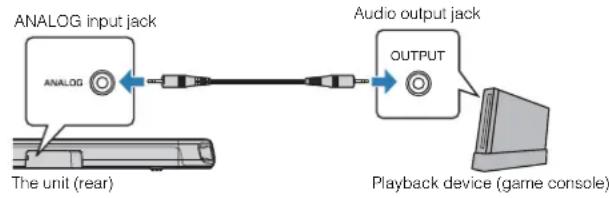
CAUTION
If volume can be adjusted on the device connected to the unit's ANALOG input jack, set that device's volume to the same level as that of other devices connected to the unit's HDMI IN jack to prevent volume from being louder than expected.
NOTE
When connecting the video device, connect the video device's video output to the TV's video input directly.
4
Connecting an external subwoofer
Connecting an external subwoofer
The unit has dual built-in subwoofer; however you can connect a subwoofer equipped with built-in amplifier when you want to enhance low frequency sound.
Connect an external subwoofer to the unit via an RCA mono cable (sold separately).
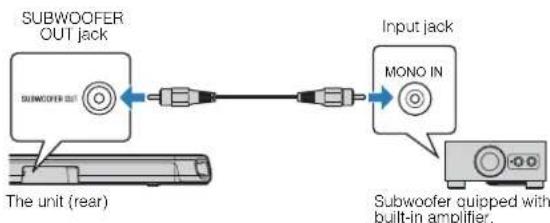
NOTE
Sound is output from both the built-in subwoofoers and external subwoofer.
5 onnecting the power cord
Connecting the power cord
After all connections are complete, connect the supplied power cord to the AC IN jack on the unit and plug the power cord into an AC wall outlet.
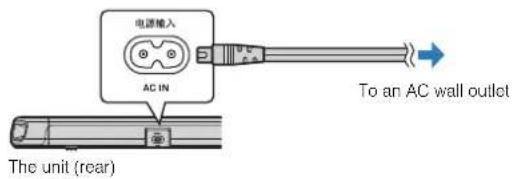
PLAYBACK
Basic operations
Basic procedure for playback
Basic procedure for playing back music is as follows.
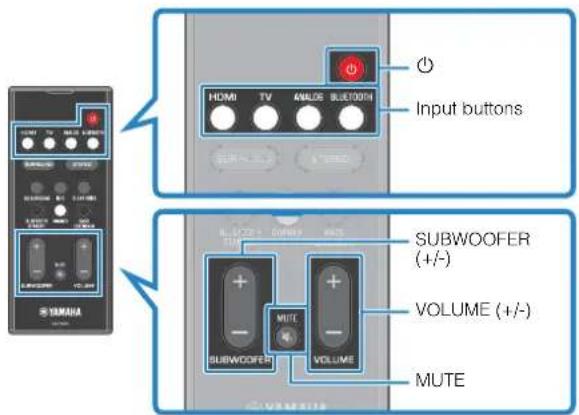
1 Press to turn on the unit.
2 Turn on the external devices (such as a TV or BD/DVD player, game console) connected to the unit.
3 Use the input buttons to select an input source to be played back.
HDMI: Sound from a device connected to the HDMI IN jack
TV: TV audio
ANALOG:Sound from a device connected to the ANALOG input jack
BLUETOOTH:Sound from a Bluetooth device
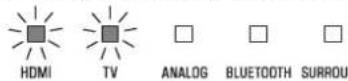
The indicator for the selected input source glows.
Example When TV is selected

HOMI

TV

ANALOG

BLUETOOTH

SURROUND
4 Start playback on the external device selected in step 3.
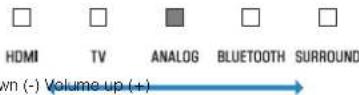
5 Press VOLUME (+ / - ) to adjust the volume.
Volume down () Volume-up ()
When audio is output from both TV speaker and the unit, mute the TV sound.
6 Adjust sound settings to suit individual preferences.
NOTE
For details on adjusting sound settings, see the following:
"Playback with 3D surround sound" (p.29)
"Playback with surround sound" (p.29)
"Playback with 2-channel stereo sound" (p.29)
"Playback of human voices clearly (clear voice)" (p.30)
- "Enjoying enhanced bass sound (bass extension)" (p.30)
For details on playback music files stored on a Bluetooth device, see the following:
- "Listening to music stored on a Bluetooth device" (p.31)
To mute the sound, press MUTE. Press MUTE again to unmute.
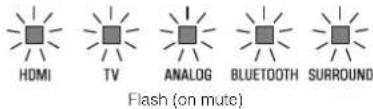
- When sound input to the HDMI IN jack is output from the TV, the volume level does not change even if you press VOLUME (+/-) or MUTE.
To adjust the subwoofer volume, press SUBWOOFER (+/-) . The subwoofer volume can be adjusted separately from the whole volume.
- When playing audio/video from a device connected to the TV, select TV as the unit's input source, and select the playback device with the input selector on the TV.
Enjoying your favorite sound
Playback with 3D surround sound
Press 3D SURROUND to switch to 3D surround playback according to the input source or your individual preference.
When 3D surround playback is selected, DTS Virtual:X makes it possible to hear sound not only from horizontal directions, but also from varying heights.
The SURROUND indicator glows blue.


SURROUND
Glows (blue)
NOTE
The TV Program, Movie, Music, Sports, or Game surround mode can be selected using the HOME THEATER CONTROLLER app installed on a smartphone that supports the Bluetooth function. For details, see the following:
- "Operating the unit with the HOME THEATER CONTROLLER app" (p.36)
Playback with surround sound
Press SURROUND to switch to surround playback according to the input source or your individual preference.
The SURROUND indicator glows white.

SURROUND
Glows (white)
NOTE
The TV Program, Movie, Music, Sports, or Game surround mode can be selected using the HOME THEATER CONTROLLER app installed on a smartphone that supports the Bluetooth function. For details, see the following:
- "Operating the unit with the HOME THEATER CONTROLLER app" (p.36)
Playback with 2-channel stereo sound
Press STEREO to switch to 2-channel stereo playback. You can enjoy playback sources with your favorite sound mode.
When stereo playback is enabled, the SURROUND indicator goes out.

SURROUND
off
Playback of human voices clearly (clear voice)
Press CLEAR VOICE to turn on the clear voice function. Human voices such as lines in movies and TV shows, or news and sport commentary, are played clearly.
Press the button again to disable the function.
CLEAR VOICE

HDMI

V

ANALOG

BLUETOOTH

AROUNO
Flash three times (enabled)
Flash once (disabled)
NOTE
Press INFO to confirm whether the clear voice function is enabled or disabled. For details, refer to the following:
- "Showing audio information with playback" (p.35)
Enjoying enhanced bass sound (bass extension)
Press BASS EXTENSION to turn on the bass extension function. You can enjoy enhanced bass sound and more powerful sound.
Press the button again to disable the function.


Flash three times (enabled) Flash once (disabled)
NOTE
Press INFO to confirm whether the bass extension function is enabled or disabled. For details, refer to the following:
- "Showing audio information with playback" (p.35)
Use of a Bluetooth device
Listening to music stored on a Bluetooth device
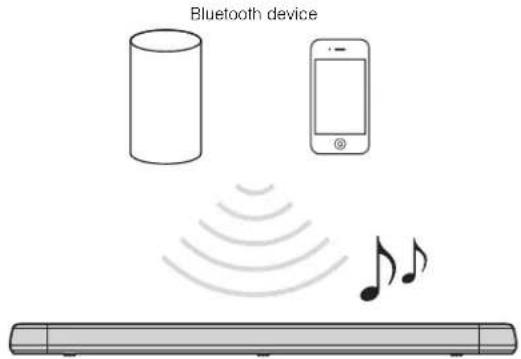
Music files stored on a Bluetooth device, such as a smartphone, smart speaker, or digital music player, can be played back on the unit over a wireless connection.
The unit can be connected to two Bluetooth devices simultaneously (Music cannot be played from both devices simultaneously).
NOTE
The Bluetooth standby function is enabled by default. When a Bluetooth device is connected to this unit while the unit is off, the unit will be turned on and will be immediately ready to play sound from the Bluetooth device. For details, refer to the following:
- Configuring the Bluetooth standby function (p.39)
The BLUETOOTH indicator on the unit flashes.

Flashes
NOTE
If Bluetooth devices have been connected before, the unit will connect to the last played device when BLUETOOTH is pressed.
2 On the Bluetooth device, enable the Bluetooth function.
The Bluetooth device list appears on the Bluetooth device.
3 Select "ESB-1080 Yamaha" (or "YamahaAV") in the list.
If a passkey (PIN) is required, enter the number "0000".
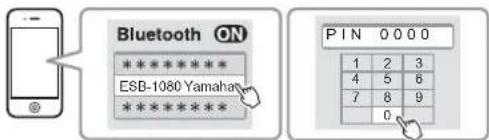
When the connection between the Bluetooth device and the unit is established, a completion message is displayed on the Bluetooth device, and the BLUETOOTH indicator on the unit glows.

BLUETOOTH
Glows
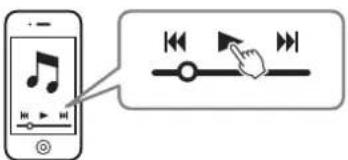
4 Play back a song on the Bluetooth device.
The unit will begin playing audio from the Bluetooth device.
NOTE
To terminate the Bluetooth connection, perform one of the following operations.
- Turn off the Bluetooth function on the Bluetooth device.
Hold down BLUETOOTH for more than 3 seconds.
- Select an input source other than Bluetooth using the input buttons on the unit.
Turn off the unit.
- If the Bluetooth connection is terminated when the unit's input is BLUETOOTH, the BLUETOOTH indicator flashes and the unit enters the connection wait status.
- Adjust the volume level of the Bluetooth device as required.
- Perform Bluetooth connection with the Bluetooth device and unit within 10 m (33 ft) of each other.
See documentation supplied with your Bluetooth device for more information.
Connecting the unit to two Bluetooth devices simultaneously (multipoint connection)
The unit can be connected to two Bluetooth devices at the same time.
Follow these instructions to switch between the Bluetooth devices for playback.
1 Stop playback on the Bluetooth device from which audio is currently being played.
2 Start playback on the other Bluetooth device.
The unit will begin playing audio from the other Bluetooth device.
NOTE
When connecting a Bluetooth device that has not previously been connected to the unit, disconnect the Bluetooth device currently connected to the unit and connect the new Bluetooth device.
Useful features for playback
Using a TV's remote control to operate the unit (HDMI control)
The HDMI control function coordinates TV and unit operation so that the unit can be operated using the TV's remote control.
When the unit is connected to a TV via HDMI cable, the TV's remote control can be used to perform the following operations.
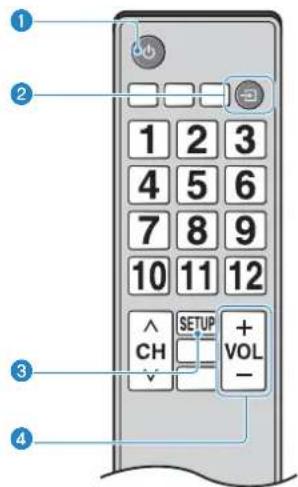
Operations that can be controlled via the TV's remote control
Turn on/off
Both the TV and the unit turn on/off at the same time.
The unit's input source switches accordingly when the TV's input source is switched.
For example, when a TV program is selected on the TV, the unit's audio input source is switched to the HDMI OUT (ARC) jack using the ARC function or TV input jack.
And also, when a BD/DVD player is connected to the HDMI IN jack on the unit, the unit's input source switches to HDMI when the BD/DVD player is selected with the TV's remote control.
Switch the audio output device
You can switch the audio output device to the TV or the unit.
Adjust volume
The unit's volume can be adjusted when the TV's audio output is set to the unit.
NOTE
- If you are unable to operate the unit with your TV's remote control, configure the HDMI control function of your TV and the unit. For details, see the following:
- "Configuring the HDMI control function" (p.37)
The input source can be switched while the unit is off (HDMI signal pass-through).
The volume displays on the TV and unit may not be the same.
The type of audio signal being played, whether Dolby Pro Logic II is enabled or disabled, and bass extension and clear voice settings can be confirmed by the status of indicators.
Press INFO on the remote control.
The indicators on the unit will show the following audio information for three seconds immediately after INFO is pressed.

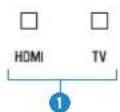

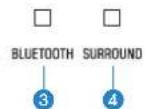
Show the type of audio signal.
HDMI glows (white): Dolby Digital
HDMI glows (red): DTS
TV glows (white). AAC
HDMI and TV off: PCM/analog input/no input
Show whether Dolby Pro Logic II is enabled or disabled. Dolby Pro Logic II is enabled automatically when 2-channel stereo signals are played in surround sound.
Glows: Enabled
Off:Disabled
Show the bass extension function setting.
Glows:Enabled
Off:Disabled
Show the clear voice function setting.
Glow, Enabled
Off:Disabled
Operating the unit with the HOME THEATER CONTROLLER app
When the free HOME THEATER CONTROLLER app is installed on a mobile device such as a smartphone, the unit can be operated using the mobile device. In addition to basic unit operation, various functions, including surround mode selection and tone adjustment, can be more precisely configured using the app than is possible using the remote control.
For details on the HOME THEATER CONTROLLER app, see the product information on the Yamaha website.
CONFIGURATIONS
Configuring various functions
Changing the brightness of the indicators (DIMMER)
Change the brightness of the indicators on the unit.
Each time DIMMER is pressed, the brightness of the indicators changes as follows.
Dim (default setting) Off Bright Dim ...

Indicators glow brightly just after operation and change to the specified brightness after a few seconds.
Configuring the HDMI control function
Enable or disable the unit's HDMI control function (link function). This function coordinates TV and unit operation so that the unit can be operated using the TV's remote control.
This function is enabled by default.
1 Turn off the unit.
2 Press and hold HDMI at least three seconds.
The HDMI control function is enabled or disabled, and the unit turns on. The indicator shows HDMI control function status for several seconds immediately after the unit is turned on.


TV
Glows (enabled; default) Off (disabled)
NOTE
- Enable the HDMI control function when connecting a TV that supports Audio Return Channel (ARC), or when using HDMI signal pass-through. For details, see the following:
"Connecting a TV that supports Audio Return Channel (ARC)" (p.23)
-Using a TV's remote control to operate the unit (HDMI control) (p.34)
- If the unit cannot be operated with the TV's remote control, confirm that the HDMI control function of this unit is enabled and the HDMI control function is enabled on the TV. For details, see the following:
"The unit cannot be operated using the TV's remote control" (p.43)
- The unit's power consumption will be reduced if the HDMI control function is disabled.
Configuring HDMI audio output
Select the device from which audio input via the unit's HDMI IN jack will be played when the HDMI control function is disabled. HDMI audio is output from this unit by default.
Settings
The unit (default) Play HDMI audio input signal from the unit.
TV Play HDMI audio input signal from the TV.
1 Turn off the unit.
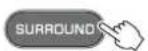
2 Press and hold SURROUND at least three seconds.
HDMI audio output switches between the unit and the TV, and the unit turns on. The indicator shows HDMI audio output status for several seconds immediately after the unit is turned on.

ANALOG
Glowsaudic is played from the unit
default
Off (audio is played from the TV)
NOTE
-
When playing back HDMI audio input signal from the TV, the unit cannot be used to adjust volume. Use TV controls to adjust volume.
For details on the HDMI control function, see the following:
-
"Configuring the HDMI control function" (p.37)
To configure HDMI audio output with the HDMI control function enabled, select the audio output device configured for the TV connected to the unit.
- HDMI video signals input to the HDMI IN jack of this unit are always output from the HDMI OUT (ARC) jack of the unit.
Setting the auto power standby function
Enabling the auto power standby function prevents the unit from remaining on when not in use. When the auto power standby function is enabled, the unit automatically turns off in any of the following situations.
No operations for 8 hours
- No audio input and no operations for 20 minutes when Bluetooth or HDMI is selected as the input source.
1 Turn off the unit.
2 Touch and hold l and then touch and hold l CONNECT on the unit for at least three seconds.
The auto power standby function is enabled or disabled. The indicator shows auto power standby function status for several seconds immediately after the unit is turned on.
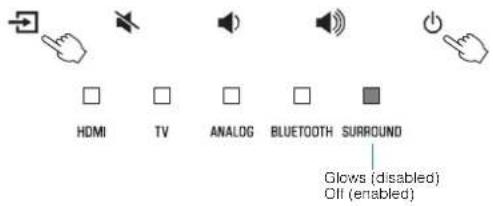
Enabling/disabling touch panel control (child lock function)
Disable touch panel control to prevent children from accidentally operating the unit. When touch panel control is disabled, operations can be performed only via the remote control or dedicated free "HOME THEATER CONTROLLER" app. This function is enabled by default.
1 Turn off the unit.
2 Press and hold the INFO key at least three seconds.
The touch panel control is enabled or disabled, and the unit is turned on. The indicator shows touch panel control status for several seconds immediately after the unit is turned on.


HDMI
Glows (enabled; default) Off (disabled)
Configuring the Bluetooth standby function
If the Bluetooth standby function is enabled, the unit will be turned on and will be ready to play sound from the Bluetooth device when Bluetooth connection is made on a Bluetooth device. This function is enabled by default.
Press and hold BLUETOOTH STANDBY at least three seconds to switch function status between enabled and disabled.
The indicators on the unit show Bluetooth standby function status for several seconds immediately after switching function status.
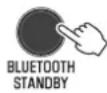


Flash 3 times (enabled: default) Flash once (disabled)
Initializing the unit
Reset the settings of the unit to the factory presets.
1 Turn off the unit.
2 Touch and hold 喜 and on the unit until all indicators flash.
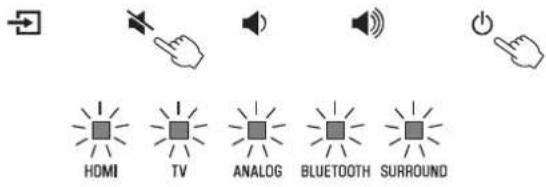
Flash (initialized)
APPENDIX
When any problem appears (General)
First in trouble, check the following:
Refer to the following when the unit does not function properly.
- The power cord of the unit, TV and playback devices (such as BD/DVD players) are connected to AC wall outlets securely.
- The unit, TV and playback devices (such as BD/DVD players) are turned on.
- The connectors of each cable are securely inserted into jacks on each device.
If there is no problem with the power and cables, see the following:
- "When any problem appears (Power and system function)" (p.41)
- "When any problem appears (Audio)" (p.44)
- "When any problem appears (Bluetooth®)" (p.46)
If the problem you are experiencing is not listed or if the instructions do not help, turn off the unit, disconnect the power cord, and contact the nearest authorized Yamaha dealer or service center.
When any problem appears (Power and system function)
The power turns off suddenly
The auto power standby function activated.
When the auto power standby function is enabled, the unit automatically turns off in any of the following situations:
- No operations have been performed for 8 hours.
- BLUETOOTH or HDMI is selected as the input source, but no audio has been input to the unit or no operations have been performed with the unit for more than 20 minutes.
Turn on the unit again. If the auto power standby function is not used, disable the function. For details, see the following:
- "Setting the auto power standby function" (p.38)
The protection circuitry has been activated. (The HDMI indicator flashes white or red.)
After confirming that all connections are made properly, turn on the unit again. If the power still turns off frequently, unplug the power cord from the AC wall outlet and contact the nearest authorized Yamaha dealer or service center.
The power cannot be turned on
- The protection circuitry has been activated three times consecutively. (If you try to turn on the power in this condition, the HDMI indicator will flash red.)
To protect the product, the power cannot be turned on. Unplug the power cord from the AC wall outlet and contact the nearest authorized Yamaha dealer or service center.
- The touch panel control is disabled.
Enable the touch panel control. For details, see the following:
- "Enabling/disabling touch panel control (child lock function)" (p.39)
All indicators go out although the unit is turned on (it may seem that the unit is turned off)
The unit is configured so that indicators do not glow or flash unless the unit is being operated.
Press DIMMER to select the desired brightness. For details, see the following:
- "Changing the brightness of the indicators (DIMMER)" (p.37)
The unit does not function correctly
- The internal microcomputer is frozen, due to an external electric shock (such as lightning or excessive static electricity) or to a drop in the power supply voltage.
Unplug the power cord from the AC wall outlet and plug it again.
The unit turns on by itself
- Another Bluetooth device is being operated nearby.
Terminate Bluetooth connection with the unit. For details, see the following:
- "Connecting the unit to two Bluetooth devices simultaneously (multipoint connection)" (p.33)
The TV's 3D glasses do not work
The unit is blocking the TV's 3D glasses transmitter.
Confirm the position of the TV's 3D glasses transmitter, and position the unit so that it does not obstruct the transmitter.
HDMI video is not displayed on TV screen
The HDMI cable is not securely connected.
Connect the HDMI cable properly. For details, see the following:
- "Connecting a TV that supports Audio Return Channel (ARC)" (p.23)
- "Connecting a TV that does not support Audio Return Channel (ARC)" (p.24)
When the unit is turned off, video and/or audio from a playback device are not output to the TV
The HDMI control function is disabled.
Enable the HDMI control function. For details, see the following:
- "Configuring the HDMI control function" (p.37)
The unit cannot be operated using the remote control
The unit is out of the operating range.
Use the remote control within the operating range. For details, see the following:
Replace with new batteries. For details, see the following:
Adjust the lighting angle, or reposition the unit.
The TV cannot be operated using the TV's remote control
The unit is blocking the TV's remote control sensor.
Position the unit so that it does not obstruct the TV's remote control sensor.
The unit cannot be operated using the TV's remote control
The HDMI control function is incorrect.
Confirm the settings are properly configured as follows.
- The HDMI control function of the unit is enabled.
- The HDMI control function is enabled on the TV.
- Set audio output to any option other than TV.
If the unit cannot be operated with the TV's remote control, even after the settings have been applied correctly:
- Turn off the unit and the TV, and then turn them back on again.
- Disconnect the power cord of the unit and external devices connected to the unit via HDMI cable. Plug them in again after about 30 seconds.
The TV and BD/DVD player are not from the same manufacturer.
We suggest using devices such as a TV and BD/DVD player from the same manufacturer.
The TV does not support the unit's functions.
Even if your TV supports the HDMI control function, some functions may not be available. For details, refer to documentation supplied with your TV.
When any problem appears (Audio)
No sound
- Another input source is selected.
Select an appropriate input source. For details, see the
following:
"Basic procedure for playback" (p.27)
The mute function is activated.
Cancel the mute function. For details, see the following:
"Basic procedure for playback" (p.27)
The volume is too low.
Turn up the volume. For details, see the following:
"Basic procedure for playback" (p.27)
The power cord of the unit is not connected properly.
Make sure that the power cord of the unit is connected to an AC wall outlet securely. For details, see the following:
"Connecting the power cord" (p.26)
- Input jacks on a playback device are connected.
Connect the input jack on the unit and the output jack on the playback device.
- Signals that the unit cannot play back are being input.
Change the digital audio output setting on the playback device to PCM, Dolby Digital or DTS.
The unit is configured so that HDMI audio input signals are output from the TV.
Configure the unit so that HDMI audio input signals are output from the unit. For details, see the following:
- "Configuring HDMI audio output" (p.38)
The HDMI control function is disabled.
When connecting a TV that supports ARC (Audio Return Channel) to the unit using an HDMI cable only, enable the HDMI control function.
To output audio signals from the unit with the HDMI control function disabled, connect the TV's audio output jack to the unit's TV input jack (optical digital) via the optical digital audio cable.
For details, see the following:
- "Configuring the HDMI control function" (p.37)
"Connecting a TV that does not support Audio Return Channel (ARC)" (p.24)
Sound from an HDMI control-enabled TV is set for output from the TV's built-in speakers.
Use the TV's HDMI settings to set audio output to any option other than the TV's built-in speakers.
No sound is coming from the subwoofer
The volume of the subwoofer is too low.
Turn up the volume of the subwoofer. For details, see the following:
"Basic procedure for playback" (p.27)
The playback source does not contain low-frequency signals.
Play back a sound source containing low-frequency signals, and confirm that the sound is output from the subwoofer.
The volume decreases when the unit is turned on
The automatic volume adjustment function is activated.
To prevent excessive loudness, the unit automatically controls its volume within a certain level when the unit is turned on. Turn up the volume as required. For details, see the following:
"Basic procedure for playback" (p.27)
No surround effect
- Stereo playback is selected.
Select surround playback or 3D surround playback. For details, see the following:
"Playback with 3D surround sound" (p.29)
"Playback with surround sound" (p.29)
The volume is too low.
Turn up the volume. For details, see the following:
"Basic procedure for playback" (p.27)
The TV or playback device is set to output 2 channel audio (such as PCM) only.
Change the digital audio output setting on the TV or playback device to Bitstream.
Sound is also heard from the TV built-in speakers.
Set the TV volume to minimum. For details, see the following:
"Basic procedure for playback" (p.27)
- The listening position is too close to the unit.
The listening position should be at some distance from the unit.
Noise is heard
The unit is too close to another digital or high-frequency device.
Move those devices away from the unit.
When any problem appears (Bluetooth®)
The unit cannot be connected to a Bluetooth device
- Bluetooth is not selected as the input source.
Select Bluetooth as the input source. For details, see the following:
"Connecting the unit to two Bluetooth devices simultaneously (multipoint connection)" (p.33)
- The unit is too far away from the Bluetooth device.
Move the Bluetooth device closer to the unit.
- A device emitting electromagnetic waves (such as a microwave oven, a wireless device and so on) may be located nearby.
Do not use the unit near devices that emit electromagnetic waves.
- The Bluetooth device you are using may not support the A2DP profile.
Use a Bluetooth device that supports the A2DP profile.
- The connection profile registered in the Bluetooth device may not be functioning correctly for some reason.
Delete the connection profile in the Bluetooth device, and then connect the Bluetooth device to the unit.
The passkey for devices such as a Bluetooth adapter is not "0000".
Use a Bluetooth device with a passkey of "0000".
The unit is already connected to another Bluetooth device. (Using a Bluetooth device that has never been connected to the unit.)
Terminate the current Bluetooth connection, and then connect to the new device.
- The unit is already connected to two Bluetooth devices. (Using a Bluetooth device that has been connected to the unit.)
Terminate one of the Bluetooth connections, and then connect to the new device.
No sound can be heard, or the sound cuts off intermittently from a Bluetooth device
The volume on the Bluetooth device may be too low.
Raise the volume on the Bluetooth device.
- Bluetooth is not selected as the input source.
Select Bluetooth as the input source. For details, see the following:
Perform playback on the Bluetooth device.
The sound output on the Bluetooth device may not be set to the unit.
Select the unit as the output destination on the Bluetooth device.
The connection to the Bluetooth device was terminated.
Connect with the Bluetooth device one more time.
- The unit may be too far away from the Bluetooth device.
Move the Bluetooth device near the unit.
- A device emitting electromagnetic waves (such as a microwave oven, a wireless device and so on) may be located nearby.
Do not use the unit near devices that emit electromagnetic waves.
- Audio from another Bluetooth device is playing.
Stop playback on the Bluetooth device from which audio is currently being played, and start playback on the other Bluetooth device.
Specifications
Specifications
The specifications of the unit are as follows.
Amplifier Section
Maximum Rated Output Power
Front L/R 30 W × 2ch
- Subwoofer 60 W
Speaker Section
Front L/R
Acoustic suspension type (non-magnetic shielding)
- Driver 5.5 cm (2-1/8") cone × 2
Frequency Response 160 Hz to 20 kHz
Impedance 6 Ω
Tweeter
- Driver 25 mm (1") dome × 2
Frequency Response 4 kHz to 23 kHz
Impedance 6 Ω
Subwoofer
Bass reflex type (non-magnetic shielding)
- Driver 7.5 cm (3') cone × 2
Frequency Response 60 Hz to 160 Hz
Impedance 3Ω (6Ω×2)
Decoder
Supported audio signal PCM (up to 5.1ch)
Dolby Digital (up to 5.1ch)
DTS Digital Surround (up to 5.1ch)
HDMI 1 (HDMI IN)
Digital (Optical) 1 (TV)
Analog (3.5 mm stereo mini) 1 (ANALOG)
Output Jacks
HDMI 1 (HDMI OUT (ARC))
Analog (RCA/monaural) 1 (SUBWOOFER OUT)
Other Jacks
USB
1 (UPDATE ONLY)
Bluetooth
Bluetooth version
Ver 5.0
Supported profiles
A2DP
Supported codes
SBC, MPEG-4 AAC
Bluetooth class Bluetooth Class2
Range (line-of-sight) Approx. 10 m (33 ft)
Supported content protection method SCMS-T
[U.K. and Europe models]
- Radio frequency (Operational frequency) 2402 MHz to 2480 MHz
Maximum Output Power (EIRP) 20 dBm (100 mW)
General
Power Supply
[U.S.A.and Canada models] AC 120 V,60 Hz
[Australia model] AC 240 V, 50/60 Hz
[Europe, Central and South America and Asia models]
[U.K.model]AC230V,50Hz
[Taiwan model] AC 110 V, 60 Hz
- [China model] AC 220 V, 50 Hz
[Korea model] AC 220 V, 60 Hz
Power Consumption 27 W
Standby Power Consumption
[U.S.A., Canada and Taiwan models]
HDMI Control Off 0.3 W
HDMI Control On 1.2 W
- [U.K. and Europe models and other models]
HDMI Control Off 0.4 W
HDMI Control On 1.2 W
Dimensions (W x H x D)
- Installing the unit in front of a TV, etc.
- Mounting the unit on a wall, with spacers
890× 53× 131mm
(35^× 2 - 1 / 8^ × 5 - 1 / 8^)
890× 131× 62mm
(35^× 5 - 1 / 8^ × 2 - 1 / 2^)
Weight 3.2 kg (7.1 lbs)
NOTE
The contents of this manual apply to the latest specifications as of the publishing date. To obtain the latest manual, access the Yamaha website then download the manual file.
The following HDMI audio and video formats can be used by the unit.
Audio signals
| Audio signal types | Audio signal formats | Compatible media |
| 2ch Linear PCM | 2ch, 32 kHz to 192 kHz, 16/20/24 bit | CD, DVD-Video, DVD Audio, etc. |
| Multi-ch Linear PCM | 6ch, 32 kHz to 192kHz, 16/20/24 bit | DVD-Audio, Blu-ray disc, HD DVD, etc. |
| Bitstream | Dolby Digital, DTS | DVD-Video, etc. |
Video signals
The unit is compatible with the following video signals.
- Deep Color
x.v.Color
3D video signal
High Dynamic Range (HDR) video
-HDR10
-HLG
The unit is compatible with the following resolutions.
VGA
480i/60 Hz
- 480p/60 Hz
- 576i/50 Hz
- 576p/50 Hz
- 720p/60 Hz, 50 Hz
- 1080j/60 Hz, 50 Hz
- 1080p/60 Hz, 50 Hz, 30 Hz, 25 Hz, 24 Hz
- 4K/60 Hz, 50 Hz, 30 Hz, 25 Hz, 24 Hz
NOTE
Refer to documentation supplied with the playback device, and set the device appropriately.
- When CPPM copy-protected DVD-Audio is played back, video and audio signals may not be output depending on the type of the DVD player.
- The unit is not compatible with HDCP-incompatible HDMI or DVI devices. Refer to documentation supplied with the HDMI or DVI device for HDCP compatibility.
- To decode audio bitstream signals on the unit, set the input source device appropriately so that the device outputs the bitstream audio signals directly (does not decode the bitstream signals on the device). Refer to documentation supplied with the device for details.
- The resolution of transmitted video signal varies according to specifications of the TV connected to the unit.
- The contents of this manual apply to the latest specifications as of the publishing date. To obtain the latest manual, access the Yamaha website then download the manual file.
The following digital audio formats can be used by the unit.
Optical
| Audio signal types | Audio signal formats | Compatible media |
| 2ch Linear PCM | 2ch, 32 kHz to 96 kHz, 16/20/24 bit | CD, DVD-Video, DVD Audio, etc. |
| Bitstream Dolby Digital | DTS DVD-Video, etc. | |
HDMI (ARC)
| Audio signal types | Audio signal formats | Compatible media |
| 2ch Linear PCM | 2ch, 32 kHz to 96 kHz, 16/20/24 bit | TV |
| Bitstream Dolby Digital | DTS TV | |
NOTE
The contents of this manual apply to the latest specifications as of the publishing date. To obtain the latest manual, access the Yamaha website then download the manual file.
Mounting the unit on a wall
Mount the unit on a wall so that the touch panel faces forward.
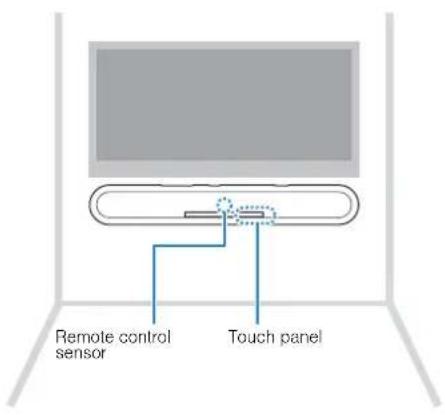

CAUTION
- To prevent the unit from falling, attach it to a wall constructed of drywall (plasterboard).
- Make sure you use screws (sold separately) that can support the weight of the installation. Using clamps other than specified screws, such as short screws, nails, and two-sided tape, may cause the unit to fall.
Fix the cables in place where they will not become loose. If your foot or hand accidentally gets caught on a loose cable, the unit may fall.
- Do not lean on the unit or apply excessive force to the top of the unit. Doing so may cause the unit to fall.
- Check that the unit is fixed securely after the installation. Yamaha will bear no responsibility for any accidents caused by improper installations.

Attach the mounting template (supplied) on a wall and mark for the screw holes.
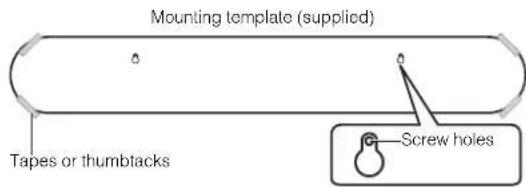
2 Remove the mounting template from the wall, and then install screws (sold separately) at the points marked on the wall.
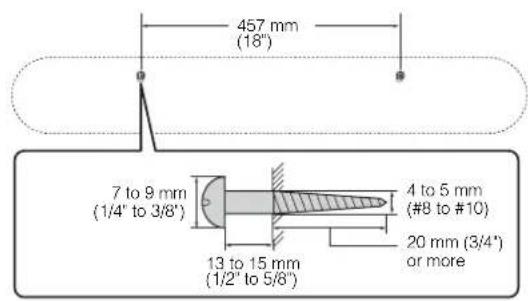
3 Peel off the backing paper from the spacers (supplied) and attach the adhesive face to the bottom of the unit.
4 Hang the unit on the screws.
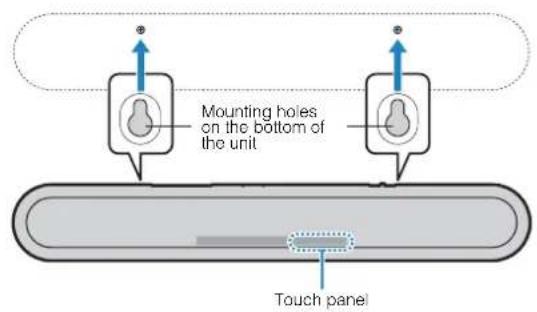
TABLE DES MATIÈRES PRECAUTIONS D'USAGE 6
AVANT D'UTILISER L'UNITE 15
(weee battery eu fr 02)
Accentuation des graves
Touche (alimentation)
Touche BASS EXTENSION
Dimensions (L x H x P)
4K High Dynamic Range (HDR)-Sendungen
Buchse SUBWOOFER OUT
High Dynamic Range (HDR)-Video
-HDR10
-HLG
Transmission di video HDR (High Dynamic Range) 4K
Cos' e Audio Return Channel (ARC)?
Dimensioni (L x H x P)
m = 311
1
ANALOG
BLUETOOTH
UBROUND
m = 311 ;
1
m : x = 1 或 3x + 4y + 1 = 0
m = 311
https://uc.yamaha.com/
Yamaha UC Support
https://uc.yamaha.com/resources/support/
Manual Development Group
© 2019 Yamaha Corporation
Published 07/2019
NVOD-B0
Printed in China