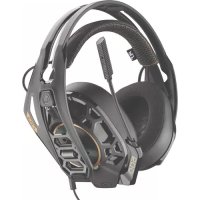
RIG 500 Pro HC - Headphones Nacon - Free user manual and instructions
Find the device manual for free RIG 500 Pro HC Nacon in PDF.



| Product type | Wired headset |
| Brand | NACON |
| Model | RIG 500 Pro HC |
| Dimensions (approx.) | 20 x 18 x 8 cm |
| Weight (approx.) | 300 g |
| Connector type | 3.5 mm jack with adapters |
| Power | None (wired) |
| Compatibility | PC, PlayStation 4, Xbox One (via adapters) |
| Size adjustment | 3 notches on the headband |
| Removable ear cups | Yes, snap-on attachment |
| Interchangeable ear pads | Yes, simple press to change |
| Volume control | Rotary wheel on the cable |
| Microphone | Pivoting, mute in upright position |
| Mute function | Raise the microphone boom |
| Included accessories | Adapters for PS4 and Xbox One controllers |
| Maintenance | Clean with a soft, dry cloth |
| Precautions | Do not force the microphone boom when at the stop |
| Spare parts | Replacement ear pads available |
| Repairability | Replaceable ear cups and ear pads |
| Warranty | 2 years (according to applicable law) |
Frequently Asked Questions - RIG 500 Pro HC Nacon
User questions about RIG 500 Pro HC Nacon
0 question about this device. Answer the ones you know or ask your own.
Ask a new question about this device
Download the instructions for your Headphones in PDF format for free! Find your manual RIG 500 Pro HC - Nacon and take your electronic device back in hand. On this page are published all the documents necessary for the use of your device. RIG 500 Pro HC by Nacon.
USER MANUAL RIG 500 Pro HC Nacon
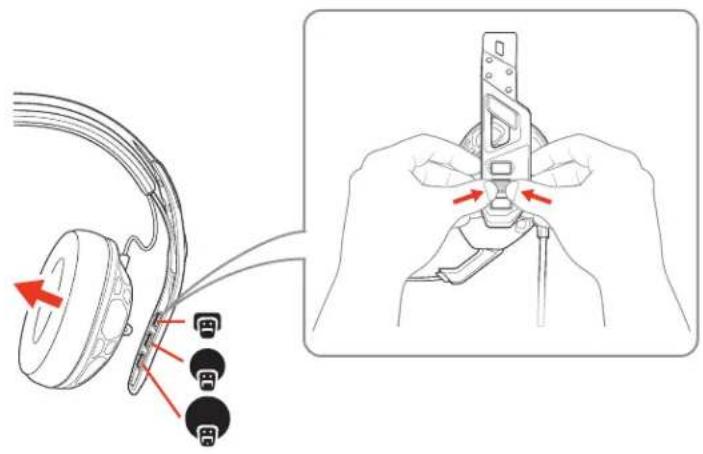
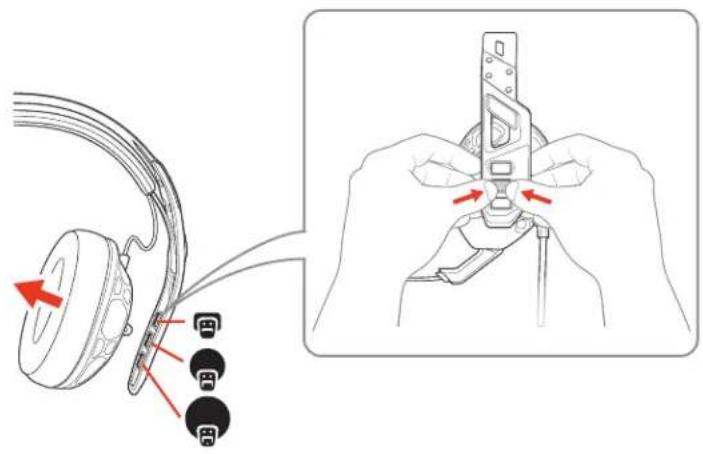
Fit 1 The headband adjusts to three sizes (small, medium, large) by moving the earcups. To remove an earmcup, press the earmcup to detach it from the headband.
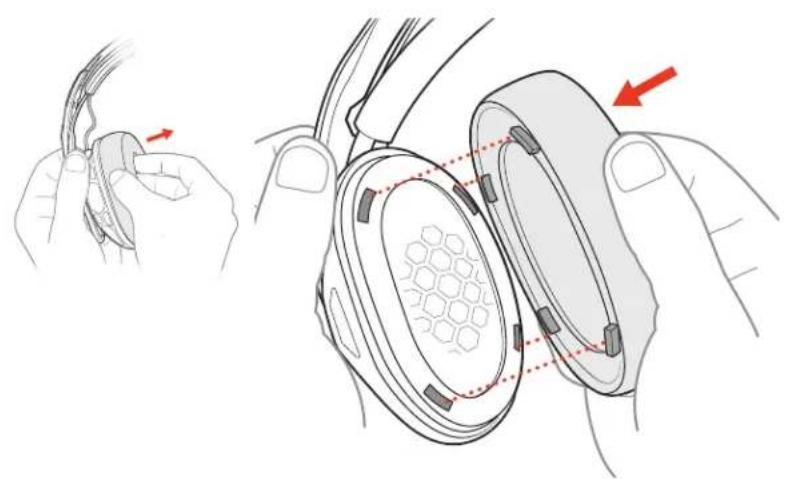
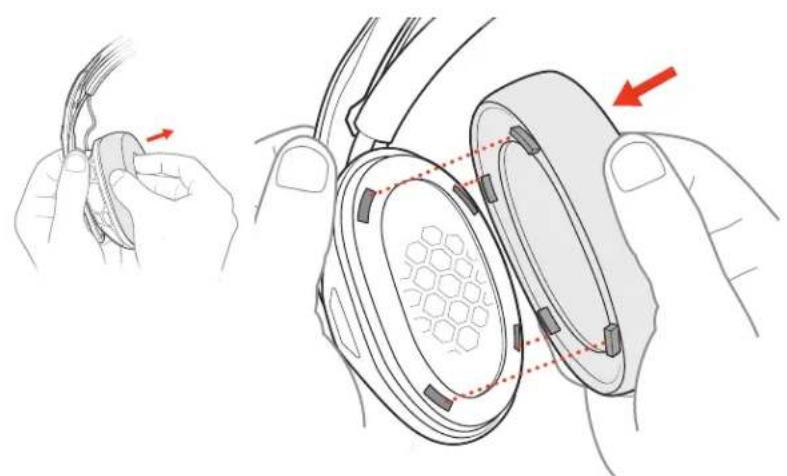
2 To change your ear cushions, gently pull the ear cushion off. To replace it, align the notches.
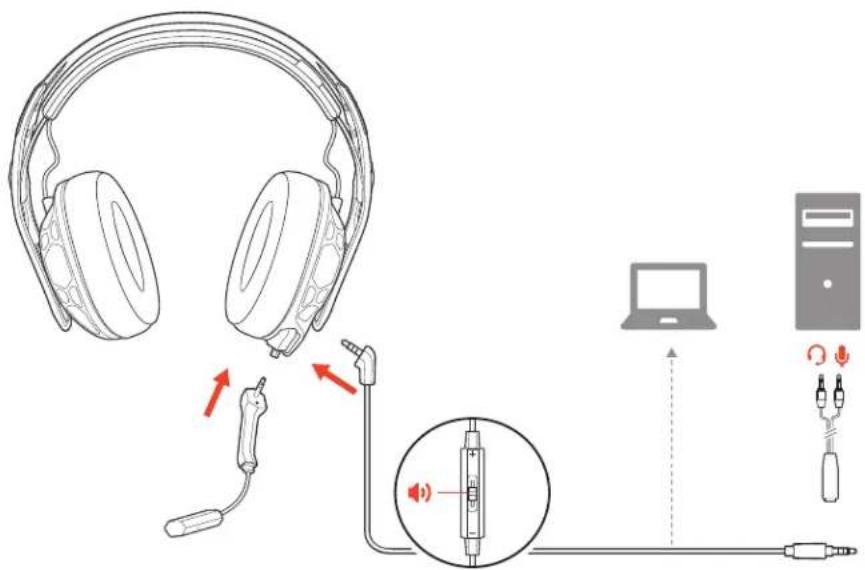
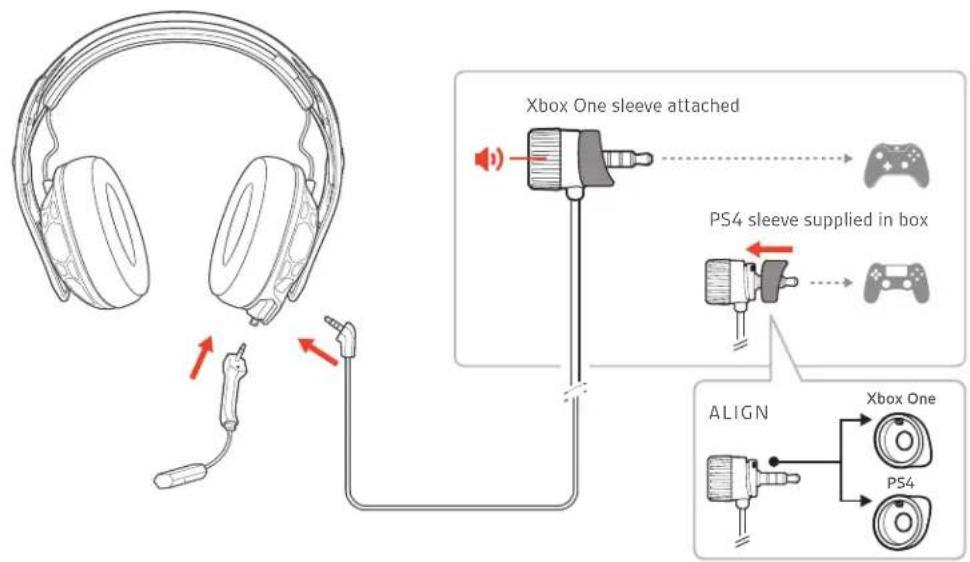
Set up your headset
Your headset components easily snap into the headset frame to configure the best fit and sound.
Follow the diagram to put your headset together. Connect to PC RIG 500 PRO, RIG 500 PRO ESPORTS
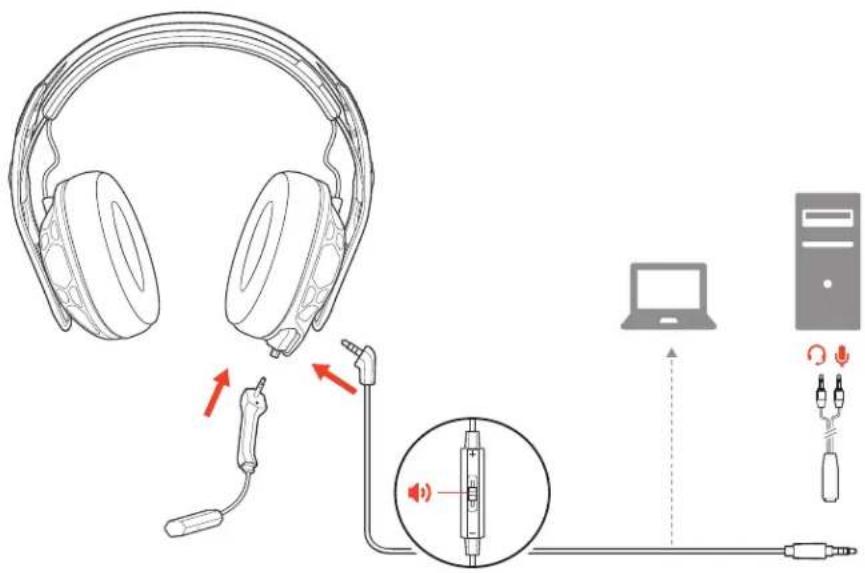
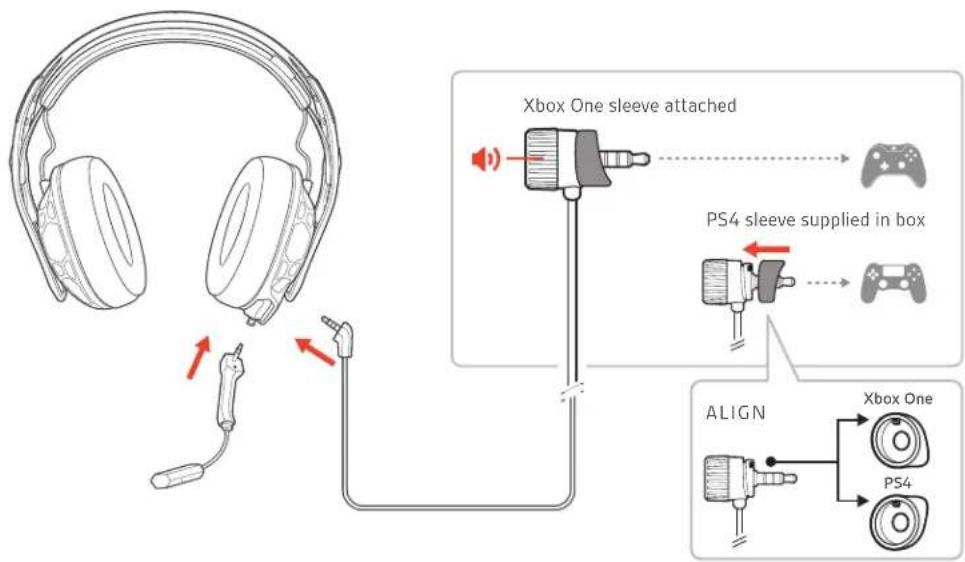
Connect to console RIG 500 PRO ESPORTS, RIG 500 PRO HC, RIG 500 PRO HX/HX SE
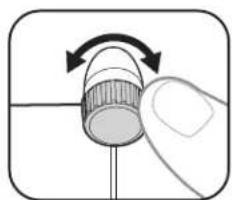
Out of the box, the volume wheel has the Xbox One sleeve attached and the PS4 sleeve is supplied (the RIG 500 PRO HS/HS SE models have the PS4 sleeve attached and the Xbox One sleeve is supplied). Align notches on the appropriate sleeve and volume wheel before attaching to your controller.
Adjust the volume
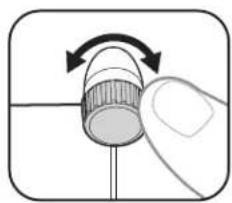
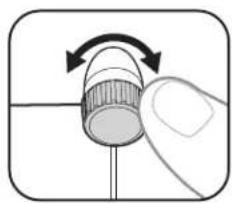
To adjust your headset volume, turn the volume wheel.
NOTE If your controller has a volume feature, you can lock the volume wheel at maximum by turning it fully to the right.
System volume
To adjust system volume, check your console's user guide.
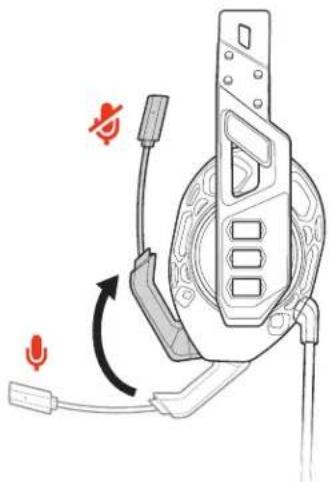
Mute
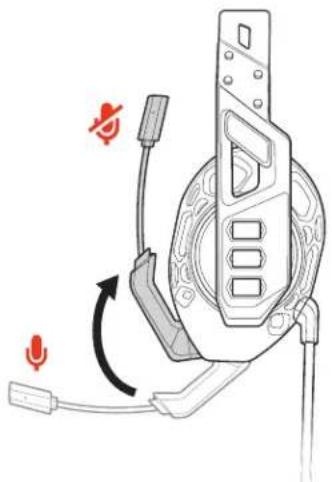
Lift the boom to a full stop to mute the microphone.
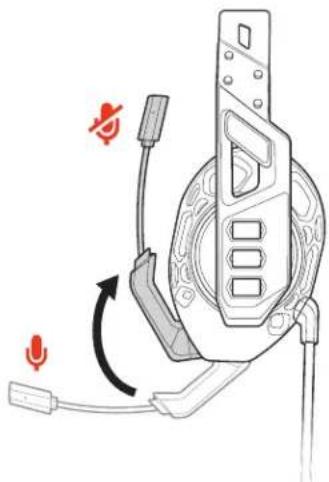
CAUTION Do not force the boom past its upper or lower limits.
Support
NEED MORE HELP?
www.naongaming.com

nacon
NACONG GAMING, Inc
10400 NE 4th Street, Suite 500,
Bellevue, WA 98004 USA
(+1) 800-617-0174
Headquarter
NACON
10400 NE 4th Street, Suite 500,
Bellevue, WA 98004 USA
(+1) 800-617-0174
Headquarter
NACON
10400 NE 4thStreet, Suite 500
Bellevue, WA 98004 USA
(+1) 800-617-0174
Headquarter
NACON
10400 NE 4th Street, Suite 500,
Bellevue, WA 98004 USA
(+1) 800-617-0174
Headquarter
NACON
10400 NE 4th Street, Suite 500,
Bellevue, WA 98004 USA
(+1) 800-617-0174
Headquarter
NACON
10400 NE 4thStreet, Suite 500
Bellevue, WA 98004 USA
(+1) 800-617-0174
Headquarter
NACON
PerynnpOBKa rpomKoCTM
ПРIMEHAHNE Ecnn KOnTpponnep OChaueh FyHKuenepeRyIpOBKn rPOMKoCTN,MOxHO 3aФИКСИРОВТь KOJIeCO PeryIINpOBKn rPOMKoCTN Ha MaKcMmaNbHOM yPOBHe, NOBepHyB erO BnpaBO Do yNopa.
CnCTeMHbI yPOBeHb rPOMKOCTN
OTKIIIOUeHne 3Byka
YTo6bI OtperynIpOBaTb CNTeMHbI yPoBeHb rPOMKoCTN, O3HaKOMbTEcB C pyKOBoDCTBOM NJIb3OBATeJI KOHCOII.
YtO6bI OTKIOUHTb 3BYK MKNPOoHOb, NOHMMTe WtAHrY MKNPOoHOb Do ynpoa.
OCTOPOXHO He nbTaTaeTcB nepemeaTb WtAHy MKNPOoHa daNbwe npedeHbHoro BepxHero Nn HNKeHrnoNoJoxHeH.
TPEBYETCII NOMOLIb? www.nacongaming.com

nacon
NACONG GAMING, Inc
10400 NE 4th Street, Suite 500, Bellevue, WA 98004 USA
(+1) 800-617-0174
Headquarter NACON 396466R
CRT2 59273 Fretin FRANCE
念 2020 NACON. NACON IN RGB AINIOCTRA TOBAPHBMN 3HAKAMM KOMNAHIN NACON, 3apeIeTnPPOBAHHIM B CIIA n dpyrtnx ctpaHx. PlayS-tation n DUALSHOCK AINIOCTRA 3apeIeTnPPOBAHHIM TOBAPHBMN 3HAKAMM KOMNAHIN Sony Interactive Entertainment, Inc. Bce npaba 3auuienbHm. BCE octJIbIbIe TOBAPHBMN 3HAK IINOTC OCo5TeBHeHOCTBO COOTBTcETByOIOHIX KOMNAHIN..
PateHTb3aBHeHb. 213538-25(06.20)
RIG
RIG 500 PRO
사용자 썸명서
K0
目录
45
the3f
告吾不
Ss
音
48
締繫認同基層の相貌
1 1 h3-1h3-1h3-1h3-1h3-1h3-1h3-1h3-1h3-1h3-1h3-1h3-1h3-1h3-1h3-1h3-1h3-1h3-1h3-1h3-1h3-1h3-1h3-1h3-1h3-1h3-1
2 1
海德士
其同和也他三成,
PCB 用 端 RIG 500 PRO, RIG 500 PRO ESPORTS
KONJU 500 PRO ESPORTS, RIG 500 PRO HC, RIG 500 PRO HX/HX SE
g 100 PRO HS/HS SE 00 的 00 XPO 00 HX 00 00 00 00 00 00 00 00 00 00 00 00 00 00 00 00 00 00 00 00 00 00 00 00 00 00 00 00 00 00 00 00 00 00
景号 本
德三贝贝贝贝贝贝贝贝贝贝贝贝贝贝贝贝贝贝贝贝贝贝贝贝贝贝贝贝贝贝贝贝贝贝贝
中記開連樂里藥樂能有在,歌云樂樂樂樂樂樂樂樂樂樂樂樂樂樂樂樂樂樂樂樂樂樂樂樂樂樂樂樂樂樂樂樂樂樂樂樂樂
山
士世本录者不整于人,
音
马克三言,
孕的弗将如卡吉格以理力国内利思
聖明路向是不多中
www.nacongaming.com

nacon
NACONG GAMING, Inc
10400 NE 4thStreet, Suite 500
Bellevue, WA 98004 USA
(+1) 800-617-0174
Headquarter
NACON
10400 NE 4thStreet, Suite 500
Bellevue, WA 98004 USA
(+1) 800-617-0174
Headquarter
NACON
10400 NE 4thStreet, Suite 500
Bellevue, WA 98004 USA
(+1) 800-617-0174
Headquarter
NACON
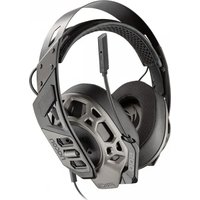
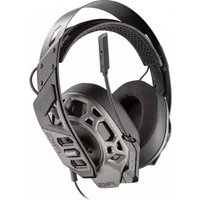
Brand : Nacon
Model : RIG 500 Pro HC
Category : Headphones