BCS601 - Electric saw BLACK & DECKER - Free user manual and instructions
Find the device manual for free BCS601 BLACK & DECKER in PDF.



| Brand | Black & Decker |
| Model | BCS601 |
| Tool type | Electric saw (reciprocating saw) |
| Rated voltage | 12 VDC |
| No-load speed | 0-2800 strokes/min |
| Stroke length | 16 mm |
| Max cutting capacity - Wood | 52 mm |
| Max cutting capacity - Steel | 5 mm |
| Max cutting capacity - Aluminium | 17 mm |
| Weight (without battery) | 1.19 kg |
| Weight (with battery) | 1.44 kg |
| Battery type | 2-in-1 GoPak 12V MAX* power pack |
| Battery charging | Via micro USB port (up to 2.4 A) |
| USB output port | USB-A port (up to 2.4 A) for charging devices |
| Variable speed | Yes, variable speed trigger |
| Safety device | Lock-off button, safety switch |
| Guiding system | Sightline® for cut line visibility |
| Blade type | Reciprocating saw blade (universal shank) |
| Maintenance and cleaning | Clean with a damp cloth and mild soap; do not immerse |
| Repairability | Battery not repairable; tool repairable at authorized service center |
Frequently Asked Questions - BCS601 BLACK & DECKER
User questions about BCS601 BLACK & DECKER
0 question about this device. Answer the ones you know or ask your own.
Ask a new question about this device
Download the instructions for your Electric saw in PDF format for free! Find your manual BCS601 - BLACK & DECKER and take your electronic device back in hand. On this page are published all the documents necessary for the use of your device. BCS601 by BLACK & DECKER.
USER MANUAL BCS601 BLACK & DECKER
natural_image
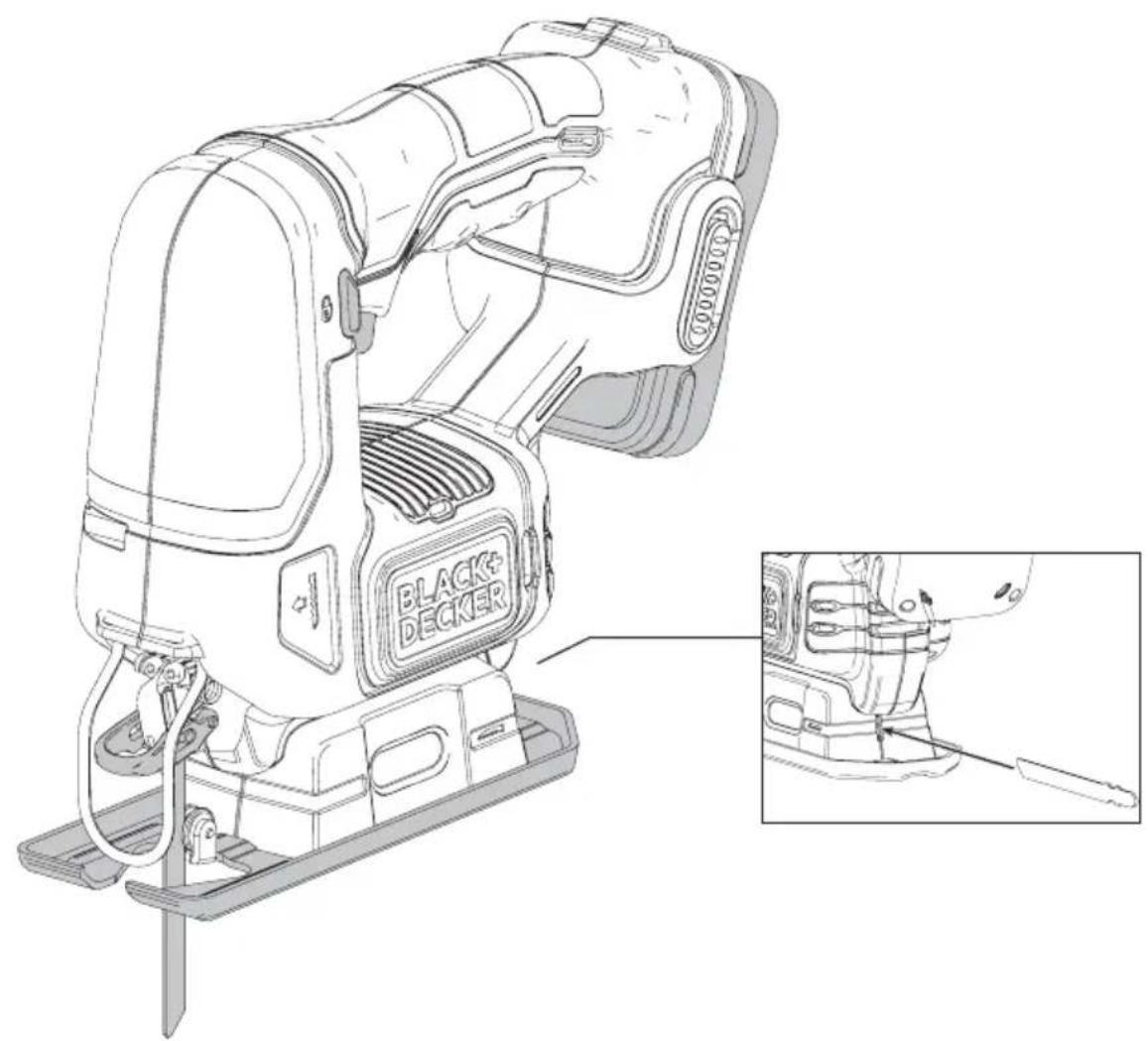
Line drawing of a black and decker sewing machine with a close-up inset showing the component detail (no text or symbols present)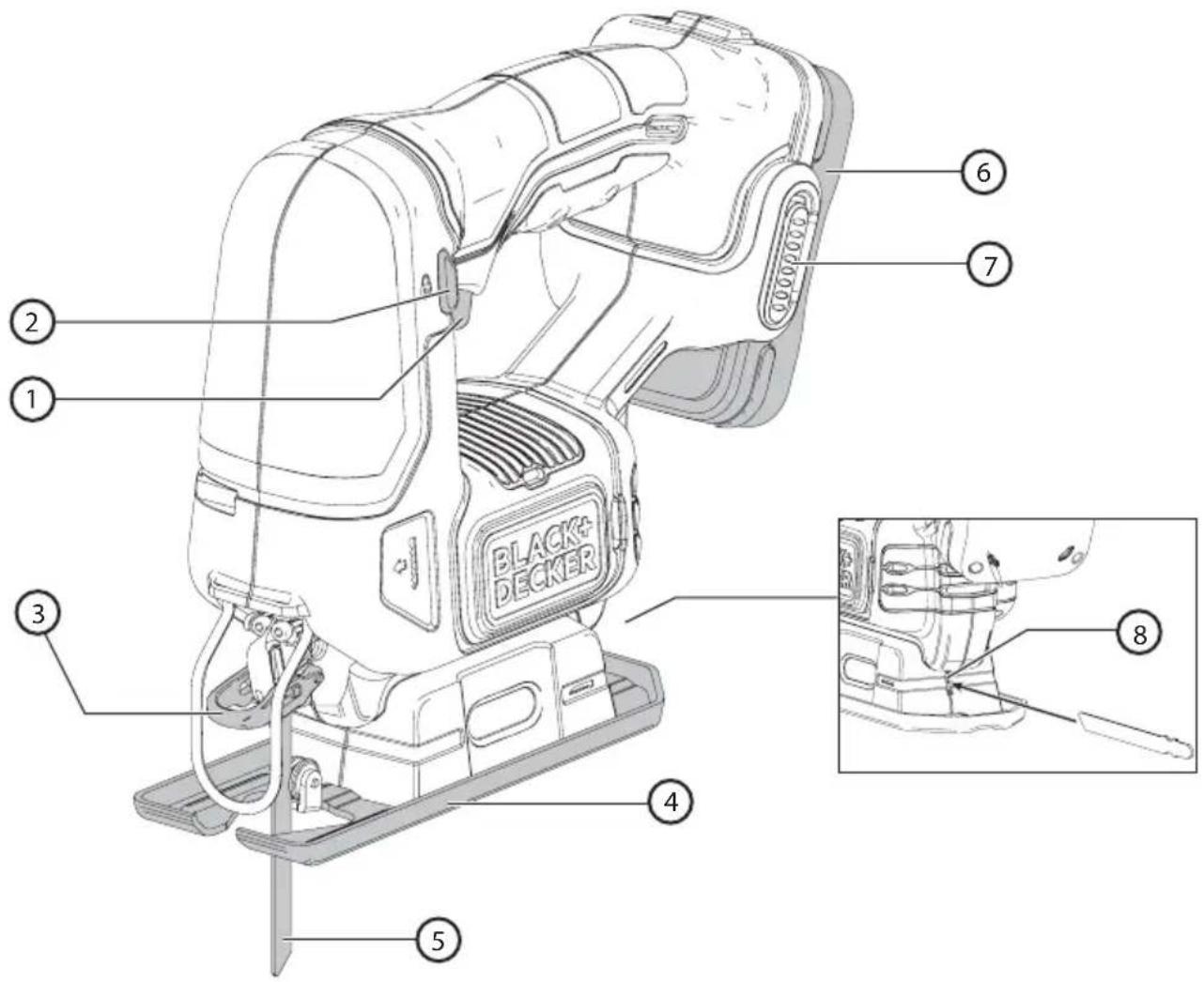
Intended use
Your BLACK+DECKER™ BCS601 jig saw has been designed for sawing wood, plastics and sheet metal. This tool is intended for consumer use only.
DO NOT use under wet conditions or in presence of flammable liquids or gases.
DO NOT let children come into contact with the tool. Supervision is required when inexperienced operators use this tool.
General power tool safety warnings

Warning! Read all safety warnings and all instructions. Failure to follow the warnings and instructions may result in electric shock, fire and/or serious injury.
Save all warnings and instructions for future reference
The term “power tool” in the warnings refers to your mains-operated (corded) power tool or battery-operated (cordless) power tool.
1. Work area safety
a. Keep work area clean and well lit. Cluttered or dark areas invite accidents.
b. Do not operate power tools in explosive atmospheres, such as in the presence of flammable liquids, gases or dust. Power tools create sparks which may ignite the dust or fumes.
c. Keep children and bystanders away while operating a power tool. Distractions can cause you to lose control.
2. Electrical safety
a. Power tool plugs must match the outlet. Never modify the plug in any way. Do not use any adapter plugs with earthed (grounded) power tools. Unmodified plugs and matching outlets will reduce risk of electric shock.
b. Avoid body contact with earthed or grounded surfaces such as pipes, radiators, ranges and refrigerators. There is an increased risk of electric shock if your body is earthed or grounded.
c. Do not expose power tools to rain or wet conditions. Water entering a power tool will increase the risk of electric shock.
d. Do not abuse the cord. Never use the cord for carrying, pulling or unplugging the power tool. Keep cord away from heat, oil, sharp edges or moving parts. Damaged or entangled cords increase the risk of electric shock.
e. When operating a power tool outdoors, use an extension cord suitable for outdoor use. Use of a cord suitable for outdoor use reduces the risk of electric shock.
f. If operating a power tool in a damp location is unavoidable, use a ground fault circuit interrupter (GFCI) protected supply. Use of a GFCI reduces the risk of electric shock.
3. Personal safety
a. Stay alert, watch what you are doing and use common sense when operating a power tool. Do not use a power tool while you are tired or under the influence of drugs, alcohol or medication. A moment of inattention while operating power tools may result in serious personal injury.
b. Use personal protective equipment. Always wear eye protection. Protective equipment such as dust mask, non-skid safety shoes, hard hat, or hearing protection used for appropriate conditions will reduce personal injuries.
c. Prevent unintentional starting. Ensure the switch is in the off position before connecting to power source and/or battery pack, picking up or carrying the tool. Carrying power tools with your finger on the switch or energizing power tools that have the switch on invites accidents.
d. Remove any adjusting key or wrench before turning the power tool on. A wrench or a key left attached to a rotating part of the power tool may result in personal injury.
e. Do not overreach. Keep proper footing and balance at all times. This enables better control of the power tool in unexpected situations.
f. Dress properly. Do not wear loose clothing or jewelry. Keep your hair, clothing and gloves away from moving parts. Loose clothes, jewelry or long hair can be caught in moving parts.
g. If devices are provided for the connection of dust extraction and collection facilities, ensure these are connected and properly used. Use of dust collection can reduce dust-related hazards.
- Power tool use and care
a. Do not force the power tool. Use the correct power tool for your application. The correct power tool will do the job better and safer at the rate for which it was designed.
b. Do not use the power tool if the switch does not turn it on and off. Any power tool that cannot be controlled with the switch is dangerous and must be repaired.
c. Disconnect the plug from the power source and/or the battery pack from the power tool before making any adjustments, changing accessories, or storing power tools. Such preventive safety measures reduce the risk of starting the power tool accidentally.
d. Store idle power tools out of the reach of children and do not allow persons unfamiliar with the power tool or these instructions to operate the power tool. Power tools are dangerous in the hands of untrained users.
e. Maintain power tools. Check for misalignment or binding of moving parts, breakage of parts and any other condition that may affect the power tool's operation. If damaged, have the power tool repaired before use. Many accidents are caused by poorly maintained power tools.
f. Keep cutting tools sharp and clean. Properly maintained cutting tools with sharp cutting edges are less likely to bind and are easier to control.
g. Use the power tool, accessories and tool bits, etc. in accordance with these instructions, taking into account the
working conditions and the work to be performed. Use of the power tool for operations different from those intended could result in a hazardous situation.
- Battery tool use and care
a. Recharge only with the charger specified by the manufacturer. A charger that is suitable for one type of battery pack may create a risk of fire when used with another battery pack.
b. Use power tools only with specifically designated battery packs. Use of any other battery packs may create a risk of injury and fire.
c. When battery pack is not in use, keep it away from other metal objects, like paper clips, coins, keys, nails, screws, or other small metal objects, that can make a connection from one terminal to another. Shorting the battery terminals together may cause burns or a fire.
d. Under abusive conditions, liquid may be ejected from the battery; avoid contact. If contact accidentally occurs, flush with water. If liquid contacts eyes, additionally seek medical help. Liquid ejected from the battery may cause irritation or burns.
- Service
a. Have your power tool serviced by a qualified repair person using only identical replacement parts. This will ensure that the safety of the power tool is maintained.
Jig saw safety warnings
- Hold power tool by insulated gripping surfaces, when performing an operation where the cutting accessory may contact hidden wiring. Cutting accessory contacting a “live” wire may make exposed metal parts of the power tool “live” and could give the operator an electric shock.
-
Use clamps or another practical way to secure and support the workpiece to a stable platform. Holding the work by hand or against your body leaves it unstable and may lead to loss of control.
-
Keep hands away from cutting area. Never reach underneath the material for any reason. Hold front of saw by grasping the contoured gripping area. Do not insert fingers or thumb into the vicinity of the reciprocating blade and blade clamp. Do not stabilize the saw by gripping the shoe.
- Keep blades sharp. Dull blades may cause the saw to swerve or stall under pressure.
- Use extra caution when cutting overhead and pay particular attention to overhead wires which may be hidden from view. Anticipate the path of falling branches and debris ahead of time.
- When cutting pipe or conduit ensure that they are free from water, electrical wiring, etc.
Save these instructions Additional safety information

Warning: ALWAYS use safety glasses. Everyday eyeglasses are NOT safety glasses. Also use face or dust mask if cutting operation is dusty. ALWAYS WEAR certified safety equipment:
• ANSI Z87.1 eye protection (CAN/CSA Z94.3),
• ANSI S12.6 (S3.19) hearing protection,
- NIOSH/OSHA/MSHA respiratory protection.

Warning: Some dust created by power sanding, sawing, grinding, drilling, and other construction
activities contains chemicals known to the State of California to cause cancer, birth defects or other reproductive harm. Some examples of these chemicals are:
- Lead from lead-based paints,
- Crystalline silica from bricks and cement and other masonry products, and
- Arsenic and chromium from chemically-treated lumber.
Your risk from these exposures varies, depending on how often you do this type of work. To reduce your exposure to these
chemicals: work in a well ventilated area, and work with approved safety equipment, such as those dust masks that are specially designed to filter out microscopic particles.
- Avoid prolonged contact with dust from power sanding, sawing, grinding, drilling, and other construction activities. Wear protective clothing and wash exposed areas with soap and water. Allowing dust to get into your mouth, eyes, or lay on the skin may promote absorption of harmful chemicals.

Warning: Use of this tool can generate and/or disperse dust, which may cause serious and permanent respiratory or other injury. Always use NIOSH/OSHA approved respiratory protection appropriate for the dust exposure. Direct particles away from face and body.

Warning: Always wear proper personal hearing protection that conforms to ANSI S12.6 (S3.19)
during use. Under some conditions and duration of use, noise from this product may contribute to hearing loss.

Caution: When not in use, place tool on its side on a stable surface where it will not cause a tripping or falling hazard. Some tools with large battery packs will stand upright on the battery pack but may be easily knocked over.
- Air vents often cover moving parts and should be avoided. Loose clothes, jewelry or long hair can be caught in moving parts. If use of an extension cord is absolutely necessary outdoors, use an extension cord suitable for outdoor use.
The label on your tool may include the following symbols. The symbols and their definitions are as follows:
Labels on tool
The label on your tool may include the following symbols:

Warning! To reduce the risk of injury, the user must read the instruction manual.

The charger is intended for indoor use only.

Read this entire manual carefully before using the appliance.
Position of date barcode
The Date Code, which also includes the year of manufacture, is printed into the housing. Example:
2017 XX JN
Year of manufacturing
Electrical safety

Your charger is double insulated; therefore no earth wire is required.
Always check that the mains voltage corresponds to the voltage on the rating plate. Never attempt to replace the charger unit with a regular mains plug.
- If the supply cord is damaged, it must be replaced by the manufacturer or an authorised BLACK+DECKER Service Centre in order to avoid a hazard.
Batteries
The battery pack is not fully charged out of the carton. Before using the battery pack, read the safety instructions below and then follow charging procedures outlined. When ordering replacement battery packs, be sure to include the catalog number and voltage.
Read all instructions
Important safety instructions for all battery packs

Warning: Read all safety warnings and all instructions for the battery pack, and power tool. Failure to
follow the warnings and instructions may result in electric shock, fire and/or serious injury.
- Do not charge or use the battery pack in explosive atmospheres, such as in the presence of flammable liquids, gases or dust. Inserting or removing the charging cable from the battery pack may ignite the dust or fumes.
- Never force the battery pack into cable insertion or tool insertion.
- Do not modify the battery pack in any way as battery pack may rupture causing serious personal injury.
- Do not splash or immerse in water or other liquids.
- Do not store or use the tool and battery
pack in locations where the temperature may reach or exceed 104 °F (40 °C) (such as outside sheds or metal buildings in summer). For best life store battery packs in a cool, dry location.
Note: Do not store the battery packs in a tool with the trigger switch locked on. Never tape the trigger switch in the ON position.
- Do not incinerate the battery pack even if it is severely damaged or is completely worn out. The battery pack can explode in a fire. Toxic fumes and materials are created when lithium ion battery packs are burned.
- If battery contents come into contact with the skin, immediately wash area with mild soap and water. If battery liquid gets into the eye, rinse water over the open eye for 15 minutes or until irritation ceases. If medical attention is needed, the battery electrolyte is composed of a mixture of liquid organic carbonates and lithium salts.
- Contents of opened battery cells may cause respiratory irritation. Provide fresh air. If symptoms persist, seek medical attention.

Warning: Burn hazard. Battery liquid may be flammable if exposed to spark or flame.

Warning: Fire hazard. Never attempt to open the battery pack for any reason. If the battery pack case is cracked or damaged, do not attempt to use or charge. Do not crush, drop or damage the battery pack. Do not use a battery pack or charger that has received a sharp blow, been dropped, run over or damaged in any way (e.g., pierced with a nail, hit with a hammer, stepped on). Damaged battery packs should be returned to the service center for recycling
Storage recommendations
- The best storage place is one that is cool and dry, away from direct sunlight and excess heat or cold.
- For long storage, it is recommended to store a fully charged battery pack in a cool dry place out of the charger for optimal results.
Note: Battery packs should not be stored completely depleted of charge. The battery pack will need to be recharged before use.
The RBRC® Seal
The RBRC® (Rechargeable Battery Recycling Corporation) Seal on the nickel cadmium, nickel metal hydride or lithium -ion batteries (or battery packs) indicates that the costs to recycle these batteries (or battery packs) at the end of their useful life have already been paid by BLACK+DECKER. In some areas, it is illegal to place spent nickel cadmium, nickel metal hydride or lithium-ion batteries in the trash or municipal solid waste stream and the Call 2 Recycle® program provides an environmentally conscious alternative.

Call 2 Recycle, Inc., in cooperation with BLACK+DECKER and other battery users, has established the program in the United States and Canada to facilitate the collection of spent nickel cadmium, nickel metal hydride or lithium-ion batteries. Help protect our environment and conserve natural resources by returning the spent nickel cadmium, nickel metal hydride or lithium-ion batteries to an authorized BLACK+DECKER service center or to your local retailer for recycling. You may also
contact your local recycling center for information on where to drop off the spent battery. RBRC ^® is a registered trademark of Call 2 Recycle, Inc.
Important charging notes
- Longest life and best performance can be obtained if the battery pack is charged when the air temperature is between 65 °F - 75 °F (18 ° - 24 °C). DO NOT charge the battery pack in an air temperature below 40 °F (4.5 °C), or above 104 °F (40 °C). This is important and will prevent serious damage to the battery pack.
- If the battery pack does not charge properly:
a. Check operation of receptacle by plugging in a lamp or other appliance;
b. Check to see if receptacle is connected to a light switch which turns power off when you turn out the lights;
c. Move the power adapter and battery pack to a location where the surrounding air temperature is approximately 65 °F - 75 °F ( 18 ° - 24 °C );
d. If charging problems persist, take the tool, battery pack and USB cable to your local service center.
3. The battery pack should be recharged when it fails to produce sufficient power on jobs which were easily done previously. Do not continue to use under these conditions. Follow the charging procedure. You may also charge a partially used pack whenever you desire with no adverse effect on the battery pack.
Transportation

Warning: Fire hazard. Do not store or carry the battery pack so that metal objects can contact exposed battery terminals. For example, do not place the battery pack in aprons, pockets, tool boxes, product kit boxes, drawers, etc., with loose nails, screws, keys, etc.
with loose nails, screws, keys, etc.
Transporting batteries can possibly cause fires if the battery terminals inadvertently come in contact with conductive materials such as keys, coins, hand tools and the like.
The US Department of Transportation Hazardous Material Regulations (HMR) actually prohibit transporting batteries in commerce or on airplanes in carry-on baggage UNLESS they are properly protected from short circuits. So when transporting individual battery packs, make sure that the battery terminals are protected and well insulated from materials that could contact them and cause a short circuit.

Caution: GoPak battery terminal cap should be used when battery is not connected to a power tool.
Terminal cap is provided for use whenever the battery is out of the tool. Remove cap before placing battery into tool.
FCC requirements for all digital devices
This device complies with Part 15 of the FCC Rules and Industry Canada License-exempt RSS standard(s). Operation is subject to the following two conditions:
- This device may not cause harmful interference, and
- This device must accept any interference received, including interference that may cause undesired operation.
Changes or modifications not expressly approved by the party responsible for compliance could void the user's authority to operate the equipment.
This equipment has been tested and found to comply with the limits for a Class B digital device, pursuant to Part 15 of the FCC Rules. These limits are designed to provide reasonable protection against harmful interference in a residential installation. This equipment generates, uses, and can radiate radio frequency energy and, if not installed and used in accordance with the instructions, may cause harmful interference to radio communications. However, there is no guarantee that interference will not occur in a particular installation. If this equipment does cause harmful interference to radio or television reception, which can be determined by turning the equipment off and on, the user is encouraged to try to correct the interference by one of the following measures:
- Reorient or relocate the receiving antenna.
- Increase the separation between the equipment and receiver.
- Connect the equipment into an outlet on a circuit different from that to which the receiver is connected.
- Consult the dealer or an experienced radio/TV technician for help.
CAN ICES-3(B)/NMB-3(B)
Getting started
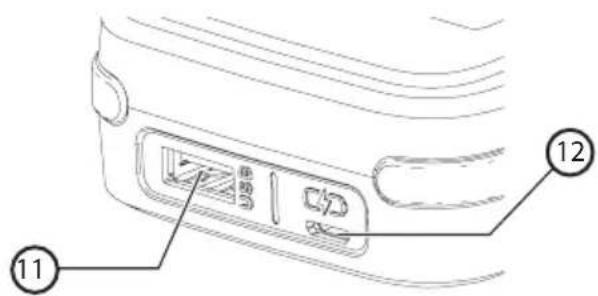
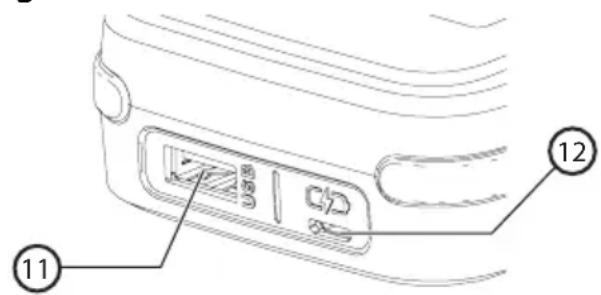
- The Micro USB port (12) on the BLACK+DECKER GoPak 2 in 1 battery is only to be used for charging the GoPak.
- The USB A port (11) on the BLACK+DECKER GoPak 2 in 1 battery is only to be used for powering USB devices (Phone/Tablet/MP3/Wearable/Game Controller/etc.).
Fig. B
Charging the BLACK+DECKER GoPak 2 in 1 battery (Fig. C, D)

Warning: Never attempt to charge the BLACK+DECKER GoPak 2 in 1 battery using the tool terminals on
the GoPak.

Warning: You should only charge the BLACK+DECKER GoPak 2 in 1 battery using UL or CSA approved
USB ports rated for charging high performance devices.
An error message may display on your computer if the computer is used to charge the GoPak.
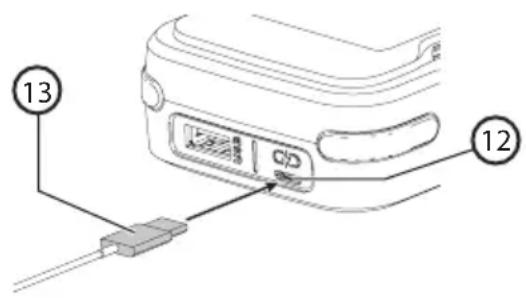
- Plug the micro USB cable (included) (13) into a USB power supply (not included).
- Plug the micro USB plug of your charger cord into the GoPak micro USB port (12).
- As the GoPak charges, the state of charge LEDs will illuminate. The illuminated LED(s) indicate the state of charge of the pack. The blinking LED indicates the next level of charge in progress. The state of charge button (9) is disabled during charging only.
- The completion of charge is indicated by all four LEDs turning off. Pressing the state of charge indicator button (9) will illuminate all four LEDs. The battery is fully charged and may be used at this time or left on the charger.
- Recharge discharged batteries as soon as possible after use or battery life may be greatly diminished. For longest battery life, do not discharge batteries fully. It is recommended that the batteries be recharged after each use.
Fig. C
State of charge indicator (Fig. D)
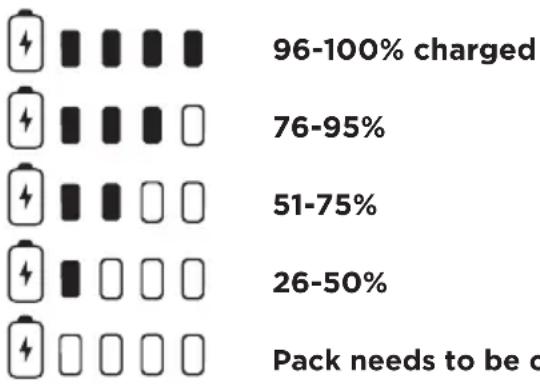
The BLACK+DECKER GoPak 2 in 1 battery is equipped with a state of charge button (9) with a four LED display.
The state of charge is an indication of approximate levels of charge remaining in the battery according to the following indicators:
bar
| Category | Value | | -------- | ----- | | 96-100% charged | 76-95% | | 51-75% | 26-50% | | Pack needs to be c | Not labeled |To actuate the state of charge, press the state of charge Indicator button. A combination of the four LEDs will illuminate designating the level of charge left. When the level of charge in the battery is below the usable limit, the state of charge LEDs will either not light or the bottom LED will blink.
Note: The state of charge LED will only display once the state of charge button is pressed.
Fig. D
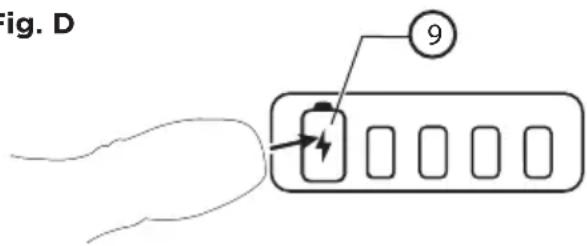
- Press state of charge button at anytime to display the remaining level of charge.
Note: The state of charge Indicator is only an indication of the charge left on the battery. It does not indicate tool functionality and is subject to variation based on product components, temperature and end-user application.
Note: GoPak battery terminal cap should be used when battery is not connected to a power tool. Terminal cap is provided for use whenever the battery is out of the tool. Remove cap before placing battery into tool.
GoPak tool terminal cap
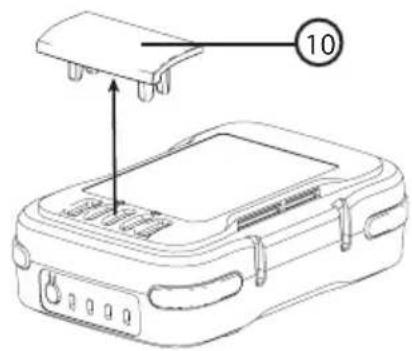
A battery storage and carrying cap (10) is provided for use whenever the battery is out of the tool. Remove the cap as shown in Figure E before placing battery onto tool.
Fig. E
Components (Fig. A)

Warning: Never modify the power tool or any part of it. Damage or personal injury could result.
Refer to Figure A at the beginning of this manual for a complete list of components.
Assembly and adjustments

Warning: To reduce the risk of serious personal injury, turn unit off and remove the battery pack before making any adjustments or removing/installing attachments or accessories. An accidental start-up can cause injury.

Warning: Laceration Hazard. Before attempting any of the following operations, make sure that the tool is switched off and the battery is removed, and that the saw blade has stopped. Used saw blades can be hot.

Warning: Remove battery when removing or installing the blade
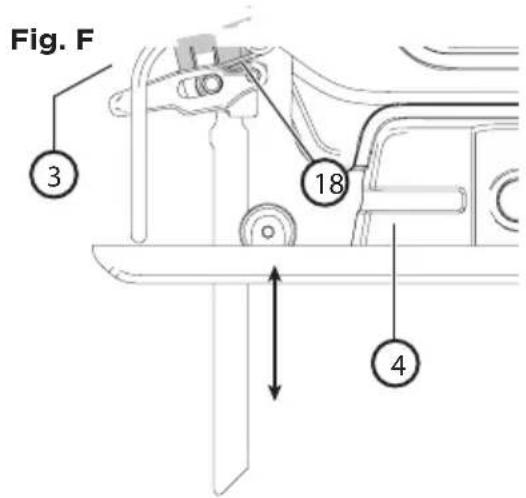
Fitting the saw blade (Fig. A, F)
-
Hold the saw blade (5) as shown, with teeth facing forward.
-
Push the locking lever (3) up away from the shoe (4).
-
With the teeth facing forward, insert the shank of the saw blade into the blade holder (18) as far as it will go.
-
Release the lever.
-
Pull blade to be sure the blade is fully secured.
Operation

Warning: To reduce the risk of serious personal injury, turn unit off and remove the battery pack before making any adjustments or removing/installing attachments or accessories. An accidental start-up can cause injury.

Warning: To reduce the risk of injury, never use the tool when the saw shoe is loose or removed
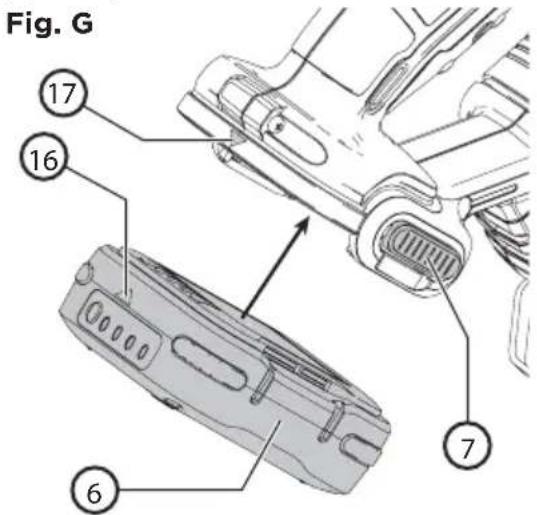
Installing and removing the GoPak 2 in 1 battery in a power tool (Fig.G)

Warning: Remove any connected USB cords from the BLACK+DECKER GoPak 2 in 1
battery before connecting the GoPak to the compatible tool.
- Remove the tool terminal cap if installed on the BLACK+DECKER GoPak 2 in 1 battery.
- To power a compatible GoPak 12V MAX* power tool, align the tool terminals on the foot of the tool with the terminal slots on the battery (6) as shown in Fig. G.
Note: The state of charge indicator will face the rear of the tool and the USB ports will face the front. The arrow on the battery will align with the arrow on the tool as shown in Fig. G.
- Snap the BLACK+DECKER GoPak 2 in 1 battery into the foot of the tool. The arrow (16) on the battery will align with the arrow (17) on the tool. Ensure the battery is fully seated and fully latched into position before using.
- To remove the BLACK+DECKER GoPak 2 in 1 battery from the tool, depress the two battery release buttons (7) located on the tool and pull the BLACK+DECKER GoPak 2 in 1 battery off the tool.
Note: The BLACK+DECKER GoPak 2 in 1 battery USB ports are disabled when the trigger is pulled.
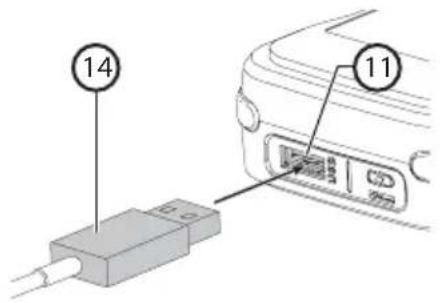
Using the GoPak 2 in 1 battery to charge your USB device (Fig. H)
- Plug the USB A end of your device specific cable (14) into the BLACK+DECKER GoPak 2 in 1 battery (11) and the other end of the cable into a UL or CSA listed compatible device
(Phone/Tablet/MP3/Wearable/Game Controller/etc.). Charging will start automatically.
Fig. H
Functionality
The BLACK+DECKER GoPak 2 in 1 battery can power your compatible BLACK+DECKER 12 V GoPak MAX* tools or power/charge your mobile devices. The compact, slim battery housing is designed for portability.
- GoPak Charge Input: Up to 2.4A**
- GoPak Power Output: Up to 2.4A***
** Actual input charge rate is dependant upon power adapter (not included).
***Actual output rate is dependant on the device.
USB power port
The BLACK+DECKER GoPak 2 in 1 battery is equipped with a USB Type A power port. It delivers up to 2.4 amp total current.
Note: The current delivered to device is dependent on user device and user's chosen cable.

Warning: Ensure the terminal cap is securely attached to the BLACK+DECKER GoPak 2 in 1
battery when using it to power/charge your device.
• Install terminal cap on the tool terminals.
• Device charging from USB will start automatically when device is connected.
• To turn off, disconnect USB device.
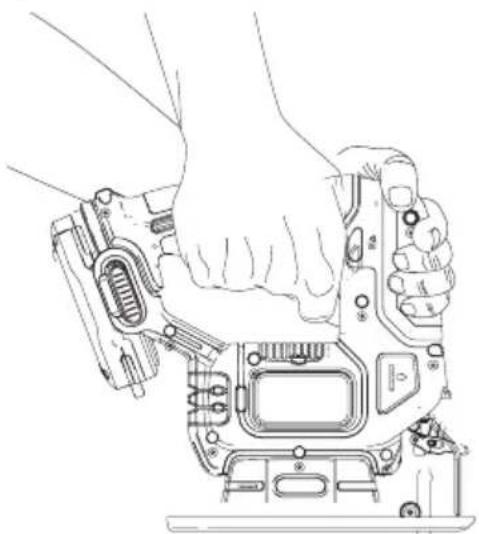
Proper hand position (Fig. I)

Warning: To reduce the risk of serious personal injury, always use proper hand position as shown.

Warning: To reduce the risk of serious personal injury, always hold securely in anticipation of a sudden
Proper hand position requires one hand on the main handle and one hand on the auxiliary handle.
Fig. I
natural_image
Line drawing of a hand operating a DSLR camera module (no text or symbols)Switching on and off (Fig. A, J)
This tool is equipped with a lock-off button (2). The button must be disengaged for the jig saw to turn on. To disengage the button, depress the button on the side of the handle that shows the unlock symbol.
Fig. J
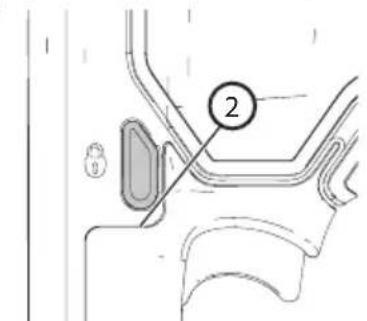
- To switch the tool on, press the variable speed switch (1). The tool speed depends on how far you depress the switch.
- To switch the tool off, release the variable speed switch.
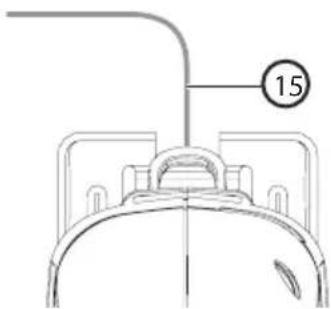
How to use the sightline® feature (Fig. K)
- Use a pencil to mark the cutting line.
- Position the jig saw over the line (15).
- Viewing from directly above the jig saw, the line of cut can be easily followed.
Fig. K
natural_image
Technical line drawing of a mechanical component with a numbered annotation (15), no readable text or symbols present.Hints for optimum use
General
Use a high speed for wood, a medium speed for aluminum and PVC and a low speed for metals other than aluminum Specific materials also require specialty blades (sold separately).
Sawing laminates
As the saw blade cuts on the upward stroke, splintering may occur on the surface closest to the shoe plate.
• Use a fine-tooth saw blade.
- Saw from the back surface of the workpiece.
- To minimize splintering, clamp a piece of scrap wood or hardboard to both sides of the workpiece and saw through this sandwich.
Sawing metal
- Be aware that sawing metal takes much more time than sawing wood.
- Use a saw blade suitable for sawing metal.
- When cutting thin metal, clamp a piece of scrap wood to the back surface of the workpiece and cut through this sandwich.
- Spread a film of oil along the intended line of cut.
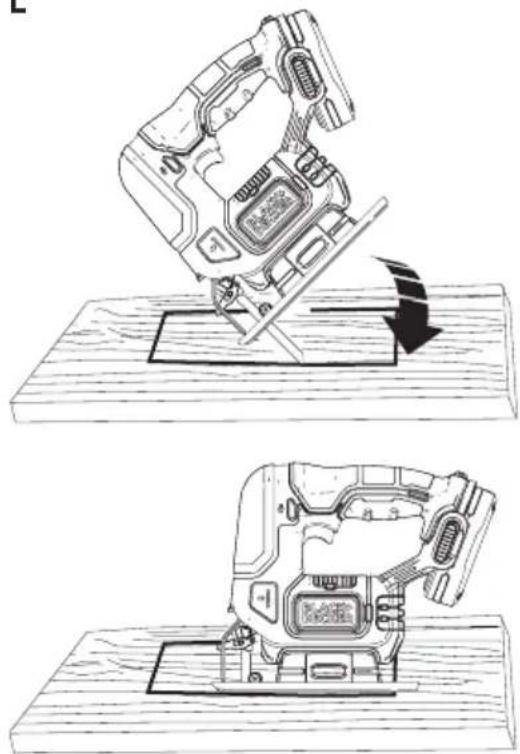
Pocket cutting (Fig. L)
A pocket cut is an easy method of making an inside cut. The saw can be inserted directly into a panel or board without first drilling a lead or pilot hole. In pocket cutting, measure the surface to be cut and mark clearly with a pencil. Next tip the saw forward until the front end of the shoe sits firmly on the work surface and the blade clears the work through its full stroke. Switch the tool on and allow it to attain maximum speed. Grip the saw firmly and lower the back edge of tool slowly until the shoe sits flate on the surface. Hold the shoe flat against the wood and continue cutting. Do not remove blade from cut while it is still moving. Blade must come to a complete stop.
Fig. L
natural_image
Technical line drawing of a mechanical device on a wooden base, showing a step-by-step assembly (no text or symbols)Maintenance
Warning: To reduce the risk of serious personal injury, turn unit off and remove the battery pack before making any adjustments or removing/installing attachments or accessories. An accidental start-up can cause injury.
Important: To assure product safety and reliability, repairs, maintenance and adjustment (other than those listed in this manual) should be performed by authorized service centers or other qualified service personnel, always using identical replacement parts.
Protecting the environment

Separate collection. This product must not be disposed of with normal household waste.
Should you find one day that your BLACK+DECKER product needs replacement, or if it is of no further use to you, do not dispose of it with household waste. Make this product available for separate collection.

Separate collection of used products and packaging allows materials to be recycled and used again. Reuse of recycled materials helps prevent environmental pollution and reduces the demand for raw materials.
Local regulations may provide for separate collection of electrical products from the household, at municipal waste sites or by the retailer when you purchase a new product.
BLACK+DECKER provides a facility for the collection and recycling of BLACK+DECKER products once they have reached the end of their working life. To take advantage of this service please return your product to any authorised repair agent who will collect them on our behalf.
You can check the location of your nearest authorised repair agent by contacting your local BLACK+DECKER office at the address indicated in this manual. Alternatively, a list of authorised BLACK+DECKER repair agents and full details of our after-sales service and contacts are available on the Internet at: www.2helpU.com.
Cleaning

Warning: Never use solvents or other harsh chemicals for cleaning the non-metallic parts of the tool or power supply. These chemicals may weaken the plastic materials used in these parts. Use a cloth dampened only with water and mild soap. Never let any liquid get inside the tool
or power supply; never immerse any part of the tool or power supply into a liquid.
Note: Remove tool and both USB cables from GoPak before cleaning.
Use only mild soap and a damp cloth to clean the tool or power supply. Many household cleaners contain chemicals which could seriously damage plastic. Also, do not use gasoline, turpentine, lacquer or paint thinner, dry cleaning fluids or similar products.
Troubleshooting
- The GoPak will not power your device or charge.
a. The LED closest to the state of charge button will blink red when attempting USB functionality.
- The GoPak is too hot or too cold. Allow the GoPak to cool down or warm up.
2. The GoPak will not power your compatible tool.
- Attempt to charge the battery. If the LED fails to come on refer to number 1 in Troubleshooting.
Repairs
The BLACK+DECKER GoPak 2 in 1 battery is not serviceable.

Warning: To assure product safety and reliability, repairs, maintenance and adjustment (including brush
inspection and replacement) should be performed by a BLACK+DECKER factory service center or a BLACK+DECKER authorized service center. Always use identical replacement parts.
Technical data
| BCS601 | |
| Voltage VDC | 12 |
| No-load speed Min-1 | 0-2800 SPM |
| Stroke Length mm 16 | |
| Max depth of cut: | |
| Wood mm 52 | |
| Steel mm 5 | |
| Aluminium mm 17 | |
| Weight kg 1.19 (with battery 1.44) | |
Level of sound pressure according to EN 62841:
Sound pressure(LpA) 69.6 dB(A), uncertainty(K)5 dB(A)
Sound power( L_wA ) 90.6 dB(A), uncertainty(K)5 dB(A)
Vibration total values (triax vector sum) according to EN 62481:
Drilling into metal ( a_h,D )<5.2m/s ^2 , uncertainty (K) 1.5 m/s ^2
Screwdriving without impact (ah,M)<6.1m/s ^2 , uncertainty (K) 1.5 m/s ^2
The vibration emission level given in this information sheet has been measured in accordance with a standardised test given in EN 60745 and may be used to compare one tool with another. It may be used for a preliminary assessment of exposure.

Warning: The declared vibration emission level represents the main applications of the tool. However if the tool is used for different
applications, with different accessories or poorly maintained, the vibration emission may differ. This may significantly increase the 1.5 exposure level over the total working period.
An estimation of the level of exposure to vibration should also take into account the times when the tool is switched off or when it is running but not actually doing the job. This may significantly reduce the exposure level over the total working period.
Identify additional safety measures to protect the operator from the effects of vibration such as: maintain the tool and the accessories, keep the hands warm, organisation of work patterns.
Guarantee
BLACK+DECKER is confident of the quality of its products and offers an outstanding guarantee. This guarantee statement is in addition to and in no way prejudices your statutory rights.
If a BLACK+DECKER product becomes defective due to faulty materials, workmanship or lack of conformity, within 24 months from the date of purchase, BLACK+DECKER guarantees to replace defective parts, repair products subjected to fair wear and tear or replace such products to make sure of the minimum inconvenience to the customer unless:
- The product has been used for trade, professional or hire purposes.
- The product has been subjected to misuse or neglect.
- The product has sustained damage through foreign objects, substances or accidents.
• Repairs have been attempted by persons other than authorised repair agents or BLACK+DECKER service staff.
To claim on the guarantee, you will need to submit proof of purchase to the seller or an authorised repair agent. You can check the location of your nearest authorised repair agent by contacting your local BLACK+DECKER office at the address indicated in this manual. Alternatively, a list of authorised BLACK+DECKER repair agents and full details of our aftersales service and contacts are available on the Internet at: www.2helpU.com
Usage Prévu
Your BLACK+DECKER BCS601 jig saw has been designed for sawing wood, plastics and sheet metal. This tool is intended for consumer use only.
natural_image
Line drawing of a hand operating a digital camera module (no text or symbols)natural_image
Technical line drawing of a mechanical component with a numbered annotation (15) pointing to a cylindrical feature (no text or symbols beyond the number)natural_image
Technical illustration of a mechanical device being adjusted, showing two views (top and bottom) with no visible text or symbols.Maintenance

96-100% charged
76-95%
51-75%
26-50%
Pack needs to be charged
natural_image
Line drawing of a hand operating a DSLR camera module (no text or symbols)natural_image
Technical line drawing of a mechanical component with a numbered annotation (15), no readable text or symbols present.natural_image
Two technical line drawings of a mechanical device on a wooden base, showing a press or assembly process (no text or symbols present)Pack needs to be charged
Складові (Рис. А)

natural_image
Line drawing of a hand operating a DSLR camera module (no text or symbols)natural_image
Two technical line drawings of a mechanical device on a wooden base, showing a step-by-step assembly (no text or symbols present)| 96-100% charged | |
| 76-95% | |
| 51-75% | |
| 26-50% | |
| Pack needs to be charged |
İçerikler (Şekil A)

natural_image
Line drawing of a hand operating a DSLR camera module (no text or symbols)natural_image
Two technical line drawings of a mechanical device on wooden base, showing a press or assembly process with no visible text or symbols.Bakım

natural_image
Diagram of a mechanical device with a lever and arrow indicating motion (no text or symbols)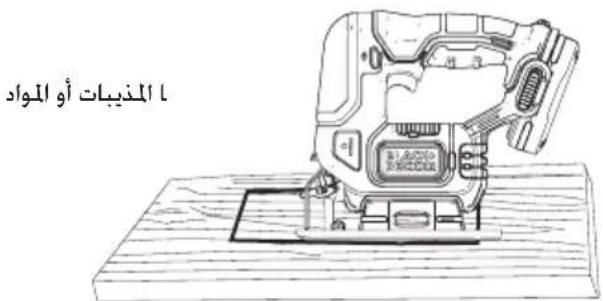
natural_image
Technical line drawing of a mechanical component with a numbered annotation (15), no readable text or symbols present.natural_image
Line drawing of a hand operating a DSLR camera module (no text or symbols)ملاحظة: في公正 Egypt، Export Democracy des Shinesen, Strictly Environmental Conservation Policy, Environmental Protection Policy, Environmental Protection Policy, Environmental Protection Policy, Environmental Protection Policy, Environmental Protection Policy, Environmental Protection Policy, Environmental Protection Policy, Environmental Protection Policy, Environmental Protection Policy, Environmental Protection Policy, Environmental Protection Policy, Environmental Protection Policy, Environmental Protection Policy, Environmental Protection Policy, Environmental Protection Policy, Environmental Protection Policy, Environmental Protection Policy, Environmental Protection Policy, Environmental Protection Policy, Environmental Protection Policy, Environmental Protection Policy, Environmental Protection Policy, Environmental Protection Policy, Environmental Protection Policy, Environmental Protection Policy, Environmental Promotion Policy, Environmental Promotion Policy, Environmental Promotion Policy, Environmental Promotion Policy, Environmental Promotion Policy, Environmental Promotion Policy, Environmental Promotion Policy, Environmental Promotion Policy, Environmental Promotion Policy, Environmental Promotion Policy, Environmental Promotion Policy, Environmental Promotion Policy, Environmental Promotion Policy, Environmental Promotion Policy, Environmental Promotion Policy, Environmental Promotion Policy, Environmental Promotion Policy, Environmental Promotion Policy, Environmental Promotion Policy, Environmental Promotion Policy, Environmental Promotion Policy, Environmental Promotion Policy, Environmental Promotion Policy, Environmental Promotion Policy, Environmental Promotion Policy, Environmental Protection Policy, Environmental Protection Policy, Environmental Protection Policy, Environmental Protection Policy, Environmental Protection Policy, Environmental Protection Policy, Environmental Protection Policy, Environmental Protection Policy, Environmental Protection Policy, Environmental Protection Policy, Environmental Protection Policy, Environmental Protection Policy, Environmental Protection Policy, Environmental Protection Policy, Environmental Protection Policy, Environmental Protection Policy, Environmental Protection Policy, Environmental Protection Policy, Environmental Protection Policy, Environmental Protection Policy, Environmental Protection Policy, Environmental Protection Policy, Environmental Protection Policy, Environmental Protection Policy, Environmental Production Policy, Environmental Production Policy, Environmental Production Policy, Environmental Production Policy, Environmental Production Policy, Environmental Production Policy, Environmental Production Policy, Environmental Production Policy, Environmental Production Policy, Environmental Production Policy, Environmental Production Policy, Environmental Production Policy, Environmental Production Policy, Environmental Production Policy, Environmental Production Policy, Environmental Production Policy, Environmental Production Policy
(Α المكونات الشكل)
B الشكل