 ManualGo.com
CS4492BUU - Cooker SAMSUNG - Free user manual and instructions
Find the device manual for free CS4492BUU SAMSUNG in PDF.



Download the instructions for your Cooker in PDF format for free! Find your manual CS4492BUU - SAMSUNG and take your electronic device back in hand. On this page are published all the documents necessary for the use of your device. CS4492BUU by SAMSUNG.
USER MANUAL CS4492BUU SAMSUNG
FOUT STOOMSENSOR OPEN
Deze fout treedt op bij een defecte stoomsensor, onjuiste aansluitingen, een defecte printplaat en wanneer de door MICOM gedetecteerde A/D- waarde langer dan 3 minuten hoger is dan 250.
FOUT STOOMSENSOR KORT
TEMP SENSOR OPEN ERROR
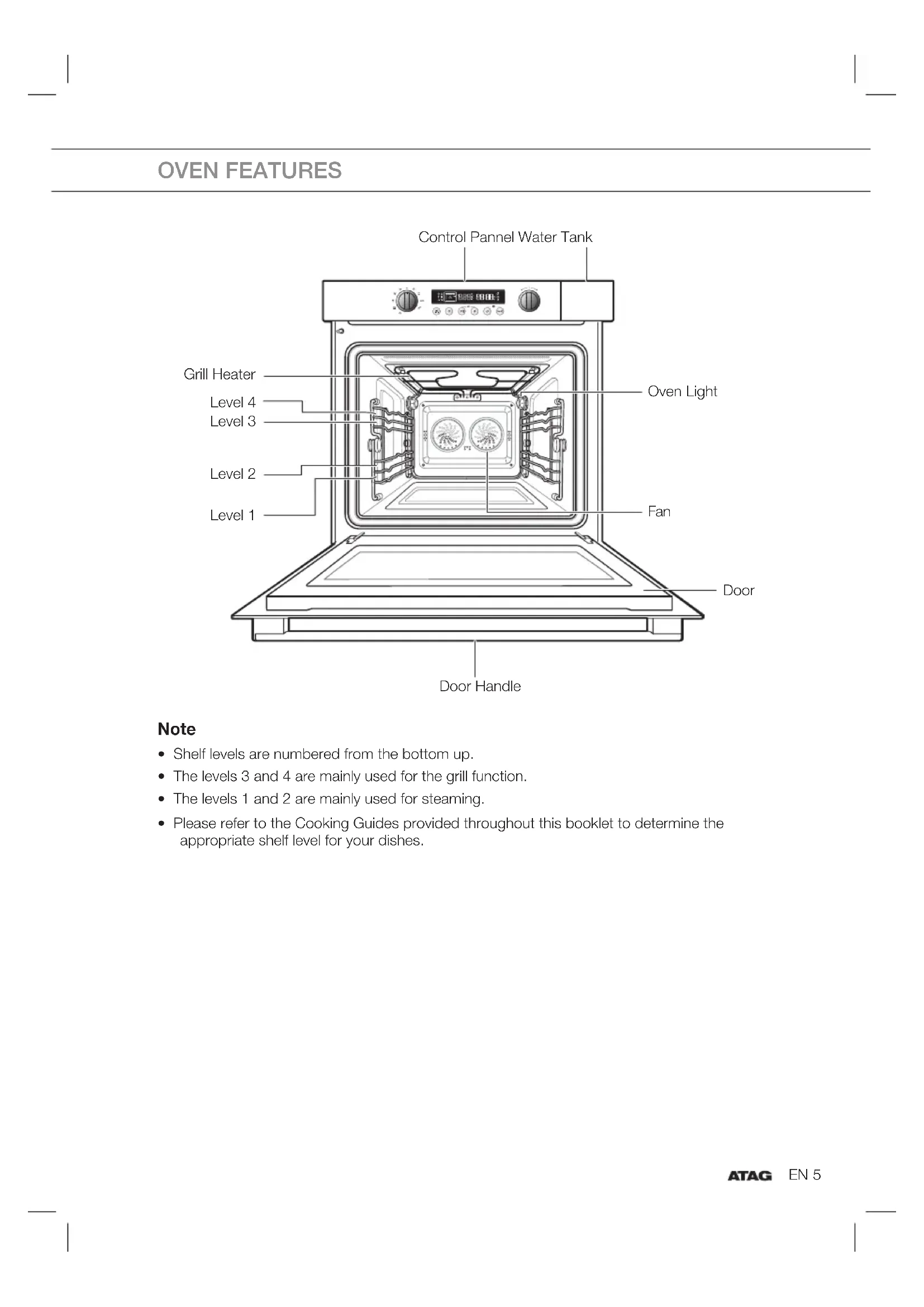
- Shelf levels are numbered from the bottom up.
- The levels 3 and 4 are mainly used for the grill function.
- The levels 1 and 2 are mainly used for steaming.
- Please refer to the Cooking Guides provided throughout this booklet to determine the appropriate shelf level for your dishes. OVEN FEATURES Control Pannel Water Tank Oven Light Fan Grill Heater Level 4 Level 3 Level 2 Level 1 Door Handle DoorEN 6 ACCESSORIES The following accessories are provided with your Combi Steam Oven:
Oven Rack (for all levels)
Steam dish, unperforated, 40 mm deep (useful during steam mode for collecting condensation)
Steam dish, perforated, 40 mm deep (useful for steam mode) For steaming, you can place the perfo ra- ted steam dish into the unperforated steam dish. You can only use these two together in level 2.
Thank you for purchasing this ATAG Combi Steam Oven. Your Owner’s Manual contains essential information on using and caring for your new Combi Steam Oven. The only installation is seperate installation instructions are included separate. Before using your combi steam oven, please read the safety instructions and all the information in this manual fi rst and keep it for future reference. SAFETY Safe use
WARNING: this appliance and the accessible
parts become hot during use. Do not touch the hot components. Keep children younger than 8 away from the appliance unless you can watch them continuously.
This equipment may be used by children older than 8, as well as by people with physical, sensory or learning di culties or with a lack of experience and knowledge, provided they are supervised and instructed in the safe use of the appliance and understand the associated dangers. Do not allow children to play with the appliance. Do not allow children to clean or maintain the appliance unless supervised.
This appliance is only designed for household use. Use it only for food preparation.
Keep the cable away from hot surfaces.
Never cover the ventilation openings.
The appliance is not intended to be operated by means of an external timer or separate remote control system.
In connection with electrical safety, the appliance may not be cleaned with high-pressure cleaners or steam cleaners.
WARNING: never heat sealed tins. Pressure
develops in the tin which can make it explode.
In preparing meals containing alcohol, high temperatures may cause the alcohol to evaporate. The vapour can catch fi re if it comes into contact with hot parts.
Do not use the appliance for storing fl ammable materials or materials that warp easily.EN 8 SAFETY (CONTINUED)
Ensure that food is always heated thoroughly. The time required for this depends on many factors including the quantity and type of food. Any bacteria present in the food are only destroyed if the food is heated at a temperature higher than 70 °C for more than 10 minutes. Allow the food to cook for longer if you are not sure if the food has been heated through.
Do not use any abrasive cleaners or metal scrapers to clean the glass door. This will scratch the surface which may cause the glass to break.
Use oven gloves or a pot-holder to remove dishes and accessories from the appliance.
If smoke is emitted, switch o or unplug the appliance and keep the door closed in order to stifl e any fl ames.
Only use the temperature probe recommended for this oven (for appliances having a facility to use a temperature-sensing probe).
Remove all excess spillage and utensils before cleaning with pyrolytic self cleaning function.
If, for cleaning, the controls have to be set to a position higher than for normal cooking purposes (pyrolytic), the surfaces may get hotter than usual and children should be kept away.
WARNING: Ensure that the appliance is switched
o before replacing the lamp to avoid the possibility of electric shock.
WARNING: If the (glass) control panel is cracked,
switch o the appliance to avoid the possibility of electric shock.
WARNING: Unattended cooking with fat or oil can
be dangerous and may result in fi re.
NEVER try to extinguish a fi re with water, but switch o the appliance and keep the door closed.
WARNING: Danger of fi re: do not store items in
Do not allow children to play with the appliance. Do not allow children to clean or maintain the appliance unless supervised.
Do not store anything of interest to children in cabinets above or behind the appliance.
WARNING: Keep children at a safe distance
from the oven during baking or roasting. The oven becomes hot during use. Do not touch the elements and the interior until the oven has cooled completely.
WARNING: The outside of the oven may become
hot if it is used for a long period of time at high temperatures. If the oven is used at the maximum temperature for a long time (when grilling, for example), the glass panel in the oven door may become hot. Please be careful if children are around. Safe use of oven / Steam oven
The oven is fully insulated. Despite this, there is always some transfer of heat, as a result of which the outside of the oven heats up. This heating up falls well within the norm.
The oven has a fan that cools the oven casing. The fan may run for some time after the oven is switched o .
Make sure the appliance is turned o before replacing the bulb to avoid risk of electric shock.
Do not place accessories on the open oven door.
Close the oven door during cooking.
Open the oven door carefully; hot steam will escape.
Do not store fl ammable materials in the oven.
Frozen products such as pizzas should be cooked on the grid shelf. If the baking tray is used, it may become deformed due to the large di erences in temperature.
Never cover the bottom of the oven with aluminium foil. The foil blocks heat fl ow, which may result in inferior cooking results. This can also damage the enamel of the bottom of the oven.EN 10
Smaller quantities require a shorter cooking time. When the cooking times given in recipes are used, you might burn them.
Fruit juices can result in stains on the oven fl oor that are di cult to remove. When cooking moist pastries (such as apple pie), use a baking tin/ griddle/roasting tin as a drip tray.
Spilled food containing sugar or fruit juices, such as prune juice or rhubarb, can damage the colour of the enamel. It is advisable to clean the oven immediately after it has cooled down. Note: the water in the steam oven insert pan is still hot!
Heat and steam resistant baking tins should be used in the steam oven. Silicone baking tins are not suitable when combining hot air circulation and steam.
Do not use baking tins that have areas of rust. Even tiny patches can lead to rust in the oven interior. Installation
Check the appliance for transport damage. Do not connect a damaged appliance.
This appliance should only be connected by a registered installer!
Faulty parts may only be replaced by original parts. The manufacturer can only guarantee that original parts meet safety requirements.
To avoid dangerous situations, a damaged connecting cable should only be replaced by the manufacturer, the manufacturer’s service organisation or suitably qualifi ed persons.
The electrical connection must comply with national and local regulations.
The wall plug socket and plug should always be accessible.
SAFETY (CONTINUED)EN 11
If you want to make a fi xed connection, make sure that a omnipolar switch with a contact separation of at least 3 mm is fi tted in the supply cable.
The equipment should not be connected to the network via a multi-plug socket or extension lead, as the safe use of the equipment can then not be guaranteed.
WARNING: Never open the appliance casing.
The casing may only be opened by a service technician.
Disconnect the appliance from the mains supply before starting any repair work.
Appliance should allow to disconnection of the appliance from the supply after installation. The disconnection may be achieved by having the plug accessible or by incorporating a switch in the fi xed wiring in accordance with the wiring rules. If the safety instructions and warnings are not followed, the manufacturer cannot be held responsible for any resulting damage. If you decide to discontinue using the appliance because of a fault, we recommend you cut o the cable after removing the plug from the plug socket. Take the appliance to your municipality’s waste disposal site.
SAFETY (CONTINUED)EN 12
CHANGING THE OVEN LAMP
Replacing the oven lamp and cleaning the glass cap
1. Take o the cap by turning counterclockwise.
2. Remove the metal ring and the two sheet rings and
clean the glass cap.
4. Fit the metal and the sheet ring to the glass cap.
You will see the water tank on the right-hand side. Only fi ll the tank with fresh tap water or with still bottled water. If your water is very hard, we recommend that you use softened water (see also “Water hardness”). Caution Do not fi ll the water tank with distilled water or any other liquids. Fill the water tank before each use Lift the water tank over the interlock and pull the tank out of the appliance. Open the lid and fi ll the water tank with cold water up to the “Max.” mark. If you use the measuring jug to fi ll the water tank, you don’t have to pull the water tank completely out of the appliance. Close the lid until you feel it engage. Slide the water tank back until it engages. Empty the water tank after each use Pull the water tank out of the appliance slowly. Pulling it out quickly may cause water to spill. Hold the water tank horizontally, so that no remaining water can drip out of the valve seat. Empty out the water. Thoroughly dry the water tank in the appliance and the seal in the lid. “Fill water tank” display If the water tank is empty, a signal sounds. A symbol appears in the display. The operation is interrupted.
Take out the water tank, fi ll to the “ Max ” mark and reinsert.
2. Automatically start after 5 seconds.EN 14
When the appliance is fi rst plugged in, the DISPLAY lights up. After fi ve seconds, the Clock symbol and “12:00” blink on the DISPLAY. Setting the Clock (example 15:15)
Turn the MODE SELECTOR to the “OFF” position.
Press CLOCK. The “12” starts blinking.
Press CLOCK again. The “00” starts blinking.
Turn the MULTI-FUNCTION SELECTOR to set the minutes.
Press CLOCK again. Note
- If you want to change a setting after you have pressed a button, the setting starts blinking. You can only change this setting during blinking. If it has stopped blinking, you have to press the button so it will start blinking again.
The oven has an energy save mode. This facility saves electricity when the oven is not in use. Standby mode The oven will automatically go to Standby mode after 10 minutes if not operated (default). ECO mode In ECO mode, the current time is not displayed. You cannot use the oven.
Turn the MODE SELECTOR to the “OFF” position.
Press END TIME for 3 seconds. The oven switches to ECO mode and the display shows nothing.
To go to Standby mode, open the door or press any button. The display will show the current time and the oven is ready for use.EN 16
The following table represents the various oven modes and settings of your oven. Use the cooking guide tables for those modes as guidelines for cooking. Steam Mode (use the button ‘steam level’ to set steam level 1, 2 or 3) Food is cooked by steam provided by the steam generator and injected into the cavity by two jet nozzles. This mode is suitable for steaming food like vegetables, fi sh, eggs, fruits and rice. When cooking by using this mode, always fi ll the water tank with fresh water. Suggested temperature: 100 °C Steam Combi Mode (use the button ‘steam level’ to set steam level 1, 2 or 3) Food is cooked by convection mode and the help of steam. The steam is provided by the steam generator and injected into the cavity by interval. This mode is suitable for baking pastries, such as pu pastry, brioches, yeast buns, bread rolls, gratins and roasting meat. The superheated steam will provide a nice crisp, shiny surface and fl u y structure. Meat roasts and fi sh will keep a more juicy texture inside. When cooking with this mode always fi ll the water tank with fresh water. Suggested temperature: 180 °C Reheat Mode (use the button ‘steam level’ to set steam level 1, 2 or 3) Food is reheated by convection mode and the help of steam. The steam is provided by the steam generator and injected into the cavity by interval. This mode is suitable for plated meals. Dishes can be gently reheated without drying out. When reheating with this mode always fi ll the water tank with fresh water. Suggested temperature: 100 °C Hot Air Setting Food is heated by hot air from the back of the oven. This setting provides uniform heating and is ideal for baking. Suggested temperature: 180 °C Hot Air + Top Heat Setting Hot air and top heating element combine, making this setting ideal for crisping and browning. Especially recommended for meats. Suggested temperature: 180 °C Top Heat + Bottom Heat Setting Heat comes from top and bottom heating elements. This setting is suitable for baking and roasting. Suggested temperature: 200 °C Grill Setting Food is heated by the top heating element. Suggested temperature: 220 °CEN 17 TYPES OF HEATING (CONTINUED) Top Heat + Fan Setting The heat generated by the top heating elements is distributed by the fan. This mode can be used for grilling meat and fi sh. Suggested temperature: 220 °C Hot Air + Bottom Heat Setting Hot air and the bottom heating element combine so food can be crisped and browned. Suggested temperature: 180 °C Intensive Setting This mode activates all heating elements such as top, bottom and convection fan alternately.The heat is distributed evenly in the oven. This mode is suitable for big quantities of food, which need heat supply, such as large gratins and pies. Suggested temperature: 180 °C ProRoasting Setting This mode includes an automatic heating-up cycle over 200 °C. The top heater and the convection fan is operating during the process of searing the meat. After this stage the food is cooked gently by the low temperature of preselection. This process is done while the top and the bottom heaters are operating. This mode is suitable for meat roasts, poultry and fi sh. Suggested temperature: 100 °C ECO Hot Air Setting This mode uses the optimized heating system so that you save the energy during cooking your dishes. The cooking time will be increased a little but you can achieve the even baking results without the burning on your dishes. Suggested temperature: 180 °C Note
- The energy e ciency class of the ECO Hot Air mode of heating shall be determined in accordance with EN50304. Multi-level Cook Mode Multi-level cook is available for when you wish to cook a larger quantity of food on two levels. The entire oven cavity may then be utilized. For example, cooking two trays of biscuits. Suggested temperature: 180 °C Defrost Mode 5 pre-programmed defrost settings can be selected for your convenience. Time and temperature will be set automatically. You simply select the programme and the weight of your dish and start the speed cooking process.EN 18 Keep Warm Mode The food will be kept warm by help of the heat, provided by the bottom heating element. (Do not keep food warm for longer than 2 hours. Warm food spoils more quickly. Suggested temperature: 70 °C Auto Menu Mode 35 pre-programmed auto menu settings can be selected for your convenience. Time and temperature will be set automatically. You simply select the programme, the weight of your dish and start the steam cooking process. Steam Clean Mode By the help of hot steam the surface of the oven cavity will be soaked and you can easily clean your oven. The steam clean programme takes only 10minutes time.
TYPES OF HEATING (CONTINUED)EN 19
DEFAULT SETTINGS During blinking of the default cook time or default temperature, you can change the time or temperature by turning the MULTI-FUNCTION SELECTOR.
While the default time/temperature is blinking: turn the MULTI-FUNCTION SELECTOR to set the desired time/ temperature. If the blinking has stopped, you can change the time/temperature by pressing COOK TIME, WEIGHT/TEMP fi rst. During cooking, COOK TIME or TEMPERATURE can always be changed.
Fill the water tank up to the maximum line and place it back. Then place your food into the cooking cavity.
Turn the MODE SELECTOR to Steam mode position. Press STEAM LEVEL to set steam level 1, 2 or 3.
Press WEIGHT/TEMP. The temperature is blinking.
During Blinking, turn the MULTI- FUNCTION SELECTOR and set the temperature.
Press COOK TIME. The cook time is blinking.
During Blinking, turn the MULTI- FUNCTION SELECTOR and set the cook time.
Automatically start after 5 seconds.EN 21 If there is too little water while cooking, you will see a symbol in the display along with a beep being played. Add water into the tank and wait 5 seconds to continue with the steaming.
- You can add water into the tank at any time while cooking. Note
1) During cooking, COOK TIME and TEMPERATURE can be
changed. ► Cooking time: press COOk TIME and then turn the MULTI-FUNCTION SELECTOR. ► Temperature: press WEIGHT/TEMP and then turn the MULTI-FUNCTION SELECTOR.
2) In Steam mode settings, the top and bottom steam heating
elements switch o and on throughout cooking to regulate the temperature.
3) Be careful when removing the plate as it is hot. First leave the door a little open to allow the hot
steam to escape. Pay attention to the steam outlets as well.
When you have fi nished cooking, pull the water tank out of the appliance slowly and empty the tank.
5) Dry the cooking cavity with a dry cloth if there is any remaining water.
6) The cooling fan (10 minutes) and drain pump (10 sec) always work after a steaming process.
However, this is not a malfunction and you do not need to worry about this. Remove the remnant water.
After fi nish the steam mode, empty the water tank and place it back.
Turn the MODE SELECTOR to the “OFF” position.
Press CLOCK and STEAM LEVEL at the same time and hold for 2 seconds. The oven starts removing the remnant water and displays 20 seconds.
Remove the water tank and empty any remnant water.
USING THE STEAM MODE (CONTINUED)EN 22
USING THE STEAM MODE (CONTINUED) Steam Mode Setting Food is cooked by steam provided by the steam generators and injected into the cavity by two jet nozzles. Perforated steam dish, is usually placed on level 2.
Cooking Guide Use settings and times in this table as guide lines for steaming. We recommend to always fi ll the water tank with fresh water to the maximum level. Food Item Steam mode (°C ) Time (min.) Accessory (shelf level) Broccoli Florets 100 °C 12 - 16 Steam dish, perforated (2) Whole carrots 100 °C 25 - 30 Steam dish, perforated (2) Sliced Vegetables (pepper, courgettes, carrots, onions) 100 °C 15 - 20 Steam dish, perforated (2) Green Beans 100 °C 20 - 25 Steam dish, perforated (2) Asparagus 100 °C 15 - 20 Steam dish, perforated (2) Whole Vegetables (artichokes, whole caulifl ower, corn on the cob) 100 °C 25 - 35 Steam dish, perforated (2) Peeled Potatoes (cutinto quarters) 100 °C 25 - 35 Steam dish, perforated (2) Fish fi llet (2cmthickness) 80 °C 15 - 20 Steam dishes, perforated and unperforated (2) Prawns (raw/uncooked) 100 °C 10 - 14 Steam dishes, perforated and unperforated (2) Chicken Breast 100 °C 23 - 28 Steam dishes, perforated and unperforated (2) Boiled Eggs (hardboiled) 100 °C 15 - 20 Steam dish, perforated (2)EN 23 USING THE STEAM MODE (CONTINUED) Food Item Steam mode (°C ) Time (min.) Accessory (shelf level) Frozen Yeast Dumplings 100 °C 25 - 30 Steam dish, perforated (2) White Rice (basmati or pandan) (add double quantity of water) 100 °C 30 - 35 Steam dish, unperforated (2) Fruit Compote (use a fl at round glass pyrex, add 1 teaspoon sugar and 2 tbsp. water) 100 °C 25 - 35 Steam dish, perforated (2) Flan/Crème (6 dessert dishes, each 100 ml, cover dishes with foil) 90 °C 20 - 30 Steam dish, perforated (2) Egg Custard (use a large fl at glass pyrex dish, cover dish with foil) 90 °C 30 - 40 Steam dish, perforated (2) Two Level Steam Cooking Use settings and times in this table as guide lines for steam cooking. We recommend to always fi ll the water tank with fresh water to the maximum level. If you have di erent food with a similar preparation time, you can put all the items in the oven at the same time. Otherwise put in fi rst the item with the longest preparation time. Put one tray on level 2 and the other tray on level 4. Food Item Steam mode (°C ) Time (min.) Accessory (shelf level) 2-level cooking: DualMeals (fi sh fi llets/ slicedvegetables) 100 °C 15 - 20 Steam dish, unperforated (4) / Steam dish, perforated (2) 2-level cooking: DualMeals (chicken breasts/ wholevegetables) 100 °C 25 - 30 Steam dish, unperforated (4) / Steam dish, perforated (2)EN 24
Fill the water tank up to the maximum line and place it back. Then place your food into the cooking cavity.
Turn the MODE SELECTOR to Steam combi mode position. Press STEAM LEVEL to set steam level 1, 2 or 3.
Press WEIGHT/TEMP. The temperature is blinking.
During blinking, turn the MULTI- FUNCTION SELECTOR and set the desired temperature.
Press COOK TIME to set the desired cooking time. The time is blinking. ► If you don’t set the cooking time, the oven operates Hot Air mode.
Turn the MULTI-FUNCTION SELECTOR and set the desired cooking time.
Automatically start after 5 seconds. Note
1) During cooking, COOK TIME and TEMPERATURE can be changed.
► Cooking time: press COOK TIME and then turn the MULTI-FUNCTION SELECTOR. ► Temperature: press WEIGHT/TEMP and then turn the MULTI-FUNCTION SELECTOR.
2) In Steam Combi Mode settings, the top bottom and steam heating elements switch o and on
throughout cooking to regulate the temperature.EN 25 USING THE COMBI STEAM MODE (CONTINUED) Combi Steam Mode Setting Food is cooked by convection mode and the help of steam. The steam is provided by the steam generators and injected into the cavity by interval. Place the baking tray on level 2.
- Temperatures Setting: 100 - 230 °C
- Please ensure that (glass) baking dishes are suitable for 40 - 250 °C cooking temperatures. Cooking Guide Use settings and times in this table as guide lines for baking and roasting. We recommend to always fi ll the water tank with fresh water to the maximum level. Food Item Combi steam mode (°C ) Steam level Time (min.) Accessory (shelf level) Pu Pastry Stripes (add grated cheese) 200 °C 1 15 - 20 Baking tray (1) Croissants (all ready made croissant dough) 180 °C 1 17 - 23 Baking tray (1) Homemade Bread 180 °C (preheating)
- 40 Oven rack (1) Vegetable Gratin / Potato Gratin 160-180 °C 2 35 - 50 Oven rack (2) Roast Beef, 1 kg Medium-welldone 1st stage: 180 °C 2nd stage: 180 °C (preheating)
Oven rack (2) / Baking tray (1) Whole Chicken 1st stage: 210 °C 2nd stage: 210 °C
Oven rack (2) / Baking tray (1) Chicken Pieces 1st stage: 210 °C 2nd stage: 210 °C
- Preheating is recommended.
- To turnover is recommended between 1st stage and 2nd stage.
- If you open the door while oven is cooking, the oven stops. To restart the oven, close the door and wait 5 seconds. Oven will start automatically.EN 26
Fill the water tank up to the maximum line and place it back. Then place your food into the cooking cavity.
Turn the MODE SELECTOR to Reheat Mode position. Press STEAM LEVEL to set steam level 1, 2 or 3.
Press COOK TIME. The time is blinking.
During blinking, turn the MULTI- FUNCTION SELECTOR and set the desired cooking time.
Automatically start after 5 seconds. Reheat Cooking Use settings and times in this table as guide lines for reheating. We recommend to always fi ll the water tank with fresh water to the maximum level. Food Item Mode Time (min.) Accessory (shelf level) Plated Meal (250-500 g) Reheat 13 - 19 Steam dish, perforated (2) 2-level reheating: Plated Meals (two plated meals, each 250-500 g) Reheat 17 - 23 Oven rack (4) / steam dish, perforated (2)EN 27
Turn the MULTI-FUNCTION SELECTOR to the desired oven mode. The oven mode and recommended temperature will be displayed. (Default : Hot air mode). Hot Air Hot Air + Top Heat Top Heat + Bottom Heat Grill Top Heat + Fan Hot Air + Bottom Heat Intensive ProRoasting ECO Hot Air
To change the temperature, press WEIGHT/TEMP and turn the MULTIFUNCTION SELECTOR to set desired temperature. If the blinking has already stopped before you have set the temperature, press WEIGHT/ TEMP again and then turn the MULTI- FUNCTION SELECTOR.
Press COOK TIME to set the desired cooking time. The time is blinking.EN 28 USING THE OVEN MODE (CONTINUED)
Turn the MULTI-FUNCTION SELECTOR and set the desired cooking time (the maximum cooking time is 10:00 h).
Automatically start after 5 seconds. Note
1) During cooking, COOK TIME and TEMPERATURE can be changed.
► Cooking time: press COOK TIME and then turn the MULTI-FUNCTION SELECTOR. ► Temperature: press WEIGHT/TEMP and then turn the MULTI-FUNCTION SELECTOR.
2) In Oven Mode settings, the top and bottom heating elements switch o and on throughout
cooking to regulate the temperature. Important Please ensure that (glass) baking dishes are suitable for 40 - 250 °C cooking temperatures.EN 29 USING THE OVEN MODE (CONTINUED) Hot Air Setting Food is heated by hot air from two fans which located in center of the oven. This setting provides uniform heating and is ideal for baking. Place the baking tray on Level 1 or 2.
- Preheating is recommended.
- If you open the door while oven is cooking, the oven stops. To restart the oven, close the door and wait 5 seconds. Oven will start automatically.EN 30 USING THE OVEN MODE (CONTINUED) Hot Air + Top Heat Setting Hot air and top heating element combine, making this setting ideal for crisping and browning. This setting is especially recommended for cooking meats. When cooking meat, place on oven rack on Level 2 and set baking tray on Level 1 to catch drippings.
- Temperatures Setting: 40 - 250 °C
- Please ensure that (glass) baking dishes are suitable for 40 - 250 °C cooking temperatures. Cooking guide Use temperatures and times in this table as guidelines for roasting. We recommend to preheat the oven using Hot Air + Top Heat mode. Put meat on oven rack, follow shelf level advice in the table and use baking tray as oil pan on level 1. Food Item Shelf level Temperature (°C) Time (h) Accessory Beef roast beef / 1kg medium 2 / 1 170 - 190 1:00 - 1:30 Oven rack / Baking tray Pork shoulder joint / Roll 1 kg 2 / 1 180 - 200 1:30 - 2:00 Oven rack / Baking tray Lamb roast lamb / Leg of lamb 0.8 kg 2 / 1 190 - 210 0:50 - 1:20 Oven rack / Baking tray Chicken whole Chicken 1 kg 2 / 1 170 - 190 0:50 - 1:10 Oven rack / Baking tray Fish whole trouts 2pcs / 0.5 kg 2 / 1 170 - 180 0:30 - 0:40 Oven rack / Baking tray Duck breast 0.3 kg 2 / 1 180 - 200 0:25 - 0:35 Oven rack / Baking tray Note
- Preheating is recommended.
- If you open the door while oven is cooking, the oven stops. To restart the oven, close the door and wait 5 seconds. Oven will start automatically.EN 31 USING THE OVEN MODE (CONTINUED) Top Heat + Bottom Heat Setting Heat comes from top and bottom heating elements. This setting is suitable for baking and roasting. Baking tray or oven rack is usually placed on Level 1 or 2.
- Preheating is recommended.
- If you open the door while oven is cooking, the oven stops. To restart the oven, close the door and wait 5 seconds. Oven will start automatically.EN 32 USING THE OVEN MODE (CONTINUED) Grill Setting Food is heated by the top heating elements. For grilling, Oven rack is usually placed on Level 4 or Oven rack with baking tray on level 4 and level 1.
- Temperatures Setting: 150 - 250 °C
- Please ensure that (glass) baking dishes are suitable for 40 - 250 °C cooking temperatures Cooking guide Use temperatures and times in this table as guidelines for grilling. Set 220 °C grill temperature, preheat for 5 minutes. Food Item Shelf level Time (h)
- Preheating is recommended.
- To turnover is recommended between 1st stage and 2nd stage.
- If you open the door while oven is cooking, the oven stops. To restart the oven, close the door and wait 5 seconds. Oven will start automatically.EN 33 USING THE OVEN MODE (CONTINUED) Top Heat + Fan Setting The heat generated by the top heating element is distributed by the fan. This mode can be used for grilling meat, fi sh, poultry and vegetables. It is not necessary to turn over food and it will get the crispy texture. For grilling, oven rack or baking tray are usually placed on Level 3.
- Preheating is recommended.
- If you open the door while oven is cooking, the oven stops. To restart the oven, close the door and wait 5 seconds. Oven will start automatically.EN 34 USING THE OVEN MODE (CONTINUED) Hot Air + Bottom Heat Setting Hot air and the bottom heating element combine to heat food. This is a useful setting for crisping and browning. Baking tray or oven rack is often used on Level 1.
- Preheating is recommended.
- If you open the door while oven is cooking, the oven stops. To restart the oven, close the door and wait 5 seconds. Oven will start automatically.EN 35 USING THE OVEN MODE (CONTINUED) Intensive Setting This mode activates all heating elements such as upper, lower and convection fan alternately. The heat is distributed evenly in the oven. This mode is suitable for big quantities of food, which need heat supply, such as large gratins and pies. Baking tray or oven rack is often used on Level 1.
- Preheating is recommended.
- If you open the door while oven is cooking, the oven stops. To restart the oven, close the door and wait 5 seconds. Oven will start automatically.
- Turnover is not necessary but you can get the better results if you turnover at half time.EN 36 USING THE OVEN MODE (CONTINUED) ProRoasting Setting This mode includes an automatic heating-up cycle over 200 °C. The top heater and the convection fan is operating during the process of searing the meat. After this stage the food is cooked gently by the low temperature of preselection. This process is done while the top and the bottom heaters are operating. This mode is suitable for meat roasts, poultry and fi sh. Oven rack and baking tray is often used on Level 2 and 1.
- Temperatures Setting: 40 - 150 °C
- Please ensure that (glass) baking dishes are suitable for 40 - 250 °C cooking temperatures. Cooking guide Use temperatures and times in this table as guidelines for baking. Food Item Shelf level Temperature (°C) Time (h) Accessory Roast beef 2 / 1 60 - 80 3:30 - 4:30 Oven rack / Baking tray Pork roast 2 / 1 70 - 90 3:30 - 4:00 Oven rack / Baking tray Duck breast 2 / 1 60 - 80 1:30 - 2:00 Oven rack / Baking tray Fillet of beef 2 / 1 70 - 90 1:30 - 2:00 Oven rack / Baking tray Pork fi llet 2 / 1 70 - 90 1:30 - 2:00 Oven rack / Baking trayEN 37 USING THE OVEN MODE (CONTINUED) ECO Hot Air Setting This mode uses the optimized heating system so that you save the energy during cooking your dishes. The cooking time will be increased a little but you can achieve the even baking results on your dishes. Baking tray or oven rack is often used on Level 2.
- Temperatures Setting: 40 - 250 °C
- Please ensure that (glass) baking dishes are suitable for 40 - 250 °C cooking temperatures. Cooking guide Use temperatures and times in this table as guidelines for baking. We recommend to preheat the oven with ECO Hot Air mode. Food Item Shelf level Temperature (°C) Time (h) Accessory Sponge cake 1 150 - 160 0:30 - 0:40 Oven rack Small cake 2 150 - 170 0:20 - 0:30 Baking tray Mu n 2 160 - 180 0:30 - 0:40 Oven rack Beef Roast Beef / 1 kg Medium 2 / 1 170 - 190 1:00 - 1:30 Oven rack / Baking tray Potato Gratin 2 160 - 180 1:00 - 1:30 Oven rack Note
- Preheating is recommended.
- If you open the door while oven is cooking, the oven stops. To restart the oven, close the door and wait 5 seconds. Oven will start automatically. Energy saving tip
If cooking time is more than 30 minutes, you can switch o the oven 5-10 minutes before the end of the cooking time for energy saving. The residual heat will complete the cooking process.
- Please do not open the door frequently during cooking to keep the temperature in cavity and it will save the energy and time.EN 38
USING THE MULTI-LEVEL COOK MODE
This mode is suitable for cooking with two di erent levels at the same time. This mode works by the circulation of heated air. The entire oven cavity may then be utilized. For example, cooking two trays of biscuits. The cooking time will be increased compared to 1 level cooking, but you can cook more dishes at the same time. Multi-level Cook Setting
Turn the MODE SELECTOR to Multi- level Cook mode position.
Press WEIGHT/TEMP and turn MULTI-FUNCTION SELECTOR to set desired temperature.
To set cooking time, press COOK TIME and turn MULTI-FUNCTION SELECTOR to set desired cooking time.
Automatically start after 5 seconds.EN 39 USING THE MULTI-LEVEL COOK MODE (CONTINUED) For Multi-Level Cook, 2 Baking trays or 1 baking tray and oven rack are usually placed on Level 1and 4.
- Preheating is recommended.
- If you open the door while oven is cooking, the oven stops. To restart the oven, close the door and wait 5 seconds. Oven will start automatically.EN 40
Turn the MULTI-FUNCTION SELECTOR to set the desired Cook Time and press COOK TIME to end the setting of the cook time.
Automatically start after 5 seconds. Note
1) When the set time has elapsed, an audible signal sounds, “0:00” will blink in the display and
the oven switches itself of. The current time is shown in the display.
2) You can reset the programmed cook time in the same order as above.
3) To cancel the programmed cook time, press COOK TIME and set the time to zero with the
Press END TIME. Example Current time is 13:00. The current time’s digit “13:00” will blink.
Press END TIME again. Example Current time is 13:00. Desired end time is 14:00.
Automatically start after 5 seconds. Cooking time “1:00” is displayed. Note
1) The cooking time will count down in the time display. When the set time has elapsed, an
audible signal sounds, “0:00” will blink in the display and the oven switches itself o . The current time is shown in the display.
2) During cooking, you can adjust the preset cooking time for better cooking performance.
Press COOK TIME and change the time with the MULTI-FUNCTION SELECTOR.
3) To cancel the programmed end time, press COOK TIME and set the time to zero with the
Example by using the convection mode: Current time: 12:00 Cook time: 2 hours End time: you wish to end cooking at 18:00
Press COOK TIME and turn the MULTI-FUNCTION SELECTOR to set the desired cooking time (2 hours).
Press END TIME. ► The Cook Time is added to the current time and “14:00” is displayed. Turn the MULTI-FUNCTION SELECTOR to set the desired End Time (18:00).
Press END TIME. ► You see a fi gure in the display, indicating that a reservation has been made. ► The oven automatically starts at the reserved time of 16:00 and the Cook Time is displayed.
Automatically start after 5 seconds. Note
- Cook Time and End Time can be changed before the reserved time. WARNING Do not leave the food for too long time in the oven as food may spoil.EN 43
USING THE AUTO MENU MODE
The 35 Auto Menu features include/provide pre-programmed cooking times. You do not need to set either the cooking times or the temperature.
Turn the MODE SELECTOR to “AUTO” position.
If you see the symbol in the display, fi ll the water tank up to the maximum line and place it back. Place your food into the cooking cavity.
If you want to change the weight, turn the MULTI-FUNCTION SELECTOR.
Press WEIGHT/TEMP. ► Auto cooking starts. When the cooking has fi nished, the oven will beep and “End” will fl ash four times. The oven will then beep one time per minute.
Automatically start after 5 seconds. Note
- If you open the door while oven is cooking, the oven stops. To restart the oven, close the door and wait 5 seconds. Oven will start automatically.EN 44 USING THE AUTO MENU MODE (CONTINUED) The following table presents 35 Auto Programmes for Steam cooking, Baking, Grilling and Roasting. Also the auto programmes for Auto Reheat and Defrosting are presented. The tables contains its quantities and appropriate recommendations. Before using those programmes always fi ll water tank up to maximum level with fresh water. The other programmes are running with fan oven mode or grill mode. Use oven gloves while taking out!
Steam dish, perforated 2 Put broccoli fl orets on the steam dish. A:02 Caulifl ower fl orets
Steam dish, perforated 2 Put caulifl ower fl orets on the steam dish. A:03 Steamed Fish fi llet, 2 cm
Steam dishes, perforated and unperforated 2 Put fi sh fi llet (2 cm) on the steam dishes. A:04 Steamed Fish steak, 3 cm
Steam dishes, perforated and unperforated 2 Put fi sh steak (3 cm) on the steam dishes. A:05 Steamed prawns
Steam dishes, perforated and unperforated
Put prawn (raw / uncooked-peeled or unpeeled) on the steam dishes. A:06 Steamed Chicken breast
Steam dishes, perforated and unperforated 2 Put chicken breast on the steam dishes. A:07 Eggs, medium- hard
Steam dish, perforated
Pierce a hole in medium sized eggs (M). Put 2-10 eggs on the steam dish. If you like more fi rm eggs, leave the eggs to stand for a couple of minutes. A:08 Steamed potato half
Steam dish, perforated
Cut potatoes (each 150-200 g) into halves and put on the steam dish. A:09 white rice 0.2 - 0.4 Steam dish, unperforated
Distribute white rice (basmati or pandan) evenly in steam dish. Add for each 100 g of rice, 200ml cold water. Stir after steaming. A:10 Flan steamed
Steam dish, perforated
Put fl an mixture in 6 small fl an dishes (100 ml in each). Cover with cling fi lm. Put dishes steam dish. A:11 Steeping dried fruit
Steam dish, perforated
Put dried fruits (apricots, plums, and apple) on the steam dish. A:12 Melting chocolate
Steam dish, perforated
Break chocolate (pure or baking chocolate) into pieces, put in a small glass pyrex dish and cover with plastic foil or lid. Put dish on the steam dish. Keep covered during programme. After taking out stir well. (For white or milk chocolate decrease 5 min)EN 45
No Food Item Weight Accessory Shelf level Recommendation A:13 Apple pie 1.2 - 1.4 Oven rack 1 Put apple pie into a round metal dish. Put on the oven rack. The weight ranges include apple and so on. A:14 Base for fruit pie
0.3 - 0.5 Oven rack 2 Put batter into metal base dish on the oven rack.
A:15 Brownies 0.5 - 0.7 Oven rack 2 Put dough into a round glass pyrex or ceramic dish on the oven rack. A:16 Dutch butter pie
0.5 - 0.7 Oven rack 1 Put batter into metal base dish on the oven rack.
A:17 Dutch loaf Cake
0.7 - 0.8 Oven rack 2
Put fresh dough into suitable sized rectangular metal baking dish (length 25 cm). Put dish lengthway to the door on oven rack. A:18 Mu ns 0.5 - 0.6 Oven rack 2 Put mu n dough into metal mu n dish, suitable for 12 mu ns. Set dish in the middle of oven rack. A:19 Sponge cake
0.3 - 0.6 Oven rack 1
Preheat the oven, using the Top Heat + Bottom Heat mode to 180 °C. Put 300 g dough into 18 cm, 400 g into 24 cm and 500 g into 26 cm diameter round black metal baking dish. Set dish in the middle of oven rack. A:20 Homemade pizza
0.6 - 1.0 Baking tray 1
Put pizza on the baking tray. The weight ranges include topping such as sauce, vegetables, ham and cheese.
No Food Item Weight Accessory Shelf level Recommendation A:21 Beef steak, thin, welldone
Oven rack / Baking tray 4 / 1 We recommend to preheat the oven to 250 ˚C with grill mode for 5 min. Put beef steaks side by side in the middle of oven rack. Turn over as soon as the oven beeps. A:22 Chicken pieces
Oven rack / Baking tray 4 / 1 Brush chilled chicken pieces with oil and spices. Put skin-side down on oven rack. Turnover, as soon as the oven beeps. A:23 Chicken, drumsticks
Oven rack / Baking tray 4 / 1 Put the marinated Chicken drumsticks side by side on the oven rack. Turnover as soon as the oven beeps. A:24 Fish steak 0.3 - 0.6 Oven rack / Baking tray 4 / 1 Marinate fi sh fi llet (1 cm) and put side by side on oven rack. Turnover, as soon as the oven beeps. A:25 Fish fi llet 0.3 - 0.6 Oven rack / Baking tray 4 / 1 Marinate fi sh fi llet (2 cm) and put side by side on oven rack. Turnover, as soon as the oven beeps. A:26 Lamb chops
Oven rack / Baking tray 4 / 1 Marinate lamb chops. Put lamp chops on oven rack. Turnover, as soon as the oven beeps. USING THE AUTO MENU MODE (CONTINUED)EN 46 USING THE AUTO MENU MODE (CONTINUED)
No Food Item Weight Accessory Shelf level Recommendation A:27 Whole Chicken
Oven rack / Baking tray 2 / 1 Brush chicken with oil and spices. Put breast-side-down, in the middle of oven rack. Turnover, as soon as the oven beeps. After cooking let stand for 5 minutes. A:28 Roast beef, rare- medium
Oven rack / Baking tray 2 / 1 Brush the beef with oil and spices (pepper only, salt should be added after roasting). Put it on the oven rack. Turnover, as soon as the oven beeps. After roasting and during standing time of 5-10 minutes it should be wrapped in aluminium foil. A:29 Roast pork 0.7 - 0.9 Oven rack / Baking tray 2 / 1 Put pork roast, brushed with oil and spices, with the fat-side down on the oven rack. Turnover, as soon as the beep sounds. After roasting and during standing time of 5-10 minutes it should be wrapped in aluminium foil. A:30 Whole fi sh 0.4 - 0.8 Oven rack / Baking tray 2 / 1 Brush skin of whole fi sh with oil and herbs and spices. Put fi sh side by side, head to tail on the oven rack. Turnover, as soon as the beep sounds. The programme is suitable for whole fi shes, like trout, pikeperch or gilthead. A:31 Roasted Vegetable
0.2 - 0.5 Baking tray 4
Put vegetables, such as sliced courgette, pieces of pepper, sliced aubergine, mushrooms and cherry tomatoes into baking tray. Brush with a mixture of olive oil, herbs and spices. A:32 Baked Potato
0.4 - 0.8 Baking tray 2
Use middle sized potatoes. Rinse and clean potatoes. Brush skin with a mixture of olive oil, salt pepper and herbs. Put potatoes side by side on baking tray.
Oven rack 2 Put frozen pizza in the middle of oven rack. A:34 Frozen oven chips
0.4 - 0.5 Baking tray 2 Distribute frozen oven chips on baking tray.
Put frozen fi sh fi nger evenly on baking tray. If turnover when beeps, you can get the better results.EN 47
Fill the water tank up to the maximum line and place it back. Then place your food into the cooking cavity.
Turn the MULTI-FUNCTION SELECTOR to choose a defrost feature.
Always shield the edges with aluminium foil. This programme is suitable for beef, lamb, pork, steaks, chops, minced meat. Put the meat on the oven rack. Insert oven rack in shelf level 2, baking tray in shelf level 1. d:0
Always shield the leg and wing tips with aluminium foil. This programme is suitable for whole chicken as well as for chicken portions. Put poultry on the oven rack. Insert oven rack in shelf level 2, baking tray in shelf level 1. d:0
Always shield the tail of a whole fi sh with aluminium foil. This programme is suitable for whole fi shes as well as for fi sh fi llets. Put fi sh on the oven rack. Insert oven rack in shelf level 2, baking tray in shelf level 1. d:0
Put bread horizontally, lengthways to the door on the baking tray, shelf level 2. This programme is suitable for all kinds of sliced bread, as well as for bread rolls and baguettes. d:0
Distribute fruits evenly into baking tray, shelf level 2. This programme is suitable for all kinds of sliced fruits or berries. Note
1) When you have fi nished defrosting, pour out the water in the tray and wash out the tank.
2) Dry the cooking room with a dry cloth if there is any remaining water.
3) The cooling fan always works for 3-10 minutes after defrost mode.
However, this is not a malfunction and you do not need to worry about this.
USING THE DEFROST MODE (CONTINUED)EN 49
USING THE KEEP WARM MODE
Turn the MODE SELECTOR to the KEEP WARM mode position.
Press WEIGHT/TEMP. The temperature is blinking.
During blinking, turn the MULTI- FUNCTION SELECTOR and set the desired temperature.
Press COOK TIME. The time is blinking.
During blinking, turn the MULTI- FUNCTION SELECTOR and set the desired cooking time.
Automatically start after 5 seconds.EN 50 TEST DISHES According to standard EN 60350
The recommendations for baking refer to preheated oven. Insert baking tray with slanted side towards the door front. Type of Food Dish & Notes Shelf level Cooking Mode Temp. °C Cooking time min Small Cakes Baking tray 2 Top Heat + Bottom 150 - 170 20 - 30 2 Hot Air 150 - 170 20 - 25 Baking tray + Baking tray 1 + 4 Multi-Level Cook 150 - 160 20 - 30 Fatless Sponge Cake Springform cake tin on Big grid (Dark coated, ø 26 cm)
Shortbread Baking tray
Apple Yeast Tray Cake Baking tray
Placed diagonally Hot Air + Bottom Heat
- Two springform cake tins are arranged on the grid at the back left and at the front right.
Beef Burgers (12 ea) Oven rack + Baking tray (to catch drippings)
It is necessary to descale your appliance at regular intervals. This is the only way to prevent damage. Your appliance has a system that automatically displays when it needs descaling. It is preset to a water hardness 3. Change the value if your water is softer. Checking the water hardness Information on the hardness of the water in your area can be obtained from the local water board. Changing the water hardness
Turn the MODE SELECTOR to “OFF” position.
Press LAMP and COOK TIME button at the same time.
Turn the MULTI-FUNCTION SELECTOR to select the desired water hardness.
Automatically setting after 5 second. ► The appliance is now programmed to provide the descaling warning when necessary, based on the actual hardness of the water. Display Type PPM French deg. (°df) German deg. (°dH) H1 Soft Water 0 - 105 0 - 11 0 - 6 H2 Medium Soft water 125 - 230 12 - 23 7 - 13
Pour 500 ml mixed solution of descaler and clean water in the water tank. Regarding to mixing ratio, refer to the user manual of descaler.
Close the lid of water tank before installing into main unit.
Turn the FUNCTION KNOB to “OFF” position.
Close the door and press and hold down both END TIME and WEIGHT/TEMP for 3 seconds. The machine displays 50 minutes and starts descaling. ► Cleaning Mode: 40 min ► Rinse Mode: 10 minEN 53 DESCALE MODE (CONTINUED)
When it has progressed for about 40minutes, the machine displays “10:00” and stops operating with a beep. Remove the tank and empty any remaining mixed water. Wash the tank with water and fi ll up to the maximum line with clean water. Put it back into the main unit. ► When ‘10:00’ is displayed, you have to operate the rinse mode within 25minutes. If you do not, the set will be reset after 25 minutes and then you will perform the descale mode again.
Automatically start after 5 seconds. A rinse mode takes place with clean water. After 10 minutes later, the descale mode will be completed.
When done, the machine will make a beep. Empty both the tank and the drip tray and clean the tank with water.
Open the door and wipe inside the cooking cavity with a dry cloth. Note
- We advise to use NOKALK/DLS when you descale the machine. NOKALK/DLS is a highly e ective descaler made exclusively from natural, totally biodegradable substances. It is non- corrosive, non-aggressive and has no environmental impact. As well as being an e ective descaler, it also has an antimicrobial sanitising action, thus helping to ensure the hygiene of the machine’s internal components, preserve the taste of the food over time and extend the working life of the machine.
- For subsequent descaling operations with NOKALK/DLS, descaling solvent can be purchased from www.atag.nl
- Water which is used for steam cooking, contains calcium and magnesium. Through heating, water evaporates and only the fl oating materials (minerals) remain (not harmful to humans).
- If the descaling cycle is interrupted before completion, the programme must be started again from the beginning.EN 54
USING THE STEAM CLEAN FEATURE
The Steam Clean feature allows you to sanitize your oven in just 10 minutes. The STEAM CLEAN process takes 7 minutes, and the standby time for the process is 3minutes. In these 3 minutes the steam will soak all the leftovers and you can wipe them from the ceiling or walls with a soft cloth.
Fill the water tank up to the maximum line and place it back.
The oven will start automatically.
When the process is fi nished, open the door and wipe inside the cooking cavity with a dry cloth. Important
- Use this feature only when the oven has cooled completely to room temperature.
- DO NOT use distilled water.
- DO NOT use high-pressure water cleaners or steam jet cleaners for safety reasons.EN 55 CLEANING
Cleaning inside the cavity. ► Lift up both left and right shelves at the front (1). Move them towards the middle (2) and pull them out. Wipe any leftovers from the ceiling or walls using a neutral cloth dipped in detergent. ► When completed, install both shelves back into the correct positions. ► Even solid, difficult stains or dry leftovers can be removed by using the steam clean process.EN 56 CLEANING (CONTINUED)
Cleaning the oven surface, control panel and window. ► The surface of the oven can be wiped with a wet dish towel, followed by a dry cloth to remove the water completely. ► Do not use force when cleaning the control panel as it can be damaged while cleaning. ► Clean the transparent window with a neutral detergent-dipped dish towel and then with a dry cloth until no water remains.
Cleaning the water tank and the tray. ► Wipe them with a sponge dipped in a neutral detergent and then rinse them with water.
Cleaning the accessories. ► Wipe them with a neutral detergent and dry them before inserting them back into the cooking cavity. ► Do not use force on the accessories when wiping them with a scrubber, as this may damage the coated surface.
- NEVER use benzene, thinner or a metal scrubber to clean. Otherwise, it can cause discoloration or damage to the surface.
Do not spray water onto the machine when cleaning it. This can lead to electric shock or fi re.
Do not expose the water tank or tray to direct sunlight to dry it. This can result in mal formation or damage.
- Do not separate arbitrarily the Gasket door from the cavity for cleaning.EN 57
Turn the MODE SELECTOR to “OFF” position.
To switch the beeper o , press COOK TIME and END TIME at the same time and hold for 3 seconds.
To switch the beeper back on, press COOK TIME and END TIME again at the same time and hold for 3 seconds.EN 58
The oven’s Child Safety Lock allows you to lock the control panel to protect the oven against unintended use. To Lock the Oven
Turn the MULTI-FUNCTION SELECTOR to “OFF” position.
Press STEAM LEVEL and COOK TIME at the same time and hold for 3 seconds.
A lock symbol appears in the display, indicating that all functions are locked. To Unlock the Oven
Turn the MODE SELECTOR to “OFF” position. Press STEAM LEVEL and COOK TIME at the same time and hold for 3 seconds.
The Lock symbol disappears in the display, indicating that all functions are unlocked.EN 59
CLEANING YOUR STEAM OVEN
Clean your oven regularly to prevent grease and food particles from building up, especially on inside and outside surfaces, door and door seals.
1. Clean outside surfaces with a soft cloth and warm soapy water. Rinse and dry.
2. Remove any splashes or stains on inside surfaces with a soapy cloth. Rinse and dry.
3. To loosen hardened food particles and remove smells, place a cup of diluted lemon juice on
the fl oor of the empty oven and heat for ten minutes at maximum power.
- Take special care NOT to spill water in the vents.
- NEVER use abrasive products or chemical solvents.
- ALWAYS ensure that door seals are clean to prevent particles from building up so that the door can close properly.
STORING AND REPAIRING YOUR STEAM OVEN
Repairs should only be made by a qualifi ed service technician. If oven requires servicing, unplug the oven and contact ATAG Customer Service. When calling, please have the following information ready:
- The model number and serial number (can be found inside the oven door)
- Clear description of the problem If oven must be temporarily stored, choose a clean dry place as dust and dampness can cause damage.EN 60 ERROR CODES Error Code General Functions
TEMP SENSOR OPEN ERROR
It occurs due to a defective sensor, misplaced wires, a defective PCB and when A/D value that MICOM senses rises over 250.
TEMP SENSOR SHORT ERROR
It occurs due to a defective sensor, misplaced wires, a defective PCB and when A/D value that MICOM senses falls under 5. TEMP SENSOR TARGET TEMP ERROR (PREHEATING ERROR) It occurs when the preheating is not completed in 30 minutes.
ABNORMAL TEMP SENSING ERROR
It occurs when the temperature of cavity inside is over 250 °C for 10minutes.
It occurs when EEPROM communication is error during initial power setting.
EEPROM READ & WRITE ERROR
EEPROM use does not occur.
STEAM SENSOR OPEN ERROR
It occurs due to a defective steam sensor, misplaced wires, a defective PCB and when A/D value that MICOM senses rises over 250 for 3minutes.
STEAM SENSOR SHORT ERROR
It occurs due to a defective steam sensor, misplaced wires, a defective PCB and when A/D value that MICOM senses falls under 5 for 3minutes.
Nak signal occurs if initial power-up for more than 1 minute. COMMUNICATION ERROR It occurs when not communicating between main and sub PCB for more than 10 seconds.
This error occurs when a button is pressed and held for over 60 seconds. It may occur when water soaks through the inside of the control panel or dust particles are stuck to touch pad. If any of these errors occur, please contact ATAG Customer Service.EN 61 TECHNICAL SPECIFICATIONS Model CS4411BUU CS4492BUU Power Source 230 V ~ 50 Hz Power Consumption Maximum Power Grill Mode Hot Air Mode Steam Mode 3100 W 2500 W 2400 W 2800 W Cooling Method Cooling fan motor Dimensions Set size: Built in size: W 595 x H 454 x D 569.4 mm W 555 x H 445 x D 548.8 mm Volume 50 liter Weight Net Shipping 38 kg
DISPOSAL OF APPLIANCE AND PACKAGING
The packaging of this appliance is recyclable and may have been made of: