 ManualGo.com
OX6411KUU - Cooker SAMSUNG - Free user manual and instructions
Find the device manual for free OX6411KUU SAMSUNG in PDF.



Download the instructions for your Cooker in PDF format for free! Find your manual OX6411KUU - SAMSUNG and take your electronic device back in hand. On this page are published all the documents necessary for the use of your device. OX6411KUU by SAMSUNG.
USER MANUAL OX6411KUU SAMSUNG
3. Convection (Convection)
2. Top Heat + Convection 29
6. Bottom Heat + Convection 33
Cleaning and care 39 Troubleshooting 47 Error and safety codes 48 Technical specifications 49 Disposal of appliance and packaging 50EN 4
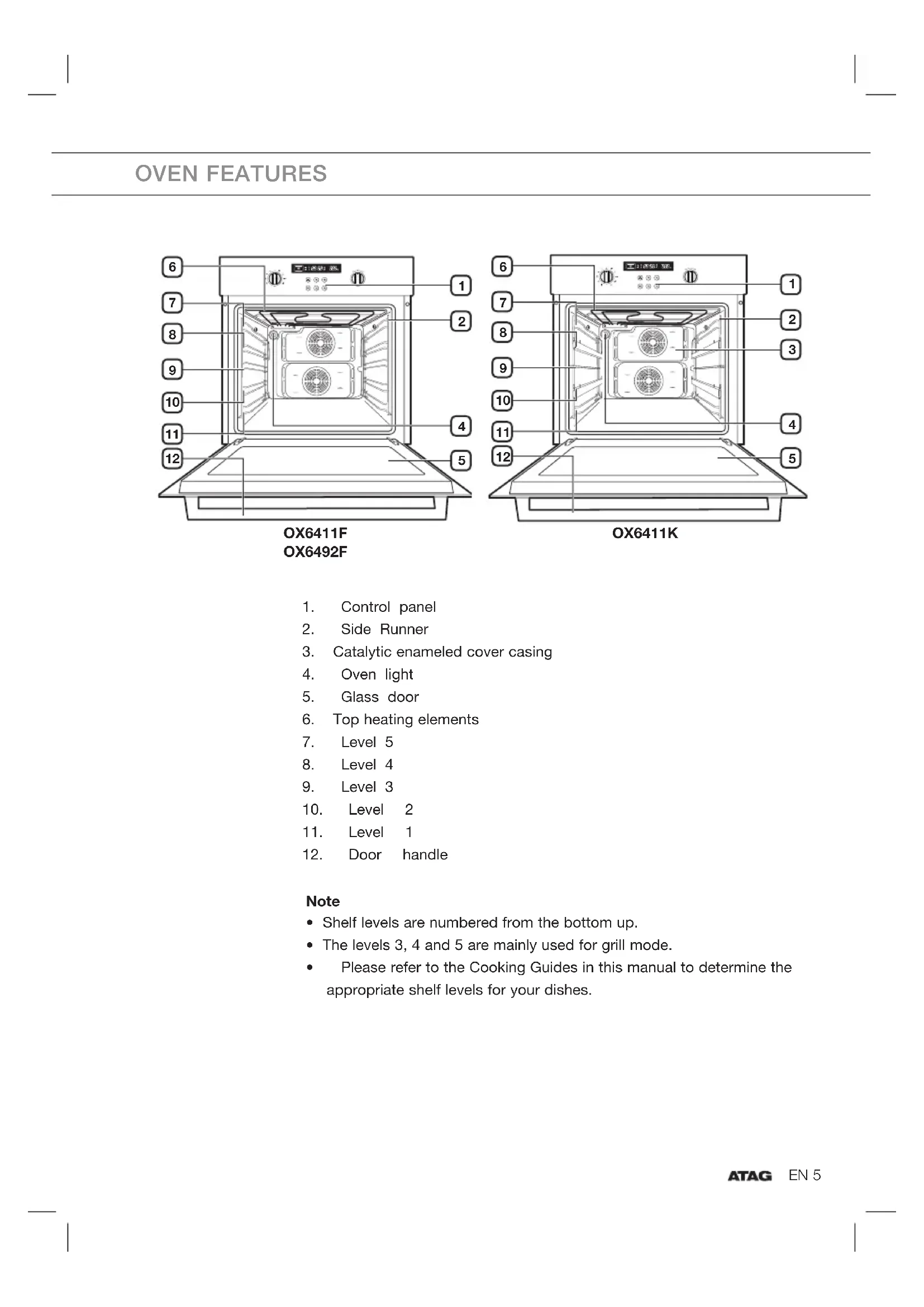
- Shelf levels are numbered from the bottom up.
- The levels 3, 4 and 5 are mainly used for grill mode.
- Please refer to the Cooking Guides in this manual to determine the appropriate shelf levels for your dishes. OVEN FEATURES
3. Catalytic enameled cover casing
6. Top heating elements
12EN 6 The following accessories are provided with your oven: Front Baking tray The baking tray could be used for the preparation of cakes, cookies and other pastries. Front Deep baking tray The deep baking tray should be used for roasting or collecting meat juices or fat drippings. Wire rack The wire rack should be used for dishes, cake tins, roasting and grilling trays. Roast wire rack The roast wire rack should be used for roasting. Always use the roast wire rack in combination with a baking tray. Note
- Be sure to attach the accessory correctly to the racks. Trays need to have at least 2 cm space towards the bottom of the oven, otherwise the enamel surface could be damaged.
- Be very careful removing meals and/or accessories out of the oven. Hot meals, accessories and surfaces can burn you!
- Place the deep baking tray at level 1 to collect the cooking juices.
- Parboiled potatoes and vegetables can be placed arount the edge of the deep baking tray to roast at the same time.
The baking tray, deep baking tray and wire rack should be inserted correctly into the side runners. When taking out the cooked foods from the oven, be careful of hot utensils and surfaces. Example Level 4: baking tray Level 1: deep baking tray Note When using the deep baking tray or the baking tray to collect drippings from cooking foods, ensure that the pan or tray is properly placed in the side runners. Allowing these accessories to contact the bottom surface of the oven can damage the enamel of the surface. Trays and pans placed on level 1 should clear the bottom surface of the oven by at least 2 cm. Baking tray Deep baking tray gap 2cm Level 1 Level 2 Level 3 Level 4 Level 5 OX6411F OX6492F OX6411KEN 8
USING THE ACCESSORIES
Wire rack, baking tray and deep baking tray Positioning the wire rack Insert the wire rack at any desired level. Positioning the baking tray or deep baking tray Insert the baking tray and/or the deep baking tray at any desired level. Telescopic slide guides (OX6411K) Telescopic slide guides and other oven accessories might get very hot! Use kitchen gloves or other suitable protection! Telescopic slide guides are located inside the oven to the right and to the left in three different levels.
- To insert the baking tray or wire rack, first slide out the telescopic guides for one particular level.
- Place the tray or wire rack on the guides. Pay attention to the round holes in the baking tray (see illustration)! By placing the wire rack you must push it tight between the guides. Push them back completely into the oven. Close the oven door only after you have pushed the telescopic guides into the oven.EN 9 FEATURES Safety shut off If a cooking time is not entered, the oven will shut itself off after the lengths of time indicated below. Shut off times for various temperature settings Under 105 °C 16 hours From 105 °C to 240 °C 8 hours From 245 °C to 300 °C 4 hours
- This oven’s electrical circuitry features a thermal shut off system. If the oven heats to abnormally high temperatures, the system will shut off the power supply to the heating elements for a period of time. Cooling fan During cooking, it is normal for the vent to release hot air from the front of the oven. The cooling fan will also continue to operate after the oven has been in use. It will turn off when the internal cabinet temperature has dropped to 60 °C or after 25 minutes.EN 10
Thank you for purchasing an ATAG built-in oven. First read the user instructions carefully and completely before starting to use the appliance, and keep them carefully for future reference.EN 11 SAFETY INSTRUCTIONS Installation of this oven must be performed only by a licensed electrician. The installer is responsible for connecting the appliance to the mains power supply in observance of the relevant safety recommendations. Electrical safety If the oven has been damaged in transport, do not connect it.
- This appliance must be connected to the mains power supply only by a specially licensed electrician.
- In the event of a fault or damage to the appliance, do not attempt to operate it.
- Repairs should be performed by a licensed technician only. Improper repair may result in considerable danger to you and others. If your oven needs repair, contact the Atag Customer Service or your dealer.
- If the supply cord is defective, it must be replaced by a special cord or assembly available from the manufacturer or an authorised service agent.
- Electrical leads and cables should not be allowed to touch the oven.
- The oven should be connected to the mains power supply by means of an approved circuit breaker or fuse. Never use multiple plug adapters or extension leads.
- The rating plate is located inside the oven on the right side.
- The power supply of the appliance should be turned off when it is being repaired or cleaned.
- Take care when connecting electrical appliances to sockets near the oven.EN 12 SAFETY INSTRUCTIONS
- This appliance is not intended for use by persons (including children) with reduced physical, sensory or mental capabilities, or lack of experience and knowledge, unless they have been given supervision or instruction concerning use of the appliance by a person responsible for their safety. Warning
- This appliance and the accessible parts become hot during use. Do not touch the hot components. Keep children younger than 8 away from the appliance unless you can watch them continuously.
- This equipment may be used by children older than 8, as well as by people with physical, sensory or learning difficulties or with a lack of experience and knowledge, provided they are supervised and instructed in the safe use of the appliance and understand the associated dangers.
- Do not allow children to play with the appliance. Do not allow children to clean or maintain the appliance unless supervised. Safety during operation
- This oven has been designed only for the cooking of household foods.
- During use, the oven interior surfaces become hot enough to cause burns. Do not touch heating elements or interior surfaces of the oven until they have had time to cool.
- Never store flammable materials in the oven.
- The oven surfaces become hot when the appliance is operated at a high temperature for an extended period of time.
- When cooking, take care when opening the oven door as hot air and steam can escape rapidly.EN 13 SAFETY INSTRUCTIONS
- When cooking dishes that contain alcohol, the alcohol may evaporate due to the high temperatures and the vapour can catch fire if it comes into contact with a hot part of the oven.
- For your safety, do not use high-pressure water cleaners or steam jet cleaners.
- Children should be kept at a safe distance when the oven is in use.
- Frozen foods such as pizzas should be cooked on the Big grid. If the baking tray is used, it may become deformed due to the great variation in temperatures.
- Do not pour water into the oven bottom when it is hot. This could cause damage to the enamel surface.
- The oven door must be closed during cooking.
- Do not line the oven bottom with aluminium foil and do not place any baking trays or tins on it. The aluminium foil blocks the heat, which may result in damage to the enamel surfaces and cause poor cooking results.
- Fruit juices will leave stains, which can become indelible on the enamel surfaces of the oven. When cooking very moist cakes, use the deep baking tray.
- Do not rest bakeware on the open oven door.
- Young children should be supervised to ensure that they do not play with the appliance.
- Small amounts of food require shorter cooking or heating time. If normal times are allowed they may overheat and burn.
- The appliance should be powered down before replacing the lamp to avoid the possibility of electric shock. During oven operation, the interior surfaces become very hot.EN 14 min. 20 min. 50
Safety instructions for the installation This oven may be installed only by an approved electrician. The installer is responsible for connecting the appliance to the mains and in so doing for observing the relevant safety regulations.
- Ensure protection from live parts when installing the oven.
- The kitchen cabinet in which the oven is built in must satisfy stability requirements as specified in DIN 68930. Installation in the cabinet This is a built-in oven, which needs to be installed into an upper or lower cabinet.
- Observe the minimum distances.
- The oven should be slid into place at the proper angle of alignmentEN 15
1. Fix the oven on both sides using screws.
2. After installation, remove the vinyl protective film from the door to
the appliance and the protective film from the interior surfaces of the oven. Live Neutral Earth Connecting to the mains power supply
- Electrical connections must be made as per the connection plate fixed to the back of the appliance by an electrical fitter who must ensure that the appliance has been connected up in accordance with fitting instructions and local regulations.
- Where the appliance is not connected to the mains electricity supply by a plug, an omni polar cutout device (with a contacts gap of at least 3 mm) must be fitted on the supply side of the connection to meet safety requirements.
- When the power is connected, the electronics of the oven are initialised; this neutralizes the lighting for a few seconds. The electric cable (H05 RR-F or H05 VV-F, Min. 1.5 m, 1.5~2.5 mm²) must be long enough for it to be connected to the built-in oven standing on the floor in front of its unit. Open the back cover of the oven at the bottom (using a flat-bladed screwdriver) and completely unscrew the connection screw and the cable clamp before fitting conducting wires into the appropriate terminals.
- The earth wire must be connected to the ( ) terminal of the oven.
- If the oven is connected to the power supply by a plug, this must remain accessible once the oven has been fitted.
- We cannot accept any liability in the event of an accident resulting from non-existent or faulty earthing.
Setting the clock When the power is first supplied to the oven, the display on the control panel will light briefly. After 3 seconds, you will see ‘12:00’ in the display.
Press the Clock Button. The clock symbol and ‘12:’ will blink.
Example: to set 1:30. Turn the Time / Temp Control Knob to set the hour of the day.
Press the Clock Button. The clock symbol and ‘:00’ will blink.
Turn the Time / Temp Control Knob to set the minute of the time. The clock symbol will blink.
Press the Clock Button to fi nish setting the clock or wait for about 10 seconds. The clock symbol will disappear and ‘30’ will stop blinking. The display shows the time of day. The appliance is now ready to use.EN 18 Initial cleaning Clean the oven thoroughly before using for the first time.
- Do not use sharp or abrasive cleaning materials. These could damage the oven surface. For ovens with enamel fronts, use commercially available cleaning products. To clean the oven
1. Open the door. The oven light will light up.
2. Clean all oven trays, accessories and side runners with warm water
or washing - up liquid and polish dry with a soft clean cloth.
3. Wash the oven interior in the same way.
4. Wipe the front of the appliance with a damp cloth.
Check that the clock is set correctly. Remove accessories and operate the oven at the convection setting at 200 °C for 1 hour before using. There will be a distinctive odor; this is normal, but ensure your kitchen is well ventilated during this conditioning period.
BEFORE YOU BEGINEN 19
Setting the Cooking Function Mode Turn the Cooking Function Select Knob to select the desired oven function.
- After 5 seconds the oven starts automatically! Oven functions Conventional Food is heated by top and bottom heating elements. This setting is suitable for baking and roasting. Top Heat + Convection We recommend this mode when roasting meat. The top heating element is in operation and the fans operate to circulate the hot air coming from top and back wall heating element. Convection Food is heated by the hot air from the heating element in the back and circulated by two fans. This setting provides uniform heating and is ideal for frozen convenience food as well as cake and croissants. This mode can be used for baking on two levels. Large Grill Food is heated by the top heating elements. We recommend this mode for grilling steaks and sausages as well as cheese toasts. Small Grill This mode is ideal for grilling small amounts of foods, such as baguettes, cheese or fi sh fi llets. Place the food in the middle of the wire rack, as only the smaller heating element in the centre is operating. Bottom Heat + Convection The bottom heating element and back wall heating element provide hot air which is circulated by the fans. This mode is ideal for baking food such as quiches, pizza, bread and cheesecakes.
Oven functions Auto Menu Programs You can select auto menu programs for baking, roasting and cooking. The mode, cooking time and temperatures are preprogrammed for your convenience. You simply select the item and appropriate serving option. OX6411K Defrosting This mode is ideal for defrosting frozen food by low- temperature heat and the fan. We recommend to turn over the food during the process. Food Item Shelf Level Accessory Time (min) Note Chicken (1000 - 1400g)
Wire rack + Deep baking tray 100~140 Turn over during defrosting Fish (300 - 1000 g)
Wire rack + Deep baking tray 50~80 Meat (500 - 1000 g) 2 Wire rack 50~100 Frozen food 2 Wire rack OX6411K Bottom heat This mode is ideal for browning the base of cake, pizza, quiches or pie. We recommend using this function towards the end of baking.EN 21
Setting the Oven Temperature Turn the Time / Temp Control Knob to adjust the temperature in increments of 5 °C. 40 °C – 250 °C 40 °C – 300 °C (Large & Small Grill) The temperature may be adjusted during cooking. During the preheating of the oven, on the left side (near the temperature that is set) a ‘dot’ or “°C” is blinking. When the oven has reached the temperature that has been set, the ‘dot’ disappears or “°C” will light continuously. Switching the Oven Off To switch the oven o , turn the Cooking Function Select Knob to the ‘O ’ position. Setting the End Time You can set the end time during cooking.
Press the End Time button. Example: current time is 12:00.
Turn the Time / Temp Control Knob to set the desired end time.EN 22
Press the End Time button. The oven operates with the selected end time automatically unless the End Time button is pressed within 5 seconds.
- During cooking, you can adjust the previously set end time with the Time / Temp Control Knob for better results. Setting the Cook Time You can use the ‘set cook time function’ in operating status.
Turn the Time / Temp Control Knob to set the desired cook time.
Press the Cook Time button. The oven operates with the selected cook time unless the Cook Time button is pressed within 5 seconds. During cooking, you can adjust the previously set cook time with the Time / Temp Control Knob for better results.EN 23 Setting the Delayed Start Time Case 1 - Cook time is entered first If the end time is entered after the cook time has already been set (see page 18), the cook time and the end time are calculated and if necessary the oven sets a delayed start point.
Press the End Time button. Example: current time is 15:00 and the desired cook time is 5 hours.
Turn the Time / Temp Control Knob to set the end time. Example: You want to cook for 5 hours and fi nish at 20:30.
Press the End Time button. A symbol with brackets appears until the delayed start point.
Setting the Delayed Start Time Case 2 - End time is entered first If the cook time is entered after the end time has already been set (see page 17), the cook time and the end time are calculated and if necessary the oven sets a delayed start point.
Press the Cook Time button. Example: current time is 15:00 and the desired end time is 17:00.
Turn the Time / Temp Control Knob to set the cook time. Example: You want to cook for 1 hour and 30 minutes and end at 17:00.
Press the Cook Time button. A symbol with brackets appears until the delayed start point.
Press the Kitchen Timer button once. The alarm symbol fl ashes.
Turn the Time / Temp Control Knob to set the desired time. Example: 5 minutes.
Press the Kitchen Timer button to start the kitchen timer. When the set time has elapsed, an audible signal sounds.
- Press and hold the Kitchen Timer button for 2 seconds each to cancel the timer.
Turn the Cooking Function Knob to Auto Cook.
Select the desired recipe by turning the Time / Temp control knob to the right and left. Wait to select weight 5 seconds after selecting a recipe. For a recipe with weight fi xed, start cooking immediately.
Select the desired weight by turning the Time / Temp control knob to the right and left.
- When it reaches the time for ‘Turn Over / Around’ It beeps to inform the time for ‘Turn Over / Turn Around’.
- The lamp automatically turns off after 5 minutes. Child Safety Function The lock is available whether or not the oven is in operation.
Turn Cook Function Select Knob to ‘O ’ position. Press the Child Lock button. Hold for 3 seconds. The lock symbol will appear in the display fi eld.
Turn Cook Function Select Knob to ‘O ’ position. Press the Child Lock button. Hold for 3 seconds again to unlock.
- When locked, all buttons and knobs except the Child Lock button fail to operate. Switching the Sound On/Off
To turn the beeper o , press the Clock and End Time buttons at the same time and hold for 3 seconds.
To turn the beeper back on, press the Clock and End Time buttons again at the same time and hold for 3 seconds.
The conventional function is ideal for baking and roasting foods arranged on one rack. Both the top and bottom heating elements operate to maintain the oven temperature. We recommend to preheat the oven in conventional mode. Food Item Shelf Level Accessory Temperature (°C) Time (min) Frozen Lasagne (500-1000g) 3 Wire rack 180-200 40-50 Whole Fish (e.g. Dorade) (300-1000g) 3-4 cut on each side DROP OIL 3/2 Wire rack / Deep baking tray 240 15-20 Fish fi lets (500-1000g) 3-4 cut on each side DROP OIL 3 Baking tray 200 13-20 Frozen cutlets (350-1000g) minced meat & with ham, cheese or mushroom fi ling DROP OIL 3 Baking tray 200 25-35 Frozen cutlets from minced, carrot, beetroot or potato (350-1000g) DROP OIL 3 Baking tray 200 20-30 Pork on bone cutlets (500-1000g)
2. Top Heat + Convection
The top heating element is in operation and the fan operates to constantly circulate the hot air. We recommend to preheat the oven with Top Heat + Convection mode. Food Item Shelf Level Accessory Temperature (°C) Time (min) Pork on bone (1000g)
BRUSH WITH OIL&SPICES
3/2 Wire rack / Deep baking tray 180-200 50-65 Pork shoulder in foil (1000-1500g) MARINATE 2 Baking tray 180-230 80-120 Whole chicken (800-1300g)
2 Wire rack 180-200 30-40 Roast Beef (800-1200g)
This function bakes foods placed on up to three shelves and is also appropriate for roasting. Cooking is achieved by the heating element on the rear wall and the fan distributes the heat. We recommend to preheat the oven in convection mode. Food Item Shelf Level Accessory Temperature (°C) Time (min) Lamb rack (350-700g)
BRUSH WITH OIL & SPICES
3/2 Wire rack / Deep baking tray 190-200 40-50 Baked Bananas (3-5 pcs), cut with knife on top, add10-15g chocolate, 5-10g nuts into cuts, drop sugar water, wrap in aluminium foil. 3 Wire rack 220-240 15-25 Baked apples 5-8pcs each 150-200g Take out the hearts, add raisins and jam. Use ovenproof dish. 3 Wire rack 200-220 15-25 Cutlets from minced meat (300-600g) DROP OIL 3 Baking tray 190-200 18-25 Minced Meat roll with fi lling ‘Russian style’ (500-1000g)
The large grill function grills large quantities of flat foods, such as steaks, schnitzels and fish. It is also suitable for toasting. Both the top heating element and the grill are on in this mode. We recommend to preheat the oven using Large Grill mode. Food Item Shelf Level Accessory Temperature (°C) Time (min) Sausages (thick) 5-10pcs 4/3 Wire rack / Deep baking tray 220 5-8 turnover 5-8 Sausages (thin) 8-12pcs 4/3 Wire rack / Deep baking tray 220 4-6 turnover 4-6 Toasts 5-10pcs 5 Wire rack 240 1-2 turnover 1-2 Cheese Toasts 4-6 pcs 4/3 Wire rack / Baking tray 200 4-8 Frozen Pancakes with fi lling ‘Russian Style’ (200-500g) 3 Baking tray 200 20-30 Beef Steaks (400-800g) 4/3 Wire rack / Deep baking tray 240 8-10 turnover 5-7EN 32 OVEN FUNCTIONS
This setting is for grilling smaller amounts of flat foods, such as steaks, schnitzels, fish and toast, placed in the middle of the tray. Only the top element is in operation. Put food in the centre of accessory. Food Item Shelf Level Accessory Temperature (°C) Time (min) Frozen Oven Camembert (2 – 4 each 75g)
6. Bottom Heat + Convection
The Bottom Heat + Convection mode is for recipes calling for a moist topping and a crisp base, as with foods like pizzas, quiches lorraine, German-style open fruitcakes and cheesecakes. We recommend to preheat the oven in Bottom Heat + Convection mode. Food Item Shelf Level Accessory Temperature (°C) Time (min) Yeast dough pie with apple frozen (350-700g) 3 Wire rack 180-200 15-20 Pu pastry small pies with fi lling frozen (300-600g)
3 Baking tray 180 15-23 Cannelloni in sauce (250-500g) use ovenproof dish 3 Wire rack 180 22-30 Yeast dough pies with fi lling (600-1000g)
The following table presents 27 Auto Program for Cooking, Roasting and Baking. It contains its quantities, weight ranges and appropriate recommendations. Cooking Modes and times have been pre- programmed for your convenience. You can refer to these guide lines for cooking. Always insert food in cold oven. No Food Item Weight/kg Accessory Shelf Level
Wire rack 2 Put frozen pizza in the middle of the wire rack. The fi rst setting is for thin Italian pizza. The second setting is for thick American pizza.
Baking tray 2 Distribute frozen Oven Chips on baking tray. The fi rst setting is recommended for thin French fries, the second setting is recommended for thick oven chips. Use baking paper. We recommend to turn over after 2/3 of cooking time.
Baking tray 2 Put frozen potato croquettes evenly on baking tray. We recommend to turnover after 2/3 of cooking time.
Wire rack 3 Put ready prepared lasagne into a suitable sized ovenproof dish. Put dish in the centre of oven.
Roast wire rack Deep baking tray
Put 2-6 beef steaks side by side evenly on roast wire rack. The fi rst setting is for thin steaks, the second setting is for thick steaks. Turn over after beep sounds.
Roast wire rack Deep baking tray
Marinate Roast Beef and put on roast wire rack. Add 1 cup of water into deep baking tray. Turn over after beep sounds. After cooking wrap in aluminium foil and let stand for 5-10 min.
Roast wire rack Deep baking tray
Put marinated roast pork on roast wire rack. Turn over, as soon as the oven beeps.
Roast wire rack Deep baking tray
Marinate lamb chops. Put lamb chops on roast wire rack. Turn over, as soon as the oven beeps. The fi rst setting is for thin chops, the second setting is for thick chops.
Roast wire rack Deep baking tray
Brush chicken pieces with oil and spices. Put chicken pieces side by side on the roast wire rack.EN 35 OVEN FUNCTIONS No Food Item Weight/kg Accessory Shelf Level
Roast wire rack Deep baking tray
Brush chilled chicken with oil and spices and put breast-side-up on the roast wire rack.
Roast wire rack Deep baking tray
Prepare duck breast, put on the roast wire rack with the fat-side up. First setting is for thick duck breast, the second setting is for very thick duck breasts.
Roast wire rack Deep baking tray
Put roll of turkey on the roast wire rack. Turn over, as soon as the oven beeps.
Wire rack 3 Put prepared fresh fi sh (e.g. trout, haddock, codfi sh) in a suitable sized ovenproof glassware with lid. Add liquid until bottom of dish is covered e.g. 3-4 tbsp. lemon juice, white wine or water and cover with lid. Put dish on wire rack. If you prefer roasted appearance, brush skin of fi sh with olive oil and do not cover.
Roast wire rack Deep baking tray
Put fi shes head to tail on the roast wire rack. First setting is for 2 fi shes, the second setting is for 4 fi shes. The program is suitable for whole fi shes, like trout, pikeperch or gilthead.
Roast wire rack Deep baking tray
Put salmon steaks on the roast wire rack. Turn over, as soon as the oven beeps.
Baking tray 2 Rinse potatoes, cut potatoes into halves. Brush with olive oil, herbs and spices. Distribute on the baking tray evenly. The fi rst setting is for small potatoes (each 100g), the second setting is for large oven potatoes (each 200g).
Deep baking tray 4 Put vegetables, such as sliced courgette, pieces of pepper, sliced aubergine, mushrooms and cherry tomatoes into deep baking tray. Brush with a mixture of olive oil, herbs and spices.
Wire rack 2 Prepare vegetable gratin using an ovenproof round dish. Put dish on wire rack in the centre of oven.
Loaf Cake 1. 0.7 - 0.8 Wire rack 2 Put dough into a rectangular, buttered, black metal baking dish, with a length of 30 cm.EN 36 OVEN FUNCTIONS No Food Item Weight/kg Accessory Shelf Level
Apple Pie 1. 1.2 - 1.4 Wire rack 2 Prepare apple pie (Dutch style) in a round black metal dish with a diameter 24 cm.
Wire rack 2 Put dough into a suitable sized buttered baking dish for bundt cake.
Wire rack 2 Put mu n dough in metal mu n dish, suitable for 12 mu ns. Set dish on rack.
0.5 -0.6 kg weight range is recommended for mu ns of each 45g, 0.7-0.8 kg weight
range is recommended for medium sized mu ns of each 65g.
White Bread 1. 0.7 - 0.8 Wire rack 2 This program is suitable for bread mixtures using 500 g wheat fl our. Follow instruction on package. Put yeast dough into rectangular baking dish. Brush top of dough with water. Cut length with a knife.
Wholemeal Bread 1. 0.7 - 0.8 Wire rack 2 This program is suitable for bread mixtures using 500 g wheat and rye fl our. Follow instruction on package. Put leaven (sour dough) into suitable rectangular baking dish. Brush top of dough with water. Cut length with a knife.
Baking tray 3 The fi rst setting in suitable for dough used for small pieces such as bread rolls or fresh dough for croissants (4-8 pcs). Setting 2 is suitable for dough used for homemade ciabatta breads or baguettes (2-6 pcs). Use baking paper.
Baking tray 2 The fi rst setting is suitable for Pizza Snacks (7-9 pcs). Setting 2 is suitable for one round or tray sized Pizza. The weight ranges are including topping such as sauce, vegetables, ham and cheese. If you prefer strong crust, we recommend to preheat oven with bottom heat plus convection mode for 5 min.
Yeast dough Fermentation
(bread dough) Wire rack 2 0.2-0.4 kg weight range setting is to prepare yeast dough for pizza, cake, or to pre-rise bread dough. Put into a big round dish and cover with cling fi lm. 0.4-0.6 kg setting is for bread dough like yeast dough or sour dough. 0.4-0.8 kg setting is for leaven. Knead dough manually, put into baking dish and cover with cling fi lm.EN 37 OVEN FUNCTIONS
8. Auto Menu Programs for OX6411F/OX6492F
The following table presents 17 Auto Program for Cooking, Roasting and Baking. It contains its quantities, weight ranges and appropriate recommendations. Cooking Modes and times have been pre- programmed for your convenience. You can refer to these guide lines for cooking. Always insert food in cold oven. No Food Item Weight/kg Accessory Shelf Level
Wire rack 2 Put frozen pizza in the middle of the wire rack. The fi rst setting is for thin Italian pizza. The second setting is for thick American pizza.
Baking tray 2 Distribute frozen Oven Chips on baking tray. The fi rst setting is recommended for thin French fries, the second setting is recommended for thick oven chips. Use baking paper. We recommend to turn over after 2/3 of cooking time.
Baking tray 2 Put frozen potato croquettes evenly on baking tray. We recommend to turnover after 2/3 of cooking time.
Wire rack 3 Put ready prepared lasagne into a suitable sized ovenproof dish. Put dish in the centre of oven.
Wire rack Deep baking tray
Put 2-6 beef steaks side by side evenly on wire rack. The fi rst setting is for thin steaks, the second setting is for thick steaks. Turn over after beep sounds.
Wire rack Deep baking tray
Marinate Roast Beef and put on wire rack. Add 1 cup of water into deep baking tray. Turn over after beep sounds. After cooking wrap in aluminium foil and let stand for 5-10 min.
Wire rack Deep baking tray
Brush chilled chicken with oil and spices and put breast-side-up on the wire rack.
Wire rack 3 Put prepared fresh fi sh (e.g. trout, haddock, codfi sh) in a suitable sized ovenproof glassware with lid. Add liquid until bottom of dish is covered e.g. 3-4 tbsp. lemon juice, white wine or water and cover with lid. Put dish on wire rack. If you prefer roasted appearance, brush skin of fi sh with olive oil and do not cover.EN 38 OVEN FUNCTIONS No Food Item Weight/kg Accessory Shelf Level
Loaf Cake 1. 0.7 - 0.8 Wire rack 2 Put dough into a rectangular, buttered, black metal baking dish, with a length of 30 cm.
Apple Pie 1. 1.2 - 1.4 Wire rack 2 Prepare apple pie (Dutch style) in a round black metal dish with a diameter 24cm.
Wire rack 2 Put dough into a suitable sized buttered baking dish for bundt cake.
Wire rack 2 Put mu n dough in metal mu n dish, suitable for 12 mu ns. Set dish on rack.
0.5 -0.6 kg weight range is recommended for mu ns of each 45g, 0.7-0.8 kg weight
range is recommended for medium sized mu ns of each 65g.
White Bread 1. 0.7 - 0.8 Wire rack 2 This program is suitable for bread mixtures using 500 g wheat fl our. Follow instruction on package. Put yeast dough into rectangular baking dish. Brush top of dough with water. Cut length with a knife.
Wholemeal Bread 1. 0.7 - 0.8 Wire rack 2 This program is suitable for bread mixtures using 500 g wheat and rye fl our. Follow instruction on package. Put leaven (sour dough) into suitable rectangular baking dish. Brush top of dough with water. Cut length with a knife.
Baking tray 3 The fi rst setting in suitable for dough used for small pieces such as bread rolls or fresh dough for croissants (4-8 pcs). Setting 2 is suitable for dough used for homemade ciabatta breads or baguettes (2-6 pcs). Use baking paper.
Baking tray 2 The fi rst setting is suitable for Pizza Snacks (7-9 pcs). Setting 2 is suitable for one round or tray sized Pizza. The weight ranges are including topping such as sauce, vegetables, ham and cheese. If you prefer strong crust, we recommend to preheat oven with bottom heat plus convection mode for 5 min.
Yeast dough Fermentation
(bread dough) Wire rack 2 0.2-0.4 kg weight range setting is to prepare yeast dough for pizza, cake, or to pre- rise bread dough. Put into a big round dish and cover with cling fi lm. 0.4-0.6 kg setting is for bread dough like yeast dough or sour dough. 0.4-0.8 kg setting is for leaven. Knead dough manually, put into baking dish and cover with cling fi lm.EN 39
Aqua Cleaning If your oven is dirty and must be cleaned, you could use the built- in aqua cleaning. Aqua cleaning will be available after the oven has cooled down.
Remove all accessoiries from the oven.
Pour 400 ml (3/4 pint) of water onto the bottom of the oven.
Set the operation knob to aqua cleaning. When the display starts to blink and a beep occurs, the operation is complete.
Set the operation knob to O to end the aqua cleaning.
Clean the oven interior with a soft clean cloth.EN 40
- Take care when opening the door before the end of the aqua cleaning procedure; the water on the bottom is hot.
- Open the oven door and remove the remaining water with a sponge.
- Never leave the residual water in the oven for a longer time, for example, over night.
- Clean the oven interior with a sponge and detergent or a soft brush. Stubborn soil can be removed with a nylon scourer.
- Lime deposits can be removed with a cloth soaked in vinegar.
- Use soft cloth and clear water to clean the interior. Do not forget to wipe under the oven door seal.
- If the oven is heavily soiled, the procedure may be repeated after the oven has cooled.
- If the oven is heavily soiled with grease, for example, after roasting or grilling, it is recommend that you rub detergent into the stubborn soil before activating the oven cleaning function.
- Leave the oven door ajar at 15° after cleaning to allow the interior enamel surface to dry thoroughly. Warning
- Make sure the oven and accessory is cool before cleaning.
- Do not use high - pressure water cleaners or steam jet cleaners to clean the oven. Oven interior
- For cleaning the interior of the oven, use a clean cloth and a mild cleaning product or warm soapy water.
- Do not hand-clean the door seal.
- Do not use scouring pads or cleaning sponges.
- To remove stubborn soil, use a special oven cleaner.
- The cover casing should be cleaned using hot water, detergent and a soft nylon brush.
- Do not use abrasive cleaning products, hard brushes, scouring pads or cloths, steel wool, knives or other abrasive materials. Oven exterior
- For cleaning the exterior of the oven, use a clean cloth and a mild cleaning product or warm soapy water.
- Dry with kitchen roll or a dry towel.
- Do not use scourers, caustic cleaners or abrasive products.EN 41
Stainless steel and Graphite black oven fronts
- Do not use steel wool, scouring pads or other abrasives. They may damage the finish.
- Wipe the surface gently with a soft clean cloth or microfiber cloth and a mild window cleaning detergent. Accessories
- Wash the accessories after every use and dry them with a kitchen towel. If necessary, lay in warm soapy water for about 30 minutes for easier cleaning. Catalytic enamel surface (OX6411K) The removable cover casing is coated with a dark gray catalytic enamel that can become coated with oil and fat distributed by circulating air during convection heating. These deposits will burn off at oven temperatures of 200 °C and higher, for example, when baking or roasting. Higher temperatures will result in faster burning. The oven and accessories should be cleaned after each use. Otherwise further baking and roasting will cause the deposits to bake on even harder and cleaning may become difficult and in extreme cases impossible. Cleaning by hand Make sure the oven is cool before cleaning
- The catalytic enameled cover casing should be cleaned using a solution of hot water and washing-up liquid applied with a soft nylon brush.
- Do not use abrasive cleaning products, hard brushes, scouring pads or cloths, steel wool, knives or other abrasive materials. Do not use oven spray on catalytic enamel as the chemicals used in oven sprays will damage catalytic enamel and render it ineffective.
- If using oven sprays on the interior oven surfaces, the catalytic cover casing must first be removed from the oven. Cleaning with high temperatures Before cleaning the catalytic cover casing with high temperatures, make sure that all interior oven surfaces have been cleaned as described above. Otherwise, the high temperatures can bake deposits onto the interior oven surfaces and make them impossible to remove.EN 42
If, after manual cleaning, the oven is still heavily soiled, heating it to a high temperature will help remove soiling caused by oil and grease splashes. Note that deposits of spices, syrups and similar substances are not removed by this process. These should be removed by hand with a mild solution of hot water and washing-up liquid applied with a soft brush.
- Remove all accessories from the oven.
- Set the oven to conventional function.
- Set the heat to 250 °C.
- Run the oven for approximately 1 hour. The length of time will depend on the degree of soiling. It is a good idea to set the finish time for the process using the end time setting, in case you forget to switch the oven off at the end. Any remaining soil will gradually disappear with each subsequent use of the oven at high temperatures. Cleaning the Oven Door For normal use, the oven door must not be removed but if removal is necessary, for example, for cleaning purposes, follow these instructions. Caution: The oven door is heavy. Door removal
Open the door and fl ip open the clips at both hinges completely.
Close the door by approximately 70°. With both hands, grasp the sides of the oven door at its middle and pull-lift until the hinges can be taken out.EN 43
Door attaching Repeat steps 1 and 2 in reverse order. Door glass removal The oven door is equipped with three sheets of glass placed against each other. These sheets can be removed for cleaning.
Remove the two screws on the left and right sides of the door.
Detach the covering and remove glass 1 from the door.
Lift glass 2 and remove the two holder glass rubbers from the top of the sheet. Clean the sheets with warm water or washing-up liquid and polish dry them with a soft clean cloth. Door glass attaching Repeat steps 1, 2 and 3 in reverse order.
- When assembling the inner glass 1, put printing to the lower direction. Attention: The glass may break if you use excessive force especially at the edges of the front sheet.
- Whenever the door is separated from the oven, the clips should be flipped open.
- Do not use harsh abrasive cleaners or metal scrapers to clean the oven door; they can scratch the surface, which may cause the glass to shatter.
- When the door is mounted, removing some of the parts (the door glass or some other part) from the door may result in injury.EN 44 Cleaning the Side Runners To clean the interior of the oven, the side runners can be removed. Detaching the Side Runners
Press the central part of the side runner top portion.
Rotate the side runner by approximately 45°.
Pull the side runner out of the two holes in the bottom and remove the side runner. Attaching the Side Runners Repeat steps 1, 2 and 3 in reverse order.
CLEANING AND CAREEN 45
Cleaning the top heater
Remove the upper nut circular by turning it anti-clockwise while holding the top of the heater. The front of the top heater inclines downwards.
When the cleaning has been done, lift the top of the heater back to its original level and turn the nut circular clockwise.
CLEANING AND CAREEN 46
- Danger of electric shock! Before replacing any of the oven light bulbs, take the following steps:
1. Switch off the oven.
2. Disconnect the oven from the mains.
3. Protect the oven light bulb and the glass cap by laying a cloth on
the bottom of the oven compartment. Bulbs can be purchased from the ATAG Customer Service. Replacing the rear oven lamp and cleaning the glass cap
Remove the cap by turning anticlockwise and remove the metal ring, the sheet ring and clean the glass cap. If necessary, replace the bulb with a 25 watt, 230 V, 300 °C heat-resistant oven light bulb. Clean the glass cap, the metal ring and the sheet ring if necessary.
Fit the metal and the sheet ring to the glass cap. Place the glass cap where you have removed it in step 1 and turn it clockwise to keep it in place.
CLEANING AND CAREEN 47
TROUBLESHOOTING If you have problems with your oven, try the solutions suggested below. They may save you the time and inconvenience of an unnecessary service call. What should I do if the oven doesn’t heat up? Check to see if one of the following actions resolves the issue:
- The oven may not be switched on. Switch the oven on.
- The clock may not be set. Set the clock (see section ‘Setting the clock’).
- Check to see if the required settings have been applied.
- A household fuse may have blown or a circuit breaker may have tripped. Replace the fuses or reset the circuit. If this happens repeatedly, call an authorised electrician. What should I do if, even though the oven function and temperature have been set, the oven does not heat up? There may be problems with the internal electrical connections. Call your local service centre. What should I do if an error code appears and the oven does not heat up? There is a fault in the internal electrical circuit connection. Call your local service centre. What should I do if the time display is blinking? There was a power failure. Set the clock (see section ‘Setting the clock’). What should I do if the oven light doesn’t illuminate? The oven light is faulty. Replace the oven light bulb (see section ‘Changing the lamp’). What should I do if the oven’s fan is running without having been set? Following use, the oven’s fan runs until the oven has cooled down. Call your local service centre if the fan continues to run after the oven has cooled down.EN 48
Oven has continued operating at set temperature for prolonged time. Turn the oven o and remove food. Allow oven to cool down before using again. An error of the oven may cause low performance and problems in safety. Stop using the oven im- mediately. If any of these errors occur, please contact ATAG Customer Service.EN 49 TECHNICAL SPECIFICATIONS Model OX6411F/OX6411K/OX6492F Power Source 230 V ~ 50 Hz Output Rating max. 3400 W Dimensions (W x H x D) Outside Oven cavity net. 598 x 595 x 566 mm 440 x 365 x 405 mm Volume (usable capacity) 65 L Weight Net Shipping 37/38/37 kg approx 42.5/43.5/42.5 kg approx ATAG Model F2946XOK1146XOF1146XOnoitacifitnedi Energy ĸĐŝĞŶĐLJ Index per cavity (EEI 1,6011,6011,601)ytivac Energy ĸĐŝĞŶĐLJ Class per AAAytivac Energy ĐŽŶƐƵŵƉƟŽŶ required to heat a standardised load in a cavity of an electric heated oven during a cycle in ĐŽŶǀĞŶƟŽŶĂů mode per cavity (electric ĮŶĂů energy) (EC electric 98,098,098,0)yt ivac Energy ĐŽŶƐƵŵƉƟŽŶ required to heat a standardised load in a cavity of an electric heated oven during a cycle in fan-forced mode per cavity (electric ĮŶĂů energy) (EC electric 78,078,078,0)ytivac Number of 111seitivac Heat source per cavity (electricity or yticirtcelEyticir tcelEyti cirtcelE)sag Volume per cavity 565656)V( Type of Built-in Built-in Built-in nevo Mass of the appliance 7 38373)M( ( 1 ) 1 kWh/cycle = 3,6 MJ/cycle. Data determined according to standard EN 60350-1 and Commission ZĞŐƵůĂƟŽŶƐ (EU) No 65/2014 and (EU) No Energy saving ƟƉƐ
- During cooking, the oven door should remain closed except for turning food over. Do not open the door frequently during cooking to maintain the oven temperature and to save energy.
- If cooking ƟŵĞ is more than 30 minutes, the oven may be switched Žī 5- 10 minutes before the end of the cooking ƟŵĞ to save energy. The residual heat will complete the cooking process.
- Plan oven use to avoid turning the oven Žī between cooking one item and the next to save energy and reduce the ƟŵĞ for re-ŚĞĂƟŶŐ the oven.
- Wherever possible cook more than one item at a ƟŵĞEN 50
DISPOSAL OF APPLIANCE AND PACKAGING
The packaging of this appliance is recyclable and may have been made of:
- polypropylene tape (PP). Dispose of these materials in a responsible manner and in accordance with government regulations. The appliance carries the symbol of a crossed-out dustbin to state that segregated processing is compulsory to avoid any negative effects on the environment and publichealth. This means that at the end of its working life, you must hand it in at a special refuse collection centre run by your local authority or dealer. Segregated processing enables the recovery of the materials used in the production of this appliance, thus saving considerably in terms of raw materials and energy. Declaration of conformity We declare that our products meet the applicable European Directives, Decisions and Regulations and the requirements listed in the standards referenced.