 ManualGo.com
OX6411BUU - Cooker SAMSUNG - Free user manual and instructions
Find the device manual for free OX6411BUU SAMSUNG in PDF.



Download the instructions for your Cooker in PDF format for free! Find your manual OX6411BUU - SAMSUNG and take your electronic device back in hand. On this page are published all the documents necessary for the use of your device. OX6411BUU by SAMSUNG.
USER MANUAL OX6411BUU SAMSUNG
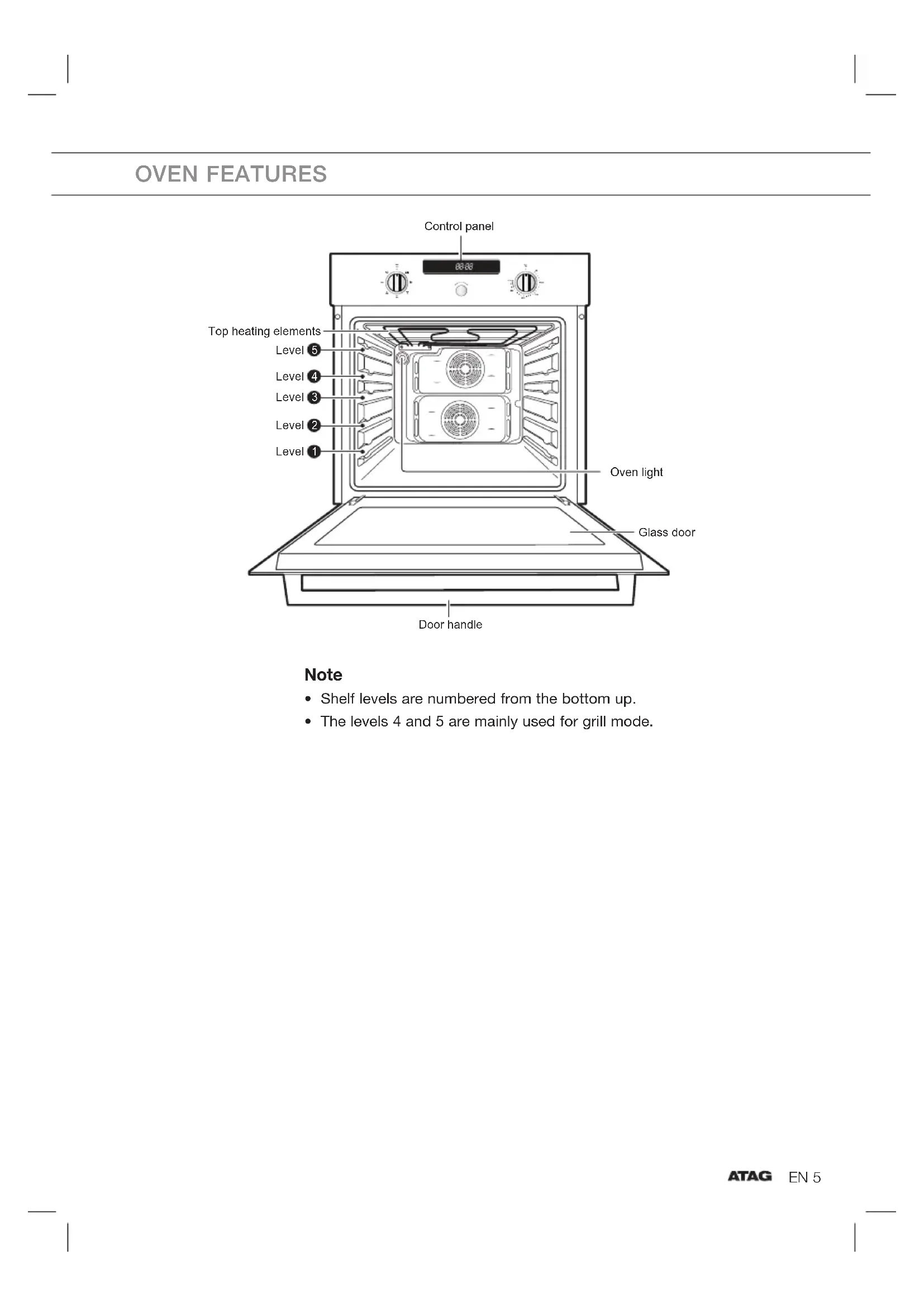
- Shelf levels are numbered from the bottom up.
- The levels 4 and 5 are mainly used for grill mode. OVEN FEATURES Glass door Top heating elements Level Level Level Level Level Oven light Door handle Control panel
1EN 6 The following accessories are provided with your oven: Front Baking tray The baking tray could be used for the preparation of cakes, cookies and other pastries. Wire rack The wire rack should be used for dishes, cake tins, roasting and grilling trays. If you remove the wire rack completely out off the oven, you must lift it a little at the end. Note
- Be sure to attach the accessory correctly to the racks. Trays need to have at least 2 cm space towards the bottom of the oven, otherwise the enamel surface could be damaged.
- Be very careful removing meals and/or accessories out of the oven. Hot meals, accessories and surfaces can burn you!
Thank you for purchasing an ATAG built-in oven. First read the user instructions carefully and completely before starting to use the appliance, and keep them carefully for future reference.EN 8 SAFETY INSTRUCTIONS Installation of this oven must be performed only by a licensed electrician. The installer is responsible for connecting the appliance to the mains power supply in observance of the relevant safety recommendations. Electrical safety If the oven has been damaged in transport, do not connect it.
- This appliance must be connected to the mains power supply only by a specially licensed electrician.
- In the event of a fault or damage to the appliance, do not attempt to operate it.
- Repairs should be performed by a licensed technician only. Improper repair may result in considerable danger to you and others. If your oven needs repair, contact the Atag Customer Service or your dealer.
- If the supply cord is defective, it must be replaced by a special cord or assembly available from the manufacturer or an authorised service agent.
- Electrical leads and cables should not be allowed to touch the oven.
- The oven should be connected to the mains power supply by means of an approved circuit breaker or fuse. Never use multiple plug adapters or extension leads.
- The rating plate is located on the inside of the oven on the right side.
- The power supply of the appliance should be turned off when it is being repaired or cleaned.
- Take care when connecting electrical appliances to sockets near the oven.EN 9 SAFETY INSTRUCTIONS WARNING
- This appliance and the accessible parts become hot during use. Do not touch the hot components. Keep children younger than 8 away from the appliance unless you can watch them continuously.
- This equipment may be used by children older than 8, as well as by people with physical, sensory or learning difficulties or with a lack of experience and knowledge, provided they are supervised and instructed in the safe use of the appliance and understand the associated dangers. Do not allow children to play with the appliance. Do not allow children to clean or maintain the appliance unless supervised. Safety during operation
- This oven has been designed only for the cooking of household foods.
- During use, the oven interior surfaces become hot enough to cause burns. Do not touch heating elements or interior surfaces of the oven until they have had time to cool down.
- Never store flammable materials in the oven.
- The oven surfaces become hot when the appliance is operated at a high temperature for an extended period of time.
- When cooking, take care when opening the oven door as hot air and steam can escape rapidly.
- When cooking dishes that contain alcohol, the alcohol may evaporate due to the high temperatures and the vapour can catch fire if it comes into contact with a hot part of the oven.
- For your safety, do not use high-pressure water cleaners or steam jet cleaners.
- Children should be kept at a safe distance when the oven is in use.EN 10 SAFETY INSTRUCTIONS
- Frozen foods such as pizzas should be cooked on the Wire rack. If the baking tray is used, it may become deformed due to the great variation in temperatures.
- Do not pour water into the oven bottom when it is hot. This could cause damage to the enamel surface.
- The oven door must be closed during cooking.
- Do not line the oven bottom with aluminium foil and do not place any baking trays or tins on it. The aluminium foil blocks the heat, which may result in damage to the enamel surfaces and cause poor cooking results.
- Fruit juices will leave stains, which can become indelible on the enamel surfaces of the oven.
- Do not rest bakeware on the open oven door.
- Young children should be supervised to ensure that they do not play with the appliance.
- Small amounts of food require shorter cooking or heating time. If normal times are allowed they may overheat and burn.
- The appliance should be powered down before replacing the lamp to avoid the possibility of electric shock. During oven operation, the interior surfaces become very hot.EN 11 Safety instructions for the installation This oven may be installed only by an approved electrician. The installer is responsible for connecting the appliance to the mains and in so doing for observing the relevant safety regulations.
- Ensure protection from live parts when installing the oven.
- The kitchen cabinet in which the oven is built in must satisfy stability requirements as specified in DIN 68930. Installation in the cabinet This is a built-in oven, which needs to be installed into an upper or lower cabinet.
- Observe the minimum distances.
- The oven should be slid into place at the proper angle of alignment.
1. Fix the oven on both sides using screws.
2. After installation, remove the vinyl
protective film from the door to the appliance and the protective film from the interior surfaces of the oven. Connecting to the mains power supply
- Electrical connections must be made as per the connection plate fixed to the back of the appliance by an electrical fitter who must ensure that the appliance has been connected up in accordance with fitting instructions and local regulations.
- Where the appliance is not connected to the mains electricity supply by a plug, an omni polar cutout device (with a contacts gap of at least 3 mm) must be fitted on the supply side of the connection to meet safety requirements. Note
- When the power is connected, the electronics of the oven are initialised; this neutralizes the lighting for a few seconds. The electric cable (H05 RR-F or H05 VV-F, Min. 1.5 m, 1.5~2.5 mm²) must be long enough for it to be connected to the built-in oven standing on the floor in front of its unit. Open the back cover of the oven at the bottom (using a flat-bladed screwdriver) and completely unscrew the connection screw and the cable clamp before fitting conducting wires into the appropriate terminals.
- The earth wire must be connected to the ( ) terminal of the oven.
- If the oven is connected to the power supply by a plug, this must remain accessible once the oven has been fitted.
- We cannot accept any liability in the event of an accident resulting from non-existent or faulty earthing.
INSTALLATION AND CONNECTION
Live Neutral EarthEN 13 Setting the Clock When the power is first supplied to the oven, the display on the control panel will light briefly. After 3 seconds, you will see ‘12:00’ in the display.
Turn the Time Select Knob, set the desired time in hours.
Turn the Time Select Knob, set the desired time in minutes.
Press the Time Select Knob to confi rm. Child Safety Function You can use the ‘child lock function’ in standby status.
Press the Time Select Knob, hold for 3 seconds. (L) will appear in the display. SETTINGSEN 14 Setting the Cook Time You can use the ‘set cook time function’ in operating status.
Turn the Time Select Knob, set the cook time.
Press the Time Select Knob to confi rm.
- While it is operating, press the Time Select Knob to display the clock for the current time. SETTINGSEN 15
Using the Fast Preheating ( ) mode If you use the FAST PREHEATING option, you can increase the temperature up to the set value in no time. This will drastically shorten your waiting time until the preheating is done. Use the FAST PREHEATING option to increase the temperature to the set value until the preheating is completed. Then switch to Cooking mode before proceeding. However, you do not need to use FAST PREHEATING for grilling food. Using the Cooking mode Grill temperature 1 Low 2 Medium 3 High Set the temperature for all cooking other than grilling.
- If you select the Grill function and set the temperature between 50 °C and 250 °C, or if you select Normal Cooking mode and set the temperature between Grill 1 and 3, you are asked to reset the temperature with a buzzer and popup message. Oven functions Convection The heat generated by the convection is shared evenly in the oven by fans. This function should be used for frozen dishes and baking such as cake and croissants. Suggested temperature: 170 °C Top Heat + Convection The heat generated by the upper heating system and the convection is shared evenly in the oven by fans. This function should be used for roasting crusty dishes like meat. Suggested temperature: 190 °C Conventional Heat is emitted from the upper and lower heating system. This function should be used for standard baking and roasting of almost any type of dishes. Suggested temperature: 200 °C
Turn the Function Select Knob to set the desired cooking mode.
Select the desired temperature by turning the Temp Control Knob.EN 16
Test dishes According to standard EN 60350
The recommendations for baking refer to preheated oven. Type of Food Dish & Notes Shelf level Cooking Mode Temp. °C Cooking time min. Small Cakes Baking tray 2 Conventional 170-190 15-25 Fatless Sponge Cake Baking tin on wire rack (Dark coated, ø 26 cm) 1 Conventional 160-180 25-35 Apple Pie Wire rack + Baking tray + 2 Springform cake tins (Dark coated, ø 20 cm) 1+3 Convection 170-190 80-100 Wire rack + 2 Springform cake tins (Dark coated, ø 20 cm)
Placed diagonally Conventional 180-200 75-90
Preheat the empty oven for 5 minutes using Large Grill function. Use this function with the maximum temperature setting of high. Type of Food Dish & Notes Shelf level Cooking Mode Temp. °C Cooking time min. White Bread Toasts Wire rack 5 Large Grill high
1-1 1/2 Beef Burgers Wire rack Baking tray (to catch drippings)
5-8 Bottom Heat + Convection The heat generated by the lower heating system and the convection is shared evenly in the oven by fans. This function should be used for pizzas, bread and cakes. Suggested temperature: 190 °C Large Grill Heat is emitted from the large area grill. This function should be used for scalloped dishes like lasagne and grilling meat. Suggested temperature: MediumEN 17
Make sure the oven and accessories are cool before cleaning. Oven interior
- For cleaning the interior of the oven, use a clean cloth and a mild cleaning product or warm soapy water.
- Do not hand-clean the door seal.
- Do not use scouring pads or cleaning sponges.
- To remove stubborn soil, use a special oven cleaner.
- The cover casing should be cleaned using hot water, detergent and a soft nylon brush.
- Do not use abrasive cleaning products, hard brushes, scouring pads or cloths, steel wool, knives or other abrasive materials. Oven exterior
- For cleaning the exterior of the oven, use a clean cloth and a mild cleaning product or warm soapy water.
- Dry with kitchen roll or a dry towel.
- Do not use scourers, caustic cleaners or abrasive products. Stainless steel oven fronts
- Do not use steel wool, scouring pads or other abrasives. They may damage the finish.
- Wipe the surface gently with a soft clean cloth or microfiber cloth and a mild window cleaning detergent. Accessories
- Wash the accessories after every use and dry them with a kitchen towel. If necessary, lay in warm soapy water for about 30 minutes for easier cleaning.EN 18
Door removal For normal use, the oven door must not be removed but if removal is necessary, for example, for cleaning purposes, follow these instructions. CAUTION: The oven door is heavy.
Open the door and fl ip open the clips at both hinges completely.
Close the door by approximately 70°. With both hands, grasp the sides of the oven door at its middle and pull-lift until the hinges can be taken out. Door glass removal The oven door is equipped with three sheets of glass placed against each other. These sheets can be removed for cleaning.
Remove the two screws on the left and right sides of the door.
Detach the covering and remove glass 1 from the door.
Lift glass 2 and remove the two holder glass rubbers from the top of the sheet. Clean the sheets with warm water or washing-up liquid and polish dry them with a soft clean cloth.
- When assembling the inner glass 1, put printing to the lower direction.EN 19 Changing the lamp
- Danger of electric shock! Before replacing any of the oven light bulbs, take the following steps:
2. Disconnect the oven from the mains.
3. Protect the oven light bulb and the glass cap by laying a cloth on
the bottom of the oven compartment. Bulbs can be purchased from the ATAG Customer Service. Rear oven lamp
1. Remove the cap by turning anticlockwise and remove
3. Fit the metal and the sheet ring to the glass cap.
4. Place the glass cap where you have removed it in step 1 and
turn it clockwise to keep it in place.
CLEANING AND CAREEN 20
TROUBLESHOOTING If you have problems with your oven, try the solutions suggested below. They may save you the time and inconvenience of an unnecessary service call. What should I do if the oven doesn’t heat up? Check to see if one of the following actions resolves the issue:
- The oven may not be switched on. Switch the oven on.
- The clock may not be set. Set the clock (see section ‘Setting the clock’).
- Check to see if the required settings have been applied.
- A household fuse may have blown or a circuit breaker may have tripped. Replace the fuses or reset the circuit. If this happens repeatedly, call an authorised electrician. What should I do if, even though the oven function and temperature have been set, the oven does not heat up? There may be problems with the internal electrical connections. Call your local service centre. What should I do if an error code appears and the oven does not heat up? There is a fault in the internal electrical circuit connection. Call your local service centre. What should I do if the time display is blinking? There was a power failure. Set the clock (see section ‘Setting the clock’). What should I do if the oven light doesn’t illuminate? The oven light is faulty. Replace the oven light bulb (see section ‘Changing the lamp’). What should I do if the oven’s fan is running without having been set? Following use, the oven’s fan runs until the oven has cooled down. Call your local service centre if the fan continues to run after the oven has cooled down.EN 21
-SE- An error of the oven may cause low performance and problems in safety. Stop using the oven immediately. Call local ATAG customer service. S-01 SAFETY SHUTOFF Oven has continued operating at set temperature for prolonged time. Turn the oven off and remove food. Allow the oven to cool down before using again.
If you did not select an appropriate temperature for the mode. Select the correct temperature for the mode (see section “Using the Fast Preheating mode”, page 15)
1) * refers to all numbers or characters.EN 22
DISPOSAL OF APPLIANCE AND PACKAGING
The packaging of this appliance is recyclable and may have been made of:
- polypropylene tape (PP). Dispose of these materials in a responsible manner and in accordance with government regulations. WARNING Before disposing of old appliances, make them inoperable so that they cannot be a source of danger. To do this, disconnect the appliance from the mains supply and remove the mains lead. The appliance carries the symbol of a crossed-out dustbin to state that segregated processing is compulsory to avoid any negative effects on the environment and public health. This means that at the end of its working life, you must hand it in at a special refuse collection centre run by your local authority or dealer. Segregated processing enables the recovery of the materials used in the production of this appliance, thus saving considerably in terms of raw materials and energy. Declaration of conformity We declare that our products meet the applicable European Directives, Decisions and Regulations and the requirements listed in the standards referenced.EN 24