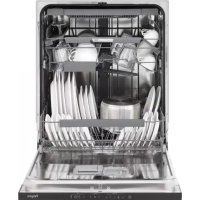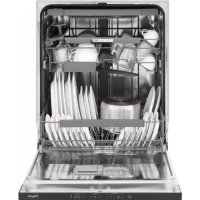
GVW240LS - Dishwasher Pelgrim - Free user manual and instructions
Find the device manual for free GVW240LS Pelgrim in PDF.



User questions about GVW240LS Pelgrim
0 question about this device. Answer the ones you know or ask your own.
Ask a new question about this device
Download the instructions for your Dishwasher in PDF format for free! Find your manual GVW240LS - Pelgrim and take your electronic device back in hand. On this page are published all the documents necessary for the use of your device. GVW240LS by Pelgrim.
USER MANUAL GVW240LS Pelgrim
text_image
Technical diagram of a 3D printer with labeled parts and exploded viewsSnelstart
flowchart
graph LR
    A["Person holding a cup with a slice"] --> B["Add salt to a cup with a salt container"]
    B --> C["Add salt into a cup with a glass jar"]
    C --> D["Add salt into a cup with a glass jar"]
natural_image
Technical line drawing of a mechanical component with no visible text or symbolsnatural_image
Pure diagram of vertical panels mounted on a horizontal base, no text or symbols presentnatural_image
Circular diagram with vertical grid lines and intersecting black X marks, no text or symbols presentnatural_image
Diagram of a car chassis with wheels and an arrow indicating motion (no text or symbols)natural_image
Line drawing of a car chassis with wheels and a directional arrow indicating motion (no text or symbols)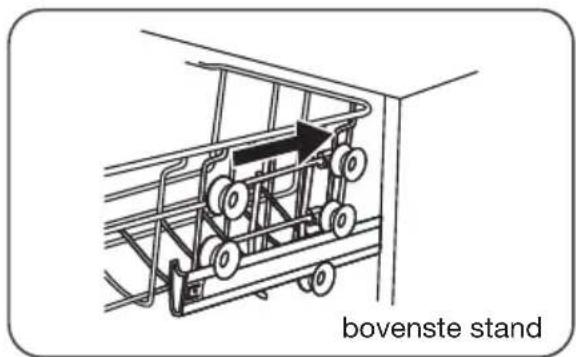
text_image
bovenste standnatural_image
Technical line drawing of a mechanical assembly or housing with internal components and a hand interacting (no text or symbols)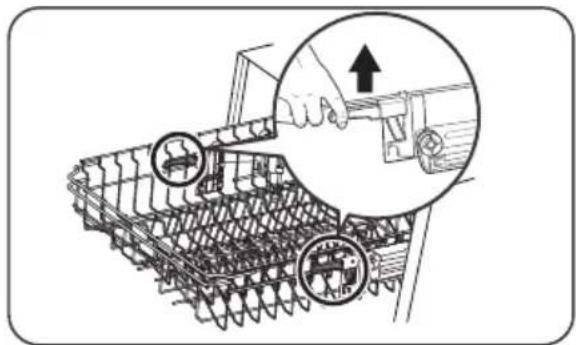
natural_image
Technical illustration of a tracked vehicle with mechanical components and a hand adjusting a tool (no text or symbols present)natural_image
Diagram showing structural deformation of a steel rebar system, with no text or symbols presentDe bordenrekken inklappen
natural_image
Diagram showing structural deformation of a vehicle chassis, with no visible text or symbolsnatural_image
Illustration of a hand pressing down on a device panel with buttons and a knob (no text or symbols)natural_image
Illustration of a hand pressing down on a kitchen fan with directional arrows indicating motion (no text or symbols)flowchart
graph LR
    A["Container with left-hand icon"] -->|3 sec mark| B["Finger icon"]
    B --> C["Control panel with icons for eco-assembly and ECO feedback"]
Bent u iets vergeten in de vaatwasser te zetten?
natural_image
Technical diagram of a mechanical component with arrows indicating open state, labeled 'Open' (no text or symbols on the diagram itself)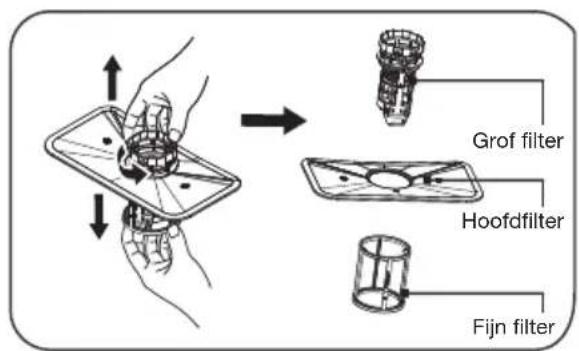
natural_image
Illustration of hands cleaning a surface with a tool and spray, no text or symbols present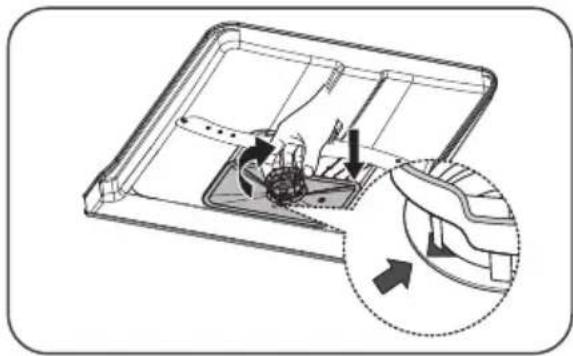
natural_image
Technical diagram of a mechanical device with internal components and directional arrows indicating movement (no text or symbols)natural_image
Technical diagram of an aircraft carrier with internal components and a magnified inset showing the engine (no text or labels)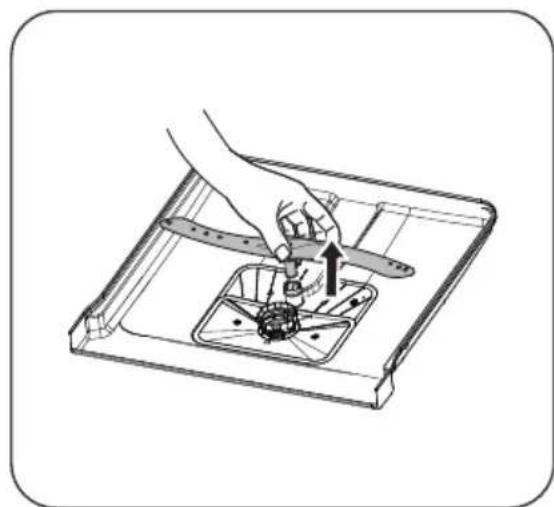
natural_image
Illustration of a hand using a tool to adjust or install a small component inside a transparent tray (no text or symbols visible)natural_image
Line drawing of a kitchen sink with a hand cleaning the surface and a faucet spraying water (no text or symbols)natural_image
Symbol of a trash bin with crossed lines indicating no waste or discharge (no text or numbers present)text_image
Technical diagram of a 3D printer with labeled parts including base, top, and side views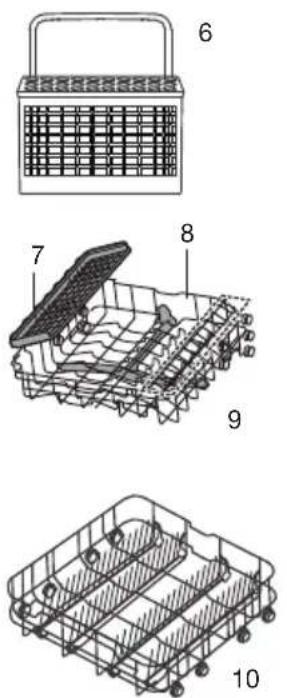
text_image
Technical diagram of a basket with numbered parts, showing front, side, and top views.Utilisation rapide
flowchart
graph LR
    A["Person holding a cup with a lid"] --> B["Add salt to a container"]
    B --> C["Salt being added to the cup"]
    C --> D["Add salt into a jar with liquid, producing a salt in the container"]
    D --> E["Add salt into a container with a curved arrow indicating rotation"]
natural_image
Technical line drawing of a mechanical component with gears and shafts (no text or symbols)natural_image
Pure diagram of vertical panels mounted on a horizontal base, no text or symbols presentnatural_image
Circular diagram with grid lines and a cross symbol, no readable text or labelsnatural_image
Diagram of a shopping cart with wheels and an arrow indicating direction (no text or symbols)natural_image
Diagram of a mechanical cart with wheels and an arrow indicating motion (no text or symbols)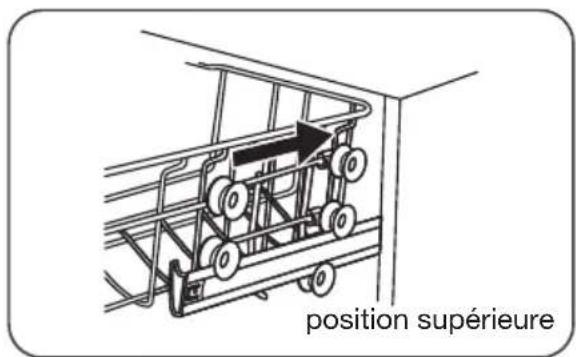
text_image
position supérieurenatural_image
Technical line drawing of a mechanical assembly or housing with no visible text or symbols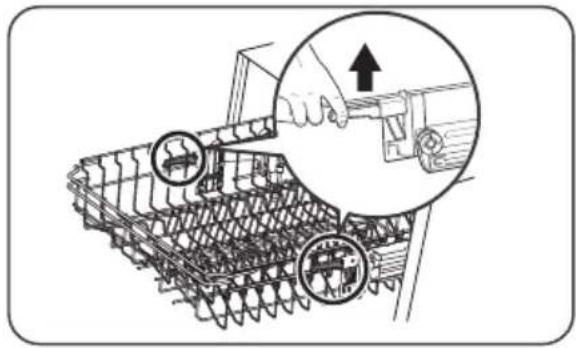
natural_image
Illustration of a hand using a tool to adjust or install a mechanical component, with no visible text or symbols.natural_image
Diagram showing structural deformation of a steel rebar system, with no text or symbols presentnatural_image
Illustration of a hand pressing down on a device with a knob and control knob (no text or symbols)natural_image
Illustration of a hand pressing down on a kitchen appliance with a directional arrow indicating rotation (no text or symbols)flowchart
graph LR
    A["Battery with battery icon"] -->|3 sec| B["Hand gesture"]
    B --> C["Control panel with ECO indicator"]
flowchart
graph LR
    A["Container"] --> B["Rack with Drop"]
    B --> C["Storage Unit"]

natural_image
Illustration of hands cleaning a kitchen sink with a faucet and cleaning device (no text or symbols)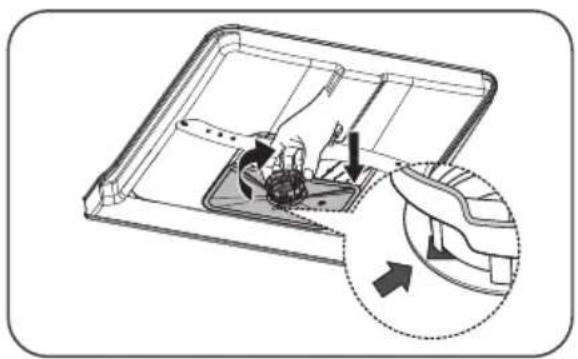
natural_image
Diagram of a device interior with arrows indicating movement or force, showing internal components and a magnified view (no text or symbols)natural_image
Technical diagram of an aircraft carrier with internal components and a close-up inset showing mechanical assembly (no text or labels)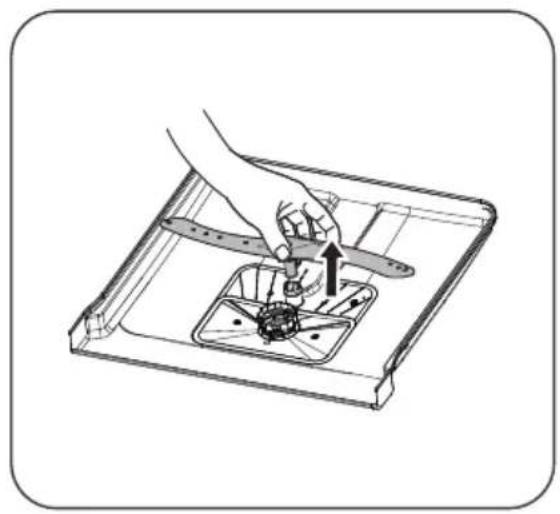
natural_image
Illustration of a hand using a tool to adjust or install a mechanical component, with no visible text or symbols.natural_image
Illustration of a kitchen sink with a hand cleaning the surface and a faucet pouring liquid (no text or symbols)natural_image
Symbol of a trash bin with crossed lines indicating no waste or discharge (no text or numbers present)text_image
Barcode image with vertical black and white bars, no visible text or symbols beyond the pattern811587
GVW420L
Instructions for use
Dishwasher
Anleitung
Geschirrspüler
EN User instruction EN 3 - EN 30
Contact a registered installer to fit your appliance (see “Installation instructions”). Do not connect the appliance to the electrical mains until the installation is complete.
This appliance is intended to be used in household and similar applications such as:
▶staff kitchen areas in shops, offices and other working environments;
farmhouses;
▶by clients in hotels, motels and other residential type environments;
▶bed and breakfast type environments.
For EN60335-1:
- This appliance can be used by children aged from 8 years and above and persons with reduced physical, sensory or mental capabilities or lack of experience and knowledge if they have been given supervision or instruction concerning use of the appliance in a safe way and understand the hazards involved.
- Children shall not play with the appliance. Cleaning and user maintenance shall not be done by children without supervision.
For IEC60335-1:
- This appliance is not intended for use by persons (including children) with reduced physical, sensory or mental capabilities, or lack of experience and knowledge, unless they have been given supervision or instruction concerning use of the appliance by a person responsible for their safety.
- Packaging material could be dangerous for children!
- This appliance is for indoor household use only.
- To protect against the risk of electrical shock, do not immerse the unit, cord or plug in water or other liquid.
- Please unplug before cleaning and performing maintenance on the appliance.
- Use a soft cloth moistened with mild soap, and then use a dry cloth to wipe it again.
Earthing Instructions
- This appliance must be earthed. In the event of a malfunction or breakdown, earthing will reduce the risk of an electric shock by providing a path of least resistance of electric current. This appliance is equipped with an earthing conductor plug.
- The plug must be plugged into an appropriate outlet that is installed and earthed in a ccordance with all local codes and ordinances.
-
Improper connection of the equipment-earthing conductor can result in the risk of an electric shock.
-
Check with a qualified electrician or service representative if you are in doubt whether the appliance is properly grounded.
- Do not modify the plug provided with the appliance, if it does not fit the outlet.
- Have a proper outlet installed by a qualified electrician.
Use
- When loading items to be washed:
- Locate sharp items so that they are not likely to damage the door seal;
▶ Warning: Knives and other utensils with sharp points must be loaded in the basket with their points facing down or placed in a horizontal position.
- Do not abuse, sit on, or stand on the door or dish rack of the dishwasher.
- Do not operate your dishwasher unless all enclosure panels are properly in place.
- Open the door very carefully if the dishwasher is operating, there is a risk of water squirting out.
- Do not place any heavy objects on or stand on the door when it is open. The appliance could tip forward.
- Some dishwasher detergents are strongly alkaline. They can be extremely dangerous if swallowed.
Avoid contact with the skin and eyes and keep children away from the dishwasher when the door is open.
- Check that the detergent powder is empty after completion of the wash cycle.
- Do not wash plastic items unless they are marked “dishwasher safe” or the equivalent.
- For unmarked plastic items not so marked, check the manufacturer's recommendations.
- Use only detergent and rinse agents recommended for use in an automatic dishwasher.
- Never use soap, laundry detergent, or hand washing detergent in your dishwasher.
- The door should not be left open, since this could increase the risk of tripping.
- If the supply cord is damaged, it must be replaced by the manufacturer or its service agent or a similarly qualified person in order to avoid a hazard.
- During installation, the power supply must not be excessively or dangerously bent or flattened.
- Do not tamper with controls.
- The appliance needs to be connected to the main water valve using new hose sets. Old sets should not be reused.
- To save energy, in stand by mode, the appliance will switch Off automatically while there is no any operation in 30 minutes.
Your dishwasher
Introduction 4
Using your dishwasher
Description 5
Quick start 5
Control panel
Water softener
Adding salt 8
Preparing and loading dishes 9
Function of the rinse aid and dishwasher detergent 13
Filling the rinse aid reservoir 14
Filling the detergent dispenser 15
Programming the dishwasher
Wash cycle table
Starting a cycle wash
Changing the program mid-cycle 17
Forget to add a dish? 18
Maintenance
Filtering system 19
Cleaning the spray arms
Caring for the dishwasher 21
Cleaning the door
Errors
What should I do, if... 23
Error table 23
Technical data sheet
26
Loading the baskets according to EN50242
28
Your dishwasher and the environment
30
Disposal 30
Introduction
You have opted to purchase a Pelgrim dishwasher. Optimum user comfort and easy operation were paramount during the development of this product.
This manual describes how you can get the most out of your dishwasher. It provides you with information on how to operate the appliance, as well as background information about how it works. You will furthermore also find maintenance tips.
The safety instructions that are relevant during the installation are included in the installation guide. This is intended for the installation technician.
Read this manual before using the appliance. Keep this manual somewhere safe so that subsequent users can also benefit from the information contained within.
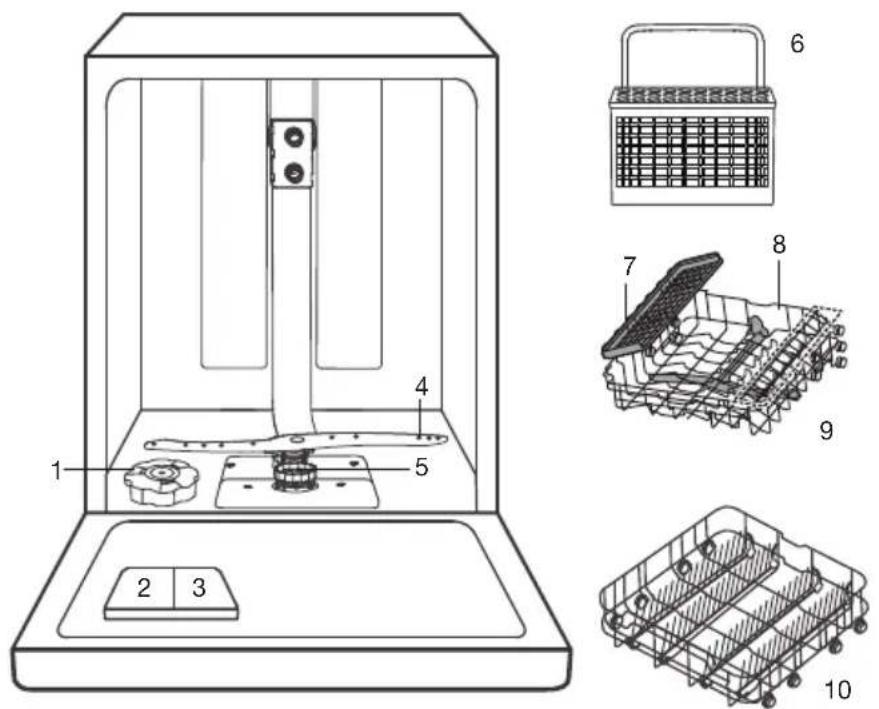
Description
Features and appearance of baskets and cutlery baskets may vary, depending on your model.
- Salt container
- Detergent dispenser
- Rainse aid reservoir
- Lower spray arm
- Filtering system
- Cutlery basket
- Cup rack
- Upper spray arm
- Upper basket
- Lower basket
text_image
Technical diagram of a 3D printer with labeled parts and exploded viewsQuick start
Please read the corresponding content in this manual for more details about the operation.

flowchart
graph LR
    A["SALT"] --> B["Add salt"]
    B --> C["Inside Outside"]
    C --> D["Add washing machine"]
    D --> E["Water washing machine"]
- Setting the water softener/loading the salt.
- Removing larges residues on the cutlery/dishes.
- Loading the baskets.
- Filling the dispenser and the rinse aid reservoir.
- Selecting a program and running the dishwasher.
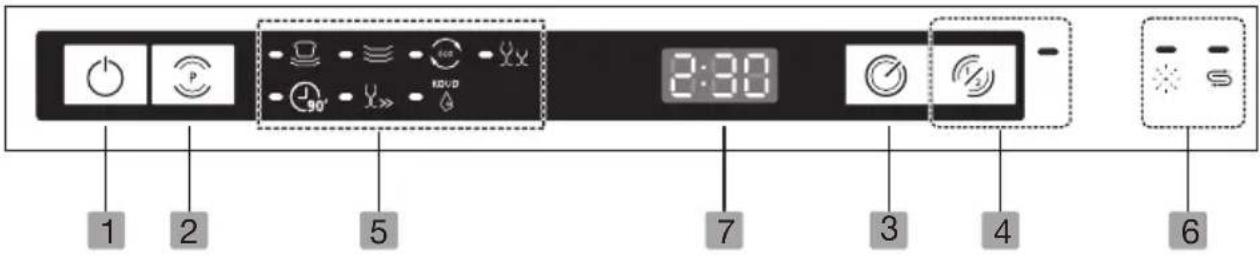
Control panel
text_image
1 2 5 7 3 4 6 2:30| Operation (push buttons) | ||
| 1 | On/off | Press this button to turn on your dishwasher, the screen lights up. |
| 2 | Program | Select the appropriate washing program, the selected program indicator will be lit. |
| 3 | Delayed start | Press this button to set a delayed start (up to 24 hours). One press on this button delays the start by one hour. |
| 4 | Half-load | If you do not have too much load, you might consider using the half-load program. This function saves water and energy. It can be used with the programs Intensive, Normal, ECO, Glass and 90 min. |
| Indicators | |||
| 5 Program indicator |  | IntensiveFor heaviest soiled crockery, and normally soiled pots, pans, dishes etc. With dried-on food. | |
 | NormalFor normally soiled loads, such as pots, plates, glasses and lightly soiled pans. | ||
 | ECOThis is standard program, it is suitable to clean normally soiled tableware and it is the most efficient program in terms of its combined energy and water consumption for that type of tableware. | ||
 | GlassFor lightly soiled crockery and glass. | ||
 | 90 MinFor normally soiled loads that need quick wash. | ||
 | RapidA shorter wash for lightly soiled loads that do not need drying. | ||
 | SoakTo rinse dishes that you plan to wash later that day. | ||
| 6 Warning indicator |  | Rinse aidIf this indicator is lit, it means the dishwasher is low on dishwasher rinse aid and requires a refill. | |
 | SaltIf this indicator is lit, it means the dishwasher is low on dishwasher salt and needs to be refilled. | ||
| 7 Display | To show the reminder time, delay time, error codes etc. | ||
Water softener
- The hardness of the water varies from place to place. If hard water is used in the dishwasher, deposits will form on the dishes and utensils.
- The appliance is equipped with a special softener that uses a salt container specifically designed to eliminate lime and minerals from the water.
Adjusting salt consumption
The dishwasher is designed to allow for adjustment in the amount of salt consumed based on the hardness of the water used. This is intended to optimise and customise the level of salt consumption. Please follow the steps below for adjustment in salt consumption.
- Switch on the appliance;
- Press the program button for more than 5 seconds to open the water softener settings mode within 60 seconds after the appliance was switched on;
- Press the program button to select the correct setting according to your local environment. The settings will change in the following sequence: H1->H2->H3->H4->H5->H6;
- Press the On/Off button to confirm the setting and to end the setting mode.
Water hardness table
Adjust the salt consumption according to the table below:
| Water hardness | ||||
| °Clarke °dH mmol/l Setting Salt consumption | (grams/cycle) | |||
| 0 - 6 0 - 5 0 | - 0.94 H1 0 | |||
| 7 - 14 6 - 11 | 1.0 - 2.0 H2 9 | |||
| 15 - 21 12 - 17 | 2.1 - 3.0 H3 | 12 | ||
| 22 - 28 18 - 22 | 3.1 - 4.0 H4 | 20 | ||
| 29 - 42 23 - 34 | 4.1 - 6.0 H5 | 30 | ||
| 43 - 69 35 - 55 | 6.1 - 9.8 H6 | 60 | ||
The factory setting: H3 (EN 50242)
Contact your local water board for information on the hardness of your water supply.
Adding salt
flowchart
graph LR
    A["Person holding a cup with a lid"] --> B["Add salt to a pot"]
    B --> C["Add salt using a salt can be added"]
    C --> D["Add salt into a container with liquid"]
    D --> E["Add salt into a container with a curved arrow"]
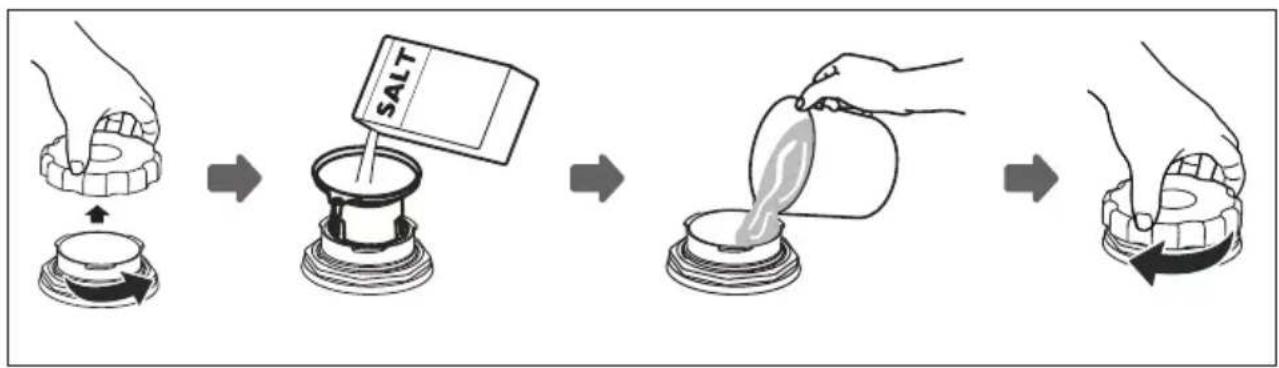
- Remove the lower basket and unscrew the reservoir cap.
- Place the end of the funnel (supplied) into the container
- Fill the salt container to its maximum limit with dishwasher salt (about 1.5 kg). It is normal for a small amount of water to come out of the salt container.
- After filling the container, put back the cap (tighten firmly).
- The salt warning light will go off after the salt container has been filled with salt.
- Immediately after filling the salt into the salt container, a washing program should be started (we suggest to use a short program). Otherwise the filter system, pump or other important parts of the machine may be damaged by salty water. This is out of warranty.

Note! The salt container must only be refilled when the salt warning light in the control panel comes on. Depending on how well the salt dissolves, the salt warning light may still be on even though the salt container is filled. If salt has spilled, run a soak or quick program to remove it.
Preparing and loading dishes
- Consider buying utensils which are identified as dishwasher-proof.
- For particular items, select a program with the lowest possible temperature.
- To prevent damage, do not take glass and cutlery out of the dishwasher immediately after the program has ended.
For washing the following cutlery/dishes are not suitable:
▶Cutlery with wooden, horn china or mother-of-pearl handles
▶Plastic items that are not heat resistant
▶ Older cutlery with glued parts that are not temperature resistant
▶ Bonded cutlery items or dishes
▶Pewter or cooper items
▶Crystal glass
▶Steel items subject to rusting
▶Wooden platters
▶Items made from synthetic fibres
For washing the following cutlery/dishes are of limited suitability:
Some types of glasses can become dull after a large number of washes
Silver and aluminum parts have a tendency to discolour during washing
▶Glazed patterns may fade if machine washed frequently
Recommendations for loading the dishwasher
Scrape off any large amounts of leftover food. Soften remnants of burnt food in pans. It is not necessary to rinse the dishes under running water. For best performance of the dishwasher, follow these loading guidelines.

Features and appearance of baskets and cutlery baskets may vary, depending on your model.
- Place objects in the dishwasher in the following way:
Items such as cups, glasses, pots/pans, etc. are faced downwards.
▶ Curved items, or ones with recesses, should be loaded aslant so that water can run off.
▶All utensils are stacked securely and cannot tip over.
All utensils are placed in the way that the spray arms can rotate freely during washing.
Load hollow items such as cups, glasses, pans etc. with the opening facing downwards so that water cannot collect in the container or a deep base.
Dishes and items of cutlery must not lie inside one another, or cover each other.
To avoid damage, glasses should not touch one another.
The upper basket is designed to hold more delicate and lighter dishware such as glasses, coffee and tea cups.
▶ Long bladed knives stored in an upright position are a potential hazard!
- Long and / or sharp items of cutlery such as carving knives must be positioned horizontally in the upper basket.
▶ Please do not overload your dishwasher. This is important for good results and for reasonable consumption of energy.

Note: Very small items should not be washed in the dishwasher as they could easily fall out of the basket.
Loading the upper basket
The upper basket is designed to hold more delicate and lighter dishware such as glasses, coffee and tea cups and saucers, as well as plates, small bowls and shallow pans (as long as they are not too dirty). Position the dishes and cookware so that they will not get moved by the spray of water.
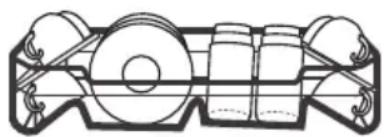
natural_image
Technical line drawing of a mechanical component with no visible text or symbolsLoading the lower basket
We suggest that you place large items and the most difficult to clean items into the lower basket: such as pots, pans, lids, serving dishes and bowls. It is preferable to place serving dishes and lids on the side of the racks in order to avoid blocking the rotation of the top spray arm. The maximum diameter advised for plates in front of the detergent dispenser is of 19 cm, this not to hamper the opening of it.
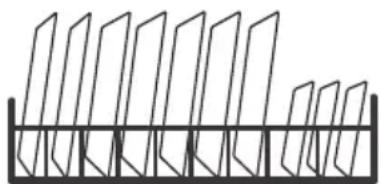
natural_image
Pure geometric diagram of vertical planes mounted on a horizontal base (no text or symbols)Loading the cutlery basket/cutlery rack
Cutlery should be placed separately from each other in the appropriate positions, and do make sure the utensils do not nest together, this may cause bad performance.

natural_image
Circular diagram with grid pattern and crossed X marks (no text or symbols)Warning! Do not let any item extend through the bottom.
Removing the dishes
To prevent water dripping from the upper basket into the lower basket, we recommend that you empty the lower basket first, followed by the upper basket.

Warning! Items will be hot! To prevent damage, do not take glass and cutlery out of the dishwasher for around 15 minutes after the program has ended.
Adjusting the height of the upper basket type 1 (depending on the model)
The height of the upper basket can be easily adjusted to accommodate taller dishes in either the upper or lower basket. To adjust the height of the upper basket, follow these steps:
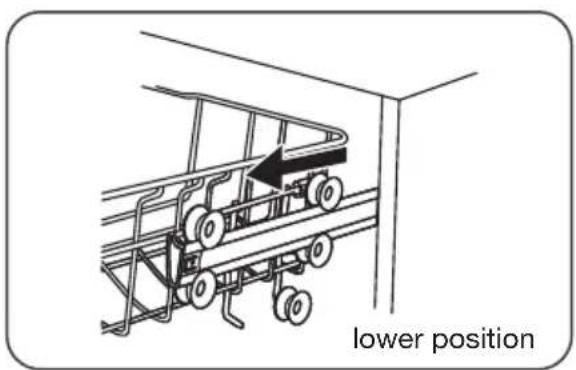
text_image
lower position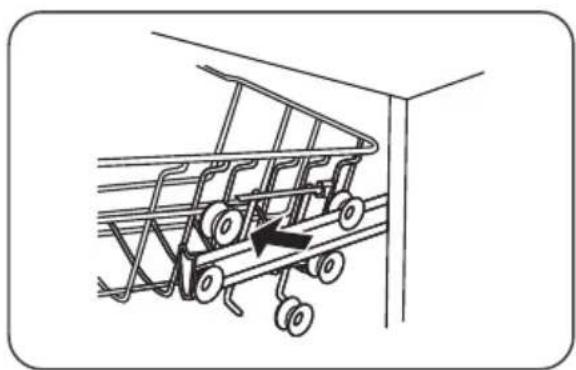
natural_image
Diagram of a car with wheels and an arrow indicating motion (no text or symbols)- Pull out the upper basket.
- Remove the upper basket.
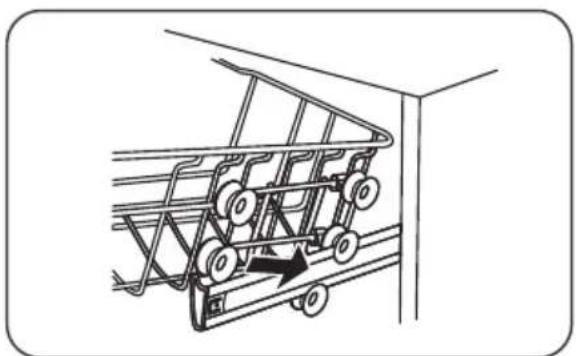
natural_image
Line drawing of a shopping cart with wheels and an arrow indicating direction (no text or symbols)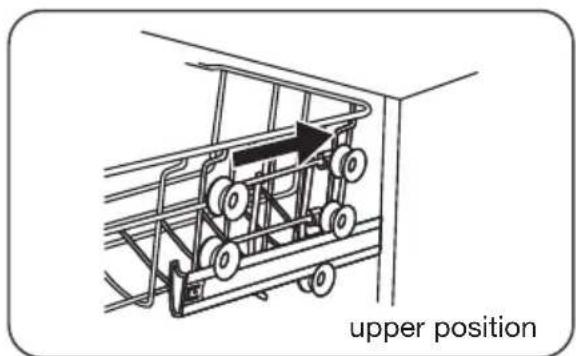
text_image
upper position- Re-attach the upper basket to the upper or lower rollers.
- Push in the upper basket.
Adjusting the height of the upper basket type 2 (depending on the model)
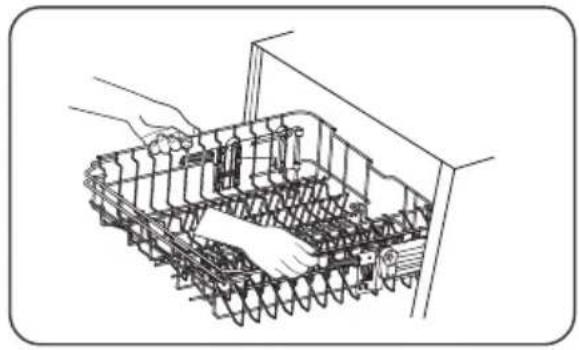
natural_image
Technical line drawing of a mechanical assembly with spring-loaded components and a hand adjusting parts (no text or symbols)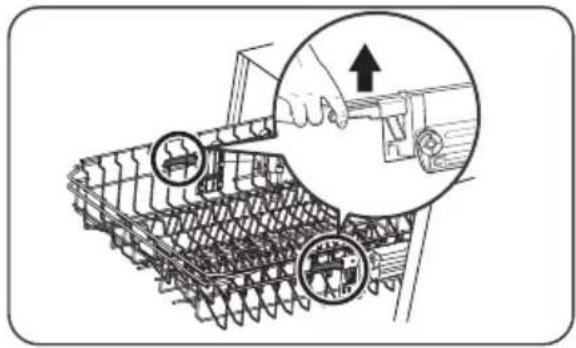
natural_image
Illustration of a robotic arm with two circular components and a hand adjusting a tool, showing mechanical assembly (no text or symbols)- To raise the basket to the upper position, lift the basket until both sides are at the same height. The basket will secure into place.
- To lower the basket, push down on the handle and release.
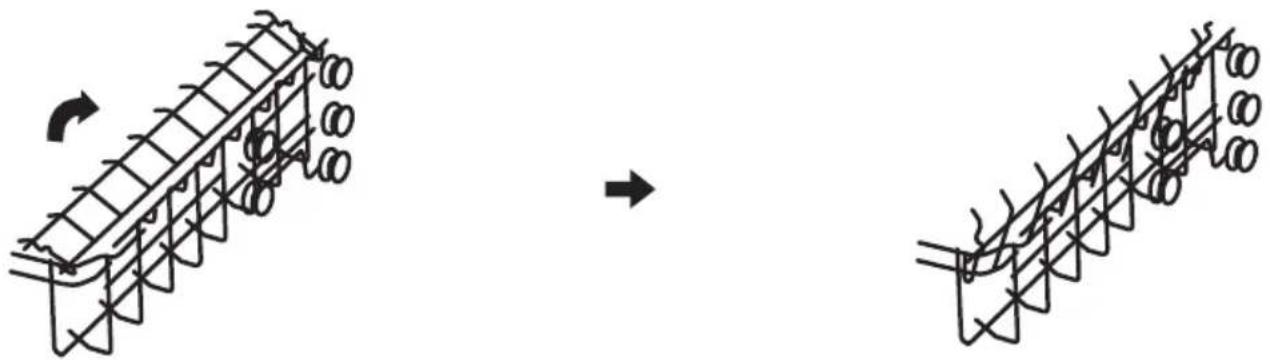
Folding back the cup shelves
To make room for taller items in the dishwasher basket, raise the cup rack upwards. You can then lean the tall glasses against it. You can also remove it when it is not required for use.
natural_image
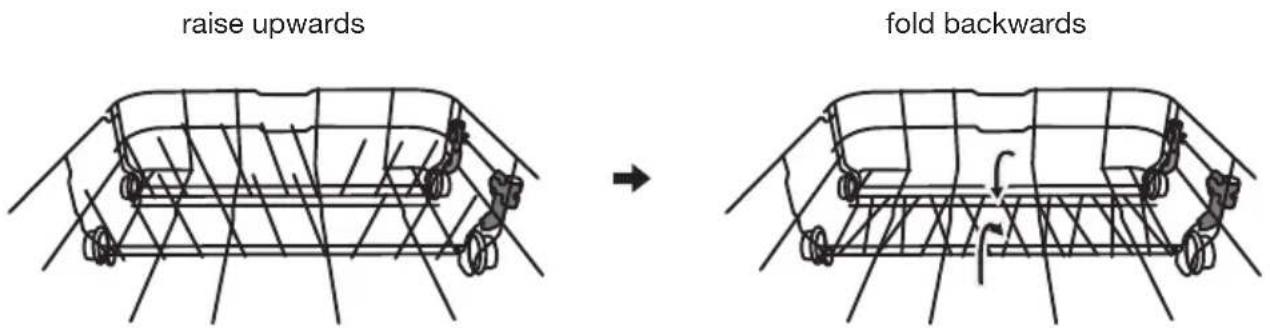
Diagram showing two stages of a structural rebar system with circular components, one before and one after rotation (no text or labels)Folding back the rack shelves
The rack shelves can be lowered to make more room for large items.
text_image
raise upwards fold backwardsFunction of the rinse aid and dishwasher detergent
The rinse aid is released during the final rinse to prevent water from forming droplets on your dishes, which can leave spots and streaks. It also improves drying by allowing water to roll off the dishes. Your dishwasher is designed to use liquid rinse aids.

Warning! Only use branded rinse aid for dishwasher. Never fill the rinse aid dispenser with any other substances (e.g. Dishwasher cleaning agent, liquid detergent). This would damage the appliance.
When to refill the rinse aid dispenser
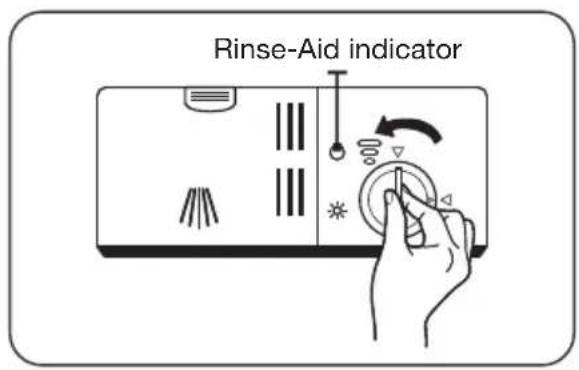
- Unless the rinse-aid warning light on the control panel is on, you can always estimate the amount from the color of the optical level indicator located next to the cap.
- When the rinse-aid container is full, the indicator will be fully dark. The size of the dark dot decreases as the rinse-aid diminishes. You should never let the rinse aid level be less than 1/4 full.
- As the rinse aid diminishes, the size of the black dot on the rinse aid level indicator changes, as illustrated below.
● Full 3/4 full ●1/2 full 1/4 full Empty
◎ ○
Function of the dishwasher detergent
The chemical ingredients that compose the detergent are necessary to remove, crush and dispense all dirt out of the dishwasher. Most of the commercial quality detergents are suitable for this purpose.

Warning! Proper use of the dishwasher detergent
- Use only detergent specifically made for dishwashers use.
- Keep your dishwasher detergent fresh and dry.
- Don't put powdered detergent into the dispenser until you are ready to wash dishes.
- Dishwasher detergent is corrosive! Keep dishwasher detergent out of the reach of children.
Filling the rinse aid reservoir
text_image
Rinse-Aid indicator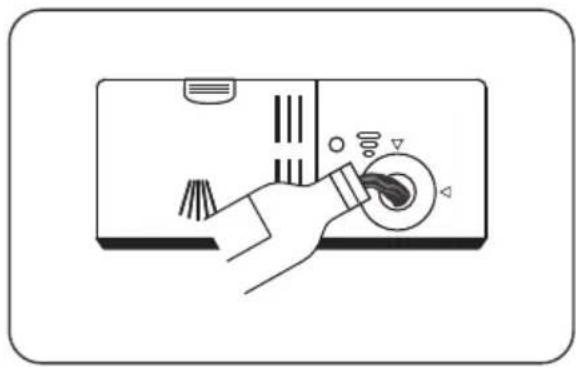
natural_image
Illustration of a hand operating a device with a knob and control knob (no text or symbols)- To open the dispenser, turn the cap to the "open" (left) arrow and lift it out
- Carefully pour in the rinse-aid into its dispenser, whilst avoiding it to overflow.

Note: Clean up any spilled rinse aid with an absorbent cloth to avoid excessive foaming during the next wash.
- Replace the cap by inserting it aligned with "open" arrow and turning it to the closed (right) arrow.
Adjusting the rinse aid reservoir
text_image
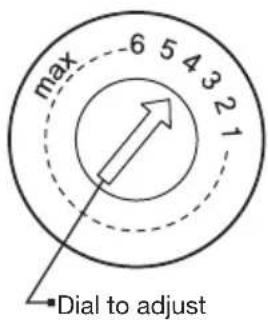
max 6 5 4 3 2 1 Dial to adjustThe rinse aid reservoir has 6 settings. Both the recommended setting and the factory setting is "4". If the dishes are not drying properly or are spotted, adjust the dial to the next higher number until your dishes are spot-free. Reduce it if there are sticky whitish stains on your dishes or a bluish film on glassware or knife blades.
Filling the detergent dispenser
text_image
Push latch to open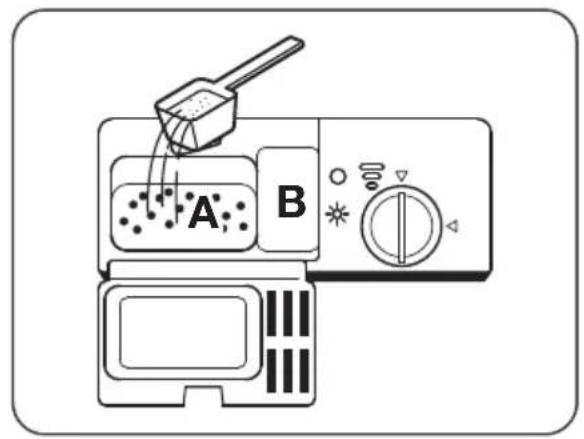
text_image
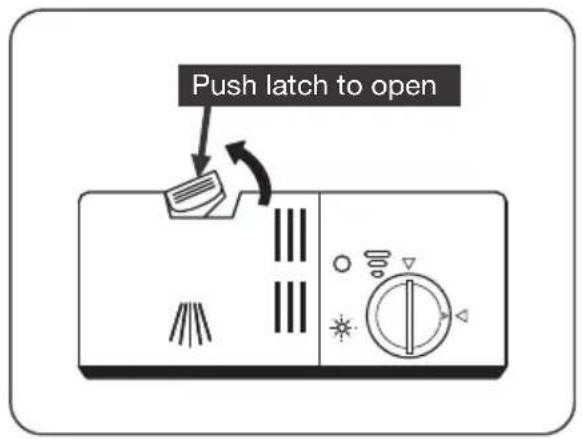
A B- Press the release catch on the detergent dispenser to open the cover.
- Add detergent into the larger cavity (A) for the main wash cycle.
For more heavily soiled wash loads, also add some detergent into the smaller cavity (B) for the pre-wash cycle.
natural_image
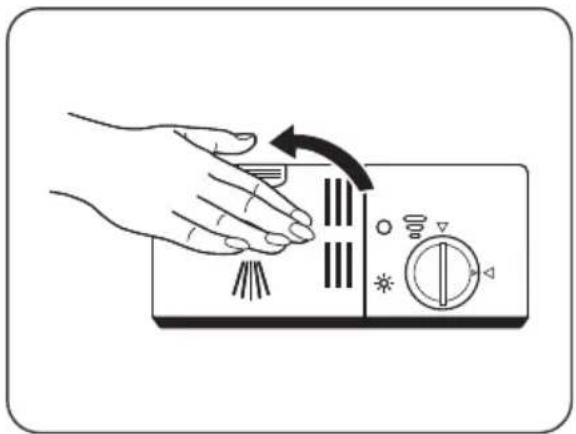
Illustration of a hand pressing down on a kitchen fan with directional arrows indicating rotation (no text or symbols)- Close the cover and press on it until it locks into place.

Note: Be aware that depending on the soiling of water, setting may be different. Please observe the manufacturer's recommendations on the detergent packaging.
Wash cycle table
The table shows information about the programs.
| Program Steps of the was cycle | Detergent Pre/Main | Running time (min) | Energy (kWh) | Water (l) | Rinse aid | |
 Intensive Intensive | Pre-wash (50°C)Wash (60°C)RinseRinseRinse (65°C)Drying | 5/27.5g(1 or 2 pieces) | 170 1.6 18.5 | Yes | ||
 Normal Normal | Pre-wash (45°C)Wash (55°C)RinseRinse (65°C)Drying | 5/27.5g(1 or 2 pieces) | 180 1.3 15 | Yes | ||
 (*EN 50242) (*EN 50242) | Pre-washWash (45°C)Rinse (65°C)Drying | 5/27.5g(1 or 2 pieces) | 190 0.92 11 | Yes | ||
 Glass Glass | Pre-washWash (45°C)Rinse (65°C)Drying | 5/27.5g(1 piece) | 130 0.9 14.5 | Yes | ||
 90 Min 90 Min | Wash (65°C)RinseRinse (65°C)Drying | 32.5 g(1 piece) | 90 1.35 12.5 | Yes | ||
 Rapid Rapid | Wash (45°C)Rinse (50°C)Rinse (55°C) | 25g 30 0.75 11 | No | |||
KOUD Rapid Rapid | Wash (45°C)Rinse (50°C)Rinse (55°C) | - 15 0.02 4 | No | |||
*EN 50242: This program is the test cycle.
The information for comparability test in accordance with EN 50242.
Starting a cycle wash
- Draw out the lower and upper basket, load the dishes and push them back. It is commended to load the lower basket first, then the upper one.
- Pour in the detergent.
- Insert the plug into the socket. The power supply refer to the page "Technical data sheet". Make sure that the water supply is turned on to full pressure.
- Open the door and press the on/off button to switch on the appliance.
- Choose a program, the response light will turn on. Then close the door, the dishwasher will start its cycle.
Changing the program mid-cycle
A wash cycle can only be changed if it has been running for a short time. Otherwise the detergent may have already been released and the dishwasher may have already drained the wash water. If this is the case, the dishwasher needs to be reset and the detergent dispenser must be refilled. To reset the dishwasher, follow the instructions below:
- Open the door a little to stop the dishwasher. When the spray arm stops working, you can open the door completely.
- Press the program button for more than three seconds to set the appliance into standby state.
- You can change the program to the desired cycle setting.
- Then close the door, the dishwasher will start its cycle.
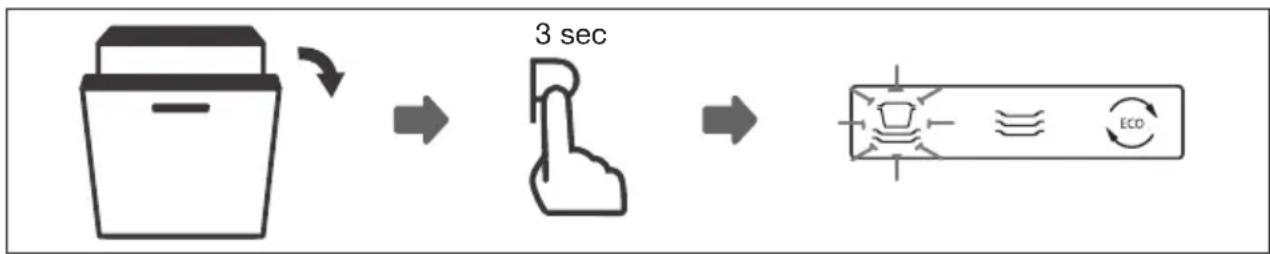
flowchart
graph LR
    A["Container with handle"] -->|3 sec mark| B["Finger icon"]
    B --> C["Control panel with 'ECO' indicator"]
Forget to add a dish?
A forgotten dish can be added any time before the detergent dispenser opens. If this is the case, follow the instructions below:
- Open the door a little to stop the washing.
- After the spray arms stop working, you can open the door completely.
- Add the forgotten dishes.
- Close the door.
- The dishwasher will start running again.
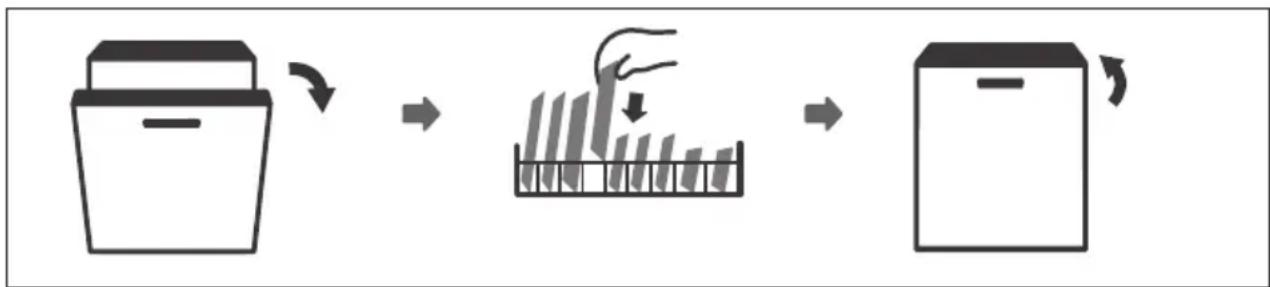
flowchart
graph LR
    A["Container"] --> B["Rack with Drop"]
    B --> C["Storage Unit"]

Warning! It is dangerous to open the door mid-cycle, as hot steam may scald you.
Filtering system
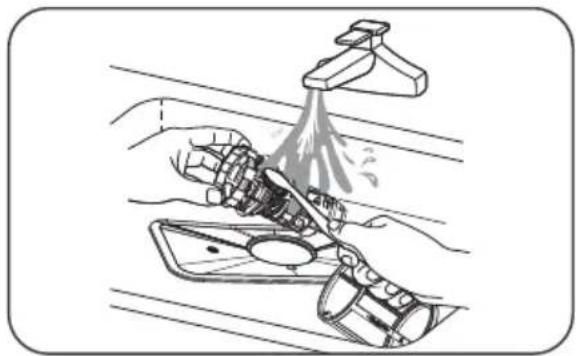
The filtering system in the base of the wash cabinet retains coarse debris from the washing cycle. The collected coarse debris may cause the filters to clog. Check the condition of the filters regularly and clean them if necessary under running water. Follow the steps below to clean the filters in the wash cabinet.

Note: Pictures are only for reference. The models of the filtering system and spray arms can be different.
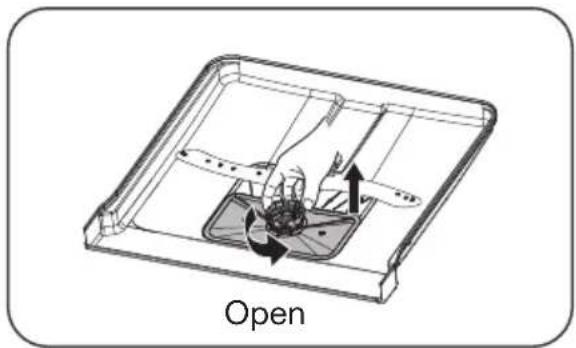
natural_image
Technical diagram of a device with internal components and directional arrows, labeled 'Open' (no text or symbols on the diagram itself)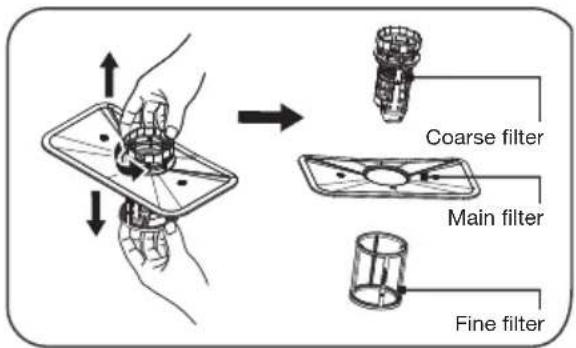
text_image
Coarse filter Main filter Fine filter-
Hold the coarse filter and rotate it anticlockwise to unlock the filter. Lift the filter upwards and out of the dishwasher.
-
The fine filter can be pulled off the bottom of the filter assembly. The coarse filter can be detached from the main filter by gently squeezing the tabs at the top and pulling it away.
natural_image
Illustration of a hand washing a faucet with liquid, no text or symbols present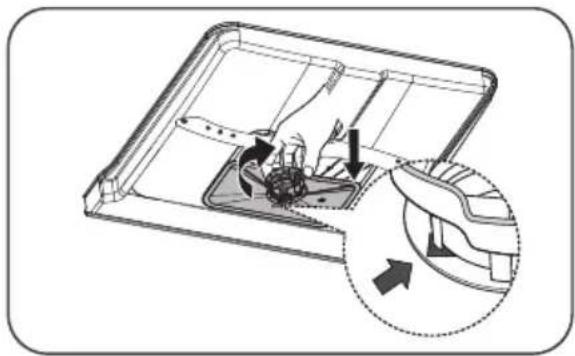
natural_image
Diagram of a device interior showing internal components and directional arrows, no text or symbols present-
Larger food remnants can be cleaned by rinsing the filter under running water. For a more thorough clean, use a soft cleaning brush.
-
Reassemble the filters in the reverse order of the disassembly, replace the filter insert, and rotate clockwise to the close arrow.

Warning! Do not over tighten the filters. Put the filters back in sequence securely, otherwise coarse debris could get into the system and cause a blockage. NEVER use the dishwasher without filters in place. Improper replacement of the filter may reduce the performance level of the appliance and damage dishes and utensils.
Cleaning the spray arms
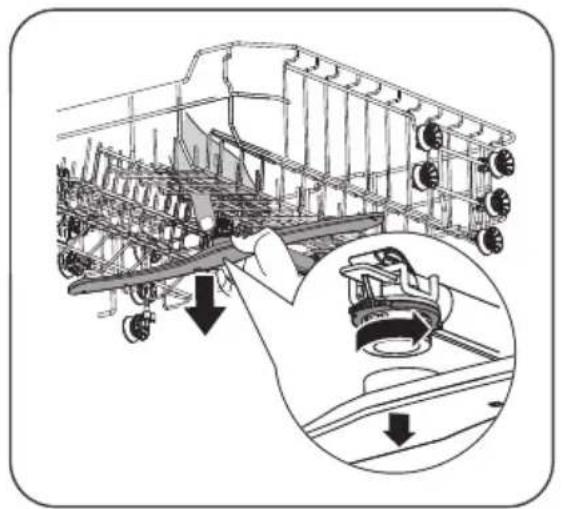
It is necessary to clean the spray arms regularly for hard water chemicals will clog the spray arm jets and bearings. To clean the spray arms, follow the instructions below:
natural_image
Technical illustration of an aircraft carrier with structural components and a close-up inset showing the engine (no text or symbols present)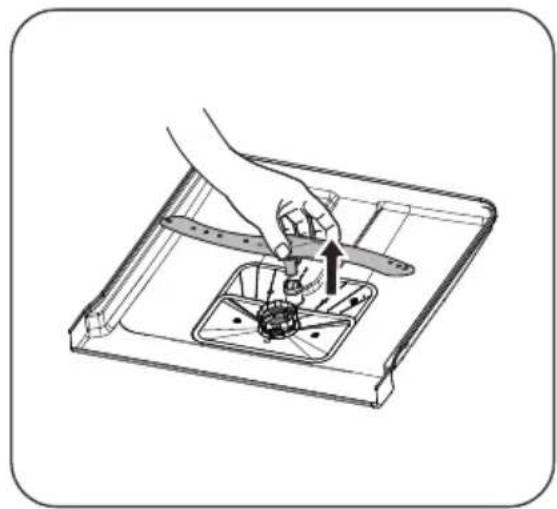
natural_image
Illustration of a hand using a tool to adjust or install a mechanical component inside a tray (no text or symbols visible)- To remove the upper spray arm, hold the nut, rotate the arm clockwise to remove it.
- To remove the lower spray arm, pull out the spray arm upward.
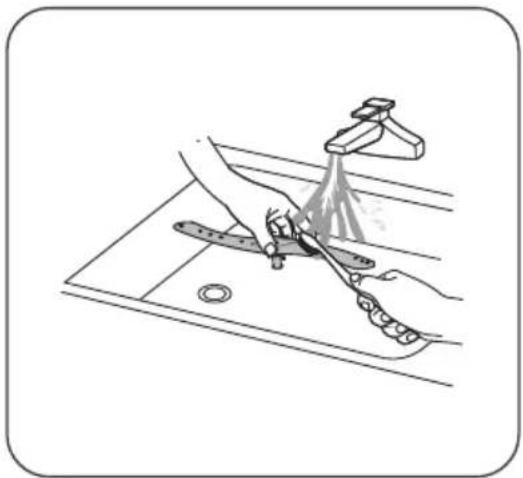
natural_image
Illustration of a kitchen sink with a hand using a tool to clean or wash the surface (no text or symbols)- Wash the arms in soapy and warm water and use a soft brush to clean the jets. Replace them after rinsing them thoroughly.
Caring for the dishwasher
Frost precaution
Please take frost protection measures on the dishwasher in winter. Every time after a washing cycle, please operate as follows:
- Cut off the electrical power to the dishwasher at the supply source.
- Turn off the water supply and disconnect the water inlet pipe from the water valve.
- Drain the water from the inlet pipe and water valve (use a pan to gather the water).
- Reconnect the water inlet pipe to the water valve.
- Remove the filter at the bottom of the dishwasher and use a sponge to soak up water in the sump.
After every wash
- After every wash, turn off the water supply to the appliance and leave the door slightly open so that moisture and odours are not trapped inside.
Remove the plug
- Before cleaning or performing maintenance, always remove the plug from the socket.
No solvents or abrasive cleaning
- To clean the exterior and rubber parts of the dishwasher, do not use solvents or abrasive cleaning products. Only use a cloth with warm soapy water. To remove spots or stains from the surface of the interior, use a cloth dampened with water an a little vinegar, or a cleaning product made specifically for dishwashers.
When not in use for a longtime
- It is recommend that you run a wash cycle with the dishwasher empty and then remove the plug from the socket, turn off the water supply and leave the door of the appliance slightly open. This will help the door seals to last longer and prevent odours from forming within the appliance.
Moving the appliance
- If the appliance must be moved, try to keep it in the vertical position. If absolutely necessary, it can be positioned on its back.
Cleaning the door
- Clean the edge of the door, including the sealing rubber, with a soft, damp cloth.
- Take care to ensure that water does not enter the door locking mechanism or electrical components.
- Spray-type cleaning products should not be used, nor aggressive cleaning products such as scourers. These cleaning products can damage the finish.
What should I do, if...
If the appliance is not functioning well, this does not always mean that it is faulty. Try to resolve the fault yourself first. If the recommendations below do not solve your problem, telephone our service department.

Note!
Disconnect the appliance from the power supply before beginning repairs. It is preferable if you remove the plug from the socket.
Error table
Problem Potential causes Solution
| The dishwasher is not working. | Fuse is faulty or the earthing switch has been activated. | Replace the fuse or reset the isolating switch. Remove other appliances that are connected to the same group. |
| The power supply is not switched on. | Make sure that the dishwasher is switched on and the door closed.Make sure that the plug is correctly inserted into the socket. | |
| The water pressure is too low. | Check whether the dishwasher is correctly connected to the water mains and that the tap is open. | |
| The door of the dishwasher is not closed properly. | Make sure the door is closed properly. | |
| The drainage pump does not shut off. | The water is running over. The system is designed so that it can automatically detect overflowing water. In that instance, the appliance shuts off the circulation pump and switches on the drainage pump. | |
| Noise. Some noises are normal. Noise of rotating pump/washing noises; the detergent compartment opening. | ||
Problem Potential causes Solution
| Contamination of the tub. | Poor quality detergent. Only use detergent suitable for dishwashers to prevent contamination. | ||
| Blocked filters. Open the door and clean the filters.Run the pre-wash cycle. | |||
| Rinse agent has been spilled. Always wipe up spilled rinse agent immediately. | |||
| Dishes are not dry. The rinse agent reservoir is empty. | Ensure that the rinse agent reservoir is filled. | ||
| Improper loading. Load the dishwasher as suggested in the manual. | |||
| The dishwasher is unloaded too soon. | Do not unload your dishwasher immediately after washing. Open the door slightly so the steam can come out. Wait for the inside temperature to be safe. Unload the lower basket first. | ||
| Incorrect cycle. A short program with low temperature can have worse washing and drying results compared to a longer program with a higher temperature. Select another wash cycle. | |||
| Dishes and flat objects are not clean. | Incorrect cycle. Select a higher cycle. | ||
| Baskets are incorrectly loaded. Make sure that the detergent compartment and spray arms are not obstructed by large dishes/pans. | |||
| Spotting and scaling on glasses and flat dishes. | Extremely hard water.Incoming water temperature is low. The dishwasher is overloaded.Baskets are incorrectly loaded.Old or damp detergent. Rinse agent reservoir is empty.Incorrect detergent dosage. | To remove spotting from glass objects: Remove all metal objects from the dishwasher. Use the prescribed quantity of detergent.Select the longest cycle. Allow the dishwasher to run for approximately 18 to 22 minutes. It should by then have reached the main wash cycle.Open the door carefully and pour 2 cups of white vinegar into the base. Close the door and allow the dishwasher to complete its cycle. If vinegar does not work: Repeat the above steps, but use a quarter cup (60 ml) of citric acid crystals in place of white vinegar. | |
Problem Potential causes Solution
| Cloudy stains on the glassware. | Combination of soft water and too much detergent. | Use less detergent and choose the glass cycle, which you can use to clean glassware. |
| Yellow or brown scale on the inside of the tub. | Traces of iron in the water may cause spotting to the tub of the dishwasher. | Contact a manufacturer of water softeners for a special filter. |
| White scale on the inside of the tub. | Hard water. Increase salt consumption setting. | |
| Dishwasher detergent is left in the detergent compartment. | The detergent compartment is blocked by dishes. | Load the baskets so that the dishes no longer block the detergent compartment. Clean the upper spray arm. |
| Steam. When opening the door. This is possible at the end of the cycle. | ||
| Black or grey stains on the dishes. | Aluminium cooking utensils have scraped the dishes. | Aluminium can tarnish. |
| Water remains under the filters. | This is normal. A small amount of water around the drain on the rear of the tub base keeps the seal flexible. | |
| The dishwasher is leaking. | Rinse agent reservoir too full or rinse agent is leaking. | Take care not to overfill the rinse agent reservoir. Spilled rinse agent can lead to foam/flooding. Wipe up spilled rinse agent with a damp cloth. |
| The dishwasher is not standing level. | Adjust the dishwasher so that it is standing level. | |
| Faults code E1. Water intake time is too long. Faucets is not opened, or water intake is restricted, or water pressure is too low. | ||
| Faults code E3. Not reaching required temperature. | Malfunction of heating element. | |
| Faults code E4. Overflow. Some element of dishwasher leaks. | ||

Should the appliance become overfilled or exhibit excessive leaking, shut off the inlet tap and alert the service department. If all indicators are flashing simultaneously: switch off the dishwasher immediately, shut off the inlet tap and alert the service department.
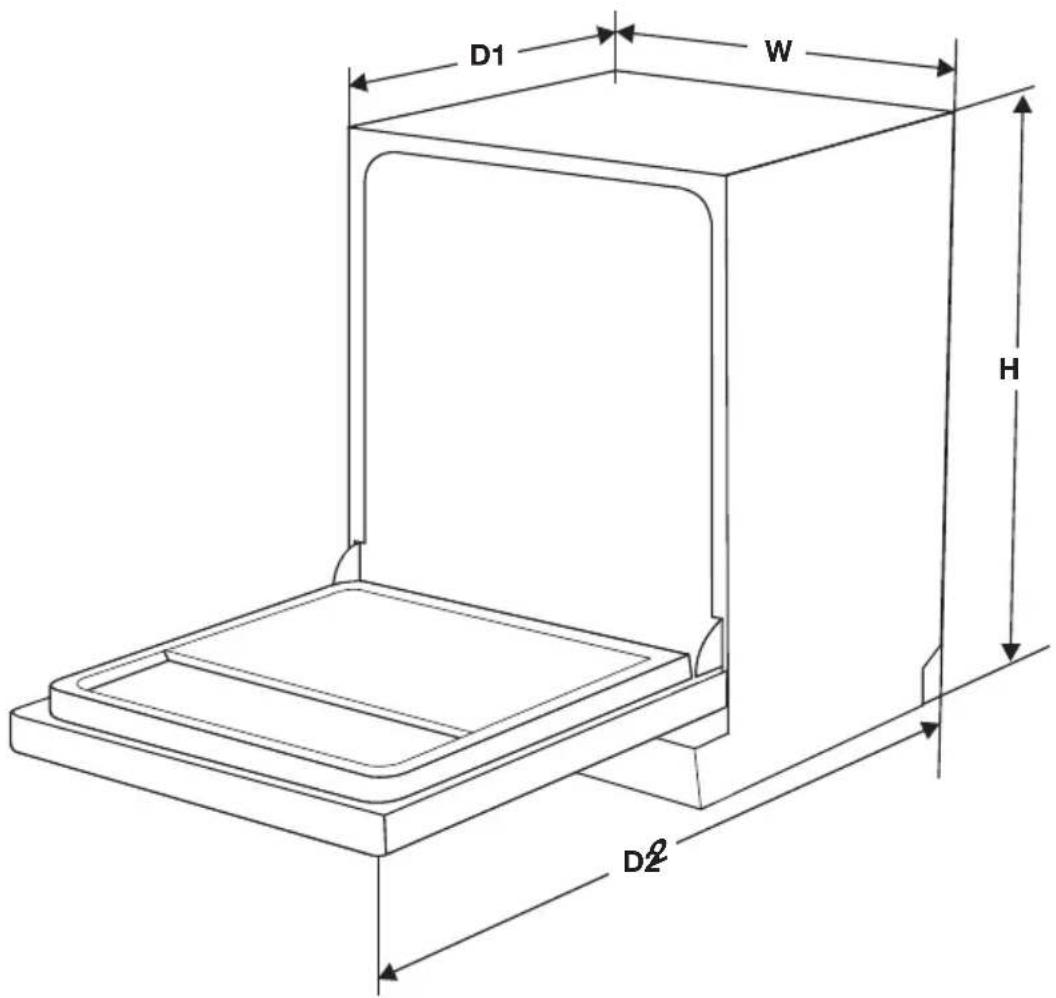
text_image
D1 W H D2²| Product fiche | |
| Sheet of household dishwasher according to EU Directive 1016/2010 & 1059/2010: | |
| Manufacturer Pelgrim | |
| Type / Description GVW420L | |
| Height (H) 815 mm | |
| Width (W) 598 mm | |
| Depth (D1) 550 mm (with the door closed) | |
| Depth (D2) 1150 mm (with the door opened 90°) | |
| Standard place settings 13 | |
| Energy efficiency class [1] A++ | |
| Annual energy consumption [2] 262 kWh | |
| Energy consumption of the standard cleaning cycle 0.92 kWh | |
| Power consumption of off-mode 0.45 W | |
| Power consumption of left-on mode 0.49 W | |
| Annual water consumption [3] 3080 liter | |
| Drying efficiency class [4] A | |
| Standard cleaning cycle [5] ECO 45 °C | |
| Program duration of the standard cleaning cycle 190 min | |
| Noise level 47 dB(A) re 1 pW | |
| Mounting Built-in | |
| Power consumption 1760-2100 W | |
| Rated voltage / frequency 220-240V/50 Hz | |
| Water pressure (flow pressure) 0.04-1.0 MPa = 0.4-10 bar | |
- A + + + (highest efficiency) to D (lowest efficiency)
- on the basis of 280 standard cleaning cycles. Actual annual energy consumption depends on the actual frequency of usage.
- on the basis of 280 standard cleaning cycles. Actual annual water consumption depends on the actual frequency of usage.
- A (highest efficiency) to G (lowest efficiency)
- This program is suitable for cleaning soiled normally soiled tableware and that it is the most efficient programme in terms of its combined energy and water consumption for that type of tableware.
The device meets the European standards and the directives in the current version at delivery:
- LVD 2004/95/EC
- EMC 204/108/EC
- EUP 2009/125/EC
Note: The above values have been measured in accordance with standards under specified operating conditions. Results may vary greatly according to quantity and the dishes, water hardness, amount of detergent, etc.
The manual is based on the European Union's standards and rules.
Upper basket:
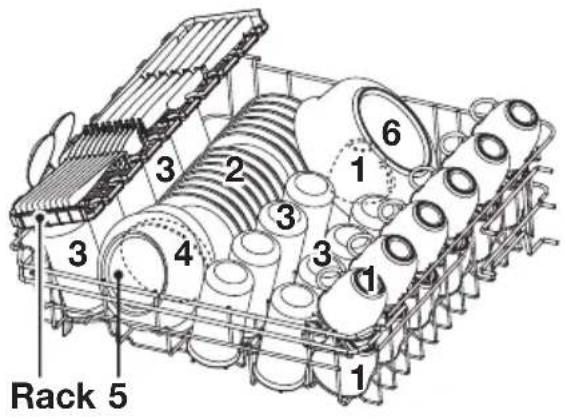
text_image
Rack 5 1 2 3 4 1 3 6| Number Item | |
| 1 Cups | |
| 2 Saucers | |
| 3 Glasses | |
| 4 Small serving bowl | |
| 5 Medium serving bowl | |
| 6 Large serving bowl |
Lower basket:
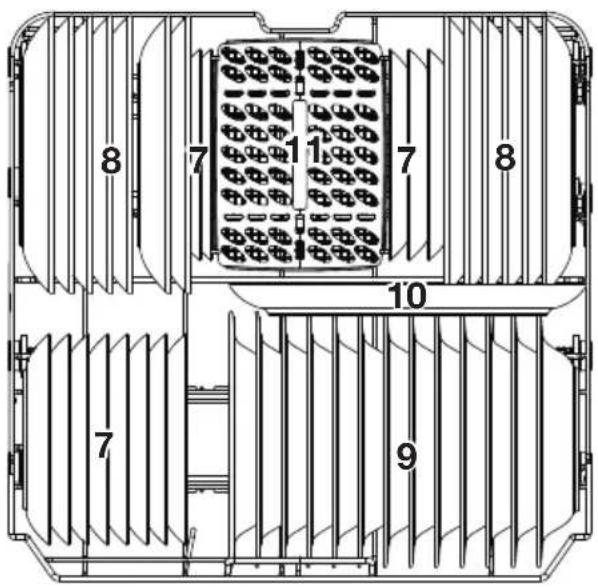
text_image
8 7 1 7 8 10 7 9| Number Item |
| 7 Dessert dishes |
| 8 Dinner plates |
| 9 Soup plates |
| 10 Oval platter |
| 11 Cutlery basket |
Cutlery rack:
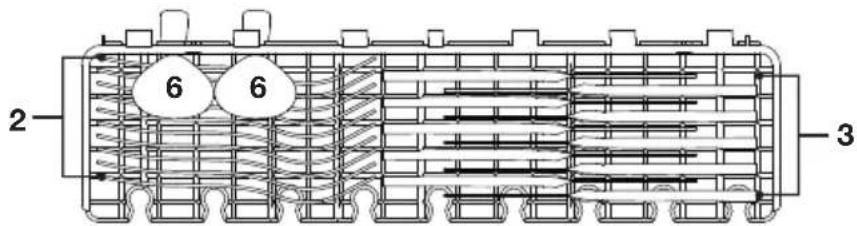
text_image
2 6 6 3
Note: Only place cutlery that has a small weight on the rack. The total weight must be less than 1.5 kg.
Cutlery basket:
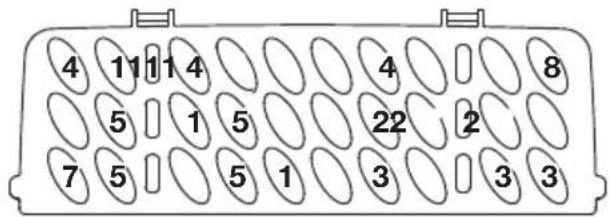
text_image
4 11 1 4 5 1 5 7 5 5 1 4 8 22 2 3 3 3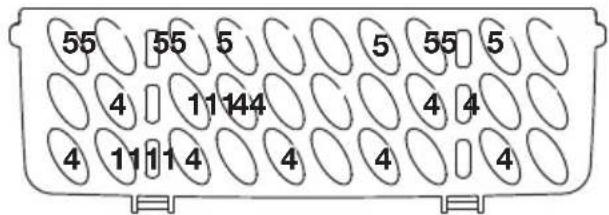
text_image
55 55 5 5 55 5 4 11 14 4 4 4 4 4 11 1 4 4 4 4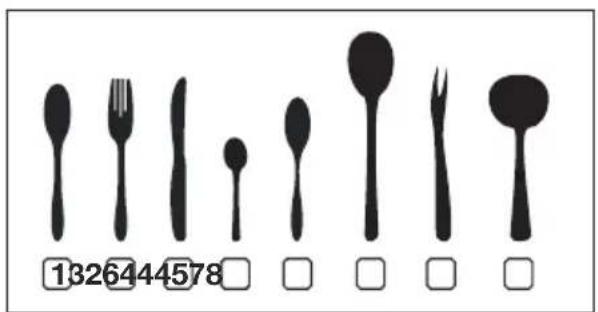
text_image
1326444578| Number | Item |
| 1 Soup spoons | |
| 2 Forks | |
| 3 Knives | |
| 4 Teaspoons | |
| 5 Dessert spoons | |
| 6 Serving spoons | |
| 7 Serving forks | |
| 8 Gravy ladles | |
Information for comparability tests in accordance with EN 50242
• Capacity: 13 place settings
- Position of the upper basket: lower position
- Program: ECO
- Rinse aid setting: 6
- Softener setting: H3
Disposal
Disposing of the packaging and appliance
Sustainable materials were used in the manufacture of this appliance. At the end of its life cycle, this appliance should be disposed of in a responsible manner. The government can provide you with information in this regard.
The packaging for the appliance is recyclable. The following may be used:
- cardboard;
• polyethylene film (PE);
• CFC-free polystyrene (PS hard foam).
The materials should be disposed of in a responsible manner and in accordance with government regulations.
text_image
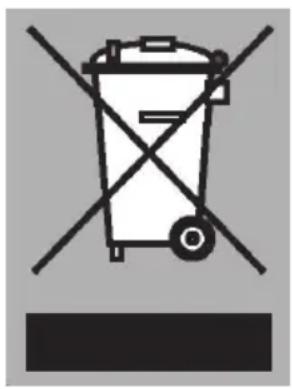
Prohibition sign for a trash bin with crossed and unexposed lines, indicating no waste or discharge.The product bears the symbol of a crossed out waste bin to draw attention to the obligation regarding separate processing of electrical household appliances. This means that the appliance cannot be added to your normal household waste at the end of its lifecycle. The appliance must be taken to a special municipal waste collection centre, or to a sales outlet that offers this service.
Separate processing of household appliances prevents the potentially negative consequences for the environment and health that can arise as a result of inadequate processing. It ensures that the materials which the appliance is composed of can be reclaimed, allowing for considerable savings to be made in terms of energy and materials.

text_image
! CENote! The packaging material may be hazardous for children.
Declaration of conformity
We hereby declare that our products satisfy the applicable European directives, orders and regulations
text_image
Technical diagram of a 3D printer with labeled parts including base, top, and side views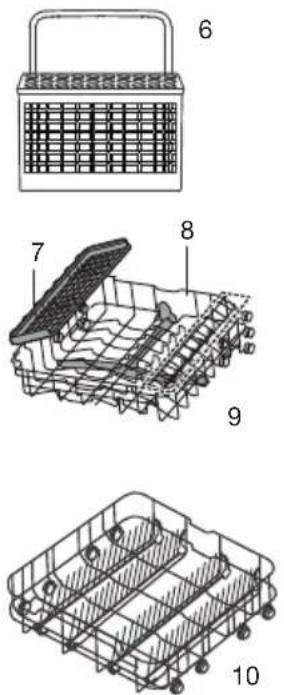
text_image
Technical diagram of a basket with labeled parts, showing front, side, and top views with numbered annotations.Schnellstart
flowchart
graph LR
    A["SALT"] --> B["Innen Außen"]
    B --> C["Extraction with chromatography"]
    C --> D["Washing Machine"]
    D --> E["Discharge into a device"]
flowchart
graph LR
    A["Hand holding a cup with a lid"] --> B["Add salt to a cup"]
    B --> C["Salt being added to the cup"]
    C --> D["Add liquid into a container"]
    D --> E["Transfer from salt to a container"]
natural_image
Technical line drawing of a mechanical component with no visible text or symbolsnatural_image
Pure diagram of vertical slats arranged in a grid pattern without any text, numbers, or symbolsnatural_image
Circular diagram with grid lines and a crossed X symbol, no readable text or labelsnatural_image
Line drawing of a shopping cart with wheels and an arrow indicating direction (no text or symbols)natural_image
Line drawing of a shopping cart with wheels and an arrow indicating motion (no text or symbols)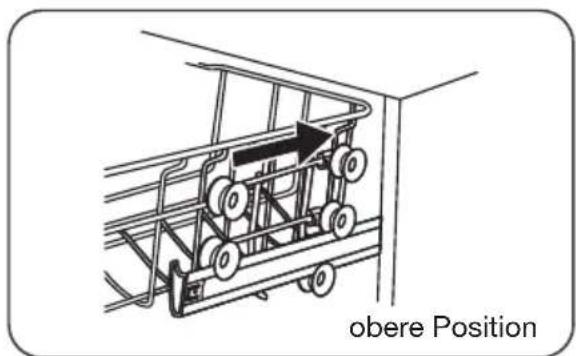
text_image
obere Positionnatural_image
Technical line drawing of a mechanical assembly or housing with no visible text or symbols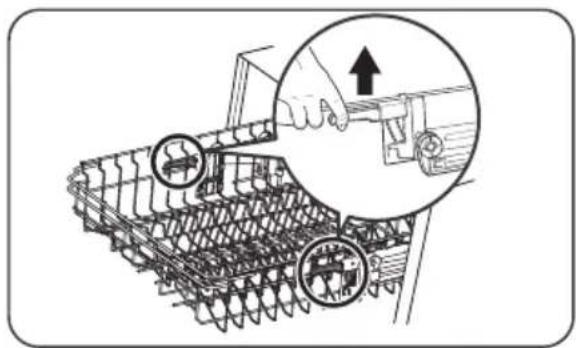
natural_image
Technical illustration of a tracked vehicle with mechanical components and a hand adjusting a tool (no text or symbols present)natural_image
Diagram showing structural deformation of a steel rebar system, with no text or symbols presentnatural_image
Illustration of a hand pressing down on a device panel with buttons and a knob (no text or symbols)natural_image
Illustration of a hand pressing down on a kitchen air conditioner panel with a scroll and control buttons (no text or symbols)flowchart
graph LR
    A["Receipt with lever"] --> B["3 sec Hand Trigger"]
    B --> C["Product with Eco Control Unit"]
natural_image
Illustration of a hand washing a car with a faucet, showing liquid spray and cleaning process (no text or symbols)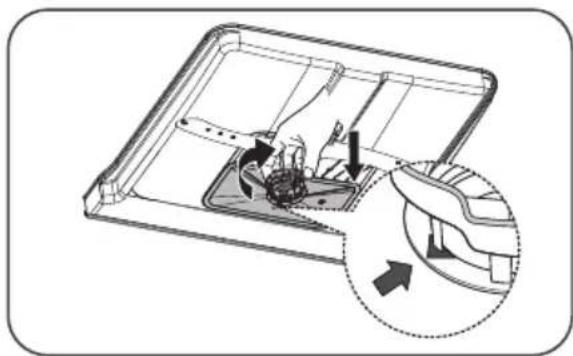
natural_image
Diagram of a mechanical device with internal components and directional arrows indicating motion (no text or symbols)natural_image
Technical illustration of an aircraft carrier with structural components and a close-up inset showing the engine (no text or symbols present)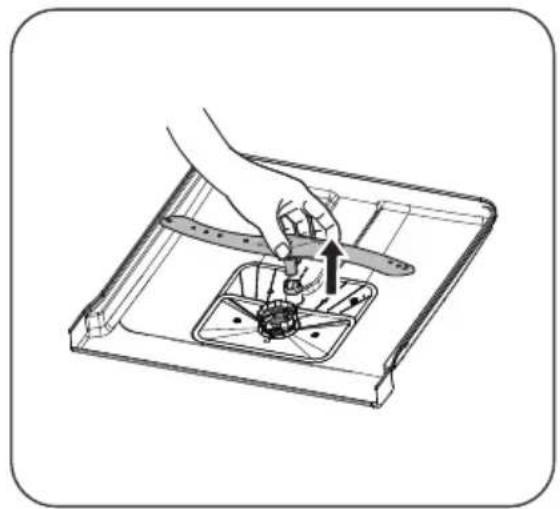
natural_image
Illustration of a hand using a tool to adjust or install a mechanical component, with no visible text or symbols.natural_image
Illustration of hands using a tool to clean or spray liquid on a kitchen sink (no text or symbols)natural_image
Symbol of a trash bin with crossed x-marks and a blank base (no text or numbers)text_image
Barcode image containing machine-readable data, with vertical black bars for each digit and a series of adjacent numbers.811588