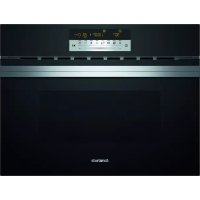
CC4W91960 - Oven CONSTRUCTA - Free user manual and instructions
Find the device manual for free CC4W91960 CONSTRUCTA in PDF.



| Product type | Built-in microwave combi oven |
| Brand | Constructa |
| Model | CC4W91960 |
| Cooking modes | Microwave, convection, hot air grilling, grill, MicroCombi (combination microwave + convection/grill) |
| Microwave power | Up to 900 W (settings: 90, 180, 360, 600, 900 W) |
| Temperature range | 40 °C to 230 °C (depending on mode) |
| Automatic programs | 15 programs (defrost, cooking, combination cooking) |
| Time functions | Timer, programmable duration, clock display |
| Child safety | Yes, control panel lock |
| Cleaning | Aqualysis (steam cleaning), manual cleaning |
| Display | Digital with touch control zone (dial) |
| Included accessories | Wire rack |
| Installation type | Built-in |
| Power supply | Mains connection, 220-240 V (estimated) |
| Dimensions (H x W x D) | Approx. 595 x 595 x 548 mm (estimated for standard built-in oven) |
| Net weight | Approx. 35 kg (estimated) |
| After-sales service | Product number (E-Nr.) and serial number (FD) on the rating plate |
Frequently Asked Questions - CC4W91960 CONSTRUCTA
User questions about CC4W91960 CONSTRUCTA
0 question about this device. Answer the ones you know or ask your own.
Ask a new question about this device
Download the instructions for your Oven in PDF format for free! Find your manual CC4W91960 - CONSTRUCTA and take your electronic device back in hand. On this page are published all the documents necessary for the use of your device. CC4W91960 by CONSTRUCTA.
USER MANUAL CC4W91960 CONSTRUCTA
1 Safety 36
2 Preventing material damage 39
3 Environmental protection and saving energy.... 40
4 Familiarising yourself with your appliance 41
5 Accessories. 44
6 Before using for the first time 44
7 Basic operation 45
8 Microwave 46
9 Automatic programmes 49
10 Time-setting options. 50
11 Childproof lock. 51
12 Basic settings. 51
13 Cleaning and servicing. 52
14 Troubleshooting 54
15 Disposal. 56
16 How it works. 56
17 Customer Service 69

1 Safety
Please read the safety information to ensure that you use the appliance safely.
1.1 General information
You can find general information for this instruction manual here.
- Read this instruction manual carefully. Only this will ensure you use the appliance safely and efficiently.
This manual is intended for the user of the appliance. - Follow the safety instructions and warnings.
- Keep the instruction manual and the product information safe for future reference or for the next owner.
- Check the appliance after unpacking it. Do not connect the appliance if it has been damaged in transit.
1.2 Intended use
Read the information on intended use to ensure that you use the appliance correctly and safely.
Only a licensed professional may connect appliances without plugs. Damage caused by incorrect connection is not covered under the warranty.
Only use this appliance:
As specified in this instruction manual.
To prepare meals and drinks.
In private households and in enclosed spaces in a domestic environment.
Up to an altitude of max. 4000m above sea level.
This appliance complies with the standards EN 55011 and CISPR 11. It is a group 2, class B product. Group 2 means that microwaves are produced for the purpose of heating food. Class B means that the appliance is suitable for private households.
1.3 Restriction on user group
Avoid risks to children and vulnerable persons.
This appliance may be used by children aged 8 or over and by people who have reduced physical, sensory or mental abilities or inadequate experience and/or knowledge, provided that they are supervised or have been instructed on how to use the appliance safely and have understood the resulting dangers.
Children must not play with the appliance. Children must not perform cleaning or user maintenance unless they are at least 15 years old and are being supervised.
Keep children under the age of 8 years away from the appliance and power cable.
1.4 Safe use
Follow these safety instructions when using the appliance.
Always place accessories in the cooking compartment the right way round.
"Accessories", Page 44
WARNING - Risk of fire!
Combustible objects that are left in the cooking compartment may catch fire.
-
Never store combustible objects in the cooking compartment.
-
Never open the appliance door if there is smoke inside.
- Switch off the appliance and unplug it from the mains or switch off the circuit breaker in the fuse box.
Loose food remnants, fat and meat juices may catch fire.
Before using the appliance, remove the worst of the food residues and remnants from the cooking compartment, heating elements and accessories.
Opening the appliance door creates a draught. Greaseproof paper may come into contact with the heating element and catch fire.
Do not place greaseproof paper loosely over accessories when preheating the appliance.
Always use a plate or baking tin to hold greaseproof paper down.
Do not use more greaseproof paper than is necessary.
- Greaseproof paper must not extend over the edge of accessories.
Overheating can cause a fire. If the appliance is installed behind a decorative door or the door of a kitchen unit, this will result in a build-up of heat during operation with the decorative door or the door of a kitchen unit closed.
- Only operate the appliance when the decorative door or the door of a kitchen unit is open.
WARNING - Risk of burns!
The appliance gets very hot.
- Never touch the inside surfaces of the cooking compartment or the heating elements while they are hot.
Always allow the appliance to cool down. - Keep children at a safe distance.
Accessories and cookware get very hot.
Always use oven gloves to remove accessories or cookware from the cooking compartment.
When the cooking compartment is hot, any alcoholic vapours inside may catch fire.
- Never prepare food containing large quantities of liquid with a high alcohol content.
- Only use liquid with a high alcohol content in small quantities.
- Open the appliance door carefully.
WARNING - Risk of scalding!
The accessible parts of the appliance become hot during operation.
- Never touch these hot parts.
- Keep children at a safe distance.
Hot steam may escape when you open the appliance door. Whether or not you can see steam depends on its temperature.
- Do not stand too close to the appliance when opening the door.
- Open the appliance door carefully.
- Keep children at a safe distance.
If there is water in the cooking compartment when it is hot, this may create hot steam.
- Never pour water into the cooking compartment when the cooking compartment is hot.
WARNING - Risk of injury!
Scratched glass in the appliance door may develop into a crack.
- Do not use glass scrapers, sharp or abrasive cleaning aids, or harsh cleaning products.
The hinges on the appliance door move when the door is opened and closed, which could trap your fingers.
- Keep your hands away from the hinges.
WARNING - Risk of electric shock!
Incorrect repairs are dangerous.
- Repairs to the appliance should only be carried out by trained specialist staff.
- Only use genuine spare parts when repairing the appliance.
If the power cord of this appliance is damaged, it must be replaced by the manufacturer, the manufacturer's Customer Service or a similarly qualified person in order to prevent any risk.
If the insulation of the power cord is damaged, this is dangerous.
- Never let the power cord come into contact with hot appliance parts or heat sources.
- Never let the power cord come into contact with sharp points or edges.
- Never kink, crush or modify the power cord.
An ingress of moisture can cause an electric shock.
- Do not use steam- or high-pressure cleaners to clean the appliance.
If the appliance or the power cord is damaged, this is dangerous.
- Never operate a damaged appliance.
- Never operate an appliance with a cracked or fractured surface.
- Never pull on the power cord to unplug the appliance. Always unplug the appliance at the mains.
If the appliance or the power cord is damaged, immediately unplug the power cord or switch off the fuse in the fuse box.
"Call Customer Service." Page 69
Repairs to the appliance should only be carried out by trained specialist staff.
1.5 Microwave
Follow these safety instructions when using the microwave.
WARNING - Risk of fire!
Using the appliance for anything other than its intended purpose is dangerous and may cause damage. For example, heated slippers and pillows filled with grain or cereal may catch fire, even several hours later.
- Never dry food or clothing with the appliance.
- Never heat up slippers, pillows filled with grain or cereal, sponges, damp cleaning cloths or similar with the appliance.
The appliance must only be used to prepare food and drink.
Food may catch fire.
- Never heat food contained in heat-retaining packaging.
- Do not leave food heating unattended in containers made of plastic, paper or other combustible materials.
- Never set the microwave power too high or the cooking time too long. Follow the instructions provided in this instruction manual.
- Never use the microwave to dry food.
- Never defrost or heat food with a low water content, such as bread, at too high a microwave power or for too long.
Cooking oil may catch fire.
- Never use the microwave to heat cooking oil on its own.
WARNING - Risk of explosion!
Liquids and other food may explode when in containers that have been tightly sealed.
- Never heat liquids or other food in containers that have been tightly sealed.
WARNING - Risk of burns!
Foods with peel or skin may burst or explode during heating, or even afterwards.
- Never cook eggs in their shells or reheat hard-boiled eggs.
- Never cook shellfish or crustaceans.
Always prick the yoke when baking or poaching eggs. - The skin of foods that have a peel or skin, such as apples, tomatoes, potatoes and sausages, may burst. Always prick the peel or skin before heating.
Heat is not distributed evenly through baby food.
- Never heat baby food in closed containers.
Always remove the lid or teat. - Stir or shake well after heating.
- Check the temperature before giving the food or drink to a child.
Heated food gives off heat. The cookware may become hot.
Always use oven gloves to remove cookware or accessories from the cooking compartment.
Airtight packaging may burst when food is heated.
Always follow the instructions on the packaging.
Always use oven gloves to remove dishes from the cooking compartment.
The accessible parts of the appliance become hot during operation.
- Never touch these hot parts.
- Keep children at a safe distance.
Using the appliance for anything other than its intended purpose is dangerous. This is because, for instance, overheated slippers, pillows filled with grain or cereal, sponges and damp cleaning cloths, etc., may cause burns to the skin.
- Never dry food or clothing with the appliance.
- Never heat up slippers, pillows filled with grain or cereal, sponges, damp cleaning cloths or similar with the appliance.
The appliance must only be used to prepare food and drink.
WARNING - Risk of injury!
Unsuitable cookware may crack. Porcelain or ceramic cookware can have small perforations in the handles and lid. These perforations conceal a cavity below. If moisture penetrates this cavity, it could cause the cookware to crack.
- Only use microwave-safe cookware.
Using cookware and containers made of metal or that feature metal detailing in microwave-only mode may cause sparks during operation. This will damage the appliance.
- Never use metal containers when operating the appliance in microwave-only mode.
Either use only microwave-safe cookware or use the microwave in combination with a type of heating.
WARNING - Risk of electric shock!
The appliance uses a high voltage.
- Never remove the casing.
WARNING - Risk of serious harm to health!
If it is not cleaned properly, the surface of the appliance may become damaged, causing microwave energy to escape.
- Clean the appliance on a regular basis and remove any food residue immediately.
Always keep the cooking compartment, door seal, door and door stop clean.
Microwave energy may escape if the cooking compartment door or the door seal is damaged.
- Never use the appliance if the cooking compartment door, the door seal or the plastic door frame is damaged.
Call our after-sales service.
Microwave energy will escape from appliances that do not have any casing.
- Never remove the casing.
- Contact our after-sales service if maintenance or repair work is needed.
2 Preventing material damage
Follow these instructions to prevent material damage to your appliance, accessories or other objects in your kitchen.
2.1 General
Follow these instructions when using the appliance.
ATTENTION!
When the cooking compartment is hot, any water inside it will create steam. The change in temperature may cause damage.
- Never pour water into the cooking compartment when it is still hot.
The prolonged presence of moisture in the cooking compartment leads to corrosion.
Always wipe away the condensation after cooking.
- Do not keep moist food in the cooking compartment for a long time with the door closed.
Do not store food in the cooking compartment.
Leaving the appliance to cool down with the door open will damage the front of neighbouring kitchen units over time.
Always allow the cooking compartment to cool down with the door closed after cooking at high temperatures.
Take care not to trap anything in the appliance door.
- Only leave the cooking compartment to dry with the door open if a lot of moisture was produced during operation.
If the seal is very dirty, the appliance door will not close properly when the appliance is in operation. This may damage the front of adjacent kitchen units.
- Keep the seal clean at all times.
Sitting or placing objects on the appliance door may damage it.
Do not place or hang objects on the appliance door.
- Do not place cookware or accessories on the appliance door.
With certain models, accessories may scratch the door pane when closing the appliance door.
Always push accessories fully into the cooking compartment.
Carrying the appliance by the door handle could break it. The door handle cannot support the weight of the appliance.
- Do not carry or hold the appliance by the door handle.
2.2 Microwave
Follow these instructions when using the microwave.
ATTENTION!
Metal touching the wall of the cooking compartment will cause sparks, which may damage the appliance or the inner door pane.
Metal (e.g. a spoon in a glass) must be kept at least 2cm from the cooking compartment walls and the inside of the door.
Placing aluminium containers in the appliance may cause sparks, which will damage the appliance.
- Do not use aluminium containers in the appliance. When preparing microwave popcorn at a high microwave power, the door pane may crack due to over loading.
- Never set the microwave power too high.
Use a power setting no higher than 600 watts.
Always place the popcorn bag on a glass plate.
The microwave feed is damaged by the removal of the cover.
- Never remove the cover of the microwave feed in the cooking compartment.
3 Environmental protection and saving energy
Help protect the environment by using your appliance in a way that conserves resources and by disposing of reusable materials properly.
3.1 Disposing of packaging
The packaging materials are environmentally compatible and can be recycled.
- Sort the individual components by type and dispose of them separately. Information about current disposal methods are available from your specialist dealer or local authority.
3.2 Saving energy
If you follow these instructions, your appliance will use less power.
Only preheat the appliance if the recipe or the recommended settings tell you to do so.
- Not preheating the appliance can reduce the energy used by up to 20% .
Use dark-coloured, black-coated or enamelled baking tins.
These types of baking tin absorb the heat particularly well.
Open the appliance door as little as possible during operation.
- This will maintain the temperature in the cooking compartment and eliminate the need for the appliance to reheat.
When baking multiple dishes, do so in succession or in parallel.
- The cooking compartment is heated after baking the first dish. This reduces the baking time for the second cake.
If the cooking time is relatively long, you can switch the appliance off 10 minutes before the cooking time ends.
- There will be enough residual heat to finish cooking the dish.
Remove any accessories that are not being used from the cooking compartment.
- Accessories that are not being used do not need to be heated.
Allow frozen food to defrost before cooking.
- This will save the energy that would otherwise be required to defrost it.
4 Familiarising yourself with your appliance
Familiarise yourself with the parts of your appliance.
4.1 Controls
The controls are used to configure all functions of your appliance and to obtain information about the operating status.
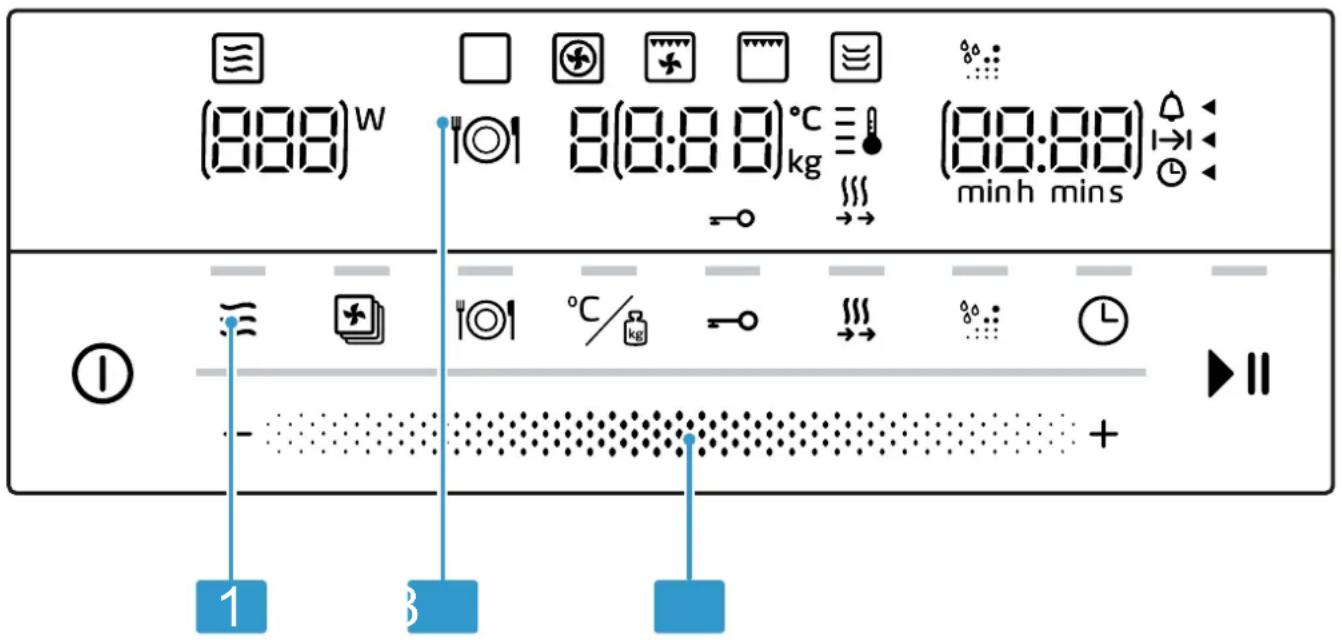
On certain models, specific details such as the colour and shape may differ from those pictured.
1 Function selector
2 Touch fields
3 Display
Settings area
You can use the settings area to change the setting values that are highlighted in the display.
The settings area functions like a scroller. Swipe left or right with your finger to change the setting. The faster you swipe, the faster the scroller will move. Tap on the scroller to stop it and select an exact setting.
In selection lists, e.g. programmes, the first selection follows the last.
For values, e.g. weight, return to the settings area when you reach the minimum or maximum value.
Touch fields
Touch fields are touch-sensitive surfaces. To select a function, touch the relevant field.
Symbol Name Use
| ① On/off Switch the appliance on and off. | |
| Microwave Select the microwave power levels or switch on the microwave function for a type of heating. | |
| Types of heating Call up the selection of types of heating. | |
| Automatic programmes Call up the selection of automatic programmes. | |
| Temperature/weight Select set the temperature and weight. | |
| Childproof lock Press and hold: Activate or deactivate the childproof lock. | |
| Rapid preheating Activate or deactivate rapid preheating. |
Symbol Name Use
Aqualisis Activate the Aqualisis cleaning function
Time-setting options Timer, cooking time or set the time.
Start/stop Press briefly: Start or stop operation.
Press and hold: End operation. The settings are reset.
Display
You can see the current setting values or options in the display.
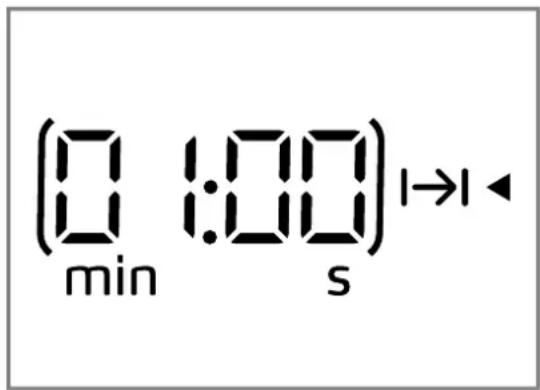
| Active value | The directly adjustable value is shown in brackets. The active value can be adjusted via the settings area. |
| Passive value | You cannot directly adjust the values outside the brackets. If you want to change a value, you must first activate the value. |
Display elements
Here you can find a short explanation of the various display elements.
| Symbol | Name | Meaning |
| △ | Timer If the symbol is highlighted, the timer appears in the display. | |
| I→I | Cooking time If the symbol is highlighted, the cooking time appears in the display. | |
| ⊙ | Clock If the symbol is highlighted, the clock appears in the display. | |
| h:min Hours/minutes The time is displayed in hours and minutes. | ||
| min:s Minutes/seconds The time is displayed in minutes and seconds. | ||
| ○ | Childproof lock If this symbol is highlighted, the child-proof lock is activated. | |
| || | Rapid heating If the symbol is highlighted, rapid heating is activated. | |
| °C | The temperature is displayed in °C. | |
| kg | Weight The weight is displayed in kg. | |
Temperature display
The temperature display shows the heating progress.
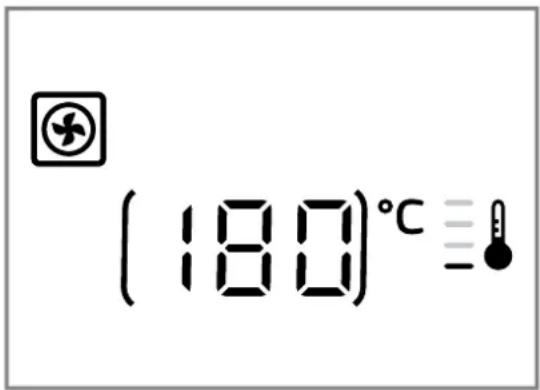
After operation starts, the thermometer lights up and the bars next to it light up one after another to display the heating up progress of the interior temperature.
When all the bars are lit, the appliance has reached the set temperature. When using the grill, all the bars are lit from the start.
When using the microwave, there is no temperature display.
Due to thermal inertia, the temperature displayed may differ slightly from the actual temperature inside the cooking compartment.
Night mode
To save energy, the control panel brightness is automatically reduced to a lower level between 10 p.m. and 5.59 a.m.
4.2 Types of heating
Here you can find an overview of the types of heating. You can find recommendations on using the types of heating.
| Symbol | Name | Temperature/levels | Use |
| ≡ | Microwave Microwave power settings: | For defrosting, cooking and heating foods and liquids. | |
| ■ 90 W | |||
| ■ 180 W | |||
| ■ 360 W | |||
| ■ 600 W | |||
| ■ 900 W | |||
| ◎ | Hot air 40 °C | 100-230 °C | Let yeast dough rise, de-frost cream cakes. For baking and roasting on one level. |
| ★ | Hot air grilling 100-230 °C Roasting poultry, whole fish | and large pieces of meat. | |
| ◎ | Plate warming 30-70 °C Warming plates. | ||
| ☐ Grill Grill settings: | ■ 1 = low | Grilling flat items such as steak and sausages, or making toast. Browning food. | |
| ■ 2 = medium | |||
| ■ 3 = high | |||
| ◎† | Programmes - There are preprogrammed | settings for many dishes. | |
4.3 Cooking compartment
The features of the cooking compartment make your appliance easier to use.
Interior lighting
When you open the appliance door, the light in the cooking compartment switches on. If the appliance door remains open for longer than 15 minutes, the light switches off again.
In most operating modes, the interior lighting switches on as soon as operation starts. The interior lighting switches off again when operation stops.
You can specify whether you want the interior lighting to switch on during operation in the
"Basic settings", Page 51.
Cooling fan
The cooling fan switches on and off as required. The hot air escapes through the ventilation slots above the appliance door.
ATTENTION!
Covering the ventilation slots will cause the appliance to overheat.
- Do not cover the ventilation slots.
To cool the cooking compartment more quickly after operation, the cooling fan continues to run for a certain period afterwards. If the appliance is running in microwave operation, the appliance remains cool, but the cooling fan still switches on. The cooling fan may continue to run even when microwave operation has ended.
Condensation
Condensation can occur in the cooking compartment and on the appliance door when cooking. Condensation is normal and does not adversely affect appliance operation. Wipe away the condensation after cooking.
4.4 Appliance door
If you open the appliance door during operation, operation stops. If the appliance door is closed, you can continue operation with
5 Accessories
Only use original accessories. These have been made especially for your appliance. Here you can find an overview of your appliance's accessories and how to use them.
Accessories Use
Wire rack Wire rack for baking
and roasting in oven operation.
Wire rack for grilling, e.g. steaks, sausages and bread
Wire rack as a storage space, e.g. for flat ovenproof dishes
5.1 Other accessories
You can purchase other accessories from our after-sales service, specialist retailers or online.
You will find a comprehensive range of products for your appliance in our brochures and online: www.constructa.com
Accessories vary from one appliance to another. When purchasing accessories, always quote the exact product number (E no.) of your appliance.
You can find out which accessories are available for your appliance in our online shop or from our after-sales service.
Glass roasting dish
Use
Stews
Bakes
Pizza tray
Use
Traybakes
Biscuits
5.2 Inserting the accessory
The accessory can be inserted in two positions.
- Insert the accessory so that it does not touch the appliance door.
| ~ | Insert the accessory in the high position. |
| ~ | Insert the accessory in the low position. |
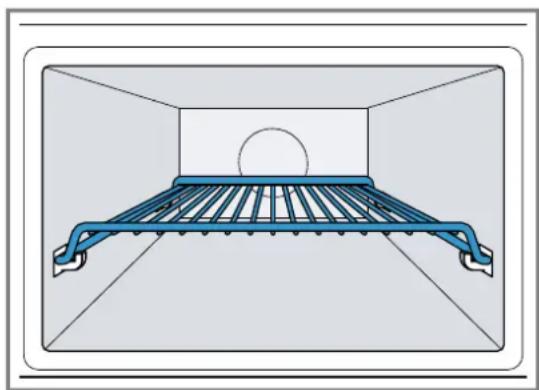
The image shows the position.
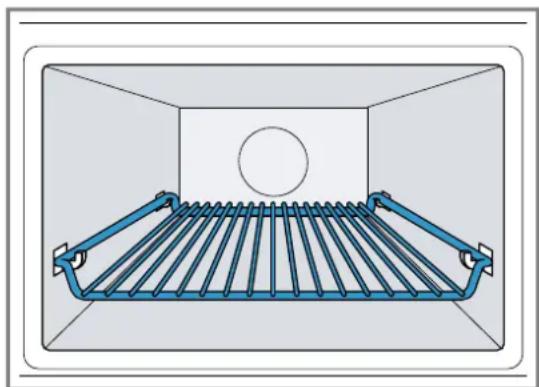
The image shows the position.
6 Before using for the first time
Configure the settings for initial start-up. Clean the appliance and accessories.
6.1 Performing the initial configuration
After connecting the appliance to the power supply or following a power cut, the following prompt appears in the display for the setting the time. It may take a few seconds for the prompt to appear.
Connect the appliance to the power supply.
✓ 12. Dashes in the display and lights up.
Setting the time
- Set the time in the settings area.
- Press
The clock time is set.
6.2 Cleaning the appliance before using it for the first time
Clean the cooking compartment and accessories before using the appliance to prepare food for the first time.
- Make sure that there is no leftover packaging, accessories or other objects in the cooking compartment.
- Close the appliance door.
- Press
Keep hot air as the default value.
-
Press %
-
Set the temperature to 180^ using the settings area.
-
Press II
The appliance starts.
7. After one hour, press
8. Press ① to switch the appliance off.
The appliance is cleaned.
The appliance is switched off.
6.3 Cleaning the accessories
- Clean the accessories thoroughly using soapy water and a soft cloth.
7 Basic operation
You can find out everything you need to know about operating your appliance here.
7.1 Switching on the appliance
Press to switch on the appliance.
The appliance is ready to use.
A default value appears in the display.
7.2 Switching off the appliance
Switch your appliance off when you are not using it. If no settings are applied for an extended period, the appliance switches itself off automatically.
Press to switch off the appliance.
The appliance stops any ongoing functions.
The time appears in the display.
- Some displays also remain visible in the display when the appliance has been switched off.
7.3 Setting the type of heating and temperature
- Use the function selector to set the required type of heating.
A default value appears in the display. - If necessary, change the settings. To do this, touch the appropriate field and use the rotary selector to change the value.
- Press II
The appliance starts.
llights up. - With a type of heating with temperature, the temperature display lights up gradually.
- If necessary, use the rotary selector to change the temperature while the oven is in operation. When the appliance is in operation, you cannot set the temperature to 40^ .
7.4 Pausing operation
You can pause operation at any time.
-
Press Ibr open the appliance door.
Operation is paused.
√ 1fashes. -
To continue operation, close the appliance door and press
Operation continues.
lights up.
7.5 Stopping operation
You can stop operation at any time.
Press ①
The fan may continue to run after operation has been paused or stopped.
The appliance stops any ongoing functions.
7.6 Rapid heating
To save time, you can shorten the preheat time for certain types of heating from a minimum temperature of 100^ .
You can use rapid heating for the following types of heating:
Hot air, exception: Hot air 40^
lot air grilling
Configuring rapid heating
To ensure an even cooking result, do not place the accessory with the food in the cooking compartment until rapid heating has finished. Do not set a cooking time until rapid heating has finished.
- Set a suitable type of heating and a temperature of at least 100^ .
- Press
- lights up in the display.
- Press
Rapid heating starts.
lights up. - Once the set temperature has been reached, the rapid heating process ends. A signal sounds and goes out in the display. Your appliance continues to run with the set type of heating and temperature.
Rapid heating is automatically deactivated within no more than 15 minutes.
Cancelling rapid heating
Press
- goes out in the display. Your appliance continues to run with the set type of heating and temperature.
7.7 Safety switch-off function
For your safety, the appliance has a safety switch-off function. The appliance is automatically switched off if it has been in operation for an extended period. How long the appliance waits before switching itself off depends on the setting:
Hot air 40^ and preheating: 24 hours
Hot air 100 - 230^ and hot air grilling: 5 hours
Grill: 90 minutes
If the appliance has been switched off by the safety switch-off function, E8 shown in the display. You can confirm this message by pressing
8 Microwave
You can use the microwave to cook, heat up, bake or defrost food very quickly. The microwave can be used on its own or in combination with a type of heating.
8.1 Microwave power settings
Here you can find an overview of the different microwave power settings and when to use them.
| Microwave output Maximum cooking time Use in watts |
| 90 W 1:30 hours Defrosting delicate foods. |
| 180 W 1:30 hours Defrosting food and continued cooking. |
| 360 W 1:30 hours Cooking meat and fish or heating delicate foods. |
| 600 W 1:30 hours Heating and cooking food. |
| 900 W 30 minutes Heating liquids.The maximum power setting is not designed for heating food. |
Default settings
The appliance suggests a cooking time for each microwave power setting. You can accept this value or change it in the relevant area.
8.2 Microwave-safe cookware and accessories
To heat food evenly and avoid damaging your appliance, it is important to use the right cookware and accessories.
Read the manufacturer's instructions before using any cookware in the microwave. If in doubt, carry out a cookware test. "Testing cookware for microwave suitability" Page 47
Microwave-safe
| Cookware and accessories | Reason |
| Cookware made from heat-resistant, microwave-safe material: | Microwaves do not damage heat-resistant material. |
| Glass | |
| Glass ceramic | |
| Porcelain | |
| Temperature-resistant plastic | |
| Fully glazed ceramic without cracks |
| Cookware and accessories | Reason |
| Accessories supplied: Wire rack | The wire rack supplied has been designed spec-cifically for the appliance and is therefore suitable for microwave use. |
| Metal cutlery You can use | metal cut- lery, e.g. place a spoon in a glass, to prevent delayed boiling. Note: Metal may create sparks, which could dam- age the cooking compa-t- ment and the inner door pane. Metal must be kept at least 2 cm from the cooking compartment walls and the inside of the door. |
Not microwave-safe
| Cookware and accessor-ies | Reason |
| Metal cookware Microwaves | cannot pass through metal. The food is barely heated or not heated at all. |
| Cookware with gold or sil-verb decoration | Microwaves can damage gold and silver decora-tion. Only use this kind of cookware if the manufac-turer guarantees that it is microwave-safe. |
Microwave-safe in MicroCombi mode
In MicroCombi mode, a microwave output of up to 600 W watts can be added to a type of heating. This means that metal dishes can be used in MicroCombi mode.
| Cookware and accessori-ies | Reason |
| Accessories supplied The accessories supplied, e.g. the wire rack, do not create sparks in Micro-Combi mode. | |
| Metal baking tins Cakes will brown both on top and on the bottom, as baking tins made of metal conduct heat more effi-ciently. Note: Metal may create sparks, which could damage the cooking compa-tment and the inner door pane. Metal must be kept at least 2 cm from the cooking compartment walls and the inside of the door. | |
8.3 Testing cookware for microwave suitability
Test cookware to see whether it is suitable for microwave use. Testing cookware is the only time the appliance should be operated in microwave mode without any food inside.
WARNING - Risk of scalding!
The accessible parts of the appliance become hot during operation.
- Never touch these hot parts.
-
Keep children at a safe distance.
-
Place the empty cookware in the cooking compartment.
-
Set the appliance to run for 30 seconds to 1 minute at maximum power.
-
Press Ito start.
-
Check the cookware several times:
-
If the cookware is cold or warm to the touch, it is suitable for microwave use.
- If the cookware becomes hot or sparks are created, the stop the cookware test. The cookware is not microwave-safe.
8.4 Configuring the microwave settings
Different power levels and settings are available for different types of food and recipes.
ATTENTION!
Operating the appliance without food in the cooking compartment may lead to overloading.
- Do not switch on the microwave unless there is food inside. The only exception to this rule is when performing a short cookware test.
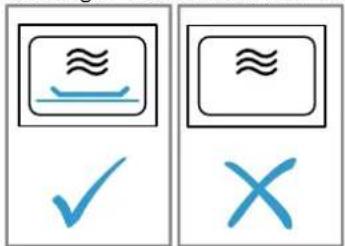
- Read the "safety instructions" Page 38 and the section on "how to prevent material damage" Page 39.
- "Read the information on microwave-safe cookware and accessories." Page 46
- Press
The appliance is ready to use.
- The display shows the maximum microwave power setting of 900 watts as the default value.
4. Set the required microwave power setting using the settings area.
- The display shows the microwave power setting and a default cooking time.
5. Press
6. Set the required cooking time using the settings area.
7. Press b start.
You can change the cooking time at any time during operation in the settings area.
- The cooking time starts to count down and the microwave starts.
lights up. - Once the cooking time has elapsed, the microwave stops and a signal sounds.
- When the dish is ready, open the appliance door or press any field.
8.5 Intervals for the time settings
The interval for setting a cooking time in microwave operation changes with the length of the cooking time.
| Cooking time Interval |
| 0-1 minutes 5 seconds |
| 1-3 minutes 10 seconds |
| 3-15 minutes 30 seconds |
| 15 minutes - 1 hour 1 minute |
| 1 hour - 5 minutes 1 hour 30 minutes |
8.6 Changing the microwave power
- Press
- Set the required microwave power setting using the settings area.
If the microwave function is only added after starting, the appliance pauses. Press tb start.
8.7 Pausing operation
You can pause operation at any time.
- Press Ibr open the appliance door.
Operation is paused.
✓ Ilflashes. - To continue operation, close the appliance door and press
Operation continues.
llights up.
8.8 Stopping operation
You can stop operation at any time.
Press ①
The fan may continue to run after operation has been paused or stopped.
The appliance stops any ongoing functions.
8.9 MicroCombi
To reduce the cooking time, you can use certain of the types of heating in combination with microwave mode. MicroCombi mode can be used with the following types of heating:
Hot air
Hot air grilling
Grill
Exceptions:
Microwave power setting 900 W
Hot air 40^
Warming plates
Configuring MicroCombi mode
Switch on microwave mode in addition to a type of heating.
- Press
The appliance is ready to use. - The display shows the maximum microwave power setting of 900 watts as the default value.
- Set the required microwave power setting using the settings area.
- The display shows the microwave power setting and a default cooking time.
- Press
- Select a combinable type of heating using the settings area.
A default value for the temperature is displayed. - Press %
- Set the temperature using the settings area.
- Press
- Set the required cooking time using the settings area.
- Press Ito start.
- The cooking time counts down and MicroCombi mode starts.
- Once the cooking time has elapsed, MicroCombi mode ends automatically and a signal sounds.
Changing the microwave power
- Press
- Set the required microwave power setting using the settings area.
If the microwave function is only added after starting, the appliance pauses. Press b start.
Pausing operation
You can pause operation at any time.
- Press Ibr open the appliance door.
Operation is paused.
√Iflashes.
- To continue operation, close the appliance door and press
Operation continues.
llights up.
Stopping operation
You can stop operation at any time.
Press ①
The fan may continue to run after operation has been paused or stopped.
The appliance stops any ongoing functions.
8.10 Heating and drying the cooking compartment
Always dry the cooking compartment after operation to ensure that no moisture remains.
- Allow the appliance to cool down.
- Remove the worst of the food residues from the cooking compartment immediately.
- Wipe any humidity from the cooking compartment floor.
- Press to switch on the appliance.
- Press
- Use the settings area to set the hot air grilling type of heating.
- Press
- Use the settings area to set the temperature to 150^ .
-
Press twice.
-
highlighted in the display.
-
Use the settings area to set a cooking time of 15 minutes.
-
Press tb start.
-
The drying process starts and ends after 15 minutes.
-
Open the appliance door to allow the steam to escape.
8.11 Drying the cooking compartment by hand
Always dry the cooking compartment after operation to ensure that no moisture remains.
- Allow the appliance to cool down.
- Remove the worst of the food residues from the cooking compartment.
- Dry the cooking compartment with a sponge.
- Leave the appliance door open for 1 hour so that the cooking compartment dries completely.
9 Automatic programmes
Automatic programmes can help you prepare different dishes by selecting the optimal settings automatically.
9.1 Tips on configuring the settings for dishes
Follow these tips to achieve optimal cooking results.
Only use food that is in perfect condition.
Only use meat at refrigerator temperature.
Only use frozen food straight from the freezer.
Take the food out of its packaging and weigh it. If you cannot set the exact weight on the appliance, round the weight up or down.
- Place the food in the cold cooking compartment.
Always use microwave-safe, heat-resistant cookware, for example made of glass or ceramic.
9.2 Overview of dishes
The appliance prompts you to enter the weight. You can only enter weights within the intended weight range.
Defrosting
| No. Food Accessories Rack pos- | ition | Weight range in Information kg | |
| PO1 | Minced meat Shallow cook-ware without lid | ~ | 0,2-1,0 After turning, remove any minced meat that has already defrosted. |
| PO2 | Pieces of meat Shallow cook-ware without lid | ~ | 0,2-1,0 Drain off any liquid when turning and under no circumstances use it for other purposes or allow it to come into contact with other foods. |
| PO3 | Chicken, chicken pieces | Shallow cook-ware without lid | 0,4-1,8 Drain off any liquid when turning and under no circumstances use it for other purposes or allow it to come into contact with other foods. |
| PO4 | Bread Shallow cook-ware without lid | ~ | 0,2-1,0 Bread should only be defrosted in the required amounts, as it quickly becomes stale. If possible, separate the slices. |
Cooking programmes
| No. Food Accessories Rack pos- | ition | Weight range in Information kg | |
| POS | Rice Cookware with lid | ~ | 0,05-0,2 Do not use boil-in-the-bag rice. Rice foams a lot during cooking. Enter the uncooked weight (without liquid). Add two to two and a half times the amount of liquid to the rice. |
| POS | Potatoes Cookware with lid | ~ | 0,15-1,0 Cut into pieces of equal size. Add 1 tbsp water per 100 g. |
| POS | Vegetables Cookware with lid | ~ | 0,15-1,0 Cut into pieces of equal size. Add 1 tbsp water per 100 g. |
Combi cooking programmes
| No. Food Accessories Rack pos- | ition | Weight range in Information kg | |
| P08 | Bake, frozen Cookware without lid | ─ | 0,4-1,2 The bake should not be thicker than 3 cm. |
| P09 | Chicken, whole Cookware without lid | ─ | 0,5-2,0 Breast side down. |
| P10 | Sirloin, medium Cookware without lid | ─ | 0,5-1,5 |
| P11 | Pork neck joint Cookware with lid | ─ | 0,5-2,0 |
| No. Food Accessories Rack pos- | ition | Weight range in Information kg | ||
| P12 | Lamb, medium Cookware with lid | ~ | 0,8-2,0 Shoulder joint or boned leg of lamb | |
| P13 | Meat loaf Cookware without lid | ~ | 0,5-1,5 The meat loaf should not be thicker than 7 cm. | |
| P14 | Fish, whole Cookware without lid | ~ | 0,3-1,0 Scale the fish beforehand. Place the fish in the cookware in its "swimming position". | |
| P15 | Rice stew with fresh ingredients | Deep cookware with lid | ~ | 0,05-0,2 Add one part rice, three parts water, four parts vegetables. Only use fresh ingredients. Only enter the weight of the rice. |
9.3 Applying settings for dishes
1. Press
- The display shows the first dish number and a default value for the weight.
- Set the required weight using the settings area.
- Press %
- Set the weight using the settings area. Before starting, you can use and switch between the dish and the weight.
- The appliance automatically sets the right cooking time.
- Press After starting, the dish and weight cannot be changed. The set weight can be displayed with ^ C / 2
The appliance starts.
llights up.
You will see the cooking time counting down.
For some programmes, a short audible signal sounds when you have to stir or turn the dish. -
When the cooking time has elapsed:
-
A signal sounds. The appliance stops heating.
- Press ①
9.4 Pausing operation
You can pause operation at any time.
- Press Ibr open the appliance door.
Operation is paused.
√▶Iflashes. - To continue operation, close the appliance door and press
Operation continues.
llights up.
9.5 Stopping operation
You can stop operation at any time.
Press ①
The fan may continue to run after operation has been paused or stopped.
- The appliance stops any ongoing functions.
10 Time-setting options
Your appliance features time-setting options that you can use to set the cooking time and the timer.
10.1 Checking the time-setting options
Requirement: If multiple time-setting options are set, the corresponding symbols light up. During operation, the timer and cooking time are available. In standby, the timer and the time are available.
Press until ,In focus.
The respective value is shown in the display.
10.2 Changing the time
Requirement: To change the time on the clock, the appliance must be switched off.
- Press twice.
- The symbol and the clock time appear in the display.
- Set the time in the settings area.
- Press
The clock time is set.
If is not pressed, the set value is applied after a few seconds.
10.3 Cooking time
You can set a time after which operation ends automatically. The maximum cooking time is 23 hours and 59 minutes.
Setting the cooking time
- Set the type of heating and temperature.
- Press until 1-1s in focus.
- Set the required cooking time using the settings area.
- Press II
The appliance starts.
llights up.
You will see the cooking time counting down.
Ending the cooking time
Requirement: A signal sounds. The appliance stops heating. 03 03 is shown in the display.
- Press
The signal is switched off. - Press ①
The appliance is switched off.
Changing the cooking time
- Use the settings area to change the cooking time.
After a few seconds, the display shows the changed cooking time.
You will see the cooking time counting down.
Clearing the cooking time
- If the timer function has been set, press
- Use the settings area to set the cooking time to 00:00.
After a few seconds, the cooking time is cleared. The appliance does not interrupt operation.
10.4 Timer
You can specify for a signal to sound after a certain period of time. The maximum duration of the timer is 24 hours.
The timer works independently of the operation and other time-setting options. The timer signal is different to the other signals the appliance sounds.
Setting the timer
-
Press until in focus.
-
Use the settings area to set the required timer duration.
After a few seconds, the appliance displays the set timer duration.
The timer starts.
- lights up in the display.
You will see the timer duration counting down.
Ending the timer
Requirement: A signal sounds. 00 00 shown in the display.
Press any symbol.
The timer is switched off.
Changing the timer
- Use the settings area to change the required timer duration.
After a few seconds, the appliance displays the set timer duration.
Cancelling the timer
Use the settings area to set the timer duration to 00.
The timer is switched off.
11 Childproof lock
You can secure your appliance to prevent children from accidentally switching it on or changing the settings.
11.1 Activating the childproof lock
Requirement: The appliance is switched off.
Press and hold for approx. 4 seconds.
The control panel is locked.
The symbol appears in the display.
If a timer duration has been set, this continues to count down. While the childproof lock is active, the timer duration cannot be changed. Signal tones, e.g. when the timer duration has elapsed, can be ended by pressing any button
11.2 Deactivating the childproof lock
Press and hold approx. 4 seconds.
The control panel is unlocked.
12 Basic settings
You can configure the appliance to meet your needs.
12.1 Overview of the basic settings
Here you can find an overview of the basic settings and factory settings. The basic settings depend on the features of your appliance.
Display Basic setting Selection Description
| c01 | Signal duration = short = 10 seconds 2 = medium = 30 seconds¹ 3 = long = 2 minutes | Signal duration after a cooking time has elapsed or the timer is set. |
| c02 | Button tone = off | Switch the button tones on or off. |
| c03 | Display brightness = low | Set the brightness of the display. |
| c04 | Time indicator = off | Show the clock time in the display. |
Factory setting (may vary according to model)
| Display Basic setting Selection Description | |||
| c05 | Interior lighting = off | 0 = on1 | Switch the interior lighting on or off. |
| c06 | Factory setting = off | 0 1 = on | Reset the changed settings to the factory settings. |
| c07 | Demo mode = off | 0 1 = on | Switch demo mode on or off. Note: Demo mode is only visible in the first 5 minutes after connecting the appliance to the mains. |
| c08 | Signal volume = low | 1 2 = medium1 3 = high | Setting the signal volume. |
1 Factory setting (may vary according to model)
12.2 Changing the basic settings
Requirement: The appliance must be switched off.
- Press and hold for a few seconds.
The first basic setting is shown in the display. - Use the settings area to change the basic setting.
- Press
The next basic setting is shown in the display. -
Use Go select all the required basic settings and change the values.
-
To save the changes, press and hold for a few seconds.
Tip: Your changes to the basic settings will be retained even after a power cut.
12.3 Discarding changes to the basic settings
Press ①
All changes are discarded and not saved.
13 Cleaning and servicing
To keep your appliance working efficiently for a long time, it is important to clean and maintain it carefully.
13.1 Cleaning products
Only use suitable cleaning products.
WARNING - Risk of electric shock!
An ingress of moisture can cause an electric shock.
- Do not use steam- or high-pressure cleaners to clean the appliance.
ATTENTION!
Unsuitable cleaning products may damage the surfaces of the appliance.
Do not use harsh or abrasive detergents.
Do not use cleaning products with a high alcohol content.
- Do not use hard scouring pads or cleaning sponges.
Do not use any special cleaners for cleaning the appliance while it is hot.
- Only use glass cleaners, glass scrapers or stainless steel care products if recommended in the cleaning instructions for the relevant part.
- Wash sponge cloths thoroughly before use.
Using oven cleaner while the cooking compartment is still warm may damage the enamel.
- Never use oven cleaner in the cooking compartment when it is still warm.
- Remove all food remnants from the cooking compartment and the appliance door before you next heat up the appliance.
You can find out which cleaning products are suitable for each surface or part of the appliance in the individual cleaning instructions.
13.2 Cleaning the appliance
Clean the appliance as specified. This will ensure that the different parts and surfaces of the appliance are not damaged by incorrect cleaning or unsuitable cleaning products.
WARNING - Risk of burns!
The appliance gets very hot.
- Never touch the inside surfaces of the cooking compartment or the heating elements while they are hot.
Always allow the appliance to cool down. - Keep children at a safe distance.
WARNING - Risk of fire!
Loose food remnants, fat and meat juices may catch fire.
Before using the appliance, remove the worst of the food residues and remnants from the cooking compartment, heating elements and accessories.
WARNING - Risk of injury!
Scratched glass in the appliance door may develop into a crack.
- Do not use glass scrapers, sharp or abrasive cleaning aids, or harsh cleaning products.
-
Follow the instructions for "Cleaning products", Page 52.
-
Follow the instructions on cleaning the appliance components or surfaces.
-
Unless otherwise specified:
-
Clean the appliance components with hot soapy water and a dish cloth.
Dry with a soft cloth.
13.3 Cleaning the cooking compartment
- Follow the instructions for
"Cleaning products", Page 52.
- Use hot soapy water or a vinegar solution for cleaning.
- Use oven cleaner to remove very heavy soiling. Only use oven cleaner when the cooking compartment is cold.
Do not use oven spray, other aggressive oven cleaners or abrasive materials.
To avoid scratching the surface, do not use scouring pads, rough sponges or pan cleaners.
Tip: To eliminate unpleasant odours, heat up a cup of water with a few drops of lemon juice for 1 to 2 minutes at maximum microwave power. Always place a spoon in the container to prevent delayed boiling.
- Dry with a soft cloth.
Cleaning the glass floor
- Follow the instructions for
"Cleaning products", Page 52. - Clean the glass floor with hot soapy water and a soft dish cloth.
Do not use metal or glass scrapers for cleaning. Do not scour. - Dry with a soft cloth.
13.4 Cleaning the front of the appliance
- Follow the instructions for
"Cleaning products", Page 52.
- Clean the front of the appliance using hot soapy water and a dish cloth.
Follow the cleaning instructions.
Part/surface Cleaning instructions
| Appliance front Do not use glass cleaners or metal or glass scrapers for cleaning. | |
| Appliance front with stainless steel | Do not use glass cleaners or metal or glass scrapers for cleaning. To prevent corrosion, remove any limescale, grease, starch or albu-min (e.g. egg white) stains on stainless steel fronts immediately. On stainless steel surfaces, use special stainless steel cleaning products suitable for hot surfaces. You can obtain stainless steel cleaning products from our after-sales service or from specialist retailers. Apply a thin layer of the stainless steel cleaning product with a soft cloth. |
Note: Slight differences in colour on the front of the appliance are caused by the use of different materials, such as glass, plastic or metal.
- Dry with a soft cloth.
13.5 Cleaning the display
- Follow the instructions for "Cleaning products", Page 52.
- Wipe the display using a microfibre cloth or a slightly damp cloth.
Do not wipe with a wet cloth.
- Dry with a soft cloth.
13.6 Cleaning the accessories
- Follow the instructions for "Cleaning products", Page 52.
- Soften burnt-on food residues with a damp dish cloth and hot soapy water.
- Clean the accessories with hot soapy water and a soft dish cloth or washing-up brush.
- Clean the wire rack with stainless steel cleaner or in the dishwasher.
Use steel wool or oven cleaner to remove very heavy soiling.
- Dry with a soft cloth.
13.7 Tips on caring for your appliance
Follow the tips on appliance care to make sure your appliance functions properly at all times.
Measure Advantage
Prevents dirt from accumulating and burning on.
| Always keep the appliance clean and remove dirt immediately. Always clean the cooking compartment after use. |
Measure Advantage
| Remove splashes and patches of limescale, grease, starch and albu-min (e.g. egg white) immediately. | Prevents corrosion. |
| Use the pizza tray for very moist cakes. | Keeps the cooking compartment cleaner. |
| Use suitable cookware for roasting, e.g. a roasting dish. | Keeps the cooking compartment cleaner. |
| You can purchase suitable cleaning and care products from our after-sales service. Always follow the manufacturer's instructions. |
13.8 Cleaning the door panels
- Follow the instructions for
"Cleaning products", Page 52.
- Clean the door panels with a damp dish cloth and glass cleaner.
Do not use a glass scraper.
Note: Shadows on the door panels, which look like streaks, are caused by reflections made by the interior lighting.
- Dry with a soft cloth.
13.9 Cleaning the door seal
- Follow the instructions for
"Cleaning products", Page 52.
- Clean the door seal with hot soapy water and a soft dish cloth.
Do not use metal or glass scrapers for cleaning. Do not scour. - Dry with a soft cloth.
13.10 Drying the cooking compartment by hand
WARNING - Risk of burns!
The appliance will become hot during operation.
-
Allow the appliance to cool down before cleaning it.
-
Remove any food remnants from the cooking compartment.
- Dry the cooking compartment with a soft cloth.
- Leave the appliance door open until the cooking compartment has dried completely.
13.11 Switching on Aqualisis
The Aqualisis cleaning function makes it easier to clean your appliance in the event of slight soiling.
- Add a few drops of washing-up liquid to a cup of water.
- Place a spoon in the cup to prevent delayed boiling.
- Place the cup in the centre of the cooking compartment.
- Press
Aqualisis starts.
- The appliance switches off automatically after approx. 8 minutes.
5. At the end of the cleaning function, wipe out the cooking compartment with a soft cloth.
6. Allow the cooking compartment to dry.
14 Troubleshooting
You can rectify minor faults on your appliance yourself. Read the troubleshooting information before contacting after-sales service. This will avoid unnecessary costs.
WARNING - Risk of injury!
Improper repairs are dangerous.
- Repairs to the appliance should only be carried out by trained specialist staff.
If the appliance is defective, call Customer Service.
14.1 Malfunctions
WARNING - Risk of electric shock!
Improper repairs are dangerous.
- Repairs to the appliance should only be carried out by trained specialist staff.
Only use genuine spare parts when repairing the appliance.
If the power cord of this appliance is damaged, it must be replaced by the manufacturer, the manufacturer's Customer Service or a similarly qualified person in order to prevent any risk.
Fault Cause & Troubleshooting
The appliance is not working. The mains plug of the power cord is not plugged in.
Connect the appliance to the power supply.
The circuit breaker is faulty.
- Check the circuit breaker in the fuse box.
There has been a power cut.
- Check whether the lighting in your kitchen or other appliances are working.
| Fault Cause & Troubleshooting | |
| The appliance is not working. Malfunction | |
| 1. Switch off the fuse in the fuse box.2. Switch the fuse back on after approx. 10 seconds.√ If the fault was a one-off, the message disappears.3. If the message appears again, call the after-sales service. Please specify the exact error message when calling.→ "Customer Service", Page 69 | |
| Appliance is not heating, colon is flashing in the display. | Demo mode is activated in the basic settings.1. Disconnect the appliance from power supply by briefly switching off the circuit breaker in the fuse box.2. Deactivate demo mode in the basic settings in the next 3 minutes. |
| Microwave operation is stopped. Malfunction | |
| 1. Switch off the fuse in the fuse box.2. Switch the fuse back on after approx. 10 seconds.√ If the fault was a one-off, the message disappears.3. If the message appears again, call the after-sales service. Please specify the exact error message when calling.→ "Customer Service", Page 69 | |
| Food takes longer than usual to heat up. | The microwave power setting was too low.▶ Select a higher microwave power setting.You have placed a larger amount of food than normal in the appliance.▶ Set a longer cooking time.Double the amount needs double the cooking time.The food was colder than usual.Stir or turn the food during cooking. |
| The microwave does not work. The door was not fully closed. | |
| ▶ Check whether food residue or debris is trapped in the door.▶has not been pressed.Press | |
| 12:00 flashes in the display and the symbol lights up. | There has been a power cut.▶ Reset the time.→ "Setting the time", Page 44 |
| The appliance is not in operation.A cooking time is shown in the display. | ▶ has not been pressed.Press |
14.2 Information on display panel
| Fault Cause & Troubleshooting | |
| A message with "D" or "E" appears in the display, e.g. D0111 or E0111. | Malfunction 1. Switch off the fuse in the fuse box. 2. Switch the fuse back on after approx. 10 seconds. ✔ If the fault was a one-off, the message disappears. 3. If the message appears again, call the after-sales service. Please specify the exact error message when calling. → "Customer Service", Page 69 |
| The message Eappears in the display. | The automatic safety cut-out function has been activated. ✔ Press any button. |
| The message Eappears in the display. | Moisture in the control panel. ✔ Allow the control panel to dry. |
15 Disposal
Find out here how to dispose of old appliances correctly.
15.1 Disposing of old appliance
Valuable raw materials can be reused by recycling.
- Unplug the appliance from the mains.
- Cut through the power cord.
- Dispose of the appliance in an environmentally friendly manner.
This appliance is labelled in accordance with European Directive 2012/19/EU concerning used electrical and electronic appliances (waste electrical and electronic equipment - WEEE).
The guideline determines the framework for the return and recycling of used appliances as applicable throughout the EU.
16 How it works
Here, you can find the ideal settings for various dishes as well as the best accessories and cookware. We have tailored these recommendations to your appliance.
16.1 What is the best way to proceed?
In this section, you will find out the best way to proceed step-by-step in order to be able to make optimum use of the recommended settings. You will get information on a number of dishes, with details and tips on how to best manually use and set your appliance.
Tip: Your appliance has programmed settings for a selection of dishes. If you want to be guided by the appliance, use the automatic programmes.
- Select a suitable dish from the overviews.
Tips
If you are using the appliance for the first time, follow this basic information:
- "Safety", Page 36
"Saving energy", Page 40
"Condensation", Page 43
If you do not find the exact dish or application that you want to prepare or implement, look for a similar dish and take the general information into consideration.
- Remove any accessories from the cooking compartment.
- Select suitable cookware and accessories.
Use the cookware and accessories listed in the recommended settings.
- Only preheat the appliance if the recipe or the recommended settings tell you to do so.
- Set the appliance according to the recommended settings.
6. WARNING - Risk of scalding!
Hot steam may escape when you open the appliance door. Whether or not you can see steam depends on its temperature.
- Do not stand too close to the appliance when opening the door.
- Open the appliance door carefully.
- Keep children at a safe distance.
When the dish is ready, switch off the appliance.
16.2 Tips for keeping acrylamide levels low during cooking
Acrylamide is dangerous to your health and is produced in particular when you cook cereal and potato products at high temperatures.
Dish Tip
General - Keep cooking times as
short as possible.
- Brown dishes until they are golden brown and not too dark.
Use large, thick pieces of food. These contain less acrylamide.
Baked items and biscuits Set the temperature for hot air to max. 180^
Brush baked items and biscuits with egg or egg yolk. This reduces the production of acrylamide.
Oven chips - Spread the chips out evenly and in a single layer on the baking tray.
Cook at least 400g at once on a baking tray so that the chips do not dry out.
16.3 Defrosting, heating and cooking with the microwave
Recommended settings for defrosting, heating and cooking with the microwave.
The cooking time depends on the cookware, as well as on the temperature, composition and quantity of the food. This is why ranges are given in the tables. Begin with the lower value and, if necessary, use a higher setting the next time. It may be that you have different quantities from those specified in the tables. There is a rule of thumb for this: Double the amount = almost double the time, half the amount = half the time.
Tips on defrosting, heating and cooking with the microwave
Follow these tips for good results when defrosting, heating and cooking with the microwave.
Issue Tip
You want to prepare a different amount than that indicated in the table.
Increase or reduce the cooking times using the following rule of thumb:
Double the amount = almost double the cooking time
- Half the amount = half the cooking time
Defrosting with the microwave
Recommended settings for defrosting food and dishes.
Note:
Preparation tips
Use microwave-safe cookware without a lid.
- Turn or stir the food two or three times during the defrosting time. When turning, remove any liquid that escapes during defrosting.
After defrosting, leave the food to rest for 10 - 60^ minutes.
- Delicate parts such as the legs and wings of chicken or fatty outer layers of roasts can be covered with small pieces of aluminium foil. The foil must not touch the cooking compartment walls. You can remove the foil halfway through the defrosting time.
| Dish Accessories/cook- | ware | Rack position Microwave output in watts | Cooking time in mins |
| Whole pieces of beef, veal or pork (on the bone or boned), 800 g | Cookware without lid | 1. 1802. 90 | 1. 152. 10-20 |
| Whole pieces of beef, veal or pork (on the bone or boned), 1.0 kg | Cookware without lid | 1. 1802. 90 | 1. 202. 15-25 |
| Whole pieces of beef, veal or pork (on the bone or boned), 1.5 kg | Cookware without lid | 1. 1802. 90 | 1. 302. 20-30 |
| Meat in pieces or slices of beef, veal or pork, 200 g1 | Cookware without lid | 1. 1802. 90 | 1. 32. 10-15 |
| Meat in pieces or slices of beef, veal or pork, 500 g1 | Cookware without lid | 1. 1802. 90 | 1. 52. 15-20 |
| Meat in pieces or slices of beef, veal or pork, 800 g1 | Cookware without lid | 1. 1802. 90 | 1. 82. 15-20 |
| Minced meat, mixed, 200 g2 | Cookware without lid | 90 10-15 | |
| Minced meat, mixed, 500 g2 | Cookware without lid | 1. 1802. 90 | 1. 52. 10-15 |
| Minced meat, mixed, 800 g Cookware without lid | 1. 1802. 90 | 1. 102. 5-10 | |
| Poultry or poultry portions, 600 g Cookware without lid | 1. 1802. 90 | 1. 82. 10-15 | |
| Poultry or poultry portions, 1.2 kg Cookware without lid | 1. 1802. 90 | 1. 152. 25-35 | |
| Duck, 2.0 kg Cookware without lid | 1. 1802. 90 | 1. 202. 30-40 | |
| Fish fillet, fish steak or slices, 400 g1 | Cookware without lid | 1. 1802. 90 | 1. 52. 10-15 |
| Whole fish, 300 g Cookware without lid | 1. 1802. 90 | 1. 32. 10-15 | |
| Whole fish, 600 g Cookware without lid | 1. 1802. 90 | 1. 82. 10-15 |
1 Separate any defrosted parts.
2 Remove any meat that has already defrosted.
3 Only defrost cakes without icing, whipped cream, gelatine or custard.
| Dish Accessories/cook- | ware | Rack position Microwave output in watts | Cooking time in mins |
| Vegetables, e.g. peas, 300 g Cookware without lid | ~ | 180 10-15 | |
| Vegetables, e.g. peas, 600 g Cookware without lid | ~ | 1. 1802. 90 | 1. 82. 5-10 |
| Fruit, e.g. raspberries, 300 g \( ^1 \) | Cookware without lid | ~ | 180 7-10 |
| Fruit, e.g. raspberries, 500 g \( ^1 \) | Cookware without lid | ~ | 1. 1802. 902. 5-10 |
| Defrosting butter, 125 g Cookware without lid | ~ | 1. 1802. 90 | 1. 12. 2-4 |
| Defrosting butter, 250 g Cookware without lid | ~ | 1. 3602. 90 | 1. 12. 2-4 |
| Loaf of bread, 500 g Cookware without lid | ~ | 1. 1802. 90 | 1. 62. 5-10 |
| Loaf of bread, 1.0 kg Cookware without lid | ~ | 1. 1802. 90 | 1. 122. 15-25 |
| Cakes, plain, e.g. sponge cake, 500 g\( ^3 \) | Cookware without lid | ~ | 90 15-25 |
| Cakes, plain, e.g. sponge cake, 750 g\( ^3 \) | Cookware without lid | ~ | 1. 1802. 90 |
| Cakes, moist, e.g. fruit flan, cheese-cake, 500 g\( ^3 \) | Cookware without lid | ~ | 1. 1802. 90 |
| Cakes, moist, e.g. fruit flan, cheese-cake, 750 g\( ^3 \) | Cookware without lid | ~ | 1. 1802. 90 |
1 Separate any defrosted parts.
2 Remove any meat that has already defrosted.
3 Only defrost cakes without icing, whipped cream, gelatine or custard.
Defrosting and heating frozen food
Recommended settings for defrosting and heating frozen food using the microwave.
Note:
Preparation tips
- Use microwave-safe cookware with a lid. You can also use a plate or microwave film to cover the dish. Take ready meals out of the packaging.
- Distribute the food flat in the cookware. Food which lies flat cooks more quickly than food which is piled high.
- Turn or stir the food two or three times during the defrosting time.
After heating, leave the food to rest for 1 - 2^ minutes.
The food transfers heat to the cookware. The cookware can become very hot. Use oven gloves.
| Dish Accessories/cook- | Rack position Microwave output in watts | Cooking time in mins | |
| ware | |||
| Menu, plated meal, ready meal, 300-400 g | Cookware with lid 600-10-15 | ||
| Soup, 400 g Cookware with lid 600 8-15 | |||
| Stew, 500 g Cookware with lid 600 10-15 | |||
| Stew, 1 kg Cookware with lid 600 20-25 | |||
| Slices or pieces of meat in sauce, e.g. goulash, 500 g | Cookware with lid 600-25-30 | ||
| Slices or pieces of meat in sauce, e.g. goulash, 1 kg | Cookware with lid 600-25-30 | ||
| Fish, e.g. fillet steaks, 400 g Cookware | with lid 600 10-15 | ||
| Fish, e.g. fillet steaks, 800 g Cookware | with lid 600 18-20 | ||
| 1 Add a little water to the dish. | |||
| Dish Accessories/cook- | ware | Rack position Microwave output in watts | Cooking time in mins |
| Side dishes, e.g. rice, pasta, cooked, 250 g1 | Cookware with lid 600-2-5 | ||
| Side dishes, e.g. rice, pasta, cooked, 500 g1 | Cookware with lid 600-8-10 | ||
| Vegetables, e.g. peas, broccoli, carrots, precooked, 300 g1 | Cookware with lid 600-5-8 | ||
| Vegetables, e.g. peas, broccoli, carrots, precooked, 600 g1 | Cookware with lid 600-14-17 | ||
| Creamed spinach, 500 g Cookware with lid 600 11-16 | |||
| 1 Add a little water to the dish. | |||
Heating in the microwave
Recommended settings for heating food.

WARNING - Risk of scalding!
There is a possibility of delayed boiling when a liquid is heated. This means that the liquid reaches boiling temperature without the usual steam bubbles rising to the surface. Even if the container only vibrates a little, the hot liquid may suddenly boil over and spatter.
Always place a spoon in the container when heating liquids. This will prevent delayed boiling.
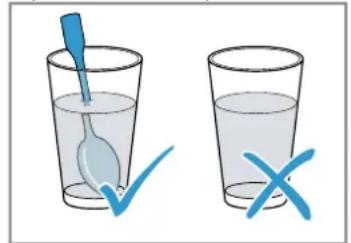
ATTENTION!
Metal touching the wall of the cooking compartment will cause sparks, which may damage the appliance or the inner door pane.
Metal (e.g. a spoon in a glass) must be kept at least 2cm from the cooking compartment walls and the inside of the door.
Note:
Preparation tips
Use microwave-safe cookware with a lid. You can also use a plate or microwave film to cover the dish. Take ready meals out of the packaging.
- Distribute the food flat in the cookware. Food which lies flat cooks more quickly than food which is piled high.
- Turn or stir the food two or three times during the defrosting time.
After heating, leave the food to rest for 1 - 2^ minutes.
The food transfers heat to the cookware. The cookware can become very hot. Use oven gloves.
Baby food:
- Place bottles without a teat or lid on the wire rack.
- Stir or shake well after heating.
- Always check the temperature of the baby food.
| Dish Accessories/cook- | ware | Rack position Microwave output in watts | Cooking time in mins |
| Menu, plated meal, ready meal, ap-prox. 400 g | Cookware without lid | ─ | 600 5-10 |
| Drinks, 200 ml Glass | Place a spoon in the glass | ─ | 900 1-2 |
| Drinks, 500 ml Glass | Place a spoon in the glass | ─ | 900 2-4 |
| Baby food, e.g. baby bottles, 150 ml1 | Place bottles without a teat or lid on the cooking compartment floor | ─ | 360 1-2 |
| Soup, 2 cups, 175 g each Cookware without lid | ─ | 900 4-5 | |
| Soup, 4 cups, 175 g each Cookware without lid | ─ | 900 5-6 | |
| 1 Stir or shake well after heating. Check the temperature.2 Add a little water to the dish. | |||
| Slices or pieces of meat in sauce, e.g. goulash, 500 g | Cookware with lid 600-10-15 | ||
| Stew, 400 g Cookware with lid 600 5-10 | |||
| Stew, 800 g Cookware with lid 600 10-15 | |||
| Vegetables, 150 g2 | Cookware without lid | 600 2-3 | |
| Vegetables, 300 g2 | Cookware without lid | 600 3-5 | |
| 1 Stir or shake well after heating. Check the temperature. | |||
| 2 Add a little water to the dish. | |||
Cooking with the microwave
Recommended settings for cooking with the microwave.
Note:
Preparation tips
- Use microwave-safe cookware with a lid. You can also use a plate or microwave film to cover the dish. Take ready meals out of the packaging.
- Distribute the food flat in the cookware. Food which lies flat cooks more quickly than food which is piled high.
After heating, leave the food to rest for 1 - 2^ minutes.
The food transfers heat to the cookware. The cookware can become very hot. Use oven gloves.
This will help the food retain its flavour. Use salt and seasonings sparingly. - Cut vegetables and potatoes into equal sized pieces. Add 1-2 tbsp water for every 100 g . Stir while cooking.
- Add double the amount of liquid to the rice.
| Dish Accessories/cook- | Rack position Microwave output in watts | Cooking time in mins | |
| ware | |||
| Whole chicken, fresh, no giblets, 1.3 kg | Cookware with lid 600-30-35 | ||
| Fish fillet, fresh, 400 g Cookware with lid 600 10-15 | |||
| Vegetables, fresh, 250 g Cookware with lid 600 5-10 | |||
| Vegetables, fresh, 500 g Cookware with lid 600 10-15 | |||
| Potatoes, 250 g Cookware with lid 600 8-10 | |||
| Potatoes, 500 g Cookware with lid 600 10-15 | |||
| 125 g rice + 250 ml water Cookware with lid 1. 600 | 1. 7-9 | ||
| 2. 180 | |||
| 250 g rice + 500 ml water Cookware with lid 1. 600 | 1. 8-10 | ||
| 2. 180 | |||
| Desserts, e.g. blanc mange (instant), 500 ml 1 | Cookware with lid 600-6-8 | ||
| 1 Stir 2 to 3 times with a whisk while heating. | |||
Microwave popcorn
Recommended settings for heating food.
ATTENTION!
When preparing microwave popcorn at a high microwave power, the door pane may crack due to overloading.
- Never set the microwave power too high.
- Use a power setting no higher than 600 watts.
Always place the popcorn bag on a glass plate.
Note:
Preparation tips
Use shallow, heat-resistant glass ovenware. Do not use porcelain or heavily curved plates.
Always place the glass ovenware on the wire rack.
- Adjust the cooking time to the quantity.
- To prevent the popcorn from burning, after 1 minute 30 seconds, briefly take the popcorn bag out of the oven and shake it. Take care as the bag will be hot!
| Dish Accessories/cook-ware | Rack position Microwave output in watts | Cooking time in mins |
| Microwave popcorn, 100 g Wire rack | 600 3-5 | |
| Glass tray |
Tips on defrosting, heating and cooking with the microwave next time
Follow these tips for good results when defrosting, heating and cooking with the microwave.
| Issue Tip | |
| Your food is too dry. | Reduce the cooking time or select a lower microwave power setting. Cover the food and add more liquid. |
| The time has elapsed but the food is not defrosted, hot or cooked. | Increase the cooking time. Large quantities and food which is piled high require longer times. |
| The time has elapsed but your food is not yet done on the inside, but is already overdone on the outside. | Stir while cooking. Reduce the microwave power setting and increase the cooking time. |
| After defrosting, the poultry or meat is defrosted on the outside but not defrosted in the middle. | Reduce the microwave power setting. Turn large pieces of frozen food several times. |
16.4 Cakes and baked items
Recommended settings for cakes and baked items. The temperature and baking time depend on the consistency and amount of the mixture. This is why ranges are given in the tables. Begin with the lower value and, if necessary, use a higher setting the next time. A lower temperature results in more even browning.
Baking tips
We have compiled a few tips to help you achieve a good baking result.
| Issue Tip | |
| You want your cake to rise evenly. | Only grease the base of the springform cake tin. After baking, use a knife to carefully loosen the cake from the baking tin. |
| You do not want small baked items to stick to each other when baking. | Leave a minimum clearance of 2 cm around each item to be baked. This allows enough space for the baked items to expand and brown on all sides. |
| Determine whether the cake is ready. | Push a cocktail stick into the highest point on the cake. If no dough sticks to the wood, the cake is ready. |
| You want to bake using your own recipe. | Use similar items in the baking tables as a guide. |
| Use bakeware made of silicone, glass, plastic or ceramic. | The bakeware must be heat-resistant up to 250 °C. Cakes in this bakeware brown less. When using the microwave, the cooking time is shorter than the time shown in the table. |
Cakes in tins
Recommended settings for baking cakes in tins
Note:
Preparation tips
The recommended settings apply to dishes placed into the non-preheated appliance.
Always place the cake tin in the centre of the wire rack.
Use heat-resistant, microwave-safe bakeware.
Metal baking tins are not suitable for baking with microwaves.
Dark-coloured metal baking tins are most suitable.
| Dish Accessories/ | cookware | Rack posi- tion | Type of heating | Temperature in °C | Microwave output in watts | Cooking time in mins |
| Sponge cake, basic1 | Vienna ring tin/loaf tin | ─ | ◎ | 170-180 90 40-50 | ||
| Sponge cake, delicate (e.g. sand cake)1 | Vienna ring tin/loaf tin | ─ | ◎ | 150-170 - 70-90 | ||
| Sponge flan base Flan base tin 160-180 - 30-40 | ◎ | |||||
| Fruit cake, delicate, made of sponge | Springform/ ring tin | ─ | ◎ | 170-190 90 30-45 | ||
| 3-egg fatless sponge cake Springform cake tin, diameter 26 cm | ─ | ◎ | 170-180 - 30-40 | |||
| Fruit tart or cheesecake with shortcrust pastry base1 | Springform cake tin, diameter 26 cm | ─ | ◎ | 170-180 180 35-45 | ||
| Pizza Round pizza tray | ─ | ◎ | 220-230 - 15-25 | |||
| Savoury cakes, (e.g. quiche) | Springform cake tin, diameter 26 cm | ─ | ◎ | 200-220 - 50-70 | ||
| Nut cake Springform cake tin, diameter 26 cm | ─ | ◎ | 170-180 90 30-35 | |||
| Yeast dough with moist topping | Round pizza tray | ─ | ◎ | 170-190 - 55-65 | ||
| Plaited loaf with 500 g flour Round pizza tray | ─ | ◎ | 170-190 - 35-45 | |||
| 1 Allow cakes to cool in the oven for approx. 20 minutes. | ||||||
Small baked items
Recommended settings for baking small pastries
Note:
Preparation tips
The recommended settings apply to dishes placed into the non-preheated appliance.
Always place the cake tin in the centre of the wire rack.
Dark-coloured metal baking tins are most suitable.
| Dish Accessories/ cookware | Rack position Type of heating | Temperature in °C | Cooking time in mins |
| Biscuits Round pizza tray 150-170 20-35 | - | - | |
| Macaroons | Round pizza tray 10-130 35-45 | - | |
| Meringues | Round pizza tray 100 | 80-100 | |
| Muffins | Muffin tray on wire rack | - | 160-180 35-40 |
| Puff pastry | Round pizza tray 190-200 35-45 | - |
Bread and bread rolls
Recommended settings for baking bread and bread rolls
Note:
Preparation tips
The recommended settings apply to dishes placed into the non-preheated appliance.
Always place the cake tin in the centre of the wire rack.
- Dark-coloured metal baking tins are most suitable.
| Dish Accessories/ cookware | Rack position | Type of heating | Temperature in °C | Cooking time in mins |
| Bread, 1.5 kg Loaf tin 1.230 | - | ® | 2.200-210 | 1. 10-152. 40-50 |
| Bread rolls, e.g. wheat rolls Round pizza tray 210-236-25-35 | ® | |||
Tips for next time you bake
If something goes wrong when baking, you can find some tips here.
Issue Tip
| Your cake collapses. ■ Note the ingredients and preparation in-structions that are given in the recipe. ■ Use less liquid. Or: ■ Reduce the baking temperature by \( {10}^{ \circ }\mathrm{C} \) and increase the bak- ing time. |
| Your cake is too dry. Increase the baking tem- perature by \( {10}^{ \circ }\mathrm{C} \) and shorten the baking time. |
| Your cake is generally too light in colour. Check the shelf posi- tion and accessories. Increase the baking temperature by \( {10}^{ \circ }\mathrm{C} \) . Or: Increase the baking time. |
| Your cake is too light on top and too dark under-neath. Slide the cake in one level higher. |
| Your cake is too dark on top and too light under-neath. Slide the cake in one level lower. Reduce the baking temperature and in- crease the baking time. |
| Your cake is unevenly browned. Reduce the baking temperature. Cut the greaseproof paper to a suitable size. Place the baking tin in the centre. As far as possible, shape small baked items to be the same size and thickness. |
Issue Tip
| Your cake is cooked on the outside but is not fully baked through on the inside. | Reduce the baking temperature and increase the baking time. Add less liquid. For cakes with a moist topping: Pre-bake the base. Sprinkle the baked base with almonds or bread crumbs. Place the topping on the base. |
| The cake will not come out of the tin when turned upside down. | Allow the cake too cool for 5–10 minutes after baking. Use a knife to carefully loosen the edge of the cake. Turn the cake tin upside down again and cover it several times with a cold, wet cloth. Next time you bake, grease the baking tin and sprinkle it with bread crumbs. |
| Sparks are generated between the tin and the wire rack. | Check that the tin is clean on the outside. Change the position of the tin in the cooking compartment. Continue baking without the microwave and increase the baking time. |
16.5 Roasting and grilling
Recommended settings for roasting and grilling The temperature and roasting time depend on the type and amount of food being cooked. This is why ranges are given in the tables. Begin with the lower value and, if necessary, use a higher setting the next time.
Roasting in cookware
If you prepare dishes in cookware, you can remove them from the cooking compartment more easily and serve them directly in the cookware. When preparing food in cookware with a lid, the cooking compartment remains cleaner.
General information about roasting in cookware
Use heat-resistant, microwave-safe cookware.
Metal roasting dishes are not suitable for roasting with microwaves.
- Place the cookware onto the wire rack.
- Check in advance whether the cookware fits in the cooking compartment.
Glass cookware is best.
Place hot glass ovenware on a dry mat after cooking. The glass may crack if placed on a cold or wet surface.
The cookware can become very hot. Use oven gloves to take the cookware out of the oven.
- Follow the manufacturer's instructions for your roasting dishes.
Use a deep roasting dish.
Cookware with lid
Use a suitable lid that seals well.
- When roasting meat, there should be at least 3cm between the food and the lid as the meat may expand.
- Meat, poultry and fish can also become crispy in a covered roasting dish. Use a roasting dish with a glass lid. If necessary, set a higher temperature.
WARNING - Risk of scalding!
Very hot steam may escape when the lid is opened after cooking. Steam may not be visible, depending on the temperature.
- Lift the lid at the rear, so that the hot steam can escape away from you.
- Keep children at a safe distance.
Notes
Lean meat or pot roast
- Add liquid to the cookware so that it is approx. 1/2 cm deep, e.g. water, wine, vinegar or similar liquid. The amount of liquid depends on the type of meat, what the cookware is made of and on whether or not a lid is used. More liquid needs to be added to enamelled or dark metal roasting pan than for glass cookware. Add slightly more liquid for pot roasts.
- During roasting, the liquid in the roasting dish will evaporate. Carefully add liquid as necessary.
- Turn pieces of meat halfway through the cooking time.
Fish
- When steaming fish, add one to three tablespoons of liquid to the cookware, e.g. lemon juice or vinegar.
Grilling
Grill foods that should be crispy.
- Do not grill food with the oven door open.
- Do not preheat.
Use food to be grilled that is of a similar weight and thickness.
This allows the food to be grilled to brown evenly and remain succulent and juicy.
- Place the food to be grilled directly on the wire rack.
Use grill tongs to turn the grilled items.
If you pierce the meat with a fork, the juices will run out and it will become dry.
- Do not add salt until after the meat has been grilled. Salt draws water from the meat.
Note: Dark meat, such as beef, browns more quickly than lighter-coloured meat, such as veal or pork. When grilling light-coloured meat or fish, these often only brown slightly on the surface, although they are cooked and juicy on the inside.
The grill element switches on and off continuously. This is normal. The frequency of this depends on the grill level that is set.
Smoke may be produced when grilling.
Tips for roasting and braising
Follow these tips for good results when roasting and braising.
Issue Tip
| Prevent lean meat from drying out. | Coat lean meat with fat or oil as required and cover it with strips of bacon. |
| Prepare joints with the rind on. | Score the rind in a criss-cross pattern. Roast the joint with the rind facing down first. |
| Keep the cooking compartment as clean as possible. | Prepare the food in a covered roasting dish at a higher temperature. |
| The meat should remain succulent and hot, e.g. roast beef. | When the roast is ready, switch off the oven and leave it to rest for 10 minutes in the cooking compartment with the door closed. This helps distribute the meat juices more evenly. The resting time is not included in the indicated cooking time. After preparing it, wrap the food in foil. |
Beef
Recommended settings for cooking beef
Note:
Preparation tips
The recommended settings apply to dishes placed into the non-preheated appliance.
- Turn sirloin and steaks halfway through the cooking time. Allow the dish to stand for around a further 10 minutes at the end.
| Dish Accessories/ | cookware | Rack position | Type of heating | Temperature in °C/grill setting | Microwave output in watts | Cooking time in mins |
| Pot-roasted beef, ap- prox. 1 kg | Wire rack Cookware with lid | ~ | ® | 180-200 | 180 120-145 | |
| Sirloin, medium, ap- prox. 1 kg | Wire rack Cookware without lid | ~ | ® | 210-230 | 180 30-40 | |
| Beef steak, medium, 2-3 pieces, 2-3 cm thick, 200 g each | Wire rack Glass tray | ~ | ® | 3 - 20-30 | ||
Pork
Recommended settings for cooking pork
Note:
Preparation tips
The recommended settings apply to dishes placed into the non-preheated appliance.
- Turn rindless joints halfway through the cooking time. Allow the joint to stand for around a further 10 minutes at the end.
- Place the joint in the cookware rind-side up. Score the rind. Do not turn the joint. Allow the joint to stand for around a further 10 minutes at the end.
- Turn neck steaks after 2/3 of the cooking time.
| Dish Accessories/ | cookware | Rack position | Type of heating | Temperature in °C/grill setting | Microwave output in watts | Cooking time in mins |
| Rindless joint, e.g. pork neck, approx. 750 g | Wire rackCookware with lid | ─ | ⊕ | 220-230 180 40-50 | ||
| Joint with rind, e.g. shoulder, approx. 1 kg | Wire rackCookware without lid | ─ | ⊕ | 190-210 - 130-150 | ||
| Pork neck, 2-3 pieces, 2-3 cm thick | Wire rackGlass tray | ─ | □ | 3 - 25-35 |
Other meat dishes
Recommended settings for cooking other meat dishes.
Note:
Preparation tips
The recommended settings apply to dishes placed into the non-preheated appliance.
- Allow the meat loaf to stand for around a further 10 minutes at the end.
- Turn the sausages after 2/3 of the cooking time.
| Dish Accessories/ | cookware | Rack position | Type of heating | Temperature in °C/grill setting | Microwave output in watts | Cooking time in mins |
| Meat loaf, approx. 750 g Wire rack Cookware without lid | ~ | + | 180-200 | 600 15-20 | ||
| Sausages for grilling, 4 to 6, approx. 150 g each | Wire rack Glass tray | ~ | □ | 3 - 25-35 |
Poultry
Recommended settings for cooking poultry.
Note:
Preparation tips
The recommended settings apply to dishes placed into the non-preheated appliance.
- Arrange whole chickens breast-side down. Turn halfway through the cooking time.
- Arrange chicken portions and duck breast skin side up. Do not turn the dishes.
- Turn goose legs halfway through the cooking time. Pierce the skin.
| Dish Accessories/ | cookware | Rack position | Type of heating | Temperature in °C/grill setting | Microwave output in watts | Cooking time in mins |
| Chicken, whole, approx. 1.2 kg | Wire rackCookware with lid | ~ | + | 220-230 | 360 35-45 | |
| Chicken portions, approx. 800 g | Wire rackCookware without lid | ~ | ® | 210-230 | 360 20-30 | |
| Duck breast, approx. 500 g | Wire rackGlass tray | ~ | + | 3 90 | 20-30 | |
| Goose breast, goose legs, 700-900 g | Wire rackCookware without lid | ~ | + | 210-230 | 90 30-40 |
Fish
Recommended settings for cooking fish.
Note:
Preparation tips
The recommended settings apply to dishes placed into the non-preheated appliance.
For grilling, place the whole fish, e.g. salmon or trout, onto the middle of the wire rack.
Grease the wire rack with oil beforehand.
| Dish Accessories/ cookware | Rack position Type of heating | Grill setting Cooking time in mins |
| Fish steaks, 2-3, 150 g each Wire rack | - | 3 20-25 |
| Glass tray | ||
| Fish, whole, 2-3, 300 g each Wire rack | - | 3 20-30 |
| Glass tray |
Tips for next time you roast
If roasting is not successful the first time, you can find some tips here.
| Issue Tip | |
| Your roast is too dark and the crackling is partly burnt. | ■ Select a lower temper- ature. ■ Reduce the roasting time. |
| Your roast is too dry. | ■ Select a lower temper- ature. ■ Reduce the roasting time. |
| The crackling on your roast is too thin. | ■ Increase the temperat- ure. Or: ■ Switch on the grill briefly at the end of the roasting time. |
| Your roasting juices are burnt. | ■ Select a smaller item of cookware. ■ When roasting, add more liquid. |
| Issue Tip | |
| Your roasting juices are too clear and watery. | ■ Use a larger item of cookware so that more liquid evaporates. ■ When roasting, add less liquid. |
| The meat catches during braising. | ■ Check whether the roasting dish and lid fit together and close properly. ■ Reduce the temperat-ure. ■ Add liquid when braising. |
| Your roast is not well-done enough. | ■ Carve the meat into portions. ■ Prepare the juices in the roasting dish. ■ Place the sliced meat in the juices. ■ Place the slices of meat in the microwave to finish cooking. |
16.6 Bakes, gratins and toast
Recommended settings for cooking bakes, gratins and toast.
Note:
Preparation tips
The recommended settings apply to dishes placed into the non-preheated appliance.
Use a 4 to 5cm deep microwave-safe, heat-resistant dish for bakes and potato gratins.
Leave bakes and gratins to cook in the oven for a further 5 minutes after the oven has been switched off.
- Toast the slices of bread first.
| Dish Accessories/ | cookware | Rack position | Type of heating | Temperature in °C/grill setting | Microwave output in watts | Cooking time in mins |
| Sweet bake, approx. 1.5 kg | Cookware without lid | 140-160 360 25-30 | ||||
| Savoury bake, made with cooked ingredients, approx. 1 kg | Cookware without lid | 150-170 600 20-25 | ||||
| Potato gratin made from raw ingredients, approx. 1.1 kg | Cookware without lid | 210-220 600 20-25 | ||||
| Toast with topping, 4 slices | Wire rack 3 - 8-10 |
16.7 Frozen convenience products
Recommended settings for cooking frozen convenience products.
Note:
Preparation tips
- Observe the manufacturer's instructions on the packaging.
The recommended settings apply to dishes placed into the non-preheated appliance. - Do not arrange chips, croquettes or potato rostis on top of each other.
| Dish Accessories/ | cookware | Rack position | Type of heating | Temperature in °C | Microwave output in watts | Cooking time in mins |
| Thin-crust pizza Wire rack 220-230 - 10-15 | - | - | - | |||
| Pizza baguette Wire rack 1. - | - | - | - | 1. 600 | 1. 2 | |
| 2. 220-230 | 2. - | 2. 13-18 | ||||
| Chips Round pizza tray | - | - | - | 220-230 90 10-15 | ||
| Croquettes Round pizza tray | - | - | - | 210-220 - 10-15 | ||
| Rösti, stuffed potato pock-ets | Round pizza tray | - | - | 200-220 90 15-20 | ||
| Strudel Round pizza tray | - | - | - | 220-230 - 20-30 | ||
| Bakes, e.g. lasagne, ap-prox. 450 g | Cookware with lid | - | - | 220-230 600 10-15 |
16.8 Test dishes
These overviews have been produced for test institutes to facilitate appliance testing in accordance with EN 60350-1:2013 or IEC 60350-1:2011 and EN 60705:2012, IEC 60705:2010.
Defrosting with the microwave
Recommended settings for defrosting meat or poultry.
| Dish Accessories/cook- | ware | Rack position Microwave output in watts | Cooking time in mins |
| Meat, 500 g Cookware without lid | lid | Cooking com-partment floor | 1. 1802. 90 |
| 1. 52. 10-15 |
Cooking with the microwave
Recommended settings for cooking test dishes in the microwave.
| Dish Accessories/cook- | ware | Rack position Microwave output in watts | Cooking time in mins |
| Custard, 1 kg Cookware without | lid | Cooking com-partment floor | 1. 6002. 180 |
| Sponge flan, 475 g Cookware without | lid | Cooking com-partment floor | 600 8-10 |
| Meat loaf, 900 g Cookware without | lid | Cooking com-partment floor | 18-23 18-23 |
Cooking in combination with a microwave
Recommended settings for cooking test dishes in combination with a microwave.
Note:
Preparation tips
Use a deep dish for chicken.
- Arrange the chicken breast-side down. Turn halfway through the cooking time.
| Dish Accessories/ | cookware | Rack position | Type of heating | Temperature in °C | Microwave output in watts | Cooking time in mins |
| Potato gratin Wire rack | Cookware without lid | ~ | + | 210-220 600 25-30 | ||
| Cakes Wire rack | Cookware without lid | ~ | + | 190-200 180 20-27 | ||
| Chicken Wire rack | Cookware without lid | ~ | + | 190 360 30-45 |
Baking
Recommended settings for baking test dishes.
Note: The recommended settings apply to dishes placed into the non-preheated appliance.
| Dish | Accessories/ cookware | Rack position | Type of heating | Temperature in °C | Cooking time in mins |
| Hot water sponge cake | Wire rack Springform cake tin, diameter 26 cm | ─ | ◎ | 170-180 | 30-40 |
| Double-crusted apple pie | Wire rack Springform cake tin, diameter 20 cm | ─ | ◎ | 170-190 | 80-100 |
| Viennese whirls | Glass tray | ─ | ◎ | 160-170 | 30-35 |
| Small cakes | Glass tray | ─ | ◎ | 160-170 | 25-30 |
Grilling
Recommended settings for grilling test dishes.
Note: Turn beef burgers halfway through the cooking time.
| Dish Accessories/ | cookware | Rack position Type of heating | Grill setting Cooking time in mins |
| Toasting bread Wire rack 3 4-5 | \(\boxed{\begin{array}{c}\end{array}}\) | ||
| Beef burgers, x9 Wire rack | Glass tray | \(\boxed{\begin{array}{c}\end{array}}\) | 3 35-45 |
17 Customer Service
If you have any queries on use, are unable to rectify faults on the appliance yourself or if your appliance needs to be repaired, contact Customer Service.
You can solve many problems yourself by consulting the information on troubleshooting in these instructions or on our website. If this is not the case, contact our after-sales service.
We will always find an appropriate solution and try to avoid unnecessary visits being made by a Customer Service technician.
With any warranty claims, we will make sure that your appliance is repaired by trained after-sales technicians using genuine spare parts, including after the manufacturer's warranty has expired.
Detailed information on the warranty period and terms of warranty in your country is available from our after-sales service, your retailer or on our website.
If you contact Customer Service, you will require the product number (E-Nr.) and the production number (FD) of your appliance.
The contact details for Customer Service can be found in the enclosed Customer Service directory or on our website.
17.1 Product number (E-Nr.) and production number (FD)
You can find the product number (E-Nr.) and the production number (FD) on the appliance's rating plate. You will see the rating plate with these numbers if you open the appliance door.
Make a note of your appliance's details and the Customer Service telephone number to find them again quickly.
Table des matieres
1.4 Utilisation sure
Ragouts
Souffles/gratins
Plaque à pizza
Utilisation
WAARSCHUWING - Kans op brand!
WAARSCHUWING - Kans op letsel!

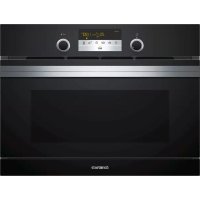
- Safety
- General information
- Intended use
- Restriction on user group
- Safe use
- WARNING - Risk of fire!
- WARNING - Risk of burns!
- WARNING - Risk of scalding!
- WARNING - Risk of injury!
- WARNING - Risk of electric shock!
- Microwave
- WARNING - Risk of explosion!
- WARNING - Risk of burns!
- WARNING - Risk of serious harm to health!
- Preventing material damage
- General
- ATTENTION!
- Microwave
- Environmental protection and saving energy
- Disposing of packaging
- Saving energy
- Familiarising yourself with your appliance
- Controls
- Settings area
- Touch fields
- Symbol Name Use
- Display
- Display elements
- Temperature display
- Night mode
- Types of heating
- Cooking compartment
- Interior lighting
- Cooling fan
- Condensation
- Appliance door
- Accessories
- Accessories Use
- Other accessories
- Glass roasting dish
- Pizza tray
- Inserting the accessory
- Before using for the first time
- Performing the initial configuration
- Setting the time
- Cleaning the appliance before using it for the first time
- Cleaning the accessories
- Basic operation
- Switching on the appliance
- Switching off the appliance
- Setting the type of heating and temperature
- Pausing operation
- Stopping operation
- Rapid heating
- Configuring rapid heating
- Cancelling rapid heating
- Safety switch-off function
- Microwave
- Microwave power settings
- Default settings
- Microwave-safe cookware and accessories
- Microwave-safe
- Microwave-safe in MicroCombi mode
- Testing cookware for microwave suitability
- Configuring the microwave settings
- Intervals for the time settings
- Changing the microwave power
- Pausing operation
- Stopping operation
- MicroCombi
- Configuring MicroCombi mode
- Changing the microwave power
- Pausing operation
- Stopping operation
- Heating and drying the cooking compartment
- Drying the cooking compartment by hand
- Automatic programmes
- Tips on configuring the settings for dishes
- Overview of dishes
- Applying settings for dishes
- Press
- Pausing operation
- Stopping operation
- Time-setting options
- Checking the time-setting options
- Changing the time
- Cooking time
- Setting the cooking time
- Ending the cooking time
- Changing the cooking time
- Clearing the cooking time
- Timer
- Setting the timer
- Ending the timer
- Changing the timer
- Cancelling the timer
- Childproof lock
- Activating the childproof lock
- Deactivating the childproof lock
- Basic settings
- Overview of the basic settings
- Changing the basic settings
- Discarding changes to the basic settings
- Cleaning and servicing
- Cleaning products
- Cleaning the appliance
- Cleaning the cooking compartment
- Cleaning the glass floor
- Cleaning the front of the appliance
- Cleaning the display
- Cleaning the accessories
- Tips on caring for your appliance
- Cleaning the door panels
- Cleaning the door seal
- Drying the cooking compartment by hand
- Switching on Aqualisis
- Troubleshooting
- Malfunctions
- Fault Cause & Troubleshooting
- Information on display panel
- Disposal
- Disposing of old appliance
- How it works
- What is the best way to proceed?
- Tips
- WARNING - Risk of scalding!
- Tips for keeping acrylamide levels low during cooking
- Dish Tip
- Defrosting, heating and cooking with the microwave
- Tips on defrosting, heating and cooking with the microwave
- Issue Tip
- Defrosting with the microwave
- Note:
- Defrosting and heating frozen food
- Heating in the microwave
- Cooking with the microwave
- Microwave popcorn
- Tips on defrosting, heating and cooking with the microwave next time
- Cakes and baked items
- Baking tips
- Cakes in tins
- Small baked items
- Bread and bread rolls
- Tips for next time you bake
- Roasting and grilling
- Roasting in cookware
- General information about roasting in cookware
- Cookware with lid
- Notes
- Grilling
- Tips for roasting and braising
- Beef
- Pork
- Other meat dishes
- Poultry
- Fish
- Tips for next time you roast
- Bakes, gratins and toast
- Frozen convenience products
- Test dishes
- Cooking in combination with a microwave
- Baking
- Customer Service
- Product number (E-Nr.) and production number (FD)
- Table des matieres
- Utilisation sure
- Plaque à pizza
- WAARSCHUWING - Kans op brand!
- WAARSCHUWING - Kans op letsel!
Brand : CONSTRUCTA
Model : CC4W91960
Category : Oven