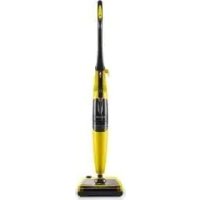
SDB 1500 A1 - Steam cleaner SILVERCREST - Free user manual and instructions
Find the device manual for free SDB 1500 A1 SILVERCREST in PDF.



User questions about SDB 1500 A1 SILVERCREST
0 question about this device. Answer the ones you know or ask your own.
Ask a new question about this device
Download the instructions for your Steam cleaner in PDF format for free! Find your manual SDB 1500 A1 - SILVERCREST and take your electronic device back in hand. On this page are published all the documents necessary for the use of your device. SDB 1500 A1 by SILVERCREST.
USER MANUAL SDB 1500 A1 SILVERCREST
DAMPFBESEN SDB 1500 A1
DE AT CH
DAMPFBESEN
Operation and Safety Notes
IAN 114903
DE AT CH

DE AT CH
Before reading, unfold both pages containing illustrations and familiarise yourself with all functions of the device.
GB Operation and Safety Notes Page 37


Einleitung
Chere cliente, cher client,
31100 Treviso - Italy
CH
M+R Spedag Group
c/o Netsend GmbH
Hirsrtuweg
CH-4303 Kaiseraugst
Telefono:
199 202 250 (IT)
00800 09348567 (CH)
Fax:
+39-0422-413736 (IT)
E-Mail: info@ariete.net (IT)
service@mynetsend.de (CH)
Intended use Page 38
Parts description.. Page 38
Technical Data . Page 38
Scope of delivery.
Safety notices
Before Initial Use
Attaching the steam broom.. Page 41
Preparing the steam broom.. Page 41
Start-up
Switching the turbo brush on/off
Using the steam function.
Changing the pads . Page 42
Filling the water tank during operation.. Page 42
Using accessories for carpet cleaning.. Page 42
Ending operation.. Page 42
Cleaning and Maintenance
Replacing the filter . Page 43
Troubleshooting.. Page 43
Disposal
Warranty
Service
Declaration of Conformity
SILVERCREST
37GB
Steam Mop SDB 1500 A1
Introduction
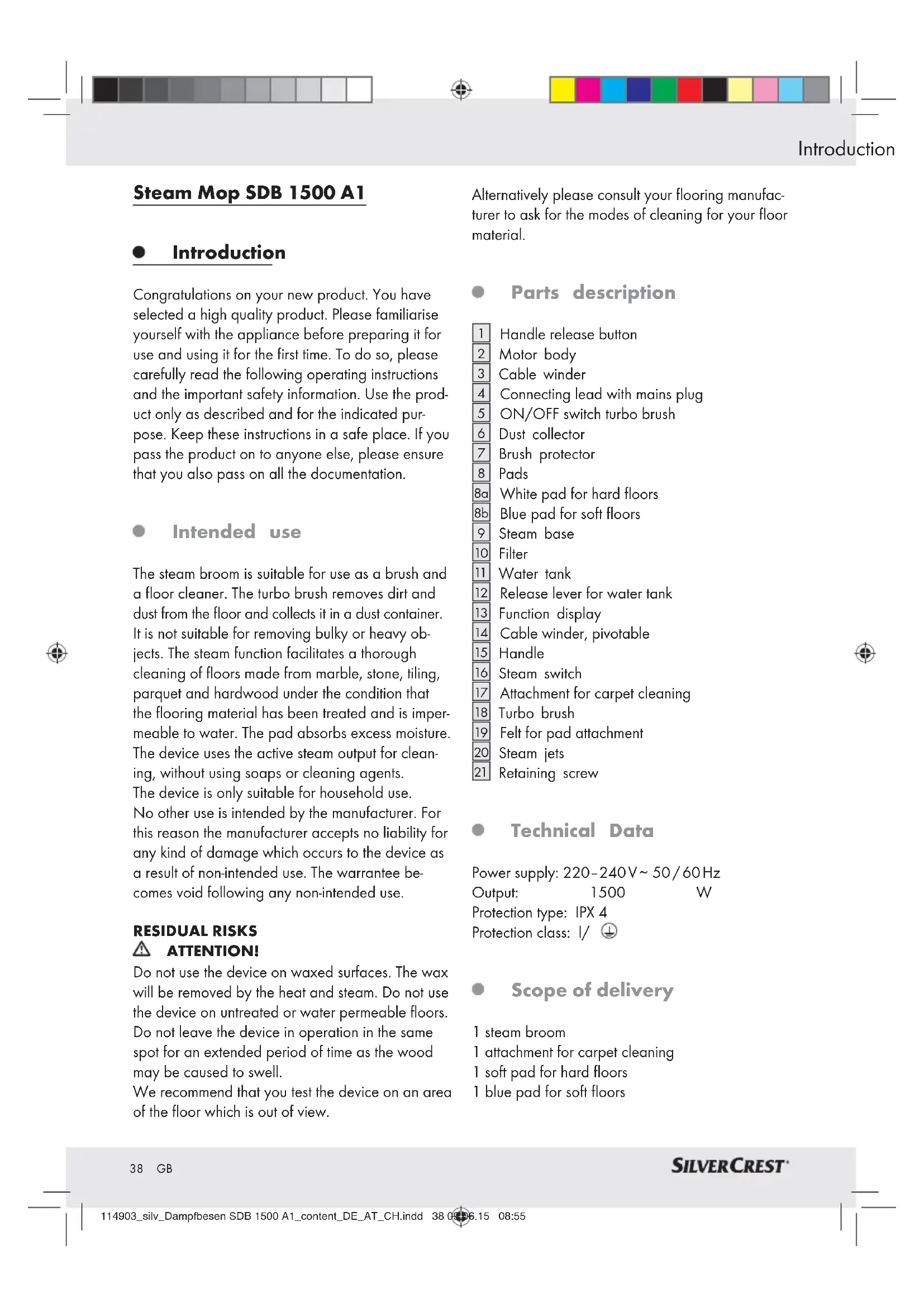
Congratulations on your new product. You have selected a high quality product. Please familiarise yourself with the appliance before preparing it for use and using it for the first time. To do so, please carefully read the following operating instructions and the important safety information. Use the product only as described and for the indicated purpose. Keep these instructions in a safe place. If you pass the product on to anyone else, please ensure that you also pass on all the documentation.
Intended use
The steam broom is suitable for use as a brush and a floor cleaner. The turbo brush removes dirt and dust from the floor and collects it in a dust container. It is not suitable for removing bulky or heavy objects. The steam function facilitates a thorough cleaning of floors made from marble, stone, tiling, parquet and hardwood under the condition that the flooring material has been treated and is impermeable to water. The pad absorbs excess moisture. The device uses the active steam output for cleaning, without using soaps or cleaning agents. The device is only suitable for household use. No other use is intended by the manufacturer. For this reason the manufacturer accepts no liability for any kind of damage which occurs to the device as a result of non-intended use. The warrantee becomes void following any non-intended use.
RESIDUAL RISKS: ATTENTION!
Do not use the device on waxed surfaces. The wax will be removed by the heat and steam. Do not use the device on untreated or water permeable floors. Do not leave the device in operation in the same spot for an extended period of time as the wood may be caused to swell. We recommend that you test the device on an area of the floor which is out of view.
Alternatively please consult your flooring manufacturer to ask for the modes of cleaning for your floor material.
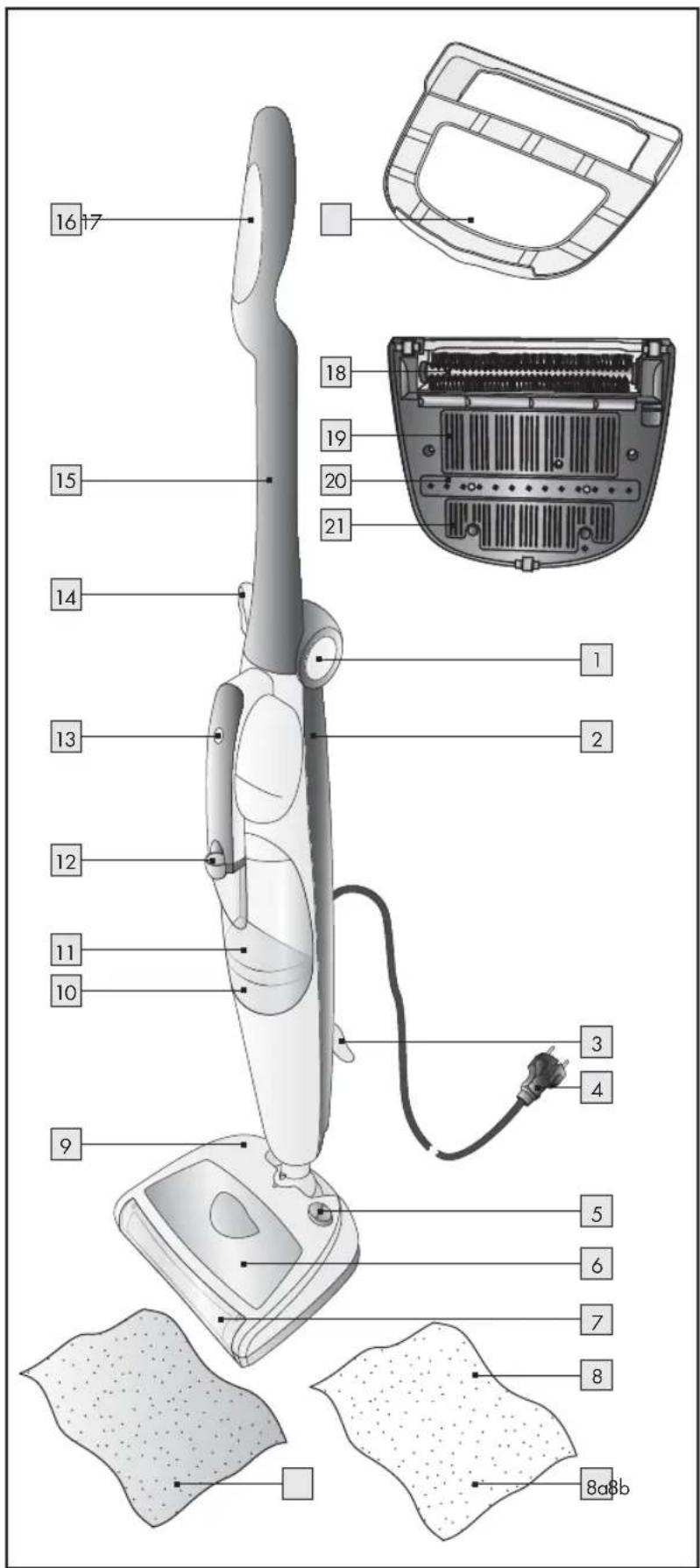
Parts description
1 Handle release button
2 Motor body
3 Cable winder
4 Connecting lead with mains plug
5 ON/OFF switch turbo brush
6 Dust collector
7 Brush protector
8 Pads
8a White pad for hard floors
8b Blue pad for soft floors
9 Steam base
10 Filter
11 Water tank
12 Release lever for water tank
13 Function display
14 Cable winder, pivotable
15 Handle
16 Steam switch
17 Attachment for carpet cleaning
18 Turbo brush
Felt for pad attachment
20 Steam jets
[21] Retaining screw
Technical Data
Power supply: 220 - 240V 50 / 60Hz
Output: 1500 W
Protection type: IPX 4
Protection class: I/
Scope of delivery
1 steam broom
1 attachment for carpet cleaning
1 soft pad for hard floors
1 blue pad for soft floors
Introduction / Safety notices
1 retaining screw
1 set of instructions for use

Safety notices
PLEASE READ THESE INSTRUCTIONS CAREFULLY BEFORE USE. KEEP THESE INSTRUCTIONS IN A SAFE PLACE!
Please pass on these instructions along with the item.

RIS ADN/ARNING!
TAL INJURY AND ACCIDENT HAZARD FOR TODDLERS AND
SMALL CHILDREN! Never leave children
unattended with the packaging material. The packaging material represents a danger of suffocation. Children frequently underestimate the dangers. Always keep children away from the packaging material. Always keep toddlers and children away from the device in order to minimise danger.
A WARNING! DANGER OF ELECTRIC SHOCK!
Before connecting the device check that the mains voltage corresponds to the values specified on the type plate of the device.
Use of extension cables not specified by the manufacturer can lead to damage and accidents.
Do not use extension cables or plugs with insufficient current capacities.
The device must be connected to an earthed socket.
Never immerse the device in water or other liquids.
Do not use the device with wet hands or when bare foot.
Risk of fire, electric shock and injury when using with accessories not recommended by the manufacturer or with accessories not delivered with the product.
Only use accessories included in the scope of delivery or accessories recommended by the manufacturer.
Disconnect the mains plug from the socket when you do not intend to use the device for
an extended period, if there is a storm and before you clean it.
Children older than 8 years old and persons with reduced physical, sensory or mental abilities, or persons lacking the necessary experience or knowledge of how to operate the device, may only use the device under supervision and once they have been instructed in how to use the device safely and have been made to understand the related dangers in doing so. Do not allow children to play with the device. The cleaning to be undertaken by the user, as well as any maintenance work, may not be completed by children without supervision.
In order to avoid potential hazards, please ensure that the device does not take up any flammable or combustible liquids, or any hot ashes.
Do not use the device in closed rooms or in close proximity to fumes from oil based paints, solvents, waterproofing agents, combustible dusts or any other harmful or explosive vapours.
Keep objects, clothing, hair, fingers and other body parts away from moving parts and the openings of the turbo brush 18.
Fill the water tank with water before using the device. Always disconnect the mains plug 4 from the socket before topping up with water.
Only switch on the device when you are ready at the site for its use.
If you should leave this site, even for the briefest time, always ensure you switch off the device and disconnect the mains plug 4 from the socket.
Ensure that the cable does not present a tripping hazard.
WARNING! RISK OF BURNS!
Do not touch the metallic parts of the device, the hot water or the steam during operation or immediately after operation as this could result in burns.
Never direct the jet of steam in the direction of body parts, pets, plants or delicate objects. Risk of scalding!
Keep the device away from flammable materials, e.g. drapes, curtains, etc.
SILVERCREST
Do not leave the device on the floor during or after operation.
Never direct the jet of steam in the direction of other devices which contain electrical components (e.g. the inside of an oven).
Remove the plug from the socket when removing the pad 8 from the steam jet. Wait for at least 5 minutes until the steam base 9 and the pad 8 have been allowed to cool.
Ifthemainspowercableofthisapplianceisdamaged,itmustbereplacedbythemanufac-tureroritsservicedepartment,orasimilarlyqualifiedpersontopreventhazards.
A WArHbDg or mains lead needs to be replaced, always have the work performed by the manufacturer or its service centre. This will ensure the safety of the device.
Do not use any other high-consumers of power (heaters, irons, radiators) on the same circuit. Risk of overloading!
Do not place the warm parts of the device onto the power cable.
Never pull the plug attached to the mains cable 4 from the socket.
The mains cable may not come into contact with sharp objects or sharp edges.
Ensure that you do not run over the mains cable with the device while it is switched on. Otherwise there is a risk of injury.
Please ensure that the mains cable does not come into contact with warm parts.
Do not pull the device by the mains cable.
Unplug the mains plug from the socket when there is a storm.
Never wrap the mains cable around your hand when the device is connected to the mains.

ATTENTION!
DANGER OF MATERIAL DAMAGE!
Do not use the device for cleaning natural wood, water-permeable wood, soft plastics, wooden objects and leather products.
Do not use the device on glass surfaces.
Do not use the device is the pdd is worn. Risk of damage or scratching to the floor!
The device may not be used without a filto.
Always unwind the mains cable completely prior to use.
Use of extension cables not specified by the manufacturer can lead to damage and accidents.
Never use the device without water as the pump may otherwise burn through. Check the water level in the water tank regularly.
Do not use sparkling water (with added carbon dioxide). In cases of particularly hard water (with a water hardness of more than 2mmol / l ), use a mixture of 50% tap water and 50% distilled water.
Do not add any vinegar, descending agent or other perfumed substances to the water tank [11]. Doing so will void the warranty.
Always remove the mains cable from the plug before stowing away the device. Wait until the device has completely cooled and empty the water tank 11.
Never use or leave the device standing outdoors.
Possible modifications to the device which have not been expressly permitted by the manufacturer can compromise the safety of the device and lead to the warranty becoming void.
Do not use the steam broom on glass as the hot steam can cause the glass to break.
For your own safety, check the device for damage before each use. Cease use immediately in the case of damage until the device can be repaired by a specialist.
Do not take the device apart or try to repair damage yourself. Contact the customer service team or a specialist.
Never concentrate the steam on one point for too long.
Do not insert anything into the openings/jets of the device and ensure that these do not become blocked.
40 GB
SILVERCREST
Before Initial Use/Start-up
Before Initial Use
- Attaching the steam broom
Remove the device from the packaging.
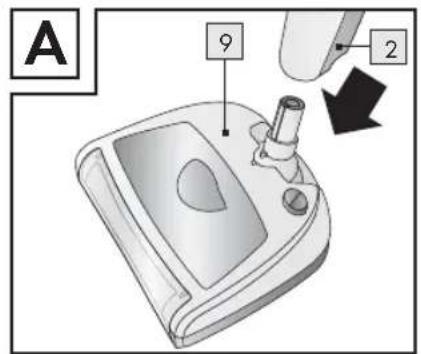
Attach the motor body to the steam base (Fig. A).
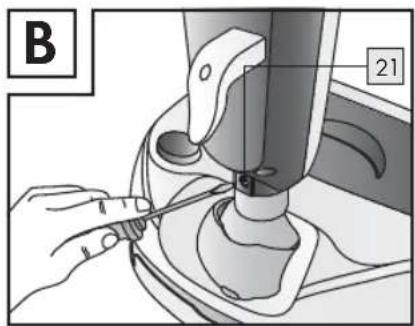
Tighten both parts together using the retaining screw [2] and a Phillips screwdriver (Fig. B).
ATTENTION! Check the seating of the retaining screw regularly. Otherwise the steam base may detach itself from the device.
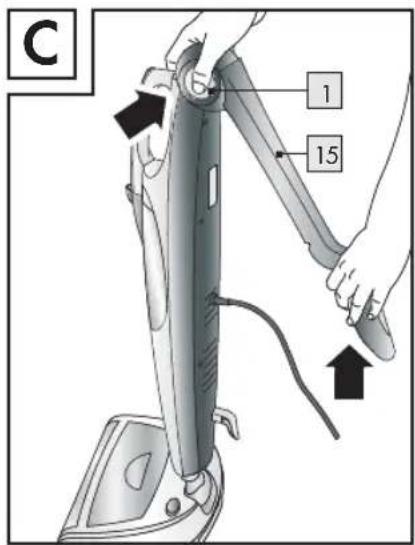
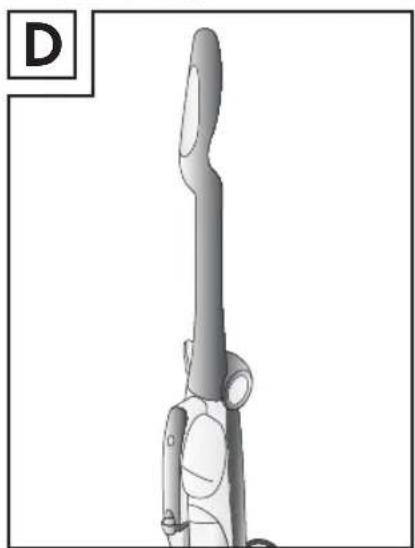
Press the handle release button. Lift up the handle until it clicks into place on the motor body (refer to Fig. C and Fig. D).
Preparing the steam broom
Unroll the mains cable completely. You can lower the pivotable cable winder 14 to make this easier.
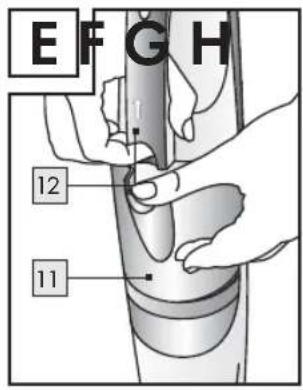
Pull the release lever of the water tank upward in the direction shown by the arrow (Fig. E) and remove the water tank.
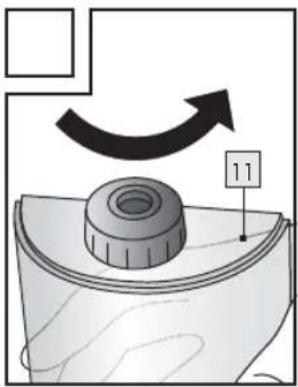
Turn the water to over and remove the seal (Fig. F).
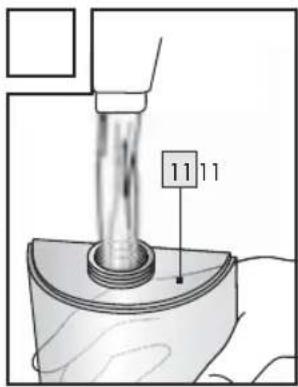
Fill the water to the lower edge of the thread with cold tap water (Fig. G). Screw the seal back on without using too much force.
ATTENTION! In cases of particularly hard water (with a water hardness of more than 2 mmol / l), use a mixture of 50% tap water and 50% distilled water.
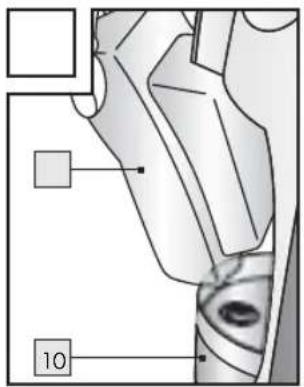
Re-insert the water tank into the device and ensure that the water tank valve is correctly seated on the filter inlet (Fig H). Then click the water tank into the appropriate position and check for the correct seating.
Start-up
Note: You can only use the turbo broom [18], the steam function or both functions at the same time. However, we recommend that you use the two functions after one another and first use the turbo
broom 18 to remove dust from the floor. Only activate the steam function thereafter.
Note: There is a groove below the handle into which you can clamp the mains cable so that it does not hang in the way during operation.
- Switching the turbo brush on/off
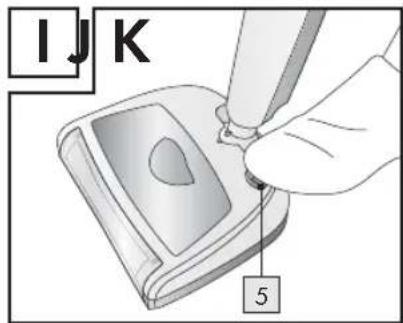
Press the ON/OFF switch to switch on the turbo brush 18 (Fig. 1). The turbo brush 18 begins to rotate and removes dirt and dust from the floor, and collects it in the dust collector 6.
ATTENTION! Do not clean the turbo brush during this process. The steam base 9 could tip over or the dust collector 6 could fall down. Risk of injury!
Press the ON/OFF button again to switch off the turbo brush [18].
Using the steam function
Only use the device in well-ventilated rooms.
Remove the plug from the socket.
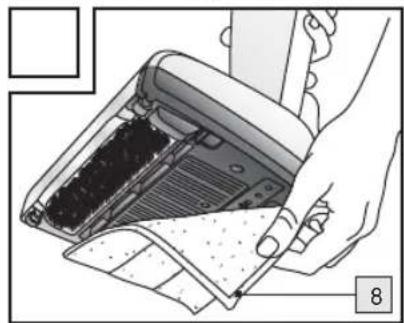
Use the blue pad for soft floors and the white pad 8a for hard floors. Place the pad 8 under the steam base 9 onto the relevant felt attachment 19 (Fig. J).
ATTENTION! Ensure that the water tank is full to prevent operation without water - otherwise the pump could burn through.
ATTENTION! Similarly check before use that all objects and surfaces to be cleaned are heat resistant and/or compatible. We recommend that you follow the care instructions of the manufacturer, particularly for treated terracotta and wooden floors. Conduct a test on an area which is not easily visible or on a sample piece.
ATTENTION! There is a risk that a white edge may develop on the floor if the device is allowed to rest in the same spot for an extended duration during operation. This edge is not indicative of damage! You can remove it
SILVERCREST
Start-up
with a standard commercially available descaling agent or with a little vinegar.
Insert the plug into an earthed socket. When the function display 13 lights up, the device is switched on and the boiler has begun to heat up.
Hoover the floor to be cleaned before you start to generate steam.
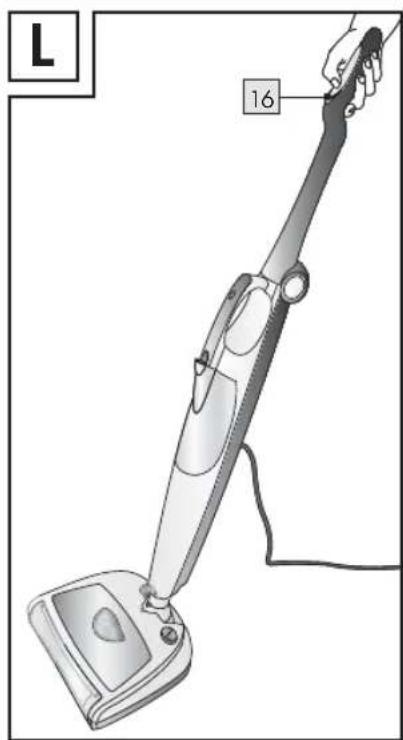
Start to generate steam by pressing the steam button [Fig. L].
ATTENTION! Never use the device without a pad 8! Risk of damage and scratching to the floor. The pad 8 is available at authorised service centres.
Press the steam but again to stop the steam function.
ATTENTION! RISK OF BURNS! Take care when removing the pad 8 that the steam base 9 does not tip over.
Remove the plug from the socket. Wait for at least 5 minutes until the steam base 9 and the pad 8 have been allowed to cool.
- Changing the pads
If you change from a hard floor to a soft floor when cleaning, you should also change the pad 8.
Remove the plug from the socket. Wait for at least 5 minutes until the steam base 9 and the pad 8 have been allowed to cool.
ATTENTION! RISK OF BURNS! Take care when removing the pad 8a and 8b that the steam base 9 is not knocked over.
Remove the pad or 8b.
Place the new pl or 8b under the steam base 9 onto the relevant felt attachment 19 (Fig.J).
Insert the mains plug into the mains socket. When the function display 13 lights up, the device is switched on and the boiler has begun to heat up. You can now start steam operation.
- Filling the water tank during operation
If the water in the water tank runs out, press the steam button to discontinue steam production.
Remove the plug from the socket and remove - as previously described - the water tank [11].
Fill the water tank with cold, still water. In cases of particularly hard water (with a water hardness of more than 2 mmol/l), use a mixture of 50% tap water and 50% distilled water.
Re-insert the water tanks - as previously described - and continue steam operation.
Using accessories for carpet cleaning
ATTENTION! This attachment is only suitable for cleaning carpets and soft surfaces. Do not use the attachment on hard surfaces.
Ensure that the pad under the steam base is attached to the appropriate felt attachments [19].
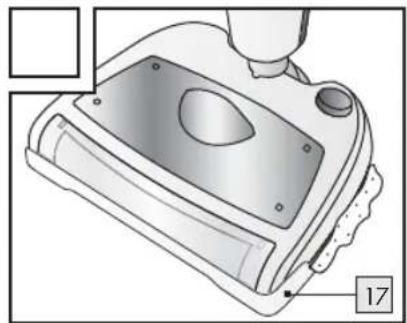
Place the attachment with the flat side on the floor. Attach the device to the attachment (fig. K).
The device is now ready for carpet cleaning.
Ending operation
Press the steam button to cease steam production.
Remove the mains cable from the socket.
Empty the water tank completely to avoid a build-up of limescale caused by standing water.
ATTENTION! Wait for at least 5 minutes until the steam base 9 and the pad 8 have been allowed to cool! Risk of burns!
Remove the pad.
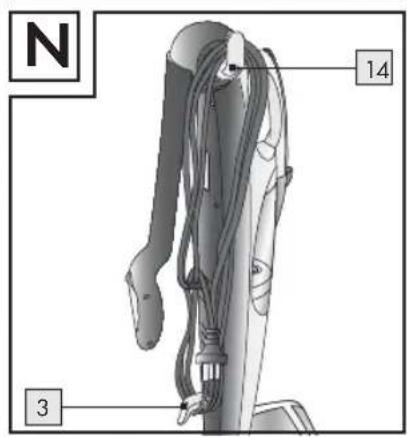
Wrap the mains cable around the cable.
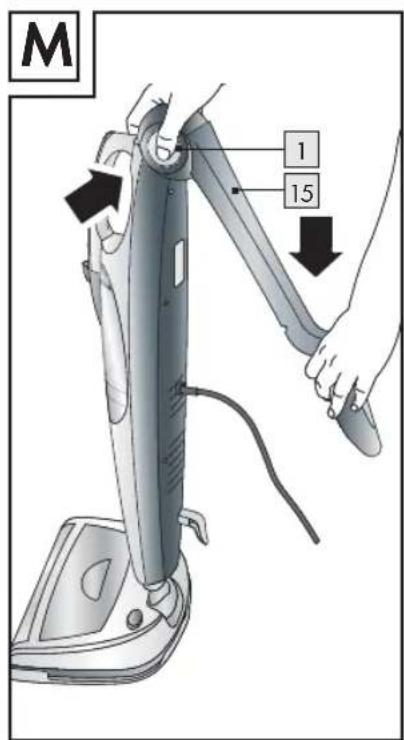
Press the handle release button.
Start-up / Cleaning and Maintenance
Press the handle 15 downwards vertically until it clicks into place (Fig. M).
Place the motor body in an upright position (Fig. N).
ATTENTION! The hinge between the steam base 9 and motor body 2 must click into place to ensure that the device can stand upright in a stable fashion.
- Cleaning and Maintenance
ATTENTION! Unplug the mains plug4 from the socket before cleaning the device. Allow the device to cool for several minutes before cleaning.
ATTENTION! Never immerse the device in water or other liquids! Risk of electric shock/ short circuit.
ATTENTION! Check the condition of the mains cable after each use. If this should become damaged, take it to an appropriate service centre to be replaced by a specialist.
Do not use any abrasives and/or solvents for cleaning the device as this could damage the plastic parts.
Do not fill any vinegar, descending agents or other perfumed substances into the tank. Doing so will void the guarantee.
Clean the plastic parts on the device with a damp, non-abrasive cloth and dry it with a dry, non-abrasive cloth.
Rinse out the water tank from time to time with fresh water and empty it thereafter.
Wash the washable p as per the instruc-tions on the label.
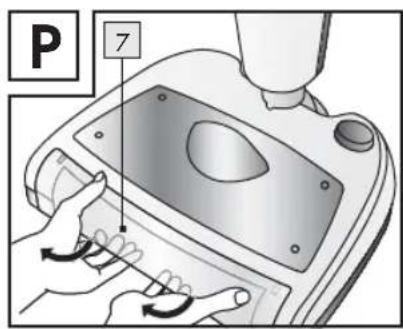
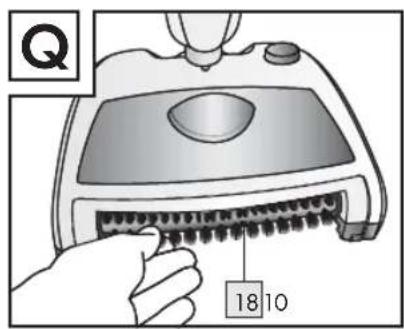
Remove the dust container regularly and empty it (fig. O). Remove the brush protector by unhooking this from the bottom of the
device and pulling it upwards (fig. P). Clean the turbo brush [18] by removing the dust accumulated (Fig. Q). Reattach the brush protector [7] by hooking it onto the corresponding notches on the underside of the device and clicking it into place on the top of the device.
Keep the device in a cool, dry location and out of the reach of children.
We recommend that you keep the original packaging in a safe place. The manufacturer accepts no liability for damage which occurs through sending in the item to customer services in the incorrect packaging.
- Replacing the filter
Note: The filter 10 must be replaced every 4-6 months or 100 cleaning cycles (one cycle denotes use of a full water tank).
Remove the mains p from the socket when doing so.
Wait until the hot parts have cooled.
Remove the water tank.
Remove the filled by lifting it upward parallel to the motor body 2.
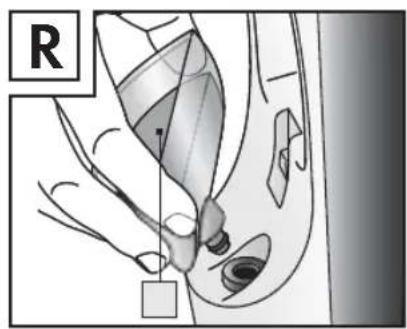
Replace the filter with a new one and check that it is seated correctly (Fig. R).
Put the water tank back in place.
Troubleshooting
ATTENTION! In cases of malfunction and electrical damage, turn the device off immediately. Unplug the mains plug 4 from the socket and wait until the device has cooled.
SILVERCREST
Cleaning a
| Problems Causes Solution | ||
| Function display 13 off. Mains plug 4 not connected. | Check that the mains plug 4 is plugged in correctly. Check that the cable is supplied with power. Please try plugging the mains plug 4 into another socket. Should the problem still persist, please consult one of the afore mentioned service centres (refer to "Service" chapter). | |
| No steam comes out of the steam jets 20. | Steam button 16 has not been pressed. | Press the steam button 16. |
| The device is not ready for operation. | Press the steam button 16 for approximately 30 seconds. If no steam is produced after this time, please consult one of the afore mentioned service centres (refer to "Service" chapter). | |
| No water in the water tank 11. | Fill the water tank 11 to the lower edge of the thread. | |
| Water tank 11 has not been correctly inserted. | Remove the water tank 11 and put it in again. Check that it is seated correctly. | |
| The steam vents may be blocked by limescale. | Please consult one of the afore mentioned service centres (refer to "Service" chapter). | |
| Sudden increase in the volume coming from the pump | No water in the water tank 11. | Switch off the device and fill the water tank 11 with water. |
| Water tank 11 has not been correctly inserted. | Remove the water tank 11 and put it in again. Check that it is seated correctly. | |
| Water is flowing from the steam jets 20. | Possible residual condensation in the steam tube | Press the steam button 16 until no more steam comes out. Place a cloth under the device to ensure that the floor does not become wet. If water continues to flow from the device, switch off the device. Wait for at least 5 minutes until the steam base 9 and the pad 8 have been allowed to cool. Try again. |
| The turbo brush 18 does not turn | The ON/OFF button 5 has not been pressed. | Press the ON/OFF button 5 firmly. Should the problem still persist, please consult one of the afore mentioned service centres (refer to "Service" chapter). |
Disposal

The product packaging is made from recyclable materials. Please dispose of these in an environmentally friendly way and ensure that they are sorted into the appropriate collection bins.

Old, disused devices may not be disposed of in normal household waste!
At the end of its service lime, the device must be disposed of in a way according to EC Directive 2012 / 19 / EU. Doing so ensures that the reusable materials contained in the device can be used and that the disposal does not burden the environment.
You can hand in your old device at a collection site for electrical waste or a recycling centre. For further information please consult your local recycling company or municipal administration.
Warranty
Dear customer,
This appliance has a warranty of 3 years (or an agreed warranty) from the date of purchase. In the event of product defects, you have legal rights against the retailer of this product. Your statutory rights are not limited in any way by our warranty detailed below.
Warranty terms
The warranty period begins on the date of purchase. Please retain the original receipt safely. This document is required as your proof of purchase. Should this device show any fault in materials or manufacture within three years (or the agreed warranty period) from the date of purchase, we will repair or replace it - at our discretion - free of charge to you. This warranty is conditional on the defective device and the receipt of purchase being presented within the three year warranty period (or the agreed warranty period), and that there is a brief
written description of the nature of the defect and of the date it arose.
If the defect is covered by our warranty, we will return the repaired device or replacement thereof. A repair or exchange of the device does not extend a new warranty period.
Warranty period and statutory claims for defects
The warranty period will not be extended by repairs made under warranty. This also applies to replaced and repaired parts. Any damage or defects present at the time of purchase must be reported immediately after unpacking the appliance. Repairs made after the expiration of the warranty period are subject to payment.
Extent of warranty
The appliance has been manufactured to strict quality guidelines and meticulously examined before delivery. The warranty applies to faults in material or manufacture. This warranty does not apply to product parts which are subject to normal wear and tear and can be regarded as wearing parts, or for damage to breakable parts, e.g., switch, rechargeable batteries, or parts which are made of glass, or parts damaged in transport. This warranty becomes void if the device has been damaged or improperly used or maintained. All instructions provided in the instructions for use must be followed strictly to constitute proper use of the product. Purposes and practices which the operating instructions warn of or advise against must be avoided without fail. This product is intended for private, non-commercial use only. Any incorrect or improper use of the device, use of force and changes not performed by our authorised service branch will void the warranty.
Procedure in the case of warranty
Please follow the instructions below to ensure quick processing of your claim:
- Please have your receipt and the item number (IAN 114903) ready as your proof of purchase when enquiring about your product.
SILVERCREST
45GB
Warranty / Service / Declaration of Conformity
- Please take the product number from the type plate or from the title page of your operating instructions (bottom left).
In the event of malfunctions or other defects, please first contact the afore mentioned service department by phone or e-mail. - You can send a product, which has first been registered as defective, postage free to the address given to you by the service department, enclosing the purchase slip (receipt) and written details of the fault and the date it occurred.
- Pack your defective device carefully before sending it back to the service department.
Declaration of Conformity
This product conforms to the requirements of the applicable European and national directives (Electromagnetic Compatibility 2004/108/EC, Low Voltage Directive 2006/95/EC). Conformity has been demonstrated. The relevant declarations and documents are held by the manufacturer.

Service
Service address: GB
Jaleno Europe Limited
Roe Head House
Far Common Road
Mirfield
West Yorkshire
WF140DQ
England
Telephone hotline:
01924481053
E-Mail: customerservice@jaleno.com
Manufacturer / importer designation
De'Longhi Appliances S.r.l.
Via L. Seitz, 47
31100 Treviso
Italy
Tel.: +39-0422-4131
Fax: +39-0422-413736
Product description:
Steam mop SDB 1500 A1
IAN114903



DE'LONGHI APPLIANCES S.R.L.
VIA L. SEITZ, 47
31100 TREVISO
ITALY