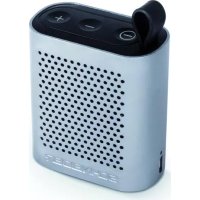
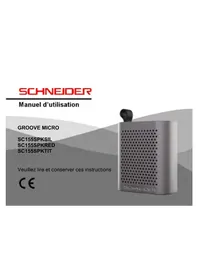
SC155SPKSIL - Speaker SCHNEIDER - Free user manual and instructions
Find the device manual for free SC155SPKSIL SCHNEIDER in PDF.



| Product Type | Bluetooth Speaker |
| Brand | Schneider |
| Model | SC155SPKSIL |
| Bluetooth Version | Bluetooth 4.1, Class 3 |
| Total Power | 3 W RMS |
| Speaker | 40 mm diameter, internal magnetic, 3 W |
| Frequency Range | 120 Hz to 20 kHz |
| Signal-to-Noise Ratio | ≥ 75 dB |
| Battery | Built-in rechargeable Li-ion, 3.7 V / 450 mAh |
| Playback Time | 3 hours |
| Charging Time | Approximately 2 hours with 5 V / 500 mA adapter |
| Power Supply | USB port (5 V / 500 mA to 1000 mA max) |
| Hands-Free Function | Yes, with built-in microphone |
| Package Contents | Speaker, USB-mini USB cable, user manual |
| Care and Cleaning | Wipe with a soft, dry cloth. Do not use chemical products. |
| Safety | Do not expose to water, humidity, excessive heat, or naked flames. Minimum ventilation required (10 cm at the back, 5 cm on the sides). |
| Certification | Compliant with RED Directive 2014/53/EU |
| Operating Temperature | 0 to 40 °C |
| After-Sales Service | ADMEA/LOGISAV, ZI du clos des charmes, 77090 COLLEGIEN - France |
Frequently Asked Questions - SC155SPKSIL SCHNEIDER
User questions about SC155SPKSIL SCHNEIDER
0 question about this device. Answer the ones you know or ask your own.
Ask a new question about this device
Download the instructions for your Speaker in PDF format for free! Find your manual SC155SPKSIL - SCHNEIDER and take your electronic device back in hand. On this page are published all the documents necessary for the use of your device. SC155SPKSIL by SCHNEIDER.
USER MANUAL SC155SPKSIL SCHNEIDER
1.Preparation. 20
2. Operations 20
3. Technical characteristics 25
Nederland
- Voorbereiding 30
- Werking. 31
- Technische eigenschappen 36
Deutsch
Distance de transmission : 10 metres
Important safety instructions regarding the product. Please read
The product must be installed in accordance with national regulations.
Ventilation space
- Place the unit in a location with adequate ventilation to prevent internal heat buildup. Leave at least 10cm of space at the back and above the unit and 5cm space on the sides to prevent overheating.
- Do not obstruct the ventilation openings with items such as newspapers, tablecloths, curtains, etc.
Keep the unit away from high temperatures, moisture, water, and dust.
-
The device must not be exposed to dripping or splashing water.
-
Do not place the device near open flame sources such as lighted candles.
- Only use this device with the supplied battery.
- WARNING: Danger of explosion if the battery is not replaced correctly.
- This product features a built-in rechargeable battery. In the case of failure or non-operation, stop using the product and do not attempt to repair or open it by yourself. Entrust essential repair of this product only to qualified personnel.
- Batteries (battery pack or batteries installed) must not be exposed to excessive heat such as sunshine, fire or the like.
- If the battery life is reduced by half during use, the following charging must be carried out under the supervision of the user. A damaged battery can cause significant heat buildup.
Declaration of conformity
This appliance is Bluetooth speaker complies with the essential requirements and other provisions of and the Radio Equipment Directive (RED) 2014/53/EU that goes into effect on 12 June 2016. The declaration of conformity is available at: http://www.schneiderconsumer.com

Technical specifications:
Product: Bluetooth speaker
Operation frequency: 2400 MHz to 2483.5MHz Class 3 (BT 4.1) Radio Frequency transmission power: 6mW (power per channel) Operation environment: 0 - 40^
-
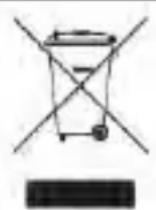
This logo affixed to the product means that it is a device whose treatment as waste falls within the scope of Directive 2012/19/EU of July 4, 2012, on waste electrical and electronic equipment (WEEE).
-
The presence of hazardous substances in electrical and electronic equipment may have potential effects on the environment and human health in the reprocessing cycle of this product.
-
This means that when the appliance is thrown away, it must not be disposed of with unsorted municipal waste.
- As the end user, your role is crucial in the reuse cycle, recycling and other forms of recovery of the electrical and electronic equipment.
Recovery and collection systems are made available to you by local authorities (recycling centers) and distributors.
- You have an obligation to use the collection systems available to you.
1.Preparation
Package Contents
1 x Bluetooth speaker
1 x User manual
1 x Mini-USB cable
2. Operation
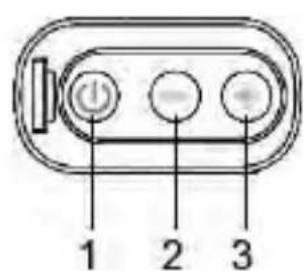
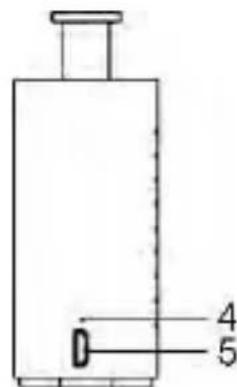
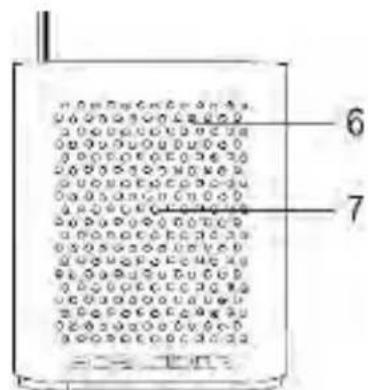
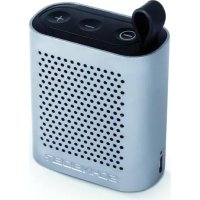
- On/Off button (mode indicator): Press and hold button to turn on or off. When Bluetooth is activated, press and hold button to cut the connection. Another long press will switch off the unit.
- VOL-: (Long press) Decrease volume / (briefly) Previous track
- VOL+: (Long press) Volume up / (briefly) Next track
- Charge indicator: When red light battery charging, light-off when the battery is fully charged.
- USB Port (Power input): connect with the USB cable (provided) to a computer or a 5V 500mA adapter (not provided) for battery charging.
- Microphone
- Speaker
2.1 Pairing with a Bluetooth device
-
Press the key and hold to turn the unit on and activate the Bluetooth function.
-
A long beep sounds when the speaker starts. Then a lower tone sounds to indicate that Bluetooth is activated.
-
A blue indicator light will keep blinking fast when there is no Bluetooth connection.
-
Look for the "SC155SPK" device on your smartphone and start pairing.
-
The connection does not require a password, or can be established with the password "0000".
- A low tone sounds as soon as the connection is established; the blue indicator is blinking slowly to indicate the connection has been established.
| Mode | Status | Indicator LED |
| Bluetooth | Awaiting synchronization | Blue (flashing quickly) |
| Connected / Play / Pause | Blue (blinking and slow) |
2.2 Hands-free use
Your device also has a hands-free function, allowing you to call using the built-in speaker and microphone.
-
Short-press the power button to answer the phone call, and short-press one more time to hang up the phone call.
-
During an incoming phone call, short-press the power button twice to reject the call.

- Short pressing the power button will dial the previously called number.
During a phone call, be sure to speak very close (1 cm) to the microphone.
2.3 Battery charge
To charge your device, connect it to the USB of your computer or USB charger for your phone (5V-500mA).
Note: This unit can be powered by an AC adapter 5V/1000mA (not supplied).

Do not use an adaptor which the current is more than 1000mA
otherwise, the device will be damaged and the warranty will be void.
3. Technical characteristics
Bluetooth 4.1
Transmission distance: 10 meters
Handsfree support
Frequency band: 120 Hz to 20 KHz
Signal-to-noise ratio: ≥ 75 dB
Speaker: 40~mm diameter, internal magnetic 4 3W
Total power: 3W RMS
Power: rechargeable battery; 3.7V / 450mAh
Playback time: 3 hours
After-sales service
ADMEA/LOGISAV
Brand : SCHNEIDER
Model : SC155SPKSIL
Category : Speaker