Groove Mini SC500SPK - Loudspeaker SCHNEIDER - Free user manual and instructions
Find the device manual for free Groove Mini SC500SPK SCHNEIDER in PDF.


| Brand | Schneider |
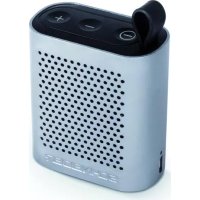
| Model | Groove Mini SC500SPK |
| Product type | Portable Bluetooth speaker |
| Connectivity | Bluetooth 3.0, 3.5mm auxiliary input |
| Main functions | Play/pause, volume control, previous/next track, hands-free function with built-in microphone |
| Speaker | 40 mm diameter, 3 W x 2 |
| Frequency range | 180 Hz - 20 kHz |
| Signal-to-noise ratio | ≥ 80 dB |
| Power supply | Built-in rechargeable battery 3.7 V / 1200 mAh |
| Charging time | 3 to 4 hours |
| Playback time | 4 to 6 hours |
| Safety | Do not open the device, do not expose to water or humidity, use only the supplied battery |
| Care and cleaning | Wipe with a soft, dry cloth. Do not use abrasive products or solvents |
| Package contents | Bluetooth speaker, user manual, 3.5mm audio cable, USB to mini USB cable |
| Warranty | Refer to warranty conditions on the manufacturer's website |
| After-sales service | Admea/LOGISAV, ZI du clos des charmes, 26 rue du clos des charmes, 77090 Collegien, France |
Frequently Asked Questions - Groove Mini SC500SPK SCHNEIDER
User questions about Groove Mini SC500SPK SCHNEIDER
0 question about this device. Answer the ones you know or ask your own.
Ask a new question about this device
Download the instructions for your Loudspeaker in PDF format for free! Find your manual Groove Mini SC500SPK - SCHNEIDER and take your electronic device back in hand. On this page are published all the documents necessary for the use of your device. Groove Mini SC500SPK by SCHNEIDER.
USER MANUAL Groove Mini SC500SPK SCHNEIDER
- Getting started 14
- Operations 14
- Specifications 17
Distance de transmission : 10 metres
Important safety instructions - please read carefully and keep for future reference

To reduce the risk of fire or electric shock, do not expose this product to water, rain or moisture. To prevent the risk of electric shock, do not remove the cover or back of this product. In case of product failure, only qualified personnel can repair. There are no user-serviceable parts inside.
CAUTION!
Dangerous tension inside the product! Do not open. Risk of electric shock! No parts can be repaired by the end-user. Only qualified personnel can repair and maintain this product.
The product must be installed in accordance with local laws.
Damaged batteries must be properly disposed. In order to protect the environment, please dispose the batteries properly, in accordance with local laws (information is available at your reseller).
Where to install the product
- Place the product on a straight, rigid and stable place. Do not place the product on a carpet.
- Do not place the product on top of another that may cause overheating (for example, a receiver or amplifier).
- Do not place anything underneath the product (for example, CDs or magazines).
Proper ventilation
- Place the product in a sufficiently-aerated place to avoid overheating. Allow at least 10cm spacing at the back and top of the product, and 5cm spacing on both sides to prevent overheating.
- Do not place items such as newspapers, tablecloth, curtains, in front of the ventilating openings.
Do not expose the product to high temperatures, moisture, water and dust.
- The apparatus shall not be exposed to dripping or splashing. No object filled with liquids, such as vases, shall be placed on the apparatus.
- Do not place other items close to this product that may damage it (for example, objects containing water or lightened candles).
- No naked flame sources, such as lighted candles, should be placed on the apparatus.
- Do not use the product with a battery different from the one provided.
- CAUTION: Explosion risk if the battery is not replaced correctly. Do not attempt to replace the battery with a different battery version.
- Batteries (battery pack or batteries installed) shall not be exposed to excessive heat such as sunshine or fire or any other heat sources.
- If after being charged, the battery autonomy is reduced by half, the user must supervise the next charge. Caution, a damaged battery may cause a dangerous thermal overheating.
Declaration of Conformity
Hereby, Admea declares that this Bluetooth speaker is in compliance with the essential requirements and other relevant provisions of Directive 1999/5/EC.
The declaration of conformity is available on website:
http://www.schneiderconsumer.com
CE
This product is compliant with directives
2006/95/CE (abrogating the directive
73/23/CEE modified by the directive
93/68/CEE) and 2004/108/CE
(abrogating the directive 89/336CEE).
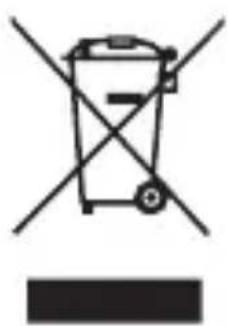
- This logo set on the product means that the recycling of this apparatus comes within the framework of the directive 2012/19/ EC of July 4, 2012 concerning the waste on electrical and electronic equipment (WEEE).
- The presence of dangerous substances in the electrical and electronic equipments can have potential consequences on the environment and human health in the cycle of reprocessing this product.
- Therefore, at the end of its lifetime, this product shall not be disposed with other non-recycled waste.
- As the end user, your role is of prime importance in the cycles of re-using, recycling, and other forms of valorization of this electrical and electronic equipment. Local authorities and resellers have set special procedures for the purpose of collecting and recycling this product.
- You have the obligation to use the selective waste collection systems put in place by your local authorities.
1. Getting started
Packaging contents
1 x Bluetooth speaker
1 x User manual
1 x USB charging cable
1 x Audio cable
2. Operations
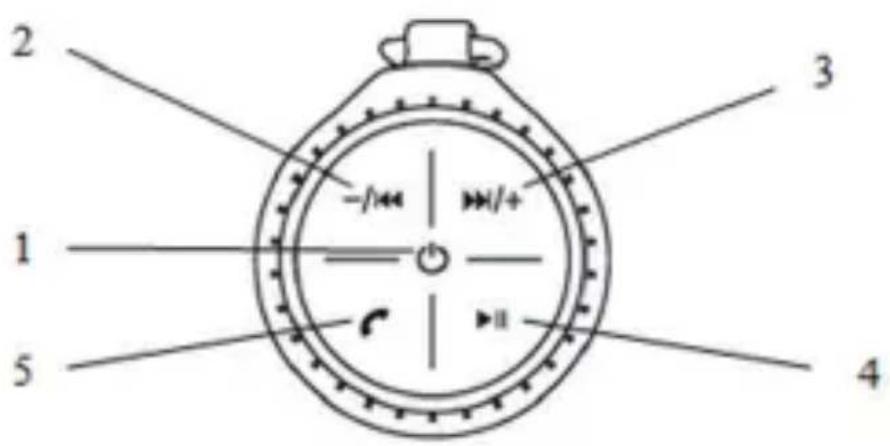
- Standby /on (Mode indicator): Press and hold the button to power the speaker on or off. When Bluetooth connected, long press it to disconnect the Bluetooth.
- VOL : long press to decrease the volume, short press to play last track.
- VOL+1: long press to increase the volume, short press to play next track.
- / : Play/pause
- : Answer/cut phone call
| Mode Status indicator | ||
| AUX-IN | Play / pause Blue | |
| Bluetooth | Waiting for pairing | Blue + red (fast flash one by one) |
| Paired /Play/ pause | Blue + red (slow flash at the same time) |
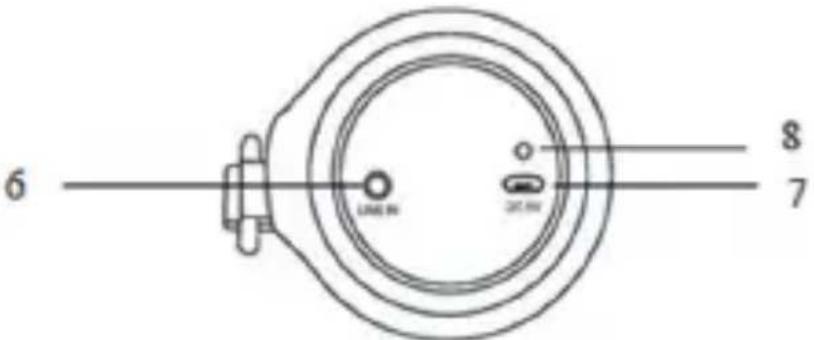
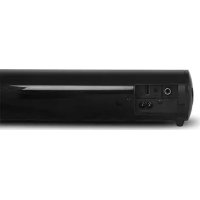
- Aux-in
- Power input: the unit will enter standby mode when recharging the battery, press power button to turn on the unit
- Charging Indicator
1. Pairing with Bluetooth device
-
Press and hold button to turn on the unit and activate Bluetooth function.
-
A long beep sound can be heard when the speaker is turned on, then followed by a low-pitched sound when the Bluetooth function is turned on.
-
Red and blue indicator keeps flashing one by one when no Bluetooth connection
-
Search for the device "SC500SPK" on your smartphone and start pairing.
-
No password or password "0000" is required for pairing.
- You will hear one low-pitched sound when the connection is successful; red and blue indicator keeps flashing at the same time.
2. Using the audio cable
- Connect the external audio player (such as desktop computer, Laptop and Cell Phone etc.) to the speaker with the audio cables provided;
- The unit then enters AUX-IN mode automatically, and Bluetooth will be disconnected.
3. Using as a microphone for phone calls
You can use the device as a microphone to answer phone calls. Press to answer or cut the phone calls. For better results, talk during a call at a close distance from the microphone (1cm).
4. Battery charging
The device has a rechargeable lithium-ion battery which can be charged by connecting with the USB port of your computer Note: This device can also be powered by a 5V AC adaptor (not provided).
3. Specifications
Bluetooth 3.0
Transmission distance: 10 meters
Support hands-free function
Frequency range: 180Hz-20KHz
S/N ratio: ≥80db
Speaker unit: diameter 40mm, inner magnetic 4 3W^*2
Power supply: Built-in rechargeable battery, 3.7V/1200mAh
Charging time: 3~4hours
Playing time: 4~6hours
SAV
ADMEA/LOGISAV
- Important safety instructions - please read carefully and keep for future reference
- CAUTION!
- Where to install the product
- Proper ventilation
- Do not expose the product to high temperatures, moisture, water and dust.
- Declaration of Conformity
- Getting started
- Packaging contents
- Operations
- Pairing with Bluetooth device
- Using the audio cable
- Using as a microphone for phone calls
- Battery charging
- Specifications
- SAV
Brand : SCHNEIDER
Model : Groove Mini SC500SPK
Category : Loudspeaker