
D32H472R4D - TV TELEFUNKEN - Free user manual and instructions
Find the device manual for free D32H472R4D TELEFUNKEN in PDF.


| Product Type | Color TV with built-in DVD player |
| Brand | TELEFUNKEN |
| Model | D32H472R4D |
| Screen Size | 32 inches (81 cm) |
| Resolution | HD Ready (1366 x 768 pixels) |
| Reception | DVB-T2/C/S2 (terrestrial, cable, satellite) |
| Audio Power | 2 x 6 W (RMS) |
| Power Consumption | 65 W (max) |
| Power Supply | 220-240 V AC, 50 Hz |
| Dimensions with stand (W x H x D) | 735 x 494 x 185 mm |
| Dimensions without stand (W x H x D) | 735 x 438 x 78/90 mm |
| Weight | Approximately 4.5 kg |
| Connectivity | 2x HDMI, 1x USB, 1x SCART, 1x VGA, 1x Peritel, 1x Headphone out, 1x Coaxial digital audio out |
| Main Functions | Built-in DVD, teletext, EPG, parental control, auto standby mode, timer |
| Supported USB Formats | Video (MPEG, H.264, H.265), Audio (MP3, AAC, AC3), Image (JPEG, BMP) |
| Energy Class | A+ |
| Operating Temperature | 0 °C to 40 °C |
| Included Accessories | Remote control, 2 AAA batteries, stand, instruction manual |
| Maintenance and Cleaning | Wipe with a soft dry cloth. Do not use abrasive products. |
| Safety | Child lock, automatic shutdown, overvoltage protection |
| Spare Parts and Repairability | Repairability index not provided. Contact customer service for parts. |
Frequently Asked Questions - D32H472R4D TELEFUNKEN
User questions about D32H472R4D TELEFUNKEN
0 question about this device. Answer the ones you know or ask your own.
Ask a new question about this device
Download the instructions for your TV in PDF format for free! Find your manual D32H472R4D - TELEFUNKEN and take your electronic device back in hand. On this page are published all the documents necessary for the use of your device. D32H472R4D by TELEFUNKEN.
USER MANUAL D32H472R4D TELEFUNKEN
KLASSE 1 LASER-PRODUKT
STROMSCHLAGGEFAHR
Safety Information 30
Markings on the Product 30
Environmental Information 31
Features 32
Accessories Included 32
Standby Notifications 32
TV Control Switch & Operation 32
Inserting the Batteries into the Remote 33
Connect Power 33
Antenna Connection 33
Notification 33
Specification 34
Remote Control 35
Connections 36
Switching On/Off 37
First Time Installation 37
Using SatcoDX Feature 37
MediaPlayback via USB Input 38
Media Browser Menu 38
CEC and CEC RC Passthrough 38
TV Menu Contents. 39
General TV Operation 43
Using the Channel List 43
Configuring Parental Settings 43
ElectronicProgramme Guide (EPG) 43
Teletext Services 44
Software Upgrade 44
Troubleshooting & Tips 44
PC Input Typical Display Modes. 45
AV and HDMI Signal Compatibility 45
Supported File Formats for USB Mode 46
Supported DVI Resolutions 47
DVD Mode 48
Notes on Discs 48
Licence Notification 48
How to Watch a DVD. 48
DVD Control Panel Buttons 48
GeneralPlayback 49
DVD Troubleshooting 49
Disc Types Compatible with This Unit 50
Specifications 50
General DVD Operation (depending on model) .... 51
Overview of the Remote Control 52
Safety Information

CAUTION
RISK OF ELECTRIC SHOCK DO NOT OPEN

CAUTION: TO REDUCE THE RISK OF ELECTRIC SHOCK DO NOT REMOVE COVER (OR BACK). NO USER-SERVICEABLE PARTS INSIDE. REFER SERVICING TO QUALIFIED SERVICE PERSONNEL
In extreme weather (storms, lightning) and long inactivity periods (going on holiday) disconnect the TV set from the mains.
The mains plug is used to disconnect TV set from the mains and therefore it must remain readily operable. If the TV set is not disconnected electrically from the mains, the device will still draw power for all situations even if the TV is in standby mode or switched off.
Note: Follow the on screen instructions for operating the related features.
IMPORTANT - Please read these instructions fully before installing or operating
WARNING: Never let people (including children) with reduced physical, sensory or mental capabilities or lack of experience and / or knowledge use electrical devices unsupervised.
- Use this TV set at an altitude of less than 2000 meters above the sea level, in dry locations and in regions with moderate or tropical climates.
- The TV set is intended for household and similar general use but may also be used in public places.
- For ventilation purposes, leave at least 5cm of free space around the TV.
- The ventilation should not be impeded by covering or blocking the ventilation openings with items, such as newspapers, table-cloths, curtains, etc.
- The power cord plug should be easily accessible. Do not place the TV, furniture, etc. on the power cord. A damaged power cord/plug can cause fire or give you an electric shock. Handle the power cord by the plug, do not unplug the TV by pulling the power cord. Never touch the power cord/plug with wet hands as this could cause a short circuit or electric shock. Never make a knot in the power cord or tie it with other cords. When damaged it must be replaced, this should only be done by qualified personnel.
- Do not expose the TV to dripping or splashing of liquids and do not place objects filled with liquids, such as vases, cups, etc. on or over the TV (e.g., on shelves above the unit).
-
Do not expose the TV to direct sunlight or do not place open flames such as lit candles on the top of or near the TV.
-
Do not place any heat sources such as electric heaters, radiators, etc. near the TV set.
- Do not place the TV on the floor and inclined surfaces.
- To avoid danger of suffocation, keep plastic bags out of the reach of the babies, children and domestic animals.
- Carefully attach the stand to the TV. If the stand is provided with screws, tighten the screws firmly to prevent the TV from tilting. Do not over-tighten the screws and mount the stand rubbers properly.
- Do not dispose of the batteries in fire or with hazardous or flammable materials.
Warning: Batteries must not be exposed to excessive heat such as sunshine, fire or the like.
| Caution | Serious injury or death risk |
| Risk of electric shock | Dangerous voltage risk |
| Maintenance | Important maintenance component |
Markings on the Product
The following symbols are used on the product as a marker for restrictions and precautions and safety instructions. Each explanation shall be considered where the product bears related marking only. Note such information for security reasons.

Class II Equipment: This appliance is designed in such a way that it does not require a safety connection to electrical earth.

Class II Equipment With Functional Earthing: This appliance is designed in such a way that it does not require a safety connection to electrical earth, the earth connection is used for functional purposes.

Protective Earth Connection: The marked terminal is intended for connection of the protective earthing conductor associated with the supply wiring.

Hazardous Live Terminal: The marked terminal(s) is/are hazardous live under normal operating conditions.

Caution, See Operating Instructions: The marked area(s) contain(s) user replaceable coin or button cell batteries.

Class 1 Laser Product: This product contains Class 1 laser source that is safe under reasonably foreseeable conditions of operation.
WARNING
Do not ingest the battery, Chemical Burn Hazard This product or the accessories supplied with the product may contain a coin/button cell battery. If the coin/button cell battery is swallowed, it can cause severe internal burns in just 2 hours and can lead to death.
Keep new and used batteries away from children. If the battery compartment does not close securely, stop using the product and keep it away from children.
If you think batteries might have been swallowed or placed inside any part of the body, seek immediate medical attention.
WARNING
Never place a television set in unstable or inclined locations. A television set may fall, causing serious personal injury or death. Many injuries, particularly to children, can be avoided by taking simple precautions such as;
- Using cabinets or stands recommended by the manufacturer of the television set.
- Only using furniture that can safely support the television set.
- Ensuring the television set is not overhanging the edge of the supporting furniture.
- Not placing the television set on tall furniture (for example, cupboards or bookcases) without anchoring both the furniture and the television set to a suitable support.
- Not standing the television set on cloth or other materials placed between the television and supporting furniture.
- Educating children about the dangers of climbing on furniture to reach the television set or its controls. If your existing television set is being retained and relocated, the same considerations as above should be applied.
WALL MOUNTING WARNINGS
- Read the instructions before mounting your TV on the wall.
- The wall mount kit is optional. You can obtain from your local dealer, if not supplied with your TV.
- Do not install the TV on a ceiling or on an inclined wall.
- Use the specified wall mounting screws and other accessories.
- Tighten the wall mounting screws firmly to prevent the TV from fall. Do not over-tighten the screws.
WARNING
Apparatus connected to the protective earthing of the building installation through the MAINS connection or through other apparatus with a connection to protective earthing - and to a television distribution system using coaxial cable, may in some circumstances create a fire hazard.
Connection to a television distribution system has therefore to be provided through a device providing electrical isolation below a certain frequency range (galvanic isolator, see EN 60728-11)
Environmental Information
This television is designed to be environment friendly. To reduce energy consumption, you can follow these steps:
If you set the Energy Saving to Minimum, Medium, Maximum or Auto the TV will reduce the energy consumption accordingly. If you like to set the Backlight to a fixed value set as Custom and adjust the Backlight (located under the Energy Saving setting) manually using Left or Right buttons on the remote. Set as Off to turn this setting off.
Note: Available Energy Saving options may differ depending on the selected Mode in the System>Picture menu.
The Energy Saving settings can be found in the System>Picture menu. Note that some picture settings will be unavailable to be changed.
If pressed Right button while Auto option is selected or Left button while Custom option is selected, "Screen will be off in 15 seconds." message will be displayed on the screen. Select Proceed and press OK to turn the screen off immediately. If you don't press any button, the screen will be off in 15 seconds. Press any button on the remote or on the TV to turn the screen on again.
Note: Screen Off option is not available if the Mode is set to Game.
When the TV is not in use, please switch off or disconnect the TV from the mains plug. This will also reduce energy consumption.
Features
- Remote controlled colour TV
- Fully integrated digital terrestrial/cable/satellite TV (DVB-T2/C/S2)
- HDMI inputs to connect other devices with HDMI sockets
- USB input
- OSD menu system
- Scart socket for external devices (such as DVD Players, PVR, video games, etc.)
- Stereo sound system
- Teletext
- Headphone connection
Automatic programming system - Manual tuning
Automatic power down after up to eight hours. - Sleep timer
Child lock
Automatic sound mute when no transmission. - NTSC playback
AVL (Automatic Volume Limiting) - PLL (Frequency Search)
PC input
Game Mode (Optional) - Picture off function
Accessories Included
Remote Control
- Batteries: 2 x AAA
- Instruction Book
Standby Notifications
If the TV does not receive any input signal (e.g. from an aerial or HDMI source) for 3 minutes, it will go into standby. When you next switch-on, the following message will be displayed: "TV switched to stand-by mode automatically because there was no signal for a long time." Press OK to continue.
If the TV is on and it isn't being operated for a while it will go into standby. When you next switch-on, the following message will be displayed. "TV switched to stand-by mode automatically because no operation was made for a long time." Press OK to continue.
TV Control Switch & Operation
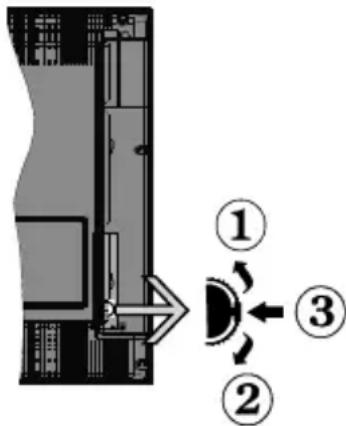
- Up direction
- Down direction
- Volume / Info / Sources List selection and Standby-On switch
The Control button allows you to control the Volume/Programme/Source and Standby-On functions of the TV.
To change volume: Increase the volume by pushing the button up. Decrease the volume by pushing the button down.
To change channel: Press the middle of the button in, the information banner will appear on the screen. Scroll through the stored channels by pushing the button up or down.
To change source: Press the middle of the button in twice(for the second time in total), the source list will appear on the screen. Scroll through the available sources by pushing the button up or down.
To turn the TV off: Press the middle of the button in and hold it down for a few seconds, the TV will turn into standby mode.
To turn on the TV: Press the middle of the button in, the TV will turn on.
Notes:
- If you turn the TV off, this circle starts again beginning with the volume setting.
- Main menu OSD cannot be displayed via control buttons.
Operation with the Remote Control
Press Menu button on your remote control to display main menu screen. Use the directional buttons to select a menu tab and press OK to enter. Use the directional buttons again to select or set an item. Press Return/Back button or Menu button to quit a menu screen.
Input Selection
Once you have connected external systems to your TV, you can switch to different input sources. Press Source button on your remote control consecutively to select the different sources.
Changing Channels and Volume
You can change the channel and adjust the volume by using the Volume +/- and Programme +/- buttons on the remote.
Inserting the Batteries into the Remote
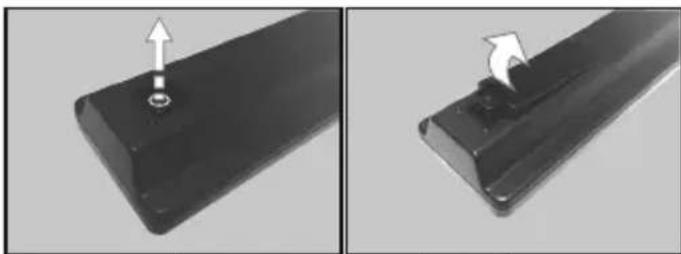
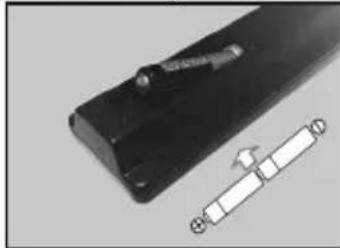
Remove the screw that secure the battery compartment cover on the back side of the remote control first. Lift the cover gently. Insert two size AAA batteries. Make sure the (+) and (-) signs match (observe correct polarity). Do not mix old and new batteries. Replace only with same or equivalent type. Place the cover back on. Then screw the cover back on again.
Connect Power
IMPORTANT: The TV set is designed to operate on 220-240V AC, 50Hz socket. After unpacking, allow the TV set to reach the ambient room temperature before you connect the set to the mains. Plug the power cable to the mains socket outlet.
Antenna Connection
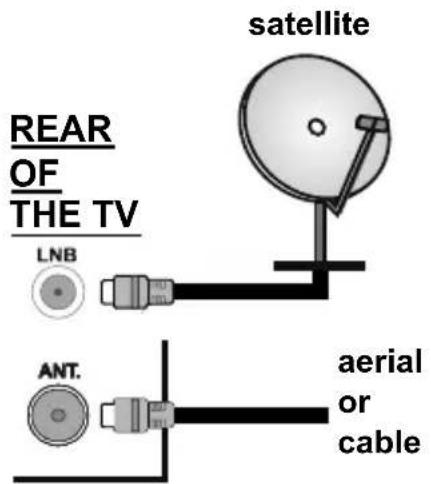
Connect the aerial or cable TV plug to the AERIAL INPUT (ANT) socket or satellite plug to the SATELLITE INPUT (LNB) socket located on the back of the TV.
Notification
TRADEMARK ACKNOWLEDGMENT
The terms HDMI and High-Definition Multimedia Interface, and the HDMI Logo are trademarks or registered trademarks of HDMI Licensing Administrator, Inc. in the United States and other countries.

Manufactured under license from Dolby Laboratories. Dolby, Dolby Audio and the double-D symbol are trademarks of Dolby Laboratories.
Information for Users on Disposal of Old Equipment and Batteries
[European Union only]
Equipment bearing these symbols should not be disposed as general household waste.
You should look for appropriate recycling facilities and systems for the disposal of these products.
Notice: The sign Pb below the symbol for batteries indicates that this battery contains lead.
![TELEFUNKEN D32H472R4D - [European Union only] - 1](/content/2026/03/504954/images/7536114956207a6938ef7a166d395f347fa0b7999ce4ca5bbb434b34e44b83ad.jpg)
![TELEFUNKEN D32H472R4D - [European Union only] - 2](/content/2026/03/504954/images/9aceeafb57448a943e1248c03d862f36955c4cff29bdcd18f912f82377609ba7.jpg)
Specification
| TV Broadcasting PAL B/G | D/K K I/I' |
| Receiving Channels | VHF (BAND I/III) - UHF (BAND U) - HYPERBAND |
| Digital Reception | Fully integrated digital terrestrial-cable-satellite TV(DVB-T-C-S) (DVB-T2, DVB-S2 compliant) |
| Number of Preset Channels | 10 000 |
| Channel Indicator On Screen Display | |
| RF Aerial Input 75 Ohm (unbalanced) | |
| Operating Voltage 220-240V AC, 50Hz. | |
| Audio German+Nicam Stereo | |
| Audio Output Power (WRMS.) (10% THD) | 2 x 6 W |
| Power Consumption (W) 65 W | |
| TV Dimensions DxLxH (with foot) (mm) | 185 x 735 x 494 mm |
| TV Dimensions DxLxH (without foot) (mm) | 78/90 x 735 x 438 mm |
| Display 32" | |
| Operation temperature and operation humidity | 0°C up to 40°C, 85% humidity max |
Remote Control
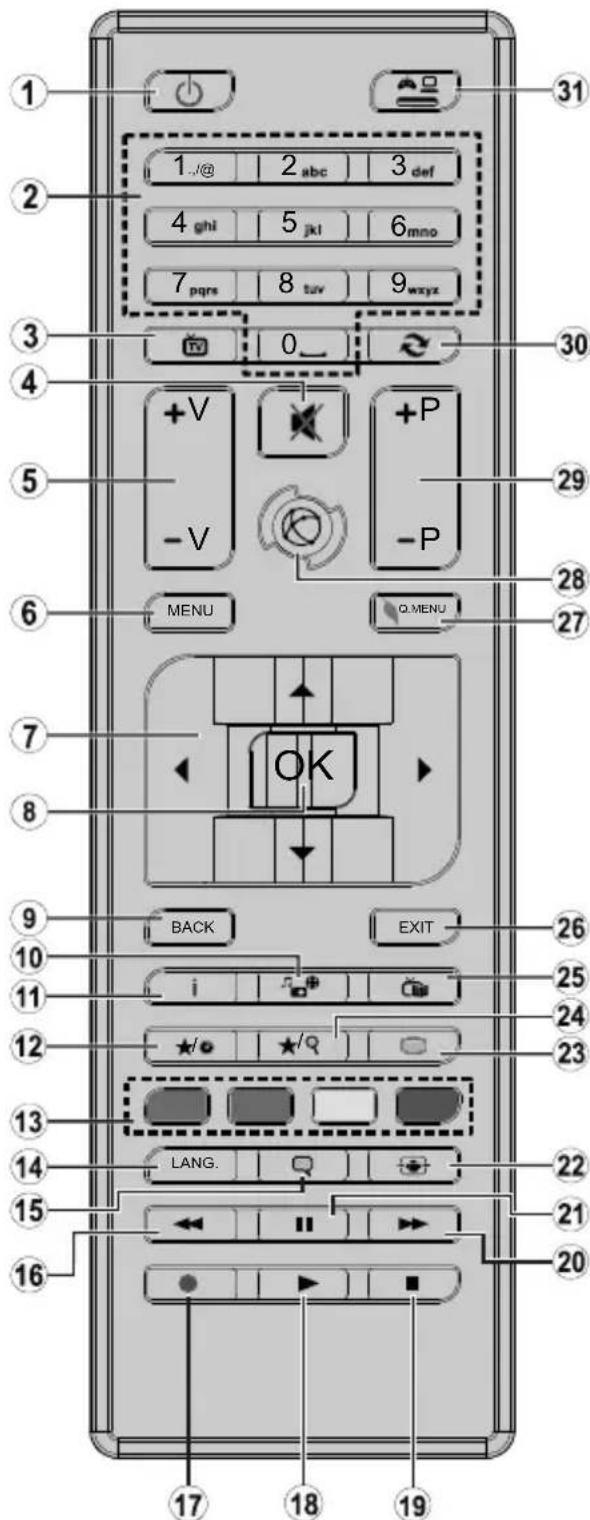
(*) MY BUTTON 1 & MY BUTTON 2:
These buttons may have default functions depending on the model. However you can set a special function to these buttons by pressing on them for five seconds when on a desired source or channel. A confirmation message will be displayed on the screen. Now the selected MY BUTTON is associated with the selected function.
Note that if you perform First Time Installation, MY BUTTON 1&2 will return to their default function.
- Standby: Switches On / Off the TV
- Numeric buttons: Switches the channel, enters a number or a letter in the text box on the screen.
- TV: Switches to TV Source
- Mute: Completely turns off the volume of the TV
- Volume +/-
- Menu: Displays TV menu
- Directional buttons: Helps navigate menus, content etc. and displays the subpages in TXT mode when pressed Right or Left
- OK: Confirms user selections, holds the page (in TXT mode), views channel list (DTV mode)
- Back/Return: Returns to previous screen, opens index page (in TXT mode)
- Media browser: Opens the media browsing screen
- Info: Displays information about on-screen content, shows hidden information (reveal - in TXT mode)
- My button 1 (*)
- Coloured Buttons: Follow the on-screen instructions for coloured button functions
- Language: Switches between sound modes (analogue TV), displays and changes audio/subtitle language (digital TV, where available)
- Subtitles: Turns subtitles on and off (where available)
- Rapid reverse: Moves frames backwards in media such as movies
- No function
- Play: Starts to play selected media
- Stop: Stops the media being played
- Rapid advance: Moves frames forward in media such as movies
- Pause: Pauses the media being played
- Screen: Changes the aspect ratio of the screen
- Text: Displays teletext (where available), press again to superimpose the teletext over a normal broadcast picture (mix)
- My button 2 (*)
- EPG (Electronic programme guide): Displays the electronic programme guide
- Exit: Closes and exits from displayed menus or returns to previous screen
- Quick Menu: Displays a list of menus for quick access
- No function
- Programme +/-
- Swap: Quickly cycles between previous and current channels or sources
- Source: Shows all available broadcast and content sources
Connections
| Connector Type | Cables Device | ||
| Scart Connection (back) | |||
| VGA Connection (back) | |||
| SIDE AV | PC/YPbPr Audio Connection (side) | YPbPr/PC Audio Cable | |
| HDMI Connection (back) | |||
| SPDIF | SPDIF (Coaxial Out) Connection (back) | ||
| SIDE AV | Side AV (Audio/Video) Connection (side) | AV Cable | |
| HEADPHONE | Headphone Connection (side) | ||
| PC to YPBPR | YPbPr Video Connection (back) | PC to YPbPr Connection Cable | |
| USB Connection (side) | |||
| CI Connection (side) |
You can use YPbPr to VGA cable to enable YPbPr signal via VGA input. You cannot use VGA and YPbPr at the same time. To enable PC/YPbPr audio, you will need to use the side audio inputs with a YPbPr/PC audio cable for audio connection. If an external device is connected via the SCART socket, the TV will automatically switch to AV mode. When receiving DTV channels (Mpeg4 H.264) or while in Media Browser mode, output will not be available via the scart socket. When using the wall mounting kit (available from third party in the market, if not supplied), we recommend that you plug all your cables into the back of the TV before mounting on the wall. Insert or remove the CI module only when the TV is SWITCHED OFF. You should refer to the module instruction manual for details of the settings. The/Each USB input of your TV supports devices up to 500mA. Connecting devices that have current value above 500mA may damage your TV. By connecting an HDMI cable to your TV, you have to use only a shielded HDMI cable to guarantee a sufficient immunity against parasitic frequency radiation.

If you want to connect a device to the TV, make sure that both the TV and the device are turned off before making any connection. After the connection is done, you can turn on the units and use them.
Switching On/Off
To Switch the TV On
Connect the power cord to a power source such as a wall socket (220-240V AC, 50 Hz).
To switch on the TV from standby mode either:
- Press the Standby button, Programme +/- or a numeric button on the remote control.
- Press the side function switch on the TV until the TV comes on from standby.
To Switch the TV Off
Press the Standby button on the remote control or press the side function switch on the TV until the TV switches into standby mode.
To power down the TV completely, unplug the power cord from the mains socket.
Note: When the TV is switched into standby mode, the standby LED can blink to indicate that features such as Standby Search, Over Air Download or Timer is active. The LED can also blink when you switch on the TV from standby mode.
First Time Installation
When turned on for the first time, the language selection screen is displayed. Select the desired language and press OK.
On the next screen, set your preferences using the directional buttons.
Note: Depending on the Country selection you may be asked to set and confirm a PIN at this point. The selected PIN cannot be 0000. You have to enter it if you are asked to enter a PIN for any menu operation later.
About Selecting Broadcast Type
Digital Aerial: If Digital Aerial broadcast search option is turned on, the TV will search for digital terrestrial broadcasts after other initial settings are completed.
Digital Cable: If Digital Cable broadcast search option is turned on, the TV will search for digital cable broadcasts after other initial settings are completed. According to your other preferences a confirmation message may be displayed before starting to search. Select YES and press OK to proceed. To cancel operation, select NO and press OK. You can select Network or set values such as Frequency, Network ID and Search Step. When finished, press OK button.
Note: Searching duration will change depending on the selected Search Step.
Satellite: If Satellite broadcast search option is turned on, the TV will search for digital satellite broadcasts after other initial settings are completed. Before satellite search is performed some settings should be made. Antenna Type menu will be displayed first. You can select Antenna Type as Direct, Single Satellite Cable or DiSEqC switch by using " 一 ^ or " buttons.
- Direct: If you have a single receiver and a direct satellite dish, select this antenna type. Press OK to continue. Select an available satellite on the next screen and press OK to scan for services.
- Single Satellite Cable: If you have multiple receivers and a single satellite cable system, select this antenna type. Press OK to continue. Configure settings by following instructions on the next screen. Press OK to scan for services.
- DiSEqC switch: If you have multiple satellite dishes and a DiSEqC switch, select this antenna type. Press OK to continue. You can set four DiSEqC options (if available) on the next screen. Press OK button to scan the first satellite in the list.
Analogue: If Analogue broadcast search option is turned on, the TV will search for analogue broadcasts after other initial settings are completed.
Additionally you can set a broadcast type as your favourite one. Priority will be given to the selected broadcast type during the search process and the channels of it will be listed on the top of the Channel List. When finished, press OK to continue.
You can activate Store Mode option at this point. This option will configure your TV's settings for store environment and depending on the TV model being used, the supported features of it may be displayed on the top of the screen as an info banner. This option is intended only for store use. It is recommended to select Home Mode for home use. This option will be available in System>Settings>More menu and can be turned off/on later.
Press OK button on the remote control to continue. After the initial settings are completed TV will start to search for available broadcasts of the selected broadcast types.
After all the available stations are stored, scan results will be displayed. Press OK to continue. The Edit Channel List menu will be displayed next. You can edit the channel list according to your preferences or press the Menu button to quit and watch TV.
While the search continues a message may appear, asking whether you want to sort channels according to the LCN^(*) . Select Yes and press OK to confirm.
(*) LCN is the Logical Channel Number system that organizes available broadcasts in accordance with a recognizable channel number sequence (if available).
Note: Do not turn off the TV while initializing first time installation. Note that, some options may not be available depending on the country selection.
Using SatcoDX Feature
You can perform SatcoDX operations using the Installation>Satelite Settings menu. In the SatcoDX menu, there are two options regarding to the SatcoDx.
You can download or upload SatcoDX data. In order to perform these functions a USB device must be connected to the TV.
You can upload current services and related satellites & transponders in TV, to a USB device.
Additionally you can download one of the SatcoDx files stored in USB device, to the TV.
When you select one of these files, all services and related satellites and transponders in the selected file will be stored in the TV. If there are any installed terrestrial, cable and/or analog services, they will be kept and only satellite services will be removed.
Afterwards, check your antenna settings and make changes if necessary. An error message stating "No Signal" may be displayed if the antenna settings are not configured properly.
MediaPlayback viaUSB Input
You can connect 2.5" and 3.5" inch (hdd with external power supply) external hard disk drives or USB memory stick to your TV by using the USB inputs of the TV.
IMPORTANT! Back up the files on your storage devices before connecting them to the TV. Manufacturer will not be responsible for any file damage or data loss.
Certain types of USB devices (e.g. MP3 Players) or USB hard disk drives/memory sticks may not be compatible with this TV. The TV supports FAT32 and NTFS disk formatting.
Wait a little while before each plugging and unplugging as the player may still be reading files. Failure to do so may cause physical damage to the USB player and the USB device itself. Do not pull out your drive while playing a file.
You can use USB hubs with your TV's USB inputs. External power supplied USB hubs are recommended in such a case.
It is recommended to use the TV's USB input(s) directly, if you are going to connect a USB hard disk.
Note: When viewing image files the Media Browser menu can only display 1000 image files stored on the connected USB device.
Media Browser Menu
You can play photo, music, and movie files stored on a USB disk by connecting it to your TV. Connect a USB disk to one of the USB inputs located on the side of the TV. Pressing the Menu button while in the Media Browser mode will access the Picture, Sound and Settings menu options. Pressing the Menu button again will exit from this screen. You can set your Media Browser preferences by using the Settings Menu.
| Loop/Shuffle Mode Operation | |
| Start playback with the Play button and activate | All files in the list will be continuously played in original order |
| Start playback with the OK button and activate | The same file will be played continuously (repeat) |
| Start playback with the Play button and activate | All files in the list will be played once in random order |
| Start playback with the Play button and activate | All files in the list will be continuously played in the same random order. |
CEC and CEC RC Passthrough
This function allows to control the CEC-enabled devices, that are connected through HDMI ports by using the remote control of the TV.
The CEC option in the System>Settings>More menu should be set as Enabled at first. Press the Source button and select the HDMI input of the connected CEC device from the Sources List menu. When new CEC source device is connected, it will be listed in source menu with its own name instead of the connected HDMI ports name(such as DVD Player, Recorder 1 etc.).
The TV remote is automatically able to perform the main functions after the connected HDMI source has been selected.
To terminate this operation and control the TV via the remote again, press Quick Menu button on the remote, highlight the CEC RC Passthrough and set as Off by pressing Left or Right button. This feature can also be enabled or disabled under the System>Settings>More menu.
The TV supports also ARC(Audio Return Channel) feature. This feature is an audio link meant to replace other cables between the TV and the audio system (A/V receiver or speaker system).
When ARC is active, TV does not mute its other audio outputs automatically. So you need to decrease TV volume to zero manually, if you want to hear audio from connected audio device only (same as other optical or co-axial digital audio outputs). If you want to change connected device's volume level, you should select that device from the source list. In that case volume control keys are directed to connected audio device.
Note: ARC is supported only via the HDMI11 input.
System Audio Control
Allows an Audio Amplifier/Receiver to be used with the TV. The volume can be controlled using the remote control of the TV. To activate this feature set the Speakers option in the System>Settings>More menu as Amplifier. The TV speakers will be muted and the sound of the watched source will be provided from the connected sound system.
Note: The audio device should support System Audio Control feature and CEC option should be set as Enabled.
| TV Menu Contents | |
| System - Picture Menu Contents | |
| Mode | You can change the picture mode to suit your preference or requirements. Picture mode can be set to one of these options: Cinema, Game(optional), Sports, Dynamic and Natural. |
| Contrast Adjusts the light and dark values on the screen. | |
| Brightness Adjusts the brightness values on the screen. | |
| Sharpness Sets the sharpness value for the objects displayed on the screen. | |
| Colour Sets the colour value, adjusting the colors. | |
| Energy Saving | For setting the Energy Saving to Custom, Minimum, Medium, Maximum, Auto, Screen Off or Off. Note: Available options may differ depending on the selected Mode. |
| Backlight | This setting controls the backlight level. The backlight function will be inactive if the Energy Saving is set to an option other than Custom. |
| Advanced Settings | |
| Dynamic Contrast You can change the dynamic contrast ratio to desired value. | |
| Noise Reduction | If the signal is weak and the picture is noisy, use the Noise Reduction setting to reduce the amount of noise. |
| Colour Temp | Sets the desired colour temperature value. Cool, Normal, Warm and Custom options are available. |
| White Point | If the Colour Temp option is set as Custom, this setting will be available. Increase the 'warmth' or 'coolness' of the picture by pressing Left or Right buttons. |
| Picture Zoom Sets the desired image size format. | |
| Film Mode | Films are recorded at a different number of frames per second to normal television programmes. Turn this feature on when you are watching films to see the fast motion scenes clearly. |
| Skin Tone Skin tone can be changed between -5 and 5. | |
| Colour Shift Adjust the desired colour tone. | |
| RGB Gain (Optional) | You can configure the colour temperature values using the RGB Gain feature. |
| HDMI Full Range | While watching from a HDMI source, this feature will be visible. You can use this feature to enhance blackness in the picture. |
| PC Position | Appears only when the input source is set to VGA/PC. |
| Autoposition Automatically optimizes the display. Press OK to optimize. | |
| H Position | This item shifts the image horizontally to the right hand side or left hand side of the screen. |
| V Position This item shifts the image vertically towards the top or bottom of the screen. | |
| Dot Clock | Dot Clock adjustments correct the interference that appear as vertical banding in dot intensive presentations like spreadsheets or paragraphs or text in smaller fonts. |
| Phase | Depending on the input source(computer etc.) you may see a hazy or noisy picture on the screen. You can use phase to get a clearer picture by trial and error. |
| Reset | Reset the picture settings to factory default settings (except Game Mode). |
| While in VGA (PC) mode, some items in Picture menu will be unavailable. Instead, VGA mode settings will be added to the Picture Settings while in PC mode. | |
| System - Sound Menu Contents | |
| Volume Adjusts the volume | level. |
| Equalizer | Selects the equalizer mode. Custom settings can be made only when in User mode. |
| Balance Adjusts whether the | sound comes from the left or right speaker. |
| Headphone | Sets headphone volume.Pleasesure ensure before using headphones that the headphone volume is set to a low level, to prevent damage to your hearing. |
| Sound Mode You can select | a sound mode (If the viewed channel supports). |
| AVL (Automatic Volume Limiting) | Sets the sound to obtain fixed output level between programmes. |
| Headphone/Lineout | When you connect an external amplifier to your TV using the headphone jack, you can select this option as Lineout. If you have connected headphones to the TV, set this option as Headphone.Please ensure before using headphones that this menu item is set to Headphone. If it is set to Lineout, the output from the headphone socket will be set to maximum which could damage your hearing. |
| Dynamic Bass Enables or disables the Dynamic Bass. | |
| Surround sound | Surround sound mode can be changed as On or Off. |
| Digital Out Sets digital out audio type. | |
| System - Settings Menu Contents | |
| Conditional Access Controls | is conditional access modules when available. |
| Language You may set a different language depending on the broadcaster and the country. | |
| Parental | Enter correct password to change parental settings. You can easily adjust Menu Lock, Maturity Lock, Child Lock or Guidance in this menu. You can also set a new PIN or change the Default CICAM PIN using the related options. Note: Some menu options may not be available depending on the country selection in the First Time Installation. Default PIN can be set to 0000 or 1234. If you have defined the PIN (is requested depending on the country selection) during the First Time Installation use the PIN that you have defined. |
| Timers | Sets sleep timer to turn off the TV after a certain time. Sets timers for selected programmes. |
| Date/Time Sets date and time. | |
| Sources Enables or disables selected source options. | |
| Accessibility Displays accessibility options of the TV. | |
| Hard of Hearing Enables any special feature sent from the broadcaster. | |
| Audio Description | A norration track will be played for the blind or visually impaired audience. Press OK to see all available Audio Description menu options. This feature is available only if the broadcaster supports it. |
| More Displays other setting | options of the TV. |
| Menu Timeout Changes timeout duration for menu screens. | |
| Software Upgrade | Ensures that your TV has the latest firmware. Press OK to see the menu options. |
| Application Version Displays current software version. | |
| Subtitle Mode | This option is used to select which subtitle mode will be on the screen (DVB subtitle / Teletext subtitle) if both is available. Default value is DVB subtitle. This feature is available only for the country option of Norway. |
| Auto TV OFF | Sets the desired time for the TV to automatically go into standby mode when not being operated. |
| Biss Key | Biss is a satellite signal scrambling system that is used for some broadcasts. If you need to enter Biss key on a broadcast, you can use this setting. Highlight Biss Key and press OK to enter keys on the desired broadcast. |
| Store Mode | Select this mode for store display purposes. Whilst Store Mode is enabled, some items in the TV menu may not be available. |
| Power Up Mode | This setting configures the power up mode preference. Last State and Standby options are available. |
| CEC | With this setting you can enable and disable CEC functionality completely. Press Left or Right button to enable or disable the feature. |
| CEC Auto Power On | This function allows the connected HDMI-PEC compatible device to turn on the TV and switch to its input source automatically. Press Left or Right button to enable or disable the feature. |
| Speakers | To hear the TV audio from the connected compatible audio device set as Amplifier. You can use the remote control of the TV to control the volume of the audio device. |
| OSS | Displays Open Source Software license information. |
| Installation Menu Contents | |
| Automatic channel scan (Retune) | Displays automatic tuning options. Digital Aerial: Searches and stores aerial DVB stations. Digital Cable: Searches and stores cable DVB stations. Analogue: Searches and stores analogue stations. Satellite: Searches and stores satellite stations. |
| Manual Channel Scan | This feature can be used for direct broadcast entry. |
| Network Channel Scan | Searches for the linked channels in the broadcast system. Digital Aerial: Searches for aerial network channels. Digital Cable: Searches for cable network channels. |
| Analogue Fine Tune | You can use this setting for fine tuning analogue channels. This feature is not available if no analogues channels are stored. |
| Satellite Settings | Displays satellite settings. Satellite list: Displays available satellites. You can Add, Delete satellites or Edit satellite settings on the list. Antenna installation: You can change satellite antenna settings and/or start a satellite scan. SatcoDX: You can upload or download SatcoDX data using the related options. |
| Installation Settings (Optional) | Displays installation settings menu. Standby Search(*) : Your TV will search for new or missing channels while in standby. Any new found broadcasts will be shown. Dynamic Channel Update(*) : If this option is set as Enabled, the changes on the broadcasts such as frequency, channel name, subtitle language etc., will be applied automatically while watching. (*) Availability depends on model. |
| Clear Service List | Use this setting to clear channels stored. This setting is visible only when the Country option is set to Denmark, Sweden, Norway or Finland. |
| Select Active Network | This setting allows you to select only the broadcasts within the selected network to be listed in the channel list. This feature is available only for the country option of Norway. |
| First Time Installation | Deletes all stored channels and settings, resets TV to factory settings. |
General TV Operation
Using the Channel List
The TV sorts all stored stations in the Channel List. You can edit this channel list, set favourites or set active stations to be listed by using the Channel List options. Press the OK button to open the Channel List. You can filter the listed channels by pressing the Blue button or open the Edit Channel List menu by pressing the Green button in order to make advanced changes in the current list.
Managing the Favourite Lists
You can create four different lists of your favourite channels. Enter the Channel List in the main menu or press the Green button while the Channel List is displayed on the screen in order to open the Edit Channel List menu. Select the desired channel on the list. You can make multiple choices by pressing the Yellow button. Then press the OK button to open the Channel Edit Options menu and select Add/Remove Favourites option. Press the OK button again. Set the desired list option to On. The selected channel/s will be added to the list. In order to remove a channel or channels from a favourite list follow the same steps and set the desired list option to Off.
You can use the Filter function in the Edit Channel List menu to filter the channels in the Channel list permanently according to your preferences. Using this Filter option, you can set one of your four favourite lists to be displayed every time the Channel list is opened. The filtering function in the Channel list menu will only filter the currently displayed Channel list in order to find a channel and tune in to it. These changes will not remain the next time the Channel list is opened if you don't save them. To save the changes on the list press the Red button after filtering while the Channel list is displayed on the screen.
Configuring Parental Settings
The Parental Settings menu options can be used to prohibit users from viewing of certain programmes, channels and using of menus. These settings are located in the System>Settings>Parental menu.
To display parental lock menu options, a PIN number should be entered. After coding the correct PIN number, Parental Settings menu will be displayed.
Menu Lock: This setting enables or disables access to all menus or installation menus of the TV.
Maturity Lock: If this option is set, TV gets the maturity information from the broadcast and if this maturity level is disabled, disables access to the broadcast.
Note: If the country option in the First Time Installation is set as France, Italy or Austria, Maturity Lock's value will be set to 18 as default.
Child Lock: If this option is set to ON, the TV can only be controlled by the remote control. In this case the control buttons on the TV will not work.
Set PIN: Defines a new PIN number.
Default CICAM PIN: This option will appear as greyed out if no CI module is inserted into the CI slot of the TV. You can change the default PIN of the CI CAM using this option.
Note: Default PIN can be set to 0000 or 1234. If you have defined the PIN(is requested depending on the country selection) during the First Time Installation use the PIN that you have defined.
Some options may not be available depending on the country selection in the First Time Installation.
Electronic Programme Guide (EPG)
Some channels send information about their broadcast schedules. Press the Epg button to view the Programme Guide menu.
There are 3 different types of schedule layouts available, Timeline Schedule, List Schedule and Now/Next Schedule. To switch between them follow the instructions on the bottom of the screen.
Timeline Schedule
Zoom (Yellow button): Press the Yellow button to see events in a wider time interval.
Filter (Blue button): Views filtering options.
Highlight Genre (Subtitles button): Displays Highlight Genre menu. Using this feature, you can search the programme guide database in accordance with the genre. Info available in the programme guide will be searched and results matching your criteria will be highlighted.
Options (OK button): Displays event options.
Event Details (Info button): Displays detailed information about selected events.
Next/Prev Day (Programme +/- buttons): Displays the events of previous or next day.
Search (Text button): Displays Guide Search menu. Now (Source button): Displays current event of the highlighted channel.
List Schedule\*
(*) In this layout option, only the events of the highlighted channel will be listed.
Prev. Time Slice (Red button): Displays the events of previous time slice.
Next/Prev Day (Programme +/- buttons): Displays the events of previous or next day.
Event Details (Info button): Displays detailed information about selected events.
Filter (Text button): Views filtering options.
Next Time Slice (Green button): Displays the events of next time slice.
Options (OK button): Displays event options.
Now/Next Schedule
Options (OK button): Displays event options.
Event Details (Info button): Displays detailed information about selected events.
Filter (Blue button): Views filtering options.
Event Options
Use the directional buttons to highlight an event and press OK button to display Event Options menu. The following options are available.
Select Channel: Using this option, you can switch to the selected channel.
Set Timer on Event / Delete Timer on Event: After you have selected an event in the EPG menu, press the
OK button. Select Set Timer on Event option and press the OK button. You can set a timer for future events.
To cancel an already set timer, highlight that event and press the OK button. Then select Delete Timer on Event option. The timer will be cancelled.
Notes: You cannot switch to any other channel or source while there is an active timer on the current channel. It is not possible to set timer for two or more individual events at the same time interval.
Teletext Services
Press the Text button to enter. Press again to activate mix mode, which allows you to see the teletext page and the TV broadcast at the same time. Press once more to exit. If available, sections in the teletext pages will become colour-coded and can be selected by pressing the coloured buttons. Follow the instructions displayed on the screen.
Software Upgrade
Your TV is capable of finding and updating the firmware automatically via the broadcast signal.
Software upgrade search via user interface
On the main menu select System>Settings and then More. Navigate to Software upgrade and press the OK button. In Upgrade options menu select Scan for upgrade and press OK button to check for a new software upgrade.
If a new upgrade is found, it starts to download the upgrade. After the download is completed confirm the question asking about rebooting the TV by pressing the OK to continue with the reboot operation.
3 AM search and upgrade mode
Your TV will search for new upgrades at 3:00 o'clock if Automatic scanning option in the Upgrade options menu is set to Enabled and if the TV is connected to an aerial signal. If a new software is found and downloaded successfully, it will be installed at the next power on.
Note: Do not unplug the power cord while led is blinking during the reboot process. If the TV fails to come on after the upgrade, unplug, wait for two minutes then plug it back in.
Troubleshooting & Tips
Tv will not turn on
Make sure the power cord is plugged in securely to wall outlet. Check if batteries are exhausted. Press the Power button on the TV.
Poor picture
- Check if you have selected the correct TV system.
- Low signal level can cause picture distortion. Please check antenna access.
- Check if you have entered the correct channel frequency if you have done manual tuning.
- The picture quality may degrade when two devices are connected to the TV at the same time. In such a case, disconnect one of the devices.
No picture
- This means your TV is not receiving any transmission.
Make sure the correct source has been selected. - Is the antenna connected properly?
- Is the antenna cable damaged?
- Are suitable plugs used to connect the antenna?
If you are in doubt, consult your dealer.
No sound
- Check if the TV is muted. Press the Mute button or increase the volume to check.
Sound may be coming from only one speaker. Check the balance settings from Sound menu.
Remote control - no operation
- The batteries may be exhausted. Replace the batteries.
Input sources - can not be selected
- If you cannot select an input source, it is possible that no device is connected. If not;
- Check the AV cables and connections if you are trying to switch to the input source dedicated to the connected device.
PC Input Typical Display Modes
The following table is an illustration of some of the typical video display modes. Your TV may not support all resolutions. Your TV supports up to 1920x1080.
| Index Resolution Frequency | ||
| 1 | 480 60 Hz | |
| 2 | 600 56 Hz | |
| 3 | 600 60 Hz | |
| 4 | x768 60 Hz | |
| 5 | 24x768 66 Hz | |
| 6 | x768 60 Hz | |
| 7 | x960 60 Hz | |
| 8 | x1024 60 Hz | |
| 9 | x768 60 Hz | |
| 10 | 0x1050 60 Hz | |
| 11 | 0x1200 60 Hz | |
| 12 | 0x1080 60 Hz | |
AV and HDMI Signal Compatibility
| Source Supported Signals Available | |||
| EXT(SCART) | PAL 50/60 O | ||
| NTSC 60 O | |||
| RGB 50 | O | ||
| RGB 60 | O | ||
| Side AV | PAL 50/60 O | ||
| NTSC 60 O | |||
| PC/YPbPr | 480I, 480P | 60Hz O | |
| 576I, 576P | 50Hz O | ||
| 720P | 50Hz,60Hz | O | |
| 1080I | 50Hz,60Hz | O | |
| 1080P 50Hz,60Hz O | |||
| HDMI | 480I 60Hz | O | |
| 480P | 60Hz O | ||
| 576I, 576P | 50Hz O | ||
| 720P | 50Hz,60Hz | O | |
| 1080I | 50Hz,60Hz | O | |
| 1080P | 24Hz, 25Hz30Hz, 50Hz,60Hz | O | |
(X: Not Available, O: Available)
In some cases a signal on the TV may not be displayed properly. The problem may be an inconsistency with standards from the source equipment (DVD, Set-top box, etc.). If you do experience such a problem please contact your dealer and also the manufacturer of the source equipment.
| Supported File Formats for USB Mode | |||
| Media Extension Format Notes | |||
| Video | g, .mpeg | MPEG1-2 MPEG1: | 768x576 @ 30P, MPEG2:1920x1080 @ 30P |
| .vob MPEG2 | 1920x1080 @ 30P | ||
| .mp4 MPEG4, Xvid, H.264 | |||
| .mkv H.264, MPEG4,VC-1 | |||
| .avi MPEG2 | MPEG4, Xvid, H.264 | ||
| .flv H.264/VP6/ Sorenson | H.264/VP6: 1920x1080 @ 30P Sorenson: 352x288 @ 30P | ||
| .mp4, .mov, .3gpp, .3gp, MPEG transport stream, .ts, .trp, .tp, .mkv | HEVC/H.265 1080P | @60fps - 50Mbps | |
| .3gp MPEG4, H.264 1920x1080 @ 30P | |||
| Audio | 3 MPEG1 Layer | 2/3 | Layer2: 32Kbps ~ 448Kbps (Bit rate) / 32kHz, 44.1kHz, 48kHz, 16kHz, 22.05kHz, 24kHz (Sampling rate) Layer3: 32Kbps ~ 320Kbps (Bit rate) / 32kHz, 44.1kHz, 48kHz, 16kHz, 22.05kHz, 24kHz, 8kHz, 11.025kHz, 12kHz (Sampling rate) |
| works only with video files) | AC3 32Kbps ~ 640 | Kbps (Bit rate) / 32kHz, 44.1kHz, 48kHz (Sampling rate) | |
| AAC | 16Kbps ~ 576Kbps (Bit rate) / 48kHz, 44.1kHz, 32kHz, 24kHz, 22.05kHz, 16kHz, 12kHz, 11.025kHz, 8kHz (Sampling rate) | ||
| EAC3 | 32Kbps ~ 6Kbps (Bit rate) / 32kHz, 44.1kHz, 48kHz (Sampling rate) | ||
| LPCM | Unsigned 8bit PCM, Signed/Unsigned 16bit PCM (big / little endian), 24bit PCM (big endian), DVD LPCM 16/20/24bit (Bit rate) / 6kHz, 8kHz, 11.025kHz, 12kHz, 16kHz, 16kHz, 22.05kHz, 24kHz, 32kHz, 44.1kHz, 48kHz, 88.2kHz, 96kHz, 176.4kHz, 192kHz (Sampling rate) | ||
| IMA-ADPCM/MS-ADPCM | 384Kbps (Bit rate) / 8KHz ~ 48Khz (Sampling rate) | ||
| LBR 32Kbps ~ 96k | Kbps (Bit rate) / 32kHz, 44.1kHz, 48kHz (Sampling rate) | ||
| Picture | .jpeg | Baseline | Resolution(WxH): 17000x10000 |
| Progressive | Resolution(WxH): 4000x4000 | ||
| .bmp | - | Resolution(WxH): 5760x4096 | |
| Subtitle | .sub, .srt | - | - |
Supported DVI Resolutions
When connecting devices to your TV's connectors by using DVI converter cable(DVI to HDMI cable - not supplied), you can refer to the following resolution information.
| 56Hz | 60Hz | 66Hz | 70Hz | 72Hz | 75Hz | |
| 640x400 | ☑ | |||||
| 640x480 | ☑ ☑ | ☑ ☑ | ||||
| 800x600 | ☑ ☑ | ☑ ☑ ☑ | ||||
| 832x624 | ☑ | |||||
| 1024x768 | ☑ ☑ | ☑ ☑ ☑ | ||||
| 1152x864 | ☑ ☑ | ☑ | ||||
| 1152x870 | ☑ | |||||
| 1280x768 | ☑ | ☑ | ||||
| 1360x768 | ☑ | |||||
| 1280x960 | ☑ | ☑ | ||||
| 1280x1024 | ☑ | ☑ | ||||
| 1400x1050 | ☑ | ☑ | ||||
| 1440x900 | ☑ | ☑ | ||||
| 1600x1200 | ☑ | |||||
| 1680x1050 | ☑ | |||||
| 1920x1080 | ☑ |
DVD Mode
Safety Information
CAUTION
DVD Player is a class 1 laser product. However this product uses a visible laser beam which could cause hazardous radiation exposure. Be sure to operate the player correctly as instructed.
CLASS 1 LASER PRODUCT
RISK OF ELECTRIC SHOCK
The lightning flash with arrowhead symbol, within an equilateral triangle, is intended to alert the user to the presence of uninsulated "dangerous voltage" within the product's enclosure that may be of sufficient magnitude to constitute a risk of electric shock of persons.
The exclamation point within an equilateral triangle is intended to alert the user to the presence of important operating and maintenance (servicing) instructions in the literature accompanying the appliance.
Notes on Discs
On handling discs
- To keep the disc clean, handle the disc by its edge. Do not touch the surface.
- Do not stick paper or tape on the disc.
- If the disc is contaminated with any substance like glue remove before using it.

- Do not expose the disc to direct sunlight or heat sources such as hot air ducts, or leave it in a car parked in direct sunlight as the temperature can rise quickly and damage the disc.
After playing, store the disc in its case.
On cleaning
- Before playing, clean the disc with a cleaning cloth. Wipe the disc from the center out.
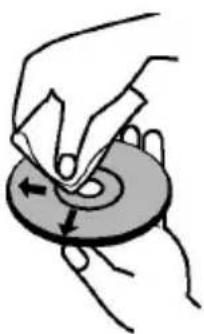

- Do not use solvents such as benzine, thinner, commercially available cleaners or anti-static spray intended for vinyl LPs.
Licence Notification
- This product incorporates copyright protection technology that is protected by U.S. patents and other intellectual property rights. Use of this copyright protection technology must be authorized by Rovi Corporation, and is intended for home and other limited viewing uses only unless otherwise authorized by Rovi Corporation. Reverse engineering and disassembly are prohibited.
How to Watch a DVD
When placing a disc into the loader, labeled side of the disc should be on the front.
When TV set is turned on, first switch to DVD source by using the Source button on the remote control. Press play on the remote control, or directly press play button at the front panel. If there is no disc inside the loader, place a DVD first and press play.
Note: If you switch to another source by pressing Source, Swap or Programme +/- buttons on the remote control, DVD playback will be paused automatically. You should press Play button and resume the playback manually when you switch to DVD mode.
DVD Control Panel Buttons
Play/Pause)
Plays/pauses the disc. When DVD menu (root menu) is active, this button functions as "button select" (selects the highlighted item in menu) if this is not prohibited by the disc.
/Stop/Eject)
Stop playing disc / Eject or Load the disc.
Note:
- You cannot eject the disc via the remote control.
- While playing a file, you should press STOP button three times to eject.
General Playback
Basic Play
- Press on the power button
- Please insert a disc into the loader.
The disc will be automatically loaded and play will commences if the disc does not have any menus recorded on it.
A menu may appear on the TV screen after a few moments or the film may start immediately. This behaviour depends on the disc content and may change.
Note: Step 3 and 4 is available only when a menu is recorded on the disc.
- Press Down / Up / Left / Right or the numeric button (s) to select the preferred title.
- Press OK.
To confirm the selected items. The played item may be a motion picture, a still picture or another submenu depending on the disc.
For your reference:
If an action corresponding to a button is prohibited the " symbol appears.
Notes on Playback:
- No sound will be heard during Rapid advance or Rapid reverse.
- No sound will be heard during Slow motion play.
- Reverse slow motion play may not be available depending on theDVD content.
- In some cases, the subtitle language is not changed immediately to the selected one.
- When the preferred language is not selected even after pressing the button several times, it means that the language is not available on the disc.
- When the player is restarted or the disc is changed, the subtitle selection is automatically changed back to the initial settings.
- If a language is selected, not supported by the disc, the subtitle language will automatically be set to the disc's priority language.
- Usually a circulation will happen while switching to another language, that is you can cancel the subtitle by pressing this button a number of times until "Subtitles Off" appears on the screen.
- When the power is turned on or the disc is removed, the language heard is the one selected at the initial settings. If this language is not recorded on the disc, only the available language on the disc will be heard.
- Some DVDs may not contain root and/or title menus.
- Reverse stepping is not available.
- For your convenience:
If you attempt to enter a number greater than the total time of the current title, the time search box disappears and "Input Invalid" message appears on up-left corner of screen.
- Slide Show is disabled when the ZOOM mode is on.
DVD Troubleshooting
Poor picture quality (DVD)
- Make sure the DVD disc surface is not damaged. (Scratch, fingerprint etc.)
- Clean the DVD disc and try again.
See instructions described in "Notes on Disks" to clean your disc properly.
- Ensure that the DVD disc is in the tray with the label facing upward.
- A damp DVD disc or condensation may effect the equipment. Wait for 1 to 2 hours in Stand-by to dry the equipment.
Disc does not play
- No disc in the machine. Place a disc into the loader.
Disc incorrectly loaded.
Ensure that the DVD disc is in the tray with the label facing upward.
- Wrong type of disc. The machine cannot play CD-ROMS etc. The region code of the DVD must match the player.
Wrong OSD language
- Select the language in the set-up menu.
- The language for the sound or subtitles on a DVD cannot be changed.
- Multilingual sound and/or subtitles not recorded on the DVD.
- Try to change the sound or subtitles using DVD's title menu. Some DVD's do not allow the user to change these settings without using the disc's menu
These functions are not available on the DVD.
No picture
- Make sure you have pressed the correct buttons on the remote control. Try once more.
No sound
- Check if volume is set to an audible level.
- Make sure the sound isn't turned off by mistake.
Distorted sound
- Check that the appropriate listening mode setting is correct.
If nothing works
If you have tried the above solutions and none seem to work, try switching your TV-DVD off and on again. If this does not work, contact your supplier or TV-DVD repair technician. Never attempt to repair a defective TV-DVD yourself.
Disc Types Compatible with This Unit
| Disc Types (Logos) | Recording Types | Disc Size | Max. Playing Time | Characteristics |
| DVD VIDEO | Audio + Video | 12 cm | Single-sided; 240 min. Double-sided; 480 min. | DVD contains excellent sound and video due to Dolby Digital and MPEG-2 System. Various screen and audio functions can be easily selected through the on screen menu. |
| AUDIO-CD COMPACT DISC DIGITAL AUDIO | Audio 12 cm | 74 min. | An LP is recorded as an analog signal with more distortion. CD is recorded as a Digital Signal with better audio quality, less distortion and less deterioration of audio quality over time. | |
| MP3-CD MP3 READABLE | Audio (xxxx.mp3) | 12 cm | It depends on MP3 quality. | MP3 is recorded as a Digital Signal with better audio quality, less distortion and less deterioration of audio quality over time. |
| PICTURE-CD J P E G READABLE | Video (still picture) | 12 cm | It depends on JPEG quality. | JPEG is recorded as a Digital Signal with better picture quality over time. |
For proper operation, only 12 cm discs must be used.
Specifications
| Types of Discs Supported | DVD: SS/SL 4.7" (DVD-5) | CD-DA |
| SS/DL 4.7" (DVD-9) | CD-R | |
| DS/SL 4.7" (DVD-10) | CD-RW | |
| DS/DL 4.7" (DVD-18) | MP-3/JPEG | |
| Video Type | MPEG-2 Video Standard Decoding (MPEG-1 supported) | |
| Full-Screen Video Display of 720 x 576 (PAL) & 720 x 480 (NTSC) pixels | ||
| 50 and 60 Hz frame refresh rates (PAL & NTSC) | ||
| Digital bit-stream processing rate up to 108Mbits/sec | ||
| Line resolution more than 500 lines | ||
| Audio Type | MPEG Multichannel Decoding | |
| LPCM | ||
| Audio Output | Analog Outputs: | |
| 24 bit /48, 44.1kHz down-sampling DAC | ||
General DVD Operation (depending on model)
You can operate DVD, movie CD, music or picture CD's content by using the proper buttons on your remote control. Below are main functions of commonly used remote control buttons.
| Buttons | DVD Playback | Movie Playback | Picture Playback | Music Playback |
| ▶ | Play Play Play Play | |||
| || | Pause Pause | Pause Pause | ||
| □ | Stop Stop Stop Stop | |||
| ▲/▲ | Skip backward/ forward | Skip backward/ forward | Rotate Skip backward/forward | |
| ▼/▲ | Highlights a menu item / Shifts the zoomed picture up or down (if available). | |||
| ▲/▲ | Rapid advance / Rapid reverse | |||
| C Clears digit (if available) | ||||
| MEDIA BROWSER | Views the scene from different angles (if available) | Changes slide effect (depends on the content) | X | |
| DISPLAY | Displays time / Views main setup menu | |||
| INFO | Time counter mode selection (during playback). Press repeatedly to switch between modes. | |||
| LANGUAGE | Auto language | X | X | |
| MENU Displays TV menu. | ||||
| OK | Enter / View / Play | |||
| GREEN BUTTON | Displays repeat options. | |||
| RETURN/BACK | Returns back to the previous menu (if available). | |||
| YELLOW BUTTON | Goes back to the root folder (if available). | |||
| SEARCH (*) | Direct selection of scenes or time. | Selects the desired file. | Selects the desired file. | |
| SUBTITLES | Subtitle on-off. Press repeatedly to switch between subtitle options. | X | X | |
| BLUE BUTTON | Displays disc menu (if available). | Displays disc menu (if available). | X | X |
| RED BUTTON Zooms picture. Press repeatedly to switch between zoom options. | ||||
| Other Functions – Button Combinations (During playback) | |
| II+II | Slow forward |
| (II+II) +IIII | Sets slow forward speed |
| IIII+IIII | Sets rapid advance speed |
| IIII+IIII | Sets rapid reverse speed |
| II+II | Confirms stop command |
(*) You can switch to title by pressing numeric keys directly. You need to press 0 and then digit key to switch one digit titles (example: to select 5, press 0 and 5).
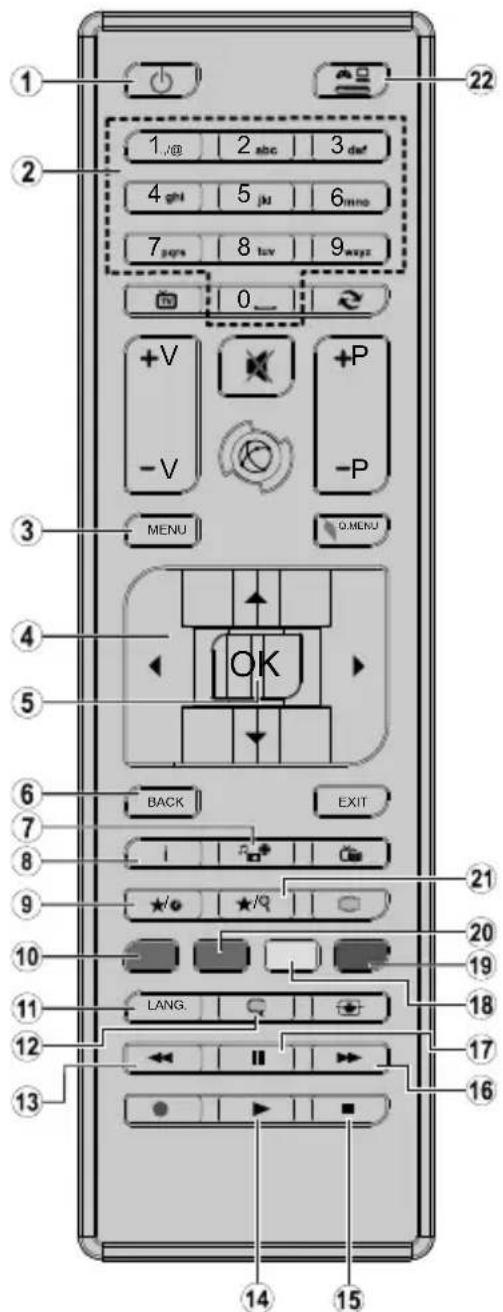
- Standby
- Numeric buttons
- TV Menu
- Navigation buttons
- OK/Select
- Back
- Angel
- Info
- Display / DVD Menu
- Zoom
- Language selection
- Subtitle
- Rapid reverse
- Play
- Stop
- Rapid advance
- Pause
- Root
- Title
- Repeat
- Search mode
- Source
Note: Buttons not indicated with a number are not functional in DVD mode.
Table des matieres
Notification de licence. 74
Details techniques 76
PRODUIT LASER DE CLASSE 1
RISQUE DE CHOC ÉLECTRIQUE
CEC and CEC RC Passthrough 88
90
CEC and CEC RC Passthrough
| A | Product Fiche | ||
| B | Commercial Brand:TELEFUNKEN | ||
| C | Product No. | 10120062 | |
| D | Model No. | D32H472R4D | |
| E | Energy efficiency class | A+ | |
| F | Visible screen size (diagonal,approx.) (inch/cm) | 32 inches 81 cm | |
| G | On mode average power consumption (Watt) | 31,0 | |
| H | Annual energy consumption (kWh/ahnum) (*) | 45 | |
| I | Standby power consumption (Watt) | 0,50 | |
| J | Off mode power consumption (Watt) | N/A | |
| K | Display resolution (px) | 1366x768 | |
| A | B | C | D | E | F | ||
| English Product | Fiche Commercial Brand | Product No. Model No. | Energy efficiency class | Visible screen | size | (diagonal, aprox.) (inch/cm) | |
| Deutsch | Produkt-Datenblatt Markenzehen Produkt-Nr. Model-Nr. | Nen Produkt-Nr. | Ner. Energieeffizienzklasse | Sichbare Bilanzschirmgroße | Schirmgroße | diag onalca) (Zoll /cm) | |
| Булгарский | Бларочen Лост сTekнескite дддд | Тьровская мarksa | П Brockт № | Мodel № | Клас на eнергийсяфektivноct | Видим разимр на ekрANA Дамоганл по indи./ finда /см | |
| Čeština | Produktovу list | Zнackа vyrobce | Cislo produktu | Model c. | Energetická frida | Viditelna velikost obrazovky Uhlco fickao fibl.lvo alcu /cm | |
| Dansk | Produktoplysningskema | Varemaerkle | Produktnr. | Model nr. | Energieffektivitetsklasse | Snying skærmsternelse (diagonl,ca.) | |
| Suomi | Tuote fiche | Kaufallenin merkki | Tuole nro. | Malli nro. | Virran tehokkusluokka | NKyvan kuvarudun koko diaoonaalinne / tuumaa/cm | |
| Frankaïs | Fiche du produit | Marque commerciale | Produit N° | Modèle N° | Classe d'efficacité énergétique | Taille d'écran visible (diagonale,approx.) | |
| pouces/cm | |||||||
| Hrvatski | SAZETAK PROIZVDOTA | Trgovаčka marka | Br. proizvoda | Br. modela | Klasa energetske užinkovitosti | Vidljva velicina ekrana diaoona lona,criblžo/ | |
| Nederlands | Productfiche | Commercieel merk. | Productnr. | Modelnr. | Energie efficiencie klasse | Zichtbare schemgrotte diaoona lona,γ (inches/cm) | |
| Espanol | Ficha del Producto | Marca Comercial | N° de Producto | N° de Modelo | Clasificacion Energética | famaño de pantalla visible diaoona lona rox,lp uladas/cm | |
| Svenska | Produktspecifikation | Varumärke | Produktnr. | Modelnrl. | Energiklass | Synig skästmorcek (diag onalung efärlig) (tum/cm) | |
| Italienano | Scheda prodotto | Marchio commerciale | Numero prodotto | Numero modello | Classe di efficienza energetica | Dimensione visibili dello schemo diag onalecircia)(p olici/cm) | |
| Polski | KARTA PRODUKTU | Marka produktu | Nr produktu | Nr modelu | Klasa efektwinošci energetycznej | Widoczný obraz ekrani przek na okolo (cali/cm) | |
| Magyar | Termékismertő adatlap | Kereskedelmi marka | Termékszám | Modellszám | Energiahátekonysági osztály | Lathato keptartomány (diagonalis,kb.) | |
| inches/cm | |||||||
| Norsk | Produktinformasjon | Kommersiell merkevare | Produkt nr. | Model nr. | Energiefektivitet klasse | Synig skjermstørrelse (diagonai,ca.) tommer/cm | |
| Portugues | Ficha do produits | Marca Comercial | Produto N° | Modelo N° | Classificacao efficiência energetica | Tamanho ecra visível (diagonai,approx.) peleg adas/cm | |
| Româna | Fişà produs | Marca comercialä | Nr. Produs | Nr. Model | Clase de eficientă energetica | Dimensione ecranului vizibil diag onalä p rox.) (inch/cm) | |
| Pусккій | Спразочький писток Текнескix ддддддддддддддддддддддддддддддддддддддддддддддддддддддддддддддддддддддддддддддддддддддддддддддддддддд徳 | Iproobray MAPKA | Homep nozzelma | Homep nozzelma | Klacc zhepronotpebneia | Bdimbim pazarmé ekrana (no dianarohani, Okono) (daimmoB/cm) | |
| Беларczak | Спразочький писток Текнескix ддддддддддддддддддддддддддддддддддддддддддддддддддддддддддддддддддддддддддддддддд徳 | Iproobray MAPKA | Homep nozzelma | Homep nomelma | Klacc zhepronotpebneia | Bdimbim pazarmé ekrana (no dianarohani, Okono) (daimmoB/cm) | |
| Makdeонскny | Тechинник podatoцni | Коршунлары Марka | Iproozbod bp. | Model bp. | Klaca ha ehepretska epikhacost | Оемпima на видим вскран dianarohani, okono) (inchn/ cm) | |
| ураимьскNY | Тechинник ддд | Коршунлары Марka | Aprykuyl | Modellb. | Klasc eheprostokobvanha | Вdimbimpo zopmsk ekrana (diagonai, bilya) | |
| Srpski | Tehnicker odlike | Komerçialina marka | Proizvod br. | Model br. | Klasa energetske etikasnostvi | Velicina vidjiyog ekrana (dijagonala, tokom) (inca/cm) | |
| Slovenscina | Produktovy list | Znacka vyrobu | Cislo produktu | Model c. | Energeticka trieda | Videtela velkost obrazovky uhlo riecka zhruba) (dalcov/cm) | |
| Slovenscina | Opis izdelka | Komerçialina znamka | St. Izdelka | St. Modela | Razred energetske učinkovitosti | Videtela volkost zastona (diagonai, prilb.) (dalcev/cm) | |
| Ельник | Дулlio пистоц | Ельорбо олч. | Ap. Iproiovtroc | Ap. MoviTEAU | Katryyopia evepeyekoiç satorbooyoiç | Odofo lybeboz obvovci (diayuvovci, trup) (livoc/m) | |
| Bosanski | Tehnicki podaci | Komerçialina marka | Produkt br. | Model br. | Klasa energetske etikasnostvi | Vidjiva velicina ekrana (diagonala, prilbizno). (inca/cm) | |
| Льзь | Спразочький писток Текнескix dдддддддддддддддддддддддддддддддддддддддддддддддддддддддддддддддддддддддддддддддддддддддддддддддддддkill | Iproobray MAPKA | Urin No. | Model No. | Enerji verimiligi smfi | Gorulien ekran boyutu (capraz, yaksik.) (incc/m) | |
| Shqip | Te chénat e produktit | Marka treglare | Nr. i produktit. | Nr. i modelit. | Klasa e eficiencés se energjisne | Madhesia e ekranit te dukhshem diag onal afersish) (inc/cm) | |
| Lietuvlú | Gamnio otaketé | Gamintojas | Gamnio Nr. | Modello Nr. | Energetinio efektyvumo klasé | Matomas ekran dydis (jstrzainé, approx) (col) /cm | |
| Latviešu | Produktapraktsts | Marka | Produktur. | Modela nr. | Energoefektivitates klase | Ekranja Izmer (pa diognali, apmcram) collas/cm) | |
| Eesti | TOOTEKIRJELDUS | Rootja firma | Toote nr. | Mudell nr. | Energiaklass | Vaadatava ekraani suurus (diagonaal, umbes) (tolll/cm) |
| G | H | I | J | K | |
| English On mode | e average power consumption (Watt) | Annual energy consumption (kWh/annum) | Standby power consumption (Watt) | Off mode power consumption (Watt) | Display resolution (px) |
| Deutsch | Durchschnittlicher Stromverbrauch im elmeschalten zum Wandel (Watt) | Jährlicher Energieverbrauch (kWh/Jahr) | Standby-Stromverbrauch (Watt) | Verbrauch im ausgeschiedetam Zustand (Watt) | Display-Auflösung (px) |
| Bilanrapsk | Crepdja konchymaunha an Elektroheptner yba bckncheho Cstochmna (Watt) | Onduuna konchymaunha an Elektroheptner (kWh/Toauncha) | (Boch) | (Boch) | (Boch) |
| ceftina | Prümernä spotfeba elektrické energia v za nutem rezimwau (Watt) | Rochni spotfeba energia (kWh/Rochni) | Spotfeba elektrické energia v bohovostinim rezimu (Watt) | Spotfeba elektrické energia ve vvnutem rezimu (Watt) | Roziliseni dispieje (px) |
| Dansk | Gennensniftig stromforbrug i taendt tilstand(Watt) | Anlgit energforbrug (kWh/Arligt) | Stromforbrug (standby)(Watt) | Stromforbrug i sklukket tilstand (Watt) | Skarmoplésing (px) |
| Suomi | Paillā-tilan keskimaäräinen virankulutus (Wattla) | Vusittainen sahkönkulu (kWh/Vusittalner) | Vakovirran kulutus (Wattla) Poi-silan virankulutus (Wattla) | Virankulutus (Wattla) Nāytōn erotteluky (Watt) | (pikselia) |
| Français | Consommation énergétique moyenne en mode "March" (Watt) | Consummation énergétique annuelle (kWh/annuel) | Consummation d'énergie en veille (Watt) | Consummation d'énergie en mode arrêt" (Watt) | Résolution de l'écran (px) |
| Hrvatski | Prosječna potrošnja el. enerjke kada je proizvod uklujen (Watt) | Godinja potrošnja el. Energije (kWh/Godinj) | Potrošnja el. energije u modu prigravnosti (Watt) | Potrošnja el. energija kada je proizvod skjücnj (Watt) | Rezolucija zaslona (piksela) |
| Nederlands | Aan-modus gemiddeld stroomverbruk (Watt) | Jaarlilks energerforbrug (kWh/Jaarij, ks) | Stand-by stroomverbruk (Watt) Ult-modus | Stand-by stroomverbruk (Watt) Ult-modus | Schemresolutie (px) |
| Espanol | Consumo electrico medio, en functionamento (Vatio) | Consumo electrico anual (kWh/Unua) | Consumo en medio en espera (Vatio) | Consumo electrico medio apagado (Vatio) | Resoluccion de pantalla (px) |
| Svenska | Stromkonsumption i PA-lage (Watt) Energonsumption per ar (kWh/Arig) | Stromkonsumption per ar (kWh/Arig) | Stromkonsumption i village (Watt) Stromkonsumption i AV-lage (Watt) | Stromkonsumption i AV-lage (Watt) Skarmuppo | osning (pixlar) |
| Italiano | Consumo di corrente medio da accesa (Watt) | Consumo annuale di energia (kWh/Wannup) | Consumo di corrente in modalità standby (Watt) | Consumo di corrente da spenta (Watt) | Soluzione del display (px) |
| Polski | Srednja uzuzycle energija w trybie wzyzony m (Watto) | Kocznze uzuzycle energija (kWh/Rocznj) | Srednja uzuzycle energija w trybie oczekliwnia (Watto) | Zuzycle energija w trybie wylczonym (Watto) | Rozdzieloczosc obrazu (pikseli) |
| Magyar | Energiafogasyzlas békapcsolva hagyott üzemmodbana (Watt) | Eves energiafogasyzlas (kWh/Eves) | Energiafogasyzlas standby Üzemmodbana (Watt) | Energiafogasyzlas kikapcsolt Üzemmodbana (Watt) | Képernyofelbontas (px) |
| Norsk | Pamodus glennonsnittig stromforbruk (Watt) | Arlig stromforbruk (kWh/Arlig) Hvlemodus stromforbruk (Watt) Av-modus stromforbruk (Watt) | Stromforbruk (Watt) Av-modus stromforbruk (Watt) | Stromforbruk (Watt) Skermopplösning (piksel) | Resoluccion de pantalla (px) |
| Portugues | Consumo energia em modo medio (Watt) | Consumo annual energy (kWh/Unua) | Consumo energia em stand-by (Watt) | Consumo energia em modo alimenta gao (Watt) | Resoluccion do visor (pixel) |
| Română | Consume electric mediu In modul pornot (Watt) | Consum unal de energia (kWh/Unua) | Consume electric In stare de repaus (Watt) | Consume electric In modul oprit (Watt) | Razolutzia ecranului (pixelli) |
| Puckskii | Crepdian paskoedenergii a pekimepeabotu(Bt) | Egeodni paskoedenergii kBrTuTcOd | Paskoedenergii b pekimepeokdianu (Bt) | Paskoedenergii b bocknochenom pekime (Bt) | Pazepшенихсян (piksceleni) |
| Bénparycká | Crepdian paskoedenergii a pekimebo kBrNochubnab (Watt) | Egeodni paskoedenergii kBrTuTcAno | Paskoedenergii b pekimepeokdianu (Bt) | Paskoedenergii b pekimepeokdianu (Bt) | Pazepшенихсян (piksceleni) |
| Makdeoncksi | Pocneca nortoptybavka kora e binkhen | Odochina nortoptybavka na Hengriäa/kWh/Toa Unua | Tortoptybavka BO mmpybahe (Batu) | Tortoptybavka kora e hcknyuen (Batn) | Pezolynija na ekpan (piksceleni) |
| Ukpaibnckii | Cerenda cnoptybavka nortoyhctb y noobokmny kEmi Bt) | Cerenda boryhctb cnoptybavka noobokmny kEmi KChnK/PnHa | Cnoptybavka nortoyhctb y pekime noobokmny (Bt) | Cnoptybavka nortoyhctb y binkhenomy tani (Bt) | Pozdnilba na dathntb ekpana (piksceleni) |
| Srpski | Prosecnia potrošnja kada je ukjuceni (Vati) | Godinja potrošnja energija (kWh/Godinj) | Potrošnja tokom mirovanja (Vati) | Potrošnja kada je iključeni (Vati) | Rezolucija dispieja (pixi.) |
| Slovenlina | Priemema spotebre elektrickej energija v zapnutom rezime (Watt) | Rocna spotebre energija (kWh/Rocna) | Spotreba elektrickej energija v potohovostnom rezime(Watt) | Spotreba elektrickej energija vo vypnutom rezime (Watt) | Rozliselenie dispieja (pixi.) |
| Slovenlincs | Poraba elektricke energija v poprncne načinu (Watt) | Letna poraba energija (kWh/Letna) | Poraba energija v stanju prigrav nestoj (Watt) | Poraba energija načinu izkropa (Watt) | Resoluncia zaslona (pixi.) |
| Emluynik | Meon katayvalon pejutrotko katofysic (Watt) | Etna katayvalon evépykac (kWh/Emi) | Katovskawon pejutotac otny avouovji (Watt) | Katovskawon pejutotac otny avouovji (Watt) | Avóluon odovn (Pilea) |
| Bosanski | Prosječna potrošnja kada je ukjucen (Watt) | Godinja potrošnja energija (kWh/Godinj) | Potrošnja tokom mirovanja (Watt) | Potrošnja kada je iključeni (Watt) | Rezolucija ekraṇa (pixi.) |
| Trknc | (Ax) Trknc zozumnaya tuzhni zhurn nozni (Watt) | (Y) Trknc zozumnaya zhurn nozni (Watt) | (Z) Trknc zozumnaya zhurn nozni (Watt) | (Z) Trknc zozumnaya zhurn nozni (Watt) | (H) Trknc zozumnaya zhurn nozni (Piksc.) |
| Shqlp | Konsumi mesatar i energjisë s i nduszur (Watt) | Konsumi vgetar i energjisë (kWh/v etot) | Konsumi i energjisë s i ngatishmen (Watt) | Konsumi i energjisë s i fikur (Watt) Rezolucioni i ekrant (pixi.) | Ekrano skriamoji gaba (piksceleni) |
| Lietuviu | Vidutinës energjos sanaudos jungus (Vatai) | Metinës energjos sanaudos (kWh/Metines) | Energios sanaudos budëjmo rezimu (Vatai) | Energios sanaudos tsjungus (Vatai) | Ekrano skriamoji gaba (piksceleni) |
| Latvešu | Enerjias patērniš akviča režim (Vati) | Gada energjus patērniš patērniš girdsāns režim (Vati) | Enerjias patērniš girdsāns režim (Vati) | Enerjias patērniš izlgläst slavokl (Vati) | Displeja rezolucija (piksceleni) |
| Eesti | Keskmine energiakuli tõbezimid (Vati) | Aaslane energiakuli (kWh/aaslane) | Eneriakuli oolerezimi (Vati) | Eneriakuli oolerezimi (Vati) | Ekerani resolutsoon (pikslit) |
() English Energy consumption kWh per year, based on the power consumption of the television operating 4 hours per day for 365 days. The actual energy consumption will depend on how the television is used.
(+) Deutsch Energieverbrauch kWh/Jahr, auf der Grundlage eines tages vierstündigen Betriebs des Fermsehgerätes an 365 Tagen. Der tatsächliche Energieverbrauch hängt von der Art der Nutzung des Fermsehgerätes ab.
()
() 5bnrapckn KcymmaHHe Heprrk Wth roMmho, m3mcneHa Ha 6a3ata Ha 4pa0THH Yac aDheHo npr 365 dHa. DeTbTeHNO KcympaHata eeprrn Iue 3abOHT HA HnOtnpe6Ha TeneBnOpa
() Čestina Spoftebela elektrikke energie kWh za rok vychazejci ze spofteby elektrikke energie televiznlo pijimace, kier y je v provozu 4 hodiny denne po dobu 365 dni. Skutecnia spofteba elektricke energie zavisi na zpuosobu pruzilteyevino hpiamae.
() Dansk Enerigforbrug: kWh om aret, beregnet som fjemsynets effektforbrug, hvis det er tendt 4 timer om dagen i 365 dage. Det faktiske energiforbrog vil bero pa, hvordan fjemsynet bruges.
() Suomi Energiankulutu kWh: a vuodessa, kun oletetaan, eta televisiata kaytetaan 4 tuntia paivass 365 paiv an. Todellinen energiankulutu riippuu television kayttotavasta
Gans Commation d'energe de kwh par an, sur la base de la consommation electrique d'un televiseur fonctionnant quatre heures par jour pendant trois cent soixante-cinq jours. La consommation reelle depend des conditions d'utilisation du téléviseur.
() Hrvatski Urošak enerijie iznosi kWh godisnej na temeliu utroska enerijie televizora koi radi celiri sata dnevno 365 cna u godini. Svami utrosk enerijie ovisit ce o tome kako se upotreblava televizor.
() Nederlands Energieverbruik kWh per staat, gebeerd op het elektricitieisverbruik van de televisie wanneer die gestuere 365 dagen 4 uer per dag aanslaat. Het feeilijke energieverbruik is afhankelijk van de manier waarop de televisie worden tebruik.
() Espanol Consumo de energia: kWh al ano, suponiendo quatre horas de functiOnamento diario durante 365 djas. El consumo efectivo dependera de las condidiones reales de uso de la television.
() Svenska Energiforbuknng 0Wh per ar, beraknaud utfuran effektforbrukngen for en tv-moltagare som anvands fya limmar per dygn under 365 dygn. Den faktiska energiforbukningen kommer all bero pa hur tv-moltagaron anvands.
(€) Italiano Consumo di energia kWh/anno calcolo sulla base del consumo di un teilevisore in funzione per 4 ore al giorno per 365 giorni. Il consumo effettivo di energia dipende dall'utilizzo reale del teilevisore.
() Polski Zuycle energii kwVrok na podstawie zuycia energi przyez telewizor dzialajcy 4 godziny Dziennie przyez 365 dni. Rzeczwyiste zuycle energii zalezy od spoosobu uzytkowania telewizora.
() Magyar A televizóksülek napi 4 orás üzem mellett az ev 365 napjá vetîte evente kWh mennyişeg ü energiţ fogasyzt. A tenyileges energiafogasyzts a késülek Üzemeitétési mucjátol fugg.
() Norsk EnerglborukkWn per ar, stromforbruket er basert pa bruk av TV-en for 4 timer per dag for 365 dager. Det faktiske energiforbruket vll vare avhenglg av hordan TV-en brukes.
() Portugues Consumo de energia de kWh por ano, baseado no Consumo, em termos de potencia, do televisor a funcionar 4 horas por dia durante 365 dias. O consumo de energia real dependerá do modo como o televisor é
Consumul de energie de kWh pe an, pe baza puteri consumate de aparatul TV atunc i and est in functjne 4 ore pe zi timp de 365 de zile; consumul real de enerigde depinde de conditilte de utilizare a aparatul
(1) Pycckn Hne pnoeNKeHbTc h 40 nPbHbTa cH paeTc TpOeBnHnHnHepn Hnepn 4 cAa b Hnpoaeknn 365 dH. KaTHHeckoo npTe6nHne 3EeKtPOoHepn 6ydt AabocbToTO, kA HnOhts3eyrTepehOp.
(1)6enapcKa 3HopraacKauBHe Hcyr yro npbocDpiaa 3paanik cykaBAAHn 3eepi rI 18eBapam np npaa 4raaHy y dAeHa Ha npaay 365dE. AaKTHae cnaKuaBHe anktpaeeepri 5yde 3aAekBa ad taro,
Bbikapbctoybaeaatanebiap.
*MAeOKHcK 1000000000000000000000000000000000000000000000000
() ykpaicbki 3nAeHHHcHPOCIOXHaHH BToD HA pik BaCyIbCR Ha NtOyXHOCTI, CIOXHBAHOIT TeneBIOOPOM, OIO npaIOc npOTAROM 4 rOHH H daHB bnpOoBk 365 dH. AOKTHHe cIOXHAAHH EIOKIPoeepri 3aIIeKHTbld cnco0By BVKnOpCTAHN TeneBIOPA.
() Srpski Potrajsna struje od kWh na goildsnem nivou zasnovana je na potrosnji televizora koj ie ukljucen 4 sata dinmo 365 dana godisne. Stvarna potrosnja struje zavilice o načina korišcenja televizora
() Slovenica Spotreba energie kWh za rok na zaklade spotreby elektrickej energie televizora, ktor y je v dinnost 4 hodiny donne poceas 365 din. Skutozné spotreba energie zavisi od toho, ako sa televizor pouziva.
() Slovenscina Poraba energije je kWh na leto, glede na napajalno energije televizorjka, ki deluje 4 ure dan v vseh 365 dreh. Dejanska poraba energije je odvisna od nacina uporabe televizorjca.
(1) EAanyika Kaovauwovevayekwivavvctoc,kaonnykavauwovoyooacnnoivnnaokpaonviTepaowenKienoupyiaovnaJepaet365npec. H npayatni Kaovauwauvepyei cepatotai an tov pmo xphjntnsuokyue.
() Bosanski Energetska potrosnja je XYZ kWh na godilnjem nivou, na osnovu potrosnje TV-a koj radi 4h dnevmo, 365 dana. Stvarna energetska potrosnja zavisi od toga kolko e TV koristi.
(1) nay
365 gun boyuncu gunde 4 saat cal san televizyonun tuketigi guc referans alinarak ylda kWh eneri tuketimi. Guncel eneri tuketimi televizyonn nasil kullanildigina bagl olacaktir.
(Shqip Konsumi i enerjise kWh ne vit, bazuar ne konsumin e enerjise se televorit kur punon per 4 orne n de tite per 365 dite. Konsumi aktual i enerjise varet nga menyra e perdorimit televizorit.
() Lietuviu kWh enerjgos sunaudojmas per metus nurodomas atsižvelgus t al. kiek enerjgos sunaudojama televizoril veiklant 4 valandas per diena 365 dinas i ellas. Faktini enerjgos sunaudojima lems tai, kiek lalko bus naudojamas televizorius.
() Latviesu Enerjias pataris kWh gada, nemot vare televizora elektroenerjias patarinju, darbojoties 365 dienas, cetras stundas diena. Faktiskais enerjias pataris bux atkaris no ta, ka televizors tikz imantots.
Eestl Energialarbimine kWh aaslas, eoldusat televisior tooblan neli lundi pavaes ja 365 pava aaslas. Tegelik energialarbimine oleneb televisor kasulusviist
()
| A | VESA WALL MOUNT MEASUREMENTS | ||
| B | Hole Pattern Sizes (mm) | W | H |
| 200 | 100 | ||
| C Screw Sizes | |||
| D | Length (X) | min. (mm) | 5 |
| max. (mm) 8 | |||
| E | Thread (Y) | M4 | |
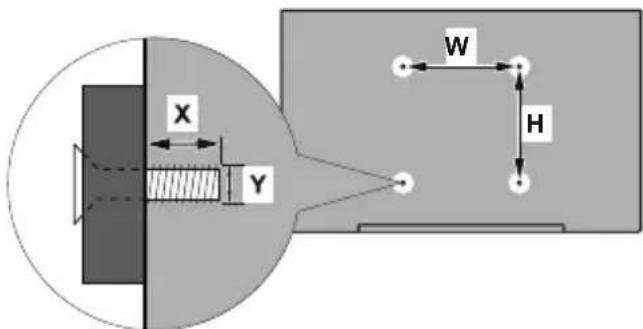
| ABCDE | ||||||
| English | VESA WALL MOUNT MEASUREMENTS | Hole Pattern Sizes (mm) Screw Sizes Length (X) Thread (Y) | ||||
| Deutsch | MASSANGABEN FÜR VESA-WANDMONTAGE | Lochmustergroßen (mm) | Schraubengrößen | Länge (X) | Gewinde (Y) | |
| Français | DIMENSIONS DU SUPPORT DE FIXATION MURALE VESA | Dimensions des modèles de trous de montage (mm) | Dimensions des vis | Longueur (X) | Filetage (Y) | |
| Italieno | Misurazioni installazione a parete VESA | Dimensioni schema foro (mm) | Dimensioni vite | Lunghezza (X) | Flettatura (Y) | |
| Portugués | MEDICÔES DE MONTAGEM MURAL VESA | Dimensões do molde de furação (mm) | Tamanhos do parafuso | Comprimento (X) | Rosca (Y) | |
| Espanol | MEDIDAS DEL MONTAJE DE PARED VESA | Tamaños de patrón para agujero (mm) | Tamaños de tornillo | Longitud (X) | Rosca (Y) | |
| Türkce | VESA DUVARA MONTAJ APARATI ÖLÇULERİ | Aplacak Delik Ölçüleri (mm) | Vida Ölçüleri | Uzunluk (X) | Yüsey (Y) | |
| Éλλυνικ | ΔΙΑΣΤΑΕΙZ ΒΑΒΗ Ι TOXΟ YESA | Meyéfn Κγματος Οιουν (mm) | Meyéfn Μβόνω | Míjkoc (X) | Фίερωμα (Y) | |
| Polski | WYMIARY DO MONTAZU NÁSCIENNEG O VESA | Rozmiary szablonu otworów (mm) | Rozmiary wkrętow | Dlugosć (X) | Gwint (Y) | |
| ceştina | ROZΜÈRY DRŽÁKU NA ZÊD VESA | Rozměry velikosti dér (mm) | Rozměry šroubú | Délá (X) | Závit (Y) | |
| Magyar | VESA FALI TARTÓ MÉRETEK | Lyukak méréténynek nagyságá (mm) | Csavar mérét | Hossz (X) | Menet (Y) | |
| Română | MÁSURÂTORI SUPORT PERETE VESA | Dimensuni tipar gaură (mm) | Dimensiuni Šüruburi | Lungime (X) | Filet (Y) | |
| Svenska | VESA VAGGMONTERINGSMÄTT | Hálmönsterstorlear (mm) | Skrvystorlekar | Längd (X) | Trnad (Y) | |
| Nederlands | VESA WANDMONTAGE METINGEN | Grootte booropening (mm) | Schroefgroote | Lengte (X) | Draad (Y) | |
| Suomi | VESA SEINÄASENNUKEN MITAT | Reikäkuvion koot (mm) | Ruuvinkoot | Pituus (x) | Kierre (Y) | |
| Norsk | VESA VEGGMONTERINGSMål | Hullmønster størrelser (mm) | Skruestørrelser | Lengde (x) | Trnad (Y) | |
| Dansk | VESA VEGGMONTERINGS-Mål | Hulmønster-størrelser (mm) | Skruestørrelser | Længde(X) | Trnad (Y) | |
| Русский | РAZMEРы HACTENHOTO KPEΠLEHIMRA VESA | Размерь с篇文章ы отberстý | Рazmperь ВИNTOB | Длесна(X) | Рezьба (Y) | |
| Беларczayak | ПАМЕРы HACUCEHANTA MAцавангЯ VESA | Памерь с篇文章ы adтули | Памерь віntоу | Даджьн� (X) | Разьба (Y) | |
| mačedoncksi | МЕРК 3A MOHTIPAHBE HA SIVД 3A „BECA" | Шема на rolемини на дулковata (MM) | Галемпа на чрафот | Длочьина (X) | Навоj (Y) | |
| украимькa | POЗМРИ HACTIHINTO KРПЛECHNHA VESA | Відстань між кріпльников� OTBOPAM, MM | Розмі рівіпі | Довожина (X) | Дiamетр різбін (Y) | |
| Srpski | DIMENZJIVE VESA ZIDNOG NOSAČA | Dimenzije šablona za bušernej | Dimenzije zavrtnejva | Dužina (X) | Navoj (Y) | |
| Slovenčina | ROZMERY DRŽIAKA NA STENU VESA | Rozmery velkosti dier (mm) | Rozmery skrutiek | Délá (X) | Závit (Y) | |
| Slovensčina | MERE STENSKEGA NOSILCA VESA | Veliksi vizora lukenj (mm) | Veliksi vizjakov | Dolžina (X) | Navoj (Y) | |
| Hrvatski | VESA MJERE ZIDNOG DRŽAÇA | Veličine uzorka otvora (mm) | Veličine vijka | Dužina (X) | Navoji (Y) | |
| Bosanski | DIMENZJIVE VESA ZIDNOG NOSAÇA | Dimenzije šablona za bušernej | Dimenzije vijaka | Dužina (X) | Navoj (Y) | |
| Бъларски | РAZMEРы 3A KOMПЛЕKT 3A MOHTAJK HA CTEA VESA | Размерь на OTBOPA (mm) | Размерь на бома | Дылжинат (X) | Рezьба (Y) | |
| Lietuviç | VESA TVIRTINIMO PRIÉ SIENOS MATAVIMAL | Angos šablono dydis (mm) | Varžtu dydis | Ilgis (X) | Sriegis (Y) | |
| Latvišeu | VESA SIENAS STIPRINÄJUMA IZMÈRi | Caurumu šablona izmīres (mm) | Skruvju izmīre | Garums (X) | Vitne (Y) | |
| Eesti | VESA SEINALE KINNITAMISE MÖÖDUD | Kruvi suuruse mõöt (mm) | Kruvi suurus | Körgust(x) | Keere (Y) | |
| Shqip | PERMASATENJESIDESEMONIMIT NE MUR VESA | Madhésitê modele tê vrimave (mm) | Madhésitê e vidhave | Gajtesia (X) | Filetimi (Y) | |
| şobii | dušileuţie dušileuție dušileuţie | dušileuţie dušileuție dušileuţie | dušileuţie dušileuție dušileuţie | (X) dušileuţie dušileuţie dušileuţie | (Y) dušileuţie dušileuţie dušileuţie | |
| nauy | VESA xinian yin yin yin yin yin yin yin yin yin yin yin yin yin yin yin yin yin yin yin yin yin yin yin yin yin yin yin yin yin yin yin yin yin yin yin yin yin yin yin yin yin yin yin yin yin yin yin yin yin yin y iny | (n"n" n"n" n"n" n"n" n"n" n"n" n"n" n"n" n"n" n"n" n"n" n"n" n"n" n"n" n"n" n"n" n"n" n"n" n"n" n"n" n"n" n"n" n"n" n"n" n"n" n"n" | ||||
TR: Isbu belgede; VESTEL Elektronik Sanayi ve Ticaret A.Ş., telsiz ekipmani tipi TFT IDTV 'nin 2014/53/AB sayil direktife uygun olduğunu bylan eder. AB uygünlik bayanın tam metni internet adresinde mevcuttur: doc.vosshub.com
EN: Hereby, VESTEL Elektronik Sanayi ve Ticaret A.Ş., declares that the radio equipment type TFT IDTV is in compliance with Directive 2014/53/EU. The full text of the EU declaration of conformity is available at the following internet address: doc.vosshub.com
BG:C HactoToVESTEL Elektronik Sanayi ve Ticaret A.S. DeKnappa, Ye To3n TnP paNocbOpBXeHne TFT IDTV e B CbotBcTCTBne C DnpeKtNa 2014/53/EC. LJIIOCTHnT TeKT Ha EC DeKnapaCnIyTa 3a CbotBcTCTBne MOKe da Ce HamepHa CneDnHn INTEpHET aIpec: doc.vosshub.com
CZ: Timto VESTEL Elektronik Sanayi ve Ticaret A.Ş., prohlăşuje,Že typ rádoviho zařizení TFT IDTV je v souladu se směrnici 2014/53/EU. Üplné zněné EU prohlášeni o shodě je k dispozici na teto internetové adrese: doc.vosshub.com
DA: Hermed erklærer VESTEL Elektronik Sanayi ve Ticaret A.S., at radioudstyrdtypen TFT IDTV er i overensstemmelse med direktiv 2014/53/EU. EU-overensstemmelseserklaeringens fulde tekst kan findes på følgende internetadresse: doc.vosshub.com
DE: Hiermit erklart VESTEL Elektronik Sanayi ve Ticaret A.Ş., dass der Funkanlagentyp TFT IDTV der Richtlinie 2014/53/EU entspricht. Der vollständige Text der EU-Konformitätserklärung ist unter der folgenden Internetadresse verfügbar: doc.vosshub.com
EL: Me tvapouo a/o VESTEL Elektronik Sanayi ve Ticaret A.S., 8nawei oti o paioeotiaoTFT IDTV npoi tv odnyia 2014/53/EE. To nane c kei evo ts gn dwnosc oumuoppwongc EE diatietai otnv akolouon iooteia oTo diaiktuoc.doc.vosshub.com
ES: Por la presente, VESTEL Elektronik Sanayi ve Ticaret A.S., declar que el tipo de equipo radioeléctrico TFT IDTV es conforme con la Directiva 2014/53/UE. El textoplete do la declaración UE de conformidad está disponible en la direction Internet信箱: doc.vosshub.com
ET: Käesolevaga deklareerib VESTEL Elektronik Sanayi ve Ticaret A.S., et käesolev raadoseadme tuup TFT IDTV vastab direktivi 2014/53/EL nouetele. ELi vastavusdeklaratsiooni täielik tekst on kattesaadav jargmisel internetiaaddressil: doc.vosshub.com
FI: VESTEL Elektronik Sanayi ve Ticaret A.S., vakuuttaa, etta radiolaitetyppi TFT IDTV on direktivin 2014/53/EU mukainen. EU-vaatimustemmukaisuusvakuutuksen tāysimittainen teksti on staativla seuraavassa internetosoitteessa: doc.vosshub.com
FR: Le soussigné, VESTEL Elektronik Sanayi ve Ticaret A.Ş., déclare que l'équipement radioélectrique du type TFT IDTV est conforme à la directive 2014/53/UE. Le texte complet de la déclaration UE de conformité est disponible à l'adresse internet suivante: doc.vosshub.com
HR: VESTEL Elektronik Sanayi ve Ticaret A.S., ovime izjavljube da je radijska oprema tipa TFT IDTV u skladu s Direktivom 2014/53/EU. Cjeloviti tekst EU izjave o sukladnosti dostupan je na sljedećoj internetskoj adresi: doc.vosshub.com
HU: VESTEL Elektronik Sanayi ve Ticaret A.S., igazolja, hogy a TFT IDTV tipusu radioberendezes megfelel a 2014/53/EU iranyelvnek. Az EU-megfeleloségí nyilatkozat teljes szövege elerheto a kovetkezo internetes cimen: doc.vosshub.com
IT: Il fabbricante, VESTEL Elektronik Sanayi ve Ticaret A.S., dichiara che il tipo di apparecchiatura radio TFT IDTV è conforme alla direttiva 2014/53/UE. Il testo Completo della dichiarazione di conformità UE è disponibile al segunte indirizzo Internet: doc.vosshub.com
LT: A§, VESTEL Elektronik Sanayi ve Ticaret A.§, patvirtinu, kad radijo jrenginiu tipas TFT IDTV atitinka Direktyva 2014/53/ES. Visas ES atitikties deklaracijos tekstas prieinamas šiuo interneto adresu: doc.vosshub.com
LV: Ar šo VESTELElektronik Sanayi ve TicaretA.§., deklare, ka radioiekárta TFT IDTV atbilst Direktivai 2014/53/ES. Pilns ES atbilstibas deklarácijas teksts ir pieejams šādā interneta vietne: doc.vosshub.com
MT: B'dan, VESTEL Elektronik Sanayi ve Ticaret A.Ş., niddikjara li dan it-tip ta' taghmir tar-radju TFT IDTV huwa konformi mad-Direttiva 2014/53/UE. It-test kollu tad-dikjarazzjoni ta' konformita tal-UE huwa disponibbli f'dan I-indirizz tal-Internet li gej: doc.vosshub.com
NL: Hierbij verklaar ik, VESTEL Elektronik Sanayi ve Ticaret A.S., dat het type radioapparatuur TFT IDTV conform is met Richtlijn 2014/53/EU. De volledige tekst van de EU-conformiteitsverklaring kan worden geraadpleegd op het volgende internetadres: doc.vosshub.com
PL: VESTEL Elektronik Sanayi ve Ticaret A.S., niniejszym oswiadcza, ze typ urzadzenia radiowego TFT IDTV jest zgodny z dyrektywa 2014/53/UE. Pelny tekst deklaracja zgodnosci UE jest dostepny pod nastepujacym adresem internetwym: doc.vosshub.com
PT: O(a) abaixo assinado(a) VESTEL Elektronik Sanayi ve Ticaret A.S., declara que o presente tipo de equipoamento de radio TFT IDTV está em conformidade com a Diretiva 2014/53/UE. O texto integral da declaração de conformidade está disponible no segunte endereço de Internet: doc.vosshub.com
RO: Prin preventa, VESTEL Elektronik Sanayi ve Ticaret A.S., declară că tipul de echipamente radio TFT IDTV este în conformitate cu Direcita 2014/53/UE. Textul integral al declarației UE de conformitate este disponibil la urmâtoarea adresă internet: doc.vosshub.com
SK: VESTEL Elektronik Sanayi ve Ticaret A.Ş., tymto vyhlasuje,Že radióve zariadenie typu TFT IDTV je v súlade so smernicou 2014/53/EU. Uplné EU vyhlasenie o zhode je k dispozicii na tejto internetovej adrese: doc.vosshub.com
SL: VESTEL Elektronik Sanayi ve Ticaret A.Ş., potruje, da je tip radijske opreme TFT IDTV skladen z Direktivo 2014/53/EU. Celotno besedilo izjave EU o skladnosti je na voljo na naslednjem spletnem naslovu: doc.vosshub.com
SV: Harmed forsakrar VESTEL Elektronik Sanayi ve Ticaret A.Ş., attenna typ av radioutrustning TFT IDTV overensstämmer med direktiv 2014/53/EU. Den fullständiga texten till EU-forsakran om overensstammelse finns på foljande webbadress: doc.vosshub.com
Herstellergarantie
D
TELEFUNKEN Licensed by:
TELEFUNKEN Licenses GmbH
Imported by: Vestel Germany GmbH,
D-85748 Garching/Munich