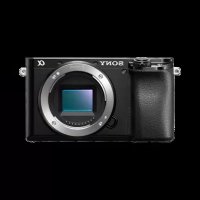
Alpha a1400 - Camera SONY - Free user manual and instructions
Find the device manual for free Alpha a1400 SONY in PDF.

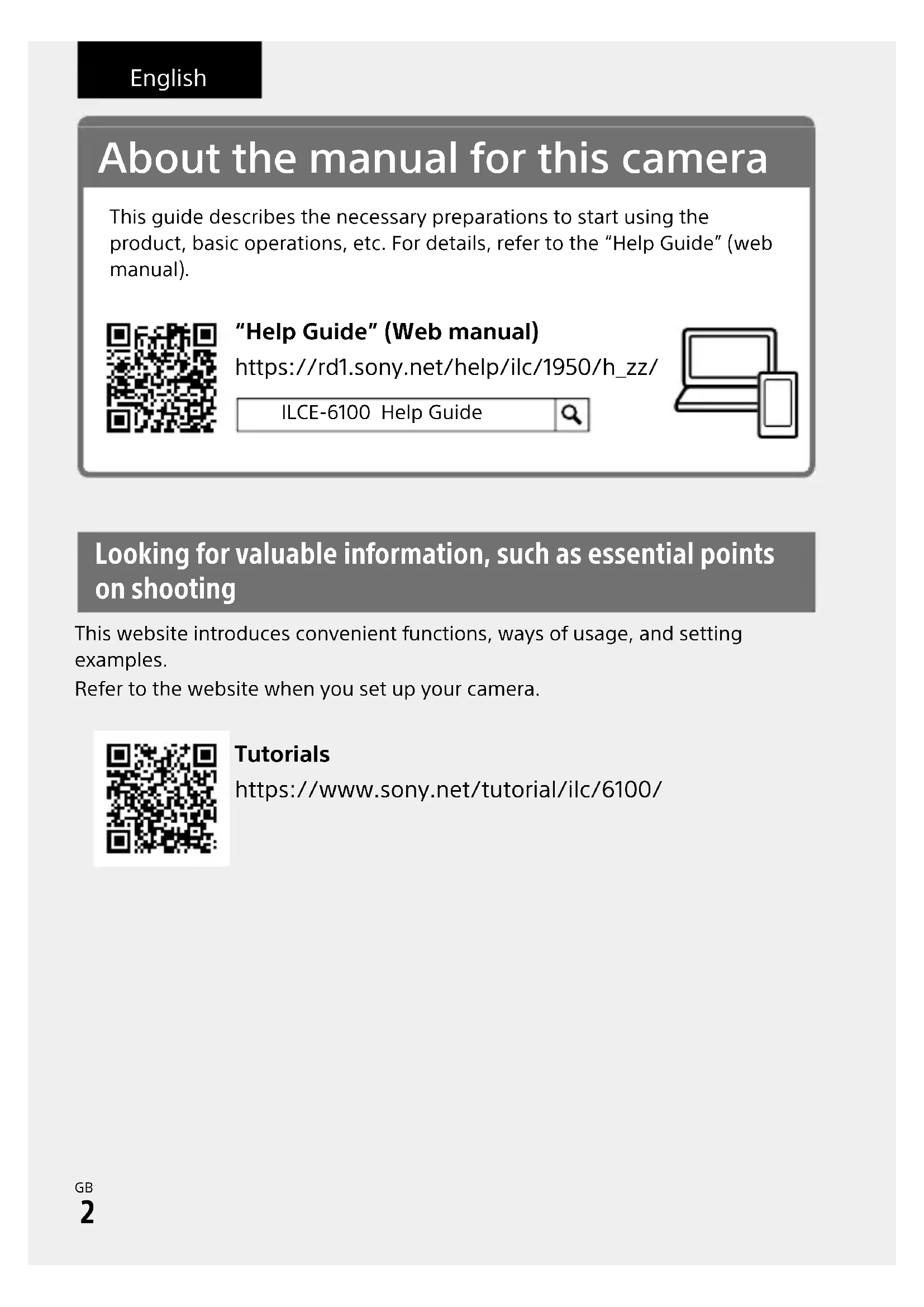


| Product type | Interchangeable lens camera (Sony E-mount) |
| Image sensor | APS-C CMOS (23.5 x 15.6 mm), 24.2 effective megapixels |
| Electronic viewfinder | 1.0 cm (0.39 type), high resolution |
| Screen | TFT touchscreen 7.5 cm (3.0 type), tiltable |
| Dimensions (W x H x D) | 120 x 66.9 x 59.4 mm |
| Weight | 396 g (with battery and SD memory card included) |
| Power supply | Rechargeable battery NP-FW50 (7.2 V), AC adapter AC-UUD12/AC-UUE12 (5 V, 1.5 A) |
| Main features | Shooting (various modes), XAVC S/AVCHD video recording, built-in Wi-Fi, tiltable screen, electronic viewfinder |
| Connectivity | Wi-Fi, micro USB |
| Memory support | SD (SDHC/SDXC) cards and Memory Stick |
| Care and cleaning | Clean the flash with a soft cloth; avoid direct sunlight exposure |
| Safety | Do not look at the sun through the lens; keep the camera out of reach of children |
| Spare parts | Available from Sony after-sales service |
| Repairability | Repair by Sony authorized centers |
| Operating temperature | 0 to 40 °C (32 to 104 °F) |
| Storage temperature | -20 to 55 °C (-4 to 131 °F) |
| Provided software | Imaging Edge Mobile, PlayMemories Home |
| Available languages | French, English, German, etc. (multilingual manual) |
| Warranty | According to local legislation (standard 1 year) |
| General information | Interchangeable lens camera for beginners and informed amateurs |
Frequently Asked Questions - Alpha a1400 SONY
User questions about Alpha a1400 SONY
0 question about this device. Answer the ones you know or ask your own.
Ask a new question about this device
Download the instructions for your Camera in PDF format for free! Find your manual Alpha a1400 - SONY and take your electronic device back in hand. On this page are published all the documents necessary for the use of your device. Alpha a1400 by SONY.
USER MANUAL Alpha a1400 SONY
https://www.sony.net/ SonyInfo/Support/
SONY.
5-009-876-41(1)
0019
6100
E-mount
"Help Guide" (Web manual)
Refer to "Help Guide" for in-depth instructions on the many functions of the camera.
https://rd1.sony.net/help/iloc/1950/h_zz/
Interchangeable Lens Digital Camera/Startup Guide GB
About the manual for this camera
This guide describes the necessary preparations to start using the product, basic operations, etc. For details, refer to the "Help Guide" (web manual).
"Help Guide" (Web manual)
https://rd1.sony.net/help/ilc/1950/h_zz/
ILCE-6100 Help Guide

Looking for valuable information, such as essential points on shooting
This website introduces convenient functions, ways of usage, and setting examples.
Refer to the website when you set up your camera.
Tutorials
https://www.sony.net/tutorial/ilmc/6100/
Preparations
Checking the supplied items
The number in parentheses indicates the number of pieces.
- Camera (1)
-
Power cord (mains lead) (1)^* (supplied in some countries/ regions)
-
Multiple power cords may be supplied with this equipment. Use the appropriate one that matches your country/region. See page 11.
-
Rechargeable battery pack NP-FW50 (1)
-
Micro USB cable (1)
- AC Adaptor (1) The type of the AC Adaptor may differ depending on the country/region.
Shoulder strap (1)
Eyepiece cup (1)
Body cap (1)* Only for the ILCE-6100 - Startup Guide (this manual) (1)
Reference Guide (1)
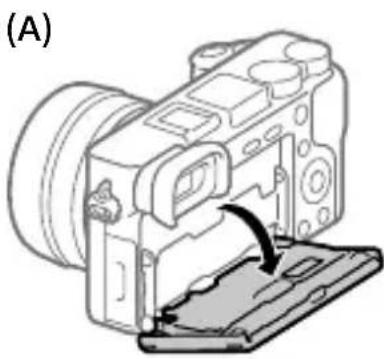
Inserting the battery pack (supplied)/memory card (sold separately) into the camera
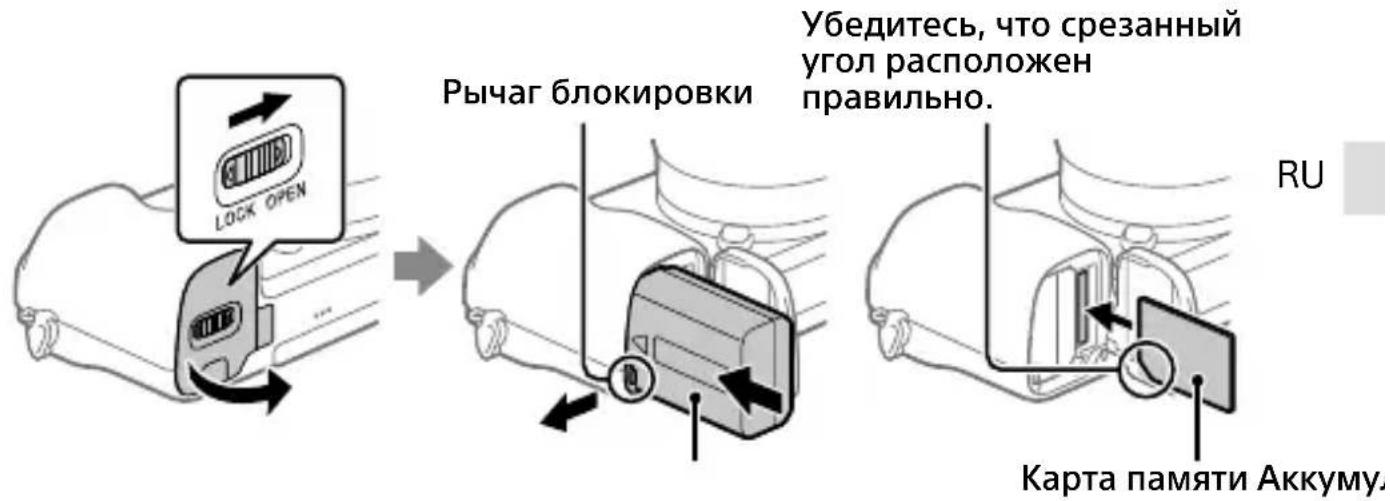
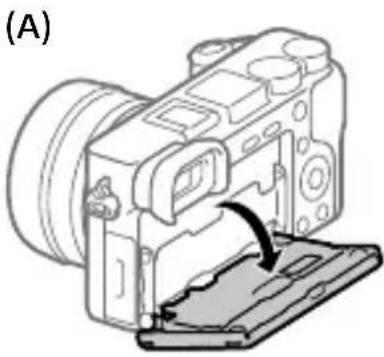
Open the battery/memory card cover, and insert the battery pack and a memory card into the camera. Then, close the cover.
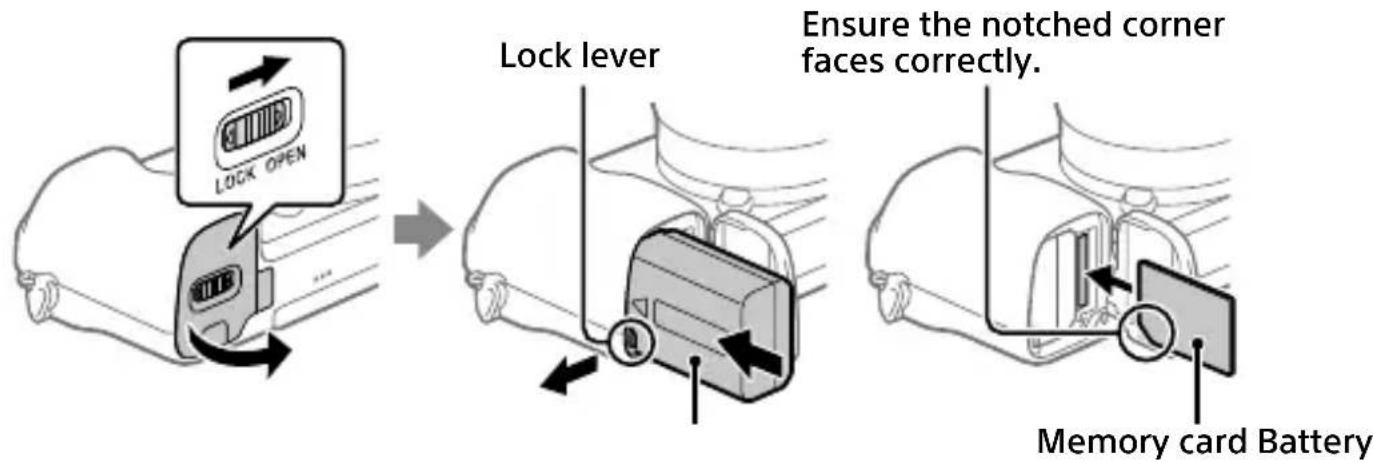
Battery pack
Make sure that the battery pack is facing in the correct direction, and insert it while pressing the battery lock lever.
Memory card
Insert the memory card with the notched corner facing as illustrated.
This camera is compatible with SD memory cards or Memory Stick media. For details on the compatible memory cards, refer to the "Help Guide."
When you use a memory card with this camera for the first time, format the card using the camera in order to stabilize the performance of the memory card.
Note
- Formatting erases all data, including protected images and registered settings (M1 to M4). Once erased, this data cannot be restored. Save valuable data to a computer, etc. before formatting.
Charging the battery pack
1 Turn the power off.
If the camera is turned on, the battery pack will not be charged.
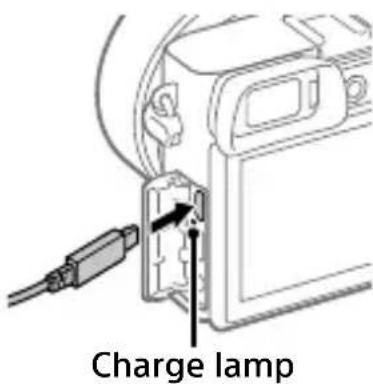
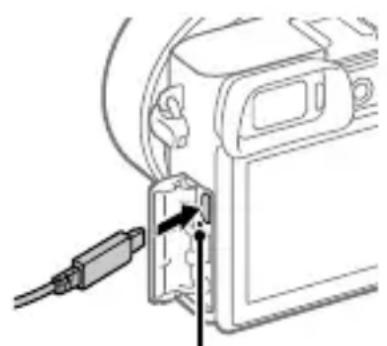
2 Connect the camera with the battery pack inserted to the AC Adaptor (supplied) using the micro USB cable (supplied), and connect the AC Adaptor to the wall outlet (wall socket).
The charge lamp will light up when charging starts. When the charge lamp turns off, charging is completed.
Attaching a lens
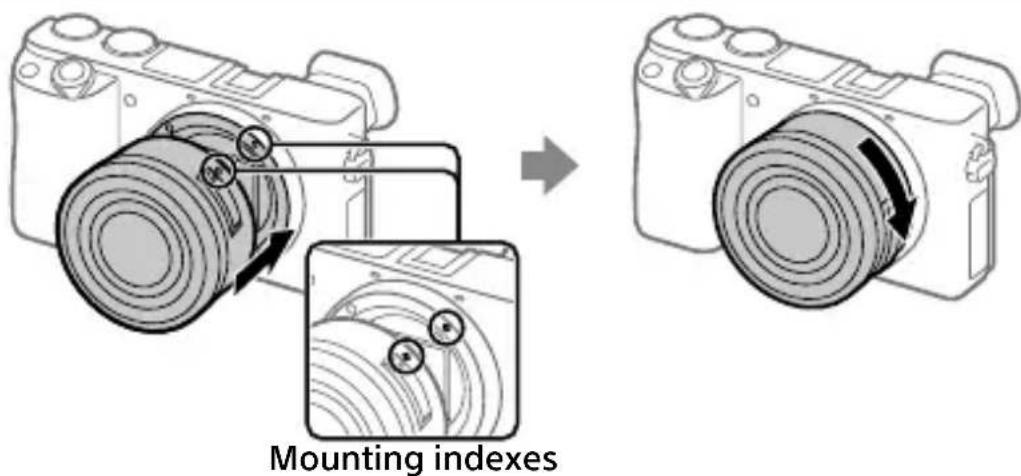
1 Remove the body cap from the camera and the rear lens cap from the rear of the lens.
2 Mount the lens by aligning the two white index marks (mounting indexes) on the lens and camera.
3 While pushing the lens lightly toward the camera, turn the lens slowly in the direction of the arrow until it clicks into the locked position.
Setting the language and the clock
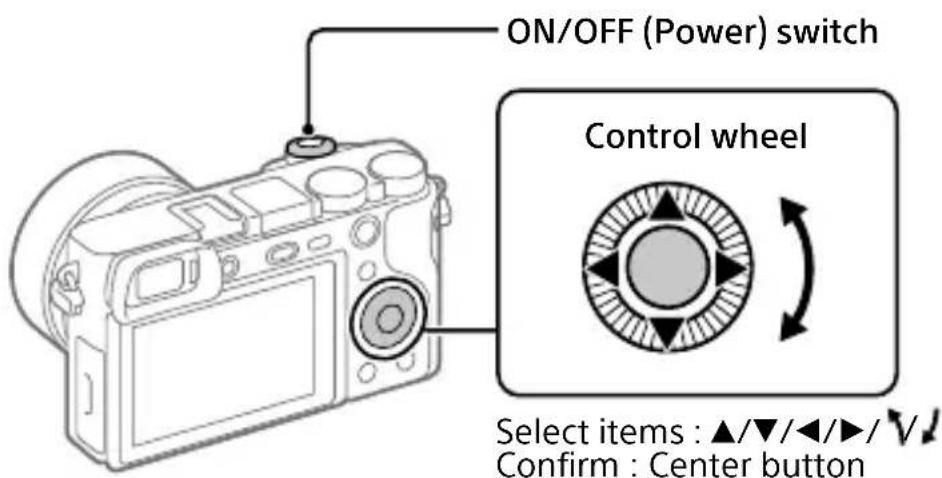
GB
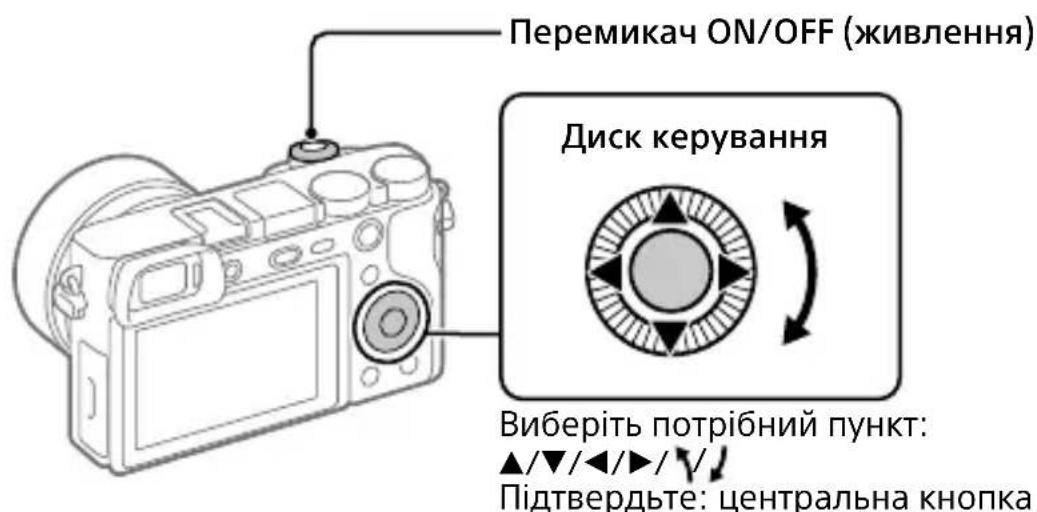
1 Set the ON/OFF (Power) switch to "ON" to turn on the camera.
2 Select the desired language and then press the center of the control wheel.
3 Make sure that [Enter] is selected on the screen and then press the center button.
4 Select the desired geographic location and then press the center button.
5 Set [Daylight Savings], [Date/Time], and [Date Format], and then select [Enter] and press the center button.
If you want to reconfigure the date/time or the area setting at a later point, select MENU (Setup) [Date/Time Setup] or [Area Setting].
Shooting
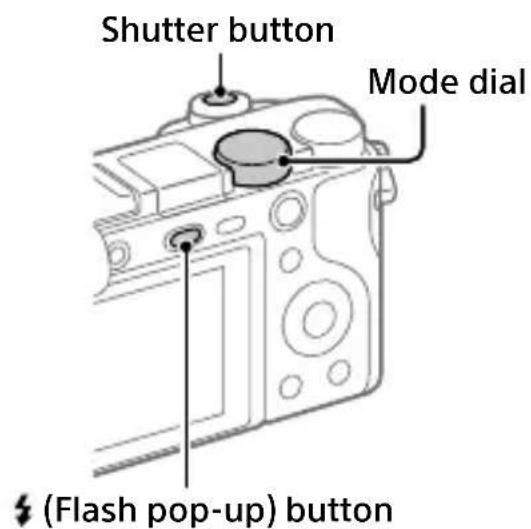
Shooting still images
1 Select the desired shooting mode by turning the mode dial.
2 Press the shutter button halfway down to focus.
3 Press the shutter button all the way down.
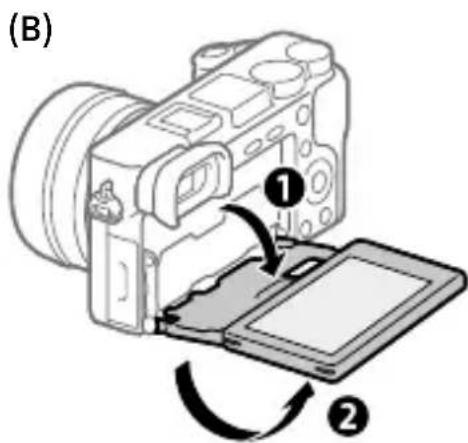
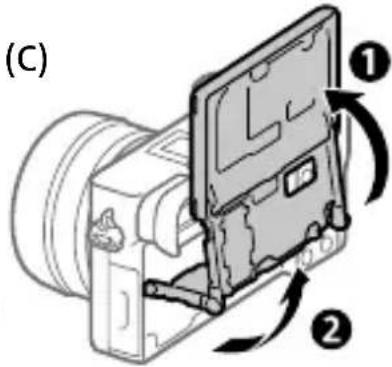
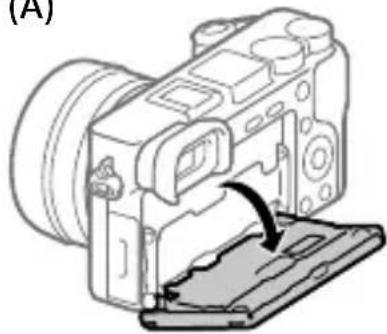
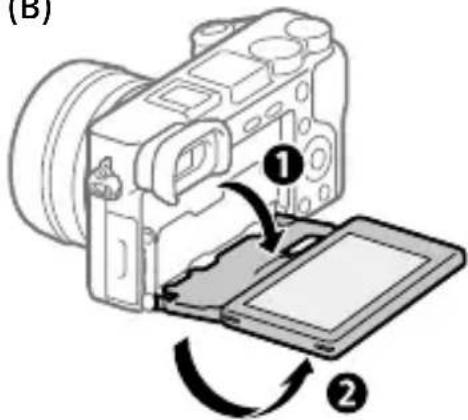
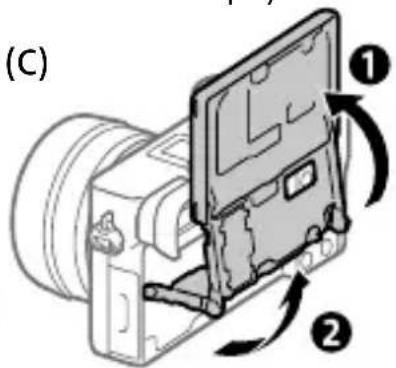
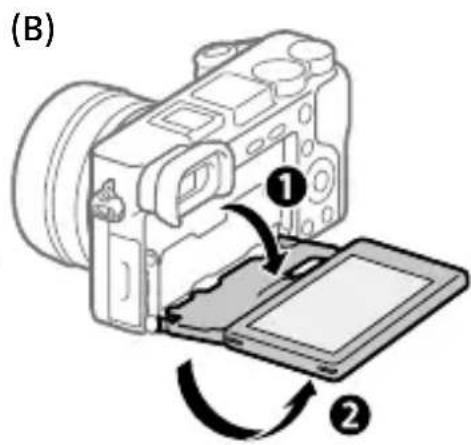
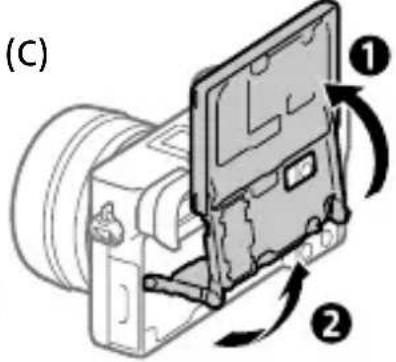
Changing the monitor angle
You can change the monitor angle to shoot from any position you like.
(A) High position (holding the camera high)
(B) Low position (holding the camera low)
(C) Selfie position (facing the monitor toward you to take a selfie)
Using the flash
Press the ±b (Flash pop-up) button to pop up the flash.
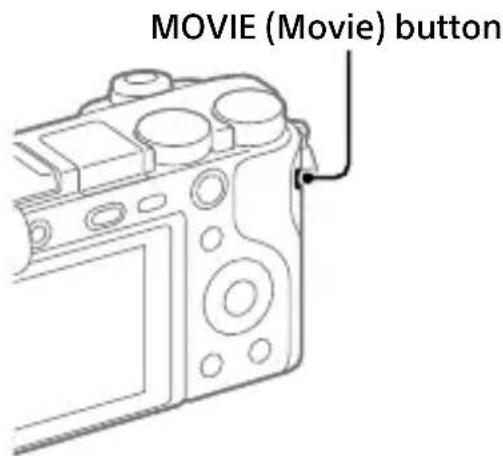
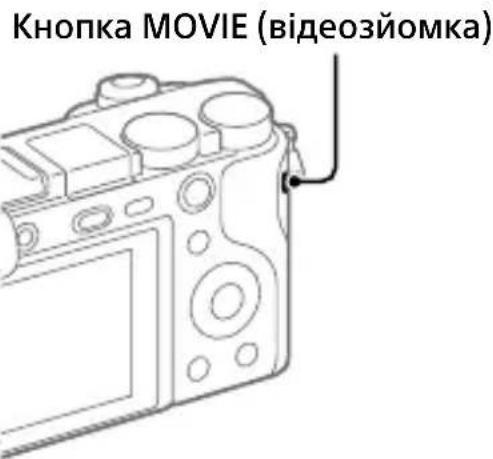
Shooting movies
Press the MOVIE (Movie) button to start recording.
Movie recording can be started from any shooting mode in the default setting.
2 Press the MOVIE button again to stop recording.
GB
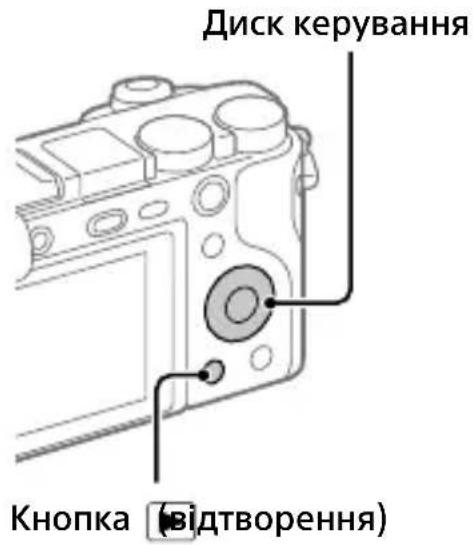
Viewing
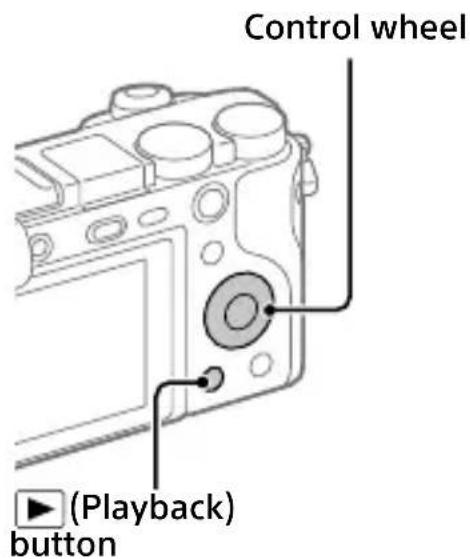
1 Press the (Playback) button to switch to the playback mode.
2 Select an image with the control wheel.
You can move to the previous image/ next image by pressing the left/right side of the control wheel.
To start playing back a movie, press the center button on the control wheel.
Transferring images to a smartphone
You can transfer images to a smartphone by connecting the camera and a smartphone via Wi-Fi.
1 : Install Imaging Edge Mobile on your smartphone.
To connect the camera and your smartphone, Imaging Edge Mobile is required.
Install Imaging Edge Mobile to your smartphone in advance.
If Imaging Edge Mobile is already installed on your smartphone, be sure to update it to the latest version.
https://www.sony.net/iem/
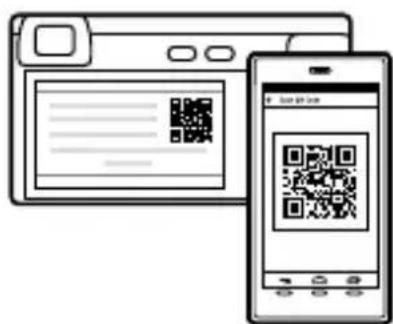
2 Connect the camera and your smartphone using the QR Code.
1: MENU (Network) [Send to Smartphone Func.] [Send to Smartphone] [Select on This Device] images to transfer. If you want to select images on the smartphone, select [Select on Smartphone].
② : Launch Imaging Edge Mobile on your smartphone, and select [Scan QR Code of the Camera].
③ : Scan the QR Code displayed on the camera using your smartphone.
3 The selected images will be transferred.
If you are using Android, you can transfer images after the first time simply by launching Imaging Edge Mobile with Step 2-② above.
If image transfer does not start, select the camera to connect on the screen of your smartphone.
For details on how to connect to a smartphone, refer to the following support sites:
https://www.sony.net/dics/iem02/
- For details on other connection methods or how to use the smartphone as a remote commander to operate the camera, refer to the "Help Guide."
- The Wi-Fi functions introduced in this manual are not guaranteed to operate on all smartphones or tablets.
- The Wi-Fi functions of this camera are not available when connected to a public wireless LAN.
Managing and editing images on a computer
GB
PlayMemories Home
PlayMemories Home allows you to import still images and movies to your computer and view or use them. You need to install PlayMemories Home to import XAVC S movies or AVCHD movies to your computer.
Imaging Edge
Imaging Edge is a software suite that includes functions such as remote shooting from a computer, and adjusting or developing RAW images recorded with the camera.
For details on the computer software, refer to the following URL.
https://www.sony.net/disoft/
Notes on use
Refer to "Precautions" in the "Help Guide" as well.
Notes on handling the product
-
This camera is designed to be dust- and moisture-resistant, but is not waterproof or dust-proof.
-
Remove any dirt from the surface of the flash. Dirt on the surface of the flash may emit smoke or burn due to heat generated by the emission of light. If there is dirt/dust, clean it off with a soft cloth.
-
Do not leave the lens or the viewfinder exposed to a strong light source such as sunlight. Because of the lens's condensing function, doing so may cause smoke, fire, or a malfunction inside the camera body or the lens. If you have to leave the camera exposed to a light source such as sunlight, attach the lens cap to the lens.
- When you shoot with backlighting, keep the sun sufficiently far away from the angle of view. Otherwise, the sunlight may enter the focus inside the camera and cause smoke or fire. Even if the sun is slightly away from the angle of view, it may still cause smoke or fire.
- Do not directly expose the lens to beams such as laser beams. That may damage the image sensor and cause the camera to malfunction.
- Do not look at sunlight or a strong light source through the lens when it is detached. This may result in unrecoverable damage to the eyes or cause a malfunction.
- Do not leave the camera, the supplied accessories, or memory cards within the reach of infants. They may be accidentally swallowed. If this occurs, consult a doctor immediately.
Notes on the monitor and electronic viewfinder
- The monitor and electronic viewfinder are manufactured using extremely high-precision technology, and over 99.99% of the pixels are operational for effective use. However, there may be some small black dots and/or bright dots (white, red, blue or green in color) that constantly appear on the monitor and electronic viewfinder. These are imperfections due to the manufacturing process and do not affect the recorded images in any way.
- When shooting with the viewfinder, you may experience symptoms such as eyestrain, fatigue, motion sickness, or nausea. We recommend that you take a break at regular intervals when you are shooting with the viewfinder.
- If the monitor or electronic viewfinder is damaged, stop using the camera immediately. The damaged parts may harm your hands, face, etc.
Notes on continuous shooting
During continuous shooting, the monitor or viewfinder may flash between the shooting screen and a black screen. If you keep watching the screen in this situation, you may experience uncomfortable symptoms such as feeling of unwellness. If you experience uncomfortable symptoms, stop using the camera, and consult your doctor as necessary.
Notes on recording for long periods of time or recording 4K movies
- The camera body and battery may become warm with use - this is normal.
-
If the same part of your skin touches the camera for a long period of time while using the camera, even if the camera does not feel hot to you, it may cause symptoms of a low-temperature burn such as redness or blistering. Pay special attention in the following situations and use a tripod, etc.
-
When using the camera in a high temperature environment
- When someone with poor circulation or impaired skin sensation uses the camera
- When using the camera with
[Auto Power OFF Temp.] set to [High]
Notes on using a tripod
Use a tripod with a screw less than 5.5mm (7/32 inches) long. Otherwise, you cannot firmly secure the camera, and damage to the camera may occur.
Sony lenses/accessories
Using this unit with products from other manufacturers may affect its performance, leading to accidents or malfunction.
Warning on copyrights
Television programs, films, videotapes, and other materials may be copyrighted. Unauthorized recording of such materials may be contrary to the provisions of the copyright laws.
Notes on location information
If you upload and share an image tagged with a location, you may accidentally reveal the information to a third party. To prevent third parties from obtaining your location information, set [□ Location Info. Link Set.] to [Off] before shooting images.
Notes on discarding or transferring this product to others
Before discarding or transferring this product to others, be sure to perform the following operation to protect private information.
- Select [Setting Reset] [Initialize].
Notes on discarding or transferring a memory card to others
Executing [Format] or [Delete] on the camera or a computer may not completely delete the data on the memory card. Before transferring a memory card to others, we recommend that you delete the data completely using data deletion software. When discarding a memory card, we recommend that you physically destroy it.
Note on network functions
When you use network functions, unintended third parties on the network may access the camera, depending on the usage environment. For example, unauthorized access to the camera may occur in network environments to which another network device is connected or can connect without permission. Sony bears no responsibility for any loss or damage caused by connecting to such network environments.
How to turn off wireless network functions (Wi-Fi, etc.) temporarily
When you board an airplane, etc., you can turn off all wireless network functions temporarily using [Airplane Mode].
Power Cord
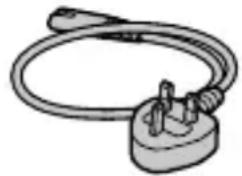
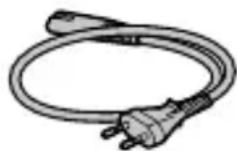
For the customers in the UK, Ireland, Malta, Cyprus and Saudi Arabia Use the power cord (A). For safety reasons, the power cord (B) is not intended for above countries/regions and shall therefore not be used there. For the customers in other EU countries/ regions Use the power cord (B).
(A) (B)
For Customers in the U.S.A.
For question regarding your product or for the Sony Service Center nearest you, call 1-800-222-SONY (7669).
Supplier's Declaration of Conformity
Trade Name : SONY
Model:WW642826
Responsible Party : Sony Electronics Inc. Address : 16535 Via Esprillo, San Diego, CA 92127 U.S.A.
Telephone Number : 858-942-2230
This device complies with part 15 of the FCC rules. Operation is subject to the following two conditions: (1) This device may not cause harmful interference, and (2) this device must accept any interference received, including interference that may cause undesired operation.
Specifications
Camera
[System]
Camera Type: Interchangeable Lens Digital Camera
Lens: Sony E-mount lens
[Image sensor]
Image format: APS-C size (23.5 mm × 15.6 mm), CMOS image sensor
Effective pixel number of camera: Approx. 24 200 000 pixels
Total pixel number of camera: Approx. 25000000 pixels
[Electronic Viewfinder]
Type: 1.0 cm (0.39 type) Electronic Viewfinder
[Monitor]
Wide, 7.5 cm (3.0 type) TFT drive, touch panel
[General]
Rated input: 7.2V = -2.3W
Operating temperature: 0 to 40^ (32 to 104^
Storage temperature: -20 to 55^ (-4 to 131^
Dimensions (W/H/D) (Approx.):
120 × 66.9 × 59.4 mm
120 × 66.9 × 49.9 mm
(from grip to monitor)
4 3/4 × 2 3/4 × 2 3/8 in.
43 / 4× 23 / 4× 2 in.
(from grip to monitor)
Mass (Approx.): 396 g (14.0 oz) (including battery pack, SD memory card)
AC Adaptor
AC-UUD12/AC-UUE12
Rated input: 100 - 240 V, 50/60 Hz, 0.2 A
Rated output: 5V = 1.5A
Rechargeable battery pack NP-FW50
Rated voltage: 7.2 V---
Design and specifications are subject to change without notice.
Trademarks
XAVCS and XAVC gistered trademarks of Sony Corporation.
- AVCHD and AVCHD logotype are trademarks of Panasonic Corporation and Sony Corporation.
- Android and Google Play are trademarks or registered trademarks of Google LLC.
- Wi-Fi, the Wi-Fi logo and Wi-Fi Protected Setup are registered trademarks or trademarks of the Wi-Fi Alliance.
- QR Code is a trademark of Denso Wave Inc.
- In addition, system and product names used in this manual are, in general, trademarks or registered trademarks of their respective developers or manufacturers. However, the ^TM or ^ marks may not be used in all cases in this manual.
Additional information on this product and answers to frequently asked questions can be found at our Customer Support Website.
https://www.sony.net/
GB
https://rd1.sony.net/help/ilc/1950/h_zz/
Batterie rechargeable NP-FW50
https://rd1.sony.net/help/ilc/1950/h_zz/
ILCE-6100 Hilfe
https://rd1.sony.net/help/ilc/1950/h_zz/
ILCE-6100 Guía dealysis

https://rd1.sony.net/help/ilc/1950/h_zz/
ILCE-6100 Guida

https://rd1.sony.net/help/ilc/1950/h_zz/
https://rd1.sony.net/help/ilc/1950/h_zz/
ILCE-6100 Helpgids

https://rd1.sony.net/help/ilc/1950/h_zz/
https://rd1.sony.net/help/ilc/1950/h_zz/
ILCE-6100 CnpaBouHoe pyKOBoDCTBO
Ponck Pone3Hoi HHΦopMauN, HapnMpE, Heo6XoIIMbIX peKOMeHdaaN NO cBeMKe
Ha daHnom Be6-caTe npedctaBHeHbI yO6HbIe uHKcN, cNooc6bl NCNoJIb3OBaHnI n pImepbI HaCTpoEk.
O6paaItecB K daHHomy Be6-caHTy npn HacTpoKe KaMepbl.
Yue6HbIe MaTePnAJIbI
https://www.sony.net/tutorial/ilmc/6100/
I PoiDrToTobKa
Поберka komплектуни
YnCNoB CkO6KaX yKa3bIBaET KOJIuYeCTBO WtYK.
- Kamepa (1)
- CeTeBoi ShHyp (1)* (npnlaeraTcB HeKOTOpbIX CtpaHax/perNoHax)
*B KOMnJIeKT NOCTaBKn DaHHO O6OpyIOBaHnRA MoKeT BXoIITb HeCKOJIbKO CeTeBbIX UHypOB. IcnoJIb3yIte UHyp, COOTBeTCTByUoIuN CTpaHe/ perNoHy npe6bIBaHnA. Cm. ctp.12.
- AkkymyЯTop NP-FW50 (1)
-
Ka6eJb Micro USB (1)
-
Adaantep nepemehnhoro toka (1) Tnp aantera nepemehnoro toka MOKET OTJNUATbC8 B 3aBNCIMOCTN OT CTpaHb/periNoHa.
-Плесевою ремь (1) - Hara3nK okyjra (1)
Kpbioka Kopnyca (1)* ToIbko IJy ILCE-6100
-PykoBoDCTBO no haayy pa60tbi (daHHoe pykoBoDCTBO) (1)
CnpaBoUHnK(1)
BcTaBka aKKymyIaTopa (npnlaeraTc)/KapTbI namrN (npoJaTeC r OTdJIbHo) B KaMepy
OTKpoIe KpbIuKy OTceKa aKKymyIaTopa/KapTbI NaMrtu N BCTaBbTe aKKymyIaTOp IN KapTy NaMrtu B KaMepy. 3aTeM 3akpoIe KpbIuKy.
AkkymyIaTOp
Y6eIITecb B TOM, yTo aKKymyJrTop HnpaBHeH npaBnJIbHO, n BCTaBbTe erO, Haxmam pyuar 6lOKnPOBKn aKKymyJrTopa.
Kapta namrtn
BCTaBbTe KapTu namrTu TaKIM o6pa3OM, uTo6bl 3a3y6peHHbI yroJ 6bl paCNoJIOKeH, KaK NOKa3aHO Ha pncuHke.
KhoNka (POnHraTne BCnblwKn)

I3meHeHne yrna MOHnTopa
BbIMoKTe N3MeHnTb yroJ MOHITopa dJIa CbeMKN B JIO6OM yO6HOM dJIa BacNoJoxKeHH.
(A) BbICOKoe noIoxeHne (ydepxnBaHne KaMepbl Ha BbICOKOM ypOBHe)
(B) Hn3Koe noloxeHne (ydepXnBaHne kamepbHa Hn3KOM ypOBHe)
(C)Положене сeн (MOHITOPOBpaueH KBamДЯсbeMkn ceHn)
(A)
(B)
(C)

IcnoJb30BaHne BCnbIwKn
HaXMMTe KhoNky (IoHraTne BCnblsKn), YTO6bl IoHraTb BCnblsKy.
Bvndeocbemka
HomHaJIbHbI BxOД:7,2B-2,3BT
Pa6o7a TeMnepaTypa:
OTo 0do 40^
Tempepatypxpanen:
OT-20do 55^
Pa3mepbl (U/B/Γ) (npn6n3.):
120 × 66.9 × 59.4 MM
120 × 66.9 × 49.9 MM
(OT PYKOKTKN DO MOHITOPa)
Macca (npn6n3.):
396 r (BkIIOUa aKKyMnyJrTOp,
kapTy namrtn SD)
AanTep nepemehHoro ToKa
AC-UUD12/AC-UE12
HOMHaJIbHbI BXOD:
100 - 240 B\~, 50/60 , 0,2 A
HOMHaJIbHbIy BbIXoD:5B-15A
AkkymyIaTOp
NP-FW50
HomHaJIbHoe HapJxKeHne: 7,2 B---
KoHCTpykUryI TexHnueckne
XapaKTePncTnK MOrTy 6bITb
n3MeHeHbI 6e3 yBcIOMJIeHnJ.
TobapHbIe 3HaKn


XAVCSW
3apeTnCTpnpoBaHHbIMN TOBapHbIMN 3HaKaMn Sony Corporation.
- AVCHD и логотин AVCHD
- ВлияOTСТВарныIMN 3HaKaMn
- Panasonic Corporation
- Sony Corporation.
- Android v Google Play yBJIaOTcT OBaPbIMn 3HaKaMn nn 3apeRNCtpuPoBAHHbIMn TOBaPbIMn 3HaKaMn Google LLC.
Wi-Fi, norotun Wi-Fi Wi-Fi Protected Setup yBnIOTc 3apernctpnpoBaHHbIMn TOBapHbIMn 3HaKaMn nIITOBaPbIMn 3HaKaMn Wi-Fi Alliance.
- QR Code Альяетс Товарныз haKOM Denso Wave Inc.
Kpome toro,Ha3BaHnna cnCTeM nI3dJIIn,NCIOJIb3yEmbIe B daHHOM pyKOBoIDCTBe,ABJIOTcR, 06bIuHO,TOBapHBIMN 3HaKaAMN IIN 3apeRnCTpnpOBaHHbIMN TOBapHBIMN 3HaKaAMN IX COOTBEcTByIOUx pa3pa6OToHKOB INI pOn3BOJNTeJeN. Odnako 3NaKN TM INI MOrYr NCIOJIb3OBaTbcRA He BO BCEX CJIyuaRx B daHHOM pyKOBoIDCTBe.
https://rd1.sony.net/help/ilc/1950/h_zz/
ILCE-6100 DoBikka

INdNKaTop 3apJxKaHHN
BctaHOBJIeHHa 06'ekTnBa
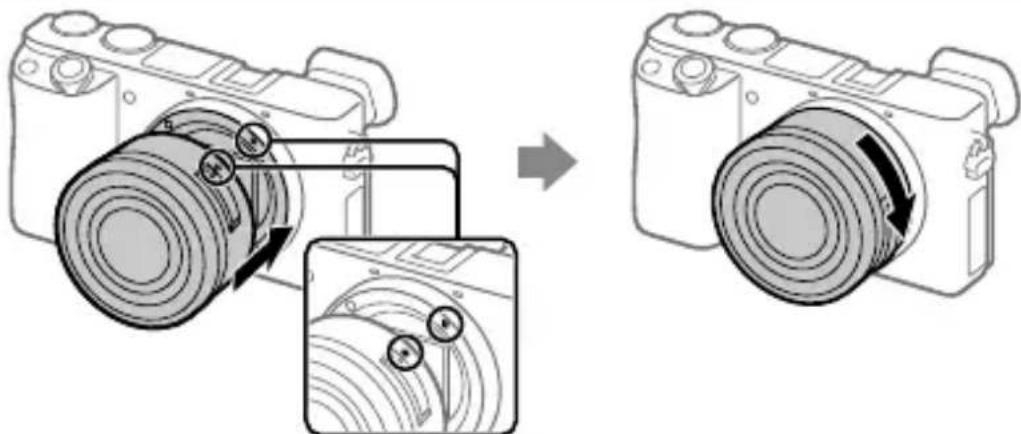
No3HaayKn BCTaHOBJeHH
1 3himitb kprshkykopnyc y 3 fotoanapata i 3aHIO Kpnkky 6'KTKBa, 70 3HaXoIITbcra i3 3aHbOi CTOpOH N 6'KTKBa.
2 BCTaHObitb 06'KTKB, BnpiBnBn DBi 6iJI nO3HaCKN (no3HaCKN BCTaHOBJeHH) Ha 06'KTKBi Ta foToanapati.
3 3nerka npntnckaoun 6'ekTnb do foToanapata, nobephitb 6'kTNB y Hanpymky cTpiKn,doKn BIn He Klaune y 3aikcobaHomy noIooKeHHi.
HanaHTyBaHHa MOBn Ta rOuHHnKa
UA
1 106 yBIMKHyTN fOToanapaT, BCTaHOBITb nepemnkaU ON/OFF (XNBLeHn) y noloxeHn «ON».
2 Bn6epitb notpi6Hy MOBy i HaTncHItb nocepeHHi ducka kepyBaHHa.
3 Npebipte, uB6paHo Ha ekpani nyHKT [BxiI], iHaTnchItb ueHtpaIbHy KhoNky.
4 Bn6epitb noTpbi6He reorpaΦiue He po3TaUyBaHnHa HATnCHITb ΚeHTpaJIbHy KHOIky.
5 BctaHOBiB [JIiTHiN yac], [JaTa/Yac] Ta [ΦopMaT dAtn], a ToDi Bn6epiB [Bxid] i HATNCiTB ueHTpaIbHy KHOKNy.
Якwo n3nwe Bn 3axoyeTe 3miHHTn DaTy/uaC a6o HanaTsyBaHHa perioHy, Bn6epitb MENU (HaJauTByBaH.) [HaJauT. daTu/acy] a6o [Yacobn noc].
3йомka
ΦOT03HOMKa
1 Повертаюн диспераимкинся рекимь, виберітьnotрибни реким зйомки.
2 Hatachitb KhoNky cnycky do noIobHH, 06 BnKoHaTHn fokycBaHHa.
3 NOBHICTHOHaTNCiTb KHonKy cnycky.
Khonka cnycky
ДиСК
nepemkaHHpeKmib
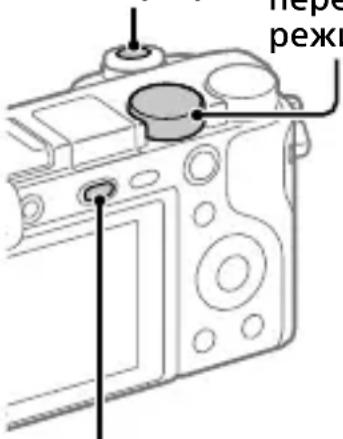
Khonka (niHnTcnaJaxy)
3miHa KyTa HaxnIy MoHITopa
Kyt haxiny MOHITopa MoXHa 3MiHHTn, 0o Do3BOJAE 3DiIChIOBaTN 3NOMKy i3 6yNb-yaKO rO NOLOKeHHa.
(A) Bucoke noIoxeHHa (foToanapaTtpMaetbca Bucoko)
(B) Hn3bke noIoxeHHa (oToaapaT TpMaetbca Hn3bKO)
(C)Положеня сeлphi (иоб зробпссelphi, розерні мониторdoce6e)
BukopncTaHnCnaJaxy
HaTnCHiB KONKy (niHЯTTcnaJaxy), 0o6 niHЯTn cnaJax.
Bideo3mka
1 106 po3noatn 3aHnc, HATNCiTb KhoNkY MOVIE (Bideo3HOMka).
3iOMky BiJeO MoXHa po3NoaTn 36yIb-IAKOpeKIMy 3IOMKN 3 HaJaSTyBaHHaMn 3a 3aMOBcYBaHHaM.
2 206 3ynnHnTn 3aInc, HATNCiTb KhoNkY MOVIE ue pa3.
Пергелян
1 Hatachitb KhoNky
(BiD TBOpEHn), 06 npeuTn B peKIM BiD TBOpEHn.
2 3a donomoroTo DNCKa KepyBaHHa Bn6epitb 306paXeHHa.
Ioo6 nepexoHTn do nonepedhboTo/ HactynHOrO 306paXeHHa,HaTnCKaTe IIBn/npabN KpaJ DnCKa KepyBaHHa.
Ioo6 po3noatn BiTbOpenhra BiJeO, HATNCiTB KHOKNy NocpeuHi DnCKa KepyBaHHra.
https://rd1.sony.net/help/ilc/1950/h_zz/
ILCE-6100 Hjalpguide
https://rd1.sony.net/help/ilc/1950/h_zz/
ILCE-6100 Kayttoopas
https://rd1.sony.net/help/ilc/1950/h_zz/
ILCE-6100 Hjelpeveiledning

https://rd1.sony.net/help/ilc/1950/h_zz/
- SONY.
- 0019
- 6100
- E-mount
- "Help Guide" (Web manual)
- About the manual for this camera
- Looking for valuable information, such as essential points on shooting
- Preparations
- Checking the supplied items
- Inserting the battery pack (supplied)/memory card (sold separately) into the camera
- Battery pack
- Memory card
- Note
- Charging the battery pack
- Turn the power off.
- Connect the camera with the battery pack inserted to the AC Adaptor (supplied) using the micro USB cable (supplied), and connect the AC Adaptor to the wall outlet (wall socket).
- Attaching a lens
- Setting the language and the clock
- Shooting
- Shooting still images
- Changing the monitor angle
- Using the flash
- Shooting movies
- Press the MOVIE (Movie) button to start recording.
- Press the MOVIE button again to stop recording.
- Viewing
- Transferring images to a smartphone
- : Install Imaging Edge Mobile on your smartphone.
- Connect the camera and your smartphone using the QR Code.
- The selected images will be transferred.
- Managing and editing images on a computer
- PlayMemories Home
- Imaging Edge
- Notes on use
- Refer to "Precautions" in the "Help Guide" as well.
- Notes on handling the product
- Notes on the monitor and electronic viewfinder
- Notes on continuous shooting
- Notes on recording for long periods of time or recording 4K movies
- Notes on using a tripod
- Sony lenses/accessories
- Warning on copyrights
- Notes on location information
- Notes on discarding or transferring this product to others
- Notes on discarding or transferring a memory card to others
- Note on network functions
- How to turn off wireless network functions (Wi-Fi, etc.) temporarily
- Power Cord
- For Customers in the U.S.A.
- Supplier's Declaration of Conformity
- Specifications
- Camera
- [System]
- [Image sensor]
- [Electronic Viewfinder]
- [Monitor]
- [General]
- AC Adaptor
- AC-UUD12/AC-UUE12
- Rechargeable battery pack NP-FW50
- Trademarks
- Batterie rechargeable NP-FW50
- Ponck Pone3Hoi HHΦopMauN, HapnMpE, Heo6XoIIMbIX peKOMeHdaaN NO cBeMKe
- I PoiDrToTobKa
- Поберka komплектуни
- BcTaBka aKKymyIaTopa (npnlaeraTc)/KapTbI namrN (npoJaTeC r OTdJIbHo) B KaMepy
- AkkymyIaTOp
- Kapta namrtn
- I3meHeHne yrna MOHnTopa
- IcnoJb30BaHne BCnbIwKn
- Bvndeocbemka
- AanTep nepemehHoro ToKa
- AC-UUD12/AC-UE12
- NP-FW50
- TobapHbIe 3HaKn
- BctaHOBJIeHHa 06'ekTnBa
- HanaHTyBaHHa MOBn Ta rOuHHnKa
- 3йомka
- ΦOT03HOMKa
- 3miHa KyTa HaxnIy MoHITopa
- BukopncTaHnCnaJaxy
- Bideo3mka
- Пергелян
- Hatachitb KhoNky
- 3a donomoroTo DNCKa KepyBaHHa Bn6epitb 306paXeHHa.
Brand : SONY
Model : Alpha a1400
Category : Camera