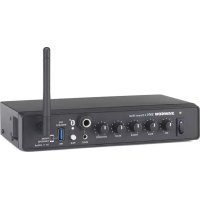
SM4 - Mixer SAMSON - Free user manual and instructions
Find the device manual for free SM4 SAMSON in PDF.



| Product Type | 4-Channel Stereo Mixer |
| Number of Channels | 4 (1 mic/line + 3 stereo) |
| Mic Inputs | 1 x XLR/6.35 mm combo jack with 15V phantom power |
| Line Inputs | 2 x RCA (rear), 1 x 6.35 mm stereo jack (front), 1 x 3.5 mm stereo jack (front) |
| Wireless Connectivity | Bluetooth V4.0 (A2DP), range up to 30 m |
| Mic Equalizer | 2-band: bass ±15 dB at 100 Hz, treble ±15 dB at 10 kHz |
| Voice-Off Function | Automatic music attenuation when using microphone, with adjustable hold time (0.5 to 3 s) |
| Main Outputs | 2 x XLR balanced, 2 x RCA unbalanced |
| Mono/Stereo Switching | Yes, on rear panel |
| Phantom Power | 15 V DC |
| USB Port | Type A, for Samson XPD wireless receiver or device charging (5V, 200mA) |
| Power Supply | Included power adapter: DC 15 V, 800 mA |
| Dimensions | Half 19-inch rack: approx 220 x 150 x 50 mm (W x D x H) |
| Weight | Approximately 1.5 kg |
| Frequency Response | 30 Hz - 30 kHz (±3 dB) |
| Total Harmonic Distortion | < 0.02% |
| Cleaning | With a dry cloth only |
| Rack Mounting | Kit included for 19-inch rack |
| General Information | Use in temperate/tropical climate; do not expose to water |
Frequently Asked Questions - SM4 SAMSON
User questions about SM4 SAMSON
0 question about this device. Answer the ones you know or ask your own.
Ask a new question about this device
Download the instructions for your Mixer in PDF format for free! Find your manual SM4 - SAMSON and take your electronic device back in hand. On this page are published all the documents necessary for the use of your device. SM4 by SAMSON.
USER MANUAL SM4 SAMSON
This lightning flash with arrowhead symbol within an equilateral triangle is intended to alert the user to the presence of non-insulated "dangerous voltage" within the product's enclosure that may be of sufficient magnitude to constitute a risk of electric shock.

The exclamation point within an equilateral triangle is intended to alert the user to the presence of important operating and maintenance instructions in the literature accompanying the appliance.
WARNING: TO REDUCE THE RISK OF ELECTRIC SHOCK, DO NOT REMOVE COVER (OR BACK) AS THERE ARE NO USER-SERVICEABLE PARTS INSIDE. REFER SERVICING TO QUALIFIED SERVICE PERSONNEL.
The Bluetooth® word mark and logos are registered trademarks owned by Bluetooth SIG, Inc. and any use of such marks by Samson Technologies is under license. Other trademarks and trade names are those of their respective owners."

If you want to dispose this product, do not mix it with general household waste.
There is a separate collection system for used electronic products in accordance with legislation that requires proper treatment, recovery and recycling.
Private household in the 28 member states of the EU, in Switzerland and Norway may
return their used electronic products free of charge to designated collection facilities
or to a retailer (if you purchase a similar new one).
For Countries not mentioned above, please contact your local authorities for a correct method of disposal.
By doing so you will ensure that your disposed product undergoes the necessary treatment, recovery and recycling and thus prevent potential negative effects on the environment and human health.
SM4 4-Channel Mixer 1
Important Safety Information

- Read these instructions.
- Keep these instructions.
- Heed all warnings.
- Follow all instructions.
- Do not use this apparatus near water.
- Clean only with dry cloth.
- Do not block any ventilation openings. Install in accordance with the manufacturer's instructions.
- Do not install near any heat sources such as radiators, heat registers, stoves, or other apparatus (including amplifiers) that produce heat.
- Do not defeat the safety purpose of the polarized or grounding type plug. A polarized plug has two blades with one wider than the other. A grounding type plug has two blades and a third grounding prong. The wide blade or the third prong are provided for your safety. If the provided plug does not fit into your outlet, consult an electrician for replacement of the obsolete outlet.
- Protect the power cord from being walked on or pinched particularly at the plugs, convenience receptacles, and at the point where they exit from the apparatus.
- Only use attachments/accessories specified by the manufacturer.
- Use only with the cart, stand, tripod, bracket, or table specified by the manufacturer, or sold with the apparatus. When a cart is used, use caution when moving the cart/apparatus combination to avoid injury from tip-over.
- Unplug the apparatus during lightening, sort or when unused for long periods of time.
- Refer all servicing to qualified personnel. Service is required when the apparatus has been damaged in any way, such as power supply cord or plug is damaged, liquid has been spilled or objects have fallen into the apparatus has been exposed to rain or moisture, does not operate normally, or has been dropped.
- This appliance shall not be exposed to dripping or splashing water and that no object filled with liquid such as vases shall be placed on the apparatus.
- Caution-to prevent electrical shock, match wide blade plug wide slot fully insert.
- Please keep a good ventilation environment around the entire unit.
- WARNING: The direct plug-in adapter or AC/DC adapter is used as disconnect device, the disconnect device shall remain readily operable.
- No naked flame sources, such as lighted candles, should be placed on the apparatus.
- This apparatus is intended to be used in moderate and/or tropical climates.
Important Safety Information
FCC Notice
- This device complies with Part 15 of the FCC Rules. Operation is subject to the following two conditions:
(1) This device may not cause harmful interference.
(2) This device must accept any interference received, including interference that may cause undesired operation.
- Changes or modifications not expressly approved by the party responsible for compliance could void the user's authority to operate the equipment.
FCC Statement
This equipment has been tested and found to comply with the limits for a Class B digital device, pursuant to Part 15 of the FCC Rules. These limits are designed to provide reasonable protection against harmful interference in a residential installation.
This equipment generates uses and can radiate radio frequency energy and, if not installed and used in accordance with the instructions, may cause harmful interference to radio communications. However, there is no guarantee that interference will not occur in a particular installation. If this equipment does cause harmful interference to radio or television reception, which can be determined by turning the equipment off and on, the user is encouraged to try to correct the interference by one or more of the following measures:
- Reorient or relocate the receiving antenna.
- Increase the separation between the equipment and receiver.
- Connect the equipment into an outlet on a circuit different from that to which the receiver is connected.
- Consult the dealer or an experienced radio/TV technician for help.
FCC Radiation Exposure Statement
This equipment complies with FCC RF radiation exposure limits set forth for an uncontrolled environment. This equipment should be installed and operated with a minimum distance of 20 centimeters between the radiator and your body.
RF Warning Statement
The device has been evaluated to meet general RF exposure requirement. The device can be used in portable exposure condition without restriction.
This device complies with RSS-310 of Industry Canada. Operation is subject to the condition that this device does not cause harmful interference.
Hereby, Samson Technologies Corp, declares that this SM4 is in compliance with the essential requirements and other relevant provisions of Directive 2014/53/EU. The declaration of conformity may be consulted at:
http://www.samsontech.com/site_media/support/manuals/SM4_DOC.pdf
Introduction
Thank you for purchasing the Samson SM4 4-Channel Mixer. The SM4 rack mount mixer is a versatile tool for many sound applications. Featuring microphone and music inputs as well as Bluetooth® connectivity for streaming audio and a USB jack for connecting an optional Samson XPD USB Digital Wireless System.
In the box, you'll find a registration card enclosed—please don't forget to follow the instructions so that you can receive online technical support and so we can send you updated information about this and other Samson products in the future. Also, be sure to check out our website (www.samsontech.com) for information about our full product line. We recommend you keep the following records for reference, as well as a copy of your sales receipt.
Serial number:
Date of purchase:
If you have any questions or comments regarding the SM4 or any other products from Samson, do no hesitate to contact us at support@samsontech.com.
With proper care and maintenance, your SM4 will operate trouble-free for many years. Should your SM4 ever require servicing, a Return Authorization (RA) number must be obtained before shipping your unit to Samson. Without this number, the unit will not be accepted. Please visit www.samsontech.com/ra for an RA number prior to shipping your unit. Please retain the original packing materials and, if possible, return the unit in its original carton. If your SM4 was purchased outside of the United States, contact your local distributor for warranty details and service information.
Features
- 4-channel stereo line mixer
- Microphone input with 2-band EQ (balanced XLR-1/4" combo)
- Stereo line input (rear mounted RCA inputs, front-mounted stereo 1/4" and 1/8" [3.5mm])
- Bluetooth® connectivity to wirelessly stream music
- USB port for use with Samson XPD Series USB Digital Wireless Systems (sold separately) and phone charging
Voiceover control with priority ducking and variable hold time
Rear panel master volume control
15V phantom power
Mono/Stereo output switch - Compact, half-rack steel chassis
- Rackmount kit and power adapter included
Front Panel Callouts
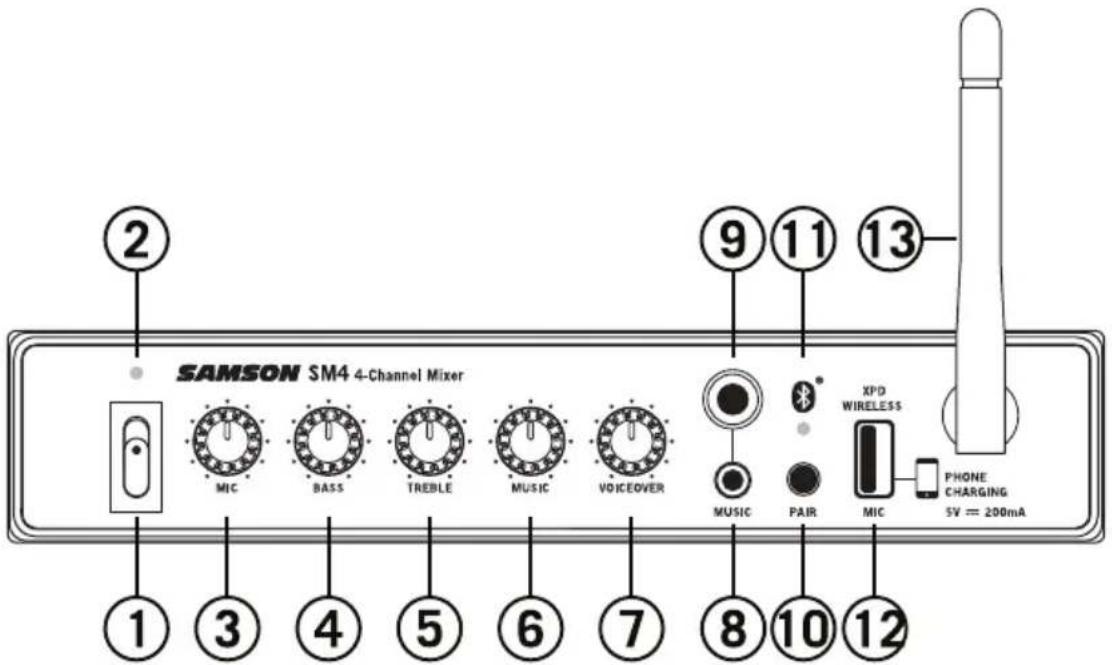
- Power Switch - Use this switch to turn the SM4 on and off. To avoid potential damage to your speakers, turn the SM4 on before you turn on any connected power amps, and turn it off after the power amps are turned off.
- Power Indicator - LED lights white indicating the unit is powered on.
- MIC Volume - This knob controls the level of the MIC input.
- BASS Equalizer Knob - Controls the MIC channel low frequency band, +/- 15dB at 100Hz.
- TREBLE Equalizer Knob - Controls the MIC channel high frequency band, +/- 15dB at 10kHz.
- MUSIC Volume - This knob controls the level of the Music inputs (rear panel RCA, front panel 1/4" and 1/8") and the Bluetooth® audio.
- VOICEOVER - Controls the level the Music channel and Bluetooth audio will be lowered when there is signal on the Mic channel.
- 1/8" (3.5mm) Music Input - Stereo 1/8" (3.5mm) jack to connect line level sources. Level of this input is controlled by the MUSIC Volume knob.
- 1/4" Music Input - Stereo 1/4" jack to connect line level sources. Level of this input is controlled by the MUSIC Volume knob.
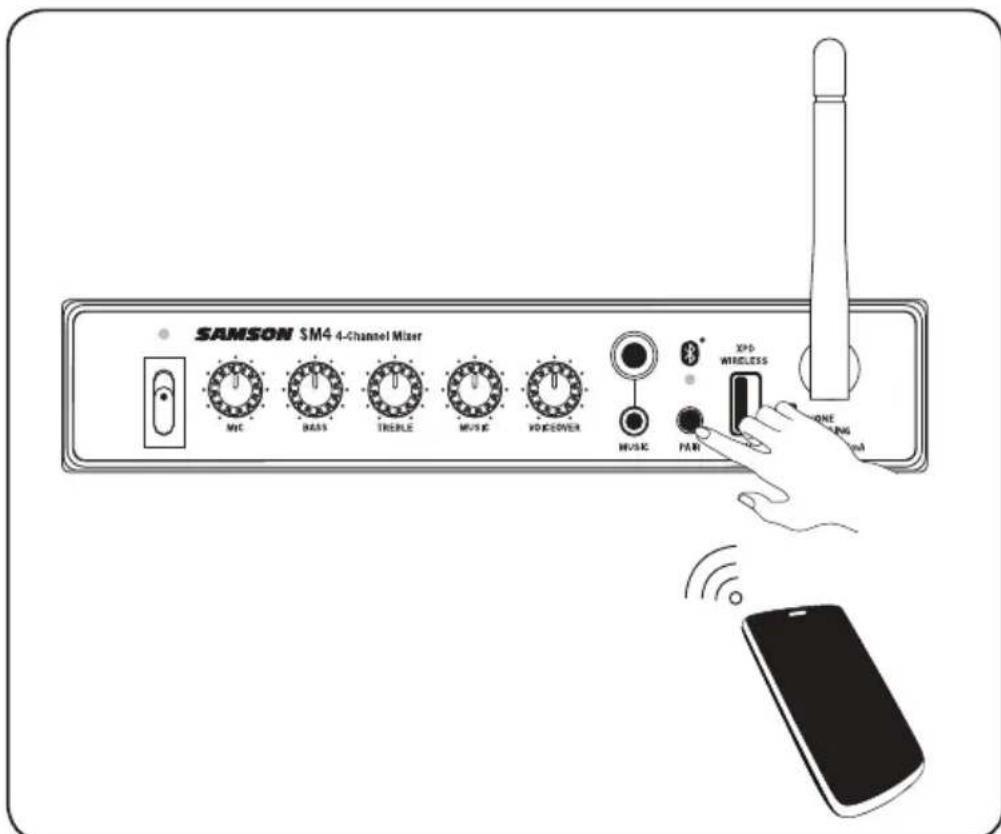
- Pairing Indicator - Displays the Bluetooth status of the SM4.
- Pairing Button - Press and hold this button to enable discoverable mode in order to pair with a Bluetooth audio device.
- Samson XPD WIRELESS USB Input - Connect an optional Samson XPD USB Digital Wireless receiver to this input. The wireless level is controlled by the MIC Volume control. The USB connector supplies 5V 200mA at of power to charge a small portable USB device like an MP3 player or smartphone.
- Bluetooth Antenna - This antenna receives signal from a paired device and should be placed in a vertical position when using the Bluetooth. The Bluetooth receiver has a range of approximately 100^ (30m).
Rear Panel Callouts
-
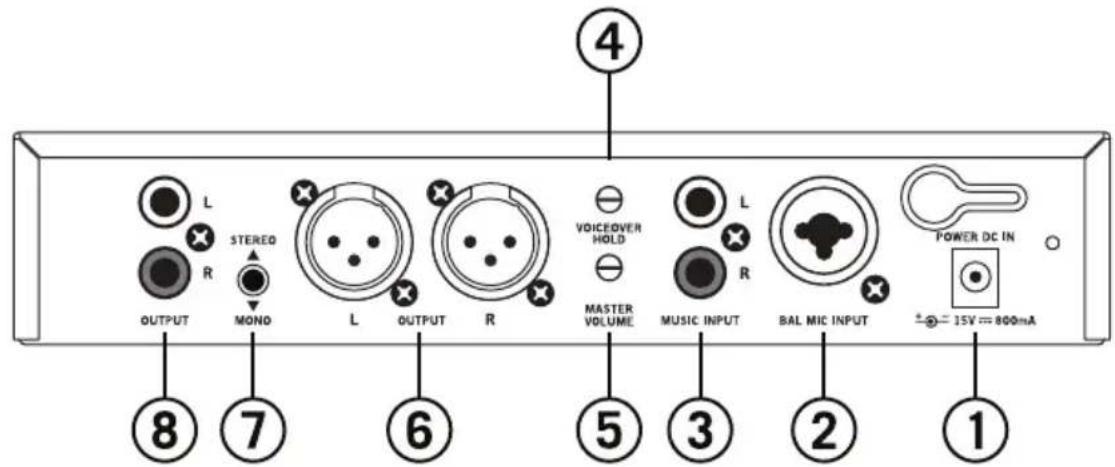
DC Input - Connect the supplied power adapter here, using the strain relief* as shown in the illustration below. WARNING: Do not substitute any other kind of power adapter. Doing so can cause severe damage to the SM4 and will void your warranty.
-
BAL MIC INPUT - Use this Combo XLR plus 1/4" jacks to connect a microphone or wireless microphone receiver. The XLR input provides 15-volt phantom power for use with condenser microphones.
-
Stereo RCA MUSIC INPUT - Stereo line level input for connecting the output of devices such as MP3, CD, or any line level audio device using standard RCA cables.
-
VOICEOVER HOLD - This knob controls the hold time of the VOICEOVER priority ducking from 0.5s-3s.
-
MASTER VOLUME - The MASTER VOLUME knob controls the overall output level. This knob determines the final output signal level. Signals from all channels are routed here just before being routed to the OUTPUT jacks.
-
Balanced XLR OUTPUT - Balanced XLR outputs to connect the SM4 to a power amplifier or speakers. In recording applications, these outputs can be used to connect to a stereo device such as computer sound card, MP3, or hard disk recorder. The signal at the OUTPUT jacks follow the MASTER VOLUME control.
-
STEREO/MONO Switch - When the switch is in the out, STEREO position, the left and right signals are routed to the corresponding outputs. In the in, MONO, position, the left and right input signals are summed together and fed to both Left and Right OUTPUT jacks.
-
Unbalanced RCA OUTPUT - Unbalanced RCA outputs to connect the SM4 to a power amplifier or speakers. In recording applications, these outputs can be used to connect to a stereo device such as computer sound card, MP3, or hard disk recorder. The signal at the OUTPUT jacks follow the MASTER VOLUME control.

*Using the strain relief: Gather up a loop of wire and pass it through the strain relief, then pass the adapter plug through the loop in order to create a knot.
Quick Start
- Remove all packing materials and decide where the unit is to be physically placed. The SM4 can be mounted in any standard 19" rack (requiring one rack space), or used on a tabletop.
- Before connecting a microphone or line level audio device, make sure that the power to all your systems components, including the SM4, are turned off.
- Using an XLR or 1/4'' cable, connect a wired microphone or the output of a wireless microphone receiver to the Mic input jack on the rear of the SM4.
- Connect a music source, like a CD player, to the RCA jacks on the rear panel of the SM4. The red connector is the right input and the white connector is the left input. Portable audio devices, like an MP3 player, can be connected to the 1/4'' or 1/8'' stereo inputs on the front of the SM4.
- Connect the outputs of the SM4 to the inputs of a power amplifier or speaker system using XLR or RCA cables.
- Turn the SM4 Master Volume control all the way down and turn the SM4 power on. NOTE: It is important to remember the Golden Rule of audio ... "LAST ON, FIRST OFF". Translated, this means that when turning on your system, you should always turn your power amplifiers or powered monitors on LAST, and when turning your system off, turn your power amps off FIRST. This helps avoid any loud pops caused by rush current at power up, which can sometimes damage loudspeakers.
- Turn the power amplifier or speaker system on and turn the volume up.
- Set the MIC volume control of the SM4 to the 12 o'clock position.
- While talking into the microphone, raise the MASTER VOLUME control until you have reached the desired level.
- Play music from the connected music source and raise the MUSIC volume control. Adjust the MIC and MUSIC volume until the microphone signal is able to be heard above the music.
Avoiding Feedback
Feedback is the annoying howling and squealing that can heard when the microphone picks up sound from the speaker. The sound is then re-amplified back through the speaker again, creating a feedback loop. Follow these steps to minimize the likelihood of feedback:
- Avoid pointing the microphone directly at the speakers. In general it is recommended that the microphone be positioned behind the speaker enclosure. This uses the directional characteristics of the speaker and microphone to your advantage.
- Keep the microphone as far from the speakers as possible. This will help achieve isolation between the speaker and the microphone.
- Position the microphone as close to the sound source as possible. This will enable the microphone to pick up more direct sound, and allow you to reduce the microphone input gain control.
Pairing with a Bluetooth® device
Bluetooth is a wireless communication technology that allows for connectivity between a wide range of devices. The SM4 uses Bluetooth to stream high quality audio from your Bluetooth enabled device without the need for connecting any cables. In order for your device to work with the SM4 it must first be paired.
- With the SM4 and your Bluetooth device powered on, press and hold the PAIR button on the front panel of the SM4 mixer to make the mixer discoverable. The blue Bluetooth indicator will flash slowly.
- In the settings of your Bluetooth device, set it to "discover" available devices.
- From the Bluetooth device list, select the "SAMSON BLUETOOTH" device.
- If your device asks for a passkey, enter digits 0000 (four zeros) and press OK. Some devices may also ask you to accept the connection.
- As the SM4 is connecting to your device, the Bluetooth indicator will quickly flash blue.
- The SM4 speaker indicates that pairing is complete when the indicator turns steady blue. You can now stream audio from your device to the SM4 speakers.
- On your Bluetooth device, set the volume to the maximum setting and start playing music
- Use the MUSIC volume knob on the front panel of the SM4 to set the desired level of the Bluetooth audio.
Specifications
Frequency Response (Level@Max, unity gain +1/-3dB)
Mic to Main 30Hz~30KHz
T.H.D (Level@Max, unity gain, 20Hz~30KHz A-Weighted)
Mic/Line to Main < 0.02%
Line to Main < 0.02%
Equivalent Input Noise
Mic (Level@Max)<-75dB 20Hz~30KHz A-weighted
Maximum Voltage Gain
Mic to Main 32dB
Line to Main 8dB (RCA Input)
Stereo Line to Main 8dB (1/4',1/8' Input)
Residual Noise (30kHz LPF, all control Min)
Main (All Level min) -110dB
Crosstalk (@1kHz w/30kHz LPF)
Input vs. Output (unity gain, Level set min,) >82dB
Input vs. Output (Max output, Level set min) >70dB
Maximum Input Level (@1kHz)
Mic Input-18dB
Maximum Output Level (@1kHz)
Mic Output +14dB
Input Channel Equalizer (±3dB)
High ±12dB@12KHz
Low ±10dB@80Hz
USB Output Power USB3.0 +5V DC 0.2A max
Phantom Power
15 Volts DC
Power Requirements
DC15V 800mA
Bluetooth Bluetooth V4.0, A2DP
Working Frequency 2.402GHz 2.480GHz
RF Power < 10 mW EIRP
Dimensions and Weight
Dimensions
8.78" x 5.43" x 1.69"
223mm x 138mm x 43mm
Weight
1.76 lbs / 0.8 kg
8.78" x 5.43" x 1.69"
Poids
223mm x 138mm x 43mm
1.76 lbs / 0.8 kg

Brand : SAMSON
Model : SM4
Category : Mixer