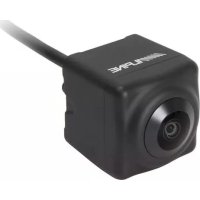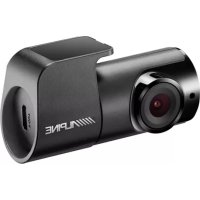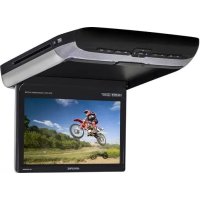
PKGRSE3HDMI - Dashcam ALPINE - Free user manual and instructions
Find the device manual for free PKGRSE3HDMI ALPINE in PDF.



User questions about PKGRSE3HDMI ALPINE
0 question about this device. Answer the ones you know or ask your own.
Ask a new question about this device
Download the instructions for your Dashcam in PDF format for free! Find your manual PKGRSE3HDMI - ALPINE and take your electronic device back in hand. On this page are published all the documents necessary for the use of your device. PKGRSE3HDMI by ALPINE.
USER MANUAL PKGRSE3HDMI ALPINE
Please read before using this equipment.
GUIA DE CONSULTA RAPIDA
Lealao antes de utilizesque.
Torrance, California 90501 U.S.A.
Tel.: 1-800-ALPINE-1 (1-800-257-4631)
ALPINE ELECTRONICS (BENELUX) GmbH
Leuvensesteenweg 510-B6,
1930 Zaventem, Belgium
Tel.: 02-725 1315
ALPINE ELECTRONICS OF AUSTRALIA PTy, LId.
161-165 Princess Highway, Hallam
Victoria 3803, Australia
Tel.: 03-8787-1200
ALPINE ELECTRONICS GmbH
Fletchamstead Highway, Coventry CCV4 9TW, U.K.
Tel.:0870-3333763
ALPINE ELECTRONICS FRANCE S.A.R.L.
(RCS PONTOISE B 338 101 280)
98, Rue de la Belle Etoile, Z.I. Paris Nord II
B.P. 50016, 95945 Roissy Charles de Gaulle Cedex, France
Tel:01-48638989
Designed by Alpine Electronics of America, Inc.
Printed In China
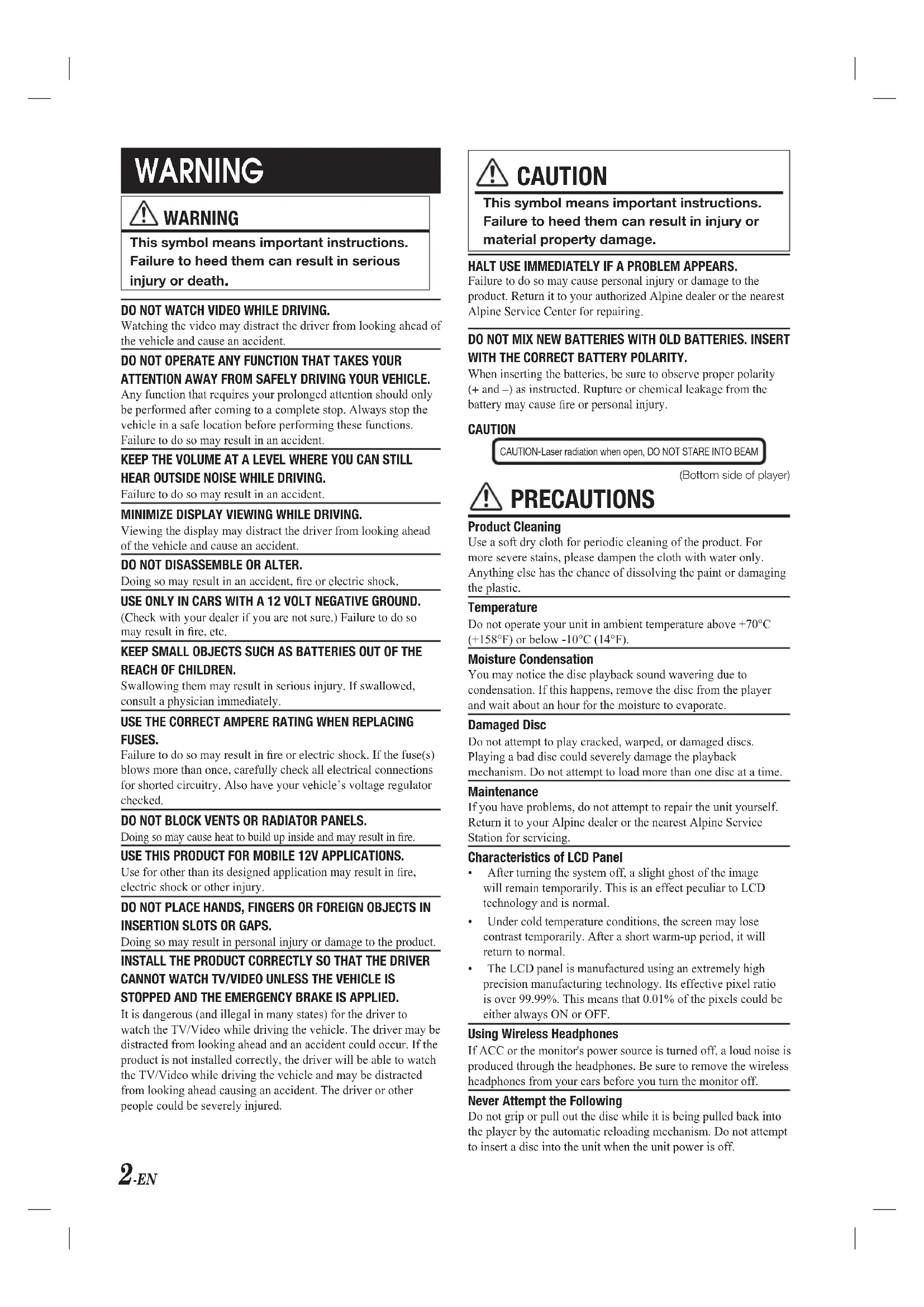
WARNING

WARNING
This symbol means important instructions. Failure to heed them can result in serious injury or death.
DO NOT WATCH VIDEO WHILE DRIVING.
Watching the video may distract the driver from looking ahead of the vehicle and cause an accident.
DO NOT OPERATE ANY FUNCTION THAT TAKES YOUR ATTENTION AWAY FROM SAFELY DRIVING YOUR VEHICLE.
Any function that requires your prolonged attention should only be performed after coming to a complete stop. Always stop the vehicle in a safe location before performing these functions. Failure to do so may result in an accident.
KEEP THE VOLUME AT A LEVEL WHERE YOU CAN STILL HEAR OUTSIDE NOISE WHILE DRIVING.
Failure to do so may result in an accident.
MINIMIZE DISPLAY VIEWING WHILE DRIVING.
Viewing the display may distract the driver from looking ahead of the vehicle and cause an accident.
DO NOT DISASSEMBLE OR ALTER.
Doing so may result in an accident, fire or electric shock.
USE ONLY IN CARS WITH A 12 VOLT NEGATIVE GROUND.
(Check with your dealer if you are not sure.) Failure to do so may result in fire, etc.
KEEP SMALL OBJECTS SUCH AS BATTERIES OUT OF THE REACH OF CHILDREN.
Swallowing them may result in serious injury. If swallowed, consult a physician immediately.
USE THE CORRECT AMPERE RATING WHEN REPLACING FUSES.
Failure to do so may result in fire or electric shock. If the fuse(s) blows more than once, carefully check all electrical connections for shorted circuitry. Also have your vehicle's voltage regulator checked.
DO NOT BLOCK VENTS OR RADIATOR PANELS.
Doing so may cause heat to build up inside and may result in fire.
USE THIS PRODUCT FOR MOBILE 12V APPLICATIONS.
Use for other than its designed application may result in fire, electric shock or other injury.
DO NOT PLACE HANDS, FINGERS OR FOREIGN OBJECTS IN INSERTION SLOTS OR GAPS.
Doing so may result in personal injury or damage to the product. INSTALL THE PRODUCT CORRECTLY SO THAT THE DRIVER CANNOT WATCH TV/VIDEO UNLESS THE VEHICLE IS STOPPED AND THE EMERGENCY BRAKE IS APPLIED.
It is dangerous (and illegal in many states) for the driver to watch the TV/Video while driving the vehicle. The driver may be distracted from looking ahead and an accident could occur. If the product is not installed correctly, the driver will be able to watch the TV/Video while driving the vehicle and may be distracted from looking ahead causing an accident. The driver or other people could be severely injured.

CAUTION
This symbol means important instructions. Failure to heed them can result in injury or material property damage.
HALT USE IMMEDIATELY IF A PROBLEM APPEARS.
Failure to do so may cause personal injury or damage to the product. Return it to your authorized Alpine dealer or the nearest Alpine Service Center for repairing.
DO NOT MIX NEW BATTERIES WITH OLD BATTERIES. INSERT WITH THE CORRECT BATTERY POLARITY.
When inserting the batteries, be sure to observe proper polarity (+ and -) as instructed. Rupture or chemical leakage from the battery may cause fire or personal injury.
CAUTION
CAUTION-Laser radiation when open, DO NOT STARE INTO BEAM
(Bottom side of player)

PRECAUTIONS
Product Cleaning
Use a soft dry cloth for periodic cleaning of the product. For more severe stains, please dampen the cloth with water only. Anything else has the chance of dissolving the paint or damaging the plastic.
Temperature
Do not operate your unit in ambient temperature above +70^ (+158^) or below -10^ (14^) .
Moisture Condensation
You may notice the disc playback sound wavering due to condensation. If this happens, remove the disc from the player and wait about an hour for the moisture to evaporate.
Damaged Disc
Do not attempt to play cracked, warped, or damaged discs. Playing a bad disc could severely damage the playback mechanism. Do not attempt to load more than one disc at a time.
Maintenance
If you have problems, do not attempt to repair the unit yourself. Return it to your Alpine dealer or the nearest Alpine Service Station for servicing.
Characteristics of LCD Panel
After turning the system off, a slight ghost of the image will remain temporarily. This is an effect peculiar to LCD technology and is normal.
Under cold temperature conditions, the screen may lose contrast temporarily. After a short warm-up period, it will return to normal.
The LCD panel is manufactured using an extremely high precision manufacturing technology. Its effective pixel ratio is over 99.99% . This means that 0.01% of the pixels could be either always ON or OFF.
Using Wireless Headphones
If ACC or the monitor's power source is turned off, a loud noise is produced through the headphones. Be sure to remove the wireless headphones from your cars before you turn the monitor off.
Never Attempt the Following
Do not grip or pull out the disc while it is being pulled back into the player by the automatic reloading mechanism. Do not attempt to insert a disc into the unit when the unit power is off.
Getting Started
Overhead Monitor
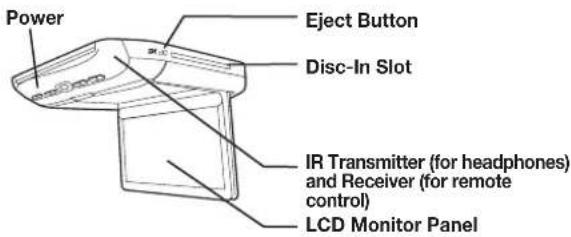
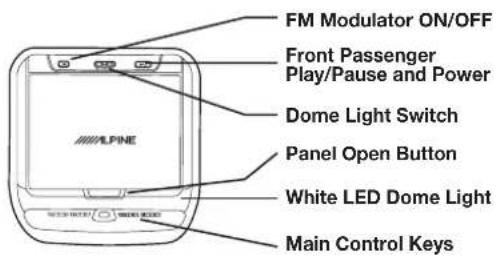
LCD Monitor Panel
This is a 10.1 inch, Wide SVGA, Active Matrix LCD with LED backlight.
Panel Open Button
Press the Panel Open Button to release the Monitor Panel. The Panel will drop down slightly allowing you to fully open to its 90 degree or greater position. To close, firmly press the LCD Monitor Panel back up into the housing until a click is heard.
White LED Dome Light
White LED Dome Light illuminates when the Dome Light Switch is on or when triggered by the vehicle door (if connected).
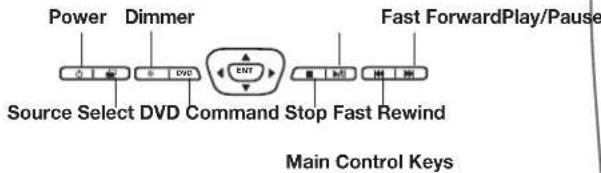
Main Control Keys
White, back-lit buttons illuminate when the overhead monitor power is on. DVD overhead monitor and other devices can be controlled by using these buttons.
Front Passenger Control Buttons
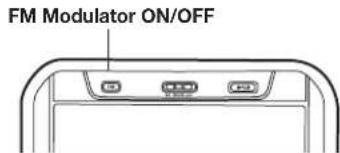
FM: FM modulator ON/OFF switch
The audio is transmitted to the radio's FM Tuner, when FM button is on. The radio must be tuned to the proper frequency. The FM transmitter function in the System menu must be ON to use the FM modulator.
▶/II:Play/pause and power switch
The front passenger can play/pause the DVD. It also allows turning on the unit. The unit can be turned off by pressing and holding this switch.
Dome Light Switch
Dome light switch turns on/off the dome light. When the switch is set to Door, the dome light turns on when the door is open.
IR Audio Transmitter and Remote Control Receiver
IR transmitter sends sound to the Headphones. IR receiver receives the signal from the remote control. The Infrared Wireless Headphone Transmitter and Remote Control Receiver are located in front of the unit.
Eject Button
Pressing Eject button unloads Disc.
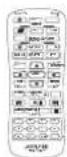
Remote Control (RUE-4159H)
This is the multi-function remote control which can operate other Alpine peripheral devices.
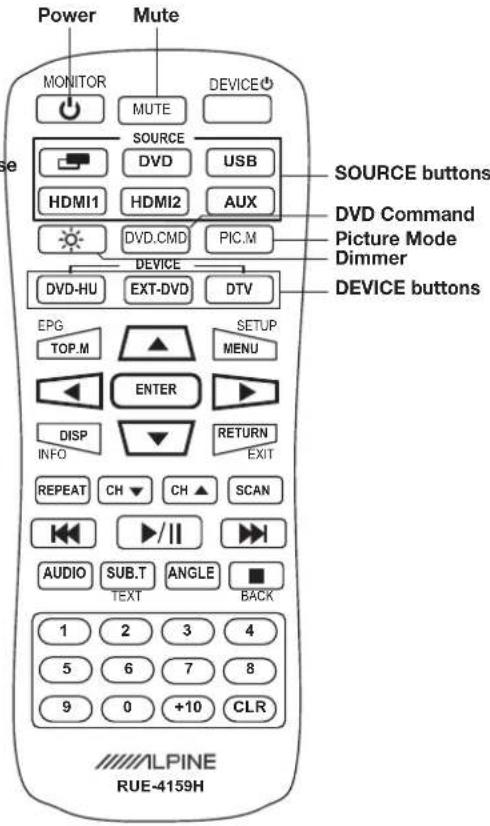
SOURCE buttons
Press the button to switch the source of DVD, USB, HDMI1, HDMI2 and AUX
DEVICE buttons
Press the button to change control of other Alpine peripheral devices such as DVD-HU (In-Dash DVD HU), EXT-DVD (External DVD) and DVT (Digital TV Tuner)
Basic Operations
Turning Power ON/OFF
The power state of the monitor is memorized when Ignition/ACC is turned off. When Ignition/ACC is turned back on, the monitor returns to the memorized power state (either ON or OFF), including DVD playback position.
Main Control Keys
- Press POWER ( ) to turn ON the monitor.
To turn off power, press and hold POWER ( ) again. - While the power is ON, press POWER to activate the Mute function.
Remote Control
- Press POWER to turn ON and OFF.
Front Passenger Controls
- Press PLAY/PAUSE button to turn ON.
To turn off the power, press and hold PLAY/ PAUSE.
Muting the Audio
Main Control Keys
While the power is ON, press POWER (O) to activate the Mute function.
PressPower ( ) again to turn OFF the Mute function.
Remote Control
Press MUTE to turn it ON and OFF.
Switching the Source
Main Control Keys and Remote Control
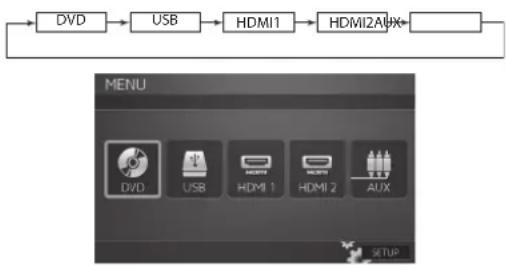
1PressSELECT ( ) to display the Source Select Menu.
2PressSELECT ( ) again to cycle through the different sources.
Remote Control
Press source buttons (DVD, USB, HDMI1, HDMI2 and AUX) to select the source instantly.
- OSD (On Screen Display) will turn OFF automatically after 5 seconds without use.
- When the source is changed, the power is turned OFF or the ACC is turned OFF, the device remembers the scene where the internal DVD stopped and playback will resume from that point.
Setting the Backlight Brightness
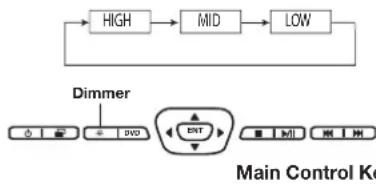
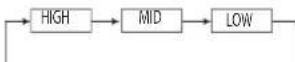
1 Press Dimmer () on the Main Control Keys or the remote control to cycle through High/Mid/Low.
- OSD will disappear in 3 seconds.
It is also changed from the backlight tab in the Picture Setting Menu with < or > buttons. (refer to Monitor Setup instructions page 6)
- OSD will disappear in 8 seconds.
- Press and hold the DIMMER (●) button for at least 2 seconds to access the monitor setup menus.
Loading and Unloading Discs
Turn on the power before loading and unloading discs.
Loading discs
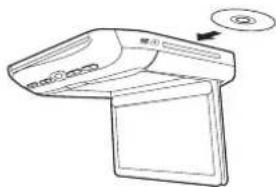
1 Insert the disc with the label side facing upwards.
2 Once the disc is partially inserted, source is changed to DVD from current source and the disc is drawn in automatically. Playback starts.
- For two-sided DVDs, play one side of the disc to the end, then unload the disc, turn it over and reload it to play the other side.
- If wrong disc, upside-down discs or dirty discs have been inserted, "Bad Disc" is displayed. Press and eject the disc.
Unloading discs
Press
Be sure to remove the disc.
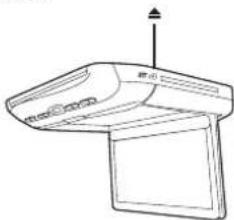
- If the disc is not removed within a few moments, it will be reloaded automatically.
- During ACC OFF or while the disc is being loaded ("LOADING" is displayed), the disc will not be ejected even if you press
DVD Commands
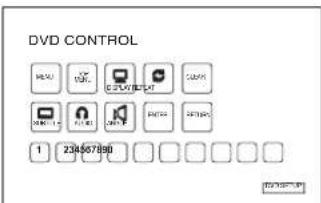
DVD control commands may also be accessed from within the monitor itself. This is useful if the remote control batteries are dead or the remote control is misplaced.
1 Press the DVD button on the Main Control Keys or press DVD.CMD on the Remote Control to access the DVD Command menu.
2 Press the four directional keys (▲▼▲▶) and Enter to select the command.
USB
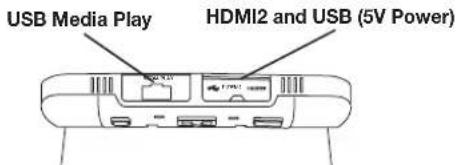
1 Pull the USB Media Play cover out, plug the USB storage device into the USB port.
2 Change the source to USB. Contents (video, music and picture) will be played.
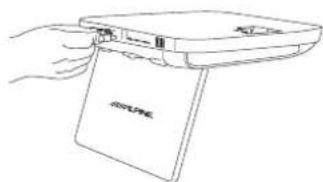
- Play order is depending on file structure in the USB storage.
If an external HDD is connected, USB power may not be enough and additional power may be required.
HDMI1 Input
One of two HDMI input ports is located on mount side of the overhead monitor. Your installer may connect to any HDMI compatible devices such as DVD head unit, stand-alone DVD player or Digital TV Tuner. (In Europe)
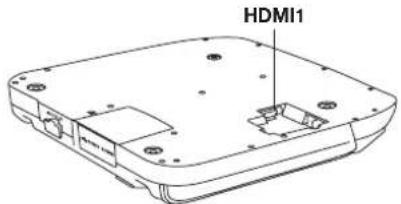

HDMI2 Input
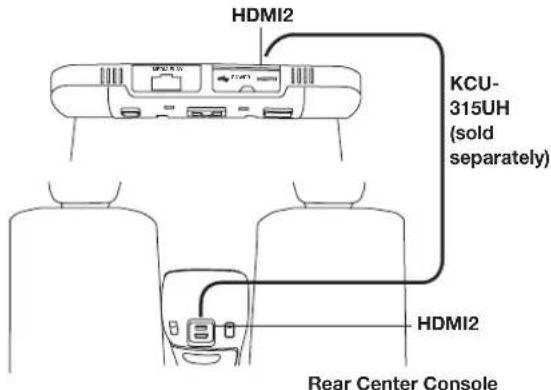
The second HDMI input port is located with a USB power connector on rear side of the overhead monitor.
- USB is for 5V power (LA) charging only and does not play media.
- HDMI2 and USB can be extended to center console or other place using optional 15 ft HDMI/USB Extension Connector (KCU-315UH). Refer to installation manual page 7.
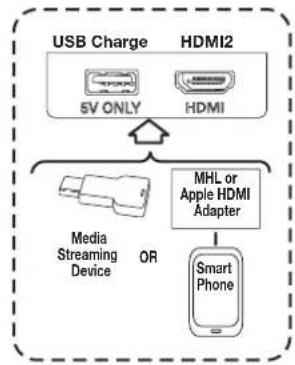
Media Streaming Devices Connect HDMI2 and USB to use Media Streaming Devices.
Smart Phone
Connect the MHL or Apple HDMI adapter to HDMI2 to use smart phone. Connect to USB to charge the phone.
AUX
Connect to any AUX output devices such as DVD HU, stand-alone DVD or Digital TV Tuner.
Monitor Setup
Picture Mode, brightness, color, tint and contrast are adjustable.
To access the Settings menus, press and hold the DIMMER ( ) button on the Main Control Keys or Remote Control for at least 2 seconds and then press or to select the Picture Settings, Screen Settings, or System Settings menus.
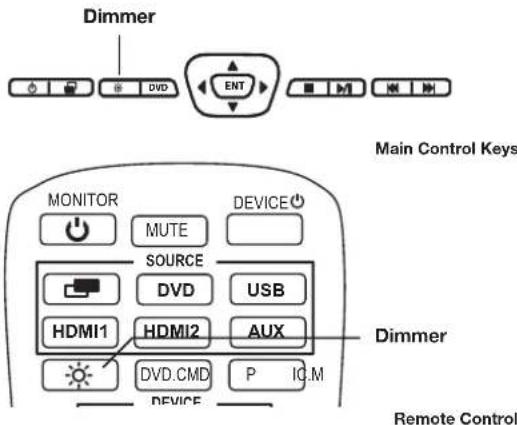
Wait 8 seconds until OSD disappears; any adjustments made will be saved automatically.
Picture Settings
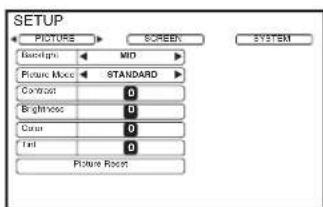
Setting the Backlight Brightness
Refer to "Setting the Backlight" section on page 4 for detailed instructions.
From the Picture Settings menu, press or to cycle through High/Mid/Low.
Setting the Picture Mode
To change the Picture Mode, press to cycle through the OSD and select from STANDARD, VIVID, CINEMA, SPORT and GAME. (Default: STANDARD)

If any of the picture settings (Contrast, Brightness, Color, and Tint) of any mode are adjusted, a "CUSTOM" mode will be created and will be set with the new values.

- Picture Reset deletes "CUSTOM" mode.
Adjusting the Contrast/Brightness/Color/Tint
Press or to select the desired picture setting.
Press on to adjust the value of the chosen setting. Each setting can be adjusted from -7(MIN) to +7(MAX).
Resetting the Picture Settings
Press or until "Picture Reset" is selected.
Press ENTER to reset all picture settings to their factory default values. This will only reset the current Source Setting (DVD, USB, HDMI1, HDMI2, or AUX).
Screen Settings
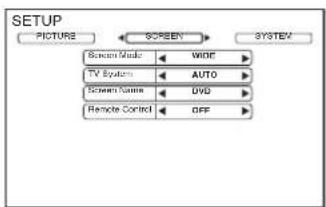
Setting the Screen Mode and TV System
Display mode on the screen can be adjusted to Wide, Cinema or Normal. (Default: WIDE)
Press or to select WIDE/CINEMA/NORMAL
The Video Signal Standard (TV System) can be manually switched. (Default: AUTO)
Press or to select AUTO/NTSC/PAL.
System Setting
The IR audio transmitter, FM modulator and frequency can be adjusted for all available sources.
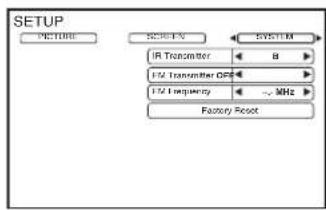
Setting the IR Audio Transmitter
The IR audio transmitter frequency setting is used to match your IR headphone's frequency fixed settings.
The headphones included are set to channel A.
Press or select A/B/OFF. (Default: A)
CHANNEL A: 2.3 MHz/ 2.8 MHz
CHANNEL B: 3.2 MHz/ 3.8 MHz
Setting the FM Modulator
Press or select FM Radio region (OFF/USA/Others). (Default: OFF) It also turns ON or OFF by pressing FM Modulator ON/OFF button on Front Passenger Control.
Setting the FM Frequency
Press or select desired FM Radio Frequencies between 88.1 MHz to 92.1 MHz. (Default: 89.1 MHz) USA frequency step is 0.2MHz and other countries is 0.1MHz .
Resetting to the Factory Default
Press ENTER Key, the entire settings including picture, screen and system value will be restored to the factory default.
DVD Setup
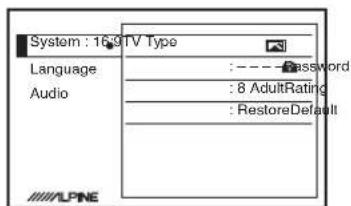
Press and hold the DVD button on the Main Control Key or the DVD_CMD button on the remote control to enter the DVD Setup menu for Parental Control or other setting.
You may also access from the DVD Setup button on the DVD Command screen. (page 5)
Wireless Headphones
Headphone Receivers
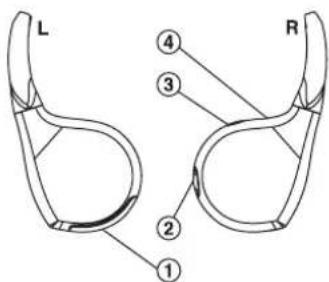
1) Battery Cover
2) Volume Control
3) Power Switch
4) Power Indicator LED
Operation
Read carefully to prevent damage to the headphone or your ears:
WARNING: Before turning on the power, remove headphones and turn the volume down as low as possible.
1) Be sure the batteries are properly installed in the headphones.
2) Turn the headphones volume completely down before placing it on your ears and turning on the power.
3) Turn on the headphone power and adjust the headphone volume to a comfortable level (You can increase the audio source volume if needed).
Adjusting the Volume
Volume can be controlled from the headphone or your own radio volume function.
1 Turn on POWER on the headphone.
2 Adjust the volume level by turning clockwise for louder and counter-clockwise for lower on the headphone.
Battery Installation
1 Press and slide open the battery compartment as shown in the diagram.
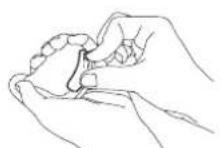
2 Place two AAA batteries into the battery compartment of the headphone(s), making sure that the battery polarity is correct.
Note
If ACC or the monitor's power source is turned off, a loud noise may be produced through the headphones. Be sure to remove the wireless headphones from your ears before you turn the monitor off.
Accessories
Check accessory parts.
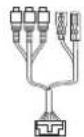
AV Input Connector AV Output Connector Power Connector
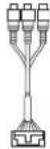
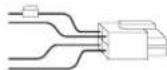
RUE-4159H Universal Remote Control
SHS-N106 Single Source Fold Flat Wireless Headphones
Installation Bracket

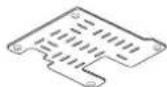
X2
Trim Ring
Screws (for Installation Bracket)
Screws (for Trim Ring)
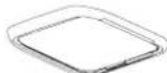
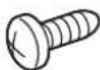

X4X5
AAA Batteries
Optional FM Switching Box
Quick Start Guide, Installation Manual, Registration Card
HDMI/USB Cover Plate

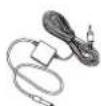
nual, registration
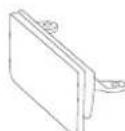
X6
Transmitter: nna Wire
Optional KCU-315UH HDMI/USB Extension Connector
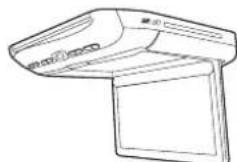
TMX-R3300HDMI Overhead Monitor
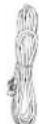
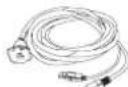
Sold Separately
Top interchangeable cover
Right side interchangeable cover
Left side interchangable cover
Rear interchangeable cover
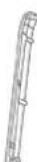
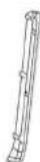

X3X3X3X3
(Color of Interchangeable cover: high gloss gun metal black, high gloss bright gray, high gloss champagne gold)
Specifications
Video Display System NTSC/PAL Compatibility
DISPLAY SCREEN
Size 10.1"
Width 221mm (8.70")
Height 132mm (5.20")
Aspect Ratio 16:9
Type Transparent type TN Liquid Crystal Display
System TFT-LCD, Active Matrix
Number of Elements 1024(W) x 600(H) x 3 1.84M Pixels (WSVGA)
Effective Number of 99.9% or more
Elements
Back Light LED
GENERAL
Operating Voltage 10-16 V DC (Typical: 12V)
Power Consumption 2.35A (MAX)
1.60A (TYP)
140mA (Stand by)
Video Input
1.0V p-p 75ohm
Audio Input
2.0V rms (max)
IR Transmitter
CH A:2.3MHz/2.8MHz
CH B:3.2 MHz/3.8MHz
FM Modulator
88.1MHz - 92.1MHz
PLL Frequency
Synthesizer
Operating Temperature
14°F to +158°F (-10°C)
to +70^
MONITOR
Width 290 mm (11.42")
Depth
290 mm (11.42")
Height (LCD Panel Closed)
45 mm (1.7")
Height (LCD Panel Open)
204.2 mm (8.04")
Weight
2.270 Kg (5.0lbs)
DOLBY DIGITAL
Manufactured under license from Dolby Laboratories. Dolby and the double-D symbol are trademarks of Dolby Laboratories.
The terms HDMI and HDMI High-Definition Multimedia Interface, and the HDMI Logo are trademarks or registered trademarks of HDMI Licensing, LLC in the United States and other countries.
This product incorporates copyright protection technology that is protected by U.S. patents and other intellectual property rights. Use of this copyright protection technology must be authorized by Rovi Corporation, and is intended for home and other limited viewing uses only unless otherwise authorized by Rovi Corporation. Reverse engineering and disassembly are prohibited.
AdVERTENCIA

ADVERTENCIA
CANAL A:2.3 MHz/2.8 MHz
CANAL B:3.2 MHz/3.8 MHz
Manufactured under license from Dolby Laboratories. Dolby and the double-D symbol are trademarks of Dolby Laboratories.
Plaque of couverture HDMI/USB

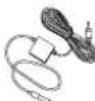
X6
Entree audio 2,0 V rms (max)
Emetteur infrarouge
Canal A:2,3 MHz/2,8 MHz
Canal B:3,2 MHz/3,8 MHz
Poids 2,270 kg (5,0 lb)
DOLBY DIGITAL
Manufactured under license from Dolby Laboratories. Dolby and the double-D symbol are trademarks of Dolby Laboratories.
ALPINE ELECTRONICS OF AMERICA, INC. ("Alpine"), is dedicated to quality craftsmanship and is pleased to offer this Warranty. We suggest that you read it thoroughly. Should you have any questions, please contact your Dealer or contact Alpine at one of the telephone numbers listed below.
PRODUCTS COVERED:
This Warranty covers Car Audio Products and Related Accessories ("the product"). Products purchased in the Canada are covered only in the Canada. Products purchased in the U.S.A. are covered only in the U.S.A.
- LENGTH OF WARRANTY:
This Warranty is in effect for one year from the date of the first consumer purchase.
WHOIS COVERED:
This Warranty only covers the original purchaser of the product, who must reside in the United States, Puerto Rico or Canada.
WHAT IS COVERED:
This Warranty covers defects in materials or workmanship (parts and labor) in the product.
WHAT IS NOT COVERED:
This Warranty does not cover the following:
① Damage occurring during shipment of the product to Alpine for repair (claims must be presented to the carrier).
② Damage caused by accident or abuse, including burned voice coils caused by over-driving the speaker (amplifier level is turned up and driven into distortion or clipping). Speaker mechanical failure (e.g. punctures, tears or rips). Cracked or damaged LCD panels. Dropped or damaged hard drives.
③ Damage caused by negligence, misuse, improper operation or failure to follow instructions contained in the Owner's manual.
④ Damage caused by act of God, including without limitation, earthquake, fire, flood, storms or other acts of nature. Any cost or expense related to the removal or reinstallation of the product.
⑤ Service performed by an unauthorized person, company or association.
Any product which has the serial number defaced, altered or removed.
⑦ Any product which has been adjusted, altered or modified without Alpine's consent.
Any product not distributed by Alpine within the United States, Puerto Rico or Canada.
Any product not purchased from an Authorized Alpine Dealer.
HOW TO OBTAIN WARRANTY SERVICE:
You are responsible for delivery of the product to an Authorized Alpine Service Center or Alpine for repair and for payment of any initial shipping charges. Alpine will, at its option, repair or replace the product with a new or reconditioned product without charge. If the repairs are covered by the warranty, and if the product was shipped to an Authorized Alpine Service Center or Alpine, Alpine will pay the return shipping charges.
You should provide a detailed description of the problem(s) for which service is required.
③ You must supply proof of your purchase of the product.
You must package the product securely to avoid damage during shipment. To prevent lost packages it is recommended to use a carrier that provides a tracking service.
HOW WE LIMIT IMPLIED WARRANTY:
ANY IMPLIED WARRANTY INCLUDES FITNESS FOR USE AND MERCHANTABILITY ARE LIMITED IN DURATION TO THE PERIOD OF THE EXPRESS WARRANTY SET FORTH ABOVE AND NO PERSON IS AUTHORIZED TO ASSUME FOR ALPINE ANY OTHER LIABILITY IN CONNECTION WITH THE SALE OF THE PRODUCT.
HOW WE EXCLUDE CERTAIN DAMAGES:
ALPINE EXPRESSLY DISCLAIMS LIABILITY FOR INCIDENTAL AND CONSEQUENTIAL DAMAGES CAUSED BY THE PRODUCT. THE TERM "INCIDENTAL DAMAGES" REFERS TO EXPENSES OF TRANSPORTING THE PRODUCT TO THE ALPINE SERVICE CENTER, LOSS OF THE ORIGINAL PURCHASER'S TIME, LOSS OF THE USE OF THE PRODUCT, BUS FARES, CAR RENTALS OR OTHERS COSTS RELATING TO THE CARE AND CUSTODY OF THE PRODUCT. THE TERM "CONSEQUENTIAL DAMAGES" REFERS TO THE COST OF REPAIRING OR REPLACING OTHER PROPERTY WHICH IS DAMAGED WHEN THIS PRODUCT DOES NOT WORK PROPERLY. THE REMEDIES PROVIDED UNDER THIS WARRANTY ARE EXCLUSIVE AND IN LIEU OF ALL OTHERS.
HOW STATE/PROVINCIAL LAW RELATES TO THE WARRANTY:
This Warranty gives you specific legal rights, and you may also have other rights which vary from state to state and province to province. In addition, some states/provinces do not allow limitations on how long an implied warranty lasts, and some do not allow the exclusion or limitation of incidental or consequential damages. Accordingly, limitations as to these matters contained herein may not apply to you.
IN CANADA ONLY:
This Warranty is not valid unless your Alpine car audio product has been installed in your vehicle by an Authorized Installation Center, and this warranty stamped upon installation by the installation center.
HOW TO CONTACT CUSTOMER SERVICE:
Should the product require service, please call the following number for your nearest Authorized Alpine Service Center.
CAR AUDIO 1-800-ALPINE-1 (1-800-257-4631)
NAVIGATION 1-888-NAV-HELP (1-888-628-4357)
Or visit our website at; http://www.alpine-usa.com
ALPINE
GARANTIE LIMITÉE
PRODUITS COUVERTS PAR LA GARANTIE
EXCLUSIONS DE LA GARANTIE
ALPINE STIPULE EXPRESSEMENT QU'ELLE N'EST PAS RESPONSABLE DES DOMMAGES-INTERETS ET DOMMAGES INDIRECTS PROVOQUES PAR LE PRODUIT. LES DOMMAGES-INTERETS SONT LES FRAIS DE TRANSPORT DU PRODUIT VERS UN CENTRE DE SERVICE ALPINE, LA PERTE DE TEMPS DE L'ACHETEUR ORIGINAL, LA PERTE D'UTILISATION DU PRODUIT, LES BILLETS D'AUTOBUS, LA LOCATION DE VOITURES ET TOUS LES AUTRES FRAIS LIÉS À LA GARDE DU PRODUIT. LES DOMMAGES INDIRECTS SONT LES FRAIS DE RÉPARATION OU DE REMPLACEMENT D'AUTRES BIENS ENDOMMAGES SUITE AU MAUVAI SFUNCTIONNEMENT DU PRODUIT. LES RECOURS PRÉVUS PAR LES PRESENTES EXCLUENT ET REMPLACENT TOUTE AUTRE FORME DE RECOURS.