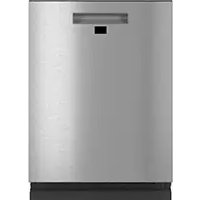
CDT875M5NS5 - Dishwasher GE - Free user manual and instructions
Find the device manual for free CDT875M5NS5 GE in PDF.



User questions about CDT875M5NS5 GE
0 question about this device. Answer the ones you know or ask your own.
Ask a new question about this device
Download the instructions for your Dishwasher in PDF format for free! Find your manual CDT875M5NS5 - GE and take your electronic device back in hand. On this page are published all the documents necessary for the use of your device. CDT875M5NS5 by GE.
USER MANUAL CDT875M5NS5 GE
Models: CDT706 Series, CDT800-855 Series & CDT836-875 Series
Contents
Safety Information 4
Care and Cleaning. 20
Using the Dishwasher
Troubleshooting Tips 22
Getting Started 6
Limited Warranty 25
Dispensers 10
Consumer Support 26
Appliance Communication 12
Loading 13
Write the model and serial numbers here:
Model #
Serial #
You can find them on a label on the tub wall just inside the door.
THANK YOU FOR MAKING CAFÉ A PART OF YOUR HOME.
We take pride in the craftsmanship, innovation and design that goes into every Café product, and we think you will too. Among other things, registration of your appliance ensures that we can deliver important product information and warranty details when you need them.
Register your Café appliance now online. Helpful websites are available in the Consumer Support section of this Owner's Manual. You may also mail in the pre-printed registration card included in the packing material.
CAFÉ
DISTINCT BY DESIGN
IMPORTANT SAFETY INFORMATION READ ALL INSTRUCTIONS BEFORE USING THE APPLIANCE
WARNING For your safety, the information in this manual must be followed to minimize the risk of fire, explosion, electric shock, and to prevent property damage, personal injury, or death.
WARNING PROPER INSTALLATION AND MAINTENANCE
This dishwasher must be properly installed and located in accordance with the Installation Instructions before it is used. If you did not receive an Installation Instructions sheet with your dishwasher, you can receive one by visiting our website at cafeappliances.com. In Canada, visit cafeappliances.ca.
- Connect the dishwasher/appliance to a grounded metal, permanent wiring system; or run an equipment-grounding conductor with the circuit conductors and connect to the equipment-grounding terminal or lead of the appliance.
- Improper connection of the equipment-grounding conductor can result in a risk of electric shock. Check with a qualified electrician or service representative if you are in doubt whether the appliance is properly grounded.
-
Dispose of discarded appliances and shipping or packing material properly.
-
Do not attempt to repair or replace any part of your dishwasher unless it is specifically recommended in this manual. All other servicing should be referred to a qualified technician.
Use only cord kit WX09X70910 or hard-wire to building electrical. Failure to follow this instruction, could result in risk of fire and personal injury.
To minimize the possibility of electric shock, disconnect this appliance from the power supply before attempting any maintenance.
NOTE: Turning the dishwasher off does not disconnect the appliance from the power supply. We recommend having a qualified technician service your appliance.
WARNING WHEN USING YOUR DISHWAS INCLUDING THE FOLLOWING:
Use this appliance only for its intended purpose as described in this Owner's Manual.
Use only detergents or wetting agents recommended for use in a dishwasher and keep them out of reach of children. Using a detergent that is not specifically designed for dishwashers will cause the dishwasher to fill with suds.
- Locate sharp items so that they are not likely to damage the door seal.
- Load sharp knives with the handles up to reduce the risk of cut-type injuries.
- Do not wash plastic items unless marked dishwasher safe or the equivalent. For plastic items not so marked, check the manufacturer's recommendations.
- Do not touch the heating element during or immediately after use.
Detailed grounding instructions can be found in the "PREPARE ELECTRICAL WIRING" section of the Installation Instructions.
Do not operate your dishwasher unless all enclosure panels are properly in place.
Do not tamper with controls.
- Do not abuse, sit on or stand on the door or dish rack of the dishwasher.
To reduce the risk of injury, do not allow children to play with, on or inside this appliance at any time.
- Do not store or use combustible materials including gasoline or other flammable liquids or vapors in the vicinity of this or any other appliance.
Small parts, such as rack clips and filter retaining posts, can be a choke hazard to small children if removed from the dishwasher. Keep out of reach of small children.
READ AND SAVE THESE INSTRUCTIONS
IMPORTANT SAFETY INFORMATION READ ALL INSTRUCTIONS BEFORE USING THE APPLIANCE
WARNING WATER HEATER SAFETY
Under certain conditions, hydrogen gas may be produced in a water heater that has not been used for two or more weeks. HYDROGEN GAS IS EXPLOSIVE.
If the hot water has not been used for two or more weeks, prevent the possibility of damage or injury by turning on all hot water faucets and allowing them to run for several minutes. Do this before using any electrical appliance connected to the hot water system. This simple procedure will allow any built-up hydrogen gas to escape. Since the gas is flammable, do not smoke, use an open flame, or use the appliance during this process.
WARNING RISK OF CHILD ENTRAPMENT
PROPER DISPOSAL OF THE DISHWASHER
Junked or abandoned dishwashers are dangerous...even if they will sit for "just a few days." If you are getting rid of your dishwasher, please follow the instructions below to help prevent accidents.
Do not allow children to play with, on, or inside this or any discarded appliance.
Take off the door of the washing compartment.
CAUTION TO PREVENT MINOR INJURY AND PROPERTY DAMAGE
During or after wash cycle, contents may be hot to the touch. Use care before handling.
- Close supervision is necessary if this appliance is used by or near children. Do not allow children to play around the dishwasher when closing the door, closing the upper rack, or while vertically adjusting the upper rack due to the possibility of small fingers being pinched.
Non-Dishware Items: Do not wash items such as electronic air cleaner filters, furnace filters and paint brushes in your dishwasher. Damage to the dishwasher and discoloration or staining of the dishwasher may result.
- Load light-weight, plastic items so they do not become dislodged and drop to the bottom of the dishwasher—they might come into contact with the heating element and be damaged.
CAUTION ELECTRICALREQUIREMENTS
Be sure that the electrical connection and wire size are adequate and in conformance with the National Electric Code, ANSI/NFPA 70 - latest edition, and all local codes and ordinances.
This appliance must have:
120V, 60Hz, AC-only, 15-ampere or 20-ampere, fused electrical supply.
Wiring must be 2 wire with ground and rated for 75^ (167^)
If the electrical supply does not meet the above requirements, call a licensed electrician before proceeding.
It is recommended to have:
A circuit breaker or time-delay fuse.
A properly grounded individual branch circuit.
NOTICE
If your dishwasher is connected to a wall switch, ensure that the switch is on prior to use.
If you choose to turn the wall switch off between wash cycles, allow 5-10 seconds after turning the switch on before touching Start to allow the control to initialize.
Use only powder, FinishQuantumAutomatic Dishwashing Detergent, liquid detergents or rinse agents recommended for use in a dishwasher and keep them out of the reach of children. Finish Quantum Automatic Dishwashing Detergent, and Finish Jet-Dry Rinse Aid rinse agents have been approved for use in all GE Appliances dishwashers.
READ AND SAVE THESE INSTRUCTIONS
Getting started
Features and appearance will vary throughout this manual
CDT706 and CDT836 Series

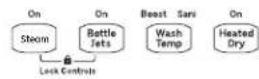
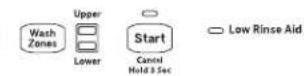
CDT866 Series


CDT805 and CDT845 Series
Clean Sanitized LowRinseAid
Aulo Pots Normal China Express
Delay
CDT800 Series
Clean Sanitized
uto 1
Normal
China Express
Delay
Prosoak+ Hi-Temp Sanitize Wash Lock Controls Hold 3 Sec
Utra Normal 0f
Start Cancel Hold 3 Sec
CDT855 and CDT875 Series
WIFI Clean Sanitized Low Blood Aid
Auto
Normal
China Express
Delay
Presoak + Hi-Temp Sanitize Wash Lock Control Hold 3 Sec
Upper Lower Wash Zones
DUAL CONVECTIONBottles Ultra Dry Normal OffCancel Hold 3 sec
Leak Protection (on some models)
If a leak is detected, the dishwasher will drain and the cycle will stop. The display will show "LEAK DETECTED". Contact Café for service.
1 Load Dishwasher
For best dishwashing results, follow the loading guidelines found in the Loading section. No pre-rinsing of normal food soil is required. Scrape off hard soils, including bones, toothpicks, skins, and seeds. Remove leafy vegetables, meat trimmings, and excessive amounts of grease or oil.
2 Add Detergent
Add needed amount of detergent to the detergent dispenser. Use detergent such as Finish® Quantum® Automatic Dishwashing Detergent. See Dispensers section.
3 Add Rinse Agent
Add rinse agent such as Finish® Jet-Dry® Rinse Aid to the rinse agent dispenser. See Dispensers section.
4 Select Cycle
Press the furthest most pad on the left (on some models) for the desired wash cycle. On some models, the light next to the furthest most pad on the left (on some models) will be on to indicate which wash cycle has been selected. On other models, pressing the Select Cycle pad will show various cycles in the display window. Press the pad until the desired cycle is shown.
NOTE: Actual cycle times vary based on soil level, water temperature, and options selected.
The cycle may be selected with the door in the open position. The cycle will not start until the Start pad is pushed and the door is closed within 4 seconds.
| AutoSense/ Auto | This cycle automatically senses the soil level and adjusts the wash cycle accordingly. *Time range: 1 hour 50 minutes - 2 hours 10 minutes. |
| Heavy/ Pots | This cycle is meant for heavily soiled dishes, cookware, pots, or pans with dried-on or baked-on soils. Everyday dishes are safe to be used in this cycle. *Time: 2 hours 31 minutes. |
| Normal | This cycle is meant for daily, regular, or typical use to completely wash a full load of normally soiled dishes and is designed to conserve both water and energy. *Time range: 1 hour 15 minutes - 1 hour 50 minutes. NOTE: Normal was used to rate the energy efficiency of this dishwasher. |
| Light/ China | This cycle is for light to medium soiled dishes. It is safe for china and crystal with no options selected. *Time: 55 minutes. |
| Rinse (on some models) | For rinsing partial loads that will be washed later. Do not use detergent. Detergent is not dispensed during the rinse cycle. *Time: 16 minutes. |
| Express (on some models) | This cycle was designed to wash loosely soiled dishes in 1 hour. Heated dry will add 65-105 minutes. For better drying, select Heated Dry/Dry or Ultra Dry. This will raise the final rinse temperature and extend the dry time. When the Clean light comes on, open the door, pull the racks out, and the dishes will "flash" dry in approximately five minutes. |
| eWash (on some models) | This cycle will efficiently wash dishes using about 2 gallons of water and .8 KWhr. Selecting Ultra Dry with this cycle adds an energy efficient 50 to 90 minute dry period. Drying is accomplished with an efficient 2 watt fan. *Time: 1 hour 3 minutes. |
*Washing time only. Does not include drying time, Auto Hot Start, or options. NOTE: If the incoming water temperature is too low, the Auto Hot Start feature may add up to 11 minutes of additional time.
Getting Started
5 Select Options
The light by the selected pad will be lit to indicate which Option has been selected.
Normal This option is for normally soiled dishes, optimizes wash performance while conserving energy. Temp
Wash This option increases the temperature to help clean heavily soiled dishes and will increase the Temp cycle time by 20 to 50 minutes. Option may be turned On or Off during the wash cycle. This Boost/ option will also improve dry performance on the Normal cycle.
Boost
Temp/
Hi-Temp
Wash
Wash This option raises the water temperature in the final rinse to sanitize your dishware but may increase cycle time by 60 minutes. The cycle length will vary depending on the temperature of your inlet water.
NOTE: This option is monitored for sanitization requirements. If the cycle is interrupted during or after the main wash portion or if the incoming water temperature is so low that adequate water heating cannot be achieved, the sanitizing conditions may not be met. In these cases, the Sanitized or Cycle Sanitized light will not illuminate at the end of the cycle. Utilizing this option will modify the cycle to meet the requirements of Section 6, NSF 184 for soil removal and sanitization efficacy.
NOTE: NSF certified residential dishwashers are not intended for licensed food establishments.
Heated Dry/Dry Off - Shut off the drying option. Dishes air dry naturally and energy is saved. Open the dishwasher door to speed drying.
On/Normal -Turns on the option for faster drying. This option may extend the time to your wash cycle up to 85 minutes. This option is not available with the Rinse/Express cycle.
Ultra (on some models) -This option can be selected by pressing the Heated Dry/Dry pad twice to illuminate the Ultra light. It will add additional time to your drying option, further enhancing the dishwasher's performance for difficult to dry items.
Steam For use with heavily soiled and/or dried-on, baked-on soils. This option MUST be selected (Prewash) PRIOR to starting the cycle. The Steam option adds up to 30 minutes to the cycle time. This option is available with Heavy/Pots, AutoSense/Auto, and Normal cycles.
Pre Soak Use this option to improve wash performance with heavy or dried-on soils. This option is available on Heavy/Pots, AutoSense/Auto, and Normal cycles and may add up to 30 minutes models) to the cycle time.
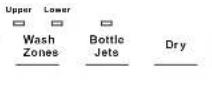
Wash Selecting either the Upper or Lower Wash Zones will target dishwashing of just one rack. This Zones will shorten the cycle time and conserve energy. This option should be used when dishes are placed in only one rack. (on some models)
Bottle Jets This option increases the time that the bottle jets are on and may add up to 23 minutes to the cycle time. Use this to wash difficult to clean, dishwasher safe baby bottles, sport bottles, tall models) coffee cups, etc. See use recommendations in the Loading section.
Delay Delays the start of a wash cycle up to 8 to 12 hours depending on model. Press Delay Hours/
Hours/ Delay, to select the number of hours, then press Start one time and close door to begin
Delay countdown. The cycle will start once allotted time has expired.
Control You can lock the controls to prevent selections from being made. You can also lock the Lock controls after you have started a cycle to prevent cycle changes. For example, children cannot accidentally start the dishwasher by pressing pads with this option selected.
To LOCK the dishwasher control, depending on the model, press and hold the 1 or 2 pads indicated on the controls for 3 seconds. On some models, it will be the Heated Dry/Dry, another the Steam and Wash Temp pads, another the Wash Temp Sani/Presoak+Sani pad, and another model is the Pre-Soak and Bottle Jets pads. The Control Lock light will turn on to indicate the control is locked.
To UNLOCK the dishwasher control, depending on the model, press and hold the 1 or 2 pads indicated on the controls for 3 seconds. The Control Lock light will turn off to indicate the control is unlocked.
Getting Started

Start Dishwasher
| Start | Press the Start pad and close the door within 4 seconds to start the cycle or begin the Delay Hours/Delay countdown. The wash cycle will begin shortly after closing the door. The display will turn off if the door remains open for two minutes. To activate the display, close and open the door or press any pad. |
| Interrupt or Pause | To interrupt or pause a dish cycle, slowly open the door. Opening the door will cause the wash cycle to pause. The dishwasher will beep every minute to remind you to close the door. To restart or resume the cycle, press Start, and close the door within 4 seconds. |
| Cancel | To cancel a wash cycle, press and hold the Start pad for 3 seconds and close door. The dishwasher will drain, emit a beep sound, and the wash cycle light will turn OFF. |

Cycle Indicator Lights and Sounds
| Sanitized or Cycle Sanitized | Displayed at end of the cycle when Wash Temp Sani/Sanitize Temp/Presoak+Sani has been selected and dishwasher has met requirements for sanitization. See Wash Temp Sani/Sanitize Temp/Presoak+Sani, for complete description. Closing door or pressing any pad will turn off light. |
| Clean or Cycle Complete | Displayed when a wash cycle is complete. The light stays ON as a reminder that the dishes are clean. The light will turn off when the door is opened. |
| Low Rinse Aid (on some models) | Displayed when rinse agent is low or empty. See Use a Rinse Agent section. To turn indicator off, press the Pre-Soak or Steam pad 7 times within 5 seconds. Repeat this process to turn the Low Rinse Aid indicator back on. |
| Cycle Status (on some models) | The indicator light on the door front will change color to indicate the wash status. During the wash cycle, the indicator light will be amber or white depending on the model. When the wash cycle is complete, the light will change to green. |
| Sounds | The dishwasher will emit a sound to indicate cycle completion, pad presses, and door ajar. To mute all sounds, press the Heated Dry/Dry or Ultra Dry pad 7 times within 5 seconds. Repeat this process to turn sounds back on. |
| Mute | To turn the dishwasher control sounds ON/OFF, press the Heated Dry/Dry or Ultra Dry pad 7 times within 5 seconds. |
| Sabbath/Door Wake Up Mode (on some models) | To turn this option ON/OFF, press and hold the Start/AutoSense/Auto and Wash Temp/Hi Temp Wash/Wash Temp Boost pads for 5 seconds, close the door and wait 3 minutes for the dishwasher to go into sleep mode. In the OFF mode, the control display, control sounds, and interior lights (on some models) will not respond to the door opening/closing. This mode can be used when observing certain religious holidays such as the Sabbath. To activate the control and interior lights (on some models), press any pad. |
Dispensers
Check the Water Temperature
The entering water should be at least 120^ (49^) and not more than 150^ (66^) for effective cleaning and to prevent dish damage. Check the water temperature with a candy or meat thermometer.
Turn on the hot water faucet nearest the dishwasher, place the thermometer in a glass and let the water run continuously into the glass until the temperature stops rising.
Use a Rinse Agent
Rinse agents, such as Finish® Jet-Dry® Rinse Aid are designed for great drying action and to protect against spots and film build-up on your dishes, glasses, flatware, cookware, and plastic.
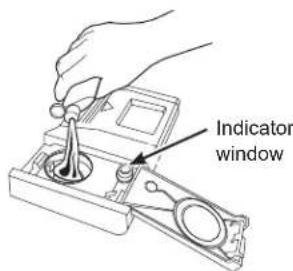
Filling the Rinse Agent Dispenser
The rinse agent dispenser holds 3.5 oz. (104 ml) of rinse agent. Under normal conditions, this will last approximately one month.
1 Make sure the dishwasher door is fully open.
2 Open the rinse agent dispenser door.
3 Slowly add rinse agent until the cup is full. You may need to pause several times to allow rinse aid to settle. NOTE: Indicator window does not light up.
4 Clean up any spilled rinse agent with a damp cloth to prevent foam from forming inside the dishwasher.
5 Close the rinse agent dispenser door.
Rinse Aid Setting
The amount of rinse agent released into the final wash can be adjusted. If water drops or hard water spots remain on dishes after the dry cycle, increase the setting.
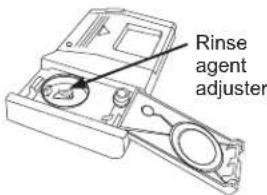
To adjust the setting
Open the Rinse Agent dispenser door; then turn the adjuster clockwise to increase the amount of rinse agent, counterclockwise to reduce the amount of rinse agent.
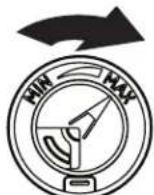
Clockwise to reduce water drops and hard water spots
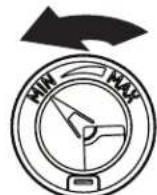
Counterclockwise to reduce foaming
Detergent Dispenser
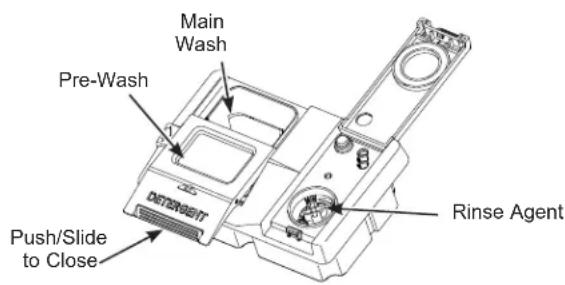
The detergent dispenser is located in the center of the dishwasher door. It has two compartments. The main wash compartment is found inside the detergent dispenser. To open, press the button on the side of the dispenser. The pre-wash compartment is on the lid of the detergent dispenser. Use the pre-wash compartment only when your water is extremely hard or when you have a heavy soiled load. The pre-wash compartment is not used when tablet or packet detergents are used.
NOTE: Do not load large items in the lower rack where they may block the wash jets from rinsing out the detergent dispenser.
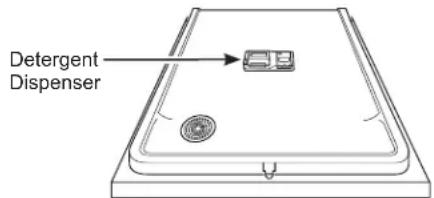
You may use tablet, packet, powder, liquid or gel automatic dishwasher detergent. Make sure you use only detergents specifically labeled for use in automatic dishwashers. Never use liquid hand dish detergent in an automatic dishwasher. Sudsing and poor wash performance will result with the use of improper detergents.
Detergents should be stored in a dry location and in their original container to prevent loss of effectiveness. Place detergent in the cup just prior to starting the dishwasher and then close the cover. The cover will open during the wash cycle.
Filling the Detergent Dispenser
Café recommends using detergent in tablet or packet form. Independent testing has shown this form of detergent is very effective in the dishwasher. Finish Quantum Powerball is an example of this type of detergent. Simply put a tablet or packet into the main wash compartment and close the detergent cup cover
Please notice that the tablet or packet must be placed in the main wash compartment of the detergent cup. If the tablet or packet is placed in the prewash compartment or tossed in the bottom of the dishwasher, the detergent will be flushed down the drain in a very short period of time and will thus be wasted. Wash performance will be very poor as a result.
If you choose to use detergent in powder, liquid or gel form, the amount of detergent you use will be determined by the hardness of your water, the temperature of your water, and the food soil load inside the dishwasher. Contact your water company to get information about the hardness of the water in your area. Water hardness is measured in grains per gallon. Use this information and the table above to determine the amount of detergent to use. You may purchase a hard water test strip from Café. Visit cafeappliances.com/parts for WD01X10295. In Canada, visit cafeappliances.ca/parts.
Use the table as a starting point and then adjust the amount of detergent you use. Use just enough to get good wash performance. Using just the right amount of detergent will provide great wash performance without wasting detergent or etching glassware.
| Number of Grains/Gal. | Detergent Cup(s) to Fill |
| Less than 4 Fill | cup to 1/3 full |
| 4 to 8 Fill cup | cup to 2/3 full |
| 8 to 12 Fill cup | cup completely full |
| Greater than 12 | Fill both main wash cup and pre wash cup |
Using too much detergent with very soft and/or very hot water may cause a condition called etching on your glassware. Etching is a permanent cloudiness in your glassware. This condition is irreversible. However, using too little detergent will cause poor wash performance.
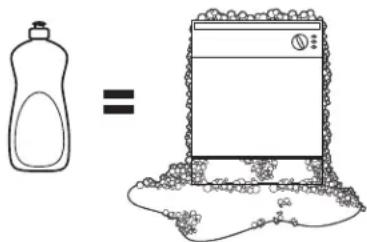
DO NOT USE HAND DISH DETERGENT
NOTE: Using a detergent that is not specifically designed for dishwashers will cause the dishwasher to fill with suds. During operation, these suds will spill out of the dishwasher vents, covering the kitchen floor and making the floor wet.
Because so many detergent containers look alike, store the dishwasher detergent in a separate space from all other cleaners. Show anyone who may use the dishwasher the correct detergent and where it is stored.
While there will be no lasting damage to the dishwasher, your dishes will not get clean using a dishwashing detergent that is not formulated for automatic dishwashers.
Appliance Communication
WiFi Connect
Your dishwasher is Café WiFi Connect capable. A WiFi communication card is built into the product allowing it to communicate with your smartphone for remote monitoring, control and notifications.
Please visit cafeappliances.com/connect to connect your appliance, learn more about connected appliance features and learn what connected appliance app's will work with your smartphone.
In Canada, visit cafeappliances.ca/connect.
This device complies with Part 15 of the FCC Rules. Operation is subject to the following two conditions:
- This device may not cause harmful interference, and
-
This device must accept any interference received, including interference that may cause undesired operation. This equipment has been tested and found to comply with the limits for a Class B digital device, pursuant to Part 15 of the FCC Rules. These limits are designed to provide reasonable protection against harmful interference in a residential installation. This equipment generates uses and can radiate radio frequency energy and, if not installed and used in accordance with the instructions, may cause harmful interference to radio communications. However, there is no guarantee that interference will not occur in a particular installation. If this equipment does cause harmful interference to radio or television reception, which can be determined by turning the equipment off and on, the user is encouraged to try to correct the interference by one or more of the following measures:
-
Reorient or relocate the receiving antenna.
- Increase the separation between the equipment and receiver.
- Connect the equipment into an outlet on a circuit different from that to which the receiver is connected.
- Consult the dealer or an experienced radio/television technician for help.
Labelling: Changes or modifications to this unit not expressly approved by the manufacturer could void the user's authority to operate the equipment.
Loading
For best dishwashing results, follow these loading guidelines. Features and appearance of racks and silverware baskets may vary from your model.
Upper Rack
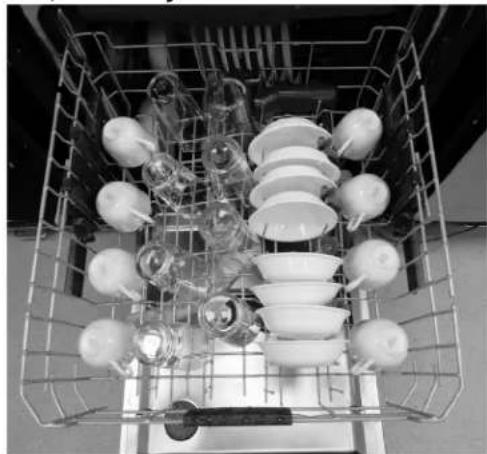
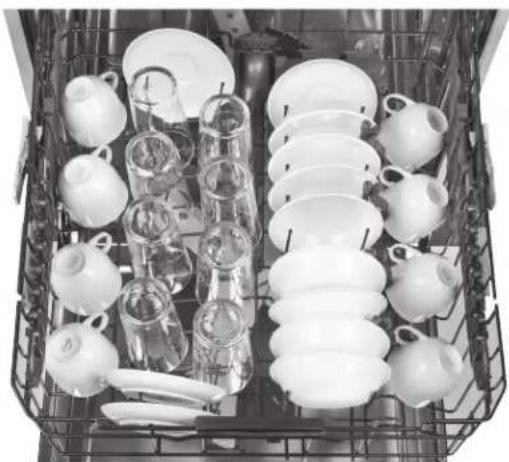
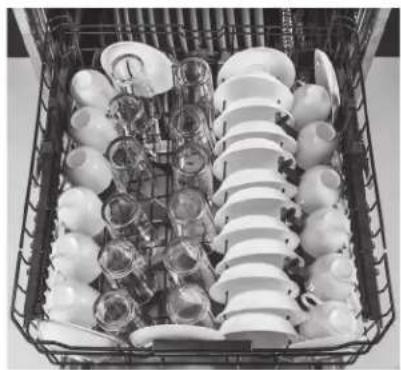
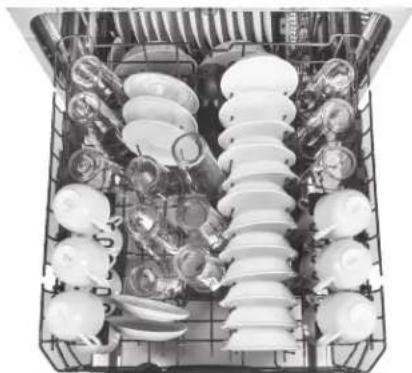
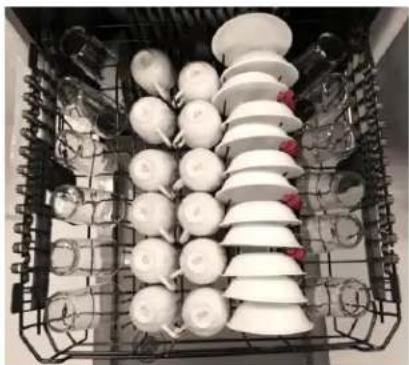
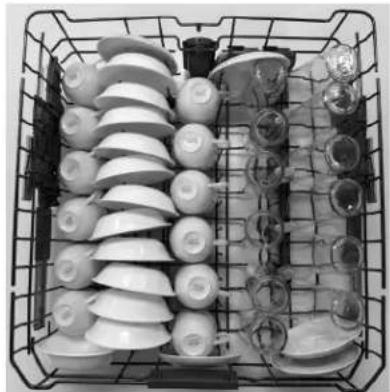
The upper rack is primarily for glasses, cups, and saucers. For best wash performance, tilt cup and glass openings toward the center of the rack. Other items such as pots, pans, and plates may be placed in the upper rack. This is also a secure place for dishwasher-safe plastic items. The upper rack can be used for odd sized utensils. Sauce pans, mixing bowls, and other similarly shaped items should be placed face down for best wash performance. Ensure small plastic items are secure so that they cannot fall on the heater at the bottom of the dishwasher, potentially damaging the item. Some models are equipped with a hidden heater, so dishwasher safe plastic items can be placed in the lower rack.
IMPORTANT: Ensure items in the upper rack do not interfere with the 3rd Rack (on some models) when loading and unloading.
IMPORTANT: Ensure that items do not protrude through the bottom of the rack or silverware basket where they will block the rotation of the middle spray arm. This could result in noise during operation and/or poor wash performance.
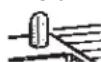
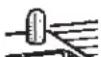
The Bottle Jets system (on some models) is the ideal location to position baby bottles, tall sports bottles, or other tall items with narrow openings. The Bottle Jets clips hold bottles with small openings in place so water jets are directed inside the bottles to clean hard to reach areas. Clips can be installed or removed by simply slipping the clip opening over the top of the nozzle.
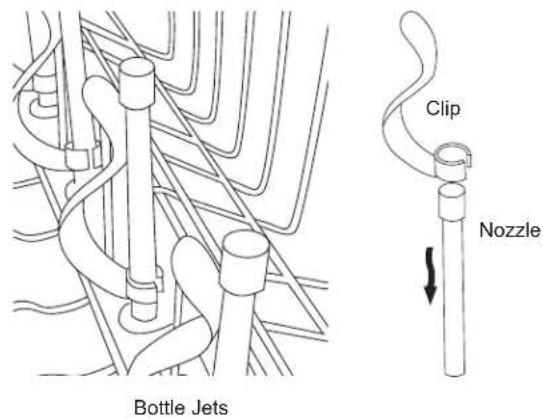
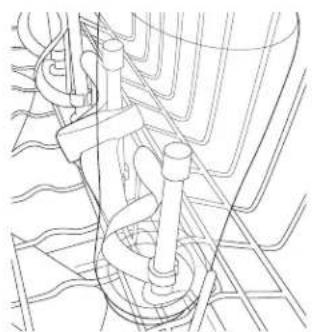
Sports bottle held in place over a Bottle Jets clip
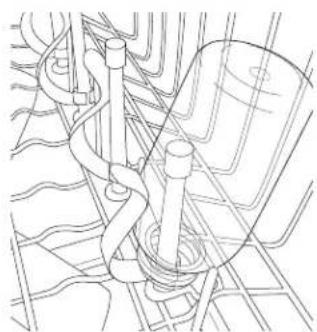
Baby bottle held in place under a Bottle Jets clip
Loading
CAUTION A loaded upper rack may be heavier than anticipated. To prevent minor injury or damage to the contents, do not raise or lower the upper rack after the rack is loaded.
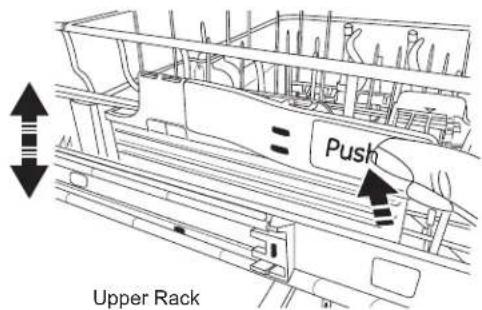
The upper rack allows 2" of adjustment up or down to accommodate large items. The upper rack may be lowered by pushing the long flaps on each side of the rack. This will allow you to lower the rack (see fig. Upper Rack). To raise the rack, lift up on the rack until the rack locks in place.
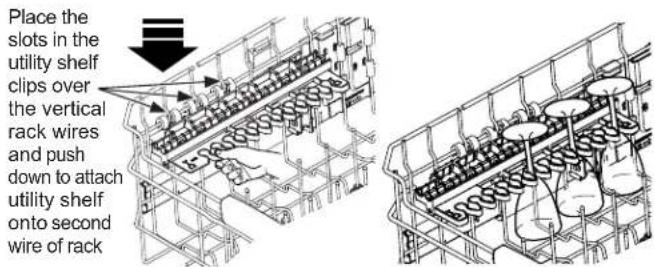
To add flexibility in loading, the stem safe shelf (on some models) may be placed in the up or down position or unfolded and placed in the lower unfolded position.
The shelf may also be used to secure stemware such as wine glasses. Because these stemware items come in various sizes, slowly push the rack in to ensure the items do not bump into the edges of the dishwasher, which may cause damage to the items.
The fold down tines (on some models) provide flexibility for extra-large and hard-to-fit items. The tine rows can be adjusted to a vertical or lay-down position.

For best dishwashing results, follow these loading guidelines. Features and appearance of racks and silverware baskets may vary from your model.
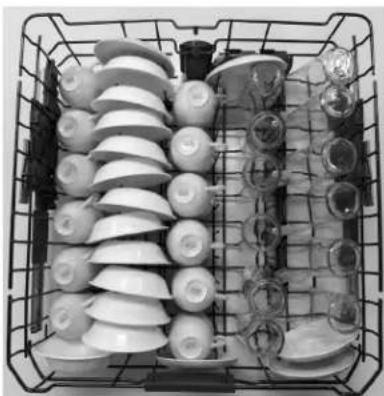
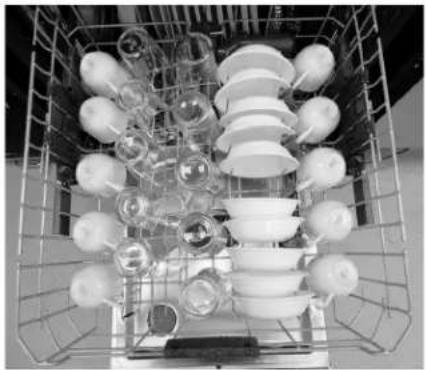
8 Place Settings - Upper Rack
Models - CDT706, CDT800, CDT805, CDT845, CDT855, CDT866 and CDT875 Series
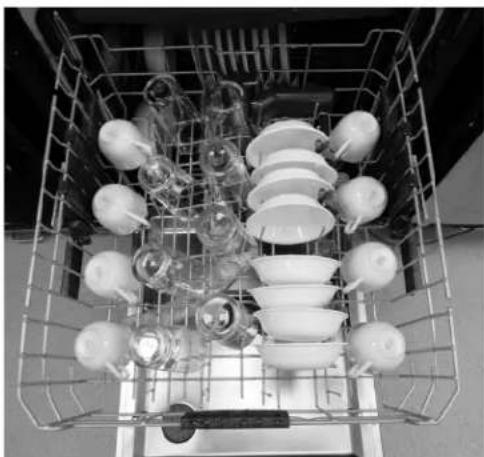
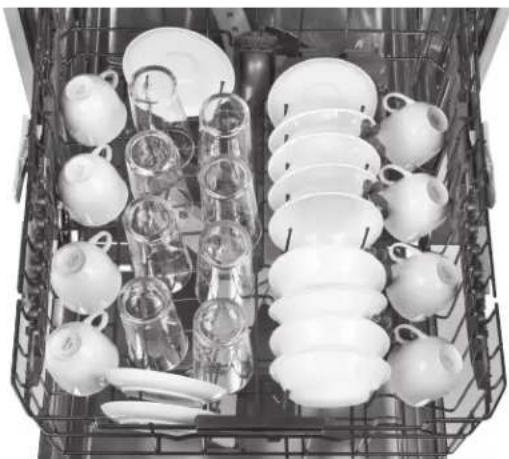
Model - CDT836 Series
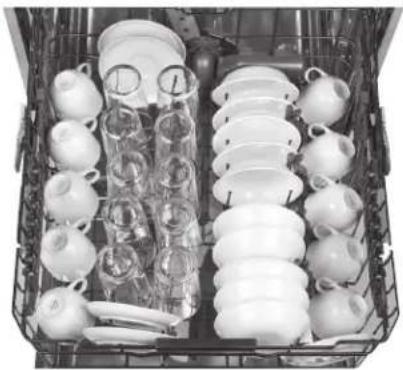
10 Place Settings - Upper Rack
Model - CDT706, CDT800, CDT805, CDT845, CDT855 and CDT875 Series
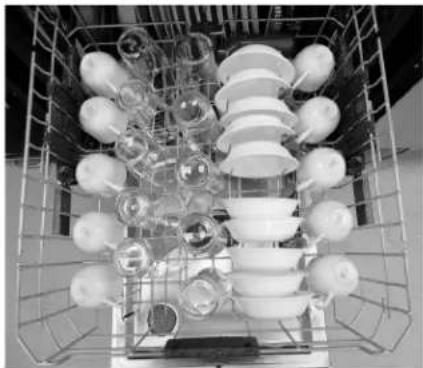
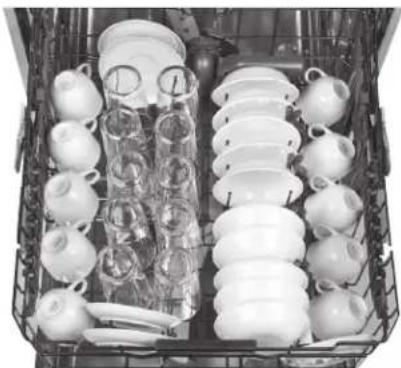
Model - CDT836 Series
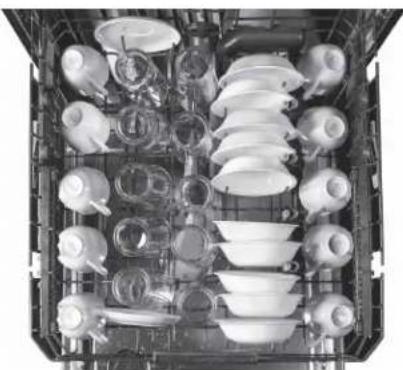
Model - CDT866 Series
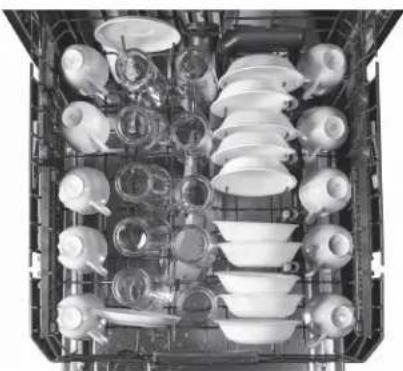
12 Place Settings - Upper Rack
Model - CDT706, CDT805, CDT845 and CDT866 Series
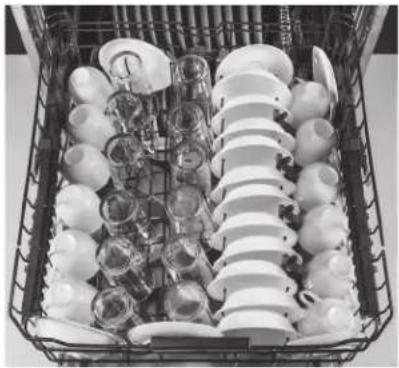
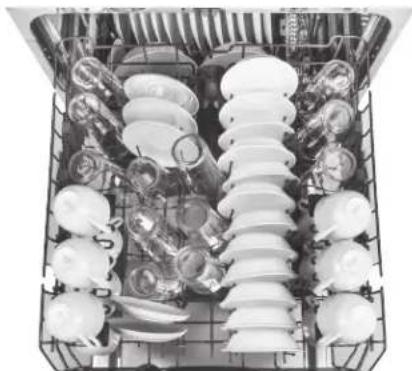
Model - CDT836 Series
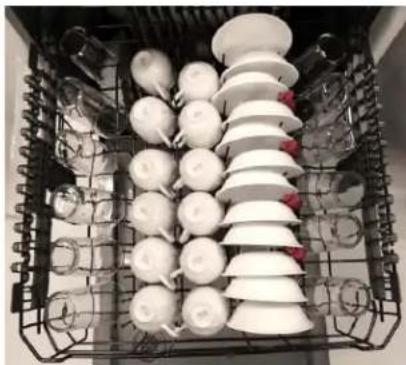
Model - CDT800 and CDT855 Series
Model - CDT875 Series
Loading
For best dishwashing results, follow these loading guidelines. Features and appearance of racks and silverware baskets may vary from your model.
Lower Rack
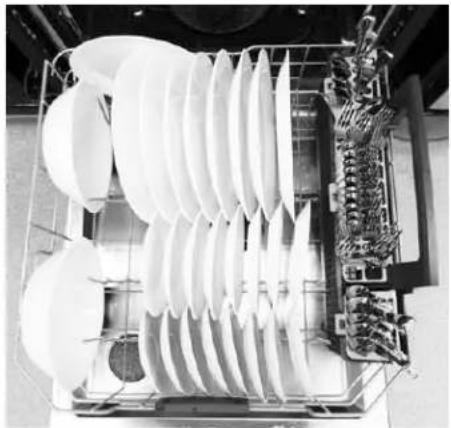
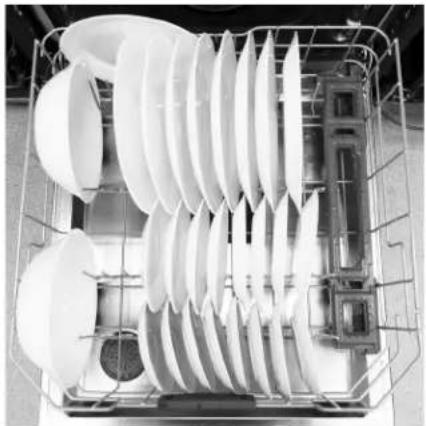
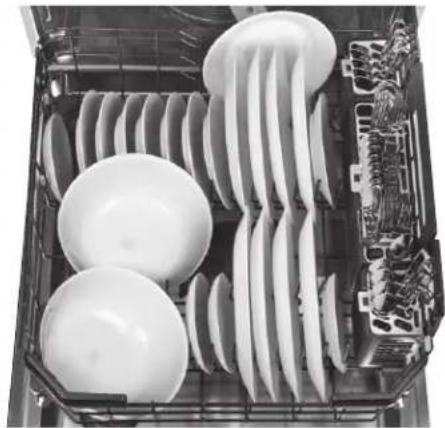
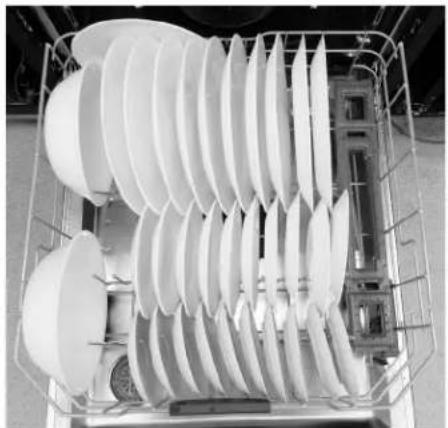
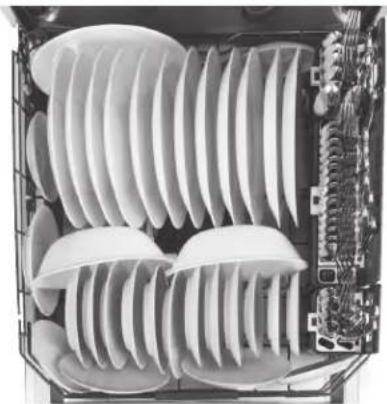
The lower rack is best used for plates, saucers and cookware items. Large items, such as broiler pans and baking racks should be placed along the sides of the rack. If necessary, oversized glasses and mugs can be placed in the lower rack to maximize loading flexibility. Plates, saucers and similar items should be placed between the tines in the direction that allows the item to remain secure in the rack.
NOTE: Do not load large items in the lower rack where they may block the wash jets from rinsing out the detergent dispenser.
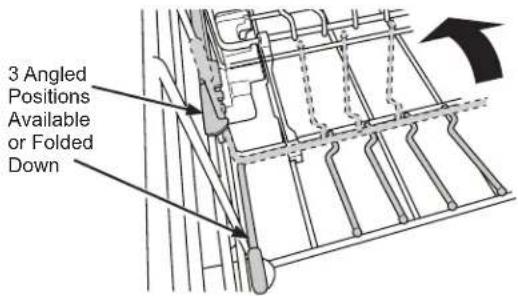
The lower rack fold down tines (on some models) can
be adjusted to different upright angles or placed flat to provide flexibility for hard-to-fit or extra-large items.
The reversible tine blocks (on some models) are designed to allow greater flexibility in loading dishes. The direction of the tine blocks can be changed to match your preferred loading direction as shown in Figure A or Figure B:

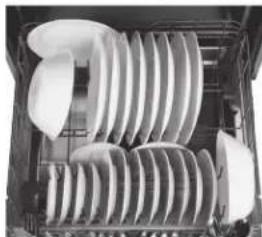
Figure A Figure B
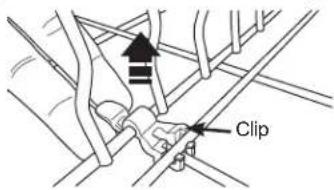
To adjust the tine block direction, remove the clips securing the tine blocks to the racks by pulling up on the tab, then gently flex the retaining wire from the center to unseat the tine block from the lower rack. The tine block may be turned in the opposite direction to reverse loading direction. Secure the tine block to the rack using the same process and be sure to snap the clips back in place.
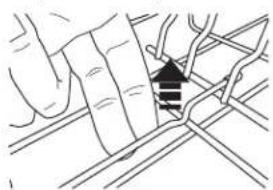
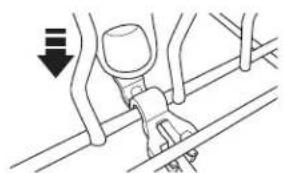
WARNING
The clips can be a choke hazard for small children if removed from Keep out of reach of children.
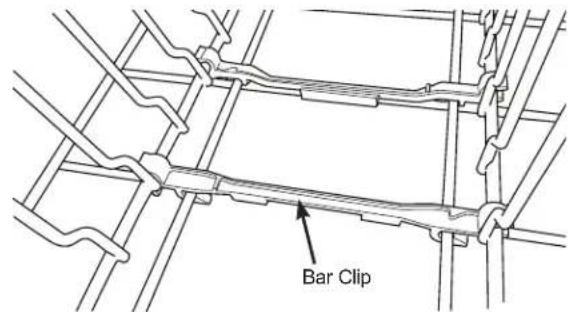
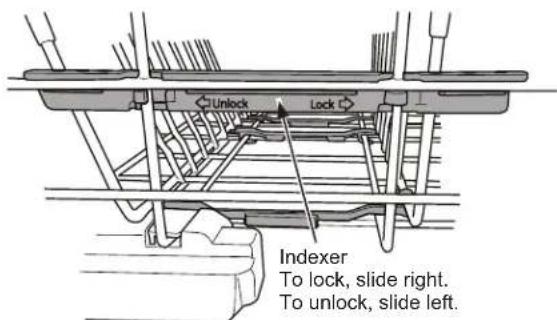
To change the direction of the fold down tines, lower the tines, then pull away from the bar clips that secure the tines to the rack and remove. Reverse the direction of the tines, orienting the handle on the opposite side of the rack. Reattach the tines to the bar clips by pushing the tines back until they click in place. The indexer will also need to be switched to the opposite side of the dishwasher. To remove the indexer, simply slide it the in the direction labeled "unlock." Then, align the indexer with the rack on the other side and slide in the direction that says "lock" in order to reattach the indexer to the rack.
IMPORTANT: It is important to ensure that items do not protrude through the bottom of the rack or the silverware basket where they will block the rotation of the lower spray arm. Also, ensure that large plates, pots, or tall items don't hit the mid spray arm. This could result in noise during operation and/or poor wash performance.
Loading
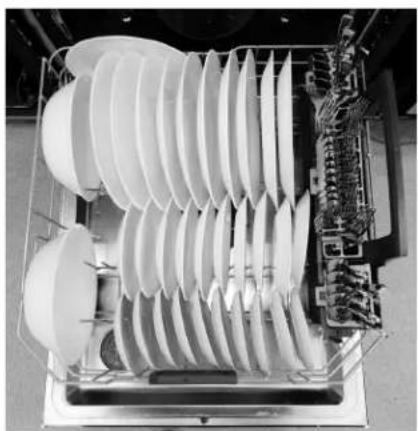
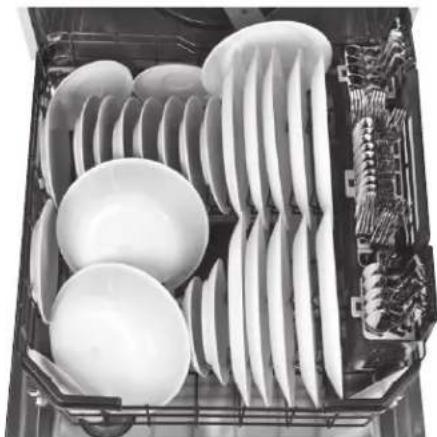
8 Place Settings - Lower Rack
Model - CDT706, CDT800, CDT855 and CDT866 Series
Model - CDT805, CDT845 and CDT875 Series
Model - CDT836 Series
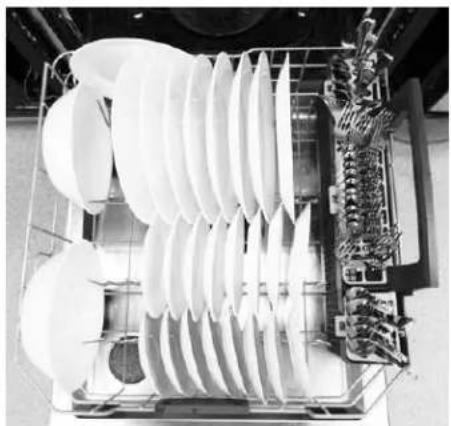
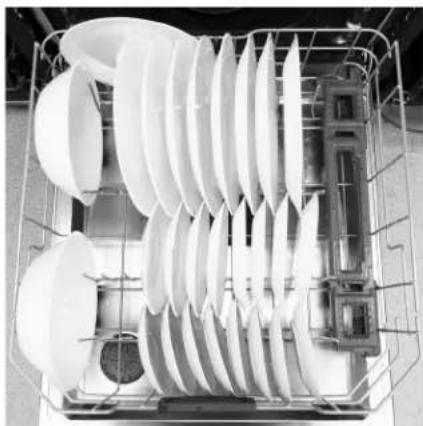
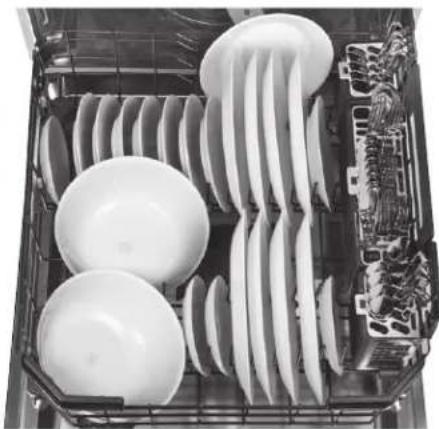
10 Place Settings - Lower Rack Model - CDT706, CDT805, CDT845 and CDT875 Series
Model - CDT800 and CDT855 Series
Model - CDT836 Series
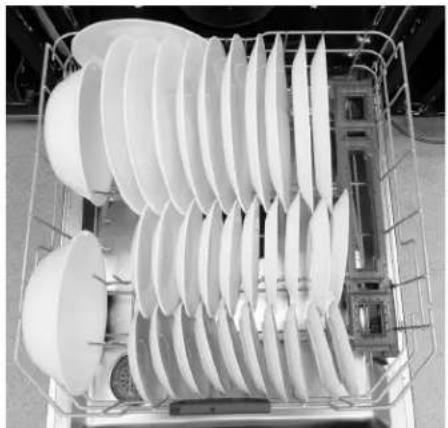
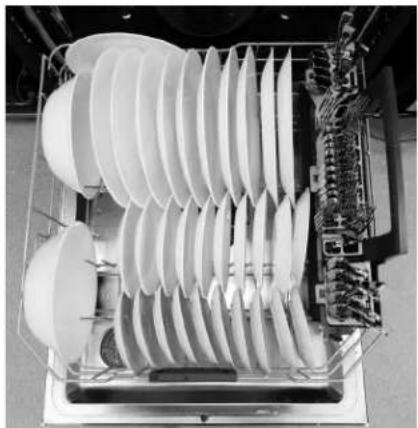
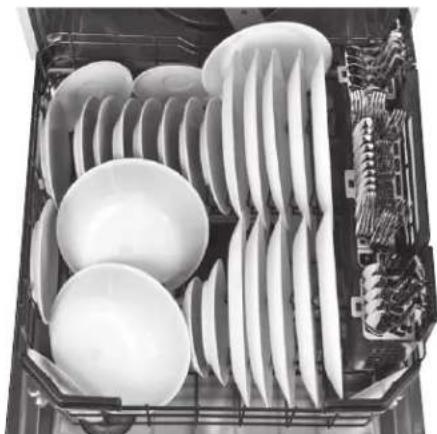
Model - CDT866 Series
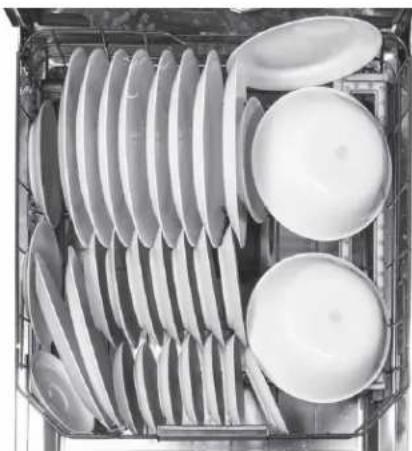
Loading
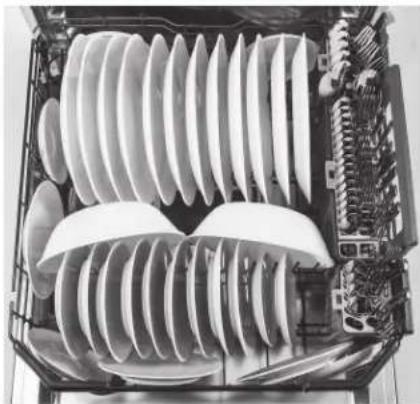
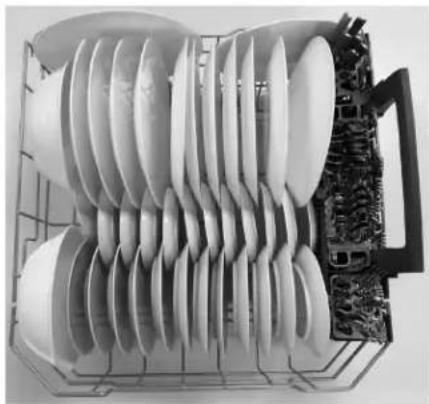
12 Place Settings - Lower Rack Model - CDT706, CDT805, CDT845, CDT866 and CDT875 Series
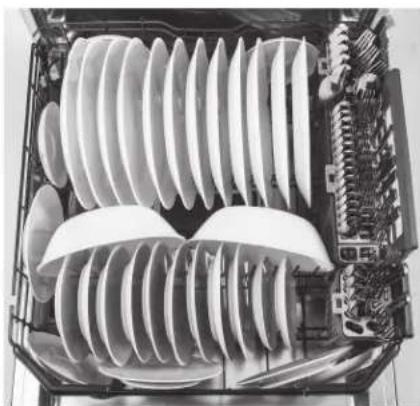
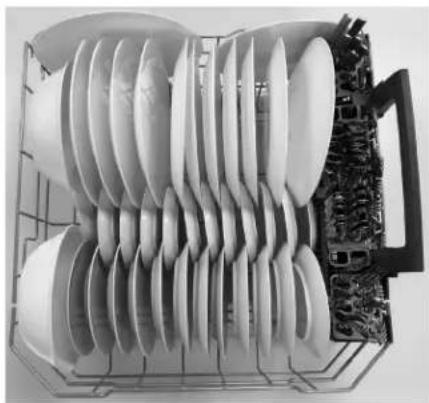
Series
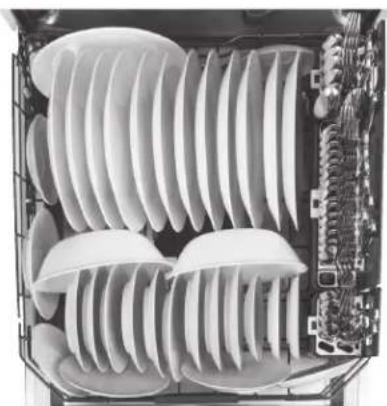
Model - CDT836 SeriesModel - CDT800 a
For best dishwashing results, follow these loading guidelines. Features and appearance of racks and silverware baskets may vary from your model.
3rd Rack (on some models)
The 3rd rack is the recommended location for silverware and large utensils
CAUTION
Take care when loading, unloading, or transporting the silverware or
utensil tray. The tray may contain sharp or heavy items. If items are dropped from the tray or the tray is dropped, injury could occur.
IMPORTANT NOTES:
- Do not allow cutlery of different materials to touch each other in the 3rd rack. Doing so may cause discoloration of the cutlery.
The tray is only meant to be used with a Café 3rd rack dishwasher to hold silverware, cooking utensils, and other small items. Using the tray for any other purpose could result in damage to the tray or damage to anything interacting with the tray. - Ensure that the 3rd rack is fully closed before shutting the dishwasher door. Shutting the door with the rack partially extended could cause damage to the dishwasher.
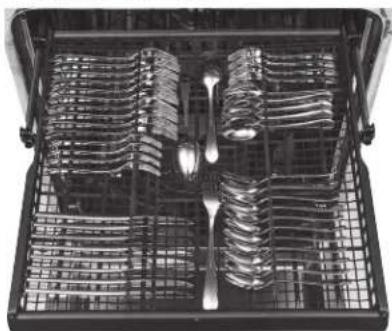
8 Place Settings
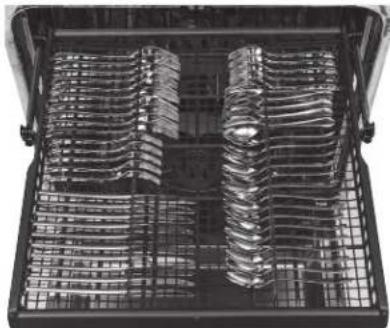
10 Place Settings 12 Place Settings
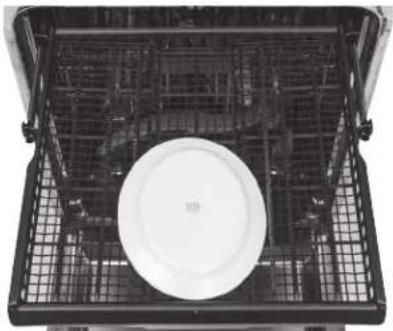
The 3rd rack is also removable to allow extra large items to be placed in the upper rack:
To remove the 3rd rack:
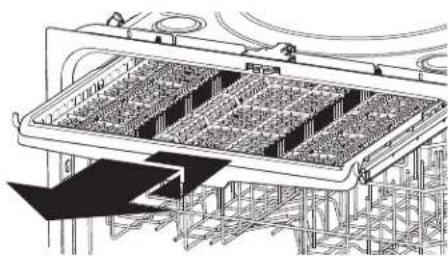
1 With the rack fully extended, lift the front of the rack so that the rack roller wheels clear the retaining hook.
2 Continue to pull the rack until the remaining rack roller wheels clear the retaining hook.
3 Replace the rack by aligning the rack roller wheels on the retaining hook and rack rails - Ensure all roller wheels are located on top of the rack rails.
Loading
Silverware/flatware is loaded using the silverware basket lids. This ensures great wash performance of the silverware. Loading in this manner prevents nesting and makes sure all items are washed uniformly.
Silverware Basket
Place flatware in the removable silverware baskets. Sharp objects, such as forks and knives, may be placed with the handles facing up, in order to protect your hands. For the best wash performance, place other items such as spoons with the handles facing down. Avoid allowing items to nest together, which may keep them from being properly washed. When loading, distribute items evenly in the basket.
The silverware baskets may also be used for small items, such as measuring spoons, baby bottle nipples, plastic lids, or corn cob holders. The silverware basket covers can be closed to contain small items.
IMPORTANT: Do not load large or tall utensils where they may block the detergent dispenser, mid spray arm, or become trapped between the door and the gasket when the door is closed.
Deep Clean Silverware Jets (on some models)
Deep Clean Silverware Jets target stubborn, stuck-on food and help separate nested spoons and forks to keep your silverware spotless no matter how you load the silverware. For optimal silverware cleaning, the use of silverware basket lids is always recommended. For models with the third rack, the Deep Clean Silverware Jets can also be used to clean mixing bowls and other cookware.
Do not remove Deep Clean Silverware Jet spray assembly from the dishwasher rack.
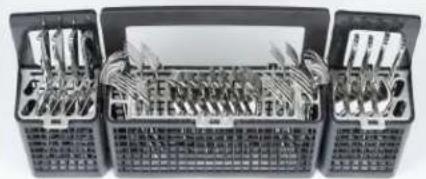
Silverware Basket - 8 Place Settings Model - CDT706, CDT800, CDT805, CDT836, CDT845 and CDT855 Series
Silverware Basket - 8 Place Settings Model - CDT805, CDT845, CDT866 and CDT875 Series
NOTE: Refer to the 3rd Rack in this Loading The Dishwasher section.
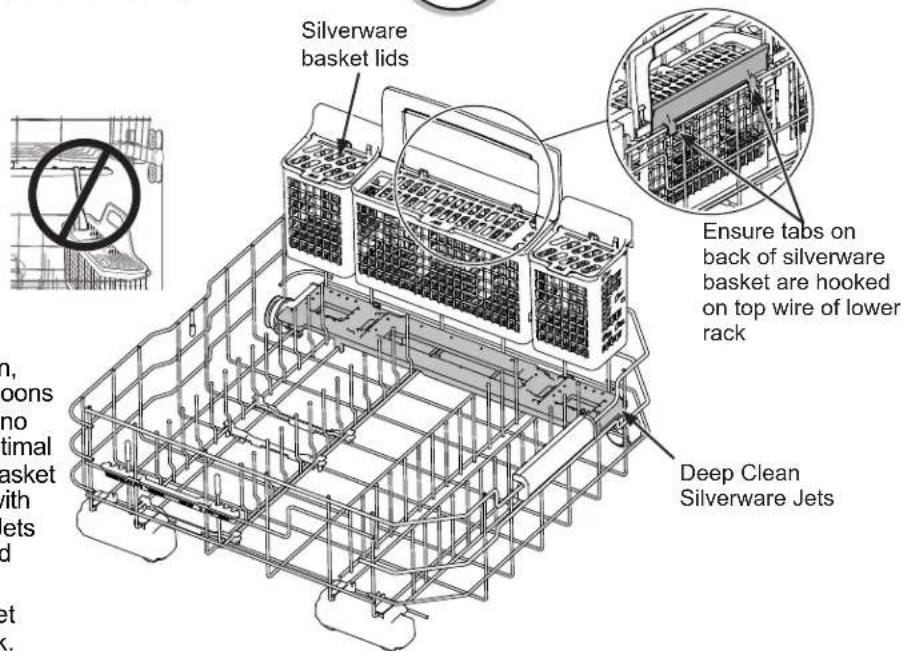
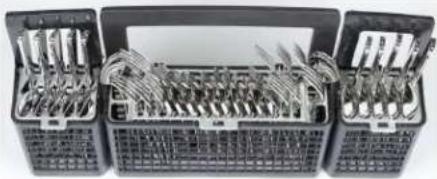
Silverware Basket - 10 Place Settings Model - CDT706, CDT800, CDT805, CDT836, CDT845 and CDT855 Series
Silverware Basket-10 Place Settings Model - CDT805, CDT845, CDT866 and CDT875 Series
NOTE: Refer to the 3rd Rack in this Loading The Dishwasher section.
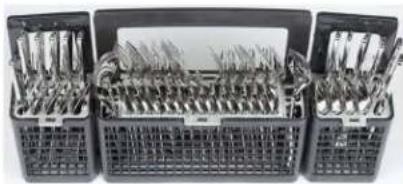
Silverware Basket - 12 Place Settings Model - CDT706 and CDT836 Series
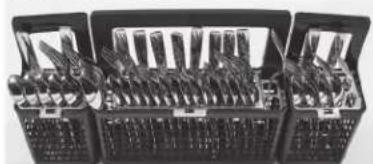
Silverware Basket - 12 Place Settings Model - CDT805, CDT845, CDT866 and CDT875 Series
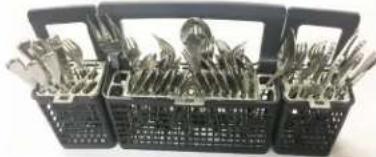
Silverware Basket - 12 Place Settings Model - CDT800 and CDT855 Series
Care and Cleaning
Control Panel
To clean the control panel, use a lightly dampened cloth. Then dry thoroughly.
Exterior Door Panel
Before cleaning the front panel, make sure you know what type of panel you have. Refer to the last two letters of your model number. You can locate your model number on the left-hand tub wall just inside the door. If your model number ends with D1 or W2 then you have a painted door panel. If your model number ends with S1 or SS, then you have a stainless steel door panel.
Follow the instructions below for cleaning the door panel for your specific model.
Painted Door Panel (model numbers ending in D1-Matte Black or W2-Matte White)
Use a clean, soft, lightly dampened cloth, then dry thoroughly.
Stainless Steel Door Panel (model numbers ending in S1 or SS)
For cleaning rust and tarnish, cleaners with oxalic acid such as Bar Keepers Friend Soft Cleanser™ will remove rust, tamish and small blemishes. Use only a liquid cleanser free of grit and rub in the direction of the brush lines with a damp soft sponge. Do not use appliance wax or polish on the stainless steel.
Glass Door Panel - Use window cleaner for cleaning, then let dry thoroughly.
For other blemishes and marks, use Stainless Steel Magic or a similar product using a clean soft cloth. Do not use appliance wax, polish, bleach or products containing chlorine on stainless steel. You can order Stainless Steel Magic WX10X29 through Café by visiting cafeappliances.com/parts. In Canada, visit cafeappliances.ca/parts.
Dishwasher Interior
To clean and de-odorize your dishwasher, use citric acid or Finish® Dishwasher Cleaner, a detergent additive. Finish® Dishwasher Cleaner will break up mineral deposits, and remove hard water film and stains. You can order citric acid Café kit WD35X151 through Café Parts by visiting cafeappliances.com/parts. In Canada, visit cafeappliances.ca/parts. You can purchase Finish® Dishwasher Cleaner at your local grocery store.
Stainless Steel Inner Door and Tub
The stainless steel used to make the dishwasher tub and inner door provides the highest reliability available in a Café dishwasher.
If the dishwasher tub or inner door should be scratched or dented during normal use, they will not rust or corrode. These surface blemishes will not affect their function or durability.
Filters
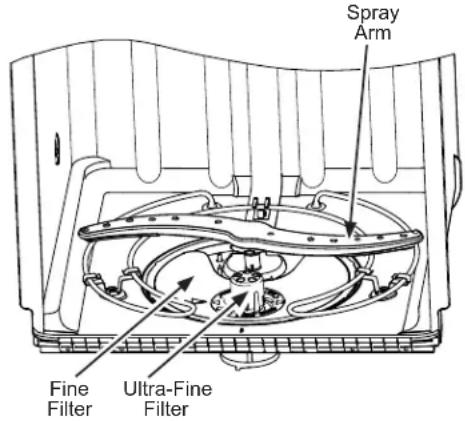
Inspect and clean the filters periodically. This should be done every other month or more depending on usage. If there is a decrease in wash performance or dishes feel gritty, this is also an indication the filters need to be cleaned.
Ultra-Fine Filter
To clean the Ultra-Fine Filter, remove the bottom rack. Twist the Ultra-Fine Filter counterclockwise and lift to remove. Rinse filter with warm soapy water and use a sponge to carefully remove any stubborn particles. Scrubbing with scouring pads or brushes can dama get the filter. Once cleaned, replace the Ultra-Fine Filter, and twist it clockwise to lock in place.
Fine Filter
To clean the Fine Filter (mesh plate), remove the bottom rack. Remove the Ultra-Fine Filter.
Lift the Fine Filter up and out from under the two rear retaining tabs. Rinse filter with warm soapy water. Scouring pads or brushes can scratch the filter surface but a soft brush or sponge may be needed to remove stubborn soils or calcium deposits caused by hard water. Once cleaned, replace the Fine Filter making sure it goes under the two rear retaining tabs. Replace the Ultra-Fine Filter.
Protect Against Freezing
If your dishwasher is left in an unheated place during the winter, ask a service technician to:
Turn off electrical power to the dishwasher. Remove fuses or trip circuit breaker.
Turn off the water supply and disconnect the water inlet line from the water valve.
3 Drain water from the water inlet line and water valve. (Use a pan to catch the water.)
4 Reconnect the water inlet line to the water valve.
Does Your Dishwasher Have an Air Gap?
An air gap protects your dishwasher against water backing up into it if a drain clogs. The air gap is not a part of the dishwasher. It is not covered by your warranty. Not all plumbing codes require air gaps, so you may not have one.
Air gap
Check the air gap any time your dishwasher isn't draining well.
The air gap is easy to clean.
1 Turn off the dishwasher and lift off the air gap cover.
2 Remove the plastic cap under the cover and clean with a toothpick.
3 Replace the cap and cover when the air gap is clean.
Troubleshooting Tips... Before you schedule service
| Problem Possible Cause What To Do | ||
| Start status indicator light flashing | The door was opened or the cycle was interrupted. | Press the Start pad once and close the door within 4 seconds to start the dishwasher. Press the Start pad a second time when the dishwasher is running only if you wish to cancel the cycle. |
| Dishwasher BEEPS once every minute | This is a reminder that your dishwasher door has been left open during operation. It will continue beeping until you press Start and close the door. | Press Start and close the door. |
| Display shows "LEAK DETECTED" | Possible leak is detected Some models are equipped with leak detection and the cycle will be cancelled if a leak is detected. The display will show "LEAK DETECTED". Contact Café for service. | |
| Beeping at the end of the cycle (on some models) | This is normal. Dishwasher will beep twice at the end of the cycle. | To turn off the double beep indicator (or re-activate it if it was previously turned off), press the Heated Dry/Dry pad 5 times within 3 seconds. A triple beep will sound to indicate the end-of-cycle beep option has been turned on or off. |
| Dishes and flatware not clean | Ultra-Fine Filter or Fine Filter is clogged | See the Care and Cleaning section. |
| Low inlet water temperature | Make sure inlet water temperature is correct (see the USING THE DISHWASHER section). Turn on the hot water faucet nearest the dishwasher, let run until the water temperature stops rising. Then start the dishwasher and turn off the faucet. This ensures the entering water is hot. Select Wash Temp Boost/Boost Temp/Hi-Temp Wash if available. | |
| Water pressure is temporarily low | Turn on a faucet. Is water coming out more slowly than usual? If so, wait until pressure is normal before using your dishwasher. Normal water pressure to the dishwasher should be 20-120 psi. | |
| Air gap or dispenser clogged | Clean the air gap or flush the dispenser. | |
| High drain loop or air gap not installed | Refer to the Installation Instructions for proper drain line installation. | |
| Improper rack loading Make sure large dishware does not block the detergent dispenser or the wash arms. See the Loading section. | ||
| Poor performing detergent Use a highly rated detergent such as Finish Quantum Automatic Dishwashing Detergent. | ||
| Spots and filming on glasses and flatware | Extremely hard water Use rinse agents such as Finish Jet-Dry Rinse Aid to prevent spots and prevent new film build-up. If water is extremely hard, a softener may be required. | |
| Low inlet water temperature | Make sure water temperature is at least 120°F (49°C). | |
| Overloading or improper loading of the dishwasher | Load dishwasher as shown in the Loading section. | |
| Old or damp powder detergent | Make sure detergent is fresh. Use a highly rated detergent such as Finish Quantum Automatic Dishwashing Detergent. | |
| Rinse agent dispenser empty | Refill with rinse agent such as Finish Jet-Dry Rinse Aid. | |
| Too little or low performing detergent | Make sure you use the proper amount of highly rated detergent. | |
| Cloudiness on glassware | Combination of soft water and too much detergent | This is called etching and is permanent. To prevent this from happening, use less detergent if you have soft water. Wash glassware in the shortest cycle that will get it clean. |
| Low performing phosphate-free detergent | See A white film on glassware, dishware and the interior in this TROUBLESHOOTING section. | |
| Water temperature entering the dishwasher exceeds 150°F (66°C) | This could be etching. Lower the water heater temperature. | |
Troubleshooting Tips... Before you schedule service
| Problem Possible | ble Cause What To Do | |
| Suds in the tub | Wrong detergent | Use only automatic dishwasher detergents to avoid sudsing. Finish® Quantum® Automatic Dishwashing Detergent has been approved for use in all Café dishwashers.To remove suds from the tub, open the dishwasher and let suds dissipate. Open the door, press and hold Start for 3 seconds, and close the door. |
| Rinse agent was spilled Always wipe up rinse agent spills immediately. | ||
| Detergent left in dispenser cups | Dishes or utensils are blocking the detergent cup | Reposition the dishes, so the water from the lower spray arm can flush the detergent cup. See the Loading section.Reposition the tall utensils or heavy silverware that may be keeping the dispenser cup door from opening. See the Loading section.Don't place large bowls or pots directly under the detergent dispenser. |
| Black or gray marks on dishes | Aluminum utensils have rubbed against dishes | Remove marks with a mild, abrasive cleaner. |
| Dishes don't dry Addtional drying time is needed | Leave door closed after the Clean light appears to allow the fan to run an additional 90 minutes.Select Heated Dry/Dry - Ultra option to add additional drying time.Note: If you open the door, this fan extension will be cancelled. | |
| Low inlet water temperature | Make sure inlet water temperature is at least 120°F Select Heated Dry/Dry.Use Wash Temp Boost/Boost Temp/Hi-Temp Wash option SELECTA higher cycle, such as Wash Temp Sani/Sanitize Temp/Presoak+Sani or Heavy. | |
| Rinse agent dispenser is empty | Check the rinse agent dispenser and fill as required. | |
| Control panel responded to inputs but dishwasher never filled with water | Door may not be completely closed | Make sure the door is firmly closed. |
| Water valve may be turned off | Make sure water valve (usually located under the sink) is turned on. | |
| Flood float may be stuck Remove Ultra-Fine filter and lightly tap the piece under the ultra fine filter that looks like a salt shaker. Replace the filter. | ||
| Stained tub interior White film on inside surface—hard water minerals | Café recommends Finish® Jet-Dry® Rinse Aid to help prevent hard water mineral deposits from forming. Run dishwasher with citric acid to remove mineral deposits.Citric acid (WD35X151) can be ordered through Café Parts.See back cover for ordering information. Alternatively, purchase Finish® Dishwasher Cleaner and follow the directions on the label. | |
| Dishwasher won't run | Fuse is blown or circuit breaker is tripped | Replace fuse or reset circuit breaker. Remove any other appliances from the circuit. |
| Power is turned off In some installations, the power to the dishwasher is provided through a wall switch, often located next to the dispenser switch. Make sure it is on. | ||
| Control panel is locked | Unlock control panel. See the Getting started section. | |
| Possible leak is detected Some models are equipped with leak detection and the cycle will be cancelled if a leak is detected. The display will show "LEAK DETECTED". Contact Café for service. | ||
| Proper Start sequence was not followed | See the Using the dishwasher section. | |
| Control panel lights go off when you're setting controls | Time too long between touching of selected pads | Each pad must be touched within 30 seconds of the others. To relight, touch any pad again or open the door and unlock (top control). |
Troubleshooting Tips... Before you schedule service
| Problem Possible Cause What To Do | ||
| Water standing in the bottom of the tub | Air gap is clogged | Clean the air gap. See the Care and Cleaning section. |
| High drain loop or air gap not installed | Refer to the Installation Instructions for proper drain line installation. | |
| Water won't pump out of the tub | Drain is clogged If you have an air gap, clean it. See the Care and Cleaning section. If the dishwasher drains into a dispenser, run dispenser clear. Check to see if your kitchen sink is draining well. If not, you may need a plumber. | |
| Steam | This is normal | Warm, moist air comes through the vent during drying and when water is being pumped out. This is necessary for drying. |
| Sanitized or Cycle Sanitized light does not illuminate at the end of the cycle | The door was opened and the cycle was interrupted during final rinse | Do not interrupt the cycle by opening the door during the wash cycle. |
| The incoming water temperature was too low | Raise the water heater temperature to between 120°F and 150°F. | |
| Noise Normal operating sounds: Beeping at the end of the cycle (on some models) Detergent cup opening Water entering dishwasher Motor stops and starts at various times during cycle Spray arms start and stop at various times Drain pump sounds during pump out Drain pump starts and stops several times during each drain | These are all normal. No action is required. | |
| Rattling dishes when the spray arm rotates | Make sure dishes are properly loaded. See the Loading section. | |
| Rattling silverware against door during wash | Tall utensils may be placed in the upper rack to avoid bumping against inner door during wash cycle. | |
| A white film on glassware, dishware and the interior | This problem is likely caused by a low quality phosphate-free dishwasher detergent | To remove the white film, run your dishes through a dishwasher cycle with citric acid. Use a WD35X151 citric acid kit found online. Otherwise, use Finish® Dishwasher Cleaner found at your local grocery store. Pour the citric acid in the detergent cup and close the cover. Place the filmed but otherwise clean glassware and dishware in the dishwasher. Leave silverware and other metal items out of the dishwasher. Turn the dishwasher on and let it run through a complete cycle without detergent. The glassware, dishware, and dishwasher should come out film free. Alternatively, a vinegar rinse may be used. Pour 1 cup of vinegar into dishwasher just after the detergent cup opens and let the dishwasher complete its cycle. This may be repeated several times a year as needed. The use of a rinse agent such as Finish® Jet-Dry® Rinse Aid may help minimize a repeat build up of film. Also, the use of a highly rated detergent such as Finish® Quantum® Automatic Dishwashing Detergent will help prevent film build-up. |
| Feel air on your legs when standing in front of the dishwasher in cycle. | This is normal Do not interrupt | the cycle. No action is required. |
Café Dishwasher Limited Warranty
cafeappliances.com (United States) | cafeappliances.ca (Canada)
All warranty service is provided by our Factory Service Centers, or an authorized service technician. To schedule service online, visit us at cafeappliances.com/service. In Canada, visit: cafeappliances.ca/service. Please have your serial number and your model number available when scheduling service.
Servicing your appliance may require the use of the onboard data port for diagnostics. This gives a Café factory service technician the ability to quickly diagnose any issues with your appliance and helps Café improve its products by providing Café with information on your appliance. If you do not want your appliance data to be sent to Café, please advise your technician not to submit the data to Café at the time of service.
| For the period of: We will | replace: |
| One yearFrom the date of the original purchase | Any part of the dishwasher which fails due to a defect in materials or workmanship. During this limited one-year warranty, we will also provide, free of charge, all labor and related service to replace the defective part. |
What is not covered:
Service trips to your home to teach you how to use the product.
- Improper installation, delivery or maintenance.
Failure of the product if it is abused, misused, or used for other than the intended purpose or used commercially.
- Replacement of house fuses or resetting of circuit breakers.
- Products which are not defective or broken, or which are working as described in the Owner's Manual.
- Damage to the product caused by accident, fire, floods or acts of God.
- Incidental or consequential damage caused by possible defects with this appliance.
Defects or damage due to operation in freezing temperatures. - Damage caused after delivery including damage from items dropped on the door.
Product not accessible to provide required service. - Cleaning or servicing of the air gap device in the drain line.
EXCLUSION OF IMPLIED WARRANTYES
Your sole and exclusive remedy is product repair as provided in this Limited Warranty. Any implied warranties, including the implied warranties of merchantability or fitness for a particular purpose, are limited to one year or the shortest period allowed by law.
In the United States:
This limited warranty is extended to the original purchaser and any succeeding owner for products purchased for home use within the USA. If the product is located in an area where service by a Café Authorized Servicer is not available, you may be responsible for a trip charge or you may be required to bring the product to an Authorized Café Service location for service. In Alaska, the limited warranty excludes the cost of shipping or service calls to your home.
Some states do not allow the exclusion or limitation of incidental or consequential damages. This limited warranty gives you specific legal rights, and you may also have other rights which vary from state to state. To know what your legal rights are, consult your local or state consumer affairs office or your state's Attorney General.
Warrantor: GE Appliances, a Haier Company
Louisville, KY 40225
In Canada:
This limited warranty is extended to the original purchaser and any succeeding owner for products purchased in Canada for home use within Canada. If the product is located in an area where service by a Café Authorized Servicer is not available, you may be responsible for a trip charge or you may be required to bring the product to an Authorized Café Service location.
Some provinces do not allow the exclusion or limitation of incidental or consequential damages. This limited warranty gives you specific legal rights, and you may also have other rights which vary from province to province. To know what your legal rights are, consult your local or provincial consumer affairs office.
Warrantor: MC Commercial Inc., Burlington, ON, L7R 5B6
Extended Warranties: Purchase a Café extended warranty and learn about special discounts that are available while your warranty is still in effect. You can purchase it online anytime at
In the US, visit: cafeappliances.com/extended-warranty. | In Canada, visit: cafeappliances.ca/extended-warranty.
Café Service will still be there after your warranty expires.
Consumer Support
Café Website
Have a question or need assistance with your appliance? Try the Café website 24 hours a day, any day of the year! You can also shop for more great Café products and take advantage of all our on-line support services designed for your convenience. In the US: cafeappliances.com. In Canada: cafeappliances.ca.
Register Your Appliance
Register your new appliance on-line at your convenience! Timely product registration will allow for enhanced communication and prompt service under the terms of your warranty, should the need arise. You may also mail in the pre-printed registration card included in the packing material. In the US: cafeappliances.com/register. In Canada: cafeappliances.ca/registration.
Schedule Service
Expert Café repair service is only one step away from your door. Get on-line and schedule your service at your convenience any day of the year. In the US: cafeappliances.com/service. In Canada: cafeappliances.ca/service.
Extended Warranties
Purchase a Café extended warranty and learn about special discounts that are available while your warranty is still in effect. You can purchase it on-line anytime. Café Service will still be there after your warranty expires. In the US: cafeappliances.com/extended-warranty. In Canada: cafeappliances.ca/extended-warranty.
Remote Connectivity
For assistance with wireless network connectivity, visit our website at cafeappliances.com/connect. In Canada: cafeappliances.ca/connect.
Parts and Accessories
Individuals qualifed to service their own appliances can have parts or accessories sent directly to their homes (VISA, MasterCard and Discover cards are accepted). Order on-line today 24 hours every day. In the US: cafeappliances.com/parts. In Canada: cafeappliances.ca/parts.
Instructions contained in this manual cover procedures to be performed by any user. Other servicing generally should be referred to qualified service personnel. Caution must be exercised, since improper servicing may cause unsafe operation.
Contact Us
If you are not satisfied with the service you receive from Café, contact us on our website with all the details including your phone number, or write to:
In the US: General Manager, Customer Relations, Café | Appliance Park | Louisville, KY 40225
cafeappliances.com/contact.
In Canada: Director, Consumer Relations, Mabe Canada Inc. | Suite 310, 1 Factory Lane | Moncton, N.B. E1C 9M3 cafeappliances.ca/contact.
CAfé
DISTINCT BY DESIGN
Coupure antirefoulement
Garant:MCCommercialInc.,Burlington,ON,L7R5B6
cafeappliances.ca/extended-warranty
Au Canada : Director, Consumer Relations, Mabe Canada Inc. | Suite 310, 1 Factory Lane | Moncton, N.B. E1C 9M3 cafeappliances.ca/contact
CAfé
DISTINCT BY DESIGN
Bajo ciertas condtiones, se podra produir gas de hidrogen en un calentador de agua que no fue used por dos semanas o mas. EL GAS DE HIDROGENO ES UN EXPLOSIVO. If the hot water has not been used for two or more weeks, prevent the possibility of damage or injury by turning on all hot water faucets and allowing them to run for several minutes. Do this before using any electrical appliance connected to the hot water system. This simple procedure will allow any built-up hydrogen gas to escape. Since the gas is flammable, do not smoke, use an open flame, or use the appliance during this process.
ADVERTENCIA
| CDT706 y CDT836 Series | ||||||||||||||
| CDT866 Series | ||||||||||||||
| CDT805 y CDT845 Series | ||||||||||||||
| Clean = Sanitized = Low Rinse Aid = | ||||||||||||||
| CDT800 Series | ||||||||||||||
| CDT855 y CDT875 Series |
Modelos - CDT706, CDT800, CDT805, CDT845, CDT855, CDT866 y CDT875 Series
Modelo - CDT836 Series
Carga del Lavavajillas
Configuraciones de 10 lugares - Este Superior Configuraciones de 12 lugares - Este Superior Modelo - CDT706, CDT800, CDT805, CDT845, CDT855 y CDT875 Series
Modelo - CDT836 Series
Modelo - CDT866 Series
Modelo - CDT836 Series
Modelo - CDT800 y CDT855 Series
Modelo - CDT875 Series
Carga del Lavavajillas
Modelo - CDT706, CDT800, CDT855 y CDT866 Series
Modelo - CDT805, CDT845 y CDT875 Series
Modelo - CDT836 Series
Configurations de 10 lugares - Estante inférieur
Modelo - CDT800 y CDT855 SeriesModModeCDTCD836S865sCDT845
y CDT875 Series
Modelo - CDT866 Series

Carga del Lavavajillas
Modelo - CDT706, CDT805, CDT845, CDT866 y CDT875 Series
Modelo - CDT836 SeriesModelo - CDT800
cafeappliances.com/extended-warranty