
IAN 103134 - Wristwatch AURIOL - Free user manual and instructions
Find the device manual for free IAN 103134 AURIOL in PDF.



| Product type | Chronograph wristwatch |
| Brand | Auriol |
| Model | IAN 103134 |
| Power supply | SR920SW battery (button cell) |
| Display | Analog with hands for hours, minutes, seconds; subdials for date and chronograph |
| Time functions | Time and date setting |
| Chronograph function | Chronograph up to 60 minutes with split time measurement and quick setting |
| Quick setting | Ability to accelerate setting by holding a button |
| Readjustment of chronograph hands | Possible via buttons A and B in setting position |
| Strap type | Metal bracelet (models 2-LD4276-1+2+6 with removable links; model 2-LD4276-4 with sliding clasp) |
| Shortening the bracelet | Depending on model: removal of links using provided tool or adjustment via sliding clasp |
| Water resistance | Up to 5 bars (conforms to DIN 8310 standard) |
| Warranty | 3 years from date of purchase |
| Care | Clean with a dry, lint-free cloth |
| Battery replacement | Must be performed by a watchmaker to preserve water resistance |
| Safety | Do not swallow battery; keep out of reach of children; do not expose to fire |
| Disposal | Do not dispose of with household waste; recycle according to local regulations |
| Spare parts | Replacement pins provided; other parts available during warranty period |
| Package contents | Watch with battery, two extra links (depending on model), assembly/disassembly tool, instruction manual |
Frequently Asked Questions - IAN 103134 AURIOL
User questions about IAN 103134 AURIOL
0 question about this device. Answer the ones you know or ask your own.
Ask a new question about this device
Download the instructions for your Wristwatch in PDF format for free! Find your manual IAN 103134 - AURIOL and take your electronic device back in hand. On this page are published all the documents necessary for the use of your device. IAN 103134 by AURIOL.
USER MANUAL IAN 103134 AURIOL
Usage and safety instructions
IAN 279380

CH
DE Anderers- und Sicherheitseinweise
FR CH Litation et avertissements de sécurité -12-
IT Hefezioniperl'usoepara sicurezza 25-
GB Usage and safety instructions 36
Batteriewechsel (SR920SW) -8-
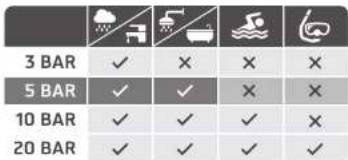
Wasserdichtigkeit 8
| 3 BAR | ✓ | X | X | X |
| 5 BAR | ✓ | ✓ | X | X |
| 10 BAR | ✓ | ✓ | ✓ | X |
| 20 BAR | ✓ | ✓ | ✓ | ✓ |
Usage and safety instructions
Table of contents
Table of contents. 36
Introduction. 37
Intended use 37
Scope of delivery. 37
Important safety information important safety information 38
Features. 39
Setting the time. 39
Setting the date 39
Stopwatch feature. 39
Lap time measurement. 40
Speed setting. 40
Adjusting the stopwatch hands. 40
Band shortening for the models 2-LD4276-1+2+6
Band shortening for the model 2-LD4276-4. -41
Cleaning instructions 42
Replacement of battery (SR920SW) 42
Water resistance. 42
Disposal of the watch. 42
Disposal of the batteries. 43
digi-tech gmbh warranty. 43
Warranty conditions. 43
Warranty period and defects liability 43
Scope of the warranty. 43
Warranty claim procedure. 44
Service 45
Supplier. 45
-36-

CHRONOGRAPH WATCH
Introduction
Congratulations on the purchase of your new wristwatch. You have chosen a high quality product. The instruction manual is part of the product- it contains important information about safety, use and disposal. Read the manual with all usage and safety notes before using the watch. Only use the watch in the intended way and for the intended applications. If the watch is given to someone else, include all documentation with the watch.
Intended use
This watch is intended for time display and the described additional features. Any other use or modification of the electronic appliance does not comply with the intended uses. The manufacturer is not liable for damages caused by improper use or misuse. The device is not intended for commercial use.
Scope of delivery
Please note: Check the scope of delivery after purchase. Please ensure that all parts are included and undamaged.
- wristwatch incl. battery
- two removable links for models: 2-LD4276-1 + 2 + 6
band changing tool for models: 2-LD4276-1 + 2 + 6 - instruction manual
-37-


Important safety information
User
This device may be used by persons (including children over 8 years of age) with reduced physical, sensory or mental abilities or lack of experience and knowledge, if they are supervised or instructed regarding the safe use of the device and understand the dangers that may arise. Children may not play with the device. Cleaning and user maintenance of the device may not be performed by children without supervision. Keep packaging films out of the hands of children. There is a danger of suffocation.
Batteries
Keep batteries out of reach of small children. If a battery is swallowed, you must seek medical attention immediately. Batteries/rechargeable batteries must always be inserted in the correct polarity. If necessary, clean the battery and device contacts. Never attempt to recharge non-rechargeable batteries. Never short-circuit or attempt to open batteries. Never throw batteries into fire as they may explode.
If the device will not be used for an extended time period, remove the battery and store the device in a dry and dust-free area. Improper use of the battery can lead to explosion or leakage.
If the battery leaks, avoid contact with skin, eyes and mucous membranes. Use gloves. If you are exposed to battery acid, rinse the affected areas with plenty of clean water and immediately seek medical attention. Remove discharged batteries from the device as they present an increased risk of leakage.
-38

Features

Setting the time
Before setting the time, ensure that all stopwatch hands are at the "60" (12 o'clock position) and do not push the buttons as this will change the position of the stopwatch hands. Pull the crown out to the 2nd stop when the second hand reaches the "60" (12 o'clock position). Set the time by turning the crown clockwise. Press the crown back to the initial position.
Setting the date
Pull the crown out to the 1st stop- turn the crown clockwise to set the correct date. Press the crown back to the initial position. The date will change between 23:30 and 24:00. If the date changes between 11:30 and 12:00, adjust the time by 12 hours.

Do not set the date between 9:00 pm and 1:00 am as this can cause damage to the movement.
Stopwatch feature
Press button A to start the stopwatch- press Button A again to stop the stopwatch. You can now read the stopped time. Press Button B to reset the hands to the "60" (12 o'clock position).
The stopwatch can measure a time span of up to 60 minutes.
-39

Lap time measurement
Press button A to start the stopwatch- press button B to stop the stopwatch and read the lap time, the stopwatch will continue to count internally. Press button B again to show the running stopwatch time. This process can be repeated as often as desired. Press A to stop the stopwatch and read the stopped time.
Speed setting
When setting press and hold A or B to use the speed setting feature.
Adjusting the stopwatch hands
If the small stopwatch hands are not exactly in the "60" (12 o'clock position) they must be adjusted manually. Carefully pull the crown out to the stop. Repeatedly press button A to set the hands counter-clockwise to "60" (12 o'clock position). Repeatedly press button B to set the hands clockwise to "60" (12 o'clock position). Press the crown back to the initial position.
Band shortening for the models 2-LD4276-1+2+6
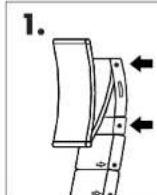
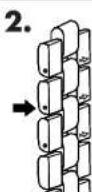
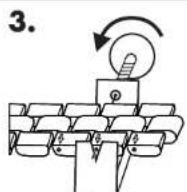
Band shortening can be accomplished by removing links. Open the band clasp safety and open the clasp. The band is held to the clasp by a spring bar. Image 1. Compress and remove the spring bar by using a pointed tool. Now place the watch face down on a soft surface. Image 2. The
-40

links that can be removed are marked with an arrow. Image 3. Place the band in the band changing tool in such a way that the pointed end of the tool points directly at the metal rod and the metal rod can be pushed out in the direction of the arrow. Carefully turn the screw clockwise until the metal rod is pushed out a small distance. The rod can now be pulled out (using pliers if necessary). The strap can now be taken disassembled. Remove as many links as necessary using this method. Reinsert the rod in the opposite direction of the arrow and push it back into the band. The strap and clasp can now be reassembled.
A replacement tip for the tool is included in the bottom of the tool.
An instructional video is available for online viewing at the following URL: http://specials.lidl.com/videos/nou9nohN/ ..or simply scan the following QR code:

Band shortening for the model 2-LD4276-4
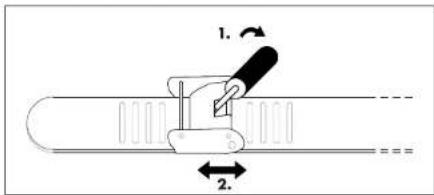
The band includes a moveable clasp for easy band shortening.
-
Push a suitable tool into the opening on the clasp and lever the clasp open.
-
Move the clasp to the required length and let it snap into place on the horizontal grooves on the back side of the strap. Securely re-engage the clasp.
-41
GB
Cleaning instructions
Clean the wristwatch with a soft, dry and lint-free cloth. A glasses cleaning cloth is ideal.
Replacement of battery (SR920SW)
Battery replacements must be performed by an expert to avoid damaging the case or gaskets.
Water resistance
Water resistant up to 5 bar. The bar value specifies the atmospheric overpressure which is applied during testing (DIN 8310).
Disposal of the watch
This wristwatch may not be disposed of with normal household waste. Dispose of the wristwatch at an approved disposal facility or at your local recycling centre. Please observe the current rules and regulations when disposing of the watch. Contact the disposal system if in doubt.

-42
GB
Disposal of the batteries
Please dispose of your batteries properly in containers especially set up at retailers. Batteries do not belong in household waste. Dispos of the batteries at an approved disposal facility or at your recycling centre. Contact the disposal system if in doubt.

digi-tech gmbh warranty
This wristwatch includes a 3 year warranty starting on the day of purchase. In case of defects of this wristwatch you have, by law, certain rights regarding the vendor of the watch. These rights are not changed by the warranty which is described in the following paragraphs.
Warranty conditions
The warranty duration starts on the date of purchase. Please keep the original receipt in a safe place. The receipt is needed as a proof of purchase. If a defect occurs in the wristwatch within 3 years, the wristwatch will be repaired or replaced (according to our choice) free of charge. This warranty requires that, within the 3 year warranty period, the wristwatch and the receipt can be made available to us along with a short written description of the defect and when it occurred. If the defect is covered by the warranty, you will receive the repaired wristwatch or a new watch. Repair or replacement does not cause the warranty period to restart.
Warranty period and defects liability
The warranty period is not increased by the defect liability. This also applies to repaired or replaced parts. If defects are noticed at the time of purchase they must be reported immediately upon unpacking the item. Paid repair may be available after the end of the warranty period.
Scope of the warranty
The wristwatch was manufactured according to strict quality guidelines and was carefully inspected before delivery. The warranty does not include parts that experience normal wear and tear and can thus be seen as wear
-43-

parts or fragile parts that are damaged. Examples include Switches, Batteries or parts made of glass. This warranty becomes void if the wristwatch is damaged, is not used in the recommended way or is improperly repaired. For proper use of the wristwatch all instructions in this manual must be adhered to exactly. Use of the wristwatch in a way that is discouraged in the manual must be avoided. The wristwatch is not intended for commercial use. Abusive or improper use, excessive force and changes that are made by non-authorized repair centers will void the warranty.
Warranty claim procedure
To ensure that your call is processed in a fast and efficient manner please note the following directions:
- Have your receipt (as proof of purchase) and the article number (279380) handy.
- The article number can be found on the type label, an engraving, the front page of the manual (bottom left) or a sticker on the back side or bottom side of the case.
In case defects occur, please first contact the service center (see below) by phone or email.

Visit www.lidl-service.com to download this and many other manuals, product videos and software.
-44

Service
Please note that the following address is not a service address.
Please first contact the service address (see above).
Name: digi-tech gmbh
Street: Valterweg 27A
Town:Eppstein 65817
Country: Germany
-45-

digi-tech gmbh
Valterweg 27A
D-65817 Eppstein


- Usage and safety instructions
- Table of contents
- CHRONOGRAPH WATCH
- Introduction
- Intended use
- Scope of delivery
- Important safety information
- User
- Batteries
- Features
- Setting the time
- Setting the date
- Stopwatch feature
- Lap time measurement
- Speed setting
- Adjusting the stopwatch hands
- Band shortening for the models 2-LD4276-1+2+6
- Band shortening for the model 2-LD4276-4
- Cleaning instructions
- Replacement of battery (SR920SW)
- Water resistance
- Disposal of the watch
- Disposal of the batteries
- digi-tech gmbh warranty
- Warranty conditions
- Warranty period and defects liability
- Scope of the warranty
- Warranty claim procedure
- Service
Brand : AURIOL
Model : IAN 103134
Category : Wristwatch