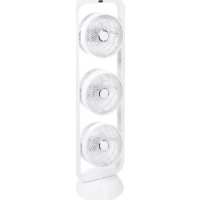
Vento 3D - Fan Eurom - Free user manual and instructions
Find the device manual for free Vento 3D Eurom in PDF.


| Brand | Eurom |
| Model | Vento 3D |
| Product type | Pedestal fan with oscillation and tilt |
| Power supply | 220-240 V~ 50 Hz |
| Power consumption | 60 W |
| Fan diameter | 22 cm |
| Horizontal oscillation angle | 60° |
| Vertical tilt angle | 85° |
| Weight | 4.14 kg |
| Dimensions (height/min-max x width x depth) | 62.5/74.5 x 28 x 25 cm |
| Height adjustment | Yes, via adjustment button |
| Remote control | Yes, with remote control (CR2032 battery included) |
| Operating modes | Standard, Natural (natural wind), Night (sleep) |
| Speeds | 4 speeds: Low, Medium, High, Turbo |
| Timer | Programmable from 1 to 7 hours (in 1-hour increments) |
| Maintenance | Clean exterior with a soft cloth; do not spray water |
| Safety | Automatic shut-off in case of overheating (not explicit but general protections), protective grille |
| Intended use | Indoor only |
| Warranty | Not specified, but professional repairs recommended |
Frequently Asked Questions - Vento 3D Eurom
User questions about Vento 3D Eurom
0 question about this device. Answer the ones you know or ask your own.
Ask a new question about this device
Download the instructions for your Fan in PDF format for free! Find your manual Vento 3D - Eurom and take your electronic device back in hand. On this page are published all the documents necessary for the use of your device. Vento 3D by Eurom.
USER MANUAL Vento 3D Eurom
Instruction manual (EN) (20)
Thank you very much for choosing for a EUROM product. You have made a good choice! We hope you will be satisfied about its functioning.
To get maximum profit from your product, it is important to read this manual attentive and totally before use, and to understand what is written. Read especially the safety instructions: they are there to protect you and your environment.
- Keep the manual in a safe place for future reference. Store also the package: that is the best protection for your heater in times of no-use. And if you at any time pass the appliance on, pass on the manual and package too.
We wish you a lot of fun with the Vento 3DS !
Eurom
Kokosstraat 20
8281 JC Genemuiden (NL)
info@eurom.nl
www.eurom.nl
This manual has been compiled with the utmost care. Nevertheless, we reserve the right to optimize and technically adjust this manual at any time.
Technische Daten
| Connected power | 220-240V~50Hz |
| Output capacity | 60W |
| Ø blades | 22 cm |
| Oscillation (swing) | 60° |
| Tilt angle | 85° |
| Remote control | ✓ |
| Weight | 4,14 kg |
| Dimensions | 62,5/74,5 x 28 x 25 cm |
General safety guidelines
- This device is only to be used indoors.
- This device should only be used for the purposes (ventilating a domestic space) and in the way as set out in the booklet. Any other usage may be dangerous (could cause fire, injury, damage, electric shock etc.), will invalidate the guarantee
- Check fan, plug and cable for damage before use. Do not turn on the appliance if you have discovered damage to the appliance, cord or plug, if the appliance is malfunctioning, if it has been dropped or if there are signs of any other defect. Return the complete product to the vendor or to a certified electrician for inspection and/or repair. Always ask for original parts. The appliance (incl. cord and plug) may only be opened and/or repaired by properly authorized and qualified persons.
- If you hear strange noises, smell something or see smoke, switch off the fan immediately and remove the plug from the socket.
- Before every use, check that the voltage on the socket to be used matches the input voltage indicated on the device's specification plate: 220 / 240V 50Hz .
- Avoid the use of extension cables. If unavoidable, use an approved cable with sufficient power. Completely unroll the cable.
- The electrical cable may never come into contact with sharp, hot or moving objects, must not be wound around the fan and must not be bent or rolled up too tightly.
- If the electrical cable or plug is damaged, it must be replaced by a qualified person. Never carry out repairs yourself.
- Always ensure that the floor is sturdy, flat and horizontal.
- Do not leave a fan operating unsupervised in a room.
- This device in not suitable for use in wet or damp spaces such as bathrooms and laundry rooms. Do not place the device in the vicinity of taps, bathtub, shower, pool, fountains or other sources of moisture. Make sure it cannot fall into water and prevent water from getting into the device itself. If, at any time, the device does fall into water, unplug it immediately! Do not use a device that has a damp interior but have it repaired.
-
Never immerse the device, cord or plug in water or other liquids and never touch the device with wet hands or feet.
-
Do not place the appliance in an open window to avoid rain or on wet surfaces and avoid that no moisture spillage.
- Never hang things over the device. Ensure that curtains, clothing and other materials do not come into the vicinity of the fan.
- Watch out that long hair is not sucked into the fan.
- Keep the suction and extraction grill clean and free from dust and make sure that a minimum of 30~cm of free space is left around the fan.
- Make sure there are no objects in the vicinity of the fan that could hinder it from oscillating (swiveling).
- Never insert a finger, pen or any other object through the protective grille when the fan is in use!
- Never spray any products (anti-insect, cleaning agent etc.) on or in the fan.
-
Do not store or use the fan:
-
in locations where it could become wet or fall into water;
- near flammable, explosive or gaseous substances;
-
near acids, alkalis, oil or other corrosive substances.
-
Never connect the fan to a timer or dimmer.
- Do not use the fan at temperatures above 40^ , not in the vicinity of heating apparatuses and not in dusty areas.
- First turn off the fan and then remove the plug from the socket before moving, cleaning or carrying out maintenance. Do that when the fan is not in use as well. Pull on the plug to remove from the socket, never pull on the cord!
- Make sure that the plug has been pulled out of the socket before you remove the protective grill for cleaning or any maintenance tasks.
- Always remove the plug from the socket after use.
- This appliance can be used by children aged from 8 years and above and persons with reduced physical, sensory or mental capabilities or lack of experience and knowledge if they have been given supervision or instruction concerning use of the appliance in a safe way and understand the hazards involved.
- Children shall not play with the appliance.
- Prevent the fan from blowing continuously on small children, patients of people that have difficulties in moving aside.
- Cleaning and user maintenance shall not be made by children without supervision.
Description
Fan
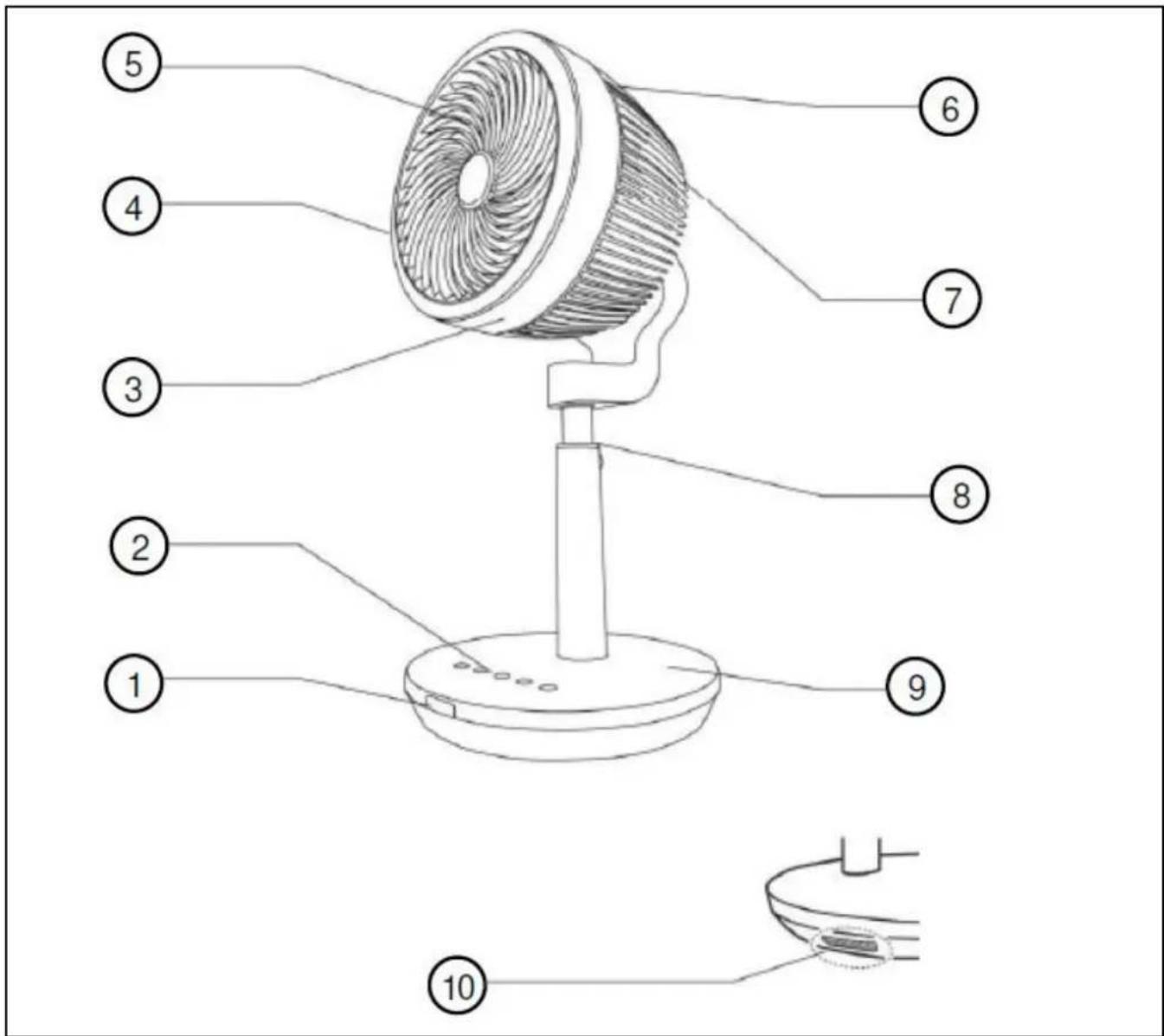
- Remote control receiver
- Control panel and LED lights
- Protective grid screw
- Front protection grille
- Fan blades
-
Rear protection grille
-
Handle
- Height adjustment button
- Feet
- Remote control storage compartment
Control panel
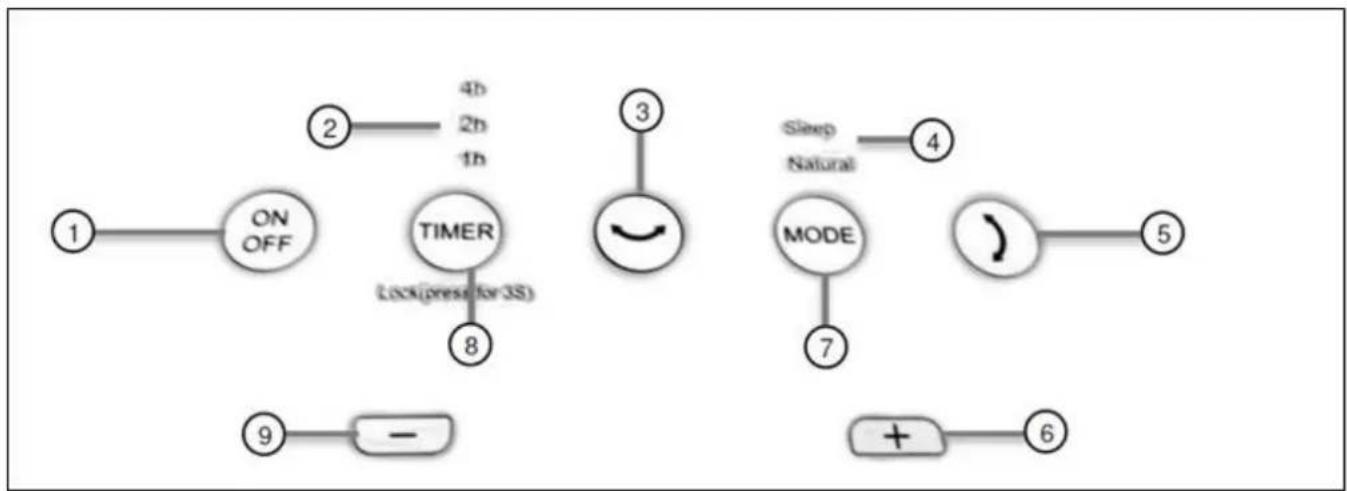
- On/Off button
- Timer LED light
- Oscillation left/right button
- Mode LED light
- Oscillation up/down button
Remote control
- On/Off button
- Timer button
- Ventilation speed button
- Oscillation left/right button
-
Oscillation up/down button
6.Mode button -
Ventilation speed increase button
7.Mode button - Timer button
- Ventilation speed decrease button
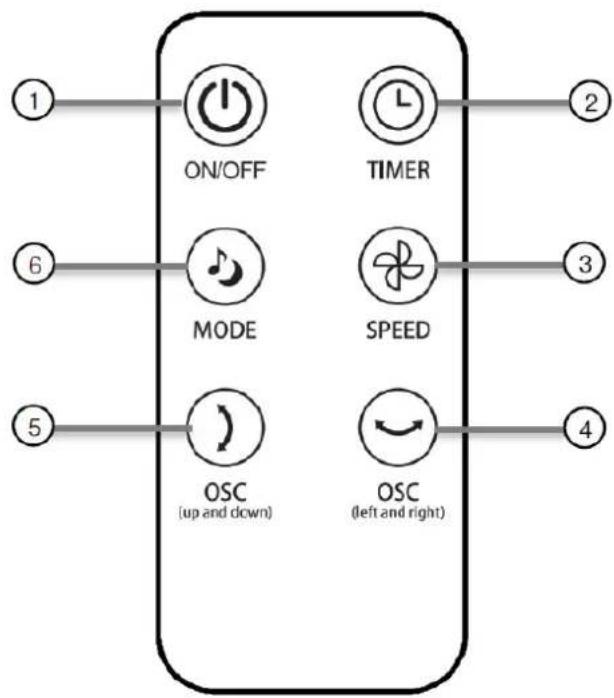
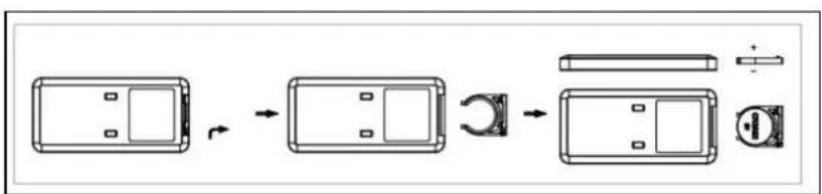
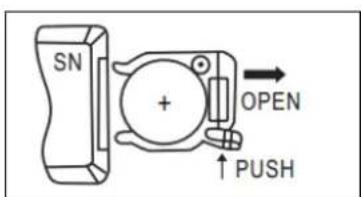
Inserting the battery (button cell battery CR2032) into the remote control.
Commissioning and operation
- Do not start using the fan until:
- all packaging is removed and places away from children.
- All safety instructions have been observed.
- The fan is placed on a stable flat surface.
- Set the fan to the correct height by pressing the height adjustment button and moving the rod to the desired height.
- Put the fan in the correct position.
- Insert the plug into a suitable socket.
- Select the required mode on the control panel or the remote control.
- The control panel and the remote control have the similar functions.
To turn on
Press the On / Off button to switch the fan to standby.
Mode
In the Standard mode (LEDs NATURAL and SLEEP are off) the fan speed can be set (Low, Middle, High, Turbo).
In Natural (NATURAL) mode (NATURAL light on), the fan speed is automatically varied to imitate a natural wind. With the SPEED button you can choose between Natural wind-Low, Natural wind-Middle, Natural wind-High or Natural wind-Turbo. The average fan speed depends on the choice Low, Middle, High, Turbo.
The Night (SLEEP) mode (SLEEP light on) is the same as natural mode, with the additional addition that after 30 minutes the ventilation speed is reduced by one speed.
If the Night mode starts in fan speed Turbo, then after 30 minutes it is automatically switched to fan speed High, after another 30 minutes to fan speed Medium, after another 30 minutes to Fan Low. The fan then remains low in the fan speed.
If the Night mode starts with a ventilation speed High, after 30 minutes the ventilation speed is switched to Medium, after a further 30 minutes the ventilation speed is low. The fan now remains at a low ventilation speed.
If the Night mode starts in ventilation speed Medium, then the ventilation speed is automatically switched to Low after 30 minutes. The fan now remains at a low ventilation speed.
If the Night mode starts with a ventilation speed Low, the ventilation will keep this speed.
Fan speed
Press the fan speed button (on the control panel + or -) to increase or decrease the speed. You can adjust the fan speed in both Natural Mode and Sleep Mode.
Low - Middle - High - Turbo - Low -.
Timer
Press the timer button to display the timer in hours (1 - 2 - 3 - 4 - 5 - 6 - 7 - off). The corresponding light comes on.
| Timer tome | 1 hour LED | 2 hours LED | 4 hours LED |
| 1 hour | On | Off | Off |
| 2 hours | Off | On | Off |
| 3 hours | On | On | Off |
| 4 hours | Off | Off | On |
| 5 hours | On | Off | On |
| 6 hours | Off | On | On |
| 7 hours | On | On | On |
| Off | Off | Off | Off |
Oscillate up / down
Press the tilt button to tilt the fan head. The fan head moves from top to bottom and back until you press the tilt button again. The fan remains in this position.
Oscillate left / right
Press the oscillation button to make the fan head oscillate. The fan head moves from right to left and back until you press the oscillation button again. The fan remains in this position.
Switch off
Press the On / Off button to switch the fan to standby. Then remove the plug from the wall socket to switch off the fan completely.
Cleaning and maintenance
Switch off the fan and remove the plug from the wall socket when you want to clean it or carry out maintenance.
The fan only requires some general, external maintenance. Dust it regularly with a soft cloth or feather duster or vacuum it clean with a soft vacuum cleaner brush.
Make sure that no water ends up on parts other than grate and trays! Never rinse or spray the fan!
To prevent damage to, damage to or deformation of the material, never use abrasive, aggressive or corrosive (cleaning) agents.
If you want to clear the fan at the end of the season, do so in the original packaging: it offers the best protection. Put it away in a safe, dry, not extremely hot or cold place.
Problems and solutions
The fan blades do not rotate even though the device is switched on
- Is the plug in the socket?
- Is there power to the socket?
- Is the blade blocked, e.g. by damage, a deformity on the grille or a foreign object?
There is strange noise when starting
- Check if there are any burrs around the edges of the blades.
- Check whether the blades have become deformed and are touching the protective grille.
Warning: Repairs must be carried out by qualified engineers. Please request original parts if the device needs to be repaired.
If the device is subjected to modifications or repairs are carried out by unqualified persons, the guarantees from the supplier, importer and manufacturer will become null and void.
Removal
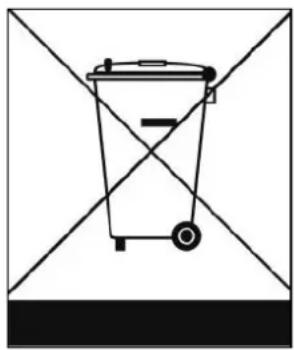
In the EU this symbol indicates that this product may not be disposed of as ordinary household waste. Old equipment contains valuable materials, suitable for recycling. These materials should be made suitable for reuse in order to prevent any adverse effects to health and the environment caused by unregulated waste collection. Therefore, please make sure that you bring old equipment to a designated collection point. Alternatively, contact the original supplier, who can make sure that as many of the components as possible can be recycled.
CE - Declaration
See page 37
Remerciements
declares the following device in sole responsibility:
Product: Fan
Brand name: EUROM
Model: Vento 3DS
Item number: 384833
Complies with the following harmonization rules:
Low Voltage Directive: LVD 2014/35/EU
Electromagnetic compatibility Directive: EMC 2014/30/EU
Restriction of Hazardous Substances RoHS Directive: 2011/65/EU&(EU)2015/863
Framework Directive Ecodesign requirements: ERP 2009/125/EC
Regulation Ecodesign requirements for
Comfort Fans: (EU) 206/2012
Regulation Ecodesign requirements Electricity
Consumption in standby and off state: 1275/2008/EC
Applied harmonized standards:
Brand : Eurom
Model : Vento 3D
Category : Fan