M Series DO30CMB - Oven WOLF - Free user manual and instructions
Find the device manual for free M Series DO30CMB WOLF in PDF.



User questions about M Series DO30CMB WOLF
0 question about this device. Answer the ones you know or ask your own.
Ask a new question about this device
Download the instructions for your Oven in PDF format for free! Find your manual M Series DO30CMB - WOLF and take your electronic device back in hand. On this page are published all the documents necessary for the use of your device. M Series DO30CMB by WOLF.
USER MANUAL M Series DO30CMB WOLF
natural_image
Abstract white flame-like shape on red background (no text or symbols)WOLF
M SERIES OVEN
Contents
4SafetyPrecautions
6 M Series Oven Features
7OvenOperation
17 CookingGuide
20 CareRecommendations
21 Troubleshooting
23 Wolf Warranty
Customer Care
The model and serial number are printed on the enclosed product registration card. Both numbers are also listed on the product rating plate. Refer to page 6 for rating plate location. For warranty purposes, you will also need the date of installation and name of your authorized Wolf dealer. Record this information below for future reference.
SERVICE INFORMATION
| Model Number |
| Serial Number |
| Date of Installation |
| Certified Service Name |
| Certified Service Number |
| Authorized Dealer |
| Dealer Number |
If your product ever needs attention, be sure to use a Wolf Factory Certified Service provider recommended by our customer care center, or select one from our list of providers available at wolfappliance.com/locator. All Factory Certified Service providers are carefully selected and thoroughly trained by us.
Important Note
To ensure this product is installed and operated as safely and efficiently as possible, take note of the following types of highlighted information throughout this guide:
IMPORTANT NOTE highlights information that is especially important.
CAUTION indicates a situation where minor injury or product damage may occur if instructions are not followed.
WARNING states a hazard that may cause serious injury or death if precautions are not followed.
IMPORTANT NOTE: Throughout this guide, dimensions in parentheses are millimeters unless otherwise specified.
IMPORTANT INSTRUCTIONS
GENERAL SAFETY PRECAUTIONS
- Read this guide carefully before using this appliance to reduce risk of fire, electric shock or injury.
- This appliance must be properly installed and serviced by a qualified installer or service agency and grounded by a qualified technician.
- Clean only those parts listed in this guide.
- Do not use oven cleaners. No commercial oven cleaner or oven liner protective coating of any kind should be used in or around any part of the oven.
- Do not touch heating elements or interior surfaces of oven. Heating elements may be hot even though they are dark in color. Interior surfaces become hot enough to cause burns. During and after use, do not touch, or let clothing or other flammable materials contact heating elements or interior surfaces of oven until they have had sufficient time to cool.
- Exercise caution when opening the oven door. Let hot air or steam escape before looking or reaching into the oven.
-
Be sure that the oven cool air intake (located above the door) and oven exhaust vent (located below the door) are unobstructed at all times.
-
Always use dry pot holders when removing pans from this appliance. Wet or damp pot holders can cause steam burns. Do not use a towel or bulky cloth in place of pot holders.
- Position oven racks in desired locations when oven is cool. If a rack must be repositioned after the oven is already hot, be sure pot holder does not contact a hot heating element in the oven.
- Do not repair or replace any part of this appliance unless specifically recommended in literature accompanying this appliance.
- Do not use aluminum foil to line any part of this appliance.
- Never use this appliance to warm or heat the room.
- Do not leave children alone or unattended in the area where this appliance is in use. Never allow children to sit or stand on the appliance.
- Do not store items of interest to children above or at the back of this appliance, as they could climb on the appliance to reach items and be injured.
CAUTION
Before using self-clean, remove broiler pan, oven racks, oven rack guides and any other utensils.
IMPORTANT INSTRUCTIONS
GENERAL SAFETY PRECAUTIONS
- Do not use water on grease fires. Smother the flame or use a dry chemical or foam-type extinguisher.
- Do not heat unopened food containers, such as baby food jars and cans. Pressure build-up may cause the container to burst and cause injury.
- Do not store or use gasoline or other flammable vapors and liquids in the vicinity of this or any other appliance.
- Do not clean oven gasket; rubbing or moving the gasket may compromise the door seal.
- Wear proper apparel. Loose-fitting or hanging garments should never be worn while using this appliance.
- For contemporary models, press the upper middle section of the door firmly to open. To close, rotate the door upward, then press firmly to close. Refer to the illustration below.
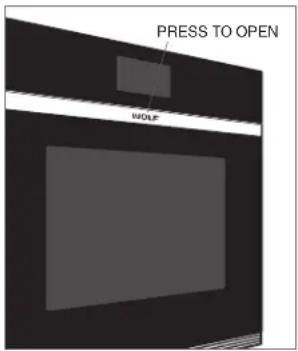
text_image
PRESS TO OPEN MOLFContemporary model
WARNING
PROPOSITION 65 FOR CALIFORNIA RESIDENTS
Cancer and Reproductive Harm—www.P65Warnings.ca.gov
M Series Oven Features
FEATURES
| 1 | Product Rating Plate (lower oven for double ovens) |
| 2 | Adjustable Oven Rack |
| 3 | Full-Extension Oven Racks |
| 4 | Control Panel and Display |
| 5 | Control Knobs (professional model) |
| 6 | Convection Fans |
| 7 | Temperature Probe Receptacle |
| 8 | Halogen Lighting |
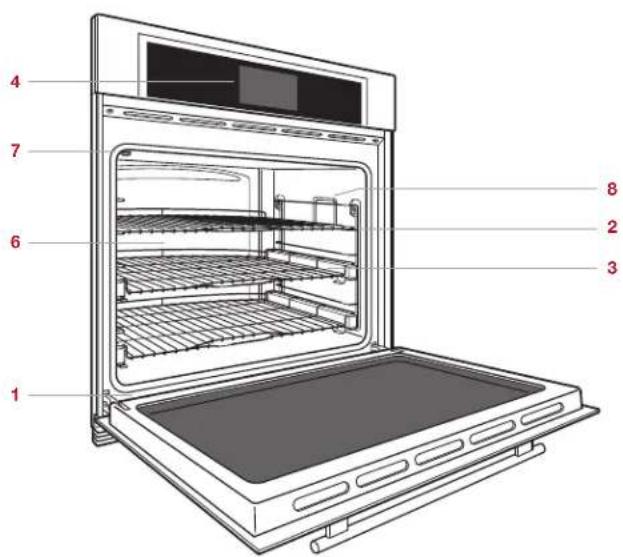
text_image
1 2 3 4 6 7 8M series single oven—transitional
Getting Started
We know you are eager to start cooking, but before you do, please take some time to read this use & care guide. Whether you are an occasional cook or an expert chef, it will be to your benefit to familiarize yourself with the safety practices, features, operation and care recommendations of your Wolf M series oven.
To ensure the best results, review cooking modes and special features on page 12.
CAUTION
Do not place cookware on the oven floor or use aluminum foil or other material to line the oven floor or side walls. Failure to adhere to this notice will damage the porcelain interior and will void your warranty.
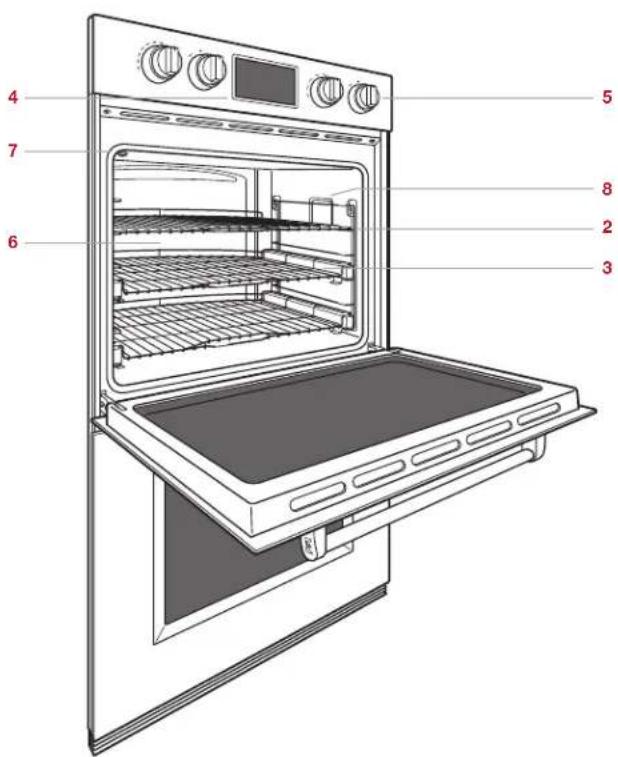
text_image
Labeled diagram of an oven with numbered parts for identificationM series double oven—professional
Oven Racks
OVEN RACK GUIDES
To insert the rack guides in the oven, locate the mounting screws on the oven side walls. Place the rack guide mounting tabs over the top screws, pivot inward and slide down until fully seated. Refer to the illustration below.
OVEN RACKS
To insert a standard rack in the oven, place the rack anti-tip lock under the side rack guide rails. Slide the rack back and lift up to clear the rack stops. Continue to slide the rack back until completely inside the oven. Refer to the illustration below.
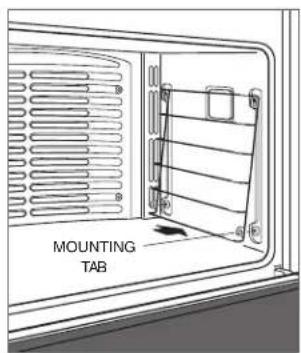
text_image
MOUNTING TABOven rack guide
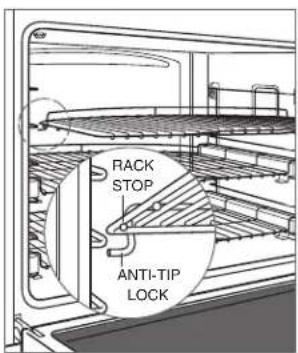
text_image
RACK STOP ANTI-TIP LOCKOven rack anti-tip lock
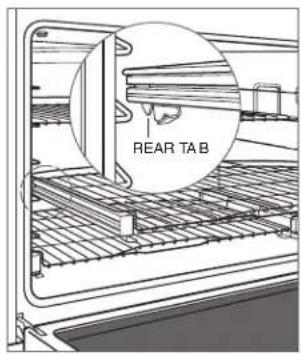
To insert a full-extension rack, place the two rear tabs onto the rack guide (one tab above and one below). Refer to the illustration below. Angle the rack slightly and slide back until the front rack notch engages the front rack guide.
text_image
REAR TABFull-extension rack
Interactive Control Panel
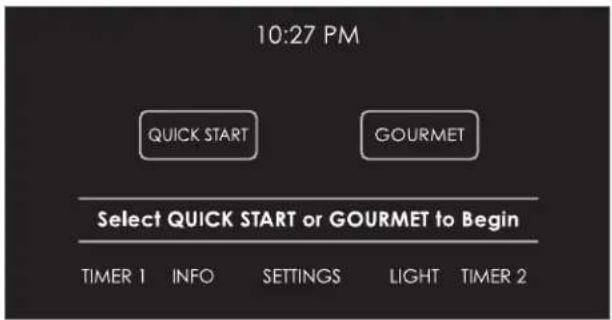
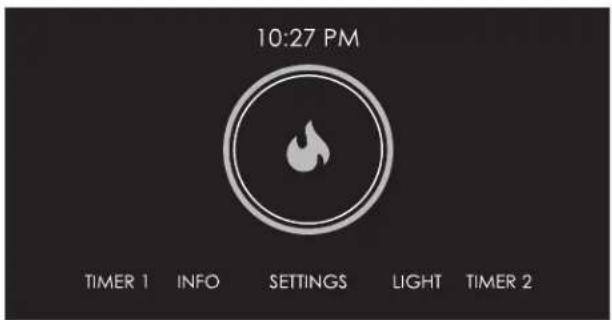
The interactive control panel utilizes touch technology to select cooking modes and other functions. Refer to the illustrations below. For professional models, cooking modes and temperatures are selected using selector knobs.
text_image
10:27 PM QUICK START GOURMET Select QUICK START or GOURMET to Begin TIMER 1 INFO SETTINGS LIGHT TIMER 2Home screen—single transitional and contemporary shown
text_image
10:27 PM TIMER 1 INFO SETTINGS LIGHT TIMER 2Home screen—single professional shown
COOKING OPTIONS
| QUICK START | Touch to initiate cooking, then select from options on the control panel. For professional model, turn selector knob to desired mode. |
| GOURMET | Touch to initiate Gourmet meal preparations, then select from options on the control panel. For professional model, turn selector knob to GOURMET. |
Oven Operation
PRIOR TO USE
To ensure all residual oil from the manufacturing process has been removed, each oven must go through the following procedure:
1 Clean oven thoroughly with hot water and a mild detergent. Rinse and dry with a soft cloth.
2 Turn on ventilation. Some smoke and odor is normal.
3 Touch or turn knob to CONVECTION ROAST and adjust temperature to 500°F (260°C) for one hour.
4 Touch OFF (turn knob for professional model) and allow oven to cool with door closed.
PREHEAT
During preheat, the oven is heated as quickly and evenly as possible and is not ideal for cooking. Preheat should be utilized for all cooking modes except broil, warm and some modes in Gourmet. Once preheat is complete, an audible chime indicates the oven has reached set temperature.
CLOCK
The clock is visible on the control panel during all cooking modes, however, the oven is shipped with the standby power feature enabled which causes the screen to go blank after five minutes of inactivity. To disable standby power, refer to extended options on page 10. It is very important the clock is set to the correct time if a timed cook feature is used. The clock must be reset after a power outage.
Setting clock:
1 Touch SETTINGS, then select TIME.
2 Touch 12 HOUR or 24 HOUR mode.
3 Use slide bar to set time of day, select AM or PM, then touch SET. An audible chime indicates the clock has been set.
Time can also be adjusted by touching the time display on the home screen.
Oven Operation
TIMER
Each timer can be set for a maximum of 11 hours and 59 minutes. Once a time is set, the countdown is illuminated on the control panel display. The timer is independent from the oven. Setting the timer does not affect cook time or stop time.
Setting timer:
1 Touch TIMER 1 or TIMER 2.
2 Use slide bar to set duration, then touch SET. An audible chime indicates the timer has been set.
3 To cancel or edit, touch the countdown time on the display.
4 Oven will chime and time will flash when complete. Timer will continue to chime until canceled or reset.
EXTENDED OPTIONS
Touch SETTINGS to access extended options. Touch or use the slide bar to select the desired option. If more information is needed, touch INFO.
• Temperature Offset (service only).
• Calibration—screencalibration.
• Sound—volume and tone.
- Brightness.
• Time—12 hour or 24 hour.
•SabbathMode.
- Clock—digital or analog.
- StandbyPower.
•Language.
- Units—°F/Imperial or °C/Metric.
• Showroom Mode (for showroom use only). - About (service only).
Cooking Modes
The oven has ten cooking modes—bake, roast, broil, convection roast, convection, Gourmet, proof, stone, dehydrate and warm. Stone and dehydrate require accessories. Refer to the chart on page 12.
SETTING CONTROLS
1 Touch QUICK START. Oven will default to BAKE mode. Touch or use slide bar to select desired cooking mode. For professional model, turn selector knob to desired cooking mode.
2 Touch START to select preset temperature. To change temperature, touch or use slide bar to select desired temperature, then touch START. For professional model, turn selector knob to adjust temperature.
3 Touch OFF to end mode. For professional model, turn selector knob to OFF.
GOURMET
Gourmet provides a variety of quick and convenient meal preparations. Gourmet also provides recommendations for ideal rack positions and tips to ensure cooking confidence.
Choose from six categories—meat, fish, baked goods, pizza, vegetables and one dish meals. Each category can be refined to ensure the most effective cooking mode and rack position to create a cooking masterpiece. Refer to the Gourmet guide below.
GOURMET GUIDE
MEAT Beef* steak, tenderloin, roast, prime rib, meatloaf, slow cook
Poultry* whole bird, fresh pieces, whole breast
Pork* ribs, tenderloin, roast, steak, chop, whole ham
Lamb ^* leg, roast, rib rack
FISH Steak*
Fillet*
BAKED GOODS Cookies
Cake sheet, fluted, angel, pound, cupcakes
Pie single crust, double crust
Bread quick bread, yeast loaf, yeast rolls, biscuits
PIZZA
Fresh
Par-Baked
Calzone
VEGETABLES
Roasted
Sweet Potato*
Baked Potato*
ONE DISH MEALS
Casserole*
Lasagna*
Quiche
*Does not require preheat.
Cooking Modes
MODE PRESET RANGE PROBE USES
| BAKE 350°F | (175°C) | 200–550°F(95–290°C) | Best for single-rack cooking, primarily baked foods. Use for standard recipes. |
| ROAST 350°F | (175°C) | 200–550°F(95–290°C) | Best for roasting less tender cuts of meat, such as chuck roasts and stew meat that should be covered. |
| BROIL High | MedLow | 550°F (290°C)450°F (230°C)350°F (175°C) | Best for broiling meats, fish and poultry pieces up to 1" thick.Utilize two-piece broiler pan and always broil with oven door closed. |
| CONVECTION ROAST 325°F | (165°C) | 200–550°F(95–290°C) | Gently browns exterior and seals in juices. Perfect for roasting tender cuts of beef, lamb, pork and poultry. |
| CONVECTION 325°F | (165°C) | 200–550°F(95–290°C) | Uniform air movement makes it possible to multi-level rack cook with even browning. |
| GOURMET — — | Gourmet provides quick and convenient meal preparations with recommendations for cooking mode and rack position. Refer to page 11. Preset temperature and range are dependent on food and desired doneness. | ||
| PROOF 85°F | (30°C) | 85–110°F(30–45°C) | Ideal for proofing, or rising bread dough. Refer to page 13. |
| STONE 450°F | (230°C) | 200–550°F(95–290°C) | Baking on a ceramic stone. Great for pizza and bread. Stone accessory required. Refer to page 13. |
| DEHYDRATE 135°F | (60°C) | 110–170°F(45–75°C) | Dry a variety of fruits, vegetables, herbs and meat strips.Accessory racks required. Refer to page 13. |
| WARM | 180°F(80°C) | 140–200°F(60–95°C) | Designed to keep foods at serving temperature. |
Cooking Modes
PROOF
Setting controls:
1 Touch QUICK START, then select PROOF. For professional model, turn selector knob to MORE, then select PROOF on the control panel.
2 Touch START to select preset temperature. To change temperature, touch or use slide bar to select desired temperature, then touch START. For professional model, turn selector knob to adjust temperature.
3 Touch OFF to end mode. For professional model, turn selector knob to OFF.
STONE
Accessory kit required. Accessories are available through an authorized Wolf dealer. For local dealer information, visit the find a showroom section of our website, wolfappliance.com. Additional use & care information is included with the accessory kit.
Setting controls:
1 Touch QUICK START, then select STONE. For professional model, turn selector knob to MORE, then select STONE on the control panel.
2 Touch START to select preset temperature. To change temperature, touch or use slide bar to select desired temperature, then touch START. For professional model, turn selector knob to adjust temperature.
3 Touch OFF to end mode. For professional model, turn selector knob to OFF.
DEHYDRATE
Accessory kit required. Accessories are available through an authorized Wolf dealer. For local dealer information, visit the find a showroom section of our website, wolfappliance.com. Additional use & care information is included with the accessory kit.
Setting controls:
1 Place door stop supplied with accessory kit.
2 Touch QUICK START, then select DEHYDRATE. For professional model, turn selector knob to MORE, then select DEHYDRATE on the control panel.
3 Touch START to select preset temperature. To change temperature, touch or use slide bar to select desired temperature, then touch START. For professional model, turn selector knob to adjust temperature.
4 Touch OFF to end mode. For professional model, turn selector knob to OFF.
Temperature Probe
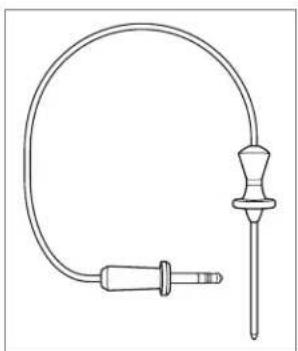
Use only the temperature probe shipped with this appliance. Refer to the illustration below. The temperature probe measures the internal temperature of food while cooking. It can be used with all cooking modes except broil, proof and dehydrate.
Setting controls:
1 Preheat oven to desired oven temperature in desired mode (BAKE or STONE mode for breads).
2 Insert probe into the thickest area of food. When making bread, cook for approximately 10 minutes before inserting probe.
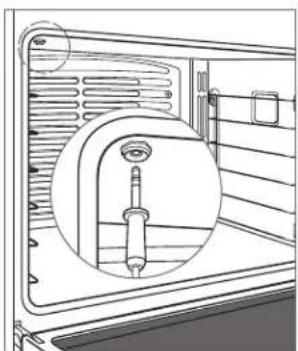
3 When preheat is complete, insert probe into probe receptacle. Refer to the illustration below. Close oven door.
4TouchPROBE.
5 Touch SET to select preset temperature. To change temperature, use slide bar to select desired temperature, then touch SET.
6 An audible chime indicates internal temperature has reached probe setpoint. Remove and reinsert probe to verify internal temperature, then select OK or OFF.
natural_image
Line drawing of a medical catheter device with a curved tube and connector (no text or symbols)Temperature probe
natural_image
Line drawing of a door with a screwdriver inserted into the opening (no text or symbols)Probe receptacle
CAUTION
Probe and probe receptacle will be very hot. Handle with care.
Auto Program
TIMED COOK | DELAYED START
Timed cook automatically turns the oven off at a specified time. The oven will begin to heat immediately and will turn off at the desired stop time. Delayed start automatically turns the oven on and off at specified times. The oven will remain idle until the desired start time and will turn off at the desired stop time. If preheat is required, preheat time must be accounted for when determining cooking duration. The clock must be set to the correct time to function properly. Use in any cooking mode except broil, Gourmet or stone.
Setting controls:
1 Touch QUICK START, then select desired cooking mode and temperature. For professional model, turn selector knobs to desired mode and temperature.
2 Touch TIMED COOK, then select cooking duration.
3 Touch SET to confirm stop time or use slide bar to select desired stop time, then touch SET. Cooking duration and stop time will appear on the display. Oven will chime with one minute remaining. Oven will chime when complete and will continue to chime until canceled or reset.
4 To cancel, reset or turn oven off, touch TIMED COOK.
5 Oven will automatically turn off when cook time is complete. Touch OK to clear display.
Sabbath
This appliance is certified by Star-K to meet strict religious regulations in conjunction with specific instructions found on www.star-k.org.
Roast, bake, proof and warm modes can be used in Sabbath.
Setting controls:
1 Turn oven light on or off.
2 Touch SETTINGS, then select SABBATH MODE.
3 Touch ON, then touch SET.
4 Select cooking mode and temperature, then touch START.
5Touch to initiate Sabbath mode.
6 Touch OFF to end mode. For professional model, turn selector knob to OFF.
Clean
During clean, the oven is heated to an extremely high temperature to burn off food soil. Oven lights are disabled.
Setting controls:
1 Touch QUICK START, then select CLEAN. For professional model, turn selector knob to MORE, then select CLEAN on the control panel.
2 Remove oven racks and rack guides, then touch OK.
3TouchSTART.
4 Touch OFF to end mode. For professional model, turn selector knob to OFF.
5 Oven door will lock and remain locked until clean cycle has ended and oven temperature has cooled below 550^ F ( 290^ C).
CAUTION
During clean, exterior surfaces may get hotter than usual. Children should be kept away.
Oven Light
WARNING
Verify power is disconnected from the electrical box before replacing a light bulb.
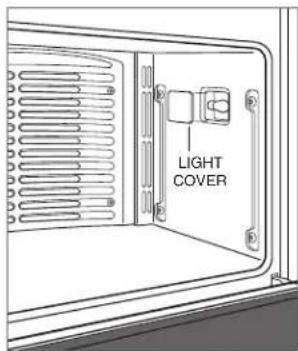
Allow the oven to cool completely, then remove oven racks and rack guides. To remove the light cover, gently pry the bottom edge with a flat screwdriver. Remove the existing bulb and replace with a 40-watt halogen bulb. Refer to the illustration below.
To replace the light bulb located on the top of the oven cavity, contact Wolf Factory Certified Service. For the name of the nearest Wolf Factory Certified Service, check the contact & support section of our website, wolfappliance.com or call Wolf customer care at 800-222-7820.
text_image
LIGHT COVERLight bulb replacement
Wolf Cooking Guide
FOOD RACK(S) MODE OVEN TEMP POSITION TIME NOTES
| BREADS | ||||
| Biscuits 1 Roast 400°F (205°C) 3 5–10 min | ||||
| 2 Convection 425°F | (220°C) 2, 5 5–10 min | |||
| 3 Convection 425°F | (220°C) 2, 4, 6 | 5–10 min | ||
| Cinnamon rolls | 1 Bake | 350°F (175°C) 3 20–25 min | ||
| 2 Convection 325°F | (165°C) 2, 5 20–25 min | |||
| 3 Convection 325°F | (165°C) 2, 4, 6 20–25 min | |||
| Muffins | 1 Bake | 400°F (205°C) | 3 | 15–20 min |
| 2 Convection 375°F | (190°C) 2, 5 10–15 min | |||
| 3 Convection 375°F (190°C) 2, 4, 6 | 10–15 min | |||
| Yeast rolls | 1 Convection 375°F | (190°C) 3 10–20 min | ||
| 2 Convection 375°F | (190°C) 2, 5 10–20 min | |||
| 3 Convection 375°F | (190°C) 2, 4, 6 10–20 min | |||
| Yeast bread (loaf pan) | 1 Bake 350°F | (175°C) 3 20–45 min | ||
| Yeast bread (no pan) | 1 Stone | 450°F (230°C) | 1 | 15–45 min |
| Quick breads | 1 Bake | 350°F (175°C) 3 40–50 min | ||
| Garlic bread | 1 Broil | Med | 5 | |
| Toast | 1 Broil | High | 5 | |
| CAKES | ||||
| Angel food cake | 1 Bake | 350°F (175°C) | 1 | 35–45 min |
| Bundt or pound cake | 1 Bake | 350°F (175°C) 3 40–50 min | ||
| Mixes or from scratch | 1 Bake | 350°F (175°C) | 3 | 20–30 min |
| 2 Convection 325°F | (165°C) 2, 5 20–30 min | |||
| 3 Convection 325°F | (165°C) 2, 4, 6 20–30 min | |||
| Cupcakes | 1 Bake | 350°F (175°C) 3 20–25 min | ||
| 2 Convection 325°F | (165°C) 2, 5 15–25 min | |||
| 3 Convection 325°F | (165°C) 2, 4, 6 15–25 min | |||
| COOKIES | ||||
| Cookies or bars | 1 Bake | 350°F (175°C) | 3 | 10–25 min |
| 2 Convection 325°F | (165°C) 2, 5 10–25 min | |||
| 3 Convection 325°F | (165°C) 2, 4, 6 10–25 min | |||
| PIES | ||||
| 2-crust, filled or streusel topped | 1 Bake | 375°F (190°C) | 3 | 40–45 min |
| Lemon meringue | 1 Broil | Low | 3 | 10–15 min |
| Pumpkin or custard | 1 Bake 425°F | (220°C) / 325°F (165°C) | 3 | see note |
| Pie crust (empty) | 1 Bake | 425°F (220°C) | 3 | 10–15 min |
| Puff pastry | 1 Bake | 400°F (205°C) 3 10–15 min | ||
| 2 Convection 375°F | (190°C) 2, 5 10–15 min | |||
| 3 Convection 375°F | (190°C) 2, 4, 6 10–15 min | |||
| Cream puffs | 1 Convection 400°F | (205°C) 3 20–30 min | ||
Consuming raw or undercooked meats, poultry, seafood, shellfish or eggs may increase your risk of foodborne illness.
Wolf Cooking Guide
FOOD MODE OVEN TEMP RACK TIME PROBE TEMP NOTES
| BEEF | ||||||
| Ground patties Broil High 5 10–15 min Turn over at 7 min. | ||||||
| Steaks (under 1" thick) Broil High 5 10–15 min Turn over at 6 min. | ||||||
| Steaks (1–3" thick) Broil High 5 10–20 min Turn over at 8 min. | ||||||
| Chuck roast Conv Roast | 325°F | (165°C) | 3 | 20–25 min/lb | Med 150°F (65°C) | Place in dish, liquid 1/2 the height of the meat. |
| Roast | 350°F (175°C) 3 | 20–25 min/lb | Med 150°F (65°C) | |||
| Roast | Roast | 425°F (220°C) / 325°F (165°C) | 2 | see note | Rare 135°F (60°C) | Roast for 30 min at 425°F, reduce temp to 325°F and cook to desired internal temp. |
| Slow roast | Bake | 300°F (150°C) | 2 | Place in covered dish, liquid 1/4 the height of the meat. | ||
| Prime rib | Roast | 450°F (230°C) / 225°F (105°C) | 2 | see note | Rare 130°F (55°C) | No preheat required. Roast for 30 min at 450°F, reduce temp to 225°F and cook to desired internal temp. |
| Tenderloin | Conv Roast | 450°F (230°C) | 3 | 10–20 min/lb | Rare 130°F (55°C) | |
| POULTRY | ||||||
| Chicken, bone-in | Conv Roast | 325°F (165°C) | 5 | 20–25 min | Thigh 180°F (80°C) | |
| Chicken, whole | Conv Roast | 325°F (165°C) | 2 | 10–20 min/lb | Thigh 180°F (80°C) | |
| Turkey, whole (brined) | Bake | 350°F (175°C) | 1 | 10–15 min/lb | Thigh 180°F (80°C) | |
| Turkey, whole | Conv Roast | 325°F (165°C) | 1 | 10–15 min/lb | Thigh 180°F (80°C) | |
| Roast | 325°F (165°C) | 1 | 10–15 min/lb | Thigh 180°F (80°C) | ||
| Duck | Conv Roast | 325°F (165°C) | 2 | 15–20 min/lb | Thigh 180°F (80°C) | |
| Goose | Conv Roast | 325°F (165°C) | 2 | 15–20 min/lb | Thigh 180°F (80°C) | |
| Cornish hen | Conv Roast | 325°F (165°C) | 3 | 1 hour | Thigh 180°F (80°C) | |
| Roast | 350°F (175°C) | 3 | 1 hour | Thigh 180°F (80°C) | ||
| Chicken quarters, thighs | Broil | Med | 5 | 20–25 min | Turn over halfway through broiling. | |
| Roast | 350°F (175°C) | 3 | 30–40 min | Thigh 180°F (80°C) | ||
| Conv Roast | 325°F (165°C) | 3 | 30–40 min | Thigh 180°F (80°C) | ||
| Bake | 350°F (175°C) | 3 | 30–40 min | Thigh 180°F (80°C) | ||
| Turkey pieces | Conv Roast | 325°F (165°C) | 3 | 30–40 min | Thigh 180°F (80°C) | |
| Roast | 350°F (175°C) | 3 | 30–40 min | Thigh 180°F (80°C) | ||
| Chicken boneless breast(flattened to 1/2" thick) | Broil | Med | 5 | 10–15 min | Turn over halfway through broiling. | |
| Conv Roast | 350°F (175°C) | 3 | 15–20 min | Breast 165°F (75°C) | ||
| Turkey breast, whole | Conv Roast | 325°F (165°C) | 2 | 15–20 min | Breast 165°F (75°C) | |
| Roast | 350°F (175°C) | 2 | 15–20 min | Breast 165°F (75°C) | ||
Consuming raw or undercooked meats, poultry, seafood, shellfish or eggs may increase your risk of foodborne illness.
Wolf Cooking Guide
FOOD MODE OVEN TEMP RACK TIME PROBE TEMP NOTES
| PORKChops,steaks (1/2" thick) Broil High 5 5-10 min Turn over halfway through broiling. | ||||||
| Conv Roast 350°F | (175°C) 3 | 10-15 min | ||||
| Slow roast Bake 300°F | (150°C) 2 | Place in covered dish, liquid height of the meat. | 1/4 the | |||
| Ribs | Bake 300°F | (150°C) 3 | Place in foil packets or covereddish, liquid 1/4 the height of themeat. | |||
| Tenderloin | Conv Roast 400°F | (205°C) 3 | 15-20 min/lb | Rare 130°F (55°C) | ||
| Ham steak (1/2" thick) | Broil | High | 5 | 5-10 min | Turn over halfway through broiling. | |
| Ham steak (1" thick) | Broil | High | 5 | 10-15 min | Turn over halfway through broiling. | |
| Ham, whole | Bake 335°F | (170°C) | 2 | 10-15 min/lb | 160°F (70°C) | Cover and rest 15 min. |
| LAMBChops,steaks (3/4" thick) | Broil | High | 5 | 5-10 min | Turn over halfway through broiling. | |
| Leg | Conv Roast | 425°F (220°C) /325°F (165°C) | 2 | see note | 145°F (65°C) | Roast for 30 min at 425°F, reduce temp to 325°F and cook to desired internal temp. |
| Veal roast | Conv Roast 300°F | (150°C) 2 | 30-35 min/lb | 140°F (60°C) | ||
| Crown rack | Conv Roast | 325°F (165°C) | 2 | 15-20 min/lb | 145°F (65°C) | |
| PIZZACalzones | Stone | 375°F (190°C) | 1 | 10-15 min | ||
| Homemade | Stone | 450°F (230°C) 1 | 5-15 min | |||
| French bread pizza | Broil | Med | 5 | 10-15 min | ||
| FISHFillet (under 1" thick) | Broil | Med | 5 | 10-20 min | ||
| Fillet (over 1" thick) | Conv Roast | 375°F (190°C) | 5 | 15-25 min | ||
| VEGETABLESPotatoes,sweet potatoes | Bake | 350°F (175°C) | 3 | 45-60 min | ||
| Mixed vegetables | Conv Roast 400°F | (205°C) 4 | 10-20 min | |||
| OTHERMeatloaf | Roast | 425°F (220°C) /325°F (165°C) | 2 | see note | 165°F (75°C) | Roast for 20 min at 425°F, reduce temp to 325°F and cook to desired internal temp. |
| Sausage, bratwurst (fresh) | Broil | Med | 5 | 10-15 min | Turn over halfway through broiling. | |
| Nachos | Broil | Low | 3 | 15-20 min | ||
| Quiche | Bake 350°F | (175°C) 3 | 40-50 min | |||
| One dish meals | Bake 350°F | (175°C) 3 | 45-60 min | 175°F (80°C) | ||
Consuming raw or undercooked meats, poultry, seafood, shellfish or eggs may increase your risk of foodborne illness.
Care Recommendations
CLEANING
| Stainless steel | Use a nonabrasive stainless steel cleaner and apply with a soft lint-free cloth. To bring out the natural luster, lightly wipe surface with a water-dampened microfiber cloth followed by a dry polishing chamois. Always follow the grain of stainless steel. |
| Black glass Spray glass cleaner on a cloth to clean. | |
| Oven racks and guides | Remove and place on a flat surface near the sink. Clean with hot water and mild detergent or paste of baking soda and water. Do not immerse in water. Towel dry. |
| Control panel | Use a spray degreaser to remove fingerprints and food soil. Spray on a cloth before wiping panel. IMPORTANT NOTE: Do not spray cleaners directly on control panel. |
| Oven interior | Before utilizing the clean feature, use a razor blade to gently lift baked on foods from the oven cavity and window. For stubborn stains, spray with a mild abrasive cleaner or spray degreaser and scrub with a no-scratch Scotch-BriteTM pad (pink or blue). Wash the entire oven cavity with soap and water to remove all cleaning chemicals before entering the clean cycle. If residue is not cleaned from the cavity, etching of the porcelain may occur. Once the clean cycle is complete, allow the oven to cool completely and wipe out ash with a damp cloth. |
| Broiler pan | To clean the upper rack, use mild detergent and a scouring pad. Rinse and dry. To clean the bottom pan, discard grease and wash with hot water and mild detergent. Rinse and dry. The upper rack is dishwasher safe, however, do not place the porcelain-coated pan in dishwasher. |
Troubleshooting
OPERATION
Oven does not operate.
- Verify power is on.
- Verify electrical power to oven and home circuit breaker is on.
Oven temperature issue.
- Contact Wolf customer care at 800-222-7820 for recommendations.
No response from control panel touch pads.
- Unit in Sabbath mode ( ☆ displayed on control panel), refer to page 15.
- Turn circuit breaker off for 20 seconds, then turn back on.
'PROBE SHORTED' displayed on control panel.
- Touch OFF. Verify probe connector is fully seated into the receptacle. Reset oven temperature and probe temperature.
Error message displayed during clean cycle.
- For double ovens, if one oven is in an active clean cycle, the other oven can not be used.
Oven 'pops' or 'bangs' during preheat or cool down.
• Normal with new oven cavity expansion and contraction.
- Run clean cycle. If it persists, contact Wolf customer care at 800-222-7820.
Service
- Maintain the quality built into your product by contacting Wolf Factory Certified Service. For the name of the nearest Wolf Factory Certified Service, check the contact & support section of our website, wolfappliance.com or call Wolf customer care at 800-222-7820.
- When contacting service, you will need the model and serial number of your product. Both numbers are listed on the product rating plate. Refer to page 6 for rating plate location.
- For warranty purposes, you will also need the date of installation and name of your authorized Wolf dealer. This information should be recorded on page 3 of this guide.
Sub-Zero, Sub-Zero & Design, Sub-Zero & Snowflake Design, Dual Refrigeration, The Living Kitchen, Great American Kitchens The Fine Art of Kitchen Design, Wolf, Wolf & Design, Wolf Gourmet, W & Design, red colored knobs, Cove, and Cove & Design are registered trademarks and service marks of Sub-Zero Group, Inc. and its subsidiaries. All other trademarks are property of their respective owners in the United States and other countries.
Wolf Appliance Residential Limited Warranty
FOR RESIDENTIAL USE
FULL TWO YEAR WARRANTY\*
For two years from the date of original installation, this Wolf Appliance product warranty covers all parts and labor to repair or replace, under normal residential use, any part of the product that proves to be defective in materials or workmanship. All service provided by Wolf Appliance under the above warranty must be performed by Wolf factory certified service, unless otherwise specified by Wolf Appliance, Inc. Service will be provided during normal business hours.
LIMITED FIVE YEAR WARRANTY
For five years from the date of original installation, Wolf Appliance will repair or replace the following parts that prove to be defective in materials or workmanship: gas burners (excludes appearance), electric heating elements, blower motors (ventilation hoods), electronic control boards, magnetron tubes and induction generators. If the owner uses Wolf factory certified service, the service provider will repair or replace these parts with the owner paying for all other costs, including labor. If the owner uses non-certified service, the owner must contact Wolf Appliance, Inc. (using the information below) to receive repaired or replacement parts. Wolf Appliance will not reimburse the owner for parts purchased from non-certified service or other sources.
TERMS APPLICABLE TO EACH WARRANTY
The warranty applies only to products installed for normal residential use. The warranty applies only to products installed in any one of the fifty states of the United States, the District of Columbia or the ten provinces of Canada. This warranty does not cover any parts or labor to correct any defect caused by negligence, accident or improper use, maintenance, installation, service or repair.
THE REMEDIES DESCRIBED ABOVE FOR EACH WARRANTY ARE THE ONLY ONES THAT WOLF APPLIANCE, INC. WILL PROVIDE, EITHER UNDER THIS WARRANTY OR UNDER ANY WARRANTY ARISING BY OPERATION OF LAW. WOLF APPLIANCE, INC. WILL NOT BE RESPONSIBLE FOR ANY CONSEQUENTIAL OR INCIDENTAL DAMAGES ARISING FROM THE BREACH OF THIS WARRANTY OR ANY OTHER WARRANTY, WHETHER EXPRESS, IMPLIED OR STATUTORY.
Some states do not allow the exclusion or limitation of incidental or consequential damages, so the above limitation or exclusion may not apply to you. This warranty gives you specific legal rights and you may also have other legal rights that vary from state to state.
To receive parts and/or service and the name of Wolf factory certified service nearest you, contact Wolf Appliance, Inc., P.O. Box 44848, Madison, WI 53744; check the contact & support section of our website, wolfappliance.com, email us at customerservice@subzero.com or call 800-222-7820.
*Stainless steel (doors, panels, handles, product frames and interior surfaces) are covered by a limited 60-day parts and labor warranty for cosmetic defects.
*Replacement filters for ventilation hood recirculating kits are not covered by the product warranty.
WOLF
Contenido
www.P65Warnings.ca.gov
text_image
Labeled diagram of an oven with numbered parts for identificationnatural_image
Technical line drawing of a mechanical component with a circular inset showing internal structure (no text or symbols)Recipiente de la sonda
PRECAUCIÓN
text_image
APPUYEZ SUR POUR OUVRIR MOULFModèle contemporain
AVERTISSEMENT
PROPOSITION 65 POUR RESIDENTS DE LA CALIFORNIE
text_image
Labeled diagram of an oven with numbered parts for identificationnatural_image
Technical line drawing of a mechanical component with a magnified inset showing internal structure (no text or symbols)Prise de la sonde
MISE EN GARDE
WOLF APPLIANCE, INC. P.O. BOX 44848 MADISON, WI 53744 WOLFAPPLIANCE.COM 800.222.7820
9005945 REV-D 2/2018