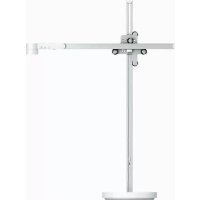
Lightcycle - Lighting DYSON - Free user manual and instructions
Find the device manual for free Lightcycle DYSON in PDF.



| Product Type | Connected desk lamp |
| Brand | Dyson |
| Model | Lightcycle |
| Power supply | Mains (polarized plug) |
| Light source | Integrated non-replaceable LED |
| Color temperature | Adjustable from warm to cool (via dial) |
| Brightness | Adjustable (switch) |
| Connectivity | Bluetooth 4.0 (BLE) via Dyson Link app |
| Sensors | Presence, ambient brightness |
| Smart functions | Natural light tracking based on geolocation, automatic shut-off after 2 minutes without presence, constant brightness maintenance |
| USB-C charging port | Yes, up to 1.5 A / 5 V |
| Warranty | 5-year limited (parts and labor) |
| Dimensions (estimate) | Height approx. 50 cm, round base |
| Weight (estimate) | Approximately 2-3 kg |
| Maintenance | Soft, dry, lint-free cloth |
| Operating temperature | 0 °C to 40 °C |
| Storage temperature | -20 °C to 60 °C |
| Usage | Indoor only |
| Safety | Do not look directly at the light source; do not use if damaged |
| Repairability | Non-replaceable light source; full replacement of the product at end of life |
Frequently Asked Questions - Lightcycle DYSON
User questions about Lightcycle DYSON
0 question about this device. Answer the ones you know or ask your own.
Ask a new question about this device
Download the instructions for your Lighting in PDF format for free! Find your manual Lightcycle - DYSON and take your electronic device back in hand. On this page are published all the documents necessary for the use of your device. Lightcycle by DYSON.
USER MANUAL Lightcycle DYSON
Thank you for choosing to buy a Dyson light
To read your manual in English, go to page 4.
Thank you for choosing to buy a Dyson light
To read your manual in English go to page 60.
6 Registration
8 Important safety instructions
14 Assembly
16 Controls
18 Color temperature
20 Brightness
22 Settings
24 USB-C charging point
Additional information
26 Dyson Link app connectivity
26 Disposal
26 Terms and conditions of the Dyson 5 year limited warranty
28 Important data protection information
28 Important information
Thank you for choosing to buy a Dyson light
Download the latest Dyson Link app from the App Store or Google Play. Open the app and follow the on screen instructions to connect to your light.
Online www.dyson.com/support
On the phone:
(866) 693-9766
Mon-Fri: 8:00am - 8:00pm (CST)
Sat: 9:00am - 6:00pm (CST)

Download on the App Store

GETITON Google Play
Apple and the Apple logo are trademarks of Apple Inc., registered in the U.S. and other countries. App Store is a service mark of Apple Inc., registered in the U.S. and other countries. Google Play and the Google Play logo are trademarks of Google Inc.
The Bluetooth® word mark and logos are registered trade marks owned by the Bluetooth SIG, Inc. and any use of such marks by Dyson is under license.
Registration
After registering your 5 year warranty, your Dyson light will be covered for parts and labor for 5 years from the date of purchase, subject to the terms of the warranty. If you have any questions about your Dyson light, call the Dyson Helpline with your serial number and details of where and when you bought the light. Most questions can be solved over the phone by one of our trained Dyson Helpline staff.
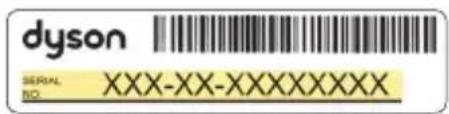
Your serial number can be found on the base of the light.
Visit www.dyson.com/support for online help, support videos, general tips and useful information about Dyson.
Note your serial number for future reference.
This illustration is for example purposes only.

Register with your smartphone Download the Dyson Link app and you will be taken through registration as part of the set up.
Register online
Visit our website to register your full parts and labor warranty online. www.dyson.com/register
Register by phone
Call our dedicated Helpline.
Open Mon-Fri: 8:00am - 8:00pm (CST)
Sat: 9:00am - 6:00pm (CST).
(866) 693-9766
IMPORTANT SAFETY INSTRUCTIONS
This portable luminaire has a polarized plug (one blade is wider than the other) as a feature to reduce the risk of electric shock. This plug will fit in a polarized outlet only one way. If the plug does not fit fully in the outlet, reverse the plug. If it still does not fit, contact a qualified electrician. Never use with an extension cord unless plug can be fully inserted. Do not alter the plug.
BEFORE USING THIS LIGHT
READ ALL INSTRUCTIONS
AND CAUTIONARY
MARKINGS IN THIS MANUAL
AND ON THE LIGHT
When using any electrical appliance, basic precautions should always be followed, including the following:
WARNING
These warnings apply to the light, and also where applicable to chargers or mains adaptors.
TO REDUCE THE RISK OF FIRE, ELECTRIC SHOCK, OR INJURY:
- Ensure light is fully assembled in line with the instructions before use.
-
This Dyson light can be used by persons with reduced physical, sensory or reasoning capabilities, or lack of experience and knowledge, only if they have been given supervision or instruction by a responsible person concerning use of the light in a safe way and understand the hazards involved. Cleaning and maintenance shall not be performed by children.
-
Do not allow to be used as a toy. Close attention is necessary when the light is used near children.
-
Suitable for indoor use only 32^(0^) - 104^(40^)
- CAUTION: Possibly hazardous optical radiation emitted from this light. Do not stare at the light source as it may be harmful to the eye.
- Use only as described in this Dyson Operating Manual. Do not carry out any maintenance other than that advised by the Dyson Helpline.
- If the light is not working as it should, has received a sharp blow, has been dropped, damaged, left outdoors, or dropped into water, do not use and contact the Dyson Helpline.
-
If a service or repair is needed, contact the Dyson Helpline so we can discuss the available options. Do not disassemble the light as incorrect reassembly may result in an electric shock or fire.
-
Do not handle any part of the light, cord or plug with wet hands.
-
Do not use with a damaged cord or plug. If the supply cord is damaged it must be replaced by Dyson, its service agent or similarly qualified persons in order to avoid a hazard.
-
Do not stretch the cord or place the cord under strain. Keep cord away from heated surfaces.
-
Do not run the cord under carpeting. Do not cover the cord with throw rugs, runners or similar coverings. Do not route the cord under furniture or appliances. Arrange the cord away from traffic area and where it will not be tripped over.
-
Do not unplug by pulling on the cord. To unplug, grasp the plug, not the cord. The use of an extension cord is not recommended.
-
Turn off all controls before unplugging. Unplug from outlet when not in use for
extended periods. To avoid a tripping hazard, safely coil the cord.
- Do not use near furnaces, fireplaces, stoves or other high temperature heat sources.
- The light source is not replaceable; when the light source reaches its end of life, the whole light shall be replaced. End of life replacement is not covered under the warranty.
- The light must be stored and operated within the following temperature ranges:
Storage temperature range: -4^(-20^) - 140^(60^)
Ambient temperature: 32^ F ( 0^ C ) - 104^ F ( 40^ C )
Operating temperature range: 32^ (0^) - 104^ (40^) .
READ AND SAVE THESE INSTRUCTIONS
Assembly
1
2
3
4
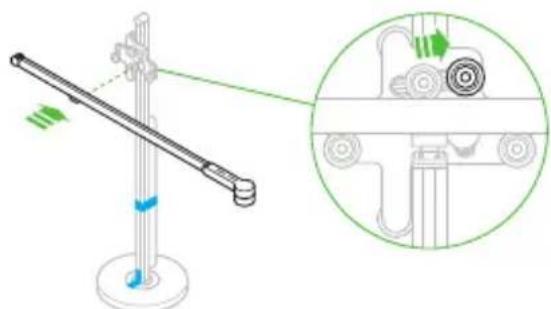
14
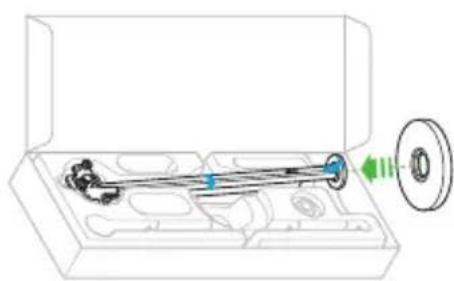
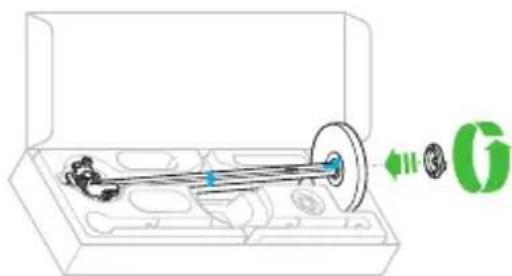
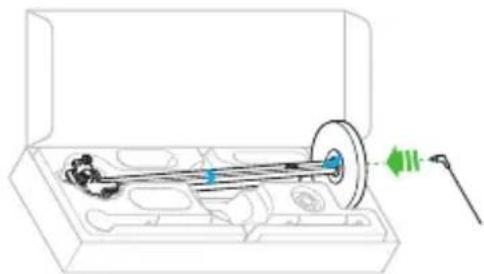
It is important that the light is assembled in the box as shown. Do not remove the transit tape until the light is fully assembled.
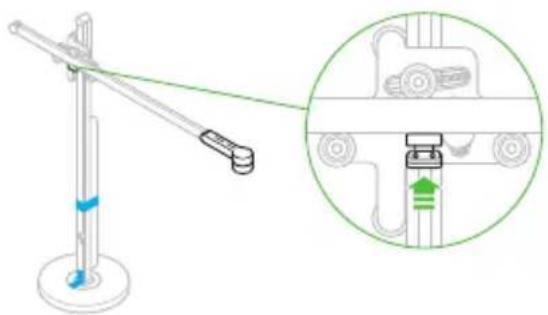
5
6
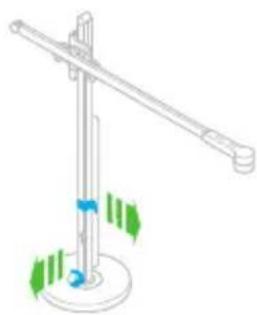
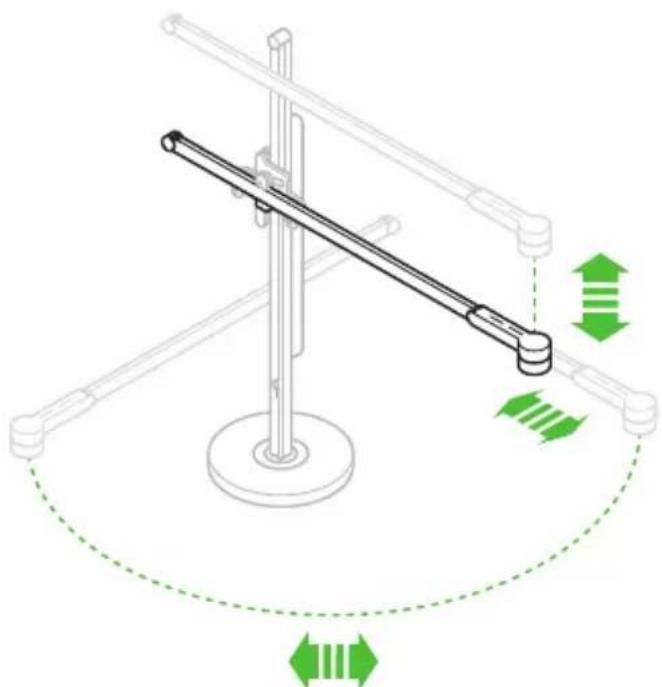
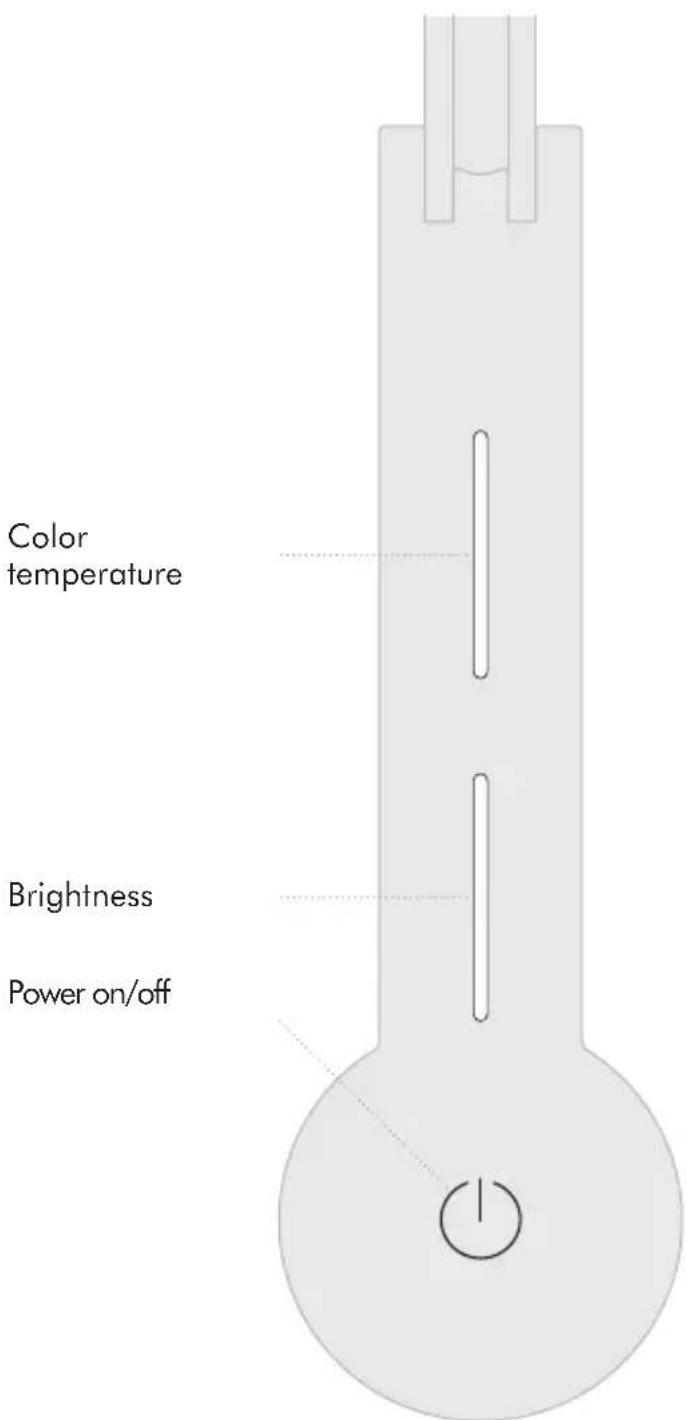
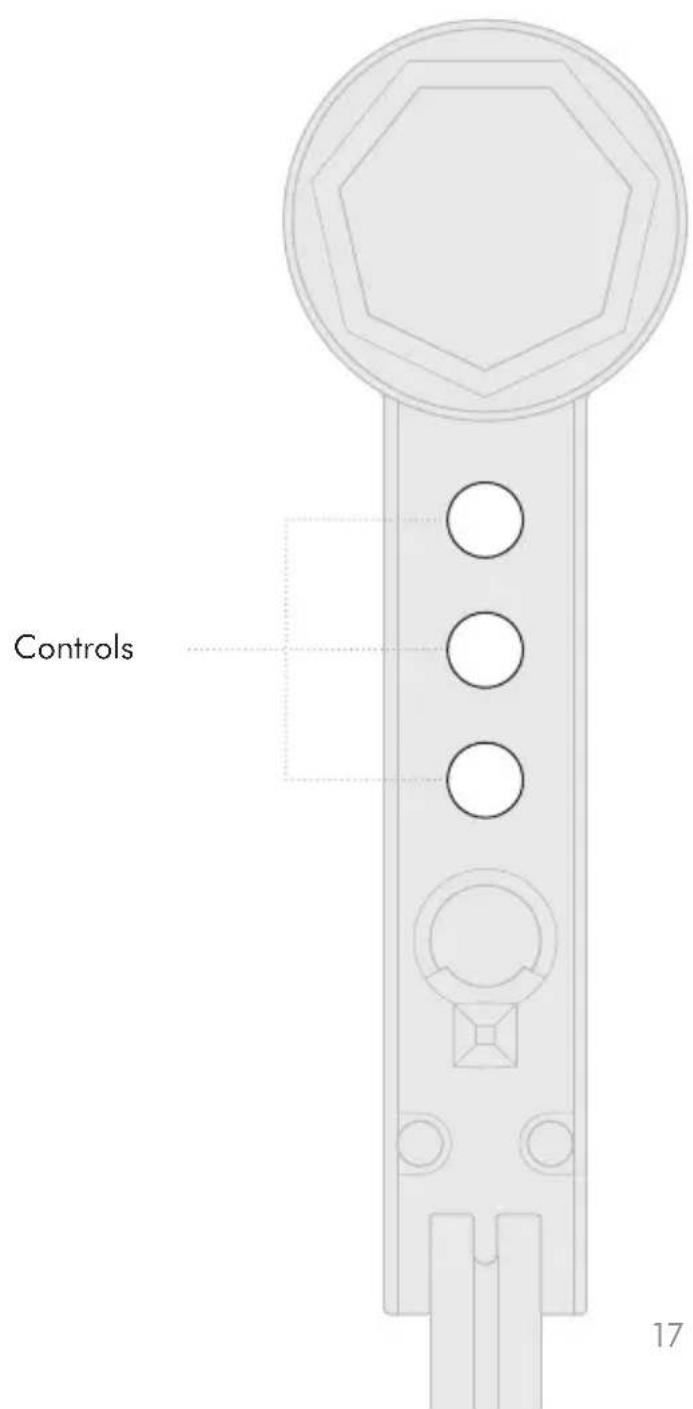
Controls
16
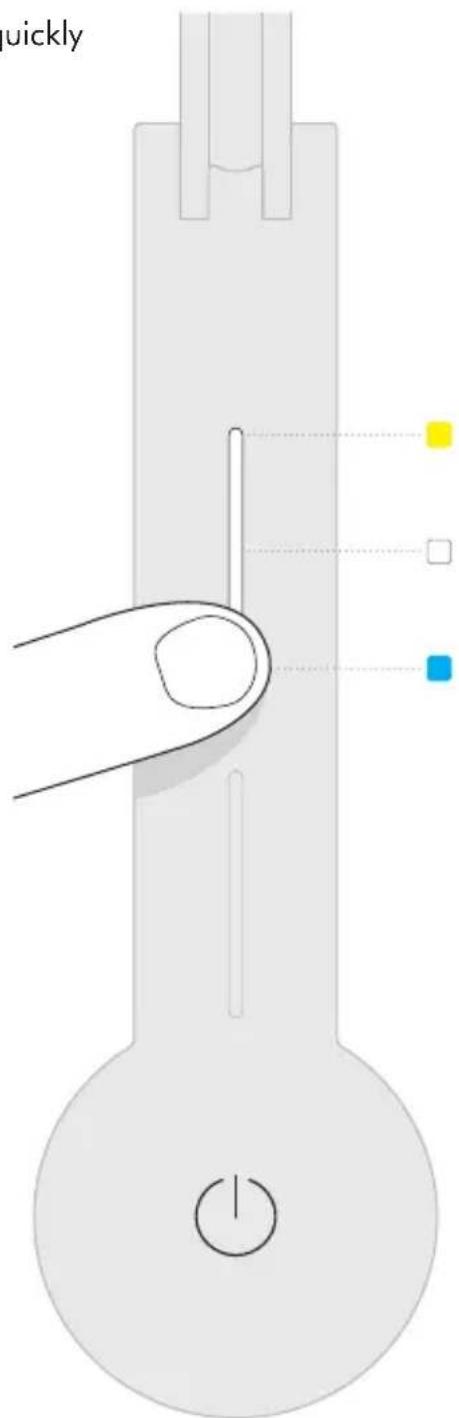
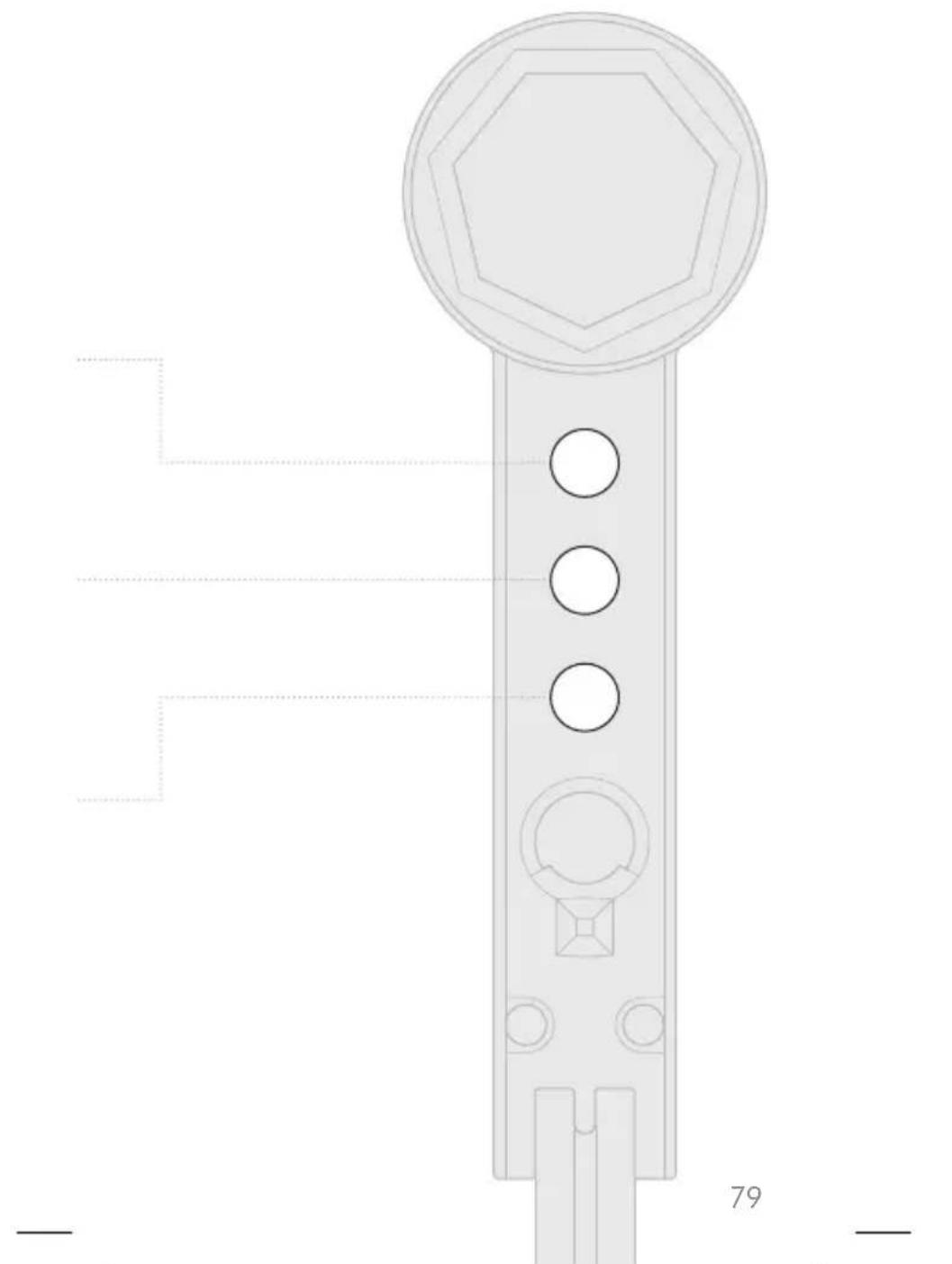
Color temperature
Swipe to change the color temperature of the light from warm through to cool.
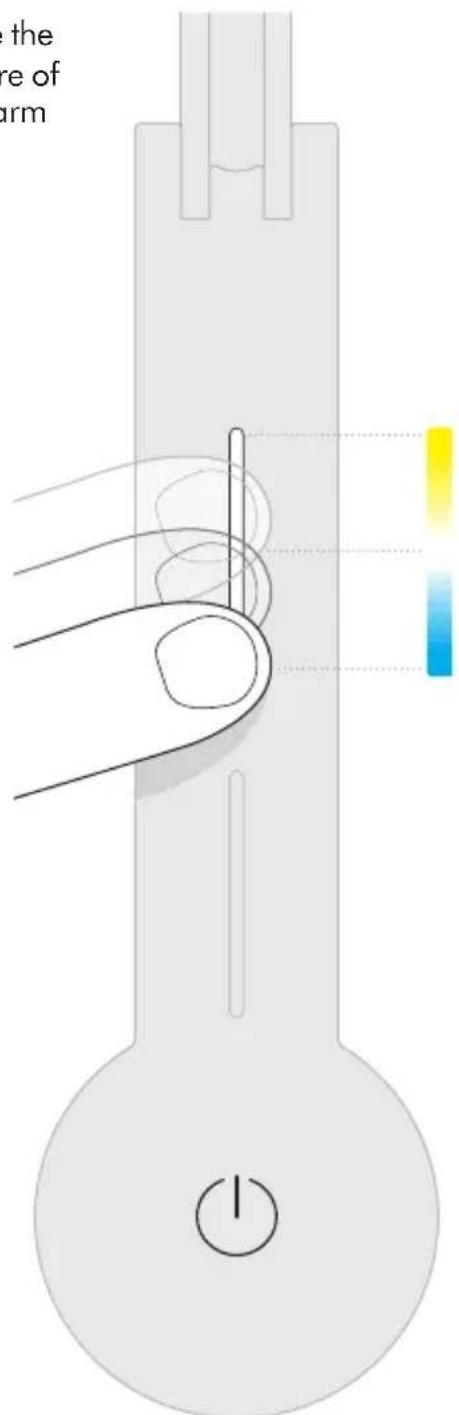
To find out more about color temperatures of light, and to get the most from your light, go to the Dyson Link app or online at www.dyson.com
Tap to change quickly between color temperatures.
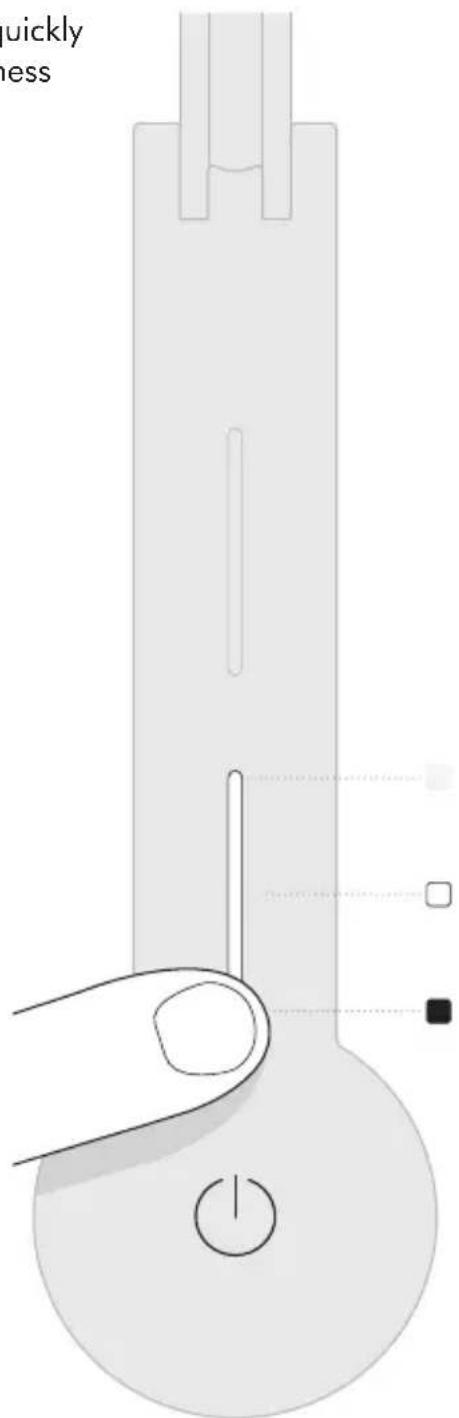
Brightness
Swipe to change the brightness of the light.
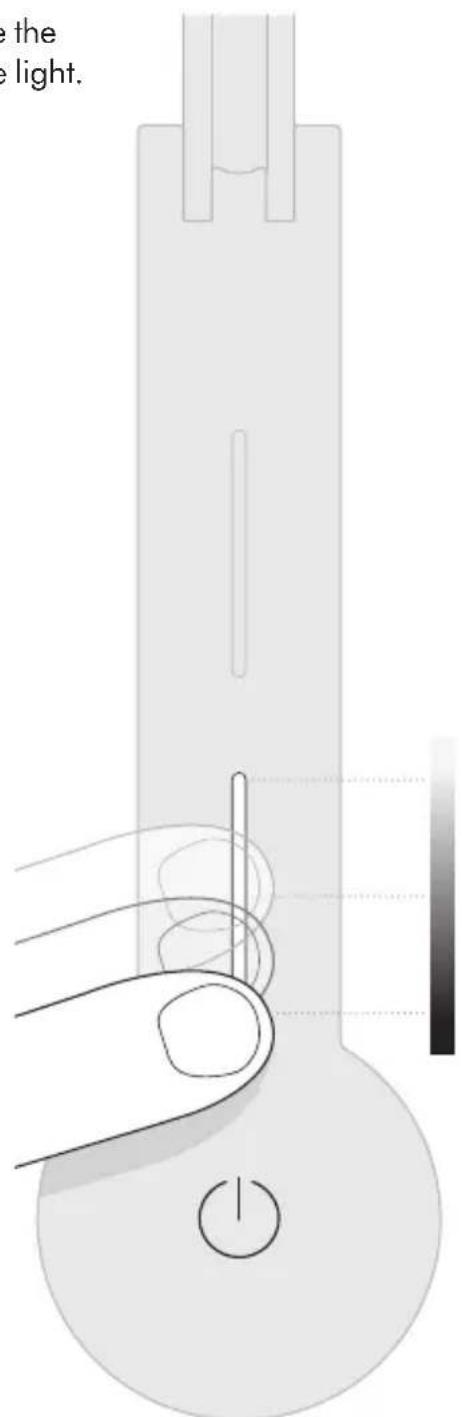
To find out more about brightness levels, and to get the most from your light, go to the Dyson Link app or online at www. dyson.com
Tap to change quickly between brightness levels.
21
Settings
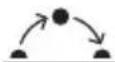
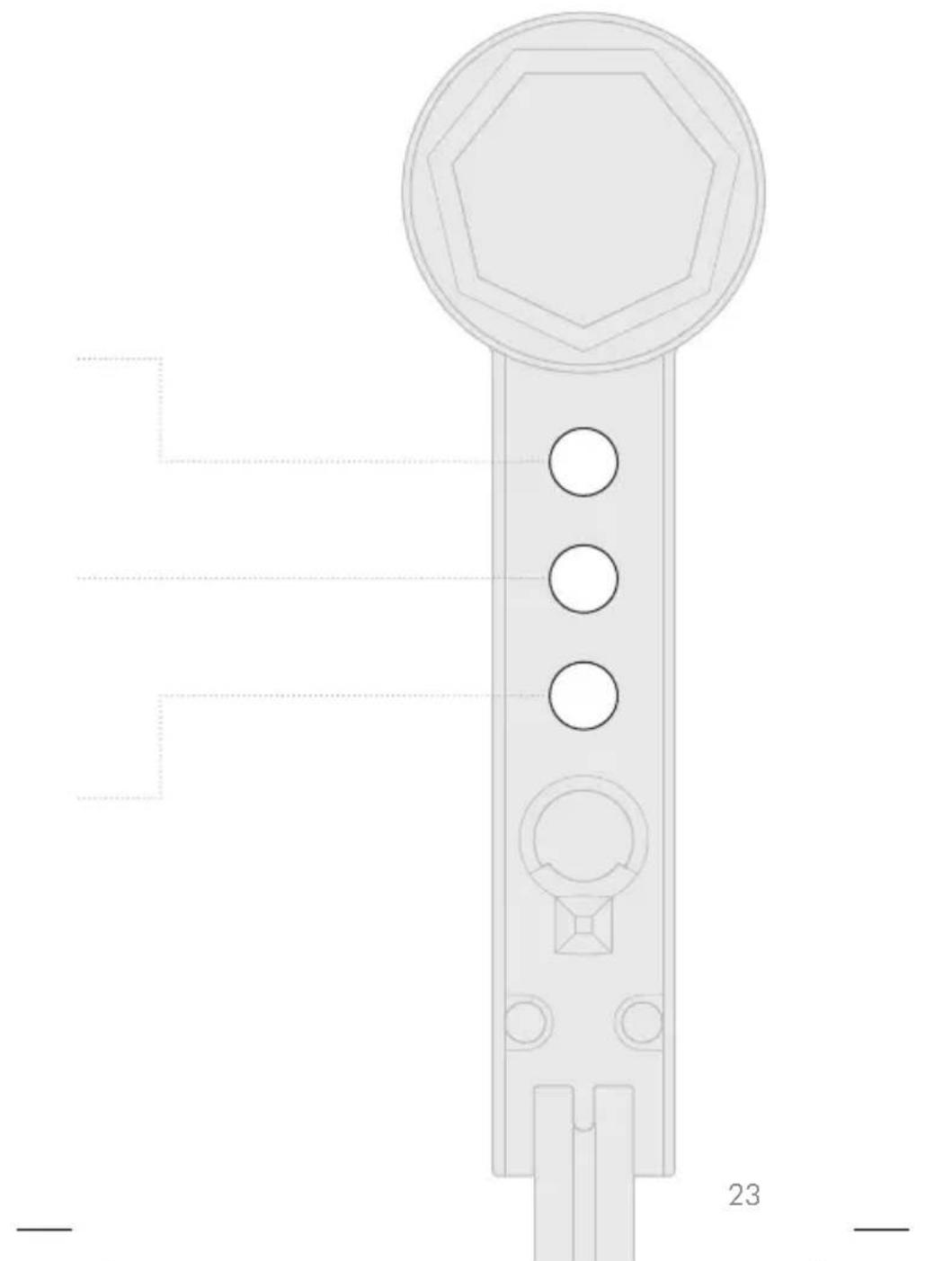
Automatically changes the brightness and color, according to your geographical location, throughout the day when connected by Bluetooth wireless technology to the Dyson Link app.

The light will turn off after 2 minutes if no presence is detected.
O AUTO
The light will adjust to background light conditions and keep the workspace at a constant brightness.
For more information about using your light without connecting to the Dyson Link app: Online: www.dyson.com/support On the phone: (866) 693-9766 Mon-Fri: 8:00am - 8:00pm (CST) Sat: 9:00am - 6:00pm (CST)
To find out more about settings, and to get the most from your light, go to the Dyson Link app or online at www.dyson.com
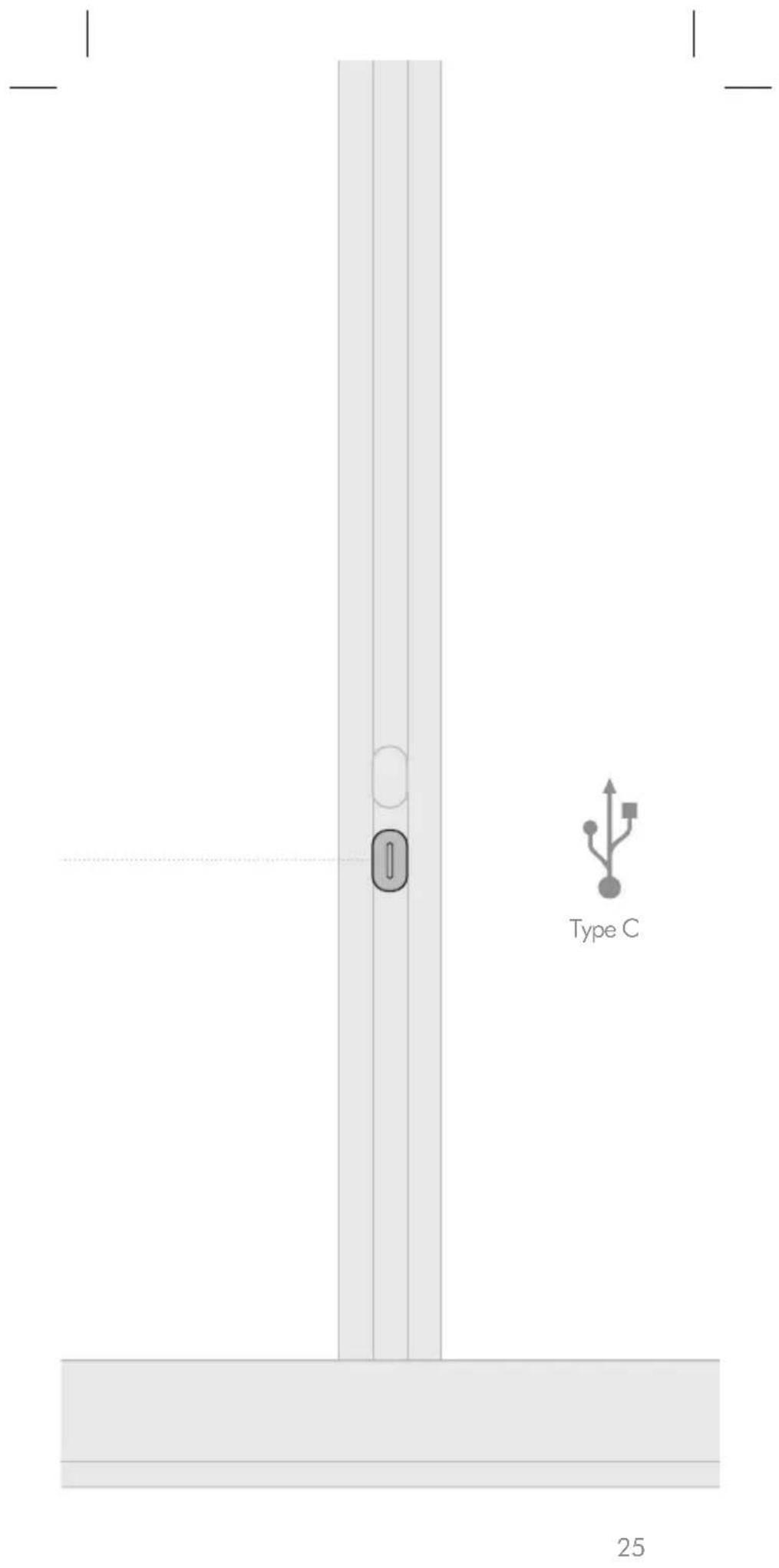
USB-C charging point
Plug in your mobile devices to charge up to 1.5A at 5V.
Additional information
DYSON LINK APP CONNECTIVITY
- Dyson endeavours to ensure that our technology is compatible with current operating systems but this is not guaranteed. If you have any questions or would like to check the latest compatibility, please contact the Dyson Helpline.
- Your mobile device must have Bluetooth 4.0 support (Bluetooth Low Energy) in order to set up a connection with the light. Check your device specification for compatibility.
DISPOSAL
- Dyson products are made from high grade recyclable materials. Recycle where possible.
- Dispose in accordance with local ordinances or regulations.
5 YEAR LIMITED PARTS AND LABOR WARRANTY
TERMS AND CONDITIONS OF THE DYSON 5 YEAR PARTS AND LABOR WARRANTY
WHAT IS COVERED
- The repair or replacement of your Dyson light (at Dyson's discretion) if it is found to be defective due to faulty materials, workmanship or function within 5 years of purchase or delivery (if any part is no longer available or out of manufacture, Dyson will replace it with a functional replacement part).
WHAT IS NOT COVERED
Dyson does not guarantee the repair or replacement of a light where a defect is the result of:
- Damage caused by not carrying out any recommended maintenance of the light.
-
Accidental damage, faults caused by negligent use or care, misuse, neglect, carelessness, operation or handling of the light which is not in accordance with the Dyson Operating Manual.
-
Use of the light for anything other than the use it is designed for.
- Use of parts not in accordance with the Dyson Operating Manual.
- Use of parts and accessories other than those produced or recommended by Dyson.
- Faulty installation (except where installed by Dyson).
- Repairs or alterations carried out by unauthorized parties or agents.
Normal wear and tear (e.g. fuse etc.). If you are in any doubt as to what is covered by your warranty, please contact Dyson.
WARRANTY LIMITATIONS AND EXCLUSIONS
- Any implied warranties relating to your machine including but not limited to warranty of merchantability or warranty of fitness for a particular purpose, are limited to the duration of this warranty. This limitation is not allowed by some States, and so this limitation may not apply to you.
- Your remedy for breach of this warranty is limited to the warranty service described below. Dyson will not be liable for any consequential damages or incidental damages you may incur in connection with your purchase and use of your machine. This limitation is not allowed by some States and so this limitation may not apply to you.
- This limited warranty gives you specific legal rights. You may also have other rights which vary by State.
- This limited warranty is not transferable.
WARRANTY SERVICE
- Visit our website to register your full parts and labor warranty online at www.dyson.com/register
- Before a service can take place, the terms of the warranty require that you contact the Dyson Helpline with your model name/number, serial number, date and place of purchase.
-
Please keep your purchase receipt in a safe place to ensure that you have this information.
-
All work will be coordinated by Dyson or its authorized agents.
- Any replaced defective parts will become the property of Dyson.
Service under this warranty will not extend the period of this warranty. - If your light is not functioning properly, please call the Dyson Helpline on (866) 693-9766. Most issues can be rectified over the telephone by our trained Helpline staff.
IMPORTANT DATA PROTECTION INFORMATION
You will need to provide us with basic contact information when you register your Dyson Product or the Dyson Link app;
WHEN REGISTERING VIA THE DYSON LINK APP
You will need to provide us with basic contact information to register the Dyson Link app.
WHEN REGISTERING YOUR DYSON LIGHT:
- You will need to provide us with basic contact information to register your product and enable us to support your warranty.
- When you register, you will have the opportunity to choose whether you would like to receive communications from us. If you opt-in to communications from Dyson, we will send you details of special offers and news of our latest innovations. We never sell your information to third parties and only use information that you share with us as defined by our privacy policies which are available on our website at privacy.dyson.com
IMPORTANT INFORMATION
- If your light needs servicing, please call the Dyson Helpline or visit the website at www.dyson.com/support
- To clean, use a soft, dry, lint free cloth to wipe all over the light.
CONFORMITY INFORMATION
This equipment has been tested and found to comply with the limits for a Class B digital device, pursuant to part 15 of the FCC Rules. These limits are designed to provide reasonable protection against harmful interference in a residential installation. This equipment generates, uses and can radiate radio frequency energy and, if not installed and used in accordance with the instructions, may cause harmful interference
to radio communications. However, there is no guarantee that interference will not occur in a particular installation. If this equipment does cause harmful interference to radio or television reception, which can be determined by turning the equipment off and on, the user is encouraged to try to correct the interference by one or more of the following measures:
Reorient or relocate the receiving antenna.
- Increase the separation between the equipment and receiver.
- Connect the equipment into an outlet on a circuit different from that to which the receiver is connected.
- Consult the dealer or an experienced radio/TV technician for help. This equipment complies with FCC radiation exposure limits set forth for an uncontrolled environment. In order to avoid the possibility of exceeding the FCC radio frequency exposure limits, human proximity to the antenna shall not be less than 20cm during normal operation. Changes or modifications not expressly approved by the party responsible for compliance could void the user's authority to operate the equipment.
USES
Contenido
Inicio
www.dyson.com/support
Portelefono:
(866) 693-9766
Lunes a Viernes de 8 a.m. - 8 p.m., hora Centro;
Sábados de 9 a.m. - 6 p.m., hora Centro


62 Registration
64 Important safety instructions
70 Assembly
72 Controls
74 Color temperature
76 Brightness
78 Settings
80 USB-C charging point
Additional information
82 Dyson Link app connectivity
82 Disposal
82 Terms and conditions of the
Dyson 5 year limited warranty
84 Important data protection information
84 Important information
Thank you for choosing to buy a Dyson light
Download the latest Dyon Link app from the App Store or Google Play. Open the app and follow the on screen instructions to connect to your light.
Online
www.dyson canada.ca/support
On the phone:
1-877-397-6622 Mon-Fri:8am-7pm,EST Saturday:9am-5pm,EST

Download on the App Store

GETON Google Play
Apple and the Apple logo are trademarks of Apple Inc., registered in the U.S. and other countries. App Store is a service mark of Apple Inc., registered in the U.S. and other countries. Google Play and the Google Play logo are trademarks of Google Inc.
The Bluetooth® word mark and logos are registered trade marks owned by the Bluetooth SIG, Inc. and any use of such marks by Dyson is under license.
Registration
After registering your 5 year warranty, your Dyson light will be covered for parts and labor for 5 years from the date of purchase, subject to the terms of the warranty. If you have any questions about your Dyson light, call the Dyson Helpline with your serial number and details of where and when you bought the light. Most questions can be solved over the phone by one of our trained Dyson Helpline staff.
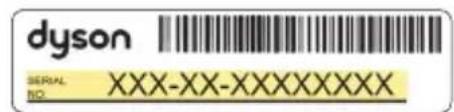
Your serial number can be found on the base of the light.
Visit www.dysoncanada.ca/support for online help, support videos, general tips and useful information about Dyson.
Note your serial number for future reference.
This illustration is for example purposes only.
Register with your smartphone Download the Dyson Link app and you will be taken through registration as part of the set up.
Register online
Visit our website to register your full parts and labor warranty online. www.dyson canada.ca
Register by phone
Dyson Customer Care is available 6 days a week.
Mon - Fri: 8am - 7pm, EST
Saturday: 9am - 5pm, EST
1-877-397-6622
IMPORTANT SAFETY INSTRUCTIONS
This portable luminaire has a polarized plug (one blade is wider than the other) as a feature to reduce the risk of electric shock. This plug will fit in a polarized outlet only one way. If the plug does not fit fully in the outlet, reverse the plug. If it still does not fit, contact a qualified electrician. Never use with an extension cord unless plug can be fully inserted. Do not alter the plug.
BEFORE USING THIS LIGHT
READ ALL INSTRUCTIONS
AND CAUTIONARY
MARKINGS IN THIS MANUAL
AND ON THE LIGHT
When using any electrical appliance, basic precautions should always be followed, including the following:
WARNING
These warnings apply to the light, and also where applicable to chargers or mains adaptors.
TO REDUCE THE RISK OF FIRE, ELECTRIC SHOCK, OR INJURY:
-
Ensure light is fully assembled in line with the instructions before use.
-
This Dyson light can be used by persons with reduced physical, sensory or reasoning capabilities, or lack of experience and knowledge, only if they have been given supervision or instruction by a responsible person concerning use of the light in a safe way and understand the hazards involved. Cleaning and maintenance shall not be performed by children.
-
Do not allow to be used as a toy. Close attention is necessary when the light is used near children.
-
Suitable for indoor use only 0^ (32^) - 40^ (104^)
- CAUTION: Possibly hazardous optical radiation emitted from this light. Do not stare at the light source as it may be harmful to the eye.
- Use only as described in this Dyson Operating Manual. Do not carry out any maintenance other than that advised by the Dyson Helpline.
- If the light is not working as it should, has received a sharp blow, has been dropped, damaged, left outdoors, or dropped into water, do not use and contact the Dyson Helpline.
-
If a service or repair is needed, contact the Dyson Helpline so we can discuss the available options. Do not disassemble the light as incorrect reassembly may result in an electric shock or fire.
-
Do not handle any part of the light, cord or plug with wet hands.
- Do not use with a damaged cord or plug. If the supply cord is damaged it must be replaced by Dyson, its service agent or similarly qualified persons in order to avoid a hazard.
- Do not stretch the cord or place the cord under strain. Keep cord away from heated surfaces.
- Do not run cord under carpeting. Do not cover cord with throw rugs, runners or similar coverings. Arrange cord away from traffic area and where it will not be tripped over.
- Do not unplug by pulling on the cord. To unplug, grasp the plug, not the cord. The use of an extension cord is not recommended.
- Turn off all controls before unplugging. Unplug from outlet when not in use for
extended periods. To avoid a tripping hazard, safely coil the cord.
- Do not use near furnaces, fireplaces, stoves or other high temperature heat sources.
- The light source is not replaceable; when the light source reaches its end of life, the whole light shall be replaced. End of life replacement is not covered under the guarantee.
- The light must be stored and operated within the following temperature ranges:
Storage temperature range:
- 20^ (-4^) - 60^ (140^)
Ambient temperature: 0^
(32^) - 40^ (104^)
Operating temperature range:
0^ (32^) - 40^ (104^)
READ AND
SAVE THESE
INSTRUCTIONS
Assembly
1
2
3
4
70
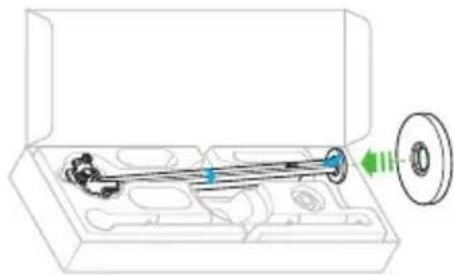
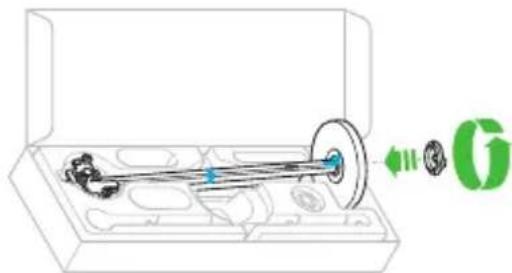
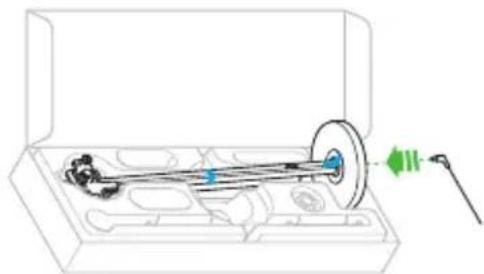
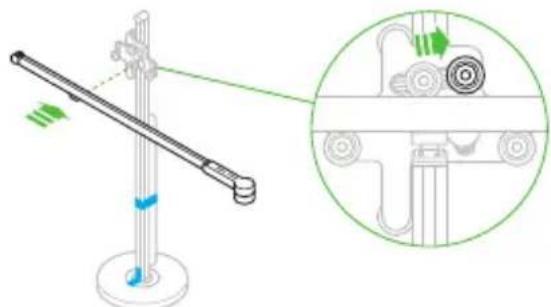
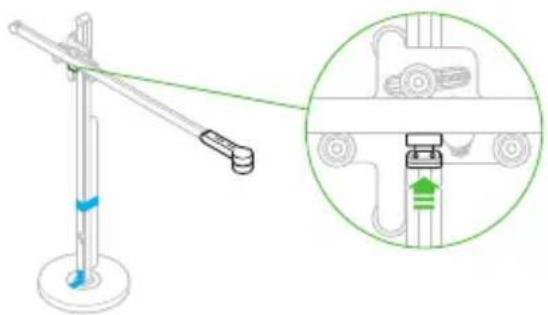
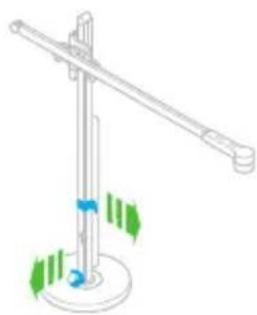
It is important that the light is assembled in the box as shown.
Do not remove the transit tape until the light is fully assembled.
5
6
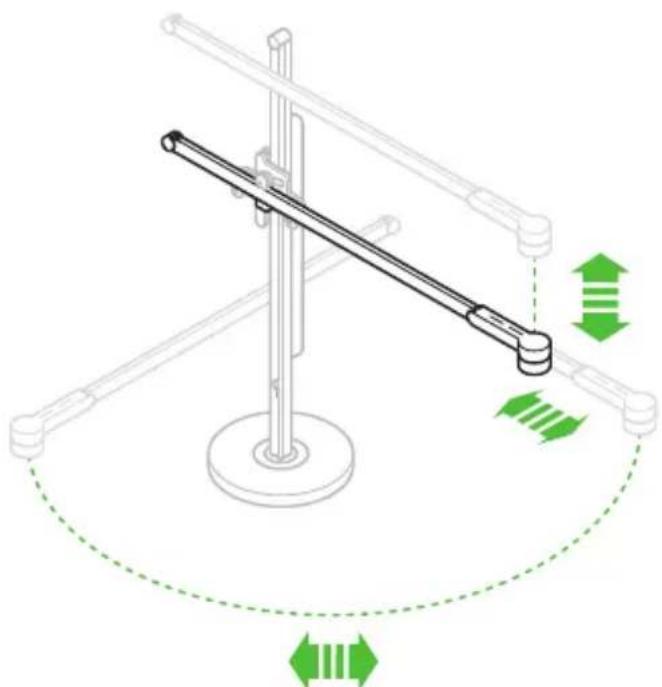
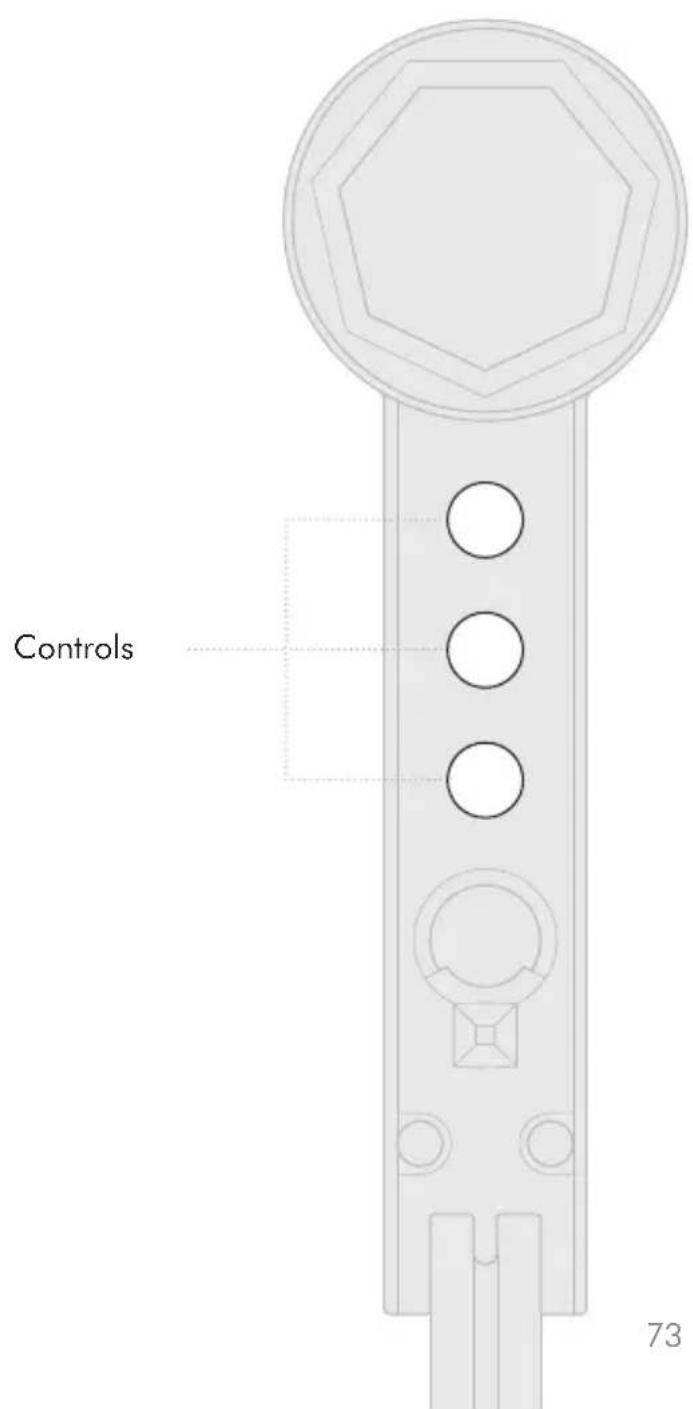
Controls
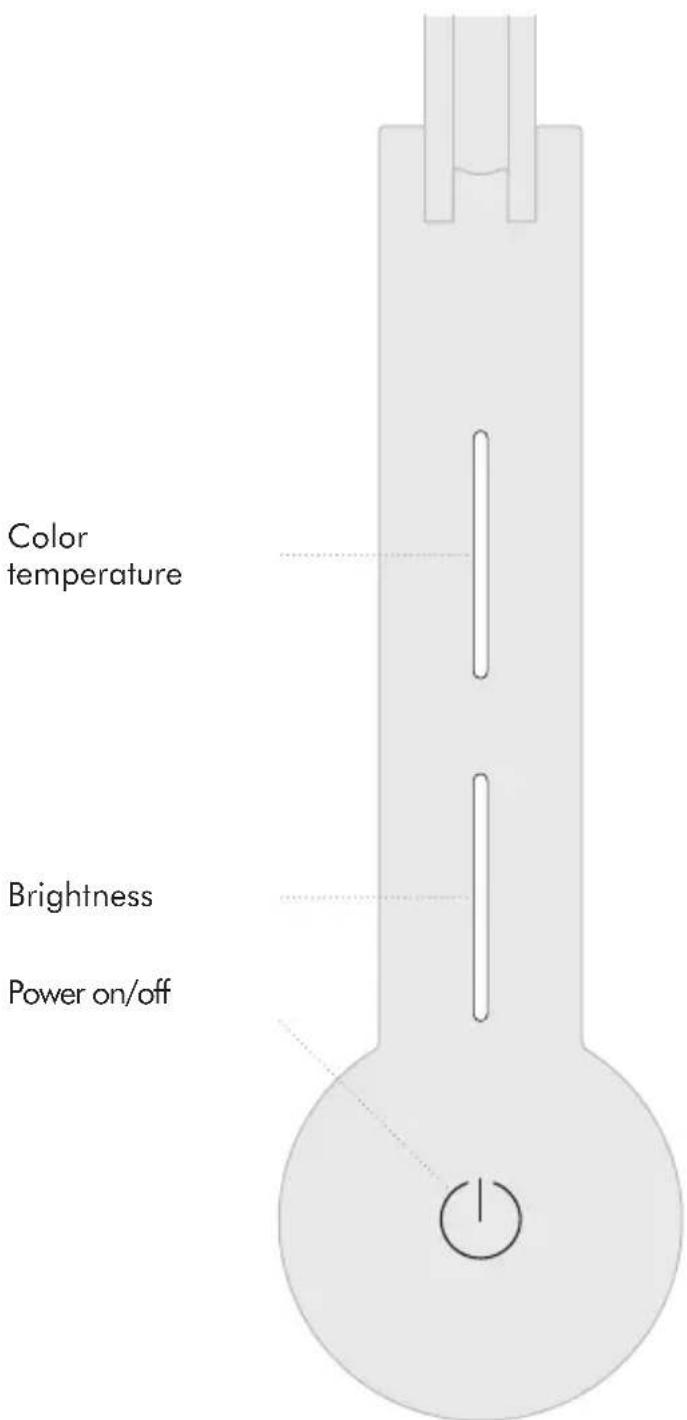
72
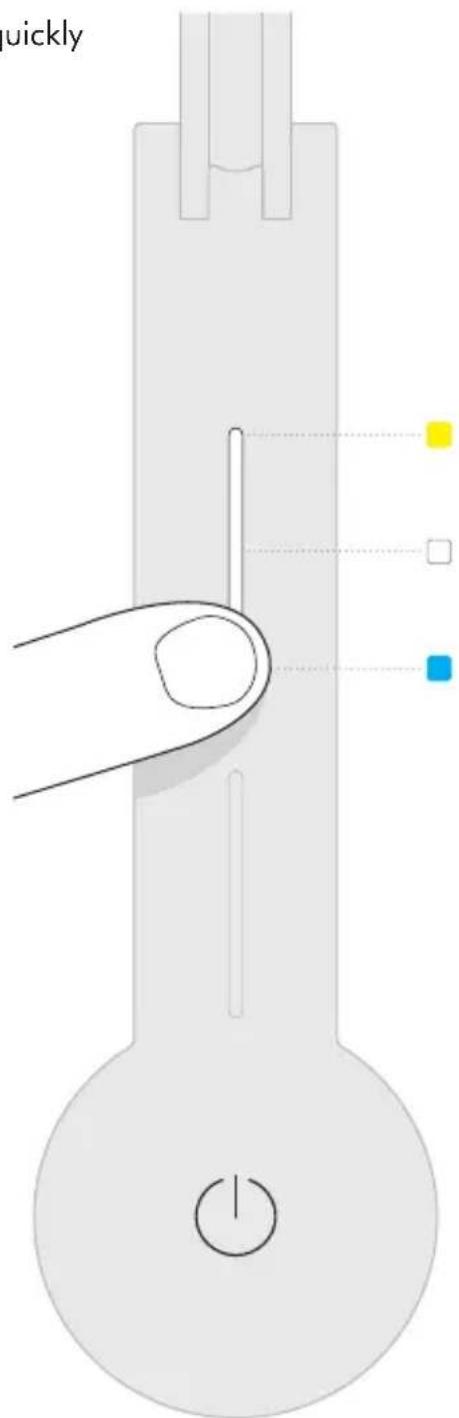
Color temperature
Swipe to change the color temperature of the light from warm through to cool.
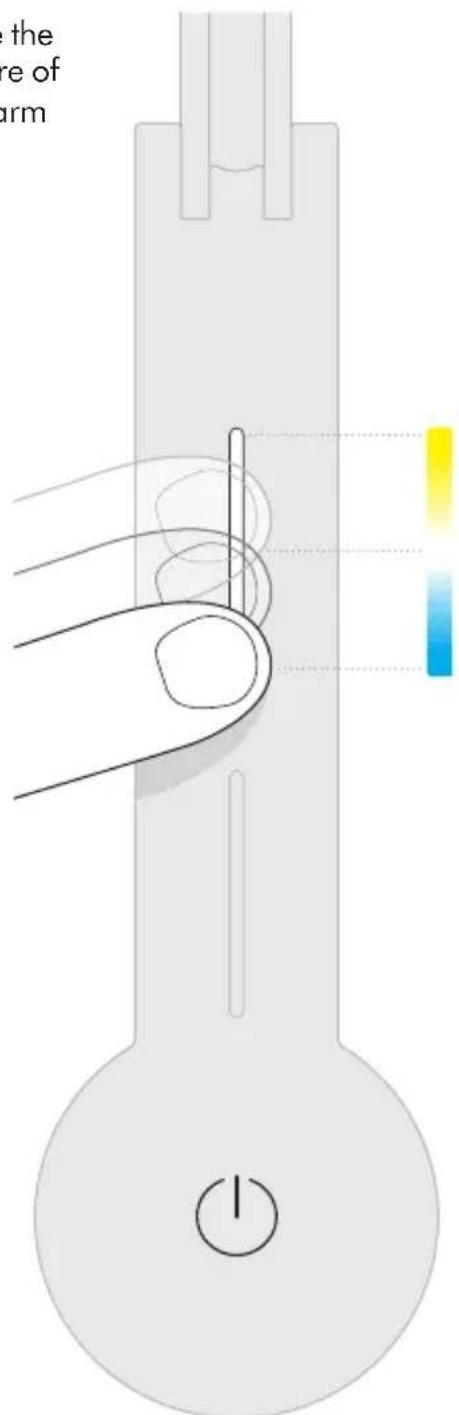
To find out more about color temperatures of light, and to get the most from your light, go to the Dyson Link app or online at www.dysoncanada.ca
Tap to change quickly between color temperatures.
Brightness
Swipe to change the brightness of the light.
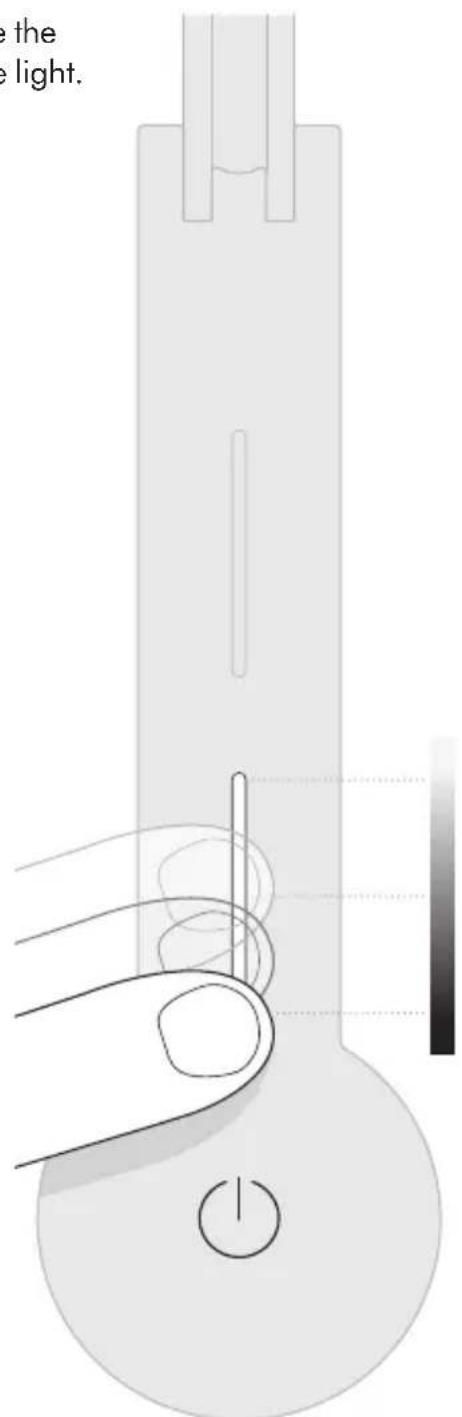
To find out more about brightness levels, and to get the most from your light, go to the Dyson Link app or online at www.dysoncanada.ca
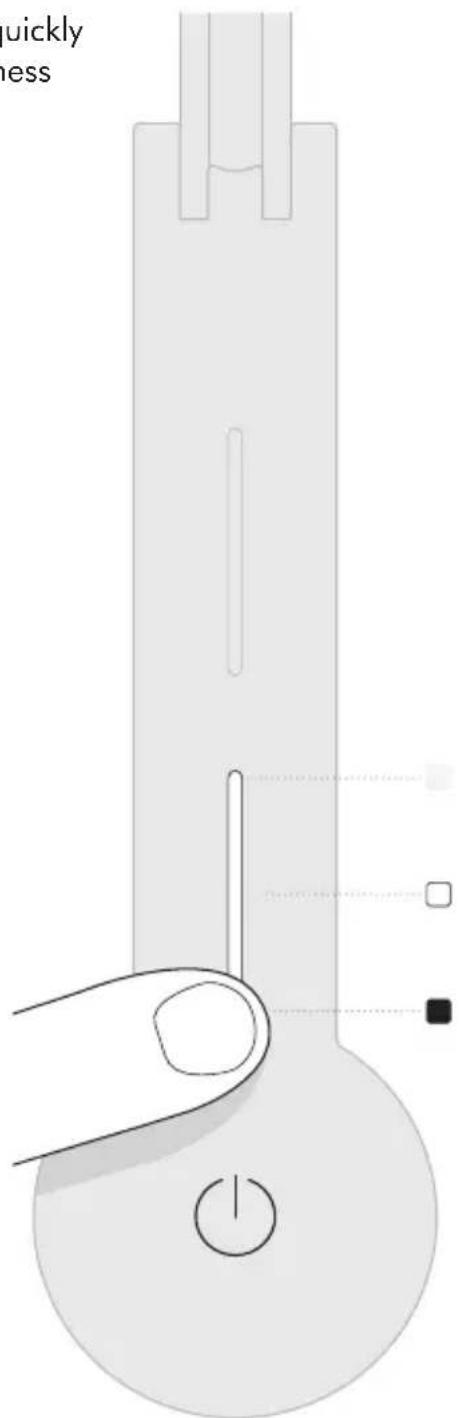
Tap to change quickly between brightness levels.
77
Settings
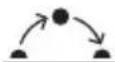
Automatically changes the brightness and color, according to your geographical location, throughout the day when connected by Bluetooth wireless technology to the Dyson Link app.

The light will turn off after 2 minutes if no presence is detected.

The light will adjust to background light conditions and keep the workspace at a constant brightness.
For more information about using your light without connecting to the Dyson Link app: Online: www.dysoncanada.ca/support On the phone: 1-877-397-6622 Mon - Fri: 8am - 7pm, EST Saturday: 9am - 5pm, EST
To find out more about settings, and to get the most from your light, go to the Dyson Link app or online at www.dysoncanada.ca
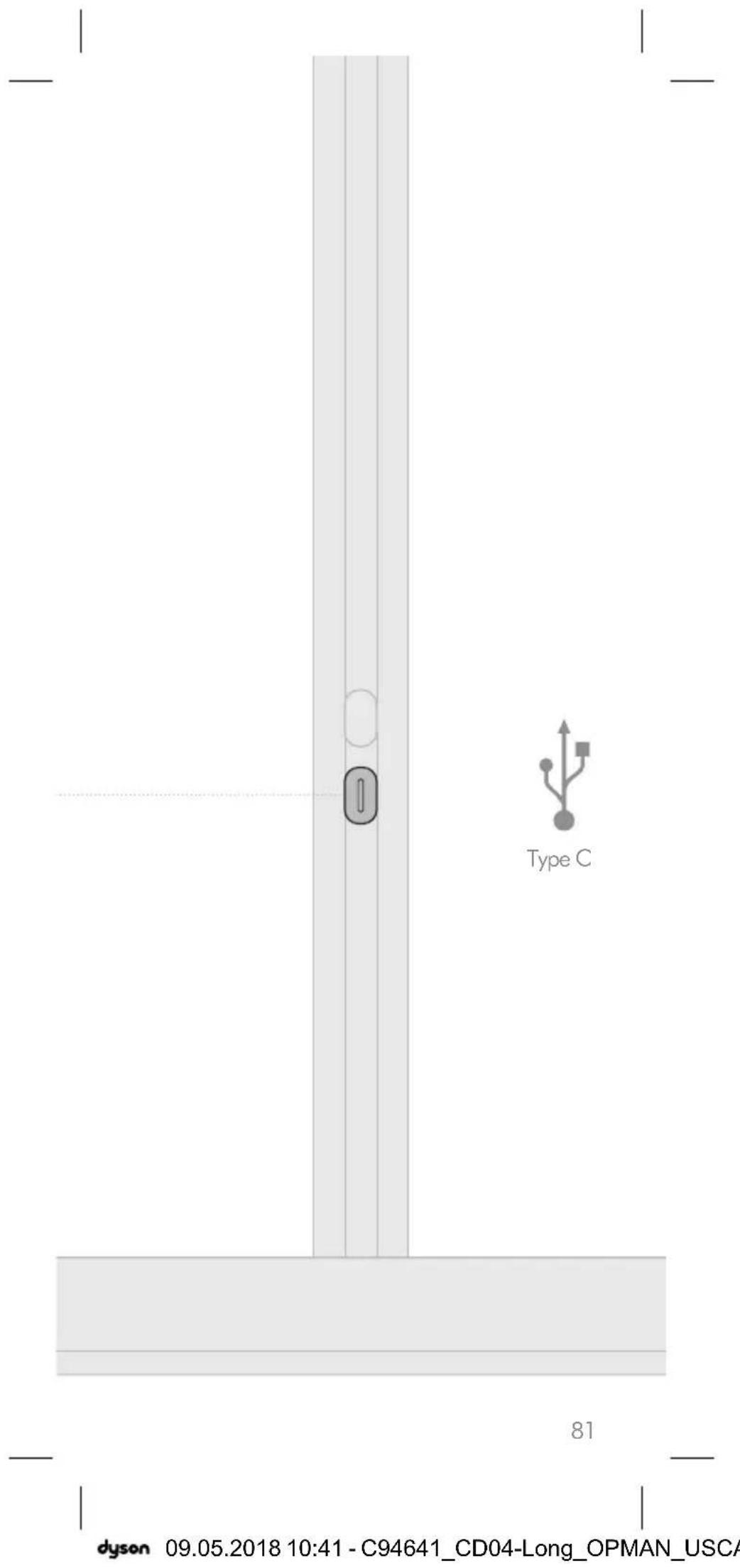
USB-C charging point
Plug in your mobile devices to charge up to 1.5A at 5V.
Additional information
DYSON LINK APP CONNECTIVITY
- Dyson endeavours to ensure that our technology is compatible with current operating systems but this is not guaranteed. If you have any questions or would like to check the latest compatibility, please contact the Dyson Helpline.
- Your mobile device must have Bluetooth 4.0 support (Bluetooth Low Energy) in order to set up a connection with the light. Check your device specification for compatibility.
DISPOSAL
- Dyson products are made from high grade recyclable materials. Recycle where possible.
- Dispose in accordance with local ordinances or regulations.
LIMITED 5 YEAR WARRANTY TERMS AND CONDITIONS OF THE DYSON 5 YEAR LIMITED WARRANTY.
WHAT IS COVERED
- The repair or replacement of your Dyson light (at Dyson's discretion) if it is found to be defective due to faulty materials, workmanship or function within 5 years of purchase or delivery (if any part is no longer available or out of manufacture Dyson will replace it with a functional replacement part).
WHAT IS NOT COVERED
Dyson does not guarantee the repair or replacement of a light where a defect is the result of:
- Damage caused by not carrying out any recommended maintenance of the light.
- Accidental damage, faults caused by negligent use or care, misuse, neglect, carelessness, operation or handling of the light which is not in accordance with the Dyson Operating Manual.
-
Use of the light for anything other than the use it is designed for.
-
Use of parts not in accordance with the Dyson Operating Manual.
- Use of parts and accessories other than those produced or recommended by Dyson.
- Faulty installation (except where installed by Dyson).
- Repairs or alterations carried out by unauthorized parties or agents.
Normal wear and tear (e.g. fuse etc.). If you are in any doubt as to what is covered by your warranty, please contact the Dyson Helpline.
WARRANTY LIMITATIONS AND EXCLUSIONS
- Any implied warranties relating to your appliance including but not limited to warranty of merchantability or warranty of fitness for a particular purpose, are limited to the duration of this warranty. This limitation is not allowed by some Provinces and/or Territories and so this limitation may not apply to you.
- Your remedy for breach of this warranty is limited to the warranty service described above.
- Dyson Canada Limited will not be liable for any consequential damages or incidental damages you may incur in connection with the purchase and use of your appliance.
- This limited warranty gives you specific legal rights. You may also have other rights which vary by Province and/or Territory.
- This limited warranty is not transferable.
- This limited warranty is only available in Canada.
WARRANTY SERVICE
- Visit our website to register your full parts and labor warranty online at www.dysoncanada.ca/register
- Before a service can take place, the terms of the warranty require that you contact the Dyson Helpline with your model name/number, serial number, date and place of purchase.
-
Please keep your purchase receipt in a safe place to ensure that you have this information.
-
All work will be coordinated by Dyson Canada Limited or its authorized agents.
- Any replaced defective parts will become the property of Dyson.
Service under this warranty will not extend the period of this warranty. - If your light is not functioning properly, please call the Dyson Helpline on 1-877-397-6622. Most issues can be rectified over the telephone by our trained Dyson Helpline staff.
IMPORTANT DATA PROTECTION INFORMATION
You will need to provide us with basic contact information when you register your Dyson Product or the Dyson Link app;
WHEN REGISTERING VIA THE DYSON LINK APP
You will need to provide us with basic contact information to register the Dyson Link app.
WHEN REGISTERING YOUR DYSON LIGHT:
You will need to provide us with basic contact information to register your product and enable us to support your warranty.
- When you register, you will have the opportunity to choose whether you would like to receive communications from us. If you opt-in to communications from Dyson, we will send you details of special offers and news of our latest innovations. We never sell your information to third parties and only use information that you share with us as defined by our privacy policies which are available on our website at privacy.dyson.com
IMPORTANT INFORMATION
- If your light needs servicing, please call the Dyson Helpline or visit the website at www.dysoncanada.ca
- To clean, use a soft, dry, lint free cloth to wipe all over the light.
CONFORMITY INFORMATION
Industry Canada statements. This device complies with Industry Canada licence-exempt RSS standard(s). Operation is subject to the following two conditions:
The device may not cause interference, and
- The device must accept any interference, including interference that may cause undesired operation of the device.
This equipment complies with Industry Canada RF exposure limits set forth for an uncontrolled environment. In order to avoid the possibility of exceeding the Industry Canada RF exposure limits, human proximity to the antenna shall not be less than 20cm during normal operation.
CAFR
Contenu
Pour commencer
www.dysoncanada.ca/support
Sur le téléphone :
1-877-397-6622
RÉPARATIONS SOUS GARANTIE
If you have a question about your Dyson machine, call the Dyson Customer Care Helpline with your serial number and details of where and when you bought the machine, or contact us via the Dyson website.
Dyson contact details
Website: www.dyson.com
Dyson Helpline: (866) 693-9766
Mon-Fri: 8:00am - 8:00pm (CST)
Sat: 9:00am - 6:00pm (CST)
1330 West Fulton Street, 5th Floor, Chicago,
IL 60607 US
CA
Dyson contact details
Dyson Customer Care is available
6 days a week.
Mon - Fri: 8am - 7pm, EST
Saturday: 9am - 5pm, EST
Toll free 1-877-397-6622
service@dyson canada.ca
Coordonnées
312 Adelaide Street West, 7th Floor, Toronto,
Ontario. M5V 1R2 Canada
www.dyson.com
www.dyson canada.ca

- Additional information
- Thank you for choosing to buy a Dyson light
- Registration
- IMPORTANT SAFETY INSTRUCTIONS
- WARNING
- READ AND SAVE THESE INSTRUCTIONS
- Assembly
- Controls
- Color temperature
- Brightness
- Settings
- O AUTO
- USB-C charging point
- DYSON LINK APP CONNECTIVITY
- DISPOSAL
- YEAR LIMITED PARTS AND LABOR WARRANTY
- WHAT IS COVERED
- WHAT IS NOT COVERED
- WARRANTY LIMITATIONS AND EXCLUSIONS
- WARRANTY SERVICE
- IMPORTANT DATA PROTECTION INFORMATION
- WHEN REGISTERING VIA THE DYSON LINK APP
- WHEN REGISTERING YOUR DYSON LIGHT:
- IMPORTANT INFORMATION
- CONFORMITY INFORMATION
- USES
- Contenido
- Inicio
- Online
- On the phone:
- Download on the App Store
- GETON Google Play
- READ AND
- SAVE THESE
- INSTRUCTIONS
- LIMITED 5 YEAR WARRANTY TERMS AND CONDITIONS OF THE DYSON 5 YEAR LIMITED WARRANTY.
- CAFR
- Contenu
- Pour commencer
- Sur le téléphone :
- RÉPARATIONS SOUS GARANTIE
- CA
Brand : DYSON
Model : Lightcycle
Category : Lighting