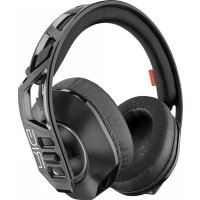
RIG 700HS - Headphones PLANTRONICS - Free user manual and instructions
Find the device manual for free RIG 700HS PLANTRONICS in PDF.



| Product Type | Wireless gaming headset |
| Brand | Plantronics |
| Model | RIG 700HS |
| Color | Black with green accents |
| Connectivity | Wireless via 2.4 GHz USB adapter |
| Battery life | Approximately 12 hours |
| Charging time | Approximately 2 hours |
| Compatibility | PS4, Xbox One, PC |
| Weight | Approximately 280 g |
| Dimensions | 200 x 180 x 90 mm |
| Microphone | Adjustable microphone with monitoring control |
| Volume control | Main volume and separate game/voice balance |
| Mute mode | Button to instantly mute audio |
| Headband adjustment | Adjustable in 3 sizes (small, medium, large) |
| Care | Wipe with a soft, dry cloth |
| Safety | Use at moderate volume to protect hearing |
Frequently Asked Questions - RIG 700HS PLANTRONICS
User questions about RIG 700HS PLANTRONICS
0 question about this device. Answer the ones you know or ask your own.
Ask a new question about this device
Download the instructions for your Headphones in PDF format for free! Find your manual RIG 700HS - PLANTRONICS and take your electronic device back in hand. On this page are published all the documents necessary for the use of your device. RIG 700HS by PLANTRONICS.
USER MANUAL RIG 700HS PLANTRONICS
Adjust mic monitoring
Support 8
Fit
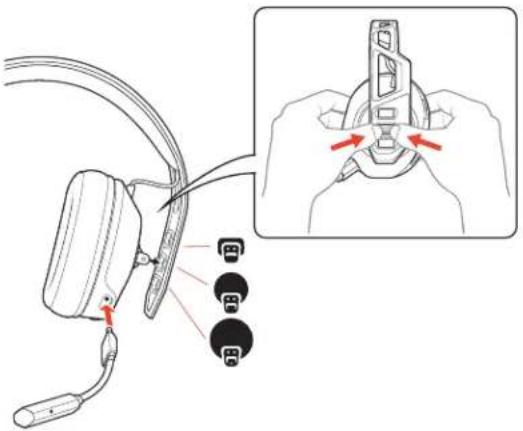
Your headset components easily snap into the headset frame to configure the best fit and sound.
The headband adjusts to three sizes (small, medium, large) by moving the earcups. To remove an earcup, press the earcup to detach it from the headband.
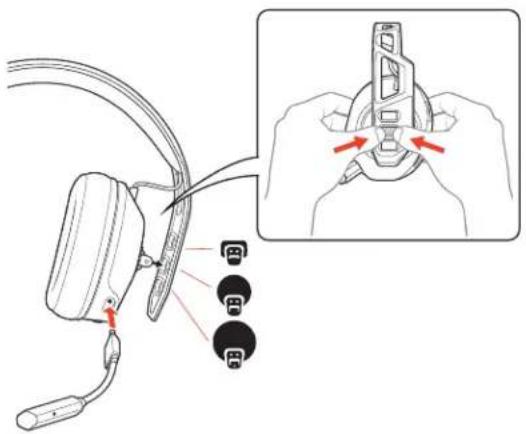
NOTE Headband style may vary.
Setup and basics
Your adapter comes pre-paired to your headset. After you adjust and charge your headset and configure your adapter, power on your headset and it's ready to go.
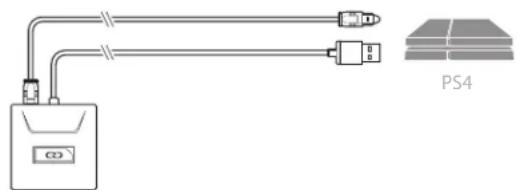
Setup PS4
PS4
1 Connect your adapter to your system.
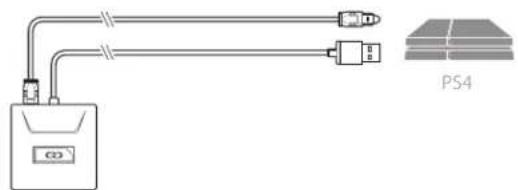

2 Power on your PS4 and Check for updates
3 To adjust system audio settings, check your console user guide.
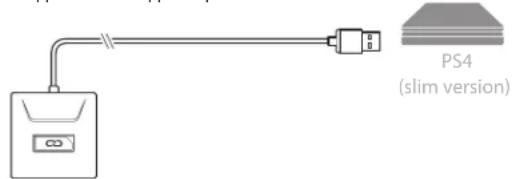
PS4 (slim version)
1 Connect your adapter to your system.
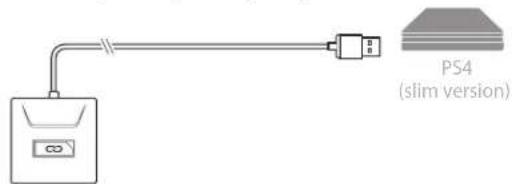

2 Power on your PS4 and Check for updates
3 To adjust system audio settings, check your console user guide.
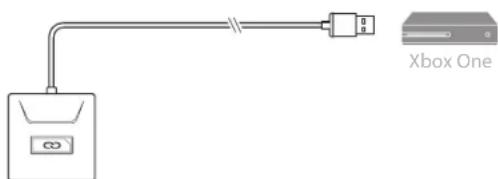
Setup Xbox One
1 Connect your adapter to your system.
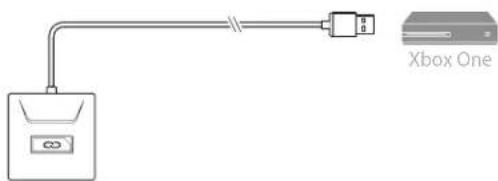

NOTE Ensure the switch on the back of the adapter is set to your preference: console or PC.
2 Power on your Xbox One and Check for updates
3 To adjust system audio settings, check your console user guide.
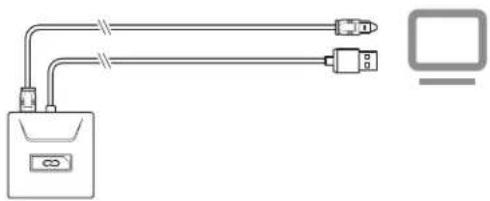
Setup PC 1 Connect your adapter to your system.
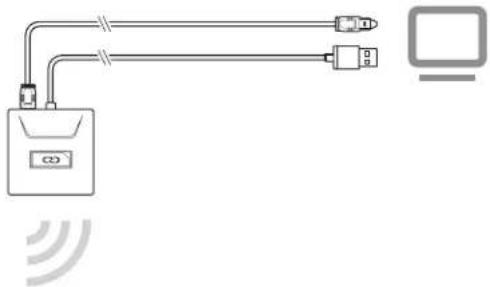
IMPORTANT Optical cable connection is only for RIG 700HD and RIG 700HS.
2 RIG 700HX only: Ensure the switch on the back of the adapter is set to «PC.»
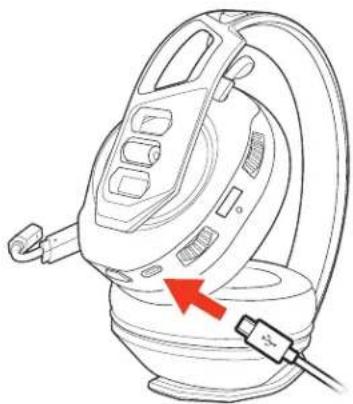
Charge It takes 2 hours to fully charge the headset. The headset LED turns off once charging is complete.
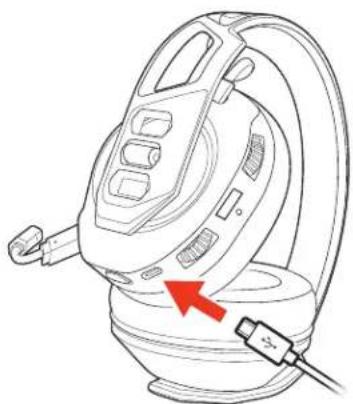
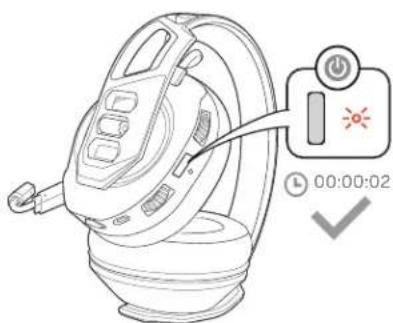
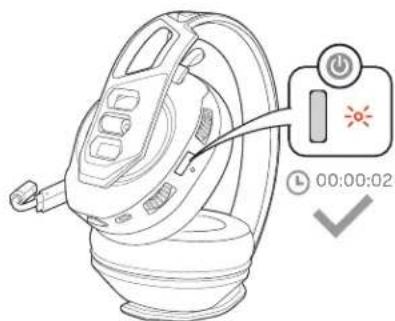
Power on or off Press the Power button for 2 seconds until you hear "power on" or «power off.
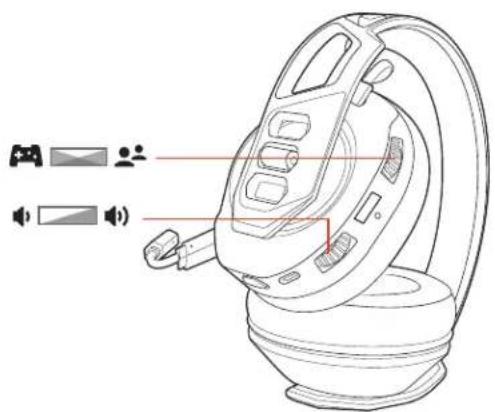
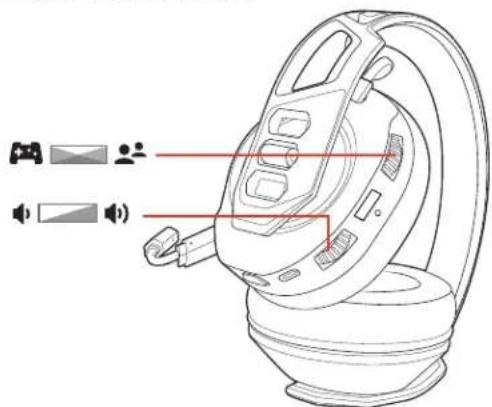
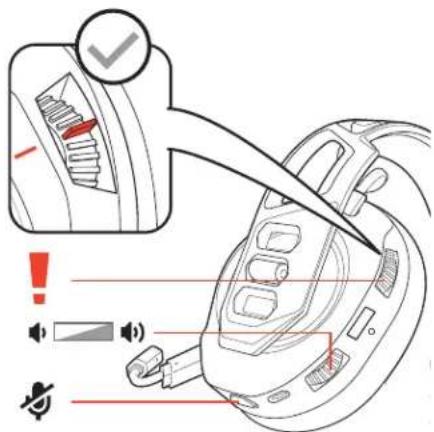
Adjust volume 1 To increase or decrease the game and chat volume, adjust the top headset dial.
2 To increase or decrease the master volume, adjust the bottom headset dial.
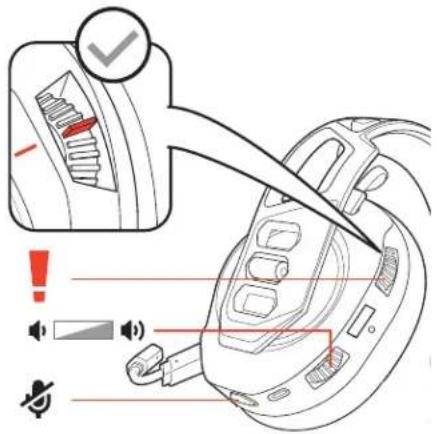
IMPORTANT For the PS4 (slim version), set the top headset dial in the middle; game and chat remain balanced. Use the bottom headset dial to increase or decrease the master volume.
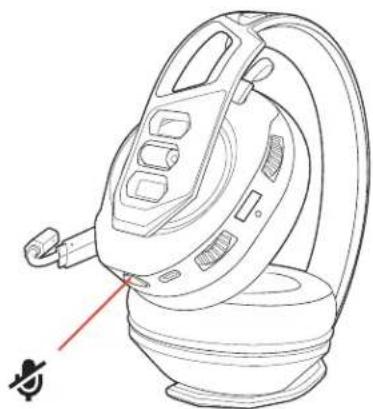
Mute
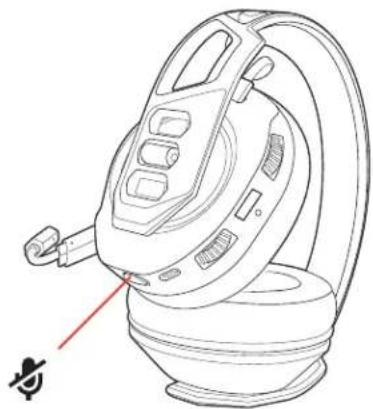
Tap the Mute button to mute or unmute your headset.
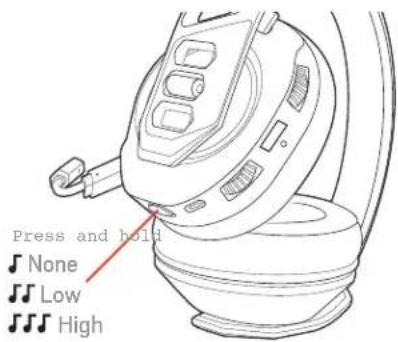
Adjust mic monitoring
Press and hold the Mute button to cycle through mic monitoring levels. Mic monitoring lets you hear your own voice in the headset.
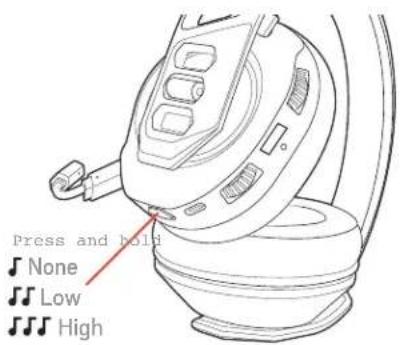
Press and hold the Mute button and hear Mic monitoring level
| one | tone | None | |
| two | tones | Low | |
| three | tones | High | |
Support
NEED MORE HELP?
www.naongaming.com

nacon
NACONG GAMING, Inc
10400 NE 4th Street, Suite 500,
Bellevue, WA 98004 USA
(+1) 800-617-0174
Headquarter
NACON
©2020 NACON. NACON and RIG are trademarks of NACON, registered in the US and other countries. «PlayStation» and «DUALSHOCK» are registered trademarks of Sony Interactive Entertainment Inc. All rights reserved. All other trademarks are the property of their respective owners.
Patents pending.
214554-06 (06.20)
RIG
Série RIG 700
Guide d'utilisation
FR
Sommaire
Ajustement 11
10400 NE 4th Street, Suite 500,
Bellevue, WA 98004 USA
(+1) 800-617-0174
Headquarter
NACON
10400 NE 4thStreet, Suite 500
Bellevue, WA 98004 USA
(+1) 800-617-0174
Headquarter
NACON
10400 NE 4th Street, Suite 500,
Bellevue, WA 98004 USA
(+1) 800-617-0174
Headquarter
NACON
10400 NE 4th Street, Suite 500,
Bellevue, WA 98004 USA
(+1) 800-617-0174
Headquarter
NACON
10400 NE 4thStreet, Suite 500
Bellevue, WA 98004 USA
(+1) 800-617-0174
Headquarter
NACON
10400 NE 4th Street, Suite 500,
Bellevue, WA 98004 USA
(+1) 800-617-0174
Headquarter
NACON
PykoBoDCTBO NOIb3OBaTeJIa
RU
KoMnJIeKT NOCTaBKn
Perynupobka 59
HactpoKa n OCHOBhIe CbeHeHn 60
Hactpoika dny ucnolb3obAHn c PS4
HactpoKa dIy nCIOB3OBaHn c Xbox One
HactpoKa dIy nCIOJIb3OBAHn c PIK
3apnka
BkIIOueHne n BbIKIOueHne NITaHn
PerynnpobkaypOBHrpomKocTn
OTKIOUHTb MKNpOoH
HactpoKa MOHTOpnHa MUKpOfoHa
Iopndepkka 64
PergunpoBka
Bnaorapnpoctote KpennneHnKOMnoeHTOB Ha Kapkac rappntpybI ee MoXHO JERKO OtperynpoBaTb Ira oecneueHn HAn6onee yO6Horo nOnoxeHn HannyUwero 3ByaHn.
OrnoBbe Moxho OTperynipobatb noD oINH n3 Tpex pa3mepOB (MaJIeHbKn, cpeHn, 6oNb) nyTeM nepemeueHnaaek HayuHKOB. YTo6bI CHaHTb HauKy HayuHKOB C OrOIOBBA, CJeDuET HaKaTb Ha Hee
PIMMEAHHE TUN ORONOBBA MOKET OTNIUATbCA.
HactpoIka n OCHOBhIe cBeJeHnA
HacpoKaInncnoB3OBaHnC PS4
AanTep noCTabJareTc conpJxehHbIM c raphNtypoi. Nocne BblnoJIHeHn HaCTpoiKu I 3apJdkn raphNtypbi KOnHfNpyaCmI aanTepa BKIOUHTe raphNttyp, I OHa 6ydt roTOBa K pa6ote.
PS4
1 POnkIIOUHTe aDaANTep K CnCTeMe.

2 BkHouTe PS4 n BB6epnte Check for updates (IpoBepntb HauHne 6HOBHeH)
3 3yto6bIOTpeYnnpoBaTb CNTeMHbIe npaMeTpbl 3ByKa, O3HaKOMbTeCb C pyKOBOCTBOM NOlb3OBATeJIKAOHCOJI.
PS4 (komnakthaBepcn)
1 PoiKJIIOUHTe aIaNTep K CnCTeMe.

2 BkHouHTe PS4 n BB6epnte Check for updates (PpOBeptb HauHne 06HOBHeH)
3 306bI OTperyInpoBaTb CnCTeMHbIe NapaMeTpbl 3ByKa, O3HaKOMbTeCb C pyKOBOCTBOM NOlb3OBeTEn KOHCoIN.
1 POnkIIOUHTe aadTep K cncTeMe.
Hactpoika nla nCnOJIb3OBaHna C Xbox One

PIMMEUAHNE Y6eIntecb, yTO nepeKIOuateIb Ha 3aHneI naHEn IaanTepa HacTpoEH B COOTBETCTBn C BaWIMN PepINOOTENHM: IIN NOKIOUeHN K KOHCJIN INI NK.
2 BkIouTe Xbox One n BB6epnte Check for updates (PpOBepuTb HauHne 06HOBHeH)
3 0To6bI OTperyInpoBaTb CNTeMHbIe npaMeTpbl 3ByKa, O3HaKombTeCb C pyKOBOCTBOM nonb3OBAteJIKA KOHCOJI.
IpoKKnOChTe aadTep K cncTeMe.
HacpoKa dna nCnoJb3ObaHn c PK

BHIMAHHE! NIOKJIIOUeHHe C NOMOUsbIO ONTNUeCKOrO Ka6eIa PpeDyCMOTpeHO TOnbKO dRIG 700HD u RIG 700HS.
2 ToIbKO RIG 700HX: y6eIITecb, yTO nepeKIOUaTeNb Ha 3aHHe n aHaEN n aanTepa yCTaHOBnE H a PC (PIK).
3apnka
IOnHnA 3apJaKa raphNtpyb 3aHMaet 2 yaca. CBeToIOoNbI INHnKaTOp oTKIOuyeTc, KOrda yCTpoCTBO NOHOCtBIO 3apJxKeHO.
BkIIOueHne IM BbIKIOueHne nTuHaHn
Haxmnte u ydepxmbaTe KhoNky nntaHnB TeueHne 2 cekyHn, noka He ycbluHTe yBeDomHeHne «power on» («nntaHne BkIooHe») nnn «power off» (nTaHne BbIKIOHeO»).
Peryu npOBka ypoBHa rpOMKOCTN
1 YBeHnHTb HmYMeHbWtB rPOMKoCTb 3ByKOBOrCOnpOBoXdEHNrIrpbl NcTaMOxHO C NOMOsbEO BepxHero peryTota Ha rapHnType.
2 YBENHTb NnYMeHbNITb 06nn yPOBeHb rPOMKOCm MOxHO C nOMOuH HIXHERo peryIaTopa Ha rapHnType.
BHIMAHHE! PS4 (KOMNAKTTHA Bepcna): yctaHOBtE BepxHn peryIaTOp Ha rapHnTpe no ceHTpy; 3BYKOBOe cO npoBXdHe nIrpbl nHaTa ocTAIOCT c6aNaHCnpOBaHbIM.ДЯ yBeINuEHN INn YmEnbSeHn O6Iero ypOBH rPOMKocTN nCOnIb3yIe HIXHN peryIaTOp Ha rapHnTpe. auscultadores para augmentar ou diminui r o volume principal.
OTKIOUHTb MMKpOFOH
HaXMMTe KHOIIky OTKIIOueHnMnKpOPOHa, YTO6bI OTKJIIOHTb IIN BKNIOHTb MKNpOPOH Ha rapHNType.
HactpoKa MOHTOpnHa MUKpOfoHa
Haxmnte u yepkmbaTe KONkY OTKIOueHn 3Byka dIe nepeKIOueHn MeJy yPOBHM MoHTOpHHra MKNpOoHa. DyHKuMa MOHTOpHHra MKNpOoHa I03BOJrE TcblTa b co6CTBeHHbI rOLOC B rapHNType.
| Hajtmite u yedejxmbaTe KhoNkU OTKIOUeHn 3ByKa, YTObI UcbluAtb | yroBeHb MOHITOpINrMa MKNpOfoHa |
| ODIN CnIHnA | HeT |
| ДBa CnIHnA | Hn3Kn |
| Трс CnIHnA | Высokn |
PoiDepKka
TPEBYETCIIOMOUIb?
www.nacongaming.com

nacon
NACONG GAMING, Inc
10400 NE 4th Street, Suite 500,
Bellevue, WA 98004 USA
(+1) 800-617-0174
Headquarter
NACON
10400 NE 4thStreet, Suite 500
Bellevue, WA 98004 USA
(+1) 800-617-0174
Headquarter
NACON
10400 NE 4thStreet, Suite 500
Bellevue, WA 98004 USA
(+1) 800-617-0174
Headquarter
NACON
10400 NE 4thStreet, Suite 500
Bellevue, WA 98004 USA
(+1) 800-617-0174
Headquarter
NACON
10400 NE 4thStreet, Suite 500
Bellevue, WA 98004 USA
(+1) 800-617-0174
Headquarter
NACON